ad blue AUDI A7 2017 Owner´s Manual
[x] Cancel search | Manufacturer: AUDI, Model Year: 2017, Model line: A7, Model: AUDI A7 2017Pages: 284, PDF Size: 72.29 MB
Page 5 of 284
co
co
.... N
" N .... 0
00
\.J -
Notice about data recorded by the Event
Data Recorde r and vehicle control
modules
127
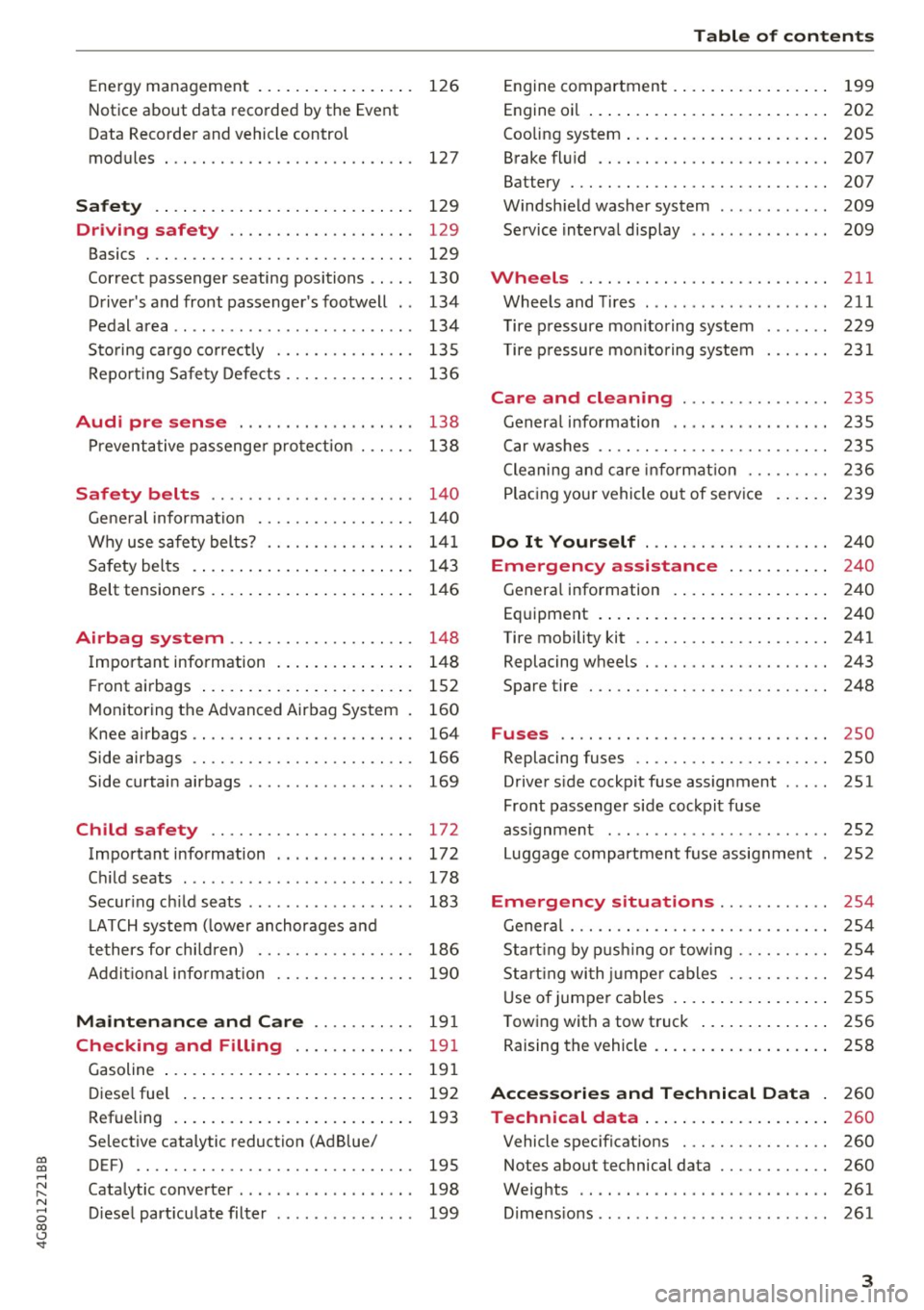
Safety . . . . . . . . . . . . . . . . . . . . . . . . . . . . 129
Driving safety . . . . . . . . . . . . . . . . . . . . 129
Basics . . . . . . . . . . . . . . . . . . . . . . . . . . . . . 129
Cor rect passenger seating positions . . . . . 130
Driver's and front passenger 's footwell . . 134
Pedal area . . . . . . . . . . . . . . . . . . . . . . . . . . 134
Sto ring cargo co rrect ly .............. .
Repo rting Safe ty Defe cts ............. . 135
136
Audi pre sense . . . . . . . . . . . . . . . . . . . 13 8
Pr eventative passenge r prote ction 138
Safety belts . . . . . . . . . . . . . . . . . . . . . . 14 0
Gene ral information . . . . . . . . . . . . . . . . . 14 0
Why use safety belts? . . . . . . . . . . . . . . . . 14 1
Safety bel ts . . . . . . . . . . . . . . . . . . . . . . . . 143
Belt tens ione rs . . . . . . . . . . . . . . . . . . . . . . 146
Airbag system . . . . . . . . . . . . . . . . . . . . 148
Important information . . . . . . . . . . . . . . . 148
F ront airbags . . . . . . . . . . . . . . . . . . . . . . . 152
Mon itoring the Advanced Airbag System . 160
Knee airbags . . . . . . . . . . . . . . . . . . . . . . . . 164
Side airbags . . . . . . . . . . . . . . . . . . . . . . . . 166
Side curtain airbags . . . . . . . . . . . . . . . . . . 169
Ch ild safety . . . . . . . . . . . . . . . . . . . . . . 172
Important information . . . . . . . . . . . . . . . 172
C hi ld seats . . . . . . . . . . . . . . . . . . . . . . . . . 178
Secur ing c hild seats . . . . . . . . . . . . . . . . . . 183
LATCH system ( lowe r anchorages a nd
tethers for chi ldren) . . . . . . . . . . . . . . . . .
186
Addit io n al i nfo rm ation . . . . . . . . . . . . . . . 190
Maintenance and Care . . . . . . . . . . . 19 1
Checking and Filling . . . . . . . . . . . . . 19 1
Gasoline . . . . . . . . . . . . . . . . . . . . . . . . . . . 191
Diese l fue l . . . . . . . . . . . . . . . . . . . . . . . . . 192
Refueling . . . . . . . . . . . . . . . . . . . . . . . . . . 193
Selective catalytic reduction (Ad Blue/
DEF) . . . . . . . . . . . . . . . . . . . . . . . . . . . . . .
195
Catalytic converter . . . . . . . . . . . . . . . . . . . 198
D iese l part iculate filter . . . . . . . . . . . . . . . 199
Table of contents
Engine compartment . . . . . . . . . . . . . . . . . 199
Engine oi l . . . . . . . . . . . . . . . . . . . . . . . . . . 202
Cooling system . . . . . . . . . . . . . . . . . . . . . . 205
Brake fl uid . . . . . . . . . . . . . . . . . . . . . . . . . 207
Battery . . . . . . . . . . . . . . . . . . . . . . . . . . . . 207
Windsh ield washer system . . . . . . . . . . . . 209
Service interval display 209
Wheels .... .. .. .... .. .......... ... 211
Wheels and Tires ... .... ...... ... .. .. 211
T ire pressure monitoring system
T ire p ressure monitoring system 2 29
231
Care and cleaning . . . . . . . . . . . . . . . . 235
General info rmation . . . . . . . . . . . . . . . . . 235
Car washes . . . . . . . . . . . . . . . . . . . . . . . . . 2 35
Cleaning and care info rmat ion . . . . . . . . . 2 36
Plac ing you r vehicle out of serv ice . . . . . . 2 39
Do It Yourself . . . . . . . . . . . . . . . . . . . . 240
Emergency assistance . . . . . . . . . . . 24 0
Genera l information . . . . . . . . . . . . . . . . . 24 0
Equipment . . . . . . . . . . . . . . . . . . . . . . . . . 240
Tire mobility kit . . . . . . . . . . . . . . . . . . . . . 241
Replacing wheels . . . . . . . . . . . . . . . . . . . . 243
Spare tire 248
Fuses ............................. 250
Replacing fuses . . . . . . . . . . . . . . . . . . . . . 250
D river side cockpit fuse assignment
Front passenger side cockpit fuse 251
ass ignment . . . . . . . . . . . . . . . . . . . . . . . . 252
Luggage compartment f use assignme nt . 252
Emergency situations . . . . . . . . . . . . 254
General . . . . . . . . . . . . . . . . . . . . . . . . . . . . 2 54
Start ing by p ushi ng o r tow ing . . . . . . . . . . 2 54
Sta rt ing wi th ju mpe r cabl es . . . . . . . . . . . 2 54
U se of j umpe r cables . . . . . . . . . . . . . . . . . 255
T owing with a tow truck . . . . . . . . . . . . . . 256
Raising the vehicle . . . . . . . . . . . . . . . . . . . 258
Accessories and Technical Data . 260
Technical data . . . . . . . . . . . . . . . . . . . . 260
Vehicle spec ificat ions . . . . . . . . . . . . . . . . 260
Notes about technical data . . . . . . . . . . . . 260
Weig hts . . . . . . . . . . . . . . . . . . . . . . . . . . . 261
D . . 1mens
1ons .. .. .. .. .... ...... ... .. . . 261
3
Page 14 of 284
Instruments and indicator lights
AIR
BAG
"O~ I I ~ ,,
TPMS
12
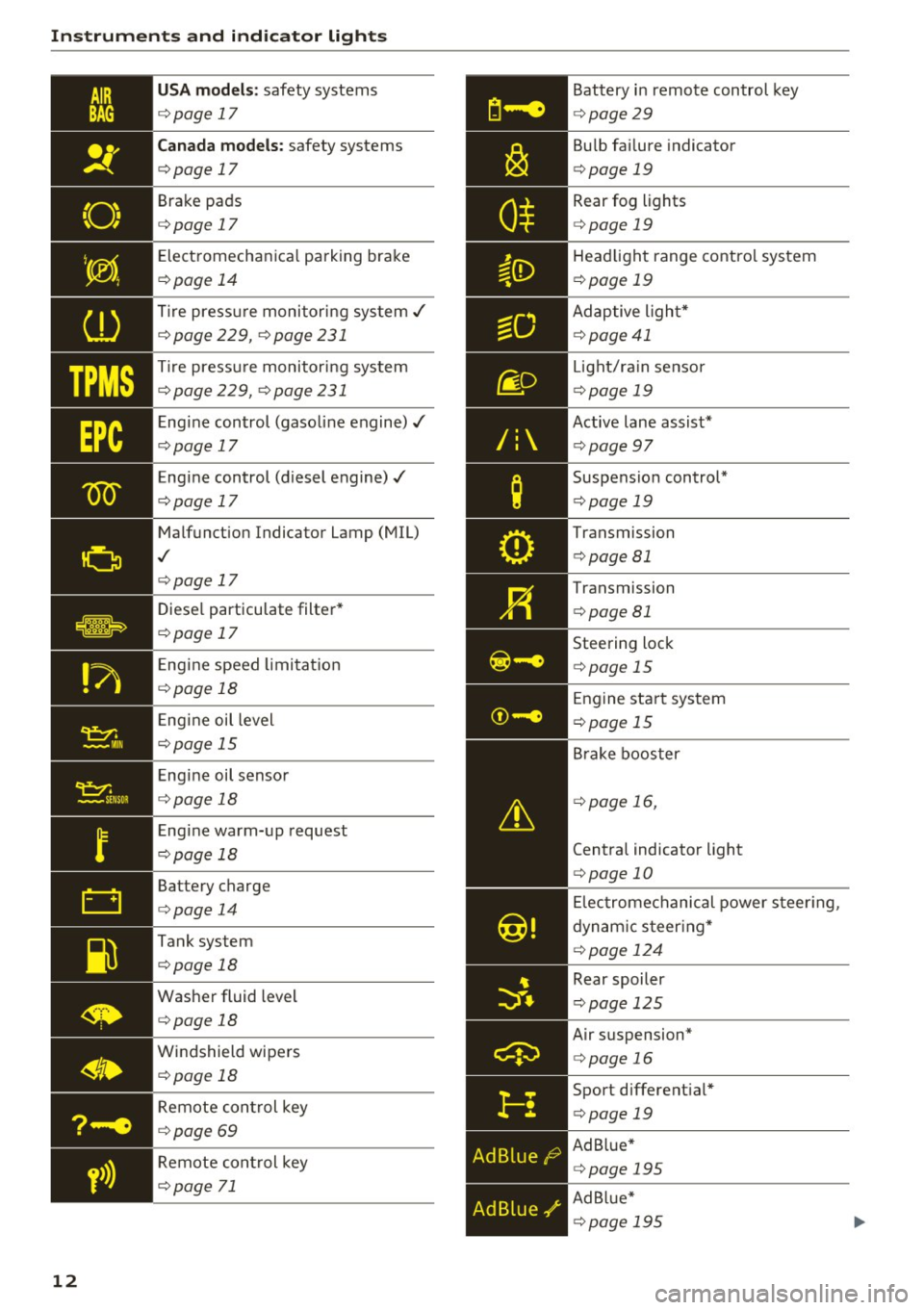
USA models: safety systems
¢page 17
Canada models: safety systems
¢page 17
Brake pads
¢page 17
Electromechanical parking brake
¢page 14
Tire pressure monitoring system,/
¢page 229, ¢page231
Tire pressure monitoring system
¢ page 229, ¢ page 231
Engine control (gasoline engine),/
¢page 17
Engine control (diesel engine),/
c::>page 17
Malfunction Indicator Lamp (MIL)
,I
¢page 17
Diesel particulate filter*
¢page 17
Engine speed limitation
¢page 18
Engine oil level
¢page 15
Engine oil sensor
¢page 18
Engine warm-up request
¢page 18
Battery charge
¢page 14
Tank system
¢page 18
Washer fluid level
¢page 18
Windshield wipers
¢page 18
Remote control key
¢page 69
Remote control key
¢page 71
Battery in remote control key
¢page29
Bulb failure indicator
¢page 19
Rear fog lights
<=>page 19
Headlight range control system
¢page 19
Adaptive light*
¢page41
Light/ra in sensor
¢ page 19
Active lane assist*
¢page 97
Suspension control*
<=> page 19
Transmission
¢page 81
Transmission
<=>page 81
Steering lock
¢page 15
Engine start system
<=>page 15
Brake booster
<=>page 16,
Central indicator light
¢page 10
Electromechanical power steering,
dynamic steering*
¢ page 124
Rear spoiler
<=>page 125
Air suspension*
¢page 16
Sport differential*
¢page 19
Ad Blue*
<=>page 195
Ad Blue*
¢page 195
Page 113 of 284

co
co
.... N
" N .... 0
00
<.,;) 'SI"
-For objects that do not touch the ground,
such as the bumper of a parked vehicle, a
tra iler hitch or the rear of a truck. Do not
use the orientation lines in this case .
- If driven from a level surface onto an in
cline, or a downward slope.
- If driven toward protrud ing objects .
- If the vehicle is carrying too much load in
the rear.
- Applies to: vehicles with air s uspension: the
accuracy of the orientation lines and bl ue
surfaces decreases when the vehicle is raised/lowered
<=) page 105.
(D Note
-Always read and follow the applicable warn
ings
Q 0 in General information on
page 108 .
-The orange-colored orientation lines in the
Infotainment display show the vehicle path
based on the steering wheel angle . The
front of the vehicle swings out more than
the rear of the veh icle . Mainta in plenty of
distance so that an exterio r mirror or a cor
ner of t he ve hicle does not co llide w it h any
obstacles.
Switching on/off
Applies to : vehicles wit h rearv iew came ra
Switching on
.,. Shift into reve rse , or
.,. Press t he
P' #A bu tton in the cente r console
Q page 109, fig . 118 . A short conf irmation
tone sounds and the LED in the button turns
on.
Switching between the r earview camera and
optical di splay
.,. Press t he Graphic control button ®
Q page 111, fig. 123 to see the opt ica l display.
.,. Press the
Rear view contro l button to see the
rearview camera image.
Switching off
.,. Drive faster than 6 mph ( 10 km/h), or
.,. Press the P•
11A button, or
.,. Switch the ign ition off .
Parking systems
(D Tips
-The visua l display in the left part of the d is
play sho uld he lp you detect the critical veh i-
cle areas.
- You can change the vol ume and pitch of the
signa ls as well as the d isplay
Q page 118.
Perpendicular parking
Applies to : veh icles w it h rearv iew camera
This view may be used when parking in a garage
or in a parking space .
Fig. 1 23 In fota inme nt syste m: a im ing at a park in g space
Fi g. 124 Infot ainment syste m: alig ning t he vehicl e
.,. Turn the Infotainment system on and shift into
reverse gear .
.,. The orange orientation lines
(D show the direc
tion of trave l of the vehicle . Turn the steering
whe el unti l the orange orientation lines appear
in the parking space
Q fig. 123. Use the mark
ings @to help you es timate the distance to an
obs ta cl e. Each mar king represen ts approxi
mately 3 ft ( 1 m) . The blue area represents an
extens ion of the vehicle 's o utline by app roxi
mately 16 ft (5 meters) to the rear .
.,. Wh ile driving in reverse gear , adjust the steer-
ing wheel angle to fit the park ing space using ..,_
111
Page 114 of 284

Parking systems
the orange orientation lines for assistance
¢ A in General information on page 110, ¢0
in General information on page 111 . @ repre
sents the rear bumper. At the very latest, stop
the vehicle when the red orientation line©
borders an object .
Parallel parking
Appl ies to: ve hicles w ith rearview ca mera
This view may be used when parallel parking
along the side of a street.
F ig. 125 Infotainment: blue surfaces aligned in t he park·
ing space
Fig . 126 Infotainment: contact of the blue curved line with
the curb
Parking on the right is described here. It is identi
cal when parking on the left .
If there is an obstacle next to the parking space (such as a wall), refer to "Information for park ing
next to obstacles" ¢
page 112.
• Activate the turn signal.
• Position your vehicle next to a parked veh icle in
front of the desired parking space. The distance
to this vehicle should be approximately 3 ft . (1
m) .
112
• Tur n the Infotainment system on and shift into
reverse gear. The parking system is turned on
and the
Cross parking view is disp layed .
• Press the contro l button on the Infotainment
unit
(D ¢ fig. 125. The Parallel parking view is
displayed .
.,. Back up and align your veh icle so the blue area
@ borders on the rear end of the vehicle be
hi nd you o r o n the parking space line ¢.&.
in
General information on page 110,
¢0 in Gen
eral information on page 111.
The blue area
represents an extension of the vehicle's outline
by approximate ly 16 ft (5 meters) to the rear .
The long side of the blue area should be on the
curb. The ent ire blue area must fit into the
parking space .
.,. With the vehicle stopped, turn the steering
wheel to the right as far as it will go .
.,_ Back up into the parking spot. When the blue
curve ¢
fig. 126 is near the curb ¢.&. in Gener
al information on page 110,
stop the vehicle
¢ (i) in General information on page 111 .
.,. With the vehicle stopped, turn the steering
wheel to the left as far as it will go.
• Continue to back into the parking space until
the vehicle is parked parallel to the curb¢
A
in General information on page 110, ¢0 in
General information on page 111 .
@ repre
sents the rear bumper. At the very latest, stop
the vehicle whe n the red orientation line©
borders an object. Keep an eye on the front of
your veh icle wh ile doing this.
Parking next to obstacles
If there is an obstacle (such as a wall) next to the
parking space, position the vehicle so there is
more space on that side. Position the long side of
the blue surface so that there is sufficient space
from the obstacle. The surface must not be
touching . You will also need to start turning the
steering wheel earlier . The blue curve¢
fig. 126
must not touch the obstacle, but rather the re
shou ld be enough distance.
(D Note
Keep enough distance from the curb to re
duce the risk of damage to the rims.
Page 115 of 284

co
co
.... N
" N .... 0
00
<.,;) 'SI"
@ Tips
The left or ri ght orientation lines and surfaces
w ill be displayed, depending on the turn sig
nal being used.
Peripheral cameras
Introduction
Applies to: vehicles with peripheral cameras
W ith this equipmen t, the parking system p lus*
c::!;> page 109 is supplemented with various periph
e ral cameras.
Depending on vehicle equipment, you are prov id
ed with the following views: area around the ve
h icle, fro nt co rner view and rea r corner view, view
in front of the vehicle and behind the veh icle .
General information
Applies to: vehicles with peripheral cameras
);
Fig. 1 27 Loca tion of periphe ral came ras
The per ipheral came ras are located in the rad ia
tor gr ille and in the luggage compartment lid
¢ fig. 127 .
Make sure that the lenses are not cove red by de
posits or any other obstructions as it may impa ir
the system . Fo r information on cleaning, refer to
¢ page 235.
The accuracy of the orientation lines and the blue
surfaces is reduced if the adapt ive a ir suspen
sion * is fau lty, if the vehicle is lifted or if the
D y
namic mode is act ivated ¢ page 105.
Parking systems
A WARNING
--Always read and follow the applicab le warn-
i n gs ¢&.
in General information on
page 108 .
-If the position or the installat io n angle of a
camera was changed, for example after a
coll is ion, do not cont inue to use the system
for safety reasons. Have it c hec ked by a n au
thori zed A udi dealer or authorized A udi
Serv ice Facility .
- Use the
Rear mode and the Corner view
( rear )
mode only whe n the l uggage com
p ar tme nt lid is fully closed . Otherwise t he
image in the display will be incorrect .
- Th e vehicle surround ings a re shown using
the camera images . The vehicle image is
shown by the system. Objects and obstacles
above the camera are not disp layed .
- Camera lenses enlarge and distor t the field
of vision . The objects appear both a ltered
and inaccurate on the screen.
(D Note
- Alw ays read and fo llow the applicable warn
ings
¢ (Din General information on
page 108 .
- The Info tainmen t disp lay shows the direc
tion i n which the rear of t he ve hicle is travel
ing based on t he steering wheel ang le . The
front of the vehicle swings out more than
the rear of the vehicle. Maintain plenty of distance so that a n exte rior m irror or a cor
ner of the vehicle does not coll ide with any
obstacles.
(D Tips
The dr iver's door/front passenger's door/lug
gage compartment lid is open when the
((:'!) or
c:::::5 symbol appears and the co rresponding
a rea of t he d isp lay is grayed out .
113
Page 118 of 284
Parking system s
You can choose between three different views in
this mode.
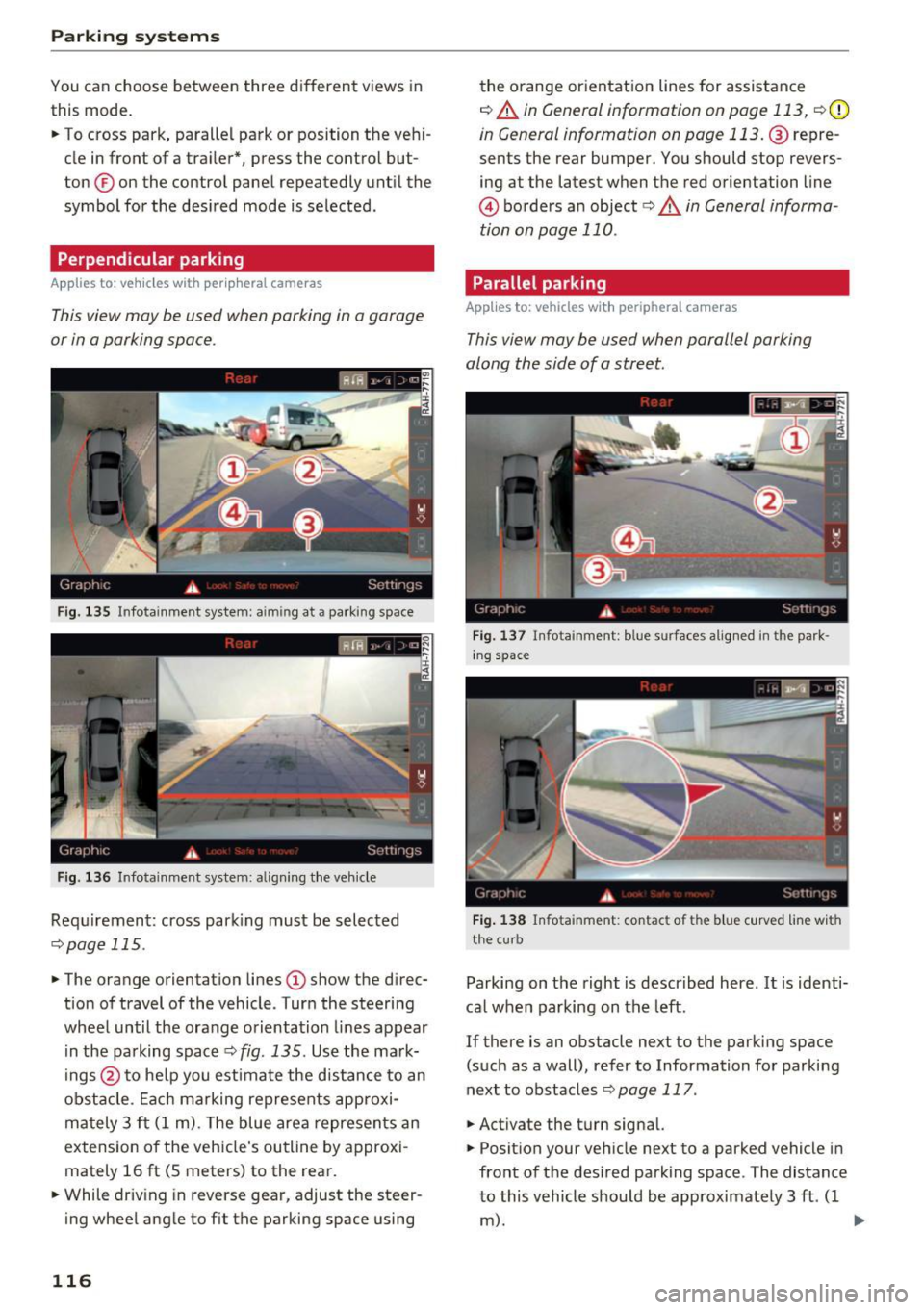
.,. To cross park, parallel park or position the vehi
cle in front of a tra iler*, press the control but
ton ® on the contro l pane l repeatedly unt il the
symbol for the des ired mode is selected .
Perpendicular parking
Applies to: ve hicles w ith perip hera l cameras
This view may be used when parking in a garage
or in a parking space .
Fig . 135 Infotainment system: aiming at a parking space
Fig . 136 Infotainment system: aligning the veh icle
Requ irement: cross park ing must be selec ted
q page 115 .
.,. The orange orientation lines (D show the d irec
tion of travel of the vehicle . Turn the steering
wheel until the orange orientation lines appear i n the pa rking space
¢ fig. 135. Use the ma rk
ings @to he lp you estimate the distance to an
obstacle . Ea ch marking represents approxi
ma tely 3 ft (1 m). The blue area represents an
extension o f the vehicle's outline by approxi
mately 16
ft (S meters) to the rear.
.,. While driv ing in reverse gear, adjust the steer
ing wheel angle to f it the parking space using
116
the o range or ientation lines for assistance
q A in General information on page 113, q (D
in General information on page 113. @repre
sents the rear bumper. You should stop revers
ing at the latest when the red o rientation line
@ borders an object<=>.&. in General informa
tion on page 110.
Parallel parking
App lies to: vehicles wit h peripheral cameras
This view may be used when parallel parking
along the side of a street.
Fi g. 13 7 In fota inment: blue surfaces alig ned in the park
in g space
Fig. 138 Infota inment: contact of the blue c urved line w ith
the cu rb
Parking on the right is descr ibed here . It is identi
ca l when parking on the left.
If there is an obstacle next to the parking space (such as a wall), refer to Information fo r parking
next to obstacles
q page 117 .
.,. Activate the turn signal.
.,. Posit ion your veh icle next to a parked vehicle in
front of the des ired park ing space . The distance
to this vehicle should be approximate ly 3 ft. ( 1
m). ..,.
Page 119 of 284

co
co
.... N
" N .... 0
00
<.,;) 'SI"
.. Turn the Infotainment system on and shift into
reverse gear. The parking system must be
turned on and the
Cro ss pa rking view must be
displayed .
.. Press the control button on the Infotainment
unit @¢page
112, fig . 125 . The Parall el park
ing
view is displayed .
.. Back up and align your vehicle so the blue area
@ borders on the rear end of the vehicle be
hind yo u or on the parking space line
¢ ,&. in
General information an page 113, ¢(Din Gen
eral information on page 113 .
The blue area
represents an extens ion of the vehicle's out line
by approximately 16 ft (5 mete rs) to the rear .
The long side of the blue area should be on the curb . The entire blue area must f it into the
parking space .
.,. With the ve hicle stopped, turn the steer ing
wheel to the right as far as it will go .
.. Back into the park ing space until the b lue curve
¢
page 112, fig . 126 tou ches the curb¢,&. in
General information on pag e 113, ¢(Din Gen
eral information on page 113 .
Stop the vehicle.
.. With the vehicle stopped, tu rn the steering
whee l to the left as far as it will go .
.. Cont inue to back into the parking space unt il
the vehicle is parked parallel to the curb¢.&.
in General information on page 113, ¢(Din
General information on page 113.@
repre
sents the rea r bumpe r. At the very latest, stop
the vehicle when the red orientation line @
borde rs an object. Keep an eye on t he front of
your vehicle while doing this .
Parking next to obstacles
If
there is an obstacle (such as a wall) next to the
parking space, pos ition the vehicle so t here is
mo re spa ce on that side. Posi tion the long s ide of
the blue area so th at there is s ufficient space
from the object. The area must not be on the
curb . You will also need to start turning the
steer ing whee l earlier. The blue curve
¢
page 112, fig. 126 must not touch the obsta
cle, but rather there should be enough distance.
Parking systems
(D Tips
The left or right orientation lines and surfaces
will be d isp layed, depend ing on the turn sig
nal be ing used .
Trailer mode
Appl ies to : vehicles with peripheral cameras a nd trai le r hitch
This view assists you in positioning the vehicle in
front of a trailer .
Fig. 1 39 Infot ainme nt syste m: rear mode
Requireme nt: the trailer mode must be selected
¢ page 115 .
.. Now you can posit ion you r ve hicle in front of
the trailer
¢ &. in General information on
page 113, ¢(Din General information on
page 113 .
The orange orientat ion line indicates
th e expected path toward the trailer h itch . Use
t he bl ue lines to help you es timate the d istance
t o the trai ler hitch.
Setting the mode
Appl ies to : vehicles with peripheral cameras
.. Sele ct: !CAR ! function button> (Car )* Sy stem s
control button > Driver assistance > Pa rking
aid
> Front /re ar camera swit ching > Auto or
M anual.
Auto -
This view behind the vehicle (Rear mode)
is disp layed automatically when you shift into re
verse. This view in front of the vehicle
( Front
mode) is d isplayed automat ica lly when you shift
into the forward gears.
Manu al -When you switch the system on, the
view beh ind the veh icle
(Rear mode) is always
117
Page 120 of 284

Parking systems
displayed and it does not switch to the Front
mode when a forward gear is selected.
Adjusting the display
and the warning tones
Applies to: ve hicles w ith parking system plus/rearview cam
era/per ipheral came ra
The display and warning tones can be adjusted in
the Infotainment.
.,. Se lect: the ICARI function button > (Car)* Sys
tems
control button > Driver assistance > Park
ing aid.
Display
On* -
An optical disp lay is shown for the parking
system plus, a rearview camera image is shown
for the rearview camera*.
Off -When the parking system is switched off,
only audible signa ls are given.
Signal tones
Front volume -
volume for the front area
Rear volume -volume for the rear area
Front frequency-frequency for the front area
Rear frequency -frequency for the rear area
Music volume during nav . prompts -The volume
of the audio/video source is lowered when the
parking system is turned on.
The newly selected level is demonstrated briefly by the sound generator .
(D Tips
- The warning tones can also be adjusted di
rectly by the v isual display or the picture
from the camera. Simply press the
Settings
control button.
- Changed settings are activated when the
parking system is switched on aga in.
- The settings for volume and frequency are
automatically saved and assigned to the re
mote control key being used .
118
Error messages
Applies to: vehicles with parking system plus/rea rv iew cam
era/peripheral camera
There is an error in the system if the LED in the
P'11A button is blinking and you hear a continuous
alarm for a few seconds after switching on the
parking system or when the parking system is al
ready activated. If the error is not corrected be
fore you switch
off the ignition, the LED in the PwA
button will blink the next time you switch on the
parking system by shifting into reverse.
Parking system plus*
If a sensor is faulty, the.!¾ symbol will appear in
front of/behind the vehicle in the Infotainment
display. If a rear sensor is faulty, only obstacles
that are in areas @ and @ are displayed
c> page 109 , fig. 117. If a front sensor is faulty,
only obstacles that are in areas © and @are d is
played . There is also a system malfunction if all
segments around the vehicle are red or if no seg
ments are displayed.
Peripheral cameras*
There is a system malfunction if the~· symbol
appears and the corresponding display area is
shown in blue. The camera is not working in this
area.
Drive to an authorized Audi dealer or authorized
Audi Service Facility immediately to have the malfunction corrected .
Trailer hitch
Applies to: vehicles with parking system plus/rearv iew cam
era/peripheral cameras and t ra ile r hitch
For vehicles using the trailer socket, the parking
system rear sensors are not activated when you
shift into reverse gear or when you press the
PwA
button. Th is results in the following restrictions.
Parking system plus*
There is no distance warning for the rear. The
front sensors remain activated. The visual display
switches to trailer mode. ..,.
Page 197 of 284
-A worn or damaged nozzle or a nozz le that
i s too sma ll may not be ab le to open the
diesel misfueling guard. If this is the case,
try turning the nozzle before insert ing it in
the fue l fi ller neck, use a different fuel
pump, o r see an a uth orized Audi dea ler or
aut horized Aud i Serv ice Fac ility fo r ass is
tance.
- The m isfueling guard does not open when
adding fue l from a fue l conta iner . You ca n
bypass it by addi ng the diesel fuel s low ly.
Fuel filler door emergency release
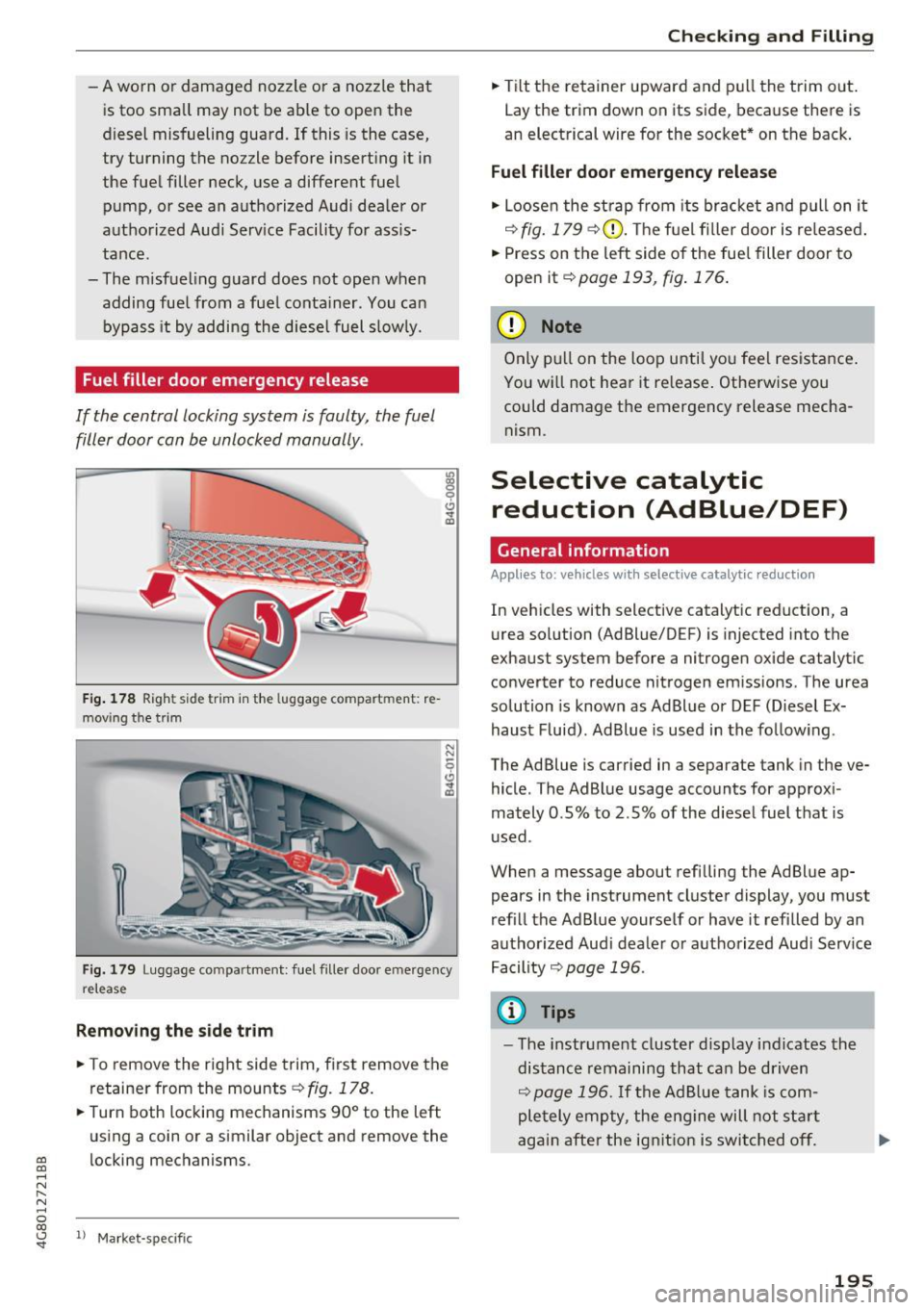
If the central locking system is faulty, the fuel
filler door con be unlocked manually .
Fig. 178 Righ t side tr im in the luggage compart ment : re
mov ing t he trim
N N
9
~
Fig . 17 9 Luggage compartme nt: fuel f iller door emerge ncy
release
Removing the side trim
.,. To remove the right side trim, first remove the
retaine r from the mounts
c::> fig. 178 .
.. Turn both locking mechanisms 90° to the left
us ing a coin or a similar object and remove the
~ locking mec hanisms . .-, N
" N .-, 0
00
~ ll Ma rket -spe cific
Checking and Filling
.. Tilt the retainer upward and pull the trim out .
Lay the trim down on its side, beca use there is
an elect rical wire for the soc ket* on the back .
Fuel filler door emergency release
.. Loose n the st rap from its br acke t and pull on it
c::> fig. 179 c::> (i) . The f uel f iller door is re le ased .
.. Press on the left side of the fue l filler door to
open it
c::> page 193, fig. 176 .
(D Note
Only pull on the loo p until yo u fee l resista nce .
You w ill not hea r it re lease . Othe rw ise you
could damage the emergency release mecha
nism.
Selective catalytic reduction (AdBlue/DEF)
General information
Appl ies to: vehicles with selective catalytic reduct io n
In vehicles with selective catalyt ic reduction, a
urea sol ution (AdBlue/DEF) is injected into the
exhaust system before a nitrogen oxide catalytic
converter to reduce nitrogen em issions . The urea
solution is known as Ad Blue or DEF (Diesel Ex
haust F luid) . Ad Blue is used in the fo llow ing .
The Ad Blue is carried in a separate tank in the ve
hicle . The AdBlue usage acco unts for app rox i
mately 0 .5% to 2.5% of the diesel fuel that is
u sed .
When a message about refi lling the AdBlue ap
pears in the instrument cluste r display, you must
r efil l the Ad B lue yourse lf or have it refilled by an
autho rized Aud i dea le r or a utho rized Aud i Serv ice
Fa cility
c::> page 196 .
(D Tips
-The instr ument cluster d isp lay i ndicates the
distanc e remaining that ca n be driven
c::> page 1 96. If the Ad B lue tank is com
ple tely emp ty, the eng ine will not s tart
agai n afte r the ign it io n is swit ched of f.
195
Page 198 of 284

Checking and Filling
-Ad Blue is required by law to operate this ve
hicle .
Messages in the instrument cluster display
Applies to: vehicles with selective catalytic reduction
The display indicates if the Ad Blue level is low or
if there is a system malfunction.
AdBlue level low
You will be informed if the Ad Blue in the tank
drops below a certain level.
Please refill AdBlue . Range x mi (km)
This message appears when there is only enough
Ad Blue left to drive the distance indicated in the
driver information system . Fill the AdBlue.
Ad Blue ,0 Refill AdBlue! Cannot start engine
in x mi (x km)! See owner's manual
This message appears when there is only enough
Ad Blue left to drive the distance indicated in the
driver information system. Fill the AdBlue. Other
wise the engine will not start again if you stop it
once the distance indicated has been driven. You
can also check the remaining distance in the on
board computer* .
Refill Ad Blue! No restart! See own-
er's manual
This message appears when the Ad Blue tank is
empty . Fill the Ad Blue . Otherwise you will not be
able to start the engine again once you stop it .
The AdB lue must be refilled when the amount in
the tank has reached the minimum level
c::> page 196, Filling AdBlue.
Incorrect filling/system malfunction
A message appears if the Ad Blue tank was filled
with a fluid other than AdBlue and the system
has detected that the tank was fi lled incorrect ly,
or if there is a system malfunction .
Ad Blue-/' Ad Blue : system fault. No re start in
x mi (x km) See owner's manual
This message appears when it is only possible to
d rive the distance indicated in the driver informa
tion system. Drive to the nearest authorized Aud i
dealer or authorized Aud i Serv ice Facility to have
196
the malfunction corrected . Otherwise the engine
will not start again if you stop it once the dis
tance indicated has been driven.
AdBlue: System fault No restart!
See owner's manual
This message appears if the system has detected
that the tank was fi lled incorrect ly or that there
i s a ma lfunction. Drive immed iate ly to the near
est authorized Audi dealer or authorized Audi
Service Facility to have the ma lfunction co rrect
ed. Otherwise you wi ll not be able to start the en
gine again once you stop it.
Filling AdBlue
Applies to: vehicles with selective cata lytic reduct ion
Fig. 180 R ig ht rea r side of t he ve hicle: removing the Ad B l
ue cap
The Ad Blue tank open ing is located near the die
sel tank opening . Add at least 1.5 gallons (S . 7
lit ers) of Ad Blue . This is the minimum amount re
quired to ensure the system detects the refilling
and to start the eng ine. You can add a maximum
of 4.5 gallons (17 lite rs).
Requirement: the request to add AdBl ue must
appear in the ins trument cluster display .
.,. Switch the ignition off.
.,. Open the tank filler door
c::> page 193.
.,. Tu rn the cap on the filler neck counter-clock
w ise using the wheel wrench from the vehicle
tool kit to remove it
c::> fig. 180.
.. Fill the Ad Blue using a bottle c::> page 197 or a
canister
c::> page 19 7.