driver seat adjustment AUDI A7 2017 Owner´s Manual
[x] Cancel search | Manufacturer: AUDI, Model Year: 2017, Model line: A7, Model: AUDI A7 2017Pages: 284, PDF Size: 72.29 MB
Page 50 of 284
Sea ts and stor age
Seats and storage
General information
A WARNING
Refer to c::> page 129 , Driving safety for im
portant information, tips, suggestions and
warnings that you should read and follow for
your own safety and the safety of you r pas
sengers.
Front seats
Power seat adjustment
App lies to veh icles with power adjustable seats
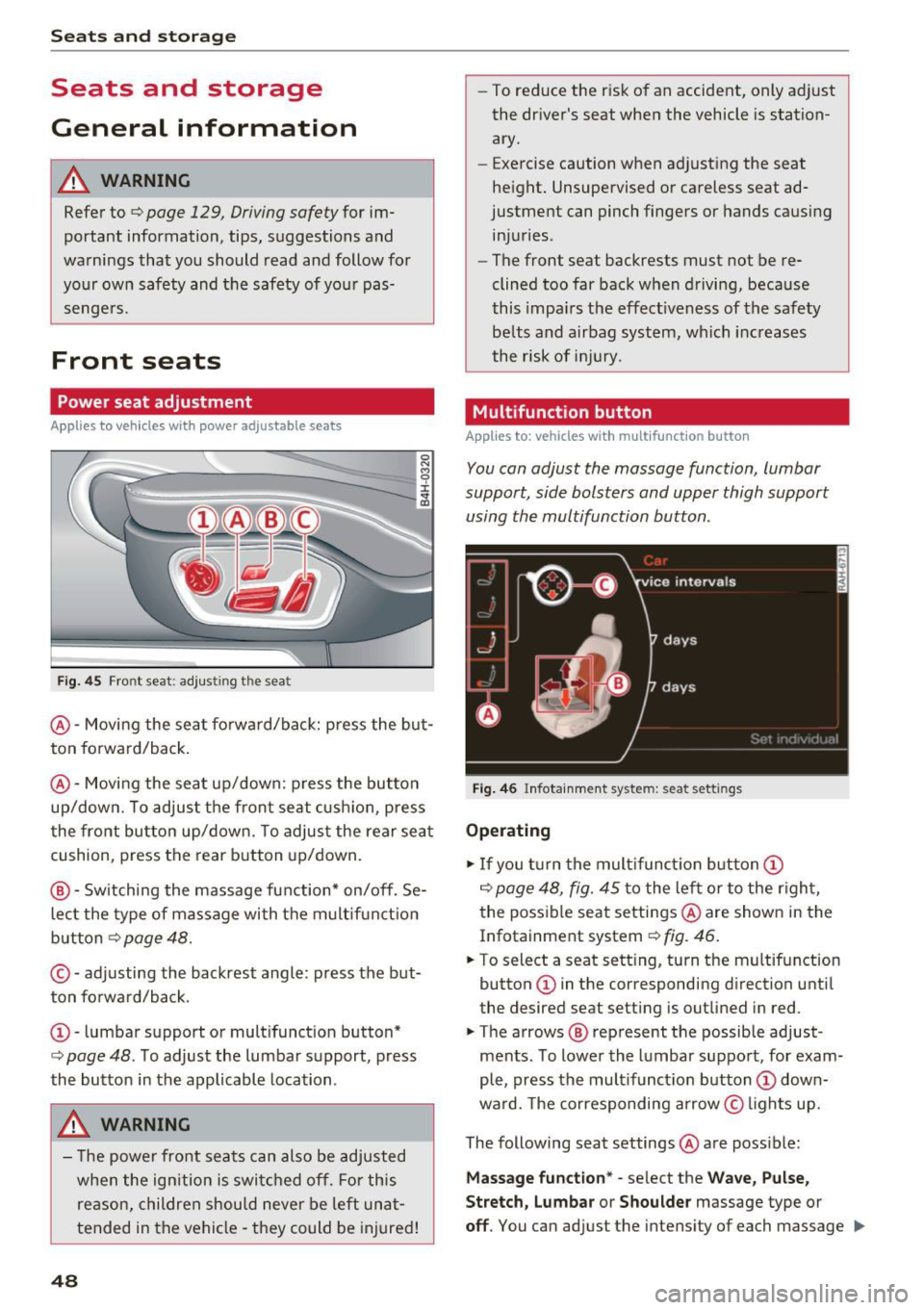
F ig. 4 5 Fro nt seat: adj ustin g the sea t
@ -Movi ng the seat fo rwa rd/back: p ress the but
ton forwa rd/back .
@ -Moving the seat up/down: press the button
up/dow n. To adjust the front seat cush ion, press
the front button up/dow n. T o adjus t the rear sea t
cushion, press the rear button up/down.
@ - Switching the massage function * on/off . Se
lec t the type of massage with the multif unct ion
button
c::> page 48.
© - adjusting the backrest angle : press the but
ton fo rwa rd/back.
CD -lumbar support or mult ifunct ion button*
c::> page 48 . To adjust the lumbar support, press
the bu tton in the applicable location .
A WARNING
- The power fro nt seats can also be adjusted
when the ign ition is swi tc h ed off. For this
reason, children should never be left una t
tended in the vehicle -they could be injured!
48
- To reduce the r isk of an accident, only adjust
the driver 's seat when the vehicle is station
ary.
- Exercise caution when adjusting the seat
height. Unsupervised or careless seat ad
justment can pinch fingers or hands causing
injuries .
- The front seat backrests must not be re
clined too far back when driving, because
this impa irs the effect iveness of the safety
be lts and airbag system, which increases
the risk of i nju ry.
Multifunction button
App lies to: vehicles wit h mult ifunct ion b utto n
You can adjust the massage function , lumbar
support, side bolsters and upper thigh support
using the multifunction button.
Fig . 46 Infotainm ent s ystem: se at settin gs
Operating
.,. If you t urn the mult ifunct ion b utton CD
c::> page 48, fig. 45 to the lef t or to the r igh t,
the poss ible seat settings @are shown in the
Infotainment system
c::> f ig . 46.
.,. To s ele ct a seat sett ing , turn the multifunction
button
CD in the corresponding direction unti l
the des ired seat setting is outlined in red .
.,. The arrows @ represent the possible adjust
ments . To lower the lumbar support , for exam
ple, press the mult ifunct ion button
CD down
ward. The corresponding arrow © lights up.
The following seat settings @are poss ible:
Ma ssa ge fun ctio n* -select the W ave, Pulse ,
Stretch, Lumbar or Shoulder
massage type or
off. You can adjust the intensity of each massage IIJ,,
Page 51 of 284
from 1 through 5. You can switch the selected massage on/off using the button @~
page 48,
fig. 45.
Lumbar support -you can ad just the lumbar sup
port up/down and to be stronge r/weaker .
Side section seat * -you can inc rease/decrease
the latera l s u pport in the seat using the side bol
sters a t the seat su rface and the back res t.
Upp er thigh support * -yo u can increase/de
crease the upper t high suppo rt.
@ Tips
- The massage function switches off a uto
matically after approx imately 10 minutes.
- The air in the s ide bolsters* is released as
soon as the driver's door opens. This makes i s possibl e to enter and exit the vehicl e
more comfortab ly. As soon as you s tart driv
i ng the ve hicle, the s ide bo lsters fi ll.
Center armrest
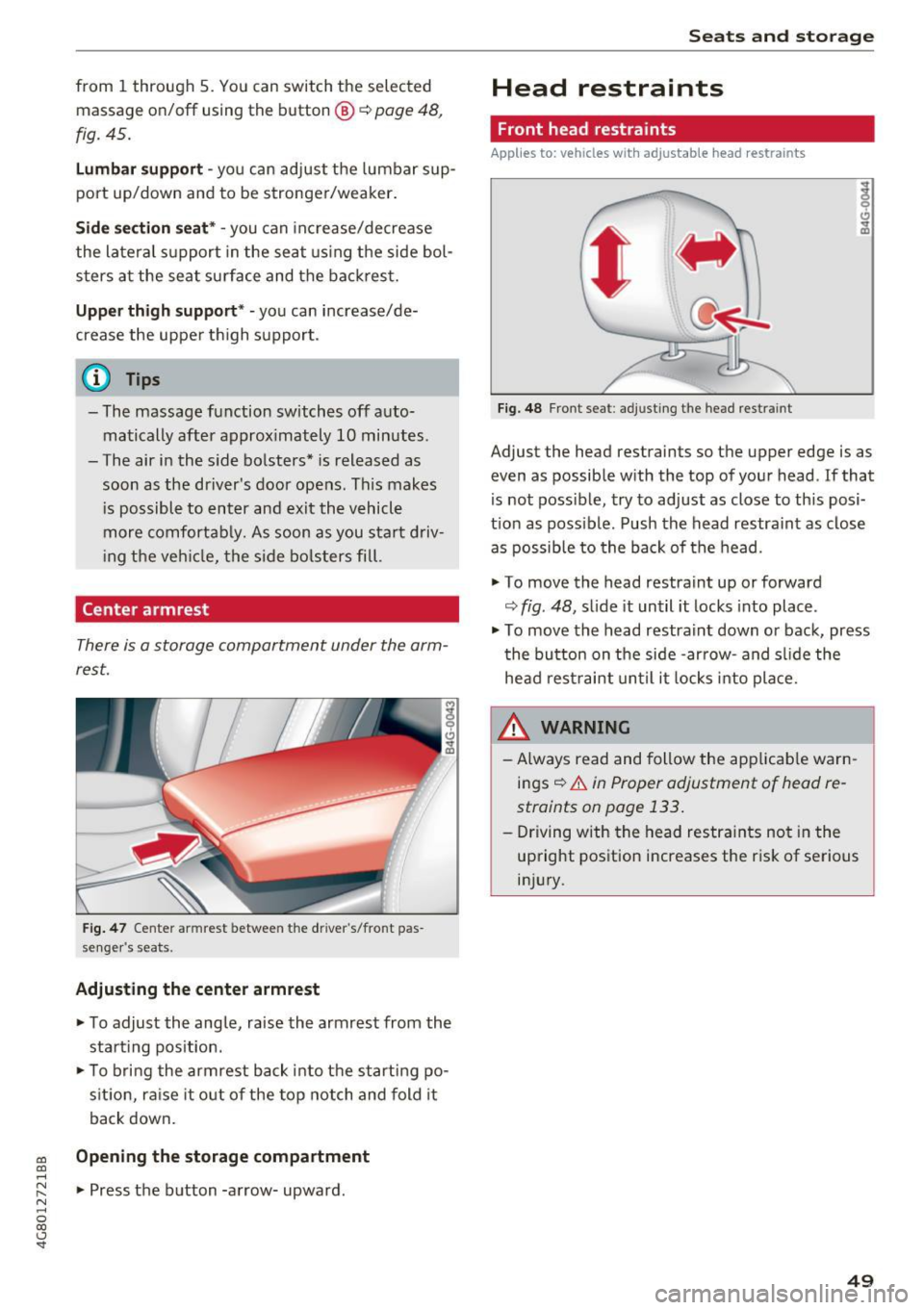
There is a storage compartment under the arm
rest.
F ig. 47 Center armrest between the driver 's/fron t pas
se nge r's seats.
Adjusting the center armr est
... To adjust the ang le, raise the armrest from the
sta rt ing pos it ion .
... To bri ng the armrest bac k into t he starting po
s it ion, ra ise it o ut of the top notch and fold it
back down.
co Opening the storage compartment co ....
~ ... Press the b utton -a rrow- upward . N .... 0
00
<.,;) 'SI"
Seats and storag e
Head restraints
Front head restraints
Applies to: vehicles with adjustable head restraints
Fig. 4 8 Front seat: adj ust ing the head restra int
Adjust the head restraints so t he upper edge is as
even as possible with the top of yo ur head . If that
is not possible, try to adjust as close to th is posi
t ion as poss ible. Push the head restraint as close
as possible to the back of the head.
" To
move the head restraint up or forward
~ fig . 48, s lide it un til it locks into place .
" To
move the head restra int down or back, press
t he button on the side -ar row- and s lide the
head rest raint until it locks into pla ce.
A WARNING
- Always read and follow the app licab le warn
ings~
& in Proper adjustment of head re
straints on page 133 .
-Driving w ith the head restra ints no t in the
up right position increases the r is k of se rious
in jury.
49
Page 52 of 284

Sea ts and stor age
Rear head restraints
Applies to: vehicles with adjustable head restraints
/
Fig. 49 Rear seat: adjust ing t he head restra int
F ig. SO Rear seat: remov ing the head restraint, release
point
The rea r seat head restraints must be raised to
the highest posit io n when passenge rs ride in the
rear seats
¢ A in Proper adjustment of head re
straints on page 133
Adjusting the head rest raints
"' To move the head rest rai nt up, ho ld it at the
s ides wi th both hands a nd slide it upward unt il
yo u fee l it click into place.
"' To move the head restraint down, press the
button (arrow)
¢fig . 49 and slide the head re
straint downward.
Remov ing th e head re st ra ints
.. Fo ld the backrest forward ¢ page 55.
.. Move the head restraint upward as far as it can
go .
.. Press the release point
c> fig. 50 using the me
chanical key and press the button
c> fig. 49. Pull
the head restraint out of the backrest at the
same time ¢_&. .
50
Installing the head r estraints
"'Slide the pos ts on the head restra int down into
the guides until the posts click into place.
"' Press the button (arrow)
¢ fig. 49 and sli de the
head restraint all the way down . You shou ld not
be able to pull the head restraint out of the
backrest without pressing the button.
A WARNING
-Always read and follow the applicable warn
ings
c> A::. in Proper adjustment of head re
straints on page 133.
- Only remove the rear seat head restra ints
when necessary in orde r to insta ll a ch ild
seat. In stall the head restraint again imme
diately once the child sea t is removed . Driv
ing with the head restraints removed or no t
in the upright position increases the risk of
ser ious inju ry.
Memory function
Description
App lies to : vehicles with memory function
Using the memory function, you can quickly and
easily store a persona l seat p rofile for the driver
and front passenge r and recall the sett ings. The
memory funct ion is co ntro lled using the remote
contro l key and the memory buttons in the driv
er's/front passenger's door *.
The driver's seat prof ile is stored again and as
s igned to the remote control key each t ime the
vehicle is locked . When you open the door, the
seat profile is automatically recalled . If two peo
ple use the vehicle, it is recommended that each
person always uses their "own" remote control
key .
Two seat profiles can be stored using the memo ry buttons in the driver's/front passenge r's
door *. Once they are stored, these seat profiles
can be selected at any time.
The following settings are stored:
Page 53 of 284

co
co
.... N
" N .... 0
00
<.,;) 'SI"
Remote Memory button control key
Driver D river Front
passen-ger
Seat X X X
Steering wheel* X X
Both
exterior X X
mirrors*
Remote control key
Applies to: vehicles with memory function
The driver's seat profile can be assigned to the
remote control key when the vehicle is locked.
• Select: the ICARI function button > (Car)* Sys
tems
control button > Vehicle settings > Driv
er's seat
> Remote control key > On .
(D Tips
If you do not wish to have the seat profile for
another driver assigned to the remote control
key, switch the memory function off in the In
fotainment system or using the
IOFFI button
r:::;,page 51.
Memory buttons
Applies to: vehicles with memory function
Fig. 51 Driver 's door: memory function buttons
The memory buttons are located in the driver's/
front passenger's* door.
Switching the memory function on/off
• Press the IOFFI button to switch the memory
function on/off. The LED in the button turns on
Seats and storage
when the memory function is off . Seat profiles
are neither stored nor recalled.
Storing a seat profile
• Press the ISET I button. When the word SET
lights up, the memory is ready to store set
tings .
• Now press a memory button briefly. A tone
confirms that the settings were stored.
Accessing a seat profile
• If the driver's door is open and the ignition is
sw itched off, press the memo ry button.
.. If the driver's door is closed or the ignition is
switched on, press and hold the memory but
ton until the seat adjustment is complete .
A WARNING
-For safety reasons, the seat setting can only
be recalled when the vehicle is stationary,
otherwise the re is a risk of an accident.
- If necessary, you can stop the recall process
by press ing the
IOFFI button or any memory
button.
Adjusting the front passenger's seat in the
Infotainment system
Applies to: vehicles with memory function
The driver can move the front passenger's seat
into various positions.
Adjusting the front passenger's seat from
the driver's seat
• Select: the I CAR I funct ion button > (Car) * Sys
tems
contro l button > Vehicle settings > Seats
> Front passenger's seat > Adjust seat posi
tion .
• You can now adjust the front passenger's seat
using the driver's seat buttons
r:::;, page 48,
fig. 45.
Align with driver's seat
• To transfer the settings from the driver's seat
to the front passenger's seat, select: the
I CAR I
function button > (Car)* Systems control but
ton
> Vehicle settings> Seats > Front passeng-
er 's seat > Align with driver 's seat. ..,.
51
Page 69 of 284
co
co
.... N
" N .... 0
00
<.,;) 'SI"
lead to greater tire wear and will affect driving
behav ior.
Do not drive on
winter tires year-round , as this
will consume up to 10% more fuel.
Eliminate unnecessary weight
Since every kilogram of extra weight increases
fuel consumption, a quick inspection of the lug
gage compartment may be worth it to avoid un
necessary weight.
When not being used, a roof rack should be re moved to decrease the wind resistance of the ve
hicle. You will save approximately 12% of your
fuel when at speeds from 62-75 mph (100-120 km/h).
Save energy
The engine drives the generator, which generates
electricity; the fuel consumption also increases
with the demand for electricity. Therefore, switch
electrical equipment off when you no longer
need it. Examples of equipment that uses a lot of
energy are air blowers at a high setting, the rear
window defogger and seat heating*.
CD Note
Do not leave engine idling unattended after
starting. If warning lights should come on to
indicate improper operation, they would go
unheeded. Extended idling also produces
heat, which could result in overheating or
other damage to the vehicle or other proper
ty .
CD Note
-Have your vehicle maintained properly and
in accordance with the service recommenda
tions in your Warranty
& Maintenance book
let. Lack of proper maintenance as well as
improper use of the vehicle will impair the
function of the emission control system and
could lead to damage .
- Do not alter or remove any component of
the Emission Control System unless ap
proved by the manufacturer.
- Do not alter or remove any device, such as
heat shields, switches, ignition wires,
Driving
valves , which are designed to protect your
vehicle's Emission Control System and other
important vehicle components.
(D Tips
The consumption estimates as published by
ENVIRONMENTAL PROTECTION AGENCY
(EPA) and Transport Canada may not corre
spond to your actual consumption on the
road, which will vary depending upon vehicle
load and speed, road and weather conditions,
trip length, etc .
Steering
Manual steering wheel position adjustment
Applies to: vehicles with manual steering wheel adjustment
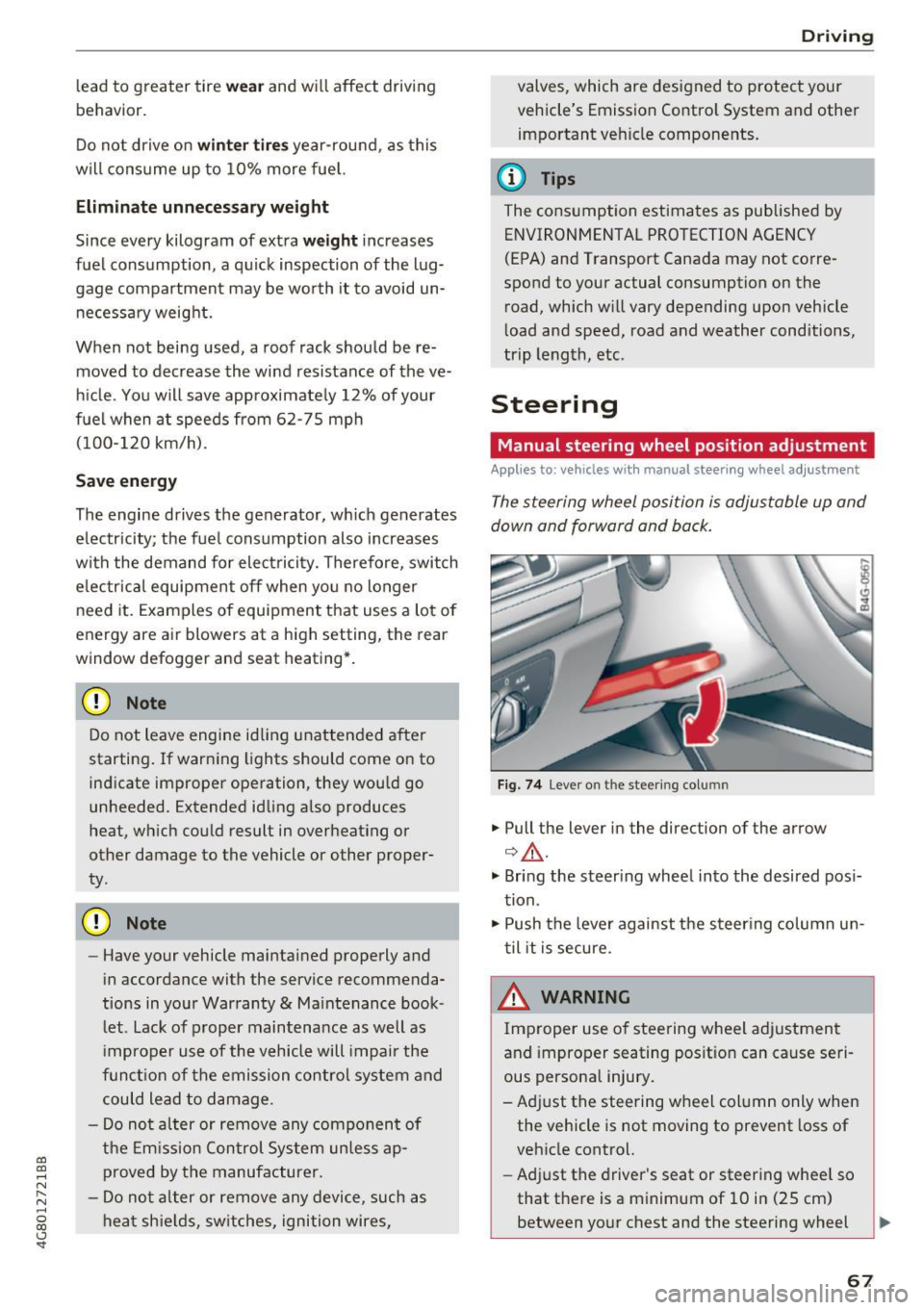
The steering wheel position is adjustable up and
down and forward and back.
Fig. 74 L eve r o n t he stee ring col umn
"'Pull the lever in the direction of the arrow
Q &_ .
"' Bring the steering wheel into the desired posi
tion.
"' Push the lever against the steering column un
til it is secure.
_& WARNING
~ -
Improper use of steering wheel adjustment
and improper seating position can cause seri
ous personal injury.
-Adjust the steering wheel column only when the vehicle is not moving to prevent loss of
vehicle control.
- Adjust the driver's seat or steering wheel so
that there is a minimum of 10 in (25 cm) between your chest and the steering wheel
II>
67
Page 70 of 284

Driving
c;,page 130, fig. 142. If you cannot main
tain this minimum distance, the airbag sys
tem cannot protect you properly.
- If physical limitations prevent you from sit
ting 10 in (25 cm) or more from the steer
ing wheel, check with your authorized Audi
dealer to see if adaptive equipment is avail
able.
- If the steering wheel is aligned with your
face, the supplemental driver's airbag can
not provide as much protection in an acci
dent. A lways make sure that the steering
wheel is aligned with your chest.
- Always hold the steering wheel with your
hands at the 9 o'clock and 3 o'clock posi
tions to reduce the risk of personal injury if
the driver's airbag deploys .
- Never hold the steering wheel at the 12
o'clock position or with your hands inside
the steering wheel rim or on the steering
wheel hub . Holding the steering wheel the
wrong way can cause serious injuries to the
hands, arms and head if the driver's airbag
deploys.
Power steering wheel position adjustment
A pp lies to: ve hicles w ith power steering wheel adju stment
The steering wheel position can be adjusted elec
trically up and down and forward and back.
Fig. 75 Switch for adjusting the steering whee l position
• To adjust the height, press the switch up/down.
The steering column will continue moving as
long as you are pressing the switch .
• To move the steering whee l forward or back,
press the switch forward/back. The steering
column will continue moving as long as you are pressing the switch .
68
The steering wheel can also be adjusted when the
ignition is switched off.
In vehicles with memory function*, the steering
column settings are sto red together with the
seat position.
~ WARNING
Improper use of steering wheel adjustment
and improper seating position can cause seri
ous personal injury.
- Adjust the steering wheel column only when
the vehicle is not moving to prevent loss of
vehicle control.
- Adjust the driver's seat or steering wheel so
that there is a minimum of 10 in (25 cm)
between your chest and the steering wheel
c;,page 130, fig. 142 . If you cannot main
tain this minimum distance, the airbag sys
tem cannot protect you properly.
- If physical limitations prevent you from sit ting 10 in (25 cm) or more from the steer
ing wheel, check with your authorized Audi
dealer to see if adaptive equipment is avail
able.
- If the steering wheel is aligned with your
face, the supplemental dr iver's a irbag can
not provide as much protection in an acci
dent. Always make sure that the steering
wheel is aligned with your chest.
- Always hold the steering wheel with your
hands at the 9 o'clock and 3 o'clock posi
tions to reduce the risk of personal injury if
the driver's airbag dep loys.
- Never hold the steering wheel at the 12
o'clock position or with your hands inside
the steering wheel rim or on the steering
wheel hub. Holding the steering wheel the
wrong way can cause serious injuries to the hands, arms and head if the driver's airbag
deploys.
-
Page 71 of 284

co
co
.... N
" N .... 0
00
<.,;) 'SI"
Easy seat entry
Applies to: vehicles with power steering wheel adjustment
Easy seat entry makes it easier to enter and exit
the vehicle by adjusting the steering column au
tomatically.
• In the Infotainment system, select the ICARI
function button > ( Car )* Sys te m s control but
ton
> Vehicl e setting s > Seat s > Driver's s eat >
E as y seat entry > On .
When easy seat entry is switched on , the steering
column goes back up into the park position when
the ignition is switched off . After entering the ve
h icle, the steering co lumn returns to the stored
position once the ignition is switched on.
Starting and stopping
the engine
Starting the engine
The I START E NGIN E STOP I button switches the
ignition on and starts the engine .
Fig. 76 Center conso le: STAR T ENGINE STOP button
Starting the engine
• Press the brake peda l and move the se lector
lever into the P or N position
¢ ,&..
• Press the I START ENGINE STOPI button. The
engine will start.
Applies to: vehicles with diesel engines
• It is possible that there will be a slight delay
when starting the engine in colder tempera
tu res. Therefore, you must hold the brake pedal
down until the engine starts. The indicator light
turns on while the engine is preheating
1,1 .
Drivi ng
Switching the ignition on /off
If you wo uld like to sw itch the igni tion on w ith
out starting the engine, follow these steps:
• Press the
!START E NGINE STOP ! button with
out press ing the brake peda l. Vehicles witho ut
t he Star t/Stop system*: the need le in the tach
ometer moves into the
READY position .
• To switch the ignition off, press the button
again . The needle in the tachometer moves into
the
O FF position .
T he prewarming runs automatica lly in diesel
vehicles when the ignition is switched on .
E quipment tha t uses a lot of e lectr icity is sw itch
ed off temporarily when you start the engine .
If the engine does not start immediately, the
start ing procedure stops automat ically after a
sho rt time. Repeat the s ta rting proced ure.
Start /Stop system *
Read the informat ion in¢ page 71, Start-Stop
system .
.&, WARNING
To reduce the risk of poisoning, never a llow
the eng ine to run in confined spaces .
(D Note
Avoid h igh engine speed, full throttle, and
heavy engine load if the engine has not
-
r eached operat ing temperat ure ye t. You cou ld
damage the engine.
(® For the sake of the environment
Do not let the eng ine run wh ile parked to
warm up. Beg in driving immed iate ly. Th is re
duces unnecessa ry emissions.
(D Tips
- Some noise afte r start ing the e ngine is nor
ma l and is no cause for conce rn.
- If you leave the vehicle w ith the ignition
switched on, the ignit ion w ill switch off af
ter a ce rtain amount of time. Ma ke sure that
elect rical eq uipment such as the exterior
lights are swit ched off.
69
Page 131 of 284

co
co
.... N
" N .... 0
00
\.J '
Basics
Safe driving habits
Please remember -safety first!
This chapter contains important information,
tips, instructions and warnings that you need to
read and observe for your own safety, the safety
of your passengers and others . We have summar
ized here what you need to know about safety
belts, airbags, child restraints as well as child
safety. Your safety is for us
priority number 1. Al
ways observe the information and warnings in
this section - for your own safety as well as that
of your passengers.
The information in this section applies to all
model versions of your vehicle. Some of the fea
tures descr ibed in this sections may be standard
equipment on some models, or may be optional
equipment on others. If you are not sure, ask
your authorized Audi dealer.
A WARNING
- Always make sure that you follow the in
structions and heed the WARNINGS in this
Manual. It is in your interest and in the in
terest of your passengers .
-
-Always keep the complete Owner's Litera
ture in your Audi when you lend or sell your
vehicle so that this important information
will always be available to the driver and
passengers.
- Always keep the Owner's literature handy so
that you can find it easily if you have ques
tions.
Safety equipment
The safety features are part of the occupant re
straint system and work together to help reduce the risk of injury in a wide variety of accident sit
uations.
Your safety and the safety of your passengers
should not be left to chance. Advances in tech
nology have made a var iety of features available
to help reduce the risk of injury in an accident.
Driving safety
The following is a list of just a few of the safety
features in your Audi:
- sophisticated safety belts for driver and all pas-
senger seat ing pos itions,
- safety belt pretensioners,
- safety belt force limiters for the front seats,
- safety belt height adjustment systems for the
front seats,
- front airbags,
- knee airbags for the front seats*
- side airbags in the front seats and outer rear
seats*,
- side curtain airbags with ejection mitigation
features,
- special LATCH anchorages for child restraints,
- head restraints for each seat ing position,
- adjustab le steering column.
These individual safety features, can work to gether as a system to help protect you and your
passengers in a wide range of accidents . These
features cannot work as a system if they are not
always correctly adjusted and correctly used.
Safety is everybody's responsibility!
Important things to do before driving
Safety is everybody 's job! Vehicle and occupant
safety always depends on the informed and care
ful driver .
For your safety and the safety of your passen
gers,
before driving always:
.,. Make sure that all lights and signals are operat
ing correctly .
.,. Make sure that the tire pressure is correct.
.,. Make sure that all windows are clean and afford
good visibility to the outside .
.,. Secure all luggage and other items carefully
¢ page 55, ¢ page 54.
.,. Make sure that nothing can interfere with the
pedals.
.,. Adjust front seat, head restraint and mirrors
correctly for your height .
.,. Instruct passengers to adjust the head re
straints according to their height .
129
Page 146 of 284
Safe ty belts
Autom ati c s afet y belt retr actors
Every safety belt is equ ipped with an automa tic
be lt retractor on the shoulder belt. This feature
locks the belt when the belt is pulled out fast,
during hard braking and in a n accident . The belt
may a lso lock when you drive up or down a steep
hill or through a sharp curve. Dur ing normal driv
ing the belt lets you
move freely .
Safety belt p ret en sion ers
The safety belts are equipped with a belt preten
sioner that helps to t ighten the safety belt and
remove slack when the pretensioner is activated
¢
page 146 . The function of the pretensioner is
mon itored by a warn ing light¢
page 17.
Con vertible loc king retracto r
Every safety belt except the one on the driver
seat is equipped with a convertible locking retrac
tor that
must be used when the safety belt is
used to attach a child seat. Be sure to read the
important information about this feature
¢ page 183 .
.&_ WARNING
Improperly pos it ioned safety be lts can cause
ser ious injury in an accident ¢
page 144,
Safety belt position.
- Safety belts offer optimum protection only
when the seatback is upright and belts are
properly positioned on the body.
- Always make sure that the rear seat bac k
rest to which the center rea r safety belt* is
attached is secure ly latched whenever the
rear center safety belt is being used. If the
backrest is not securely latched, the passen
ger will move forward with the backrest dur
ing sudden braking, in a sudden maneuver
and especially in a crash.
- Never attach the safety belt to the buckle for another seat. Attaching the belt to the
wrong b uckle will reduce safety belt effec
t iveness and can cause serious persona l in
jury.
- A passenger who is not properly restrained can be seriously in jured by the safety be lt it
self when it
moves from the stronger parts
144
of the body into critical areas like the abdo men.
- Always lock the convertible locking retractor
when you are securing a child seat in the ve
hicle
¢ page 185.
(D Tips
For information on safety belt pretensioners,
refer to¢
page 146 .
Safety belt position
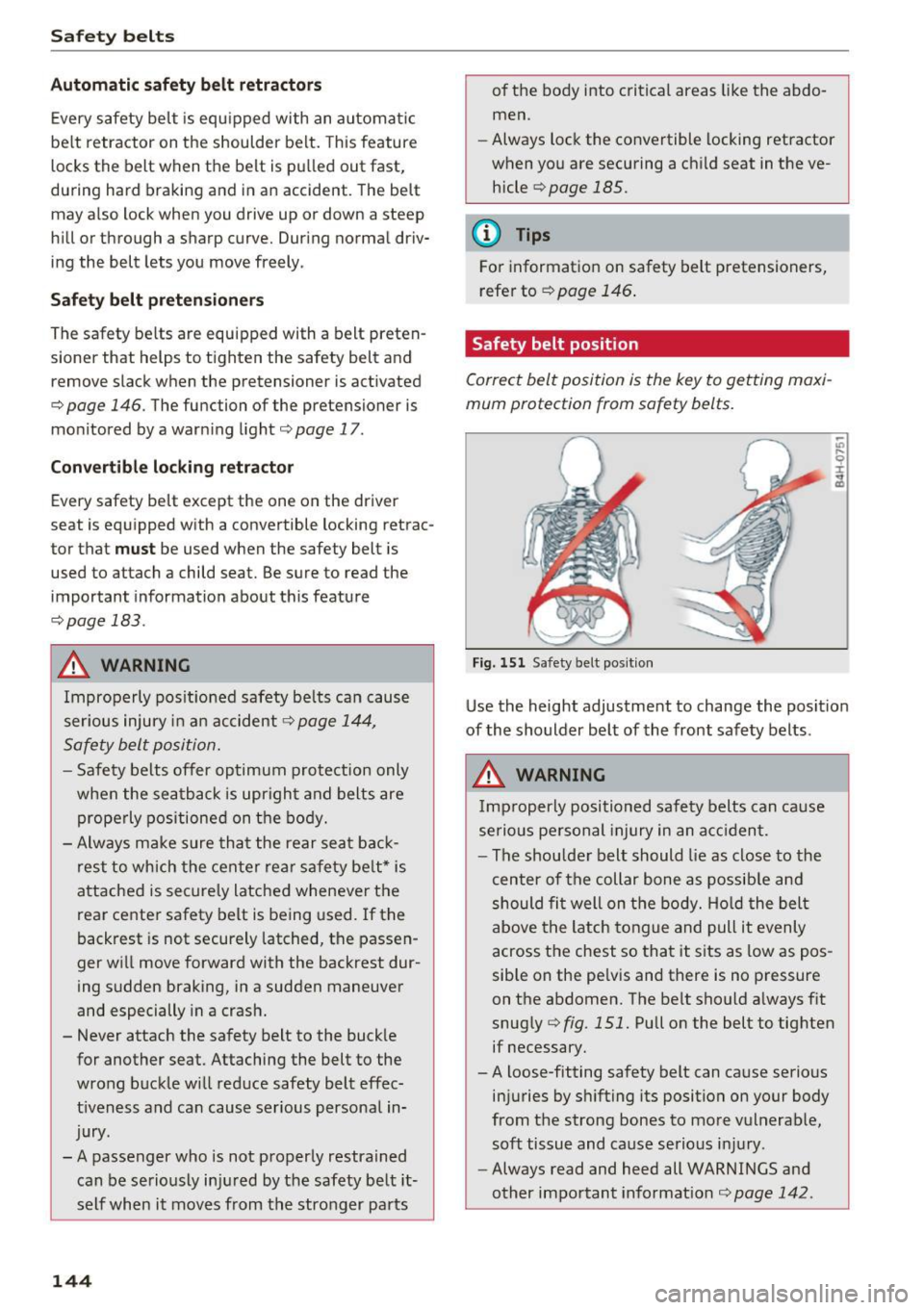
Correct belt position is the key to getting maxi
mum protection from safety belts.
Fig. 151 Safety belt posit ion
Use the height adjustment to change the posit ion
of the shoulder belt of the front safety belts .
.&_ WARNING
Imp roperly positioned safety belts can cause
serio us pe rsonal injury in an a cc ident.
- The shou lde r belt should lie as close to the
center of the collar bone as possib le and
should fi t well on the body. Ho ld the belt
above the latch to ngue and pull it evenly
across the chest so that it sits as low as pos
sible on the pe lvis and there is no pressure
on the abdomen. The belt should a lways f it
snug ly ¢
fig. 151. Pull on the belt to tighten
if necessary.
- A loose-fitting safety belt can cause serious
injuries by sh ifting its position on your body
from the strong bones to more vulnerable,
soft tissue and cause serious i nju ry .
- Always read and heed all WARNINGS and
other important informat ion
r=;, page 142 .
Page 148 of 284
Safety belt s
"'Push the loop -around fittings up c> fig . 154 @,
or
"'squeeze together the (D button, and push the
loop-around fittings
down @.
"'Pull the belt to make sure that the upper at
tachment is properly engaged.
A WARNING
Always read and heed all WARNINGS and oth
er impo rtant informat ion
c>page 14 2.
(D Tips
With the front seats , the height adjustment
of the seat can also be used to adjust the po
sition of the safe ty belts.
Improperly worn safety belts
Incorrectly positioned safety belts can cause se
vere injuries.
Wearing safety belts imprope rly can cause seri
ous injury or death. Safety belts can only work
when they a re correctly pos itioned on the body.
Imp roper seating positions reduce the effect ive
ness of safety be lts and will even inc rease the
ris k of injury a nd deat h by mov ing the safety bel t
to cr it ica l areas of the bo dy. Imp roper seating
positions a lso increase the risk of serio us inj ury
and deat h when an airbag deploys and strikes an
occ upant who is not in the co rrect seat ing pos i
tion. A driver is responsible for the safety of all
ve hicle occupants and especia lly for children.
Therefore:
"' Never permit anyone to assume an inco rrect
s itting position in the vehicle wh ile trave ling
c> ,&. .
A WARNING
Impro perly wor n safety belts increase t he risk
of se rious personal injury a nd death wheneve r
a vehicle is bei ng use d.
- Always make sure tha t all veh icle occupa nts
are co rrectly restra ined and stay in a co rrect
seat ing pos ition w heneve r the veh icle is be
ing used.
146
- Always read and heed all WAR NINGS and
o ther impo rtant in format ion
c>page 142.
Belt tensioners
How safety belt pretensioners work
In front, side and rear-end collisions above a
particular severity and in a rollover, safety belts are tensioned automatically.
Reversible safety belt tensioner s
The safety belts on the front seats are equipped
with power revers ible tensioners. The following
funct io ns are available when the dr iver's/front
passenger 's safety belts are faste ned:
- Automatic tensione rs: at the start of a drive,
the safety belts automat ica lly adjust to the
passenger after a certain time period or ve hicle
spee d. To switch the a utomat ic tens ioners off,
select the following in t he M MI :
!CARI function
button
> ( Car )* systems > Vehicle settings >
Seat s > Driver's seat or Pas senger's seat > Au ·
tomatic belt tensioner > Off .
-In certain drivi ng s ituations, the s afe ty bel ts
m ay tighten w ith a reversib le tensioning func
tion
c> page 138 .
- The s afety be lts may also tigh ten with this re-
vers ible tension ing f unct io n in m ino r collisions .
Pyrotechnic safety belt pretensioners
The safety belts are eq uipped w it h safety bel t
pretensione rs. The system is activa ted by se nsors
i n front, s ide a nd r ear-end collisions of grea t se
verity and in a ro llover. This tig htens the bel t and
takes up belt slack
c> &. in Service and disposal of
safety belt pretensioner on page 147.
Taking up
the slack helps to reduce forward occupant
movement during a collision.
A WARNING
-It is poss ible for the pretensioners to dep loy
incorrectly .
- The pyrotechnic system can only p rovide
protection for one collision. If the py rotech
nic pretens ioners deploy, the pretensioning
sys tem must be rep laced.