low beam AUDI A7 2017 Owner´s Manual
[x] Cancel search | Manufacturer: AUDI, Model Year: 2017, Model line: A7, Model: AUDI A7 2017Pages: 284, PDF Size: 72.29 MB
Page 11 of 284
co
co
....
Instruments and indicator lights
Instruments and indicator lights
Instruments
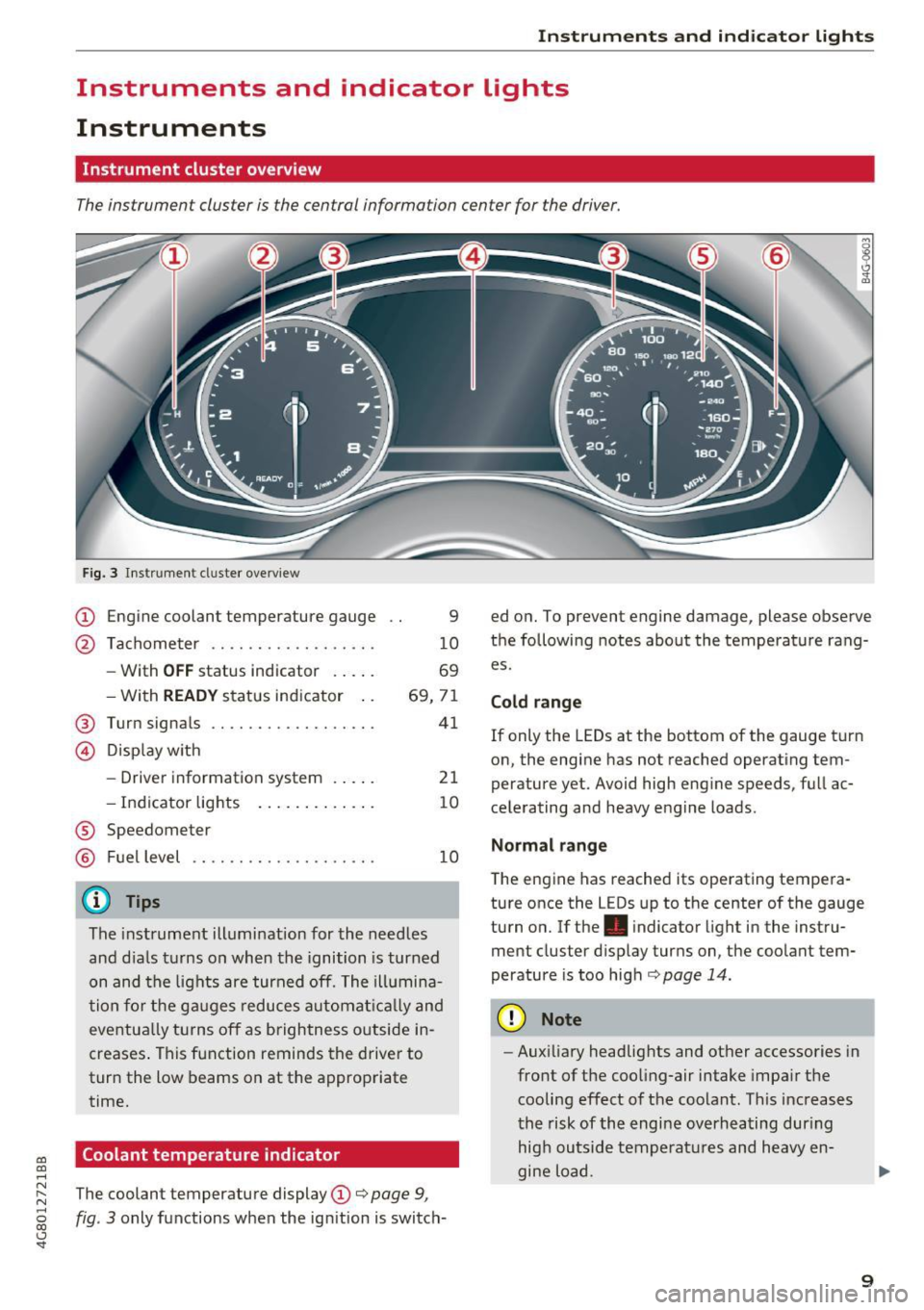
Instrument cluster overview
The instrument cluster is the central information center for the driver.
Fig . 3 Instru ment cl uste r overview
CD Engine coolant temperature gauge
@ Tachometer ...... .... ...... . .
- With
OFF status indicator . .. . .
- With
READY status ind icator ..
@ Turn signals ...... .... ....... .
© Dis p lay w ith
- Drive r information system . .. . .
- Indicator lig hts ..... .. . .. .. .
® Speedometer
® Fuel level
(D Tips
9
1 0
69
69, 7 1
41
21
10
10
The instrument illumination for the needles
and d ia ls t urns on when the ignition is turned
on and the lights are turned off. The ill umina
t ion fo r the g auges reduces aut omat ically and
eve ntu ally t urns off as brigh tness outside in
creases . This f unction reminds the drive r to
tur n the low beams on at the approp riate
time.
Coolant temperature indicator
ed o n. To prevent engine damage, please observe
t h e following notes about the temperature rang
es.
Cold range
If only the LEDs at the bottom of the gauge t urn
on, the engine has not reached operating tem
perature yet. Avoid high eng ine speeds, full ac
ce le rating and heavy e ngine loads.
Normal range
T he eng ine has reached its operating tempera
ture once the L EDs up to the center of the gauge
turn on.
If the. indicator light in the inst ru
ment cluster d isp lay turns on, the coolant tem
perature is too high¢
page 14.
(D Note
-Aux iliary headlig hts and ot her accessories in
front of the coo ling-air intake impa ir th e
cooling effect o f th e coolant . This increases
t he risk of th e engi ne overheating dur ing
hig h ou tsid e tempera tures and heavy en
gine load.
~ The coolant temperature display CD¢ page 9,
~ fig. 3 only functions w hen the ignition is switch-
<..:> 'SI"
9
Page 15 of 284
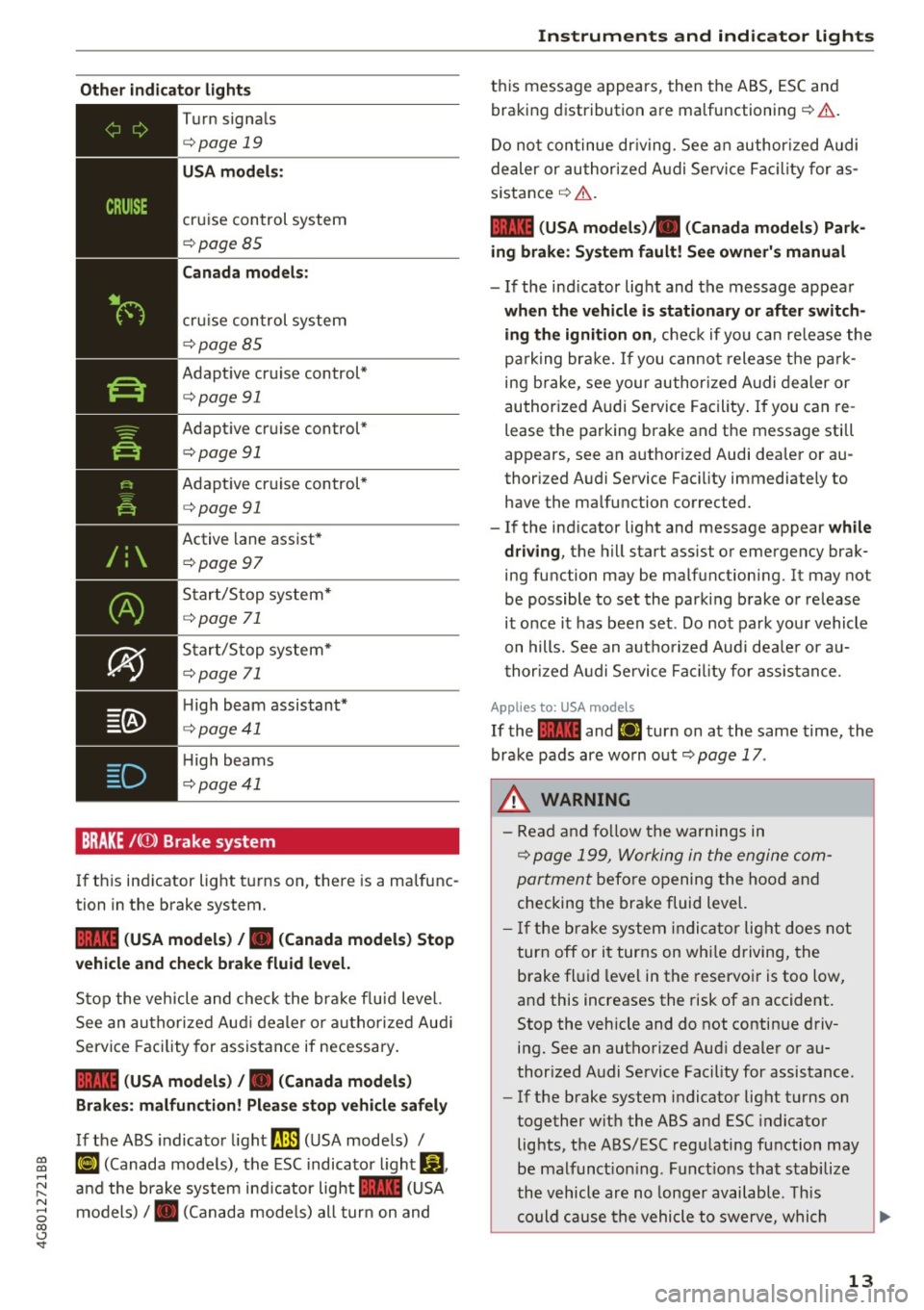
Other indicator lights
--------------
Tu rn signa ls
c:>page 19
USA models:
cruise control system
c:> pageBS
Canada models :
cruise con trol system
c:>page BS
Adaptive cruise control*
c:> page 91
Adaptive cruise control*
c:>page 91
Adaptive cr uise control *
c:>page 91
Active lane assist*
c:> page97
Start/S top system *
c:>page 71
Start/S top system*
c:>page 71
High beam assistant*
c:> page 41
High beams
c:> page41
BRAKE /(0) Brake system
If th is ind icator lig ht tu rns on, there is a ma lfunc
tion in the brake system.
1111 ( USA models ) / . (Canada models ) Stop
vehicle and check brake fluid level.
St op the veh icle and che ck the bra ke f lu id leve l.
See an au tho riz e d Au di dea ler o r aut ho riz e d Aud i
Service Fac ility for assistance if necessa ry .
1111 (USA models ) /. (Canada models )
Brake s: malfunction! Please stop vehicle safely
If the ABS indica to r light ~ (U SA mode ls) /
~ ¢ej (Canada models), the ESC indica to r li ght Gl
~ an d the brake system in dicator light 1111 (USA
8 models) /. (Canada mode ls) all tur n on and
00 \.J '
t hi s message appears, then the ABS, ESC an d
bra king distribution a re ma lfunctioning
c:> ,&. .
Do no t continue dr iv ing . See a n author ized Audi
dealer or au thor ized A udi Se rvice Fa cility for as
s istance
c:> &. .
1111 (USA models). (Canada models) Park
ing brake: System fault! See owner' s manual
- If the ind icator lig ht and the message appea r
when the vehicle is stationary or after switch
ing the ignition on ,
check if yo u can re lease the
pa rk ing br ake. If you canno t relea se t he p ark
ing b rake, see your au thor ized A udi de aler or
author ized A udi Se rvice Facility . If you can re
lease the parking brake and the message sti ll
appears, see an authorized Audi dea ler or au
thorized A udi Service Fac ility immediately to
have the ma lfunction co rrected.
- If the ind icator light and message appear
while
driving ,
the hill start ass ist or emergency brak
ing function may be ma lfunctioning. It may not
be possible to set the parki ng brake or release
it o nce it has been set. Do no t park yo ur vehicle
on hills , See an aut ho rized Audi dea le r or au
t hor ized A udi Se rvi ce Fa ci lity for assistan ce.
Applies to: USA models
If the 1111 and EiJ tur n on a t the same time, the
bra ke pads are wo rn o ut
c:>page 17.
_& WARNING
-Read and fo llow the w arning s in
c:> page 199, W orking in the engine com
partment
before o pening the hoo d and
checking the brake fluid level.
- If the b rake syst em i ndi cat or li ght does not
turn off or i t turns on wh ile driving, the
b rake fl uid level in the reservo ir is too low,
an d this increases the risk of an accident.
Stop the vehicle and do not contin ue d riv
ing. See an autho rized Aud i deale r or au
thor ized A udi Se rvice Facility for assistance.
- If the b rake system indicator light turns on
together with the ABS and ESC indicato r
lights, the ABS/ESC regu lating fu nction may
be malf unct ion ing . Funct io ns that stabilize
th e vehicle are no longe r av ailabl e. This
could c ause the vehicle to swerve, whi ch
13
Page 21 of 284
co
co
.... N
" N .... 0
00
\.J '
Aud i Service Facility immediately to have the
mal funct ion corrected.
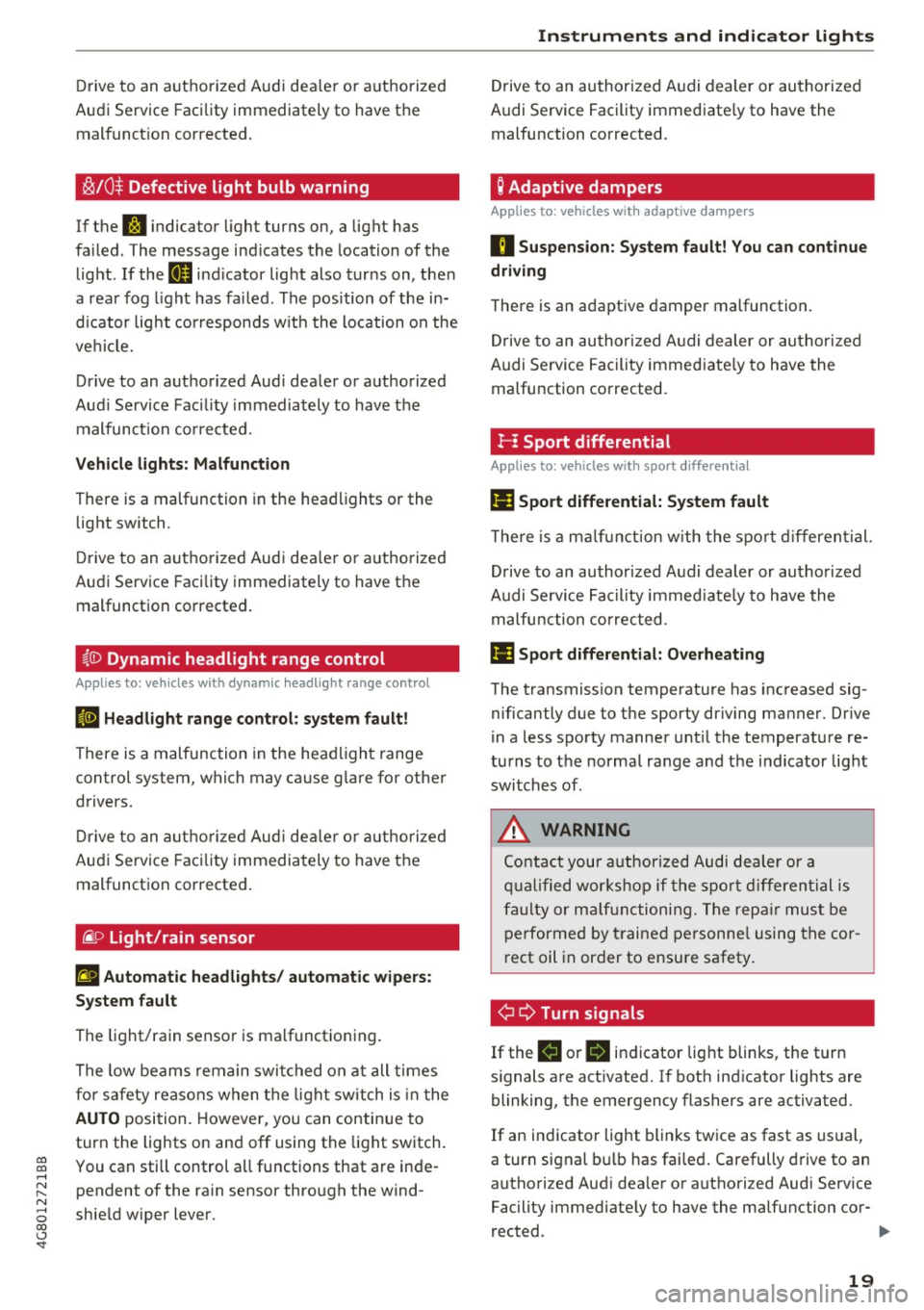
~/0$ Defective light bulb warning
If the S :I indicato r light turns on, a light has
fa iled . The message ind icates the location of the
l ight . If the
IJ ind icator lig ht also t urn s on, then
a rea r fog ligh t has fai led. The pos ition of the in
d ic a tor light cor respon ds w it h the location o n the
ve hicl e.
Drive to an autho rized Aud i dea ler o r a uthorized
Aud i Service Fac ility immediately to have t he
m alfunct io n correcte d.
Vehicle lights: Malfunction
There is a malfunction in the hea dlights or the
light switch.
D rive to an autho rized Aud i dea le r o r a uth orized
Au di Service Faci lity immediately to have the
malfunct ion corrected .
~(D Dynamic headlight range control
Applies to: veh icles with dynamic headlight range control
El Headlight range control : system fault!
There is a malfunction in the hea dlight range
control system, w hich may ca use g la re for othe r
drivers.
Dr ive to an aut ho rize d Aud i de aler o r a uth orized
Au di Service Facility immediately to have t he
malfunct ion corrected.
~ o Light/rain sensor
II Automatic headlights / automatic wipers:
System fault
The light/rain senso r is malf unct ion ing.
The low beams remain swi tched on at all ti mes
for safety reasons when t he lig ht sw itch is in the
AUTO posi tion. However, you can continue to
turn the lights on an d off using the light sw itch.
You can still control a ll functions that are in de
pendent of the ra in sensor thro ugh the w ind
shie ld wiper lever.
Instruments and ind icator lights
D rive to an au thori zed A udi dealer or au tho riz ed
Audi Se rvice Facility immed iate ly to have the
malfunction corrected.
Q Adapt ive dampers
Applies to : vehicles with adaptive dampers
II Suspension: System fault! You can continue
driving
T he re is an ada ptive damper malfunction.
Dr ive to an au thor ized A udi dealer or au tho riz ed
A udi Service Facility immed iate ly to h ave the
malfu nction co rrected.
!- I Sport differential
Applies to: vehicles with sport differential
Ill Sport differential: System fault
T he re is a m alfu n cti on w ith the s po rt diff erential.
D rive to an author ized A udi dealer or au thori zed
A udi Se rvice Faci lity i mmed iate ly to have the
malfu nction correcte d.
111 Sport differential: Overheating
The transmission temperature has inc reased sig
nificantly due to the sporty dr iv ing ma nner. Drive
in a less s po rty manner unt il t he temperatu re re
tu rns to the norma l ra nge and t he i nd icator light
swi tc h es of.
A WARNING
-
Conta ct yo ur a uthori zed Au di d eal er or a
qu alified w orkshop if the sport di fferential i s
f a u lt y or m alfunct ionin g. T he rep air mus t be
p erforme d by tr ained personne l using the cor
r ect oi l in order to ensure safety .
¢i ¢ Turn signals
If the Bl or 1B indicator lig ht blinks, the turn
s ignals a re act ivated. I f both ind icator lights are
blinking, the emergency flashers are activated .
If an indicator light blinks twice as fast as usual,
a turn signal b ulb has fai le d. Carefully d rive to an
a utho rized Aud i dea le r or authori zed Aud i Serv ice
Facility immed iate ly to have the ma lfunction cor-
rected . ..,.
19
Page 42 of 284
Lights and Vision
Lights and Vision
Exterior lighting
Switching lights on and off
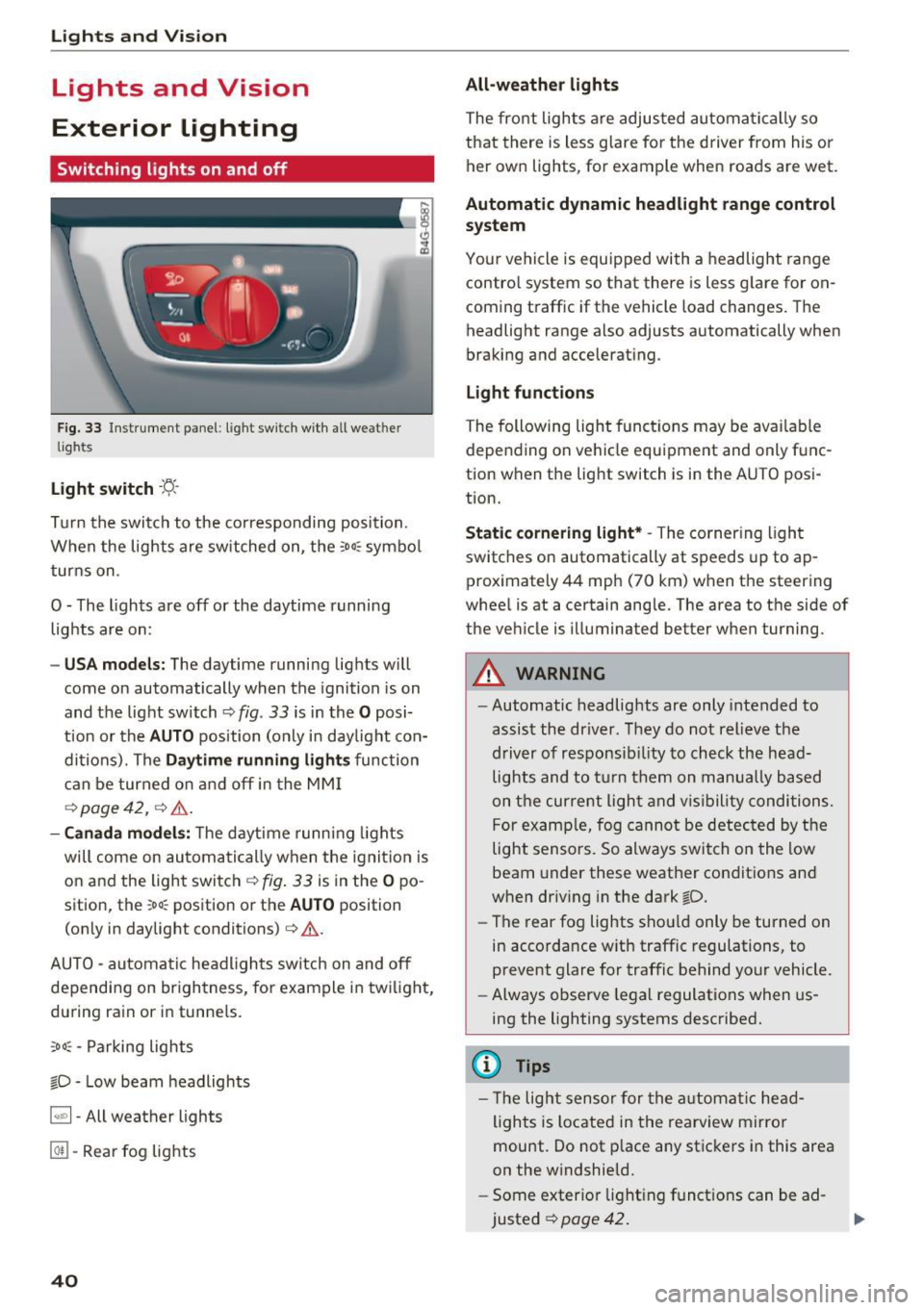
Fig. 33 Instrument panel: light sw itch w ith all weat her
lights
Light switch · 't/..·
T ur n the switch to the corresponding posi tion.
When the lights are sw itched on, the
:oo: symbol
turns on .
0 - The lights are off or the daytime running
lights are on:
- USA m odels: The daytime running lights will
come on automatically when the ignition is on
and the light switch¢
fig. 33 is in the O posi
t ion or the
AUTO position (only in day light con
dit ions). The
D aytime running light s function
can be turned o n and off in the MM I
r=:>page42, ¢ ,6 .
-Canada mo del s: T he d aytime runn ing lights
will come on automati cally when the ignit io n is
on and the ligh t swi tch
r=:> fig . 33 is in the O po
sition, the
;oo: position or the AUTO position
(on ly in daylight conditions)
¢ &.
AUTO -automatic headlights switch on and off
depending on br igh tness, for example i n tw ilig ht,
du ring rain or in tunnels.
;oo: -Parking lights
io -Low beam headlights
~ - All weather lights
@TI -Rear fog lights
40
All-weather lights
The front lights a re adjus ted au toma tically so
that there is less g lare fo r the d river from his o r
her own lights, for example when roads are wet .
Automatic dynamic headlight range control
system
Yo ur vehicle is equ ipped with a headlight range
contro l system so that there is less g lare for on
coming t raffic if the vehicle load changes. The
headlight range also adjusts automatically when
braking and accelerat ing .
Light funct ion s
The following light functions may be ava ilable
depending on ve hicle equipment and only func
tion when the light switch is in the AUTO posi
tion.
Static cornering light* -The cornering light
switches on automatically at speeds up to ap
proximately 44 mph (70 km) when the steering
whee l is at a certain angle. The area to the side of
the vehicle is illuminated better when turning.
A WARNING
-Automatic headlig hts are only intended to
assis t the driver. They do not relieve the
driver of responsib ility to check the head
lights and to t urn them on manua lly based
on t he cur re nt ligh t and v is ibility conditions.
F or examp le, fog cannot be detec ted by the
light sensors. So always switch on the low
beam under these weather conditio ns an d
when driv ing in the dark
io.
- The rear fog lights shou ld only be turned on
in accorda nce w ith traffic regulations, to
prevent glare for traffic behind your vehicle.
- Always observe legal regulations when us
ing the lighting systems described.
(D Tips
- Th e light senso r for the a utomat ic he ad
ligh ts is located in the rearview mirro r
mount . Do not p lace any stic kers i n this area
on the w indshield.
- Some exter ior light ing f unct ions can be ad
justed
¢ page 42 .
Page 44 of 284
Lights and Vision
Messages in the instrument clu ster display
Headlight a ssis t: System fault !
Drive to an authorized Aud i dealer or a uthorized
Aud i Serv ice Facility immediately to have t he
malfunct io n corrected. You can still switc h the
h igh beams on or off manually.
Headlight as sist: Unavailable No camera view
The camera view is blocked, for example by a
sticker or debris.
The senso r is located between the interior rear
view mirror and the windshield. Do not place any stickers in th is area on the windshield.
A WARNING
H igh beam assistant is only i ntended to assist
the driver . The dr iver is still responsible for
cont ro ll in g the head ligh ts a nd switc hing
t hem manually depend ing on light and v isibil
i t y condition s. It may be necessary to operate
th em m anually i n situ ations such as:
- In adve rse weathe r cond it ions s uch as fog,
he avy ra in, b low ing snow or sp raying wa te r.
- On roads w here oncoming traffi c may be
pa rtiall y obscu red, s uch as ex pressways.
- Whe n there are road users t hat do not have
s ufficient ligh ting, s uc h as bicycle rs o r
vehicles wi th dirty ta il lamps.
- In tight cu rv es and o n steep hills.
- In poorly lit areas .
- With strong reflectors , such as signs.
- If the area of the windshield near the senso r
is fogged over, dirty, icy or covered with a
sticker.
Adjusting the exterior l ighting
The funct ions are adjusted in the Infotainment
system.
~ Se lect : I CAR I functio n button> (Car) * Systems
contro l button > Vehicle settings > Exterior
light ing .
Automatic headlights
You can adj ust the fo ll ow ing settings in the Au
tomatic headlight s
menu:
42
Activation sensitivity -you can adjust if the
headlights switch on
Early , Medium or Late ac
cording to the sensit ivity of the light sensor.
Auto-dimming high beams * -yo u can switch t he
high beam assistant *
On and Off .
Daytime running lights*
USA models :
the daytime running lights can be
swi tched on/off. Select
On or Off .
Canada models:
this function cannot be sw itched
off . They act ivate automatically each time the ig
nit ion is switched on .
Coming home, Leaving home
The coming home function illuminates the area
outside the vehicle when you turn the ig nit ion off
and open the d river's door . To turn the function
o n, select
Lights when leaving car > On .
The leaving home illum inates the area outside
the vehicle when you unlock the vehicle . To turn
the function on, se lect
Lights when unlocking
car > On .
The coming home and leav ing home functions
on ly operate when it is dark and the light switch
i s in the
AUTO pos ition .
Emergency flashers
-------
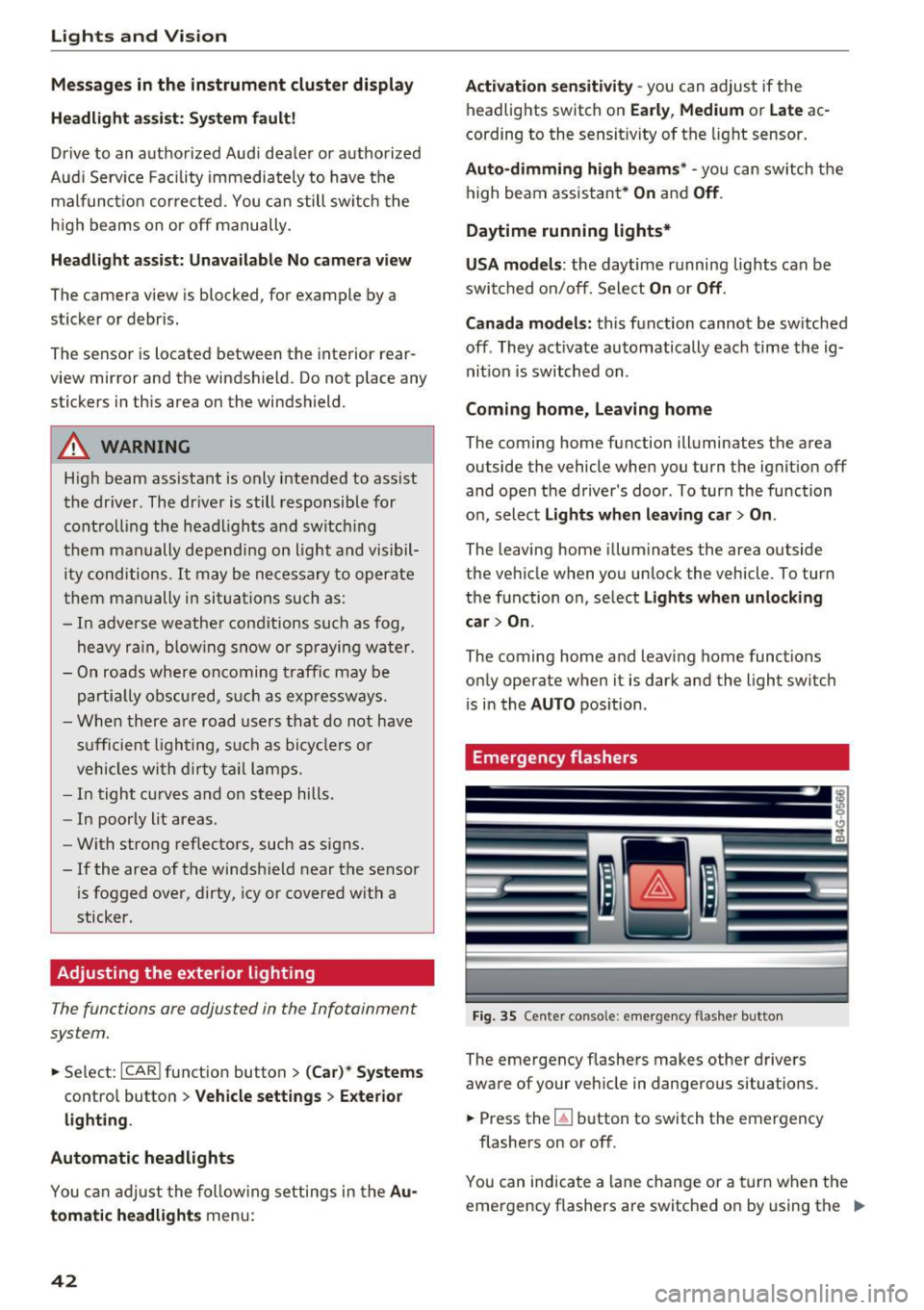
Fig. 35 Cente r conso le : emergency f las her bu tton
The emergency flashe rs makes other d rivers
aware of your veh icle in dangerous situations.
~ Press the~ button to switch the emergency
flashers on or off .
You can indicate a lane change or a tur n w hen the
emergency flashers are switched o n by using the "'
Page 45 of 284
co
co
.... N
" N .... 0 co <.,;) 'SI'
turn signal lever. The emergency flashers stop
temporarily .
The emergency flashers also wo rk when the igni
tion is turned off .
Interior Lighting
Front and rear interior lighting
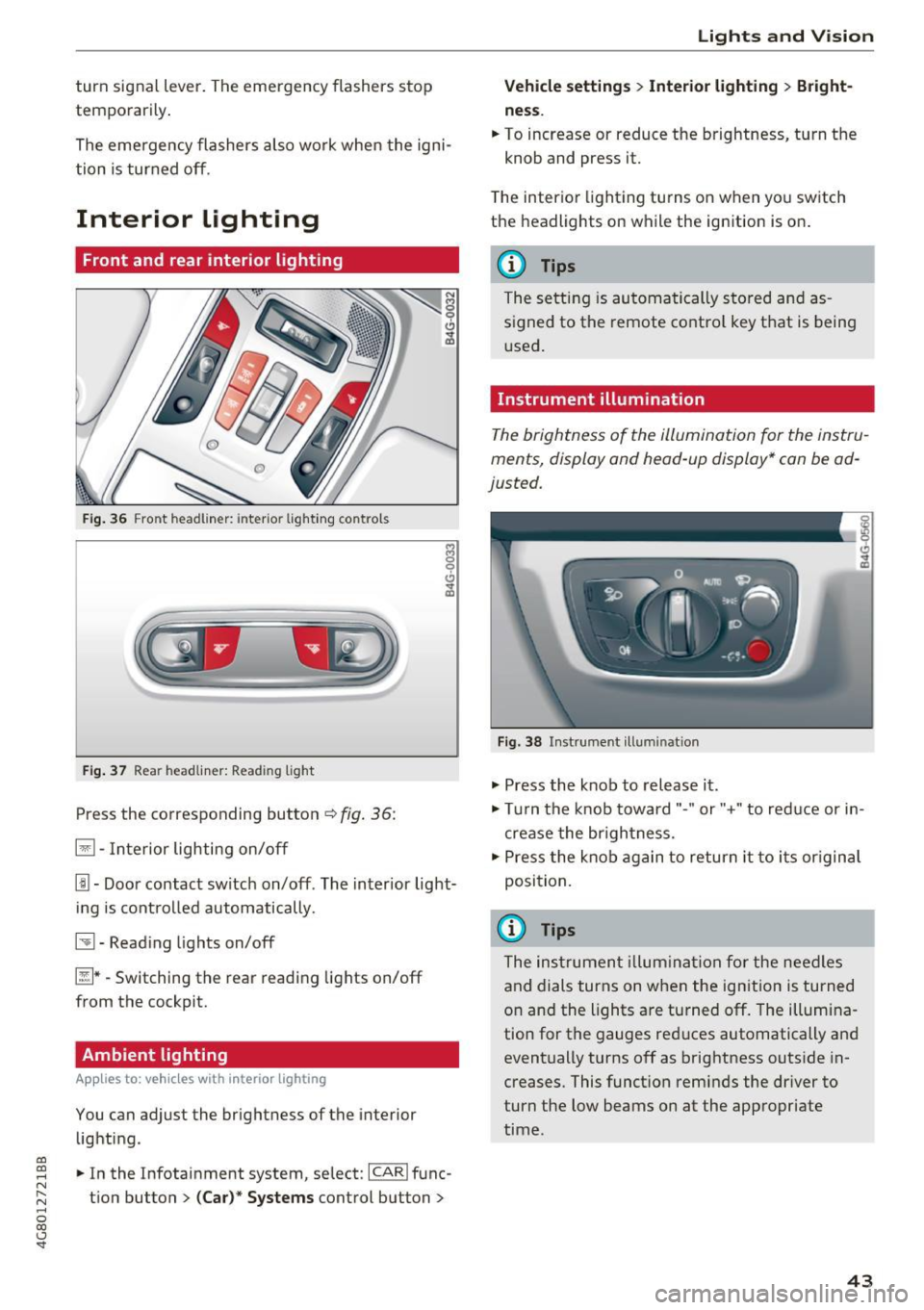
Fig. 36 Fro nt hea dliner: inter io r light ing co ntro ls
F ig. 37 Rea r headliner: Read ing light
Press the corresponding button c:::> fig . 36:
El -Interior lighting on/off
I!!-Doo r contact switch on/off . The inter ior light
i ng is cont rolled automatically.
~ -Read ing lights on/off
~ * -Switching the rear read ing lights on/off
from the cockpit.
Ambient lighting
App lies to: vehicl es with interior lighting
You can adjust the brightness of the interior
lighti ng .
.. In the Infotainment system, se lect:
ICARI func
tion button
> (Ca r)* Systems control button >
Lights and V ision
Vehicle settings > Interior lighting > Bright
ne ss .
.. To increase or reduce the brightness, turn t he
knob and press it.
T he inter ior lighting tu rns on when yo u sw itch
the headlights on while the ignition is on .
(D Tips
The setti ng is au toma tically s to red and as
s igned to the remote cont ro l key t hat is being
u sed .
Instrument illumination
The brightness of the illumination fo r the instru
ments, display and head-up display* con be ad
justed.
Fig . 38 Instrument ill um ination
"' Press the knob to release it .
"' Tur n the knob toward"-" or"+" to red uce or in
crease the br igh tness.
.,. Press the knob again to return it to i ts or igin al
posi tion.
(D Tips
The ins trumen t illum ina tion for the need les
and dials turns on when the ignition is turned
on and the lights a re turned off. The illumi na
tion for the gauges red uces automatically and
eventually turns off as brightness outside in
creases. This funct ion rem inds the dr iver to
turn the low beams on at the appropriate
time .
43
Page 48 of 284

Lights and Vision
_& WARNING
Do not use the sunshade to secure cargo. The
luggage compartment cover is not a surface
for storing objects . Objects placed o n the cov
er could endange r all vehicle occupants dur
ing sudde n braking maneuvers or in a crash .
Windshield wipers
Switching the windshield wipers on
Fig. 4 3 Winds hield w iper lever
Move the wi ndshield wipe r lever to the corre
spon ding pos ition:
@ -windshie ld w ipers off
g
"' 0 ± .. a,
© -rain sensor mode . T he w indshield wipers
sw itch on once the vehicle speed exceeds approx
imately 2 mph (4 km/h) and it is ra ining . T he
h igher the ra in sensor sensitivity is set (swi tc h @
to the r igh t), the earlie r the windshie ld w ipers re
a ct to moist ure on the w indshield . Yo u can deac
tivate the rain sensor mode in the Info tainment
system, wh ic h sw itches the int ermitte nt mode
on. Se lect : ICAR !funct ion button>
(Car )* sys
tems
contro l button > Dr iver ass istance > Rain
sensor > Off .
In intermittent mode, you can ad
just the interval time using the sw itch @.
@-slow wiping
@-fast wiping
©-sing le w ipe If you hold the lever in th is posi
tion longer, t he wipers sw itch from s low w iping
to fast wip ing .
® -clean the windsh ield The wipe rs wipe one
time afte r seve ra l seconds of dr iv ing to remove
wa te r drop lets . You can switch th is func tion off
46
by moving the lever to posit ion ® within 10 sec
onds of the afterwipe. The afterw ipe funct ion is
reactivated t he next time you switch the ignit ion
on.
Cleaning the headlights* . The headlight washer
system * operates only when the low beam head
li ghts are on . If you move the lever to posit ion
® , the headlights and the night v ision assist
camera* are cleaned at intervals .
_& WARNING
-The rain sensor is o nly intended to ass ist t he
d river . The driver may still be responsible
for manually switc hing the wipers on bas ed
on vi sibility con ditions .
- The winds hield may not be t reated with wa
ter-repelling w indshield coating agents. Un
f a vo rable condit ions, such as wet ness, d ark
n es s or low su n, can resu lt in increased
glare, which increases the risk of an acci
de nt. W iper blade chatter is also possible.
- P roperly func tioning wi ndshiel d wipe r
blades are required for a clea r view and safe
driving
c::> page 47, Replacing windshield
wiper blades.
(D Note
- If there is frost, make sure the win dshield
wiper blades are not frozen to the wind
shield. Switch ing on the windshield wipers
when the blades are frozen to the wind
shield can damage the w iper blades.
- Prior to using a car wash, the windshield
w iper system must be sw itched off (lever in
posit io n 0) . This prevents the wipers from
switching on unintentionally and causi ng
damage to the windsh ield wiper sys tem .
@ Tips
-The windshie ld w ipers switch off when the
ignition is switc hed off. You can activate the
w indshield wipers after the ignition is
switched back on by moving the w indshield
wiper lever to a ny po sit ion .
- Wor n or dirty w indshield w iper blades resu lt
in s tre aking. This can affect the rain s enso r .,..
Page 75 of 284

co
co
.... N
" N .... 0
00
<..:l 'SI'
-The vehicle battery charge leve l is too low .
- Power consumpt ion is high .
The engine can turn off again when the condi
tions fo r Start-S top mode a re met .
Ignition i s switched off automatically
To prevent the veh icle battery from draining, the
ignit ion will sw itch off
automaticall y under the
following conditions :
- The vehicle must have already been driven.
- The Start/Stop system has stopped the engine.
- T he driver's door must be open.
- The driver's safe ty be lt must be unb uck led.
- The brake pedal must not be p ressed .
- The veh icle must be stationary .
In this case, the activated low beam is replaced by the parking light. The parking lights will
switch off after app roximately 30 minutes or
when yo u lock the vehicle .
If the Start/Stop system has not turned off the
engine or if you have sw itched the Start/Stop sys
tem off manually, the ignition will not be auto mat ical ly switched off and the engine w ill contin
ue to run~&. .
A WARNING
To red uce the r isk of poisoning, never allow
t he engine to r un in conf ined s paces.
@ Tips
If you select the Dor N se lector lever position
after sh ifting into reverse, the vehicle m ust
be driven f ast er than 6 mph (10 km/ h) in or
der fo r th e engine to switch off ag ain.
-
D rivi ng
Manually switching the Start/Stop system
off/on
Applies to : vehicles wit h Start/Stop sys te m
If you do not wish to use th e system, you can
switch it off manually.
Fi g. 79 Cen te r console: S tart/Stop system butto n
.. To switch the Start/Stop system off/on man
ually, press the
l (A) ~ I button . The LED in the b ut
ton turns on when the system is switched off.
(D Tips
If you switch the system off during a stop phase, the engine will start aga in automati
cally .
Messages in the instrument cluster display
Applies to: vehicles wit h Start/Stop syste m
Start-stop system deactivated: Please re start
engine manually
T his message appears w hen spec ific conditions
are no t me t du ring a stop phase. The S tart/Stop
system will
not b e a ble to restart the engine . The
engine m ust be star ted with the
I S TAR T ENGINE S TOP ! button .
Start-stop system: Syst em fault! Currently
unavailable
T he re is a ma lfunction in the Start/Stop system.
Drive the vehicle to an a uth orized Aud i dea ler or
author ized Service Facility as soon as possible to
have the malfunction corrected .
73
Page 105 of 284
co
co
.... N
" N .... 0
00
<..:l 'SI'
that are between approximately 32 ft (10 m) and
295
ft (90 m) in front of the vehicle and within
the detection zone . Within the limits of the sys
tem ¢
page 103, a pedestrian or w ild animal de
tected when the low beams are sw itched on is
highlighted in yellow¢
fig. 110 . Animal recogni
tion is not active w it hi n highly developed areas .
The system on ly de tects large wild anima ls s uch
as deer.
@ Tips
If another display such as navigation replaces
the image from the night v is ion assist the~.,
symbo l appea rs in a tab¢
fig. 111. You can
a ccess nigh t vision assist using the mul tifunc
t ion stee ring w heel buttons ¢
page 22 .
Pedestrian and wild animal warning
Applies to: vehicles with night vision assist
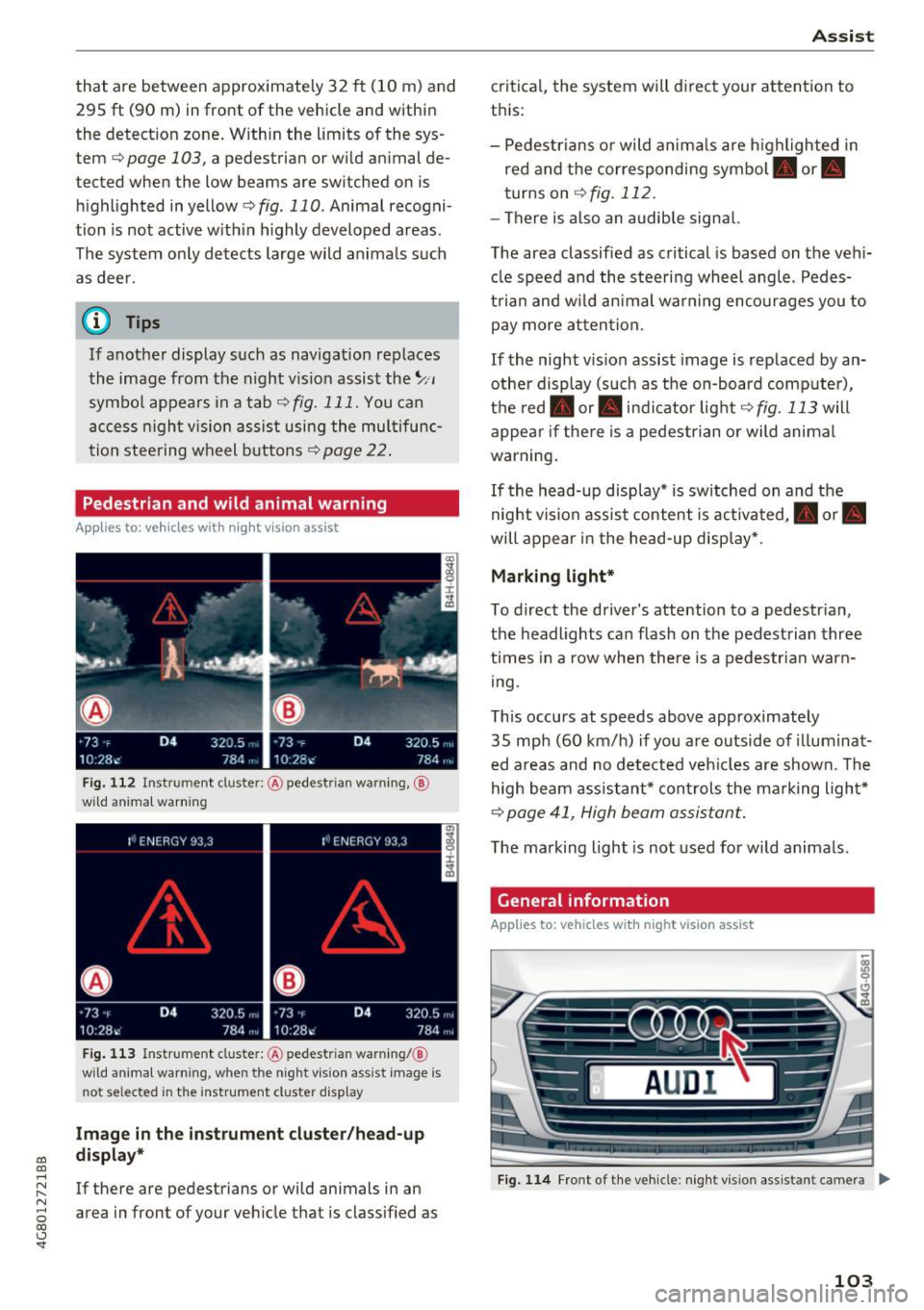
F ig . 11 2 Instru ment clust er: @ pede stri an warn ing ,@
wild animal warnin g
Fig . 11 3 In strument clus te r: @ pedest ria n warn ing/ @
wi ld an imal warning, when the nigh t vis ion a ssis t image is
n ot se lec ted in the instrument clust er dis p lay
Image in the inst rument clu ster /h ead -up
di spla y*
If there are pedestrians or wild animals in an
area in front of your veh icle that is class ified as
A ss ist
critica l, the system will d irect your attention to
t h is:
- Pedestrians or wild anima ls are h ighl ighted in
red and the corresponding symbol. or.
turns on
¢ fig. 112 .
-There is also an audib le signal.
T he area classified as critical is based on the vehi
cle speed a nd the steering wheel angle . Pedes
t rian an d w ild an imal warning encourages you to
pay more atten tion.
If the night vision assist image is replaced by an
othe r display (such as the on-board comp ute r),
t h e red . or. in d icator light ¢
fig . 113 will
appea r if the re is a pedestrian or wild animal
war ning .
If the head-up display* is sw itched on and the
night vis ion assist content is activated, . or.
will appe ar i n the head-up displ ay* .
Marking light*
To direct the driver's attention to a pedestr ian ,
the headlights can flash on the pedestrian three
t imes in a row whe n there is a pedestr ian warn
i ng .
This occurs at speeds above approximately
35 mph (60 km/h) if you are outside of illuminat
ed a reas and no de tected veh icles are shown. Th e
high beam assistant* con trols the ma rking ligh t*
¢ page 41, High beam assis tant.
T he ma rking light is not used for wild anima ls .
General information
Applies to: vehicles with night vision assist
Fig. 1 14 Front of the ve hicle : n ig h t v is io n as sist an t cam era ..,_
103
Page 108 of 284

Ass is t
depending on the s ituation. The distr ibution of
power varies from balanced (comfort) to sporty
(dynamic) depending on the selected mode. The
goal is a high leve l of agility and ability to accel
erate on curves. The veh icle is very responsive to
steer ing .
Cornering light*
The cornering light adapts the high beams to the
direction of the curve depending on the speed.
The pivot ing action and the lighting also adapt to
the mode.
Adaptive c ru ise contr ol*
The behavior when acce le rating can be adjusted
from comfortable to sporty, depending on the
drive select mode. Adaptive cruise control a lso
responds to the driving behavior of the veh icle
ahead in a more conservative or sporty manner.
Engine sound *
The engine sound adapts to the current mode
and can be subtle to sporty .
(D Note
Applies to: vehicles with adaptive air suspension
- Make sure there is enough clearance above
and below the veh icle when parking. The
height of the vehicle (ground clearance) can
change once it is parked due to tempera ture
fluctuations, changes to the load condit ions
and c hanges to the d riving modes.
- When transporting the veh icle on a car car
r ier, tra in, ship or by other means, only tie
the veh icle dow n at the running surfa ce of
the tires, w hic h is the outer circ umference .
Securing the vehicle at the axle compo
nents, suspension st ruts or towing eyes is
not permitted because the pressure in the
air suspension struts can change dur ing
transport . The vehicle may not be secured
sufficiently if this happens.
(D Tips
- In some models, the maximum vehicle
speed can only be reached in the auto and
dynam ic modes.
106
- The S se lector lever position a utomat ica lly
engages if the dynamic mode is selected.
- Applies to: vehicles with dynamic steering:
operating noise is heard when starting or
stopp ing the engine. Th is does not indicate
a problem.
Selecting the driving mode
F ig. 116 Infota inmen t: drive select
'" To select the mode, select the follow ing in the
Infota inment :
!CAR ! function b utton> Comfort ,
Auto , Dynamic or Individu al.
'" Applies to: vehicles with a ti.re'! button on the
steering wheel: press the button repeatedly un
til the desired mode appea rs in the instrument
cl uste r display.
You can change the driv ing mode when the vehi
cl e is stationary or while driv ing. If traff ic per
mits, afte r changing modes, briefly ta ke your
foot off the accelerator pedal so that the recently
selected mode is also activated fo r the engine.
Comf ort -prov ides a comfort -or iented vehi cle
setup and is suited fo r long drives on highways.
Auto -provides an overal l comfortab le yet dy
namic dr iv in g feel and is suited for everyday use.
Dynamic -gives the dr iver a sporty driving fee l
and is suited to a sporty d riving style .
Individual -¢ page 107.
A WARNING
Pay attention to traffic when ope rating the
d rive select to reduce the r is k of an accident.
-