check AUDI A7 2018 User Guide
[x] Cancel search | Manufacturer: AUDI, Model Year: 2018, Model line: A7, Model: AUDI A7 2018Pages: 274, PDF Size: 42.77 MB
Page 41 of 274

a co ,...,
N
" N ,...,
0 00 <.,;) '
Exterior Lighting
Switching lights on and off
F ig. 33 Instrument panel: l ig ht switc h w ith all-weather
lights
Light switch -t;..-
T u rn the switch to the co rresponding posi tion.
When t he lig hts are sw itched on, the
:oo: symbo l
turns on.
0 - The lights a re off or the daytime running
l ights are on:
- USA models: The daytime runn ing lig hts will
come on automatically when the ignition is on
and the light sw itch
q fig . 33 is in the O posi
t ion or the
AUTO pos ition (only i n day light con
di tions). The
Daytime running lights func tion
ca n be turned on and off in the MM I
qpage41, q _& .
-Canada models : The daytime runn ing lights
will come on au toma tically when t he ignit ion is
on a nd the light swi tch
q fig . 33 is in the O po
sition, the
: oo: position or the AUTO position
(only in daylig ht conditions)
q ,& .
AUTO -automa tic headligh ts sw itc h on and off
depending on brigh tness, fo r example in tw ilight,
d uring rain or in tunne ls.
:oo : -Parking lights
~D -Low beam headlights
~ -All-weather lights
@il -Rea r fo g lights
Lights and V ision
All-weather lights
T he front lig hts a re adjus ted au toma tic a lly so
t h at there is less glare fo r th e driver from his o r
her own lights, fo r example when roads are wet.
Automatic dynamic headlight range control
system
Yo ur vehicle is equipped with a headlight ra nge
contro l system so that there is less g lare for on
coming traff ic if the vehicle load changes . The
headlig ht range also adjusts automatically when
braking and accelerat ing .
Light functions
The following light funct ions may be ava ila ble
depending on vehicle eq uipment and only f unc
tio n when the lig ht switch is in the AUTO posi
t ion.
Static cornering light* -the corne ring light
switches on automatically at speeds up to ap
prox imately 44 mph (70 km) when the steering
whee l is at a certain ang le. The area to t he side of
the vehicle is illuminated better when turning.
A WARNING
-- Automatic headlights are only intended to
assist the driver. They do not relieve the
driver of respons ibi lity to check the head
lights and to t urn them on manu ally b ased
on the curre nt ligh t and v is ib ility conditions .
For examp le, fog canno t be detected by the
light sensors. So always switch on the low
beams under these weather conditions and
when driving in the dark
~D.
- To prevent glare fo r traffic be hind yo ur vehi
cle, the rear fog lights should only be turned
on in accordance with traff ic regulat ions.
- Always observe legal regulations when us
ing the lighting systems desc ribed.
(D Tips
- T he lig ht sensor for the automat ic he ad
lights is located in the rea rview mirror
mount. Do not p lace a ny st icke rs in this area
on the windshie ld.
- Some exter io r l ight ing funct io ns can be ad
justed
q page 41.
39
Page 48 of 274

Lights and Vi sion
-Worn or dirty windshield wipe r blades result
in streaking. This can affect the rain sensor
funct ion . Check your winds hield wiper
blades regularly.
-The washer fluid nozzles for the windshie ld
washer system are heated at low tempera
tures when the ignition is on .
-When stopping temporarily, such as at a
traffic light, the speed of the windshie ld
wipers automatically reduces by one level.
Cleaning windshield wiper blades
Clea n the w iper blades when you see wiper
streaks . Use a soft cloth and a glass cleaner .
.. Place the windshield wiper arms in the service
pos ition
¢ page 46.
.. Fold the windshield wiper arms away from the
windsh ield .
.&_ WARNING
Dirty w indshield wipe r blades can impair v i
sion , which increases the risk of a n accident .
Replacing windshield wiper blades
Fig . 44 Re mov ing w indshi eld w iper blades
Windshield wiper service position /blade
replacement po sition
-
:::
9 J: ... a,
.. Switch the ign ition off and move the winds hield
wipe r leve r to posit ion @
briefly ¢ page 45,
fig. 43. The w indshie ld w ipers move in to the
service pos ition .
.. To bring the windshield wipers back to the nor
mal position, switch the ignition on and hold
the windshie ld wiper lever in position @ until
the windshie ld w ipers go back to the normal
pos ition, or dr ive faster than 8 mph (12 km/h) .
46
You can also turn the service pos ition on or off in
the Infotainment system:
.. Switch the windshie ld w ipers off (posit ion @
¢ page 45, fig. 43).
.. Select: the I CAR I funct ion button > ( Car) * Sys
t e m s
control button > Servic e & control > Wip·
er change po sition.
> On /Off
Remo ving th e wipe r blade
.. Fold the windshie ld wiper arm away from the
w indshield .
.. Press the locking knob (D ¢ fig. 44 on the w iper
blade . Hold the wiper blade firmly .
.. Remove the wiper blade in the d irection of the
ar row .
Installing the w ipe r blade
.. Insert the new wiper blade into the mount on
the wiper arm @until it clicks into place.
.. Place the w iper arm back on the windsh ield .
.. Turn the service pos ition off .
.&_ WARNING -
Fo r safety reasons, the wi ndshield wipe r
b la des should be rep laced once o r twice eac h
year .
(Llj) Note
-Only fold the w indshie ld w ipers away when
they a re in the se rvice pos ition. Otherwise,
yo u r isk damag ing the pa int on the hood o r
the winds hield wiper motor .
-You should not move your ve hicle or operate
the winds hield wipe r leve r whe n the w iper
arms are folded away from t he windshie ld .
Th e windshie ld wipers would move back in
to their original position and co uld damage
the hood and w indshie ld.
(D Tips
-You can also use the service position, for ex
ample, if you want to protect the windshield
from icing by using a cover .
-You cannot activate the service position
when the hood is open.
Page 57 of 274
a co ,...,
N
" N ,...,
0 00 <.,;) '
.,. Pull the release lever @¢ fig. 61 in the direc-
tion of the arrow to fo ld the backrest forward.
Folding the backrest back into the upright
position
.,. Fold the backrest back up aga in until it latches
and the red marking @ is no longer visible
~ A -
A WARNING
-Be careful when folding the backrests for
ward! Not paying attention and not check
ing when folding the backrests can lead to
pinching injuries .
- The backrest must be latched securely to
ensure that the safety belt is protecting the
center seating position .
- The backrest must be securely latched so
objects cannot slide forward out of the lug
gage compartment dur ing sudden braking .
(D Note
-If you move the front seat back when the
rear seat backrest is folded forward , you
could damage the head restraints on the
rear seat.
- To reduce the risk of damage, move the rear
head restraints down before folding the
rear backrests forward
~ page 49 .
-When folding the backrest forward, make
sure the outer safety belts are in the belt
guide recess so that they do not get pinched
in the backrest lock and damaged . Other ob
jects should be removed from the rear
bench seat to protect the backrest from
damage .
-
Seats and storage
Tie-downs
Applies to: vehicles with tie -downs
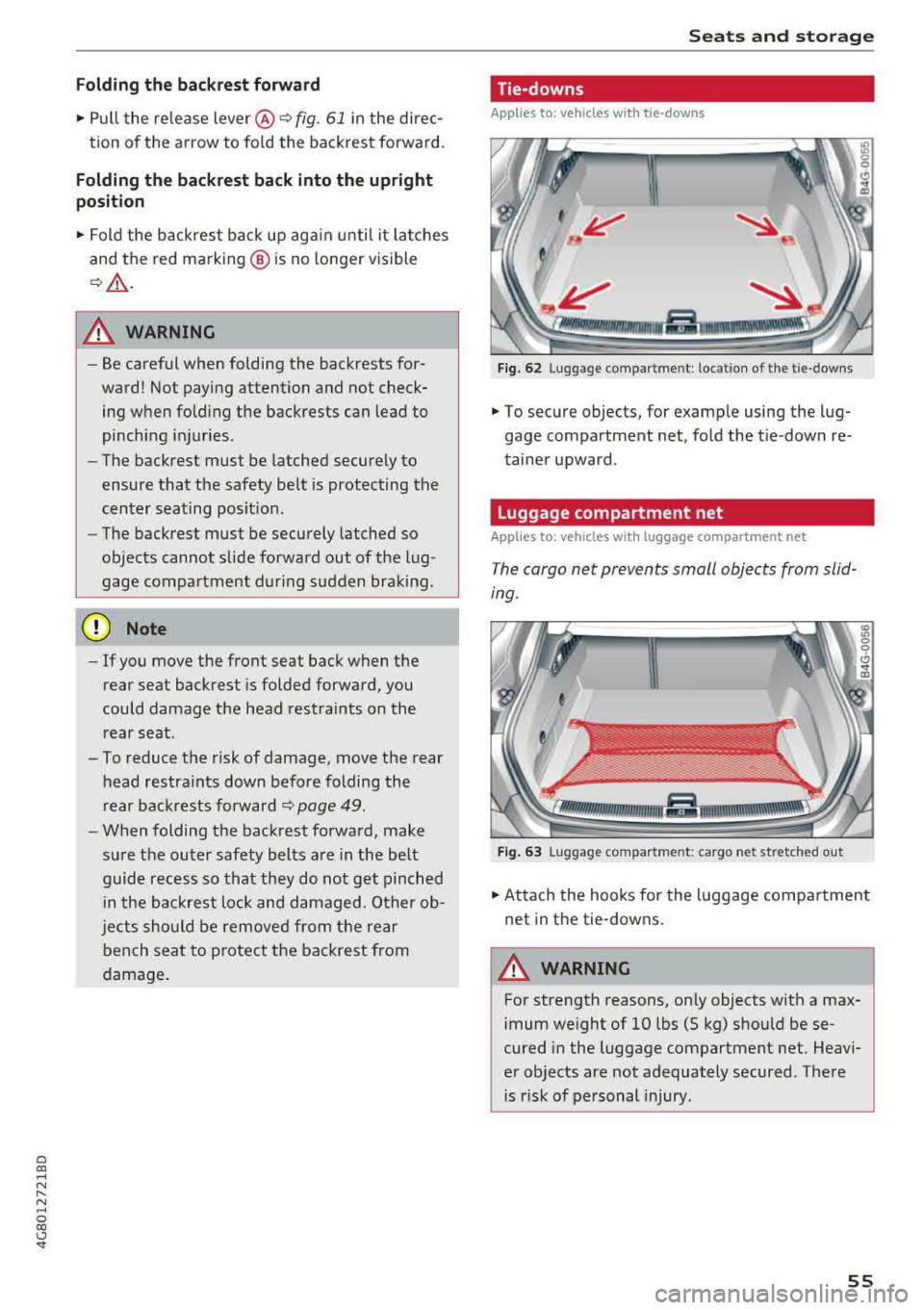
Fig. 62 Lug gage compar tmen t: loc ation of the tie -d owns
... To secure objects, for example using the lug
gage compartment net, fold the tie -down re
tainer upward .
Luggage compartment net
Applies to: vehicles wit h luggage compartment net
The cargo net prevents small objects from slid
ing.
Fig. 63 Luggage compar tmen t: cargo net st retched ou t
... Attach the hooks for the luggage compartment
net in the tie-downs.
A WARNING
-
For strength reasons, only objects with a max-
imum weight of 10 lbs (5 kg) should be se
cured in the luggage compartment net. Heavi
er objects are not adequately secured . There
is r isk of personal injury .
55
Page 60 of 274

Warm and cold
Warm and cold
Climate control system
Description
The climate control system warms, cools and re moves humidity from the air in the vehicle interi
or. It is the most effective when the windows and
sunroof* are closed. If there is a bui ld-up of heat
inside the vehicle, ventilation can he lp to speed
up the cooling process.
I n all heating mode functions, except for defrost,
the blower only switches to a higher speed once
the engine coolant has reached a sufficient tem
perature.
Pollutant filt er
The po llutant filter removes poll utants such as
dust and pollen from the a ir .
Ke y re cognition
A pp lies to: ve hicles w ith de luxe au toma tic clima te co ntrol
The blower sett ing and air distribution are stored
automatically and ass igned to the remote control
key that you are using.
A pp lies to: ve hicles w ith 4 -zo ne del uxe automatic c limate
co ntrol
The climate control set tings are automatically
stored and assigned to the remote control key
that is in use.
A WARNING
Poor visibility can lead to accidents.
- For safer driving, keep all windows free of
ice, snow and fog .
- Become familiar as quickly as possible with
the correct use and function of the climate contro l system, especially with the defrost
ing and defogg ing function.
58
- When the temperature is below freezing,
only use the windshield washer system after
the windshield has been warmed by the cli mate control system . The washer fluid could
freeze on the w indsh ield and impair v isib il i
ty .
@ Note
-If you suspect that the climate contro l sys
tem is damaged, switch the system
off to
prevent further damage and have it checked
by an authorized Aud i dea ler or authorized
Audi Serv ice Facility.
- Repa irs to t he Aud i climate control system
require special techn ical know ledge and
special tools. See an aut ho rized Aud i dea le r
or authorized Aud i Serv ice Fac ility .
@) For the sake of the environment
To save fue l, turn off cooling mode by press
i ng the
IA/Cl button. This will a lso reduce
emissions.
(D Tips
- T o prevent i nterference with t he heat ing
and cooli ng outpu t and to p revent the win
dows from fogging over, the a ir intake in
front of the windshie ld must be free of ice,
snow or leaves.
- C ondensation from the coo ling system can
drip and form a pudd le o f water under the
vehicle . This is norma l and does not mean
there is a leak.
- Th e energy management system may tem
porarily switc h
off certain functions, such as
the seat heating* or rear window defogger.
These systems are ava ilable again as soon
as the energy supply has been restored.
Page 67 of 274

a co .... N
" N
-Keep in mind that oncoming vehicles may
create waves that raise the water level and
make it too deep for your vehicle to drive
through safely.
-Avoid driving through salt water, because
this can cause corrosion.
Economical and environmentally-friendly
driving
The amount of fuel consumption, the environ
mental impact and the wear to the engine,
brakes and tires depends mostly on your driving
style. With an anticipatory and economic driving
style, fuel consumption can be reduced by ap
proximately 10-15%. The following tips will help
you conserve the environment and your money at the same time.
Anticipatory driving
A vehicle uses the most fuel when accelerating.
When you drive with anticipation, you do not
need to brake as often and so you accelerate less.
When possible, let your vehicle coast with a
gear
engaged, for example, when you notice that the
next traffic light is red. This produces an engine
braking effect, which helps to protect the brakes
and tires and reduces the emissions and fuel con
sumption to zero (fuel shut-off during decelera
tion) .
Shift efficiently
Upshifting earlier is an effective way to save fuel.
Staying in a gear too long uses fuel unnecessari
ly .
Press down on the accelerator pedal slowly and
avoid "kick-down".
Avoid full acceleration
You should rarely travel at the maximum vehicle
speed. High speeds cause a disproportionately
high increase in fuel consumption, emissions and
traffic noise. Slower driving saves fuel.
Reduce idling time
The Start/Stop system* helps to reduce the idling
time automatically. In vehicles without the Start/
8 Stop system*, it is efficient to switch the engine 00 \.J '
off when stopped at railroad crossings and long
red lights. Stopping the engine for 30-40 sec
onds already saves more fuel than the amount of
extra fuel needed to restart the engine.
It takes a very long time in idle to warm the en
gine up to operating temperature. Wear and
emissions are especially high in the warm-up
phase. Therefore, you should begin driving im
mediately after starting the engine. Avoid high
RPMs while doing this .
Have maintenance performed regularly
By having maintenance performed regularly on
your vehicle, you can help to reduce fuel con
sumption before you even start to drive. The maintenance condition of your vehicle not only
affects traffic safety and long-term value but al
so impacts
fuel consumption . A poorly main
tained engine can lead to fuel consumption that
is 10% higher than normal.
Avoid short trips
The engine and emissions control system must
reach their optimal operating temperature to ef
fectively reduce consumption and emissions .
A cold engine uses a disproportionately high amount of fuel. The engine reaches operating
temperature and consumption normalizes only
after approximately
2 .5 miles (4 km) .
Check the tire pressure
To save fuel, make sure the tires are always in
flated to the correct pressure
Q page 215. The
fuel consumption can increase by S% if the pres
sure is only 0.5 bar too low . Due to the increased
rolling resistance, low tire pressures will also
lead to greater tire
wear and will affect driving
behavior.
Do not drive on
winter tires year -round, as this
will consume up to 10% more fuel.
Eliminate unnecessary weight
Since every pound of extra weight increases fuel
consumption, a quick inspection of the luggage
compartment may be worth it to avoid unneces -
sary weight.
.,.
65
Page 68 of 274

Driving
When not being used, a roof rack should be removed to decrease the wind resistance of the ve
hicle. You will save approximately 12% of your
fuel when at speeds from 62- 7 5 mph
(100-120 km/h) .
Save energy
The engine drives the generator, which generates
electricity ; the fuel consumption also increases
with the demand for electricity. Therefore, switch electrical equipment off when you no longer
need it. Examples of equipment that uses a lot of
energy are air blowers at a high setting, the rear
window defogger and seat heating* .
@ Note
Do not leave engine idling unattended after
starting. If warning lights should come on to
ind icate improper operation, they would go
unheeded. Extended idling also produces
heat, which could result in overheating or
other damage to the vehicle or other proper-
ty.
@ Note
- Have your vehicle maintained properly and
in accordance with the service recommenda
tions in your Warranty
& Maintenance book
let. Lack of proper maintenance as well as
improper use of the vehicle will impair the
function of the emission control system and
could lead to damage.
- Do not alter or remove any component of
the Emission Control System unless ap proved by the manufacturer .
- Do not alter or remove any device , such as
heat shields, switches, ignition wires,
valves, which are designed to protect your
vehicle's Emission Control System and other important vehicle components .
@ Tips
The consumption estimates as published by
ENVIRONMENTAL PROTECTION AGENCY (EPA) and Transport Canada may not corre
spond to your actual consumption on the
road, which will vary depending upon vehicle
66
load and speed, road and weather conditions ,
trip length, etc.
Steering
Manual steering wheel position adjustment
Applies to: vehicles with manual steering wheel adjustment
The steering wheel posi tion is adjustable up and
down and forward and back .
Fig. 74 Lever on th e stee ring column
.,. Pull the lever in the direction of the arrow
~A -
... Bring the steering wheel into the desired posi
tion .
.,. Push the lever against the steering column un
til it is secure.
A WARNING
Improper use of steering wheel adjustment
and improper seating position can cause seri
ous personal injury.
-Adjust the steering wheel column only when
the vehicle is not moving to prevent loss of
vehicle control.
-Adjust the driver's seat or steering wheel so
that there is a minimum of 10 in (25 cm)
between your chest and the steering wheel
~page 130, fig. 140 . If you cannot main
tain this minimum distance, the airbag sys
tem cannot protect you properly .
- If physical limitations prevent you from sit
ting 10 in (25 cm) or more from the steer
ing wheel, check with your authorized Audi
dealer to see if adaptive equipment is avail-
able.
.,.
Page 69 of 274
a co ,...,
N
" N ,...,
0 00 <.,;) '
face, the supplemental driver's airbag can
not provide as much protection in an acci
dent . Always make sure that the steering
wheel is aligned with your chest .
- Always hold the steering wheel with your
hands at the 9 o'clock and 3 o'clock posi
tions to reduce the risk of personal injury if
the driver's airbag deploys.
- Never hold the steering wheel at the 12 o'clock position or with your hands inside
the steering wheel rim or on the steering
wheel hub. Holding the steering wheel the
wrong way can cause serious injuries to the hands, arms and head if the driver's airbag
deploys.
Power steering wheel position adjustment
Applies to: veh icles with power steering wheel adjustment
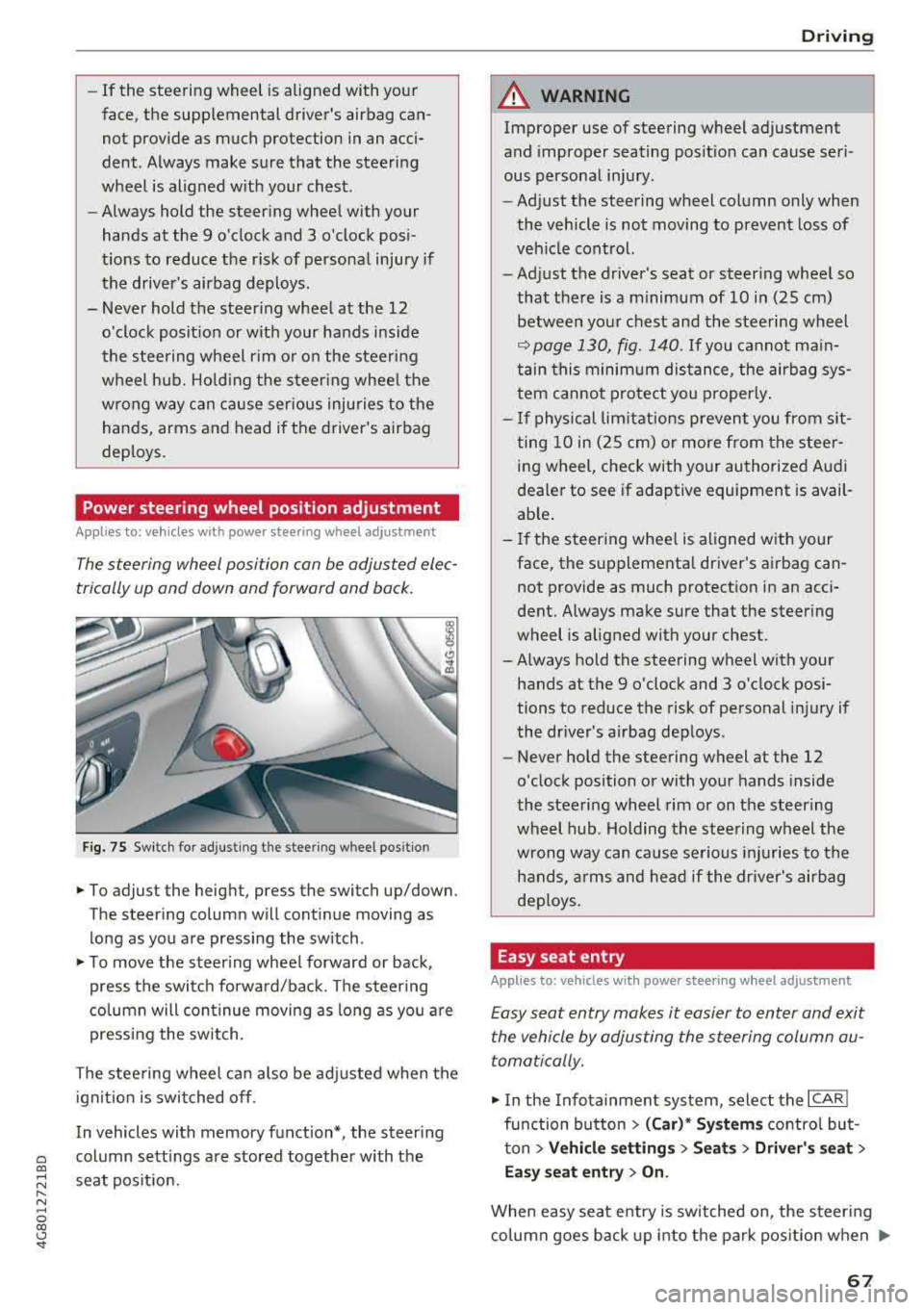
The steering wheel position can be adjusted elec
trically up and down and forward and back.
Fig. 75 Switch for adjusting the steering whee l pos itio n
.,. To adjust the height, press the switch up/down.
The steering column will continue moving as
long as you are pressing the switch .
.,. To move the steering wheel forward or back,
press the switch forward/back. The steering
column will continue moving as long as you are
pressing the switch.
The steering wheel can also be adjusted when the ignition is switched off .
In vehicles with memory fun ction*, the steering
column settings are stored together with the
seat position.
Driving
A WARNING
Improper use of steering wheel adjustment
and improper seating position can cause seri
ous personal injury.
- Adjust the steering wheel column only when
the vehicle is not moving to prevent loss of
vehicle control.
- Adjust the driver's seat or steering wheel so
that there is a minimum of 10 in (25 cm) between your chest and the steering wheel
¢ page 130, fig. 140. If you cannot main
tain this minimum distance, the airbag sys
tem cannot protect you properly.
- If physical limitations prevent you from sit
ting 10 in (25 cm) or more from the steer
ing wheel, check with your authorized Audi
dealer to see if adaptive equipment is avail
able.
- If the steering wheel is aligned with your
face, the supplemental driver's airbag can not provide as much protection in an acci
dent. Always make sure that the steering
wheel is aligned with your chest.
- Always hold the steering wheel with your
hands at the 9 o'clock and 3 o'clock posi
tions to reduce the risk of personal injury if
the driver's airbag deploys .
- Never hold the steering wheel at the 12
o'clock position or with your hands inside
the steering wheel rim or on the steering
wheel hub. Holding the steering wheel the
wrong way can cause serious injuries to the
hands, arms and head if the driver's airbag
deploys.
Easy seat entry
Applies to: vehicles with power stee ring wheel adjus tment
Easy seat entry makes it easier to enter and exit
the vehicle by adjusting the steering column au
tomatically.
.,. In the Infotainment system, select the ICARI
function button > (Car)* Systems control but
ton
> Vehicle settings > Seats > Driver's seat >
Easy seat entry > On.
When easy seat entry is switched on, the steering
column goes back up into the park position when
.,.
67
Page 73 of 274

the brake pedal. The [IJ indicator light appea rs
in the information line at the bottom of the in
str ument cl uster d isp lay . The needle in t he
tachometer also moves into the
READY pos i
t ion
ll .
"'The eng ine starts aga in when yo u take yo ur
foot off t he brake pedal. The ind icator light
tu rns off .
Additional information
The engine stops in the P, N and D se lecto r lever
positions.
If yo u select the R pos ition dur ing a stop phase,
the eng ine will start again.
Shift to P quickl y to prevent t he en gine from
starti ng u ninten tiona lly w hen s hift ing t hrough R.
You can dete rm ine fo r yo urself if t he e ng ine will
s top o r not b y reducing or increas ing the amoun t
of force yo u use to p ress the bra ke pe dal. Fo r ex
ample, if you only lig htly press on t he b rake ped
a l in stop -and -go traffic or w hen turning, the en
g ine will not switch
off when the vehicle is sta
tionary. As soon as yo u press the brake down
ha rder, the eng ine will sw itc h off.
(D Tips
- Press t he b rake pedal durin g a Stop phase
to keep the ve hicle from roll ing.
- The ignition wi ll tu rn
off if you press the
I START E N GINE ST OP I button dur ing a stop
phase. The nee dle in the tachomete r moves
i nto the
OFF posi tio n.
General information
A pp lies to: ve hicles w ith Sta rt/Stop system
The standard Start/Stop mode can be canceled
for various system-related reasons .
Engine does not switch off
Before and during eac h stop phase, the system
checks if certai n cond itions have been met . If the
fjj indicato r light appears in the instrument cl us
ter d isp lay, the engine w ill not be stopped, for
a ~ examp le in the fo llow ing s ituations:
N
" N ..... 0 00
~ ll Ma rket -spe cific
Driving
- The engine has not reached the minim um re
qui red tempe rat ure for Sta rt/Sto p mode.
- The interior tempera ture selec ted by the cl i-
mate co ntrol system has not been reached .
- The ou tside te m pe rat ure is ex tremely high/low.
- The win dshi eld i s bei ng
d efros ted® .
-The parking sys tem * is sw itched on .
- The vehicle battery charge level is too low .
- The steering wheel is tu rned at a sha rp angle o r
is moving.
- After engaging the reverse gear .
- On sharp incl ines .
Engine automatically restarts
The stan dard S tart/S top mode w ill be canc eled
dur ing a sto p p hase in the followi ng si tuatio ns.
T he eng ine res tarts wi thout a ny ac tion by the
drive r.
- The ve hicl e ro lls, fo r ex am ple whi le o n a slo pe.
- The inte rior tempe ra ture differs from t he tem-
pe ra tu re sele cte d in t he A/C sys tem.
- The winds hield is bei ng
d efros ted® .
-The brake peda l is pressed severa l times in a
row .
- The vehicle battery charge level is too low.
- Powe r consumption is high .
T he eng ine can turn off ag ain when the cond i
tions for Sta rt/Sto p mode a re met.
Ignition is switched off automatically
T o p reve nt t he vehicle batte ry from dra ining, the
i gni tion will switc h off
automatically und er the
f o llow ing co nd itio ns:
- The vehicle has already been dr iven .
- The Start/Stop system has stopped the engine .
- The driver 's door is opened.
- The driver's sa fety belt is unbuck led .
- The brake peda l is not presse d.
- The ve hicl e is sta tion ary.
In this case , the activated low beam is re placed
by the p arking ligh t. T he par kin g lig hts wi ll
swi tch off afte r appr oximat ely 30 minu tes or
whe n you lock the ve hicle.
71
Page 83 of 274

a co .... N
" N .... 0 00 \.J -
General information
Your veh icle is primar ily intended for transport
ing people and luggage. However, if you dr ive
with a trailer , follow the technical requirements,
the operation and driving tips, and the legal reg
u lations.
Driving with a trailer affects the vehicle 's fuel
consumption, performance and wear. It also re
quires highe r concentration from the driver.
A WARNING
Do not transport any people in a trailer due to
the risk of fatal injury.
Technical requirements
Certain requirements must be met when towing
a trailer.
Trailer hitch
Only use a trailer hitch with a removab le ball
hitch mount and ball hitch. The trailer hitch must
be perm itted for the vehicle, the trailer and the
permitted total weight of the trailer being
pu lled. Above all, it must be secure ly and safe ly
attached to the vehicle trailer.
Never mount a trailer hitch on the bumper. The
trailer hitch must be mounted in a way that does
not impair the function of the bumper. Do not
make any changes to the exhaust system and the
brake system.
Check regularly if the trailer hitch is securely
mounted. A lways follow the instructions given by
the trai ler hitch manufacturer .
Trailer brakes
If the tra iler has its own brake system, then fol
l ow the manufacturer specifications. However,
the brake system on the trailer must never be
connected to the vehicle brake system.
Trailer towing
Engine cooling system
Driving with a trailer means a higher load on the
engine and the cooling system. The coo ling sys
tem must be designed for additiona l load and
contain enough coo lant
i::> @ .
@ Note
Longer inclines cannot be driven without a
suitab le cooling system, especia lly if t he out
side temperatures are high . otherwise, this
increases the risk of engine damage.
Operating instructions
Several things must be noted when towing a
trailer.
Towing capacity
Your vehicle can only be operated with class 1 or
class 2 trailers.
Load distribution
Poor cargo load and distribut ion can negatively
impact vehicle handling.
- Store objects preferably in the vehicle luggage
compartment . The vehicle should always carry
the heaviest poss ible load and the trailer
should have the lightest possible load.
- Distribute the load in the trailer so that the
heavy objects are as close to the axle as poss i
b le.
- Secure objects from sl iding out of place .
- Ut ilize the maximum permitted tongue weight
if possible .
Tires
Set the tire pressure on your vehicle for a "full
load"; see the tire pressure sticker
c::>page 215.
If necessary, also adjust the tire pressure on the
trailer according to the manufacturer's recom mendat ion .
Winter tires should be mounted on the vehicle and on the trailer during winter temperatures.
Outside mirrors
If you cannot see the tra ffic behind the trailer
with the standard exterior mirrors, then you
81
Page 84 of 274
Trail er to wing
must attach additiona l exterior mirrors . Adjust
them so you have a sufficient visibility behind
you .
Exterior lighting
Follow the lega l regulat ions regard ing the light
ing eq uipment on your trailer . Conta ct an author
ized Audi dealer or authorized Audi Service Facili
ty for more information.
Before start ing to drive, check a ll l ight ing equip
men t on the hitc hed trailer.
The headlig ht range contro l adjusts automatical
ly to the light range of the headl ights.
Safe ty chain s
Make sure the safety chains are correctly applied
when pulling a trailer . The chains should hang
enough so t hat the trailer can dr ive around
curves. However, they must not touch the
g round .
Air su spension
Applies to: vehicles with air suspension
The air suspension must be at the standard vehi
cle height before you set the tongue weight on
the trailer a nd h itch the trailer ¢@ ,
¢page 107,
Raising/lowering the vehicle.
For ve hicles w ith a factory-installed tra iler hitch,
the air suspension trailer mode will automat ically
sw itch on if you connect the trailer cable to the
socket.
For ve hicles w ith a retrof itted trailer hitch, you
must switch on the air suspension trailer mode
manually . Select in the Infota inment system:
ICARI function button > ( Car )* s yste m s contro l
button
> V ehicle setting s > Air su spen sion : trail
e r > On .
Switch it off again after tow ing a tra ile r.
You can also switch off tra iler mode ma nually
while driving, for example, when using a bicycle rac k system .
If you have to drive through difficult road condi
tions, you can raise the vehicle aga in after hitch
ing the t rai ler or after adjust ing the tongue
weight .
82
@ Note
Applies to: vehicles with air suspension
-Changes i n temperature or load can affect
the height of the vehicle .
- Set the air suspension to the standard veh i
cle he ight, otherwise the applicable tongue
we ight no longer appl ies to your veh icle.
(D Tips
- Use chocks when park ing on inclines if the
trai ler is loaded.
- We recommend also hav ing the vehicle in
spected between the inspection intervals if
you are towing a trailer frequently.
- Avoid driv ing with a trai ler dur ing the veh i
cle break-in per iod.
Driving with a trailer
Driving with a trailer requires extra caution.
Sp eed
Adhere to t he lega l speed lim its . Fo llow the legal
regu lations
specific to the country.
As the speed increases, the dr iv ing stab il ity of
t h e tra ile r decreases. Therefore you should not
exceed the max imum lega l speed lim it w hen
t h ere are unfavorab le road, weather and/or wind
conditions. This especia lly applies when driving
downh ill.
Yo u m ust always red uce your speed as soon as
you notice even the slightest swinging motion o f
the trai ler . Never try to "straighten out" the trai l
er by acce lerating.
The we ight d istr ibution is very poor if the vehicle
is empty and the trai ler is loaded. However if you
must drive under these circumstances, then drive
especially slowly .
Brakes
B rake in a time ly manner. Downs hift befo re dr iv
i ng down hill so that the engine can assist with
braking ¢&. .
When using a trailer w it h over run bra kes, fi rst
bra ke gently t hen q uick ly. This red uces the r isk of
j erking while braking if the trailer wheels lock up .
IIJJ,,