check AUDI A7 2018 Owner's Manual
[x] Cancel search | Manufacturer: AUDI, Model Year: 2018, Model line: A7, Model: AUDI A7 2018Pages: 274, PDF Size: 42.77 MB
Page 90 of 274

Assistance systems
-With stationary objects ¢ page 89.
A WARNING
Always pay attention to traffic when adaptive
cruise control is switched on and braking
guard is active. As the driver, you are still re
sponsible for starting and for maintaining
speed and distance to other objects. Braking
guard is used to assist you . The driver must
always take action to avoid a collision. The
driver is always responsible for braking at the
correct time.
- For safety reasons, do not use adaptive
cruise control when driving on roads with
many curves, when the road surface is in
poor condition and/or in bad weather (such
as ice, fog, gravel, heavy rain and hydroplan
ing). Using the system under these condi
tions increases the risk of an accident.
- Switch adaptive cruise control off tempora
rily when driving in turning lanes, on ex
pressway exits or in construction zones. This
prevents the vehicle from accelerating to
the stored speed when in these situations .
- The adaptive cruise control system will not
brake by itself if you put your foot on the ac
celerator pedal. Doing so can override the
speed and distance regulation.
- When approaching stationary objects such
as stopped traffic, adaptive cruise control
will not respond and braking guard will have limited function.
- The adaptive cruise control system and
braking guard do not react to people, ani
mals, objects crossing the road or oncoming
objects.
- The function of the radar sensors can be af
fected by reflective objects such as guard
rails, the entrance to a tunnel, heavy rain or
ice.
A WARNING
- Improper use of adaptive cruise control can
cause collisions, other accidents and serious
personal injury.
- Never let the comfort and convenience that
adaptive cruise control and braking guard
88
offer distract you from the need to be alert
to traffic conditions and the need to remain
in full control of your vehicle at all times,
- Always remember that the adaptive cruise
control and braking guard have limits -they
will not slow the vehicle down or maintain the set distance when you drive towards an
obstacle or something on or near the road
that is not moving, such as vehicles stopped
in a traffic jam, a stalled or disabled vehicle.
If registered by the radar sensors, vehicles
or obstacles that are not moving can trigger
a collision warning and if confirmed by the
video camera, an acute collision warning.
- Never follow a vehicle so closely that you
cannot stop your vehicle safely. The adap
tive cruise control cannot slow or brake the
vehicle safely when you follow another vehi cle too closely. Always remember that the
automatic braking function cannot bring the
vehicle to a sudden or emergency stop un
der these conditions .
- To prevent unintended operation, always
switch ACC off when it is not being used .
@ Note
The sensors can be displaced by impacts or
damage to the bumper, wheel housing and
underbody. That could affect the adaptive
cruise control system and braking guard .
Have an authorized Audi dealer or authorized
Audi Service Facility check their function.
© Tips
For an explanation on conformity with the
FCC regulations in the United States and the
Industry Canada regulations, see
¢page 258.
Page 98 of 274

Ass is tanc e system s
@ Note
The sensors can be displaced by impacts or
damage to the bumper, whee l housing and
underbody. Pre sense can be impa ired by th is.
Have an authorized Audi dea ler or author ized
Audi Serv ice Facility check their function .
(D Tips
-Certain pre sense front functions switch off
when sport mode is switched off or when
driv ing in reverse .
- The pre sense functions may not be availa
ble if there is a ma lfu nction in the ESC sys
tem or the airbag contro l module .
- The pre sense front/plus funct ions are not
available if there is a malf unction in the
adaptive cruise contro l*
system~ page 94.
-The pre sense rear/plus functions are not
available if the re is a malfunction in the s ide
ass ist* system
~ page 94 .
Audi active Lane assist
Description
Appl ie s to: ve hicles w ith Audi active lane assis t
Active lane assist det ects lane mark er lines with
in the limits of the system using a came ra in the
windshie ld. If you are approaching a detected
lane marker line and it appears likely that you
w ill leave the lane , the system will warn you w ith
correct ive steer ing . You can override t his steer ing
at any t ime . If yo u pass over a line, t he s teer ing
wheel will v ib rate l igh tly. In o rder for this wa rn
ing v ib ra tion to occur, i t mus t first be sw itche d
on in the Info tainmen t sys tem . Act ive lane assist
is ready for operation when the lane marke r line
is detected on at least one side of the vehicle.
T he system is designed fo r driving on express
ways and highways and therefore only activates
at speeds above approximate ly 40 mph (65 km/
h).
A pp lies to: ve hicles w ith s ide ass ist
If yo u ac tiva te a turn signa l when active lane as
sist is ready and it classifies a lane change as crit
ical because of ve hicles traveling a longside you or
approaching you, there will be noticeab le correc-
96
tive steer ing sho rt ly befo re yo u leave the lane.
This wi ll attempt to keep your ve hicle in the lane.
App lies to: vehicles wi thout s ide assis t
The system will not warn you befo re cross ing a
l ane mar ke r li ne if you have act ivated the t urn
s ignal. In this case, it assumes that you are
c h anging lanes intentionally.
App lies to: vehicles wit h adaptive c ruise contro l
The corrective steering is targeted based on the
driv ing situation . In add ition to the lane ma rke r
li nes , the system can a lso take into account other
objects such as guard rails . If they are detected in
close prox imity to the ve hicle, act ive lane ass ist
helps p reve nt the vehicle from dr iv ing too close
to t hem. The re is a lso pass ing ass ista nce. The
system does no t provide any co rrec tive steering if
i t detects that you are pass ing anot her vehicle.
A WARNING
- The system warns the drive r that the vehicle
is leaving the lane using cor rect ive steering.
The d rive r is always respons ible fo r keeping
the vehicle within the lane.
- The system can help you keep the vehicle in
the lane, b ut it does not d rive by itse lf. Al
ways keep your ha nds on the steering
wheel.
- Cor rective steering may not occur in certain
situations, such as d uring heavy braking .
- There may be cases where t he camera does
not recognize all la n e mar ker lines. Correc
tive steering can only take place on the s ide
of the vehicle where lane ma rker lines are
detec ted .
- Othe r road str uctures or objects could poss i
b ly be identified u nintent ionally as lane
ma rker lines. As a res ult, co rr ec tive stee rin g
m ay be u nexpec ted o r m ay n ot occur .
- The camera view ca n be res tricted, fo r ex
a mp le by ve hicles dr iving ahea d or by r ain,
snow, he avy spray or lig ht shin ing into t he
camera. This can resul t in a ctive lane ass ist
not detecting the lane ma rke r lines o r de
tect ing them inco rrectly.
Page 101 of 274

a co ,...,
N
" N ,...,
0 00 <..:l '
Description
App lies to: vehicles with Audi side assist
Fig. 104 Sensor detection range
Fig. 105 D isplay on the exterio r mirro r
Side assist helps you monitor your blind spot and
traffic behind your vehicle . Within the limits of
the system, it warns you about vehicles that are
com ing closer or that are traveling with you with
i n sensor range
(D c> fig. 104 : if a la ne change is
classified as c ritical, the display @ in the exter ior
mirror
c> fig. 105 t urns on .
The display in the left ex ter ior mirro r provides as
sis tance when making a la ne change to the left,
while t he d isp lay in the rig ht exterior mirror pro
vides assis tance when mak ing a lane change to
the right .
Information stage
As long as you do no t activate the turn signal,
side assis t
informs you about ve hicl es tha t are
detected and class ified as crit ic al. T he disp lay in
the m irror turns on, but is dim .
The display rema ins d im in the info rmat ion s tage
so that your view toward the front is not distur bed.
A ssi st a nce systems
Warning stage
If the display in a mirror blinks b rightly when you
activate a turn s ignal, s ide assist is
warning you
about detected vehicles that it has classified as
critical. If this happens, check traffic by glancing
in the exterior mirrors and over your shoulder
c> .&. in General information on page 100.
Applies to: vehicles with active lane assist
T he display in the mirror can also blink if you
have not activated a turn signal: if you are ap
proaching a detected lane marker line and it ap
pears you will be leaving the lane, side assist w ill
warn you about detected veh icles that it has clas
s ified as crit ical.
@ Tips
You can adjust the br ightness on of the d is
play on the rearview m irror
c> page 101.
99
Page 103 of 274

a co ..... N
" N ..... 0 00 <..:l '
behind very quickly. The display may not
turn on in time.
- In poor weather conditions such as heavy
rain, snow or heavy mist.
- On very wide lanes, in tight curves, or if
there is a rise in the road surface. Vehicles
in the adjacent lane may not be detected
because they are outside of the sensor
range.
- Audi side assist cannot detect all vehicles
under all conditions, which can increase the
risk of accidents.
- Please note that side assist only displays ap
proaching vehicles or vehicles in your blind
spot if your vehicle is traveling at least 19 mph (30 km/h).
- In certain situations, the system may not
work or its function may be limited . For ex
ample:
- The display may not turn on at the right
time if vehicles are approaching or passing
very quickly.
- In poor weather conditions, such as heavy
rain, snow or fog.
- In very wide lanes, in tight curves or when
there are slopes in the roadway, vehicles
in the neighboring lanes may not be de
tected because they are outside of the
sensor range .
(D Note
The sensors can be displaced by impacts or
damage to the bumper, wheel housing and
underbody. This can impair the system. Have
an authorized Audi dealer or authorized Audi
Service Facility check their function.
(D Tips
- If the window glass in the driver's door or
front passenger's door has been tinted, the
display in the exterior mirror may be incor
rect.
- For an explanation on conformity with the
FCC regulations in the United States and the
Industry Canada regulations, see
¢page 258.
Assistance systems
Switching on and off
Applies to : veh icles w it h Audi s ide ass ist
Fig. 108 Driver 's door : side assist button
.,. Press the button to switch the system on and
off ¢.&. in General information on page 100 .
The LED in the button turns on when side assist
is switched on.
Adjusting the display brightness
App lies to: veh icles w ith Audi s ide ass ist
The display brightness can be adjusted in the In
fotainment system .
.,. Select: the I CARI function button > (Car)* Sys
tems control button > Driver assistance > Audi
side assist .
The display brightness adjusts automatically to
the brightness of the surroundings, both in the
information and in the warning stage. In very
dark or very bright surroundings, the automatic
adjustment will set the display to the minimum
or maximum level. In such cases, you may notice
no change when adjusting the brightness, or the
change may only be noticeable once the sur
roundings change.
Adjust the brightness to a level where the display
in the information stage will not disrupt your
view ahead. If you change the brightness, the dis
play in the exterior mirror will briefly show the
brightness level in the information stage . The
brightness of the warning stage is linked to the
brightness in the information stage and is adjust-
ed along with the information stage .
II>-
101
Page 104 of 274

Assistance systems
@ Tips
-Side assist is not active while you are mak
i ng the adjustment.
- Your settings are automatically stored and
assigned to the remote control key being
used.
Messages
Applies to: ve hicles w ith Audi side assist
If side ass ist switches off by itself, the LED in the
button turns off and a message will appear in the
instrument cluster display:
Audi side assist: Currently unavailable . No
sensor vision
The radar sensor v is ion is impaired . Do not cover
the area in front of the sensors with b ike wheels,
stickers, dirt or other objects . Clean the area in
front of the sensors, if
necessary¢ page 100,
fig . 107.
Audi side assist: Currently unavailable
Side assist cannot be switched on at th is time be ·
cause there is a malfunction (for example, the
battery charge level may be too low).
Audi side assist: System fault!
The system cannot guarantee that it w ill detect
vehicles correctly and it has switched off. The sensors have been moved or are faulty. Have the
system checked by an authorized Audi dealer or
authorized Audi Service Facility soon.
Audi side assist: Unavailable when towing
Side assist switches off automatically when a fac
tory-installed trailer hitch is connected to the
electrical connector on the trailer . There is no
guarantee the system will sw itch off when using
a retrofitted trailer hitch. Do not use side assist
when towing a trailer.
102
Night vision assist with
pedestrian and wild
animal detection
Description
App lies to: vehicles wit h night vision assist
The night vision assist can detect, highlight and,
if necessary, warn about pedestrians and large wild animals.
Night vision assist with pedestrian and wi ld ani
mal detection assists you at night by using an
in ·
frared camera to monitor the area in front of
your vehicle, within the limits of the system. It can d isplay objects up to a distance of approxi
mately 1000 feet (300 m). The thermal image
detected by the camera is shown in the instru
ment cluster display. Warm areas appear lighter
and cold areas appear darker.
Highlighting detected pedestrians and wild
animals
Applies to: vehicles wit h night vision assist
Fig. 109 In stru men t cl uste r: yellow highlighted pedes ·
tria ns
Fig. 110 Instrument cl uster : sy mbol when the infrar ed im
age is not v isible
Within th e limits of the system, the night vision
ass ist can detect pedestrians and wild animals
..,..
Page 110 of 274

Parking syste m s
Parking systems
General information
A pplies to: ve hicles w ith pa rk in g system plus/rearview cam
era/peripheral camera
Depending on your vehicle 's equipment , various
parking aids will help you when parking and ma
ne uvering.
The
p ark in g sys tem plu s assists you when park
ing by aud ibly and visua lly indicating objects de
tected
in front of and behind the veh icle
Q page 109.
The rea rv iew c am era shows the area beh ind the
veh icle in the Infotainment system d isp lay. The
lines in the rearv iew came ra image he lp you to
pa rk or maneuve r
Qpage 110.
The peripher al c am era s assist you with parking
and maneuvering . You are aided by var ious cam
eras depend ing on the vehicle equipment leve l
Qpage 113. The pa rk ing system pl us functions
are also available
Q page 109 .
& WARNING
-Always look for traffic and check the area
around your vehicle by looking at it direct ly
as well. The parking system cannot replace
the driver's attent ion. The driver is always
respons ible when enter ing or leav ing a park
ing space and dur ing s imilar maneuvers.
- Please note that some surfaces, such as
clothing, are not detected by the system .
-
-Sensors and cameras have blind spots in
wh ich people and objects cannot be detect
ed . Be especially caut ious of small children
and animals .
- The sensors can be displaced by impacts or
damage to the radiator gr ille, bumper,
wheel housing and the underbody . The park
ing system may be impa ired as a result.
Have a n author ized A udi dealer or au thor
ized Audi Service Facility check their func
tion .
- Make s ure the senso rs ar e not obst ructed by
stickers, deposits or other materia ls. If they
are, the sensor function could be impaired.
For additiona l information on cleaning, see
Q page 228.
108
@ Note
-Some objects are not detected or disp layed
by t he system under certain c ircumstances:
- objects such as barrier cha ins, tra iler draw
ba rs, ve rtical po les o r fences
- objects above the sensors such as wall ex
tensions
- objects with certain s urfaces or structures
such as cha in li nk fe nces or powder snow
- If you continue driving closer to a low ob
ject, it may disappear from the sensor range . Note that you will no lo nger be
wa rned about th is obstacle.
- Keep enough distance from the curb to re
duce the risk of damage to the rims .
(D Tips
-The system may prov ide a war ning even
though there are no obstacles in the cover
age area in some situations, such as :
- certain road surfaces or when there is tall
grass
- exte rna l ul trasonic sources such as from
cleaning vehicles
- in heavy rain, snow, o r th ick vehicle ex
h a u st
- We recommend th at you practice p arki ng in
a traffic -free loca tion or parking lot to be
come fami liar with the system . When doing
this, there s hou ld be good light and weath
er conditions.
- You can change the vo lume and pitch of the
signa ls as well as the d isp lay
Q page 118.
- Please refer to the instructions for towing a
trai ler located in
Q page 118.
-What appea rs in the infotainment d isplay is
somewhat time -de layed.
- Th e sensors m ust be ke pt clean and free of
snow and ice for the parking aid to operate .
Page 112 of 274
Parking systems
Rearview camera
Introduction
Applies to: vehicles with rearview camera
I ' I
....
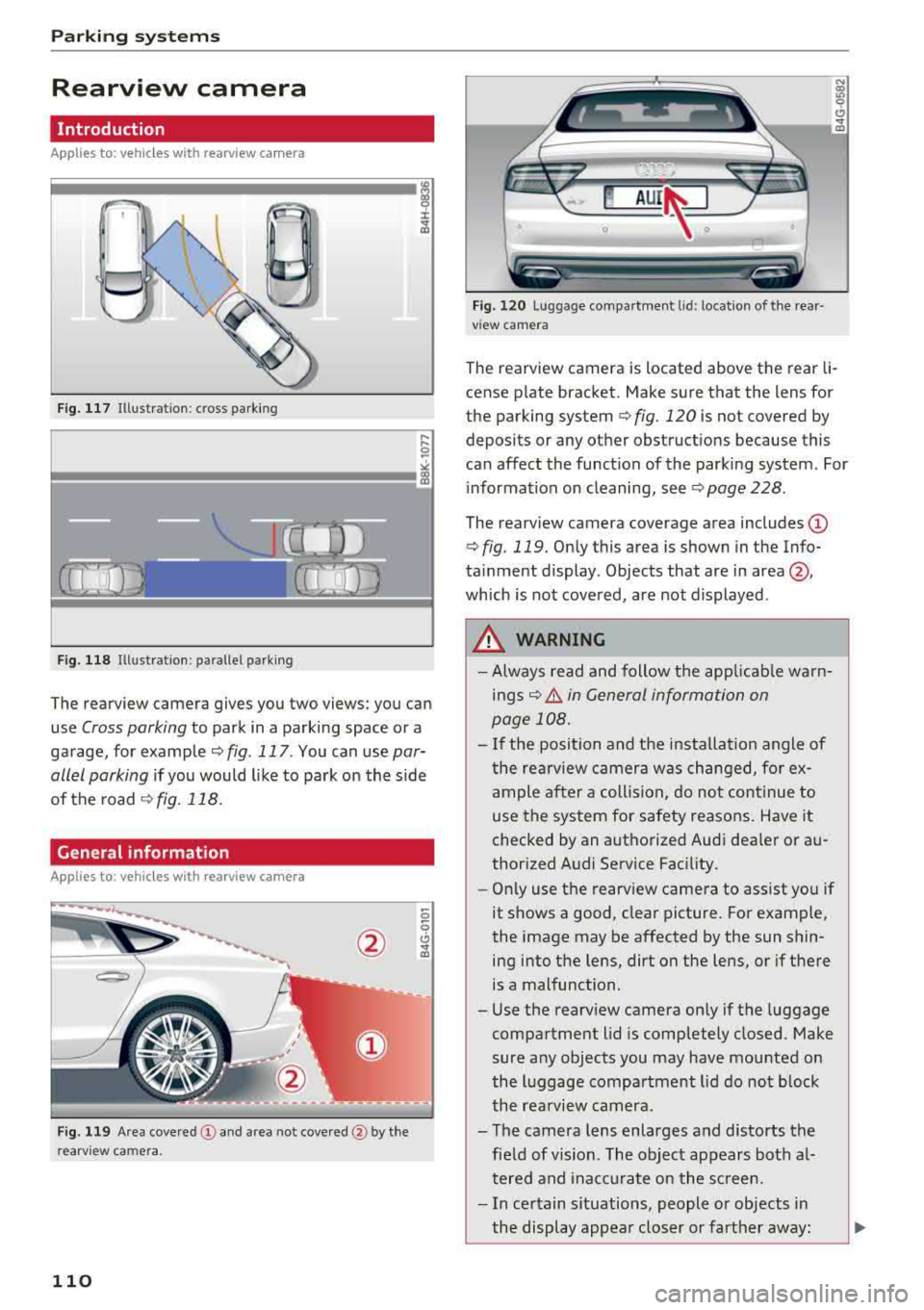
F ig. 117 Illustration: cross parking
Fig. 118 Illustration: parallel parking
The rearview camera gives you two views: you can
use
Cross parking to park in a parking space or a
garage, for example¢
fig. 117 . You can use par
allel parking
if you would like to park on the side
of the road
¢fig. 118.
General information
Applies to: ve hicles with rearview camera
F ig. 119 Area
covered (!) and area not covered@by the
re arv iew camera .
110
Fig. 120 Luggage compartmen t lid : location of the rear
v iew camera
The rearview camera is located above the rear li
cense plate bracket. Make sure that the lens for
the parking system
¢ fig. 120 is not covered by
deposits or any other obstructions because this
can affect the function of the parking system . For
information on cleaning, see ¢
page 228.
The rearview camera coverage area includes (D
¢ fig. 119. Only this area is shown in the Info
ta inment display . Objects that are in
area @,
which is not covered, are not displayed .
.&, WARNING
-Always read and follow the applicable warn
ings¢.&. in General information on
page 108.
- If the position and the installation angle of
the rearview camera was changed, for ex
ample after a collision, do not continue to
use the system for safety reasons. Have it
checked by an authorized Audi dea ler or au
thorized Audi Service Facility.
- Only use the rearv iew camera to assist you if
it shows a good, clear picture. For example,
the image may be affected by the sun shin ing into the lens, dirt on the lens, or if there
is a malfunction.
- Use the rearview camera only if the luggage
compartment lid is completely closed. Make
sure any objects you may have mounted on
the luggage compartment lid do not block
the rearview camera.
- The camera lens enlarges and distorts the field of vision . The object appears both al
tered and inaccurate on the screen.
- In certain situations, people or objects in
the display appear closer or farther away :
Page 125 of 274
a co .... N
" N .... 0 00 \.J '
the brakes in wet weather.
The braking effect can also be reduced if you are
driving on salted roads and you do not apply the
brakes for long periods of time. The layer of salt
on the brake rotors and pads must be worn off
first when the brakes are applied.
Due to its surface, the ceramic brake rotor* ab
sorbs moisture in certain situations. Therefore,
there will temporarily be less braking force than
when the brakes are dry. You can compensate for
this by pressing the brake pedal harder.
Corrosion
Leaving the vehicle parked for long periods of
time, low mileage and avoiding heavy braking
can contribute to corrosion on the brake rotors
and to dirty brake pads.
If you usually avoid heavy braking or if there is
corrosion present, occasional heavy braking at
high speeds is recommended to clean the brake
rotors and
pads ¢.&. .
Brake system malfunction
If you notice that the brake pedal travel has sud
denly increased, then a brake circuit in the dual
circuit brake system may have malfunctioned. Drive to an authorized Audi dealer or authorized
Audi Service Facility immediately to have the
problem corrected. On the way there, drive with
reduced speed and keep in mind that you will
need a longer distance to stop and you will need
to press the brake pedal harder .
Low brake fluid level
When the brake fluid level is low, malfunctions in
the brake system may occur . The brake fluid level
is electronically monitored .
Brake booster
The brake booster amplifies the pressure you ap
ply to the brake pedal. It only works when the en
gine is running.
A WARNING
-Only apply the brakes for the purpose of
cleaning the brake system when road and
-
Intelligent Technology
traffic conditions permit. You must not en
danger other road users. This increases the
risk of an accident.
- Never let the vehicle roll while the engine is
stopped because this increases the risk of an
accident.
- New brake pads do not achieve their full
braking effect during the first 250 mi
(400 km) . They must be "broken in" first.
The break-in period can be considerably lon
ger for vehicles with ceramic brake rotors*.
However, you can compensate for the
slightly reduced braking force by pressing
firmly on the brake pedal. Avoid heavy brak
ing during the break-in period.
- Certain weather and operating conditions
such as driving through water, driving in
heavy rain or driving after washing your ve
hicle can impair the effectiveness of the
brakes. In the winter, ice may build up on
the brake pads, rotors and drums. Check
these components by braking carefully. Ap
plying the brakes carefully several times
dries the brakes and removes ice build-up .
- The efficiency of the brakes can also be im
paired by driving for long stretches on roads
covered with salt without using the brakes.
You can remove salt deposits from the
brake rotors and pads by carefully applying
the brakes several times.
- If the front spoiler is damaged or you install
another spoiler, make sure the front wheel
brakes are ventilated properly. Otherwise,
the brake system could overheat, which re
duces their effectiveness.
- Failure of a brake circuit impairs braking
performance, which increases braking dis
tance. Avoid driving the vehicle and have it
towed it to the nearest authorized Audi
dealer or authorized Audi Service Facility.
- If the brake booster is not working, you will
have to press much harder on the brake
pedal to compensate for the lack of the
booster .
@ Note
-Never let the brakes "rub" by pressing the
pedal lightly when braking is not actually
123
Page 151 of 274
a co .... N
" N .... 0 00 \,;J '
insta lled on the front seat may be struck and
knocked out of position by the rapidly inflating
passenger's a irbag in a frontal collision . The air
bag could greatly reduce the effectiveness of the
child restraint and even seriously i njure the ch ild
during inflation .
For this reason, and because the back seat is the
safest place for children - when properly restra in
ed according to the ir age and size
-we strongly
recommend that children always sit in t he back
seat
¢ page 170, Child safety.
.&_ WARNING
A child in a rearward-facing chi ld seat insta l
led on the front passenger seat will be ser i
ously in jured and can be k illed if the front air
bag inflates -even with an Advanced Airbag
System.
- The inflating a irbag w ill hit the child sea t or
infant carrier with great force and will
smash the child seat and child against the
backrest, cente r arm rest, door or roof.
- Always install rear-facin g child seats on t he
rea r seat.
- If you must install a rearward facing chil d
seat on the front passenger seat because of
exceptiona l circumstances and the
PASSEN
GER AIR BAG OFF
light does not come on
and stay on, immediately insta ll the rear
facing child seat in a rea r seat ing position
and have the airbag system inspected by
yo ur Audi dealer.
- Forward-fac ing ch ild seats installed on the
front passenge r's seat may interfere with
t h e deployment of the airbag and cause se
rious person al injury to the child.
.&_ WARNING
If, in e xcept ional circumstan ces, you mus t in
stall a forward-facing chi ld restraint on the
front passenger's seat:
- Always ma ke sure the forwar d-f a ci ng seat
has been designed and ce rtified by its man
ufact urer for use on a front seat with a pas
senger front and s ide air bag .
Airbag syste m
- Never put the fo rwa rd-facing child restraint
up aga inst or very nea r the instr ument pan
el.
- Always move the front passenger seat to
the highest posit ion in the up and down ad
justment range and move it back to the
rearmost posit ion in the seat's fore and aft
ad justmen t range , as far away from the air
bag as possible, before installing the for
ward-fa cing ch ild restraint.
- Always make sure that the safety be lt upper
anchorage is behind the c hild rest raint and
not next to o r in front of the child res tra int
so th at the s afety be lt will be p roperly posi
tioned.
- Make sure th at the
PASSENGER AIR BAG
OFF
li ght comes on and stays on all the time
wheneve r the ignit ion is switched on .
.&_ WARNING
= -
To reduce the risk of serious injury, make sure
that the
PASSENGER AIR BAG OFF light will
be d isplayed whenever a child rest raint is in
stalled on the front passenger seat and the i gnition is switched on.
- If the
PASSENGER AIR BAG OFF light does
not stay on, perform the checks described
¢ page 158, Monitoring the Advanced Air
bag System.
- Take the child restra int off the front passen
ge r seat and install it properly at one of the
rear sea t positions if the
PASSENGER AIR
BAG OFF
light does no t stay o n.
- Have the ai rbag system inspected by your
Au di deale r immediately.
- Always carefully follow ins tructions from
child restrain t manufacture rs when instal
ling child restra ints .
.&_ WARNING
-
If, in exceptional c ircums tances, you must in
st all a forw ard or re arw ard-fa cing child re
stra int on t he fron t passenger 's seat:
- I mp roper installat ion of child res traints can
reduce the ir effectiveness or even preven t
them from provi ding any pro tect ion .
149
Page 160 of 274

Airbag system
Monitoring the
Advanced Airbag System
:~ (USA models) /!f (Canada models)
Airbag monitoring indicator light
Two separate indicators monitor the function of
the Advanced Airbag System : the airbag moni
toring indicator light and the
PASSENGER AIR
BAG OFF
ligh t.
The Advanced Airbag System as well as the side
airbags and side curtain airbags with eject ion
mitigation features (including the e lectroni c con
trol unit, sensors and system wiring) are all
monitored continuously to make sure that they
are funct ion ing prope rly whenever the ignition is
on . Every time you turn on the ignition, the air
bag system indicator light
II (USA models) 1fll
(Canada models) will come on for a few seconds
(function check).
The system must be inspected when the
indicator light
II (USA models) tfll
(Canada models):
-does not come on w hen the ignition is switched
on,
-does not go out a few seconds after you have
switched on the ign ition, or
-comes on wh ile driving .
If an airbag system ma lf u nction is detected, the
ind icator light wi ll come on to serve as a constant
reminder to have the system inspected immedi
ately.
If a malfunction occurs that turns the front air
bag on the passenger side off, the
PASSENGER
AIR BAG OFF
light will come on and stay on
whenever the igni tion is on .
A WARNING
An airbag system that is not funct ioning prop
erly cannot provide supplemental protection
in a frontal crash .
-If the airbag indicato r light ¢page 16
comes when the vehicle is being used, have
the system inspected immediate ly by your
authorized Audi dealer . It is possible that
158
the airbag will inflate when it is not sup
posed to, or will not inflate when it should.
PASSENGER AIR BAG OFF light
Fig. 156 Sect io n fro m t he inst rume nt panel: PASSENGER
AIR BAG O FF lig ht
The PASSENGER AIR BAG OFF light is located in
the center of the instrument panel ¢
fig. 156.
The PASSENGER AIR BAG OFF light will come on
and stay on to tell you when the front Advanced
Airbag on the passenger side has been turned off
by the electronic contro l unit . If the bulb for the
PASSENGER AIR BAG OFF light burns out, the
airbag indicator light
II (USA models) a (Can
ada models) will come on to signal a malfunction
i n the Advanced A irbag System. Although the
burned-out bulb will not change the way the
front passenger's frontal airbag works, it wi ll no
l onger be poss ible to use the
PASSENGER AIR
BAG OFF
lig ht to make sure that the a irbag on/
off status is correct for the occupant on the front
passenger seat . Have the airbag system inspect
ed immediately by your author ized Audi dealer .
The PASSENGER AIR BAG OFF light will blink
for about 5 seconds when:
-the ignition is switched on and
- the capacit ive passenger detection system,
which switches the front seat passenger's fron
tal Advanced Airbag on and off, detects a
change in the status of the front passenger
seat.
As soon as the
PASSENGER AIR BAG OFF light
stops blinking, always make sure that the airbag
status (on or off) as shown by the
PASSENGER
AIR BAG OFF
light is proper for the age, size and
electrical capacitance of the person occupying
.,..