cruise control AUDI A7 2018 User Guide
[x] Cancel search | Manufacturer: AUDI, Model Year: 2018, Model line: A7, Model: AUDI A7 2018Pages: 274, PDF Size: 42.77 MB
Page 90 of 274

Assistance systems
-With stationary objects ¢ page 89.
A WARNING
Always pay attention to traffic when adaptive
cruise control is switched on and braking
guard is active. As the driver, you are still re
sponsible for starting and for maintaining
speed and distance to other objects. Braking
guard is used to assist you . The driver must
always take action to avoid a collision. The
driver is always responsible for braking at the
correct time.
- For safety reasons, do not use adaptive
cruise control when driving on roads with
many curves, when the road surface is in
poor condition and/or in bad weather (such
as ice, fog, gravel, heavy rain and hydroplan
ing). Using the system under these condi
tions increases the risk of an accident.
- Switch adaptive cruise control off tempora
rily when driving in turning lanes, on ex
pressway exits or in construction zones. This
prevents the vehicle from accelerating to
the stored speed when in these situations .
- The adaptive cruise control system will not
brake by itself if you put your foot on the ac
celerator pedal. Doing so can override the
speed and distance regulation.
- When approaching stationary objects such
as stopped traffic, adaptive cruise control
will not respond and braking guard will have limited function.
- The adaptive cruise control system and
braking guard do not react to people, ani
mals, objects crossing the road or oncoming
objects.
- The function of the radar sensors can be af
fected by reflective objects such as guard
rails, the entrance to a tunnel, heavy rain or
ice.
A WARNING
- Improper use of adaptive cruise control can
cause collisions, other accidents and serious
personal injury.
- Never let the comfort and convenience that
adaptive cruise control and braking guard
88
offer distract you from the need to be alert
to traffic conditions and the need to remain
in full control of your vehicle at all times,
- Always remember that the adaptive cruise
control and braking guard have limits -they
will not slow the vehicle down or maintain the set distance when you drive towards an
obstacle or something on or near the road
that is not moving, such as vehicles stopped
in a traffic jam, a stalled or disabled vehicle.
If registered by the radar sensors, vehicles
or obstacles that are not moving can trigger
a collision warning and if confirmed by the
video camera, an acute collision warning.
- Never follow a vehicle so closely that you
cannot stop your vehicle safely. The adap
tive cruise control cannot slow or brake the
vehicle safely when you follow another vehi cle too closely. Always remember that the
automatic braking function cannot bring the
vehicle to a sudden or emergency stop un
der these conditions .
- To prevent unintended operation, always
switch ACC off when it is not being used .
@ Note
The sensors can be displaced by impacts or
damage to the bumper, wheel housing and
underbody. That could affect the adaptive
cruise control system and braking guard .
Have an authorized Audi dealer or authorized
Audi Service Facility check their function.
© Tips
For an explanation on conformity with the
FCC regulations in the United States and the
Industry Canada regulations, see
¢page 258.
Page 91 of 274
a co ,...,
N
" N ,...,
0 00 <..:l '
Applies to: ve hicles with Audi adaptive cruise co ntro l
Fig. 9 1 Example: dr iv ing into a curve
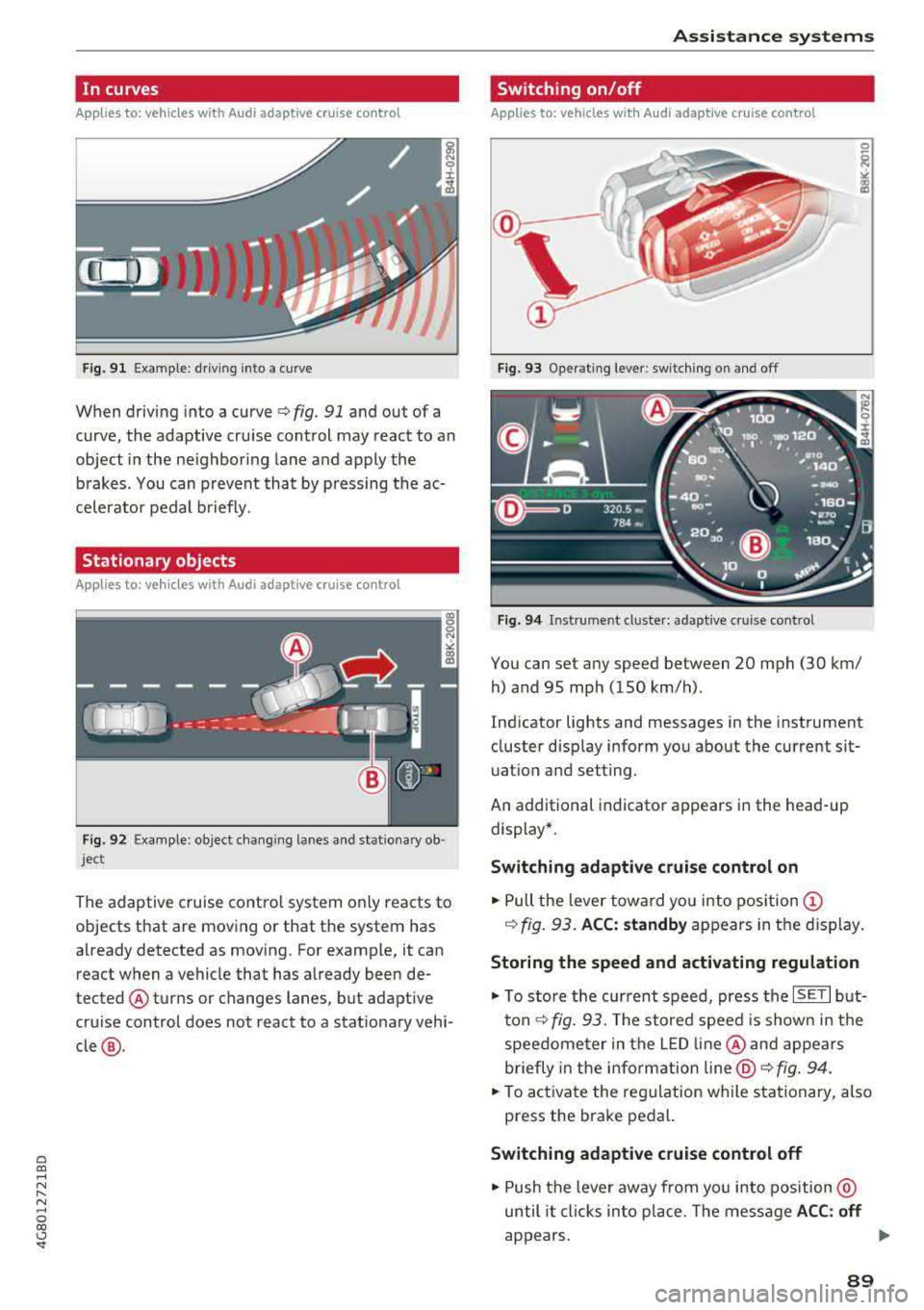
When driving into a curve ¢ fig. 91 and out of a
curve , the adaptive cruise control may react to an
object in the ne ighboring lane and apply the
b rakes. You can prevent that by p ressing the ac
celerator pedal b riefly.
Stationary objects
A pp lies to: ve hicles with Audi adaptive cruise contro l
Fig. 92 Example: object changi ng lanes and stationa ry ob
ject
The adaptive cruise contro l system only reacts to
objects that are mov ing or that th e system has
already detected as moving. For example, it can
react when a vehicle that has already been de
tected @turns or changes lanes, but adapt ive
cru ise control does not react to a stat ionary vehi
cle @.
Assi st a nce systems
Switching on/off
App lies to : vehicles wit h Audi ada ptive cr uise control
Fi g. 93 Operat ing lever : switch ing on and off
Fig . 94 Instrument clus te r: adaptive cru ise cont rol
You can set any speed between 20 mph (30 km/
h) and 95 mp h (150 km/h) .
Ind icator lights and messages in the instrument
cluster disp lay inform you about the current sit
uatio n and setting.
An additional indicator appears in the head-up display*.
Switching adaptive crui se control on
.,. Pull the lever towa rd yo u into pos ition (!)
¢ fig. 93. ACC: standby appears in the display .
Storing the speed and activating regulation
.,. To store the current speed, press the ISE TI but
ton ¢ fig. 93. The stored speed is show n in the
speedome ter in the LED line @and appears
briefly in the i nform ation
line @¢ fig. 94 .
... To activate the reg ulation while stationary, also
press the brake pedal.
Switching adaptive cruise control off
.,. Push the lever away from you into position @
until it cl icks in to p lace. The message
A CC: off
appears. ..,.
89
Page 92 of 274

Ass is tance sy stem s
@ Indicator light s
Ill -Adaptive cruise cont rol is switched on. No
objects a re detected ahead. The stored speed is
maintained.
• -An object ahead was detected. The adaptive
cruise control system regulates the speed and
distance to the object ahead and accelerates/
brakes automatica lly .
fai -Adaptive cruise control is switched on. An
object ahead was detected . Your vehicle rema ins
stopped and w ill not start driving automat ica lly.
• -The automatic braking is not enough to
maintain a suffic ient distance to a n object ahead.
You must intervene
¢ page 92, Request for
driver intervention.
© Instrument cluster display
I f adaptive cruise contro l is not shown in the in
strumen t cluster display, yo u can call it up using
the multifunction stee ring wheel b uttons
¢ page 20.
Based on the graphics in the d isp lay, you can de
termine if the system is ma inta ining a distance to
the object ahead and what that distance is.
No vehicl e -no object was detected ahead .
Whit e vehicle -an object was detected ahead.
Red veh icle -request for driver intervention
¢ page 92 .
Both
arrow s on the scale © indicate the distance
to the object ahead . No arrow appea rs when the
vehicle is on an open road and there is no obje ct
ahead. If an object is detected ahead, the arrow
moves on t he scale.
The green zone on the scale indicates the store
distance. For information on changing the dis
tance, refer to
¢ page 91. If the distance se
lected is exceeded or not reached, the arrow
moves into the red zone on the sca le.
A WARNING
If you press the ISE TI button when driving at
speeds below 20 mph (30 km/h), the vehicle
accelerates automat ically up to 20 mph (30
90
km/h), wh ich is the minimum speed that can
be set .
(D Tips
-If you switch the ign it ion or the adaptive
cruise control system off, the set speed is
erased for safety reasons .
- The electronic stabilization control (ESC) and the anti-slip-regulation (ASR) are auto
matically switched on when the adaptive
cruise control is switched on.
Changing the speed
Applies to: vehicles with Audi adapt ive cruise control
0
f
jJ
0
Fig . 95 Operat ing lever: chang ing the speed
.,. To increase or reduce the speed in increme nts,
tap the lever up or down.
.,. To increase or decrease the speed qu ickly, hold
the lever up or down until the red LED @ reach
es the des ired
speed ¢ page 89 , fig. 94.
After each change, the new stored speed appears
briefly in the information
line¢ page 89, fig. 94
@ .
Driving in stop-and-go traffic
App lies to: vehicles with Aud i adapt ive cru ise control
The adaptive cru ise cont rol system also assists
you in stop-and-go traffic.
Stopping automatically
If
an object ahead stops, your vehicle will brake
and stay at a stop, within the limits of the sys
tem . The Start/Stop system* can be used as usu-
al. ..,.
Page 93 of 274

a co ,...,
N
" N ,...,
0 00 <.,;) '
.,. Tap the accele rator pedal , o r
... pull the lever toward you into position @.
@ Tips
If an obstacle is detec ted when your veh icle
starts moving, the driver intervention request
appears
~ page 92. Your vehicle will drive
more slow ly when starting . This may also
happen in some situations when there is no
apparent obstacle.
Interrupting cruise control
App lies to: vehicles with Audi adaptive cruise contro l
Fig. 96 Sele ctor l eve r
Requirement: adaptive cruise contro l must be
sw itched on.
Overriding cruise control
.,. T o accelerate manually , p ull the lever toward
you into pos ition
@ and hold it there . T he mes
sage
ACC: over ride appears. Or
... Press the accelerator pedal.
... To resume c ru ise control, release the lever or
take your foot off the acce lerator pedal.
Canceling crui se control while dri ving
.,. Move the leve r into posit ion @. The message
ACC: standb y appears. Or
... Press the brake pedal.
... To resume the stored speed, move the lever in
to posit ion
@ .
Canceling cruise control when stopp ed
... Push the lever away from you into position @.
The message
ACC : standby appears.
A ssi st a nce systems
... To resume cru ise contro l, press the brake peda l
and pu ll the l ever toward you into pos ition @ .
A WARNING
It is dangerous to activate cruise control and
resume the stored speed when the current
road, traffic or weather cond itions do not per
mit this . This increases the risk of an accident .
Setting the distance
Applies to: vehicles with Audi adaptive cru ise control
F ig . 97 Operat ing lever: sett ing t he d ist ance
... T ap the switch to display the current set dis
tance ¢
fig. 97.
N (X) N 9 :I:
~
... To increase or reduce the d istance in incre
ments, tap the switch aga in to the r ight or left .
The distance between the two vehicles will change i n the inst rumen t cluste r display .
When approaching an object ahead , the adaptive
cruise contro l system brakes to match that speed
and then adjusts to the set d istance .
If the object
ahead accelerates, adaptive cruise contro l w ill al
so accelerate up to the stored speed .
The higher the speed, the greater the distance in
meters ¢.&. . The Distance 3 setting is recom
mended . That is equa l to the gene ral recommen
da tion of "half the speed shown on the speedom
eter" .
The distances provided a re specified values . De
pending on the driv ing s ituation and the way the
object ahead is dr iving, t he actual d istan ce may
be more or less tha n these ta rget distan ces .
The various symbo ls for the time increments ap
pears briefly in the info rmation line @
~ page 89, fig. 94 when you change the settings . .,.
91
Page 94 of 274

Ass is tance sy stem s
~-~ ---Di sta nce 1: this setting corresponds
to a distance of 92 ft (28 m) when traveling at 62
mph (100 km/h), for example (time between: 1
second) .
~-- ~--Di stan ce 2: this setting corresponds
to a distance of 118 ft (36 m) wh en traveling at
62 mph (100 km/h), for example (time between:
1.3 seconds) .
~--- ~-Distance 3: this setting corresponds
to a distance of 164 ft (SO m) when traveling at
62 mph (100 km/h), for example (time between:
1.8 seconds) .
~--- -~ Distance 4 : This setting corresponds
to a distance of 210 ft (64 m) when traveling at
62 mph (100 km/h), (time d istance of 2.3 sec
onds) .
A WARNING
Following other vehicles too closely increases
the risk of collisions and ser ious personal in
jury .
- Setting short distances to the traffic ahead
reduces the time and distance available to
br ing your vehicle to a safe stop and makes
it eve n mo re necessary to pay close atten
t ion to traffic.
- Always obey applicable traffic laws, use
good judgment, and select a safe following
distance fo r the traffic, road and weather
cond itio ns.
(D Tips
-Distance 3 is set automatically each time
you switch the ignit ion on.
-Your settings are automatically stored and
assigned to the remote control key being
used.
Selecting the driving mode
Applies to: vehicles with Audi adaptive cruise control
.. Se lect the des ired driving mode in dr ive se lect
q poge 105 .
92
@ Tips
Your settings are automatically stored and as
signed to the remote contro l key being used.
Request for driver intervention
Applies to: vehicles with Audi adaptive cruise control
Fig . 98 Ins trumen t cluster : request for dri ver in te rven tion
In certain situations, the system will request you
to take action :
-If the braking from the adaptive cru ise control
system is not eno ugh to ma inta in eno ugh dis
tance to the object ahead .
The danger is indicated by
the . indicato r light
q fig. 98. An aud io signa l will also so und.
- Press the brake pedal to slow your vehicle down .
Audi braking guard
Applies to: vehicles with Audi adaptive cruise control
Fig. 99 Instrumen t cl uster : approac h warn in g
The braking guard uses radar sensors and a v ideo
camera .
It also functions within the limits of the
system when adaptive cru ise control is switched
~ ~
Page 96 of 274

Assistance systems
objects that you are transporting to reduce
the risk of damage or injury.
Settings in the Infotainment system
A pp lies to: ve hicles w ith Audi a daptive cruise co ntro l
~ Se lect : the ICARI function button > (Car)* Sys
tems
control button > Driver assistance > Audi
braking guard .
System -
switch the brak ing guard On /Off. When
you switch the ign ition on, the message
Braking
guard: Off
appears if the system is switched off.
Early warning -the distance and approach warn
ings in the display can be sw itched
On /Off .
(D Tips
-Your settings are automatically stored and
assigned to the remote control key being
u sed .
-If you restrict or switch off the ESC, the
braking guard also switches itse lf off
c;, page 121.
-Switch braking guard off when you are load
in g t he ve hicle onto a vehicle ca rr ier, t rain,
sh ip or other type of transportation. This
ca n prevent undesired warnings from the
braking guard system.
Messages
App lies to: ve hicles w ith Audi a daptive cruise co ntro l
Braking guard: Off
This message appears if the system is switched
off throug h the I nfota inment system . Otherwise,
if the system is turned off, the information ap
pears every time shortly after the start of the
trip.
The message also appears if the system is not
ava ilable due to a malfunct ion or if the ESC is
sw itched off
c:;, page 121 . If this is the case, the
system w ill not prov ide warnings about a possi
b le co ll ision.
Braking guard: engaged
This message appears if a sharp brake pressure
was applied due to an acute warning.
94
ACC : Unavailable!
ACC and Audi braking guard: Unavailable
The system cannot guarantee that it will detect objects correctly and is sw itched off. The sensors
have been moved or are faulty . The pre sense
functions may also be affected . Drive to an au
thorized Audi dea le r or aut horized Audi Service
Facility immediately to have the malfunction cor
rected.
ACC: Currently unavailable. No sensor vision
ACC and Audi braking guard: Currently unavail
able. No sensor vision
This message appears if the sensor v iew is ob
structed, for examp le by leaves, snow, heavy
spray or dirt . Clean the sensors
c:;, page 87,
fig . 90 .
ACC : Currently unavailable. Gradient too steep
The road exceeds the maxim um possible angle
for safe adaptive cruise control operation. Adap
tive cruise control is switched off.
ACC : Only available in D, Sor M
Select the D/S or M selector lever position.
ACC: Currently unavailable. Parking brake ap
plied
The adaptive cruise control system switches off
automat ica lly if the parking brake is set.
ACC : Currently unavailable. Stability control
(ESC) input.
This message appears if the electro nic stabiliza
tion control (ESC) is taking action to stab ilize the
vehicle. In th is case, adaptive cruise control
switches off automatically.
ACC off: Manual control!
This message appears when adaptive cruise con
trol cannot set the parking brake. Press the brake
pedal to prevent the vehicle from ro llin g.
• ••
Three white dots appear if a setting cannot be se
l ected w ith the operating lever. For example, this
happens if adaptive cru ise control cannot start
driv ing automat ically in stop-and-go traff ic
Page 97 of 274

a co .... N
" N .... 0 00 \,;J '
be lt.
Door open
The adaptive cruise co ntrol system cannot sw itch
on w hen a door is open .
Stationary object ahead
This message appears if you would like to switc h
adaptiv e cruis e control on and there is a station
ary object or obstacle directly ahead of your vehi
cle .
Audi pre sense
Preventative passenger protection
Applies to: vehicles with Audi pre sense
P re sense can initiate steps to protect vehicle oc
cupants in certain dangerous situations. The
functions described are availab le depending on
ve hicle equ ipment:
Pre s ense basic*
The fo llow ing func tions can be t rigge red in cer
tain driving si tuations:
- T ension ing of the safety belts (for example,
dur ing heavy bra kin g): the fro nt safety belts
have reve rsible bel t tensione rs. If a coll is io n
does not occur, the sa fety be lts loosen slightly
and are ready to trigger again.
- C losing the w indows and the su nroo f* (for ex
amp le, when over -or understeer ing) : the win
dows and t he sunroof * close until there is only
a small gap open .
The funct io n of the p re sense basic is act ivated at
a speed of 20 mph (3 0 km/h) or hig her .
Dr ive se lect : t h e deployment time is adapted in
Dynami c mode.
Pre sense front (vehicles with adaptive cruise
control*}
Pr e sense front contains the f unct ions of p re
se nse bas ic. I n add it ion, the likelih ood of a rear
e nd collis ion with the veh icle ahead is also calc u
l ated, withi n the limits of the system.
If the risk
of a collision is detected, t he fo llowing functions
can trigger :
Ass istance systems
- Braking g ua rd r::!> poge 92
- Tensioning o f the safety bel ts
- Clos ing the wi ndows a nd the s unroof *
Pre sense rear (vehicles with side a ssist*}
Pre sense rear contains the funct ions of pre sense
basic . In addition, the likelihood of a rear-end
collision from the vehicle behind is also calcu lat
ed, within the limits of the system . If the r isk of a
c ollision is detec ted, t he follow ing f unct ions can
t rigge r:
- Tensioning of the safety belts
- Closing the windows and the sunroof *
Pre sen se plus *
Pre sense plus contains t he f unctions of pre
sense front and pre sense rea r.
Error message
Audi pre sense : Unavailable
Preventative passe nger protect ion is not ava ila
ble . D rive to an a utho rized Aud i deale r or autho r
i zed Audi Se rvice Facility immed iate ly to have the
malfu nction corrected.
_&. WARNING
Pr e sense c annot overcome n atural p hys ical
l aws . It is a system des igned to assist and it
ca nnot prevent a co llision. Do not let the in
creased safety p rovided tempt yo u into tak ing
risks. This could inc rease your ris k of a co lli-
sion.
- The system can dep loy incorrectly .
- Please note that the sensors do not a lways
detect a ll objects . T hi s increases the r isk o f
a co llision.
- Pre sense does not react to peop le or ani
mals or objects that are cross ing the vehi
cle's path o r are diffic ult to detect
r::!>poge 87.
- Reflective objects such as g uard ra ils o r the
e ntrance to a tunnel, heavy ra in and ice can
affect the funct ion of the rada r senso rs and
-
the system's ab ility to de tect a collision risk . ~
95
Page 108 of 274

Ass is tanc e system s
depending on the situation. The distribution of
power varies from balanced (comfort) to sporty
(dynamic) depending on the selected mode. The
goal is a high leve l of agility and ab ility to accel
erate on curves. The ve hicle is very respons ive to
steer ing .
Co rne ring light *
The cornering light adapts the high beams to the
direction of the curve depending on the speed.
The pivot ing action and the light ing also adapt to
the mode.
Adapti ve c ruise control *
The behavior when acce lerating can be adjusted
from comfortable to sporty, depending on the
drive select mode. Adaptive cruise control a lso
responds to the driving behavior of the veh icle
ahead in a more conservative or sporty manner.
Engine sound *
The engine sound adapts to the current mode
and can be subtle to sporty .
@ Note
Applies to: vehicles with adaptive air suspension
-Make sure there is enough clearance above
and below t he ve hicle when parking. The
height of the vehicle (ground clearance) can
change once it is parked due to temperature
fl uctuations, changes to t he load condit ions
and c hanges to the d rivi ng modes.
- When transporting the veh icle on a car car
r ier, tra in, sh ip or by other means, only t ie
the ve hicle dow n at t he ru nning surface of
the tires, w hich is the outer circ umfe rence.
Securing t he vehi cle at t he axle compo
nents, suspension struts or towing eyes is
not permitted because the pressu re in t he
a ir s uspension struts can change dur ing
Adjusting the Individual mode
transport . The vehicle may not be secured
sufficiently if this happens.
(D Tips
- In some models, the max imum ve hicle
speed can on ly be reached in t he auto and
dynamic modes.
- Th e S se lector lever position a utomat ica lly
engages if the dynamic mode is selected.
- Applies to: vehicles with dynamic steering:
operating noise is heard when sta rting o r
stopping the engine. This does not indicate
a problem .
Selecting the driving mode
.,. To select the mode, select the follow ing in the
Infotainment:
! CAR ! function button> Comfort ,
Auto , Dynamic or Individual.
.,. Applies to: vehicles with a ti:~ button on the
steering wheel: press the button repeatedly u n
til the desired mode appea rs in the instrument
cl uste r d isplay.
You
can change the driv ing mode whe n the vehi
cle is stationary or while d riv in g. If traff ic per
mits, afte r changing modes, briefly t ake your
foot o ff t he accelerator pedal so t hat the recently
selected mode is also activated for t he engine.
Comfort -provides a comfort-or iented vehicle
setup a nd is s uited fo r long d rives o n highways.
Auto -provides a n overall comfortable yet dy
nam ic dr iv ing feel and is suited for everyday use .
Dynamic -gives the driver a sporty driving fee l
and is suited to a sporty driving style .
Individu al -¢ page 106 .
A WARNING
Pay attention to traffic when ope rating the
drive select to reduce the r isk of an accident.
-
You can adjust the vehicle settings to your personal preferences .
.,. Select: the !CAR! function button > S et individ
ual
control b utton . Once you select the men u,
106
you will a utomatica lly drive in the Indi vidual
mode .
Page 109 of 274
a co .... N
" N .... 0 00 \.J '
matica lly drive in the
Ind ividual mode .
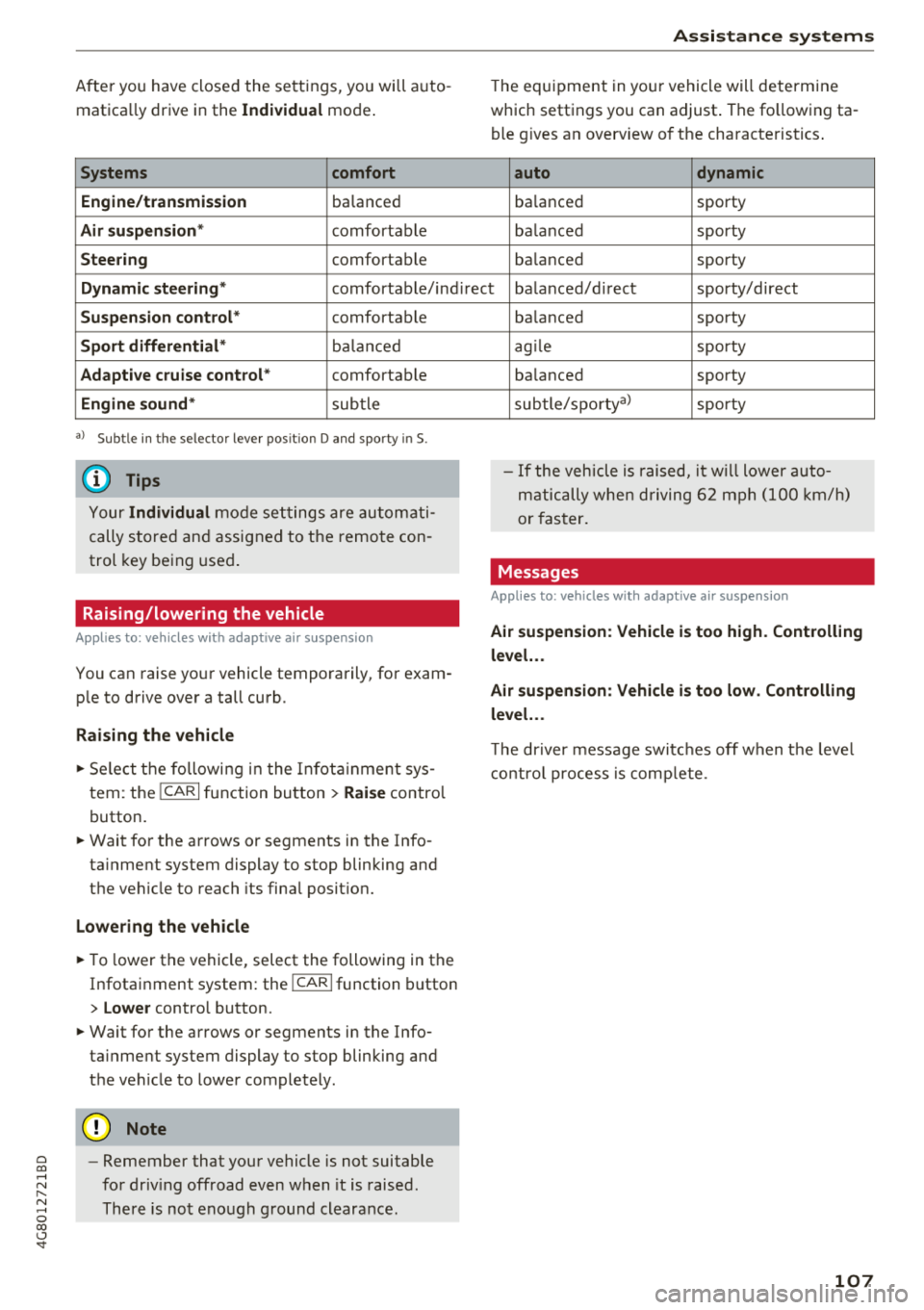
Systems comfort
Engine/transmission
ba lanced
Air suspension* comfortab le
Steering comfortab le
Assistance systems
The equipment in yo ur vehicle will determine
which settings you can adjust . The fo llowing ta
ble gives a n overview of the characteristics .
auto dynamic
ba
lanced sporty
ba lanced sporty
ba lanced sporty
Dynamic steering
* comfortable/indirect ba lanced/d irect sporty/direct
Suspension control* comfortab le
Sport differential * balanc ed
Adaptive cruise control* comfortable
Engine sound* subtle
a) Subtle in the selector lever posit ion D and sporty in S.
(D Tips
Your Individual mode settings are automati
cally stored and assigned to the remo te con
trol key being used .
Raising/lowering the vehicle
Applies to: vehicles with adaptive air suspension
You can raise your vehicle temporarily, for exam
ple to drive over a tall curb.
Raising the vehicle
~ Select the following in the In fotainm ent sys
tem: the
ICARI function button > Raise control
button.
~ Wait for the arrows or segments in the Info
ta inment system display to stop blinking and
the vehicle to reach its fina l posit ion.
Lowering the vehicle
~ To lower the vehicle, select the following in the
Infotainment system: the
! CARI function button
> Lower control button.
~ Wait for the arrows or segments in the Info
ta inment system display to stop blinking and
the vehicle to lower completely .
@ Note
-Remember that your vehicle is not suitable
for driv ing offroad even when it is raised.
There is not enough ground clearance . ba
lanced sporty
ag ile sporty
ba lanced sporty
subtle/sportyal sporty
- If the vehicle is raised, it will lower auto
matically when driving 62 mph (100 km/h)
or faster.
Messages
Applies to: vehicles with adaptive air suspension
Air suspension : Vehicle is too high . Controlling
level. ..
Air suspension: Vehicle is too low. Controlling
level. ..
Th e driver message switches off when the leve l
control process is complete.
107
Page 124 of 274
Intelligent Technology
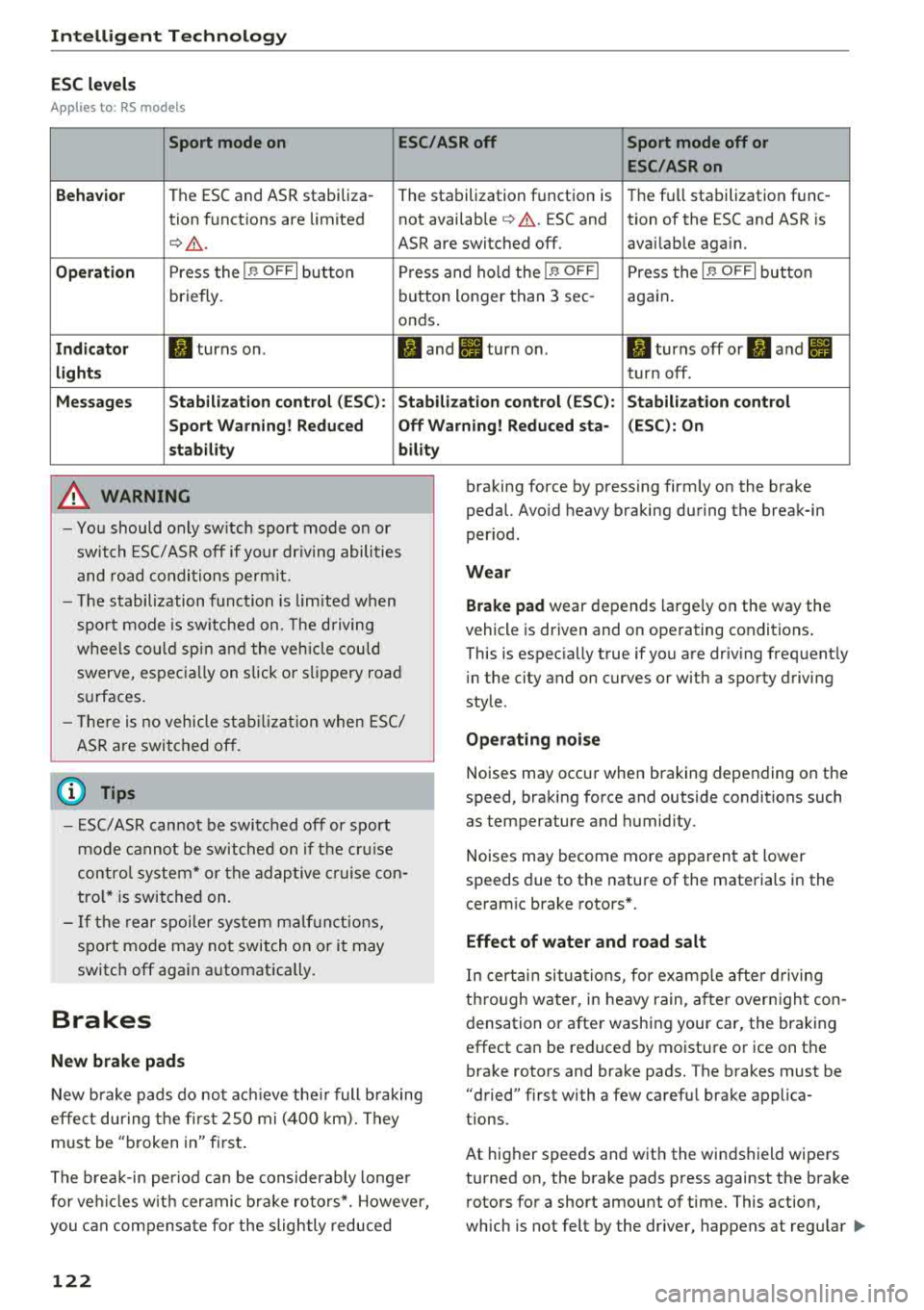
ESC levels
Applies to : RS models
Sport mode on ESC/ASR off Sport mode off or
ESC/ASRon
Behavior
The ESC and ASR stabiliza -
The stabilization function is Th
e fu ll stabilization func-
tion functions are limited not available
¢ .&. . ESC and tion of the ESC and ASR is
¢ .&_. ASR are switched off. avai lab le aga in.
Operation Press the I~ OFFI button Press and hold the I~ OFFI Press the I ~ OFFI button
briefly. button
longer than 3 sec-
again.
onds .
Indicator II turns on. II and II turn on. II turns off or II and II
lights turn off.
Messages Stabilization control (ESC): Stabilization control (ESC): Stabilization control
Sport Warning! Reduced Off Warning! Reduced sta- (ESC): On
stability bility
A WARNING
-You should only switch sport mode on or
switch ESC/ ASR off if your driving abilities
and road conditions permit.
- The stabilization function is limited when
sport mode is switched on. The driving
wheels could spin and the vehicle could swerve, especially on slick or slippery road
surfaces.
- There is no vehicle stabilization when ESC/
ASR are switched off.
(D Tips
- ESC/ASR cannot be switched off or sport
mode cannot be switched on if the cruise
control system* or the adaptive cruise con
trol* is switched on.
- If the rear spoiler system malfunctions,
sport mode may not switch on or it may
switch off again automatically.
Brakes
New brake pads
-
New brake pads do not achieve their full braking
effe ct during the first 2S0 mi (400 km). They
must be "broken in" first.
The break-in period can be considerably longer
for vehicles with ceramic brake rotors*. However,
you can compensate for the slightly reduced
122
braking force by pressing firmly on the brake
pedal. Avoid heavy braking during the break-in
period.
Wear
Brake pad
wear depends large ly on the way the
vehicle is driven and on operating conditions .
This is espec ia lly true if you are driv ing frequently
i n the city and on curves or with a sporty driving
style.
Operating noise
Noises may occur when braking depending on the
speed, braking force and outside conditions such
as temperature and humidity.
Noises may become more apparent at lower
speeds due to the nature of the materials in the
ceramic brake rotors*.
Effect of water and road salt
In certain situations, for example after driving
through water, in heavy rain, after overnight con
densation or after washing your car, the braking
effect can be reduced by moisture or ice on the
brake rotors and brake pads. The brakes must be
"dried" first with a few carefu l brake applica
tions.
At higher speeds and with the windshield wipers
turned on, the brake pads press against the brake
rotors for a short amount of time. This action,
which is not felt by the dr iver, happens at regular
IJIJ,