cruise control AUDI A7 2018 Owners Manual
[x] Cancel search | Manufacturer: AUDI, Model Year: 2018, Model line: A7, Model: AUDI A7 2018Pages: 274, PDF Size: 42.77 MB
Page 4 of 274

Table of contents
About this Owner's Manual. . . . . .
5
Cockpit . . . . . . . . . . . . . . . . . . . . . . . . . . . 6
Cockpit overview . . . . . . . . . . . . . . . . . 6
Controls at a glance . . . . . . . . . . . . . . . . . . 6
Instruments and indicator lights 9
Instruments . . . . . . . . . . . . . . . . . . . . . . . . 9
Indicato r lights . . . . . . . . . . . . . . . . . . . . .
1 0
Driver information system . . . . . . 20
Ove rview ....... ... .. ..... ... .. .. .. .
Operation . ........ .. ..... ... .. .. .. . 20
2 1
On-board computer . . . . . . . . . . . . . . . . . . 21
Eff iciency program . . . . . . . . . . . . . . . . . . . 22
Odometer . . . . . . . . . . . . . . . . . . . . . . . . . . 23
T ime/date display . . . . . . . . . . . . . . . . . . . 23
B oost, shifting and eng ine o il
temperature indicato rs . . . . . . . . . . . . . . . 23
H ead -up displ ay . . . . . . . . . . . . . . . . . . . . .
24
Starting and driving . . . . . . . . . . . . . 26
Opening and closing . . . . . . . . . . . . . 26
Cent ral lock ing . . . . . . . . . . . . . . . . . . . . . . 26
L uggage compartment lid . . . . . . . . . . . . . 32
Chi ld safety loc k . . . . . . . . . . . . . . . . . . . . . 35
Power windows . . . . . . . . . . . . . . . . . . . . . 35
Sunroof. . . . . . . . . . . . . . . . . . . . . . . . . . . . 36
Garage door opener (Homelink) . . . . . . . . 3 7
Lights and Vision . . . . . . . . . . . . . . . . . 39
Exterior lighting . . . . . . . . . . . . . . . . . . . . . 39
Interior lighting . . . . . . . . . . . . . . . . . . . . .
42
V1s1on . . . . . . . . . . . . . . . . . . . . . . . . . . . . . 43
W indshield w ipe rs . . . . . . . . . . . . . . . . . . . 45
Seats and storage ............... . 47
Gene ral information . . . . . . . . . . . . . . . . . 47
Fr ont seats . . . . . . . . . . . . . . . . . . . . . . . . . 47
H ead restra ints . . . . . . . . . . . . . . . . . . . . . 48
M emory fu nction . . . . . . . . . . . . . . . . . . . .
49
Ashtray . . . . . . . . . . . . . . . . . . . . . . . . . . . . 51
Cigarette lighter . . . . . . . . . . . . . . . . . . . . 5 1
12
Volt sockets . . . . . . . . . . . . . . . . . . . . . 52
Storage . . . . . . . . . . . . . . . . . . . . . . . . . . . . 52
Luggage compartment . . . . . . . . . . . . . . . 54
2
Warm and cold . . . . . . . . . . . . . . . . . . . 58
Climate contro l system . . . . . . . . . . . . . . . 58
Steering w heel heat ing . . . . . . . . . . . . . . . 63
Driving ... .. .. .... .. ... .. ..... ... .. 6 4
Genera l information . . . . . . . . . . . . . . . . . 64
Steering . . . . . . . . . . . . . . . . . . . . . . . . . . . 66
Start ing and stopping the eng ine . . . . . . . 68
Start/Stop system . . . . . . . . . . . . . . . . . . . 70
E lectromechanical parking brake . . . . . . . 72
Start ing to drive . . . . . . . . . . . . . . . . . . . . . 74
A utomat ic transmission 74
Trailer towing . . . . . . . . . . . . . . . . . . . . 81
D riving with a tra ile r 81
Driver assi stance . . . . . . . . . . . . . . . . . 84
Assistance systems . . . . . . . . . . . . . . 84
Speed warning system . . . . . . . . . . . . . . . . 84
Cru ise cont ro l sys tem . . . . . . . . . . . . . . . . 8 4
Lap timer . . . . . . . . . . . . . . . . . . . . . . . . . . 85
Audi adaptive cruise contro l . . . . . . . . . . . 87
Audi pre sense . . . . . . . . . . . . . . . . . . . . . . 95
Audi active lane assist . . . . . . . . . . . . . . . . 96
Audi s ide ass ist . . . . . . . . . . . . . . . . . . . . . 99
N ight vision assist w ith pedestrian and
wild animal detection . . . . . . . . . . . . . . . .
102
Audi drive select (d rive setti ngs) . . . . . . . . 105
Parking systems . . . . . . . . . . . . . . . . . 108
Genera l information . . . . . . . . . . . . . . . . . 108
Parking system plus . . . . . . . . . . . . . . . . . . 109
Rearv iew camera . . . . . . . . . . . . . . . . . . . . 110
Per ipher al came ras . . . . . . . . . . . . . . . . . . 113
Adjus ting the d isp lay an d the warn ing
tones.. ... .. .. .... .. ... .. ..... ... ..
118
Error messages . . . . . . . . . . . . . . . . . . . . . 118
Trailer hitch . . . . . . . . . . . . . . . . . . . . . . . . 118
Intelligent Technology . . . . . . . . . . 12 0
Electronic stabilization control (ESC) . . . . 120
Brakes .... .. .. .. .. .. ............. .. 122
E lectromechanical steering, dynamic
steering . . . . . . . . . . . . . . . . . . . . . . . . . . .
124
All wheel drive (quatt ro) . . . . . . . . . . . . . . 124
Rear spoiler . . . . . . . . . . . . . . . . . . . . . . . . 125
Page 9 of 274

a co .... N
" N .... 0 00 \,;J '
@
®
©
®
®
0
Side assist d isplay
Cent ral locking swit ch ..... .. .. .
M emory function buttons . ... .. .
Side assist button ............ .
A ir ven ts wit h thumbw heel
Lever for:
- T urn s ignals and h igh beams
- High beam assistant ........ .
- Active lane assist ......... .. .
@ Mul tifunct ion steer ing whee l with:
- Horn
- Drive r's airbag . ..... ... .. .. .
- Drive r informat ion sys tem con -
t rols .... ... .. ..... ... .. .. .
- Audio/v ideo, telephone, nav iga
t io n and voice recogn ition con
t rols
- dr ive se lec t ............ .. .. .
- Stee ring wheel heat ing .. .. .. .
- Sh ift paddles ............. . .
@ Ins trumen t cluste r .... ... .. .. .
@ Head-up display ........... .. .
@ W indshield was her system leve r
@ Buttons for :
- Infotai nment system display
- Tr ip odometer ........... .. .
@ Starting the eng ine when there is a
malfunc tion ............. .. .. .
(8) Knee airbag . .. .. ..... ... .. .. .
@ Steer ing whee l adjustment, de
pending on equipment
- Mechanica l .... ..... ... .. .. .
- Power . .. ............... .. .
@ Lever for:
- Cru ise cont rol system
- Adaptive cruise control ...... .
@ Bu tto n for sw itch ing the hea d-up
d isp lay on/o ff, adjust ing t he
h eight .... ... .. ..... ... .. .. .
@ Instrument illum ination ....... .
@) H ood release ............ .. .. .
@ Data link connector for On Board
Diagnostic System (OBD II) .. .. .
@ Lig ht switch ............. .. .. .
99
30
49
99
40
40
96
1 50
20
105
63 78
9
24
4 5
23
70
162
66
6 7
84
87
24
42
193
193 39
Coc kpit o ver view
@ Buttons for:
- All-weather lights
- Night vision assist .......... .
- Rear fog light(s) . .. .. ..... .. .
@) Power exterior m irror adjustment
@ Swi tch for luggage compartmen t
li d ... .. .. .... .. ... .. ..... .. .
@ Buttons for :
- P owe r wi ndows
- Parental control
@ Infot ain ment system display
@ Emergency flashers ........... .
@ G love compartment .......... .
@) Front passenger's airbag .... .. .
@ Drives (Infota inment system)
@ B utt ons/ indi cato r l ight for:
- Start/Stop system .......... .
- Parking aid .... ... .. ..... .. .
- P ASS EN GE R AIR BAG O FF .... .
- Re ar spo ile r ... ............ .
- Elect ronic Stabilization Cont rol
( E SC) . .. .. .. .. ............ .
@ Climate contro l system, depending
on vehicle eq uipment:
- Deluxe automatic climate control
- 4-zone deluxe automatic climate
con trol ... .. .. ............ .
@) Storage compartment or ashtray
with cigarette lighter .. ..... .. .
(§ I START E N GIN E STOP I button
@
@
@
In fota inment uni t
Cup holder, 12 Volt outlet
E lectromechanical parki ng brake
@ Se lector lever (automatic transm is -
sion) ... .. .... .. ... .. ..... .. .
(D Tips
39
102
39
43
32
35
35
41
53
150
70
108
158
1 2 5
1 2 1
59
60
51,51 68
52,52
72
75
- Some t he e qui pment lis ted here is o nly in
s ta lled in cert ain models or is available as
an opt io n.
- Th e instr ume nt cl us ter d is pla y is ei ther m ul
t ico lore d or monoc hrome, depending on ve
hicle equipment . Because t he images in
both a re near ly ident ica l, the mult icolored
disp lay is shown in this Owner's Manual.
.,.
7
Page 14 of 274

Instruments and indicator lights
12
Engine oil level (MIN)*
¢page 15
Engine oil sensor
¢page 17
Engine warm-up request
¢page 17
Battery charge
¢page 14
Tank system
¢ page 17
Washer fluid level
¢ page 17
Windshield wipe rs
¢ page 17
Remote control key
¢page 68
Remote control key
¢ page 70
Battery in remote control key
¢page28
Bulb failure ind icator
¢page 18
Rear fog lights
¢page 18
Headlight range control system
¢page 18
Adaptive light*
¢ page40
Light/ rain sensor
¢page 18
Active lane assist*
¢ page 97
Suspension control*
¢ page 18
Transmiss ion
Q page 79
Transmiss ion
Qpage 79
Steering lock
Qpage 15 Brake booster
¢
page 16,
Central indicator light
¢ page 10
Electromechanical power steering,
dynam ic steer ing*
¢ page 124
Rear spoiler
¢page 125
A ir suspension*
¢ page 15
Sport d ifferent ial*
¢ page 18
Other indicator lights
---=----------
/:
Turn signals
¢ page 18
cruise control system
¢ page 84
Canada model s:
cruise contro l system
~ page 84
Adaptive c ruise cont ro l*
¢ page89
Adaptive cruise control*
Qpage 89
Adaptive cruise control*
Q page 89
Active lane assist*
Q page 97
Start/Stop system*
Q page 70
Start/Stop system*
Q page 70
Hig h beam ass istant*
Q page40
Hig h beams
¢ page40
BRAKE /((f)) Brake system
If this indicator light turns on, there is a malfunc-
tion in the brake system .
.,.
Page 22 of 274

Driver information system
Driver information
system
Overview
F ig . 4 Driver information system in the i nstrume nt cluster
Fig. 5 Instrument cluster: examp le informatio n line
The information in the driver information system
is shown in @
tabs®¢ fig. 4. The fo llowing
content is possible depending on vehicle equip
ment:
20
® ®
First tab Vehicle functions:
On-board computer
c>page 21
Efficiency program*
¢page22
Digital speedometer
Cruise control system*
c>page84
Adaptive cruise control* and braking guard*
¢ page87
Active lane assist*
c>page96
Boost, shifting and eng ine oil tern-
perature indicators*
c> page23
Lap timer *
c>page85
Reduced display
Second Indicator lights and messages
tab Warning when a door, the hood or
the rear lid is not closed
Service interval display
c>page203
Speed warning system*
c>page84
Third tab Night vision assist*
c>page 102
Fourth Audio/Video
tab
Fifth tab Telephone*
Sixth tab Navigation*
The second and third tabs are only visib le if at
least one indicator light or message is shown or if
that system is sw itched on .
The status line © is located in the bottom part of
the
d isp lay¢ fig. 4. It displays the exterior tem
perature, time, selector lever position, tripod
ometer and odometer .
For some vehicle functions, you can access the
trip information from the temporary memory
¢ page 22 in line @ c> fig. 5 .
Page 26 of 274
Driver information system
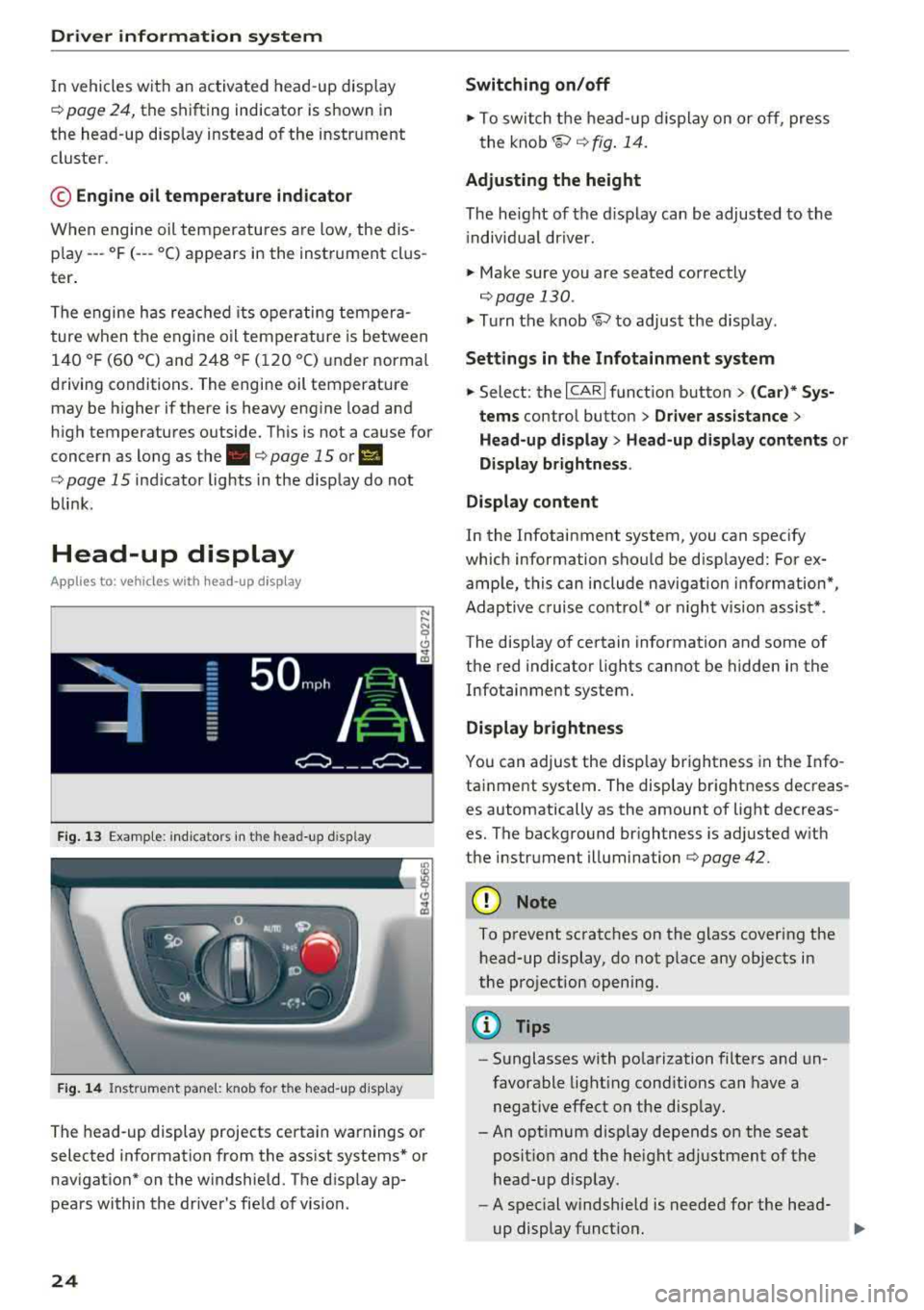
In vehicles with an activated head-up display
c:::;, page 24, the shifting indicator is shown in
the head-up disp lay instead of the instrument
cluster .
© Engine oil temperature indicator
When engine oil temperatures are low, the dis
p lay --- °F (- --°C) appears in the instrument clus
ter.
The engine has reached its operating tempera
ture when the engine oil temperature is between
140 ° F (60 °C) and 248 °F (120 °C) under normal
driving conditions. The engine oil temperature
may be higher if there is heavy engine load and
high temperatures outside. Th is is not a cause for
concern as long as
the . c:::;, page 15 or II
c:::;, page 15 indicator lights in the display do not
blink .
Head-up display
Appl ies to: ve hicles w ith hea d-up display
Fig. 13 Exampl e: indi cators in the head -up disp lay
Fig. 14 Instrument pane l: knob for the head-up disp lay
The head-up display projects certa in warnings or
selected information from the assist systems* or
nav igation* on the windshield. The d isp lay ap
pears within the driver's field of vision.
24
Switching on/off
.,. To switch the head-up dis play on or off, press
the
knob~ c:::;, fig. 14.
Adjusting the height
The height of the display can be adjusted to the
i ndivid ual driver.
.,. Make sure you are seated correctly
c:::;,page 130 .
.,. Turn the knob~ to adjust the disp lay.
Settings in the Infotainment system
.,. Select: the I CARI function button > (Car)* Sys
tems
contro l button > Driver assistance >
Head-up display > Head-up display contents or
Display brightness .
Display content
In the Infotainment system, you can spec ify
which information shou ld be disp layed: For ex
ample, this can include navigation information*,
Adaptive cruise control* or night vision assist*.
The display of certain information and some of
the red indicator lights cannot be hidden in the
Infotainment system.
Display brightness
You can adjust the display brightness in the Info
tainment system. The display brightness decreas
es automatically as the amount of light decreas
es. The background brightness is adjusted w ith
the instrument illumination c:::;,page
42.
(D Note
To prevent scratches on the glass covering the
head-up display, do not place any objects in
the projection opening.
(D Tips
-Sunglasses with polarization filters and un
favorable lighting conditions can have a
negative effect on the display.
-An opt imum disp lay depends on the seat
posit ion and the height adjustment of the
head-up display.
-A spec ial windshie ld is needed for the head-
up display funct ion.
1J,-
Page 29 of 274

a co ,...,
N
" N ,...,
0 00 <.,;) '
-Do not leave valuables unattended in the ve
hicle . A locked vehicle is not a safe!
- The LED in the driver's door rail blinks when
you lock the vehicle . If the LED lights up for
approximately 30 seconds after locking,
there is a malfunction in the central locking
system. Have the problem corrected by an
authorized Audi dealer or authorized Audi
Service Facility.
Key set
Fig . 15 Your vehicle key set
@ Remote control key or convenience key*
The convenience key* is a remote control key with
special
functions ¢ page 29 and¢ page 68.
You can unlock/lock your veh icle w ith the remote
control key . A mechan ical key is integrated in the
remote control
key ¢ page 28.
@ Separate mechanical key
This key is not intended for constant use. It
should only be used in an emergency. Do not
car
ry it on your key r ing and do not store it in the ve
hicle .
Replacing a key
If a key is lost, see an authorized Audi dealer or
authorized Audi Service Facility. Have
this key de
activated . It is important to bring all keys with
you . If a key is lost, you should report it to your
insurance company.
Number of keys
You can check the number of keys assigned to
your veh icle in the Infotainment system. Select:
the
! CAR ! function button> (Car )* Systems con-
Opening and closing
trol button > Service & control > Programmed
keys .
This way, you can make sure that you have
all the keys when purchas ing a used veh icle.
Electronic immobilizer
T he immobilizer prevents unauthorized use of
the ve hicle.
Under certain circumstances, the vehicle may not
be able to start if there is a key from a different
vehicle manufacturer on the key chain.
Data in the master key
When driving, service and ma intenance-relevant
data is cont inuously stored in your remote
con
trol key . Your A udi se rvice advisor can read out
this data and tell you abo ut the work your vehicle
needs. This applies also to vehicles with a
con
venience key*.
Personal convenience settings
If two people use one vehicle, it is recommended
that each person always uses "their own" master
key. When the ign ition is turned off o r when the
vehicle is locked, pe rsonal conven ien ce settings
f or the fo llowing systems are stored and
as
signed to the remote master key.
- Climate control system
- Central locking system
-Windows
- Interior lighting*
- Memory function*
- Parking aid*
- Adaptive cruise control*
-Active lane assist*
- Side assist*
- Dr ive select
- Night vision assist*
- Steering wheel heating*
T he stored settings are automatica lly recalled
when you unlock the vehicle, open the doors or
turn on the ignition.
.&_ WARNING ..__
Always take the vehicle key with you when
leaving the vehicle, even for a short period of
time. This applies particularly when children
-
27
Page 80 of 274
Driving
On vehicles with a cruise control system*
¢ page 84, hill descent control is also activated
when the speed is set.
A WARNING
Hill descent control cannot overcome physical
limitations, so it may not be able to maintain
a constant speed under all condit ions. Always
be ready to apply the brakes.
Shifting manually (tiptronic mode)
The tiptronic mode allows the driver to shift the
gears manually.
)
r
Fig. 83 Center console : sh ifting manual ly w ith the se lector
l ever
F ig. 84 Stee ring wheel: shifting manually w ith t he s hift
paddles*
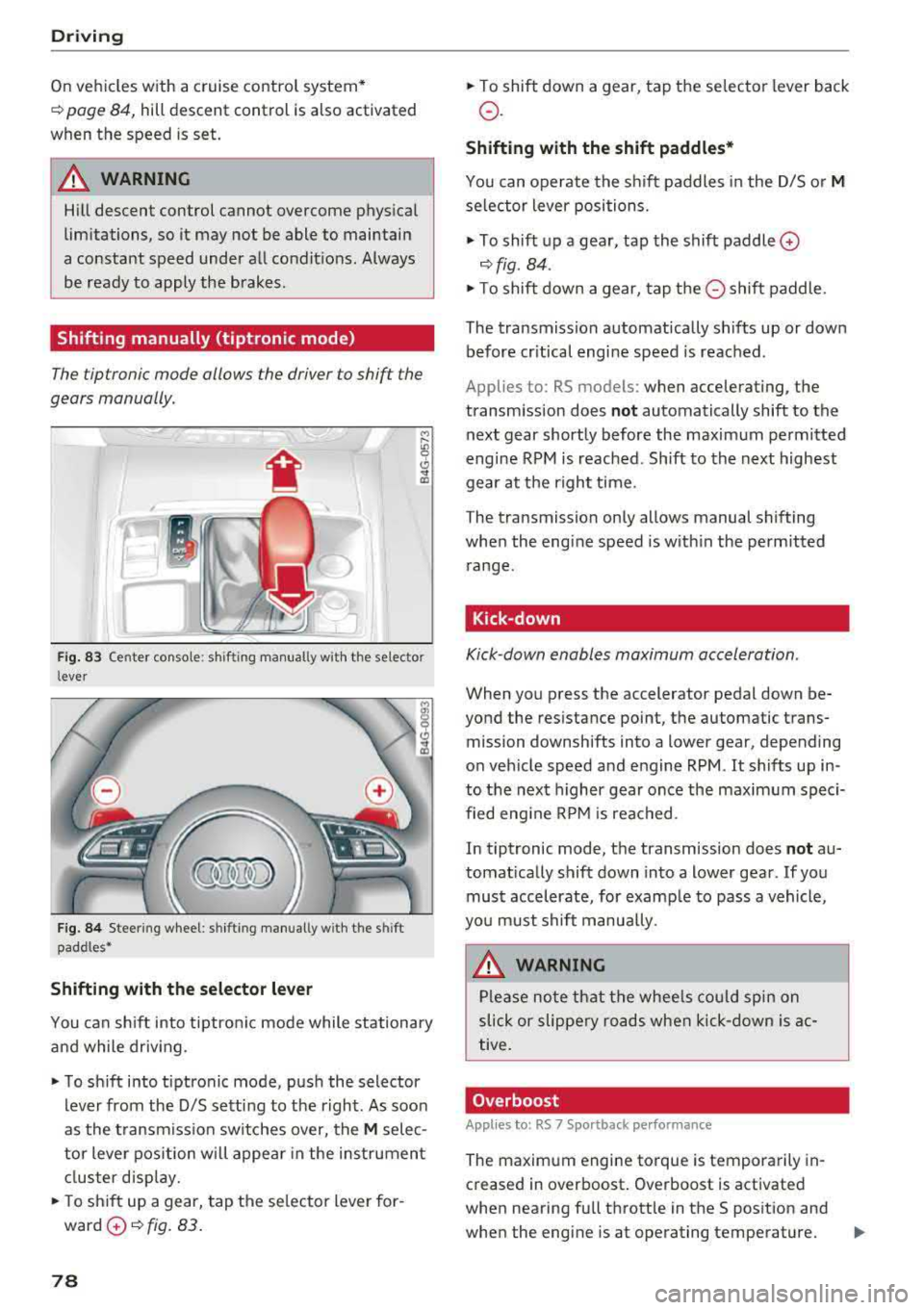
Shifting with the selector lever
You can shift into tiptronic mode while stationary
and while driv ing .
"To shift into tiptronic mode, push the selector
lever from the 0/5 sett ing to the right. As soon
as the transmission switches over, the
M selec
tor lever position will appear in the instrument
cluster disp lay.
.. To sh ift up a gear, tap the se lector lever for
ward
0 ¢ fig. 83.
78
" To shift down a gear, tap the selector lever back
o.
Shifting with the shift paddles*
You can operate the shift paddles in the 0/5 or M
selector lever positions.
" To shift up a gear, tap the shift paddle 0
¢ fig . 84 .
"To shift down a gear, tap the 0 shift paddle.
The transmission automatically shifts up or down before cr itical engine speed is reached .
Applies to: RS mo dels: when accelerating , the
transmission does
not automatically shift to the
next gear shortly before the maximum permitted
engine RPM is reached. Shift to the next highest
gear at the right time.
The transmission only allows manual shifting
when the engine speed is w ith in the permitted
range.
Kick-down
Kick -down enables maximum acceleration .
When you press the accelerator pedal down be
yond the resistance point, the automatic trans mission downshifts into a lower gear, depending
on veh icle speed and engine RPM .
It shifts up in
to the next higher gear once the maximum speci
fied engine RPM is reached .
In tiptronic mode, the transmission does
not au
tomat ically shift down into a lower gear . If you
must accelerate, for examp le to pass a vehicle,
you must shift manually .
A WARNING
-
Please note that the wheels could spin on
slick or slippery roads when kick-down is ac
tive.
Overboost
Appl ies to : RS 7 Sportback pe rformance
The maximum engine torque is temporarily in
creased in overboost . Overboost is activated
when nearing full throttle in the S position and
when the engine is at operating temperature.
II>
Page 86 of 274

Ass is tance sy stem s
Assistance systems
Speed warning system
Description
Applies to: veh icles with speed warning system
The speed warning system helps you to stay un
der a specified maximum speed.
The speed warning system warns you if you are
exceeding the maximum speed that you have set.
A warning tone will sound as soon as your speed
exceeds the sto red value slightly.
The . (USA models) I. (Canada models) indi
cator light and a message appear in the instru
ment cluster display at the same time.
The.
• indicator light and the message turn off if the
speed falls back below the stored maximum
speed.
Sett ing a threshold is recommended if you would
like to be reminded when you reach a certa in
maximum speed. S ituations where you may want
to do so i nclude driving in a country wit h a ge ne r
a l speed limit o r if the re is a specified maximum
speed for winter tires.
Setting the warning threshold
The warning threshold is set in the Infotainment
system.
• Se lect: the ICARI function button> (Car )* Sys
tems
control button > Driver assistan ce >
Spe ed warning .
(D Tips
Regardless of the speed warning system, you
should always monitor your speed using the
speedometer and make sure you are following
the legal speed limit.
84
Cruise control system
Switching on
Applies to: vehicles with cruise control system
The cruise control system makes it possible to
drive at a constant speed starting at 20 mph (30
km/h).
0
f
~
0
F ig . 86 Operat ing lever: c ruise control system
• To switch t he cru ise control o n, pull the lever
into position
(D ~ fig. 86 .
• Drive at the speed to be maintained.
• To store the speed, press the button @.
The stored speed and the
( ij;\1)~14 (USA models) /
l'I (Canada models) ind icator lig ht are disp layed
in the instrument cluster.
This information is also shown briefly in the
head -up display* .
The speed is mainta ined by modifying engine
power or through a n active br ake interven tion.
~ WARNING
-Always pay at tentio n to the traffic around
you when the cruise contro l system is in op
eration . You are always respons ible for your
speed and the distance between your ve hi
cle and other vehicles.
-For safety reasons, cruise control should not
be used in the city, in stop-and-go traff ic, on
winding roads and when road conditions are poor (such as ice, fog, gravel, heavy rai n and
hyd roplaning), because this inc reases the
r is k of an accident.
-Switch the cr uise control off temporarily
when dr iv ing in turning lanes, highway exits
or in constr uction zones.
-
Page 87 of 274
a co .... N
" N .... 0 00 \.J '
yo ur foot on the accelerator pedal prevents
the cruise control from braking. Th is is be
cause pressing the acce lerator pedal over
rides the cruise control system .
- If a brake system ma lf u nction such as over
heating occu rs when the c ruise contro l sys
tem is switched on, the braking function in
the system may be switched off . The rest of
t h e cruise control system f unction s remain
ac tive as long as
the @;(IM~ (USA model s) /
l'I (C anada models) indi cator light is on .
(D Tips
The brake lights turn on when the brakes a re
ap plied a utomat ica lly .
Changing speed
Applies to: vehicles with cruise control system
.. T o inc rease o r decrease the speed in incre
ments, tap the lever toward
0 10 <=> page 84 ,
fig . 86 .
.. To inc rease o r decrease the speed qu ickly, ho ld
the leve r in the
010 direction until the de
s ired speed is displayed.
You can a lso press the acce lerator pedal down to
increase yo ur speed, for example i f you want to
pass someone. The speed you set earlier w ill re
sume as soo n as you release t he accelerator ped
al.
However, if you exceed your saved speed by S
mph (10 km/h) for longe r th an 6 mi nutes, the
cru ise control system tur ns off temporar ily .
The
green @;(i)~i~ (USA models) !l'I (Canada mod
e ls) indicator light in the speedometer tu rns off
and the stored speed is maintained.
Preselecting the speed
Applies to: vehicles with cruise control system
You can pre-select your desired speed when the
vehicle is stationary.
.. Switch the ign ition on.
.. Pull the lever into position @<=> page 84,
fig. 86 .
A ss istance systems
.. To increase or decrease the speed, tap the lever
toward
0 10 .
.. To store t he speed d isp layed, release the leve r.
T his func tion makes it possible , fo r example, to
save the spee d you want before driving on the
highway. Once on the highway, activate the
c ruise contro l by pull ing the leve r
towa rd @ .
Switching off
Applies to : vehicles with cruise control system
Deactivating temporarily
.. Press the brake pedal, or
.. Press the lever into position @(not clicked into
p lace) <=>
page 84, fig . 86, or
.. Dr ive fo r longer t han S m inutes faster than S
mph (10 km/h) above the stored speed .
Switching off completely
.. Press the lever into position@(clicked into
p lace), or
.. Switch the ignit ion off .
The speed you stored will be ma intained if the
cruise contro l has been switched off temporari ly .
To resume the stored speed, re lease the brake
peda l and pull the lever to
position @.
Switching the ignition off wi ll erase the stored
speed.
A WARNING "---
You should only resume the sto red speed if it
i s no t too high fo r existing t raff ic conditions .
Otherw ise you can inc rease the risk of an acci
d ent .
Lap timer
Introduction
Applies to: vehicles with lap timer
Yo u can record and eva luate lap t imes with the
l ap timer <=>
page 86, fig. 87. The time is meas
ur ed in m inutes, seconds and 1/10 seconds. The
ho urs are also shown when the lap time exceeds
60 m inutes . T he maxim um indiv id ual measure
me nt is 99 ho urs. A maxim um of SO laps can be
r ecorded.
.,.
85
Page 89 of 274
a co ,...,
N
" N ,...,
0 00 <..:l '
Description
Applies to: vehicles with Audi adaptive cruise control
Fig . 8 9 Detectio n ra n ge
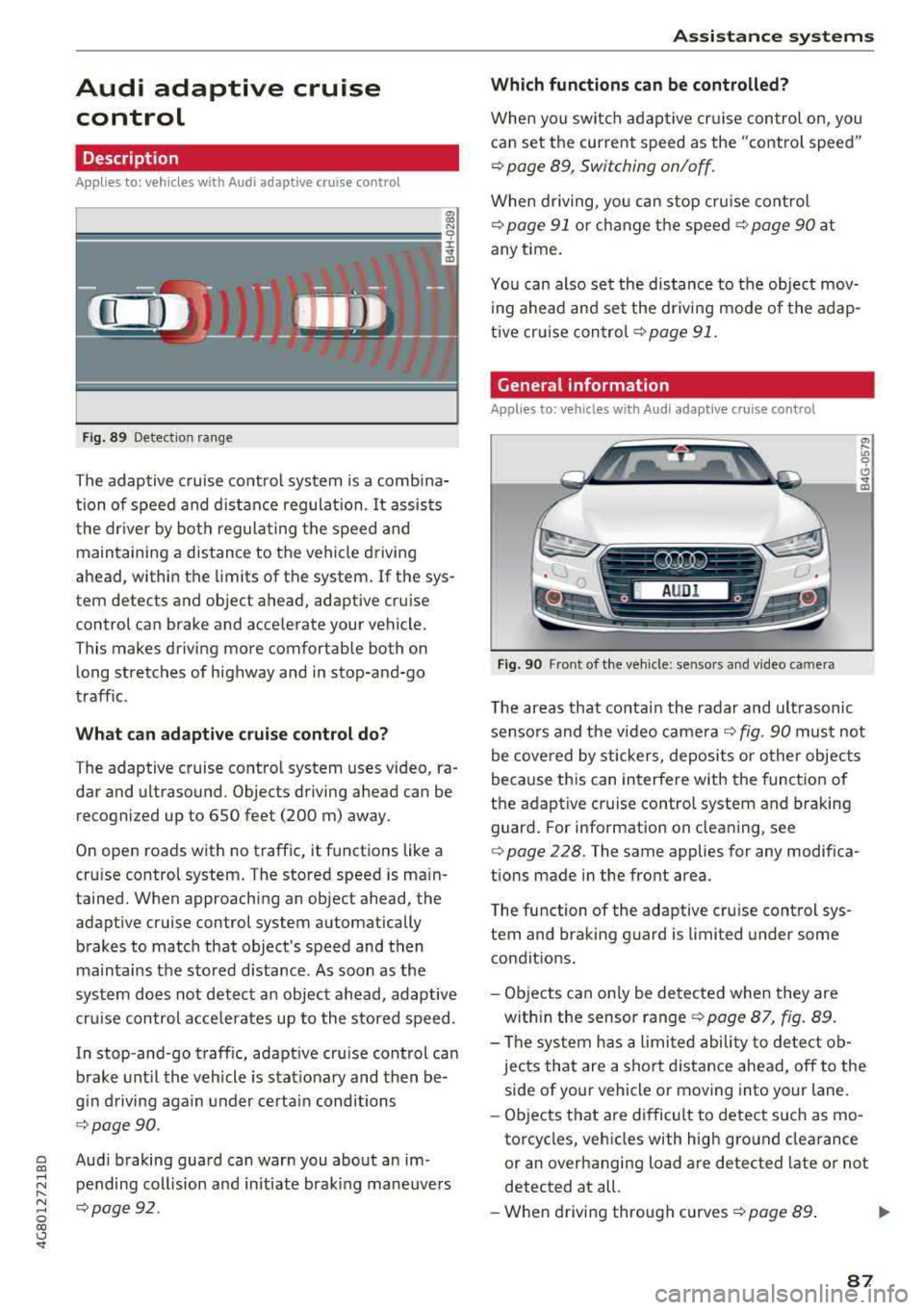
The adaptive cruise co ntro l system is a comb ina
tion of speed and d istance regula tion.
It assists
the dr iver by bot h regula ting the speed and
main taining a distance to the vehicle driving
ahead , within the limits of the system . If the sys
tem detects and object ahead, adaptive cruise
control can brake and acce lerate your vehicle.
This makes driving more comfortable both on long stretches of highway and in stop-and-go
traffic .
What can adaptive c rui se control do?
T he adaptive cruise contro l system uses video, ra
dar and ultrasound . Objects driving ahead can be
recogni zed up to 650 feet (200 m) away.
On open roads with no traffic, it functions like a
cru ise control system . T he stored speed is ma in
tained. When approaching an object ahead, the
adapt ive cruise control system automatically
brakes to match that object's speed and then
maintains the stored d istance. As soon as the
system does not detect a n object ahead, adaptive
cru ise con trol a cce lerates up to the stored speed .
In stop-and -go traff ic, adaptive cru ise control can
brake unt il the vehicle is s tat io nary and then be
g in d riving aga in under certai n conditions
¢ page 90.
Aud i braking guard can warn you about an im
pending col lision and in itiate braking maneuve rs
q page92 .
Assi st a nce systems
Which functions can be controlled?
When yo u switc h adap tive cr uise control on, you
can set the current speed as the "contro l speed"
¢ page 89, Switching on/off .
When driving, yo u can stop cru ise cont rol
¢ page 91 or ch ange t he speed ¢ page 90 at
any t ime .
Yo u can also se t the distance to the object mov
i ng ahead and set the d riving mode of the adap
t ive cr uise con trol ¢
page 91.
General information
Applies to: vehicles with Audi adaptive c ruise con trol
Fi g. 90 Fro nt o f th e ve hicle : se nsors and v ideo ca mera
T he areas that conta in the radar and ult rasonic
senso rs and the video came ra
¢ fig. 90 mus t not
be cove red by stickers, deposits or o ther objects
because th is can in terfere with the funct ion of
the adaptive cruise contro l system and braking
guard . For i nformation on clea ning, see
¢ page 228. The same applies for any modifica
tions made in the front area.
T he function of the adaptive cru ise control sys
tem and bra king g uard is limited under some
condit ions.
- Objects can on ly be detected when they are
w ith in the sensor range
¢ page 87 , fig . 89.
- The sys tem h as a limi ted abili ty to detect ob
jects that are a shor t distance ahead, off to the
side of your vehicle or mov ing into your lane.
- Ob jects that are difficult to detect such as mo
torcycles, vehicles with high g ro und clea rance
or an overhanging load are detected late or not
detected at all.
- When drivi ng through curves
¢ page 89 . .,.
87