door lock AUDI A7 2018 User Guide
[x] Cancel search | Manufacturer: AUDI, Model Year: 2018, Model line: A7, Model: AUDI A7 2018Pages: 274, PDF Size: 42.77 MB
Page 37 of 274

a co ..... N
" N ..... 0 co <..:l '
The child safety lock prevents the rear doors
from being opened from the inside and the rear
power windows from be operated.
Fig. 28 Section of dr iver's door: child safety lock buttons
~ M 0
::'i a, IIl
.,. To activate/deactivate the inner door handle
and the power window switch for the respective
rear door, press the left/right
[II button in the
driver's
door~ fig. 28. The indicator light in the
button turns on/blinks.
.,. To activate/deactivate the child safety lock on
both sides, you must press the
1±1 buttons one
after the other.
..&, WARNING
Always take the veh icle key with you when
leaving the vehicle, even for a short period of
time. This applies particularly when children
remain in the vehicle. Othe rwise child ren
could start the engine or operate electrical
equipment (such as power windows), which
increases the risk of an accident.
Opening and closing
Power windows
Controls
The driver can control all power windows.
Fig. 29 Driver's door: power win dow controls
All power window switches are equipped with a
two -stage function:
Opening and closing the windows
(0 ~ M 0
::'i (0 m
.,. To open or close the window completely, press
the switch down or pull the switch up brief ly to
the second level. The operat ion will stop if the
sw itch is pressed/pulled again.
.,. To select a position in between opened and
closed, press/pull the switch to the first level
until the des ired window position is reached .
Power window switches
CD Left front door
@ Right front door
® Left rear door
@ Right rear door
.&_ WARNING
--==
-Always take the vehicle key with you when
leaving the vehicle, even for a short period
of time. This applies particularly when chil
dren remain in the vehicle. Otherwise chil
dren cou ld start the engine or operate elec
tr ical equipment (such as power windows),
which increases the risk of an acc ident. The
power windows continue to function until
the driver's door or front passenger's door
has been opened.
- Pay careful attention when closing the win
dows. Pinching could cause serious injuries .
35
Page 38 of 274
Opening and clo sin g
- When locking the vehicle from outside, the
vehicle must be unoccupied since the win
dows can no longer be opened in an emer
gency .
(D Tips
-The windows will automatically lower ap
proximately 0.4 inches (10 mm) when you
open the doors.
- When the window in the driver's or front
passenger's door is completely open, it w ill
raise approximately 1 inch (25 mm) when
the door is opened. The w indow will lower
again when you close the door .
- You can still open and close the windows for
approximately 10 minutes after turn ing the
i gnition off. The power windows do not
switch off until the driver's door or front passenger's doo r has been opened.
Convenience opening
All of the windows and the sunroof* can be
opened at once.
The settings in the Infotainment system specify
which windows w ill open.
Con venience open ing fe ature
• Press and hold the [@] button on the remote
contro l key unt il all of the windows reach the
desired position and the sunroof* is ti lted open .
Setting c onvenience opening in the
Infotainment system
• Se lect : the ICARI function button > (Car )* Sys
tems
control button > V ehicle sett ings > C en
tral lock ing
> Long-pres s to open windows .
To enable convenience opening of the w indows
and the roof*, the
Front w indows , Rear windows
and Roof functions must be switched On .
.,&. WARNING
For security reasons, the windows and the
sunroof* can only be opened with the remote
cont rol key a t a maximum distance of approx
imate ly 6 feet (2 m) from the vehicle.
36
Correcting power window malfunctions
You can reactivate the one-touch up/down func
tion if it malfunctions.
• Pull the power window switch up until the win
dow is completely raised .
• Release the switch and pull it up aga in for at
least one second .
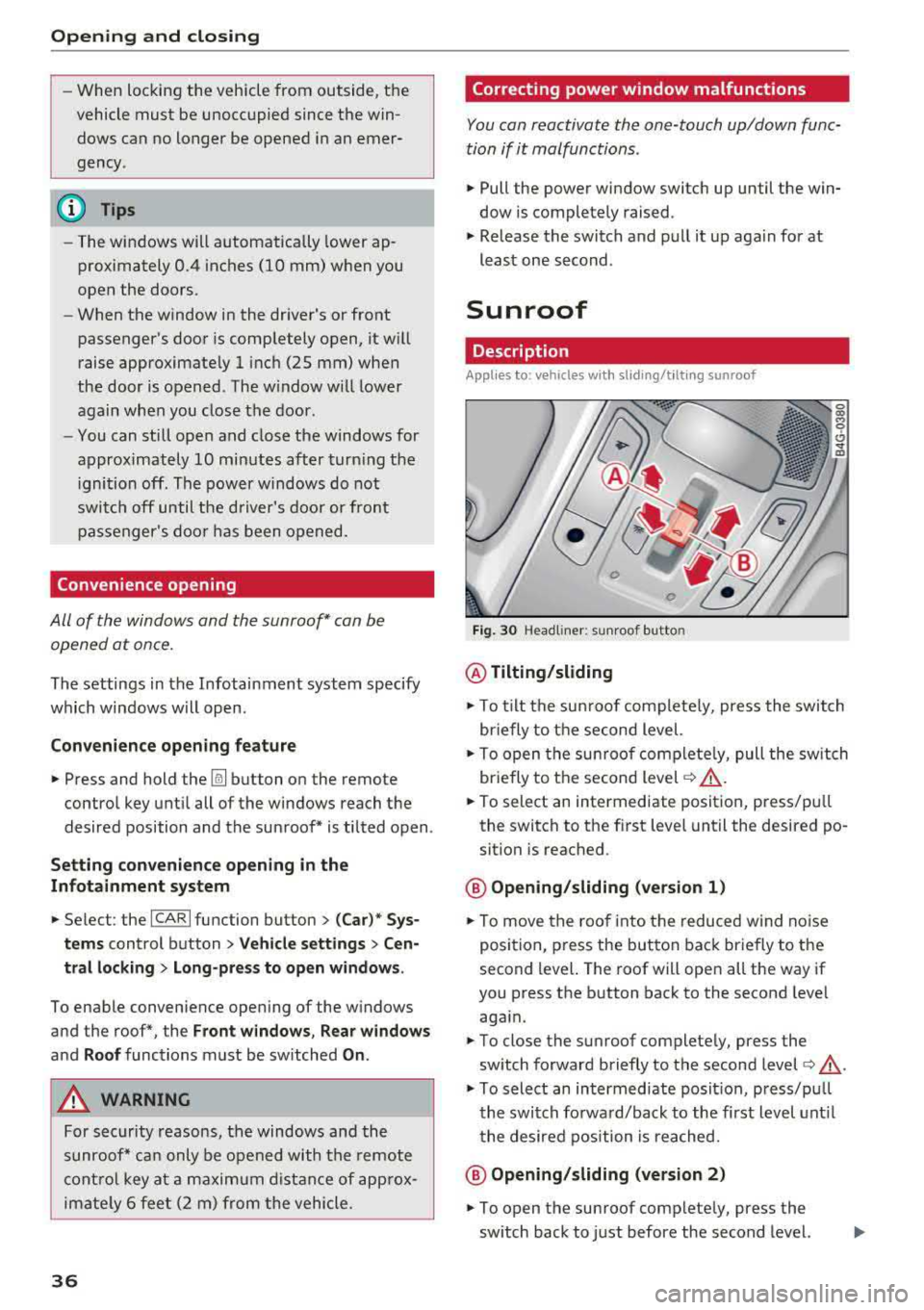
Sunroof
Description
Applies to: vehicles with sliding/t ilt ing sunroof
Fig. 30 Headli ne r: su nroof button
@ Tilting /sliding
• To t ilt the su nroof complete ly, press the switch
briefly to the second level.
• To open the sun roo f comp lete ly, pull the sw itch
briefly to the second level
c:> .&, .
• To select an intermediate position, press/pu ll
the switch to the fi rst level until the desired po
sition is reached .
@ Opening /sliding (version 1 )
• To move the roof into the reduced w ind noise
position, p ress the button back br iefly to t he
second level. The roof will open all the way if
you press the button back to the second leve l
aga in.
• To close the sunroof complete ly, press the
switch forward briefly to the second level
c:> ..&_ .
• To select an intermediate posit ion, press/pu ll
the switch fo rwa rd/back to the first level unt il
the desired position is reached.
@ Opening /sliding (version 2 )
• To open the sunroof completely, press the
sw itch back to just before the second level.
Page 45 of 274
a co ,...,
N
" N ,...,
0 00 <..:l '
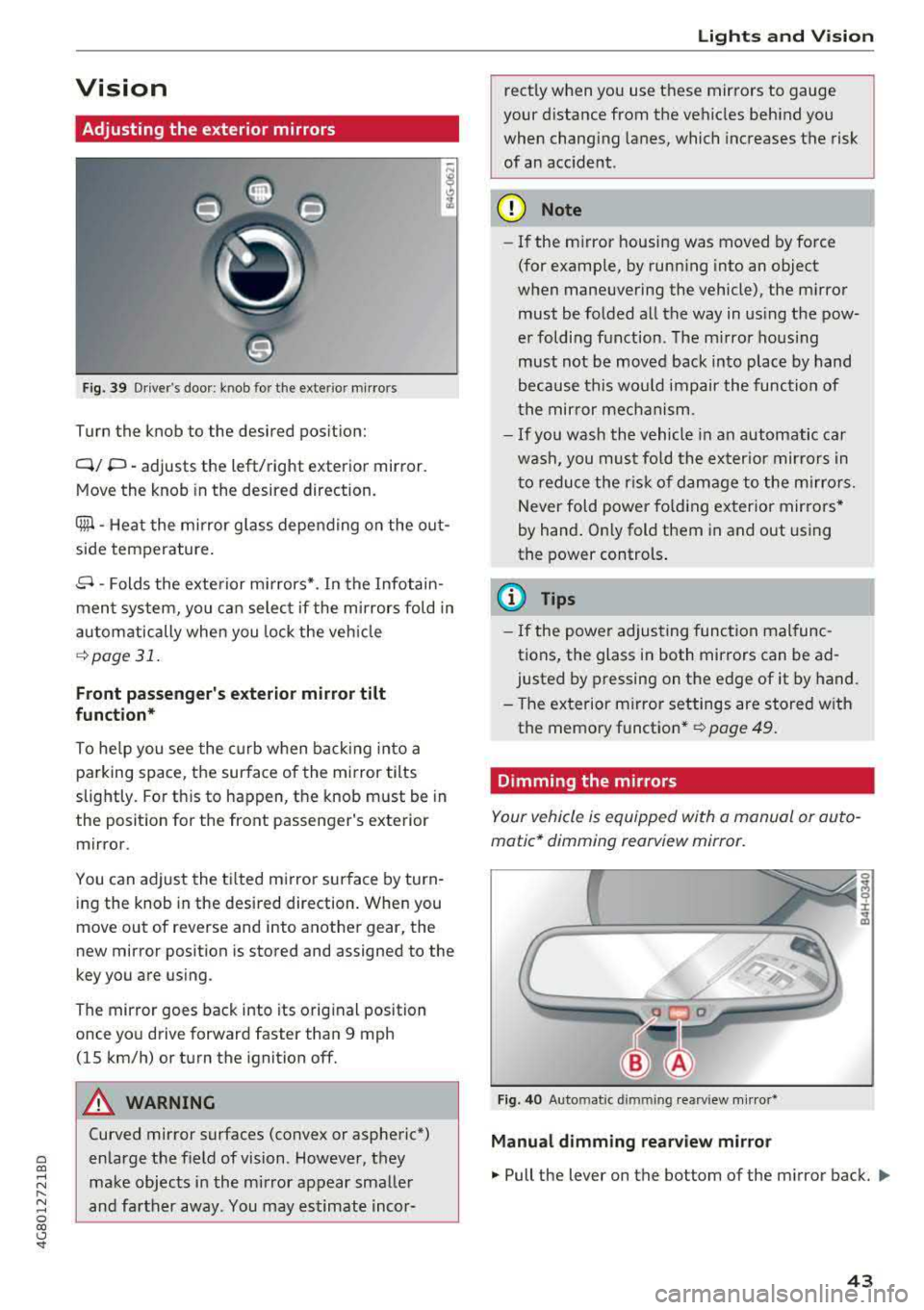
Adjusting the exterior mirrors
Fig. 39 Driver's door : kn ob for the exte rior mirro rs
Turn the knob to the desired position:
Q/ P -adjusts the left/right exterior mirror.
Move the knob in the desired direction.
Ciiil -Heat the mirror glass depending on the out
side temperature .
8 -Folds the exterior mirrors* . In the Infotain
ment system, you can select if the mirrors fold in
automatically when you lock the vehicle
¢page 31.
Front passenger's exterior mirror tilt
function*
To he lp you see the curb when backing into a
parking space, the surface of the mirror tilts
slightly. For th is to happen, the knob must be in
the position for the front passenger 's exterior
mirror.
You can adjust the tilted mirror surface by turn ing the knob in the desired direction. When you
move out of reverse and into another gear , the
new mirror position is stored and assigned to the
key you are using .
The mirror goes back into its original position
once you drive forward faster than 9 mph
(15 km/h) or turn the ignition off.
A WARNING
Curved mirror surfaces (convex or aspheric*)
enlarge the field of vision . However, they
make objects in the mirror appear smaller
and farther away. You may estimate incor-
Lights and Vision
rectly when you use these mirrors to gauge
your distance from the vehicles behind you
when changing lanes, which increases the risk
of an accident.
({I) Note
- If the mirror housing was moved by force
(for example, by running into an object
when maneuvering the vehicle), the mirror must be folded all the way in using the pow
er folding function. The mirror hous ing
must not be moved back into place by hand
because this would impair the function of
the mirror mechanism.
- If you wash the vehicle in an automatic car
wash, you must fold the exter ior mirrors in
to reduce the risk of damage to the mirro rs.
Never fold power fo lding exterior mirrors*
by hand. On ly fold them in and out using
the power controls .
(D Tips
-If the power adjusting function malfunc
tions, the glass in both mirrors can be
ad
justed by pressing on the edge of it by hand.
- The exterior m irror settings are stored w ith
the memory function *
~ page 49.
Dimming the mirrors
Your vehicl e is equipped with a manual or auto
matic* dimming rearview mirror.
Fig. 40 Auto matic dimmin g rearv iew mirro r*
Manual dimming rearview mirror
.,. Pull the lever on the bottom of the mirror back. Ill>
43
Page 50 of 274
Seats and storage
Massage function*
-select the Wave, Pulse ,
Stretch , Lumbar or Shoulder
massage type or
off . You can adjust the intensity of each massage
from 1 through 5. You can switch the selected
massage on/off using the
button @¢ page 47,
fig . 45 .
Lumbar support -you can adjust the lumbar sup
port up/down and to be stronger/weaker.
Side section seat* -you can increase/decrease
the lateral support in the seat using the side bol
sters at the seat surface and the backrest.
Upper thigh support* -you can increase/de
crease the upper thigh support.
(D Tips
- The massage function switches off auto
matically after approximately 10 minutes.
- The air in the side bolsters* is released as
soon as the driver's door opens. This makes
is possible to enter and exit the vehicle
more comfortab ly . As soon as you start driv
ing the veh icle, the s ide bolsters fill.
Front center armrest
There is a storage compartment under the arm
rest.
Fig . 47 Cente r armrest between the driver's/fron t pas ·
senger 's seats.
Adjusting the center armrest
.,. T o adjust the angle, raise the arm res t from the
starting position .
.,. To bring the armrest back into the starting po
sition, raise it out of the top notch and fold it
back down.
48
Opening the storage compartment
.,. Press the button -arrow- upward.
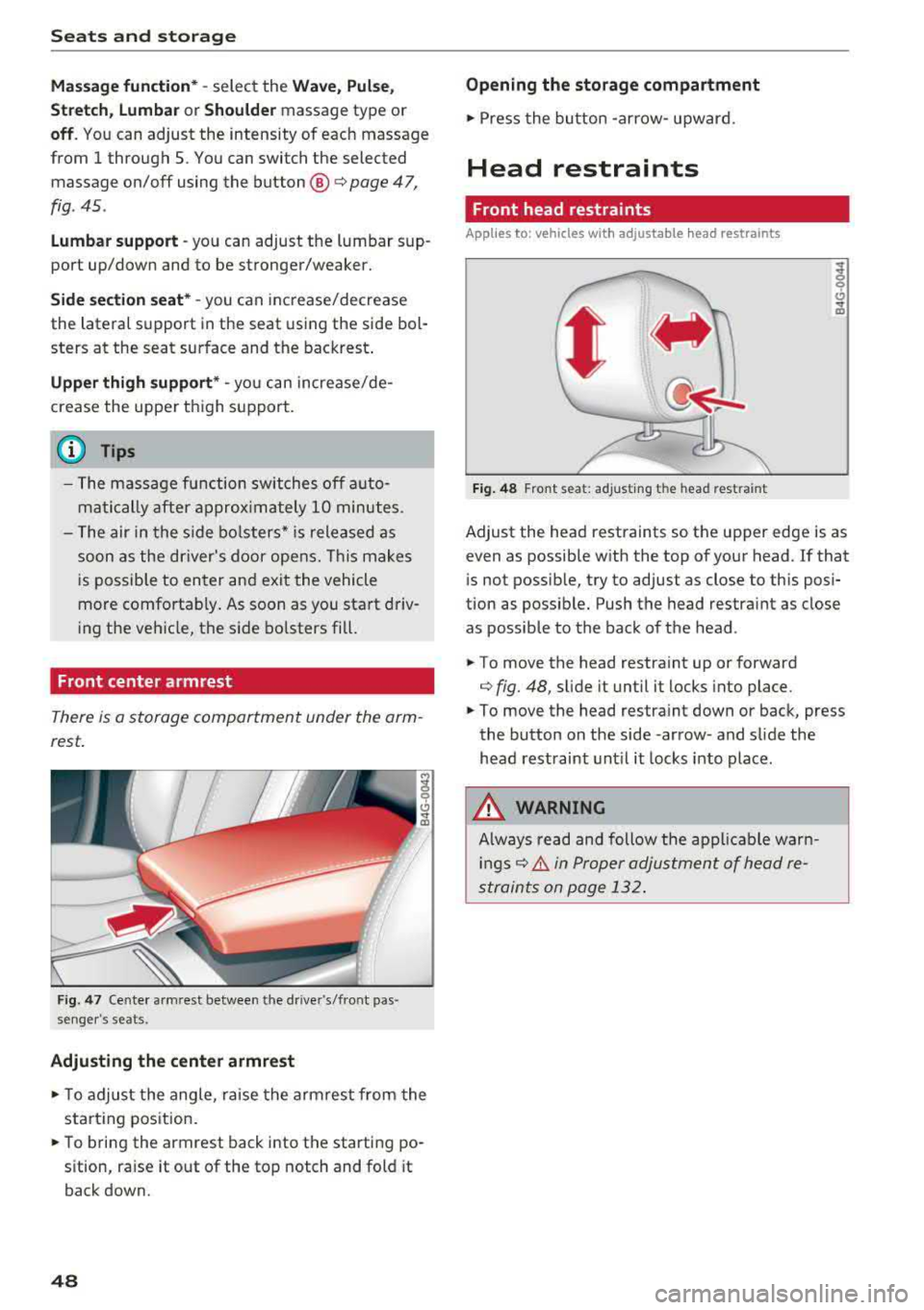
Head restraints
Front head restraints
App lies to: vehicles wit h adjustable hea d r estraints
Fig. 48 Front seat: ad justing the head restraint
Adjust the head restraints so the upper edge is as
even as possible with the top of your head. If that
i s not possib le, try to adjust as close to this posi
tion as possib le. Push the head restra int as close
as possible to the back of the head.
.,. To move the head restra int up or forward
¢ fig. 48, sli de it until it locks into place .
.,. To move the head restra int down or back, press
the button on the side -arrow- and slide the
head restraint until it locks into place.
A WARNING
Always read and follow the applicable warn
ings¢ & in Proper adjustment of head re
straints on page 132.
.
Page 51 of 274
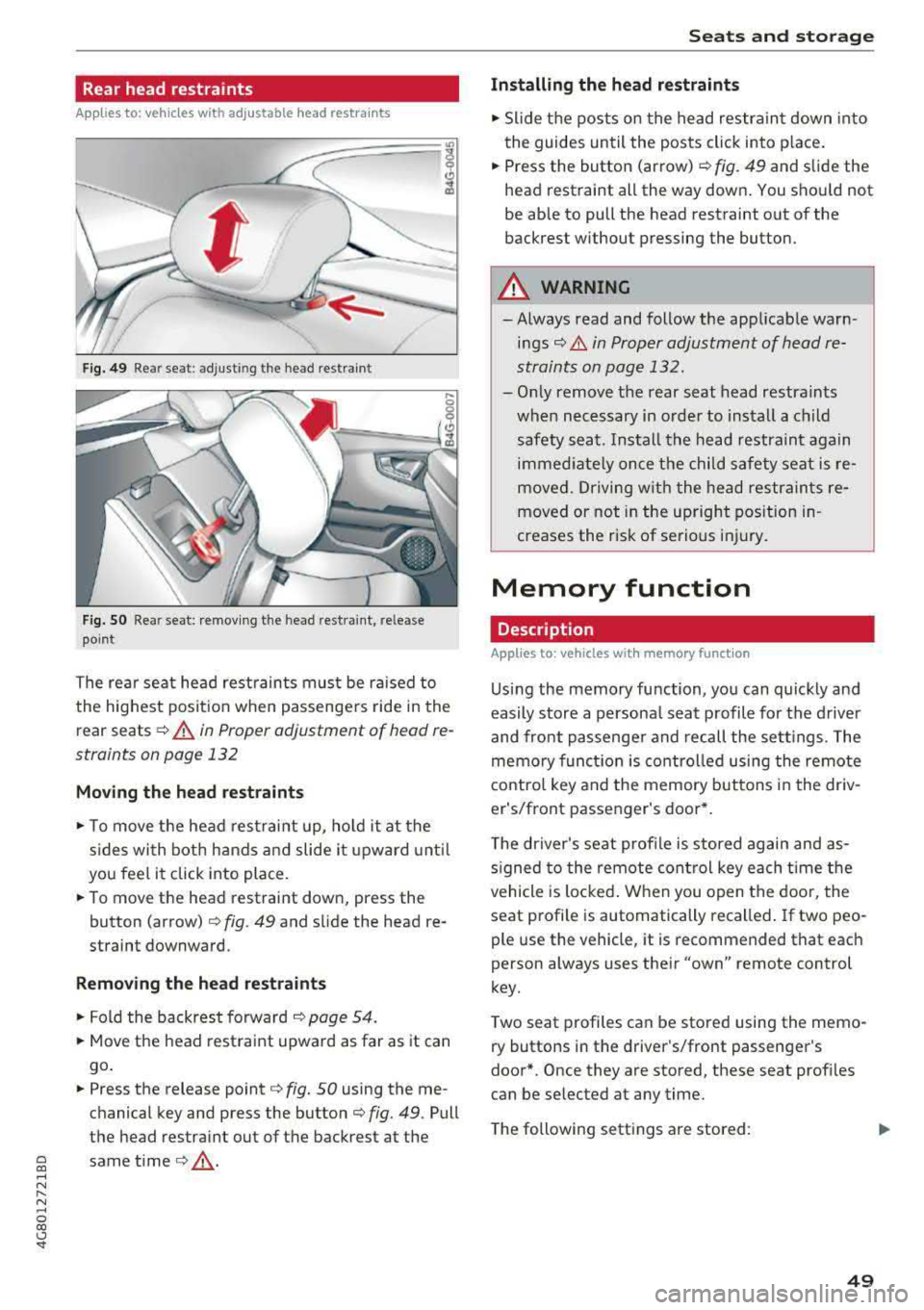
Rear head restraints
Applies to: vehicles with adjustable head restra ints
Fig. 49 Rear seat: adjusting the head restraint
Fig. SO Rear seat: remov ing the head restra int, release
point
The rear seat head restraints must be ra ised to
the highest posit ion when passengers ride in the
rear seats
¢ .&. in Proper adjustment of head re
straints on page 132
Moving the head rest raints
.,. To move the head restraint up, ho ld it at the
s ides with both hands a nd slide i t upward unt il
you feel it click into place.
.. To move the head restraint down, press the
button (arrow) ¢
fig. 49 and slide the head re
straint downward.
Remov ing th e head re stra ints
.,. Fold the backrest forward ¢ page 54.
.. Move the head restraint upward as far as it can
go .
.,. Press the release point¢ fig. 50 using the me
chanical key and press the
button¢ fig. 49. Pull
the head restraint out of the backrest at the
~ same time¢ _&. ,...,
N
" N ,...,
0 00 <.,;) '
Installing the head re straints
.,. Slide t he pos ts on the head restraint down into
the guides until the posts click into p lace .
.. Press the button (arrow) ¢ fig. 49 and slide the
head restraint all the way down . You should not
be able to pull the head restraint out of the
backrest without pressing the button.
A WARNING
-Always read and follow the applicable warn
ings¢ & in Proper adjustment of head re
straints on page 132.
-Only remove the rear seat head restraints
when necessary in order to install a ch ild
safety seat. Ins tall the head restraint again
immed iate ly once the child safety seat is re
moved. Driving w ith the head restrain ts re
moved or not in the upright position in
creases the risk of serious in jury.
Memory function
Description
Applies to: vehicles with memory function
Us ing the memory function, you can quickly and
easily store a persona l seat profile for the driver
and front passenger and recall the sett ings. The
memo ry funct ion is contro lled using the remote
contro l key and the memory buttons in the dr iv
er's/front passenger's door* .
T he driver's seat profile is stored again and as
s igned to the remote cont rol key each t ime the
vehicle is locked . When you open the door, the
seat profile is automatically recalled . If two peo
ple use the vehicle, it is recommended that each
person always uses their
"own" remote control
key .
Two seat profiles can be stored using the memo ry buttons in the driver's/front passenger's
door*. Once they are stored, these seat prof iles
can be selected at any time.
The following settings are stored:
.,.
49
Page 52 of 274
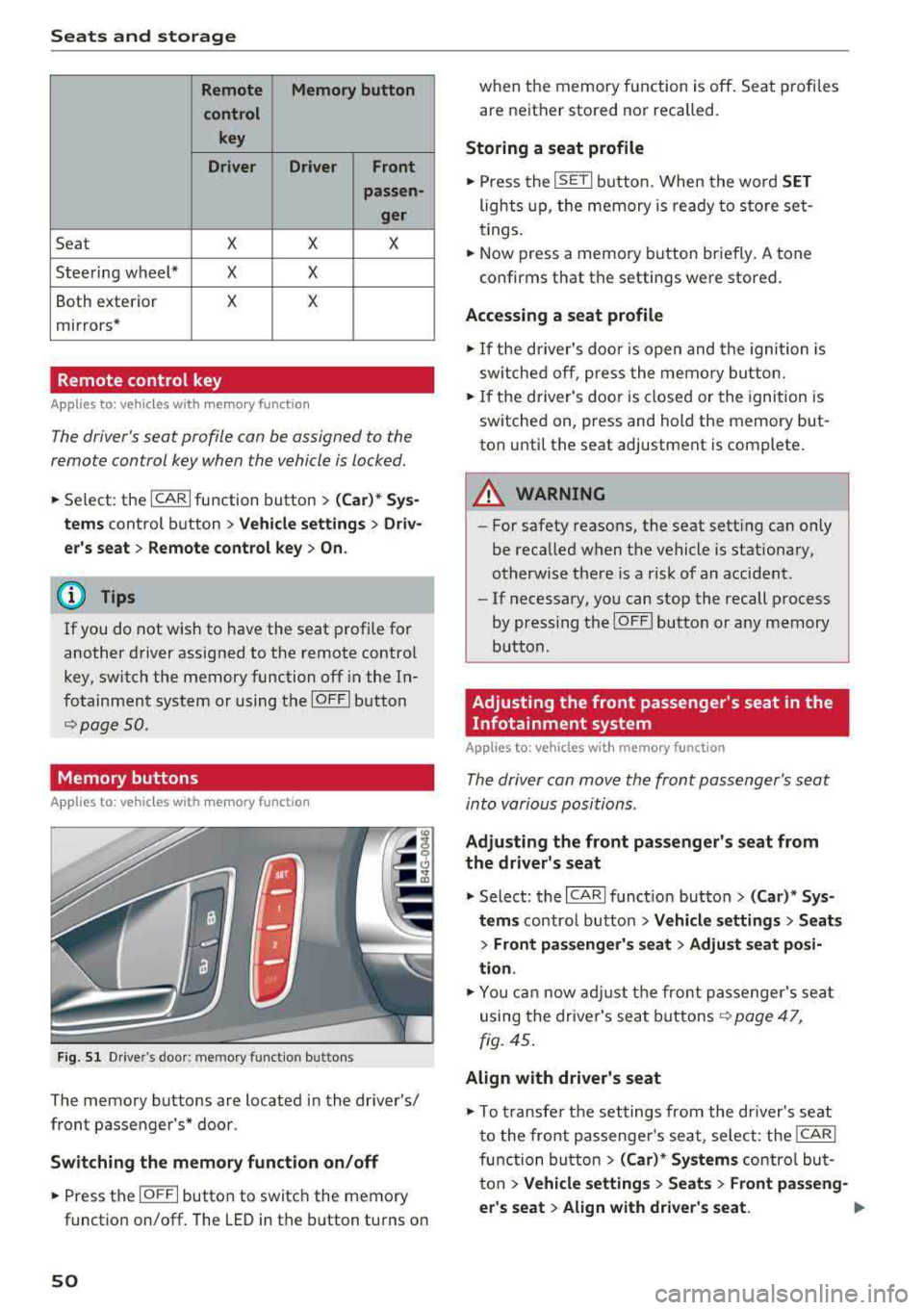
Seats and storage
Remote Memory button
control key
Driver Driver
Front
passen-
ger
Seat X X X
Steering wheel* X X
Both exterior X X
mirrors*
Remote control key
Applies to: vehicles with memory function
The driver 's seat profile can be assigned to the
remo te control key when the vehicle is locked.
.,.. Se lect : the ICARI function button > (Car)* Sys
tems
control button > Vehicle settings > Driv
er 's seat
> Remote control key > On.
(D Tips
If you do not wish to have the seat profile for
another driver assigned to the remote contro l
key, switch the memory function off in the In
fotainment system or using the
IOFFI button
r::::;, page 50 .
Memory buttons
App lies to: vehicles with memory function
Fig. 51 Drive r's door : m em ory functio n bu ttons
The memory buttons are located in the driver's/
front passenger 's* door.
Switching the memory function on/off
.,.. Press the IO FF I button to switch the memory
functio n on/off. The LED in the button turns on
50
when the memory function is off . Seat profiles
are neither stored nor recalled.
Storing a seat profile
.,.. Press the ISET I button . When the word SET
lights up, the memory is ready to store set
tings.
.,.. Now press a memo ry button briefly. A tone
confirms that th e settings were stor ed.
Accessing a seat profile
.,.. If the driver's door is open and the ignition is
sw itched off, press the memory button.
.,.. If the driver's door is closed or the ignition is
switched on, press and hold the memory but
ton until the seat adjustment is complete .
A WARNING
-For safety reasons, the seat setting can only
be recalled when the vehicle is stationary,
otherwise there is a risk of an accident .
-If necessary, you can stop the recall process
by press ing the
IOF FI butto n or any memory
button .
Adjusting the front passenger's seat in the
Infotainment system
Applies to: vehicles with memory function
The driver can move the front passenger's seat
into various positions .
Adjusting the front passenger's seat from
the driver's seat
.,. Select: the I CARI function button > (Car)* Sys
tems
control butto n > Vehicle settings > Seats
> Front passenger's seat > Adjust seat posi
tion .
.,.. You can now adjust the front passenger's seat
using the driver's seat buttons
r:::;, page 47,
fig. 45.
Align with driver's seat
.,. To trans fer the settings from the dr iver's seat
to the front passenge r's seat, select: the
I CAR I
function button > (Car)* Systems control but
ton
> Vehicle settings > Seats > Front passeng-
er 's seat
> Align with driver 's seat. .,..
Page 53 of 274
a co ,...,
N
" N ,...,
0 00 <..:l '
justing proc ess is complete.
(D T ips
The lumbar support and upper thigh support
settings are not transferred when aligning
the front passenger's seat with the driver's
seat .
Ashtray
Applies to: veh icles with ashtray
Fig. 52 Center console: fro nt as htray
Fig. 53 Door trim: rear ashtray
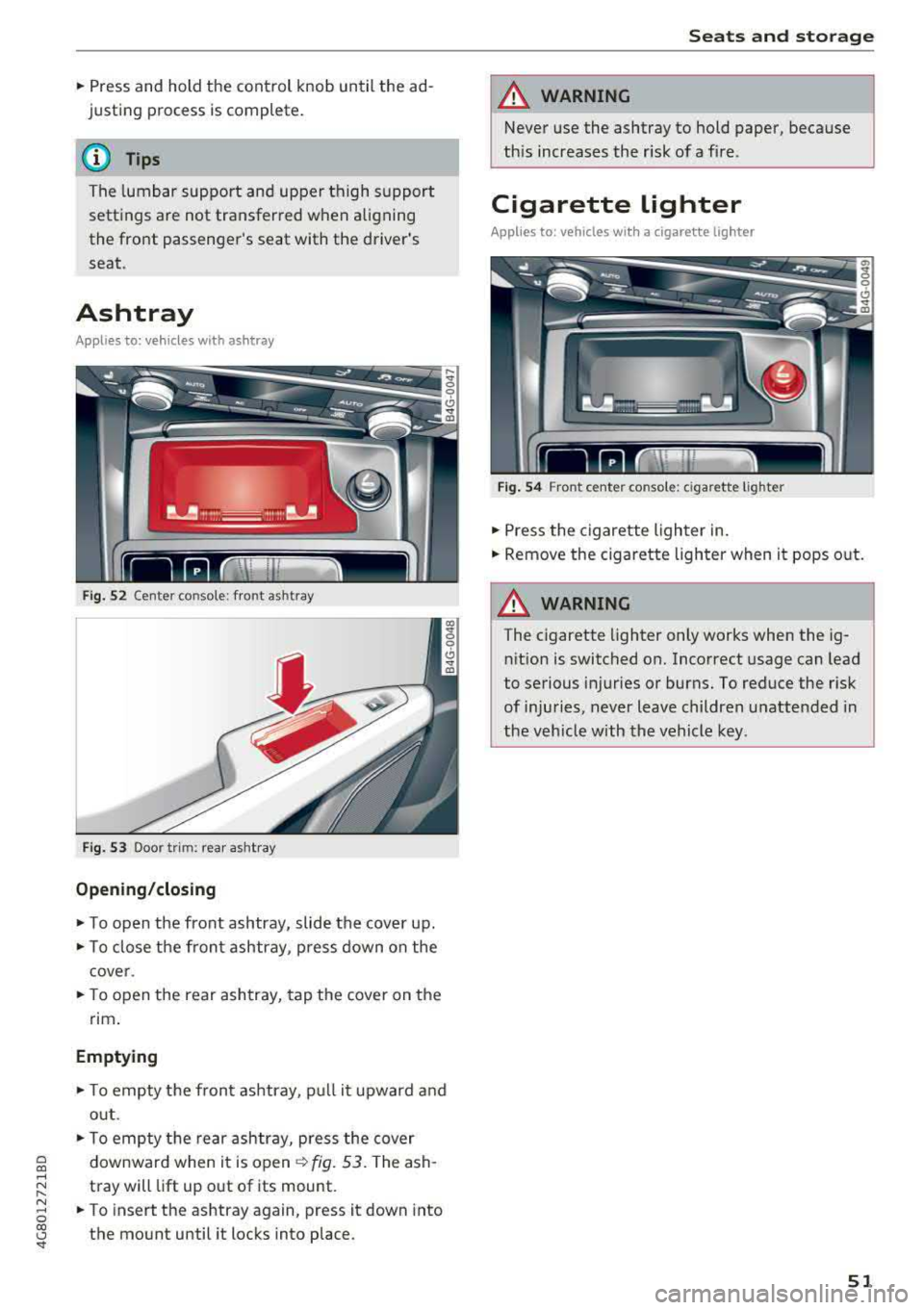
Opening /closing
• To open the front ashtray, slide the cover up.
• To close the front ashtray, press down on the
cover .
• To open the rear ashtray, tap the cover on the
rim.
Emptying
• To empty the front ashtray, pu ll it upward and
out .
• To empty the rear ashtray, press the cover
downward when it is open
~ fig. 53. The ash
tray will lift up out of its mount.
• To insert the ashtray again, press it down into
the mount until it locks into place. S
eats and storag e
A WARNING
Never use the ashtray to hold paper, because
this increases the risk of a fire.
Cigarette lighter
Applies to: vehicles wi th a cigarette lighter
Fig. 54 Front center console: ciga rette ligh te r
• Press the cigarette lighter in.
• Remove the cigarette lighter when it pops out.
A WARNING ~
The cigarette lighter only works when the ig-
nition is switched on. Incorrect usage can Lead
to serious injuries or burns. To reduce the risk
of injuries, never leave children unattended in
the veh icle with the vehicle key .
51
Page 55 of 274

a co ,...,
N
" N ,...,
0 00 <..:l '
-Do not put any hot beverages in the cup
holder while the vehicle is moving. Hot bev
erages could spill, which can cause injury.
- Do not use any breakable beverage contain
ers (for example, made out of glass or por
celain). You could be injured by them in the
event of an accident.
(D Note
Beverage containers in the cup holders should
always have a lid. If not, beverages could spill
and cause damage to vehicle equipment, such
electronics or seat covers.
Cooled glove compartment
Appl ies to: vehicles with cooled glove compartment
The cooled glove compartment only functions
when the
AIC system is switched on.
Fig. 59 Glove compartment: sw itching cooling mode on/
off
... Turn the knob@ counter-clockwise to switch
the cooling on. The symbols on the knob indi
cate the correct position.
""Turn the knob @ clockwise to switch the cool-
ing off.
The glove compartment cooling mode only func
tions when the vehicle A/C system is switched on.
If the heat ing is switched on, switching the glove
compartment cooling mode off is recommended.
Other storage compartments
You will find a range of storage compartments
and holders at different locations in the vehicle.
Seats and storage
- Compartments in the doors
- Compartment in the glove compartment
(coo led*). The glove compartment can be
locked using the mechanical key.
- Glasses holder* in the headliner (near the rear
view mirror)
- Storage compartment under the front center
armrest*
- Compartments* on the backrests of the front
seats
- Garment hooks on the sides of the pillars in the
rear of the vehicle and in the rear grab handles
- Compartment in the rear center armrest
- Bag hooks in the luggage compartment
_& WARNING
-
-To reduce the risk of personal injury in an
accident or sudden stop, always keep the
glove compartment closed while driving.
-Always keep the lid of the compartment for
(sun)glasses* closed while driving to reduce
the risk of injury during a sudden braking
maneuver or in the event of an accident.
-Any articles of clothing that you have hung up must not interfere with the driver's view.
The coat hooks are designed only for light
weight clothing. Never hang any clothing
with hard, pointed or heavy objects in the
pockets on the coat hooks. During sudden
braking or in an accident - especially if the
airbag is deployed
-these objects could in
jure any passengers inside the vehicle.
- Read and follow all WARNINGS
~ page 166, Important safety instructions
on the side airbag system.
- Hang clothes in such a way that they do not
impair the driver's vision.
- The coat hooks must only be used for light
weight clothing. Do not leave any heavy or
sharp edged objects in the pockets which
may interfere with the side curtain airbag
deployment and can cause personal injury in
a crash.
-Do not use coat hangers for hanging cloth
ing on the coat hooks as this can interfere
with proper deployment of the side curtain airbags in an accident.
53
Page 70 of 274

Driving
the ignition is switched off. After entering the ve
hicle, the steering co lumn returns to the stored
position once the ignition is sw itched on.
Starting and stopping
the engine
Starting the engine
The I S TAR T ENGINE ST OP I button switches the
ignition on and starts the engine.
Fig. 76 Center co nsole : START ENGINE STO P butto n
Starting the engine
.. Press the brake pedal and move the se lector
lever into the P or N po sit ion
¢ ,A .
.. Press the I START ENGIN E STOPI button . The
engine will start .
Switch ing the ignition on /off
If you wou ld like to switch the ignition on with
out starting the engine, follow these steps:
.. Press the I S TAR T ENG IN E STOPI button with
out
pressing the brake pedal. Vehicles w ithout
the Start/Stop system *: the needle in the tach
ometer
moves into the READY position.
.. To switch the ignition off, press the button
again . The needle in the tachometer
moves into
the
OFF pos it ion .
E quipment that uses a lot of electricity is switch
ed off temporarily when you start the engine .
If the engine does not start immediate ly, the
starting procedure stops automatically after a
short time. Repeat the starting procedure.
ll Thi s fun ctio n is not availab le in all c oun tries.
68
Start /Stop system*
See the information in ¢ page 70, Start/Stop
system.
A WARNING
To reduce the risk of poisoning, never allow
the engine to run in confined spaces.
(D Note
Avoid high engine speed, full th rottle, and
heavy engine load if the engine has not
reached operating temperature yet . You could
damage the engine.
@ For the sake of the environment
Do not let the engine run while parked to
warm up. Begin driving immediate ly. This re
duces unnecessary emissions.
(D Tips
- Some noise after starting the engine is nor
ma l and is no cause for concern.
- If you leave the veh icle w ith the ignition
switched on, the ignition w ill switch off af
ter a certain amount of time . Make sure that
electrical equipment such as the exterior
lights are switched off .
Stopping the engine
.. Bring the vehicle to a full stop .
.. Move the selector lever to the P or N posit io n.
.. Press the I START ENGINE STOP I button
¢ page 68, fig. 76.
Steering lock1>
The steering locks when you turn the engine off
using the
I STAR T ENGIN E STOPI button and
open the driver's door . The locked steering helps
prevent veh icle theft .
Emergency off function*
If it is absolutely necessary, the engine can also
be turned off while driving in the R or D/S selec-
tor lever position at speeds be low 6 mph (10 km/
...
Page 71 of 274

a co .... N
" N .... 0 00 \,;J '
I START ENGINE STOPI button and also press the
brake pedal.
A WARNING
- Never turn off the engine before the vehicle
has come to a complete stop. The full func
tion of the brake booster and the power
steering is not guaranteed. You may need to
use more force when braking or steering.
Because you cannot brake and steer as you
usually would, this could lead to accidents
and serious injuries.
- Always take the key with you whenever you
leave your vehicle. Otherwise, the engine
could be started or electrical equipment
such as the power windows could be operat
ed. This can lead to serious injury.
- For safety reasons, always park the vehicle
with the selector lever in the P position.
Otherwise, there is the risk that the vehicle
could roll unintentionally.
@ Note
If the engine has been under heavy load for
an extended period of time, heat builds up in
the engine compartment after the engine is
switched off and there is a risk of damaging
the engine. For this reason, let the engine run
at idle for approximately two minutes before
shutting it off.
(D Tips
For up to 10 minutes after stopping the en
gine, the radiator fan may turn on again auto
matically or it may continue to run (even if
the ignition is switched off) for the following
reasons:
- The coolant temperature is increasing due
to trapped heat.
- If the engine is warm and the engine com
partment also heats up from strong sun
light.
- Applies to: vehicles with particulate filter:
The emissions control system is heated
through the regeneration process, even if
the engine has not reached its operating
temperature yet.
Driving
Messages
Turn off ignition before leaving car
This message appears and a warning tone sounds if you open the driver's door when the ignition is
switched on.
Press brake pedal to start engine
This message appears if you do not press the
brake pedal when starting the engine.
fll Is key in the vehicle?
This indicator light turns on and this message ap
pears if the ignition key was removed from the
vehicle when the engine was running. If the igni
tion key is no longer in the vehicle, you cannot
switch on the ignition or start the engine once
you stop it. You also cannot lock the vehicle from
the outside.
Shift to P, otherwise vehicle can roll away.
Doors do not lock if lever is not in P.
This message appears for safety reasons if the
transmission is not in the P position when you
switch the ignition off. Move the selector lever to
the P position. Otherwise the vehicle is not pro
tected from rolling and it cannot be lock ed.
II Key is not recognized. Hold back of key
against marked area. See owner's manual
If the indicator light turns on and this message
appears, there is a
malfunction ~ page 70.
Turn off ignition before leaving car. Battery is
discharging
This message appears if the driver's door is opened while the ignition is switched on. Always
switch off the ignition if you are leaving the vehi
cle. Also see
~ page 71 .
Shift to P and turn off ignition before leaving
car, otherwise vehicle can roll away
This message appears if the driver's door is
opened while the ignition is switched on and the
selector lever is not in the P position . Move the
selector lever into the P position and switch the
ignition off when you exit the vehicle . Otherwise
the vehicle could roll. Also see
~ page 71 .
69