belt AUDI A7 2018 Owners Manual
[x] Cancel search | Manufacturer: AUDI, Model Year: 2018, Model line: A7, Model: AUDI A7 2018Pages: 274, PDF Size: 42.77 MB
Page 5 of 274

a co .... N
" N .... 0 00 \.J '
Notice about data recorded by the Event
Data Recorder and vehicle control
modules 127
Safety . . . . . . . . . . . . . . . . . . . . . . . . . . . . 129
Driving safety . . . . . . . . . . . . . . . . . . . . 129
Basics . . . . . . . . . . . . . . . . . . . . . . . . . . . . . 129
Correct passenger seating positions . . . . . 130
Driver's and front passenger 's footwell . . 133
Pedal area . . . . . . . . . . . . . . . . . . . . . . . . . . 134
S to ring cargo co rrect ly . . . . . . . . . . . . . . . 134
R epo rting Safety Defe cts . . . . . . . . . . . . . . 136
Safety belts . . . . . . . . . . . . . . . . . . . . . . 138
Gene ral informa tion . . . . . . . . . . . . . . . . . 138
Why use safety belts? . . . . . . . . . . . . . . . . 139
Safety bel ts . . . . . . . . . . . . . . . . . . . . . . . . 14 1
Belt tensioners . . . . . . . . . . . . . . . . . . . . . . 144
Airbag system . . . . . . . . . . . . . . . . . . . . 146
I mportant information . . . . . . . . . . . . . . . 14 6
F ront airbags . . . . . . . . . . . . . . . . . . . . . . . 150
Mon itoring the Advanced Airbag System . 158
Knee airbags . . . . . . . . . . . . . . . . . . . . . . . . 162
Side airbags . . . . . . . . . . . . . . . . . . . . . . . . 164
Side curtain airbags . . . . . . . . . . . . . . . . . . 167
Child safety . . . . . . . . . . . . . . . . . . . . . . 170
Important information . . . . . . . . . . . . . . . 170
Ch ild safety seats .............. ... .. . 176
Secur ing ch ild safety seats . . . . . . . . . . . . 181
L ATCH system ( lowe r anchorages a nd
te thers for chi ld ren) . . . . . . . . . . . . . . . . . 184
Ad dit ional informat ion . . . . . . . . . . . . . . . 188
Maintenance and Care . . . . . . . . . . . 189
Checking and Filling . . . . . . . . . . . . . 189
Fu el. .. .... .. ... .. ..... ... .. .. .... . 189
R efueling . . . . . . . . . . . . . . . . . . . . . . . . . . 190
Em iss ions cont rol system . . . . . . . . . . . . . 192
On Board Diagnostic System (OBD) . . . . . 193
Eng ine compartment . . . . . . . . . . . . . . . . . 193
Eng ine oi l . . . . . . . . . . . . . . . . . . . . . . . . . . 196
Cooling system . . . . . . . . . . . . . . . . . . . . . . 199
Brake flu id . . . . . . . . . . . . . . . . . . . . . . . . . 20 1
Battery . . . . . . . . . . . . . . . . . . . . . . . . . . . . 20 1
Table of content s
Windshie ld washer system . . . . . . . . . . . . 2 03
Service interva l display 203
Wheels .. .. .... .. ... .. ..... ... .. .. 205
Whee ls and Tires . . . . . . . . . . . . . . . . . . . . 205
T ire pressure mon itoring system
Tire pressure monitoring system 222
224
Care and cleaning . . . . . . . . . . . . . . . . 228
Genera l information . . . . . . . . . . . . . . . . . 228
Car washes . . . . . . . . . . . . . . . . . . . . . . . . . 228
Cleaning and care i nformat ion . . . . . . . . . 229
Plac ing your vehicle out of serv ice . . . . . . 232
Do It Yourself . . . . . . . . . . . . . . . . . . . . 233
Emergency assistance . . . . . . . . . . . 233
General information . . . . . . . . . . . . . . . . . 233
E q ui pment . . . . . . . . . . . . . . . . . . . . . . . . . 233
T ire mobility kit . . . . . . . . . . . . . . . . . . . . . 234
Replacing w heels . . . . . . . . . . . . . . . . . . . . 236
Spa re tire 241
Fuses .... .. .. .. ............... .. .. 243
Replacing fuses . . . . . . . . . . . . . . . . . . . . . 243
Drive r side cockpit fuse assignment
Front passenger side cockpit fuse 2
44
ass ignment . . . . . . . . . . . . . . . . . . . . . . . . 245
Luggage compartment fuse assignment . 245
Emergency situations . . . . . . . . . . . . 247
Genera l . . . . . . . . . . . . . . . . . . . . . . . . . . . . 247
Start ing by pus hing or tow ing . . . . . . . . . . 247
Start ing with jumper cables . . . . . . . . . . . 247
U se of jumper cables . . . . . . . . . . . . . . . . . 248
T ow ing with a tow t ruck . . . . . . . . . . . . . . 249
Raising the vehicle . . . . . . . . . . . . . . . . . . . 251
Accessories and Technical Data . 253
Technical data . . . . . . . . . . . . . . . . . . . . 253
Vehicle s pec if ic at io ns . . . . . . . . . . . . . . . . 253
Notes abo ut technic al data . . . . . . . . . . . . 253
Dimens ions. . . . . . . . . . . . . . . . . . . . . . . . . 253
3
Page 13 of 274
a co .... N
" N .... 0 00 \.J '
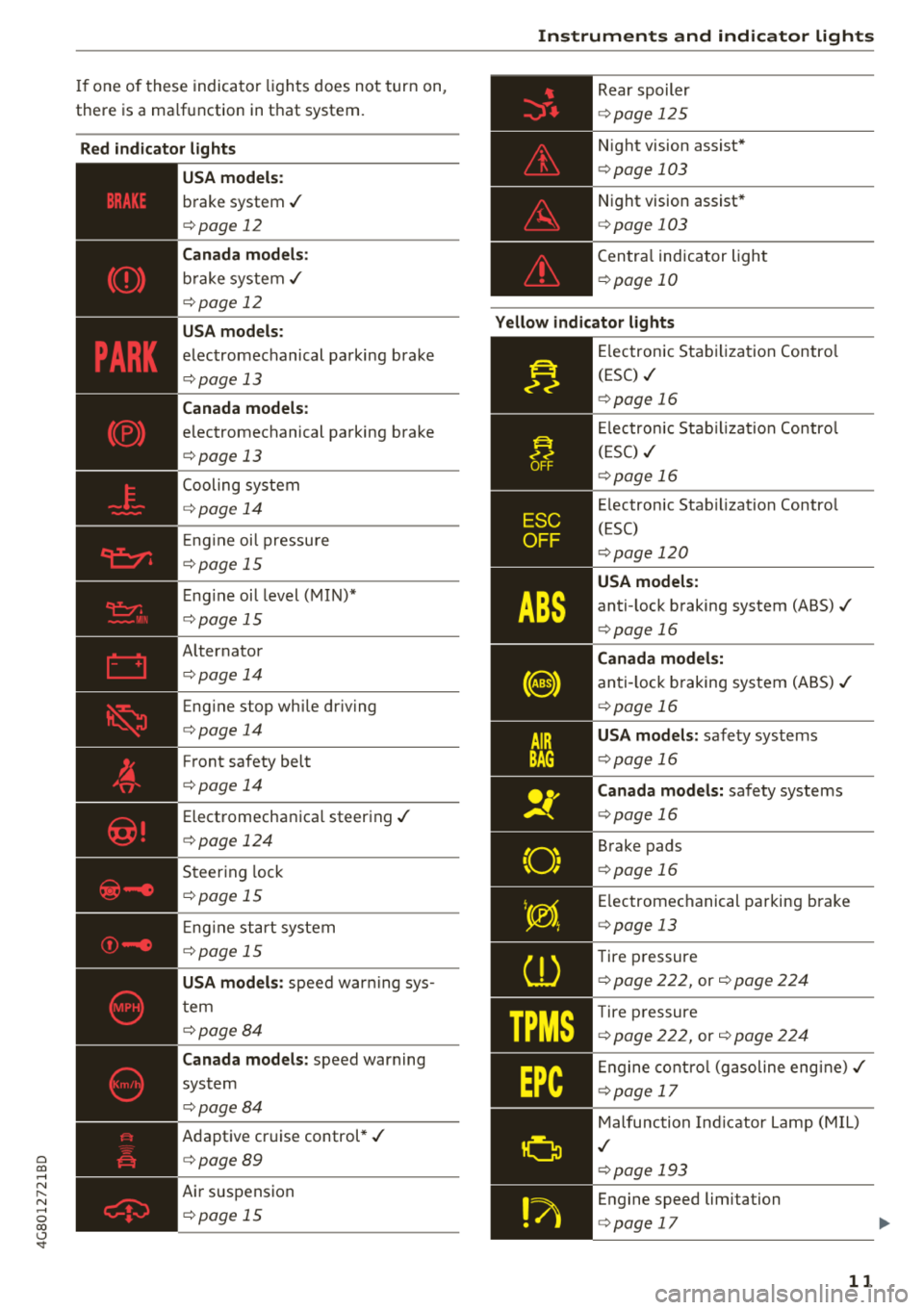
there is a ma lfu nction in t hat system.
Red indicator lights
--------------
US A models:
b rake system .I
c::> page 12
Canada models:
bra ke sys te m .I
c::> page 12
USA models :
elec tromechanical parking brake
c::> page 13
Canada models:
electromechanical pa rking brake
c::> page 13
Cooling sys tem
c::> page 1 4
Eng ine oi l pressu re
c::> page 15
E ng ine oi l level ( MIN )*
c::> pag e 15
A lternator
c::> page 14
Eng ine stop wh ile dr iv ing
c::> page 14
F ront safety belt
c::> page 14
Elect romecha nica l steer ing ./
c::> pag e 124
Steer ing lock
c::> page 1 5
En gine sta rt system
c::> page 15
USA models:
spee d war ning sys
t em
c::> page 8 4
Canada models :
speed warning
system
c::> page 84
Adapt ive cr uise control *./
c::> page 89
Air suspension
c::> page 15
Instruments and indicator lights
Rear spoil er
c::> page 1 2 5
N ight vision assist *
c::>page 103
Night vision assist*
c::> page 103
C en tra l ind icator light
c::> page 10
Yellow indicator lights
"O~ I I ~ ,.
--------------
El ec tronic Sta biliz ati on Contro l
(ESC)
.I
c::> page 16
El ec tro nic Sta bilizatio n C ontro l
( ES C)
./
c::> page 16
E lectron ic Stab iliza tion Contro l
(ESC)
c::> page 120
USA models:
anti- lock b raking system (ABS) ./
c::> page 16
Canada models:
anti-l ock braking system (ABS )./
c::> page 16
USA models: safe ty systems
c::> page 16
Canada models: sa fety systems
c::> pag e 16
B rake pads
c::> pag e 16
Electromec hanical par king brake
c::> page 13
Tire p ressure
c::> page 222, or c::> page 224
Tire pres sure
c::> page 222, or c::> page 22 4
Engine co ntro l (g aso line eng ine) ./
c::> page 17
Malfunc tion In dicator Lamp (M IL)
.I
c::> p age 19 3
En gine speed limitation
c::> pag e 17
11
Page 16 of 274

Instruments and indicator lights
_}_ Cooling system
• Turn off engine and check coolant level
The coolant level is too low.
Do not continue driving and switch the engine
off. Check the coolant level
9 page 200.
- If the coolant level is too low, add coolant
9page 200. Only continue driving once the in
dicator light turns
off.
• Coolant temperature too high! Please let en
gine run with vehicle stationary
Let the engine run at idle for a few minutes to
cool
off, until the indicator light turns off.
-If the indicator light does not turn off, do not
continue driving the vehicle . See an authorized
Audi dealer or authorized Audi Service Facility
for assistance.
_& WARNING
- Never open the hood if you can see or hear
steam or coolant escaping from the engine
compartment. This increases the risk of
burns. Wait until you no longer see or hear
steam or coolant escaping.
- The engine compartment in any vehicle can
be a dangerous area. Stop the engine and
allow it to cool before working in the engine
compartment. Always follow the informa
tion found in
9 page 193, Working in the
engine compartment.
@ Note
Do not continue driving if the. indicator
light turns on as this increases the risk of en
gine damage.
, ft Front safety belt
The. indicator light stays on until the driver's
and front passenger's safety belts are fastened.
Above a certain speed, there will also be a warn
ing tone.
14
(D Tips
For additional information on safety belts,
see ¢
page 138.
E::::I Alternator/vehicle battery
• Electrical system: malfunction! Battery is
not being charged
There is a malfunction in the alternator or the ve
hicle electrical system .
Drive to an authorized Audi dealer or authorized
Audi Service Facility immediately. Because the ve
hicle battery is discharging, turn off all unneces
sary electrical equipment such as the radio. See
an authori zed Audi dealer or authori zed Audi
Service Facility if the battery charge level is too
low .
r•j low battery: Battery will be charged while
driving
The starting ability may be impaired.
If this message turns off after a little while, the
vehicle battery charged enough while driving.
If the message does not turn off, have an author
ized Audi dealer or authorized Audi Service Facili
ty repair the malfunction .
~ Engine stop while driving
• Engine stopped: No power steering and
brake support.
There is a malfunction in the engine or in the fuel
supply system.
More force is needed to steer and brake the mov
ing vehicle when the engine is stopped . If the ve
hicle is rolling, try to bring it to a stop off to the
side from moving traffic. See an authorized Audi
dealer or authorized Audi Service Facility for as
sistance.
_& WARNING
If the engine stops while driving, you will
need to use more force to brake the vehicle.
This increases the risk of an accident. There
will still be power steering if the ignition is
-
Page 18 of 274

Instruments and indicator lights
There is a system malfunction that can result in
restricted driving stability or reduced ground
clearance.
Drive to an autho rized Aud i dea ler or authorized
Audi Service Facility immediately to have the
malfunction corrected.
II Air suspension: Vehicle too low Ground
clearance reduced
The ground clearance is very low due to a system
malfunct io n. Wait until the air suspens ion sys
tem has restored normal ground clearance. Ot h
erw ise, condit ions such as an uneven road s urface
can lead to vehicle damage.
& Brake booster
u Brake servo: limited functionality. You can
continue driving. Contact workshop
There is a malfunction in the brake booster. The
brake booster is available, but its effectiveness is
reduced. Braking behavior may be different from
how it normally functions and the brake pedal
may v ibrate.
Drive to an authorized Audi dea ler or authorized
Audi Service Facility immediately to have the
malfunction corrected.
f;.l fJ Electronic Stabilization Control (ESC)
If the bl indicator light blinks wh ile driving, the
ESC or ASR (Anti -Slip Regulation) is actively regu
lating .
If
the bl i ndicator light turns on, the system has
sw itched the ESC off. In this case, you can switch
the ignition off and then on to switch the ESC on
aga in . The indicator light turns off when the sys
tem is funct ion ing fully.
If the
JI i ndicator light turns on, ESC was
sw itched off using the
I,; OFFI button
~ page 120 .
Stabilization control (ESC/ABS): Fault! See
owner's manual
If the bl indicator light and the ABS indicator
light
rJ] (USA models) / Ii] (Canada models)
turn on and this message appears, there is a ma l-
16
function in the ABS system or electronic differen
tia l lock. This also causes the ESC to malfunction.
The brakes still function with their normal power,
but ABS is not active.
Drive to an authorized Audi dealer or authorized
Audi Service Facility immediate ly to have the
malfunction corrected.
A WARNING
If the 1111 (USA models) ;II (Canada mod
els) brake system indicator light turns on to
gether with the ABS and ESC ind icator lights,
the ABS and ESC regulating function may
have malfunctioned . Funct ions that stabilize
the vehicle are no longer available. This co uld
cause the vehicle to swerve, which increases
the risk that the vehicle will slide. Drive care
fu lly to the nearest authorized Audi dealer or
authorized Audi Service Facility and have the
malfunction corrected.
(D Tips
For additional information on ESC and ABS,
see
~page 120.
tlit !t Safety systems
The II (USA models)/ m (Canada models) indi
cator light monitors the safety systems.
If the
II (USA models)/ m (Canada mode ls) in
dicator light turns on or blinks, there is a mal
function in a safety system such as the airbag or
belt tensioner system.
Drive to an authorized Audi dealer or authorized
Audi Service Facility immediate ly to have the
malfunction corrected.
A WARNING
Have the malfunction in the safety systems
inspected immed iately. Otherwise, there is a
risk that the systems may not activate during
a collision, wh ich increases the risk of serious
injury or death .
(0} Brake pads
liJ Brake pads!
-
Page 57 of 274
a co ,...,
N
" N ,...,
0 00 <.,;) '
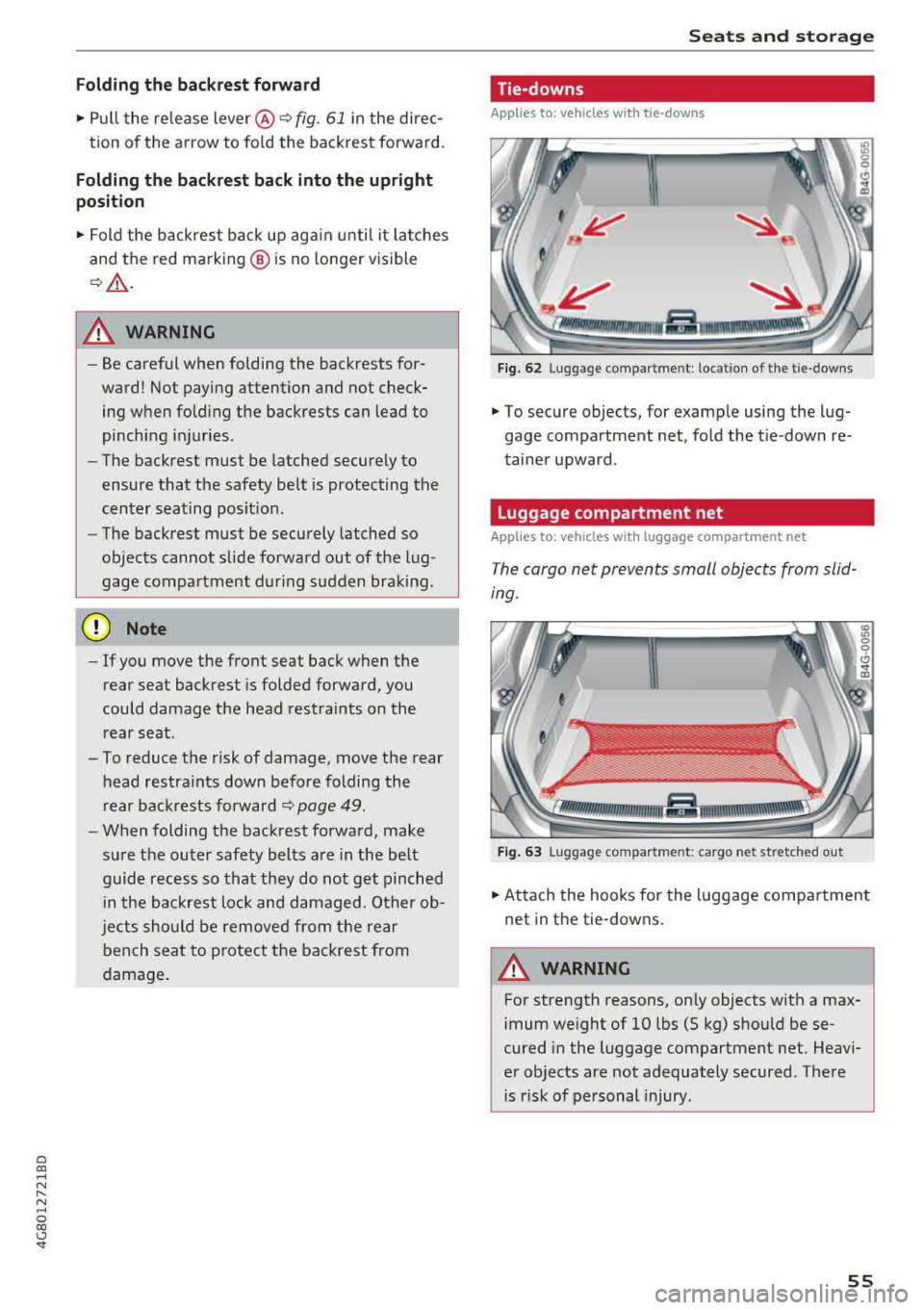
.,. Pull the release lever @¢ fig. 61 in the direc-
tion of the arrow to fo ld the backrest forward.
Folding the backrest back into the upright
position
.,. Fold the backrest back up aga in until it latches
and the red marking @ is no longer visible
~ A -
A WARNING
-Be careful when folding the backrests for
ward! Not paying attention and not check
ing when folding the backrests can lead to
pinching injuries .
- The backrest must be latched securely to
ensure that the safety belt is protecting the
center seating position .
- The backrest must be securely latched so
objects cannot slide forward out of the lug
gage compartment dur ing sudden braking .
(D Note
-If you move the front seat back when the
rear seat backrest is folded forward , you
could damage the head restraints on the
rear seat.
- To reduce the risk of damage, move the rear
head restraints down before folding the
rear backrests forward
~ page 49 .
-When folding the backrest forward, make
sure the outer safety belts are in the belt
guide recess so that they do not get pinched
in the backrest lock and damaged . Other ob
jects should be removed from the rear
bench seat to protect the backrest from
damage .
-
Seats and storage
Tie-downs
Applies to: vehicles with tie -downs
Fig. 62 Lug gage compar tmen t: loc ation of the tie -d owns
... To secure objects, for example using the lug
gage compartment net, fold the tie -down re
tainer upward .
Luggage compartment net
Applies to: vehicles wit h luggage compartment net
The cargo net prevents small objects from slid
ing.
Fig. 63 Luggage compar tmen t: cargo net st retched ou t
... Attach the hooks for the luggage compartment
net in the tie-downs.
A WARNING
-
For strength reasons, only objects with a max-
imum weight of 10 lbs (5 kg) should be se
cured in the luggage compartment net. Heavi
er objects are not adequately secured . There
is r isk of personal injury .
55
Page 73 of 274

the brake pedal. The [IJ indicator light appea rs
in the information line at the bottom of the in
str ument cl uster d isp lay . The needle in t he
tachometer also moves into the
READY pos i
t ion
ll .
"'The eng ine starts aga in when yo u take yo ur
foot off t he brake pedal. The ind icator light
tu rns off .
Additional information
The engine stops in the P, N and D se lecto r lever
positions.
If yo u select the R pos ition dur ing a stop phase,
the eng ine will start again.
Shift to P quickl y to prevent t he en gine from
starti ng u ninten tiona lly w hen s hift ing t hrough R.
You can dete rm ine fo r yo urself if t he e ng ine will
s top o r not b y reducing or increas ing the amoun t
of force yo u use to p ress the bra ke pe dal. Fo r ex
ample, if you only lig htly press on t he b rake ped
a l in stop -and -go traffic or w hen turning, the en
g ine will not switch
off when the vehicle is sta
tionary. As soon as yo u press the brake down
ha rder, the eng ine will sw itc h off.
(D Tips
- Press t he b rake pedal durin g a Stop phase
to keep the ve hicle from roll ing.
- The ignition wi ll tu rn
off if you press the
I START E N GINE ST OP I button dur ing a stop
phase. The nee dle in the tachomete r moves
i nto the
OFF posi tio n.
General information
A pp lies to: ve hicles w ith Sta rt/Stop system
The standard Start/Stop mode can be canceled
for various system-related reasons .
Engine does not switch off
Before and during eac h stop phase, the system
checks if certai n cond itions have been met . If the
fjj indicato r light appears in the instrument cl us
ter d isp lay, the engine w ill not be stopped, for
a ~ examp le in the fo llow ing s ituations:
N
" N ..... 0 00
~ ll Ma rket -spe cific
Driving
- The engine has not reached the minim um re
qui red tempe rat ure for Sta rt/Sto p mode.
- The interior tempera ture selec ted by the cl i-
mate co ntrol system has not been reached .
- The ou tside te m pe rat ure is ex tremely high/low.
- The win dshi eld i s bei ng
d efros ted® .
-The parking sys tem * is sw itched on .
- The vehicle battery charge level is too low .
- The steering wheel is tu rned at a sha rp angle o r
is moving.
- After engaging the reverse gear .
- On sharp incl ines .
Engine automatically restarts
The stan dard S tart/S top mode w ill be canc eled
dur ing a sto p p hase in the followi ng si tuatio ns.
T he eng ine res tarts wi thout a ny ac tion by the
drive r.
- The ve hicl e ro lls, fo r ex am ple whi le o n a slo pe.
- The inte rior tempe ra ture differs from t he tem-
pe ra tu re sele cte d in t he A/C sys tem.
- The winds hield is bei ng
d efros ted® .
-The brake peda l is pressed severa l times in a
row .
- The vehicle battery charge level is too low.
- Powe r consumption is high .
T he eng ine can turn off ag ain when the cond i
tions for Sta rt/Sto p mode a re met.
Ignition is switched off automatically
T o p reve nt t he vehicle batte ry from dra ining, the
i gni tion will switc h off
automatically und er the
f o llow ing co nd itio ns:
- The vehicle has already been dr iven .
- The Start/Stop system has stopped the engine .
- The driver 's door is opened.
- The driver's sa fety belt is unbuck led .
- The brake peda l is not presse d.
- The ve hicl e is sta tion ary.
In this case , the activated low beam is re placed
by the p arking ligh t. T he par kin g lig hts wi ll
swi tch off afte r appr oximat ely 30 minu tes or
whe n you lock the ve hicle.
71
Page 75 of 274

a co .... N
" N .... 0 00 \,;J '
Requirement: the driver's door must be closed,
the driver's safety belt must be latched and the
parking brake must be set.
.,. To start driving and release the parking brake
automatically, press the accelerator pedal as
usual.
In addition to releasing the parking brake auto
matically, other convenience and safety functions
are available when you start driving
¢page 74,
Starting to drive.
Preventing the automatic parking brake
release
The vehicle could begin rolling unintentionally,
depending on the hill or if towing a trailer.
.,. To prevent the parking brake from releasing au
tomatically, pull and hold
the(®) switch and
press the accelerator pedal. The parking brake
remains set and prevents the vehicle from roll
ing backward.
.,. You can release the C®l switch again once you
are sure that you are giving enough driving
force to the wheels by pressing the accelerator pedal.
Emergency braking function
You can use the emergency braking function in an
emergency situation, or if the standard brake op
eration malfunctions or is disabled.
.,. Pull and hold the®) switch.
.,. As soon as you release the (®) switch or acceler-
ate, the braking stops.
Pulling and holding the
C®) switch while driving
the vehicle activates the emergency braking func
tion. The vehicle is braked at all four wheels by
activating the hydraulic brake system. The brak ing effect is similar to heavy
braking¢&_ .
To reduce the risk of activating the emergency
braking by mistake, a warning tone (buzzer)
sounds when
the®> switch is pulled. Emergency
braking stops as soon as
the®) switch is released
or the accelerator pedal is pressed.
Parking
.,. Press the brake pedal to stop the vehicle.
Driving
.,. Pull the®> switch to set the parking brake .
.,. Place the selector lever in the P position.
.,. Turn the engine off¢&_ .
.,. Turn the steering wheel when parking on in
clines so that the wheels will roll into the curb
if the vehicle starts moving.
A WARNING
-
- Do not press the accelerator pedal inadver
tently if a gear is selected when the vehicle
is stationary and the engine is running. Oth
erwise, the vehicle will start to move imme
diately and this could result in an accident.
- Emergency braking should only be used in
an emergency, when the normal brake pedal
has failed or the brake pedal is obstructed.
During emergency braking, your vehicle will
brake similar to heavy braking. ESC and the
associated components (ABS, ASR, EDL)
cannot overcome the laws of physics . In cor
ners and when road or weather conditions
are bad, a full brake application can cause
the vehicle to skid or the rear end to swerve,
which
increases the risk of an accident.
- If the power supply fails , you cannot set the
parking brake if it is released . In this case,
park the vehicle on level ground and secure
it by placing the selector lever in the P posi
tion. See an authorized Audi dealer or au
thorized Audi Service Facility for assistance.
- Always take the vehicle key with you when
leaving your vehicle, even for a short period
of time. This applies particularly when chil
dren remain in the vehicle. Otherwise chil
dren could start the engine, release the
parking brake or operate electrical equip
ment such as power windows, which in
creases the risk of an accident .
- No one should remain in the vehicle when it
is locked - especially children . Locked doors
make it more difficult for emergency work
ers to get into the vehicle, which puts lives
at risk.
(D Tips
When stopping at a traffic signal or stopping
in city traffic, you can set the parking brake
manually . The vehicle does not have to be
73
Page 97 of 274

a co .... N
" N .... 0 00 \,;J '
be lt.
Door open
The adaptive cruise co ntrol system cannot sw itch
on w hen a door is open .
Stationary object ahead
This message appears if you would like to switc h
adaptiv e cruis e control on and there is a station
ary object or obstacle directly ahead of your vehi
cle .
Audi pre sense
Preventative passenger protection
Applies to: vehicles with Audi pre sense
P re sense can initiate steps to protect vehicle oc
cupants in certain dangerous situations. The
functions described are availab le depending on
ve hicle equ ipment:
Pre s ense basic*
The fo llow ing func tions can be t rigge red in cer
tain driving si tuations:
- T ension ing of the safety belts (for example,
dur ing heavy bra kin g): the fro nt safety belts
have reve rsible bel t tensione rs. If a coll is io n
does not occur, the sa fety be lts loosen slightly
and are ready to trigger again.
- C losing the w indows and the su nroo f* (for ex
amp le, when over -or understeer ing) : the win
dows and t he sunroof * close until there is only
a small gap open .
The funct io n of the p re sense basic is act ivated at
a speed of 20 mph (3 0 km/h) or hig her .
Dr ive se lect : t h e deployment time is adapted in
Dynami c mode.
Pre sense front (vehicles with adaptive cruise
control*}
Pr e sense front contains the f unct ions of p re
se nse bas ic. I n add it ion, the likelih ood of a rear
e nd collis ion with the veh icle ahead is also calc u
l ated, withi n the limits of the system.
If the risk
of a collision is detected, t he fo llowing functions
can trigger :
Ass istance systems
- Braking g ua rd r::!> poge 92
- Tensioning o f the safety bel ts
- Clos ing the wi ndows a nd the s unroof *
Pre sense rear (vehicles with side a ssist*}
Pre sense rear contains the funct ions of pre sense
basic . In addition, the likelihood of a rear-end
collision from the vehicle behind is also calcu lat
ed, within the limits of the system . If the r isk of a
c ollision is detec ted, t he follow ing f unct ions can
t rigge r:
- Tensioning of the safety belts
- Closing the windows and the sunroof *
Pre sen se plus *
Pre sense plus contains t he f unctions of pre
sense front and pre sense rea r.
Error message
Audi pre sense : Unavailable
Preventative passe nger protect ion is not ava ila
ble . D rive to an a utho rized Aud i deale r or autho r
i zed Audi Se rvice Facility immed iate ly to have the
malfu nction corrected.
_&. WARNING
Pr e sense c annot overcome n atural p hys ical
l aws . It is a system des igned to assist and it
ca nnot prevent a co llision. Do not let the in
creased safety p rovided tempt yo u into tak ing
risks. This could inc rease your ris k of a co lli-
sion.
- The system can dep loy incorrectly .
- Please note that the sensors do not a lways
detect a ll objects . T hi s increases the r isk o f
a co llision.
- Pre sense does not react to peop le or ani
mals or objects that are cross ing the vehi
cle's path o r are diffic ult to detect
r::!>poge 87.
- Reflective objects such as g uard ra ils o r the
e ntrance to a tunnel, heavy ra in and ice can
affect the funct ion of the rada r senso rs and
-
the system's ab ility to de tect a collision risk . ~
95
Page 130 of 274
Intelligent Technology
-How fast the vehicle was traveling.
These data can help prov ide a better unde rstand
ing of the circumstances in which crashes and in
juries occur. NOTE: EDR data are recorded by your
vehicle only if a non-trivia l crash situation occurs;
no data are recorded by the EDR under norma l
driving conditions and no personal data (e.g.,
name, gender, age, and crash location) are re
corded. However, other parties, such as law en
forcement, could combine the EDR data with the
type of personally identifying data routinely ac
quired during a crash invest igat ion.
To read data recorded by an EDR, special equip ment is required, and access to the veh icle or the
EDR is needed . In add it ion to the vehicle manu
facturer, other parties, such as law enforcement,
that have the special equipment, can read the in
formation if they have access to th e veh icle or the
EDR.
Some state laws restr ict the retrieval or down
loading of data stored by ED Rs insta lled in a vehi
cle for the express purpose of retrieving data af
ter an accident or crash event without the own
er's consent .
Aud i w ill not access the EDR and/o r similar data
or give it to othe rs -
- unless the vehicle owner (or lessee if the veh i
cle has been leased) agrees; or
- upon the official request by the police; or
- upon the order of a court of law or a govern-
ment agency; or
- for the defense of a lawsu it through the judicial
discovery process.
- Audi may also use the data for research about vehicle opera tion and safety performance or
provide the data to a third party for research
purposes without identifying the specific vehi
cle or information about the identity of its own
er or lessee and only after the recorded vehicle
data has been accessed.
Vehicle control modules
Your veh icle is also equipped with a number of
electron ic control modules for various veh icle
systems, such as engine management, emission
cont rol , airbags, and safety belts.
128
These electronic contro l modules record data
during normal vehicle operation that may be
needed by trained techn ic ians for diagnostic and
repair purposes. The recording capab ility of these
modules is lim ited to data (no sound is record
ed) . Only a small amount of data is actually re
corded over a very limited per iod of time, or stor
ed when a system fault is detected by a contro l
module . Some of the data sto red may relate to
vehicle speed, direction , or braking, as well as re
straint system use and performance in the event
of a crash. Stored data can also on ly be read and
down loaded with specia l equipment that is di
rectly connected to the vehicle.
(D Tips
Your vehicle may be equipp ed wit h Audi con
nect. Your use of certain Audi connect fea
tures requires wire less services that are pro
v ided by a third party wireless telecommuni
cations provider . For details regarding how in
formation obtained through Audi connect is
collected, processed, transmitted, used, and
sha red, please see your contract with the
wireless telecommunications provider.
Page 131 of 274
a co .... N
" N .... 0 00 \.J '
Basics
Safe driving habits
Please remember -safety first!
The individua l safety features of your vehicle can
work together as a system to help protect you
and your passengers in a wide range of accidents.
These features cannot work as a system if they
are not always correctly adjusted and correctly
used .
This chapter contains important informat ion,
tips, instruct ions and warn ings that you need to
read and observe for your own safety, the safety
of your passengers and others . We have summar
i zed here what you need to know about safety
be lts, a irbags, child restra ints as well as child
safety. Yo ur safety is for us priority number 1. Al
ways observe the information and warnings in
this section - for your own safety as well as that
of your passengers.
The informa tion in t his sect ion app lies to all
model versions of your vehicle. Some of the fea
tures described in this sections may be standard
eq uipment on some models, or may be optional
equ ipment on others. If you are not sure, ask
your author ized Audi dealer.
A WARNING
-Always make sure that you follow the in
struct ions and heed the WARNINGS in th is
Manual. It is in your i nterest a nd in the in
te rest of your passengers .
-
-Always keep the complete Owner's Litera
t ur e in yo ur Audi whe n you lend or se ll yo ur
vehicle so that this important information
w ill a lways be available to the d rive r and
passengers.
-Always keep the Owne r's literature h andy so
that you can f ind it easily if yo u have ques
tions .
Driving saf ety
Important things to do before driving
Safety is everybody 's job ! Vehicle and occupant
safety always depends on the informed and care
ful driver .
For your safety and the safety of your passen
gers,
befor e dri ving alw ays:
.. Make sure that a ll lights and signals are operat
ing correctly.
.. Make sure tha t the tire pressure is correct .
.. Make sure that all windows are clean and afford
good vis ibility to the outs ide .
.. Secure all luggage and othe r items ca refully
¢ page 54, ¢page 53 .
.. Make sure that not hing c an interfere wi th the
peda ls .
.. Adjust front seat, head restraint and mirrors
correct ly for your height.
.. Instruct passengers to adjust the head re
straints according to their height.
.. Make sure to use the rig ht child restra int cor
rectly to protect children
¢ page 170, Child
safety .
.. Sit properly in your seat and make sure t hat
your passengers do the
same ¢ page 47, Seats
and storage.
.. Fasten your safety belt and wear it properly . Al
so instruct your passengers to fasten their safe
ty belts
properly ¢ page 138 .
What impairs driving safety?
Safe driving is directly related to the condition of
the vehicle , the driver as well as the driver 's abili
ty to concentrate on the road without being dis
tracted.
The driver is responsib le for the safety of the ve
hicle and a ll of its occupants. If your ability to
drive is impa ired, safety risks for everybody in the
vehicle increase and you a lso become a hazard to
everyone else on the road
¢ &_ . Therefore:
.. Do not let yourse lf be distracted by passengers
or by using a cellular telephone .
.. NEVER drive when your driving abi lity is im
pa ired (by med ications, alcohol, drugs, etc .) .
.. Observe all traffic laws, rules of the road and
speed lim its and plain common sense .
129