fog light AUDI A7 2018 User Guide
[x] Cancel search | Manufacturer: AUDI, Model Year: 2018, Model line: A7, Model: AUDI A7 2018Pages: 274, PDF Size: 42.77 MB
Page 86 of 274

Ass is tance sy stem s
Assistance systems
Speed warning system
Description
Applies to: veh icles with speed warning system
The speed warning system helps you to stay un
der a specified maximum speed.
The speed warning system warns you if you are
exceeding the maximum speed that you have set.
A warning tone will sound as soon as your speed
exceeds the sto red value slightly.
The . (USA models) I. (Canada models) indi
cator light and a message appear in the instru
ment cluster display at the same time.
The.
• indicator light and the message turn off if the
speed falls back below the stored maximum
speed.
Sett ing a threshold is recommended if you would
like to be reminded when you reach a certa in
maximum speed. S ituations where you may want
to do so i nclude driving in a country wit h a ge ne r
a l speed limit o r if the re is a specified maximum
speed for winter tires.
Setting the warning threshold
The warning threshold is set in the Infotainment
system.
• Se lect: the ICARI function button> (Car )* Sys
tems
control button > Driver assistan ce >
Spe ed warning .
(D Tips
Regardless of the speed warning system, you
should always monitor your speed using the
speedometer and make sure you are following
the legal speed limit.
84
Cruise control system
Switching on
Applies to: vehicles with cruise control system
The cruise control system makes it possible to
drive at a constant speed starting at 20 mph (30
km/h).
0
f
~
0
F ig . 86 Operat ing lever: c ruise control system
• To switch t he cru ise control o n, pull the lever
into position
(D ~ fig. 86 .
• Drive at the speed to be maintained.
• To store the speed, press the button @.
The stored speed and the
( ij;\1)~14 (USA models) /
l'I (Canada models) ind icator lig ht are disp layed
in the instrument cluster.
This information is also shown briefly in the
head -up display* .
The speed is mainta ined by modifying engine
power or through a n active br ake interven tion.
~ WARNING
-Always pay at tentio n to the traffic around
you when the cruise contro l system is in op
eration . You are always respons ible for your
speed and the distance between your ve hi
cle and other vehicles.
-For safety reasons, cruise control should not
be used in the city, in stop-and-go traff ic, on
winding roads and when road conditions are poor (such as ice, fog, gravel, heavy rai n and
hyd roplaning), because this inc reases the
r is k of an accident.
-Switch the cr uise control off temporarily
when dr iv ing in turning lanes, highway exits
or in constr uction zones.
-
Page 99 of 274
a co ,...,
N
" N ,...,
0 00 <..:l '
road, a banked roadway or crosswinds, the
corrective steering alone may not be enough
to keep the vehicle in the middle of the lane.
- For safety reasons , active lane assist must
not be used when there are poor road and/
o r weather conditions such as slippery
roads, fog, gravel, heavy ra in, snow and the
potent ial for hydroplaning. Using active lane
assist unde r th ese conditions may increase
the risk of a c rash .
Switching on/off
Appl ies to : ve hicles with Audi active lane assist
... g
9 ::i CX) ID
•
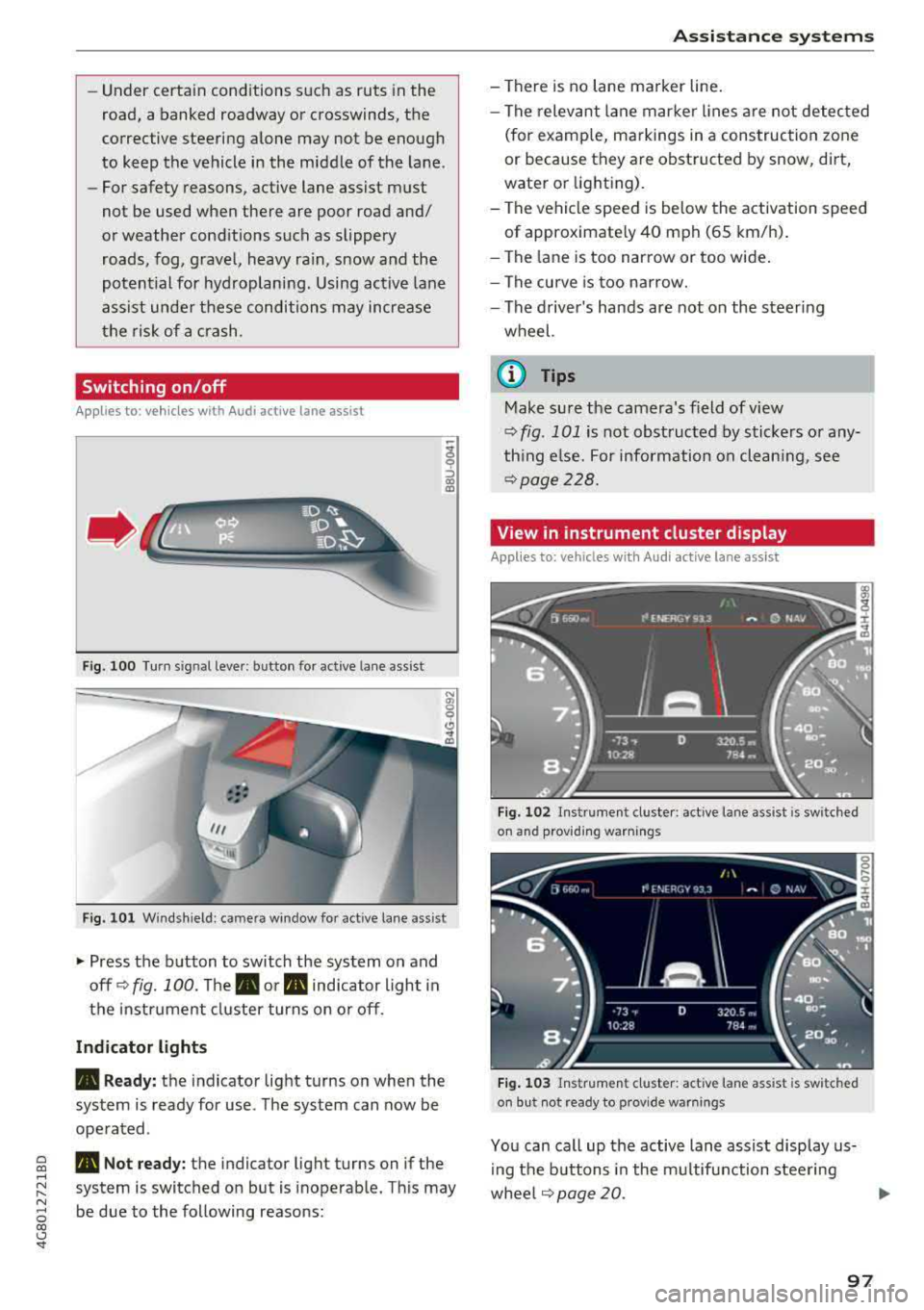
F ig. 1 00 Turn s ig n al leve r: b utton for act ive lane a ss is t
Fi g. 101 W ind sh iel d: cam era win dow fo r active lane ass is t
~ Press the b utton to switch the system on and
off ¢
fig. 100. The . or m, ind icator light in
the i nstrume nt cl uster turns on o r off.
Indicator lights
• Ready: the i ndicator light turns on whe n the
sys tem is ready for use . The sys tem can now be
ope rated .
m, Not ready: t h e indica tor ligh t turns on if the
system is switched o n but is i noperab le. Th is may
be due to the following reasons:
A ssi st a nce systems
- There is no lane marker line .
- The relevant lane mar ke r li nes a re not detec ted
(for examp le, m arkings in a construction zone
or because they are obstructed by snow, dirt,
wate r or light ing).
- The ve hicle speed is be low the activation speed
of approximate ly 40 mph (65 km/h) .
- The lane is too narrow or too wide .
- The curve is too narrow.
- The driver's hands are not on the steer ing
wheel.
(I} Tips
Make su re the camera's f ield of view
q fig . 101 is not obst ructed by stickers o r any
th ing e lse. For information on clean ing , see
¢ page 228.
View in instrument cluster display
Applies to: vehicles wit h Audi ac tive lane assist
Fig. 102 Ins trume nt cl uste r: act ive lane ass ist is sw it c h ed
on and prov idi ng warnings
Fi g. 1 03 Instr um en t cl uster : act iv e la ne ass ist is sw it c h ed
on but not rea dy to provide warn ings
You can ca ll up the active lane assist display us
i ng the b uttons in the m ultifunction steering
whee l
q page 20. .,.
97
Page 100 of 274
Assistance systems
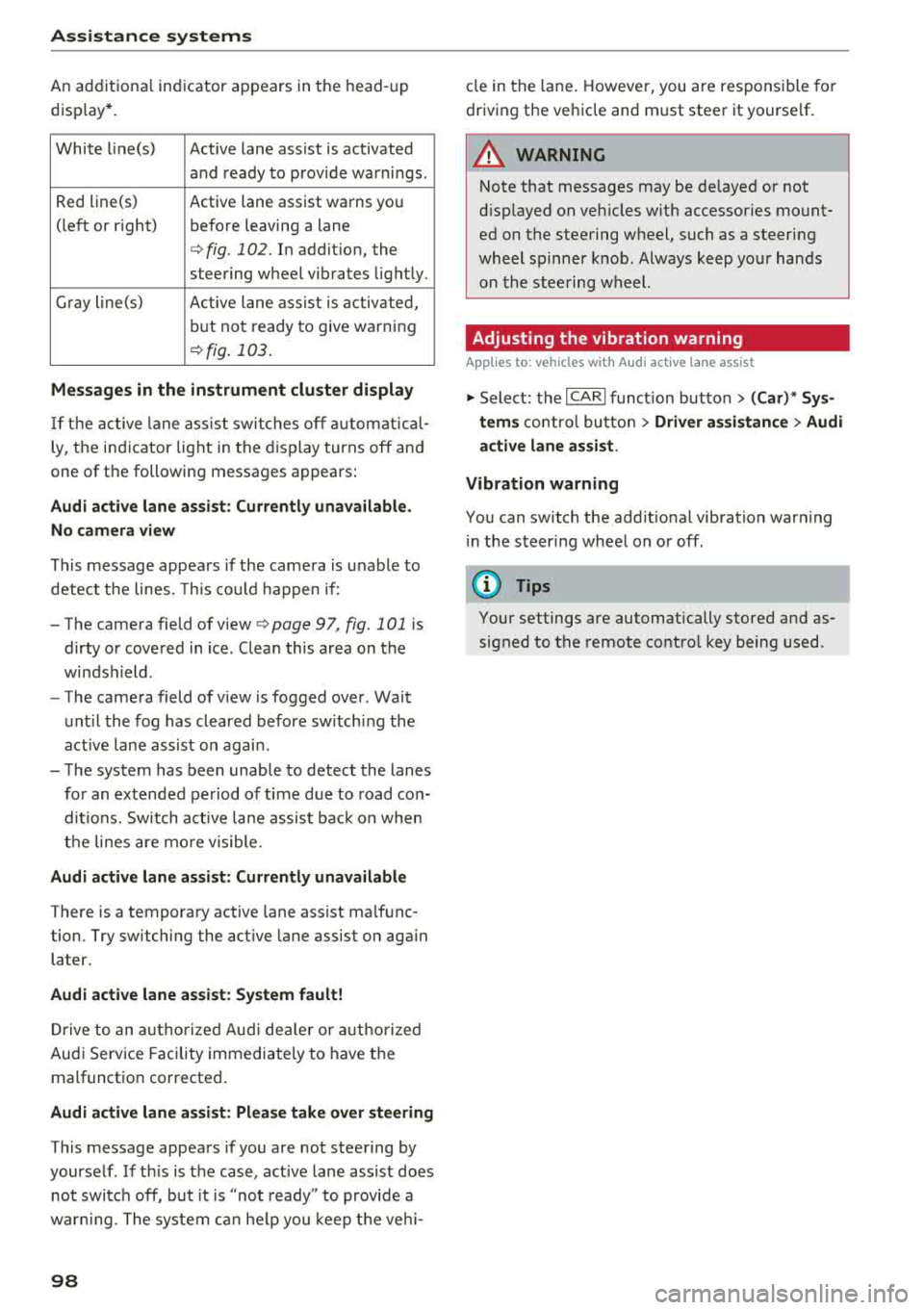
An additional indicator appears in the head-up
disp lay*.
White line(s) Active lane assist is activated
and ready to provide warnings .
Red line(s) Active lane assist warns you
(left o r right) before leaving a lane
c::>fig. 102. In addit ion, the
steering wheel vibrates lightly.
Gray line(s) Active lane assist is activated,
but not ready to give warning
c::>fig . 103.
Messages in the instrument cluster display
If the active lane assist swit ches off automat ical
ly, the indicator lig ht in the display turns off and
one of the following messages appears :
Audi active lane assist: Currently unavailable .
No camera view
This message appears if the came ra is unable to
detect the lines. This cou ld happen if :
- The camera field of v iew
c::> page 97, fig . 101 is
dirty or covered in ice. Clea n this area on the
windsh ield .
- The camera field of v iew is fogged over . Wait
until the fog has cleared before switch ing the
active lane assist on again .
- The system has been unable to detect the lanes
for an extended period of time due to road con
ditions. Sw itch act ive lane assist back on when
the lines are more visible.
Audi active lane assist : Currently unavailable
There is a temporary active lane assist ma lfunc
tion . Try sw itching the act ive lane assist on aga in
la ter.
Audi active lane assist : System fault!
Drive to an autho rized Aud i dealer or authorized
Audi Service Facility immediately to have the
malfunction corrected .
Audi active lane assist: Please take over steering
This message appears if you are not steering by
yourself . If th is is the case, active lane assist does
not switch off, but it is "not ready" to provide a
war ning. The system can help you keep the vehi-
98
cle in the lane . However, you are responsible for
driving the vehicle and must steer it yourse lf .
A WARNING
Note that messages may be de layed or not
displayed on vehicles with accessories mount
ed on the steering wheel, such as a steering
wheel spinner knob. Always keep your hands
on the stee ring wheel.
Adjusting the vibration warning
App lies to: vehicles wit h Audi active la ne ass ist
-
~ Select: the I CARI function button > (Car)* Sys
tems
contro l butto n > Driver assistance > Audi
active lane assist .
Vibration warning
You can switch the addit ional vibration warn ing
i n the steer ing wheel on or off .
(D Tips
Your settings are automatically stored and as
signed to the remote control key being used .
Page 106 of 274

Assistance systems
The following situations may affect the function
of t he night vision assist system:
- Poor visibility such as snow, rain , fog or heavy
spray
- Dirty lens on the night vision assist camera
Make sure the night vision ass ist camera
¢ fig. 113 is not covered by stickers, deposits or
any other obstructions because that can affect
the camera function. For information on clean
ing, see
¢ page 228.
The pedestrian and wild animal recognition de
pends on the temperature difference between
the person/wild animal and the background. Peo ple/wild animals may not be detected if the dif
ference is too small. The pedestrian/wild animal
marking and the marking light* deactivate at
temperatures above approximately 77 °F
(25 °()
and during daylight. If the night vision assist
im
age is selected in the instrument cluster display,
then the
II symbol appears at the top on the
right side.
..&_ WARNING
Pay attention to traffic and the area around
your vehicle when night vision assist is switch
ed on. The driver is always responsible for as
sessing the traffic situation.
- Night vision assist can only warn about peo
ple and wild animals located within the visu
al range of the infrared camera. The visual
range corresponds to the image in the in
strument cluster display.
- Night vision assist may not detect people or
wild animals and mark them if
- they are not in an upright position, for ex
ample if they are sitting or lying down
and/or
- the silhouette in the display appears in
complete or interrupted, for example be
cause the person is partially covered by a
vehicle or the animal is partially covered
by tall grass. This could increase the risk
of an accident.
- Never try to swerve around animals if doing
so will endanger you or other road users, be
cause this increases the risk of an accident.
104
@ Tips
- Even though the system evaluates the
shape and heat given off by all detected ob
jects, there are limits to the system. There
may be false warnings.
- For technical reasons, the image pauses in
split second intervals.
Switching on /off
Applies to: vehicles with night vision assist
Fig. 114 Area around the ligh t switc h: ni gh t vis ion assist
button
Requirement: switch the ignition on and turn the
light switch to the
AUTO position.
.,. Press the~ button ¢ fig. 114. The heat image
from the night vision camera appears in the in
strument cluster display .
.,. Press the~ button again to switch the night
vision assist off .
If conditions are bright enough, night vision as
sist can be switched on without moving the light
switch to the
AUTO position. Pedestrian and wild
animal highlighting and warnings are only active
when it is dark outside and the headlights are
switched on.
Adjusting the contra st
Applies to: vehicles with night vision assist
.,. Select: the I CARI function button > (Car)* Sys
tems
contro l button > Driver assistance >
Night vision assist contrast.
When the night vision assist is switched on and
the image is visible in the instrument cluster dis
play, you can adjust the contrast in the image
from
Min to Max .
Page 129 of 274
a co .... N
" N .... 0 00 \.J '
der to maintain an optima l vehicle battery charge
level.
(D Tips
-Energy management cannot overcome the
l aws of physics. Note that the charge leve l
and length of the vehicle battery life are
limited.
-When the starting ability is endangered, the
(•) indicator light turns on qpage 14.
What you should know
Maintaining the starting ability is the highest
priority.
A lot of stress is placed on the vehicle battery
when driving short distances, during city driving,
and at co ld times of the year. A lot of energy is
used but little is generated. It is a lso critical
when the engine is not running but electrical
equipment is switched on. In this case, energy is
used but none is generated.
In situations like this, energy management will
actively regulate the distribution of energy.
Long periods without use
If you do not drive your vehicle for several days or
weeks, e lectrica l equipment is gradually sca led
back or switched off. This reduces energy use and
ensures the vehicle wi ll be able to start after long
periods of time. Some convenience functions,
such as interior lighting or power seat adjust
ment, may not be available under certain circum
stances . These convenience functions will be
ava ilable again once you switch the ig nition on
and start the engine.
With the engine switched off
The vehicle battery will drain if you use Infota in
ment functions such as listening to the radio
while the eng ine is switched off.
The vehicle's ability to start may be impaired by
the energy use, a message will appear in the In
fotainment system d isplay .
The message ind icates that the system will
switch off automatically soon. If you wou ld like
Intelligent Technology
to continue using the functions, you must start
the engine.
With the engine running
Although e lectr ical energy is generated wh ile
dr iv in g, the veh icle battery can drain. This can
happen if little energy is generated but much is
used, and the charge level of the vehicle battery
is not optimal.
To r esto re the balance of energy, components
that require large amounts of energy are tempo
rarily scaled back or switched off . Heating sys
tems in particular require a great deal of energy .
If you notice, for example, that the seat heating*
or rear window defogger is not work ing, then it
has been temporarily reduced or sw itched off.
These systems are available aga in as soon as the
energy supply has been restored .
In add ition, you may notice that the idle speed
has slightly increased. That is normal and no
cause for concern. By increasing the idling speed,
the addit ional required energy will be generated
and the vehicle battery w ill be charged .
Notice about data
recorded by the Event
Data Recorder and
vehicle control modules
Event Data Recorder
This vehicle is equ ipped w ith an Event Data Re
corder (EDR) . The ma in purpose of an EDR is to
record, in certain crash or near crash-l ike situa
tions, such as an airbag deployme nt or hitt ing a
road obstacle, data that will ass ist in understand
ing how a vehicle 's systems performed. The EDR
is designed to record data related to vehicle dy
namics and safety systems for a short period of
time, typically 30 seconds or less. The EDR in this
vehicle is designed to record such data as:
-How various systems in your vehicle were oper
ating;
-Whether or not the driver and passenger safety
be lts were buckled/fastened;
-How far (if at all) the driver was depressing the
accelerator and/or brake pedal; and,
..,.
127
Page 234 of 274
Care and cl eaning
avoid scratches, move the scraper on ly in
one direction and not back and forth.
- Never remove snow o r ice from door win
dows and mirrors using warm or hot water
because this could cause cracks to form .
- To avoid damage to the rear w indow de
fogger , do not apply any stickers on the
heating wires on the inside of the window .
-Deco rati ve parts /trim
- Never use chrome care or cleaning prod-
ucts .
-Paint
-To red uce the risk of scratches, the vehicle
must be free of dirt and dus t before pol
ishing or waxing .
- To prevent pa int damage, do not pol ish or
w ax the veh icle in dire ct sunlight.
- To red uce the risk of pa int damage, do not
polish away rust spots .
- Remove cosmetics and sunscreen immedi
a tely
-these could damage the p aint.
- Displays
- To avoid scratches, do not use dry cleaning
methods on displays .
-Controls
- Make sure that no fluids enter the con-
trols, because this could ca use damage.
- Safety belts
- Do not remove the safety belts to clean
them.
- Never clean safe ty belts o r their compo
nents chemically or with corrosive fl uids
or so lvents and neve r al low sha rp o bje cts
t o come in to con ta ct w ith the sa fe ty belts .
Th is could cause damage to the belt web
bing .
- I f there is damage to the webbing, the
connections, the retractors or the b uckles,
have them replaced by an authorized Audi
dealer or author ized Audi Service Facility.
- Te xtiles /artificial leather/ Alcantara
- Never treat artificia l leather/ Alcantara
w ith leather care p roducts, solvents, floo r
polish, shoe polish, spot remove or similar
prod ucts.
- Have a specialis t remove st ubborn s tains
to prevent damage.
232
- Neve r use steam cleaners, brushes, hard
sponges, etc . when cleaning .
- D o not turn on the seat heating* to dry the
seat.
- Ob jects w ith sharp edges, such as zippe rs
or rive ts on clothing or belts, can cause
damage to the surface .
- Open hook and loop fastene rs, for exam
p le on clothing, can damage seat covers .
Make sure hook and loop fasteners a re
closed.
- Natural leather
- Never treat leather with solvents, floor
polish, shoe polish, spot remover or sim i
lar p roducts.
- Objects w ith sharp edges, such as zippe rs
or rivets on clothing or belts, can cause
damage to the surface.
- Never use steam cleaners, brushes, hard
sponges, etc. when cleaning.
- Do not turn on the seat heating * to dry the
seat .
- To he lp prevent the leather from fad ing,
do not leave the vehicle in d irec t sun light
for long periods of time. If leav ing the ve
h icl e parked fo r long pe riods of time, you
should cove r th e le athe r to pro te ct it from
dir ect sun light.
(D Tips
- I nsects are easier to remove from paint that
ha s bee n freshly waxe d.
- Regular waxing can prevent rust spots from
forming.
Placing your vehicle out
of service
I f you wo uld like to take your vehi cle out of serv
ice for a longer period of time, contact an author
i zed Audi dealer or author ized A udi Se rvice Facili
ty. They will adv ise you of important measures,
suc h as corrosion protect ion, serv ice and storage
procedures. A lso fo llow the information about
the ve hicle
battery ~ page 201.
Page 267 of 274

a co .... N
" N .... 0 00 \,;J '
Evaluating times . . . . . . . . . . . . . . . . . . . . . 86
Starting . . . . . . . . . . . . . . . . . . . . . . . . . . . . 86
Stopping timing . . . . . . . . . . . . . . . . . . . . . . 86
also refer to Lap timer . . . . . . . . . . . . . . . . . 86
L ATCH . . . . . . . . . . . . . . . . . . . . . . . . . . . . . . 184
Description . . . . . . . . . . . . . . . . . . . . . . . . . 185
Installing a child restraint . . . . . . . . . . . . . 186
Location . . . . . . . . . . . . . . . . . . . . . . . . . . . 185
Mounting and releasing the anchorage
hook . . . . . . . . . . . . . . . . . . . . . . . . . . . . . . 186
Launch control program . . . . . . . . . . . . . . . . . 79
L eather care/clean ing . . . . . . . . . . . . . . . . . 231
Leaving home . . . . . . . . . . . . . . . . . . . . . . . . . 41
Lifting jack . . . . . . . . . . . . . . . . . . . . . . . . . . 238
L ight
Ambient lighting . . . . . . . . . . . . . . . . . . . . . 42
Coming/Leav ing home . . . . . . . . . . . . . . . . . 41
Daytime running lights . . . . . . . . . . . . . . . . 39
H eadlight flasher . . . . . . . . . . . . . . . . . . . . . 40
Headlights . . . . . . . . . . . . . . . . . . . . . . . . . . 40
High beam assistant . . . . . . . . . . . . . . . . . . 40
Low beams . . . . . . . . . . . . . . . . . . . . . . . . . . 39
Parking lights . . . . . . . . . . . . . . . . . . . . . . . . 39
Rear fog lights . . . . . . . . . . . . . . . . . . . . . . . 39
Light/rain sensor
Headlights . . . . . . . . . . . . . . . . . . . . . . . . . . 39
Indicator light . . . . . . . . . . . . . . . . . . . . . . . 18
Intermittent (windshield wipers) . . . . . . . . 45
L ighting
Exterior . . . . . . . . . . . . . . . . . . . . . . . . . . . . . 39
Interior . . . . . . . . . . . . . . . . . . . . . . . . . . . . . 42
L ights
H eadlight range control system . . . . . . . . . 39
Interior/reading lights . . . . . . . . . . . . . . . . 42
Load . . . . . . . . . . . . . . . . . . . . . . . . . . . . . . . . 254
Locking/unlocking By remote control . . . . . . . . . . . . . . . . . . . . 29
Using the door lock cylinder . . . . . . . . . . . . 31
With the convenience key . . . . . . . . . . . . . . 29
L ow beams . . . . . . . . . . . . . . . . . . . . . . . . . . . 39
Indicator light . . . . . . . . . . . . . . . . . . . . . . . 18
L ower universal anchorages (Canada) . . . . . 184
Luggage compartment. . . . . . . . . . . . . . . . . . 54
12 Volt socket . . . . . . . . . . . . . . . . . . . . . . . 52
Cover .. .. .. .. ................ ... .. .. 56
Increasing the size . . . . . . . . . . . . . . . . . . . . 54
Index
Luggage compartment net . . . . . . . . . . . . . 55
Pass-through . . . . . . . . . . . . . . . . . . . . . . . . 57
Ski bag . . . . . . . . . . . . . . . . . . . . . . . . . . . . . 57
Storing cargo correctly . . . . . . . . . . . . . . . 134
Stowing luggage . . . . . . . . . . . . . . . . . . . . 134
Tie -downs . . . . . . . . . . . . . . . . . . . . . . . . . . . 55
Luggage compartment lid
Closing button . . . . . . . . . . . . . . . . . . . . . . . 32
Emergency release . . . . . . . . . . . . . . . . . . . . 34
Movement-activated opening . . . . . . . . . . . 34
Opening/closing . . . . . . . . . . . . . . . . . . . . . . 32
Lumbar support . . . . . . . . . . . . . . . . . . . . . . . 47
M
Maintenance . . . . . . . . . . . . . . . . . . . . . . . . . 255
Maintenance intervals . . . . . . . . . . . . . . . . . 203
Malfunction Indicator Lamp (MIL) . . . . . . . 193
Massage function . . . . . . . . . . . . . . . . . . . . . . 47
Mechanical key .. .. .. ............... 27,28
Mechanica lly locking the front passenger
door........ ..... .. ................ .. 31
Memory funct ion . . . . . . . . . . . . . . . . . . . . . . 49
Mirrors Dimming .. .. .. .. .. ... .. ..... ... .. .. . 43
Exterior mirrors . . . . . . . . . . . . . . . . . . . . . . 43
Vanity mirror . . . . . . . . . . . . . . . . . . . . . . . . 44
Monitoring the Advanced Airbag System . . 158
Mult ifunct ion steer ing wheel.......... .. . 21
N
Natural leather care/clean ing
NHTSA 231
Contacting . . . . . . . . . . . . . . . . . . . . . . . . . 136
Night vision assist . . . . . . . . . . . . . . . . . . . . 102
Cleaning the camera . . . . . . . . . . . . . . . . . 229
Number of seats . . . . . . . . . . . . . . . . . . . . . . 138
0
Occupant seating positions . . . . . . . . . . . . . 130
Octane rating (gasoline) . . . . . . . . . . . . . . . . 189
Odometer . . . . . . . . . . . . . . . . . . . . . . . . . . . . 23
OF F (4-zone deluxe automatic climate con-
trol) . . . . . . . . . . . . . . . . . . . . . . . . . . . . . . . . . 61
OFF (deluxe automatic climate control) . . . . 59
265
Page 269 of 274

a co .... N
" N
Reading lights . . . . . . . . . . . . . . . . . . . . . . . . . 42
Rear fog lights . . . . . . . . . . . . . . . . . . . . . . . . 39
Rear light
Indica tor light . . . . . . . . . . . . . . . . . . . . . . . 18
Rear shelf . . . . . . . . . . . . . . . . . . . . . . . . . . . . 56
Rear spoiler . . . . . . . . . . . . . . . . . . . . . . . . . . 125
Rearview camera
refer to Parking sys tems ....... .. . 109, 110
Rearview mirror dimming . . . . . . . . . . . . . . . 43
Rear window defogger (4-zone deluxe auto
matic climate control) . . . . . . . . . . . . . . . . . . 62
Rear window defogger (deluxe automatic cli
mate control) . . . . . . . . . . . . . . . . . . . . . . . . . 60
Recirculation mode (4-zone deluxe automatic
climate control) . . . . . . . . . . . . . . . . . . . . . . . 61
Recirculation mode (de luxe automatic climate
control) . . . . . . . . . . . . . . . . . . . . . . . . . . . . . . 59
Recuperation . . . . . . . . . . . . . . . . . . . . . . . . . 21
Refueling . . . . . . . . . . . . . . . . . . . . . . . . . . . . 190
Fu el filler door emergency release
192
Remote control
refer to Remote control key . . . . . . . . . . . . 27
Remote control key . . . . . . . . . . . . . . . . . . . . 27
LED . . . . . . . . . . . . . . . . . . . . . . . . . . . . . . . . 28
Personalizing . . . . . . . . . . . . . . . . . . . . . . . . 27
Replacing the battery . . . . . . . . . . . . . . . . . 28
Unlock ing/locking . . . . . . . . . . . . . . . . . . . . 29
Remote control operation Garage door opener (Home link) . . . . . . . . . 37
Removing the sid e trim pane l in the luggage
compartment . . . . . . . . . . . . . . . . . . . . . . . . 192
Repair manuals . . . . . . . . . . . . . . . . . . . . . . . 255
Repairs Airbag system . . . . . . . . . . . . . . . . . . . . . . 161
Replacement key . . . . . . . . . . . . . . . . . . . . . . 27
Replacing windshield wiper blades . . . . . . . . 46
Reporting Safety Defects ........ .. . 136, 137
Reset button (trip odometer) . . . . . . . . . . . . 23
Resetting the trip odometer . . . . . . . . . . . . . 23
Residual heat (4 -zone deluxe automat ic cli-
mate control) . . . . . . . . . . . . . . . . . . . . . . . . . 62
Retractor . . . . . . . . . . . . . . . . . . . . . . . . . . . . 141
Reverse gear (automatic transmission) . . . . . 75
Rims . .. .. .. .. ............... .. .. .. . 220
Road carrier . . . . . . . . . . . . . . . . . . . . . . . . . 252
.... 0 ~ Roof load . . . . . . . . . . . . . . . . . . . . . . . . . 54, 254
'
Roof rack . . . . . . . . . . . . . . . . . . . . . . . . . . . . . 54
also refer to Roof rack . . . . . . . . . . . . . . . . . 54
s
Safe driving habits . . . . . . . . . . . . . . . . . . . . 129
Safety . . . . . . . . . . . . . . . . . . . . . . . . . . . . . . 129
Airbag system . . . . . . . . . . . . . . . . . . . . . . 146
Belts . . . . . . . . . . . . . . . . . . . . . . . . . . . . . . 138
Cargo . . . . . . . . . . . . . . . . . . . . . . . . . . . . . 134
Correct seating pos it ion . . . . . . . . . . . . . . 130
Pedal area . . . . . . . . . . . . . . . . . . . . . . . . . . 134
Safety be lt position . . . . . . . . . . . . . . . . . . . 142
Safety belt height adjustment . . . . . . . . . 143
Safety belts worn by pregnant women . . . 143
Safety belt pretensioner Service and disposal . . . . . . . . . . . . . . . . . . 145
Saf ety belts . . . . . . . . . . . . . . . . . . . . . . 138, 141
Cleaning . . . . . . . . . . . . . . . . . . . . . . . . . . . 230
Danger to passengers who do not wear a
safety belt . . . . . . . . . . . . . . . . . . . . . . . . . 139
Fastening . . . . . . . . . . . . . . . . . . . . . . . . . . 141
Height adjustment . . . . . . . . . . . . . . . . . . . 143
Improperly worn . . . . . . . . . . . . . . . . . . . . 144
Indicator light (front) . . . . . . . . . . . . . . . . . 14
Not worn . . . . . . . . . . . . . . . . . . . . . . . . . . 139
Safety belt position . . . . . . . . . . . . . . . . . . 142
Safety instructions . . . . . . . . . . . . . . . . . . . 140
Securing child saf ety seats . . . . . . . . . . . . 181
Special considerations fo r pregnant wom-
en . . . . . . . . . . . . . . . . . . . . . . . . . . . . . . . . 143
Unfastening . . . . . . . . . . . . . . . . . . . . . . . . 143
Warning/indicator light . . . . . . . . . . . . . . 138
Worn properly . . . . . . . . . . . . . . . . . . . . . . 140
Safety be lt warning light . . . . . . . . . . . . . . . 138
Safety instructions for side curtain airbags . . . . . . . . . . . . . . . 169
for using child safety seats . . . . . . . . . . . . 17 4
for using safety b elts . . . . . . . . . . . . . . . . . 140
Monitoring the Advanced Airbag System 160
Sav ing fuel
Cylinder on demand system . . . . . . . . . . . . 21
Efficiency program . . . . . . . . . . . . . . . . . . . . 22
Recuperation . . . . . . . . . . . . . . . . . . . . . . . . 21
Screwdriver . . . . . . . . . . . . . . . . . . . . . . . . . . 233
Seat adjustment Head restraints . . . . . . . . . . . . . . . . . . . . . 132
267