light AUDI A7 2018 User Guide
[x] Cancel search | Manufacturer: AUDI, Model Year: 2018, Model line: A7, Model: AUDI A7 2018Pages: 274, PDF Size: 42.77 MB
Page 19 of 274

a co .... N
" N
The brake pads are worn. D rive to an autho rized Aud i dea le r o r authorized
Aud i Service Fac ility immediately to have the
brake pads c hec ked.
Applies to: USA models
The liJ ind icator light turns on together w it h the
1111 indicator light.
EPC Engine control (gasoline engine)
If the 13:a ind icator ligh t turns on if there is a
mal function in the engine control.
D rive s low ly to a n author ized Audi dealer or au
thor ized Audi Se rvice Fac ility to have the eng ine
checked.
! )\, Engine speed limitation
Applies to: vehicles with engine speed limitation
(Pl Maximum engine speed: XXXX rpm
The engine speed is automatically lim ited to the
speed d isplayed in the instr ument clus ter. T his
p rotects t he engine from overheating .
The engine speed limitat ion deactivates once the
engine is no longer in the c ritical temperature
range and you have released the acce le rato r ped
a l once .
I f the engine speed lim itation was activated by
a n eng ine contro l ma lfunction, the
13:a ind icator
l ight also turns on . Make su re t hat the speed
does not go above the speed displayed . Drive to
an authorized Audi dealer or authorized A udi
Service Facility immediately to have the malfunc
tion corrected.
(D Tips
Applies to: Sand RS models
The engine speed is limited when the eng ine
is cold
-the full engine output is not availa
ble. When the engine is at operating temper
ature, the red area in the tachometer moves
to a higher RPM range.
~ .. Engine oil sensor
~ • Oil l evel! Sen sor def ectiv e
\.J '
The sensor to check the engine oi l level has
failed. Drive to an authorized Audi dealer or au
thorized Audi Serv ice Facility immediately to have
the malfunction corrected.
f Engine warm-up request
n Pleas e warm up engin e
Fuel has entered the engine oil, either from low
outside temperatures or frequent short drives.
Drive until the eng ine is warm so that the fuel in
the engine o il w ill evaporate. Avoid hig h engine
speeds, full accelerating and heavy engine loads
when doing this .
Bu Tank system
D Please refuel
If the indicator light turns on for the first time
and the message appears, there are about 2 .6
gallons ( 10 liters) of fuel left in the tank .
D Fuel tank system mal funct ion! Contact deal
e r
There is a ma lfunction in the fuel tank system.
Drive to an authorized A udi dealer or authorized
Audi Service Facility immediate ly to have the
malfunction corrected.
(D Tips
For addi tional informat ion on ref ueling, see
¢ page 190 .
<9 Washer fluid level
t-"$ JJlease refill washer fluid
F ill the was her fl uid fo r th e windsh ie ld washer
system and the headlight washer system* when
the ignition is switched off ¢
page 203.
$-. Windshield wipers
m Windshield wiper defecti ve
T he re is a ma lfunction with the windshield wip-
ers.
..,.
17
Page 20 of 274

Instruments and indicator lights
Drive to an autho rized Aud i dea le r or a uth orized
Audi Service Facility immediately to have the
malfunct io n corrected .
~/0$ Defective light bulb warning
If the S:i indicato r light turns on, a light has
fa iled. The message ind icates the location of the
lig ht. If the
I) ind icator lig ht also turns on, the n
a rea r fog light has fa iled . The position of the in
d icator light cor responds w it h the location on the
ve hicl e.
Dr ive to an a uthorized Aud i dea le r or a uth orized
Aud i Serv ice Fac ility immediately to have t he
malfunct io n corrected.
Vehicle lights: Malfunction
There is a malfunction in the head lights or t he
light switch .
D rive to an a uth o rized Aud i de aler or auth orized
Au di Serv ice Facility immediately to have the
malfunct io n corrected .
i,(D Dynamic headlight range control
App lies to: ve hicles w ith dyn am ic headli ght range co ntr o l
Iii Headlight range control: System fault
There is a mal func tion in the head ligh t range
cont rol system, which may ca use g lare fo r othe r
drivers.
D rive to an a uth o rize d Aud i de aler or auth o riz ed
Aud i Serv ice Facility immediately to have t he
malfunct io n corrected .
~D Light/rain sensor
!I Automatic headlights / automatic wipers:
System fault
The light/rain senso r is malf unct ion ing.
T he low beams remain swit ched on at all times
for s afety reasons w hen t he lig ht swit ch is in the
AUTO posi tion. Howeve r, you can continue to
tur n the lights on and
off using the light sw itch.
You can still control a ll functions that are inde
pendent of the ra in sensor thro ugh the w ind
sh ie ld w iper lever.
18 Drive
to an au thor ized A udi d ealer or au tho riz e d
Audi Se rvice Fac ility immediate ly to have the
malfunction cor rected.
; Adaptive dampers
App lies to : vehicles wit h suspension cont rol
II Suspension: System fault! You can continue
driving
There is a n ada ptive damper malfunction.
Dr ive to an au thor ized A udi d ealer or au thoriz e d
Audi Se rvice Fac ility immed iate ly to h ave the
malfunction corrected.
r I Sport differential
App lies to: vehicles wi th spo rt di ffere ntial
Ill Sport differential: System fault
There is a m alfu nction w ith th e s po rt diff erential.
D rive to an au thor ized A udi dealer or au tho riz ed
Audi Se rvice Fa cility i mme diately to have the
malfunc tio n cor rec ted .
II Sport differential: Overheating
The t ransmission temperature has increased sig
nificantly d ue to the sporty dr iv ing ma nner. Drive
i n a less s porty manner unti l the temperat ure re
turns to t he norma l range and t he i nd ica tor lig ht
swi tches of .
A WARNING
Con tac t an author ized Audi dealer or author
i z ed A udi Se rvi ce F acilit y if t he spor t differen
t ia l is fa ulty or m alfu nct ionin g. Th e rep air
must be per formed by trained personnel us
ing the correct oil in or der to ensure safety .
¢ Q Turn signals
If the Ill or R ind icator light blinks, the t urn
s ignals a re activated . If both ind icator lights a re
blink ing, t he emergency flashers are activated .
-
If an indicator light blinks tw ice as fast as us ual,
a turn signal bu lb has fai led . Carefully d rive to an
a uth orized Aud i dea le r o r auth ori zed Audi Serv ice
Facility immed iate ly to have the ma lfunction cor-
r ected .
.,.
Page 21 of 274
a co .... N
" N .... 0 00 \,;J '
Additiona l information about the t urn signals
can be found
under ~ page 40.
Instruments and indicator lights
19
Page 22 of 274

Driver information system
Driver information
system
Overview
F ig . 4 Driver information system in the i nstrume nt cluster
Fig. 5 Instrument cluster: examp le informatio n line
The information in the driver information system
is shown in @
tabs®¢ fig. 4. The fo llowing
content is possible depending on vehicle equip
ment:
20
® ®
First tab Vehicle functions:
On-board computer
c>page 21
Efficiency program*
¢page22
Digital speedometer
Cruise control system*
c>page84
Adaptive cruise control* and braking guard*
¢ page87
Active lane assist*
c>page96
Boost, shifting and eng ine oil tern-
perature indicators*
c> page23
Lap timer *
c>page85
Reduced display
Second Indicator lights and messages
tab Warning when a door, the hood or
the rear lid is not closed
Service interval display
c>page203
Speed warning system*
c>page84
Third tab Night vision assist*
c>page 102
Fourth Audio/Video
tab
Fifth tab Telephone*
Sixth tab Navigation*
The second and third tabs are only visib le if at
least one indicator light or message is shown or if
that system is sw itched on .
The status line © is located in the bottom part of
the
d isp lay¢ fig. 4. It displays the exterior tem
perature, time, selector lever position, tripod
ometer and odometer .
For some vehicle functions, you can access the
trip information from the temporary memory
¢ page 22 in line @ c> fig. 5 .
Page 23 of 274
a co ,...,
N
" N ,...,
0 00 <..:l '
Do not assume the roads are free of ice based
on the outside temperature display . Be aware
that there may be ice on roads even when the
outs ide temperature is around 41 °F (+5 °C)
and that ice can increase the risk of accidents.
@ Tips
- You can select the units used for tempera
ture, speed and other measurements in the
Infotainment system.
-If your vehicle is stationary or if you are driv i ng at very low speeds, the temperature dis
played may be slightly higher than the ac
tual tempe rature outs ide d ue to the heat ra
diating from the eng ine.
-Fo r informa tion on the a udio/video and nav
i gation* functions, refer to the separate In
fota inment system operating manual.
Operation
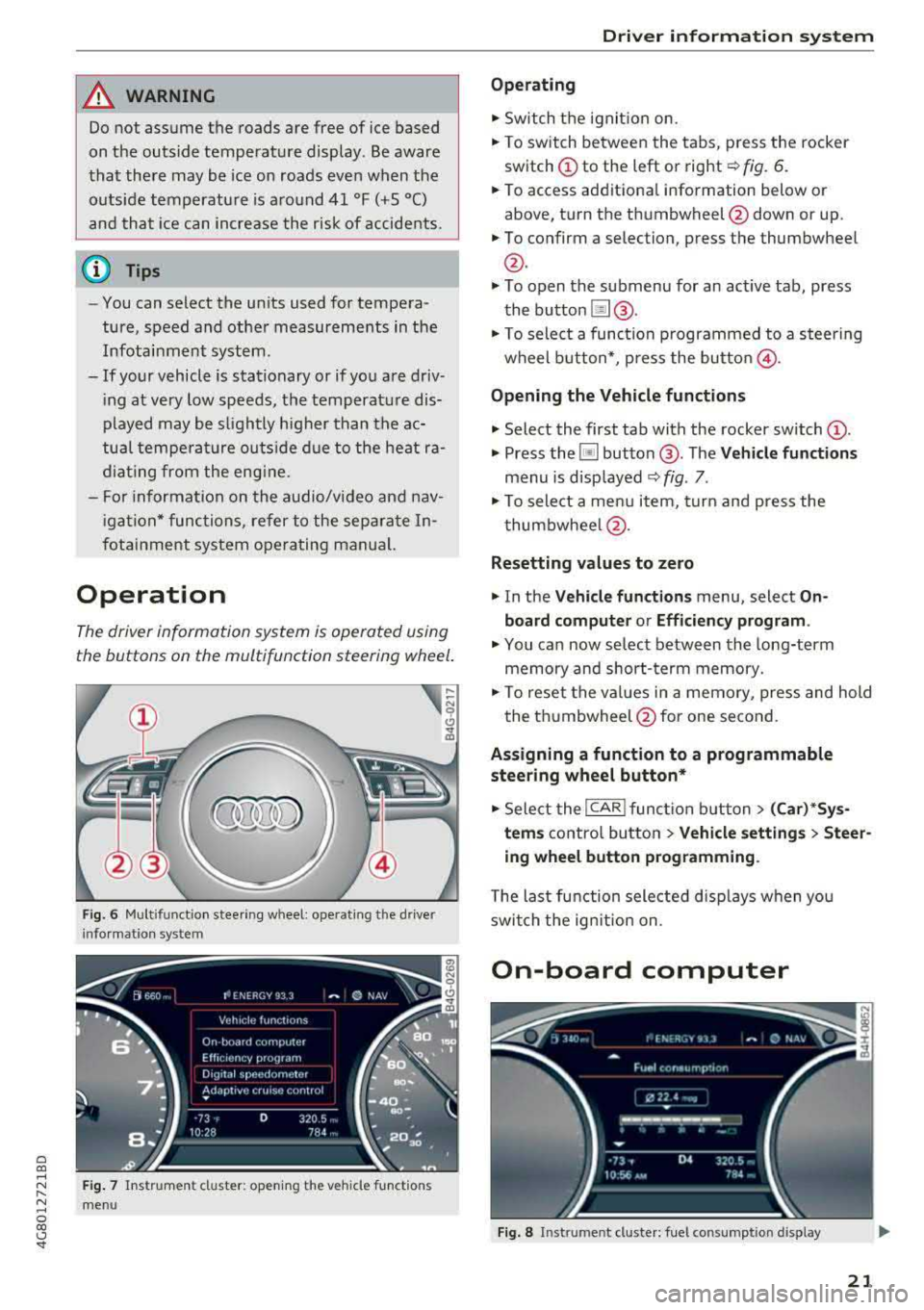
The driv er information system is operated using
the buttons on the multifunction st eering wheel .
Fig. 6 Mult ifunct ion stee ring w hee l: o pera tin g th e drive r
info rma tion syst em
F ig. 7 Instrum ent cl ust er: op en in g the ve hicle fun ction s
m en u
Dri ver in form atio n syst em
Operating
.,. Switch t he ignit ion on .
.,. To switch between the tabs, press the rocker
switch (!) to the left o r right~ fig. 6.
.,. To access additiona l information b elow or
above, turn the thumbwheel @down o r up .
.,. To confirm a selection, press the thumbwheel
@.
.,. To open the submenu for an act ive tab, press
the button !il@.
.,. To select a function p rogrammed to a steering
wheel b utton*, press the butto n@ .
Opening the Vehicle function s
.,. Select the first tab with the rocker sw itch (D .
.,. Press the ~ button @. The Vehicle function s
menu is disp layed ~ fig . 7.
.,. To select a menu item, t urn and press the
t humbwhee l@ .
Resetting value s to zero
.,. In the V ehicle function s menu, select On
board computer or Effi cienc y program .
.,. You can now se lect between the long-term
memory and short- term memory .
.,. To reset the val ues in a memory, press and hold
the thumbwheel @for one second.
Assigning a function to a programmable
steering wheel button *
.,. Select the I CARI function b utton> (Car )*Sys
t e m s
contro l button > Vehicl e sett ing s > Steer
ing wheel button programming .
The last function selected d isp lays when you
swi tch the ign it ion on.
On-board computer
Fi g. 8 In st rum en t clu ster : fue l co nsump tion displ ay
21
Page 26 of 274
Driver information system
In vehicles with an activated head-up display
c:::;, page 24, the shifting indicator is shown in
the head-up disp lay instead of the instrument
cluster .
© Engine oil temperature indicator
When engine oil temperatures are low, the dis
p lay --- °F (- --°C) appears in the instrument clus
ter.
The engine has reached its operating tempera
ture when the engine oil temperature is between
140 ° F (60 °C) and 248 °F (120 °C) under normal
driving conditions. The engine oil temperature
may be higher if there is heavy engine load and
high temperatures outside. Th is is not a cause for
concern as long as
the . c:::;, page 15 or II
c:::;, page 15 indicator lights in the display do not
blink .
Head-up display
Appl ies to: ve hicles w ith hea d-up display
Fig. 13 Exampl e: indi cators in the head -up disp lay
Fig. 14 Instrument pane l: knob for the head-up disp lay
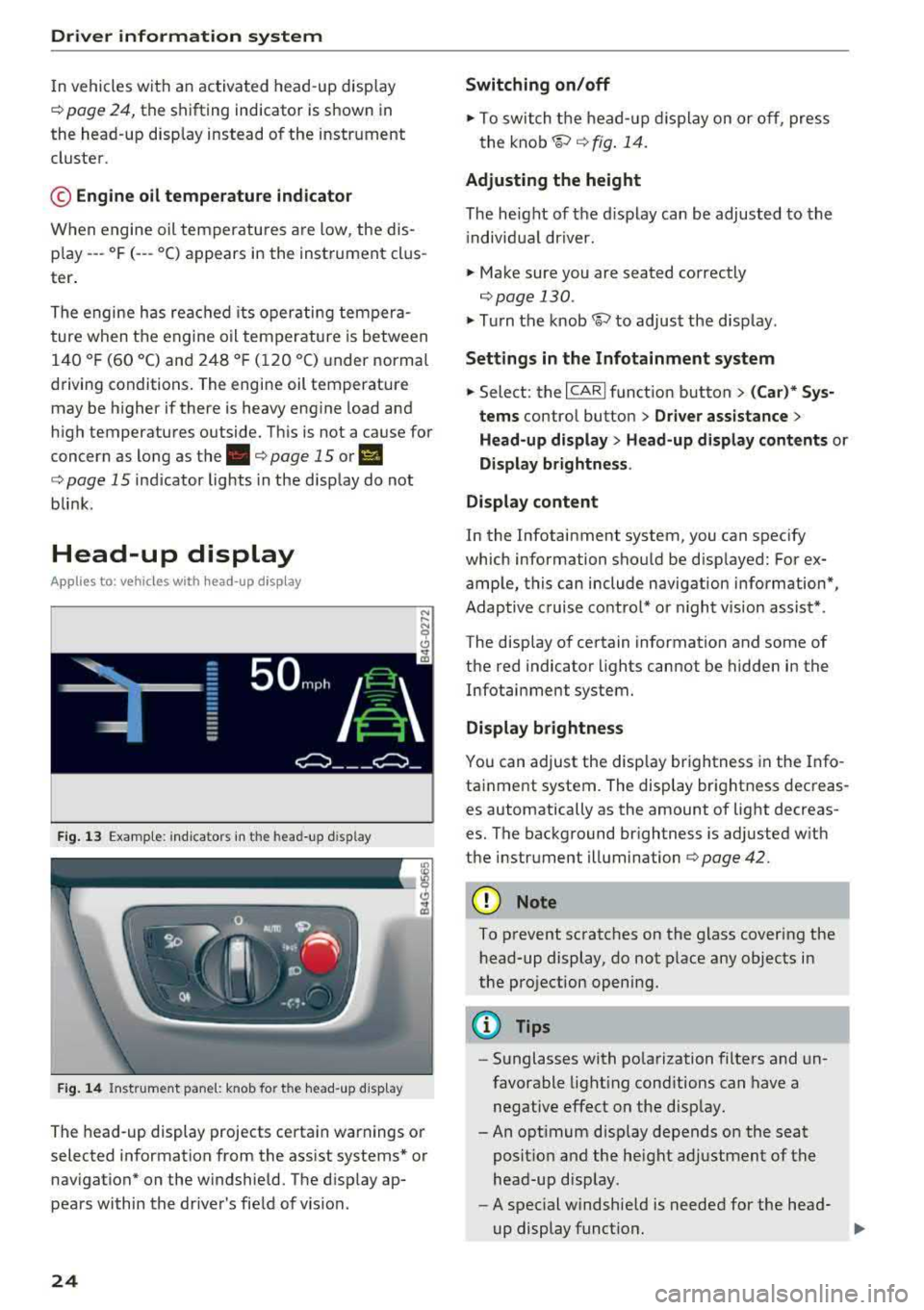
The head-up display projects certa in warnings or
selected information from the assist systems* or
nav igation* on the windshield. The d isp lay ap
pears within the driver's field of vision.
24
Switching on/off
.,. To switch the head-up dis play on or off, press
the
knob~ c:::;, fig. 14.
Adjusting the height
The height of the display can be adjusted to the
i ndivid ual driver.
.,. Make sure you are seated correctly
c:::;,page 130 .
.,. Turn the knob~ to adjust the disp lay.
Settings in the Infotainment system
.,. Select: the I CARI function button > (Car)* Sys
tems
contro l button > Driver assistance >
Head-up display > Head-up display contents or
Display brightness .
Display content
In the Infotainment system, you can spec ify
which information shou ld be disp layed: For ex
ample, this can include navigation information*,
Adaptive cruise control* or night vision assist*.
The display of certain information and some of
the red indicator lights cannot be hidden in the
Infotainment system.
Display brightness
You can adjust the display brightness in the Info
tainment system. The display brightness decreas
es automatically as the amount of light decreas
es. The background brightness is adjusted w ith
the instrument illumination c:::;,page
42.
(D Note
To prevent scratches on the glass covering the
head-up display, do not place any objects in
the projection opening.
(D Tips
-Sunglasses with polarization filters and un
favorable lighting conditions can have a
negative effect on the display.
-An opt imum disp lay depends on the seat
posit ion and the height adjustment of the
head-up display.
-A spec ial windshie ld is needed for the head-
up display funct ion.
1J,-
Page 29 of 274

a co ,...,
N
" N ,...,
0 00 <.,;) '
-Do not leave valuables unattended in the ve
hicle . A locked vehicle is not a safe!
- The LED in the driver's door rail blinks when
you lock the vehicle . If the LED lights up for
approximately 30 seconds after locking,
there is a malfunction in the central locking
system. Have the problem corrected by an
authorized Audi dealer or authorized Audi
Service Facility.
Key set
Fig . 15 Your vehicle key set
@ Remote control key or convenience key*
The convenience key* is a remote control key with
special
functions ¢ page 29 and¢ page 68.
You can unlock/lock your veh icle w ith the remote
control key . A mechan ical key is integrated in the
remote control
key ¢ page 28.
@ Separate mechanical key
This key is not intended for constant use. It
should only be used in an emergency. Do not
car
ry it on your key r ing and do not store it in the ve
hicle .
Replacing a key
If a key is lost, see an authorized Audi dealer or
authorized Audi Service Facility. Have
this key de
activated . It is important to bring all keys with
you . If a key is lost, you should report it to your
insurance company.
Number of keys
You can check the number of keys assigned to
your veh icle in the Infotainment system. Select:
the
! CAR ! function button> (Car )* Systems con-
Opening and closing
trol button > Service & control > Programmed
keys .
This way, you can make sure that you have
all the keys when purchas ing a used veh icle.
Electronic immobilizer
T he immobilizer prevents unauthorized use of
the ve hicle.
Under certain circumstances, the vehicle may not
be able to start if there is a key from a different
vehicle manufacturer on the key chain.
Data in the master key
When driving, service and ma intenance-relevant
data is cont inuously stored in your remote
con
trol key . Your A udi se rvice advisor can read out
this data and tell you abo ut the work your vehicle
needs. This applies also to vehicles with a
con
venience key*.
Personal convenience settings
If two people use one vehicle, it is recommended
that each person always uses "their own" master
key. When the ign ition is turned off o r when the
vehicle is locked, pe rsonal conven ien ce settings
f or the fo llowing systems are stored and
as
signed to the remote master key.
- Climate control system
- Central locking system
-Windows
- Interior lighting*
- Memory function*
- Parking aid*
- Adaptive cruise control*
-Active lane assist*
- Side assist*
- Dr ive select
- Night vision assist*
- Steering wheel heating*
T he stored settings are automatica lly recalled
when you unlock the vehicle, open the doors or
turn on the ignition.
.&_ WARNING ..__
Always take the vehicle key with you when
leaving the vehicle, even for a short period of
time. This applies particularly when children
-
27
Page 30 of 274

Opening and clo sin g
remain in the vehicle. Otherw ise the children
cou ld start the engine or operate electrical
equipment such as power windows.
(D Note
Protect the remote control key against high
temperatures and direct sunlight.
(D Tips
- The operation of the remote control key can be temporarily dis rupted by interference
from transmitters near the vehicle working
i n the same frequency range (such as a cell
phone or radio equipment). Always check if
your vehicle is locked!
- Using the mechanical key, you can:
- Lock/unlock the g love compartment.
- Manually lock/unlock the vehicle
r:::;,page 31 .
- Mechanically lock the doors c:> page 31.
-For an explanation on conformity with the
FCC regulations in the United States and the
Industry Canada regulations, see
r:::;, page258 .
Removing the integrated mechanical key
Fig. 16 Re mote con trol ma ste r key: re mo vin g t he mech an i·
cal key
" Press the release button @ r:::;, fig. 16.
" Pull the mechanica l key @ out of the remote
contro l key.
28
LED and batteries in the remote control key
Fig. 17 Remote con trol key : remo ving t he ba ttery h older
LED on the remo te control key
The LED @ informs you about the function of the
remote control key .
"If you press a button briefly, the LED blinks
once.
" If you press and hold a button longer (conven
ience opening), the LED blinks several t imes .
" If the LED does not blink, the remote control
key battery is dead . The
Ill ind icator light and
the message
Plea se change key battery ap
pea r. Replace the battery in the remote contro l
key .
Replacing the remote control ke y battery
" Remove the mechanical key c:> page 28 .
" Press the release button @ on the battery
holder and p ull the battery ho lde r out of the re
mote contro l key in the direct ion of the a rrow
at the same time.
" Insert the new battery with the"+" facing
down .
"Slide the battery holder carefully into the re
mote contro l key .
" Inser t the mechanical key.
@ For the sake of the environment
Discharged batter ies must be disposed of us
i ng methods that will not harm the environ
ment. Do not dispose of them in household
trash.
Page 32 of 274

Opening and clo sin g
You can unlock/lock the vehicle at every door .
The remote control key cannot be more than
ap
proximately 4 ft (1.5 m) away from the door han
d le. It ma kes no difference whether the master
key is in your jacket pocket or in your briefcase,
for example.
The door cannot be opened for a br ief period di
rectly after locking it. This way you have the
op
portun ity to check if the doors locked correctly.
The settings in the Infotainment system deter
mine if the entire vehicle or only one of the doors
is unlocked when unlocking the vehicle
c::;,page 31.
A WARNING
Read and heed all WARNINGS c::;, & in Descrip
tion on page 26 .
(D Tips
If your vehicle is left standing for a long peri
od of time, note the following:
- The proximity sensor switches off after a few days to save energy. You then have to
pull once on the door handle to unlock the
vehicle a nd a second t ime to open it.
- The energy management system gradually
turns off unnecessary convenience functions
to prevent the vehicle battery from draining
and to mainta in the vehicle's ab ility to sta rt
fo r as long as possib le. You may not be able
to unlock yo ur vehicle usi ng the convenie nce
key .
Central locking switch
Fig . 20 Driver's doo r: central locking switch
30
Fig. 21 Rear doo r: centra l locking sw itch
.,. To lock the vehicle, press the ~ button c::;, ,&.
.,. To unlo ck the vehicle, p ress the Im bu tton.
When locki ng the vehicle with t he central lock ing
switch, the following app lies:
- Opening the door and the luggage compart
ment lid from the
outside is not possible (for
security reasons, such as when stopped at a
light) .
- The LED in the centra l locking sw itch turns on
when all doors are closed and locked .
- Applies to: front doors: you can open the doors
ind ividually from the inside by pull ing the door
handle.
- Rear doors: to un lock the doors, pull on the
door handle
one time . To open the doors, pull
on the door handle
again .
-In the event of a crash with a irbag deployment,
the doors unlock a utomat ically to allow access
to the vehicle .
A WARNING
-The ce ntral locking swi tch a lso wor ks when
the ignition is switched off and automatical
ly locks the entire vehi cle when
the ~ but
ton is pressed.
- The central lock ing switch is inope ra ti ve
when the vehicle is locked from the ou tside.
- L ocked doors ma ke it more diffic ult for
emergency workers to get in to the vehicle,
which p uts lives at r isk. Do not leave anyone
behind in the veh icle, especially children .
(D Tips
Your vehi cle lo cks au tom atically when it
r eaches a speed of 9 mph ( 15 km/h) (A uto
Page 37 of 274

a co ..... N
" N ..... 0 co <..:l '
The child safety lock prevents the rear doors
from being opened from the inside and the rear
power windows from be operated.
Fig. 28 Section of dr iver's door: child safety lock buttons
~ M 0
::'i a, IIl
.,. To activate/deactivate the inner door handle
and the power window switch for the respective
rear door, press the left/right
[II button in the
driver's
door~ fig. 28. The indicator light in the
button turns on/blinks.
.,. To activate/deactivate the child safety lock on
both sides, you must press the
1±1 buttons one
after the other.
..&, WARNING
Always take the veh icle key with you when
leaving the vehicle, even for a short period of
time. This applies particularly when children
remain in the vehicle. Othe rwise child ren
could start the engine or operate electrical
equipment (such as power windows), which
increases the risk of an accident.
Opening and closing
Power windows
Controls
The driver can control all power windows.
Fig. 29 Driver's door: power win dow controls
All power window switches are equipped with a
two -stage function:
Opening and closing the windows
(0 ~ M 0
::'i (0 m
.,. To open or close the window completely, press
the switch down or pull the switch up brief ly to
the second level. The operat ion will stop if the
sw itch is pressed/pulled again.
.,. To select a position in between opened and
closed, press/pull the switch to the first level
until the des ired window position is reached .
Power window switches
CD Left front door
@ Right front door
® Left rear door
@ Right rear door
.&_ WARNING
--==
-Always take the vehicle key with you when
leaving the vehicle, even for a short period
of time. This applies particularly when chil
dren remain in the vehicle. Otherwise chil
dren cou ld start the engine or operate elec
tr ical equipment (such as power windows),
which increases the risk of an acc ident. The
power windows continue to function until
the driver's door or front passenger's door
has been opened.
- Pay careful attention when closing the win
dows. Pinching could cause serious injuries .
35