light AUDI A7 2018 Workshop Manual
[x] Cancel search | Manufacturer: AUDI, Model Year: 2018, Model line: A7, Model: AUDI A7 2018Pages: 274, PDF Size: 42.77 MB
Page 84 of 274
Trail er to wing
must attach additiona l exterior mirrors . Adjust
them so you have a sufficient visibility behind
you .
Exterior lighting
Follow the lega l regulat ions regard ing the light
ing eq uipment on your trailer . Conta ct an author
ized Audi dealer or authorized Audi Service Facili
ty for more information.
Before start ing to drive, check a ll l ight ing equip
men t on the hitc hed trailer.
The headlig ht range contro l adjusts automatical
ly to the light range of the headl ights.
Safe ty chain s
Make sure the safety chains are correctly applied
when pulling a trailer . The chains should hang
enough so t hat the trailer can dr ive around
curves. However, they must not touch the
g round .
Air su spension
Applies to: vehicles with air suspension
The air suspension must be at the standard vehi
cle height before you set the tongue weight on
the trailer a nd h itch the trailer ¢@ ,
¢page 107,
Raising/lowering the vehicle.
For ve hicles w ith a factory-installed tra iler hitch,
the air suspension trailer mode will automat ically
sw itch on if you connect the trailer cable to the
socket.
For ve hicles w ith a retrof itted trailer hitch, you
must switch on the air suspension trailer mode
manually . Select in the Infota inment system:
ICARI function button > ( Car )* s yste m s contro l
button
> V ehicle setting s > Air su spen sion : trail
e r > On .
Switch it off again after tow ing a tra ile r.
You can also switch off tra iler mode ma nually
while driving, for example, when using a bicycle rac k system .
If you have to drive through difficult road condi
tions, you can raise the vehicle aga in after hitch
ing the t rai ler or after adjust ing the tongue
weight .
82
@ Note
Applies to: vehicles with air suspension
-Changes i n temperature or load can affect
the height of the vehicle .
- Set the air suspension to the standard veh i
cle he ight, otherwise the applicable tongue
we ight no longer appl ies to your veh icle.
(D Tips
- Use chocks when park ing on inclines if the
trai ler is loaded.
- We recommend also hav ing the vehicle in
spected between the inspection intervals if
you are towing a trailer frequently.
- Avoid driv ing with a trai ler dur ing the veh i
cle break-in per iod.
Driving with a trailer
Driving with a trailer requires extra caution.
Sp eed
Adhere to t he lega l speed lim its . Fo llow the legal
regu lations
specific to the country.
As the speed increases, the dr iv ing stab il ity of
t h e tra ile r decreases. Therefore you should not
exceed the max imum lega l speed lim it w hen
t h ere are unfavorab le road, weather and/or wind
conditions. This especia lly applies when driving
downh ill.
Yo u m ust always red uce your speed as soon as
you notice even the slightest swinging motion o f
the trai ler . Never try to "straighten out" the trai l
er by acce lerating.
The we ight d istr ibution is very poor if the vehicle
is empty and the trai ler is loaded. However if you
must drive under these circumstances, then drive
especially slowly .
Brakes
B rake in a time ly manner. Downs hift befo re dr iv
i ng down hill so that the engine can assist with
braking ¢&. .
When using a trailer w it h over run bra kes, fi rst
bra ke gently t hen q uick ly. This red uces the r isk of
j erking while braking if the trailer wheels lock up .
IIJJ,,
Page 86 of 274

Ass is tance sy stem s
Assistance systems
Speed warning system
Description
Applies to: veh icles with speed warning system
The speed warning system helps you to stay un
der a specified maximum speed.
The speed warning system warns you if you are
exceeding the maximum speed that you have set.
A warning tone will sound as soon as your speed
exceeds the sto red value slightly.
The . (USA models) I. (Canada models) indi
cator light and a message appear in the instru
ment cluster display at the same time.
The.
• indicator light and the message turn off if the
speed falls back below the stored maximum
speed.
Sett ing a threshold is recommended if you would
like to be reminded when you reach a certa in
maximum speed. S ituations where you may want
to do so i nclude driving in a country wit h a ge ne r
a l speed limit o r if the re is a specified maximum
speed for winter tires.
Setting the warning threshold
The warning threshold is set in the Infotainment
system.
• Se lect: the ICARI function button> (Car )* Sys
tems
control button > Driver assistan ce >
Spe ed warning .
(D Tips
Regardless of the speed warning system, you
should always monitor your speed using the
speedometer and make sure you are following
the legal speed limit.
84
Cruise control system
Switching on
Applies to: vehicles with cruise control system
The cruise control system makes it possible to
drive at a constant speed starting at 20 mph (30
km/h).
0
f
~
0
F ig . 86 Operat ing lever: c ruise control system
• To switch t he cru ise control o n, pull the lever
into position
(D ~ fig. 86 .
• Drive at the speed to be maintained.
• To store the speed, press the button @.
The stored speed and the
( ij;\1)~14 (USA models) /
l'I (Canada models) ind icator lig ht are disp layed
in the instrument cluster.
This information is also shown briefly in the
head -up display* .
The speed is mainta ined by modifying engine
power or through a n active br ake interven tion.
~ WARNING
-Always pay at tentio n to the traffic around
you when the cruise contro l system is in op
eration . You are always respons ible for your
speed and the distance between your ve hi
cle and other vehicles.
-For safety reasons, cruise control should not
be used in the city, in stop-and-go traff ic, on
winding roads and when road conditions are poor (such as ice, fog, gravel, heavy rai n and
hyd roplaning), because this inc reases the
r is k of an accident.
-Switch the cr uise control off temporarily
when dr iv ing in turning lanes, highway exits
or in constr uction zones.
-
Page 87 of 274
a co .... N
" N .... 0 00 \.J '
yo ur foot on the accelerator pedal prevents
the cruise control from braking. Th is is be
cause pressing the acce lerator pedal over
rides the cruise control system .
- If a brake system ma lf u nction such as over
heating occu rs when the c ruise contro l sys
tem is switched on, the braking function in
the system may be switched off . The rest of
t h e cruise control system f unction s remain
ac tive as long as
the @;(IM~ (USA model s) /
l'I (C anada models) indi cator light is on .
(D Tips
The brake lights turn on when the brakes a re
ap plied a utomat ica lly .
Changing speed
Applies to: vehicles with cruise control system
.. T o inc rease o r decrease the speed in incre
ments, tap the lever toward
0 10 <=> page 84 ,
fig . 86 .
.. To inc rease o r decrease the speed qu ickly, ho ld
the leve r in the
010 direction until the de
s ired speed is displayed.
You can a lso press the acce lerator pedal down to
increase yo ur speed, for example i f you want to
pass someone. The speed you set earlier w ill re
sume as soo n as you release t he accelerator ped
al.
However, if you exceed your saved speed by S
mph (10 km/h) for longe r th an 6 mi nutes, the
cru ise control system tur ns off temporar ily .
The
green @;(i)~i~ (USA models) !l'I (Canada mod
e ls) indicator light in the speedometer tu rns off
and the stored speed is maintained.
Preselecting the speed
Applies to: vehicles with cruise control system
You can pre-select your desired speed when the
vehicle is stationary.
.. Switch the ign ition on.
.. Pull the lever into position @<=> page 84,
fig. 86 .
A ss istance systems
.. To increase or decrease the speed, tap the lever
toward
0 10 .
.. To store t he speed d isp layed, release the leve r.
T his func tion makes it possible , fo r example, to
save the spee d you want before driving on the
highway. Once on the highway, activate the
c ruise contro l by pull ing the leve r
towa rd @ .
Switching off
Applies to : vehicles with cruise control system
Deactivating temporarily
.. Press the brake pedal, or
.. Press the lever into position @(not clicked into
p lace) <=>
page 84, fig . 86, or
.. Dr ive fo r longer t han S m inutes faster than S
mph (10 km/h) above the stored speed .
Switching off completely
.. Press the lever into position@(clicked into
p lace), or
.. Switch the ignit ion off .
The speed you stored will be ma intained if the
cruise contro l has been switched off temporari ly .
To resume the stored speed, re lease the brake
peda l and pull the lever to
position @.
Switching the ignition off wi ll erase the stored
speed.
A WARNING "---
You should only resume the sto red speed if it
i s no t too high fo r existing t raff ic conditions .
Otherw ise you can inc rease the risk of an acci
d ent .
Lap timer
Introduction
Applies to: vehicles with lap timer
Yo u can record and eva luate lap t imes with the
l ap timer <=>
page 86, fig. 87. The time is meas
ur ed in m inutes, seconds and 1/10 seconds. The
ho urs are also shown when the lap time exceeds
60 m inutes . T he maxim um indiv id ual measure
me nt is 99 ho urs. A maxim um of SO laps can be
r ecorded.
.,.
85
Page 91 of 274
a co ,...,
N
" N ,...,
0 00 <..:l '
Applies to: ve hicles with Audi adaptive cruise co ntro l
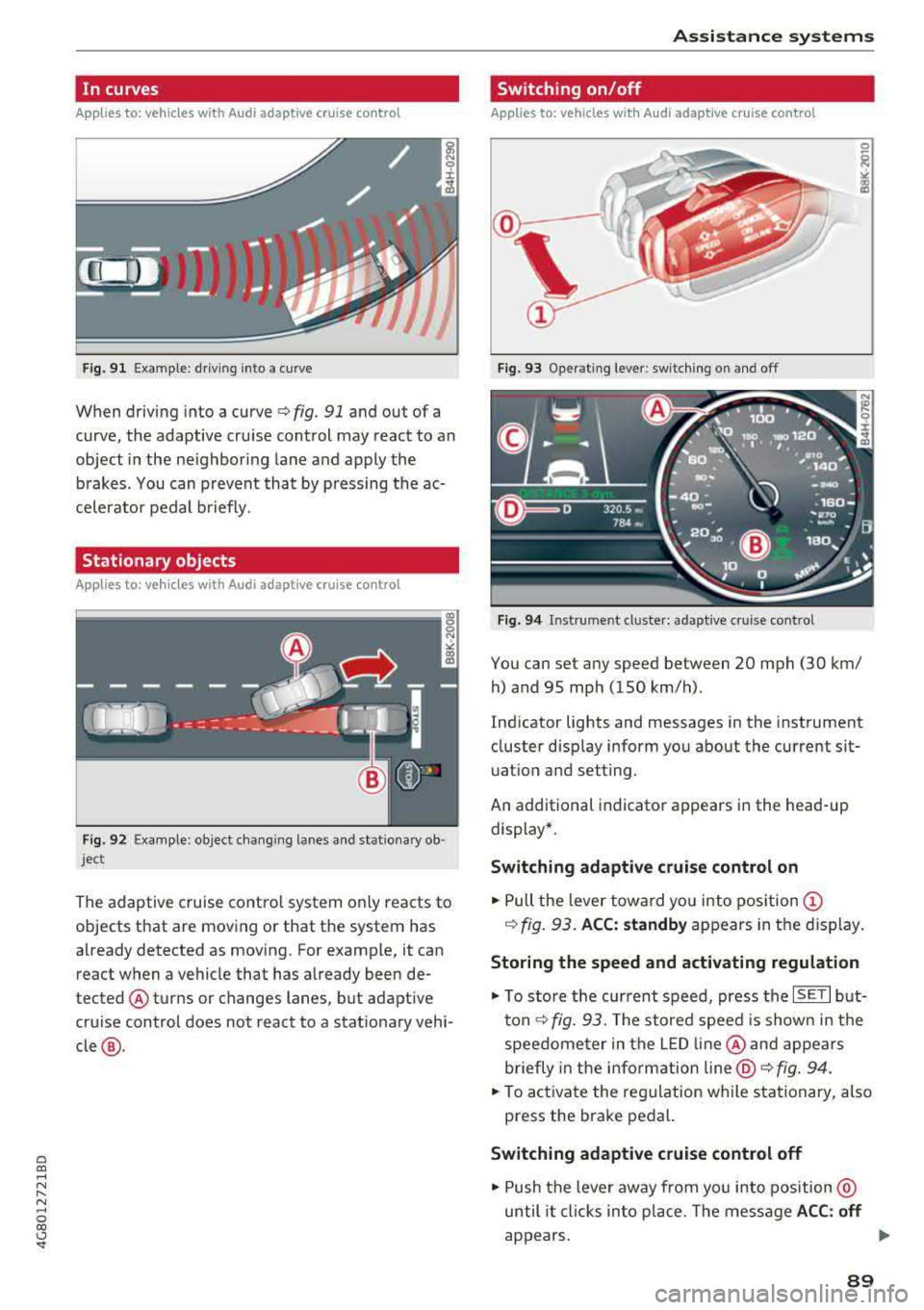
Fig. 9 1 Example: dr iv ing into a curve
When driving into a curve ¢ fig. 91 and out of a
curve , the adaptive cruise control may react to an
object in the ne ighboring lane and apply the
b rakes. You can prevent that by p ressing the ac
celerator pedal b riefly.
Stationary objects
A pp lies to: ve hicles with Audi adaptive cruise contro l
Fig. 92 Example: object changi ng lanes and stationa ry ob
ject
The adaptive cruise contro l system only reacts to
objects that are mov ing or that th e system has
already detected as moving. For example, it can
react when a vehicle that has already been de
tected @turns or changes lanes, but adapt ive
cru ise control does not react to a stat ionary vehi
cle @.
Assi st a nce systems
Switching on/off
App lies to : vehicles wit h Audi ada ptive cr uise control
Fi g. 93 Operat ing lever : switch ing on and off
Fig . 94 Instrument clus te r: adaptive cru ise cont rol
You can set any speed between 20 mph (30 km/
h) and 95 mp h (150 km/h) .
Ind icator lights and messages in the instrument
cluster disp lay inform you about the current sit
uatio n and setting.
An additional indicator appears in the head-up display*.
Switching adaptive crui se control on
.,. Pull the lever towa rd yo u into pos ition (!)
¢ fig. 93. ACC: standby appears in the display .
Storing the speed and activating regulation
.,. To store the current speed, press the ISE TI but
ton ¢ fig. 93. The stored speed is show n in the
speedome ter in the LED line @and appears
briefly in the i nform ation
line @¢ fig. 94 .
... To activate the reg ulation while stationary, also
press the brake pedal.
Switching adaptive cruise control off
.,. Push the lever away from you into position @
until it cl icks in to p lace. The message
A CC: off
appears. ..,.
89
Page 92 of 274

Ass is tance sy stem s
@ Indicator light s
Ill -Adaptive cruise cont rol is switched on. No
objects a re detected ahead. The stored speed is
maintained.
• -An object ahead was detected. The adaptive
cruise control system regulates the speed and
distance to the object ahead and accelerates/
brakes automatica lly .
fai -Adaptive cruise control is switched on. An
object ahead was detected . Your vehicle rema ins
stopped and w ill not start driving automat ica lly.
• -The automatic braking is not enough to
maintain a suffic ient distance to a n object ahead.
You must intervene
¢ page 92, Request for
driver intervention.
© Instrument cluster display
I f adaptive cruise contro l is not shown in the in
strumen t cluster display, yo u can call it up using
the multifunction stee ring wheel b uttons
¢ page 20.
Based on the graphics in the d isp lay, you can de
termine if the system is ma inta ining a distance to
the object ahead and what that distance is.
No vehicl e -no object was detected ahead .
Whit e vehicle -an object was detected ahead.
Red veh icle -request for driver intervention
¢ page 92 .
Both
arrow s on the scale © indicate the distance
to the object ahead . No arrow appea rs when the
vehicle is on an open road and there is no obje ct
ahead. If an object is detected ahead, the arrow
moves on t he scale.
The green zone on the scale indicates the store
distance. For information on changing the dis
tance, refer to
¢ page 91. If the distance se
lected is exceeded or not reached, the arrow
moves into the red zone on the sca le.
A WARNING
If you press the ISE TI button when driving at
speeds below 20 mph (30 km/h), the vehicle
accelerates automat ically up to 20 mph (30
90
km/h), wh ich is the minimum speed that can
be set .
(D Tips
-If you switch the ign it ion or the adaptive
cruise control system off, the set speed is
erased for safety reasons .
- The electronic stabilization control (ESC) and the anti-slip-regulation (ASR) are auto
matically switched on when the adaptive
cruise control is switched on.
Changing the speed
Applies to: vehicles with Audi adapt ive cruise control
0
f
jJ
0
Fig . 95 Operat ing lever: chang ing the speed
.,. To increase or reduce the speed in increme nts,
tap the lever up or down.
.,. To increase or decrease the speed qu ickly, hold
the lever up or down until the red LED @ reach
es the des ired
speed ¢ page 89 , fig. 94.
After each change, the new stored speed appears
briefly in the information
line¢ page 89, fig. 94
@ .
Driving in stop-and-go traffic
App lies to: vehicles with Aud i adapt ive cru ise control
The adaptive cru ise cont rol system also assists
you in stop-and-go traffic.
Stopping automatically
If
an object ahead stops, your vehicle will brake
and stay at a stop, within the limits of the sys
tem . The Start/Stop system* can be used as usu-
al. ..,.
Page 94 of 274

Ass is tance sy stem s
~-~ ---Di sta nce 1: this setting corresponds
to a distance of 92 ft (28 m) when traveling at 62
mph (100 km/h), for example (time between: 1
second) .
~-- ~--Di stan ce 2: this setting corresponds
to a distance of 118 ft (36 m) wh en traveling at
62 mph (100 km/h), for example (time between:
1.3 seconds) .
~--- ~-Distance 3: this setting corresponds
to a distance of 164 ft (SO m) when traveling at
62 mph (100 km/h), for example (time between:
1.8 seconds) .
~--- -~ Distance 4 : This setting corresponds
to a distance of 210 ft (64 m) when traveling at
62 mph (100 km/h), (time d istance of 2.3 sec
onds) .
A WARNING
Following other vehicles too closely increases
the risk of collisions and ser ious personal in
jury .
- Setting short distances to the traffic ahead
reduces the time and distance available to
br ing your vehicle to a safe stop and makes
it eve n mo re necessary to pay close atten
t ion to traffic.
- Always obey applicable traffic laws, use
good judgment, and select a safe following
distance fo r the traffic, road and weather
cond itio ns.
(D Tips
-Distance 3 is set automatically each time
you switch the ignit ion on.
-Your settings are automatically stored and
assigned to the remote control key being
used.
Selecting the driving mode
Applies to: vehicles with Audi adaptive cruise control
.. Se lect the des ired driving mode in dr ive se lect
q poge 105 .
92
@ Tips
Your settings are automatically stored and as
signed to the remote contro l key being used.
Request for driver intervention
Applies to: vehicles with Audi adaptive cruise control
Fig . 98 Ins trumen t cluster : request for dri ver in te rven tion
In certain situations, the system will request you
to take action :
-If the braking from the adaptive cru ise control
system is not eno ugh to ma inta in eno ugh dis
tance to the object ahead .
The danger is indicated by
the . indicato r light
q fig. 98. An aud io signa l will also so und.
- Press the brake pedal to slow your vehicle down .
Audi braking guard
Applies to: vehicles with Audi adaptive cruise control
Fig. 99 Instrumen t cl uster : approac h warn in g
The braking guard uses radar sensors and a v ideo
camera .
It also functions within the limits of the
system when adaptive cru ise control is switched
~ ~
Page 95 of 274

a co .... N
" N .... 0 00 \.J '
When detected in time, the system can assess
dangerous sit uat ions where an object a head
brakes suddenly or if your own vehicle is traveling
at a high speed and approaching an object that is
mov ing more slowly. The brak ing guard does not
react if it cannot detect the situation.
The system advises you of various dangero us sit
uations :
- T he
distan ce warning occurs if you d rive too
closely to the object ahead for a long period o f
time . If the object ahead brakes strongly, you
would not be able to avoid a collision .
The.
indicator light appears as an indication for th is.
- The
app roach wa rning occurs when an object
ahead is traveling more s low ly or brakes
strongly. When th is warning occurs, it may on ly
be poss ible to avoid a co llision by swerving or
braking strongly . The danger is indicated by the
• ind icator light ~ fig . 99 . An aud io signal w ill
also sound .
If you do not react early enough or at a ll to a dan
ge rous situation, the braking guard suppo rts you
w ith a brak ing intervent ion .
- If a co llision is imminent, the system will first
provide an
ac ute warning by braking sharply.
- If you do not react to the acute warning, the braking guard can increase the braking force
within the limits of the system
ll . Th is reduces
the veh icle speed in the event of a collision .
- The system can init iate comp lete decelerat ion
shortly before a collision
l l. Full deceleration at
high speeds occurs only in vehicles with adap
t ive cru ise control and s ide ass ist (pre sense
plus).
- If the braking gua rd determines that you are
not brak ing st rongly eno ugh whe n there is an
i mpending co llision, i t can increase the brak ing
fo rce .
- T he pre se nse functions also engage whe n
the re is an impend ing
collision ~ page 95.
ll This is not availa ble in so me co untrie s.
A ss istance systems
Which functions can be controlled?
Yo u can swit ch t he b raking guard and t he d is
tance/approach warning on or
off in the Infotain
ment system
~ page 94, Settings in the Info
tainment system .
A WARNING
--
Lack of attention can cause collisions, other
accidents and ser ious personal inj uries. The
braking guard is a n assist system and cannot
pr event a collision by itself . T he dr iver m ust
a lways inte rvene . The d river is always respon
s ib le for b raking at the co rrect t ime.
- Always pay close atten tion to traffic, even
when the b raking gua rd is switched on. Be
ready to in tervene and be rea dy to take
comp le te co ntro l wheneve r ne cess ary. A l
ways keep the sa fe and legal distance be
tween your vehi cle a nd ve hicl es up ahead .
- B raki ng g uard works w it hi n limi ts a nd will
not respond o uts ide the system limits, fo r
examp le when approach ing a stopped veh i
cle or stationary obstacle (end of a traff ic
jam or vehicle that has broken down in traf
fic).
- Always remember that the radar sensor for
the brak ing guard works only within def ined
detection and range limits that may prevent
the proper detect ion of other vehicles.
- The radar sensor's function and range can
be reduced by rain, snow and heavy spray.
Mov ing vehicles up ahead may not be
promptly de tected or may no t be detected
at a ll.
- Reflective surfaces includi ng crash ba rriers
or tunne l entra nces may impair the function
of t he ra da r se nso r.
(D Tips
- You can cancel the braking with increas ing
force tha t is initiated by t he sys tem by brak
ing yourse lf, by acce le ra ting not iceably or
by swe rving.
- Keep in mind that b raking gua rd can b rake
unexpectedly. A lways secure a ny cargo or
93
Page 97 of 274

a co .... N
" N .... 0 00 \,;J '
be lt.
Door open
The adaptive cruise co ntrol system cannot sw itch
on w hen a door is open .
Stationary object ahead
This message appears if you would like to switc h
adaptiv e cruis e control on and there is a station
ary object or obstacle directly ahead of your vehi
cle .
Audi pre sense
Preventative passenger protection
Applies to: vehicles with Audi pre sense
P re sense can initiate steps to protect vehicle oc
cupants in certain dangerous situations. The
functions described are availab le depending on
ve hicle equ ipment:
Pre s ense basic*
The fo llow ing func tions can be t rigge red in cer
tain driving si tuations:
- T ension ing of the safety belts (for example,
dur ing heavy bra kin g): the fro nt safety belts
have reve rsible bel t tensione rs. If a coll is io n
does not occur, the sa fety be lts loosen slightly
and are ready to trigger again.
- C losing the w indows and the su nroo f* (for ex
amp le, when over -or understeer ing) : the win
dows and t he sunroof * close until there is only
a small gap open .
The funct io n of the p re sense basic is act ivated at
a speed of 20 mph (3 0 km/h) or hig her .
Dr ive se lect : t h e deployment time is adapted in
Dynami c mode.
Pre sense front (vehicles with adaptive cruise
control*}
Pr e sense front contains the f unct ions of p re
se nse bas ic. I n add it ion, the likelih ood of a rear
e nd collis ion with the veh icle ahead is also calc u
l ated, withi n the limits of the system.
If the risk
of a collision is detected, t he fo llowing functions
can trigger :
Ass istance systems
- Braking g ua rd r::!> poge 92
- Tensioning o f the safety bel ts
- Clos ing the wi ndows a nd the s unroof *
Pre sense rear (vehicles with side a ssist*}
Pre sense rear contains the funct ions of pre sense
basic . In addition, the likelihood of a rear-end
collision from the vehicle behind is also calcu lat
ed, within the limits of the system . If the r isk of a
c ollision is detec ted, t he follow ing f unct ions can
t rigge r:
- Tensioning of the safety belts
- Closing the windows and the sunroof *
Pre sen se plus *
Pre sense plus contains t he f unctions of pre
sense front and pre sense rea r.
Error message
Audi pre sense : Unavailable
Preventative passe nger protect ion is not ava ila
ble . D rive to an a utho rized Aud i deale r or autho r
i zed Audi Se rvice Facility immed iate ly to have the
malfu nction corrected.
_&. WARNING
Pr e sense c annot overcome n atural p hys ical
l aws . It is a system des igned to assist and it
ca nnot prevent a co llision. Do not let the in
creased safety p rovided tempt yo u into tak ing
risks. This could inc rease your ris k of a co lli-
sion.
- The system can dep loy incorrectly .
- Please note that the sensors do not a lways
detect a ll objects . T hi s increases the r isk o f
a co llision.
- Pre sense does not react to peop le or ani
mals or objects that are cross ing the vehi
cle's path o r are diffic ult to detect
r::!>poge 87.
- Reflective objects such as g uard ra ils o r the
e ntrance to a tunnel, heavy ra in and ice can
affect the funct ion of the rada r senso rs and
-
the system's ab ility to de tect a collision risk . ~
95
Page 99 of 274
a co ,...,
N
" N ,...,
0 00 <..:l '
road, a banked roadway or crosswinds, the
corrective steering alone may not be enough
to keep the vehicle in the middle of the lane.
- For safety reasons , active lane assist must
not be used when there are poor road and/
o r weather conditions such as slippery
roads, fog, gravel, heavy ra in, snow and the
potent ial for hydroplaning. Using active lane
assist unde r th ese conditions may increase
the risk of a c rash .
Switching on/off
Appl ies to : ve hicles with Audi active lane assist
... g
9 ::i CX) ID
•
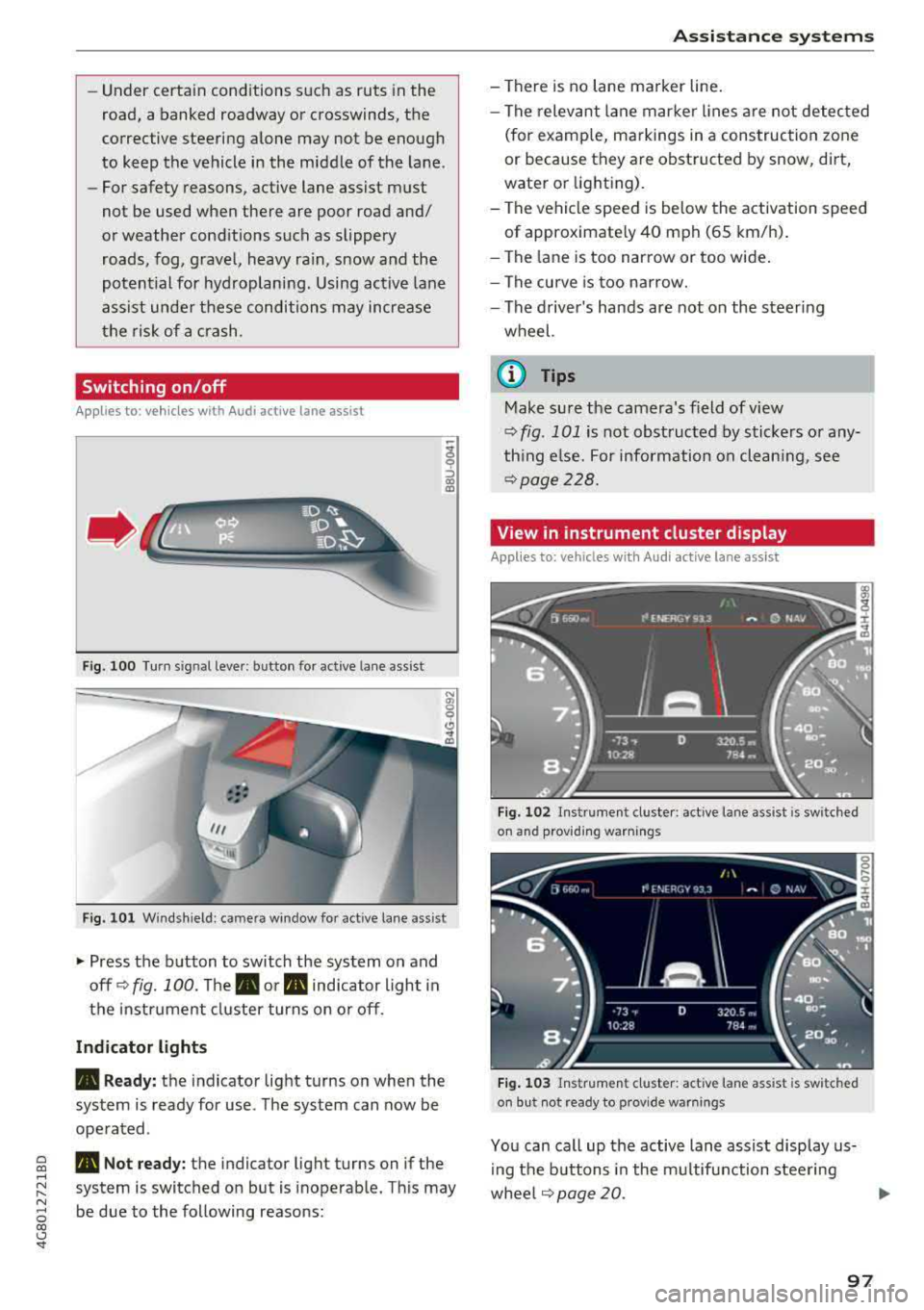
F ig. 1 00 Turn s ig n al leve r: b utton for act ive lane a ss is t
Fi g. 101 W ind sh iel d: cam era win dow fo r active lane ass is t
~ Press the b utton to switch the system on and
off ¢
fig. 100. The . or m, ind icator light in
the i nstrume nt cl uster turns on o r off.
Indicator lights
• Ready: the i ndicator light turns on whe n the
sys tem is ready for use . The sys tem can now be
ope rated .
m, Not ready: t h e indica tor ligh t turns on if the
system is switched o n but is i noperab le. Th is may
be due to the following reasons:
A ssi st a nce systems
- There is no lane marker line .
- The relevant lane mar ke r li nes a re not detec ted
(for examp le, m arkings in a construction zone
or because they are obstructed by snow, dirt,
wate r or light ing).
- The ve hicle speed is be low the activation speed
of approximate ly 40 mph (65 km/h) .
- The lane is too narrow or too wide .
- The curve is too narrow.
- The driver's hands are not on the steer ing
wheel.
(I} Tips
Make su re the camera's f ield of view
q fig . 101 is not obst ructed by stickers o r any
th ing e lse. For information on clean ing , see
¢ page 228.
View in instrument cluster display
Applies to: vehicles wit h Audi ac tive lane assist
Fig. 102 Ins trume nt cl uste r: act ive lane ass ist is sw it c h ed
on and prov idi ng warnings
Fi g. 1 03 Instr um en t cl uster : act iv e la ne ass ist is sw it c h ed
on but not rea dy to provide warn ings
You can ca ll up the active lane assist display us
i ng the b uttons in the m ultifunction steering
whee l
q page 20. .,.
97
Page 100 of 274
Assistance systems
An additional indicator appears in the head-up
disp lay*.
White line(s) Active lane assist is activated
and ready to provide warnings .
Red line(s) Active lane assist warns you
(left o r right) before leaving a lane
c::>fig. 102. In addit ion, the
steering wheel vibrates lightly.
Gray line(s) Active lane assist is activated,
but not ready to give warning
c::>fig . 103.
Messages in the instrument cluster display
If the active lane assist swit ches off automat ical
ly, the indicator lig ht in the display turns off and
one of the following messages appears :
Audi active lane assist: Currently unavailable .
No camera view
This message appears if the came ra is unable to
detect the lines. This cou ld happen if :
- The camera field of v iew
c::> page 97, fig . 101 is
dirty or covered in ice. Clea n this area on the
windsh ield .
- The camera field of v iew is fogged over . Wait
until the fog has cleared before switch ing the
active lane assist on again .
- The system has been unable to detect the lanes
for an extended period of time due to road con
ditions. Sw itch act ive lane assist back on when
the lines are more visible.
Audi active lane assist : Currently unavailable
There is a temporary active lane assist ma lfunc
tion . Try sw itching the act ive lane assist on aga in
la ter.
Audi active lane assist : System fault!
Drive to an autho rized Aud i dealer or authorized
Audi Service Facility immediately to have the
malfunction corrected .
Audi active lane assist: Please take over steering
This message appears if you are not steering by
yourself . If th is is the case, active lane assist does
not switch off, but it is "not ready" to provide a
war ning. The system can help you keep the vehi-
98
cle in the lane . However, you are responsible for
driving the vehicle and must steer it yourse lf .
A WARNING
Note that messages may be de layed or not
displayed on vehicles with accessories mount
ed on the steering wheel, such as a steering
wheel spinner knob. Always keep your hands
on the stee ring wheel.
Adjusting the vibration warning
App lies to: vehicles wit h Audi active la ne ass ist
-
~ Select: the I CARI function button > (Car)* Sys
tems
contro l butto n > Driver assistance > Audi
active lane assist .
Vibration warning
You can switch the addit ional vibration warn ing
i n the steer ing wheel on or off .
(D Tips
Your settings are automatically stored and as
signed to the remote control key being used .