lock AUDI A7 2018 User Guide
[x] Cancel search | Manufacturer: AUDI, Model Year: 2018, Model line: A7, Model: AUDI A7 2018Pages: 274, PDF Size: 42.77 MB
Page 32 of 274

Opening and clo sin g
You can unlock/lock the vehicle at every door .
The remote control key cannot be more than
ap
proximately 4 ft (1.5 m) away from the door han
d le. It ma kes no difference whether the master
key is in your jacket pocket or in your briefcase,
for example.
The door cannot be opened for a br ief period di
rectly after locking it. This way you have the
op
portun ity to check if the doors locked correctly.
The settings in the Infotainment system deter
mine if the entire vehicle or only one of the doors
is unlocked when unlocking the vehicle
c::;,page 31.
A WARNING
Read and heed all WARNINGS c::;, & in Descrip
tion on page 26 .
(D Tips
If your vehicle is left standing for a long peri
od of time, note the following:
- The proximity sensor switches off after a few days to save energy. You then have to
pull once on the door handle to unlock the
vehicle a nd a second t ime to open it.
- The energy management system gradually
turns off unnecessary convenience functions
to prevent the vehicle battery from draining
and to mainta in the vehicle's ab ility to sta rt
fo r as long as possib le. You may not be able
to unlock yo ur vehicle usi ng the convenie nce
key .
Central locking switch
Fig . 20 Driver's doo r: central locking switch
30
Fig. 21 Rear doo r: centra l locking sw itch
.,. To lock the vehicle, press the ~ button c::;, ,&.
.,. To unlo ck the vehicle, p ress the Im bu tton.
When locki ng the vehicle with t he central lock ing
switch, the following app lies:
- Opening the door and the luggage compart
ment lid from the
outside is not possible (for
security reasons, such as when stopped at a
light) .
- The LED in the centra l locking sw itch turns on
when all doors are closed and locked .
- Applies to: front doors: you can open the doors
ind ividually from the inside by pull ing the door
handle.
- Rear doors: to un lock the doors, pull on the
door handle
one time . To open the doors, pull
on the door handle
again .
-In the event of a crash with a irbag deployment,
the doors unlock a utomat ically to allow access
to the vehicle .
A WARNING
-The ce ntral locking swi tch a lso wor ks when
the ignition is switched off and automatical
ly locks the entire vehi cle when
the ~ but
ton is pressed.
- The central lock ing switch is inope ra ti ve
when the vehicle is locked from the ou tside.
- L ocked doors ma ke it more diffic ult for
emergency workers to get in to the vehicle,
which p uts lives at r isk. Do not leave anyone
behind in the veh icle, especially children .
(D Tips
Your vehi cle lo cks au tom atically when it
r eaches a speed of 9 mph ( 15 km/h) (A uto
Page 33 of 274

a co ,...,
N
" N ,...,
0 00 <..:l '
again using the
crl button in the centra l lock
ing sw itch.
Setting the central locking system
You can set which functions are controlled by the
central locking system .
.,. Se lect : the ICARI function bu tton > (Ca r)* Sys
tems
control button > Vehicle settings > (Cen
tral locking)* .
Door unlocking
-you can decide if All doors or
only the
Driver door should unlock. The luggage
compartment lid also unlocks when
All is select
ed . If you select
Driver in a vehicle wit h a conven
ience key*, only the door whose handle you pull
will unlock.
If you select
Driver , all the doors and l uggage
compartment lid will unlock if you press
the[@]
button on the remote control key twice .
Disable tailgate handle -if you select On , the
luggage compartment lid hand le is locked. In
this case, the luggage compartment lid can be
opened with the
l .:::
key or with the
l.:::< l button* in the driver's door. In
vehicles w ith a convenience key*, you can st ill
open the luggage compartment lid using the handle if an authorized remote control key is
near the proximity sensor*.
Fold mirrors when locking * -if you select On ,
the exterior rearview mirrors fold in automatical
ly when you press the
l@J button on the remote
control key or touch the sensor* in the hand le.
Lock when driving1> -if you select On , the vehicle
locks automatically when dr iving . All of the doors
and the luggage compartment lid lock.
Tone when locking l) -if you select On, a tone
will sound when you lock the vehicle.
l) This functio n is not av ailab le in all c oun tries.
Opening and closing
Mechanically unlocking and locking the
doors
If the central locking fails, you must unlock/Lock
the doors separately.
Fig. 22 Driver 's doo r: door lock cyl inder
Fig. 23 Door: e merge ncy lock ing
Unlocking/locking the driver's door with the
mechanical key
.. Remove the integrated mechanical key
¢ page 28 or use the separate mechanical key.
.,. To unlock the drive r's door, t urn the key to the
unloc k
position @¢ fig. 22.
.,. To lock the driver's door, move the selecto r lev
er to the "P " posi tion (automatic transmiss ion )
and turn the key
one time to the lock position
@¢.&_ .
Locking the front passenger's door/rear
doors with the mechanical key
T he emergency lock is located on the rear side of
the front passenger's door and the rear doors. It
is only visible when the door is open .
.,. Remove the integrated mechan ical key
¢
page 28 or use the separate mechanical key.
.. Remove the cap from the opening ¢ fig. 23. ..,.
31
Page 34 of 274
Opening and clo sin g
,.. Inse rt the key in the inside slot and turn it all
the way to the right (right door) or left (left
door).
A WARNING
Read and heed all WARNINGS c> .&. in Descrip
tion on page
26 .
Anti-theft alarm system
Appl ies to: ve hicles w ith a nti-t heft alarm system
If the anti-theft alarm system detects a vehicle
break-in, a udio and v isua l warning signals are
tr iggered . The anti-theft alarm system is sw itch
ed on o r off when loc king/u nlocking yo ur vehicle.
I f the a larm is tr iggered, it w ill shut off automat
ically after a certain amount of time .
Switching the alarm off manually
,.. To switch the alarm off, press the al button on
the remote contro l key or switch the ignition
on.
Break-in security feature
The alarm will sound if there is a break- in at the
doors, hood and/or luggage compartment lid.
Luggage compartment
lid
Automatic luggage compartment lid
A ppl ies to: ve hicles w ith automat ic lu ggage compart ment lid
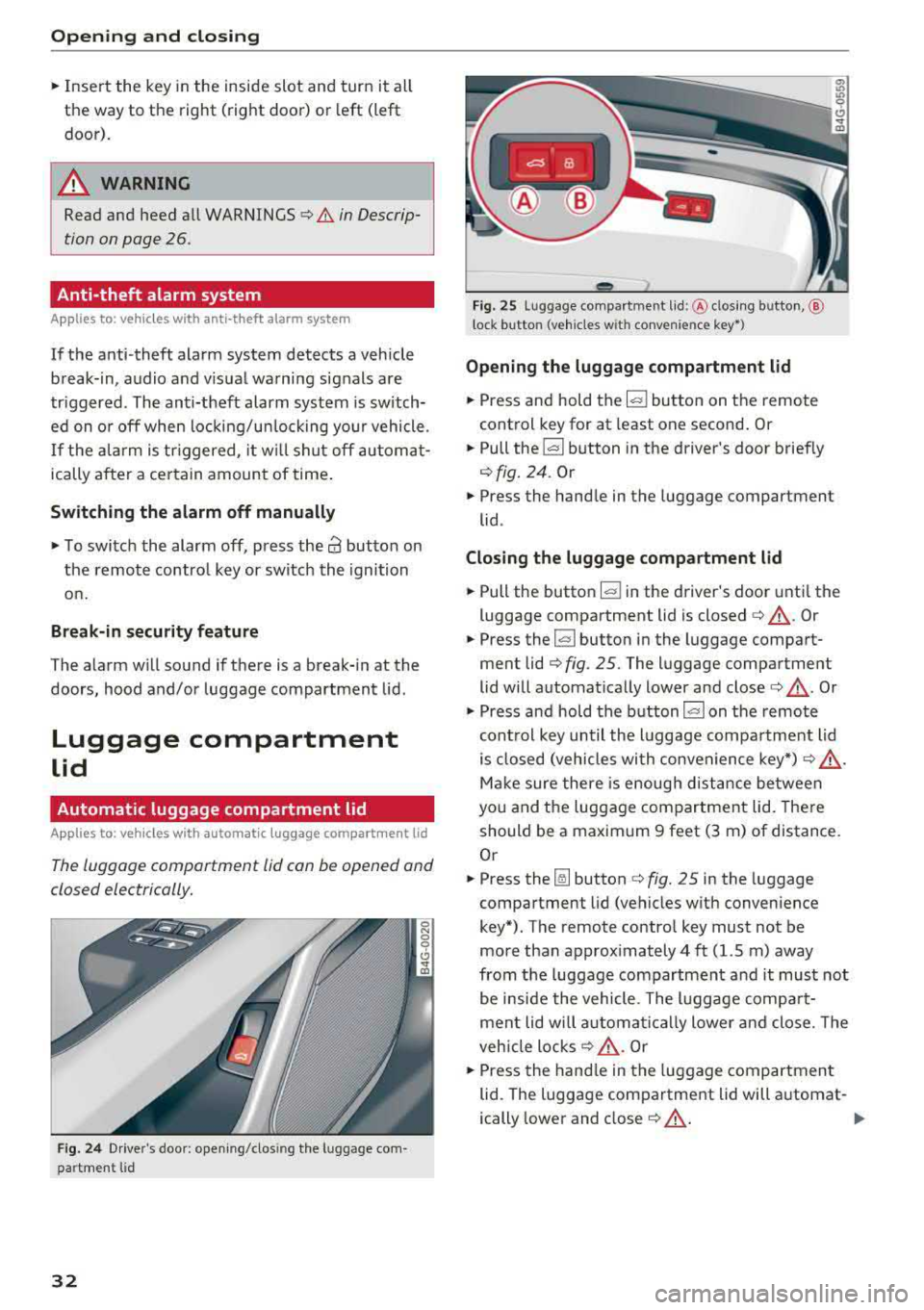
The luggage comportment lid con be opened and
closed electrically.
F ig . 2 4 Driver's doo r: open ing/clos ing the luggage com
pa rtment lid
32
- - --
' c:::s lil
--
F ig. 2 5 Luggage compa rtment lid :@ clos ing button, @
l ock button (vehicles w it h convenie nce
key*)
Opening the luggag e compartm ent lid
,.. Press and hold the l= I button on the remote
control key for at least one second . Or
,.. Pull the ~ button in the driver's door brief ly
c> fig. 24 . Or
,.. Press the hand le in the luggage compartment
lid .
Clo sing the luggage compartm ent lid
,.. Pull the button ~ in the driver's door unti l the
luggage compartment lid is closed
c> ,&. . Or
,.. Press the l= I button in the luggage compart
ment lid
c> fig . 25. The luggage compartment
lid will automat ically lower and close
c> ,&. . Or
,.. Press and hold the b utton l= I on the remote
cont rol key until the luggage compa rtment lid
is closed (vehicles with convenience key*)
c> ,& .
Make sure there is enough distance between
you and the luggage compartment lid. There
should be a maximum 9 feet (3 m) of distance.
Or
,.. Press the ~ button c> fig. 25 in the luggage
compartment l id (vehicles w ith convenience
key*). The remote contro l key must not be
more than approx imately 4 ft (1.5 m) away
from the luggage compartment a nd it must not
be inside the vehicle . The l uggage compa rt
ment lid wi ll a utomat ica lly lower and close. The
veh icle locks
c> ,&. . Or
,.. Press the hand le in the luggage compartment
lid. The luggage compartment lid will a utomat-
ically lower and close
~ ,&. . II>
Page 35 of 274

a co .... N
" N .... 0 00 \,;J '
posit ion
~ Bring the luggage compartment lid into the de
sired open position
c:> @ . The position must be
a t a certain height or higher to store.
~ Press and hold the ~ button for at leas t four
seconds to store the new open posit ion . A visu
al and audio signal w ill follow .
~ To set a higher open position, wait at least five
seconds and then carefully press the luggage
compartment lid upward.
~ Press and hold the ~ button again for at least
four seconds to store the new open position .
The opening/closing process w ill stop immed i
ately if :
- You pull/release the
la l button in the driver's
doo r, or
- You press/release
the ~ button on the remote
contro l key (vehicles with convenience key*) , or
- You press
the ~ or~ button (vehicles with
convenience key*) in the luggage compartment
l id , or
- You push the handle in the luggage compart
ment lid , or
- You press against the luggage compartment l id
against the d irect ion it is mov ing, or
- When something blocks the luggage compart
ment l id or makes it diff icult for the lid to
move .
If you press the handle or one of the~ or~ but
tons (vehicles w ith convenience key*) now , the
luggage compartment lid will either open or
close , depend ing on what ang le it is at .
A WARNING
-Read and follow a ll WARN INGS c:> & in De
scription on page
26.
- After clos ing the luggage compa rtment lid,
always pull up on it to make su re that i t is
properly closed . Otherwise it co uld open
sudden ly w hen the veh icle is moving.
- T o help prevent poisono us exhaus t gas from
being d rawn into t he ve hicle, always keep
the luggage compartment lid closed while
driving . Never transport objects larger than
those which fit comp letely into the luggage
Open ing and cl osing
area, because the n the luggage compart
ment lid cannot be fu lly closed.
- Never leave your vehicle unattended espe
cially with the luggage compartment lid left
open. A child could craw l into the car
through the luggage compartment and pull
the lid shut, becoming trapped and unable
to get out . To red uce the r isk of pe rsonal in
jury, never let chi ldren play in or around
your ve hicle. Always keep the luggage com
p art ment lid as we ll as t he ve hicle doors
closed when no t in use.
- Neve r close the luggage compa rtment lid
inattentive ly o r wi thou t checking fi rst. Al
though the closing force o f th e luggage
compartment lid is limited, you can still se rio usly injure yourself or others .
- Always ens ure t hat no one is within range of
the l uggage compartment lid when it is
mov ing, in particular close to the hinges and
the upper and lower edges - fingers or
hands can be pinched.
- Never try to interfere with the luggage com partment lid or help it when it is being
opened or closed a utomat ically .
@ Note
The luggage compartment lid can bump into
objects suc h as the garage ceiling when open
i ng and become damaged .
(D Tips
-The settings in t he Infotainment system de
termine if the luggage compartment lid can
be opened using the hand le
c:> page 31.
- There are aud io signa ls when closing the
luggage compa rtment lid with the remote
control key (vehicles with conve nience key*)
or with the
l a! butto n in the driver 's door .
- When the vehicle is locked, the luggage
compartment lid can be unlocked separately
by press ing
the ~ button on the remote
cont rol key . T he luggage compa rtme nt lid
locks a utomat ica lly w hen it is closed again.
- You ca n close the luggage compartment l id
using the remote cont rol key (vehicles with
3 3
Page 37 of 274

a co ..... N
" N ..... 0 co <..:l '
The child safety lock prevents the rear doors
from being opened from the inside and the rear
power windows from be operated.
Fig. 28 Section of dr iver's door: child safety lock buttons
~ M 0
::'i a, IIl
.,. To activate/deactivate the inner door handle
and the power window switch for the respective
rear door, press the left/right
[II button in the
driver's
door~ fig. 28. The indicator light in the
button turns on/blinks.
.,. To activate/deactivate the child safety lock on
both sides, you must press the
1±1 buttons one
after the other.
..&, WARNING
Always take the veh icle key with you when
leaving the vehicle, even for a short period of
time. This applies particularly when children
remain in the vehicle. Othe rwise child ren
could start the engine or operate electrical
equipment (such as power windows), which
increases the risk of an accident.
Opening and closing
Power windows
Controls
The driver can control all power windows.
Fig. 29 Driver's door: power win dow controls
All power window switches are equipped with a
two -stage function:
Opening and closing the windows
(0 ~ M 0
::'i (0 m
.,. To open or close the window completely, press
the switch down or pull the switch up brief ly to
the second level. The operat ion will stop if the
sw itch is pressed/pulled again.
.,. To select a position in between opened and
closed, press/pull the switch to the first level
until the des ired window position is reached .
Power window switches
CD Left front door
@ Right front door
® Left rear door
@ Right rear door
.&_ WARNING
--==
-Always take the vehicle key with you when
leaving the vehicle, even for a short period
of time. This applies particularly when chil
dren remain in the vehicle. Otherwise chil
dren cou ld start the engine or operate elec
tr ical equipment (such as power windows),
which increases the risk of an acc ident. The
power windows continue to function until
the driver's door or front passenger's door
has been opened.
- Pay careful attention when closing the win
dows. Pinching could cause serious injuries .
35
Page 38 of 274
Opening and clo sin g
- When locking the vehicle from outside, the
vehicle must be unoccupied since the win
dows can no longer be opened in an emer
gency .
(D Tips
-The windows will automatically lower ap
proximately 0.4 inches (10 mm) when you
open the doors.
- When the window in the driver's or front
passenger's door is completely open, it w ill
raise approximately 1 inch (25 mm) when
the door is opened. The w indow will lower
again when you close the door .
- You can still open and close the windows for
approximately 10 minutes after turn ing the
i gnition off. The power windows do not
switch off until the driver's door or front passenger's doo r has been opened.
Convenience opening
All of the windows and the sunroof* can be
opened at once.
The settings in the Infotainment system specify
which windows w ill open.
Con venience open ing fe ature
• Press and hold the [@] button on the remote
contro l key unt il all of the windows reach the
desired position and the sunroof* is ti lted open .
Setting c onvenience opening in the
Infotainment system
• Se lect : the ICARI function button > (Car )* Sys
tems
control button > V ehicle sett ings > C en
tral lock ing
> Long-pres s to open windows .
To enable convenience opening of the w indows
and the roof*, the
Front w indows , Rear windows
and Roof functions must be switched On .
.,&. WARNING
For security reasons, the windows and the
sunroof* can only be opened with the remote
cont rol key a t a maximum distance of approx
imate ly 6 feet (2 m) from the vehicle.
36
Correcting power window malfunctions
You can reactivate the one-touch up/down func
tion if it malfunctions.
• Pull the power window switch up until the win
dow is completely raised .
• Release the switch and pull it up aga in for at
least one second .
Sunroof
Description
Applies to: vehicles with sliding/t ilt ing sunroof
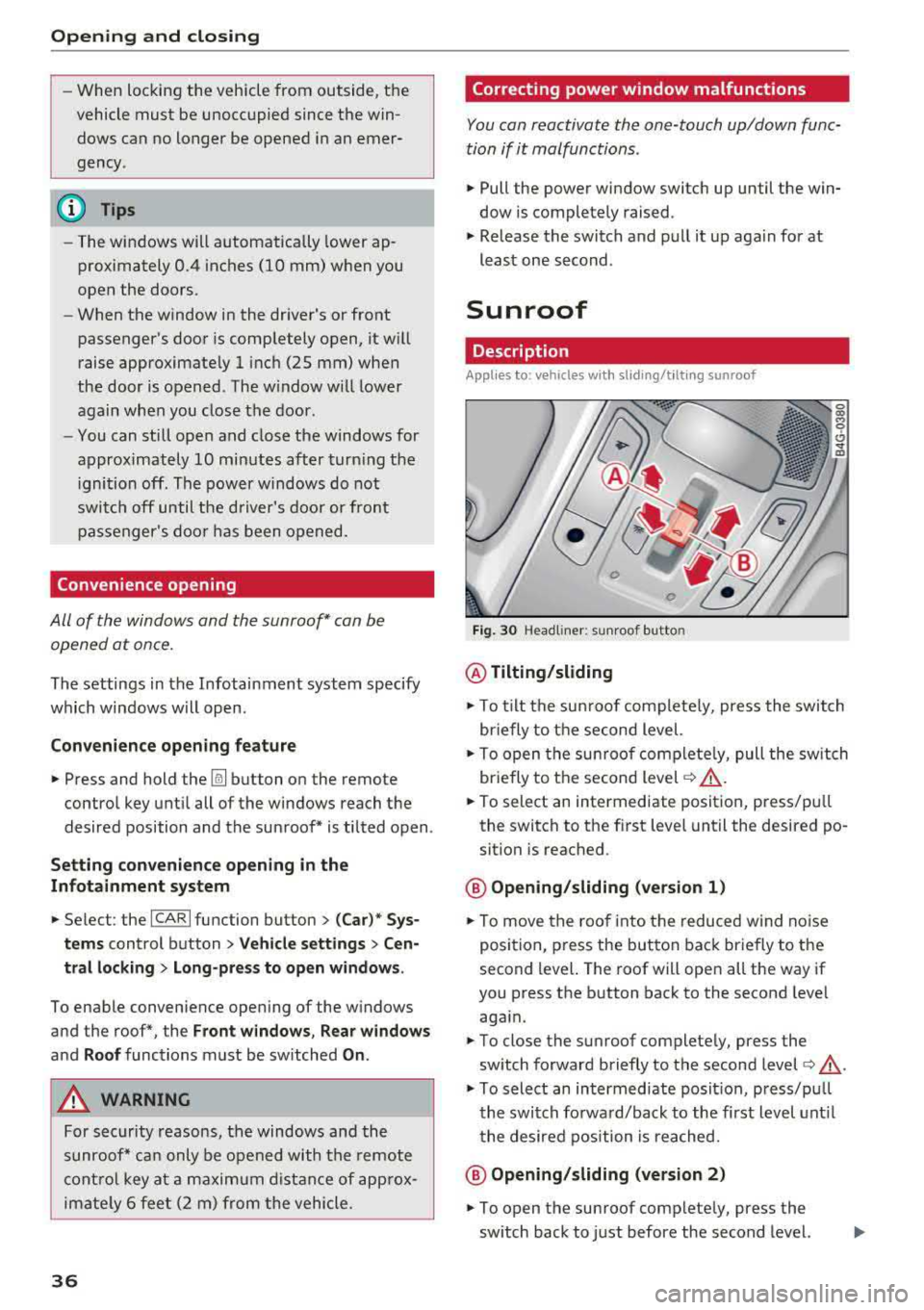
Fig. 30 Headli ne r: su nroof button
@ Tilting /sliding
• To t ilt the su nroof complete ly, press the switch
briefly to the second level.
• To open the sun roo f comp lete ly, pull the sw itch
briefly to the second level
c:> .&, .
• To select an intermediate position, press/pu ll
the switch to the fi rst level until the desired po
sition is reached .
@ Opening /sliding (version 1 )
• To move the roof into the reduced w ind noise
position, p ress the button back br iefly to t he
second level. The roof will open all the way if
you press the button back to the second leve l
aga in.
• To close the sunroof complete ly, press the
switch forward briefly to the second level
c:> ..&_ .
• To select an intermediate posit ion, press/pu ll
the switch fo rwa rd/back to the first level unt il
the desired position is reached.
@ Opening /sliding (version 2 )
• To open the sunroof completely, press the
sw itch back to just before the second level.
Page 43 of 274

Messages in the instrument cluster display
Headlight a ssist: Sy stem fault
Drive to an authorized Aud i dealer or a uthorized
Aud i Serv ice Fac ility immediately to have the
malfunc tion cor rected. You can still switc h the
hi gh beams on or off manu ally.
Headlight as sis t: Unavailable No camera view
The camera view is b locked, for example by a
sticker or debris.
The sensor is located between the interior rear
view mir ror and the windshield . Do not p lace any
stickers in this area on the windshield.
A WARNING
H igh beam assistant is only intended to assist
the drive r. The dr iver is still responsible for
con troll ing the headligh ts a nd switch ing
t hem manually depend ing on light and v is ibil
i t y cond itions .
It may be neces sary to operate
t hem manually in si tu at ions such as:
- In adve rse we athe r co nd itions s uch as fog,
heavy r ain, b low ing snow o r sp raying wa ter.
- On roads whe re oncoming t raffic may be
partia lly obs cured, su ch as exp ressways .
- Whe n there are road users t hat do no t have
s uff icient lighting, s uch as bi cycler s or
vehicles wi th dirty t ail lamps .
- In tight cu rv es and on st eep hills.
- In poor ly l it areas.
- With strong reflecto rs, such as s igns.
- If the area of the windsh ield near the sensor
is fogged over, dirty, icy or covered w ith a
st icker.
Adjusting the exterior lighting
The functions ore adjusted in the Infotainment
system.
.,. Se lect: I CARI function button> (Car)* Systems
co ntro l button > Vehicle settings > Exterior
lighting .
a Automatic headlights co ,...,
~ You can adjust the fo ll ow ing settings in the Au-N
8 tomatic headlights menu: 00 <.,;) '
Headlights activation time -you can adjust if the
headlig hts switch on
Early , Medium or Late ac
cording to the sensitivity of the light sensor .
Auto-dimming high beams * -you ca n sw itch the
high be am assistant*
On an d Off .
Daytime running lights*
USA models:
the daytime running lights can be
swi tched on/off. Sele ct
On or Off .
Canada models:
this f unction cannot be switched
off . They act ivate automatically eac h time the ig
ni tion is switched on .
Coming home, Leaving home
The coming home function illuminates the area
outside the vehicle when you turn the ignit ion off
and open t he driver 's doo r. To turn the function
o n, select
Light s when leaving car > On .
The leaving home illum inates the area outside
the vehicle when you unlock the vehicle . To turn
the function on, se lect
Lights when unlocking
car > On .
The coming home and leav ing home functions
o nly operate when it is dark and the light switc h
is in the
AUTO pos ition .
Emergency flashers
~ -~---------
Fig . 35 Cente r console : emergency f las her b utton
The emergency flashe rs makes other drivers
aware of your vehicle in dangerous situations .
.,. Press the~ button to switch t he emergency
flashe rs on or off.
You can indica te a lane change or a tur n w hen the
eme rgency flashers are switched o n by using the
.,..
41
Page 45 of 274
a co ,...,
N
" N ,...,
0 00 <..:l '
Adjusting the exterior mirrors
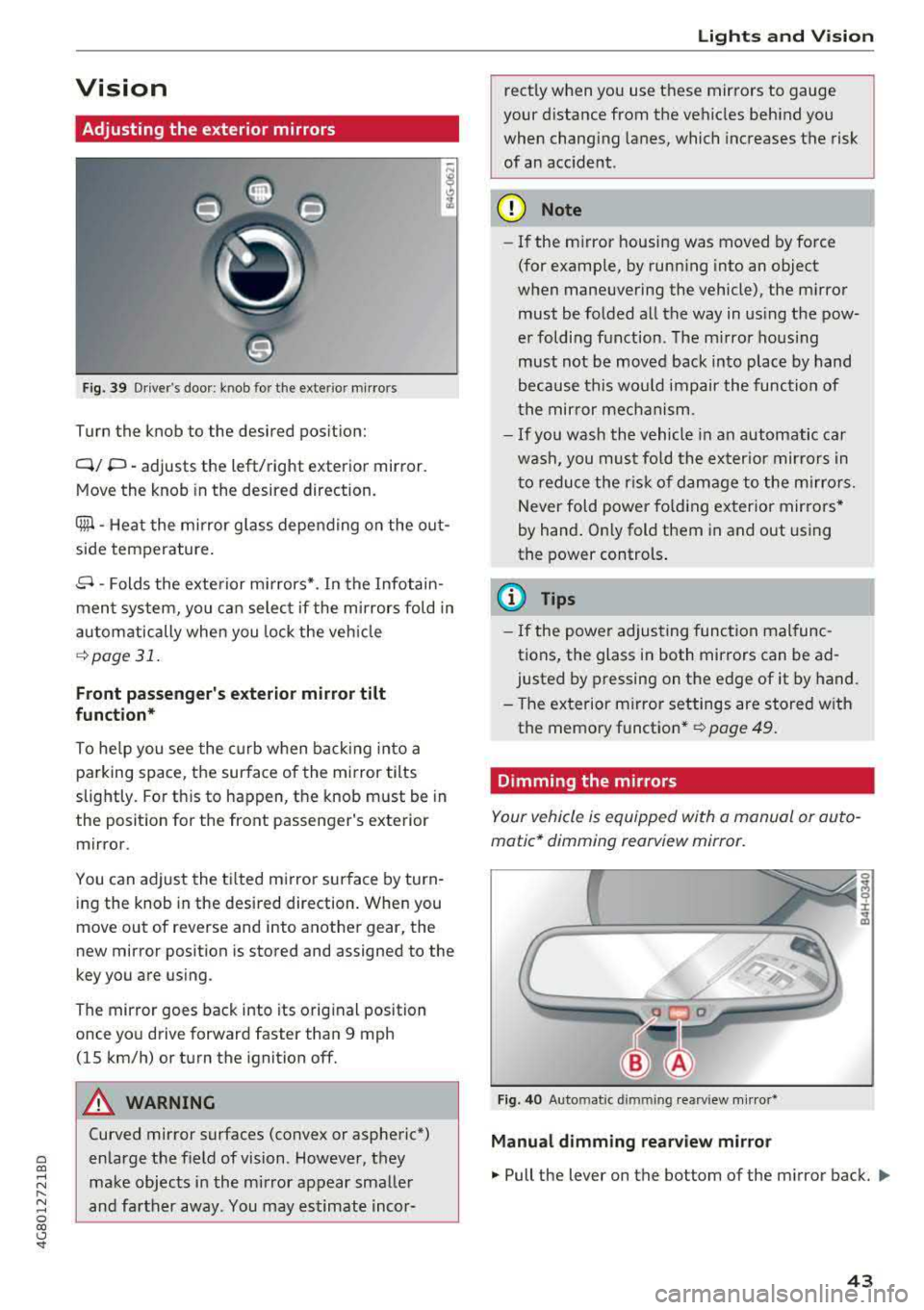
Fig. 39 Driver's door : kn ob for the exte rior mirro rs
Turn the knob to the desired position:
Q/ P -adjusts the left/right exterior mirror.
Move the knob in the desired direction.
Ciiil -Heat the mirror glass depending on the out
side temperature .
8 -Folds the exterior mirrors* . In the Infotain
ment system, you can select if the mirrors fold in
automatically when you lock the vehicle
¢page 31.
Front passenger's exterior mirror tilt
function*
To he lp you see the curb when backing into a
parking space, the surface of the mirror tilts
slightly. For th is to happen, the knob must be in
the position for the front passenger 's exterior
mirror.
You can adjust the tilted mirror surface by turn ing the knob in the desired direction. When you
move out of reverse and into another gear , the
new mirror position is stored and assigned to the
key you are using .
The mirror goes back into its original position
once you drive forward faster than 9 mph
(15 km/h) or turn the ignition off.
A WARNING
Curved mirror surfaces (convex or aspheric*)
enlarge the field of vision . However, they
make objects in the mirror appear smaller
and farther away. You may estimate incor-
Lights and Vision
rectly when you use these mirrors to gauge
your distance from the vehicles behind you
when changing lanes, which increases the risk
of an accident.
({I) Note
- If the mirror housing was moved by force
(for example, by running into an object
when maneuvering the vehicle), the mirror must be folded all the way in using the pow
er folding function. The mirror hous ing
must not be moved back into place by hand
because this would impair the function of
the mirror mechanism.
- If you wash the vehicle in an automatic car
wash, you must fold the exter ior mirrors in
to reduce the risk of damage to the mirro rs.
Never fold power fo lding exterior mirrors*
by hand. On ly fold them in and out using
the power controls .
(D Tips
-If the power adjusting function malfunc
tions, the glass in both mirrors can be
ad
justed by pressing on the edge of it by hand.
- The exterior m irror settings are stored w ith
the memory function *
~ page 49.
Dimming the mirrors
Your vehicl e is equipped with a manual or auto
matic* dimming rearview mirror.
Fig. 40 Auto matic dimmin g rearv iew mirro r*
Manual dimming rearview mirror
.,. Pull the lever on the bottom of the mirror back. Ill>
43
Page 48 of 274

Lights and Vi sion
-Worn or dirty windshield wipe r blades result
in streaking. This can affect the rain sensor
funct ion . Check your winds hield wiper
blades regularly.
-The washer fluid nozzles for the windshie ld
washer system are heated at low tempera
tures when the ignition is on .
-When stopping temporarily, such as at a
traffic light, the speed of the windshie ld
wipers automatically reduces by one level.
Cleaning windshield wiper blades
Clea n the w iper blades when you see wiper
streaks . Use a soft cloth and a glass cleaner .
.. Place the windshield wiper arms in the service
pos ition
¢ page 46.
.. Fold the windshield wiper arms away from the
windsh ield .
.&_ WARNING
Dirty w indshield wipe r blades can impair v i
sion , which increases the risk of a n accident .
Replacing windshield wiper blades
Fig . 44 Re mov ing w indshi eld w iper blades
Windshield wiper service position /blade
replacement po sition
-
:::
9 J: ... a,
.. Switch the ign ition off and move the winds hield
wipe r leve r to posit ion @
briefly ¢ page 45,
fig. 43. The w indshie ld w ipers move in to the
service pos ition .
.. To bring the windshield wipers back to the nor
mal position, switch the ignition on and hold
the windshie ld wiper lever in position @ until
the windshie ld w ipers go back to the normal
pos ition, or dr ive faster than 8 mph (12 km/h) .
46
You can also turn the service pos ition on or off in
the Infotainment system:
.. Switch the windshie ld w ipers off (posit ion @
¢ page 45, fig. 43).
.. Select: the I CAR I funct ion button > ( Car) * Sys
t e m s
control button > Servic e & control > Wip·
er change po sition.
> On /Off
Remo ving th e wipe r blade
.. Fold the windshie ld wiper arm away from the
w indshield .
.. Press the locking knob (D ¢ fig. 44 on the w iper
blade . Hold the wiper blade firmly .
.. Remove the wiper blade in the d irection of the
ar row .
Installing the w ipe r blade
.. Insert the new wiper blade into the mount on
the wiper arm @until it clicks into place.
.. Place the w iper arm back on the windsh ield .
.. Turn the service pos ition off .
.&_ WARNING -
Fo r safety reasons, the wi ndshield wipe r
b la des should be rep laced once o r twice eac h
year .
(Llj) Note
-Only fold the w indshie ld w ipers away when
they a re in the se rvice pos ition. Otherwise,
yo u r isk damag ing the pa int on the hood o r
the winds hield wiper motor .
-You should not move your ve hicle or operate
the winds hield wipe r leve r whe n the w iper
arms are folded away from t he windshie ld .
Th e windshie ld wipers would move back in
to their original position and co uld damage
the hood and w indshie ld.
(D Tips
-You can also use the service position, for ex
ample, if you want to protect the windshield
from icing by using a cover .
-You cannot activate the service position
when the hood is open.
Page 50 of 274
Seats and storage
Massage function*
-select the Wave, Pulse ,
Stretch , Lumbar or Shoulder
massage type or
off . You can adjust the intensity of each massage
from 1 through 5. You can switch the selected
massage on/off using the
button @¢ page 47,
fig . 45 .
Lumbar support -you can adjust the lumbar sup
port up/down and to be stronger/weaker.
Side section seat* -you can increase/decrease
the lateral support in the seat using the side bol
sters at the seat surface and the backrest.
Upper thigh support* -you can increase/de
crease the upper thigh support.
(D Tips
- The massage function switches off auto
matically after approximately 10 minutes.
- The air in the side bolsters* is released as
soon as the driver's door opens. This makes
is possible to enter and exit the vehicle
more comfortab ly . As soon as you start driv
ing the veh icle, the s ide bolsters fill.
Front center armrest
There is a storage compartment under the arm
rest.
Fig . 47 Cente r armrest between the driver's/fron t pas ·
senger 's seats.
Adjusting the center armrest
.,. T o adjust the angle, raise the arm res t from the
starting position .
.,. To bring the armrest back into the starting po
sition, raise it out of the top notch and fold it
back down.
48
Opening the storage compartment
.,. Press the button -arrow- upward.
Head restraints
Front head restraints
App lies to: vehicles wit h adjustable hea d r estraints
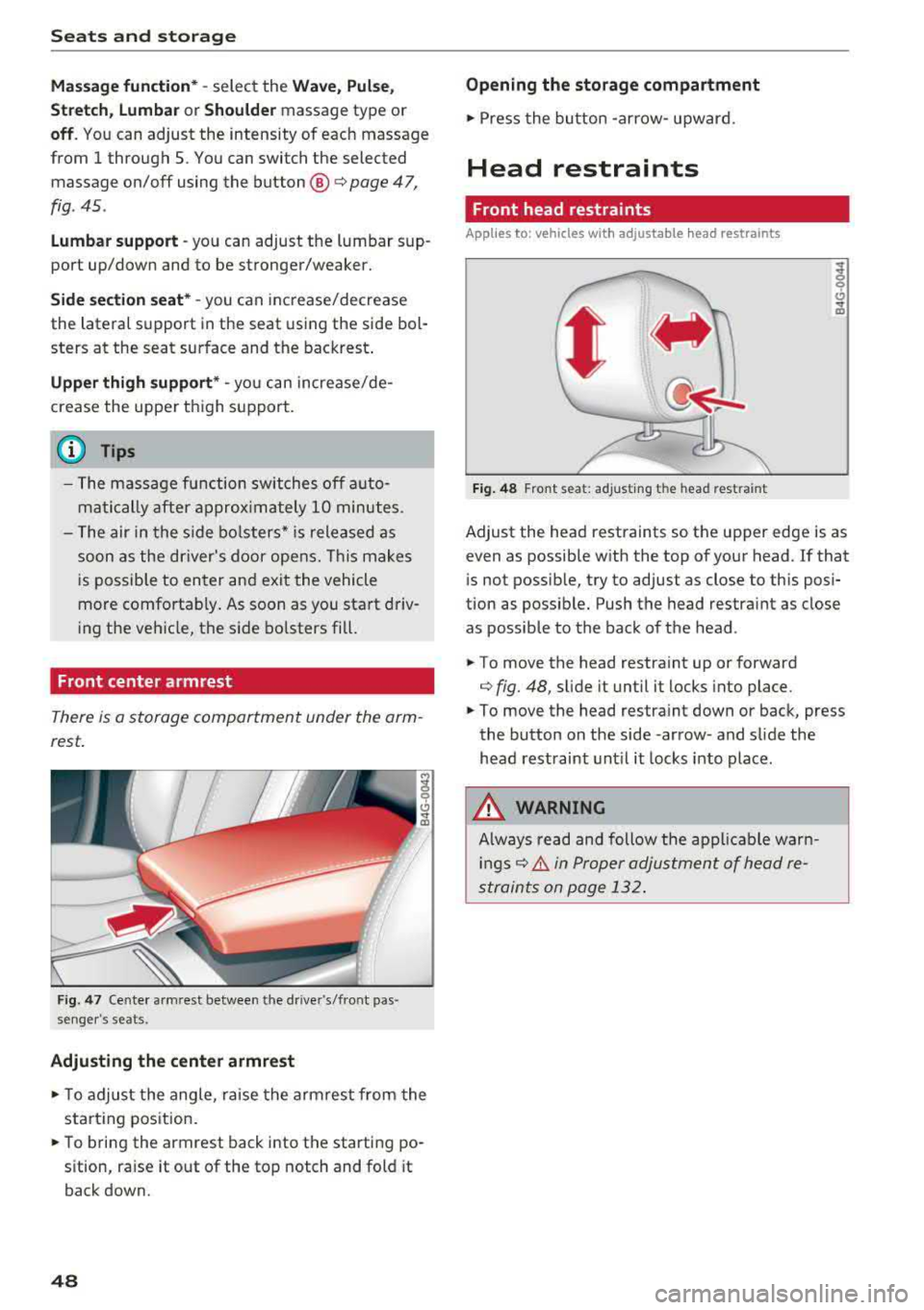
Fig. 48 Front seat: ad justing the head restraint
Adjust the head restraints so the upper edge is as
even as possible with the top of your head. If that
i s not possib le, try to adjust as close to this posi
tion as possib le. Push the head restra int as close
as possible to the back of the head.
.,. To move the head restra int up or forward
¢ fig. 48, sli de it until it locks into place .
.,. To move the head restra int down or back, press
the button on the side -arrow- and slide the
head restraint until it locks into place.
A WARNING
Always read and follow the applicable warn
ings¢ & in Proper adjustment of head re
straints on page 132.
.