ignition AUDI A7 2018 Repair Manual
[x] Cancel search | Manufacturer: AUDI, Model Year: 2018, Model line: A7, Model: AUDI A7 2018Pages: 274, PDF Size: 42.77 MB
Page 205 of 274

a co .... N
" N .... 0 00 \.J '
Service Facility for more information.
- Do not connect or disconnect the charging
cable while charging because this increases
the risk of an exp losion.
(D Tips
- Only charge the vehicle battery through the
connections in the engine compartment.
- Read all of the manufacturer's instructions
for the charger before charging the vehicle
battery.
Windshield washer system
Fig. 186 Engine compa rtment: washer flu id reservo ir cap
M N
-N ~
"' a,
The windshield washer reservoir O contains the
cleaning solution for the windshie ld and the
headlight washer
system* ¢ page 196, fig . 181.
The reservoir capacity can be found in
¢page 254.
To reduce the risk of lime sca le deposits on the
spray nozzles, use clean water with low amounts
of calc ium . A lways add window cleaner to the wa
ter. When the outs ide temperatures are cold, an
anti -freezing agent should be added to the water
so that it does not freeze .
@ Note
-The concentration of anti-freezing agent
must be adjusted to the vehicle operating
cond itions in the respective climate. A con
ce ntration that is too high can lead to vehi
cle damage.
- Never add radiator anti-freeze or other addi
tives to the washer fluid.
Checking and Filling
- Do not use a glass cleaner that contains
paint so lvents, because t his could damage
the paint.
Service interval display
The service interval display detects when your ve
hicle is due for service .
The service interval display works in two stages:
-Inspection or oil change reminder : afte r a cer -
tain distance driven, a message appears in the
instrument cluster display each time the igni
tion is switched on or off. The remaining dis
tance or time is disp layed briefly.
- Inspection or oil change due: if your vehicle
has reached an inspection or oil change interval
or both intervals at the same t ime, the mes
sage
Inspection due! or Oil change due! or Oil
change and inspection due!
appears briefly af
ter switching the ignition on/off .
Checking service intervals
You can check the remaining distance or time un
til the next oil change or next inspection in the
Car menu. To do t his, select: the !CAR !function
button
> (Car)* Systems control button > Service
& control > Service intervals .
Resetting the indicator
An authorized Audi dea ler or a uthorized Audi
Service Facility w ill reset the service interval dis
play after performing service.
If you have ch anged the oi l yourse lf, you must re
set the oil change interval.
T o reset the indicator, select : the
I CAR ! function
button
> (Car)* Systems control button > Service
& control > Service intervals . Turn the control
knob downward to
Reset oil change interval and
press the control knob.
@ Note
-Only reset the oi l change indicator if the oi l
was changed.
- Following the service intervals is critical to
maintaining the service life and value of
your vehicle, especially the engine. Even if
203
Page 226 of 274
![AUDI A7 2018 Repair Manual Wheels
Indicator lights
It]-loss of pressure in at least one tire¢,&. .
Check the tires and replace or repair if necessary.
Check/correct the pressures of all four tires and
st](/img/6/57599/w960_57599-225.png "AUDI A7 2018 Repair Manual Wheels
Indicator lights
It]-loss of pressure in at least one tire¢,&. .
Check the tires and replace or repair if necessary.
Check/correct the pressures of all four tires and
st")
Wheels
Indicator lights
It]-loss of pressure in at least one tire¢,&. .
Check the tires and replace or repair if necessary.
Check/correct the pressures of all four tires and
store the pressure again in the Infotainment sys
tem
¢ page 224.
[m]) (Tire Pressure Monitoring System) Tire
pressure: System malfunction!.
If[m]J appears
after switching the ignition on or while driving
and the
RI] indicator light in the instrument clus
ter blinks for approximately one minute and then
stays on, there is system malfunction. Try to
store the correct tire
pressures¢ page 224 . If
the indicator light does turn off or turns on again
after a short period of time, drive to an author
ized Audi dealer or authorized Audi Service Facili
ty immediately to have the malfunction correct
ed.
A WARNING
- If the tire pressure indicator appears in the
display, reduce your speed immediately and
avoid any hard steering or braking maneu
vers. Stop as soon as possible and check the
tires and their pressure .
- The driver is responsible for maintaining the
correct tire pressure. You must check the
tire pressure regularly.
- Under certain conditions (such as a sporty
driving style, winter conditions or unpaved
roads), the tire pressure monitoring system
indicator may be delayed.
(D Tips
- The tire pressure monitoring system can al
so stop working when there is an ESC mal
function.
- Using snow chains may result in a system
malfunction.
- The tire pressure monitoring system in your
Audi was calibrated with "Audi Original
Tires"
¢ page 212. Using these tires is rec
ommended .
224
Storing tire pressures
Applies to: vehicles with Tire P ressure Monitoring System in
dicator
If the tire pressure changes or a tire is replaced,
it must be confirmed in the Infotainment sys
tem.
.,. Make sure before storing that the tire pressures
of all four tires meet the specified values and
are adapted to the load
¢page 215.
.,. Switch the ignition on .
.,. Select: the I CARI function button > (Car)* Sys
tems
control button > Service & control > Tire
pressure monitor> Store tire pressure > Yes,
store now.
(D Tips
Do not store the tire pressures if snow chains
are installed.
Tire pressure monitoring
system
ill General notes
Each tire, including the spare (if provided),
should be checked monthly when cold and inflat
ed to the inflation pressure recommended by the
vehicle manufacturer on the vehicle placard or
tire inflation pressure label. (If your vehicle has
tires of a different size than the size indicated on
the vehicle placard or tire inflation pressure la
bel, you should determine the proper tire infla
tion pressure for those tires).
As an added safety feature, your vehicle has been
equipped with a tire pressure monitoring system
(TPMS) that illuminates a low tire pressure tell
tale when one or more of your tires is significant
ly under-inflated. Accordingly, when the low tire
pressure telltale illuminates, you should stop and
check your tires as soon as possible, and inflate
them to the proper pressure. Driving on a signifi
cantly under-inflated tire causes the tire to over
heat and can lead to tire failure. Under-inflation
also reduces fuel efficiency and tire tread life,
and may affect the vehicle's handling and stop-
ping ability.
.,.
Page 228 of 274

Wheels
Displaying tire pressures/temperatures
Applies to: vehicles with tire pressure monitoring system
Requirement: the ign ition must be switched on.
.,. Select : the ICARI function button > Car systems
> Service & control> Tire pressure monitor>
Display tire pressure .
The current tire pressures are shown in green and
yellow numbers in the Infotainment system:
- Green: the current tire pressure and the speci
fied tire pressure are approximately the same.
- Yellow: the current tire pressure is too low
compared to the specified tire pressure.
The specified tire pressure is the last tire pres
sure that was stored
9 page 226 .
Note that the tire pressure also depends on the
temperature of the tire. The tire pressure in
creases as the engine becomes warmer while
driving.
A WARNING
Read and follow the important information
and notes
q page 225.
@ Tips
The tire pressure or temperature are not dis
played in adaptation mode. Dashes --.-- are
shown in place of the pressure and tempera
ture.
CD Tire pressure loss
App lies to: veh icles with tire pressure mon itoring system
Fig. 192 Display : in dic ato r light with a me ssage
226
-
If the (D] indicator light turns on, the pressure in
at least one tire is too low or new sensors were
not adapted:
RE indicator lights turns on after turning the
ignition on
The tire pressure is too low compared to the
specified pressure.
.,. Check and store the tire pressure(s) the next
time it is possible
9 page 226.
RE indicator light turns on while driving
Wheels with new sensors were not adapted or
the tire pressure has reached a critical level com
pared to the specified pressure.
.,. Avoid unnecessary steering and braking maneu-
vers.
.,. Adapt your driving sty le to the situation.
.,. Stop as soon as possible and check the tire(s).
.,. If it is possible to continue driving, see an au-
thorized Audi dealer or authorized Audi Service
Facility immediately and have your tire(s) re
paired or replaced.
A WARNING
Read and follow the important information
and notes ¢
page 225.
Storing new tire pressures
Applies to: vehicles with tire pressure mon itoring system
Correctly stored tire pressure specifications are
necessary for reliable tire pressure monitoring.
.,. Check the tire pressures in all wheels .
-
.,. Correct the tire pressure if necessary. Refer to
the tire pressure Label for the recommended
tire pressure for your vehicle
c> page 215,
fig . 190 .
Only correct the pressure in tires
whose temperature is approximately the same
as the ambient temperature. If the tempera
ture of the tire is higher than the ambient air
temperature, the tire pressure must be in
creased approximately 3 PSI (0,2 bar) above
the value on the sticker .
.,. Switch the ignition on .
.,. Select: !CAR ! function button > Car systems>
Tire pressure monitoring
> Store tire pressure . ..,.
Page 229 of 274

a co .... N
" N .... 0 00 \.J '
tem measures the current tire pressures and stores them as the new specified pressures.
~ If the changed tire pressures are not displayed
in the Infotainment system, drive the vehicle
for approximately 10 minutes so that the sen
sor signal from the wheels is received again.
During this adaptation phase, --.·· is displayed
for the pressure and temperature and the tire
pressure monitoring system is only partially
available. It only provides a warning if one or
more tir e pressures is below the minimum per
mitted specified pressure. If this is the case, the
IE indicator light appears with a message.
& WARNING
Read and follow the important information
and notes
¢p age 225.
Malfunctions
Applies to: vehicles with tire pressure monitoring syste m
-
If the Tire Pressure Monitoring System is not
avai lable, the
mm indicator light appears in the
driver information system. The
IE indicator light
also blinks for approximately one minutes each
time the ignition is switched on . The tire pressure
monitoring system cannot be selected in the In
fotainment system. The fol lowing are examples
of situat ions that could cause a malfunction:
-If the message appears at the end of the adap
tation phase, the system cannot detect the
wheels installed on the vehicle. This may resu lt
from one or more wheels being installed with
out wheel sensors or with incompatible wheel
sensors.
-A wheel sensor or another component has
failed.
-Using snow cha ins can affect the function of
the system because of the shield ing effect of
the chains .
-The tire pressure monitoring system is not
available due to a malfunction.
-T ransmitters with the same frequency, such as
headphones or remote-control led dev ices, may
cause a temporary system malfunction due to
the strong electromagnetic field.
Wheels
T he m;i indicator light turns off once the Tire
Pressure Monitoring System is available again. If
you cannot correct the ma lfunction and the
m;i
indicator light stays on, drive immediately to an
authorized Audi dealer or authorized Audi Service
Facility to have the malfunction repaired.
227
Page 231 of 274

a co .... N
" N .... 0 00 \.J '
-Only wash the vehicle when the ignition is
off and follow the instructions from the ca r
was h operator to reduce the risk of acci
dents.
-T o red uce the risk of cuts, protect yourself
from sha rp metal components when wash
ing the underbody or the inside of t he wheel
hous ings .
-After wash ing the vehicle, the brak ing effect
may be delayed due to mo isture on the
brake rotors or ice in the w inter . This in
c reases the risk of an acc ide nt. The bra kes
mus t be d rie d first w ith a few careful brake
app lic at ions.
@ Note
-If yo u wash t he veh icle in an automatic car
wash, yo u m ust retract the rear spoi ler if
necessa ry, and fold the exte rior m irrors i n
to re du ce the risk of damage. Powe r fo ldi ng
ex ter io r m irr ors* m ust only be fo lde d in a nd
o ut u sing t he power folding fu nction .
-
Care and cleaning
-To re duce the risk of pa int damage, do not
was h the vehicle in direct su nlight .
-To re duce the risk of d amage to the s urface,
do not use insect removing sponges, kitche n
sponges or s imilar items .
-Mat te finish painted veh icle components :
-To reduce the risk of damage to t he sur-
face, do not use po lish ing agents o r hard
wax.
-Neve r use protective wax. It can destroy
the matte finish effect .
-Do not place any st ickers or magnetic
s igns on vehicle parts painted w ith matte
finish paint . The paint cou ld be damaged
when the stickers or magne ts are re
m oved.
@ For the sake of the environment
Only wash the veh icle in facili ties s pec ia lly de
s igned for tha t pur pose . This will reduce the
r isk of di rty wate r cont ami nated with o il from
ente rin g t he sewe r sys tem.
Cleaning and care information
When cleani ng and ca ring for in dividua l vehicle
componen ts, re fer to the follow ing tables. The
i nf ormation contained there is s imp ly recom
mendations. Fo r qu est ions or for components t
h at are not liste d, co n su lt an au tho riz e d Au di
dealer or au thor ized A udi Se rvice Fa cility. Also
f o llow the information fo und
in ¢ .&. .
Exterior cleaning
Component Situation Solution
Windshield wiper
Deposits Soft cloth with g
lass cleaner, ¢ page 46
blades
Headlights/
Deposi ts So
ft spo nge wi th a m ild soap sol utiona )
Tail lights
Sensors /
Deposits Sensors: soft cloth wit h solvent-free cleaning solut io n
camera lenses Camera le nses: soft cloth w ith a lcoho l- free cleaning so lu -
tion
Snow/ice H
and br ush/solvent-free de -icing spray
Wheels Road salt Water
Bra ke dust Acid-f
ree s pecial clea ning so lution
E xhaust tail pipes Road salt Water, clean ing so lution su itab le for s tainless stee l, if nee-
ess ary
229
Page 237 of 274
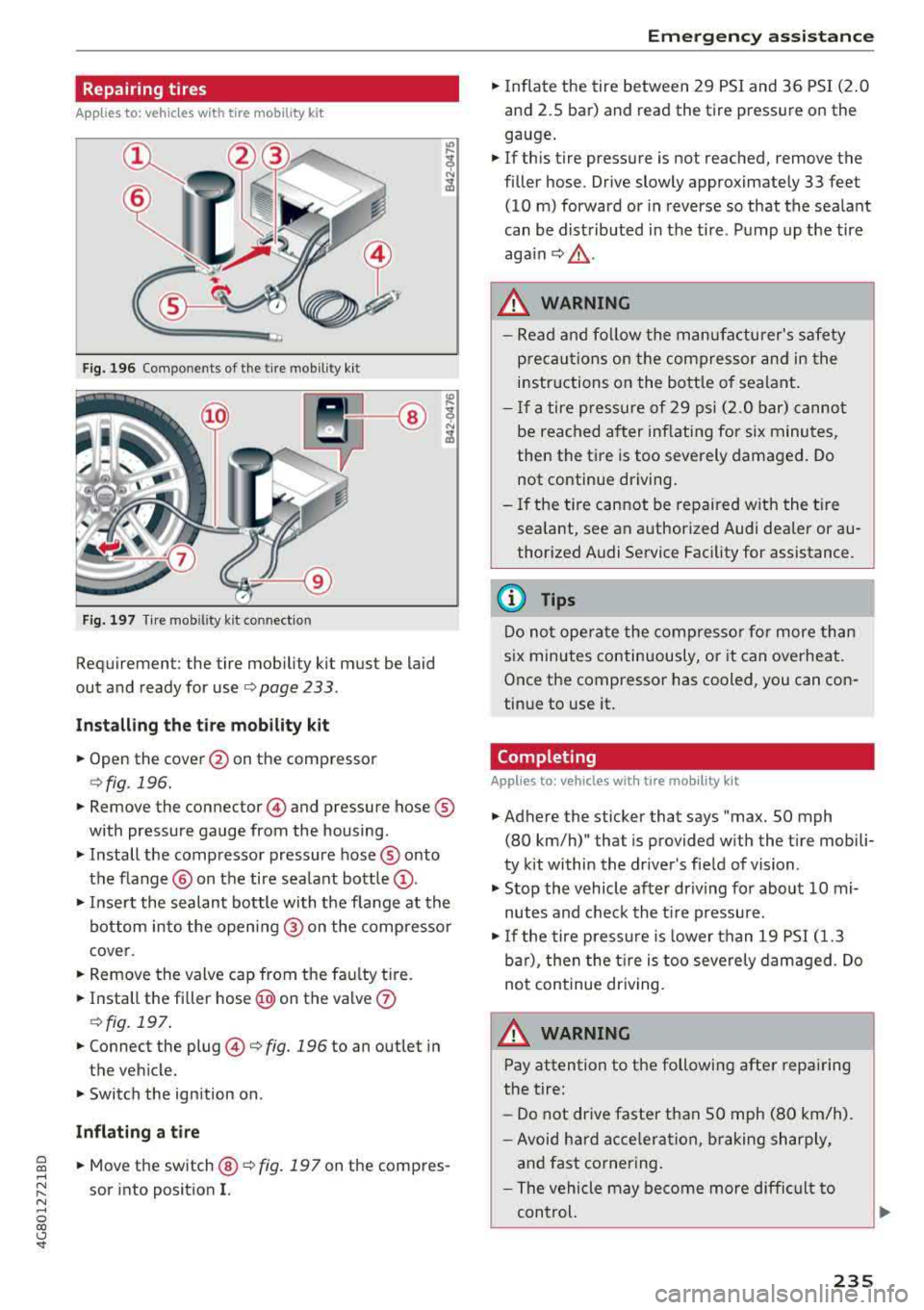
Repairing tires
Applies to: vehicles with tire mobility kit
Fig. 196 Compo nents of the tire mo bility k it
Fig. 197 T ir e mo bility k it con nec tion
Requiremen t: the tire mob ili ty ki t mus t be laid
out and ready for
use ¢ page 233 .
Install ing th e tir e mob ility k it
.,. Open the cover @on the compressor
¢fig . 196 .
.,. Remove the connecto r@) and pressure hose ®
with pressure gauge from the housing .
.,. Install the compressor pressure hose® onto
the f lange @ on the tire sea lant
bottle @.
.,. Insert the sealant bottle with the f lange at the
bottom into the opening @ on the compresso r
cover.
.,. Remove the valve cap from the fau lty t ire.
.,. Install the fi ller hose @on the valve 0
¢fig . 197 .
.,. Connect the plug @¢ fig. 196 to an outlet in
the vehicle.
.,. Switch the ignition on .
Inflating a tire
~ .,. Mov e th e sw itch @¢ fig. 197 on the com pres-,...,
~ sor into position I. N ,...,
0 00 <..:l '
.,. Inflate the tire between 29 PSI and 36 PSI (2 .0
and 2.5 bar) and read the tire pressure on the
gauge .
.,. If th is tire pressure is not reached , remove the
filler hose . Drive slowly approximately 33 feet
(10 m) forward or in reverse so that the sealant
can be distributed in the tire . Pump up the tire
aga in ¢ £ .
_&. WARNING
-Read and fo llow the manufacturer's safety
p recautions on the compressor and in the
instr uctions o n the bottle o f sealant .
- If a tire pressure of 29 psi (2.0 bar) canno t
be reached after inflating for six minutes,
then the tire is too severely damaged. Do
not continue driving.
- If the tire cannot be repaired w ith the t ire
sealant, see an authorized Audi dealer or au
thorized A udi Service Facility for assistance.
(D Tips
Do not operate the compresso r fo r more than
six minutes continuously, or it can overheat .
Once the compressor has cooled, you can con
tinue to use it.
Completing
Applies to: vehicles with tire mob ility kit
.,. Adhere the sticker that says "max. SO mph
(80 km/h)" that is provided with the t ire mobili
ty kit within the driver 's fie ld of vision .
.,. Stop the vehicle after dr iving for about 10 mi
nutes and check the t ire pressure .
.,. If the tire press ure is lower than 19 PSI ( 1.3
ba r) , then the t ire is too seve rely damaged . Do
no t continue dr iv ing .
A WARNING
Pay attention to the following after repairing
the tire:
- Do not drive faster than SO mph (80 km/h) .
- Avoid hard acce lera tion, braking sharply,
and fast cornering .
- The vehicle may become more difficult to
control.
235
Page 245 of 274
a co ,...,
N
" N ,...,
0 00 <..:l '
Replacing fuses
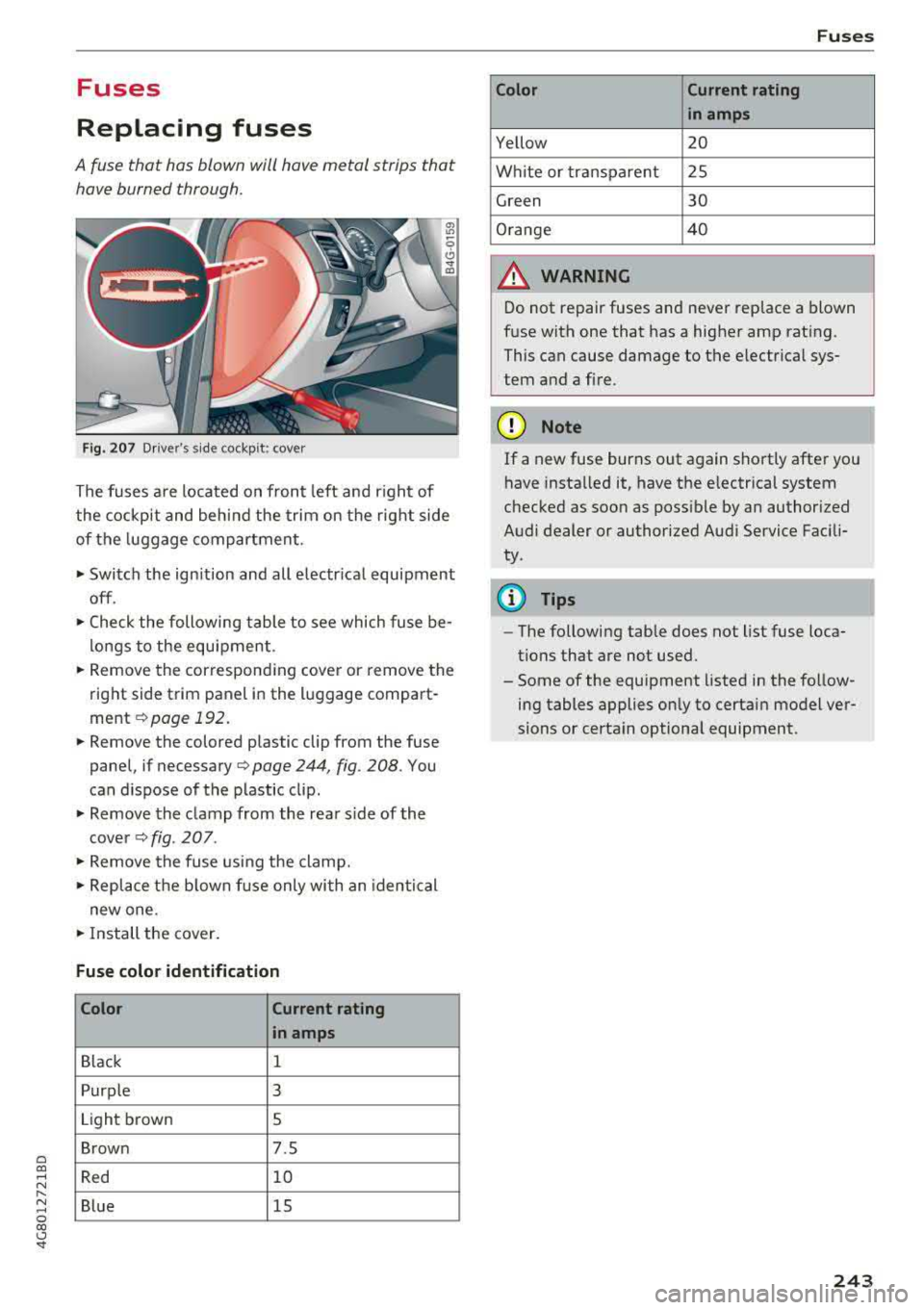
A fuse that has blown will have metal strips that have burned through.
Fig. 207 Driver's s ide cockpit : cover
The fuses are located on front left and r ight of
the cockpit and behind the trim on the right side
of the luggage compartment.
• Switch the ignition and all electrica l equipment
off .
• Check the following table to see which fuse be
longs to the equipment.
• Remove the corresponding cover or remove the
right side trim panel in the luggage compart
ment
¢ page 192.
• Remove the colored plastic clip from the fuse
panel, if
necessary¢ page 244, fig. 208. You
can dispose of the plastic clip.
• Remove the clamp from the rear s ide of the
cover
Q fig . 207.
• Remove the fuse using the clamp.
• Replace the blown fuse only with an identical
new one.
• Install the cover.
Fuse color identification
Color Current rating
in amps
Black 1
Purple 3
Light brown 5
Brown 7.5
Red 10
Blue 15
Fuses
Color Current rating
in amps
Yellow 20
White or transparent 25
Green 30
Orange 40
A WARNING
Do not repair fuses and never replace a blown
fuse with one that has a higher amp rating.
This can cause damage to the electrical sys
tem and a fire.
(D Note
If a new fuse burns out again shortly after you
have installed it, have the electrical system
checked as soon as poss ible by an authorized
Audi dealer or authorized Audi Service Facili
ty.
(D Tips
- The following table does not list fuse loca
tions that are not used.
- Some of the equipment listed in the follow
ing tables applies only to certain model ver
sions or certa in optional equipment.
243
Page 258 of 274
Consum er Info rmation
scope of maintenance and repairs which can be
carried out by vehicle owners.
Al so , sa fet y and
en vironment al
concerns place very strict limits
on the nature of repairs and ad justments to en
g ine and transmission parts wh ich an owner can
perform .
Maintenance, adjustments and repairs usually re
qu ire special tools, testing devices and other
equ ipment available to specially trained work
shop personnel i n order to assure proper per
formance, reliab ility and safety of the veh icle and
its many systems .
Improper maintenance, adjustments and repairs
can impair the operation and reliab ility of your
veh icle and eve n void your vehicle warranty .
Therefo re, proof of servicing in accordance w ith
the ma intenance sc hedule may be a condition fo r
up hold ing a possible wa rra nty claim made wi thin
the warranty pe riod.
Above all , operational safety can be adversely af
fected, c reating unnecessa ry risks fo r you and
your p assengers.
If in doubt about any servicing, have it done by
your author ized Audi dealer or any other properly
eq uipped and qualified workshop . We strongly
urge yo u to g ive your author ized Audi dealer the
opportu nity to pe rform a ll scheduled ma inte
nance and necessary repairs. Your dealer has the
facilities, origina l parts and train ed sp ecialists to
keep your veh icle running properly.
Performing limited maint enance yourself
The fo llow ing pages describe a limited number of
procedures w hich can be performed on your ve hi
cle with ordinary tools, should the need arise and
trained personne l be unavai lable . Before pe r
forming any of these procedures, always thor
ough ly read a ll of the app licab le text and carefu l
ly follow the instructions g iven . A lways rigorously
observe the
WARNING S provided .
Before you check anything in the engine com
partment , alw ays read a nd heed all WARNINGS
c> .&. and c> .&. in Working in the engine compart
ment on page 193 .
256
A WARNING
- Ser ious personal in jury may occur as a result
of imp roperly performed maintenance, ad
justments or repairs .
- Always be extreme ly careful when work ing
on the vehicle . Always follow commonly ac
cepted safety practices and general com mon sense. Never r is k personal in jury.
- Do not attempt any of the maintenance,
checks or repairs described on the following pages if you are not fu lly fam il iar with these
or other proce dures with respect to t he ve
hicle, or are uncertain how to proceed.
- Do not do any work wi thout the prope r tools
an d equi pmen t. H ave the necessary wo rk
done by your authorized Au di dealer or an
other properly equipped and qualified work
shop.
- The engine compartment of any motor vehi
cle is a potentially hazardous area . Never
reach into the area around or touch the radi
ator fan. It is temperature controlled and
can switch on suddenly - even when the en
gine is off . The radiato r fan switches on au
tomatically when the coolan t reaches a cer
tain tempe rature and w ill cont inue to run
until the coolant temperature d rops.
- Always sw itch off the ignition before anyone
gets under the vehicle.
- Always support your vehicle with safety
stands if it is necessary to work underneath
the vehicle. The jack supp lied with the veh i
cle is no t adequate fo r th is pu rpose a nd
could collapse causing serious personal in
jury .
- If you must wor k unde rneath the vehicle
w ith the wheels on the g round, always make
sure the vehicle is on level ground, that the
wheels a re always sec urely blocked and that
the engine cannot be started.
- Always make sure the transmission se lector
lever (automatic t ransm iss ion) is in P (Park
position) and the pa rk b rake is applied .
Ill>
Page 263 of 274

a co .... N
" N .... 0 00 \,;J '
seat . . . . . . . . . . . . . . . . . . . . . . . . . . . . . . . 147
Where can I get additional information
about child restraints and their use? . . . . 188
Child restraint system anchors . . . . . . . . . . 184
Ch ild safety . . . . . . . . . . . . . . . . . . . . . . . . . . 170
I mportant safety instructions for using chi ld
safety seats . . . . . . . . . . . . . . . . . . . . . . . . 17 4
I mportant things to know when driving with
children . . . . . . . . . . . . . . . . . . . . . . . . . . . 170
Tether anchors . . . . . . . . . . . . . . . . . . . . . . 187
T eth er straps . . . . . . . . . . . . . . . . . . . . . . . 187
Ch ild safety lock
Power windows . . . . . . . . . . . . . . . . . . . . . . 35
Rear doors . . . . . . . . . . . . . . . . . . . . . . . . . . 35
Child safety seats .................. .. . 176
Booster seats . . . . . . . . . . . . . . . . . . . . . . . 180
Convertible ch ild seats . . . . . . . . . . . . . . . 178
Convertible locking retractor . . . . . . . . . . 183
H ow do I properly install a child safety seat
. h' l
7 174 in my ve ,c e . ................. ..... .
Infant seats . ................. ..... . 176
Installing a child restr aint using the LATCH
system . . . . . . . . . . . . . . . . . . . . . . . . . . . . 186
LA TCH system . . . . . . . . . . . . . . . . . . . . . . 186
Lower anchorages . . . . . . . . . . . . . . . . . . . 185
Mounting and releasing the anchorage
h ook . . . . . . . . . . . . . . . . . . . . . . . . . . . . . . 186
Safety instructions . . . . . . . . . . . . . . . . . . . 17 4
Secur ing . . . . . . . . . . . . . . . . . . . . . . . . . . . 181
Unused safety belts on the rear seat . . . . 176
Cigarette lighter . . . . . . . . . . . . . . . . . . . . . . . 51
Cleaning . . . . . . . . . . . . . . . . . . . . . . . . . . . . 228
C leaning/remov ing ice from windows . . . . . 230
Cleaning Alcantara ................. .. . 231
C leaning artificia l leather......... ..... . 231
C leaning carbon parts ........ .. .. . 230 ,231
Cleaning controls . . . . . . . . . . . . . . . . . . . . . 230
C leaning decorative parts/trim . . . . . . . . . . 230
Cleaning displays . . . . . . . . . . . . . . . . . . . . . 230
Cleaning exhaust tail pip es . . . . . . . . . . . . . 229
C leaning plastic parts . . . . . . . . . . . . . . . . . . 230
Cleaning rims . . . . . . . . . . . . . . . . . . . . . . . . 229
C leaning textiles ................ ..... . 231
Index
Climate contro l system . . . . . . . . . . . . . . . . . 58
Automatic recirculation . . . . . . . . . . . . . . . . 62
Basic settings . . . . . . . . . . . . . . . . . . . . . . . . 62
Drive select . . . . . . . . . . . . . . . . . . . . . . . . . 105
Closing Hood . . . . . . . . . . . . . . . . . . . . . . . . . . . . . . 195
Sunroof. . . . . . . . . . . . . . . . . . . . . . . . . . . . . 36
Windows . . . . . . . . . . . . . . . . . . . . . . . . . . . 35
Closing/ opening
By remote control . . . . . . . . . . . . . . . . . . . . 29
Using the door lock cylinder . . . . . . . . . . . . 31
With the convenience key . . . . . . . . . . . . . . 29
Closing a id (doors) . . . . . . . . . . . . . . . . . . . . . 26
Cockpit (overview) . . . . . . . . . . . . . . . . . . . . . . 6
Coming home . . . . . . . . . . . . . . . . . . . . . . . . . 41
Compartments . . . . . . . . . . . . . . . . . . . . . . . . 52
Compliance . . . . . . . . . . . . . . . . . . . . . . . . . . 258
Consumer Information . . . . . . . . . . . . . 136, 255
Consumption (fuel) . . . . . . . . . . . . . . . . . . . . 21
Contacting NHTSA . . . . . . . . . . . . . . . . . . . . 136
Convenience key Start ing the engine (STAR T ENGINE S TOP
button) . . . . . . . . . . . . . . . . . . . . . . . . . . . . . 68
Stopping the engine (STAR T ENG INE ST OP
button) . . . . . . . . . . . . . . . . . . . . . . . . . . . . . 68
Switching the ignition on . . . . . . . . . . . . . . 68
Unlocking/locking . . . . . . . . . . . . . . . . . . . . 29
Convenience opening . . . . . . . . . . . . . . . . . . . 36
Convertible child safety seats . . . . . . . . . . . 178
Convertible locking retractor
Activating . . . . . . . . . . . . . . . . . . . . . . . . . . 183
Deactivating . . . . . . . . . . . . . . . . . . . . . . . . 184
Using to secure a child safety seat . . . . . . 183
Cooling down . . . . . . . . . . . . . . . . . . . . . . . . . 64
Cooling mode (4-zone deluxe automatic cli-
mate contro l) . . . . . . . . . . . . . . . . . . . . . . . . . 61
Cooling mode (deluxe automatic climate con-
trol) . . . . . . . . . . . . . . . . . . . . . . . . . . . . . . . . . 59
Cooling system Adding coolant . . . . . . . . . . . . . . . . . . . . . . 200
Coolant . . . . . . . . . . . . . . . . . . . . . . . . . . . . 199
Coolant level checking . . . . . . . . . . . . . . . . 200
Coolant temperature indicator . . . . . . . . . . . 9
I ndicator light . . . . . . . . . . . . . . . . . . . . . . . 1 4
Cornering light . . . . . . . . . . . . . . . . . . . . . . . 105
Crossing water . . . . . . . . . . . . . . . . . . . . . . . . 64
261