ignition AUDI A7 2018 Owner's Guide
[x] Cancel search | Manufacturer: AUDI, Model Year: 2018, Model line: A7, Model: AUDI A7 2018Pages: 274, PDF Size: 42.77 MB
Page 78 of 274

Driving
-If you accidenta lly select N while driving,
take your foot off the accelerator pedal and
wait for the engine to s low down to idle be
fore selecting D/5.
- If there is a power fa ilure, the selecto r lever
will not
move out of the P pos it ion. T he
emergency release can be used if this hap
pens
¢ page 80.
Selector lever lock
The selector lever lock prevents you from select
ing a gear accidentally, causing the vehicle to
roll.
( )
_-I
F ig. 82 Selector lever loc k
To release the selector leve r lock:
• Switc h the ign ition on.
• P ress t he b rake peda l while pressing t he in te r-
l ock button.
Automatic shift lock (ASL)
The se lector lever is locked in the P and N pos i
tions whe n the ignition is sw itched on . T he re
move it from these posit ions, the drive r mus t
p ress the bra ke pedal and press the lock button
a t the s ame ti me. The following me ssage ap
pears in the instr ument clus ter d isp lay when the
selec to r l eve r is i n the P or N posit io n to remind
the dr iver:
Brake pedal must be applied to shift from P
The automat ic shift lock only functions when the
ve hicl e is stationary or at speeds below 1 mph
(2 km/ h). A t higher speeds, the lock is automat i
cally dea ctivate d in t he N posi tion.
The se lector lever is not locked when shifting
qu ickly th ro u gh
N, for examp le from R to D. This
76
makes it possible to free the vehicle when it is
stuck by "rocking" it. The selecto r lever lock en
gages if the leve r stays in the N pos ition longer
than 2 seconds when the brake peda l is not
pressed.
Lock button
The inter lock button in the selec to r l ever hand le
prevents you from mov ing the selector leve r in
advertent ly wh ile in some selector lever posi
t ions. The positions that req uire the interlock
button to be pressed a re marked in color in the il
l ustratio n
¢ fig. 82.
Driving tips
Starting the engine
• T he se lector lever must be in the P o r the N po
si tion.
Starting from a stop
• Press and hold the brake peda l.
• Press and hold the lock b utton in the selector
lever handle, se lect the desi red selector lever
position such as D/S a nd release t he lock but
ton.
• Wa it a mo ment un til the transmission sh ifts.
You will notice a slig ht movemen t whe n the
ge ar engages.
• Rele ase the bra ke peda l an d press the ac cele ra-
to r
peda l¢ ,&. .
Various convenience funct ions a re available f or
st arti ng o n hill s
¢ page 74.
Stopping temporarily
• Keep the vehicle sta tionary using the braki ng
pe dal, for examp le a t traffic ligh ts.
• Do not press the a cce lera to r ped al whe n doi ng
t his.
• T o preven t the veh icle from ro lli ng when yo u
s tar t drivi ng, set t he parking brake when
stop
ping on steep hills ¢ A and ¢(D.
• The parking brake will release a utomat ica lly
and the vehicle will start moving once yo u press
the acce lerator pedal.
..,.
Page 79 of 274
a co .... N
" N .... 0 00 \.J '
If t he se lecto r lever is not in t he P posi tion when
you open the driver 's door, the vehicle could rol l.
The message
V ehicle ma y roll! Selector le ver not
in P
appears . A warning tone will a lso sound .
.,. Press and hold the brake pedal¢.&_ .
.,. Set the parking brake.
.,. Se lect the P selector lever position.
Unde r ce rtain c ircumstances, s uch as dr iv ing in
the mountains, i t may be useful to switch tempo
rari ly to the manua l shift program in order to
manually adjust the gears to the driving condi
tions
¢ page 78.
On inclines, activate the park ing brake fi rst and
then move the selector lever to the P position
¢ page 72 . Th is prevents the locking mechanism
from being loaded too heavi ly and wi ll make it
eas ier to move the se lector lever out of the P po
sition .
A WARNING
-The veh icle can roll even if the ignition is
switched off .
-Never leave your vehicle with the engine
runn ing wh ile in gear .
-Do not press the accelerator pedal when
changing the selector lever pos ition wh ile
the vehicle is stationary and the engine is
ru nning .
-
-Please note that a sma ll amount of power is
t ransmitted if the vehicle is stopped tempo
ra rily while in t he D/S or R selector lever po
s iti on. To redu ce the r isk of an accident, yo u
mus t continue press ing firmly on the brake
peda l w hil e the vehicle is stopped so that it
does not roll.
-Never engage the R o r P se lec to r level posi
tions while driving .
It could cause a crash.
-Be fore dr iv ing dow n a steep s lope, red uce
yo ur speed and shift in to a lower gear with
"ti ptro n i c" .
-Do not ride the brakes o r press the brake
peda l too often or too long w hen driving
down hill. Constant braking causes the
brakes to overheat and substantially re
duces braking performance, increases brak-
Driving
ing distance or causes comp lete fai lure of
the brake system.
-If you m ust stop on an incline, a lways ho ld
the vehicle in place wit h the foot brake or
parking brake to prevent it from rolling
back .
-Never hold the vehicle on an incline with a
slipp ing clutch. The clutch opens automati
cally when it becomes too hot from the
overload .
The@] indicator light turns on
a nd a message
appears~ page 79 when
the clutch is overloaded .
@ Note
-When stopping on an incl ine, do not try to
hold the ve hicle in place by pressing the ac
celerator peda l wh ile a d riving gear is se
lected. This ca n cause t he transmission to
over heat a nd can damage it. Se t the park ing
bra ke or p ress the brake pedal to p revent
t he vehicle from rolling.
-Allowing the vehicle to roll when t he engine
is stopped will damage the transmission be
cause it is not lubricated.
(D Tips
Fo r sa fety reasons, the park ing bra ke is re
l eased a utomatica lly on ly when t he driver 's
safety be lt is fastened.
Hill descent control
The hill descent control system assists the driver
when driving down hills .
Hill descent control is act ivated when the selec
tor leve r is in the D or S position and yo u press
the brake peda l. The transmission a utomatica lly
selects a gear that is suitable for the hi ll. Hill de
scent control tries to maintain the speed ach
ieved at the time of braking, w ith in physical and
technical lim itations . If may still be necessary to
adjust the speed w ith the brake pedal.
Hi ll descent control switches off once the hill lev-
els out or you press the accelerator pedal.
.,..
77
Page 82 of 274
Driving
App lies to: ve hicles w ith S tro nic t ra n smi ssio n
Ii) 10 Tran sm issio n m alfunctio n: N o reve rse
ge ar. You c an c ontinue d riv ing
There is a system malfunct io n in the t ransm is
sion . T he transmission is switching to emergency
mode. This mode only shifts into certain gears or
will no longer shift at all. The engine may stall.
You cannot engage the r everse gear. Drive to an
author ized Audi dealer or author ized Audi Service
Facility immediately to have the malfunction cor
rected .
[!l Transmi ssio n m alfun cti on : Sto p vehicl e and
s hift t o park .
Do not cont inue drivi ng. Select the P se lector lev
er position and see an authorized Audi dea le r or
author ized Audi Service Facility for assistance.
(D Note
If the transmission has switched to emergen
cy mode, drive to an author ized Audi dealer or
author ized A udi Se rvice Facility immediate ly
to have the ma lfunction corrected.
Selector lever emergency release
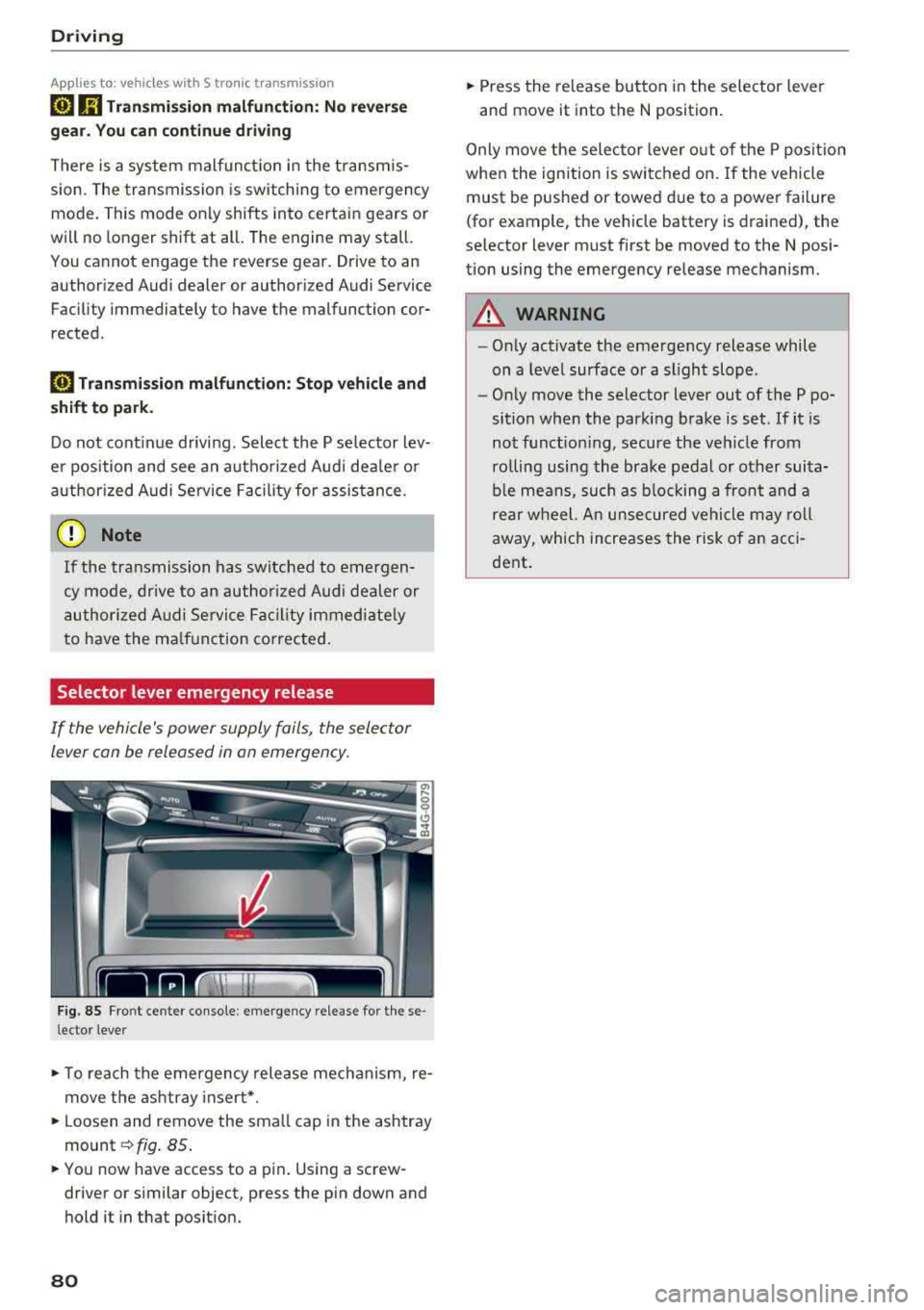
If the vehicle's power supply foils, the selector
lever con be released in on emergency.
F ig. 85 Fro nt ce nter console: emergency release for t hese
l ector lever
.,. T o reach the emergency release mechanism, re
move t he ashtray insert * .
.,. Loosen and remove the sma ll cap in the ashtray
mount ~ fig. 85 .
.,. You now have access to a pin . Using a screw
driver or s imilar object, press the pin down and
hold it in that posit ion.
80
.,. Press the release button in the selector lever
and move it into the N position .
Only move the selec tor lever o ut of the P posit ion
when the ignition is switched on. If the vehicle
must be pushed or towed due to a power failure
(for example, the vehicle battery is drained), the
selector lever must first be moved to the N posi
tion using the emergency release mechanism.
A WARNING
- Only activate the emergency release while
on a level surface or a slight slope .
- Only move the selector lever out of the P po
sition when the parking brake is set. If it is
not funct ioning, secure the veh icle from
ro lling using the brake pedal or other suita
ble means, such as b locking a front and a
rear wheel. An unsecured vehicle may roll
away, which increases the risk of an acci
dent .
Page 87 of 274
a co .... N
" N .... 0 00 \.J '
yo ur foot on the accelerator pedal prevents
the cruise control from braking. Th is is be
cause pressing the acce lerator pedal over
rides the cruise control system .
- If a brake system ma lf u nction such as over
heating occu rs when the c ruise contro l sys
tem is switched on, the braking function in
the system may be switched off . The rest of
t h e cruise control system f unction s remain
ac tive as long as
the @;(IM~ (USA model s) /
l'I (C anada models) indi cator light is on .
(D Tips
The brake lights turn on when the brakes a re
ap plied a utomat ica lly .
Changing speed
Applies to: vehicles with cruise control system
.. T o inc rease o r decrease the speed in incre
ments, tap the lever toward
0 10 <=> page 84 ,
fig . 86 .
.. To inc rease o r decrease the speed qu ickly, ho ld
the leve r in the
010 direction until the de
s ired speed is displayed.
You can a lso press the acce lerator pedal down to
increase yo ur speed, for example i f you want to
pass someone. The speed you set earlier w ill re
sume as soo n as you release t he accelerator ped
al.
However, if you exceed your saved speed by S
mph (10 km/h) for longe r th an 6 mi nutes, the
cru ise control system tur ns off temporar ily .
The
green @;(i)~i~ (USA models) !l'I (Canada mod
e ls) indicator light in the speedometer tu rns off
and the stored speed is maintained.
Preselecting the speed
Applies to: vehicles with cruise control system
You can pre-select your desired speed when the
vehicle is stationary.
.. Switch the ign ition on.
.. Pull the lever into position @<=> page 84,
fig. 86 .
A ss istance systems
.. To increase or decrease the speed, tap the lever
toward
0 10 .
.. To store t he speed d isp layed, release the leve r.
T his func tion makes it possible , fo r example, to
save the spee d you want before driving on the
highway. Once on the highway, activate the
c ruise contro l by pull ing the leve r
towa rd @ .
Switching off
Applies to : vehicles with cruise control system
Deactivating temporarily
.. Press the brake pedal, or
.. Press the lever into position @(not clicked into
p lace) <=>
page 84, fig . 86, or
.. Dr ive fo r longer t han S m inutes faster than S
mph (10 km/h) above the stored speed .
Switching off completely
.. Press the lever into position@(clicked into
p lace), or
.. Switch the ignit ion off .
The speed you stored will be ma intained if the
cruise contro l has been switched off temporari ly .
To resume the stored speed, re lease the brake
peda l and pull the lever to
position @.
Switching the ignition off wi ll erase the stored
speed.
A WARNING "---
You should only resume the sto red speed if it
i s no t too high fo r existing t raff ic conditions .
Otherw ise you can inc rease the risk of an acci
d ent .
Lap timer
Introduction
Applies to: vehicles with lap timer
Yo u can record and eva luate lap t imes with the
l ap timer <=>
page 86, fig. 87. The time is meas
ur ed in m inutes, seconds and 1/10 seconds. The
ho urs are also shown when the lap time exceeds
60 m inutes . T he maxim um indiv id ual measure
me nt is 99 ho urs. A maxim um of SO laps can be
r ecorded.
.,.
85
Page 88 of 274
Ass is tance sy stem s
~ WARNING
Your focus should always be on driving your
vehicle safely. As the driver, you have com
plete responsibility for safety in traffic. Only
use the functions in such a way that you al
ways maintain complete control over your ve hicle in all traff ic situat ions.
(D) Tips
You can retrieve information from the trip
computer while the lap ti mer stopwatch is
running.
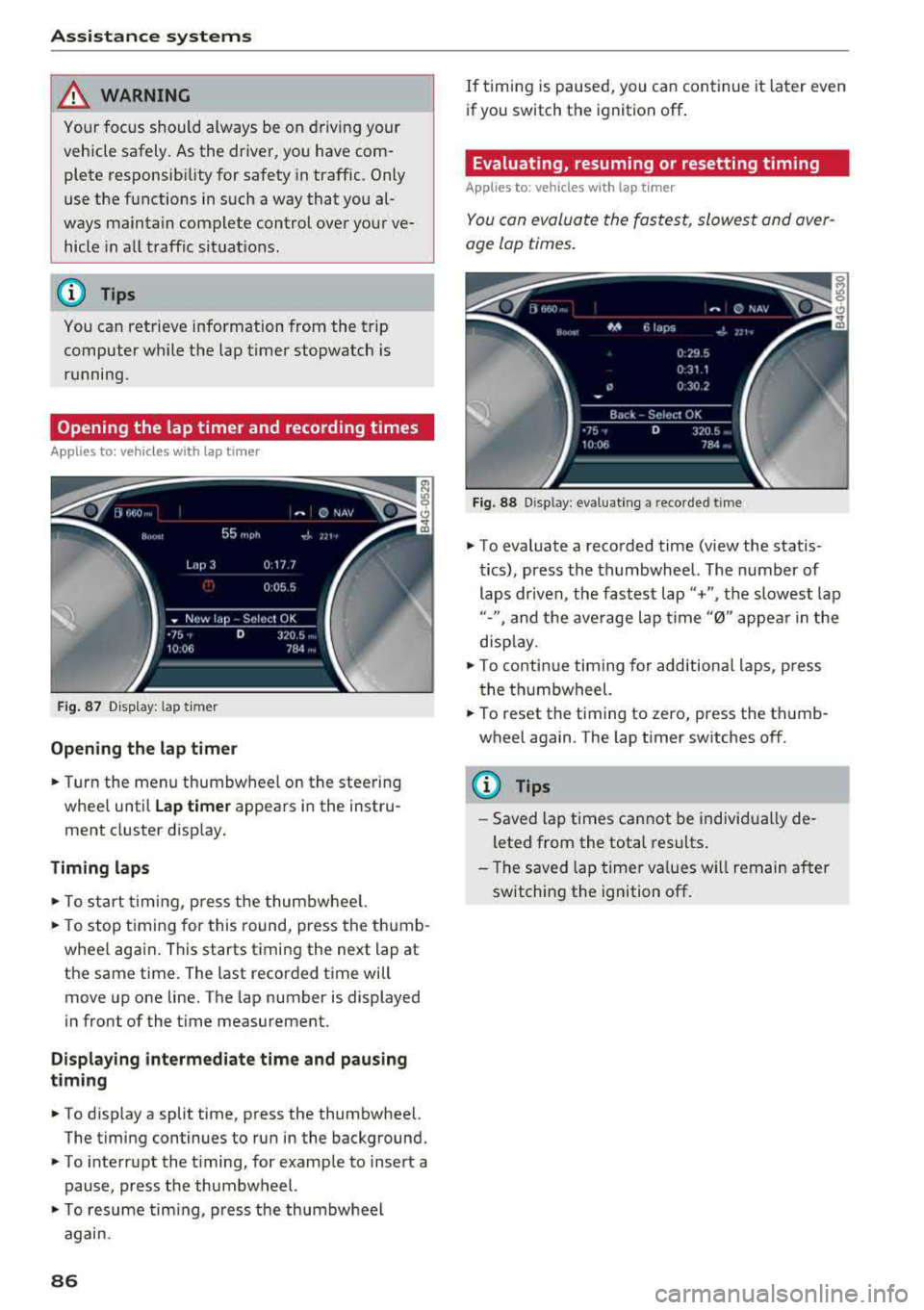
Opening the lap timer and record ing times
A pp lies to: ve hicles w ith la p timer
F ig . 87 D isplay: lap timer
Opening the lap t im er
.. Turn the menu thumbwheel on the steering
whee l until
Lap time r appears in the instru
ment cluster display.
T iming laps
.. To start timing, p ress the thumbwhee l.
-
.. To stop timing for this round, press the thumb
whee l aga in . This starts t iming the next lap at
the same time. The last recorded t ime wi ll
move up one line. The lap number is displayed
in front of the time measurement.
Displaying intermediate tim e an d pau sing
t imin g
.. To display a split time, press the thumbwheel.
The timing continues to run in the background .
.. To interrupt the t iming, for example to insert a
pause, press the thumbwheel.
.. T o resume tim ing, press the thumbwheel
again.
86
If timing is paused, you can continue it later even
if you switch the ignition off .
Evaluating, resuming or resetting timing
Applies to: vehicles with lap t imer
You can evaluate the fastest, slowest and aver
age lap times.
F ig. 88 D isp lay: evaluating a recorded time
.. To evaluate a recorded time (view the statis
tics), press the thumbwheel. The number
of
laps dr iven, the fastest lap"+", the slowest lap
"-", and the ave rage lap time "0" appea r in the
disp lay .
.. To continue timing for additional laps, press
the thumbwheel.
.. To reset the timing to zero, press the thumb
wheel again . The lap t imer switches off.
(D Tips
- Saved lap times cannot be individua lly de
leted from the total results .
- The saved lap timer va lues w ill remain after
switching the ignition off .
Page 106 of 274

Assistance systems
The following situations may affect the function
of t he night vision assist system:
- Poor visibility such as snow, rain , fog or heavy
spray
- Dirty lens on the night vision assist camera
Make sure the night vision ass ist camera
¢ fig. 113 is not covered by stickers, deposits or
any other obstructions because that can affect
the camera function. For information on clean
ing, see
¢ page 228.
The pedestrian and wild animal recognition de
pends on the temperature difference between
the person/wild animal and the background. Peo ple/wild animals may not be detected if the dif
ference is too small. The pedestrian/wild animal
marking and the marking light* deactivate at
temperatures above approximately 77 °F
(25 °()
and during daylight. If the night vision assist
im
age is selected in the instrument cluster display,
then the
II symbol appears at the top on the
right side.
..&_ WARNING
Pay attention to traffic and the area around
your vehicle when night vision assist is switch
ed on. The driver is always responsible for as
sessing the traffic situation.
- Night vision assist can only warn about peo
ple and wild animals located within the visu
al range of the infrared camera. The visual
range corresponds to the image in the in
strument cluster display.
- Night vision assist may not detect people or
wild animals and mark them if
- they are not in an upright position, for ex
ample if they are sitting or lying down
and/or
- the silhouette in the display appears in
complete or interrupted, for example be
cause the person is partially covered by a
vehicle or the animal is partially covered
by tall grass. This could increase the risk
of an accident.
- Never try to swerve around animals if doing
so will endanger you or other road users, be
cause this increases the risk of an accident.
104
@ Tips
- Even though the system evaluates the
shape and heat given off by all detected ob
jects, there are limits to the system. There
may be false warnings.
- For technical reasons, the image pauses in
split second intervals.
Switching on /off
Applies to: vehicles with night vision assist
Fig. 114 Area around the ligh t switc h: ni gh t vis ion assist
button
Requirement: switch the ignition on and turn the
light switch to the
AUTO position.
.,. Press the~ button ¢ fig. 114. The heat image
from the night vision camera appears in the in
strument cluster display .
.,. Press the~ button again to switch the night
vision assist off .
If conditions are bright enough, night vision as
sist can be switched on without moving the light
switch to the
AUTO position. Pedestrian and wild
animal highlighting and warnings are only active
when it is dark outside and the headlights are
switched on.
Adjusting the contra st
Applies to: vehicles with night vision assist
.,. Select: the I CARI function button > (Car)* Sys
tems
contro l button > Driver assistance >
Night vision assist contrast.
When the night vision assist is switched on and
the image is visible in the instrument cluster dis
play, you can adjust the contrast in the image
from
Min to Max .
Page 113 of 274
a co ,...,
N
" N ,...,
0 00 <.,;) '
such as th e bumper of a parked vehicle, a
tra ile r hitch or the rear of a truck. Do not
us e the orientation lines in this case.
- If driven from a level surface onto an in
clin e, or a downward slope.
- If driven toward protrud ing objects.
- If the vehicle is carrying too much load in
the rear.
- Applies to: vehicles with air s uspension: the
accuracy of the orientation lines and blue
surfaces decreases when the vehicle is raised/lowered
<=)page 105.
(D Note
- Always read and follow the applicable warn
ings
Q 0 in General information on
page 108.
- The orange-colored or ientation lines in the
Infotainment display show the vehicle path
based on the steering wheel angle. The
front of the vehicle swings out more than
the rear of the veh icle . Ma inta in plenty of
distance so that an exterio r mirror or a cor
ner of the ve hicle does not co llide wit h any
obstacles.
Switching on /off
App lies to : vehicles wit h rearv iew camera
Switching on
.,. S hift i nto reve rse, or
.,. Press t he P' #A button in the cente r console
Qpage 109, fig. 116 . A short confirmat io n
tone sounds and the LED in the button turns
on .
Switching between the rearview camera and
optical di splay
.,. Press the Graphic control button ®
Qpage 111, fig. 121 to see the optica l display.
.,. Press the Rear view contro l button to see the
rearview camera image.
Switching off
.,. Drive faster than 6 mph ( 10 km/h), or
.,. Press the p,,,A button, or
.,. Switch the ignition off.
Parking systems
(D Tips
- The visua l display in the left part of the d is
play sho uld he lp you detect the critical veh i-
cle areas.
- You ca n change the vol ume and pitch of the
signa ls as well as the d isplay
Q page 118.
· Perpendicular parking
Applies to : veh icles w it h rearv iew camera
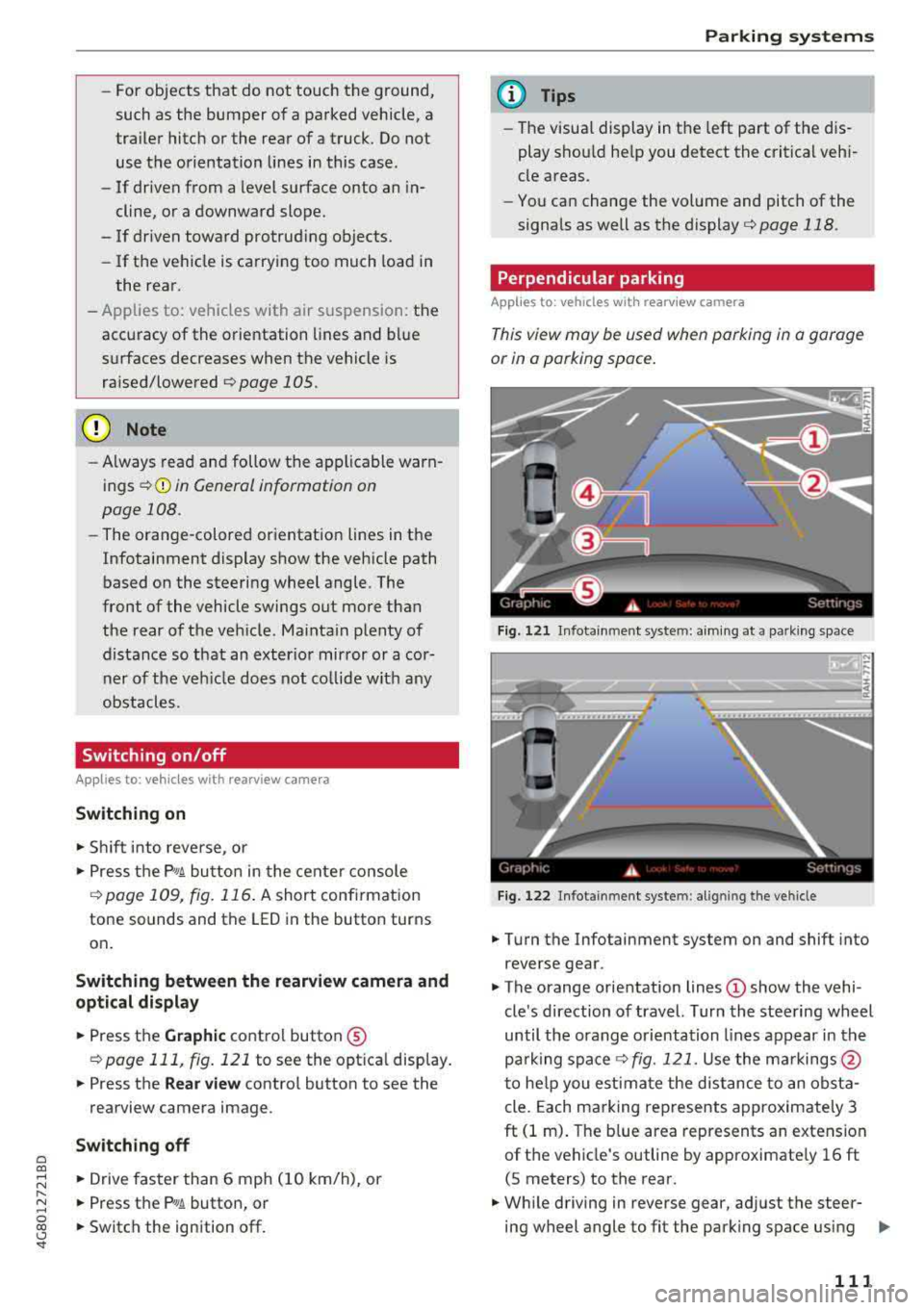
This view may be used when parking in a garage
or in a parking space .
Fig. 1 21 Infotainme nt system: aim ing at a park in g space
Fi g. 122 In fotainment system: al ig nin g the ve hicle
.,. Tu rn the Infotainment system on and shift into
reverse gear.
.,. The orange orientation lines © show the vehi
cle 's direction o f travel. Turn the stee ring wheel
until the orang e orientation lines appear in th e
pa rk ing space
Q fig. 121. Use the ma rkings @
t o he lp you estima te the distance to an obst a
cle. Each ma rking represents approximately 3
ft (1 m) . The b lue area represents an extension
of t he vehicle's outline by approximate ly 16 ft
(S meters) to the rear .
.,. Wh ile driving in reverse gear, ad just the steer-
ing wheel angle to fit the park ing space using
..,_
111
Page 116 of 274
Parking systems
Switching on or off
Applies to: ve hicles w ith per ip heral cameras
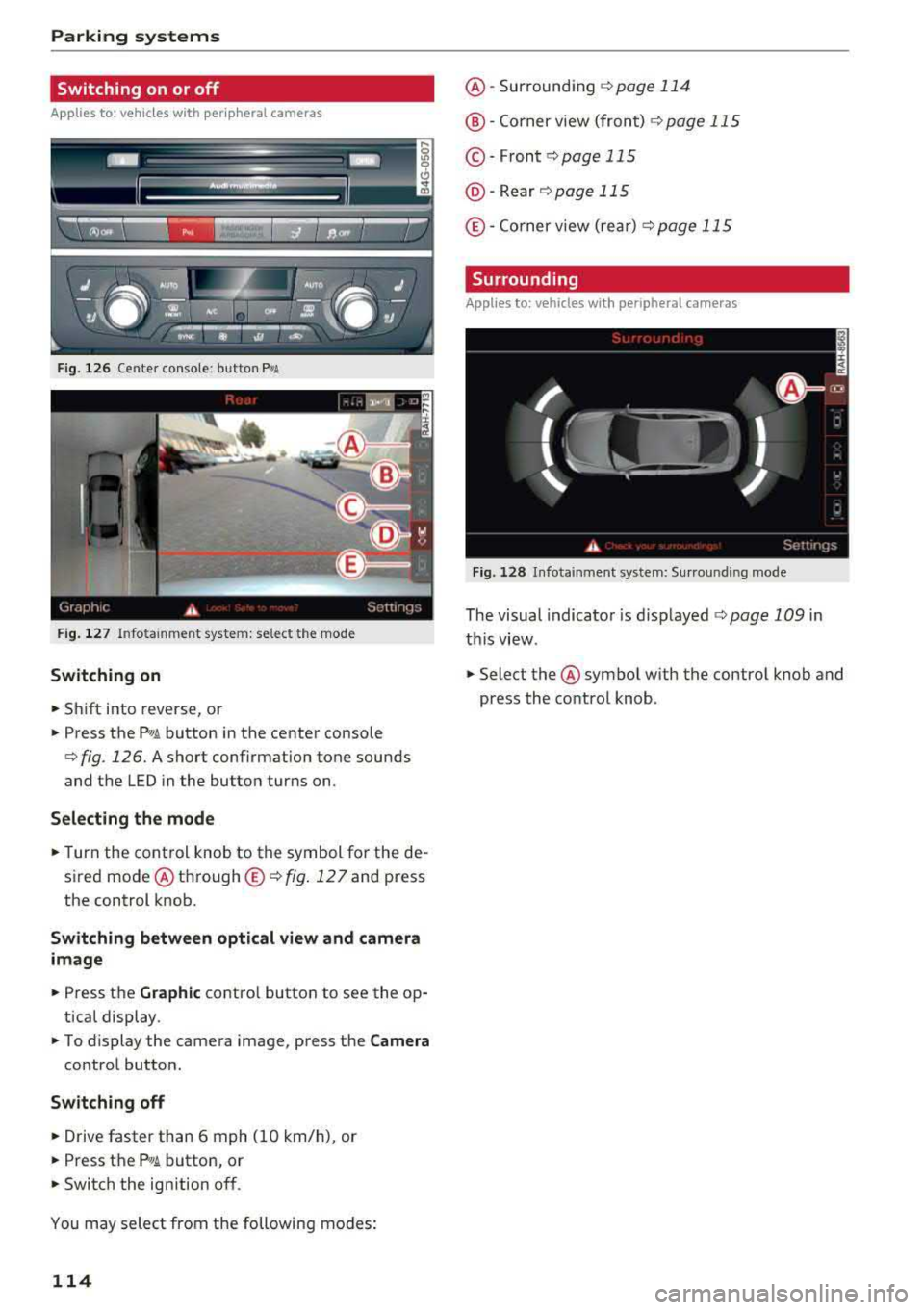
Fig. 126 Center console: button P.A
Fig. 127 Infotainment system: select the mode
Switch ing on
.. Shift into reverse, or
.. Press the Pw .A button in the center console
c> fig. 126. A short confirmation tone sounds
and the LED in the button turns on.
Selecting the mode
.. Turn the cont rol knob to the symbol for the de
sired mode @through @<=>
fig. 127 and press
the control knob.
Switching between optical view and camera
image
.. Press the Graphic contro l button to see the op
tical display .
.. To display the camera image, press the Camera
control button.
Switching off
.. Drive faster than 6 mph (10 km/h), or
.. Press the Pw.6-button, or
.. Switch the ignition off.
You may select from the following modes:
114
@ -Surrounding c>page 114
@ -Corner view (front) c> page 115
© -Front c> page 115
@ -Rear c>page 115
® -Corner view (rear) c> page 115
Surrounding
Applies to: vehicles wi th per ipheral ca meras
Fig. 128 Infotainment system: Surround ing mo de
The visual indicator is displayed <=> page 109 in
th is view .
.. Select the @symbol with the control knob and
press the control knob .
Page 120 of 274
Parking systems
Adjusting the display and the warning tones
Applies to: vehicles with parking system plus/rearview cam
era/peripheral camera
The display and warning tones can be adjusted in
the Infotainment.
~ Se lect: the ICARI function button > (Car)* Sys
tems
cont rol b utton > Driver assistance > Park
ing aid .
Display
On* -
an op tical d isp lay is shown for the parki ng
system plus, a rearview camera image is s hown
for the rea rview camera *.
Off -when the p arking syste m is sw itche d off,
only audib le s ign als a re give n.
Signal tones
Front volume -
volume for the front a rea
Rear volume -volume fo r the rear area
Front frequency -frequency for the front a rea
Rear frequen cy -freq uen cy fo r the rear area
Music volume during nav . prompts -the volume
of the a udio/video so urce is lowe red when t he
pa rking system is tur ned on
The new value is g iven briefly during the adjust
ment.
(D Tips
- The wa rning tones ca n also be ad justed di
r ect ly by the v is u al d isp lay or the picture
from the camera. Sim ply p ress the
Settings
contro l bu tton.
- Changed set tings a re act ivated whe n the
p arking sys tem is swi tched o n aga in.
- The settings for volume a nd frequency are
a utomat ica lly saved and assigned to the re
mote con trol key be ing used .
Error messages
Applies to: vehicles with parking system plus/rearview cam
era/peripheral camera
There is an erro r in the system if the LED in the
Pw Jl. button is b link ing and yo u hear a continuous
118
ala rm for a few seconds after sw itch ing on the
par kin g system or when the pa rking system is al
r eady activated . If the erro r is not cor rected be
fo re yo u switch off the ignition, the LED in the
Pw Jl.
button will blink the next time you switch on the
parki ng system by shifting into reverse.
Parking system plus*
If a sensor is fa ulty, th e~ symbol will appear i n
front of/be hind the veh icle in the Infotainment
display. If a rear sensor is faulty, on ly obstacles
that are in areas @and @ are shown
¢ page 109, fig . 115 . If a front sensor is faulty,
o nly obs tacles tha t are in a reas © and @are
shown . T he re i s also a system ma lf u nction if all
segme nts aroun d the vehicle are red or if no seg
men ts a re disp laye d.
Peripheral cameras*
There is a system malfunction if the -(l!:) , symbol
appears and the co rresponding disp lay area is
s h own in bl ue. The c amera is no t wo rking in this
a re a .
Drive to an authorized A udi dealer or authorized
Audi Se rvice Fac il ity i mme diate ly to have the
malfunction cor rec ted .
Trailer hitch
Applies to: vehicles with parking system plus/rearview cam
era/peripheral cameras and trailer hitch
When the trailer soc ket is i n use, the pa rking sys
tem rear sensors are not act ivated when you sh ift
i nto reverse gear or when yo u press the
P •11A b ut
ton. This res ults in the following restrict io ns.
Parking system plus*
There is no distance warning for the rear. The
front senso rs rema in activated. T he visua l display
switches to trailer mode.
Rearview camera* /peripheral cameras*
The re is no distance warning for the rear . The
front senso rs remain activated . The visua l display
switches to trailer mode. The rearview came ra
i mage w ill not show the orie ntation lines and the
bl ue sur faces.
..,
Page 150 of 274
Airbag syste m
about children and Advanced Airbags
¢page 170 .
Even tho ugh yo ur vehicle is equ ipped with an Ad
vanced Ai rbag System, make certain that all chi l
dren, especially those 12 years and younger, al
ways ride in the back seat properly restrained for
their age and size. The airbag on the passenger
side makes the front seat a potentially dangerous
place for a child to ride. The front seat is not the
safest place for a child in a forward-facing child
seat . It ca n be a very dangerous place for an in
fant or a c hild in a rea rwa rd-fac ing seat.
The Advanced Airbag System in your veh icle has
been cert ified to comply with the requ irements
of United States Federal Moto r Vehicle Safety
Standard ( FMVSS) 208, as well as Canada Motor
Ve hicle Safety Standa rd (CMVSS) 208 as applica
b le at the time your veh icle was ma nufactu red.
Acco rding to requi rements, the front Advanced
Airbag System on the passenger side has been
certifi ed for "suppression" for infants of about
12 month old and younger and for "low risk de
p loyment" for children aged 3 to 6 years o ld (as
defined in the standard) .
Th e
PASSENGER AIR BAG O FF light in the instru
ment panel tells you when the front Advanced
Airbag on the passenger side has been turned off by the electronic control un it .
Each time yo u switch on the ignition, the
PAS·
S ENGER AIR BAG OFF
light will come on for a
few seconds and:
- will stay on if the front passenger seat is not
occupied,
- will stay on if the electrical capacitance meas
u red by the capacitive passenger detection sys
tem for the front passenger seat equals the combined capacitance of an infant up to about
one year of age and one of the rearward-facing
or forward-facing child restraints listed in Fed
eral Motor Vehicle Safety Standard (FMVSS)
208 with wh ich the Advanced Airbag System in
yo ur vehicle was ce rt ified. For a listing of the
c hi ld rest raints t hat we re used to ce rtify yo ur
vehicle 's compliance with the Safety Standard
¢ page 172 .
148
-w ill stay on if there is a sma ll child o r chil d re
straint on the front passenger seat,
- w ill go off if the front passenger seat is occu
pied by an adu lt as registered by the capacitive
passenger detection system ¢
page 158, Mon
itoring the Advanced Airbag System.
The PASSENGER AIR BAG OFF lig ht comes on
when e lectrica l capacitance registered on the
front passenger seat is equal to or less t han the
combined capacitance of a typical
1 year-old in
fant and one of the rearward-facing or forward
facing child restrai nts listed in Federa l Motor Ve
hicle Safety Standard (FMVSS) 208 with which
the Advanced A irbag System in yo ur vehicle was
ce rt ified.
If the to tal e lectr ica l capacitance registered o n
the front passenger seat is more than that of a
typ ical 1 yea r-old ch ild but less than the weight
of a sma ll adult, the front airbag on the passen
ger side can deploy (the
PASSENGER AIR BAG
OFF
light does no t come on).
If the
PASSENGER AIR BAG OFF light does not
come on, the front airbag on the passenger s ide
has not been turned off by the electroni c con trol
u nit a nd can dep loy if the con trol unit senses an
i mpact t hat meets the cond itions stored in its
memory.
For exampl e, the airbag ma y deplo y if:
- a small ch ild that is heav ier than a typ ical 1
year-old child is on the front passenger seat (regard less of whethe r the child is in one of t he
child seats listed
¢ page 172), or
- a child who has outgrown c hild rest raints is on
the front passenge r seat.
If the front passenger a irbag is turned off, the
PASSENGER AIR BAG OFF light comes on in the
i nst rument cluster and stays on .
If the front passenger a irbag deploys, the Feder
al Standard requires the airbag to meet the "low
risk" deployment cr iteria to reduce the r isk of in
j u ry th rough interact ion w ith the airbag .
"Low
risk " dep loyment oc curs in t hose crashes tha t
t a ke place at lowe r decele ra tions as defined in
t h e e lec tronic co ntro l unit
¢ page 158 , PASSEN-
GER AIR BAG OFF light.
..,_