water AUDI A7 2020 User Guide
[x] Cancel search | Manufacturer: AUDI, Model Year: 2020, Model line: A7, Model: AUDI A7 2020Pages: 310, PDF Size: 81.29 MB
Page 241 of 310
4K8012721BC
Checking and Filling
Charging the 12 Volt vehicle battery
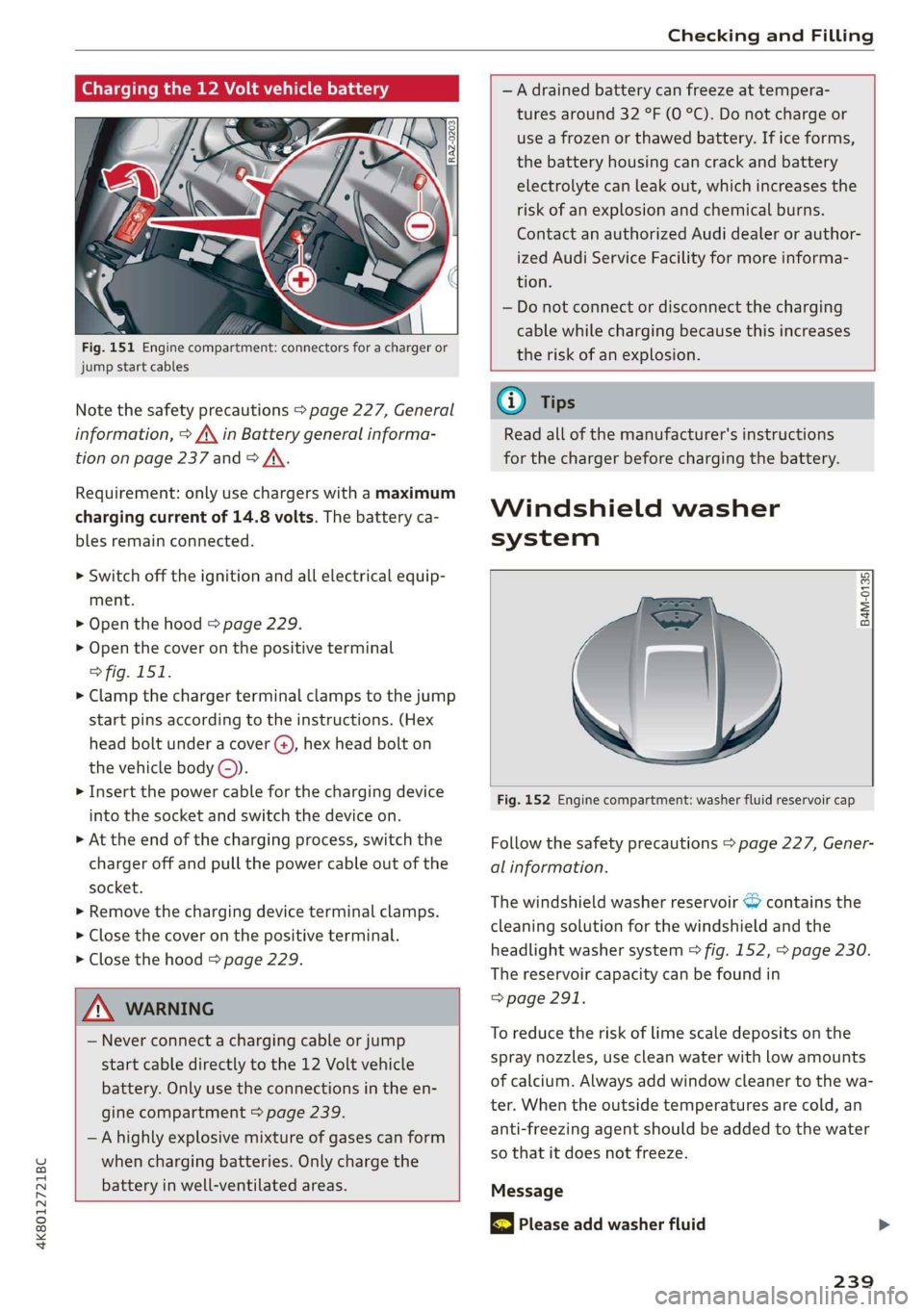
Fig. 151 Engine compartment: connectors for a charger or
jump start cables
Note the safety precautions > page 227, General
information, > A\ in Battery general informa-
tion on page 237 and > /\.
Requirement: only use chargers with a maximum
charging current of 14.8 volts. The battery ca-
bles remain connected.
> Switch off the ignition and all electrical equip-
ment.
> Open the hood > page 229.
> Open the cover on the positive terminal
> fig. 151.
> Clamp the charger terminal clamps to the jump
start pins according to the instructions. (Hex
head bolt under a cover ©, hex head bolt on
the vehicle body ©).
> Insert the power cable for the charging device
into the socket and switch the device on.
> At the end of the charging process, switch the
charger off and pull the power cable out of the
socket.
> Remove the charging device terminal clamps.
> Close the cover on the positive terminal.
> Close the hood > page 229.
Z\ WARNING
— Never connect a charging cable or jump
start cable directly to the 12 Volt vehicle
battery. Only use the connections in the en-
gine compartment > page 239.
— Ahighly explosive mixture of gases can form
when charging batteries. Only charge the
battery in well-ventilated areas.
—A drained battery can freeze at tempera-
tures around 32 °F (0 °C). Do not charge or
use a frozen or thawed battery. If ice forms,
the battery housing can crack and battery
electrolyte can leak out, which increases the
risk of an explosion and chemical burns.
Contact an authorized Audi dealer or author-
ized Audi Service Facility for more informa-
tion.
— Do not connect or disconnect the charging
cable while charging because this increases
the risk of an explosion.
G) Tips
Read all of the manufacturer's instructions
for the charger before charging the battery.
Windshield washer
system
B4M-0135)
Fig. 152 Engine compartment: washer fluid reservoir cap
Follow the safety precautions > page 227, Gener-
al information.
The windshield washer reservoir © contains the
cleaning solution for the windshield and the
headlight washer system > fig. 152, > page 230.
The reservoir capacity can be found in
=> page 291.
To reduce the risk of lime scale deposits on the
spray nozzles, use clean water with low amounts
of calcium. Always add window cleaner to the wa-
ter. When the outside temperatures are cold, an
anti-freezing agent should be added to the water
so that it does not freeze.
Message
& Please add washer fluid
239
Page 263 of 310

4K8012721BC
Care and cleaning
Care and cleaning
General information
Regular, proper care helps to maintain your vehi-
cle's value. It can also be a requirement when
submitting warranty claims for corrosion damage
and paint defects on the body.
The required cleaning and care products can be
obtained from an authorized Audi dealer or au-
thorized Service Facility. Read and follow the in-
structions for use on the packaging.
ZA WARNING
— Using cleaning and care products incorrectly
can be dangerous to your health.
— Always store cleaning and care products out
of reach of children to reduce the risk of poi-
soning.
@ For the sake of the environment
— Purchase environmentally-friendly cleaning
products if possible.
— Do not dispose of cleaning and care prod-
ucts with household trash.
Car washes
The longer that deposits such as insects, bird
droppings, tree sap or road salt remain on the ve-
hicle, the more the surface can be damaged. High
temperatures such as those caused by sunlight
increase the damaging effect.
Before washing, rinse off heavy deposits with
plenty of water.
Stubborn deposits such as bird droppings or tree
sap are best removed with plenty of water anda
microfiber cloth.
Also, wash the underside of your vehicle once
road salt stops being used for the season.
Pressure washers
When washing your vehicle with a pressure wash-
er, always follow the operating instructions pro-
vided with the pressure washer. This is especially
important in regard to the pressure and spraying
distance. Do not aim the spray directly at the
seals on the side windows, doors, hood, luggage
compartment lid, or sunroof*, or at tires, rubber
hoses, insulating material, sensors*, camera
lenses*, or the laser scanner*. Keep a distance of
at least 16 in (40 cm).
Do not remove snow and ice with a pressure
washer.
Never use cone nozzles or high pressure nozzles.
The water temperature must not be above 140 °F
(60 °C).
Automatic car wash
Spray off the vehicle before washing.
Make sure that the windows and roof* are closed
and the windshield wipers are off. Follow instruc-
tions from the car wash operator, especially if
there are accessories attached to your vehicle.
If possible, use car washes that do not have
brushes.
Washing by hand
Clean the vehicle starting from the top and work-
ing downward using a soft sponge or cleaning
brush. Use solvent-free cleaning products.
Washing vehicles with matte finish paint by
hand
To reduce the risk of damaging the paint when
washing, first remove dust and large particles
from your vehicle. Insects, grease spots, and fin-
gerprints are best removed with a special cleaner
for matte finish paint.
Apply the product using a microfiber cloth. To re-
duce the risk of damaging the paint surface, do
not use too much pressure.
Rinse the vehicle thoroughly with water. Then
clean using a neutral shampoo and a soft micro-
fiber cloth.
Rinse the vehicle thoroughly again and let it air
dry. Remove any water residue using a chamois.
261
>
Page 264 of 310

Care and cleaning
height and width of the inside of the car
wash.
—To reduce the risk of paint damage, do not
wash the vehicle in direct sunlight.
—To reduce the risk of damage, do not wash
decorative decals* with a pressure washer.
—To reduce the risk of damage to the surface,
do not use insect removing sponges, kitchen
sponges, or similar items.
— When washing matte finish painted vehicle
components:
ZA WARNING
—To reduce the risk of accidents, only wash
the vehicle when the ignition is off and fol-
low the instructions from the car wash
operator.
—To reduce the risk of cuts, protect yourself
from sharp metal components when wash-
ing the underbody or the inside of the wheel
housings.
— After washing the vehicle, the braking effect
may be delayed due to moisture on the
brake rotors or ice in the winter. This in-
creases the risk of an accident. The brakes
must be dried with a few careful brake appli-
— To reduce the risk of damage to the sur-
face, do not use polishing agents or hard
wax.
— Never use protective wax. It can destroy
ao the matte finish effect.
@) Note — Do not place any stickers or magnetic
signs on vehicle components painted with
— If you wash the vehicle in an automatic car matte finish paint. The paint could be
wash, you must retract the rear spoiler if damaged when the stickers or magnets
necessary, and fold the exterior mirrors in to
reduce the risk of damage. Power folding
exterior mirrors* must only be folded in and @) For the sake of the environment
out using the power folding function.
—To reduce the risk of damage to the rims
and tires, compare the width between the
wheels on your vehicle with the distance be-
tween the guide rails in the car wash.
—To reduce the risk of damage, compare the
height and width of your vehicle with the
are removed.
Only wash the vehicle in facilities specially de-
signed for that purpose. This will reduce the
risk of dirty water contaminated with oil from
entering the sewer system.
Cleaning and care information
When cleaning and caring for individual vehicle are not listed, consult an authorized Audi dealer
components, refer to the following tables. The or authorized Audi Service Facility. Also follow
information contained there is simply recommen- __ the information found in > A.
dations. For questions or for components that
Exterior cleaning
Component Situation Solution
Windshield wiper | Deposits Soft cloth with glass cleaner > page 57
blades
Headlights/ Deposits Soft sponge with a mild soap solution®
Tail lights
Sensors/ Deposits Sensors: soft cloth with a solvent-free cleaning solution
camera lenses Camera lenses: soft cloth with an alcohol-free cleaning sol-
ution
Snow/ice Hand brush/solvent-free de-icing spray >
262
Page 265 of 310
4K8012721BC
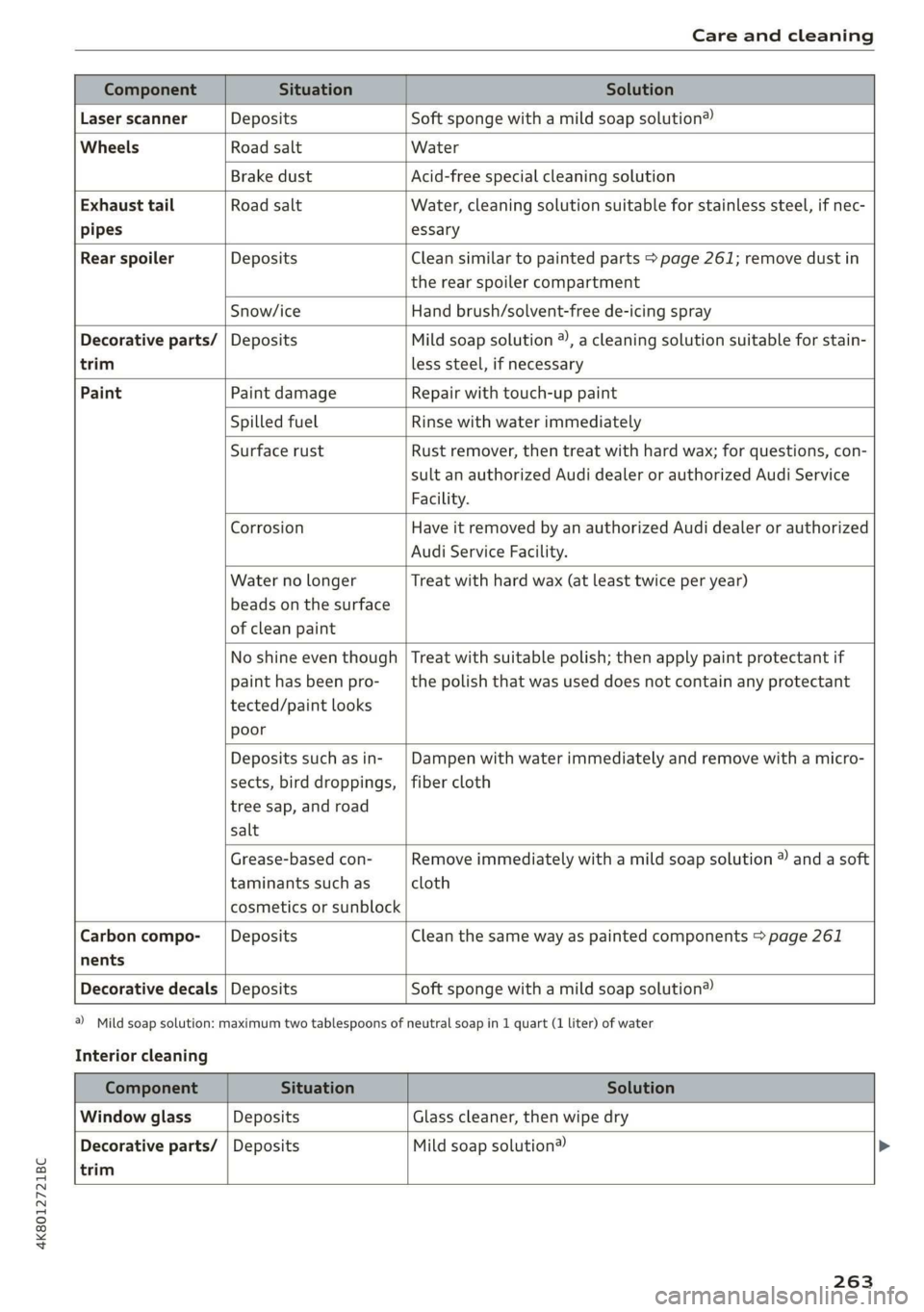
Care and cleaning
trim
Component Situation Solution
Laser scanner Deposits Soft sponge with a mild soap solution®
Wheels Road salt Water
Brake dust Acid-free special cleaning solution
Exhaust tail Road salt Water, cleaning solution suitable for stainless steel, if nec-
pipes essary
Rear spoiler Deposits Clean similar to painted parts > page 261; remove dust in
the rear spoiler compartment
Snow/ice Hand brush/solvent-free de-icing spray
Decorative parts/ | Deposits Mild soap solution ®, a cleaning solution suitable for stain-
less steel, if necessary
Paint Paint damage Repair with touch-up paint
Spilled fuel Rinse with water immediately
Surface rust Rust remover, then treat with hard wax; for questions, con-
sult an authorized Audi dealer or authorized Audi Service
Facility.
Corrosion Have it removed by an authorized Audi dealer or authorized
Audi Service Facility.
Water no longer
beads on the surface
of clean paint
Treat with hard wax (at least twice per year)
No shine even though
paint has been pro-
tected/paint looks
poor
Treat with suitable polish; then apply paint protectant if
the polish that was used does not contain any protectant
Deposits such as in-
sects, bird droppings,
tree sap, and road
salt
Dampen with water immediately and remove with a micro-
fiber cloth
Grease-based con-
taminants such as
cosmetics or sunblock
Remove immediately with a mild soap solution ®) and a soft
cloth
Carbon compo-___| Deposits Clean the same way as painted components > page 261
nents
Decorative decals | Deposits Soft sponge with a mild soap solution®
Interior cleaning
a) Mild soap solution: maximum two tablespoons of neutral soap in 1 quart (1 liter) of water
trim
Component Situation Solution
Window glass Deposits Glass cleaner, then wipe dry
Decorative parts/ | Deposits Mild soap solution®
263
Page 266 of 310

Care and cleaning
Component Situation Solution
Plastic parts Deposits Damp cloth
Heavier deposits Mild soap solution ®), detergent-free plastic cleaning solu-
tion, if necessary
Water-based deposits
such as coffee, tea,
blood, etc.
Displays/instru- | Deposits Soft cloth with LCD cleaner; dust in the lower area of the
ment cluster instrument cluster can be removed using a soft brush.
Controls Deposits Soft brush, then a soft cloth with a mild soap solution®)
Safety belts Deposits Mild soap solution ®), allow to dry before letting them re-
tract
Textiles, Deposits adhering to | Vacuum cleaner
artificial leather, |the surface
Alcantara Absorbent cloth and mild soap solution®
Oil-based deposits
such as oil, make-up,
etc.
Apply a mild soap solution ®), blot away the dissolved oil or
dye, treat afterward with water, if necessary
Specific types of de-
posits such as ink,
nail polish, latex
paint, shoe polish,
etc.
Special stain remover, blot with absorbent material, treat
afterward with mild soap solution, if necessary®)
Natural leather Fresh stains Cotton cloth with a mild soap solution®
Water-based deposits
such as coffee, tea,
blood, etc.
Fresh stains: absorbent cloth
Dried stains: stain remover suitable for leather
Oil-based deposits
such as oil, make-up,
etc.
Fresh stains: absorbent cloth and stain remover suitable
for leather
Dried stains: oil cleaning spray
Specific types of de-
posits such as ink,
nail polish, latex
paint, shoe polish,
etc.
Spot remover suitable for leather
nents
Care Regularly apply conditioning cream that protects from
light and penetrates into the material. Use special colored
conditioning cream, if necessary.
Carbon compo- Deposits Clean the same way as plastic components
a) Mild soap solution: maximum two tablespoons of neutral soap in 1 quart (1 liter) of water
ZA WARNING
The windshield must not be treated with wa-
ter-repelling windshield coating agents. Un-
der
unfavorable conditions, such as wetness,
darkness, and when the sun is low, these coat-
ings can cause increased glare, which increas-
es the risk of an accident. They can also cause
wiper blade chatter.
264
Page 267 of 310

4K8012721BC
Care and cleaning
@) Note
— Headlights and tail lights
— Never clean headlights or tail lights with a
dry cloth or sponge.
— Do not use any cleaning products that con-
tain alcohol, because they could cause
cracks to form.
— Wheels
— Never use any paint polish or other abra-
sive materials.
— Damage to the protective layer on the
rims, such as stone chips or scratches,
must be repaired immediately.
— Camera lenses
— Never use warm or hot water to remove
snow or ice from the camera lens. This
could cause the lens to crack.
— Never use abrasive cleaning materials or
alcohol to clean the camera lens. This
could cause scratches and cracks.
— Laser scanner
— Never use abrasive cleaning materials to
clean the laser scanner. This could cause
scratches and cracks.
— Door windows
— Remove snow and ice on windows and ex-
terior mirrors with a plastic scraper. To re-
duce the risk of scratches, move the scra-
per only in one direction and not back and
forth.
— Never remove snow or ice from door win-
dows and mirrors using warm or hot water
because this could cause cracks to form.
—To reduce the risk of damage to the rear
window defogger, do not apply any stick-
ers on the heating wires on the inside of
the window.
— Decorative parts and trim
— Never use chrome care or cleaning prod-
ucts.
— Paint
—To reduce the risk of scratches, the vehicle
must be free of dirt and dust before pol-
ishing or waxing.
—To prevent paint damage, do not polish or
wax the vehicle in direct sunlight.
— To reduce the risk of paint damage, do not
polish away rust spots.
— Remove cosmetics and sunscreen immedi-
ately because they could damage the
paint.
— Decorative decals
—To reduce the risk of damage, do not use
any rough powder or abrasive cleaning
products.
—To reduce the risk of damage, do not pol-
ish decorative decals that have a matte or
printed finish.
— Due to the risk of damage, do not use an
ice scraper to remove snow and ice on win-
dows with decorative decals on them.
— Displays and instrument cluster
— Make sure that the display and instrument
cluster are switched off and have cooled
down before cleaning. To switch off the
upper and lower display, select on the
MMI home screen: SETTINGS > Display &
brightness > MMI > Screen cleaning.
— Displays, the instrument cluster, and the
trim surrounding it must not be cleaned
with dry cleaning methods because they
could become scratched.
— Make sure no fluids enter the spaces be-
tween the instrument cluster and the
trim, because that could cause damage.
— Controls
— Make sure that no fluids enter the con-
trols, because this could cause damage.
— Safety belts
— Do not remove the safety belts to clean
them.
— Never clean safety belts or their compo-
nents with chemicals or with corrosive flu-
ids or solvents and never allow sharp ob-
jects to come into contact with the safety
belts. This could cause damage to the belt
webbing.
— If there is damage to the webbing, the
connections, the retractors, or the buck-
les, have them replaced by an authorized
Audi dealer or authorized Audi Service Fa-
cility.
— Textiles, artificial leather, and Alcantara
265
>
Page 270 of 310

Emergency assistance
ZA WARNING
— Please note that the tire mobility kit cannot
be used in all situations, and that it may on-
ly be used temporarily.
— The tire sealant must not come in contact
with skin, eyes, or clothing.
— If tire sealant comes into contact with your
eyes or your skin, thoroughly rinse the af-
fected area immediately with clean water.
— Do not inhale the fumes.
— If you swallow any of the tire sealant, thor-
oughly rinse your mouth immediately and
drink a lot of water. Do not induce vomiting.
Seek medical attention immediately.
— Change your clothing immediately if it
comes into contact with tire sealant.
— If an allergic reaction occurs, seek medical
attention immediately.
— Keep the tire sealant away from children.
G) Tips
— If sealant leaks, allow it to dry in place. You
can then peel it off like a sticker.
— Note the expiration date on the sealant bot-
tle. Replace the tire sealant at an authorized
Audi dealer or authorized Audi Service Fa-
cility.
— Radio reception can be interrupted when
operating the compressor.
— Follow the legal regulations that are appli-
cable in the country where you are operating
the vehicle.
D_ The compressor may look different. However, the way it is
operated is generally the same.
268
Repairing tires
Applies to: vehicles with tire mobility kit
RAZ-0054|
Fig. 160 Tire mobility kit connection
Requirement: the tire mobility kit must be laid
out and ready for use > page 267.
Setting up the tire mobility kit
> Open the cover @) on the compressor!)
> fig. 159.
> Remove the connector (@) and pressure hose (5)
from the housing.
> Connect the compressor pressure hose (5) to
the flange © on the tire sealant bottle @.
> Insert the sealant bottle with the flange at the
bottom into the opening @) on the compressor
cover or the top side of the compressor hous-
ing.
> Remove the valve cap from the faulty tire.
> Install the filler hose (@) on the valve (7)
> fig. 160.
> Connect the plug @ > fig. 159 to an outlet in
the vehicle.
> Switch the ignition on.
Page 298 of 310
Index
DriversySteim 5 cscs «x sevens © 5 eswanes 6 ¥ wumees 97,99
Audi drive select.............0 eee eee 104
Driving down hills.............2--0000- 102
DrivingprogKraims. » « swewcs + + snes oo mtmsen @ 93,139.
Driving through water................0. 103
DriVING TIMes + 3 secur so ceswen + wees s aaaeER a oo 16
Driving tips
Driving through water................. 103
Efficient driving. ..........00..ee eee eee 97
Uphill and downhill................... 102
Driving up hills: =z sees ¢ 2 sees ae ewan es es 102
Dust filter
refer to Pollutant filter..............0.. 88
DVD drive (media drives)................ 206
Dynamic all-wheel steering.............. 106
E
E-mail
Message options «. 2 6 cs. s seven se ees e 170
SettingS 0... . 0... c eee eee eee eee 170
EDL
refer to Electronic Differential Lock...... 108
EDR
Event Data Recorder wi .2 os ecce se eecee es 282
Efficiency assist... 0... eee eee 128
Electrical system. .........-.0 0 eee ee eee 236
Electromechanical parking brake......... 101
Electronic Differential Lock.............. 109
Electronicimmobilizetiiec:. . 2 sive «6 cess «2 one 37
Electronic Stabilization Control........... 108
Embedded SIM Gard « savers « « sways x 2 cawa 9 oa 175
EM@rgency assist sans « x asas 5 aaven ss news s L51,
Emergency assistance..............+-0. 267
Emergency braking function............. 102
Emergency call............200005. 167, 180
Emergency flashers..............--0000- 52
Emergency fueling.............--..000- 226
Emergency: Mode viic = + saree 2 waren oo tere 2 96
Emergency operation
Doors... 2... ee eee 35)
Fueltilledoor's « + saws & 3 naan & s aes a § me 226
Luggage compartment lid............... 41
Panoramic glass roof.............000005 44
Emissions control system.............. 227
Energy COMSUMERS! 5 sia oo wend 6 saan ao ave 17
296
Energy Managements os sce 6 eevee wo wise so 97
Engine
Breakingin.......... 0... cee eee eee eee 97
GCOOlSNE + acas 3 < seam Blais 2 a eae,8 © Game 234
Emergency Sto piss: os sess oo scons 2 susan @ 2 one 90
Jump starting ........ cece eee eee 273
Start/Stop system.............-00 ee eee 98
Starting/Stopping)=. +s mces ss sees s eres s 90
Engine compartment
Opening and closing the hood.......... 229
Overview... 22.2... eee eee eee 230
Safety precautions.............eee sees 227
Engine oil
ACAING « scr © 2 seems 2 o ewe a 2 even & eee 230
CHANGING ns + vsnnas ov ensues « & enetane ww venues © 233
Checking oillevel.............2--000-- 230
CONSUMPTION is x sas oe caw oo wees oo we 230
Indicator light...........-...2.0000 02 231
Replacement interval..............00. 240
Temperature display................0-5 16
Engine sound
Audi drivesselectis « wcsne ss seinen a esawew ¥ ive 104
Enginesstartisystem ecco s aco 6 2 eases 6 & weve 91
Engine stop
refer to Start/Stop system.............. 98
Entry/exitilightingjen: « «cence m 2 owas a a amnion a 51
Enithy aSSistance:: + 2 sowie so sew 6 © eee oo coe 61
also refer to Exit assistance............. 61
Environment
Unleaded gasoline................2.0. 223
eSIM
refer to Embedded SIM card............ 175
Event Data Recorder (EDR).............. 282
Exit assistance... 0.6... eee eee 61
Exit warning ................00 000 eee 149
Exterior lighting.................02.-005 48
EXteriOn MIPKONS scisane os serene oo vemos wanes 4 @ 53
Folding settings...............-.000005 33
External voice operation................. 28
F
Factory default settings
Multi Media Interface................. 220
Fast forwarding and rewinding (media file). 209
Fast forwarding (media files)............ 209
FaStrOute’s « cocces 2s swan 2 0 aren © 9 sane © rans 183