HEAD LIGHTS AUDI A7 2020 Owner's Manual
[x] Cancel search | Manufacturer: AUDI, Model Year: 2020, Model line: A7, Model: AUDI A7 2020Pages: 310, PDF Size: 81.29 MB
Page 129 of 310
4K8012721BC
Driver assistance
Driver assistance
Cruise control system
Applies to: vehicles with cruise control system
The cruise control system assists the driver in
maintaining a constant speed above approxi-
mately 15 mph (20 km/h). The system maintains
the desired speed by braking and accelerating.
ZA\ WARNING
— Always pay attention to the traffic around
your vehicle when the cruise control system
is in operation. As the driver, you are always
responsible for controlling your vehicle
speed and the distance between your vehicle
and
other vehicles.
— For safety reasons, cruise control should not
be used in the city, in stop-and-go traffic, on
winding roads, and when road conditions are
poor (such as ice, fog, gravel, heavy rain,
and conditions that could lead to hydroplan-
ing), because this increases the risk of an ac-
cident.
— Switch the cruise control off temporarily
when driving in turning lanes, highway exits,
or in construction zones.
—To reduce the risk of an accident, you should
only resume the stored speed if it is suitable
for the current traffic conditions.
() Note
Before driving downhill a long distance ona
steep hill, decrease your speed and select a
lower gear. This makes use of the engine brak-
ing effect and reduces the load placed on the
brakes.
@) Tips
The brake lights turn on when the brakes are
applied automatically.
Switching the system on
Applies to: vehicles with cruise control system
BFV-0220
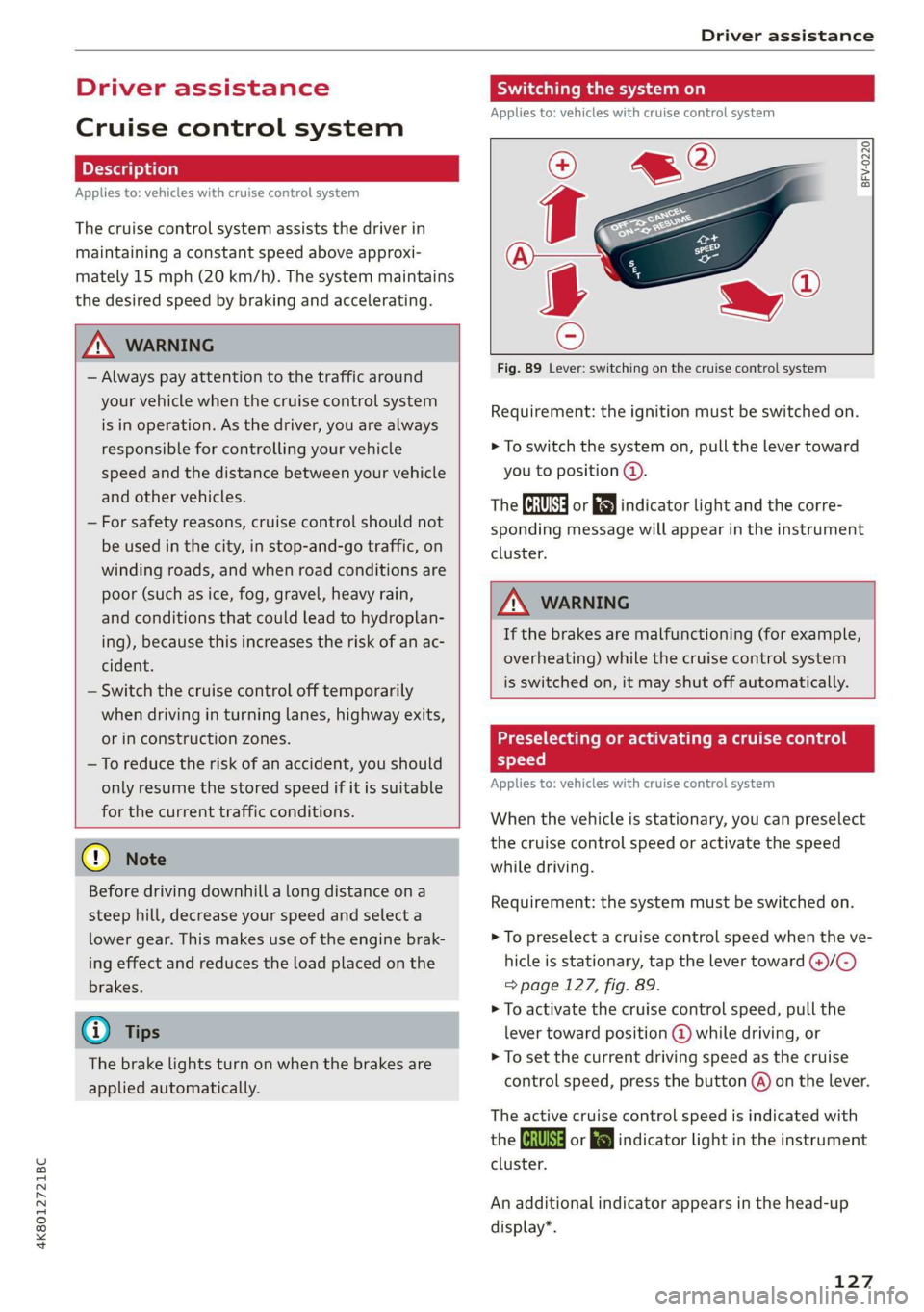
Fig. 89 Lever: switching on the cruise control system
Requirement: the ignition must be switched on.
> To switch the system on, pull the lever toward
you to position @.
The ICRUISE| or i$) indicator light and the corre-
sponding message will appear in the instrument
cluster.
ZA\ WARNING
If the brakes are malfunctioning (for example,
overheating) while the cruise control system
is switched on, it may shut off automatically.
Preselecting or activating a cruise control
speed
Applies to: vehicles with cruise control system
When the vehicle is stationary, you can preselect
the cruise control speed or activate the speed
while driving.
Requirement: the system must be switched on.
> To preselect a cruise control speed when the ve-
hicle is stationary, tap the lever toward @)/C)
=> page 127, fig. 89.
> To activate the cruise control speed, pull the
lever toward position @ while driving, or
> To set the current driving speed as the cruise
control speed, press the button @) on the lever.
The active cruise control speed is indicated with
the Gs or El indicator light in the instrument
cluster.
An additional indicator appears in the head-up
display*.
127
Page 133 of 310
4K8012721BC
Driver assistance
A message that indicates the cause and possible
solution may appear with some displays. The
weather conditions may be too poor or a sensor
may be covered. Clean the area in front of the
sensors > page 117, fig. 83 and try to turn on
the systems again later.
If the malfunction remains, drive to an author-
ized Audi dealer or authorized Audi Service Facili-
ty immediately to have the malfunction correct-
ed.
Z\ WARNING
— Follow the safety precautions and note the
limits of the assist systems, sensors, and
cameras > page 115.
— Pay attention to traffic and the area around
your vehicle when predictive control is
switched on. The driver is always responsible
for assessing the traffic situation.
— The system does not consider “right of way”
rules and does not respond to traffic lights,
so lack of driver attention in these situations
can increase the risk of an accident.
— The speed when driving through curves may
be different from what you as a driver would
do or may not be suitable for the weather
and road conditions. If necessary, apply the
brakes and reduce the selected speed to be
maintained in the Adjustment to curves
along route setting to reduce the risk of an
accident.
@ Tips
— Predictive control can exceed or drop below
the maximum permitted speed. The driver
is responsible for adhering to the permitted
speed limit.
— The traffic signs on the road always take pri-
ority over the display. The driver is always
responsible for adhering to the regulations
applicable in the country where the vehicle
is being operated.
—If a speed limit is detected, the marking @
of the set speed limit will be adjusted even
D_ In certain countries
if the adaptive cruise assist is not actively
regulating.
— Control by the system depends on which
adaptive cruise assist driving program is set
or on the selected Audi drive select* mode.
— After switching on the ignition and first
driving onto a freeway or similar road with-
out a speed limit, the system will regulate
the speed to 80 mph (130 km/h). Then
the system adjusts to the last speed set by
the driver.
— There is no adaptation to speed limits when
driving through highway interchanges and
when driving on or off the expressway.
— The system can fail to provide control or the
control may be faulty if the values from the
camera-based traffic sign recognition* are
incorrect or the navigation system map data
is outdated.
— When route guidance is switched on, the
system adapts to the route provided by the
navigation system. Driving without route
guidance or leaving a route can result in
faulty control.
— Certain settings are stored automatically in
the active personal profile.
Adaptive cruise assist
General information
Applies to: vehicles with adaptive cruise assist
Depending on the vehicle equipment, the adap-
tive cruise assist may consist of the following
functions:
Within the limits of the system, the adaptive
speed
and distance control assists the driver in
controlling the speed and the set distance to the
vehicle driving ahead. If the system detects a ve-
hicle driving ahead, the adaptive cruise assist can
brake and accelerate your vehicle within the lim-
its of the system. On open roads with no traffic, it
functions like a cruise control system. The stored
speed is maintained. When approaching a vehicle
driving ahead, the adaptive cruise assist auto-
matically brakes to match that vehicle's speed
131
>
Page 135 of 310

4K8012721BC
Driver assistance
— The adaptive cruise assist does not respond to
people, animals, or objects that are crossing or
approaching from the opposite direction.
ZA WARNING
Follow the safety precautions and note the
limits of the assist systems, sensors, and
cameras > page 115.
Display overview
Applies to: vehicles with adaptive cruise assist
8} | 9) IN| | G3
Fig. 94 Instrument cluster: driver assistance display
Indicator lights and messages in the speedome-
ter @ -@) inform you about the driving situation
and the settings. In the Driver assistance display
@-©®, you can find more detailed information
about the system. The displays depend on the
country and equipment.
Display in the speedometer
The display in the speedometer is not available in
all layouts*.
@ Marking for the set speed
@ Current vehicle speed
@® Available speed range for adaptive cruise as-
sist (example)
Image in the Driver assistance display
The display only appears when the Driver assis-
tance display is open in the on-board computer
=> page 16.
Messages and settings
Detected vehicle driving ahead
Set target distance
If you fall below the set distance, the dis-
tance bars turn red from the bottom upward.
Your vehicle
©®
CC®
Availability of lane departure warning
= page 141 and lane guidance
© Lane guidance for adaptive cruise assist is ac-
tive © or not active
Indicator lights
A - The speed/distance control is active. No
vehicles were detected ahead. The stored speed
is maintained.
a - The speed/distance control is active. A vehi-
cle was detected ahead. The adaptive cruise as-
sist controls the speed and distance from the ve-
hicle driving ahead, and accelerates and brakes
automatically.
A - The speed/distance control is active but the
vehicle is not ready to drive. A vehicle was de-
tected ahead. Your vehicle is stationary and will
not start driving automatically.
BS - The speed/distance control is active but the
vehicle is not ready to drive. No vehicles were de-
tected ahead. Your vehicle is stationary and will
not start driving automatically.
A - The automatic braking is not enough to
maintain a sufficient distance to a vehicle driving
ahead. You must intervene > page 138, Driver in-
tervention request.
& This indicator light appears if steering activity
is no longer detected. Always keep your hands on
the steering wheel so you can be ready to steer at
any time. The indicator light will also turn off, for
example if the steering power from the system is
not sufficient and adaptive cruise assist is can-
celed > page 136.
133
Page 138 of 310

Driver assistance
— The driver's hands are not on the steering
wheel
Steering intervention request
If no steering activity is detected or the steering
power is not sufficient, the driver steering inter-
vention request will alert the driver using audio
and visual signals. Take over the steering and
keep your hands on the steering wheel so that
you will be ready to steer at any time. The system
will become inactive after a short time and will
only be active again later.
If the driver does not take over steering, adaptive
cruise assist will be canceled. If the vehicle is
equipped with emergency assist and it is ready to
function, it will be activated > page 151.
ZA WARNING
Follow the safety precautions and note the
limits of the assist systems, sensors, and
cameras > page 115.
G@) Tips
— Always keep your hands on the steering
wheel. The driver is always responsible for
adhering to the regulations applicable in
the country where the vehicle is being oper-
ated.
— It is recommended to only switch on lane
guidance on well-constructed roads.
— Certain settings are stored automatically in
the active personal profile.
—The & fig. 97 button switches lane guidance
availability and the lane departure warning
on or off simultaneously, if lane guidance is
preset in the adaptive cruise assist settings.
136
Setting the distance
Applies to: vehicles with adaptive cruise assist
B4M-0234
Fig. 98 Operating lever: setting the distance
If you adjust the speed, you must also change the
time gap to the vehicle driving ahead. The higher
the speed, the greater the distance that is need-
ed.
> Tap the rocker switch to display the distance
that is currently set.
> To increase or decrease the distance in incre-
ments, tap the switch again toward G) or ().
The newly-set distance will be shown briefly, for
example with the indicator light. In the Driv-
er assistance display, a graphic display is shown
instead of the indicator lights > page 133,
fig. 94. The display matches the functions of the
indicator lights.
When approaching a vehicle driving ahead, the
adaptive cruise assist brakes to the set speed and
then maintains the set distance. If the vehicle
driving ahead accelerates, then the adaptive
cruise assist will also accelerate up to the speed
that you have set.
The following distances can be set:
Page 264 of 310

Care and cleaning
height and width of the inside of the car
wash.
—To reduce the risk of paint damage, do not
wash the vehicle in direct sunlight.
—To reduce the risk of damage, do not wash
decorative decals* with a pressure washer.
—To reduce the risk of damage to the surface,
do not use insect removing sponges, kitchen
sponges, or similar items.
— When washing matte finish painted vehicle
components:
ZA WARNING
—To reduce the risk of accidents, only wash
the vehicle when the ignition is off and fol-
low the instructions from the car wash
operator.
—To reduce the risk of cuts, protect yourself
from sharp metal components when wash-
ing the underbody or the inside of the wheel
housings.
— After washing the vehicle, the braking effect
may be delayed due to moisture on the
brake rotors or ice in the winter. This in-
creases the risk of an accident. The brakes
must be dried with a few careful brake appli-
— To reduce the risk of damage to the sur-
face, do not use polishing agents or hard
wax.
— Never use protective wax. It can destroy
ao the matte finish effect.
@) Note — Do not place any stickers or magnetic
signs on vehicle components painted with
— If you wash the vehicle in an automatic car matte finish paint. The paint could be
wash, you must retract the rear spoiler if damaged when the stickers or magnets
necessary, and fold the exterior mirrors in to
reduce the risk of damage. Power folding
exterior mirrors* must only be folded in and @) For the sake of the environment
out using the power folding function.
—To reduce the risk of damage to the rims
and tires, compare the width between the
wheels on your vehicle with the distance be-
tween the guide rails in the car wash.
—To reduce the risk of damage, compare the
height and width of your vehicle with the
are removed.
Only wash the vehicle in facilities specially de-
signed for that purpose. This will reduce the
risk of dirty water contaminated with oil from
entering the sewer system.
Cleaning and care information
When cleaning and caring for individual vehicle are not listed, consult an authorized Audi dealer
components, refer to the following tables. The or authorized Audi Service Facility. Also follow
information contained there is simply recommen- __ the information found in > A.
dations. For questions or for components that
Exterior cleaning
Component Situation Solution
Windshield wiper | Deposits Soft cloth with glass cleaner > page 57
blades
Headlights/ Deposits Soft sponge with a mild soap solution®
Tail lights
Sensors/ Deposits Sensors: soft cloth with a solvent-free cleaning solution
camera lenses Camera lenses: soft cloth with an alcohol-free cleaning sol-
ution
Snow/ice Hand brush/solvent-free de-icing spray >
262
Page 267 of 310

4K8012721BC
Care and cleaning
@) Note
— Headlights and tail lights
— Never clean headlights or tail lights with a
dry cloth or sponge.
— Do not use any cleaning products that con-
tain alcohol, because they could cause
cracks to form.
— Wheels
— Never use any paint polish or other abra-
sive materials.
— Damage to the protective layer on the
rims, such as stone chips or scratches,
must be repaired immediately.
— Camera lenses
— Never use warm or hot water to remove
snow or ice from the camera lens. This
could cause the lens to crack.
— Never use abrasive cleaning materials or
alcohol to clean the camera lens. This
could cause scratches and cracks.
— Laser scanner
— Never use abrasive cleaning materials to
clean the laser scanner. This could cause
scratches and cracks.
— Door windows
— Remove snow and ice on windows and ex-
terior mirrors with a plastic scraper. To re-
duce the risk of scratches, move the scra-
per only in one direction and not back and
forth.
— Never remove snow or ice from door win-
dows and mirrors using warm or hot water
because this could cause cracks to form.
—To reduce the risk of damage to the rear
window defogger, do not apply any stick-
ers on the heating wires on the inside of
the window.
— Decorative parts and trim
— Never use chrome care or cleaning prod-
ucts.
— Paint
—To reduce the risk of scratches, the vehicle
must be free of dirt and dust before pol-
ishing or waxing.
—To prevent paint damage, do not polish or
wax the vehicle in direct sunlight.
— To reduce the risk of paint damage, do not
polish away rust spots.
— Remove cosmetics and sunscreen immedi-
ately because they could damage the
paint.
— Decorative decals
—To reduce the risk of damage, do not use
any rough powder or abrasive cleaning
products.
—To reduce the risk of damage, do not pol-
ish decorative decals that have a matte or
printed finish.
— Due to the risk of damage, do not use an
ice scraper to remove snow and ice on win-
dows with decorative decals on them.
— Displays and instrument cluster
— Make sure that the display and instrument
cluster are switched off and have cooled
down before cleaning. To switch off the
upper and lower display, select on the
MMI home screen: SETTINGS > Display &
brightness > MMI > Screen cleaning.
— Displays, the instrument cluster, and the
trim surrounding it must not be cleaned
with dry cleaning methods because they
could become scratched.
— Make sure no fluids enter the spaces be-
tween the instrument cluster and the
trim, because that could cause damage.
— Controls
— Make sure that no fluids enter the con-
trols, because this could cause damage.
— Safety belts
— Do not remove the safety belts to clean
them.
— Never clean safety belts or their compo-
nents with chemicals or with corrosive flu-
ids or solvents and never allow sharp ob-
jects to come into contact with the safety
belts. This could cause damage to the belt
webbing.
— If there is damage to the webbing, the
connections, the retractors, or the buck-
les, have them replaced by an authorized
Audi dealer or authorized Audi Service Fa-
cility.
— Textiles, artificial leather, and Alcantara
265
>
Page 276 of 310
Emergency assistance
— Read the warnings when working in the en-
gine compartment > page 227.
— Handling the jump start cables incorrectly
may cause the vehicle battery to explode
and lead to serious injuries.
C) Note
Jump start cables can cause considerable
damage to the vehicle electrical system if
they are connected incorrectly.
G) Tips
— There must be no contact between the
vehicles, or else voltage could flow when
connecting the positive terminal and drain
the vehicle battery of the vehicle providing
the jump start.
— The drained vehicle battery must be con-
nected correctly to the electrical system.
— Switch off electrical equipment that is not
needed.
aT telat tle)
Both jump start cables must be connected in the
correct order.
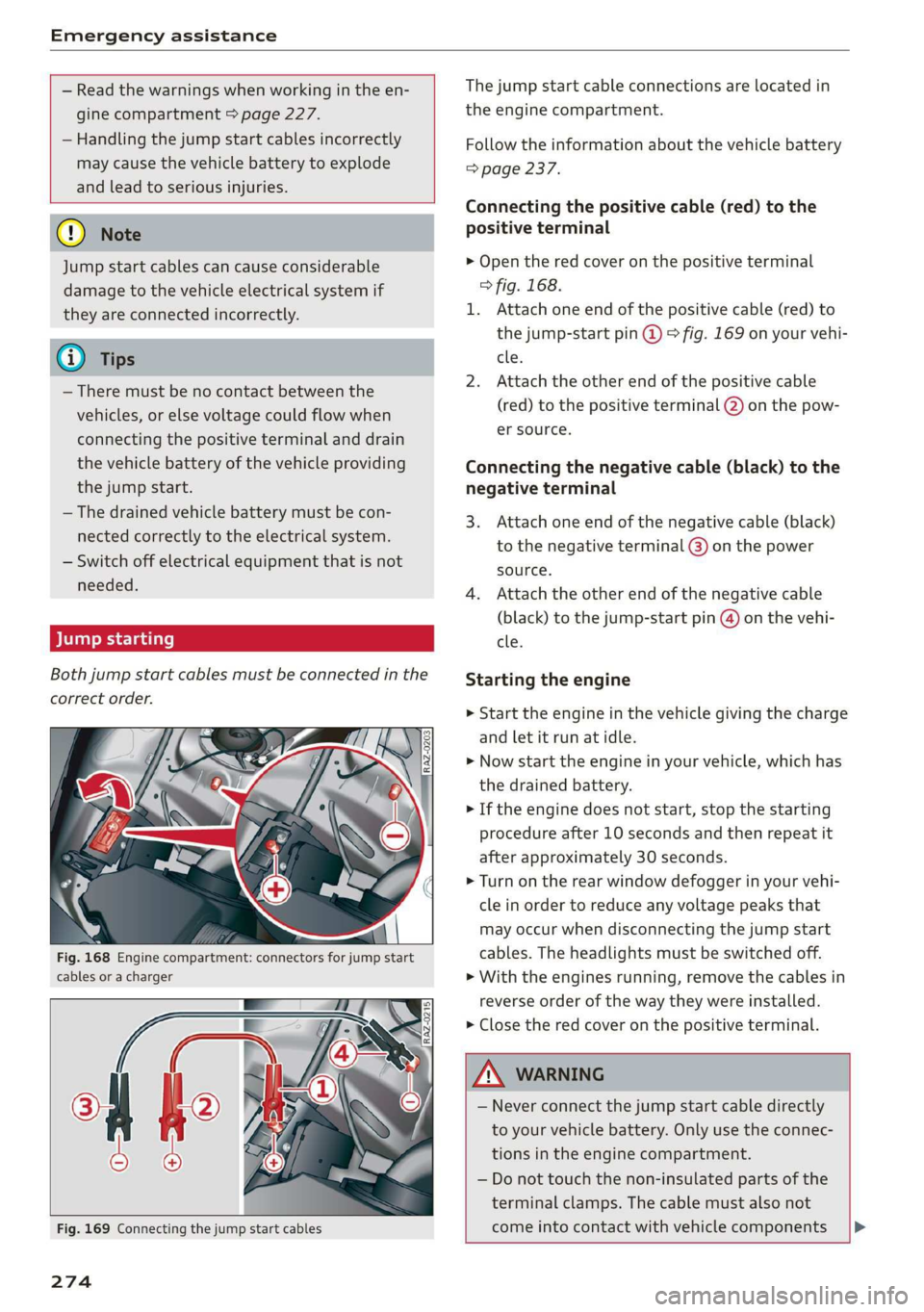
Fig. 168 Engine compartment: connectors for jump start
cables or a charger
The jump start cable connections are located in
the engine compartment.
Follow the information about the vehicle battery
=> page 237.
Connecting the positive cable (red) to the
positive terminal
> Open the red cover on the positive terminal
> fig. 168.
1. Attach one end of the positive cable (red) to
the jump-start pin @ © fig. 169 on your vehi-
cle.
2. Attach the other end of the positive cable
(red) to the positive terminal @) on the pow-
er source.
Connecting the negative cable (black) to the
negative terminal
3. Attach one end of the negative cable (black)
to the negative terminal @) on the power
source.
4. Attach the other end of the negative cable
(black) to the jump-start pin @) on the vehi-
cle.
Starting the engine
> Start the engine in the vehicle giving the charge
and let it run at idle.
> Now start the engine in your vehicle, which has
the drained battery.
> If the engine does not start, stop the starting
procedure after 10 seconds and then repeat it
after approximately 30 seconds.
> Turn on the rear window defogger in your vehi-
cle in order to reduce any voltage peaks that
may occur when disconnecting the jump start
cables. The headlights must be switched off.
> With the engines running, remove the cables in
reverse order of the way they were installed.
> Close the red cover on the positive terminal.
Fig. 169 Connecting the jump start cables
274
Z\ WARNING
— Never connect the jump start cable directly
to your vehicle battery. Only use the connec-
tions in the engine compartment.
— Do not touch the non-insulated parts of the
terminal clamps. The cable must also not
come into contact with vehicle components |»
Page 282 of 310
Fuses and bulbs
Fuse panel () (black) Fuse panel © (red)
S_ | Brake light sensor 10 | Dynamic steering
6 |Engine components 11 | Engine start
7 | Engine components Fase Parevauacn
8 | Engine components Na: Equipment
3_|Engine components 1 |Front seat heating
10 | Oil pressure sensor, oil temperature sensor 2 |Windshield wipers
ub BGI start 3 |Left headlight electronics
12 engine components 4 |Panoramic glass roof
13 | Radiator fal 5 |Left front door control module
14 | Engine control module 6 | sackats
15 |Engine sensors 7 |Right rear door control module
26 | ROBLBUTGD 8 | All-wheel drive control module (quattro)
Fuse panel (2) (red) 9 |Right headlight electronics
No. | Equipment 10 Windshield washer system/headlight
1 | Anti-theft alarm system washer system
2. |Engine control module 11 | Left rear door control module
3. | Left front lumbar support 12 | Parking heater
5_|Horn Fuse panel (5) (brown)
6 |Parking brake No. | Equipment
7 | Gateway control module (diagnosis) Diagnostic connector, seat ventilation,
8 | Interior headliner lights 1 |seat heating, rearview mirror, rear climate
9 | Driver assist systems control module control system controls
10 | Airbag control module 2 Vehicle electrical system control module,
11 Electronic Stabilization Control (ESC), An- gateway control module
ti-Lock Braking System (ABS) 3 | Sound actuator/exhaust sound tuning
12 | Diagnostic connector, light/rain sensor 4 |Transmission heating valve
13 | Climate control system 5 |Engine start
14 | Right front door control module 8 | Night vision assist
15 | Climate control system, body electronics 9 |Adaptive cruise assist
16 | Auxiliary battery control module 1 Intersection assistant, driver assist sys-
= tems, traffic jam pilot
Fuse panel (2) (red)
No. | Equipment
1 | Engine ignition coils
5 | Engine mount
6 |Automatic transmission
7 |Instrument panel
8 | Climate control system blower
9 |Windshield wiper control module
280
Page 283 of 310
4K8012721BC
Fuses and bulbs
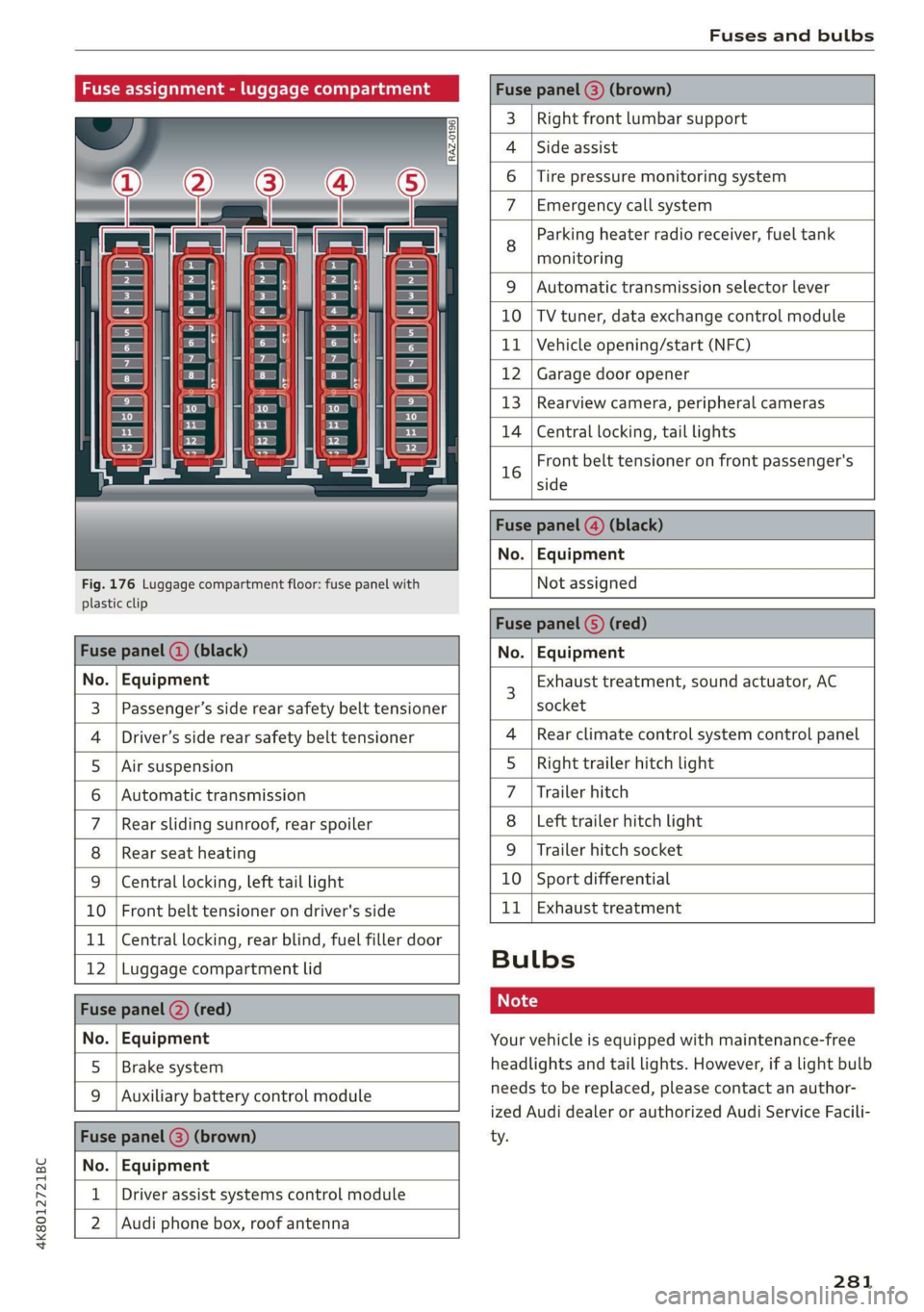
Fuse assignment - luggage compartment
[RAZ-0196
Cen
5
cs
i
-
fr) =)
ea
Fig. 176 Luggage compartment floor: fuse panel with
plastic clip
Fuse panel (@) (brown)
3 | Right front lumbar support
Side assist
4
6 |Tire pressure monitoring system
7 Emergency call system
Parking heater radio receiver, fuel tank
8 ae
monitoring
9 |Automatic transmission selector lever
10 |TV tuner, data exchange control module
11 | Vehicle opening/start (NFC)
12 | Garage door opener
13 | Rearview camera, peripheral cameras
14 | Central locking, tail lights
Front belt tensioner on front passenger's
16 side
Fuse panel @) (black)
No. | Equipment
Not assigned
Fuse panel (5) (red)
Fuse panel ( (black) No. | Equipment
No. | Equipment
Passenger’s side rear safety belt tensioner
Driver’s side rear safety belt tensioner
Air suspension
Automatic transmission
Rear sliding sunroof, rear spoiler
Rear seat heating
W}@O;N|
AD)
Mm)
BR)
Ww
Central locking, left tail light
10 | Front belt tensioner on driver's side
11 | Central locking, rear blind, fuel filler door
12 | Luggage compartment lid
Fuse panel (2) (red)
No. | Equipment
5 | Brake system
Auxiliary battery control module
Fuse panel (3) (brown)
No. | Equipment
Driver assist systems control module
2 |Audi phone box, roof antenna
Exhaust treatment, sound actuator, AC
socket
Rear climate control system control panel
Right trailer hitch light
Trailer hitch
Left trailer hitch light
Trailer hitch socket
10 | Sport differential
11 | Exhaust treatment
WOl/oOIN|
un]
Bulbs
Your vehicle is equipped with maintenance-free
headlights and tail lights. However, if a light bulb
needs to be replaced, please contact an author-
ized Audi dealer or authorized Audi Service Facili-
ty.
281
Page 295 of 310

4K8012721BC
Index
A
A/C cooling mode............. ee eee eee ee
Accelerator pedal.............--00000005
also refer to Accelerator pedal...........
ACCeSSOFICS . 6... eee
Active lane assist
refer to Lane departure warning.........
refer to Lane guidance................
Adaptive cruise assist..............-000.
Cleaning the sensors...........00 ee eee
Predictive control....................
Adaptive dampers...........--0000-00-
Adaptive speed assist
refer to Adaptive cruise assist...........
Adjusting the air distribution.............
Adjusting the brightness.................
Adjusting the sound..............-...0-
Adjusting the temperature...............
Adjusting the vents ...........0 cece eens
Adjusting the volume..............000005
Adjusting the volume (announcements) ... .
Adjusting the welcome sound............
Airbag SySteM « » ene s ews 4 5 Hemme tee Eee
Air quality display................2.2.00.
Air suspension..............00.00-0008
Alarm system
refer to Anti-theft alarm system..........
Alignment pin (changing the wheel).......
All-weather lights...............-.00000.
Allseason tires... 2.2.00... 22020
All wheel drive
refer to quattro... 2... eee eee eee
Amazon Alexa integration
Média playback’: ¢ sos s ¢ wees ¢ 4 orem b eae
Operation « sion ss aac sv rere © omen wa ar
AMI
refer to Audi music interface...........
Android Auto
refer to Audi smartphone interface......
Anti-freeze
Windshield washer system.............
Anti-lock braking system. ........-....-.
Anti-Slip Regulation.................0..
Anti-theft alarm system...........-..00--
Anti-theft wheel bolts................0.
Apple CarPlay
refer to Audi smartphone interface...... 217
Aspect ratio (video) ..........-..00. 211,.213
ASR
refer to Anti-Slip Regulation............ 108
Audi adaptive light.................0005. 48
Audi connect
refer to CONNECt:. « s ccascs seas ieeeee oe 174
Audi connect Remote & Control
refer to Vehicle control services......... 176
Audirdrive seletticy: « + sven « x cee x ¢ neem ¢ 2 2 104
Audi music interface...............20-- 208
Audio files.......... 00.0000 c cece 209
Audi phone box............ 00: e eee eee 163
Audi presense......... 0... e ee eee eee 143
Messages ............ 0.02. e eee eee 146
Audi pre sense front.............--..0-- 144
Audi side assist
refer to Side assist. ...... 0.00.00 eee eee 147
Audi smartphone interface.............. 217
Legalinformation.................005 221
Audi virtual cockpit
refer to Instrument cluster.............. 12
AUTO
Automatic headlights.................. 48
Climate control system.............0005 86
Auto Lock (central locking) ............... 32
Automatic climate control system
refer to Climate control system.......... 85
Automatic luggage compartment lid.... 40,41
Automatic transmission............-.0005 92
Parking lock emergency release.......... 95
Automatic wipe/wash system............. 55
Average consumption................... 16
Average speed.... 2.2... - ee eee eee eee 16
B
Bag hooks... ..... cece eee eee eee eee 80
Battery
Charging (12 Volt vehicle battery)....... 239
Vehicle battery (12 Volt)............... 237
Winter operation (12 Volt vehicle battery) . 237
BOCK rOUEE sicccans + 2 woewene © o sirens © ¥ ecevonT «ones 190
293