towing AUDI A7 2021 Owner´s Manual
[x] Cancel search | Manufacturer: AUDI, Model Year: 2021, Model line: A7, Model: AUDI A7 2021Pages: 350, PDF Size: 126.66 MB
Page 172 of 350
Driver assistance
» Applies to MMI: Select on the home screen: VE-
HICLE > Driver assistance > (<3) > Audi pre
sense.
Setting the prewarning
You can adjust the warning time for the prewarn-
ing individually (Early/Medium/Late) or switch
the prewarning off.
Set the warning time for the early warning to
Early at first. If you feel that the prewarnings ap-
pear too early, then set the warning time to Me-
dium. The Late warning time should only be set
in special circumstances.
@ Tips
— If the system is switched off, it switches on
again automatically once the ignition is
switched on again).
— Switch Audi pre sense off when you are not
using public streets, when loading the vehi-
cle onto a vehicle carrier, train, ship, or oth-
er type of transportation, or when towing
the vehicle. This can help to prevent an un-
desired intervention from the Audi pre
sense system.
Messages
Applies to: vehicles with Audi pre sense
re is displayed when there is a malfunction,
the Audi pre sense functions may be unavailable
or may be limited.
A message that indicates the cause and possible
solution may appear with some displays. The
weather conditions may be too poor or a sensor
may be covered. Bring the vehicle to a full stop,
switch the ignition off, and clean the area in front
of the sensors > page 140.
If the message still appears after switching the
ignition on again, have an authorized repair facili-
ty correct the malfunction as soon as possible.
D_Incertain countries.
170
Side assist
Description
Applies to: vehicles with side assist
al 3
eI
q e|
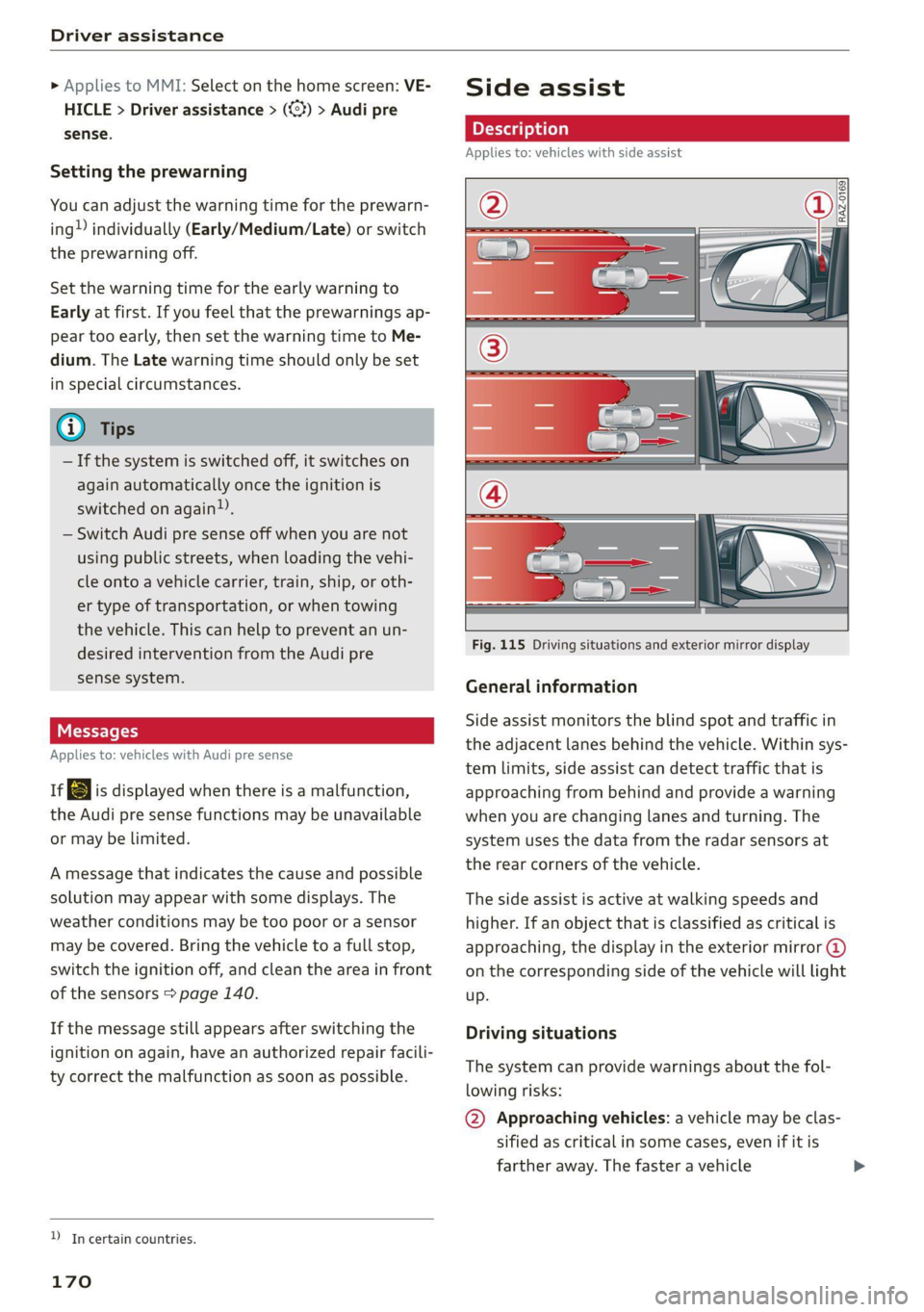
Fig. 115 Driving situations and exterior mirror display
General information
Side assist monitors the blind spot and traffic in
the adjacent lanes behind the vehicle. Within sys-
tem limits, side assist can detect traffic that is
approaching from behind and provide a warning
when you are changing lanes and turning. The
system uses the data from the radar sensors at
the rear corners of the vehicle.
The side assist is active at walking speeds and
higher. If an object that is classified as critical is
approaching, the display in the exterior mirror @
on the corresponding side of the vehicle will light
up.
Driving situations
The system can provide warnings about the fol-
lowing risks:
@ Approaching vehicles: a vehicle may be clas-
sified as critical in some cases, even if it is
farther away. The faster a vehicle
Page 291 of 350

4K8012721BF
Wheels
be five 150 lbs. passengers in
your vehicle, the amount of
available cargo and luggage
load capacity is 650 lbs.
(1400-750 (5 x 150) = 650
lbs.)
5. Determine the combined
weight of luggage and cargo
being loaded on the vehicle.
That weight may not safely ex-
ceed the available cargo and
luggage load capacity calculat-
ed in Step 4.
6. If your vehicle will be towing a
trailer, load from your trailer
will be transferred to your vehi-
cle. Consult this manual to de-
termine how this reduces the
available cargo and luggage
load capacity of your vehicle.
> Check the tire sidewall
(> page 275, fig. 170) to deter-
mine the designated load rating
for a specific tire.
Wheel bolts and rims
Wheel bolts
Wheel bolts must be clean and loosen/tighten
easily.
Rims
Rims with a bolted rim ring* or with bolted wheel
covers* consist of multiple pieces. These compo-
nents were bolted together using special bolts
and a special procedure. You must not repair or
disassemble them > A\.
ZA\ WARNING
Wheel bolts that are tightened or repaired in-
correctly can become loose and result in loss
of vehicle control, which increases the risk of
an accident. For the correct tightening specifi-
cation, see > page 311, Finishing.
— Always keep the wheel bolts and the threads
in the wheel hub clean and free of grease.
— Only use wheel bolts that fit the rim.
— Always have damaged rims repaired by an
authorized Audi dealer or authorized Audi
Service Facility. Never repair or disassemble
rims yourself, because this increases the risk
of an accident.
Loose wheel warning
Applies to: vehicles with loose wheel warning
Within the limits of the system, the loose wheel
warning in the instrument cluster warns you if
one or more wheels are loose.
Using the ABS sensors, the loose wheel warning
system compares the vibration characteristics of
the individual tires. If one or more wheels are
loose, it will be indicated in the instrument clus-
ter display with the fi indicator light and a mes-
sage. If only one wheel is affected, the location
of that wheel will be indicated.
Messages
fi Wheel bolts loose. Please safely stop the ve-
hicle and check all wheel bolts!
Loose wheel warning for at least one wheel > A\.
Check the wheel bolts on all wheels with the
wheel wrench (vehicle tool kit). Have the tighten-
ing specification checked as soon as possible with
a torque wrench. Drive carefully until then. For
the correct tightening specification, see
=> page 311, Finishing.
fi Wheel assessment active. Please continue
driving carefully
After this message appears and you have checked
the wheel bolts, the assessment phase begins
when the vehicle is in motion. This may take sev-
eral minutes. >
289
Page 310 of 350
Emergency assistance
Replacing wheels
You must complete the preparation before
changing a tire.
> Read and follow the important safety precau-
tions > page 305.
> Set the parking brake.
> Select the “P” position.
> When towing a trailer: disconnect the trailer
from your vehicle.
> Lay out the vehicle tool kit > page 305 and the
spare tire > page 311.
> Applies to: vehicles with air suspension: Select
on the home screen: VEHICLE > Settings &
Service > Air suspension: wheel change.
> Switch the ignition off.
ZA\ WARNING
The vehicle must also be secured to prevent it
from rolling when using the vehicle jack”. Use
suitable objects to block the front and back of
the wheel that is diagonal from the wheel
with the flat tire.
Removing the caps
\
B4L-1337
x
®
? =
©
4
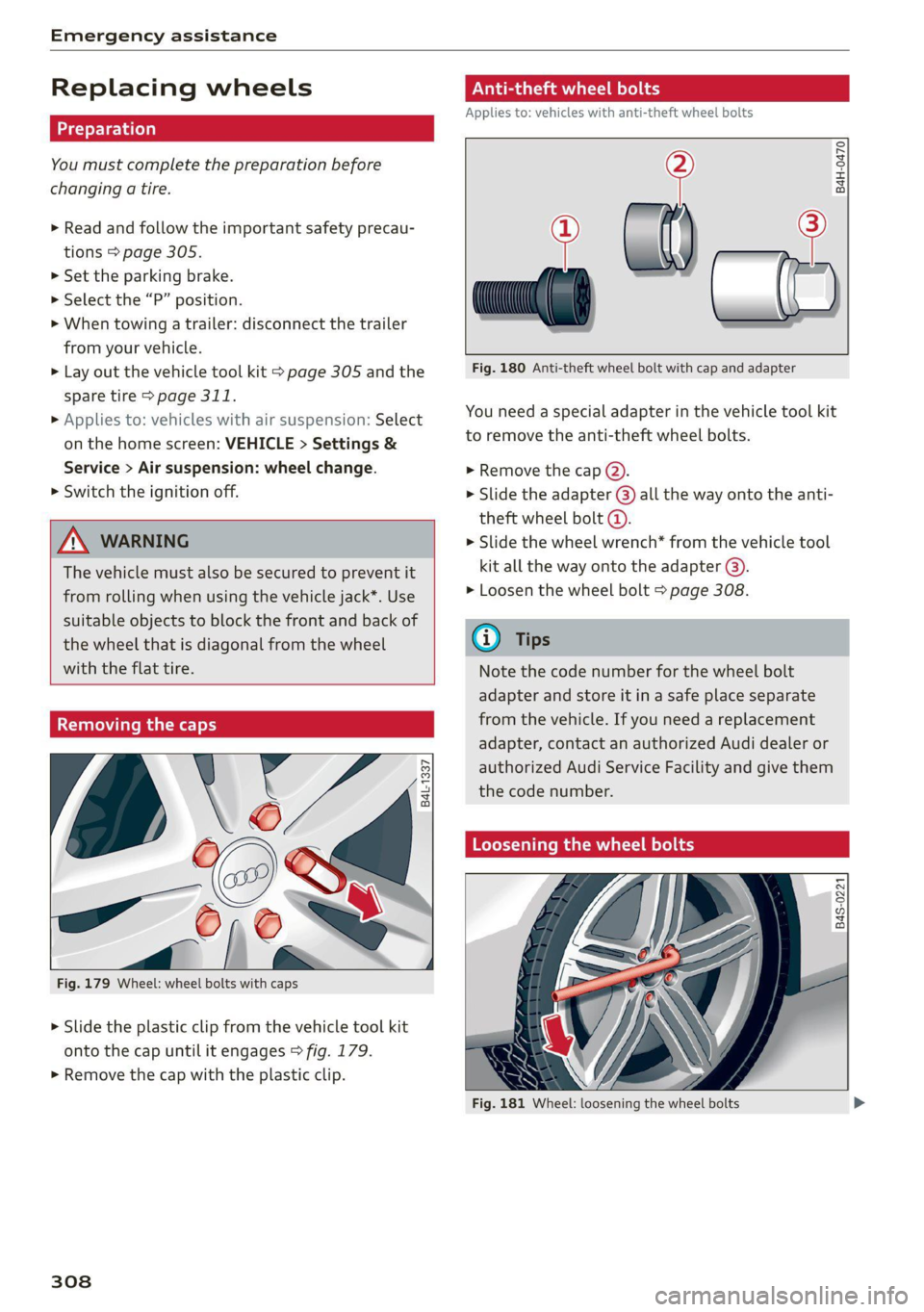
Fig. 179 Wheel: wheel bolts with caps
> Slide the plastic clip from the vehicle tool kit
onto the cap until it engages > fig. 179.
> Remove the cap with the plastic clip.
308
ONL eta ere) od
Applies to: vehicles with anti-theft wheel bolts
> al) —2
Fig. 180 Anti-theft wheel bolt with cap and adapter
B4H-0470
You need a special adapter in the vehicle tool kit
to remove the anti-theft wheel bolts.
> Remove the cap @).
> Slide the adapter @) all the way onto the anti-
theft wheel bolt @.
> Slide the wheel wrench* from the vehicle tool
kit all the way onto the adapter @).
> Loosen the wheel bolt > page 308.
@ Tips
Note the code number for the wheel bolt
adapter and store it in a safe place separate
from the vehicle. If you need a replacement
adapter, contact an authorized Audi dealer or
authorized Audi Service Facility and give them
the code number.
Loosening the wheel bolts
B4S-0221
Fig. 181 Wheel: loosening the wheel bolts
Page 315 of 350

4K8012721BF
Emergency assistance
4. Attach the other end of the negative cable
(black) to the jump-start pin @) on the vehi-
cle.
Starting the engine
> Start the engine in the vehicle giving the charge
and let it run at idle.
> Now start the engine in your vehicle, which has
the
drained battery.
> If the engine does not start, stop the starting
procedure after 10 seconds and then repeat it
after approximately 30 seconds.
> Turn on the rear window defogger in your vehi-
cle in order to reduce any voltage peaks that
may occur when disconnecting the jump start
cables. The headlights must be switched off.
> With the engines running, remove the cables in
reverse order of the way they were installed.
> Close the red cover on the positive terminal.
Z\ WARNING
— Never connect the jump start cable directly
to your vehicle battery. Only use the connec-
tions in the engine compartment.
— Do not touch the non-insulated parts of the
terminal clamps. The cable must also not
come into contact with vehicle components
that conduct electricity when it is connected
to the positive vehicle battery terminal. This
can cause a short circuit.
— The plugs on the battery cells must not be
opened.
— Keep ignition sources (such as open flames,
burning cigarettes, etc.) away from the vehi-
cle batteries to reduce the risk of an explo-
sion.
— Route the jump start cables so they cannot
get caught in the moving parts in the other
vehicle's engine compartment.
@ Note
Please note that the connecting process previ-
ously described for the jump start cables is in-
tended for when your vehicle is being jump
started.
@) Tips
Make sure that the connected jump start ca-
bles have sufficient contact with metal.
Towing
General information
You should only perform the steps that follow if
you have the necessary tools and technical ex-
pertise.
Towing requires a certain amount of practice.
Audi recommends contacting a towing company
to have the vehicle transported.
You should only have your vehicle towed by an-
other vehicle when disabled in exceptional cir-
cumstances. Inexperienced drivers should not
tow.
Notes on towing
When the engine is stopped, the transmission
will not be sufficiently lubricated if traveling at
high speeds and long distances:
— The maximum permitted towing speed is 30
mph (50 km/h).
— The maximum permitted towing distance is 30
miles (50 km).
Additional information on towing with a tow
truck
The vehicle may only be towed with the front axle
raised. Do not wrap any chains or cables around
the brake lines.
Tow bar and towing cable
The vehicle can be towed with a tow bar or tow-
ing cable. Both drivers should be familiar with
the special considerations when towing, especial-
ly when using a towing cable.
Always make sure the traction force does not ex-
ceed the permitted level and there are no shock
loading conditions. There is always the risk of the
coupling becoming overloaded when driving off-
road.
For the most safety and security, drive with a tow
bar. You should use a towing cable onlyifatow >
313
Page 316 of 350

Emergency assistance
bar is not available. Use a towing cable made of
synthetic elastic cable similar elastic material.
ZA WARNING
— Towing highly increases the risk of an acci-
dent, for example from colliding with the
towing vehicle.
— To reduce the risk of an accident, do not al-
low anyone to remain inside the vehicle
when it is being transported by a tow truck
or a special transporter.
@) Note
— If normal towing is not possible, for exam-
ple if the transmission is faulty or if the
towing distance is greater than 30 miles
(50 km), then transport the vehicle on a
special carrier.
— If the vehicle is towed by a tow truck at the
axle that is not permitted, this can cause se-
vere damage to the transmission.
— The vehicle must not be tow started for
technical reasons.
@) Tips
— If the power supply is interrupted, then it
will not be possible to move the selector
lever out of the "P" position. The parking
lock must be released using the emergency
release before towing the vehicle
> page 99.
— Switch Audi pre sense* off > page 169 when
loading the vehicle onto a vehicle carrier,
train, ship, or other type of transportation,
or when towing the vehicle. This can prevent
an undesired intervention from the pre
sense* system.
— Follow the local legal regulations for tow-
ing.
Read and follow the important information under
=> page 313.
314
Preparations
> Only secure the towing cable or tow bar at the
designated towing loops > page 315,
=> page 315.
> Make sure the towing cable is not twisted. Oth-
erwise it could disconnect from the towing loop
while towing.
> Switch the emergency flashers on in both
vehicles > page 55. However, do not do this if it
prohibited by law.
Towing vehicle (front)
> Only start to drive when the towing cable is
taut.
> Press the brake pedal very carefully.
> Avoid sudden braking or driving maneuvers.
Vehicle being towed (rear)
> Make sure the ignition is switched on so that
the steering wheel is not locked and so that you
can use the turn signals, the horn, and the
windshield wipers if needed > A\.
> Switching it off before the vehicle has stopped
may impair the function of the brake booster
and power steering. You would then need to
use more force to steer and brake the vehicle.
> Release the parking brake > page 107.
> Select the “N” selector lever position.
> Make sure the towing cable is always taut.
ZA\ WARNING
— Never tow a vehicle using a tow bar or tow-
ing cable if the vehicle does not have electri-
cal power.
— If the vehicle runs out of power while it is
being towed, stop towing the vehicle imme-
diately and consult an authorized Audi deal-
er or qualified repair facility.
Page 317 of 350
4K8012721BF
Emergency assistance
Front towing loop
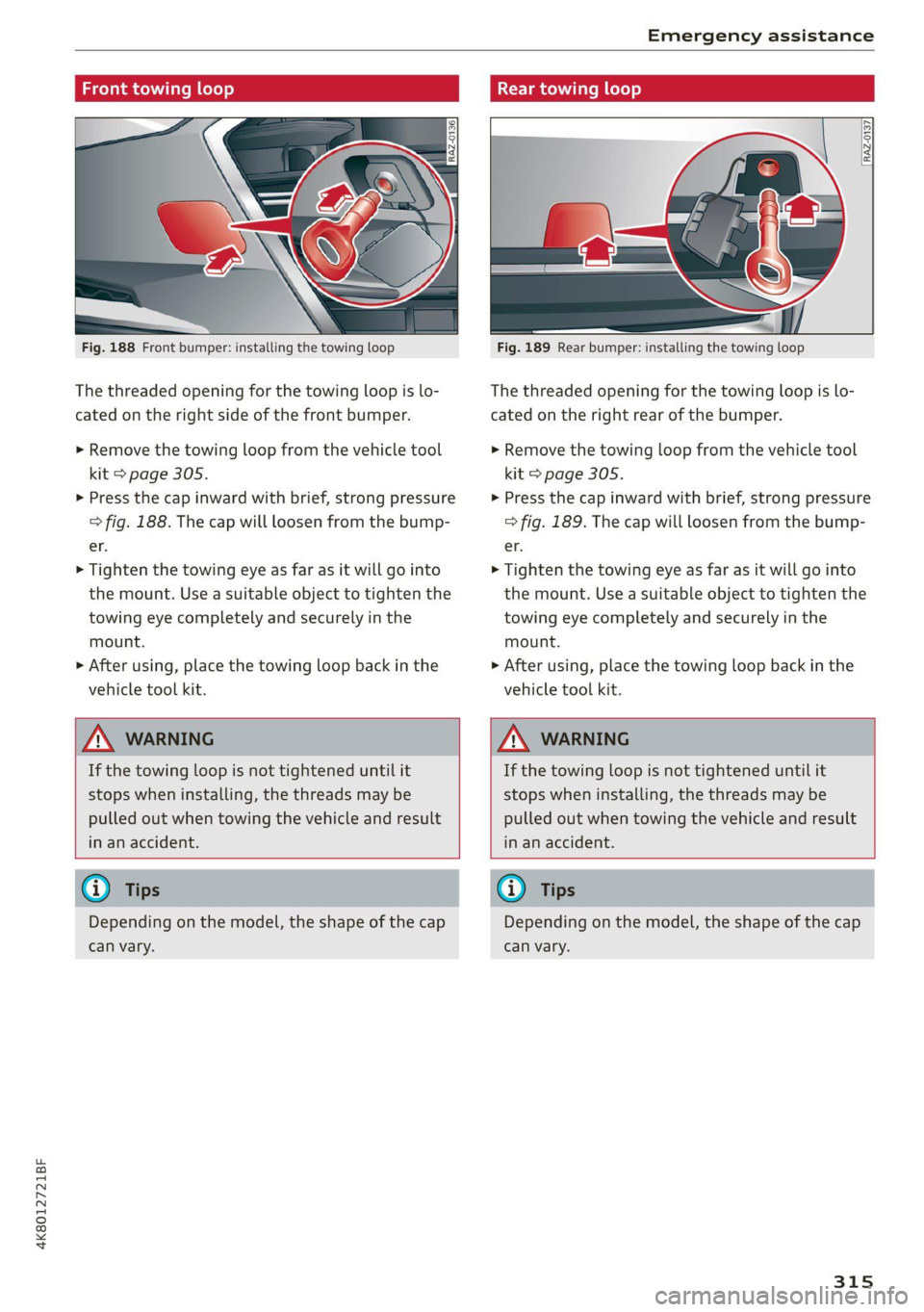
Fig. 188 Front bumper: installing the towing loop
The threaded opening for the towing loop is lo-
cated on the right side of the front bumper.
> Remove the towing loop from the vehicle tool
kit > page 305.
> Press the cap inward with brief, strong pressure
> fig. 188. The cap will loosen from the bump-
er.
> Tighten the towing eye as far as it will go into
the mount. Use a suitable object to tighten the
towing eye completely and securely in the
mount.
>» After using, place the towing loop back in the
vehicle tool kit.
Rear towing loop
Fig. 189 Rear bumper: installing the towing loop
The threaded opening for the towing loop is lo-
cated on the right rear of the bumper.
> Remove the towing loop from the vehicle tool
kit > page 305.
> Press the cap inward with brief, strong pressure
> fig. 189. The cap will loosen from the bump-
er.
> Tighten the towing eye as far as it will go into
the mount. Use a suitable object to tighten the
towing eye completely and securely in the
mount.
> After using, place the towing loop back in the
vehicle tool kit.
ZX WARNING
If the towing loop is not tightened until it
stops when installing, the threads may be
pulled out when towing the vehicle and result
in an accident.
ZA WARNING
If the towing loop is not tightened until it
stops when installing, the threads may be
pulled out when towing the vehicle and result
in an accident.
@ Tips
Depending on the model, the shape of the cap
can vary.
G) Tips
Depending on the model, the shape of the cap
can vary.
315
Page 347 of 350
4K8012721BF
Index
Toll Module
refer to Integrated Toll Module......... 149
Tools... eee 305
Tooltips. .... 0.0... eee eee eee eee 21
Top tether anchor (securing the child safety
S@at) 0. cc ee eee eee eee 80
Touch display
Adjusting feedback................0005 21
Operating « « wes 2 owe 2 omen veo eo oes 19
TOWING’: « ¢ saws 5 ¢ ewe § 5 ewig & 8 ew ee ee 313
TOWING LOOP ewes = 2 ewes ge tees de eee ee 315
Towing protection monitoring............. 39
TPMS
indicator Wight 2x. » 2 wows 9 © ewe « ¢ ewe = 296
Tire pressure monitoring system.... 293, 294
Traffic incidents
refer to Online traffic information....... 225
Traffic information » sxc. . 5 sessee + sramess a « sven 226
Online traffic information.............. 225
Traffic light information..............0. 145
Traffic sign recognition................. 143
Traffic SignS.. 6... eee eee eee 146
Trailer mode
Airsuspension..............00e eevee 135
Trailer towing ...... 2.0.0. e eee T35.
Tongue weight ..............ee ee ee eee 135
Trailer
load « aiceso: so saws ¢ o semen oa coon oo 135
TUM aSSISt wcus = 4 ewe se eee ee vee as pees 169
Turinsigtials sus < » acme 2 » wees x 8 eee 2 eeR 53
U
Uniform tire quality grading............. 291
Unlocking and locking. .......... esse eee 36
By remote’control.. «nc ss eves ee eres sees 41
Using the lock cylinder................. 39
With Audi connect vehicle control........ 42
With the central locking switch.......... 38
With the convenience key.............0. 41
Update (software) isiscca sa scence seine as wine 250
USB
Adapter... . 0... cece eee eee eee 200
USBi charging: ports cscs +s omens ¥ = esenens xo coors 82
USB drive
Supported types/formats.............. 244
USB stick
refer to Audi music interface........... 238
Users
Localusers...... cece eee eee eee 33
MYAUGi USErSins ¢ ¢ semu se cewy s e em ee oes 33
Using residual heat............00e cece uae 89
V
Vanity Mirror... .... cee cece eee 59
Vehicle
Care/cleaning « wes sv wnee + eereee s Been gs 298
DIMONSIONS xcs x suswans « 0 seers vow samen © wg 33:1,
Identification data................00. 331
Out GFSOrVICE een: « s ees 2 2s ee Bw 304
Raising ls & coses a sens ow inmne + @ suasewe @ & ste 309
Starting. ........... 0. eee eee 93
ThanspOrt vce ¢ s eee so ove ss Hewes s HeeR 112
Unlocking and locking...............004 41
Vehicle-care scx + ¢ sews ¢ o ews oo cee se oes 298
Vehicle control services ..........0ee eee 210
Vehicle data label..................00005 331
Vehicle identification number............ 331
Vehicle jack. ................0.00000005 305
Lifting POINTS: + « sees ss anew se ave se oes 309
Tire change mode.............2--.00- 308
Vehicle key's «= coms ¢ svee & ¢ sense @ o asa 36, 40
Vehiclessound 23 eeva 2 s weep sy ees se eee 103
Vehicle start system ...........-.02-005- 105
Wehicle:toolkit®. + esas < ¢ acre @ s cams 3 x eee 305
Ventilation. . 0.0... eee ce eee eee 87
VIEW button... ... eee eee 13
Voicemail... 2... eee eee eee eee 203
Voice recognition system..........-..0 00s 29
External... 0.0... eee eee eee eee 30
Operating’: = « sees « seee so yews gs geen ee ae 29
Ww
Wall mount Clip sec ss eens ss een ce ewes 133
Warning lights
refer to Indicator lights...............-.. 7
Washing matte finish paint.............. 298
Wave band
refer to Frequency band............... 228
WEIQNESS « « caves se caw ys ews ¢ & wows & ¥ we 332
Wheel bolts 2 some « » news x mean x x ayes 9 es 289
AMEENETE essics 3 & ciceiors 6 o cnauere & weenewe me & wvexao 308
Tightening specification............... 311
345