light AUDI A7 2021 Owner´s Manual
[x] Cancel search | Manufacturer: AUDI, Model Year: 2021, Model line: A7, Model: AUDI A7 2021Pages: 350, PDF Size: 126.66 MB
Page 48 of 350

Opening and closing
The luggage compartment lid will only open
or close ») if you perform the movement as
described. This prevents the luggage com-
partment lid from opening or closing due to
similar movements 2), such as when you walk
between the rear of the vehicle and your ga-
rage door. In some situations, the function
may be limited or temporarily unavailable.
This may happen if:
— You are standing too close to the bumper or
too far away from it
— The luggage compartment lid was closed or
opened immediately beforehand
— You park close to a hedge and the branches
move back and forth under the vehicle for a
long period of time
— You clean your vehicle, for example with a
pressure washer or in a car wash
— There is heavy rain
— The bumper is very dirty, for example after
driving on salt-covered roads
— There is interference to the vehicle key's ra-
dio signal, such as from mobile devices or
remote controls
Mechanically unlocking luggage
compartment lid
The luggage compartment lid can be released
from the inside in an emergency.
Fig. 31 Inner luggage compartment lid: access to the
emergency release
D_ The closing function applies to vehicles that also have au-
tomatic luggage compartment lid operation.
46
» Fold the backrest on the rear bench seat for-
ward > page 85.
>» Remove the mechanical key > page 40.
> Using the mechanical key, pry the cover &> off
the luggage compartment lid trim panel.
> Press the lever with the mechanical key in the
direction of the arrow to release the luggage
compartment lid.
ZA\ WARNING
Observe the safety precautions > page 43.
A WARNING
If you have folded the backrests into the up-
right
position, always check if the lock is cor-
rectly engaged by pulling forward on the
backrest.
Child safety lock
The child safety lock prevents the rear doors
from being opened from the inside and the rear
power windows from being operated.
RAZ-1026:
Fig. 32 Driver's door: controls
> To activate or deactivate the child safety lock
for the rear doors (which controls the power
windows and interior door handle), press the
left and/or right 8 button in the driver's door
> fig. 32. The indicator light in the button turns
on/blinks.
» Make sure the child safety lock is working by
checking the function on the rear power win-
dow switch and door handle.
Page 49 of 350
4K8012721BF
Opening and closing
> Applies to: vehicles with controls for the cli-
mate control system in the rear and MMI: To al-
so restrict the operation of the climate control
system in the rear, select on the home screen:
SETTINGS > Display & brightness > Operation
in rear
When the child safety lock is switched on, the
following functions are disabled:
— The rear inner door handles
— The rear power windows
— The control panel* for the climate control sys-
tem in the rear
Message in the instrument cluster display
@/8 Child safety lock: malfunction! Please
contact Service
There is a malfunction in the child safety lock.
Press the @ button again.
If the message stays on, drive immediately to an
authorized Audi dealer or authorized Audi Service
Facility to have the malfunction repaired.
ZA\ WARNING
— Observe the safety precautions > page 36.
— A malfunction in the child safety lock could
allow
the rear doors to be opened from the
inside, which increases the risk of an acci-
dent.
Power windows
Opening and closing the windows
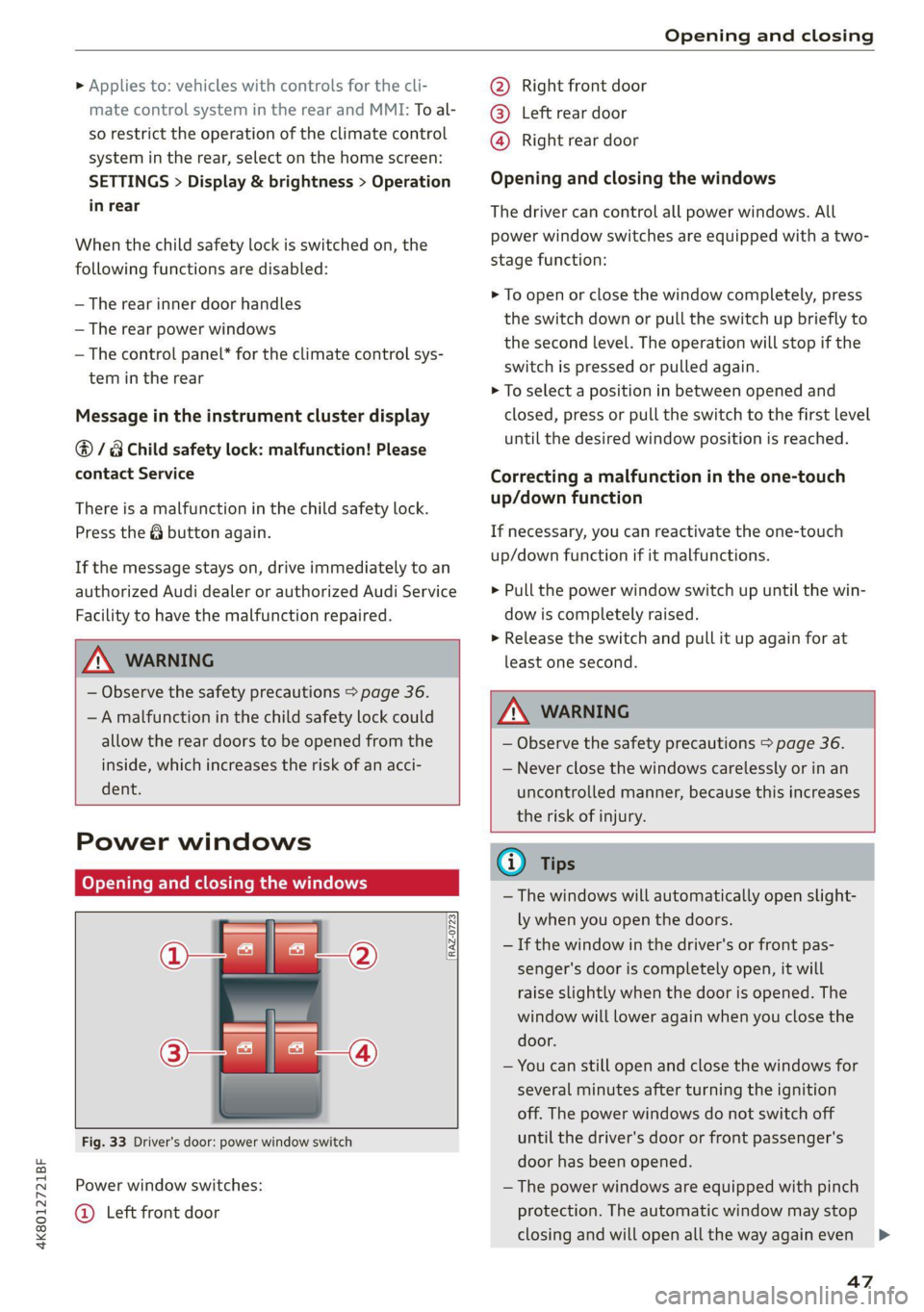
RAZ-0723,
Fig. 33 Driver's door: power window switch
Power window switches:
@ Left front door
@ Right front door
® Left rear door
@ Right rear door
Opening and closing the windows
The driver can control all power windows. All
power window switches are equipped with a two-
stage function:
> To open or close the window completely, press
the switch down or pull the switch up briefly to
the second level. The operation will stop if the
switch is pressed or pulled again.
> To select a position in between opened and
closed, press or pull the switch to the first level
until
the desired window position is reached.
Correcting a malfunction in the one-touch
up/down function
If necessary, you can reactivate the one-touch
up/down function if it malfunctions.
>» Pull the power window switch up until the win-
dow is completely raised.
> Release the switch and pull it up again for at
least one second.
ZA WARNING
— Observe the safety precautions > page 36.
— Never close the windows carelessly or in an
uncontrolled manner, because this increases
the risk of injury.
Gi) Tips
— The windows will automatically open slight-
ly when you open the doors.
— If the window in the driver's or front pas-
senger's door is completely open, it will
raise slightly when the door is opened. The
window will lower again when you close the
door.
— You can still open and close the windows for
several minutes after turning the ignition
off. The power windows do not switch off
until the driver's door or front passenger's
door has been opened.
— The power windows are equipped with pinch
protection. The automatic window may stop
closing and will open all the way again even
47
>
Page 51 of 350
4K8012721BF
Opening and closing
Quick opening and closing
You can also open or close the roof and roof sun-
shade in one movement.
> Opening the roof and sunshade: slide the 2>
switch back briefly twice in a row to the second
level @).
> Closing the opened roof: push the 2> switch
forward briefly twice in a row to the second lev-
el.
Roof emergency closing
If an object is detected when closing, the roof
will open again automatically. In this case, you
can
then close it with the power emergency clos-
ing function.
> Within five seconds after the sunroof opens au-
tomatically, pull the applicable button until the
roof is closed.
ZA WARNING
To reduce the risk of injury, always pay atten-
tion when closing the roof. Always switch the
ignition off and take the key with you when
leaving the vehicle.
() Note
Always close the roof when you leave the vehi-
cle and when there is precipitation to reduce
the risk of damage to the interior equipment,
particularly the electronic equipment.
@) Tips
— After switching off the ignition, the roof and
sunshades can still be operated for several
minutes as long as neither of the front
doors have been opened.
—It is not possible to open the roof when
temperatures are too low.
)) The possible number of hand-held transmitters depends
on the equipment.
Garage door opener
Applies to: vehicles with garage door opener
With the garage door opener, you can activate
systems such as the garage doors, security sys-
tems or house lights from inside your vehicle.
These functions are operated in the MMI. Multi-
ple receivers can be programmed, which can con-
trol the functions of up to eight!) hand-held
transmitters.
ZA WARNING
— When operating or programming the garage
door opener, make sure that no people or
objects are in the area immediately sur-
rounding the equipment. People can be in-
jured or property can be damaged if struck
when closing.
— Do not allow yourself to be distracted from
traffic by the viewing and operating the dis-
plays.
@) Tips
—If you sell your vehicle, reset all settings to
the factory default settings > page 250.
— The system complies with United States FCC
regulations and ISED regulations
> page 329.
G) Tips
Before you program your system to the ga-
rage door opener, first check the compatibili-
ty:
— Ask an authorized Audi dealer or authorized
Audi Service Facility or check at www.
homelink.com. You can also find more infor-
mation about HomeLink there.
— You can display information about Home-
Link (compatibility level/status/country
code/HomeLink generation) in the MMI:
— Select on the home screen: VEHICLE > Set-
tings & Service > Garage door opener > @.
49
Page 54 of 350
Lights and Vision
Lights and Vision
Exterior lighting
Switching the lights on and off
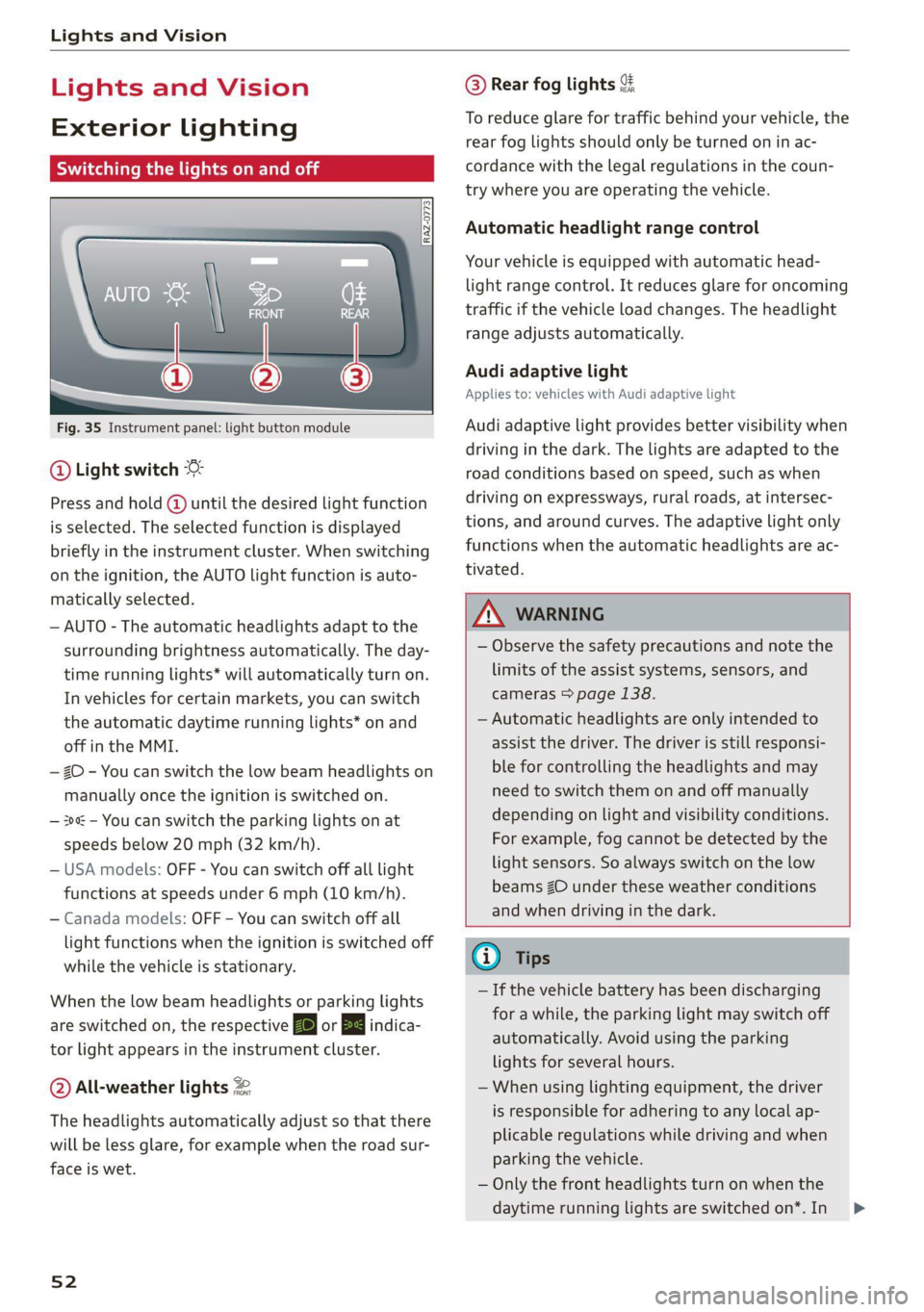
Fig. 35 Instrument panel: light button module
@ Light switch &
Press and hold @ until the desired light function
is selected. The selected function is displayed
briefly in the instrument cluster. When switching
on the ignition, the AUTO light function is auto-
matically selected.
— AUTO - The automatic headlights adapt to the
surrounding brightness automatically. The day-
time running lights* will automatically turn on.
In vehicles for certain markets, you can switch
the automatic daytime running lights* on and
off in the MMI.
— 20 - You can switch the low beam headlights on
manually once the ignition is switched on.
— 3 - You can switch the parking lights on at
speeds below 20 mph (32 km/h).
— USA models: OFF - You can switch off all light
functions at speeds under 6 mph (10 km/h).
— Canada models: OFF - You can switch off all
light functions when the ignition is switched off
while the vehicle is stationary.
When the low beam headlights or parking lights
are switched on, the respective Ba or EB indica-
tor light appears in the instrument cluster.
@ All-weather lights 2
The headlights automatically adjust so that there
will be less glare, for example when the road sur-
face is wet.
52
@ Rear fog lights %
To reduce glare for traffic behind your vehicle, the
rear fog lights should only be turned on in ac-
cordance with the legal regulations in the coun-
try where you are operating the vehicle.
Automatic headlight range control
Your vehicle is equipped with automatic head-
light range control. It reduces glare for oncoming
traffic if the vehicle load changes. The headlight
range adjusts automatically.
Audi adaptive light
Applies to: vehicles with Audi adaptive light
Audi adaptive light provides better visibility when
driving in the dark. The lights are adapted to the
road conditions based on speed, such as when
driving on expressways, rural roads, at intersec-
tions, and around curves. The adaptive light only
functions when the automatic headlights are ac-
tivated.
ZA WARNING
— Observe the safety precautions and note the
limits of the assist systems, sensors, and
cameras > page 138.
— Automatic headlights are only intended to
assist the driver. The driver is still responsi-
ble for controlling the headlights and may
need to switch them on and off manually
depending on light and visibility conditions.
For example, fog cannot be detected by the
light sensors. So always switch on the low
beams ZO under these weather conditions
and when driving in the dark.
@ Tips
— If the vehicle battery has been discharging
for a while, the parking light may switch off
automatically. Avoid using the parking
lights for several hours.
— When using lighting equipment, the driver
is responsible for adhering to any local ap-
plicable regulations while driving and when
parking the vehicle.
— Only the front headlights turn on when the
daytime running lights are switched on*. In >
Page 55 of 350

4K8012721BF
Lights and Vision
vehicles in certain markets, the tail lights
will also turn on.
—In cool or damp weather, the inside of the
headlights, turn signals, and tail lights can
fog
over due to the temperature difference
between the inside and outside. They will
clear shortly after switching them on. This
does not affect the service life of the light-
ing.
— When the parking lights are switched on
and the ignition is switched off, the 200} sym-
bol appears in the light switch module.
Turn signal and high beam lever
BFV-0012
Fig. 36 Lever: switching on the turn signal and high beams
The lever operates the turn signals, the high
beams and the headlight flasher.
Turn signals (>>
The turn signal will activate when you move the
lever into a turn signal position while the ignition
is switched on. The respective a or B indicator
light flashes.
@ Right turn signal
@ Left turn signal
The turn signal blinks three times if you tap the
lever (convenience turn signal).
If an indicator light blinks twice as fast as usual,
a turn signal bulb has failed. Carefully drive to an
authorized Audi dealer or authorized Audi Service
Facility immediately to have the malfunction cor-
rected.
High beams =O and headlight flasher
> Move the lever to the corresponding position:
@) High beams on (vehicles with high beam assis-
tant”) > page 53
@ High beams off or headlight flasher
The
=| indicator light in the instrument cluster
will turn on.
ZA WARNING
High beams can cause glare for other drivers,
which increases the risk of an accident. For
this reason, only use the high beams or the
headlight flasher when they will not create
glare for other drivers.
High beam assistant
Applies to: vehicles with high beam assistant
The high beam assistant automatically turns the
high beams on or off depending on the surround-
ing conditions.
A camera on the rearview mirror mount can de-
tect light sources from other road users. The high
beams switch on or off automatically depending
on the position of vehicles driving ahead and on-
coming vehicles, the vehicle speed as well as oth-
er environmental factors and traffic conditions.
Activating high beam assistant
Requirement: the AUTO light function must be
selected and the high beam assistant must be
switched on in the MMI > page 55.
> To activate the high beam assistant, tap the
lever forward @) > page 53, fig. 36. The fa in-
dicator light will appear in the instrument clus-
ter display and the high beams will be switched
on or off automatically. The Ed indicator light
will turn on if the high beams are switched on.
Activating and deactivating the high beam
head lights manually
If the high beams did not switch on or off as ex-
pected, you may switch them on or off manually
instead:
> To activate the high beams manually, tap the
lever
forward @) > page 53, fig. 36. The =0] in-
dicator light will turn on.
53
>
Page 56 of 350

Lights and Vision
> To deactivate the high beams manually, pull
the lever back @) > page 53, fig. 36. The high
beam assistant is deactivated.
Operating the headlight flasher
> To operate the headlight flashers, pull the lever
back @) > page 53, fig. 36. If the high beam
headlights are not switched on, the high beam
assistant will remain activated.
Z\ WARNING
— Observe the safety precautions and note the
limits of the assist systems, sensors, and
cameras > page 138.
— High beam assistant is only intended to as-
sist the driver. The driver is responsible for
controlling the high beam headlights and
adjusting them to match the lighting and
visibility conditions.
— High beams can cause glare for other driv-
ers, which increases the risk of an accident.
For this reason, only use the high beams or
the headlight flasher when they will not cre-
ate glare for other drivers.
G) Tips
Adhere to any local applicable regulations
when using the lighting equipment, for exam-
ple in regard to reducing glare for other driv-
ers. The driver is always responsible for adher-
ing to the regulations applicable in the coun-
try where the vehicle is being operated.
54
Laser lighting
Applies to: vehicles with laser lighting
[RAZ-0102}
Fig. 37 Headlights: label
The laser lights increase the range of the head-
lights.
An additional module integrated in the headlight
converts a blue laser light into a white light using
a luminescent material.
Activating or deactivating laser lights
Requirement: the AUTO light function must be
set, and the high beam assistant and the laser
lights must be switched on in the MMI
=> page 55.
The high beam is controlled by the high beam as-
sistant. The laser lights switch on shortly after
the
LED high beams are switched on.
> To activate the high beam assistant, tap the
lever forward @) > page 53, fig. 36. The fa in-
dicator light will appear in the instrument clus-
ter display and the high beams will be switched
on or off automatically.
The laser lights are switched on at speeds above
approximately 44 mph (70 km/h) when the high
beams are switched on. The Ea indicator light
will turn on if the high beams are switched on. >
Page 57 of 350
4K8012721BF
Lights and Vision
The B indicator light turns on if the laser lights
are switched on.
The laser lights are switched off when the speed
decreases below approximately 30 mph (50
km/h) or when the high beam assistant switches
the LED headlights off.
Nv WARNING
— Observe the safety precautions and note the
limits of the assist systems, sensors, and
cameras > page 138.
— All repair procedures on the headlights must
be performed by an authorized Audi dealer
or authorized Audi Service Facility that will
perform the work according to Audi factory
specifications. Incorrect repairs could result
in eye injury, impair the function, and may
void the vehicle's operating license.
— Opening the laser module is not permitted
and could cause permanent injuries to the
eyes.
— Dangerous exposure to laser beams may oc-
cur if the covers are removed or if the head-
lamp module housing is opened.
G) Tips
— The headlight contains a class 4 laser. The
technical design converts the laser beam so
that there is no danger when it is used for
its intended purpose.
—The laser beam emission from the head-
lamp has been classified in accordance with
IEC 60825-1:2007.
— The possible emission is below the thresh-
old for laser class 2.
—
Maximum laser beam output: 5W (continu-
ous emission), wavelength range A= 400 nm
- 700 nm.
— The headlamp light functions are rated in
accordance with IEC 62471-5:2015.
— The beam emitted from the headlamp was
classified as risk group 2.
Adjusting the exterior lighting
You can adjust the exterior lighting separately.
The settings depend on the vehicle equipment.
> Applies to: MMI: Select on the home screen:
VEHICLE > Light & Visibility > Exterior light-
ing.
Automatic headlights
You can adjust the following settings in the Auto-
matic
headlights menu:
Activation time - You can adjust if the headlights
switch on Early, Medium, or Late based on the
sensitivity of the light sensor.
High beam assistant - You can switch the high
beam assistant on and off.
Laser lights - You can switch the laser lights on
and off.
Entry/exit lighting
The Entry/exit lighting illuminates the area
around the vehicle when the vehicle is unlocked
or when the driver’s door is opened while the ig-
nition is off. The entry/exit lighting works when it
is dark and when the AUTO light function is
switched on. The front and rear daytime running
lights* switch on automatically each time the ve-
hicle is unlocked regardless of how bright it is
outside the vehicle.
Daytime running lights
USA models: The daytime running lights can be
switched on and off.
Canada models: The daytime running lights can-
not be switched off. The lights activate automati-
cally each time the ignition is switched on.
rgency flashers
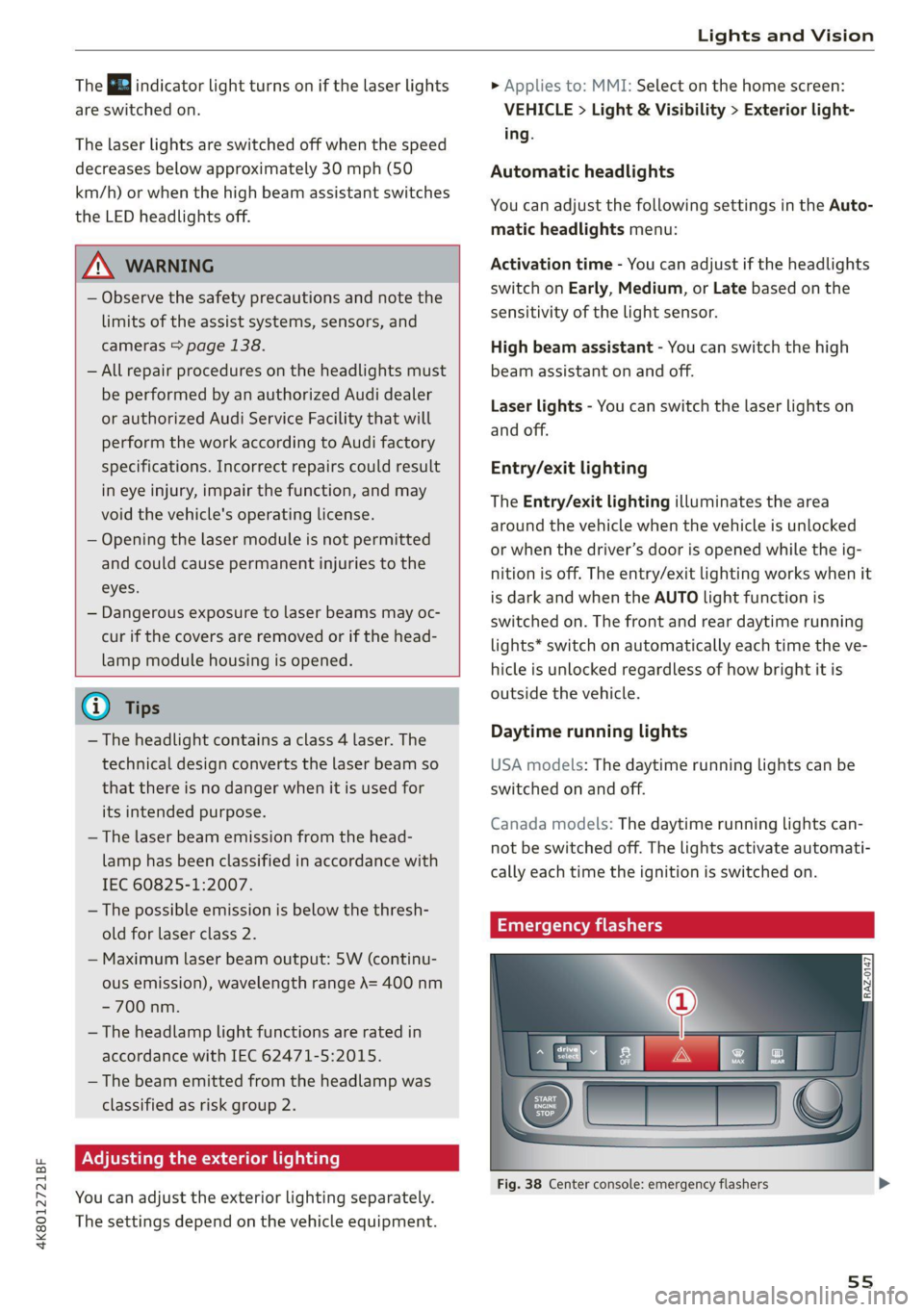
Fig. 38 Center console: emergency flashers
55
Page 58 of 350

Lights and Vision
The emergency flashers help to make other driv-
ers aware of your vehicle in dangerous situations.
> Press the A @ button to switch the emergency
flashers on or off.
When the emergency flashers are turned on, the
a and B indicator lights will flash at the same
time.
You can indicate a lane change or a turn when the
emergency flashers are switched on by using the
turn signal lever. The emergency flashers stop
temporarily.
The emergency flashers also work when the igni-
tion is turned off.
@) Tips
You should switch the emergency flashers on
if:
— you are the last car ina traffic jam so that
all other vehicles approaching from behind
can see your vehicle
— your vehicle has broken down or you are
having an emergency
— your vehicle is being towed or if you are tow-
ing another vehicle
Messages
If the 8, indicator light turns on, a bulb has
failed. The displayed message indicates the cause
and possible solutions. If one of the messages re-
mains on, drive immediately to an authorized
Audi dealer or authorized Audi Service Facility to
have the malfunction repaired.
By Audi adaptive light: malfunction! See own-
er's manual
Adaptive light* is not working. The headlights
still function. Drive immediately to an authorized
Audi dealer or authorized Audi Service Facility to
have the malfunction repaired.
High beam assistant: malfunction! See own-
er's manual
You can still switch the high beams on or off
manually. Drive immediately to an authorized
56
Audi dealer or authorized Audi Service Facility to
have the malfunction repaired.
High beam assistant: currently unavailable.
Camera view limited due to surroundings. See
owner's manual
This message appears if the camera's visual field
is blocked. The system will switch itself off. Try
switching the systems on later.
BQ automatic headlights: malfunction! See
owner's manual
The light/rain sensor is malfunctioning. When
the AUTO light function is on, the low beams will
remain switched on at all times for safety rea-
sons. Drive immediately to an authorized Audi
dealer or authorized Audi Service Facility to have
the malfunction repaired.
Interior lighting
celui miata Cela
Fig. 39 Headliner: interior lighting
Interior lighting buttons
ax* — Interior lighting on/off
4 - Door contact switch on/off. The interior light-
ing is controlled automatically.
Touch-sensitive reading lights
> To turn a reading light on or off, touch the sur-
face @ briefly.
> To activate the manual dimming function,
touch the surface @) when the light is switched
off and keep touching it until the desired
brightness is reached.
Page 59 of 350

4K8012721BF
Lights and Vision
Fig. 40 Headliner: reading lights
Reading lights
> To switch the reading lamp on or off, press the
button @.
> To activate the manual dimming function*,
touch the surface while the light is switched off
“~¥@ and keep touching it until the desired
brightness is reached.
Interior lighting
Applies to: vehicles with interior lighting
The ambient lighting turns on when the ignition
is switched on. The ambient lighting is deactivat-
ed when the lights are set to OFF.
You can adjust the interior lighting individually.
The settings depend on the vehicle equipment.
> Applies to MMI: Select on the home screen: VE-
HICLE > Light & Visibility > Interior lighting.
You can choose from various color profiles, such
as Maritime.
Additional settings and profiles:
— Brightness: you can adjust the brightness for
all of the interior lighting.
— Individual: you can adjust the brightness and
color of the interior lighting separately, divided
into contour and surface lighting.
— Audi drive select: the contour and surface
lighting color changes depending on the select-
ed drive select* mode.
Gi) Tips
Depending on vehicle equipment, when the
drive select function is activated, the color of
the contour and surface lighting may briefly
change to red or blue when the interior tem-
perature is manually increased or decreased.
Display brightness
You can adjust the instrument and display illumi-
nation separately. The settings depend on the ve-
hicle equipment.
> Applies to MMI: select on the home screen:
SETTINGS > Display & brightness.
Possible settings in the MMI:
— Cockpit dimming
— Head-up display
—MMI
— Audi virtual cockpit
Vision
Adjusting exterior mirrors
RAZ-0150.
Fig. 41 Driver's door: knob for the exterior mirrors
> Turn the knob in the driver's door to the desired
position:
0 - Deactivates all adjustment functions.
Q/ ®- Selects the left or right exterior mirror.
To adjust the mirror glass in a mirror, press the
knob in the desired direction.
GR - Heats* the mirror glass depending on the
outside temperature.
S) - Folds the exterior mirrors*. To fold the mir-
rors out, turn the knob to one of the other posi-
tions. In the MMI, you can select if the mirrors
fold in automatically when you lock the vehicle
=> page 37.
57
Page 60 of 350

Lights and Vision
Front passenger's exterior mirror tilt
function*
Requirement: the knob must be in the position
for the front passenger’s exterior mirror.
The mirror surfaces tilt slightly when reverse
gear is selected to provide a better view, for ex-
ample of the edge of the curb.
You can adjust the mirror surface by turning the
knob in the desired direction.
The mirror moves from the reversing position
back to the original position:
— When you switch the ignition off
— When you drive forward at speeds faster than 9
mph (15 km/h).
— When the knob is no longer in the position for
the front passenger exterior mirror
ZA WARNING
Curved mirror surfaces (for example convex)
enlarge the field of vision. However, they
make objects in the mirror appear smaller and
farther away. When using these mirrors to es-
timate your distance to vehicles behind you
when changing lanes, you could estimate in-
correctly, which increases the risk of an acci-
dent.
@) Note
— Applies to: vehicles with power folding exte-
rior mirrors: If the mirror housing was
moved by outside forces (such as an impact
when maneuvering), you must use the pow-
er folding function to fold the mirror all the
way out. The mirrors will make a loud noise
when they latch into place. The mirror hous-
ing must not be moved back into place by
hand because this could impair the function
of the mirror mechanism.
— Applies to: vehicles without power folding
exterior mirrors: If the mirror housing was
moved by outside forces (such as an impact
when maneuvering), you must move it back
in place by hand.
— If you wash the vehicle in an automatic car
wash, you must fold the exterior mirrors in
to reduce the risk of damage to the mirrors.
58
Never fold power folding exterior mirrors*
by hand. Only fold them in and out using
the power controls.
G) Tips
If the power adjusting function malfunctions,
the glass in both mirrors can be adjusted by
pressing on the edge of it by hand.
Dimming the mirrors
Automatic dimming rearview mirror
> The interior and exterior mirrors dim automati-
cally when light shines on them, for example
from headlights on a vehicle behind you.
ZA WARNING
— If the glass on an automatic dimming mirror
breaks, electrolyte can leak out. This liquid
can irritate the skin, eyes and respiratory
system. If there is contact with the fluid,
flush immediately with plenty of water. Con-
sult a physician if necessary.
— Repeated or long-term exposure to electro-
lyte fluid can lead to irritation of the air-
ways, especially in people with asthma or
other respiratory conditions. Take deep
breaths immediately after leaving the vehi-
cle or, if this is not possible, open all of the
doors and windows as wide as possible.
— If electrolyte fluid comes into contact with
the eyes, flush them thoroughly with plenty
of clean water for at least 15 minutes and
then seek medical attention.
— If electrolyte fluid comes into contact with
the skin, flush the affected area with clean
water for at least 15 minutes, and then
clean with soap and water and seek medical
attention. Clean affected clothing and shoes
thoroughly before wearing again.
— If the fluid was swallowed and the person is
conscious, flush the mouth with water for at
least 15 minutes. Do not induce vomiting
unless this is recommended by medical pro-
fessionals. Seek medical attention immedi-
ately.