lane assist AUDI A8 2011 User Guide
[x] Cancel search | Manufacturer: AUDI, Model Year: 2011, Model line: A8, Model: AUDI A8 2011Pages: 302, PDF Size: 76.07 MB
Page 100 of 302

98 Audi side assist
Audi side assist
Lane Change Assistant
Description
App lies to vehicles: with si de assist
The side assist helps you when changing
lanes.
GID
A UDI
Fig. 99 Rear bumper: Posit ion of radar se nsors (not
vis ible on outs ide)
Fig. 100 Signal light on the outside mirror -driver's
side
ID ,._
8
i
.. a,
Side assist uses radar sensors (not visib le on
outside) ¢
fig. 99 to help the driver check
blind spots, and see what is happening in traf
fic behind the vehicle
¢page 99, fig. 102.
Signal lights are built into both outside mir
rors ¢
fig. 100. The signal light on the left
outside mirror assists when moving over into
the left lane and the signal light on the right
outside mirror assists when moving over into
the right lane.
The s ignal light comes on to tell you that side
assist has detected a vehicle on that side and
that the position of this other vehicle should
be taken into account if you were to change
lanes. This is called the
informational stage
signal ¢page 100.
The informational stage signal
is designed so that you notice it only
when you are looking in the outside mirror.
When you activate the turn signal and side as
s ist detects a vehicle in a notable location, the
corresponding signal on the outside mirror
flashes briefly and brightly several times. This
is the
alert stage signal ¢ page 100.
Activating and deactivating
App lies to vehicles: wit h side assist
Fig. 101 Driver 's door: Side assist button
Activating
a,
ij
:r
" a,
"' Press the button¢ fig. 101. The indicator on
the button lights up.
Deactivating
"' Press the button again. The indicator light
on the button goes out .
The system works at speeds faster than 19 mph (30 km/h) .
A WARNING
-- Improper reliance on the side assist sys-
tem can cause collis ions and serious per
sonal injury:
- Never rely on ly on side assist when
changing lanes.
- Always check rear view mirrors to make
sure that it is safe to change lanes.
- Side assist cannot detect all veh icles un
der all conditions- danger of acc ident!
- Side assist cannot detect vehicles in time
to a lert you when they approach from
behind at very high speed, or fall drop
back very quickly. ..,_
Page 101 of 302
-The radar sensor's vision can be reduced
or entirely blocked by rain, snow, and
heavy spray . This can result in side assist
not adequately detecting vehicles or, in
some cases, not detecting them at all.
Always keep an eye on the d irection you
are traveling and the relevant area
around the vehicle.
- Please note that side assist indicates
there are approaching vehicles, o r vehi
cles in your blind spot, only after your ve
hicle has reached a driving speed of at
least 19 mph (30 km/h).
- Side ass ist signal does not work around
tight corners (turning radius less than
328 feet or 100 m).
- Side assist is no replacement for the driv
er's full attention . The driver alone is re
sponsible for lane changes and similar
driving maneuvers. A lways keep an eye
on the direction you are traveling and the
relevant area around the vehicle.
(D Note
- To ensure that you do not adversely af
fect side assist, do not block the area on
the rear bumper where the radar sensors
are located with foreign objec ts (such as
stickers or bicycle racks).
- Make sure that the signal light on the
outside m irror is not blocked by st ickers
or other items .
@ Tips
-Side assist automatically deactivates if it
detects that the radar sensors are
blocked ~
page 104. The indicator light
on the button goes out .
- The area on the bumper where the radar
senso rs are located must consistently re
main free of snow, ice, and heavy soiling
so that side assist can function properly.
Follow the additional notes on
.:!>page 104 .
-Additional tinting on the front side win
dows can make it harder to see and cor
rectly understand the signa l light on the
outside mirror.
Aud i side assist 99
-For Declaration of Compliance to United
States FCC and Industry Canada regula
tions ¢
page 286.
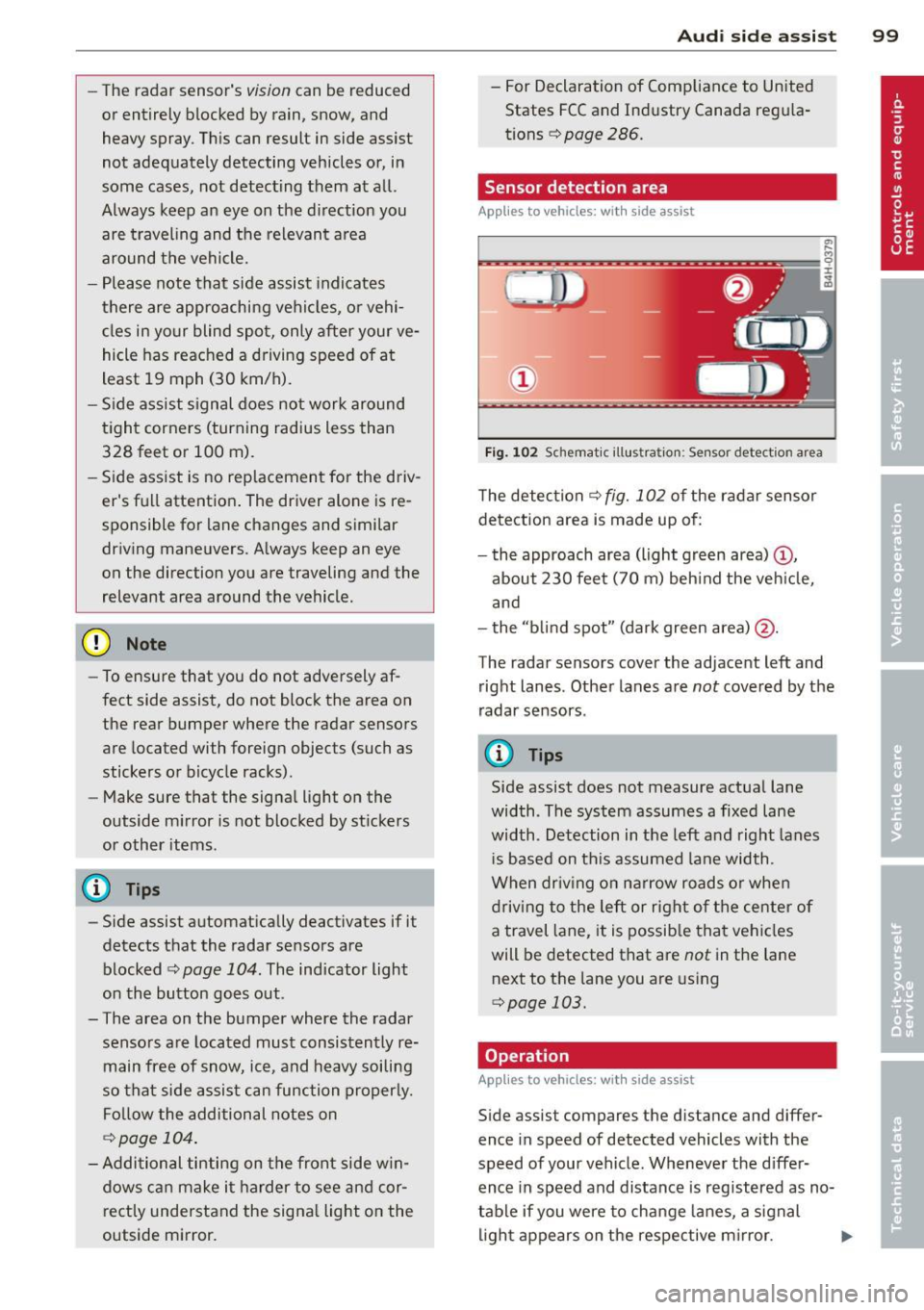
Sensor detection area
Applies to vehicles: with side assist
t
Fig. 102 Sc hemat ic illu st ration : Sen sor detect io n area
The detection ¢ fig. 102 of the radar sensor
detection area is made up of:
- the approach area (light green area)@,
about 230 feet (70 m) beh ind the veh icle,
and
- the "b lind spot" (dark green area) @.
The radar sensors cover the adjacent left and right lanes. Other lanes are
not covered by the
radar sensors .
(D Tips
Side assist does not measure actual lane
width. The system assumes a fixed lane
width . Detection in the left and right lanes
i s based on this assumed lane width .
When dr iv ing on narrow roads or when
driving to the left or right of the center of
a travel lane, it is possib le that vehicles
will be detected that are
not in the lane
next to the lane you are using
.:!> page 103.
Operation
App lies to vehicles: with side assist
Side assist compares the distance and differ
ence in speed of detected vehicles with the
speed of your vehicle . Whenever the d iffer
ence in speed and distance is registered as no
table if you were to change lanes, a signal
light appears on the respective m irror. ..,.
Page 102 of 302

100 Audi side assist
The signal can light up i f you are passed by a
vehicle or if yo u are passing another vehicle.
If you p ass another vehicle slowly (difference
in speed less than 9 mph, or 15 km/h), the
signal light will come on as soon as the other
ve hicle is in your blind spot and is detected by
side assist . When the difference in speed is
greater, the signa l light will not come on.
Informational and alert stage signals
App lies to vehicles: with side assist
Side assist has two s ignal stages:
- the informationa l stage signal, and
- the a le rt stage signa l.
Side assist helps you by using the appropriate
signal s tage, depending on whether or not
you have activated the turn signal, and thus
have indicated that you are or are not chang
ing lanes.
Informational stage signal
As long as you have not activated the turn sig
nal, side assist informs you of detected vehi
cles that are registered as being in a notable
l ocat ion if you were to change lanes. Whenev
er the detected vehicle's difference in speed
and distance is registered by side assist as no
table, the signal light on the respective m irror
produces muted illum ination.
The brightness of the informational stage sig
na l is designed not to be as intense, so that it
does not interfere with your view of the road
when you are driving and have no intention of
changing lanes. When you look in the outside
mirror, you can clearly see the informat ional
stage signa l.
Alert stage signal
When you activate the turn signal, and side
assist has detected a vehicle in a notable loca
tion on that part icular side, the signal light on
this side mirror flashes bright ly. The repeated
brief and bright flashing of the alert stage
signal reminds you to carefully check traffic to
the rea r in the outs ide mir ror and over you r shou
lder, so that you can safely comp lete the
lane change ¢.&.
in Safety tips on page 104.
(D Tips
The brightness of the s ignal light on the
outside mirrors can be adjusted with the
MMI ¢page 103.
Driving situation: Fast approaching
vehicles
Applies to vehicles: with side assist
Fig . 103 Side assist: Fast approac hing veh icles
(!) Signal on outside mirror does not light
up
No vehicle was dete cted by the sensors. The
signal on the outside mirror does not light up
¢ .&. in Safety tips on page 104.
@ Informational stage signal lights up
A fast approach ing vehicle - in the left-hand
l ane fo r example - was detected by the sen
sors. Although th is vehicle is still fa r away, it
shou ld be taken into account if you were to
change lanes, due to the considerable differ
ence in speed. The informationa l stage signal
on the outside mirror lights up
¢ page 100. ..,.
Page 103 of 302

@ Alert stage signal flashes
If you activate your turn signal in driving sit
uation @, the signa l briefly f lashes repeated
ly. Side assist is a lerting you to a vehicle that
you may not have noticed.
@ Tips
- The faster a vehicle approaches from the
rear, the sooner the signa l on the outside
mirror lights up. Side assist will signa l,
at the latest, when a detected vehicle en
ters your "blind spot".
- When vehicles approach very quickly,
changing lanes can be dangerous even if
the signal on the outside mirror does not
light up.
Driving situation: Slowly approaching
vehicles
Appl ies to vehicles : wit h side ass ist
®
Fig. 104 Side assist: Slowly approaching veh icles and
veh icles in you r b lin d spot
@ Signal on outside mirror does not light
up
A vehicle approaching slowly -in the left-hand
lane for examp le -was detected by the sen
sors. Because of the small difference in speed
and the considerab le distance from your vehi-
Audi side assist 101
cle, the signal on the outside mirror will not
light up¢.&
in Safety tips on page 104.
@ Informational stage signal lights up
The distance between your veh icle and that of
the slowly approaching vehicle has narrowed.
T he informational stage signal on the outside
mirror lights up.
As soon as the difference in speed and dis
tance is registered as notable if you were to
change lanes, a signal on the m irror lights up.
Side assist will signal at the latest when a de
tected vehicle enters your "blind spot".
@ Alert stage signal flashes
If you activate your turn signal in driving sit
uation @, the signal light briefly flashes re
peatedly. Side assist is alert ing you of a vehi
cle that you may not have noticed.
(D Tips
- Th e faster a vehicle approaches from the
rear, the sooner the signal on the outside
mirror lights up. Side assist will signal,
at the latest, when a detected vehicle en
ters your "blind spot".
- When vehicles approach very quickly,
changing lanes can be dangerous even if
the signal on the outside mirror does not
light up.
Page 104 of 302
102 Audi side assist
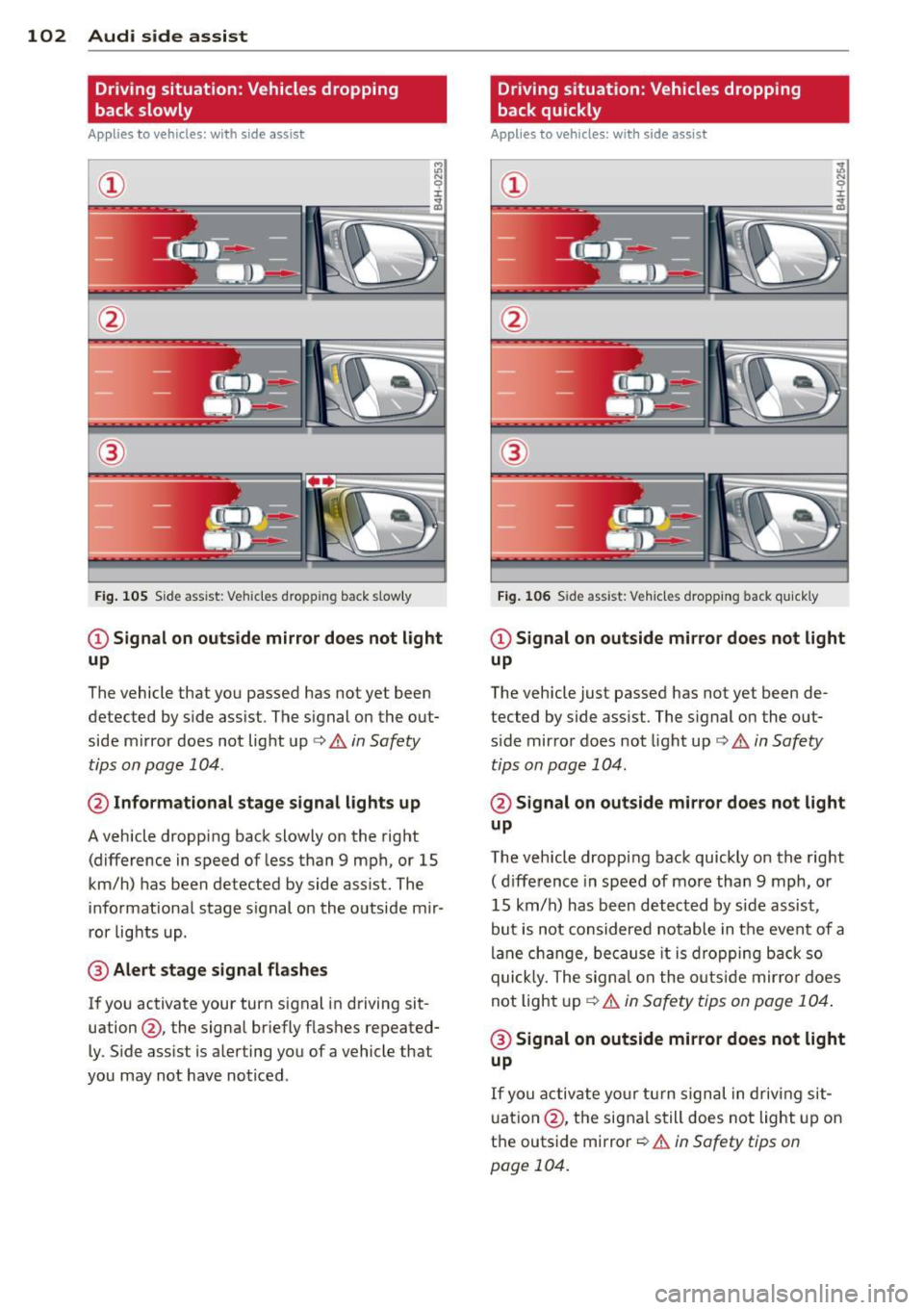
Driving situation: Vehicles dropping
back slowly
Applies to vehicles: with side assist
i:i N 9 J:
--- ----::~
®
Fig. 105 Side assist: Veh icles dropp ing back s low ly
CD Signal on outside mirror does not light
up
The vehicle that you passed has not yet been
detected by side assist . The signal on the out
side mirror does not light up¢
A in Safety
tips on page 104 .
@ Informational stage signal lights up
A vehicle dropping back slowly on the right
(difference in speed of less than 9 mph, or 15
km/h) has been detected by side assist. The
informational stage signal on the outside mir
ror lights up.
@ Alert stage signal flashes
If you activate your turn signal in driving sit
uation@, the signal briefly flashes repeated
ly. Side assist is alerting you of a vehicle that
you may not have noticed .
Driving situation: Vehicles dropping
back quickly
Applies to vehicles: with side assist
®
Fig. 106 Side assist: Ve hicles dropp ing back quickly
CD Signal on outside mirror does not light
up
The vehicle just passed has not yet been de
tected by side assist. The signal on the out
s ide mirror does not light up
Q A in Safety
tips on page 104.
@ Signal on outside mirror does not light
up
The vehicle dropping back quickly on the right
( d ifference in speed of more than 9 mph, or
15 km/h) has been detected by s ide assist ,
but is not considered notable in the event of a
lane change, because it is dropping back so
quick ly. The signal on the outs ide mirro r does
not light up¢
A in Safety tips on page 104 .
@ Signal on outside mirror does not light
up
If you activate your turn signal in driving sit
uation @, the signal still does not light up on
the outside mirror
Q A in Safety tips on
page 104.
Page 105 of 302

MMI settings
Applies to vehicles: with side assist
The basic brightness setting of the signal on
the outside mirror can be adjusted via the
MMI.
~ Select: ICARI function button> Car systems
control button > Driver assist > Audi side
assist.
The brightness of the signal light for both the informational and alert stages is automatical
ly adjusted to ambient light conditions. In ad
dition, you can adjust the
basic brightness
separately, via the brightness function .
While making the adjustment, the new brightness setting is displayed briefly . The
brightness displayed is that of the informa
tional stage signal. The alert stage signal
brightness is linked to the informational stage
signal brightness.
The informational stage signal brightness
should be adjusted so that you notice the sig
nal illumination when you look in the outside
mirror, but not when you look forward
through the windshield .
In very dark or light surroundings, the auto
matic brightness setting adjusts signal light
brightness to maximum or minimum intensi
ty, as needed. In circumstances such as these,
you may not notice any change in the bright
ness on the outside mirror when adjusting the
basic brightness. You may not notice the
change until lighting conditions are normal
again.
(D Tips
- Side assist is not active when the basic
brightness is adjusted. The signal light
comes on briefly to help you make the
adjustment .
- Your settings are automatically stored
and assigned to the remote control key
being used.
Audi side assist 103
General information
Applies to vehicles: wit h side assist
Side assist has limits and cannot detect vehi
cles under all road and weather conditions.
Please remember system limitations and nev
er rely on the system, especially when :
- driving through curves
~page 103,
-lanes are of different widths ¢ page 103.
When driving through curves
Applies to vehicles: wit h side assist
Side assist cannot detect vehicles in curves
with a turning radius of less than 328 feet
(100 m).
When driving through a curve, it is possible
that side assist may register a vehicle two
lanes over, and the signal on the outside mir
ror will light up.
Lane width
Applies to vehicles: wit h side assist
Fig. 107 Lanes of a normal width are in detectio n area
Fig. 108 Narrow lanes: Sid e assist may detect vehicles
two lanes away
Side assist's detection area is designed to cov-
er lanes of standard width to the left and ..,.
Page 106 of 302

104 Audi side assist
right of your travel lane, depending on wheth
er you drive in the center of your lane or closer
to the edge.
If you drive in narrow lanes, s ide ass ist's de
tection a rea may a lso include other lanes -es
pecia lly if you tend to drive on the edge of
your lane¢
fig. 108. Under these cond it ions ,
vehicles can also be detected that are two lanes away, and side assist then could switch
between the informat ional and warn ing stage
signals .
When driving in very w ide lanes, vehicles in
the adjacent lane may not be detected be
cause they are not inside the detection area.
Notes
Messages in instrument cluster display
Applies to vehicles: with side assis t
If side assist turns off automatically, the indi
cator light on the button wi ll go out and you
will see a message in the instrument cluster
d isplay:
Audi side assist: not available. sensors
blocked
The side assist sensors are built into the rear
bumper on the left and right (not visible on
the outside)
¢ page 98, fig. 99 . To ensure that
you do not adversely affect the way side assist
functions, foreign objects (such as stickers or
b icycle racks) should not be attached to the
a rea on the rear bumper where the sensors
are located. If side assist functions are ad
ve rsely affected, you will see this message in
the instrument cluster display. Remove any
thing that may be blocking the sensors .
If no vehicl e is detected for a longer period of
time while driving, side assist will also switc h
off a utomatica lly.
Audi side assist currently not available
If there is a temporary problem (such as the
ve hicl e's battery charge being low), s ide ass ist
cannot be activated tempo rari ly.
Audi side assist: system fault
Have the system checked by an authorized Au
di dealer or qualified workshop.
Audi side assist: not available when
towing
The radar senso r's view is limited when tow
ing a trai le r. F or vehicles with a factory instal
l ed towing hitch or a trailer hitch that was in
sta lled later according to factory specifica
tions, side assist is automatically deactivated as soon as the electrical connection to the
trailer's electrical socket is made, and this sta
tus message appears in the instrument clus
ter display . Deactivation cannot be guaran
teed when using a retrofitted towing hitch
that was
not installed acco rding to facto ry
specifications.
Safety tips
Appl ies to vehicles : wi th side assist
The side assist detection may be limited when
driv ing aro und narrow street corners, on hilly
streets, and under poor weather cond itions.
It is possible that the radar sensors may also
detect other objects, such as high or stag
gered guardrails .
Side assist does not measure actual lane
width. The system assumes a fixed lane width.
Detection in the left and right lanes is based
o n this ass umed lane width . When driving on
narrow roads or when driv ing to the left or
right of the center of a trave l lane, it is poss i
ble that vehicles will be detected that are
not
in the lane next to the lane you are using.
A WARNING
- Improper reliance on the side assist sys
tem can cause collis ions and serious per
sonal injury:
- Never rely on ly on side assist when
changing lanes .
- Always check rear view mirrors to make
sure that it is sa fe to change lanes.
- Side assist cannot detect all vehicles un-
der all conditions- danger of accident! ..,.
Page 107 of 302

-Side assist cannot detect vehicles in time
to alert you when they approach from
behind at very high speed, or fall drop
back very quickly .
- The radar sensor 's
vision can be reduced
or entirely blocked by rain, snow, and
heavy spray . This can result in side assist
not adequately detecting vehicles or, in
some cases, not detecting them at all.
Always keep an eye on the direction you are traveling and the relevant area
around the vehicle.
- Please note that side assist indicates
there are approaching vehicles, or vehi
cles in your blind spot, only after your ve
hicle has reached a driving speed of at
least 19 mph (30 km/h).
- Side assist signal does not work around
tight corners (turning radius less than
328 feet, or 100 m).
- Side assist is no replacement for the driv
er's full attention. The driver alone is re
sponsible for lane changes and similar driving maneuvers. Always keep an eye
on the direction you are traveling and the
relevant area around the vehicle.
(D Note
To ensure that side assist is not adversely
affected, you should not block the area on
the rear bumper where the radar sensors
are located with foreign objects (such as
with stickers or bicycle racks).
If the positions of the radar sensors have
been changed as a result of a rear end-col
lision, for instance, have side assist
checked by an authorized Audi dealer for
safety reasons.
Audi side assist 105
Page 192 of 302
190 Intelligent technology
Intelligent technology Notice about data
recorded by vehicle
control modules
Your veh icle is not equipped with an Event Da
ta Recorder (EDR), installed by some manu
facture rs for the express purpose of capturing
data for retrieval after an accident or crash
event . EDR's are sometimes ca lled "crash re
corders".
Some state laws restrict the retr ieval or down
loading of data stored by EDR's that were in
stalled in a vehicle for the express purpose of
retrieving data after an accident or crash
event without the owner's consent.
A lthough your vehicle is not equipped with an
EDR, it is equipped with a number of electron
ic control modules for various vehicle systems
such as, for example, eng ine function, em is
sion control, as well as for the airbags and
safety belts.
These electronic contro l modules also record
vehicle-re lated data during normal vehicle op
eration for diagnostic and repair purposes.
The recording capacity of the electronic con
trol modules is limited to data (no sound is re
corded) and only a small amount of data is ac
tually recorded over a ve ry limited pe riod of
time and stored when a system fault or other
cond ition is sensed by a control unit. Some of
the data then stored may re late to vehicle
speed, direction, braking as we ll as restraint
system use and performance in the event of a
crash or other condition. Stored data can only
be read and downloaded with special equip
ment.
Electronic stabilization
program (ESP)
Description
ESP helps to improve road holding and vehicle
dynamics to help reduce the probability of
skidd ing and loss of veh icle control. It works
only when the engine is running. ESP detects certain difficult driving situat
ions, including
when the vehicle is beginning to spin (yaw) out of control and helps you to get the veh icle
back under control by se lectively braking the
wheels, and/or reducing engine power and
providing steer ing assistance to help hold the
vehicle on the driver's intended course. The in
dicator light
liJ in the instrument cluster
blinks when ESP is taking action to help you
control the vehicle.
ESP has limitations.
It is important to remem
ber that ESP cannot overcome the laws of
physics. It will not always be able to help out
under all conditions you may come up against.
For example, ESP may not always be able to
help you master situations where there is a
sudden change in the coefficient of friction of
the road surface. When there is a section of dry road that is suddenly covered w ith water,
slush or snow, ESP cannot perform the same
way it wou ld on the dry surface . If the vehicle
hydroplanes (rides on a cushion of water in
stead of the road surface), ESP will not be
able to help you steer the vehicle because con
tact with the pavement has been interrupted
and the vehicle cannot be braked or steered.
During fast cornering, particularly on winding
roads, ESP cannot always deal as effectively
with difficult driving situations than at lower
speeds. When towing a trailer, ESP is not able
to help you regain control as it would if you
were not tow ing a trailer.
Always adjust your speed and driving style to road, traffic; and weather condit ions. ESP can
not override the vehicle's physical limits, in
crease the available traction, or keep a ve hicle
on the road if road departure is a result of
driver inattention. Instead, ESP improves the
poss ibility of keeping the vehicle unde r con
trol and on the road during extreme maneu
vers by using the driver's steering inputs to
help keep the vehicle going in the intended di
rection . If you are traveling at a speed that
causes you to run off the road before ESP can
provide any assistance, you may not experi
ence the benefits of ESP .
Page 210 of 302
208 Cleaning and protection
-Never wash your car in bright sunlight.
Drops of water act as magnifying lenses
and may damage your paint.
- When you wash your car in the winter: if
you rinse your vehicle with a hose, be
careful not to aim the stream of water
directly at locks, or at door or hatch
openings - they can freeze shut.
- Never use sponges des igned to remove
i nsects, or any kitchen scouring sponges
or similar products . They can damage
your paint finish .
- Never use a dry cloth or sponge to clean
the headlights. Only use wet cloths or
sponges to prevent scratches .
It is best
to use soapy water.
- You should remove debris (such as in
sects) from the headlight lenses on a
regular basis, fo r example when refuel
ing your vehicle. Never clean the head
lig hts w ith a dry cloth or sponge. Use a
wet cloth or sponge . It is best to use
soapy water.
@ For the sake of the environment
I n the interest of the environment, the ve
hicle should only be washed in special
wash bays.
Washing your vehicle with a power
washer
Cleaning the exterior of your car with a high
pressure power washer is safe as long as you observe a few simple rules.
• Before using the power washer, make sure
you have read and understood the WARN
INGS
c:> A in General information on
page 206 .
• Always follow the operating instructions for
the power washer .
• Make sure that the jet on the spray hose pro
duces a "fan shaped spray".
• Do
not hold the spray nozzle too close to
soft materia ls.
When cleaning the vehicle wit h a power wash
er
always follow the operating instructions. T
his applies particu larly to the
operating
pressure
and the spraying distance. Keep a
distance from soft materials such as rubber
hoses or insulating material as well as sensors
and camera lenses.
Do not use a jet which sprays water in a
di rect
stream
or one that has a rotating jet .
Water temperature should not exceed 140 °F
(60 °().
A WARNING
Never wash tires with a jet that sprays wa
ter in a direct stream . This could cause in
v is ible damage to the t ires and weaken
them, even if the spray is from
a relatively
long distance and for a short time. Dam
aged and weakened tires can fail and cause
accidents and personal injury .
(D Note
To avoid damaging your vehicle, always
make sure that there is suffic ient d istance
between the spray head and soft materials
like rubber hoses, plast ic parts and sound
deadening materials as well as sensors
and camera lenses. Never aim the sp ray
head at the same point for a long time.
This also applies to cleaning headlights
and painted bumpers. Remember: the
closer the nozzle is to the surface of the
mater ia l, the greater the stress on the ma
terial.
Sensors and camera lenses
- Remove snow with a hand brush and remove
ice with a de-icing spray that does not con
tain solvents .
- Clean the sensors (adaptive cruise control*,
pa rking system*) w ith a cleaning so lution
that does not contain so lvents and a soft
cloth.
- The camera lens or the area in front of the
camera lens is normally cleaned by the
w indshie ld w ipers (Audi lane assist*) or
headlight wipers (night vision system*) . If
the lens or the area is exceptionally dirty,
111-