steering AUDI A8 2011 User Guide
[x] Cancel search | Manufacturer: AUDI, Model Year: 2011, Model line: A8, Model: AUDI A8 2011Pages: 302, PDF Size: 76.07 MB
Page 56 of 302
54 Seat s a nd s tor ag e
Seats and storage
General recommen
dations
Why is your seat adjustment so
important?
The safety belts and the airbag system can
only provide maximum protection if the front
seats are correctly adjusted.
There are various ways of adjust ing the front
seats to provide safe and comfortable support
for the driver and the front passenger. Adjust
you r seat prope rly so that :
- you can easily and quick ly reach all the
switches and controls in the instrument
panel
-your body is prope rly supported thus reduc
ing physical stress and fatigue
- the safety be lts and airbag system can offe r
maximum protection
¢ page 145 .
In the following sec tions, you will see exactly
how you can best adjust you r seats .
There are special regulations and instructions
for insta lling a child seat on the front pas
senger's seat. Always fo llow the information
regarding child safety provided in
q page 169, Child Safety .
A WARNING
Incorrect seating position of the driver and
all other passengers can result in serious
personal injury.
- Always keep your feet on the floor when
the vehicle is in motion -never p ut your
feet on top of the instrument panel, out
of the w indow or on top of the seat cush
ion . Th is app lies especially to the passen
gers .
If your seating position is incorrect,
you increase the r isk of injury in the case
of sudden braking or an acc ident.
If the
airbag infla tes and the seating position
is incorrect, this could resul t in personal
injury or even death.
- It is important for bo th the driver and
front passenger to keep a distance of at least 10 inches (25 cm) between them
selves and the steering wheel and/or in
strument panel. If you're s itting any
closer than th is, the a irbag system can
not protect you properly . In addition, the
front seats and head restraints must be
adjusted to your body height so that they
can give you max imum protect ion.
- Always try to keep as much distance as
pos sible between yourself and the steer
ing wheel o r instrument panel.
- Do not adjust the driver's o r front pas
senger's seat whi le the vehicle is moving.
Your sea t may move unexpected ly, caus
ing sudden loss of vehicle control and
personal injury . If you adjust yo ur seat
while the veh icle is moving, yo u are out
of posit ion.
Driver's seat '
The correct seat position is important for safe
and relaxed driving.
We recommend tha t you adjus t the dr iver's
seat in the fo llowing manner :
"' Adjust th e seat in fore and aft direction so
t ha t you can eas ily push the peda ls to the
floor wh ile keeping your knees sl igh tly bent
q A in Why is your seat adjustment so im
portant? on page 54.
"' Adjust the backrest so that when you sit
w ith your back agains t th e backrest, you can
still g rasp the top of the steering wheel.
"' Adjust the head restraint so the upper edge
is as even as poss ible with the top of your
head . If that is not poss ible , try to adjust
the head restraint so that it is as close to
t his pos it ion as possib le
q page 61.
A WARNING
Neve r place any objects in the dr iver's foot
well. An object could get into the pedal
area and interfere with pedal function . In
case of sudden braking or an acc ident, you
would not be able to brake or accelerate .
Page 64 of 302
62 Seats and storage
-Correctly adjusted head restraints and
safety be lts are an extreme ly effective
combination of safety features.
Seat memory
Description
App lies to vehicles: with memory function
The memory function allows you to quickly
and easily sto re and recall personal seating
profiles for the driver, front passenger and
outer rear seats*. The memory function is op
erated through the master key and the memo ry buttons in the driver 's/front passenge r's
doors and the rear doors*.
The driver's seating profi le is stored and as
signed to the master key each time the vehicle
is locked . The seating profile is recalled auto
mat ically when the veh icle is unlocked . If two
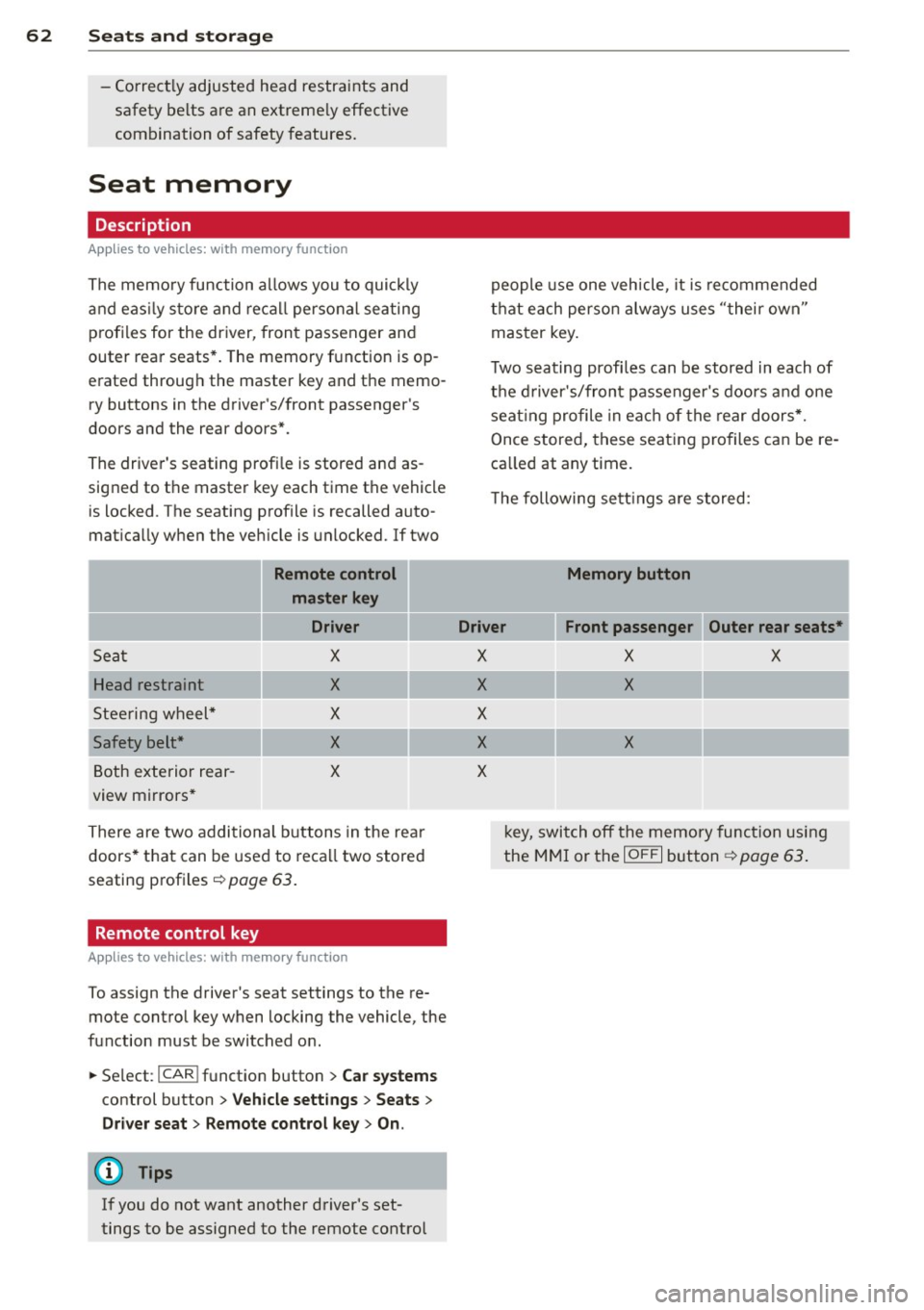
Remote control
master key
Driver
Sec1t X
Head restraint X
Steering wheel* X
Safety belt* X
Both exterior rear-X
view mirrors*
There are two additional buttons in the rear
doors* that can be used to recall two stored
seating profiles
r:=> page 63.
Remote control key
Applies to vehicles: with memory function
To assign the driver's seat settings to the re
mote contro l key when locking the vehicle, the
function must be switched on.
• Se lect :
I CAR ! function button > Car systems
control button > Vehicle settings > Seats >
Driver seat > Remote control key> On .
(D Tips
If you do not want another driver's set
tings to be assigned to the remote control people
use one veh icle, it is recommended
that each person always uses "their own"
master key.
T wo seating profi les can be stored in each of
the driver's/front passenger's doors and one
seat ing profile in each of the rear doors*.
Once stored, these seating profiles can be re
ca lled at any time.
T he following sett ings are stored:
Memory button
Driver Front passenger Outer rear seats*
X
X
X
X
X
X X
X
X
k ey, switch off the memory function using
the MMI or the
IO FF I button ~ page 63.
Page 79 of 302
place heavy loads on a small area of the
seat.
Setup
The climate control system setup is accessed
through the MMI.
.. Se lect : I CARI f u nct ion but ton> Car sy stem s
control b utton > AC .
Rear cabin settings*
When th is function is selected, all sett ings for
the rear can be adjusted through the climate con trol system in the cockpit. The cl ima te
con trol system setti ngs cannot be adjus ted in
the rear seat a t the same time . This func tion
switches off after a ce rtain period of time or
when one of the dials in the cockpit is press
ed.
Auto reci rculation*
The sens itivity level of the au tom atic rec i rcu
l ation mode can be set at v arious leve ls from
off to sensit ive . When recirculation mode ia:. !
is switched on, air recirculation is contro lled
automatically . You must press the~ button if
fog forms on the windows.
Footwell temperature
You ca n ad just the footwe ll tempe rat ur e so
that it is cooler or wa rmer.
AC mode
T he strengt h of t he airflow ca n be adjusted to
light, med ium o r strong.
Windshield heat*
When the defroster~ is switched o n and the
Auto sett ing is selected, the windshie ld de
froster is controll ed automatically .
Solar roof*
When the ignition is off, so lar-powered park
i n g vent ilation may switch o n, as long as
- there is sufficient sunlight,
- th e outside tempe ratu re is not too low,
- the center vents are open,
- the sun roof is clos ed o r til te d and
W arm and cold 77
- recirculation mode l""' I (climate control sys
tem) and
Auto ( M MI) are selected.
Pa rking ventila tion is cont rolled au toma tic ally
in the
Auto sett ing.
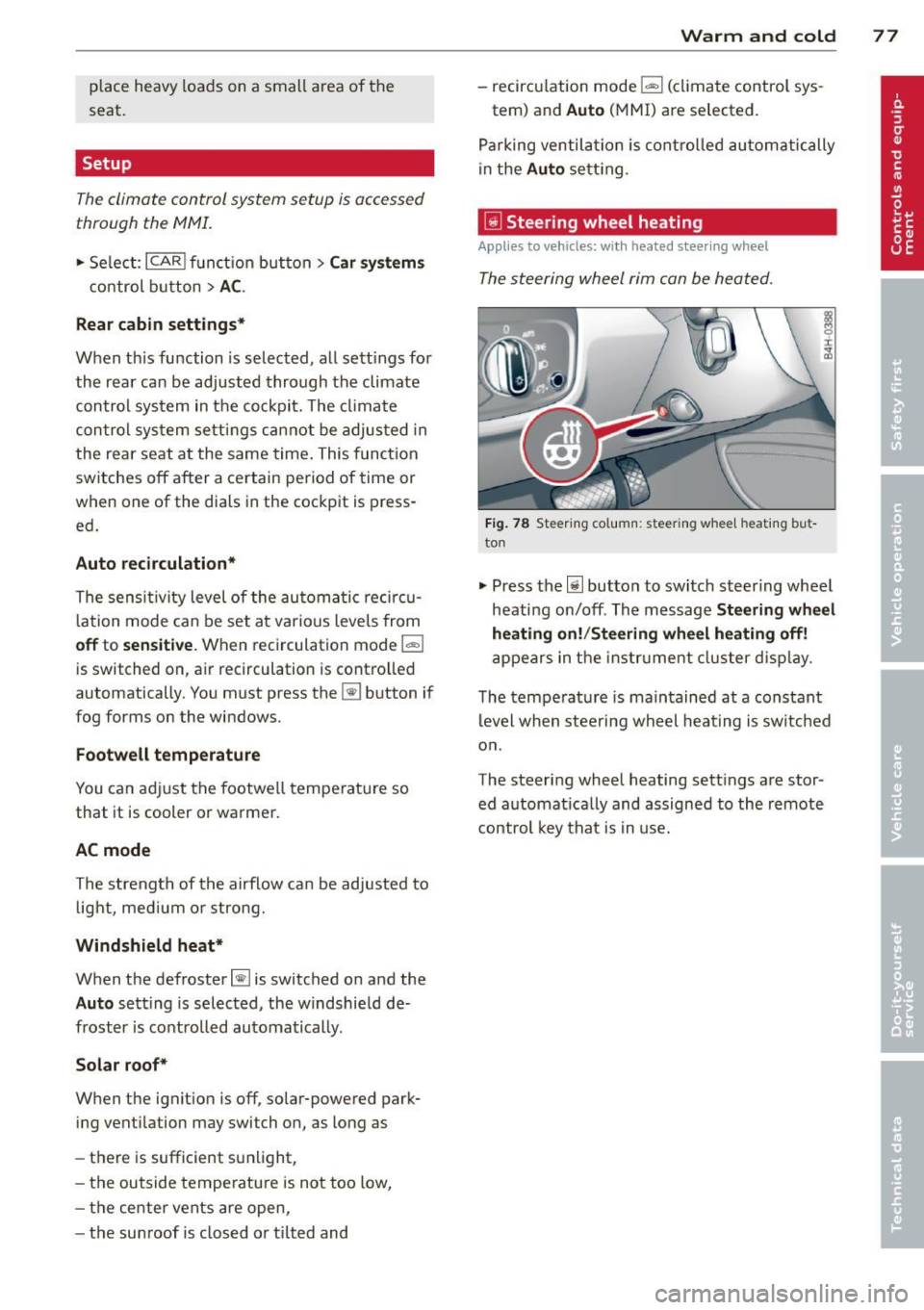
~ Steering wheel heating
App lies to vehicles : wi th hea ted s teering wheel
The steering wheel rim con be heated .
Fig. 7 8 Steeri ng col umn: steering w hee l h eating bu t
to n
.. Press the lil button to switc h steer ing whee l
heating on/off . Th e message
Ste ering wh eel
heating on! /Steering wheel heat ing off!
a p pears in the instr ument cluster d is pla y.
T he tempe rat ure is ma intained at a constant
l evel when steering whe el heat ing is sw itc hed
o n.
The steering wheel heating sett ings are stor
ed a utomat ically and assigne d to the remote
control key that is in use.
Page 80 of 302
78 On the road
On the road
Steering
Adjusting steering wheel position
The steering wheel position can be adjusted
for height and reach .
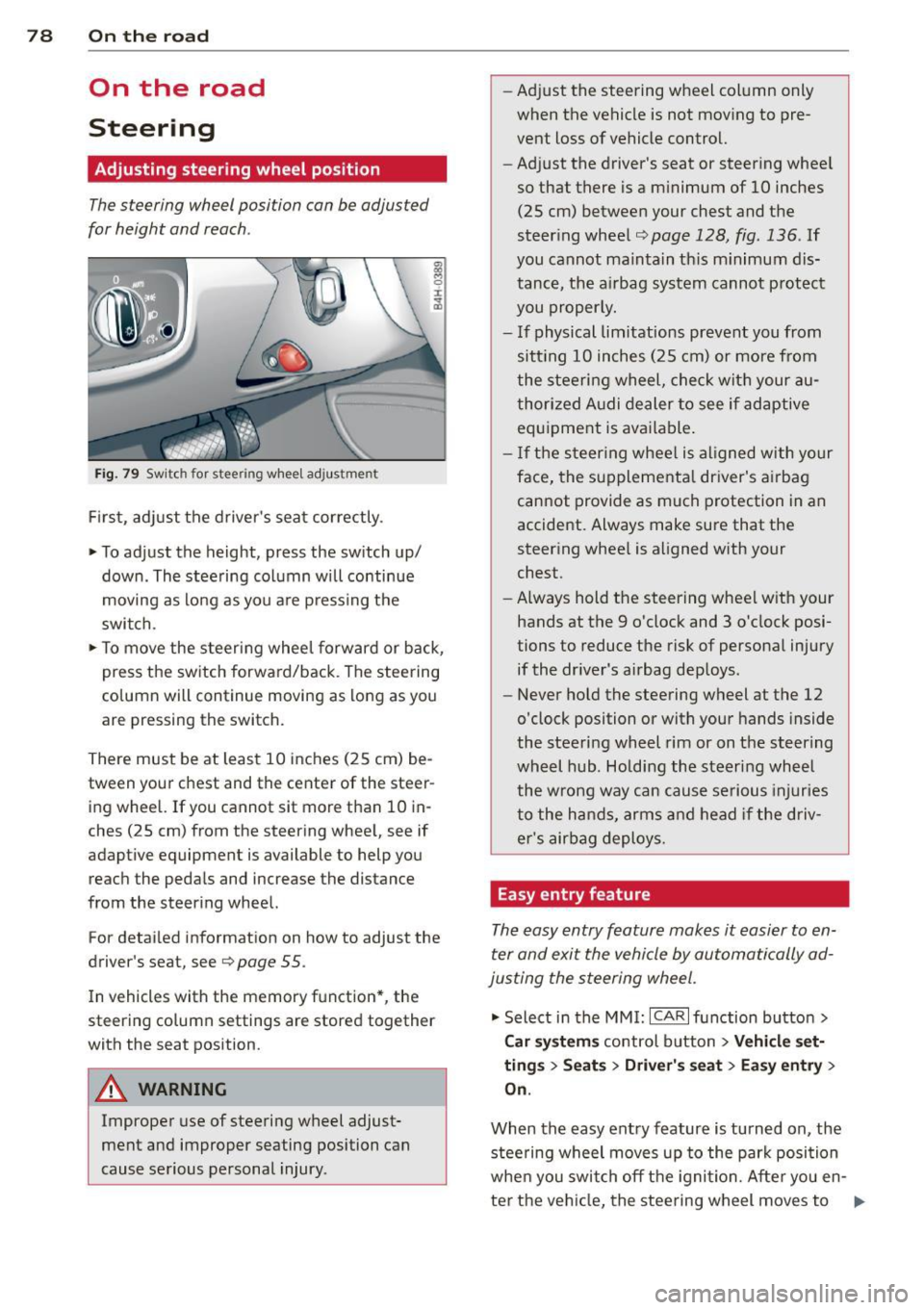
Fig. 79 Switch for steer ing wheel adjustment
First , adjust the driver's seat correctly .
• To adjust the height, press the switch up/
down. The steering column will continue
moving as long as you are pressing the
switch.
• To move the steering wheel forward or back,
press the switch forward/back . The steering
column will continue moving as long as you
are pressing the switch.
There must be at least 10 inches (25 cm) be
tween your chest and the center of the steer ing wheel. If you cannot sit more than 10 in
ches (25 cm) from the steering wheel, see if
adaptive equipment is available to help you
reach the pedals and increase the distance
from the steering wheel.
For detailed information on how to adjust the
driver's seat, see
Q page 55.
In vehicles with the memory function* , the
steering column settings are stored together
with the seat position.
A WARNING
Improper use of steering wheel adjust
ment and improper seating position can
cause serious personal injury. -
Adjust the steering wheel column only
when the vehicle is not moving to pre
vent loss of vehicle control.
- Adjust the driver's seat or steering wheel
so that there is a minimum of 10 inches
(25 cm) between your chest and the
steering wheel
Q page 128, fig . 136 . If
you cannot maintain this minimum dis
tance, the airbag system cannot protect
you properly.
- If physical limitations prevent you from
sitt ing 10 inches (25 cm) or more from
the steering wheel, check with your au
thorized Audi dealer to see if adaptive equipment is available.
- If the steering wheel is aligned with your
face, the supplemental driver's airbag
cannot provide as much protection in an
accident. Always make sure that the
steering wheel is aligned with your
chest.
- Always hold the steering wheel with your
hands at the 9 o'clock and 3 o'clock posi
tions to reduce the risk of personal injury
if the driver's airbag deploys.
- Never hold the steering wheel at the 12
o'clock position or with your hands inside
the steering wheel rim or on the steering
wheel hub. Holding the steering wheel
the wrong way can cause serious injuries
to the hands, arms and head if the driv
er's airbag deploys.
Easy entry feature
The easy entry feature makes it easier to en
ter and exit the vehicle by automatically ad
justing the steering wheel.
• Select in the MMI: ICARlfunction button>
Car systems control button > Vehicle set·
tings > Seats > Driver's seat> Easy entry >
On.
When the easy entry feature is turned on, the
steering wheel moves up to the park position
when you switch off the ignition. After you en-
ter the vehicle, the steering wheel moves to .,..
Page 81 of 302

the stored position as soon as you switch on
the ignition.
Starting and stopping
the engine
Starting the engine
This button switches on the ignition and
starts the engine.
Fig. 80 Center console: S TART ENGINE S TOP b utton
" Step on the brake pedal¢&_ .
.. Press on the !START ENGINE STOP I button
¢ fig. 80 -the engine w ill start .
By pressing the
I START ENGINE STOP I button
without depressing the brake pedal, the igni tion is on and switched off by pressing it
again.
After a cold engine is started, there may be a
brief period of increased noise because oil
pressure must first build up in the hydraulic
valve adjusters. This is normal and not a cause
for concern.
If the engine should not start immediately,
the starting process is automatically stopped
after a short time. Repeat starting procedure.
Driver message in the instrument cluster
display
Press brake pedal to start engine
This message appears if you press the
I START ENGINE S TOP I button to start the en
gine and do not depress the brake pedal. The
engine can only be started if the brake pedal is depressed.
!! Convenience key: Is key not in the vehi
cle?
On the road 79
This message appears along with thee sym
bol if the master key is removed from the ve
hicle with the eng ine running.
It is intended
to remind you (e.g . when changing drivers)
not to continue the journey without the mas
ter key.
If the master key is no longer in the veh icle,
you cannot switch on the ignition after stop
ping the engine and you also cannot start the
engine again . Moreover, you cannot lock the
vehicle from the outside with the key.
Shift to P, otherwise vehicle can roll away.
Doors do not lock if lever is not in
P.
This message appears for safety reasons
along with an audible warning tone if the
P
selector lever position is not engaged when
stopping the engine with the
I START ENGINE STOP I button. Select the P se
lector lever position . Otherwise the vehicle
cou ld roll and it cannot be locked .
Key not recognised. Hold back of key against
marked area . See owner's manual.
If the indicator light turns on and this mes
sage appears, there is a malfunction
¢ page 80.
Steering lock
The steering locks when you turn the engine
off using the
I START ENGINE STOP I button
and open the driver's door. The locked steer ing helps prevent vehicle theft.
A WARNING
- Never allow the engine to run in confined
spaces - danger of asphyx iation.
- Never turn off the engine until the vehi
cle has come to a complete stop.
- The brake booster and power steering
only work when the engine is running. If
the engine is off, you have to use more
force when steering or braking. Because
you cannot steer and brake as you usual
ly would, this could lead to crashes and
serious injuries.
Page 82 of 302
80 On the road
(D Note
-Avoid hig h engine rpm, fu ll throttle and
heavy engine loads unti l the engine has
reached operating temperat ure -other
wise you risk eng ine damage.
- The engine cannot be started by pushing
or towing the vehicle.
- If the engine has been under heavy load
for an extended period, heat b uilds up in
the engine compartment after the en
gine is switched off - there is a risk of
damaging the engine . Allow the eng ine
to run at idle for about 2 minutes before
switching it off.
@ Tips
If you open the driver's door with the igni
tion on, a buzzer sounds and the message
Igniti on is on appears in the instrument
cluster display. Sw itch the ignition off .
Stopping the engine
• Bring your vehicle to a complete stop.
.. Move the se lector lever to the
P or N pos i
t ion .
.. Pre ss the I STAR T ENGINE ST OP I button
r:> page 79, fig. 80 .
Emergency off
If necessary, the engine can be switched off
with the selector lever in the
R , D or S posi
tions . The engine stops if you press the
I S TAR T ENGINE ST OP ! button at speeds be low
6 mph (10 km/h).
A WARNING
- Never turn off the eng ine unti l the vehi
cle has come to a complete stop.
- The brake booster and power steer ing
only work when the engine is runn ing .
If
the engine is off, you have to use more
force when steering or braking. Because
you cannot steer and brake as you usua l
ly wo uld, this could lead to crashes and
serious injuries. -
For safety reasons, you should a lways
park your vehicle w ith the selector lever
in P . Otherwise, the vehicle could inad
vertently roll away .
- After the engine has been switched off,
the radiator fan can cont inue to run for
up to 10 minutes -even with the ignition
sw itched off. It can also sw itch on again
after some time if the coolant tempera
ture rises as the result ofa heat bu ildup
or if the engine is hot and the engine
compartment is additionally heated by
the sun's rays .
(D Note
Do not stop the eng ine immedia tely after
hard o r extended driving. Keep the engine
running for approximate ly two minutes to
prevent excessive heat bui ld-up.
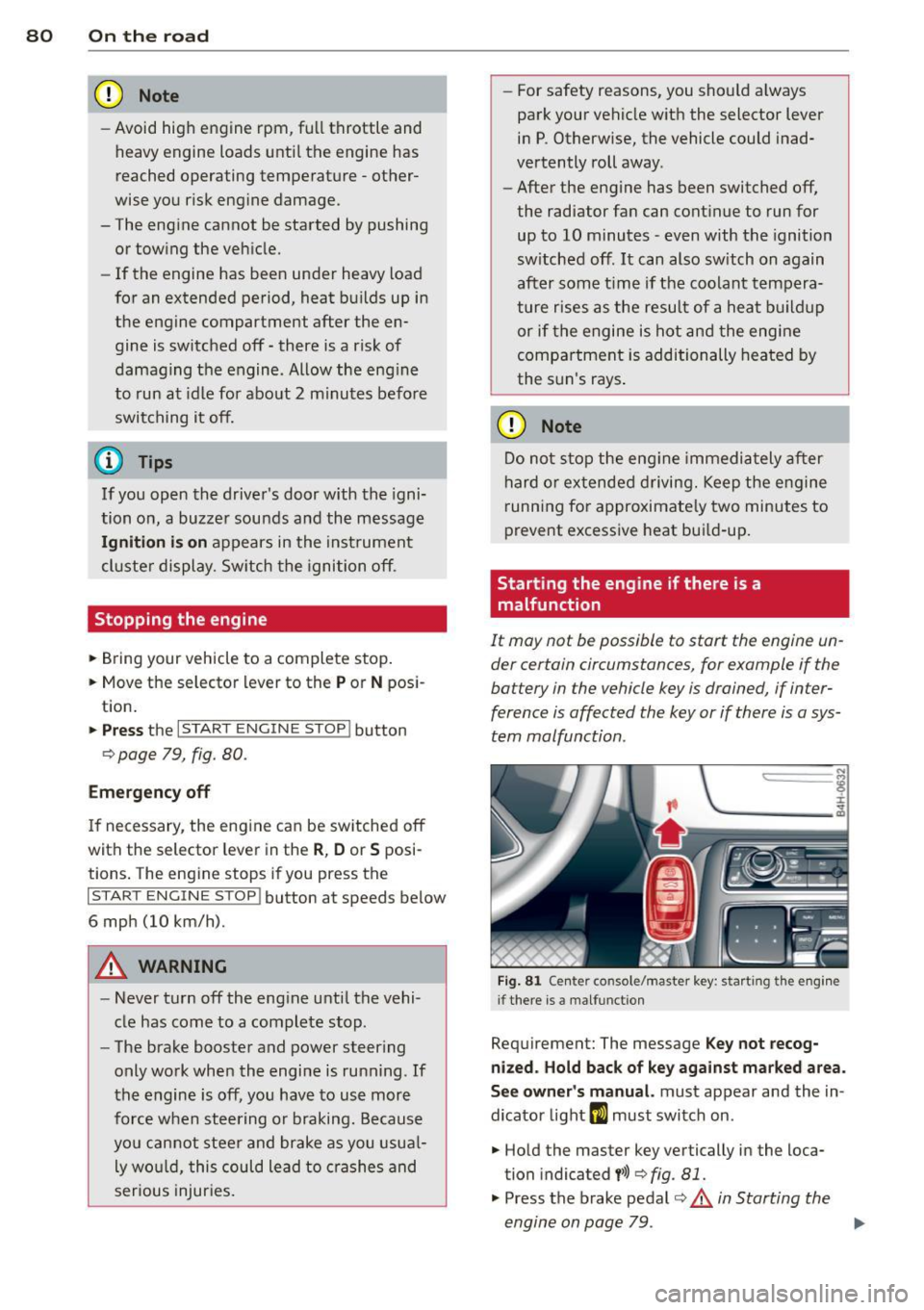
Starting the engine if there is a
malfunction
It may not be possible to start the engine un
der certain circumstances, for example if the
battery in the vehicle key is drained, if inter
ference is affected the key or if there is a sys
tem malfunction.
"' ij
:c
-- --- -~
Fig . 81 Ce nter co nsole/master key: start ing the e ngin e
i f there is a malfunct ion
Requirement: The message K ey not recog
niz ed . Hold back of ke y again st ma rked are a.
See o wner's manual.
must appear and the in
dicator light
m must switch on .
.. Hold the master key vertically in the loca
tion indicated
y >>) <=> fig . 81.
• Press the brake pedal r=> & in Starting the
engine on page 79 .
IJ>,
Page 84 of 302

82 On the road
-Occasiona l noises when the parking
brake is applied and re leased are norma l
and are not a cause for concern .
- When the vehicle is parked, the parking
brake goes through a se lf-test cycle at
regular intervals. Any assoc iated noises
are norma l.
Parking
Various rules apply to prevent the parked ve
hicle from rolling away accidentally.
P ar king
,. Stop the vehicle w ith the foot brake.
,. Pull the switch© to apply the parking
brake.
,. Se lect the
P se lector lever position
9 page 112.
,. Turn the eng ine off q _&. .
In addition on incline s and grad es
,. Turn the steering whee l so that your vehicle
wi ll ro ll against the curb in case it should
start to move .
A WARNING
-When you leave your veh icle -even if on
ly briefly -always take the ignition key
with you. This applies particularly when children remain in the veh icle. Otherw ise
the ch ildren could sta rt t he engine, re
lease the p arking brake or operate e lec
trical equipment (e .g. power windows) .
T he re is the risk of an accident.
- When the vehicle is loc ked, no one -par
t icu la rly not children sho uld remain in
the vehicle . Locked doors make it more
difficult for emergency workers to get in
to the vehicle -putt ing lives at risk.
Start ing from rest
The starting assist function ensures that the
parking brake is released automatically upon starting.
Stopping and appl ying par kin g brake
,. Pull the switch© to apply the parking
brake.
St arting and automatic ally rel easi ng the
parking b rake
,. When you start to dr ive as usual, the park
ing brake is automat ically released and your
veh icle beg ins to move.
When stopping at a traffic signal or stopping in city traffic, the parking brake can be ap
plied . The vehicle does not have to be held
with the footbrake . The parking brake elimi
nates the tendency to creep w ith a dr ive range
engaged. As soo n as you d rive off as usual,
the pa rking brake is re leased automatically
and the vehicle s tarts to move.
Sta rting on slopes
When starting on inclines, the starting assist
prevents the veh icle from u nintent ionally roll
i ng back. The braking fo rce of the par kin g
brake is not re leased unti l su ff ic ient d riving
f orce has been built up a t the wheels.
(D Tips
Fo r safety reasons, the pa rking bra ke is re
l eased automatically o nly when t he d riv
er's safety belt is engaged in the buckle.
Starting off with a trailer
To prevent rolling back unintentionally on an
incline, do the following:
,. Keep the sw itch(®) pulled and depress the
accelerator. The pa rking brake stays applied
and p revents the vehicle from roll ing back
ward .
,. You can release the switch© once you are
sure that you are developing enough for
ward momentum at the whee ls as you de
press the acce lerator.
Page 91 of 302

Adaptive cru ise co ntrol and b rakin g guar d 89
You must also press the b rake pedal when
the vehicle is stopped.
Sw itching adapti ve cruis e co ntrol off
~ Push the lever away from you into position
@ until it clic ks into p lace. The message
A CC off appears.
I ndicator lamps and messages in the instru
ment cluster display inform you about the c ur
rent system status and settings.
@ Indic ator light s
fl-adaptive cruise control is sw itched on . No
veh icles are detected up ahead . The stored
speed is ma inta ined.
I -A moving vehicle is detected up ahead .
The adaptive cruise control system regulates
the speed and distance to the moving veh icle
ahead and accelerates/brakes automat ically.
f:i -adaptive cru ise control is switched on. A
mov ing vehicle up ahead was detected. Your
veh icle remains stopped and will not start
driving automatically.
I -When automat ic braking is not able to
keep enough distance to a previously detected
mov ing vehicle up ahead, you must take con
trol and brake¢
page 90, Prompt for driver
intervention.
© Di splay
If adaptive cruise control is not shown in the
d isplay, you can call it up with the multifunc
tion steering wheel buttons
¢ page 23 .
Based on the symbols in the display, you can
determine if the system is maintaining a dis
tance to the vehicle ahead and what that d is
tance is .
No v ehicle -No vehicle ahead was detected.
White vehicle -A vehicle ahead was detected .
Red ve hicl e -Prompt for the d river to take ac
tion
¢ page 90.
Both arr ow s on the scal e© indicate the dis
tance to the vehicle ahead . No ar row appears
when the vehicle is on an open road and there is no object ahead.
If an object is detected
ahead, the arrow moves on the scale .
T he green zone on the sca le shows the stored
distance. For informat ion on changing the
stored distance ¢
page 91. If the distance
selected is too close or may soon become too
close, the arrows move into the red zone on
the scale .
A WARNING
Improper use of the adaptive cruise con
trol can cause collisions, other accidents
and serious personal injur ies .
- Pressing the
!SET ! button when driv ing at
speeds below
20 mph (30 km/h), w ill au
tomatically accelerate the vehicle to
20
mph (30 km/h), wh ich is the minimum
speed that can be set .
(D Tips
- If you switch the ignit ion or the adaptive
cruise control off, the set speed is e rased
from the system memory.
- You cannot switch the Electron ic Stabili
zation Program (ESP) to the SPORT mode
when adaptive c ruise control is sw itched
on.
Driving in stop-and-go traffic
Appl ies to vehicles: wi th adap tive c ruise control
T he adaptive cru ise contro l system also as
sists yo u in stop-and-go traffic. If a previous
detected vehicle ahead stops, your vehicle wi ll
brake to a stop, within the limits of the sys
tem.
~ To resume driving with adaptive cruise con
trol, tap the acce lerator pedal or
~ Pull the lever toward you into position @
¢ page 88, fig. 89.
(D Tips
- If adaptive cruise control is act ive and
your vehicle does not start driving as ex pected after pu lling the lever once, you
can start out again by tapping the acce l-
erator peda l. ..,.
Page 94 of 302

92 Adaptive cruise control and braking guard
-Your standard settings are automatically
stored and assigned to the remote con
trol key being used .
Audi braking guard
Description
Applies to vehicles: wit h adapt ive c ru ise control
Fig. 94 Instrument cluster: approach warn ing
Audi brak ing guard uses radar sensors and a
video camera . It is active at speeds above
about 6.2 mph (10 km/h) and also works
within system limits when adaptive cruise control is switched off.
On vehicles with aAdaptive cruise control and
Audi side assist (Audi pre sense plus), system
functions also engage when a co llision is im
minent
¢page 188.
What can Audi braking guard do?
When detected in time, the system can assess
situations when a vehicle ahead brakes sud
denly or if your own veh icle is traveling at a
h igh speed and approaching a vehicle up
ahead that is moving more slowly. Audi brak
ing guard does not react if it cannot detect
the situation.
The system advises you of various kinds situa tions :
- The
distance warning is given if you are too
close to the vehicle ahead for a long time. If
the vehicle ahead brakes sharply, you will not be able to avoid a coll is ion. The ind icator
light
I i n the d isplay comes on. Take imme
diate action to avoid the coll is ion and in
crease the distance to the vehicle up ahead. -
The
approach warning is given when a de
tected vehicle up ahead in your lane is mov
ing much more slowly that you are or if it
brakes sharp ly. When this warning is given,
it may only be possible to avoid a collision
by swerving or braking sharp ly . The indicator
light
I and the symbol in the disp lay will
warn you about the danger
c:> fig. 94 . You
w ill also hear an acoustic signal.
If you do not react fast enough or do not react
at all to the situation, Aud i braking guard w ill
intervene by braking and the message
braking
guard intervention
w ill appear.
- If a coll is ion is imminent, the system will
first provide an
acute warning by brak ing
sharply .
- If you do not react to the acute warning, Au
di braking guard will brake w ith increased
force in severa l stages to reduce the speed
in a possible collisio n. On ve hicles w ith
adaptive cruise contro l and Audi side assist
(Audi pre sense plus), the system can brake
with increasing force up to maximum decel
eration shortly before a sensed collision
¢ page 188.
- If
the Audi braking g uard senses that you
are not braking hard enough when a colli
sion is imminent, it can increase the braking
force.
Audi braking guard takes the driver's reaction
time into consideration in order to provide
timely warnings. The system reaction time de creases automatically in some situations, for
example when it detects accelerator pedal use
or steering input . The Audi braking guard in
tervent ion stops in certa in situations, for ex
amp le if you press the accelerato r pedal to
pass the vehicle moving ahead of you in your
lane.
Which functions can be controlled?
You can switch Audi braking guard and the
distance/approach warning on or off in the
M M I c:> page 93, Settings in the MMI.
Page 97 of 302
Audi lane assist Lane assist
De scription
App lies to vehicles: with la ne ass ist
Lane assist helps you keep your vehicle in your
lane.
Lane assist uses a camera to detect lane boun
dary lines . If the system detects that your ve
hicle is about to cross a detected lane boun
dary line, the steering wheel
vibrates to alert
the driver . Lane assist is operable when the
line marking the lane is detected on at least
one side of the veh icle. This is ind icated by a
g reen indicator light. in the instrument
cluster.
If the system is in active standby mode and
the turn signal is activated before driving over
the bounda ry line, the warn ing does not occur
since the system allows for intentional lane
changes.
The system is designed for driv ing on free
ways and expanded highways and thus works
only at speeds of 40 mph (65 km/h) or more.
A WARNING
- Lane assist will not keep your vehicle in
your lane . The system only warns the
driver when the vehicle is leaving the
lane . The driver is always responsible for
keeping the vehicle in the lane .
- The camera is not able to detect all lane
boundary lines and in some cases might
also detect lane structures or objects as
boundary lines . This can lead to incorrect
warnings or wa rnings tha t fail to go off
at all.
- The camera's visibility can be impaired by
vehicles ahead of you, for instance, or by
rain, snow, heavy spray o r light sh in ing
into the camera lens. Th is can cause lane
assist to fa il to detect boundary lines.
Audi lane a ssis t 95
Act ivating and deactivating
App lies to vehicles: wit h lane assist
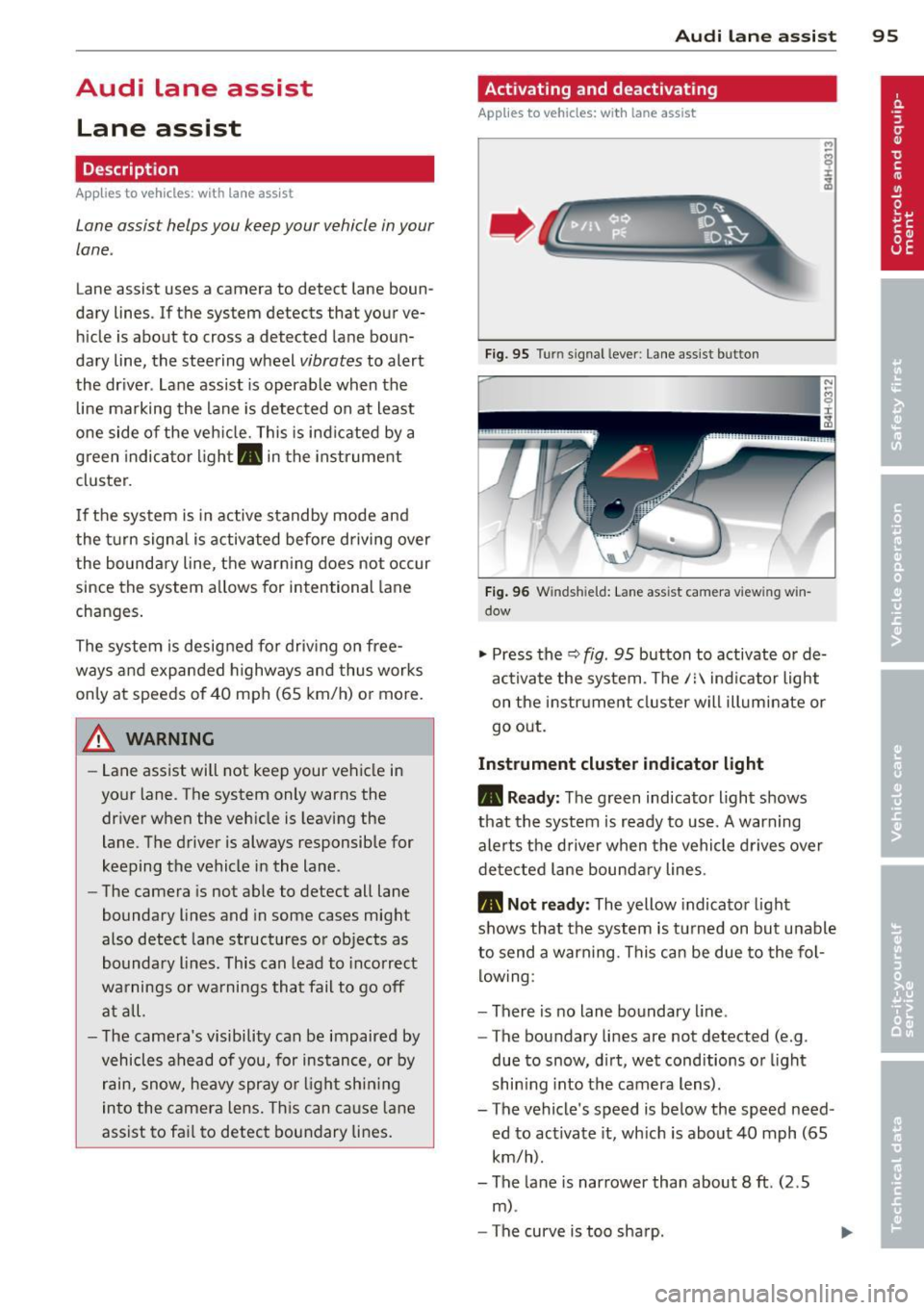
Fig. 95 Turn sign al lever: Lane assist button
Fig . 96 W inds hield: La n e ass ist camera vi ewing w in
dow
"' Press the Q fig . 95 button to activate or de
ac tivate the system . The/: indicator light
on the instr ument cluster will illuminate or
go out.
Instrum ent clu ster ind icat or light
• Rea dy:
The green indicator light shows
that the system is ready to use.
A warning
alerts the driver when the vehicle drives over
detected lane bounda ry lines.
• Not r ea dy: The yellow indicator light
shows that the system is turned on but unable
to send a warning. This can be due to the fol low ing :
- There is no lane boundary line .
- The boundary lines are not detected (e.g .
due to snow, d irt, wet conditions or l ight
shin ing into the camera lens) .
- The vehicle 's speed is below the speed need
ed to activate it, which is about 40 mph (65
km/h).
- The lane is narrower than about 8
ft. (2 .5
m) .
-The curve is too sharp .