key AUDI A8 2011 Owner's Manual
[x] Cancel search | Manufacturer: AUDI, Model Year: 2011, Model line: A8, Model: AUDI A8 2011Pages: 302, PDF Size: 76.07 MB
Page 71 of 302
-Never exceed the maximum permissible
load carry ing capacity of the roof of your
vehicle, the perm issible axle weights and
the permiss ible total weight of your veh i
cle
~ page 2 79, Weights .
-Always drive slowly, avoid sudden brak
ing and maneuvers when transporting
cargo on the roof of your vehicle .
@) For the sake of the environment
Sometimes it may be easier to leave a roof
rack installed even though you are not us
ing it. Due to the increased a ir resistance
your vehicle will unnecessarily use more
fuel. Remove the roof rack if you are not
going to use it.
12-volt sockets
App lies to vehicles: 12-volt sockets
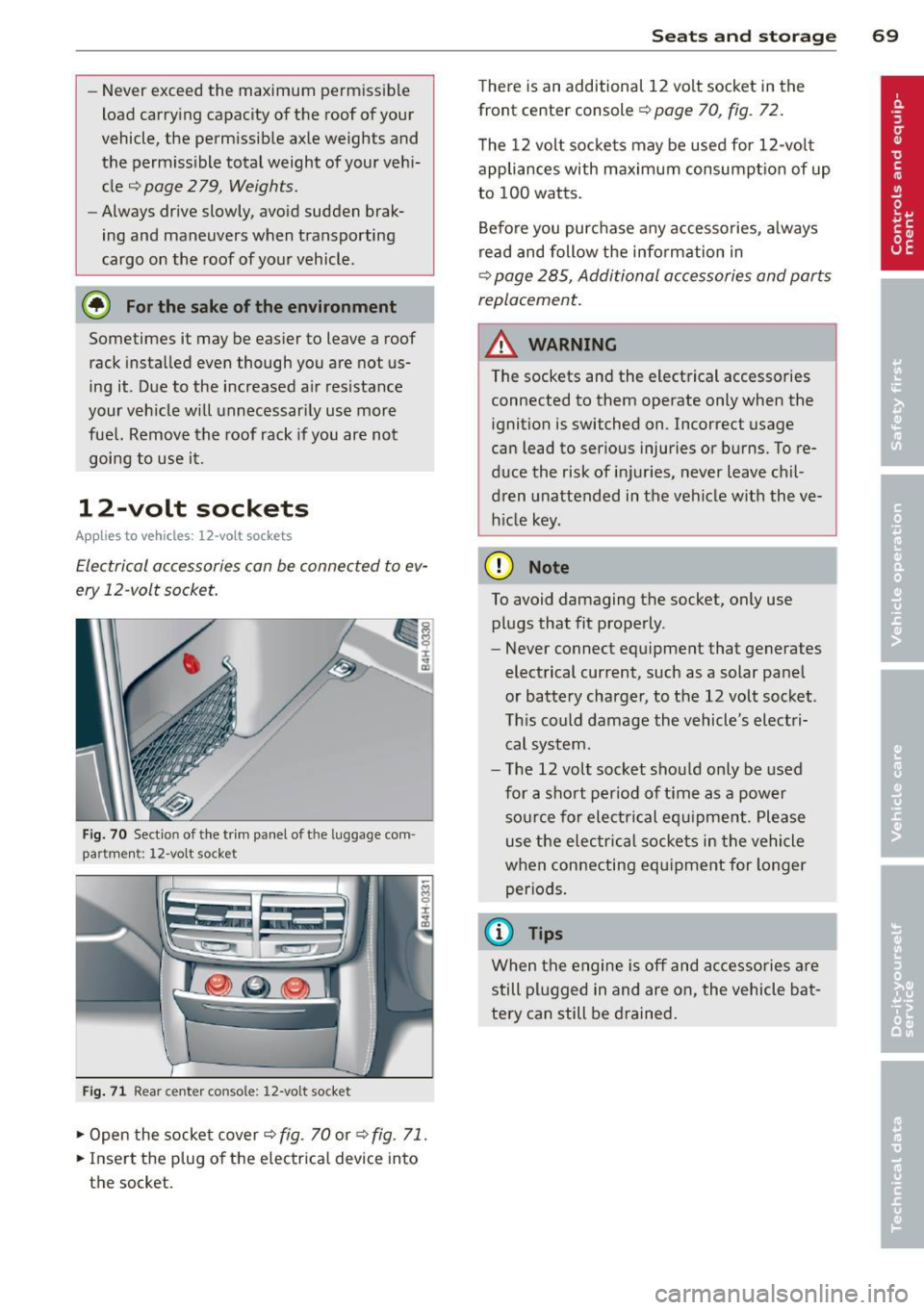
Electrical accessories can be connected to ev
ery 12 -volt socket.
Fig. 70 Sect io n of the trim panel of t he luggage com
p ar tm en t: 12 -v ol t so cke t
Fig . 71 R ear cente r c ons ole : 12 -vo lt s ocket
~ Open the socket cover ~ fig . 70 or ~ fig. 71.
~ Inse rt the plug o f the el ectrical device into
t h e socket.
S ea ts a nd s to rage 69
There is an additional 12 volt socket in the
front center console~
page 70, fig . 72.
T he 12 volt socke ts may be used for 12-volt
appliances with maximum consumpt ion of up
to 100 watts.
Before you purchase any accessories, always
read and follow the info rmation in
~ page 285 , Additional accessories and parts
replacement.
A WARNING
The sockets and the electrical accessories
connected to them operate only when the
ignition is switched on .1ncorrect usage
can lead to ser ious injuries or burns . To re
duce the risk of injuries, never leave chil
dren unattended in the vehicle w ith the ve
h icle key.
(D Note
To avoid damaging the socket, only use
plugs that fit properly .
- Never connect eq uipment that generates
electrical current, such as a solar panel
or battery charger, to the 12 volt socket .
Th is could damage the vehicle 's electri
cal system.
- The 12 volt socket sho uld only be used
for a short per iod of t i me as a powe r
so urce for electrical equipme nt. Please
use the elec trical sockets in the vehicle
when connecting equ ipment for longer
periods .
(D Tips
When the engine is off and ac ce ssories are
still plugged in and are on , the vehicle ba t
tery can still be drained .
Page 72 of 302

70 Seats and st o ra ge
Storage
(upholder
Fig . 72 Center conso le: front cupholder
Fig. 73 Section of the rear bench seat: rear cupholder
Fr ont cuphold er
., To open the cupholder, tap the cover
¢ fig. 72, ~ &_ .
Rear cupholder
., To open the cupholder, tap the front strip
¢fig. 73, ~ &_.
In vehicles with a full-length center console in
the rear, the cupholder is located at @
~page 63, fig. 62.
A WARNING
Spilled hot liquid can cause an accident
and personal inj ury .
- Never carry any beverage containers with hot liquids, s uch as hot coffee or hot tea,
in the veh icle while it is mov ing. In case
of an accident, sudden braking or other
vehicle movement, hot liquid could spill,
causing scalding burns. Spilled hot liquid
can also cause an accident and personal injury. -
Use on ly soft cups in the cupholder. Hard
cups and glasses can cause injury in an
accident.
(D Note
Only drink containers with lids should be
carried in the cupholder. Liquid could spill
out and damage your vehicle's electronic
equipment or stain the upholstery, etc.
Cooled glove compartment
The cooled glove compartment only functions
when the AIC system is switched on.
Fig. 74 Glove compartme nt: sw itching cool ing mode
on/off
., Turn the knob@ counterclockwise to sw itch
cooling on. The symbols on the knob indi
cate the correct pos ition
q fig. 74 .
., Turn the knob @clockwise to switch cooling
off.
The glove compartment cooling mode only
funct ions when the vehicle A/C system is
switched on. If the heat ing is sw itched on,
switching the glove compartment cooling mode off is recommended.
(@ Tips
The glove compartment can be locked us
i ng t he mechanical key
¢page 30.
Storage area behind the rear seat
You can place light art icles of clothing on the
rear w indow shelf behind the backrest.
Page 76 of 302
7 4 Warm and cold
Warm and cold Climate controls
Description
The climate control system warms, cools and
adds humidity to the air in the vehicle interior.
It is the most effect ive when the windows and
sunroof* are closed . If the temperature inside
the parked vehicle becomes very warm, open ing the window briefly will speed up the cool
ing process.
I n all heating mode functions except
defrost,
the blower on ly switches to a higher speed
once the engine coolant has reached a certain
temperature.
Condensation from the cooling system can
drip and form a puddle of water under the ve
hicle. This is normal and does not mean there
is a leak.
Pollutant filter
The pollutant filter removes pollutants such
as dust and po llen from the air.
The air pollutants filter must be changed at
the intervals spec ified in you r Warranty
&
Maintenance booklet, so that the air condi
tioner can properly work.
I f you drive your vehicle in an a rea with high
a ir po llution, the filter may need to be
changed more frequent ly than specified in
your Aud i Warranty
& Maintenance booklet. If
in doubt, ask your authorized Audi Service Ad
visor for advice .
Key coded settings
The climate control settings are a utomat ically
stored and assigned to the remote control key
that is in use.
A WARNING
Reduced visibility is dangerous and can
cause accidents. -
- For safe driving it is very important that
all windows be free of ice, snow and con
densation.
- Comp letely familiarize yourself with the
proper use and function of the heating
and ventilation system and especially how to defog and defrost the windows.
- Never use the windshield wiper/washer
system in freez ing weather unt il you
have warmed the windshield first, using
the heating and ventilation system. The
washer solution may freeze on the wind sh ie ld and reduce visib ility.
(D Note
- If you suspect that the air conditioner has been damaged, switch the system
off to avoid further damage and have it
inspected by a qualified dealership.
- Repairs to the Audi air conditioner re
quire special technical knowledge and
special tools. Contact an authorized Aud i
dea ler fo r assistance.
@ For the sake of the environment
By reducing the amount of fuel you use,
you also reduce the amount of pollutants
emitted into the air.
(D Tips
- Keep the air intake s lots (in fro nt of the
w indshield) free from ice, snow and de
bris in order to maintain the proper func
tion of the climate control system.
- T he energy management system may
switch the seat heating* or rear window
defroster off temporari Ly . These systems
are available again as soon as the energy
balance has been restored.
- Air escapes through vents under the rear
window. When placing items of clothing on the luggage compartment cover, en
sure that the openings are not covered.
Page 79 of 302
place heavy loads on a small area of the
seat.
Setup
The climate control system setup is accessed
through the MMI.
.. Se lect : I CARI f u nct ion but ton> Car sy stem s
control b utton > AC .
Rear cabin settings*
When th is function is selected, all sett ings for
the rear can be adjusted through the climate con trol system in the cockpit. The cl ima te
con trol system setti ngs cannot be adjus ted in
the rear seat a t the same time . This func tion
switches off after a ce rtain period of time or
when one of the dials in the cockpit is press
ed.
Auto reci rculation*
The sens itivity level of the au tom atic rec i rcu
l ation mode can be set at v arious leve ls from
off to sensit ive . When recirculation mode ia:. !
is switched on, air recirculation is contro lled
automatically . You must press the~ button if
fog forms on the windows.
Footwell temperature
You ca n ad just the footwe ll tempe rat ur e so
that it is cooler or wa rmer.
AC mode
T he strengt h of t he airflow ca n be adjusted to
light, med ium o r strong.
Windshield heat*
When the defroster~ is switched o n and the
Auto sett ing is selected, the windshie ld de
froster is controll ed automatically .
Solar roof*
When the ignition is off, so lar-powered park
i n g vent ilation may switch o n, as long as
- there is sufficient sunlight,
- th e outside tempe ratu re is not too low,
- the center vents are open,
- the sun roof is clos ed o r til te d and
W arm and cold 77
- recirculation mode l""' I (climate control sys
tem) and
Auto ( M MI) are selected.
Pa rking ventila tion is cont rolled au toma tic ally
in the
Auto sett ing.
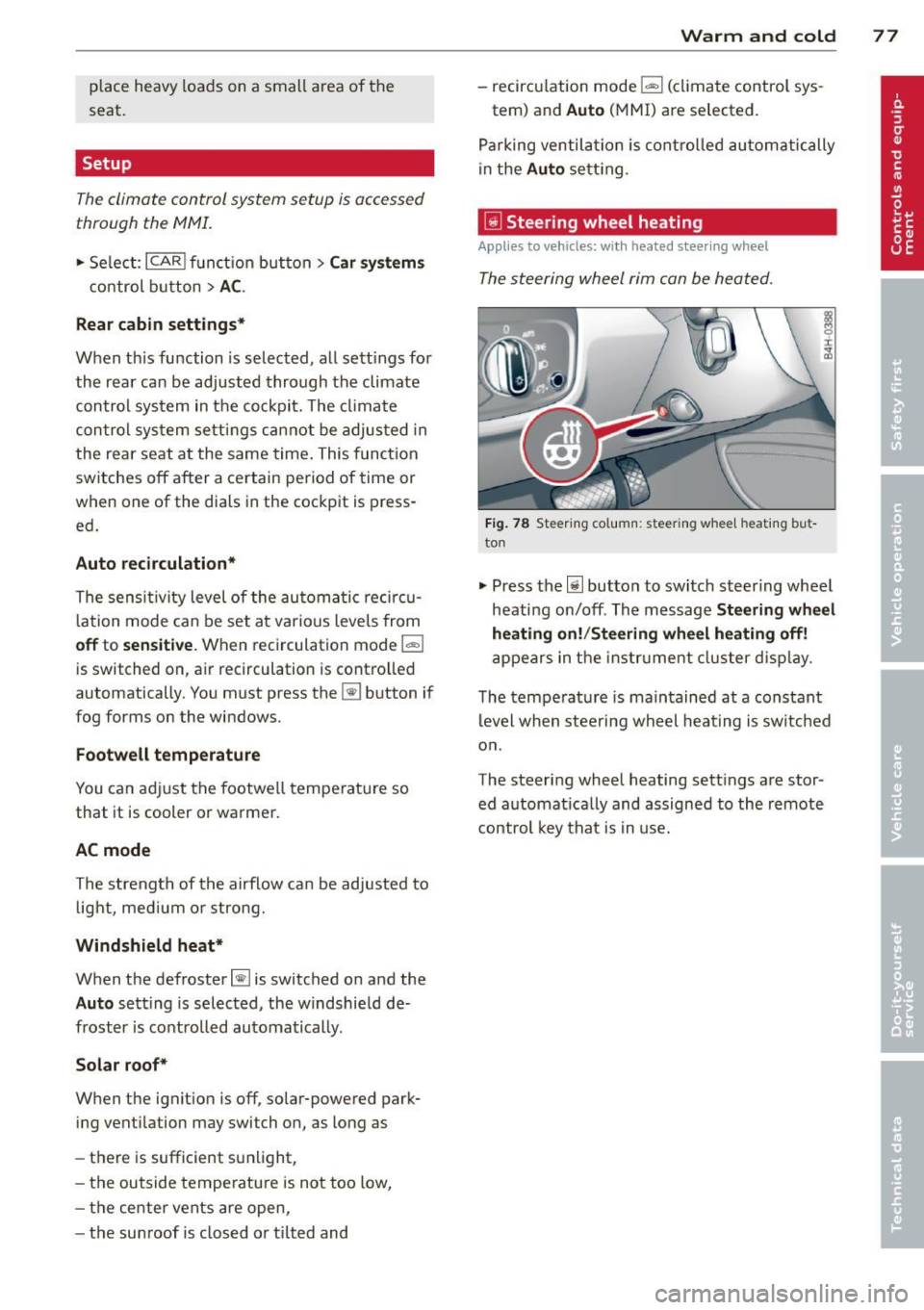
~ Steering wheel heating
App lies to vehicles : wi th hea ted s teering wheel
The steering wheel rim con be heated .
Fig. 7 8 Steeri ng col umn: steering w hee l h eating bu t
to n
.. Press the lil button to switc h steer ing whee l
heating on/off . Th e message
Ste ering wh eel
heating on! /Steering wheel heat ing off!
a p pears in the instr ument cluster d is pla y.
T he tempe rat ure is ma intained at a constant
l evel when steering whe el heat ing is sw itc hed
o n.
The steering wheel heating sett ings are stor
ed a utomat ically and assigne d to the remote
control key that is in use.
Page 81 of 302

the stored position as soon as you switch on
the ignition.
Starting and stopping
the engine
Starting the engine
This button switches on the ignition and
starts the engine.
Fig. 80 Center console: S TART ENGINE S TOP b utton
" Step on the brake pedal¢&_ .
.. Press on the !START ENGINE STOP I button
¢ fig. 80 -the engine w ill start .
By pressing the
I START ENGINE STOP I button
without depressing the brake pedal, the igni tion is on and switched off by pressing it
again.
After a cold engine is started, there may be a
brief period of increased noise because oil
pressure must first build up in the hydraulic
valve adjusters. This is normal and not a cause
for concern.
If the engine should not start immediately,
the starting process is automatically stopped
after a short time. Repeat starting procedure.
Driver message in the instrument cluster
display
Press brake pedal to start engine
This message appears if you press the
I START ENGINE S TOP I button to start the en
gine and do not depress the brake pedal. The
engine can only be started if the brake pedal is depressed.
!! Convenience key: Is key not in the vehi
cle?
On the road 79
This message appears along with thee sym
bol if the master key is removed from the ve
hicle with the eng ine running.
It is intended
to remind you (e.g . when changing drivers)
not to continue the journey without the mas
ter key.
If the master key is no longer in the veh icle,
you cannot switch on the ignition after stop
ping the engine and you also cannot start the
engine again . Moreover, you cannot lock the
vehicle from the outside with the key.
Shift to P, otherwise vehicle can roll away.
Doors do not lock if lever is not in
P.
This message appears for safety reasons
along with an audible warning tone if the
P
selector lever position is not engaged when
stopping the engine with the
I START ENGINE STOP I button. Select the P se
lector lever position . Otherwise the vehicle
cou ld roll and it cannot be locked .
Key not recognised. Hold back of key against
marked area . See owner's manual.
If the indicator light turns on and this mes
sage appears, there is a malfunction
¢ page 80.
Steering lock
The steering locks when you turn the engine
off using the
I START ENGINE STOP I button
and open the driver's door. The locked steer ing helps prevent vehicle theft.
A WARNING
- Never allow the engine to run in confined
spaces - danger of asphyx iation.
- Never turn off the engine until the vehi
cle has come to a complete stop.
- The brake booster and power steering
only work when the engine is running. If
the engine is off, you have to use more
force when steering or braking. Because
you cannot steer and brake as you usual
ly would, this could lead to crashes and
serious injuries.
Page 82 of 302
80 On the road
(D Note
-Avoid hig h engine rpm, fu ll throttle and
heavy engine loads unti l the engine has
reached operating temperat ure -other
wise you risk eng ine damage.
- The engine cannot be started by pushing
or towing the vehicle.
- If the engine has been under heavy load
for an extended period, heat b uilds up in
the engine compartment after the en
gine is switched off - there is a risk of
damaging the engine . Allow the eng ine
to run at idle for about 2 minutes before
switching it off.
@ Tips
If you open the driver's door with the igni
tion on, a buzzer sounds and the message
Igniti on is on appears in the instrument
cluster display. Sw itch the ignition off .
Stopping the engine
• Bring your vehicle to a complete stop.
.. Move the se lector lever to the
P or N pos i
t ion .
.. Pre ss the I STAR T ENGINE ST OP I button
r:> page 79, fig. 80 .
Emergency off
If necessary, the engine can be switched off
with the selector lever in the
R , D or S posi
tions . The engine stops if you press the
I S TAR T ENGINE ST OP ! button at speeds be low
6 mph (10 km/h).
A WARNING
- Never turn off the eng ine unti l the vehi
cle has come to a complete stop.
- The brake booster and power steer ing
only work when the engine is runn ing .
If
the engine is off, you have to use more
force when steering or braking. Because
you cannot steer and brake as you usua l
ly wo uld, this could lead to crashes and
serious injuries. -
For safety reasons, you should a lways
park your vehicle w ith the selector lever
in P . Otherwise, the vehicle could inad
vertently roll away .
- After the engine has been switched off,
the radiator fan can cont inue to run for
up to 10 minutes -even with the ignition
sw itched off. It can also sw itch on again
after some time if the coolant tempera
ture rises as the result ofa heat bu ildup
or if the engine is hot and the engine
compartment is additionally heated by
the sun's rays .
(D Note
Do not stop the eng ine immedia tely after
hard o r extended driving. Keep the engine
running for approximate ly two minutes to
prevent excessive heat bui ld-up.
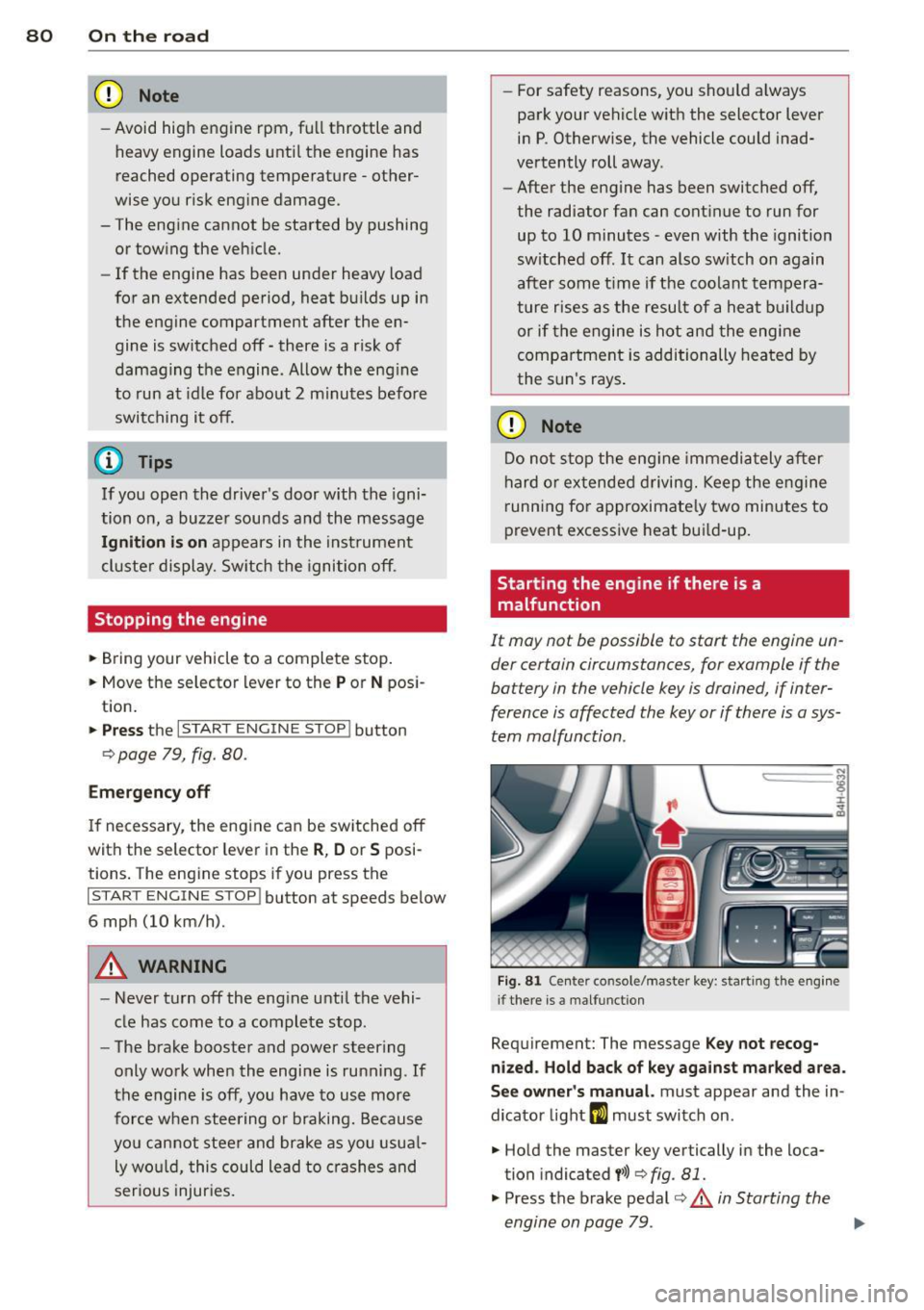
Starting the engine if there is a
malfunction
It may not be possible to start the engine un
der certain circumstances, for example if the
battery in the vehicle key is drained, if inter
ference is affected the key or if there is a sys
tem malfunction.
"' ij
:c
-- --- -~
Fig . 81 Ce nter co nsole/master key: start ing the e ngin e
i f there is a malfunct ion
Requirement: The message K ey not recog
niz ed . Hold back of ke y again st ma rked are a.
See o wner's manual.
must appear and the in
dicator light
m must switch on .
.. Hold the master key vertically in the loca
tion indicated
y >>) <=> fig . 81.
• Press the brake pedal r=> & in Starting the
engine on page 79 .
IJ>,
Page 84 of 302

82 On the road
-Occasiona l noises when the parking
brake is applied and re leased are norma l
and are not a cause for concern .
- When the vehicle is parked, the parking
brake goes through a se lf-test cycle at
regular intervals. Any assoc iated noises
are norma l.
Parking
Various rules apply to prevent the parked ve
hicle from rolling away accidentally.
P ar king
,. Stop the vehicle w ith the foot brake.
,. Pull the switch© to apply the parking
brake.
,. Se lect the
P se lector lever position
9 page 112.
,. Turn the eng ine off q _&. .
In addition on incline s and grad es
,. Turn the steering whee l so that your vehicle
wi ll ro ll against the curb in case it should
start to move .
A WARNING
-When you leave your veh icle -even if on
ly briefly -always take the ignition key
with you. This applies particularly when children remain in the veh icle. Otherw ise
the ch ildren could sta rt t he engine, re
lease the p arking brake or operate e lec
trical equipment (e .g. power windows) .
T he re is the risk of an accident.
- When the vehicle is loc ked, no one -par
t icu la rly not children sho uld remain in
the vehicle . Locked doors make it more
difficult for emergency workers to get in
to the vehicle -putt ing lives at risk.
Start ing from rest
The starting assist function ensures that the
parking brake is released automatically upon starting.
Stopping and appl ying par kin g brake
,. Pull the switch© to apply the parking
brake.
St arting and automatic ally rel easi ng the
parking b rake
,. When you start to dr ive as usual, the park
ing brake is automat ically released and your
veh icle beg ins to move.
When stopping at a traffic signal or stopping in city traffic, the parking brake can be ap
plied . The vehicle does not have to be held
with the footbrake . The parking brake elimi
nates the tendency to creep w ith a dr ive range
engaged. As soo n as you d rive off as usual,
the pa rking brake is re leased automatically
and the vehicle s tarts to move.
Sta rting on slopes
When starting on inclines, the starting assist
prevents the veh icle from u nintent ionally roll
i ng back. The braking fo rce of the par kin g
brake is not re leased unti l su ff ic ient d riving
f orce has been built up a t the wheels.
(D Tips
Fo r safety reasons, the pa rking bra ke is re
l eased automatically o nly when t he d riv
er's safety belt is engaged in the buckle.
Starting off with a trailer
To prevent rolling back unintentionally on an
incline, do the following:
,. Keep the sw itch(®) pulled and depress the
accelerator. The pa rking brake stays applied
and p revents the vehicle from roll ing back
ward .
,. You can release the switch© once you are
sure that you are developing enough for
ward momentum at the whee ls as you de
press the acce lerator.
Page 94 of 302

92 Adaptive cruise control and braking guard
-Your standard settings are automatically
stored and assigned to the remote con
trol key being used .
Audi braking guard
Description
Applies to vehicles: wit h adapt ive c ru ise control
Fig. 94 Instrument cluster: approach warn ing
Audi brak ing guard uses radar sensors and a
video camera . It is active at speeds above
about 6.2 mph (10 km/h) and also works
within system limits when adaptive cruise control is switched off.
On vehicles with aAdaptive cruise control and
Audi side assist (Audi pre sense plus), system
functions also engage when a co llision is im
minent
¢page 188.
What can Audi braking guard do?
When detected in time, the system can assess
situations when a vehicle ahead brakes sud
denly or if your own veh icle is traveling at a
h igh speed and approaching a vehicle up
ahead that is moving more slowly. Audi brak
ing guard does not react if it cannot detect
the situation.
The system advises you of various kinds situa tions :
- The
distance warning is given if you are too
close to the vehicle ahead for a long time. If
the vehicle ahead brakes sharply, you will not be able to avoid a coll is ion. The ind icator
light
I i n the d isplay comes on. Take imme
diate action to avoid the coll is ion and in
crease the distance to the vehicle up ahead. -
The
approach warning is given when a de
tected vehicle up ahead in your lane is mov
ing much more slowly that you are or if it
brakes sharp ly. When this warning is given,
it may only be possible to avoid a collision
by swerving or braking sharp ly . The indicator
light
I and the symbol in the disp lay will
warn you about the danger
c:> fig. 94 . You
w ill also hear an acoustic signal.
If you do not react fast enough or do not react
at all to the situation, Aud i braking guard w ill
intervene by braking and the message
braking
guard intervention
w ill appear.
- If a coll is ion is imminent, the system will
first provide an
acute warning by brak ing
sharply .
- If you do not react to the acute warning, Au
di braking guard will brake w ith increased
force in severa l stages to reduce the speed
in a possible collisio n. On ve hicles w ith
adaptive cruise contro l and Audi side assist
(Audi pre sense plus), the system can brake
with increasing force up to maximum decel
eration shortly before a sensed collision
¢ page 188.
- If
the Audi braking g uard senses that you
are not braking hard enough when a colli
sion is imminent, it can increase the braking
force.
Audi braking guard takes the driver's reaction
time into consideration in order to provide
timely warnings. The system reaction time de creases automatically in some situations, for
example when it detects accelerator pedal use
or steering input . The Audi braking guard in
tervent ion stops in certa in situations, for ex
amp le if you press the accelerato r pedal to
pass the vehicle moving ahead of you in your
lane.
Which functions can be controlled?
You can switch Audi braking guard and the
distance/approach warning on or off in the
M M I c:> page 93, Settings in the MMI.
Page 95 of 302

Adaptive cru ise co ntrol and b rakin g guar d 93
A WARNING ,~
The Audi braking guard is an assist system
and cannot prevent a collis ion by itself.
The driver must always intervene. The driv er is always responsible for braking at the
co rrect time.
- Always pay close attention to traffic,
even when the Aud i brak ing guard is
switched on. Be ready to intervene and
be ready to take complete control whe n
ever necessary. Always keep the safe and
legal distance between your vehicle and
vehicles up ahead.
-Audi braking guard works within limits and wi ll not respond outside the system
limits, for examp le when approaching a
stopped vehicle or stationary obstacle
(end of a traff ic jam or vehicle that has
broken down in traffic).
- Always remember that the radar sensor
for the Audi braking guard works only
within defined detect ion and range limits
that may prevent the proper detection of
other vehicles.
- The radar sensor's function and range
can be reduced by rain, snow and heavy
spray. moving vehicles up ahead may not
be promptly detected or may not be de
tected at al l.
- Reflective surfaces includ ing c rash ba rr i
ers or tunnel en trances may impair the
function of the radar sensor .
(D Tips
Innattention can cause collisions, other ac
cide nts and serious persona l injuries.
- You can stop the Audi b raking guard in
te rvention w ith increas ing braking force
by applying the brakes yourse lf or by a c
ce le rat ing rapidly.
- Audi braking guard error messages
¢page 93.
Settings in the MMI
App lies to vehicles : wi th adap tive c ruise contro l
.,. Select: !CAR ! function button> Car sy ste m s
cont ro l butto n > Driv er a ssist> Audi brak
ing gua rd .
S ys tem -
Switch Audi b raking guard On and
Off . When you switch the ign it ion on, the
message
Audi br aking guard off appears in
the instr ument cluster d isp lay if the system is
switched off.
E arly warning -The distance and approach
warnings in the d isplay can be switched
On/
Off.
(D Tips
- Yo ur settings are automatically stored
and assigned to the remote cont ro l key
being used at the times the settings are
made.
- If you switch the ESP to sport mode, A u
di braking guard switches off a utomati
cally
¢page 192.
Messages
App lies to vehicles : wi th adap tive c ruise control
ACC una vailable
ACC and braking guard: unavailabl e
The system cannot detect moving vehicles up
ahead co rrectly and is switched off . The sen
sors have been d isplaced or are not worki ng
proper ly. The Audi pre sense functions may a l
so be affected.
ACC: unavailabl e at this time. No sensor vi
s ion
ACC and b rak ing gu ide: una vailable at this
time . No s enso r vision
This message appears if the sensor view is ob
structed, for examp le by leaves, snow, heavy
spray or d irt . Clean the sensors¢
page 86,
fig. 85.
ACC: unav ailable at this time. Incline too
steep
Page 99 of 302
Audi lane assist: currently not available. no
sensor vision
This message appears if the camera is unable
to detect the lines. This could happen if:
- The camera field of view
c::> page 95, fig . 96
is dirty or covered in ice. Clean the area on
the windshield.
- The camera field of view is fogged over. Wait
until the fog has cleared before switching
lane assist on.
- The system has been unable to detect the
lanes for an extended period of time due to
road conditions such as lanes covered in
snow. Switch lane assist back on when the
lines are more visible.
Audi lane assist: currently not available
There is a temporary lane assist malfunction.
Try switching lane assist on again later.
Audi lane assist: system fault
Drive to your authorized Audi dealer immedi
ately to have the malfunction corrected.
Setting the warning point and steering
wheel vibration
App lies to vehicles: with lane ass ist
You can adjust individual settings in the MMI.
~ Select : ICARI function button> Car systems
control button > Driver assist > Audi lane
assist.
Setting the warning point Early:
With this setting, a warning is provided
before a wheel touches the detected lane
boundary line. The warning depends on the
angle in which the vehicle is approaching the
line. The distance at which the warning is giv
en increases as the angle becomes sharper. If
you drive toward a boundary line at a very sharp angle, the warning will come just before
a wheel touches the line.
Medium: With this setting, the warning point
is adapted to the course of the road, the lane
width and the speed. You will still be warned
Audi lane assist 97
if you cross slightly over a dotted line when
driving on curves.
Late: This setting has the same properties as
medium. You will only be warned once a
wheel crosses a detected line.
Setting the steering wheel vibration
The steering wheel vibration can be set to
Low, Medium or Strong. Selecting each of the
settings will cause the steering wheel to vi
brate so you can check the strength of the vi
bration in that setting.
(D Tips
Your settings are automatically stored and
assigned to the remote control key being
used.