warning lights AUDI A8 2011 Owner's Manual
[x] Cancel search | Manufacturer: AUDI, Model Year: 2011, Model line: A8, Model: AUDI A8 2011Pages: 302, PDF Size: 76.07 MB
Page 53 of 302
Mirrors
Adjusting the exterior mirrors
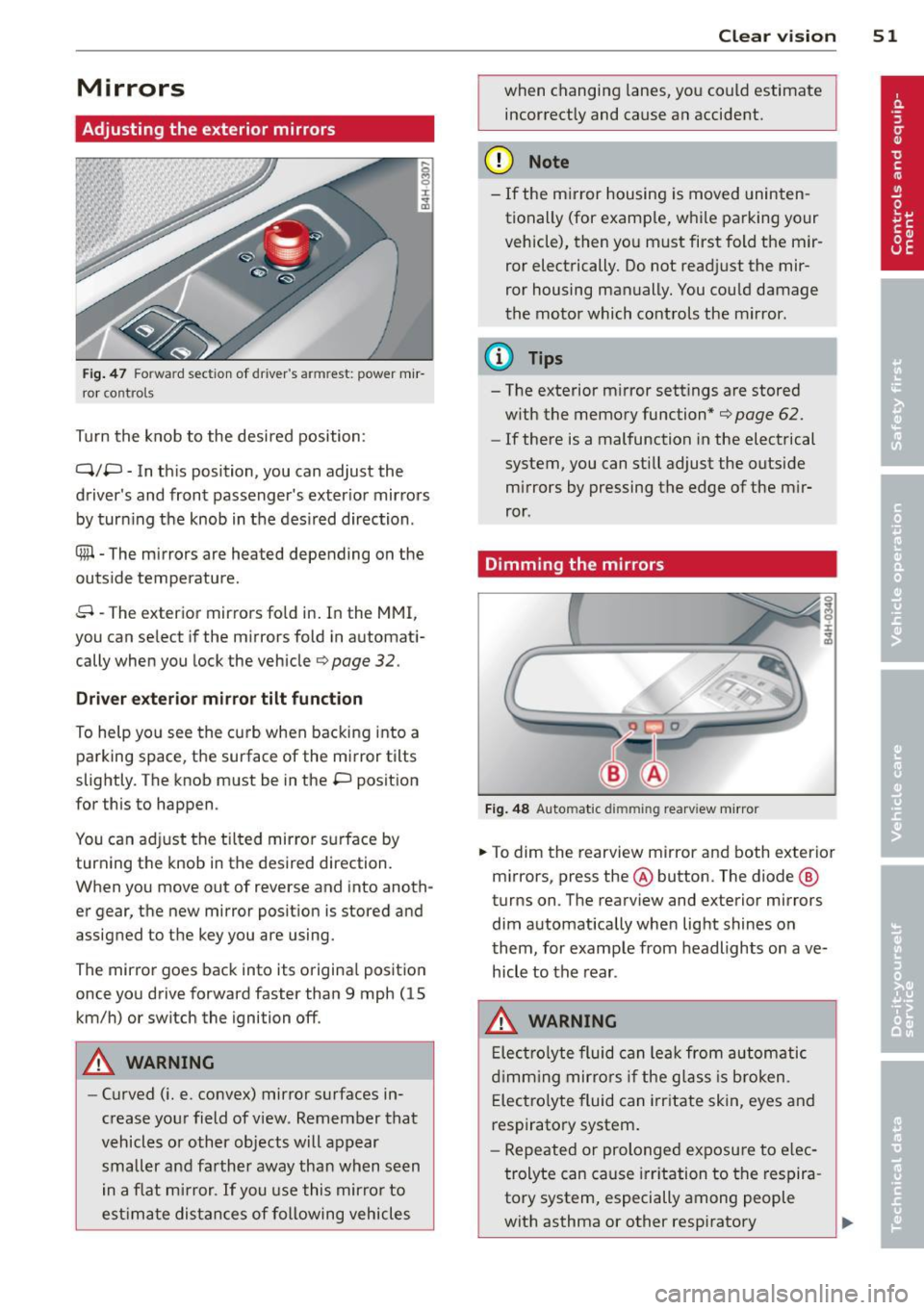
Fig . 47 Fo rw ar d section of driver's armrest: powe r m ir
r or co nt rols
Turn the knob to the desi red position :
Q/P -In th is position, you can adjust the
driver's and front passenger's exter ior mir rors
by turn ing the knob in t he des ired direction .
® -The m irrors are heated depending on the
out side temperature .
8 -The exterior mirrors fo ld in. In the MMI,
you c an se lect if the m irro rs fold in automat i
cally when you lock the vehicle
¢ page 32 .
Driver exter io r mi rro r tilt funct ion
To help yo u see the curb when backing into a
parking space, the surface of the mirror tilts
slightly. The knob must be in the P position
for this to happen .
You can ad just the tilted mirror s urface by
turning the knob in the desired direction.
When you move out of reverse and into anoth
er gear, the new mirror position is stored and
assigned to the key you a re using.
The mirror goes back into its origina l posit io n
once yo u dr ive forward faster than 9 mph (15
km/h) or switch the ignition off .
A WARNING
-Curved ( i.e. convex) mirror s urfaces in
crease your field of view . Remember that
vehicles or other objects will appear
small er and farther away than when seen
in a f lat m irror .
If you use this mirro r to
est imate distances of following vehicles
.
Clear vi sion 51
when changing lanes, you co uld estimate
incor rectly and cause an accident.
(D Note
- If the m irror housing is moved uninten
tionally (for examp le, w hile pa rking your
vehicle), then yo u must first fold the mir
ror electrically. Do not read just the mir
ror housing man ually. You cou ld damage
the motor which controls the mirror.
(D Tips
- The exterior m irror settings are stored
w ith the memory function*
¢ page 62.
- If there is a malfunction in the electrical
system, you can still adjust the outside
mi rrors by pressing the edge of the m ir
ror .
Dimming the mirrors
Fig . 48 Automatic dimming rearview mirro r
.. To dim the re arview mirror and both exterior
m irrors, press the@ button . The diode ®
turns on. T he rearv iew and exterior mirrors
dim automatically whe n light shines o n
t hem, for examp le from headlights on ave
hicle to the rear .
A WARNING
Elect ro lyte fluid can lea k from au to matic
d imm ing mir rors if the g lass is b roken .
E lec tro lyte fluid can irr itate skin, eyes and
respiratory system.
- Repeated or prolonged exposu re to e lec
trolyte can cause irritation to the respira
tory system, especially among people
with asthma or other resp iratory
.
Page 59 of 302
Armrest
There is a storage compartment under the
armrest .
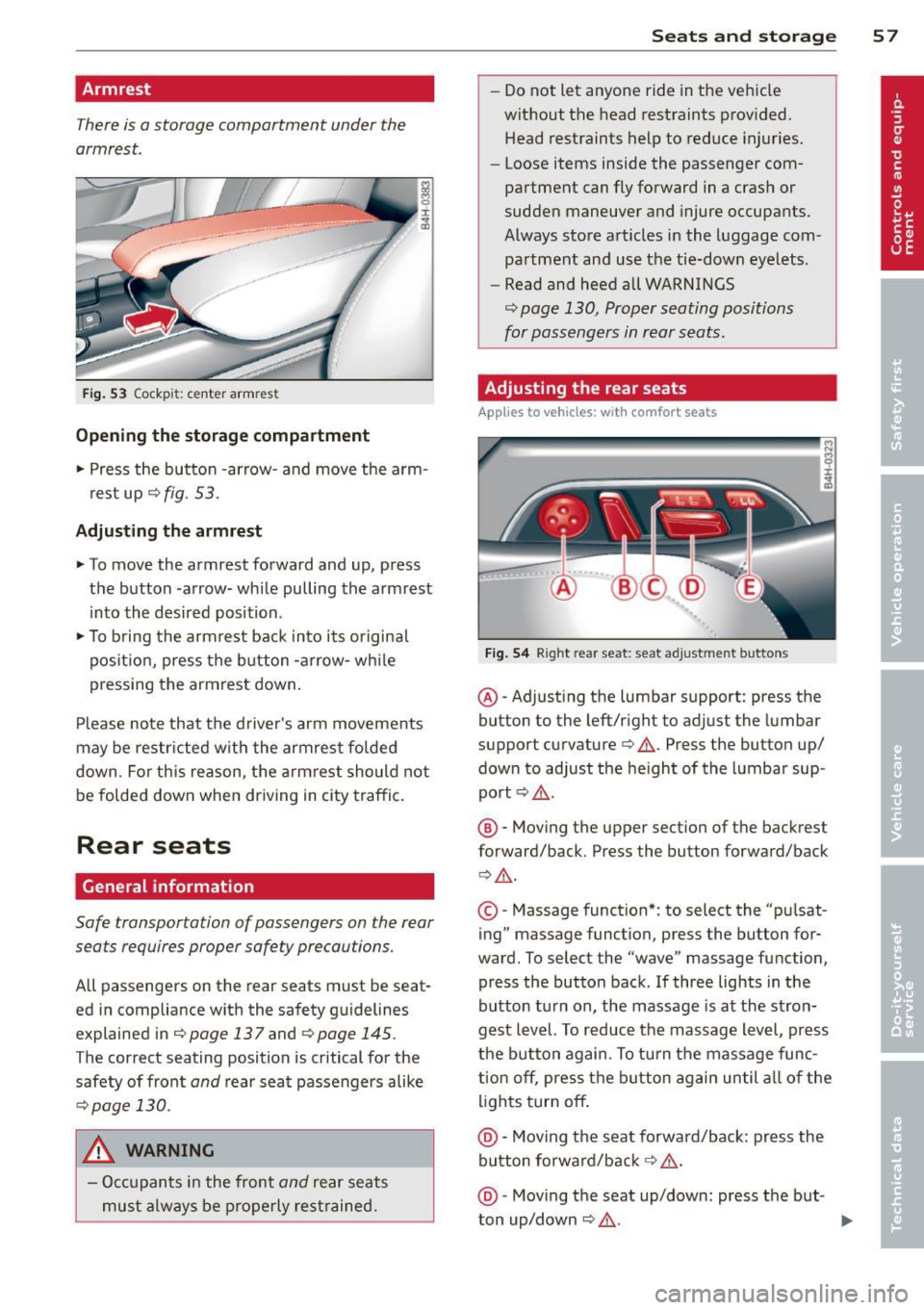
Fig. 53 Cockp it: ce nter armrest
Opening the storage compartment
.. Press the button -arrow-and move the arm
rest up¢
fig. 53.
Adjusting the armrest
.. To move the armrest forward and up, press
the button -arrow- while pulling the armrest
into the desired position .
.. To bring the armrest back into its original
position, press the button -arrow- while
pressing the armrest down.
Please note that the driver's arm movements
may be restricted w ith the armrest folded
down . Fo r this reason, the armrest should not
be folded down when driving in city traffic.
Rear seats
General information
Safe transportation of passengers on the rear
seats requires proper safety precautions.
All passengers on the rear seats must be seat
ed in compliance with the safety guidelines
explained in
¢page 137 and qpage 145.
The correct seating position is critical for the
safety of front
and rear seat passengers alike
¢page 130.
A WARNING
-Occupants in the front and rear seats
must always be properly restrained.
-
Seats and storage 57
- Do not let anyone ride in the vehicle
without the head restraints provided.
Head restraints help to reduce injuries .
- Loose items inside the passenger com
partment can fly forward in a crash or
sudden maneuver and injure occupants.
Always store articles in the luggage com
partment and use the tie-down eyelets.
- Read and heed all WARNINGS
¢ page 130, Proper seating positions
for passengers in rear seats.
Adjusting the rear seats
App lies to vehicles: wit h co mfort seats
Fig. 54 Right re ar seat: seat adjustment buttons
@ -Adjust ing the lumbar support: press the
button to the left/right to adjust the lumbar
support curvature¢ &.. Press the button up/
down to adjust the height of the lumbar sup
port ¢&,. .
@ -Moving the upper section of the backrest
forward/back. Press the button forward/back
Q &_ .
©-Massage function* : to select the "pu lsat
ing" massage function, press the button for
ward. To select the "wave" massage function,
press the button back.
If three lights in the
button turn on, the massage is at the stron
gest level. To reduce the massage level, press
the button again. To turn the massage func
tion
off, press the button again until all of the
lights turn
off .
@ -Moving the seat forward/back: press the
button forward/back ¢ &,. .
@ -Moving the seat up/down: press the but-
ton up/down ¢ &,. . ..,_
Page 61 of 302
Operating the reclining rear seat
App lies to v ehicles: with reclining rea r seat
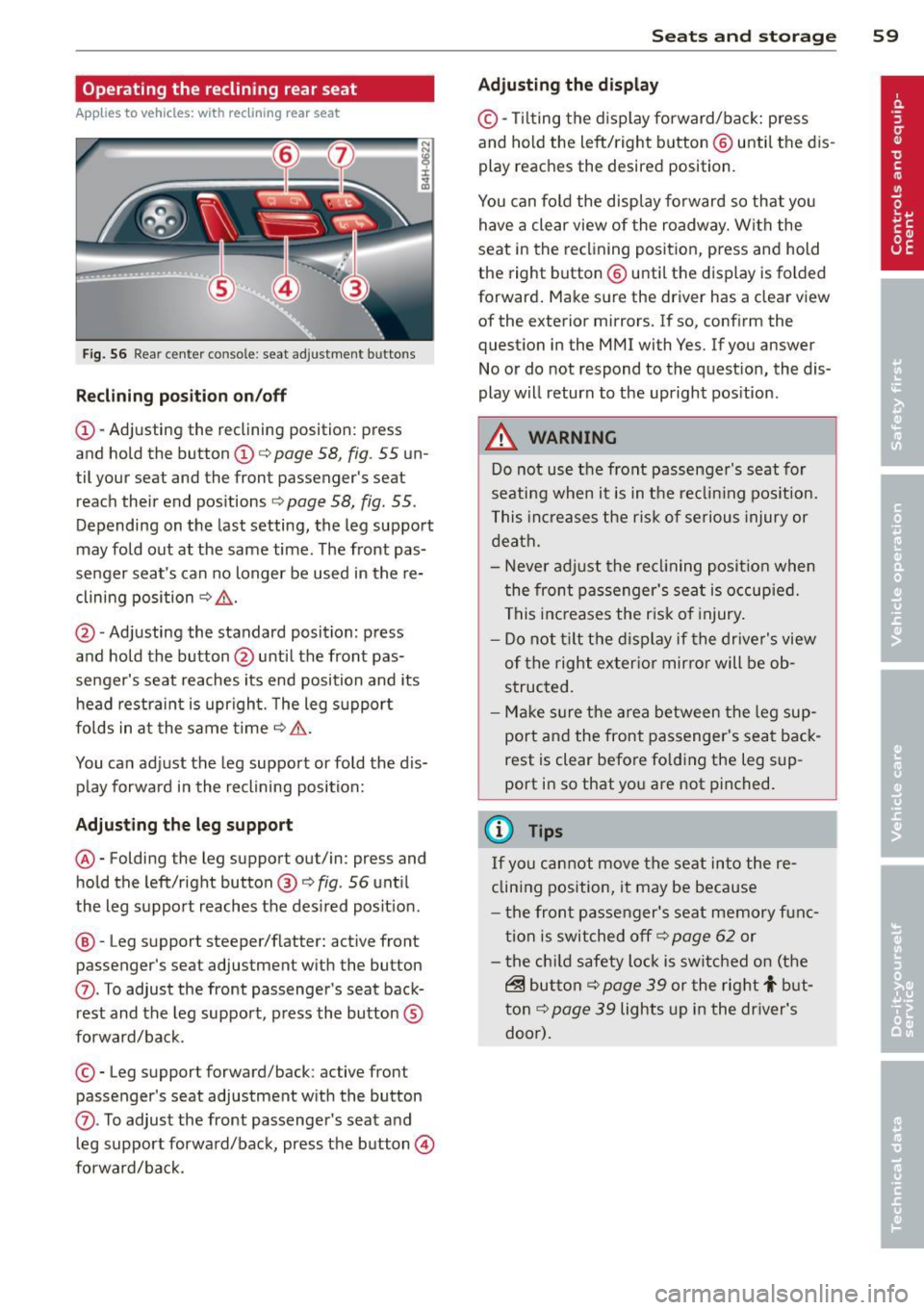
Fig. 56 Rear cente r co nso le : seat adjustment bu tto ns
Reclining position on/off
@-Adjusting the reclining position: press
and hold the button@c:::>
page 58, fig. 55 un
til your seat and the front passenger's seat
reach their end positions
c:::> page 58, fig. 55.
Depending on the last setting, the leg support
may fold out at the same time. The front pas
senger seat's can no longer be used in the re
clining position c:::>
&,.
@ -Adjusting the standard position: press
and hold the button @until the front pas
senger's seat reaches its end position and its
head restraint is upright. The leg support
folds in at the same time c:::>
&,.
You can adjust the leg support or fold the dis
play forward in the reclining position:
Adjusting the leg support
®-Folding the leg support out/in: press and
hold the left/right button ®
c:::>fig . 56 until
the leg support reaches the des ired posit ion .
@ -Leg support steeper/flatter: active front
passenger's seat adjustment with the button
(J) . To adjust the front passenger's seat back
rest and the leg support, press the button ®
forward/back.
© -Leg support forward/back: active front
passenger 's seat adjustment with the button
(J) . To adjust the front passenger's seat and
l eg support forward/back, press the button@
forward/back.
Seats and storage 59
Adjusting the display
©-Tilt ing the display forward/back: press
and hold the left/right b utton @ until the dis
play reaches the desired position.
You can fold the display forward so that you
have a clear view of the roadway. With the
seat in the reclining position, press and hold
the right button@ unti l the display is folded
forward. Make sure the driver has a clear view
of the exterior mirrors. If so, confirm the
question in the MMI with Yes. If you answer
No or do not respond to the question, the dis
play will return to the upright pos ition .
A WARNING
Do not use the front passenger's seat for
seating when it is in the reclin ing position.
This increases the risk of serious injury or
death.
- Never adjust the reclining position when
the front passenger's seat is occupied.
This increases the risk of injury.
- Do not t ilt the display if the driver's view
of the right exterior mirror will be ob
structed.
- Make sure the area between the leg sup
port and the front passenger's seat back
rest is clear before fo lding the leg sup
port in so that you are not pinched.
(!) Tips
If yo u cannot move the seat into the re
clining position, it may be because
- th e front passenger's seat memory func
tion is switched off c:::>
page 62 or
- the child safety lock is switched on (the
~ button c:::> page 39 or the rig ht t but
ton c:::>
page 39 lights up in the driver's
door).
Page 65 of 302
Memory buttons
Applies to vehicles: with memory function
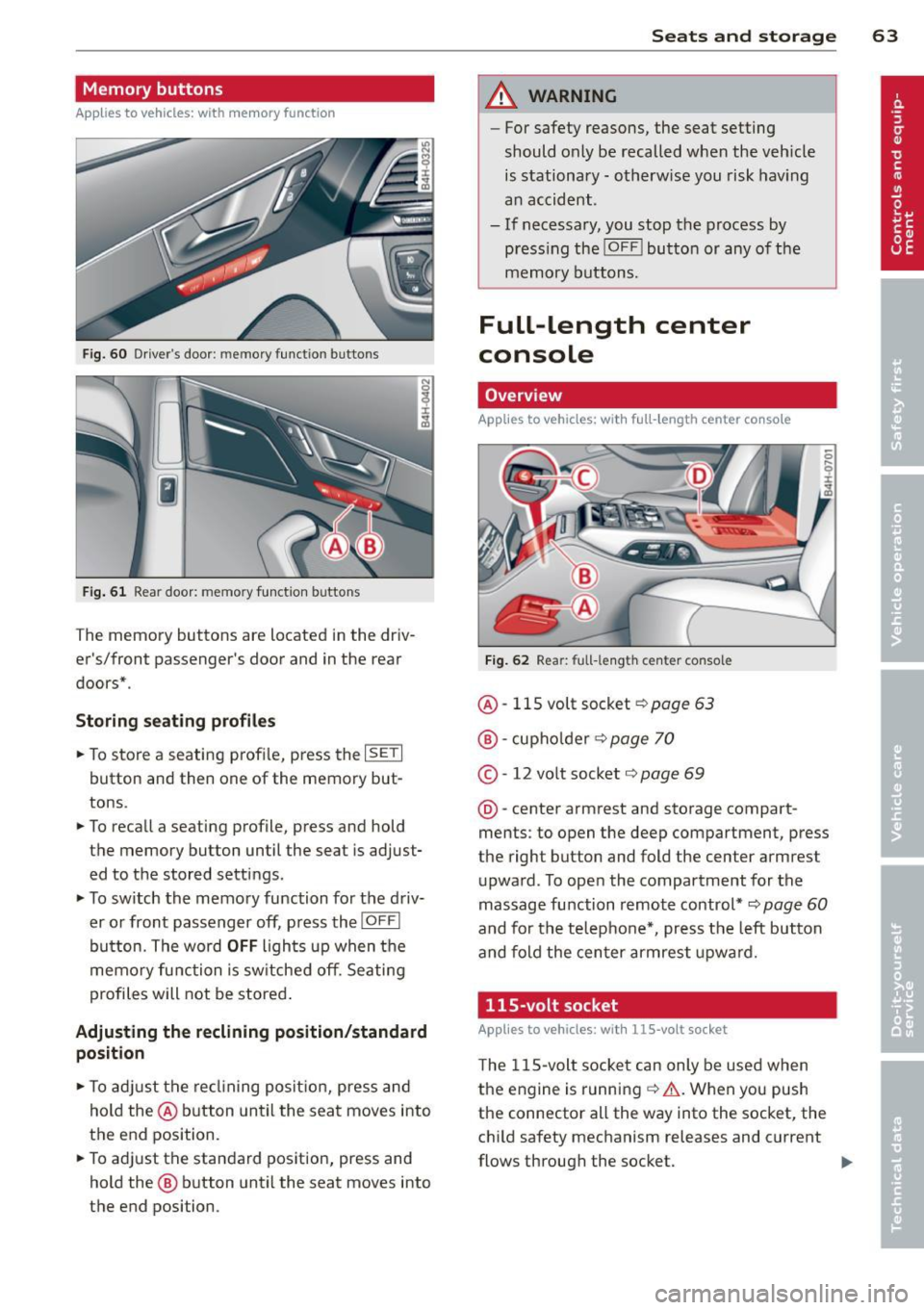
Fig. 60 Driver's door: memory function buttons
Fig. 61 Rear door: memory function buttons
The memory buttons are located in the driv
er's/front passenger's door and in the rear
doors* .
Storing seating profiles
.. To store a seating profi le, press the ISETI
button and then one of the memory but
tons .
.. To recall a seating profile, press and hold
the memory button until the seat is adjust
ed to the stored settings.
.. To switch the memory function for the driv
er or front passenger off, press the
IOFFI
button. The word OFF lights up when the
memory function is sw itched off. Seating
profiles will not be stored .
Adjusting the reclining position/standard
position
.. To adjust the reclining position, press and
hold the@ button until the seat moves into
the end position .
.. To adjust the standard position, press and
hold the @ button until the seat moves into
the end position.
Seats and storage 63
A WARNING
-For safety reasons, the seat setting
should only be recalled when the veh icle
is stationary -otherwise you risk having
an accident.
- If necessary, you stop the process by
press ing the
!OF F! button or any of the
memory buttons.
Full-length center
console
Overview
Applies to vehicles: with full-length center console
Fig. 62 Rear: full-le ngth center console
@ -115 volt socket Q page 63
@-cupho lder ¢ page 70
©-12 volt socket ¢ page 69
@-center armrest and storage compart
ments : to open the deep compartment, press
the right button and fold the center armrest
upward. To open the compartment for the
massage function remote control*
Q page 60
and for the telephone*, press the left button
and fold the center armrest upward.
115-volt socket
Applies to vehicles: wit h 115-volt socket
The 115-volt socket can only be used when
the engine is running ¢.&. .When you push
the connector all the way into the socket, the
child safety mechanism releases and current
flows through the socket. ""
Page 83 of 302

.. Press the !START ENGINE STOPI button. The
engine will start.
.. Drive to your author ized Audi dealer imme
diately to have the malfunction corrected .
@ Tips
You can view the message again by press
ing the
! START ENGINE STOPI button.
Electromechanical
parking brake
Operation
The electromechanical parking brake replaces
the hand brake.
Fig. 82 Center console: Park ing brake
.. Pull on the switch<®> c> fig . 82 @to apply
the parking brake. The indicator light in the
switch illuminates.
.. Step on the brake pedal or the accelerator
pedal and press the switch <®> at the same
t ime to release the parking brake. The indi
cator light in the switch goes out.
Your vehicle is equipped with an electrome
chan ical parking brake. The parking brake is
designed to prevent the vehicle from roll ing
un intent ionally and replaces the hand brake.
In addition to the normal functions of a tradi
tional hand brake, the electromechanical parking brake provides various convenience
and safety functions.
When starting from rest
-The integral starting assist helps you when
driving by automatically releasing the park
i ng brake
c> page 82, Starting from rest.
On the road 81
- When start ing on inclines, the starting as
sist prevents the vehicle from unintentional
ly rolling back. The braking force of the
parking brake is not released until sufficient
driving force has been built up at the
wheels.
Emergency brake function
An emergency brake ensures that the vehicle
can be slowed down even if the
normal brakes
fail
c> page 83, Emergency braking.
Indicator lights
-If the parking brake is closed with the igni
tion
switched on the indicator lights come
on - (USA mode ls)/ . (Canada models)
in the instrument cluster and the switch.
- If the parking brake is closed with the igni
tion
switched off the indicator lights come
on - (USA models)/ . (Canada models)
in the instrument cluster and the switch for
about 20 seconds .
A WARNING
Do not press the accelerator pedal inadver
tently if the veh icle is stationary but the
engine is running and a gear is selected .
Otherwise the vehi cle w ill start to move
immediately and could result in a crash.
(D Note
If the symbol . in the display or the indi
cator light
11111 (USA models)/ . (Cana
da models) in the instrument cluster flash
es, there is a malfunction in the brake sys
tem. Please refer to the detailed descrip
tion of the indicator lights
c>page 14.
- If the indicator light -(USA mod-
els)/ . (Canada models) or
Im turns
on, there may be a malfunction in the
parking brake
c> page 15.
{I) Tips
-Yo u can app ly the parking brake at any
time -even with the ignition switched
off. The ignition must be on in order to
release the parking brake.
Page 86 of 302

84 On the road
Cruise control
Switching on
The cruise control system makes it possible to
drive at a constant speed starting at 20 mph
(30 km/h).
0
f
®t
0
Fig. 83 Control lever w it h set butt on
Fig . 84 D is pl ay: Selected speed
"' Pull the lever to position (D c::> fig. 83 to
switch the system on.
"' Drive at the speed you wish to set.
"'Press button@to set that speed .
I :i:. ... a,
The stored speed and the ind icator light
[ij;W~1~ (US models) / 0 (Canadian models) ap
pear in the instrument cluster display
c:;, fig. 84 . The display may vary, depending on
the type of display in your vehicle . The indic a
tor light . in the instrument cluster also illu
minates.
The speed is kept constant
via an engine out
put adjustment or active brake intervention .
8_ WARNING
-Always pay attention to traffic even when
the cruise control is switched on . You are
always responsible for your speed and
the distance between your vehicle and
other vehicles. -
For safety reasons, the cruise contro l
should not be used in the city, in stop
and-go traffic, on twisting roads and
when road conditions are poor (such as ice, fog, gravel, heavy rain and hydro
plan ing) - risk of accident.
- Turn off the cruise control temporarily when enter ing turn lanes, highway exit
lanes or in construction zones .
- Please note that inadvertently "resting" your foot on the accelerator pedal causes
the cruise control not to brake. This is
because the cruise control is overridden
by the drive r's acceleration.
- If a brake system malfunction such as
overheating occurs when the cruise con
trol system is switched on, the braking
function in the system may be switched
off . The other cruise control functions re
main active as long as the indicator light
m:lmi (US models)/ . (Canadian mod
els) is on.
(D Tips
The brake lights illuminate as soon as th e
brakes decelerate automatically.
Changing speed
"' Press lever in the 0 or O direction
c::>page 84, fig. 83 to increase or decrease
your speed.
"' Release the lever to save that speed .
Change speed in increments of 1 mph (1 km/
h) by lightly press ing the lever. If you keep the
lever pressed down , you will alter your speed
in 5 mph (10 km/h) increments .
You can also press the accelerator pedal down
to increase your speed, e .g. if you want to
pass someone . The speed you saved earlier
will resume as soon as you release the acceler
ator pedal.
If, however, you exceed your saved speed by
6 mph (10 km/h) for longer than 5 minutes,
the cruise control will turn off temporari ly.
The green symbol in the display
c> page 84, .,..
Page 100 of 302

98 Audi side assist
Audi side assist
Lane Change Assistant
Description
App lies to vehicles: with si de assist
The side assist helps you when changing
lanes.
GID
A UDI
Fig. 99 Rear bumper: Posit ion of radar se nsors (not
vis ible on outs ide)
Fig. 100 Signal light on the outside mirror -driver's
side
ID ,._
8
i
.. a,
Side assist uses radar sensors (not visib le on
outside) ¢
fig. 99 to help the driver check
blind spots, and see what is happening in traf
fic behind the vehicle
¢page 99, fig. 102.
Signal lights are built into both outside mir
rors ¢
fig. 100. The signal light on the left
outside mirror assists when moving over into
the left lane and the signal light on the right
outside mirror assists when moving over into
the right lane.
The s ignal light comes on to tell you that side
assist has detected a vehicle on that side and
that the position of this other vehicle should
be taken into account if you were to change
lanes. This is called the
informational stage
signal ¢page 100.
The informational stage signal
is designed so that you notice it only
when you are looking in the outside mirror.
When you activate the turn signal and side as
s ist detects a vehicle in a notable location, the
corresponding signal on the outside mirror
flashes briefly and brightly several times. This
is the
alert stage signal ¢ page 100.
Activating and deactivating
App lies to vehicles: wit h side assist
Fig. 101 Driver 's door: Side assist button
Activating
a,
ij
:r
" a,
"' Press the button¢ fig. 101. The indicator on
the button lights up.
Deactivating
"' Press the button again. The indicator light
on the button goes out .
The system works at speeds faster than 19 mph (30 km/h) .
A WARNING
-- Improper reliance on the side assist sys-
tem can cause collis ions and serious per
sonal injury:
- Never rely on ly on side assist when
changing lanes.
- Always check rear view mirrors to make
sure that it is safe to change lanes.
- Side assist cannot detect all veh icles un
der all conditions- danger of acc ident!
- Side assist cannot detect vehicles in time
to a lert you when they approach from
behind at very high speed, or fall drop
back very quickly. ..,_
Page 111 of 302
Night vision assistant
Description
Applies to vehicles: with night vision assistant
Fig. 110 Display: nightv ision assistant
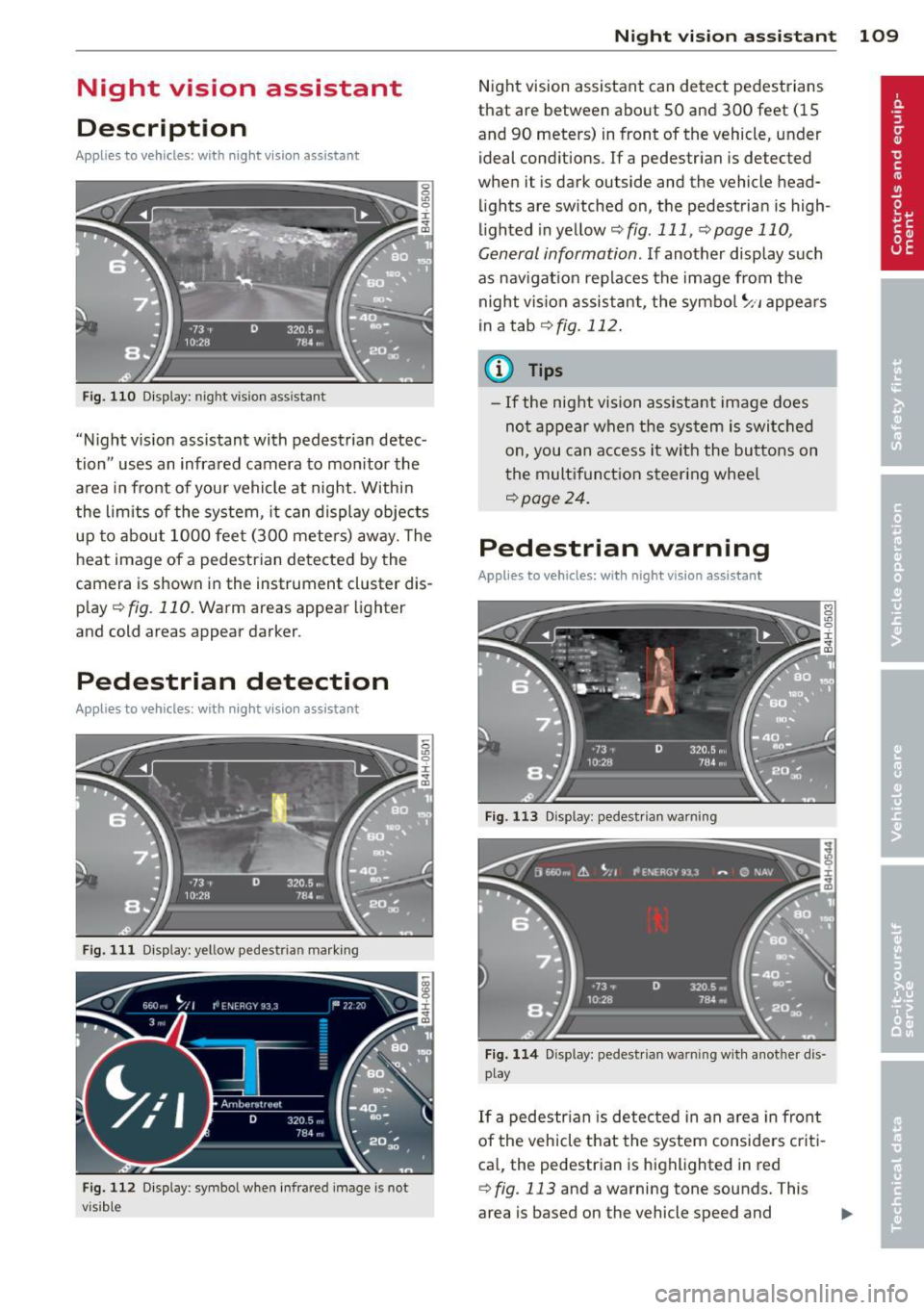
"Night v ision assistant with pedestrian detec
tion" uses an infrared camera to mon itor the
area in front of your vehicle at night . Within
the limits of the system, it can display objects
up to about 1000 feet (300 mete rs) away. The
heat image of a pedestrian detected by the
camera is shown in the instrument cluster dis
p lay
¢ fig. 110. Warm areas appear lighter
and cold areas appear darker.
Pedestrian detection
Applies to vehicles: with night vision assistant
Fig. 111 Display: yellow pedestrian marking
Fig. 112 Display: symbol when infra red image is not
visib le
Night vision assistant 109
Night vision assistant can detect pedestrians
that are between about 50 and 300 feet (15
and 90 meters) in front of the vehicle, under ideal conditions . If a pedestrian is detected
when it is dark outside and the vehicle head
lights are switched on, the pedestrian is high
lighted in yellow
~ fig. 111, ¢page 110,
General information .
If another display such
as navigat ion replaces the image from the
night vis ion assistant, the symbo l
~11 appears
in a tab
¢fig. 112.
(D Tips
-If the night vision assistant image does
not appear when the system is switched
on, you can access it with the buttons on
the multifunction steering whee l
~page 24.
Pedestrian warning
Applies to vehicles: with night vision assistant
Fig . 113 D isp lay: pedestr ian wa rning
Fig. 114 Disp lay: pedestrian wa rnin g with anot her dis
play
If a pedestrian is detected in an area in front
of the vehicle that the system considers criti
cal, the pedestrian is highlighted in red
¢fig . 113 and a warning tone sounds. This
area is based on the vehicle speed and
Page 113 of 302
.. Swi tch the ign ition on and turn the lig ht
switch to the
AUTO pos ition or io .
.. To switch night vision assistant on , press the
~ ,, button
~ fig . 116. The image from the
night vision camera appears in the instru
me nt cluster d isp lay.
.. Press t he button ~,, aga in to swi tc h ni ght vi
s ion assistant off .
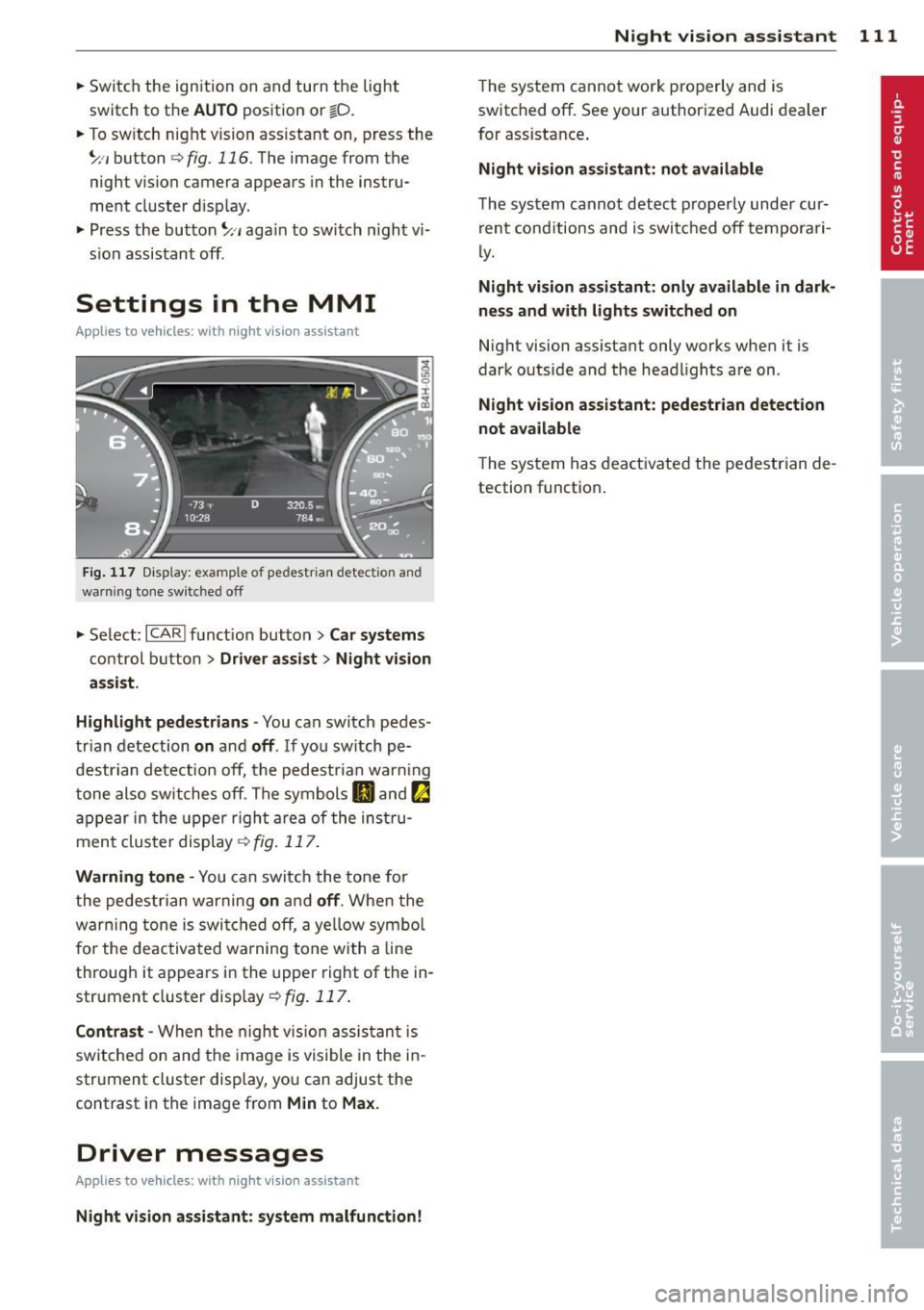
Settings in the MMI
Applies to vehicles: with night vision assistant
F ig. 117 D isp lay: examp le of pedestr ia n detectio n and
warni ng tone switched off
.. Se lect: ICARI f unct ion but ton> Car sy stems
co ntrol b utton > Dr iver assist > Night vision
a ssist.
Highlight pedestrians -
You can switch pedes
tr ian detection
on and off . If yo u sw itch pe
destrian detect ion off, the pedestrian war ning
t one also switches off . The symbols
II and !:a
a p pe ar in the upper righ t area of the ins tru
men t cluster display~
fig. 117.
Warning tone -You can switch the to ne fo r
the pedestrian warning
on a nd off . Whe n the
warn ing tone is swi tc h ed off, a ye llow sym bol
fo r the de activa ted w arning tone with a line
through it appears in the upper right of the in
strument cluster display ~
fig. 117 .
Contrast -When the nigh t vis ion assis tan t is
switche d on and the ima ge is visible in t he in
strument cluster disp lay, yo u can adjust the
contrast in the image from
Min to Max.
Driver messages
Applies to vehicles: with night visio n assistant
Night vision assistant : system malfunction! Night
vision assistant 111
The system cannot work properly and is
switched off. See your authorized Audi dealer
for assistance .
Night vision assistant: not available
The system cannot detect p roperly under cur
r ent cond itions and is switc hed off tempora ri
ly.
Night vision assistant: only available in dark
nes s and with lights switched on
N ight vision assistant only works when it is
dark outside a nd the head lights are on .
Night vision assistant: pedestrian detection
not available
The system has deactivated the pedestrian de
tection function .
Page 122 of 302

120 Advanced Parking System
Switching on and off
Applies to vehicles: with park ing system advanced
The rear view camera switches on automati
cally together with the acoustic and visual
park assist when you put the vehicle in re
verse.
Fig. 128 Ce nter console: Park ing system swi tc h
Fig. 129 MMI disp lay: v isual distance d isplay
Switching on
,. Switch the MMI on
,. Act ivate
comfort or auto mode in Audi dr ive
select
¢page 106.
,. Shift into reverse or
,. Press the switch
P,qi in the center console
¢
fig. 128 . A short confirmation tone
sounds and the ind icator light in the sw itch
lights up.
Switching between the rear view camera
and visual display
,. Press the Graphic control button
¢
page 121, fig . 130 ® to see the visual
display .
,. Press the
Rearview control button to see the
rear view ca mer a image
¢ fig . 129 .
Switching off
,. Drive faster than 6 mph (10 km/h), or ,.
press the switch
P,#A or
,. switch off the ignition.
Segments in the visual display
The red segments in front of and behind the
vehicle ¢
fig. 129 help yo u to determine the
distance between you and an obstacle. As
your vehicle comes closer to the obstacle, the segments move closer to the vehicle . The col
li sion area has been reached when the next to
last segment is displayed . Do not continue
driv ing farther ¢
A in General Information
on page
119!
A WARNING
- The MMI display cannot show, or cannot
adequately show, ce rtain objects (such as
small posts or grating), recesses in the
g round and protruding parts on another
car .
- Only use the rear view camera to assist
you if it shows a good, clear pict ure. For
examp le, the image may be affected by
the sun shining into the lens, dirt on the
lens or if there is a defect.
- Use the rear view camera on ly with the
rea r lid comp lete ly closed . Make su re any
objects you may have mounted on the
rear lid do not block the rear view cam
era.
(D Tips
- The sensors must be kept clean and free
of snow and ice for the park assist to op
erate.
- If your vehicle is near an obstacle, an ad
ditional visual indicator appears in the
rearview camera image. This superim
posed image is there to help you to de
termined which area of the vehicle is af
fected .
- You can change the volume and pitch of
the signals as well as the display
¢page 122.
-What appears in the display is time-de
layed .