lights AUDI A8 2011 Owner's Guide
[x] Cancel search | Manufacturer: AUDI, Model Year: 2011, Model line: A8, Model: AUDI A8 2011Pages: 302, PDF Size: 76.07 MB
Page 65 of 302
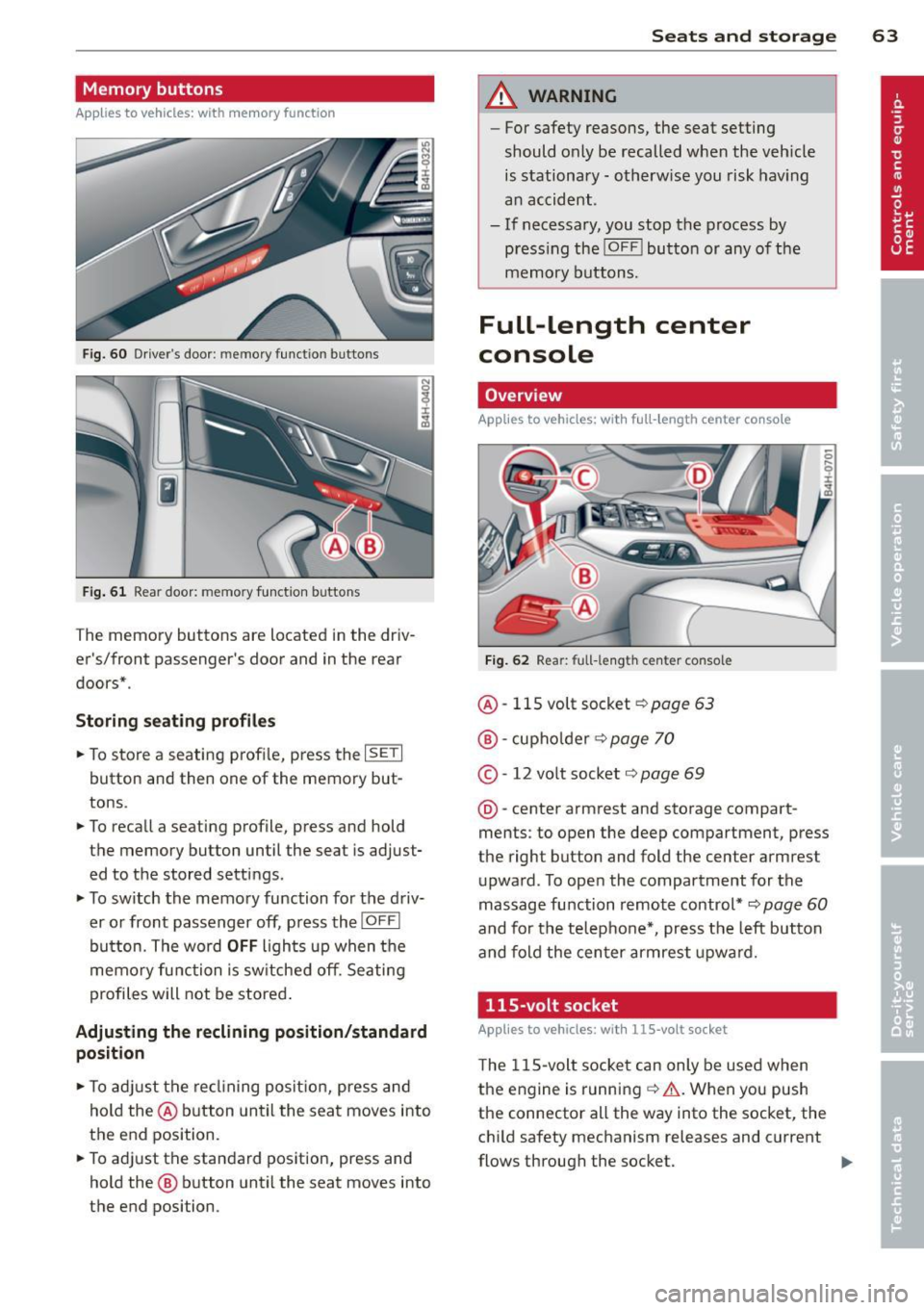
Memory buttons
Applies to vehicles: with memory function
Fig. 60 Driver's door: memory function buttons
Fig. 61 Rear door: memory function buttons
The memory buttons are located in the driv
er's/front passenger's door and in the rear
doors* .
Storing seating profiles
.. To store a seating profi le, press the ISETI
button and then one of the memory but
tons .
.. To recall a seating profile, press and hold
the memory button until the seat is adjust
ed to the stored settings.
.. To switch the memory function for the driv
er or front passenger off, press the
IOFFI
button. The word OFF lights up when the
memory function is sw itched off. Seating
profiles will not be stored .
Adjusting the reclining position/standard
position
.. To adjust the reclining position, press and
hold the@ button until the seat moves into
the end position .
.. To adjust the standard position, press and
hold the @ button until the seat moves into
the end position.
Seats and storage 63
A WARNING
-For safety reasons, the seat setting
should only be recalled when the veh icle
is stationary -otherwise you risk having
an accident.
- If necessary, you stop the process by
press ing the
!OF F! button or any of the
memory buttons.
Full-length center
console
Overview
Applies to vehicles: with full-length center console
Fig. 62 Rear: full-le ngth center console
@ -115 volt socket Q page 63
@-cupho lder ¢ page 70
©-12 volt socket ¢ page 69
@-center armrest and storage compart
ments : to open the deep compartment, press
the right button and fold the center armrest
upward. To open the compartment for the
massage function remote control*
Q page 60
and for the telephone*, press the left button
and fold the center armrest upward.
115-volt socket
Applies to vehicles: wit h 115-volt socket
The 115-volt socket can only be used when
the engine is running ¢.&. .When you push
the connector all the way into the socket, the
child safety mechanism releases and current
flows through the socket. ""
Page 83 of 302

.. Press the !START ENGINE STOPI button. The
engine will start.
.. Drive to your author ized Audi dealer imme
diately to have the malfunction corrected .
@ Tips
You can view the message again by press
ing the
! START ENGINE STOPI button.
Electromechanical
parking brake
Operation
The electromechanical parking brake replaces
the hand brake.
Fig. 82 Center console: Park ing brake
.. Pull on the switch<®> c> fig . 82 @to apply
the parking brake. The indicator light in the
switch illuminates.
.. Step on the brake pedal or the accelerator
pedal and press the switch <®> at the same
t ime to release the parking brake. The indi
cator light in the switch goes out.
Your vehicle is equipped with an electrome
chan ical parking brake. The parking brake is
designed to prevent the vehicle from roll ing
un intent ionally and replaces the hand brake.
In addition to the normal functions of a tradi
tional hand brake, the electromechanical parking brake provides various convenience
and safety functions.
When starting from rest
-The integral starting assist helps you when
driving by automatically releasing the park
i ng brake
c> page 82, Starting from rest.
On the road 81
- When start ing on inclines, the starting as
sist prevents the vehicle from unintentional
ly rolling back. The braking force of the
parking brake is not released until sufficient
driving force has been built up at the
wheels.
Emergency brake function
An emergency brake ensures that the vehicle
can be slowed down even if the
normal brakes
fail
c> page 83, Emergency braking.
Indicator lights
-If the parking brake is closed with the igni
tion
switched on the indicator lights come
on - (USA mode ls)/ . (Canada models)
in the instrument cluster and the switch.
- If the parking brake is closed with the igni
tion
switched off the indicator lights come
on - (USA models)/ . (Canada models)
in the instrument cluster and the switch for
about 20 seconds .
A WARNING
Do not press the accelerator pedal inadver
tently if the veh icle is stationary but the
engine is running and a gear is selected .
Otherwise the vehi cle w ill start to move
immediately and could result in a crash.
(D Note
If the symbol . in the display or the indi
cator light
11111 (USA models)/ . (Cana
da models) in the instrument cluster flash
es, there is a malfunction in the brake sys
tem. Please refer to the detailed descrip
tion of the indicator lights
c>page 14.
- If the indicator light -(USA mod-
els)/ . (Canada models) or
Im turns
on, there may be a malfunction in the
parking brake
c> page 15.
{I) Tips
-Yo u can app ly the parking brake at any
time -even with the ignition switched
off. The ignition must be on in order to
release the parking brake.
Page 86 of 302

84 On the road
Cruise control
Switching on
The cruise control system makes it possible to
drive at a constant speed starting at 20 mph
(30 km/h).
0
f
®t
0
Fig. 83 Control lever w it h set butt on
Fig . 84 D is pl ay: Selected speed
"' Pull the lever to position (D c::> fig. 83 to
switch the system on.
"' Drive at the speed you wish to set.
"'Press button@to set that speed .
I :i:. ... a,
The stored speed and the ind icator light
[ij;W~1~ (US models) / 0 (Canadian models) ap
pear in the instrument cluster display
c:;, fig. 84 . The display may vary, depending on
the type of display in your vehicle . The indic a
tor light . in the instrument cluster also illu
minates.
The speed is kept constant
via an engine out
put adjustment or active brake intervention .
8_ WARNING
-Always pay attention to traffic even when
the cruise control is switched on . You are
always responsible for your speed and
the distance between your vehicle and
other vehicles. -
For safety reasons, the cruise contro l
should not be used in the city, in stop
and-go traffic, on twisting roads and
when road conditions are poor (such as ice, fog, gravel, heavy rain and hydro
plan ing) - risk of accident.
- Turn off the cruise control temporarily when enter ing turn lanes, highway exit
lanes or in construction zones .
- Please note that inadvertently "resting" your foot on the accelerator pedal causes
the cruise control not to brake. This is
because the cruise control is overridden
by the drive r's acceleration.
- If a brake system malfunction such as
overheating occurs when the cruise con
trol system is switched on, the braking
function in the system may be switched
off . The other cruise control functions re
main active as long as the indicator light
m:lmi (US models)/ . (Canadian mod
els) is on.
(D Tips
The brake lights illuminate as soon as th e
brakes decelerate automatically.
Changing speed
"' Press lever in the 0 or O direction
c::>page 84, fig. 83 to increase or decrease
your speed.
"' Release the lever to save that speed .
Change speed in increments of 1 mph (1 km/
h) by lightly press ing the lever. If you keep the
lever pressed down , you will alter your speed
in 5 mph (10 km/h) increments .
You can also press the accelerator pedal down
to increase your speed, e .g. if you want to
pass someone . The speed you saved earlier
will resume as soon as you release the acceler
ator pedal.
If, however, you exceed your saved speed by
6 mph (10 km/h) for longer than 5 minutes,
the cruise control will turn off temporari ly.
The green symbol in the display
c> page 84, .,..
Page 100 of 302

98 Audi side assist
Audi side assist
Lane Change Assistant
Description
App lies to vehicles: with si de assist
The side assist helps you when changing
lanes.
GID
A UDI
Fig. 99 Rear bumper: Posit ion of radar se nsors (not
vis ible on outs ide)
Fig. 100 Signal light on the outside mirror -driver's
side
ID ,._
8
i
.. a,
Side assist uses radar sensors (not visib le on
outside) ¢
fig. 99 to help the driver check
blind spots, and see what is happening in traf
fic behind the vehicle
¢page 99, fig. 102.
Signal lights are built into both outside mir
rors ¢
fig. 100. The signal light on the left
outside mirror assists when moving over into
the left lane and the signal light on the right
outside mirror assists when moving over into
the right lane.
The s ignal light comes on to tell you that side
assist has detected a vehicle on that side and
that the position of this other vehicle should
be taken into account if you were to change
lanes. This is called the
informational stage
signal ¢page 100.
The informational stage signal
is designed so that you notice it only
when you are looking in the outside mirror.
When you activate the turn signal and side as
s ist detects a vehicle in a notable location, the
corresponding signal on the outside mirror
flashes briefly and brightly several times. This
is the
alert stage signal ¢ page 100.
Activating and deactivating
App lies to vehicles: wit h side assist
Fig. 101 Driver 's door: Side assist button
Activating
a,
ij
:r
" a,
"' Press the button¢ fig. 101. The indicator on
the button lights up.
Deactivating
"' Press the button again. The indicator light
on the button goes out .
The system works at speeds faster than 19 mph (30 km/h) .
A WARNING
-- Improper reliance on the side assist sys-
tem can cause collis ions and serious per
sonal injury:
- Never rely on ly on side assist when
changing lanes.
- Always check rear view mirrors to make
sure that it is safe to change lanes.
- Side assist cannot detect all veh icles un
der all conditions- danger of acc ident!
- Side assist cannot detect vehicles in time
to a lert you when they approach from
behind at very high speed, or fall drop
back very quickly. ..,_
Page 102 of 302

100 Audi side assist
The signal can light up i f you are passed by a
vehicle or if yo u are passing another vehicle.
If you p ass another vehicle slowly (difference
in speed less than 9 mph, or 15 km/h), the
signal light will come on as soon as the other
ve hicle is in your blind spot and is detected by
side assist . When the difference in speed is
greater, the signa l light will not come on.
Informational and alert stage signals
App lies to vehicles: with side assist
Side assist has two s ignal stages:
- the informationa l stage signal, and
- the a le rt stage signa l.
Side assist helps you by using the appropriate
signal s tage, depending on whether or not
you have activated the turn signal, and thus
have indicated that you are or are not chang
ing lanes.
Informational stage signal
As long as you have not activated the turn sig
nal, side assist informs you of detected vehi
cles that are registered as being in a notable
l ocat ion if you were to change lanes. Whenev
er the detected vehicle's difference in speed
and distance is registered by side assist as no
table, the signal light on the respective m irror
produces muted illum ination.
The brightness of the informational stage sig
na l is designed not to be as intense, so that it
does not interfere with your view of the road
when you are driving and have no intention of
changing lanes. When you look in the outside
mirror, you can clearly see the informat ional
stage signa l.
Alert stage signal
When you activate the turn signal, and side
assist has detected a vehicle in a notable loca
tion on that part icular side, the signal light on
this side mirror flashes bright ly. The repeated
brief and bright flashing of the alert stage
signal reminds you to carefully check traffic to
the rea r in the outs ide mir ror and over you r shou
lder, so that you can safely comp lete the
lane change ¢.&.
in Safety tips on page 104.
(D Tips
The brightness of the s ignal light on the
outside mirrors can be adjusted with the
MMI ¢page 103.
Driving situation: Fast approaching
vehicles
Applies to vehicles: with side assist
Fig . 103 Side assist: Fast approac hing veh icles
(!) Signal on outside mirror does not light
up
No vehicle was dete cted by the sensors. The
signal on the outside mirror does not light up
¢ .&. in Safety tips on page 104.
@ Informational stage signal lights up
A fast approach ing vehicle - in the left-hand
l ane fo r example - was detected by the sen
sors. Although th is vehicle is still fa r away, it
shou ld be taken into account if you were to
change lanes, due to the considerable differ
ence in speed. The informationa l stage signal
on the outside mirror lights up
¢ page 100. ..,.
Page 103 of 302

@ Alert stage signal flashes
If you activate your turn signal in driving sit
uation @, the signa l briefly f lashes repeated
ly. Side assist is a lerting you to a vehicle that
you may not have noticed.
@ Tips
- The faster a vehicle approaches from the
rear, the sooner the signa l on the outside
mirror lights up. Side assist will signa l,
at the latest, when a detected vehicle en
ters your "blind spot".
- When vehicles approach very quickly,
changing lanes can be dangerous even if
the signal on the outside mirror does not
light up.
Driving situation: Slowly approaching
vehicles
Appl ies to vehicles : wit h side ass ist
®
Fig. 104 Side assist: Slowly approaching veh icles and
veh icles in you r b lin d spot
@ Signal on outside mirror does not light
up
A vehicle approaching slowly -in the left-hand
lane for examp le -was detected by the sen
sors. Because of the small difference in speed
and the considerab le distance from your vehi-
Audi side assist 101
cle, the signal on the outside mirror will not
light up¢.&
in Safety tips on page 104.
@ Informational stage signal lights up
The distance between your veh icle and that of
the slowly approaching vehicle has narrowed.
T he informational stage signal on the outside
mirror lights up.
As soon as the difference in speed and dis
tance is registered as notable if you were to
change lanes, a signal on the m irror lights up.
Side assist will signal at the latest when a de
tected vehicle enters your "blind spot".
@ Alert stage signal flashes
If you activate your turn signal in driving sit
uation @, the signal light briefly flashes re
peatedly. Side assist is alert ing you of a vehi
cle that you may not have noticed.
(D Tips
- Th e faster a vehicle approaches from the
rear, the sooner the signal on the outside
mirror lights up. Side assist will signal,
at the latest, when a detected vehicle en
ters your "blind spot".
- When vehicles approach very quickly,
changing lanes can be dangerous even if
the signal on the outside mirror does not
light up.
Page 104 of 302
102 Audi side assist
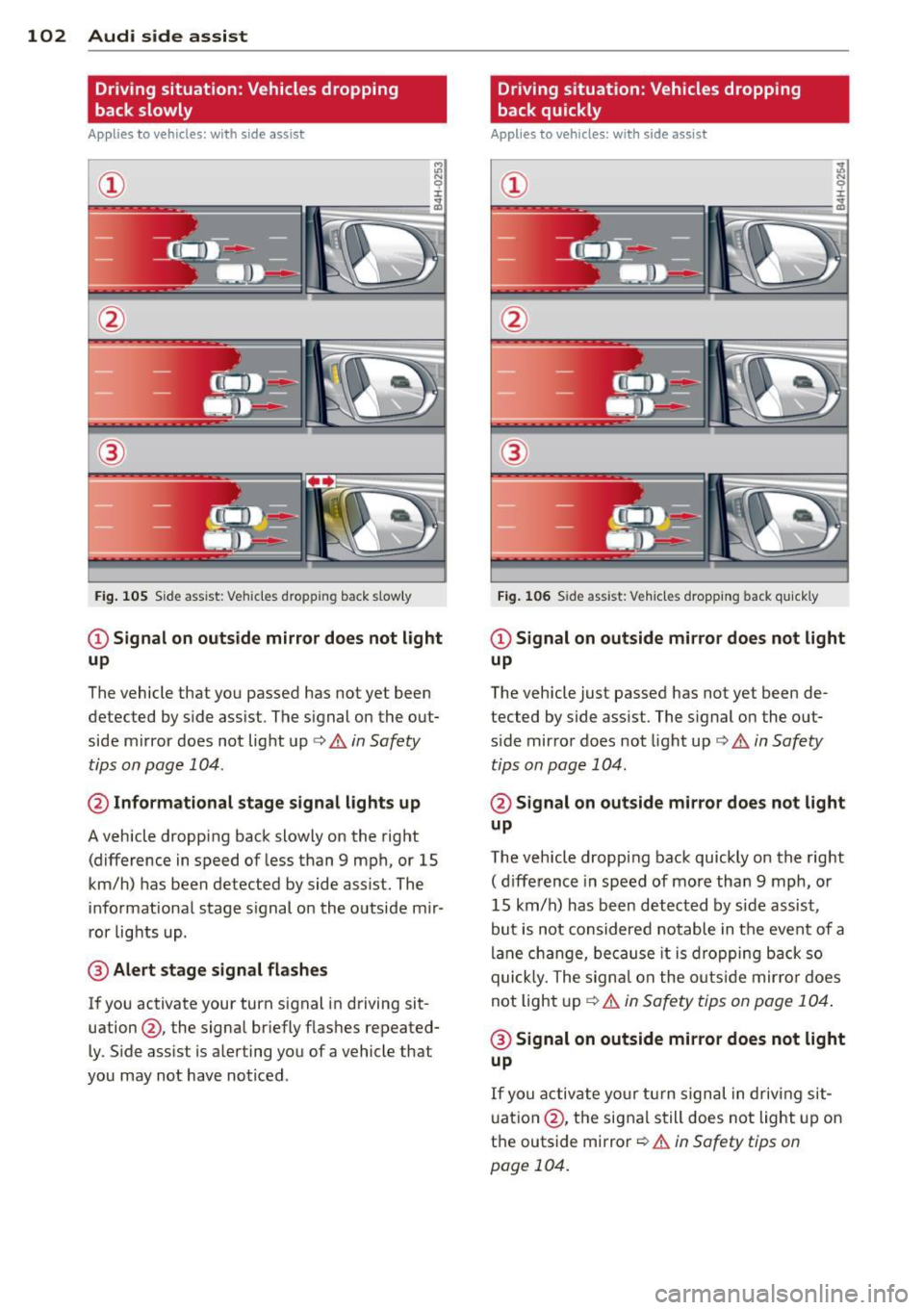
Driving situation: Vehicles dropping
back slowly
Applies to vehicles: with side assist
i:i N 9 J:
--- ----::~
®
Fig. 105 Side assist: Veh icles dropp ing back s low ly
CD Signal on outside mirror does not light
up
The vehicle that you passed has not yet been
detected by side assist . The signal on the out
side mirror does not light up¢
A in Safety
tips on page 104 .
@ Informational stage signal lights up
A vehicle dropping back slowly on the right
(difference in speed of less than 9 mph, or 15
km/h) has been detected by side assist. The
informational stage signal on the outside mir
ror lights up.
@ Alert stage signal flashes
If you activate your turn signal in driving sit
uation@, the signal briefly flashes repeated
ly. Side assist is alerting you of a vehicle that
you may not have noticed .
Driving situation: Vehicles dropping
back quickly
Applies to vehicles: with side assist
®
Fig. 106 Side assist: Ve hicles dropp ing back quickly
CD Signal on outside mirror does not light
up
The vehicle just passed has not yet been de
tected by side assist. The signal on the out
s ide mirror does not light up
Q A in Safety
tips on page 104.
@ Signal on outside mirror does not light
up
The vehicle dropping back quickly on the right
( d ifference in speed of more than 9 mph, or
15 km/h) has been detected by s ide assist ,
but is not considered notable in the event of a
lane change, because it is dropping back so
quick ly. The signal on the outs ide mirro r does
not light up¢
A in Safety tips on page 104 .
@ Signal on outside mirror does not light
up
If you activate your turn signal in driving sit
uation @, the signal still does not light up on
the outside mirror
Q A in Safety tips on
page 104.
Page 111 of 302
Night vision assistant
Description
Applies to vehicles: with night vision assistant
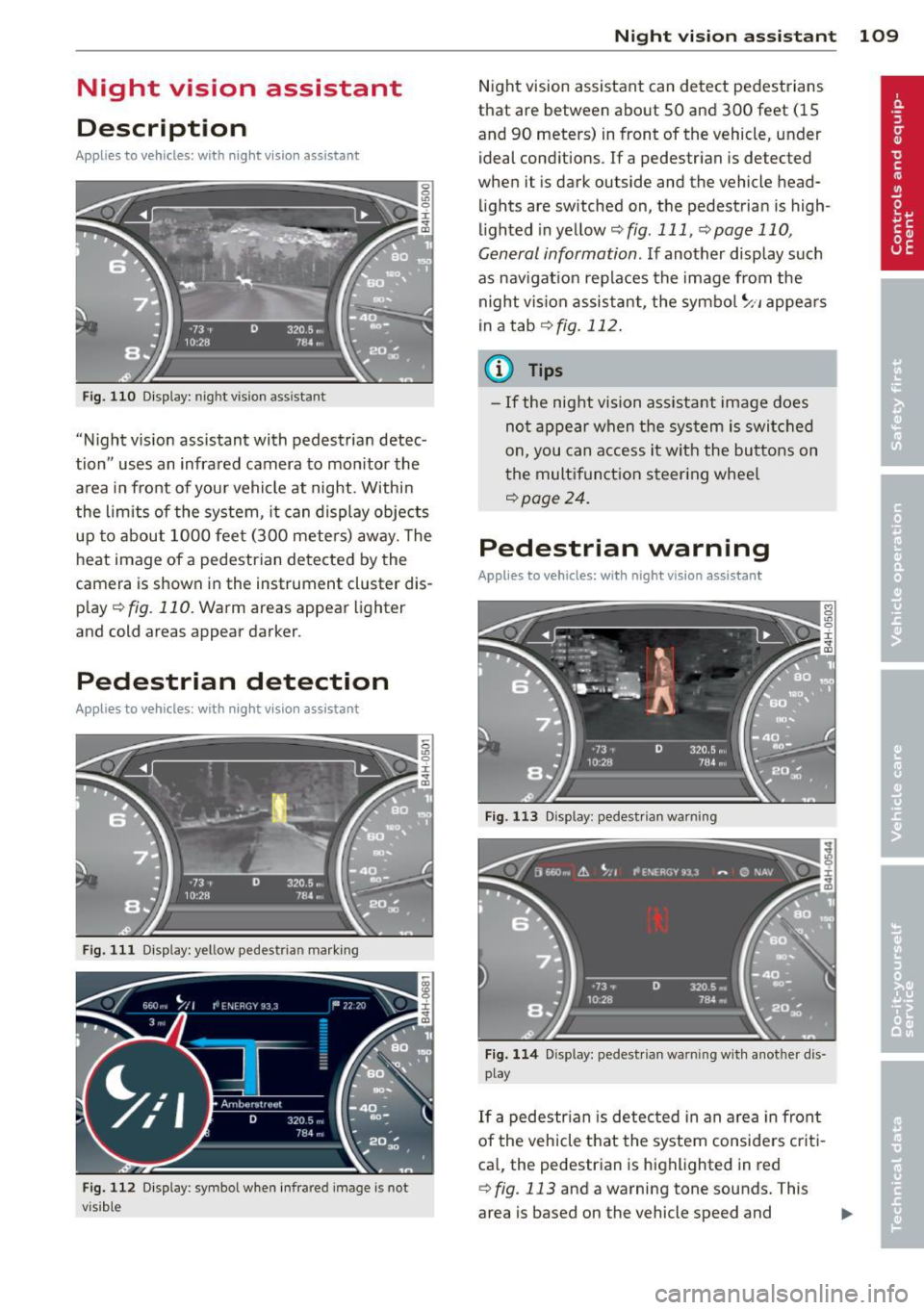
Fig. 110 Display: nightv ision assistant
"Night v ision assistant with pedestrian detec
tion" uses an infrared camera to mon itor the
area in front of your vehicle at night . Within
the limits of the system, it can display objects
up to about 1000 feet (300 mete rs) away. The
heat image of a pedestrian detected by the
camera is shown in the instrument cluster dis
p lay
¢ fig. 110. Warm areas appear lighter
and cold areas appear darker.
Pedestrian detection
Applies to vehicles: with night vision assistant
Fig. 111 Display: yellow pedestrian marking
Fig. 112 Display: symbol when infra red image is not
visib le
Night vision assistant 109
Night vision assistant can detect pedestrians
that are between about 50 and 300 feet (15
and 90 meters) in front of the vehicle, under ideal conditions . If a pedestrian is detected
when it is dark outside and the vehicle head
lights are switched on, the pedestrian is high
lighted in yellow
~ fig. 111, ¢page 110,
General information .
If another display such
as navigat ion replaces the image from the
night vis ion assistant, the symbo l
~11 appears
in a tab
¢fig. 112.
(D Tips
-If the night vision assistant image does
not appear when the system is switched
on, you can access it with the buttons on
the multifunction steering whee l
~page 24.
Pedestrian warning
Applies to vehicles: with night vision assistant
Fig . 113 D isp lay: pedestr ian wa rning
Fig. 114 Disp lay: pedestrian wa rnin g with anot her dis
play
If a pedestrian is detected in an area in front
of the vehicle that the system considers criti
cal, the pedestrian is highlighted in red
¢fig . 113 and a warning tone sounds. This
area is based on the vehicle speed and
Page 113 of 302
.. Swi tch the ign ition on and turn the lig ht
switch to the
AUTO pos ition or io .
.. To switch night vision assistant on , press the
~ ,, button
~ fig . 116. The image from the
night vision camera appears in the instru
me nt cluster d isp lay.
.. Press t he button ~,, aga in to swi tc h ni ght vi
s ion assistant off .
Settings in the MMI
Applies to vehicles: with night vision assistant
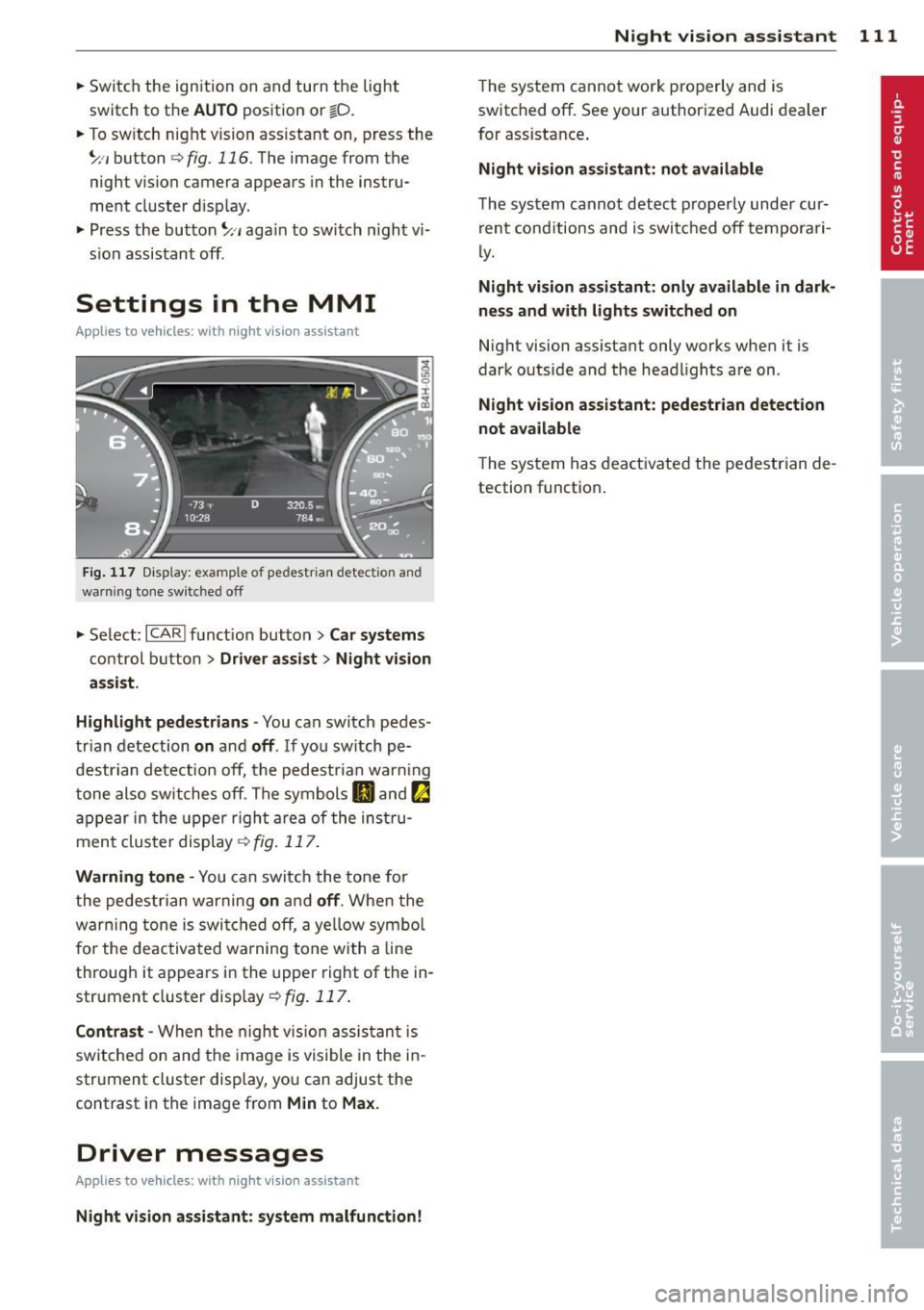
F ig. 117 D isp lay: examp le of pedestr ia n detectio n and
warni ng tone switched off
.. Se lect: ICARI f unct ion but ton> Car sy stems
co ntrol b utton > Dr iver assist > Night vision
a ssist.
Highlight pedestrians -
You can switch pedes
tr ian detection
on and off . If yo u sw itch pe
destrian detect ion off, the pedestrian war ning
t one also switches off . The symbols
II and !:a
a p pe ar in the upper righ t area of the ins tru
men t cluster display~
fig. 117.
Warning tone -You can switch the to ne fo r
the pedestrian warning
on a nd off . Whe n the
warn ing tone is swi tc h ed off, a ye llow sym bol
fo r the de activa ted w arning tone with a line
through it appears in the upper right of the in
strument cluster display ~
fig. 117 .
Contrast -When the nigh t vis ion assis tan t is
switche d on and the ima ge is visible in t he in
strument cluster disp lay, yo u can adjust the
contrast in the image from
Min to Max.
Driver messages
Applies to vehicles: with night visio n assistant
Night vision assistant : system malfunction! Night
vision assistant 111
The system cannot work properly and is
switched off. See your authorized Audi dealer
for assistance .
Night vision assistant: not available
The system cannot detect p roperly under cur
r ent cond itions and is switc hed off tempora ri
ly.
Night vision assistant: only available in dark
nes s and with lights switched on
N ight vision assistant only works when it is
dark outside a nd the head lights are on .
Night vision assistant: pedestrian detection
not available
The system has deactivated the pedestrian de
tection function .
Page 115 of 302
~ You may need to release the selector lever
lock depending on which se lector lever posi
t ion is selected and which one you would
like to select ¢
page 113, Selector lever
lock .
~ To engage the nearest selector lever posi
t ion, move the selector lever forward/back
until you feel the first pressure po int. The
selector lever will return to its original posi
tion.
~ T o skip over one (or two) se lector lever posi
tions, move the se lector lever past the first
(and second) pressure point into the desired
pos it ion. The selector lever will return to its
original position.
F or example, to move directly from the
D se
lector lever position to
P when stopping the
vehicle, you can shift past the
N and R selec
tor lever positions.
Selector lever lock
The selector lever lock prevents you from se
lecting a position unintentionally, causing the
vehicle to roll. When engaging some selector
lever positions, you must press the button on
the selector lever¢
fig. 119 and/or press the
brake pedal.
You must press the brake pedal to engage a
selector lever position when the engine is run
ning while the vehicle is stationary. The ar
rows ¢
fig. 120 indicate when you need to
press the button on the selector lever.
The selector lever does not lock if you shift from
D to R within one second. This allows
you to "rock" the vehicle to free it when it is
stuck .
P- Park
The whee ls are locked in this position. Only
shift into park when the vehicle is stationary
¢ & .To engage the
P selector lever position,
press the button on the selector lever and
shift into the
P position .
You can only shift out of park when the eng ine
is running and you are pressing the brake ped
al. Press the button on the selector lever to
Automatic Transmission 113
release the parking lock and select the desired
selector lever position.
P engages automatically when you switch the
engine off while
D, Sor R is engaged or in
manua l mode .
If you switch the eng ine off whe n N is engag
ed, the transmission remains in
N for approxi
mately 30 minutes and then Pis engaged.
You must use the emergency release proce
dure to release the parking lock before towing
the vehi cle ¢
page 116.
R- Reverse
The reverse gear is engaged in this pos it ion .
Only select reverse when the vehicle is sta
tionary and the engine is running at id le speed
¢ & -To engage the
R selector leve r position,
press the button on the selector lever, press
the brake pedal and move the selector lever
into the
R position.
T he back-up lights turn on when you select
the
R selector lever position while the engine
' ' 1s ru nning .
N -Neutral
The transmission is in idle in this pos it ion. To
engage the
N selector lever position, press
the button on the selector lever and shift int o
the
N posi tion.
If you switch the engine off whe n N is engag
ed, the transmission remains in
N for approxi
mately 30 minutes and then Pis engaged.
The vehicle cannot be locked when the selec
tor lever is in the
N position .
When dr iving through an automat ic car wash,
first select the
N position and then switch the
engine off¢
page 207.
D - Drive
In this position, the transmission shifts up
and down automatically depending on engine load, veh icle speed and the dynamic shift pro-
gram (DSP) .
IJJ,,