bumper front AUDI A8 2011 Owners Manual
[x] Cancel search | Manufacturer: AUDI, Model Year: 2011, Model line: A8, Model: AUDI A8 2011Pages: 302, PDF Size: 76.07 MB
Page 89 of 302

Adaptive cruis e control and bra kin g guard
vehicles such as motorcycles and bicy
cles.
- The adaptive cruise control system can
not detect people, animals and cannot
detect objects or traffic that crosses your
lane of travel.
- Never drive at speeds that are too fast for traffic, road and weather conditions.
- Never use adaptive cruise control when
you cannot drive safely at a steady speed, including on wind ing roads or
when road conditions are poor (for exam
ple, in construction sites, on ice , gravel,
in fog, heavy ra in or on wet roads that in
crease the risk of hydroplan ing).
- Never follow a veh icle so closely that you
cannot stop your vehicle safely. The
adaptive cruise cont ro l cannot slow or
brake the veh icle safely when you follow
another veh icle too closely. Always re
member that the automatic braking
function cannot bring the vehicle to a
sudden or emergency stop under these
condit ions.
- Never rest your foot on the acce lerator
pedal, especially when the adaptive
cruise control is being used. Pressure on
the accelerator w ill override the adaptive
cruise control braking function and pre
vent the brakes from being applied whe n
adaptive cruise cont ro l detects a situa
t io n when the brakes must be applied.
- Never use adaptive cruise control whe n
the radar sensors cannot accurately de
t ect vehicles moving in t raff ic. The rad ar
sensor's vision can be reduced by heavy
rain, ice, snow, heavy road spray and re
flect ions from guard rails, t unnel ent ran
ces, etc. These and simi lar conditions can
prevent vehicles from being accurately
detected and in some cases they may not
be detected at all .
- Always turn off adaptive cru ise contro l
when entering turn lanes, exit lanes and
constr uction zones or in similar sit ua
t ions because the vehicle will automati
ca lly accelerate to the sto red speed when
the roa d ahead is clear. -
To prevent unintended operation, a lways
sw itch ACC off when it is not being used .
(D Note
The sensors can be moved by impac ts or
damage to the bumper, wheel housing and underbody . Damage in these areas could
change the way the adaptive cru ise control
system and Aud i brak ing guard work to
gether . Have your authorized Audi deale r
check to make s ure that the adaptive
cruise control system is wor king p roperly if
your vehicle had a m ino r frontal impact or
was damaged in the area of the sensors.
In curves
Applies to vehicles: wi th adaptive cruise control
Fi g. 86 Exa mpl e: dri vin g into a curve
When dr iving into a curve¢ fig. 86 and out of
a curve, the adaptive c ruise control may react
to a vehicle in the next lane and app ly the
brakes . You c an override or preven t the brak
ing by pressing the accelerator pedal b riefly .
Stationary objects
Applies to vehicles: wit h adaptive cruise control
Fig. 87 E xam ple: object c hanging l anes a nd s tationa ry
o ~ect
~
8 7
Page 101 of 302
-The radar sensor's vision can be reduced
or entirely blocked by rain, snow, and
heavy spray . This can result in side assist
not adequately detecting vehicles or, in
some cases, not detecting them at all.
Always keep an eye on the d irection you
are traveling and the relevant area
around the vehicle.
- Please note that side assist indicates
there are approaching vehicles, o r vehi
cles in your blind spot, only after your ve
hicle has reached a driving speed of at
least 19 mph (30 km/h).
- Side ass ist signal does not work around
tight corners (turning radius less than
328 feet or 100 m).
- Side assist is no replacement for the driv
er's full attention . The driver alone is re
sponsible for lane changes and similar
driving maneuvers. A lways keep an eye
on the direction you are traveling and the
relevant area around the vehicle.
(D Note
- To ensure that you do not adversely af
fect side assist, do not block the area on
the rear bumper where the radar sensors
are located with foreign objec ts (such as
stickers or bicycle racks).
- Make sure that the signal light on the
outside m irror is not blocked by st ickers
or other items .
@ Tips
-Side assist automatically deactivates if it
detects that the radar sensors are
blocked ~
page 104. The indicator light
on the button goes out .
- The area on the bumper where the radar
senso rs are located must consistently re
main free of snow, ice, and heavy soiling
so that side assist can function properly.
Follow the additional notes on
.:!>page 104 .
-Additional tinting on the front side win
dows can make it harder to see and cor
rectly understand the signa l light on the
outside mirror.
Aud i side assist 99
-For Declaration of Compliance to United
States FCC and Industry Canada regula
tions ¢
page 286.
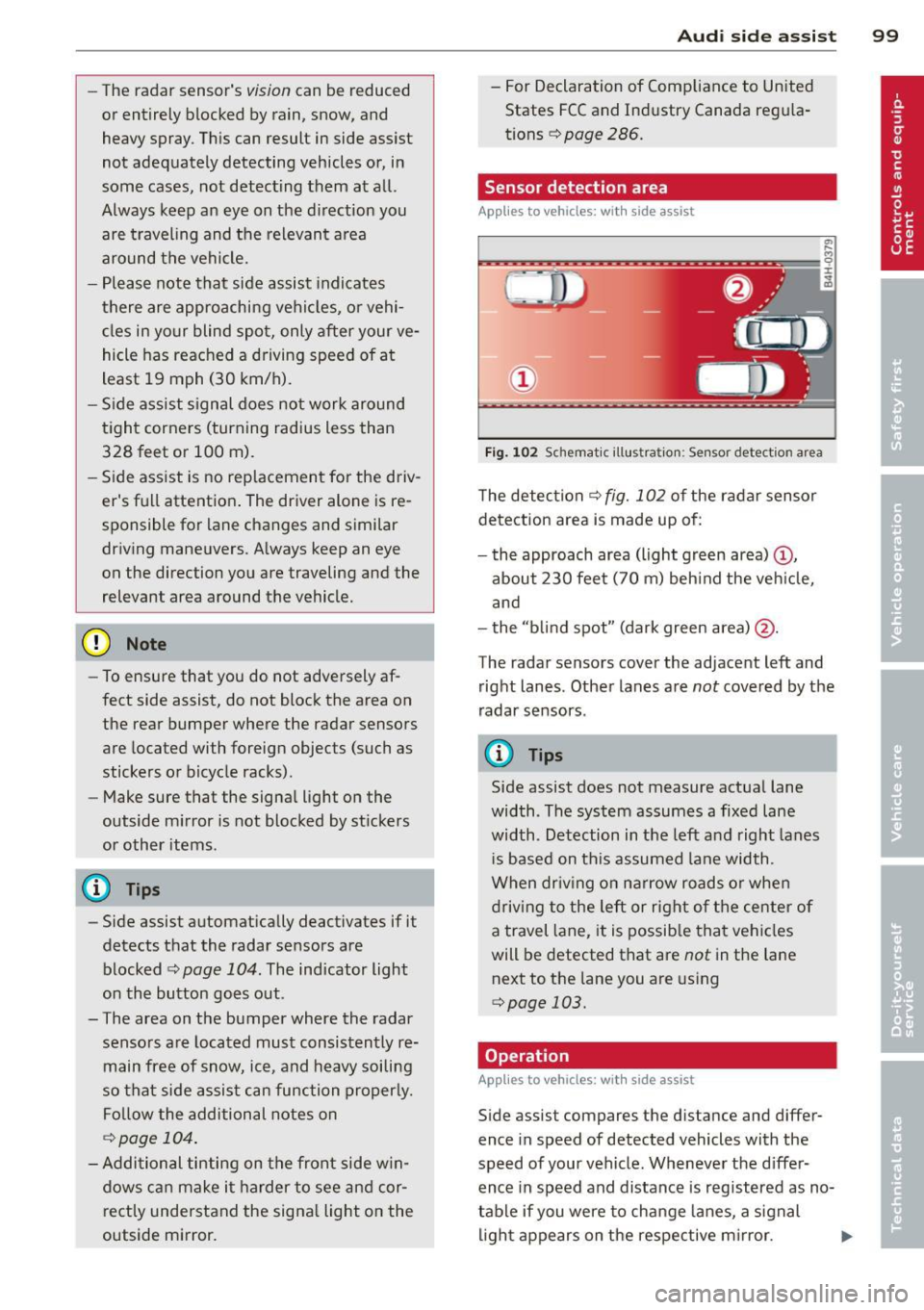
Sensor detection area
Applies to vehicles: with side assist
t
Fig. 102 Sc hemat ic illu st ration : Sen sor detect io n area
The detection ¢ fig. 102 of the radar sensor
detection area is made up of:
- the approach area (light green area)@,
about 230 feet (70 m) beh ind the veh icle,
and
- the "b lind spot" (dark green area) @.
The radar sensors cover the adjacent left and right lanes. Other lanes are
not covered by the
radar sensors .
(D Tips
Side assist does not measure actual lane
width. The system assumes a fixed lane
width . Detection in the left and right lanes
i s based on this assumed lane width .
When dr iv ing on narrow roads or when
driving to the left or right of the center of
a travel lane, it is possib le that vehicles
will be detected that are
not in the lane
next to the lane you are using
.:!> page 103.
Operation
App lies to vehicles: with side assist
Side assist compares the distance and differ
ence in speed of detected vehicles with the
speed of your vehicle . Whenever the d iffer
ence in speed and distance is registered as no
table if you were to change lanes, a signal
light appears on the respective m irror. ..,.
Page 120 of 302

118 Advanced Parking System
Advanced Parking System
Advanced Parking System with rear view
camera
Introduction
App lies to vehicles: with park ing system (rear, with rear
view ca mera)
Fig . 124 Parking mode 1: rev erse parking
Fig. 125 Parking mode 2: parallel parking
ID
Vehicles with the parking system advanced
are equipped with a rear view camera in addi
tion to the acoustic and v isua l park ing system.
You can choose between two modes to assist
you with park ing. For example, you can use
"parking mode 1'' when parking in a parking
space or garage
c::> fig. 124. When you want to
park parallel to the edge of the street, select
"parking mode 2"
<=> fig . 125.
General Information
Applies to vehicles : wit h parking system advanced
Fig. 126 Area covered © and area not covered @by
the rear view camera.
AU Dl
Fig. 127 Rear lid: Locat ion of the rear view camera
Sensors in the bumper
..
-q :r ;lo
\11
q :r .. a,
Sensors are located in the front and rear
bumpers . If these detect an obstacle, audible
and visual signals warn you. The range at
which the sensors begin to measure is approx
i mately :
side 3
ft (0.90 m)
front 4 ft (1.20 m)
side 2 ft (0.60 m)
rear center 5.2 ft
(1.60 m)
T he closer you get to the obstacle, the shorter
the interval between the audible signals. A
continuous tone sounds when the obstacle is
less than approximately 1 foot (0.30 meters)
away. Do not continue driving farther!
If the distance to an obstacle remains con
stant, the volume of the distance warning
gradually drops after about four seconds (this
does not apply in the continuous tone range). ..,.
Page 123 of 302
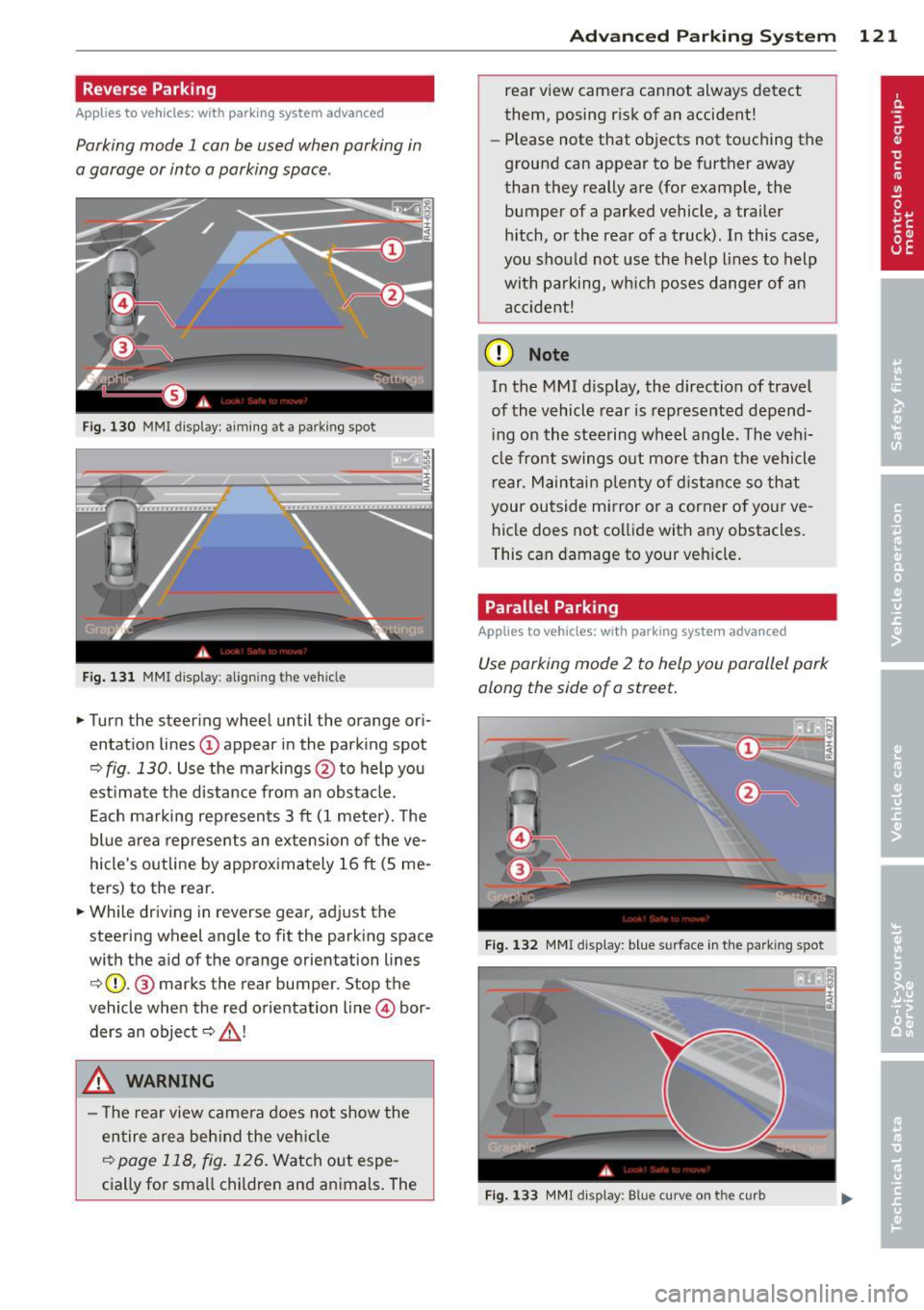
Reverse Parking
Applies to vehicles: with parking system advanced
Parking mode 1 can be used when parking in
a garage or into a parking space.
Fig. 130 MMI display: a im ing at a park ing spot
Fig. 131 MMI display : al ign ing the veh icle
... Turn the steer ing wheel until the orange ori
entat ion lines
(D appear in the park ing spot
Q fig . 130. Use the markings @to help you
est imate the distance from an obstacle.
E ach marking rep resents 3
ft (1 meter). The
blue area represents an ex tension of the ve
hicle 's outline by approx imately 16
ft (5 me
ters) to the rear .
... While driving in reverse gear, adjust the
steering wheel angle to fit the parking space
with the aid of the orange orientation lines
c>(D. @ marks the rear bumper. Stop the
vehicle when the red orientation line © bor
ders an object
c::> _& !
..&, WARNING
- The rear view came ra does not show the
entire area beh ind the veh icle
c::>page 118, fig. 126 . Watch out espe
cially for small children and animals . The
Ad vanced Parking S yste m 12 1
rear view camera cannot always detect
them, posing risk of an accident!
- Please note that objects not touching the
ground can appear to be further away
than they really are (for example, the
bumper of a parked vehicle, a trailer
hitch, or the rea r ofa truck). In this case,
you shou ld not use the help lines to help
with parking, wh ich pose s danger of an
accident!
(D Note
In the MMI d isplay, the direction of travel
of the vehicle rear is represented depend ing on the steering wheel angle. The vehi
cle front swings out more than the vehicle
r ear. Maintai n plenty of d istance so that
your outside mirror or a corner o f your ve
hicle does not co llide with any obstacles.
This can damage to your vehicle .
Parallel Parking
Applies to vehicles: with parking system advanced
Use parking mode 2 to help you parallel park
along the side of a street .
F ig . 1 32 MMI display: blue surface in the park ing spot
F ig . 1 33 MMI disp lay: Blue curve on the curb
Page 124 of 302

122 Advanc ed Parking S ystem
The following steps app ly only when there is
no obstacle such as a wall near the parking
spot. Otherwise, please read the information
prov ided in the "P arking Next to Obs tacles"
section
<=> page 122.
.. Activate the turn signal.
.. Position your vehicle parallel to the edge of
the street, approximately 3 ft (1 meter)
from a parked vehicle.
.. Switch the MMI on and se lect reverse gear .
The parking aid turns on and parking mode
1 appears on the disp lay .
.. Press the cont rol button (!)
<=>fig . 132 on
the MMI control conso le. Parki ng mode 2
appears .
.. Back up and align yo ur vehicle so the blue
area @ borders on the rear end of the vehi
cle or on the parking spot line. The bl ue area
represents an extension of the veh icle's out
line by approximately 16 ft (5 meters) to the
rear . The long side of the blue area should
be o n the curb. The entire blue area must fit
into the parking spot .
.. With the veh icle stopped, turn the s teer ing
wheel to the right as far as it w ill go.
.. Back into the par king spot until the blue
c ur ve touches the curb<=>
fig. 133. Stop the
vehicle.
.. With the vehicle stopped, turn the steering
wheel to the left as far as it will go.
.. Continue to back into the parking spot un til
the veh icle is parked parallel to the curb. @
marks the rear bumper . Stop the vehicle
when the red orientation line@ borders an
obje ct ¢
& -Keep an eye on the front of
yo ur vehicle while doing this ¢0 .
Parking n ext to obstacles
When t here is an obstacle (such as a wall)
next to the pa rk ing spot, choose a spot w ith
more space on t he sides. Pos ition the long
side of the blue area so that there is sufficie nt
space from the curb. The area m ust no t be on
the c urb. You wi ll also need to start turning
the steering wheel much earlier. There should
be a suffic ient amo unt of space between the
curb and the blue curve, and the blue c urve
c;> fig. 133 mus t not touch the curb.
A WARNING
- The rear view camera does not show the
entire area behind the vehicle
c::;, page 118, fig . 126 . Watch out espe
cially fo r small chi ldren and anima ls . The
rea r view came ra ca nnot always dete ct
them, posing ris k of an accident!
- Please note that objects not touching the
ground can appear to be further away
t han they really a re (for examp le, the
bumper of a parked vehicle, a trailer
hitch, or the rea r of a truck) . In this case,
you shou ld not use the help lines to help
with parking, which poses danger of an accident!
(D Note
In the MMI display, the direction of travel
of the vehicle rear is represented depend
i ng on the steering wheel angle . The vehi
cle front swings out more than the vehicle rear . Maintain plenty of distance so that
your outside mirror or a corner of you r ve
hicle does not collide with any obstacles.
This ca n damage to your ve hicle .
(D Tips
The left o r right orientation lines and su r
faces will be disp layed, depending on t he
tu rn s ignal being used .
Adjusting the display
and warning tones
Applies to vehicles: wi th parking system advanced
The display and warning tones can be adjust
ed in the MMI.
.. Select: !CAR I function button> Car sy stem s
cont ro l button > Driver a ssist > Parking aid
> Setting s control b utton.
Display
On -when the parking system is switched on,
either the vis ual d isp lay or the picture from
the rear view camera is disp layed .
II>-
Page 126 of 302
124 Homelink®
Homelink®
Universal remote
control
General information
Applies to vehicles: with Home link® universal remote
control
The Homelink universal remote control can
be programmed with hand -held transmitters
from existing equipment.
Using the Homelink universal remote control,
you can operate equipment such as garage
doors, property gates and house lights from
ins ide your vehicle .
Using the Homelink universal remote control,
you can replace up to three separate hand
held transmitters for equipment on your
property with just one universal remote con
trol. Most of these transmitters are used to
ope rate ga rage doo rs and property gates. The
individual transmitters are programmed at
the front bumper. That is where the control
module is located.
The transmitters must be programmed first in
order to operate systems using the Homelink
universal remote control.
.&_ WARNING
-
-Never use the Homelink ® transmitter
with any garage door opener that does have not the safety stop and reverse fea
ture as required by federal safety stand
ards . This includes any garage door open
er model manufactured before April 1, 1982.
- A garage door opener which cannot de
tect an object, signa ling the door to stop
and reverse does not meet current feder
al safety standards . Using a garage door
opener witho ut these features increases
risk of serious injury or death.
- For safety reasons never release the
parking brake or start the engine while
anyone is standing in front of the vehicle .
- A garage door or an estate gate may
sometimes be set in motion when the Homelink
® remote control is being pro
grammed. If the device is repeatedly ac
tivated, this can overstrain motor and
damage its electrical components - an
overheated motor is a fire hazard!
- To avoid possible injuries or property
damage, please always make absolutely
certain that no persons or objects are lo
cated in the range of motion of any
equ ipment being operated.
(D Tips
- If you would like additional information
on the Homelink ® Universal Transceiver,
Homelink compatible products, or to
purchase other accessories such as the
Homelink ® Light ing Package, please
contact Homelink at 1-800 -355-3515 o r
on the Internet at www.homelink .com.
- For Declaration of Comp liance to United
States FCC and Industry Canada regula
tions ¢
page 286.
Page 161 of 302
airbag system and prevent that system from
working properly in a collision.
There are some important things you have to
know to make sure that the effectiveness of
the system will not be impaired and that dis
carded components do not cause injury or pol
lute the environment.
A WARNING
Improper care, servicing and repair proce
dures can increase the risk of personal in
jury and death by preventing an airbag
from deploying when needed or deploying an airbag unexpectedly:
- Never cover, obstruct, or change the steering wheel horn pad or airbag cover or the instrument panel or modify them
many way .
- Never attach any objects such as cup
holders or telephone mountings to the
surfaces covering the airbag units.
- For cleaning the horn pad or instrument
panel, use only a soft , dry cloth or one
moistened with plain water. Solvents or
cleaners could damage the airbag cover
or change the stiffness or strength of the
material so that the airbag cannot de
ploy and protect properly.
- Never repair, adjust, or change any parts
of the airbag system.
- All work on the steering wheel, instru
ment panel, front seats or electrical sys
tem (including the installation of audio
equipment, cellular telephones and CB
radios, etc .) must be performed by a
qualified technician who has the training
and special equipment necessary .
- For any work on the airbag system, we
strongly recommend that you see your authorized Audi dealer or qualified work
shop.
- Never modify the front bumper or parts
of the vehicle body .
- Always make sure that the side airbag
can inflate without interference:
- Never install seat covers or replace
ment upholstery over the front seat-
Airbag system 159
backs that have not been specifically
approved by Audi.
- Never use additional seat cushions that
cover the areas where the side airbags
inflate.
- Damage to the original seat covers or
to the seam in the area of the side air
bag module must always be repaired
immediately by an authorized Audi
dealer.
- The airbag system can be activated only
once . After an airbag has inflated, it
must be replaced by an authorized Audi
dealer or qualified technician who has
the technical information, training and
special equipment necessary.
- The airbag system can be deployed only
once . After an airbag has been deployed,
it must be replaced with new replace
ment parts designed and approved espe
cially for your Audi model version . Re
placement of complete airbag systems
or airbag components must be per
formed by qualified workshops only.
Make sure that any airbag service action
is entered in your Audi Warranty
& Main
tenance booklet under
AIRBAG REPLACE
MENT RECORD.
- For safety reasons in severe accidents,
the alternator and starter are separated
from the vehicle battery with a pyrotech nic circuit interrupter.
- Work on the pyrotechnic circuit inter rupter must only be performed by a
qualified dealer - risk of an accident!
- If the vehicle or the circuit interrupter
is scrapped, all applicable safety pre
cautions must be followed.
@ For the sake of the environment
Undeployed airbag modules and preten
sioners might be classified as Perchlorate Material - special handling may apply, see
www .dtsc .ca.gov/hazardouswaste/per-
ch lo rate . When the vehicle or parts of the
restraint system including airbag modules
and safety belts with pretensioners are
scrapped, all applicable laws and ..,.
•
•
Page 191 of 302
(D Note
The sensors can be displaced by impacts or damage to the bumper, whee l housing and
underbody. This can affect the function of
the Audi pre sense system. Have your au
thor ized Audi dealer check to make sure
that the system is working properly .
(D Tips
-Certain Audi pre sense functions are not
available when ASR is sw itched off (sport
mode) or when driving in reverse .
- The Audi pre sense functions may not be
ava ilable if there is a malfunction in the
ESP system or the airbag control mod
u le.
- The Audi pre sense front/plus functions
are not available if there is a ma lfunction
i n the adapt ive cru ise control* system
¢ page 93.
-The Audi pre sense rear/plus functions
are no t available if there is a ma lfunction
i n the Audi side assis t* system
¢ page 93 .
-The reversible safety be lt t ightening on
the front passenger's side deactivates
when the Advanced front passenge r air
bag has been s uppressed or the seat is
not occup ied.
Audi pr e sense 189
•
•
Page 210 of 302
208 Cleaning and protection
-Never wash your car in bright sunlight.
Drops of water act as magnifying lenses
and may damage your paint.
- When you wash your car in the winter: if
you rinse your vehicle with a hose, be
careful not to aim the stream of water
directly at locks, or at door or hatch
openings - they can freeze shut.
- Never use sponges des igned to remove
i nsects, or any kitchen scouring sponges
or similar products . They can damage
your paint finish .
- Never use a dry cloth or sponge to clean
the headlights. Only use wet cloths or
sponges to prevent scratches .
It is best
to use soapy water.
- You should remove debris (such as in
sects) from the headlight lenses on a
regular basis, fo r example when refuel
ing your vehicle. Never clean the head
lig hts w ith a dry cloth or sponge. Use a
wet cloth or sponge . It is best to use
soapy water.
@ For the sake of the environment
I n the interest of the environment, the ve
hicle should only be washed in special
wash bays.
Washing your vehicle with a power
washer
Cleaning the exterior of your car with a high
pressure power washer is safe as long as you observe a few simple rules.
• Before using the power washer, make sure
you have read and understood the WARN
INGS
c:> A in General information on
page 206 .
• Always follow the operating instructions for
the power washer .
• Make sure that the jet on the spray hose pro
duces a "fan shaped spray".
• Do
not hold the spray nozzle too close to
soft materia ls.
When cleaning the vehicle wit h a power wash
er
always follow the operating instructions. T
his applies particu larly to the
operating
pressure
and the spraying distance. Keep a
distance from soft materials such as rubber
hoses or insulating material as well as sensors
and camera lenses.
Do not use a jet which sprays water in a
di rect
stream
or one that has a rotating jet .
Water temperature should not exceed 140 °F
(60 °().
A WARNING
Never wash tires with a jet that sprays wa
ter in a direct stream . This could cause in
v is ible damage to the t ires and weaken
them, even if the spray is from
a relatively
long distance and for a short time. Dam
aged and weakened tires can fail and cause
accidents and personal injury .
(D Note
To avoid damaging your vehicle, always
make sure that there is suffic ient d istance
between the spray head and soft materials
like rubber hoses, plast ic parts and sound
deadening materials as well as sensors
and camera lenses. Never aim the sp ray
head at the same point for a long time.
This also applies to cleaning headlights
and painted bumpers. Remember: the
closer the nozzle is to the surface of the
mater ia l, the greater the stress on the ma
terial.
Sensors and camera lenses
- Remove snow with a hand brush and remove
ice with a de-icing spray that does not con
tain solvents .
- Clean the sensors (adaptive cruise control*,
pa rking system*) w ith a cleaning so lution
that does not contain so lvents and a soft
cloth.
- The camera lens or the area in front of the
camera lens is normally cleaned by the
w indshie ld w ipers (Audi lane assist*) or
headlight wipers (night vision system*) . If
the lens or the area is exceptionally dirty,
111-
Page 211 of 302
clean the area with glass cleaner and a soft,
dry cloth.
(D Note
- If you wash your vehicle wi th a pressure
washer,
- make sure there is enough d istance to
sensors in the rear bumper,
- do not clean the camera lenses and the
area around them with the pressure
washer .
- Never use warm or hot water to remove
snow or ice from the camera lens. Th is
could cause the lens to c rack.
- Never clean the camera lens w ith abra
s ive products .
Waxing
Wax protects the vehicle's paint.
~ Use a manually app lied car wax occasiona lly
to protect the paint.
A good wax coating protects the vehicle paint
to a large extent against the environmental
factors listed under ¢ page 206, Washing and
even against slight scratches.
You can use a liquid car wax to p rotect your
paint as soon as one week after your ve hicle
has been de livered.
E ven if yo u regularly use a
waxing process in
automatic ca r washes, we recommend that
you man ua lly app ly a coat of wax to give the
pa int extra protection, particularly if water no
l onger beads on the clean paint.
Protect p lastic body pa rts with car wax in the
same way as the vehicle body.
D uring wa rm weat her dead insec ts tend to
collect on the front bumper and on the for
ward area o f the hood. They are much easier
to remove from paint that is waxed o~en.
A WARNING
Always read and heed a ll WARNINGS and
other information
c> page 206.
Cleaning and protec tion 209
@ Note
Do not use car wax on
- matte o r anodized meta l trim
- rubber or ru bber- lik e t rim.
Polishing
Polishing restores the gloss to the paint.
Polish your vehicle o nly if the paint has lost its
sh ine and the gloss cannot be brought back
with wax.
If the polis h used does not conta in preserva
tive compounds, the paint must be waxed af
te rwards ¢page 209, Waxing .
_&. WARNING
Always read and heed all WARNI NGS and
other info rmation
c> page 206.
(D Note
Do not treat matte anodized metal trim,
plastic o r rubbe r parts with polish or wax.
Trim strips
Metal trim needs special care.
For environmental reasons, Audi fabricates
the bright trim strips and trim p ieces from
pure chromium-free aluminum.
Dirt and ma rks on the trim strips sho uld be
removed with a
pH -balan ced cleaning agent
(do not use a chrome cleaner). A udi dealers
carry clea ning products w hich have been test
ed for use on your vehicle and are not harmf ul
to the environment.
To avoid corrosion on the exter ior trim st rips,
only a pH-ba lanced solution should be used
for the windsh ield washer .
_&. WARNING
Always read and heed all WARNI NGS and
other info rmat ion
c> page 206.
•
•