park AUDI A8 2012 User Guide
[x] Cancel search | Manufacturer: AUDI, Model Year: 2012, Model line: A8, Model: AUDI A8 2012Pages: 300, PDF Size: 75.06 MB
Page 41 of 300

- The buttons for the power sun shades* in
the side windows,
- The buttons for the power sun shade* in the
rear window,
- Front passenger power seat adj ustment *
button.
_& WARNING
- When you leave your vehicle -even if on
ly briefly- always take the ignition key
with you. This applies particularly when
children remain in the veh icle. Otherw ise
the ch ildren could start the engine or op
erate electrical equ ipment (e.g. power
w indows) . The power windows are func
t ional until t he driver's door or passeng
er's door has been opened.
- Be careful when closing the windows.
Check to see that no one is in the way, or
serious injury could result!
- When lo cking the veh icle from outside,
t he ve hicle must be unocc upied s in ce the
w indows can no longer be opened in an
emergency.
(D Tips
- The dr iver can lower or raise the power
sun shades * in the side windows by us ing
swi tches © and
@.
-After the ignition has been switched off,
the windows can still be opened o r
closed for about 10 minutes . The powe r
windows are not switched off until the
driver's door or passenger's door has
been opened.
What to do after a malfunction
The one-touch open and close function must
be reactivated if the battery hos been discon
nected.
• Pull and hold the power window switch un
ti l the window is fully closed.
• Release the switch and then pull it again for
at least one second .
Openin g an d clos ing 39
Valet parking
The valet parking feature protects the lug
gage comportment from unauthorized ac
cess.
F ig. 30 Valet par king button
Wi th "valet parking" a ctivated, the rear lid
cannot be opened.
• Remove the mechanical key
c::;, page 29 .
• Open the glove compartment and activate
c::;, fig. 30 the "valet parking" feature by
pressing the
! VALET I b utton. The indicator
light in the swi tch illuminates.
• Close the glove compartment and lock it
w ith the mechanical key.
• Leave the master key with the se rvice per
sonnel for park ing and keep the mechanical
key with you.
When the "valet parking" feature is activated:
- the unlocki ng button fo r the rear l id
c:s in
the dr ive r's door is inactive
- the button
c:s on the mas ter key is inac tive
- the opening handle in the rear lid is inact ive .
The vehicle can be driven and locked and un
locked with the master key. Access to the lug
gage compartment is blocked.
When the valet parking function is switched
on, the message
Vale t par king acti vated ap
pears in the instrument cluster display when
you sw itch the ignition on.
Page 53 of 300
Mirrors
Adjusting the exterior mirrors
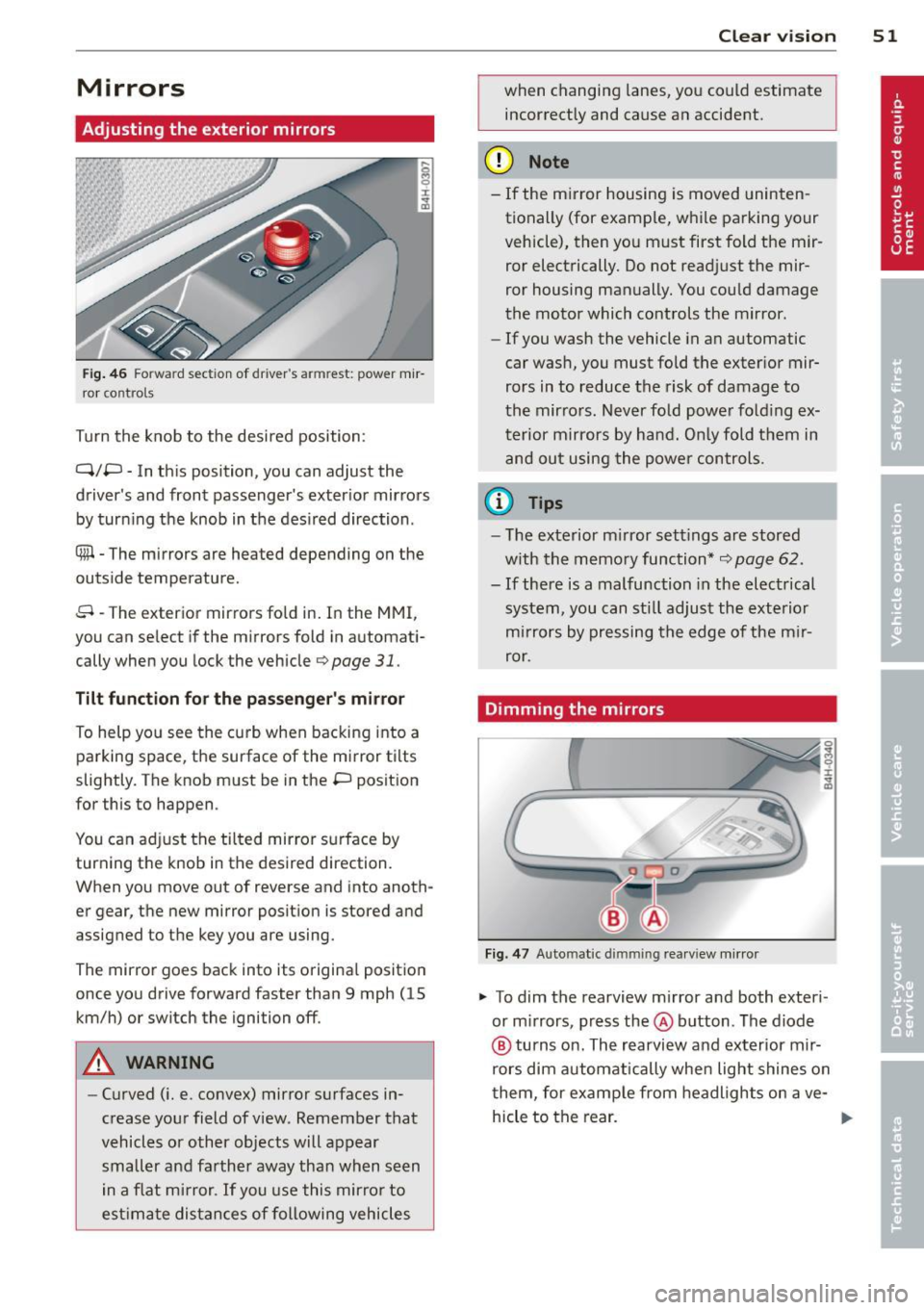
Fig . 46 Fo rwa rd section of d river's a rmrest: power m ir
ror co nt rols
Turn the knob to the desi red position :
Q/P -In th is position, you can adjust the
driver's and front passenger's exter ior mir rors
by turn ing the knob in t he des ired direction .
® -The m irrors are heated depending on the
outside temperature .
8 -The exterior mirrors fo ld in. In the MMI,
you can select if the m irrors fold in automat i
cally when you lock the vehicle
9 page 31.
Tilt function fo r th e pa sseng er' s mi rror
To help yo u see the curb when backing into a
parking space, the surface of the mirror tilts
slightly. The knob must be in the P position
for this to happen .
You can ad just the tilted mirror s urface by
turning the knob in the desired direction.
When you move out of reverse and into anoth
er gear, the new mirror posit ion is stored and
assigned to the key you are using.
The mirror goes back into its origina l posit io n
once you drive forward faster than 9 mph (15 km/h) or switch the ignition off .
A WARNING
-Curved ( i.e. convex) mirror s urfaces in
crease your field of view . Remember that
vehicles or other objects will appear
small er and farther away than when seen
in a flat m irror.
If you use this mirro r to
est imate distances of following vehicles
Clear vi sion 51
when changing lanes, you co uld estimate
incorrectly and cause an accident.
(D Note
- If the m irror housing is moved uninten
tionally (for examp le, w hile pa rking your
vehicle), then yo u must first fold the mir
ror electrically. Do not read just the mir
ror housing man ually. You cou ld damage
the motor which controls the mirror.
- If you wash the vehicle in an automatic
car was h, you must fold the exter ior mir
rors in to reduce the risk of damage to
the mirrors. Never fold power fold ing ex
terior mirrors by hand. O nly fold t hem in
and out using the power controls.
(D Tips
- T he exterior m irror set tings are stored
w ith the m emory function*
9 page 62 .
- If there is a malfunction in the elect rical
system, you can st ill adjust the exterio r
mi rrors by pressing the edge of the m ir
ror.
Dimming the mirrors
Fi g. 47 Auto m atic d immin g rearv iew mirr or
.. To dim the rearview m irror and both exteri
or m irrors, press the@ button . The diode
@ tu rns on. The rearview and exterior mir
rors dim automatically whe n light shines on
t hem, for examp le from headl ights on ave-
hicle to the rear . ..,.
Page 71 of 300
-When not in use, to reduce fuel consump
tion, wind noise and to guard against theft.
A WARNING
- Use of an unapproved roof rack or incor
rect mounting of an approved roof rack
can cause the roof rack or the items at
tached to it to fall off the roof onto the
road .
- Objects falling from the roof of a veh icle
can cause a crash and personal injury .
- Only mount the roof rack on the desig
nated locations on the roof
c::> fig . 70 .
-The roof rack system must be installed
exactly according to the instructions pro
vided.
- When driving w ith a roof rack system,
changes to the center of gravity and wind
resistance can change the veh icle han
dling and lead to a collision . Always
adapt your driv ing and your speed to the
current conditions.
0 Not e
-Your vehicle warranty does not cover any
damages to the vehicle caused by using
r oof racks or mount ing structures not
approved by Audi for your vehicle. The
same applies to damage resulting from
incorrect roof rack installation.
- Always check the roof rack mountings
and hardware before each trip and dur
ing a trip to make sure everything is se
cure ly tightened . If necessary, retighten
the mount ings and check the ent ire sys
tem from t ime to t ime.
- After mounting a roof rack system, or
when you transport objects on the roof
of your veh icle, the height of the vehicle
i s naturally increased. Be careful when
driv ing under low br idges or in parking
garages for example. This could cause
damage to the load and even the vehicle
i tself.
- Make sure the open rear lid and the sun
roof* do not come into contac t with the
roof rack .
Seat s an d sto rage 69
Loading the roof rack
Always distribute loads evenly. Make sure
anything on the roof rack is securely tied
down .
.. Always distribute the loads on the roof rack
even ly .
.. Always attach items to the roof rack secure-
ly before you d rive off .
The maximum permissible roof weight is
2 20
lb (100 kg ).
The roof weight is the total of
the weight of the roof rack, the attachments
and the cargo you a re carrying. You must also
not exceed the maximum load we ight for the
roof rack you are using .
When using a roof rack system which has a l ower load ca rrying capaci ty , you must not use
up the tota l maxim um permissible load car ry
i ng capacity specified above . Instead, you
sho uld load the roof rack system only to the
maximum capacity specified by the manufac
turer of the roof rack system.
A WARNING
---Weak, damaged or improper straps used
to secure items to the roof rack can fail
during hard braking or in a collis ion and
cause ser ious personal injury.
- Make sure the roof rack is installed exact
ly as specified above
c::> page 68.
-Always use su itable mount ing straps for
securing items to the roof rack to help
p revent items from sh ifting or flying for
ward.
- Items on the roof rack must always be
securely mounted.
- The use of a roof rack can negat ively af
fect the way a veh icle hand les . Cargo
that is large, heavy, bulky, long or flat
will have a greater negat ive influence on
the vehicle's aerodynamics, center of gravity and overall handling . Always
drive s lowly, avoid sudden braking and
maneuvers when transporting cargo on
the roof of your vehicle .
Page 77 of 300
Warm and cold Climate controls
Description
The climate control system warms, cools and
adds humidity to the a ir in the veh icle inter io r.
It is the most effect ive when the windows and
sunroof* are closed. If the temperature inside
the parked vehicle becomes very warm, open
ing the window briefly will speed up the cool
ing process.
I n all heating mode functions except
defrost,
the blower on ly switches to a higher speed
once the engine coolant has r eached a certain
temperature.
Condensation from the cooling system can
drip and form a puddle of water under the vehicle. This is normal and does not mean there
is a leak.
Pollut ant filter
The po llutant filte r removes pollutants s uch
as dust and pollen from the air.
The air pollutants filte r must be changed at
the intervals spec ified in you r Wa rra nty
&
Maintenance book let, so that the air condi
tioner can properly work.
I f you drive you r vehicle in an area with h igh
ai r po llution , the fi lter may need to be
changed more freq uent ly than specified in
your Aud i Warranty
& Ma intenance booklet. If
i n doubt, ask your authorized Audi Service Ad
visor for advice .
K ey coded settings
The climate con trol settings are a utomat ica lly
stored and assigned to the remote contro l key
that is in use .
& WARNING
Reduced visibility is dangero us and can
cause accidents . -
Warm and cold 75
- For safe driving it is very important that
all windows be free of ice, snow and con
densat ion.
- Comp letely fam iliarize yourse lf with the
proper use and funct ion of the heat ing
and ve nti lation system and especially
how to defog and defrost the w indows.
- Never use the windshield wiper/washer
system in freez ing weather unt il you
have warmed the w indshield first, using
the heating and ventilation system . The
washer solution may free ze o n the wind
shie ld and red uce visib ility.
(D Note
- If you suspect that the air conditioner has been damaged, switch the system
off to avoid furt her damage and have it
i n spected by a q ua lified dea lership.
- Repairs to the Audi air conditioner re
quire specia l techni cal know ledge and
special tools. Contact an autho rized Aud i
dealer fo r ass istance.
@ For the sake of the environment
By reduci ng the amou nt of f uel you use,
you also red uce the amount of pollutan ts
emitted into the air .
(D Tips
- Keep the air intake s lots ( in fro nt of the
w indshield) free from ice, snow and de
br is in order to maintain the proper f unc
tion of the climate control system.
- T he energy management system may
switch the seat heating* or rear window
defroster off temporar i Ly . These systems
are available again as soon as the energy
balance has been restored .
- Air escapes through vents under the rear
window. When placing items of clothing
on the luggage compartment cover, en
sure that the openings are not covered.
Page 80 of 300
78 Warm and cold
(D Note
To avoid damage to the heating e lements
in the seats, do not kneel on the seats or
place heavy loads on a small area of the
seat .
Setup
The climate control system setup is accessed
through the MMI.
.. Se lect: I CARI function button > Car systems
control button > AC.
Rear cabin settings*
When this function is selected, all settings for
the rear can be adjusted through the climate
contro l system in the cockpit . The climate
control system settings cannot be adjusted in
the rear seat at the same time. This function
switches off after a certain period of time or
when one of the dials in the cockp it is press
ed.
Auto recirculation*
The sensitivity level of the automatic reci rcu
l ation mode can be set at various leve ls from
off to sensitive . The recirculation mode 1...,1 is
controlled on automatically. You must press
the ~ button if fog forms on the w indows.
Footwell temperature
You can adjust the footwell temperat ure so
that it is cooler or warmer.
AC mode
The strength of the airflow can be adjusted to
light, med ium or strong .
Windshield heat*
When the defroster~ is switched on and the
Auto setting is selected, the windshield de
froster is controlled automatically.
Solar roof*
When the ignit io n is off, so lar-powered park
ing vent ilation may switch on, as long as
- there is sufficient sunlight, -
the outside temperature is not too low,
- t he center vents are open,
- the sunroof is closed or tilted and
- recirculation mode
1...,1 (climate control sys-
tem) and
Auto (MMI) are selected .
Parking ventilation is contro lled automatically
i n the
Auto sett ing.
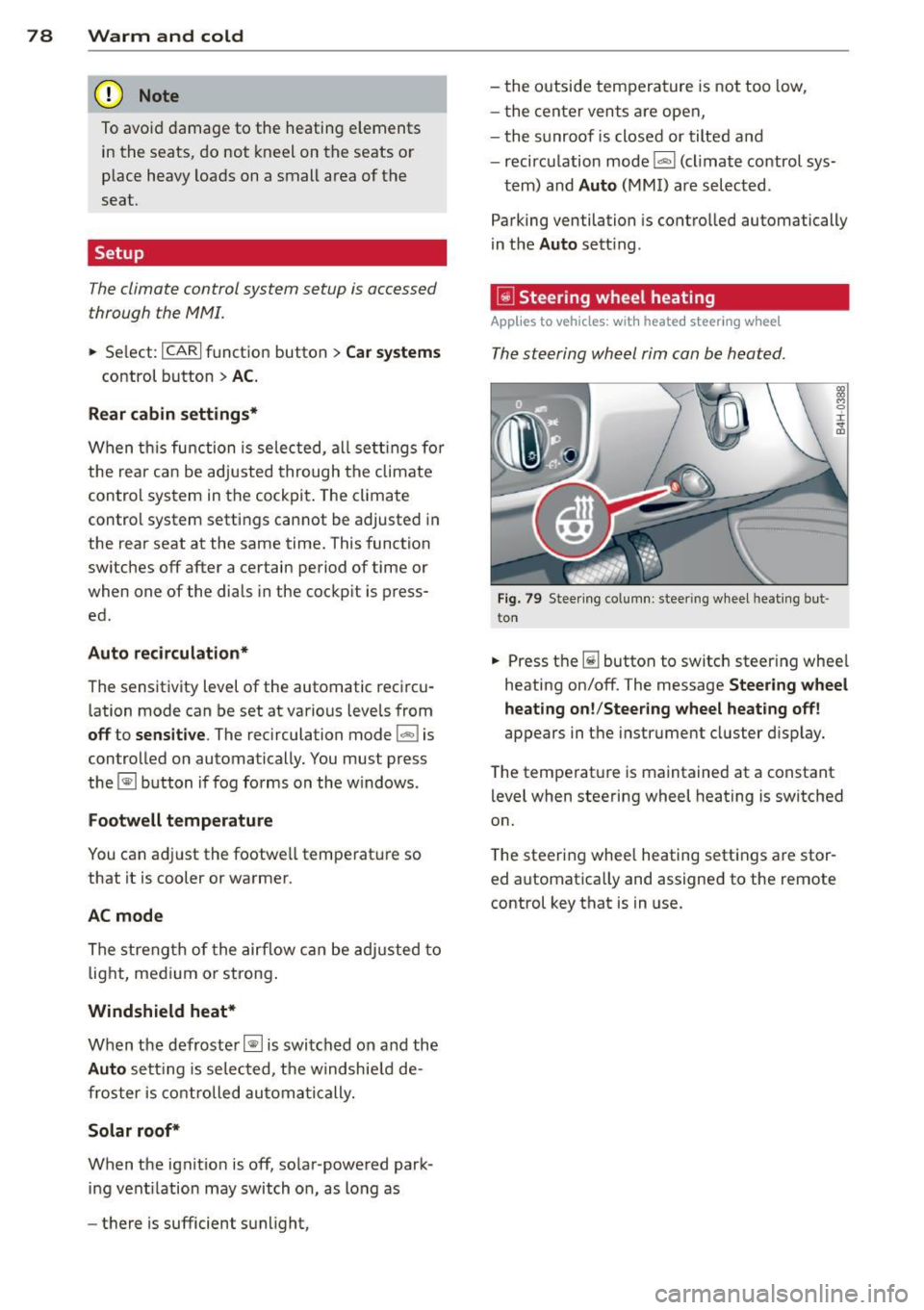
~ Steering wheel heating
Applies to vehicles: with heated steering wheel
The steering wheel rim can be hea ted .
Fig . 79 Stee ring column : steeri ng wheel heati ng but
t on
.. Press the~ button to switch steer ing whee l
heating on/off. The message
Steering wheel
heating on! /Steering wheel heating off!
appears in t he instrument cluster display.
The temperat ure is maintained at a constant
level when steering wheel heating is switched
on.
T he steering wheel heating settings are stor
ed automatically and assigned to the remote control key that is in use.
Page 81 of 300
On the road
Steering
Adjusting steering wheel position
The steering wheel position can be adjusted
for height and reach .
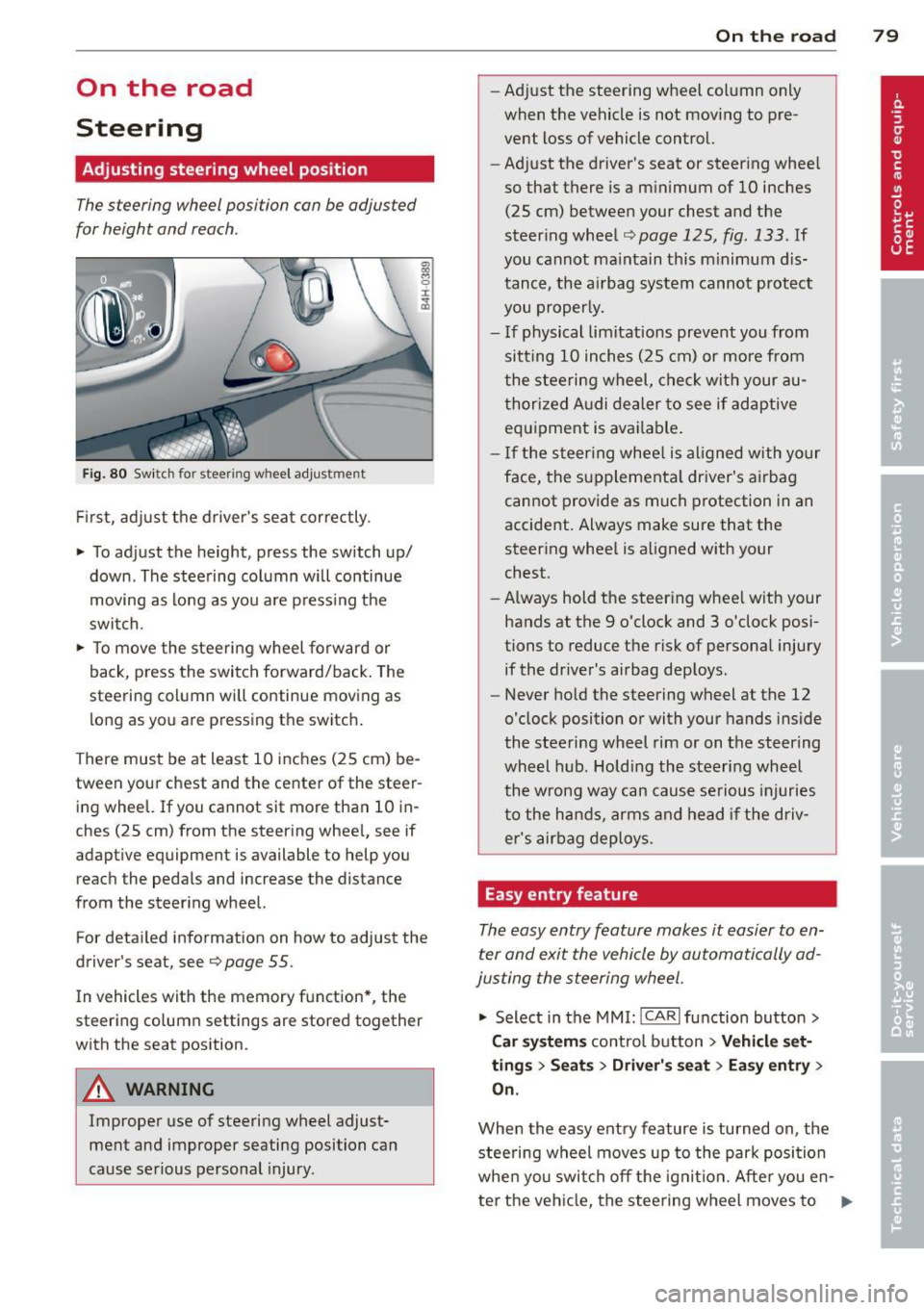
Fig. 80 Switch for steer ing w heel adjustment
First, adjust the driver's seat correctly.
• To adjust the height, press the switch up/
down . The steering column will continue
moving as long as you are pressing the
switch.
• To move the steering wheel forward or
back, press the switch forward/back. The
steering column will continue moving as long as you are pressing the switch.
There must be at least 10 inches (25 cm) be
tween your chest and the center of the steer ing wheel. If you cannot sit more than 10 in
ches (25 cm) from the steering wheel, see if
adaptive equipment is available to help you
reach the pedals and increase the distance
from the steering wheel.
For detailed information on how to adjust the
driver's sea t, see
Q page 55.
In vehicles with the memory function*, the
steering column settings are stored together
with the seat position .
A WARNING
Improper use of steering wheel adjust
ment and improper seating position can
cause serious personal injury.
-
On the road 79
-Adjust the steering wheel column only
when the vehicle is not moving to pre
vent loss of vehicle control.
- Adjust the driver 's seat or steering wheel
so that there is a minimum of 10 inches (25 cm) between your chest and the
steering wheel
~ page 125, fig . 133 . If
you cannot maintain th is m inimum dis
tance, the airbag system cannot protect
you properly.
- If physical limitations prevent you from
sitt ing 10 inches (25 cm) or more from
the steering wheel, check with your au
thorized Audi dealer to see if adaptive
equipment is available .
- If the steering wheel is al igned with yo ur
face, the supplementa l driver's airbag
cannot provide as much protection in an
accident. Always make sure that the
steering whee l is aligned with your
chest.
- Always hold the steering whee l with your
hands at the 9 o'clock and 3 o'clock posi
tions to reduce the risk of personal injury
if the driver's airbag deploys.
- Never hold the steering wheel at the 12
o'clock position or with your hands inside
the steering wheel rim or on the steering
wheel hub. Holding the steering wheel
the wrong way can cause serious injuries
to the hands, arms and head if the driv
er's airbag deploys.
Easy entry feature
The easy entry feature makes it easier to en
ter and exit the vehicle by automatically ad
justing the steering wheel.
"' Select in the MMI: ICARI function button >
Car systems control button > Vehicle set
tings > Seats > Driver' s seat > Easy entry >
On.
When the easy entry feature is turned on , the
stee ring wheel moves up to the park position
when you swit ch off the ignition. After you en -
ter the vehicle, the steering wheel moves to ..,..
Page 83 of 300

CD Note
-Avoid high engine rpm, fu ll throttle and
heavy engine loads unti l the engine has
reached operating temperature -other
wise you risk engine damage.
- T he engine cannot be started by pushing
or towing the veh icle.
- If the engine has been under heavy load
for an extended period, heat builds up in
the engine compartment after the en
gine is switched off -there is a risk of
damag ing the engine . Allow the eng ine
to run at idle for about 2 m inutes befo re
swit ching it off.
@ Tips
- If you open the dr iver's door w ith the ig
nit ion on, a buzzer sounds and the mes
sage
Igniti on i s on appears in the instru
ment cluster disp lay. Switch the ign it ion
off .
-If you leave the vehicle with the ignit ion
swi tched on, the ignition will switch off
after a certain period of time. Please
note that e lectrica l equipment such as
exter ior lights wi ll switch off as well
when that happens .
Stopping the engine
... Bring your vehicle to a comple te stop .
... Move the selector lever to the P or N posi
t ion .
... Press the !START E NGIN E STOPI button
Q page 80, fig. 81 .
Emergen cy off
If necessary, the engine can be swi tched off
with the selector lever in the R, Dor S posi
tions . The eng ine stops if you press the
I START E NGIN E STOP I button at speeds be low
6 mph (10 km/h).
_& WARNING
- Never turn off the eng ine unt il the vehi
cle has come to a complete stop.
On th e road 81
- The brake booster and power steering
only work when the engine is running. If
the engine is off, you have to use more
force when steering or braking . Because
you cannot s teer and brake as you usual
ly would, th is could lead to crashes and
serious injuries.
- For safety reasons , you sho uld a lways
park your vehicle with the selector lever
in P . Otherwise, the vehicle could inad
vertently roll away.
- After the eng ine has been switched off,
the radiator fan can cont in ue to run for
up to 10 minutes -even with the igni tion
switched off .
It can also switch on again
after some time if the coolant tempera
ture rises as the result of a heat b uildup
or if the engine is hot and the engine
compartment is additionally heated by
the sun's rays .
~
CD Note
Do not stop the eng ine immediately after
hard or extended driving. Keep the engine
running for approximate ly two minutes to
prevent excess ive heat bu ild -up .
Starting the engine if there is a
malfunction
It may not be possible to start the engine un
der certain circumstances , for example if the
battery in the vehicle key is drained, if inter
ference is affected the key or if there is a sys
tem malfunction.
ij
:c
---- -~
Fig . 82 Center co nsole/m aste r key : star ting the engine
I
if th ere is a malfun ction Ill>
Page 84 of 300
82 On the road Requirem ent : The message
Key not recog
nized. Hold b ack of key against marked area.
See owner 's manual.
must appear and the in
dicator light
m must sw itch on.
• Hold the master key vertica lly in the loca
tion indicated y>l} q fig .
82.
• Press the brake pedal~ A in Starting the
engine on page 80.
.. Press the !~S _T _A_ R_T_ E_N_ G_ I_ N _E_ S_T_ O_ P~ I button.
The eng ine will start .
• Drive to your author ized Audi dealer imme
diately to have the malfunct ion corrected .
@ Tips
You can view the message again by press
ing the !START ENGINE STOP I button.
Electromechanical
parking brake
Operation
The electromechanical parking broke replaces
the hand broke.
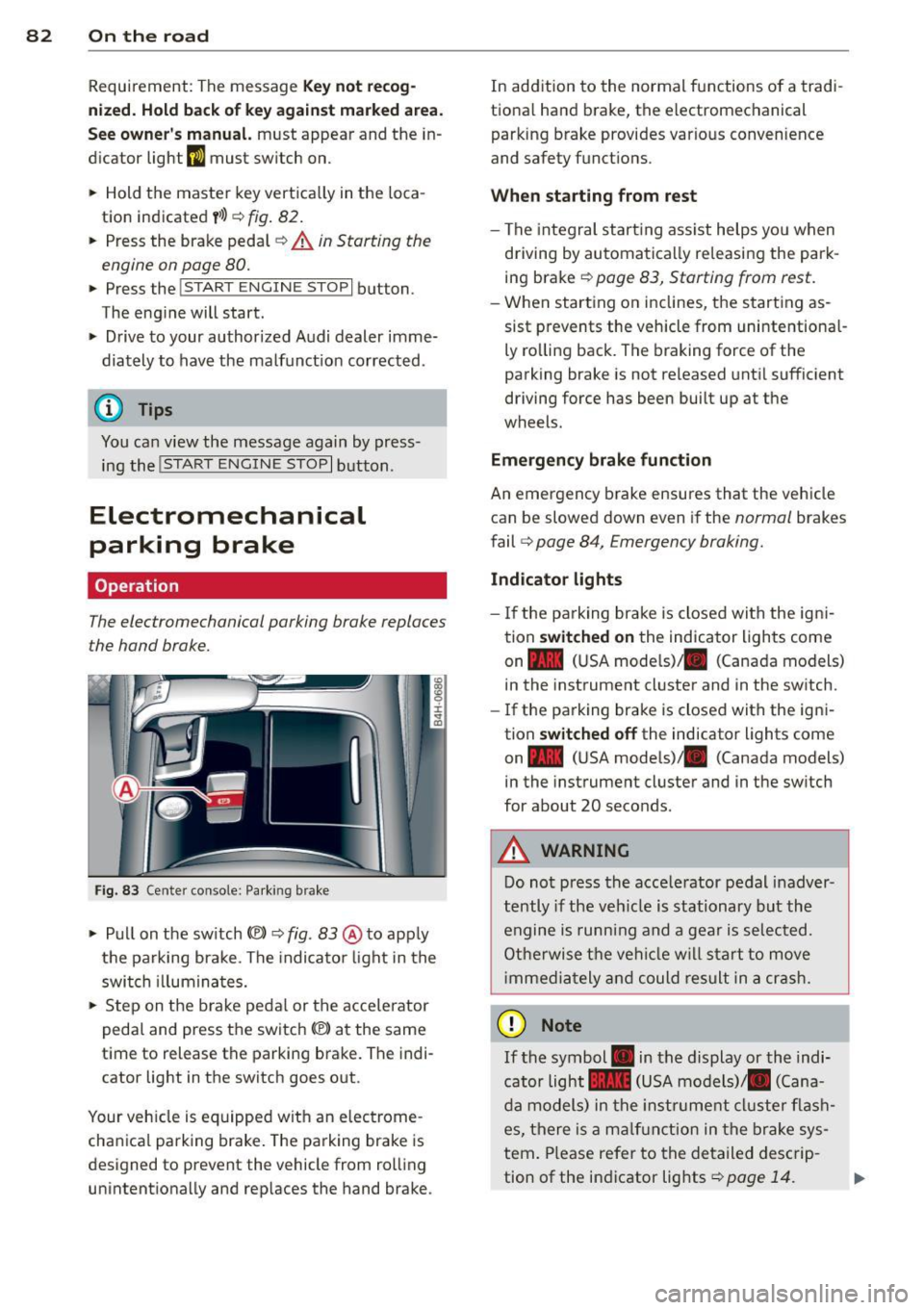
Fig . 83 Ce nter console: Parking brake
• Pull on the switch(®) ~ fig. 83 @ to app ly
the parking brake . The indica tor light in the
switch illuminates.
• Step on the brake pedal or the accelerator
pedal and press the switch(®) at the same
t ime to release the parking brake. The indi
cator light in the switch goes out .
Your vehicle is equipped wit h an electrome
cha nica l parking brake. The parking brake is
designed to prevent the vehicle from rol ling
unintentionally and rep laces the hand brake . In
addition to the normal functions of a tradi
tiona l hand brake, the electromechanical
parking brake provides var io us convenience
and safety functions .
When starting from rest
-The integral start ing ass ist helps you when
driving by automatically releasing the park
ing brake
~ page 83, Starting from rest .
-When starting on inclines, the starting as
sist prevents the vehicle from unintentiona l
ly rolling back. The braking force of the
parking brake is not released until sufficient
driving force has been built up at the
wheels.
Emergency brake function
An emergency brake ensures that the vehicle can be slowed down even if the
normal brakes
fail
q page 84, Emergency broking.
Indicator lights
-If the parking brake is closed with the ign i
tion
switched on the indicator lights come
on - (U SA mode ls)/ . (Canada models)
in the instrument cluster and in the switch.
- If the parking brake is closed with the igni
tion
switched off the indicator lights come
on - (USA mode ls)/ . (Canada models}
in the instrument cluster and in the sw itch
for about 20 seconds .
A WARNING
Do not press the acce lerator pedal inadver
tently if the vehicle is stationary but the
engine is running and a gear is selected.
Otherwise the vehicle will start to
move
immedia tely and could result in a crash.
(D Note
If the symbol . in the display or the indi
cator light .. (USA models)/ . (Cana
da models) in the instrum ent cluster flash
es, there is a malfunction in the brake sys
tem. Please refer to the detailed descrip-
tion of the indicator lights
~ page 14. ll-
Page 85 of 300
-If the indicato r light - (USA mod
els)
,111 (Canada models) or I.I turns
on, there may be a malfunction in the
parking brake
¢page 15.
@ Tips
-You can apply the parking brake at any
time - even w ith the ignition switched
off. The ignit ion must be on in order to
release the parking brake.
- Occasiona l noises when the park ing
brake is applied and released are norma l
and are not a cause for concern.
- When the vehicle is parked, the parking
brake goes through a self-test cycle at
regular intervals. Any assoc iated noises
are norma l.
Parking
Various rules apply to prevent the parked ve
hicle from rolling away accidentally.
P a rking
~ Stop the vehicle w ith the foot brake.
~ Pu ll the switch© to apply the parking
brake.
~ Se lect the P selector lever position
¢page 109.
~ Turn the eng ine off ¢,& .
In addition on incline s and grade s
~ Turn the steering wheel so that your vehicle
will roll against the curb in case it should
start to move.
A WARNING
-When you leave your veh icle - even if on
ly b riefly - always take the ignition key
with you. This applies particu la rly when
children remain in the veh icle. Otherw ise
the ch ild ren could sta rt the engine, re
lease the parking brake or operate elec
trical equipment (e .g. power windows).
There is the risk of an accident.
- When the vehicle is locked, no one - par
t icu larly not ch ildren should remain in
the vehicle. Locked doors make it more
On th e ro ad 83
difficult for emergency workers to get in
to the vehicle - putting lives at risk.
Starting from rest
The starting assist function ensures that the
parking broke is released automatically upon
starting.
Stopping and appl ying p arking brake
~ Pull the switch(®) to apply the pa rking
brake.
Sta rting and automaticall y releasing the
parking brak e
~ When you start to drive as us ual, the pa rk
ing brake is automatically released and your
veh icle begins to move .
When stopp ing at a traffic signal or stopping
in city t raff ic, the parking b rake can be ap
plied. The vehicle does not have to be held
with the footbrake. The parking brake elimi
nates the tendency to creep w ith a dr ive range
engaged. As soon as you drive off as usua l,
the parking brake is released automatically
and the vehicle starts to move.
St arting on slope s
When starting on inclines, the sta rting assist
prevents the vehicle from unintentionally roll
ing back. The braking force of the parking
brake is not re leased until suff ic ient driving
force has been built up at the wheels.
(D Tips
For safety reasons, the parking brake is re
l eased automatically on ly when the driv
er's safety belt is engaged in the buckle.
Starting off with a trailer
To prevent rolling back unintentionally on an
incline, do the following:
~ Keep the switch(®) pulled and depress the
accelerator. The parking brake stays applied
and prevents the vehicle from roll ing back-
ward . ..,.
Page 86 of 300
84 On th e road
• You can release the switch (®) once you are
sure that you are developing enough for
ward momentum at the wheels as you de
press the accelerator .
Depending on the weight of the rig (vehicle
and trai ler) and the severity of the incline, you
may roll backwards as you start . You can pre
vent roll ing backwards by holding the parking
brake switch(®) pulled out and accelerating -
just as you would when starting on a hill with
a conventional hand brake .
Emergency braking
In the event that the conventional brake sys
tem fails or locks .
• In an emergency, pull the switch(®) and
continue to pull it to slow your vehicle down
with the parking brake .
• As soon as you release the sw itch
C®> or ac-
cele rate , the braking p rocess stops.
If you pull the switch(®) and hold it above a
speed of about 5 mph (8 km/h), the emergen
cy braking function is in it iated. The veh icle is
b raked at all four wheels by activa ting the hy
d raul ic br ake system. The b rake performance
is simi lar to making an emergency stop
c::> & .
In order not to activate the emergency brak
i ng by m ista ke, an audible wa rning tone (bu z
z er) sounds when the swi tc h
C®> is pulled. As
soon as the switch(®) is released, or the accel
erator pedal is depressed, emergency braking
stops .
.&_ WARNING
Emergency braking should only be used in
an emergency, when the normal foot brake
has failed or the brake pedal is obstructed.
Using the parking bra ke to perform emer
gency braking will slow yo ur vehicle down
as if you had made a fu ll brake applicat ion.
T he laws of physics cannot be s uspended
even w ith ESC and its associate d compo
nents (ABS, ASR, EDL). In corners and
when road or weather conditions are bad, a full brake application can cause the vehi- cle to sk
id or the rear end to break away -
risking an accident.
Speed warning system
, Introduction
The speed warning system helps you to stay
under a specified maximum speed .
The speed warning system warns you if you
are exceeding the maximum speed that you
have set . You will hear a warning tone when
your speed exceeds the stored value by ap proximate ly 3 mph (3 km/h). An ind icator
l ight . (USA
models) ;a (Canada mode ls) in
the instr ument cluster d isp lay also tur ns on at
the same time. The indicator light.,.
turns off when the speed decreases be low the
stored maxim um speed.
Setting a th reshold is recommended if you
would like to be rem inded when you reach a
certain maxim um speed. Situations whe re you
may want to do so include driving in a co untry
with a genera l speed limit or if there is a
specified maximum speed for winter tires.
(D Tips
Even though your vehicle is equipped w ith
a speed warn ing system, you should still
watch the speedometer to make sure you
are not dr iv ing faster than the speed limit.
Setting the threshold
You can set, change and delete the threshold
in the MMI.
• Select: !CAR ! function b utton > Car systems
contro l button > Dri ver ass ist > Speed warn
ing .
You can set any threshold between 20 mph
(30 km/h) and 150 mph (240 km/h). Sett ings
can each be adj usted in increments of 5 mph
(10 km/h).