turn signal AUDI A8 2012 User Guide
[x] Cancel search | Manufacturer: AUDI, Model Year: 2012, Model line: A8, Model: AUDI A8 2012Pages: 300, PDF Size: 75.06 MB
Page 98 of 300
96 Audi la ne a ssis t
Audi lane assist
Lane assist
Description
Appl ies to vehicles: with lane assist
Lane assist helps you keep your vehicle in your
lane .
Lane assist detects lane marker lines within
the limits of the system using a camera in the
windshield. If you are approaching a detected
lane marker line and it appears likely that you
will leave the lane, the system will warn you
with a light vibration . Lane assist is operable
when the line marki ng the lane is detected on
at least one s ide of the vehicle .
The system will not warn you before cross ing
a lane ma rker line if you have activated the
turn signal. In t his case, it assumes tha t you
a re cha nging lanes intent ionally.
The system is designed for driv ing on free
ways and expanded highways and thus works
on ly at speeds of 40 mph (65 km/h) o r more .
.&_ WARNING
-Lane ass ist will not keep your vehi cle in
yo ur lane. The system only warns the
dr iver w hen the vehicle is leaving the
lane . The driver is always responsib le for
keeping the vehicle in the lane .
- The camera is not able to detect all lane
boundary lines and in some cases might
also detect lane structures or objects as
boundary lines. This can lead to incorrect
warnings or warnings that fail to go off
at all .
- The camera's visibility can be impaired by
vehicles ahead of you, for instance, or by
rain, snow, heavy spray or light shin ing
in to the camera lens. This can cause lane
a ssist to fa il to detec t bou ndary lines.
- Activating and deactivating
Applies to
vehicles: with lane assist
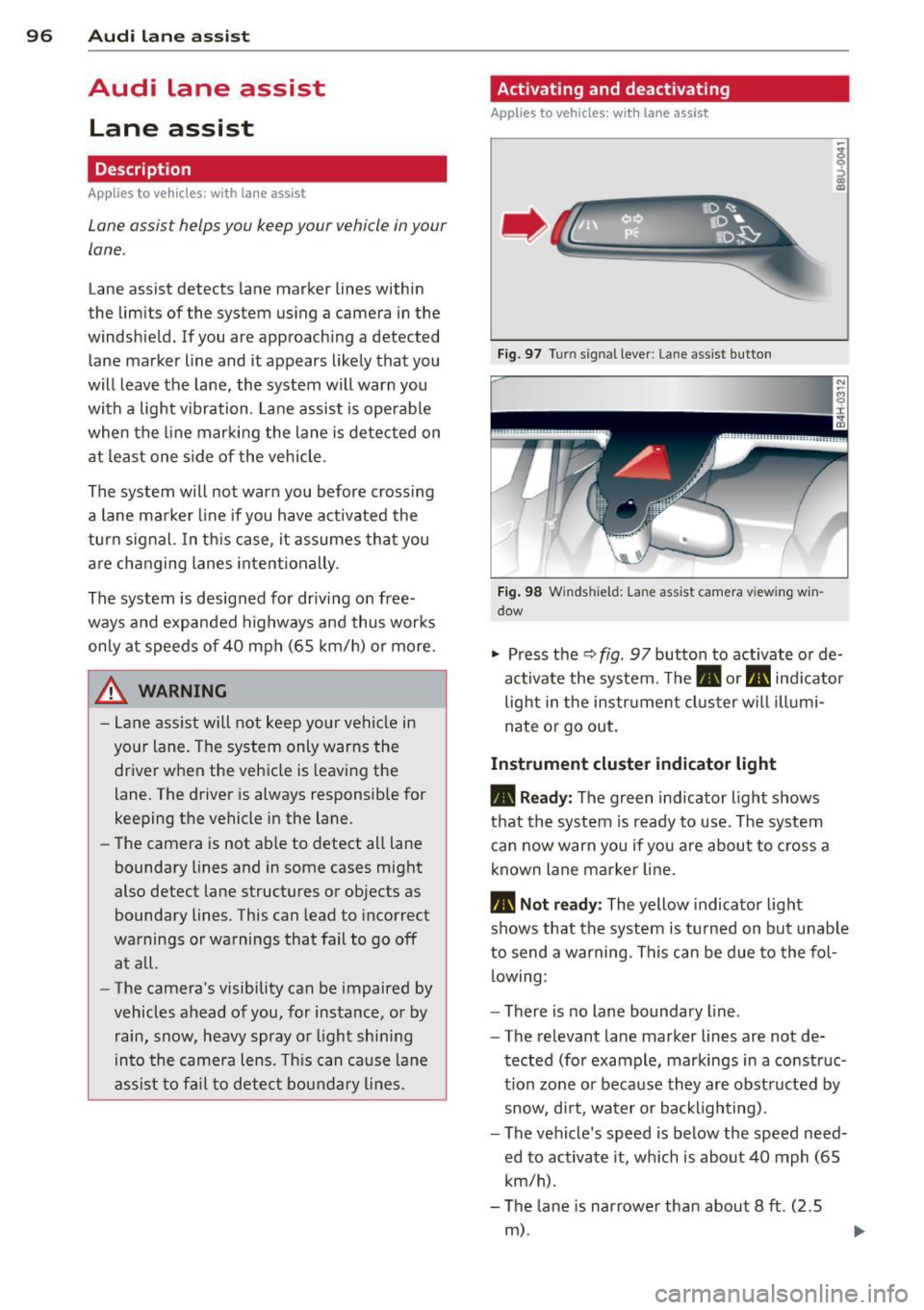
Fig. 9 7 Turn signal lever: Lane-ass ist button
Fig . 98 W ind shi eld: Lane assist camera viewing win
dow
"' Press the q fig . 97 button to activate or de
activate the system. The. or. indicator
light in the instr ument cluster w ill illumi
nate or go out.
Instrument cluster indicator light
• Ready : The green indicator light shows
that th e system is ready to use . Th e system
can now warn you if yo u are about to cross a
known lane mar ker line.
• Not r ead y: The yellow indicator light
shows that the system is t urned on bu t unable
to send a warning . This can be due to the fol
lowing :
- There is no lane boundary line .
- The relevant lane marker lines are not de-
tected (for example, markings in a construc
tion zone or because they are obst ructed by
snow, d irt, water or backlighting) .
- The vehicle's speed is below the speed need·
ed to activate it, wh ich is about 40 mph (65
km/h).
- The lane is narrower than about 8
ft . (2.5
m) .
Page 101 of 300

Audi side assist Lane Change Assistant
Description
App lies to vehicles: with si de assist
Fig . 10 1 Sensor detection range
Fig. 102 Disp lay on the exterior mirror
Side assist he lps you monitor yo ur blind spot
and traffic behind your veh icle. W ith in the
limits of the system, it warns you about vehi
cles that are coming closer or that are travel
i n g with you with in sensor range
(D
c::, fig . 101: if a lane change is class ified as crit
ical, the display @ in the exterior mirror
c::> fig. 102 turns on.
The display in the left exterior mirror provides
assistance when making a lane cha nge to t he
l eft, while the display in the right exter ior mir
r or p rov ides assistance when making a lane
change to t he right.
Information stage
As long as you do not activate the turn signal,
side assist
informs you about vehicles that are
detected and class ified as crit ica l. The display
i n the respec tive mirro r turns o n, but is d im .
Aud i side assist 99
The display remains d im intentionally in the
information stage so that your view toward
the front is not disturbed .
Warning st age
If you activate the turn signal, s ide assist
warns you about veh icles that are detected
and classified as critical. The display in the re
spective mirror blinks brightly . If this hap
pens, check traff ic by glancing in the rearview
mirror and over your shoulder¢
A in General
information on page 100.
@ Tips
- You can adjust the brightness of the dis
play @¢
page 101.
-Please refer to the instructions fo r tow
ing a trailer located in¢
page 100.
Page 121 of 300

The following steps app ly only when there is
no obsta cle such as a wa ll near the parking
spot. Otherwise, please read the information
provided in the "Parking Next to Obstacles"
section
c::> page 119.
~ Activate the turn signal.
~ Position your vehicle parallel to the edge of
the street, approximately 3 ft (1 meter)
from a parked vehicle .
~ Switch the MM I on and se lect reverse gear .
The parking aid tu rns o n and parking mode
1 appears on the display .
~ Press the contro l bu tton (D c::> fig. 129 on
the MMI contro l conso le. Parking mode 2
appea rs .
~ Back up and align yo ur vehicle so t he b lue
area @ borders on the rear end of the vehi
cle or on the parking spot line. The bl ue area
represents an extension of the veh icle's out
line by approximate ly 16 ft (5 meters) to the
rear . The long side of the blue area should
be o n the curb . The entire blue area must fit
i nto the parking spot .
~ With the vehicle stopped, turn the steer ing
whee l to the right as far as it w ill go.
~ Back into the park ing spot until the blue
cu rve to uches the curb
c::> fig. 130. Stop the
vehicle.
~ With the veh icle stopped, turn the steer ing
wheel to the left as far as it will go .
~ Continue to back into the park ing spot until
the vehicle is parked para llel to the curb .@
marks the rear bumper. Stop the vehicle
when the red orientation line@ borde rs an
object
c::> .&, . Keep an eye o n the fron t of
yo ur vehicle while do ing this
c::> (j) .
Parking next to obstacles
When t here is an obstacle (such as a wall)
next to the pa rking spot, choose a spot w ith
mo re space on t he sides. Position the long
side of the b lue a rea so that there is sufficient
space from the curb. The a rea m ust no t be on
the c urb. You w ill also need to start turn ing
the steering wheel much earlie r. T he re should
be a suffic ient amo unt of space between the
curb and the blue curve, and the blue c urve
c::> fig. 130 must not touch the curb.
Ad vanced P arking S ystem 119
A WARNING
-The rear view camera does not show the
entire area behind the vehicle
c::> page 115, fig. 12 3 . Watch out espe
cially fo r small children and anima ls . The
rea r view came ra ca nnot alway s de te ct
them, posing r is k of an a ccident!
- P lease note that objects not touching the
g rou nd can appear to be further away
than they really are (for example, the
bumper of a parked vehicle, a trai ler
hitch, or the rea r of a truck) . In this case,
you shou ld not use the help lines to help
with parking, wh ich poses danger of an
accident!
(D Note
In the MMI display, the direction of travel
of the vehicle rear is represented depend
i ng on the steering wheel angle . The vehi
cle front swings out more than the vehicle
rear. Maintain ple nty of d istance so that
your outside mirror or a corner of your ve
hicle does not col lide with any obstacles.
T his can damage to your ve hicle.
(0 Tips
The left o r right orientation lines and su r
faces will be disp layed, depending on the
turn s ignal being used .
Adjusting the display
and warning tones
App lies to v ehicl es: wi th parkin g sys tem advanced
The display and warning tones can be adjust
ed in the MMI.
~ Select: I CAR I function b utton > Car sy stem s
contro l button > Dri ver a ssist > Parking aid
> Setting s control b utton .
Display
On -when the parking system is switched on,
either the vis ual d isp lay or the picture from
the rea r view camera is disp layed .
IJI>
Page 293 of 300
-----------------------------~I~ n~d~ e~x 291
Leather ... .. .. ................ ....
Leather (cleaning) ............. ... .. .
210
211
Leaving home ............. .... .. .. .. 45
Lifting jack .. ............. .... .. ...
262
Lifting vehicle
Light 274
Ambience lighting . . . . . . . . . . . . . . . . . . 46
Coming/Leaving home ....... .. .. .. .. 45
Day time running lights .... .. .. .. .. ..
43
E mergency flashers ............ .... . 44
Exterior lighting .... ...... .. .. .. .. .. 43
Headlight range control .......... ... 43
H igh beam . ............. .. .. .. .. .. 45
L ow beam .. ............. .... .. ....
43
Rear fog lights .............. ... .... 43
Side marker lights .................. 43
Turn signals ................ ... .... 45
L ight/ra in sensor
H eadlights . ............. .. .. .. ....
43
Intermittent (windshield wipers) . ... .. 48
Sensor defective . . . . . . . . . . . . . . . . . . . . 21
Loading the roof rack . . . . . . . . . . . . . . . . . 69
Locking
Power locking swit ch ...... .. .. .. .. .. 33
Rear lid . . . . . . . . . . . . . . . . . . . . . . . . . . . 34
Remote control ............. .... ... 32
Using the key ......... ...... .... ... 33
Low beams .. ............. .... .. .... 43
Lower universal anchorages (Canada) 178
Luggage compartment
Luggage compartment net ... .. .. .. ..
66
Pass-through with ski sack ..... . ... .. 67
Stowing luggage ......... .. .. .. .. .
130
Tie-downs . . . . . . . . . . . . . . . . . . . . . . . . . 66
Lumbar support Front seats . . . . . . . . . . . . . . . . . . . . . . . .
56
Rear seats .. ................ ... ... . 57
M
Maintenance ............... ... ... .. 280
Malfunction Indicator Lamp (MIL) 20, 26
Massage function
Front seats . . . . . . . . . . . . . . . . . . . . . . . .
56
Rear seats .. ............. .... .. .. .. 57
Reclining rear seat ..................
60
Mechanical key . . . . . . . . . . . . . . . . . . . . . . 29
Mirrors
Adjusting the exterior mirrors ...... .. .
51
Compass . . . . . . . . . . . . . . . . . . . . . . . . . . 52
d' . 1mming .... .. .. ................. . 51
Vanity mirrors . . . . . . . . . . . . . . . . . 47, 48
Monitoring the Advanced Airbag System 153
Mult ifunction steer ing whee l ......... .. 24
N
Nachtsichtassistent
K .. amera rein1gen .. .. .......... .... . 205
Natural leather .. .... ............... 210
New tires and wheels
NHTSA
Contacting 246
132
Night vision assistant
............... . 106
Number of seats . .. .... ........... .. 134
0
Occupant seating positions .......... . 125
Octane rating ... .. .. ............... 215
Odomete r .. .. .. .. ................. . 25
OFF (automatic climate control) . . . . . . . . 76
Oil
refer to Engine oil 222
On-board computer . . . . . . . . . . . . . . . . . . 24
On-Board Diagnostic System (OBD) Data Link Connector (DLC) . .. .... .... .
27
Electronic speed limiter ............ .. 27
Malfunction Indicator Lamp (MIL) ..... 26
Open door/hood/rear lid warning .... .. . 26
Opening Hood ............................
219
Panoramic sunroof ................ .. 41
Power windows .. .. ................ 38
Rear lid . . . . . . . . . . . . . . . . . . . . . . . 35, 37
Sliding/tilting sunroof .............. .
40
Sun shades . . . . . . . . . . . . . . . . . . . . 42, 47
Operate your vehicle economically and
minimize pollution ..................
196
Outs ide mirro rs
refer to Exterior mirrors ........ .. .. . 51
•
•
Page 297 of 300
Index 295
Uniform tire quality grading . ... .. .. . 2 49 Unfastening safety belts . ..... ... .. .. 139
Winter tires . ... .. .... ... .. .. .. ... 250
Unidirectional tires .................. 235
•
Tires and vehicle load limits .. .. .. .. .. . 24 3
Uniform tire quality grading ...... .. .. 249 •
Tires and wheels
Unl ocking
Checking tire pressure ..... .. .. .. .. . 241
Power locking switch . ... .... ... .. .. . 33
Cold tire i nflat ion pressure ..... ... .. 239
Rear lid ... .. .... .. . .. .. ..... ... .. . 34
Dimensions . ................ ... ... 246
Remote contro l .. .. . ... ...... ... .. . 32
Gene ral notes ............ .... .. .. . 235
Using the key .. .. .... ............. . 33
Glossary of t ire and load ing te rm ino lo-
gy .. .. .. .. ............... .. .. .. . 236
L ow aspect ratio t ires ... ... .. .. .. .. . 2 52
V
New tires and wheels ... ... .. .. .. .. . 246 Valet pa
rking . ..... .. . .. .. ..... ... .. . 39
Replacing . ... .... .... ... .. .. .. ... 247 Vanity mirrors .
.. .. .. . ... ...... .. 47,48
Snow chains ............. .... .. .. . 251 Vehicle-care products ................ 203
Tires and vehicle load limits .. .. .. .. . 243
Vehicle electr ical sys tem . ..... ... .. .. . 16
Wheel bolts .............. ... ... .. 252
Vehicle identification label . .......... . 276
W inte r tir es .............. ... ... .. 250
Vehicle Identificatio n Number (VIN) . ... 276
Tire service life ... .. .... ... .. .. .. ... 245
Vehicle jac k ... .. .. ............ 257, 262
Tools . .... .. .. ............. .. .. ... 257
Vehicle literature .. .... ............. .. S
Torn or frayed safety belts ... .. .. .. .. . 137
Vehicle transport .. .. . ... ...... ... .. 274
Touch -up paint ... .. .... ... .. .. .. ... 207
Ventilation ....... .. ................ 75
Towing
Tow truck pro cedures ...... .. .. .. .. . 27 2
W
TPMS
Tire pressure monitoring system 254
Trailer towing . .... ..... ... .. .. .. ... 199
Operating instructions .. ... .. .. .. .. . 199
T echnical req uirements . . . . . . . . 199, 200
Trailer towing tips ........ .. .. .. .. . 201
Train (transporting your vehicle) . ... ... 274
Transm ission malf unct io n (ind icator
light) . . . . . . . . . . . . . . . . . . . . . . . . . . . . . 112
Transport Canada .......... .... .. .. . 132
Transport ing your vehi cle .... .. .. .. .. . 274
T read Wear Indicato r (TWI) ...... . ... . 245
T rip odometer . . . . . . . . . . . . . . . . . . . . . . . 25
What does it mean when D EF appears in
the trip odometer d isplay? . .. .. .. .. .. 25
T runk
refer to Rear lid . . . . . . . . . . . . . . . . . . . . 34
Trunk escap e hand le ........... .. .... 256
Turn signa ls .. ............. .... .. .... 45
War ning/ indicator lights ... .. .. .. .. .. 22
u
Undercoat ing ............. .... .. ... 208 Warning/indicator lights
. . . . . . . . . . . . . . 11
Airbag system ... .. ... ....... ...... 18
Anti- lock b raking system (ABS) . . . . . . . . 19
Br ake system . . . . . . . . . . . . . . . . . . . . . . 14
El ectromechani ca l p ar king brake . .. .. . 15
El ec tronic power contro l . . . . . . . . . . . . . 20
El ectronic Stability Co ntrol (ESC) ... .. . 18
Generator ....... .. . .. .. ..... ... .. . 16
Instrument cluster .... ............. . 10
Malfunction Ind icator Lamp (MIL) .. .. . 20
Safety be lt .. .. .. ................. . 16
Turn signals . .. .. .. ... ....... ...... 22
Warning/Indicator lights
Airbag system . .. ................. 153
Dynam ic steering . ................. . 22
PASSENGER AIR BAG OFF ....... .... 153
War ranty coverages . .. .. .. ..... ... .. 280
Washe r reservo ir .. .. . .. .... .... .. .. 234
Washing . .. .. .. .. .. ............... 203
Automat ic car wash ............ .. .. 204
by hand . .. .. .. .. .. . .. ....... ... .. 204
with a power washer ............... 205
Waxing . ... .. .... .. . .. .. ..... ... .. 206
Wea r indica to r .. .. .... ........... .. 245