turn signal AUDI A8 2012 Owners Manual
[x] Cancel search | Manufacturer: AUDI, Model Year: 2012, Model line: A8, Model: AUDI A8 2012Pages: 300, PDF Size: 75.06 MB
Page 11 of 300
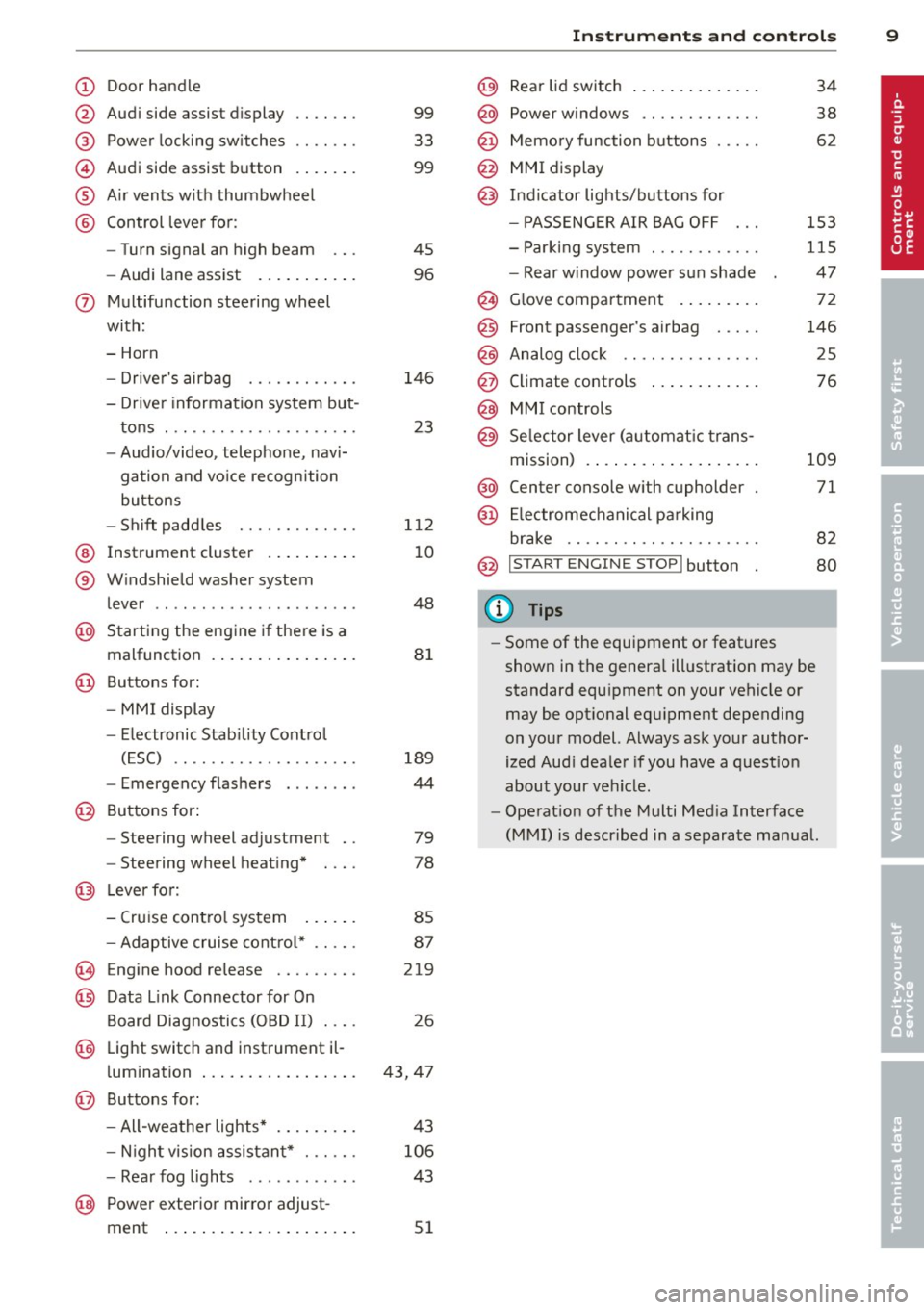
(!) Door handle
@
®
©
®
®
Audi side assist d isplay
Power locking sw itches
Audi side assist button
A ir vents with thumbwheel
Control leve r for :
- Turn signal an high beam
- Audi lane assist ..... ... .. .
0 Multifunction steering wheel
with:
- Horn
- Drive r's airbag
- Driver information system but-
tons . ............... .. .. .
- Audio/video, telephone, navi
gation and vo ice recognition
buttons
- Sh ift padd les ........ .. .. .
@ Instrument cluster .. ... .. .. .
® W indshield washer system
l ever .................... . .
@ Starting the engine i f there is a
malfunction . .. ..... ... .. .. .
@ Buttons for:
- MM I display
- Electronic Stab ility Contro l
( E SC) .. ............. .... .
- Emergency flashe rs . ..... . .
@ Buttons for:
- Steering wheel adjustment
- Steering wheel heating*
@ Lever for:
- Cruise contro l system
99
33
99
45
96
146
23
1 12
10
48
8 1
189
44
79
78
85
- Adaptive cruise cont ro l* . . . . . 87
(§ Eng ine hood re lease . . . . . . . . . 219
@ Data Link Connector for On
Board Diag nostics (OBD II) . . . . 26
@ Light switch and inst rument il-
l umination . . . . . . . . . . . . . . . . . 43, 47
@ Buttons for :
- All-wea ther lights* 43
- Nigh t vision assista nt* . . . . . .
106
- Rea r fog lights . . . . . . . . . . . . 43
@ Power exterior mirror adjust -
ment . . . . . . . . . . . . . . . . . . . . .
51
In strument s and control s 9
@) Rear lid switch .... .. .. ..... .
@ Power w indows .. .......... .
@ Memo ry function buttons .... .
@ MMI display
@ I n d icator lights/buttons for
- P ASSENG ER AIR BAG OFF
- Par king system . .. ........ .
- Rear w indow power sun shade
@ G love compartment . ..... .. .
@
@
@
Front passenger's airbag .... .
Analog clock .. .. .. ........ .
Climate controls
@ MMI controls
@ Se lector lever (a utomat ic trans-
m1ss1on) . ........ .. .. ..... .
@ Center console w ith cupholder
@ El ectromechanical pa rking
br ake .. .. .. .. .... ........ .
@ I START ENGINE STOPI button
(D Tips
34
38
62
153
115
47
72
146
25
76
109
71
82
80
- Some of the equipment o r feat ures
shown in the genera l ill ustration may be
standard equ ipment on your vehicle or
may be opt ional equ ipment depending
on your model. Always ask your author
ized Aud i dea ler if you have a quest io n
about your vehicle .
- Operat ion of the Multi Med ia Interface
(MMI) is described in a separate manua l.
Page 12 of 300
10 Instruments and warning/indicator lights
Instruments and warning/indicator Lights
Instruments
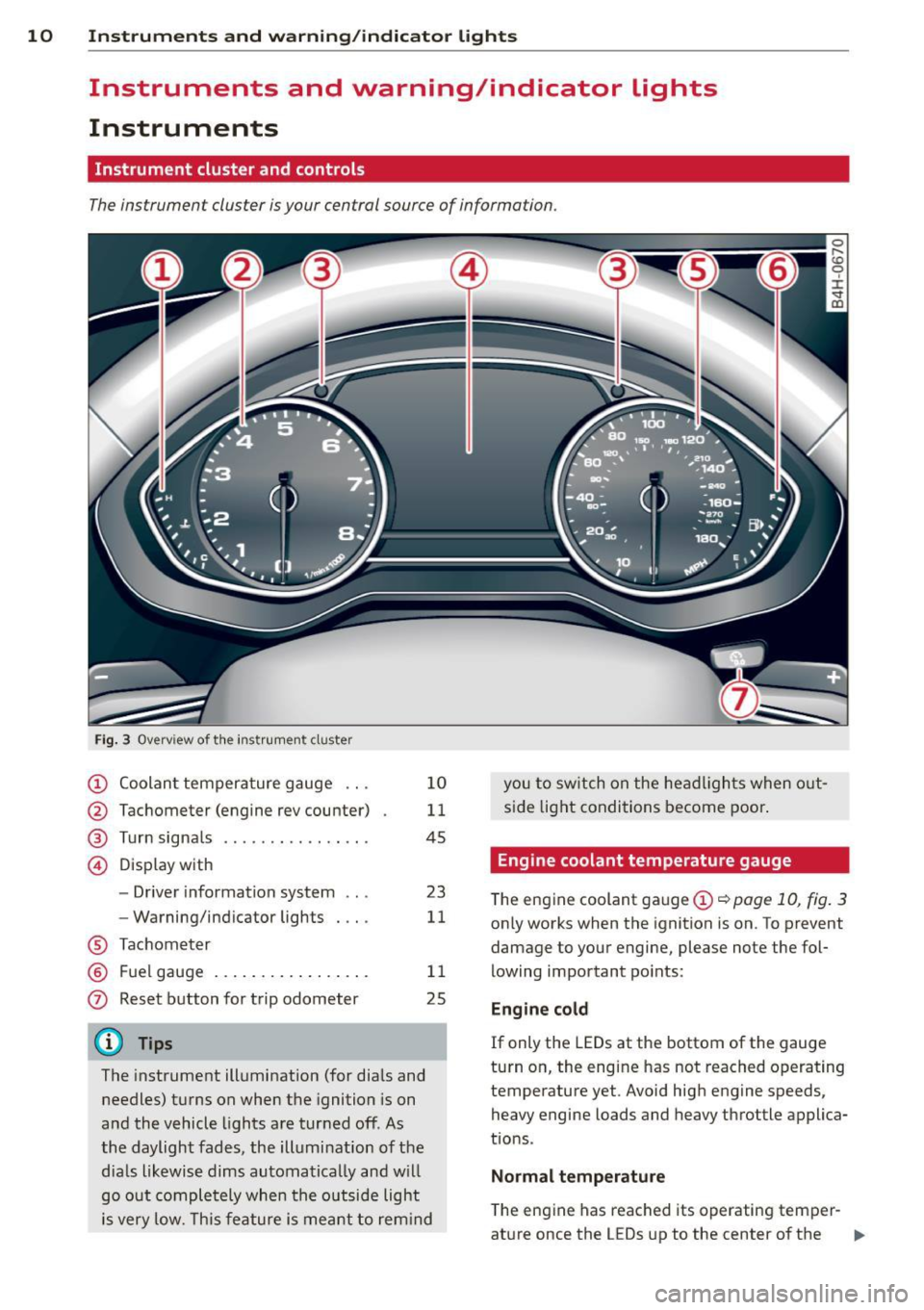
Instrument cluster and controls
The instrument cluster is your central source of information.
Fig. 3 Overview of th e instr ume nt cluster
(!) Coolan t tempera ture gauge ...
@ Tachometer (engine rev counter)
® Turn signals ............. .. .
© D isp lay with
- Driver information system ...
- Warning/ind icator lights
® Tachom eter
® F uel gauge .... ..... ... ... . .
0 Reset b utton for trip odometer
(D Tips
1 0
11
45
23
11
1 1
25
The instrument illumination (for dia ls and
needles) t urns on when the ignition is on
a nd the vehicle lights are tur ned off. As
the daylight fades, the illumination of t he
dia ls likewise dims automatica lly and w ill
go o ut comple tely when the o utsi de light
i s very low. Th is feature is meant t o rem ind you
to sw itch on the head ligh ts when o ut
s id e light condi tions become poor .
Engine coolant temperature gauge
The engine coolant gauge (!) ¢ poge 10, fig. 3
only works when the ignition is on. To prevent
damage to your engine, please note the fol
lowing important po ints:
Engine cold
If only the LEDs at the bottom of the gauge
turn o n, the engine has not reached operating
temperature yet. Avoid hig h engine speeds,
heavy engine loads and heavy throttle applica
tions .
Normal temp erature
The eng ine has reached its operating temper-
at ure once the LEDs up to the center of the .,.
Page 13 of 300
Instrument s and warnin g/indic ator ligh ts 11
gauge turn on under normal d riving condi
tions . The LEDs higher up may turn on when
the eng ine is under heavy load or the exter ior
temperature is high . This is no need to worry
as long as the. warning light in the instru
ment cluster does not illuminate . If the LEDs
in the upper area of the display and the ind ica
tor light . in the instrument cluster display
turn on, the coolant temperature is too high
¢ page 15.
A WARNING
-Always observe the warning in
~ page 213, Engine compartment, be
fore opening the hood and checking the engine coolant level.
- Never open the engine hood if you see or
hear steam, or if you see engine coolant
dr ipping from the engine compartment.
You could burn yourself. Let the engine
cool off first so that you cannot hear or
see any steam or engine coolant .
(D Note
- Mounting additional lights or accessories
in front of the a ir inlets reduces the cool
i ng effect of the rad iator . At h igh outside
temperatures or high eng ine load, the
engine co uld overheat.
- The front spo ile r has been designed to
properly distrib ute the cooling air when
the veh icle is moving. If the spoiler is
damaged, this cou ld red uce the cooling
effect and t he engine co uld then over
heat . Ask your autho rized Audi dea le r for
ass istance.
Tachometer (engine rev counter)
The tachometer indicates the engine RPM
(revolutions per minutes).
If engine R PM drops be low 1,500, you should
downshift to the next lower gear. The red a rea
at the end of the sca le ind icates maxim um
perm iss ible engine RPM after the break-in pe
riod. Before reaching this area, move these
lector lever to position "D (Drive)" or ease
your foot off the accelerator pedal.
@ Note
The tachometer need le should only briefly
be in the red zone: yo u could damage your
engine! The beg inning of the red zone var
i es depending on the engine.
@ For the sake of the environment
Upsh ifting early saves fuel and reduces en
gine noise.
Fuel gauge
The fuel gauge only works when the ignition is
o n.
If the fue l level drops below 4 gallons (15
l ite rs), the bottom LED tu rns red and the indi
cator light
(l1 tu rns on ¢ page 21. The bot
tom LED b link s red when the fue l level is very
l ow .
The possible range based on the current fuel
level is shown in tab@~
page 23, fig. 4.
(D Note
Never run the ta nk complet ely dry. An ir
regular supply of f uel can cause engine
misfiring and fuel cou ld enter the exha ust
system. The cata lytic converter could t hen
overheat and be damaged .
Warning/indicator
lights
Description
T he ind icator lights in the ins trument clus ter
blink or turn on. They indica te f unct ions or
malfunctions
¢ ,& .
Messages may appea r with some indicato r
li ghts. A warning signal will sound at the
same t ime. The indica tor lights and messages
in the center of the displays may be rep laced
by other disp lays. To show them again, select
the tab for ind icator lights and messages us
ing the multifunction steering whee l
¢ page 23. If there are several malfunc
tions, you can display them one at a time us- ing the thumbwheel. ..,.
Page 16 of 300
14 Instruments and warning/indicator lights
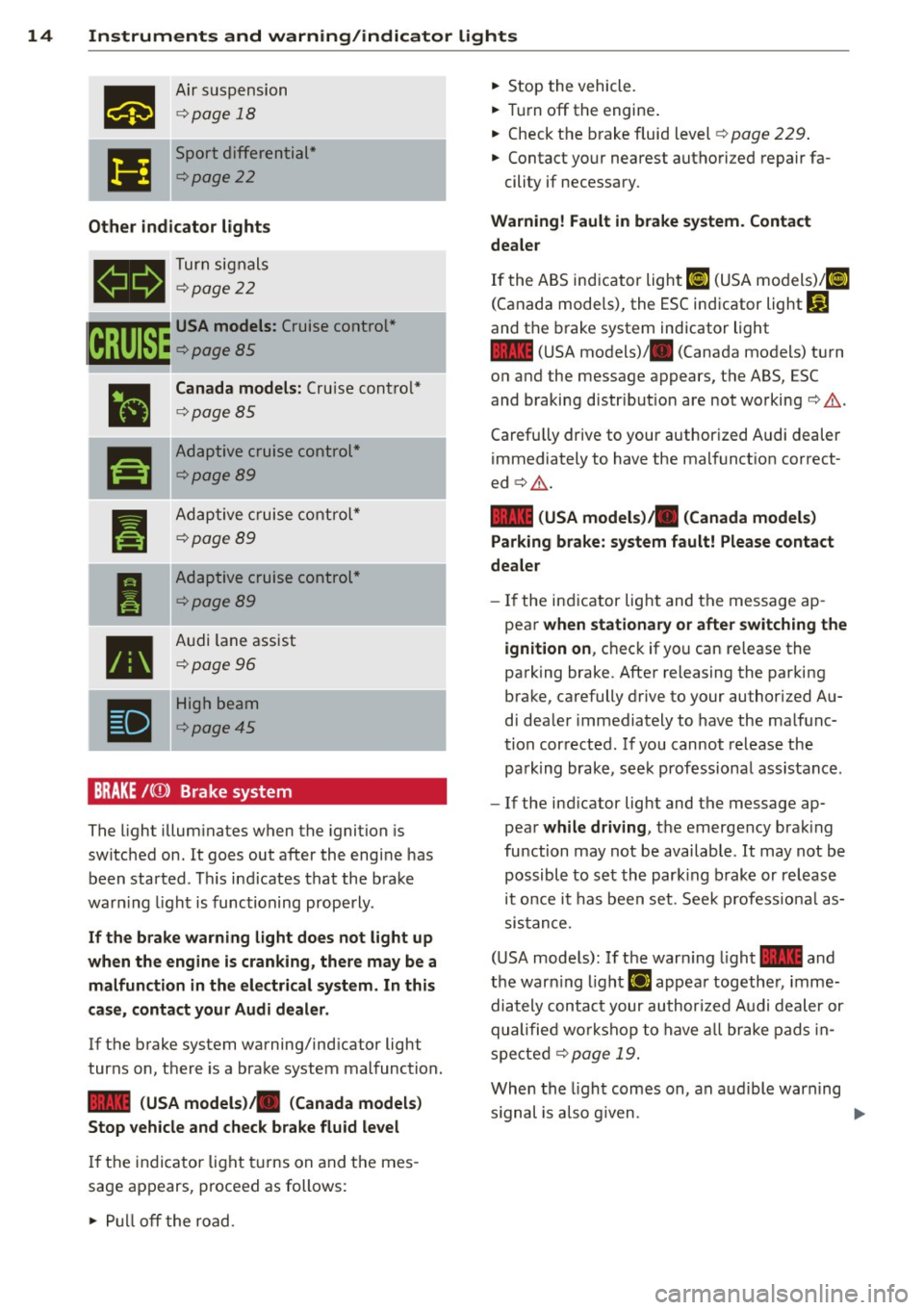
Air suspension
¢page 18
Sport differential*
¢page22
Other indicator lights
- Turn
signals
¢page22
~ USA models: Cruise control *
~ ¢ page 85
•
Canada models: Cruise control*
¢page 85
-
r!I
Adaptive cruise control*
¢page89
•
Adaptive cruise control*
¢page 89
-
I
Adaptive cruise control*
¢page89
•
Audi lane assist
¢ page 96
-
•
High beam
¢page45
BRAKE /((f)) Brake system
The light illuminates when the ignition is
switched on . It goes out after the engine has
been started . This indicates that the brake
warn ing light is functioning properly.
If the brake warning light does not light up
when the engine is cranking, there may be a
malfunction in the electrical system. In this
case, contact your Audi dealer.
If the brake system warning/ind icator light
turns on, there is a brake system malfunction.
- (USA models)/ . (Canada models)
Stop vehicle and check brake fluid level
If the indicator light turns on and the mes
sage appears, proceed as follows:
"" Pull off the road . ""
Stop the vehicle.
"" Turn off the engine .
"" Check the brake fluid level ¢
page 229.
"" Contact your nearest authori zed repair fa-
cility if necessary.
Warning! Fault in brake system. Contact
dealer
If the ABS indicator light ti] (USA models)/ rl]
(Canada models), the ESC indicator light G]
and the brake system indicator light
- (USA models)/ . (Canada models) turn
on and the message appears, the ABS, ESC
and braking distr ibut ion are not working¢.&..
Carefu lly drive to your authorized Audi dealer
immediately to have the malfunction correct
ed ¢.&. .
- (USA models) . (Canada models)
Parking brake: system fault! Please contact
dealer
- If the indicator light and the message ap
pear
when stationary or after switching the
ignition on , check if you can release the
parking brake. After releasing the parking
brake, carefully drive to your authorized Au
di dealer immediately to have the malfunc
tion corrected. If you cannot release the
pa rking brake, seek professiona l assistance.
- If the ind icator light and the message ap
pear
while driving, the emergency brak ing
function may not be available . It may not be
possible to set the park ing brake or release
it once it has been set. Seek profess ional as
sistance.
(USA models): If the warn ing light - and
the warn ing l ight
El appear together, imme
diately contact your authorized Audi dealer or
qualified wo rkshop to have all brake pads in
spected
¢ page 19.
When the light comes on, an audible warning
s ignal is also given .
Ill-
Page 24 of 300
22 Instruments and warning /indicator lights
However, you can continue to turn the lights
on and
off using the light switch . You can still
control a ll funct ions that are independent of
the rain sensor through the windshield wiper lever.
Contact your authorized Audi dealer as soon
as possible to have the prob lem corrected.
@! Dynamic steering
1;r.ij Steering: system fault. you can continue
driving
If the indicator light turns on and the mes
sage appears, the steering may be more diffi
cult to move or more sensitive than usual. The
steering wheel may also be at an angle when
driving straight .
Drive slow ly to your authorized Audi dealer or
qualified workshop to have the malfunction
corrected.
tT@ Dynamic steering: initialising
If th is driver message appears and the ind ica
tor light is flashing on the instrument panel,
dynamic steering is being reinitialized. Once
you start the engine after this is finished, the steering wheel w ill be easy to move . Re-initi
alization might be necessary if the steering
wheel was moved hard to the left and r ight
while the veh icle was not moving . The display
goes out as soon as init ialization is complete .
A WARNING
-
Have the dynamic steering system mal
function repaired as soon as possible by an
authorized Audi dealer or any qualified
workshop -risk of accident!
@ Tips
-The dynamic steering stability systems
are not available in the event of a system
malfunction.
- For additional informat ion on dynamic
stee ring, refer to
¢page 103.
I-: Sport differential
II Sport differential: system fault
There is a malfunction with the sport d ifferen
t ial.
Drive to your authori zed Audi dealer immedi
ately to have the malfunction corrected .
II Sport differential: overheating
The transmission temperature has increased
s ignificantly due to the sporty driving manner.
Drive in a less sporty manner until the tem
perature returns to the normal range and the
indicator light switches of.
A WARNING
Contact your authorized Audi dealer or a
qualified workshop if the sport differential
is faulty or malfunct ioning . The repair
must be performed by trained personnel
using the correct oil in order to ensure
safety.
¢ 9 Turn signals
-
The indicator light blinks when you use either
turn signal .
Whenever you use the left B or the right B
turn signal, the indicator light blinks. When
you use the emergency flashers , both indica
tor lights flash .
If one of the turn signal light bulbs burn out,
the turn signal will blink twice as fast as nor mal. Carefu lly dr ive to your authorized Audi
dealer immed iately to have the malfunction
corrected. The indicator light does not indi
cate a malfunction if a turn signal on the trail
er or on the vehicle fails in trailer towing
mode.
@ Tips
For more information on the turn signals,
refer to
¢ page 45.
Page 32 of 300
30 Openin g and clo sing
systems such as power window or power
sunroof leading to ser ious personal injury.
(D Tips
- The vehicle cannot be started if an unau
thorized key is used. The vehicle may not
start if another radio device such as a key
for another vehicle or a transponder is l ocated on the key ring.
- For Declaration of Compliance to United
States FCC and Industry Canada regula
tions
r::::> page 283.
Power locking system
General description
The power locking system locks or unlocks all
doors and the rear lid simultaneously.
You can lock a nd u nlock the veh icle centrally .
You have the following choices:
- Remote master key r:::>
page 32,
-Door handles with convenience key*
r::::> page 32,
-Lock cylinder at the dr iver's door
r::::> page 33, or
- Power locking switc h inside r:::>
page 33 .
Selective unlocking
When they a re closed , the door and rea r lid
a re lo ck ed. When unlocki ng, you can set in the
MMI whether only the driver's door or the en
tire vehicle sho uld be un locked r:::>
page 31 .
Automatic locking
The automat ic loc king featu re locks all t he ve
h icle doors and the rear lid when you drive
faster than 9 mph (15 km/h).
The ca r is un locked aga in, whe n the opening
function in the power loc king system sw itch
or at one of the doo r levers is ac tuated. The
Auto Lock f unction can be turned on and off in
the MMI
r::::> page 31.
Anti-theft alarm warning system
If the an ti- t h eft alarm warning sys tem de
tects a b reak-in into the vehicle, acoustic and
vis ual warn ing s ignals a re triggered .
T he anti-theft w arning sys tem is activated au
tomat ica lly when you lock the vehi cle. It is de
activated when unlocking using the remote
key, w ith the mechanica l key, and when yo u
switch the ignition on.
T he alarm a lso t urns off when the a la rm cy cle
has expired .
Turn signals
When you u nlock the veh icle, the turn s ignals
flash twice. When you lock the vehicle once,
the turn signals flash once. If they do not
flash, one of the doors, the rear lid o r the
hood is not locked .
Unintentionally locking yourself out
In the fo llow ing cases there safeguards to
preve nt yo u lock ing you r remo te master key i n
the ve hicl e:
- The vehicle does not lock w it h the central
lock ing switc h r:::>
page 33 if the driver's
door is open.
- On veh icles with convenience key*, if the
most recently used master key is in the lug
gage compartment, the rear lid is automat i
cally u nlocke d again after it is closed.
Do not lock your veh icle w ith the re mote mas
t e r k ey or con venienc e key * unti l all doors
and t he rear lid a re closed. In this way you
avo id lock ing yo urself out a cciden tally.
Power side door closer *
T he veh icle doo rs a re equipped with a powe r
s ide door closer . When closing a door, you on
ly have to le t it fall light ly into the latc h. The
doo r will the n automatically close by itself
Q .&. .
_& WARNING
--
-When you loc k yo ur vehicle from o utside,
nobody - especially children - s hou ld re-
main inside the vehicle . Remember, ..,
Page 34 of 300
32 Opening and clo sing
locking and unlocking the vehicle with
the remote control
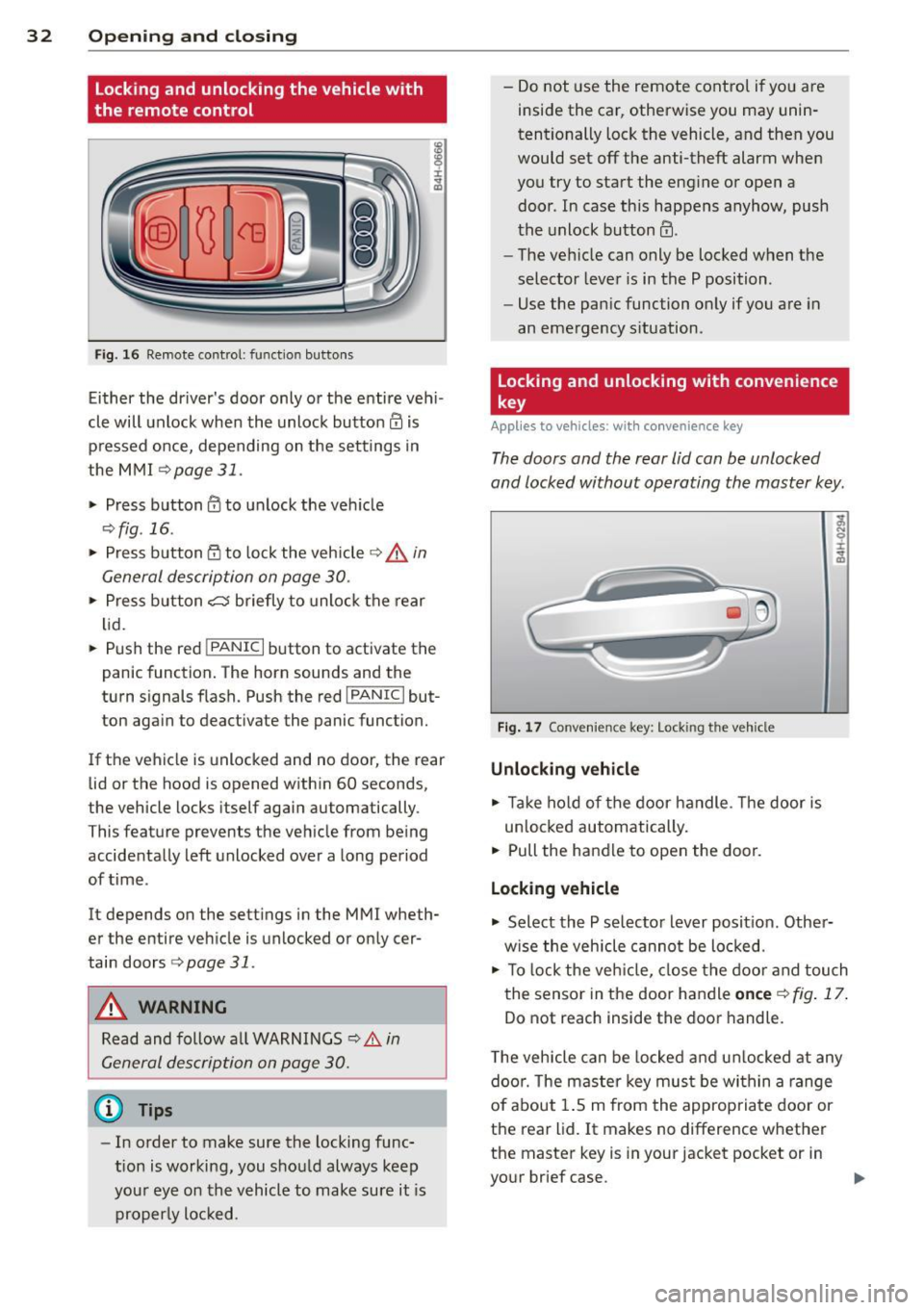
F ig. 16 Remote control: function buttons
Either the driver's door only or the e ntire veh i
cle will unlock when the unlock button
III is
p ressed once, depending on the settings in
the MMI
¢page 31.
.. Press button III to unlock the veh icle
¢ fig .16 .
.. Press b utton fij to lock the vehicle ¢ .&. in
General description on page 30 .
.. Press b utton c:s briefly to unloc k the rear
li d .
.. Push the red
!PANIC I button to activate the
panic function. The horn sounds and the
turn signals flash. Push the red
!PANIC I but
ton aga in to deact ivate the panic function.
If t he vehicle is unlocked and no door, the rear
lid or the hood is opened w ith in 60 seconds,
the vehicle locks itself again automatically.
This feature prevents the vehicle from being
accidenta lly left unlocked over a long period
of time .
It depends on the settings in the MMI wheth
er the entire veh icle is unlocked o r only cer
tain doors
¢ page 31.
A WARNING
Read and follow a ll WARNINGS c:> .&. in
General description on page 30.
@ Tips
- In order to make sure the locking func
tion is working, you shou ld always keep
you r eye on the vehicle to make sure it is
properly loc ked. -
Do not use the remote control if you are
inside the car, otherwise you may unin
tentionally lock the vehicle, and then you
would set off the anti-theft alarm when
you try to sta rt the engine o r open a
door. In case this happens anyhow, push
t he unlock button
III.
- The ve hicle can only be locked when the
selector lever is in the P position.
- Use the panic function on ly if you are in
an eme rgency s ituation.
locking and unlocking with convenience
key
A pp lies to vehicles : wi th convenience key
The doors and the rear lid can be unlocked
and locked without operating the master key .
Fig. 1 7 Conven ie n ce key: Lock ing the vehicle
Unlocking vehicle
.. Take ho ld of the door handle. The door is
un loc ked automatically.
.. Pull the handle to open the door.
locking vehicle
.. Select the P se lector lever posit ion. Other
w ise the vehicle cannot be lo cked.
.. To lock the veh icle, close the door and tou ch
the sensor in the door handle
on ce c:> fig . 17 .
Do not reach inside the door handle.
T he veh icle can be locke d and unlocked at any
doo r. T he mas te r key mus t be wi thin a range
of about 1.5 m from the appropria te door or
the rear lid. It makes no difference whether
the maste r key is in your jacket pocket or in
your brief case.
Page 46 of 300
44 Clear vision
Highway light function* (vehicles with LED
headlights) -this function adapts the lighting
for highway driving based on vehicle speed.
.&_ WARNING
- Automatic headlights are only intended
to assist the driver. They do not relieve
the driver of his responsibility to check
the headlights and to turn them on man
ually according to the current light and
visibility conditions. For example, fog
cannot be detected by the light sensors.
So always switch on the headlights §.0
under these weather conditions and
when driving in the dark.
- Crashes can happen when you cannot see the road ahead and when you cannot be
seen by other motorists. Always turn on
the headlights so that you can see ahead
and so that others can see your car from
the back.
- Please observe legal regulations when
using the lighting systems described.
(D Note
The rear fog lights should only be turned
on in accordance with traffic regulation, as
the lights are bright for following traffic.
@ Tips
- The light sensor* for automatic dynamic
headlight range control* is located in the
rear view mirror mount. You should
therefore not apply any stickers to the
windshield in this area in order to pre
vent malfunctions or failures .
- In the event of a light sensor malfunc
tion, the driver is notified in the instru
ment cluster display¢
page 21 .
- You will hear a warning tone if you open
the driver door when the exterior lights
are switched on.
- In cool or damp weather, the inside of
the headlights, turn signals and tail
lights can fog over due to the tempera
ture difference between the inside and
outside. They will clear shortly after switching them on. This does not affect
the service life of the lighting.
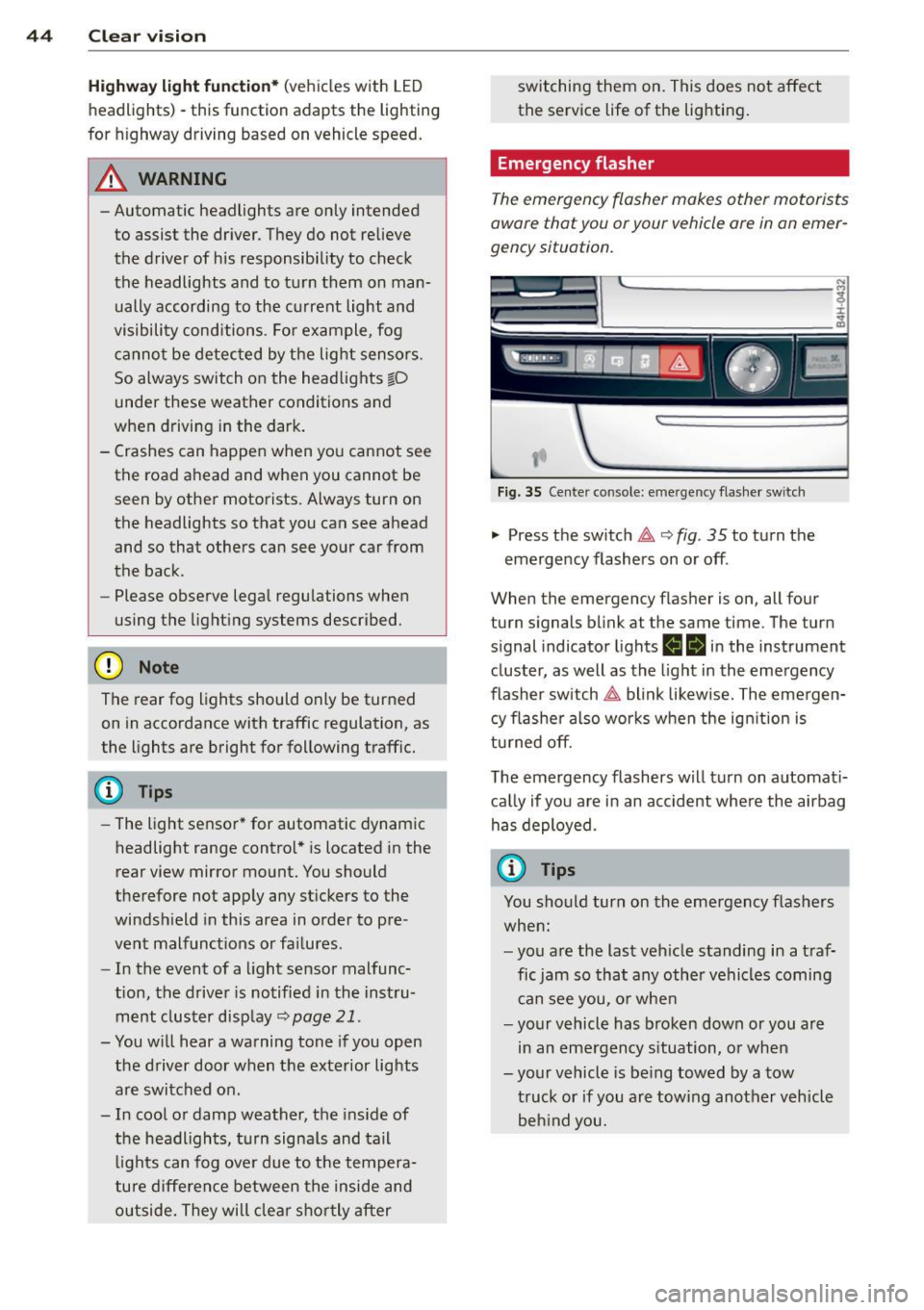
Emergency flasher
The emergency flasher makes other motorists
aware that you or your vehicle ore in an emer
gency situation.
,--~
,_'
. ;.' --- --~-.sc-
Fig. 35 Center console: emergency flasher switch
.,. Press the switch 11 ¢ fig. 35 to turn the
emergency flashers on or off .
When the emergency flasher is on, all four
turn signals blink at the same time. The turn
s ignal ind icator lights
ea in the instrument
cluster, as well as the light in the emergency
flasher switch
11 blink likewise. The emergen
cy flasher also works when the ignition is
turned off.
The emergency flashers will turn on automati
cally if you are in an accident where the airbag
has deployed.
(D Tips
You should turn on the emergency flashers
when:
- you are the last vehicle standing in a traf
fic jam so that any other vehicles coming
can see you, or when
- your vehicle has broken down or you are
in an emergency situation, or when
-your vehicle is being towed by a tow
truck or if you are towing another vehicle
behind you.
Page 47 of 300
Adjusting the exterior lighting
The settings are adjusted in the MMI.
• Se lect: ICARI f u nct ion button> Car systems
control button > Vehicle sett ings > E xterior
lighting .
Automatic headlights
You can a djust the fo llow ing settings in the
Automatic headl ights men u:
Headlight s activation time -You can adjus t if
the hea dlights sw itch on
Early , Med . or Late
according to the sensitivity of the light se nsor .
Audi adaptive light* -You can sw itch adaptive
l ig ht
On a n d Off .
Daytime running lights
USA models :
You can switch the dayt ime ru n
ni ng lights
on and off .
Canada models:
The function ca nnot be
turned off. It is activated a utomat ica lly each
time the ignition is switc hed o n. This menu
item is shown "gr eyed out" .
Coming home, Leaving home
The coming home function illuminates the
area outside the vehicle when yo u switc h the
i gn it io n off and open the driver's door. To tur n
the function o n, select
Lights when leaving
car > On .
The leav ing home function illuminates the
area outside the vehicle when yo u unl ock the
ve hicle. To turn th e f unc tion on, select
Lights
when unlocking car > On .
The com ing home and leaving home fu nctions
only operate whe n it is da rk a nd the light
sw itch is in the
AUTO p os itio n.
Clear vision 45
Turn signal and high beam lever
The lever on the left side of the steering col
umn is used to operate the turn signals and
the high beam as well as th e headlight flash
er.
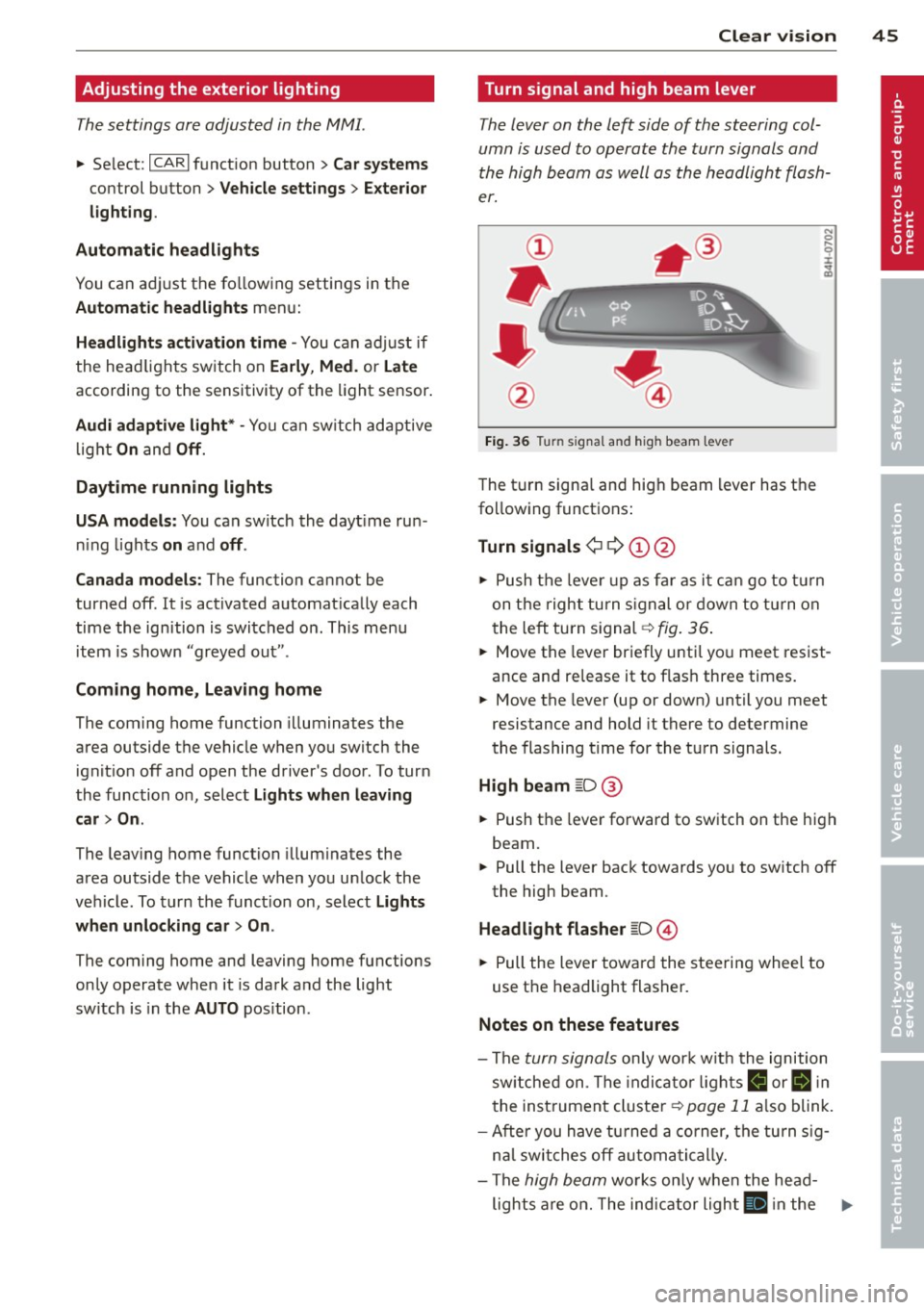
Fig. 36 Turn signal and high beam lever
The t urn signa l and hig h beam lever has t he
fo llow ing funct ions :
Turn signals ¢ Q ©@
N 0 ,._
± .. a,
• Pu sh t he leve r up as fa r as i t can go t o tur n
on t he righ t turn s igna l or d own to t urn on
t he le ft turn s ignal -=>
fig. 36 .
• Move the leve r br iefly u ntil yo u meet res ist
ance and release it to f lash three times.
• Move the lever (up or down) until you meet
resistance and hold it there to determine
the flashing t ime for the tu rn signals.
High beam ~D @
• Push t he leve r forward to sw itch on the hig h
beam.
• Pull the lever bac k towards yo u to sw itch off
the high beam.
Headlight flasher ~D ©
• Pull the lever towar d the stee rin g wheel to
use t he headlight flasher .
Notes on these features
-The turn signals o nl y wor k w ith t he ignition
sw itche d on. T he indi ca tor light s
R or II in
t he inst rumen t cluste r¢
page 11 also blink .
- Afte r yo u h ave t urned a corner, the tu rn s ig -
n al swi tches off au tom atic a lly .
- The
hig h beam wo rks o nly w he n the he ad-
lights a re on . The ind ic a tor ligh t
II in the .,,.
Page 85 of 300
-If the indicato r light - (USA mod
els)
,111 (Canada models) or I.I turns
on, there may be a malfunction in the
parking brake
¢page 15.
@ Tips
-You can apply the parking brake at any
time - even w ith the ignition switched
off. The ignit ion must be on in order to
release the parking brake.
- Occasiona l noises when the park ing
brake is applied and released are norma l
and are not a cause for concern.
- When the vehicle is parked, the parking
brake goes through a self-test cycle at
regular intervals. Any assoc iated noises
are norma l.
Parking
Various rules apply to prevent the parked ve
hicle from rolling away accidentally.
P a rking
~ Stop the vehicle w ith the foot brake.
~ Pu ll the switch© to apply the parking
brake.
~ Se lect the P selector lever position
¢page 109.
~ Turn the eng ine off ¢,& .
In addition on incline s and grade s
~ Turn the steering wheel so that your vehicle
will roll against the curb in case it should
start to move.
A WARNING
-When you leave your veh icle - even if on
ly b riefly - always take the ignition key
with you. This applies particu la rly when
children remain in the veh icle. Otherw ise
the ch ild ren could sta rt the engine, re
lease the parking brake or operate elec
trical equipment (e .g. power windows).
There is the risk of an accident.
- When the vehicle is locked, no one - par
t icu larly not ch ildren should remain in
the vehicle. Locked doors make it more
On th e ro ad 83
difficult for emergency workers to get in
to the vehicle - putting lives at risk.
Starting from rest
The starting assist function ensures that the
parking broke is released automatically upon
starting.
Stopping and appl ying p arking brake
~ Pull the switch(®) to apply the pa rking
brake.
Sta rting and automaticall y releasing the
parking brak e
~ When you start to drive as us ual, the pa rk
ing brake is automatically released and your
veh icle begins to move .
When stopp ing at a traffic signal or stopping
in city t raff ic, the parking b rake can be ap
plied. The vehicle does not have to be held
with the footbrake. The parking brake elimi
nates the tendency to creep w ith a dr ive range
engaged. As soon as you drive off as usua l,
the parking brake is released automatically
and the vehicle starts to move.
St arting on slope s
When starting on inclines, the sta rting assist
prevents the vehicle from unintentionally roll
ing back. The braking force of the parking
brake is not re leased until suff ic ient driving
force has been built up at the wheels.
(D Tips
For safety reasons, the parking brake is re
l eased automatically on ly when the driv
er's safety belt is engaged in the buckle.
Starting off with a trailer
To prevent rolling back unintentionally on an
incline, do the following:
~ Keep the switch(®) pulled and depress the
accelerator. The parking brake stays applied
and prevents the vehicle from roll ing back-
ward . ..,.