light AUDI A8 2012 Repair Manual
[x] Cancel search | Manufacturer: AUDI, Model Year: 2012, Model line: A8, Model: AUDI A8 2012Pages: 300, PDF Size: 75.06 MB
Page 110 of 300

108 Night vision assistant
• Switch the ignition on and turn the light
sw itch to the
AUTO position or tD .
• To sw itch night vision ass istant on, press
the~ ,, button
c> fig. 113 . The image from
the night vision camera appea rs in the in
strument cluster display .
• Press the button~ -, aga in to switc h night vi
s ion assistant off .
Settings in the MMI
Applies to vehicles: with night vision assistant
Fig. 114 Displa y: examp le of pede strian detect ion and
warn ing tone switc hed off
• Select : I CARI funct ion button > Car systems
control button > Driver assist > Night vision
assist.
Highlight pedestrians -
You can switch pedes
tr ian detection
on and off . If yo u sw itch pe
destrian detection off, the pedestr ian war ning
tone also switches off. The symbols
II and~
appear in the upper right area of the instru
ment cluster display
c> fig. 114.
Warning tone -You can switch the tone for
the pedestrian warning
on and off. When the
warn ing tone is switched off, a yellow symbol
for the deactivated wa rning tone with a line
through it appears in the upper right of the in
strument cluster display
c> fig. 114 .
Contrast -When the night vis ion assistant is
switched on and the image is visible in the in
strument cluster display, you can adjust the
contrast in the image from
Min to Max.
Driver messages
Appl ies to vehicles: with night vision assistant
Night vision assistant: system malfunction!
The system cannot work properly and is
switched off. See your authorized Audi dealer
for assistance .
Night vision assistant: not available
The system cannot detect properly under cur
rent cond itions and is switched off tempora ri
ly.
Night vision assistant: only available in dark
ness and with lights switched on
Night vision assistant only works when it is
dark outside and the headlights are on .
Night vision assistant: pedestrian detection
not available
The system has deactivated the pedestrian de
tection function.
Page 112 of 300
110 Automatic Tran sm iss ion
• You may need to release the selector lever
l ock depending on which se lector lever posi
t ion is selected and which one you would
Like to select ¢
page 110, Selector lever
lock.
• To engage the nearest selector lever posi
t ion, move the selector lever forward/back
unti l you feel the first pressure point . The
selector lever will return to its original posi
t ion.
• To skip over one (or two) se lector lever posi
tions, move the selector lever past the first
(and second) pressure point into the desired
pos it ion. The selector lever will return to its
origina l position.
For example, to move directly from the D se
lector lever position to P when stopping the
vehicle, you can shift past the N and R selector lever positions.
S ele ctor l ever lock
The selector lever lock prevents you from se
lecting a position unintentionally, causing the
vehicle to roll. When engaging some selector lever positions, you must press the button on
the selector lever¢
fig. 116 and/or press the
brake pedal.
You must press the brake pedal to engage a
selector lever position when the engine is run n ing while the vehicle is stationary. The ar
rows¢
fig. 117 indicate when you need to
press the button on the selector lever .
The selector lever does not lock if you sh ift
from D to R w ith in one second . Th is allows
you to "rock" the vehicle to free it when it is
stuck .
P- P ark
The whee ls are locked in th is position. Only
shift into park when the vehicle is stationary
¢ & .To engage the P selector lever position,
press the button on the selector lever and
shift into the P position .
You can only shift out of park when the eng ine
is running and you are press ing the brake ped
al. Press the button on the selector lever to r
elease the parking lock and select the desired
selector lever position.
P engages automa tica lly when you sw itch the
engine off while D, Sor R is engaged o r in
manua l mode .
If you switch the eng ine off when N is engag
ed, the transmiss ion remains in N for approxi
mately 30 minutes and then Pis engaged .
You must use the emergency release proce dure to release the parking lock before towi ng
the vehicle
¢ page 113.
R- Reverse
The reverse gear is engaged in this posit ion .
Only select reverse when the vehicle is sta
t ionary and the eng ine is running at id le speed
¢ & -To engage the R selector leve r pos ition,
press the button on the selector lever, press
the b rake pedal and move the selector lever
into the R position.
T he back-up lights turn on when you select
the R selector lever pos it ion wh ile the eng ine
. . 1s ru nning .
N -Neutral
The transm iss ion is in idle in this pos it ion . To
engage the N selector lever posit ion, press
the button on the selector lever and sh ift into
t h e N pos it ion.
If you switch the eng ine off when N is e ngag
ed, the transmiss ion remains in N for approxi
mately 30 minutes and then P is engaged .
You cannot se lect the N pos ition when the ig
nition is sw itched off. When dr iv ing th rough
an automat ic car wash, first select the N posi
t ion and then switch the engine off
¢page 204.
The veh icle cannot be locked when the selec
tor lever is in the N position.
D - Dri ve
In this pos ition, the transmission sh ifts up
and down automatically depending on eng ine
load, veh icle speed and the dynamic shift pro -
gram (DSP) .
ll-
Page 113 of 300
To shift from N to D when traveling at speeds
be low S km/h, press the brak e pedal and se
lect the D se lector lever position
~ .& .
Unde r certain conditions such as driving in the
mountains or when towing a trailer , it may be
helpful to switch to manual mode temporarily
to sh ift
manually to adapt to the driv ing con
ditions
r:=:> page 112.
S -Sport
The 5 position can be selected fo r sporty driv
ing. Upshifting at a higher RPM makes full use
of the engine's power.
You can only select the S selector lever posi
tion when Dis engaged . Move the selector
l ever back to engage the 5 selector lever posi
tion. To select the D sel ector lever position
again when 5 is engaged, move the selector
lever back
r:=:> .&.
The 5 selector lever position engages auto
matica lly when you select the dynamic mode
in Audi drive se lect .
A WARNING
-Never engage R or P wh ile driving. It
could cause a crash.
-
- Power is still transmitted to the whee ls
when the engine is running at idle. To
prevent the vehicle from "creeping", you
must keep your foot on the brake in all
selector lever positions except P and N
when the eng ine is running. Do not inad
vertent ly press the accelerator pedal
when the vehicle is stationary . Otherwise
the vehicle will start to move immediate
ly. This cou ld happen even if the parking
brake is activated .
- Before opening the hood, select the P se
lector lever position and set the parking
brake. This reduces the risk of a crash . A l
ways read and follow the applicable
warnings
r:=:> page 213, Engine compart
ment.
- Never get out of the driver's seat when
the engine is running.
Automatic Transmission 111
-If you must get out of the vehicle , move
the selector lever secure ly into the P po
sition and apply the parking brake firmly.
@ Tips
- If you unintentionally shift into the N se
lector lever position while driving, take
your foot off the accelerator pedal and
wa it for the engine to slow down until it
is idling before you sh ift into Dor 5.
Driving tips
The gears shif t automa tically.
Starting from a stop
.. Press and hold the brake pedal.
.. Start the engine
r:=:>page 80.
.. Press the b utton on the s elector lever and
select the D, 5 or R se lector lever position
r:=:> page 109 .
.. Wait a moment until the transmiss ion
shifts . You will notice a slight movement
when the gear engages .
"" Release the brake peda l and press the accel
erator pedal
r:=:> &, .
Stopping temporarily
.. Press the brake pedal to stop the veh icle,
for example at a traffic light. Do not press
the acce lerator pedal when doing this.
"" To prevent the vehicle from rolling when
you start driving, set the parking brake
when stopp ing on large inclines
r:=:> &, .
.,. Th e parking brake will release automatica lly
and the vehicle will start moving once you
press the acce lerato r pedal.
Parking
If the selector lever is not in the P position
when you open the driver's door, the vehicle
could roll . The message
Transmission: Car
may roll! Shift to park!
appears .
.. Press and hold the bra ke peda l¢ &, .
"" Set the park ing brake.
.. To engage the P se lector lever position,
press the button on the selector lever and
shift into the P position
r:=:> page 109 .
Page 115 of 300
The transmission temperature has increased
significantly due to the sporty driving manner. Drive in a less sporty manner until the tem
perature returns to the normal range and the
indicator light switches of.
[O] Gearbox malfunction: you can continue
driving
There is a system ma lfunction in the transmis
sion. You may continue driving. Drive to your
authorized Audi dealer or qualified repair fa
cility soon to have the malfunction corrected .
[O];lij Gearbox malfunction: you can contin·
ue driving in D only until engine is off
There is a system malfunction in the transmis
sion . The transmission is switching to emer
gency mode. If you turn the engine
off, you
will not be able to select any other selector
l ever positions after starting the engine again.
Drive to your authorized Audi dea ler or quali
fied repai r facility immediately to have the
malfunction corrected.
[O] Gearbox malfunction: you can continue
driving {limited functionality)
There is a system ma lfunction in the transmis
sion. The transmission is switching to emer
gency mode. This mode only shifts into cer
tain gears or will not longer shift at all. The
engine may sta ll. Drive to your authorized Au
di dealer or qualified repa ir facility immedi
ately to have the malfunction corrected.
[o]tlij Gearbox malfunction: no reverse gear
(you can continue driving)
There is a system malfunction in the transmis
sion. The transmission is switching to emer
gency mode. This mode only shifts into cer
tain gears or will not longer shift at all. You
cannot engage the reverse gear. Drive to your
author ized Audi dealer immediately to have
the malfunction corrected.
[O] Vehicle may roll! Cannot shift to P. Please
apply parking brake
- The parking lock was released using the
emergency release
r=:> page 113. Or
Automatic Transmission 113
- The parking brake cannot engage automati
cally . Drive to your authorized Audi dea ler or
qualif ied repair facility immediately to have
the malfunction corrected.
[O] Gearbox malfunction: Stop and shift to P
Do not continue dr iving. Select the P selector
lever position and see your authorized Aud i
dealer or qualified repair facility for assis
tance .
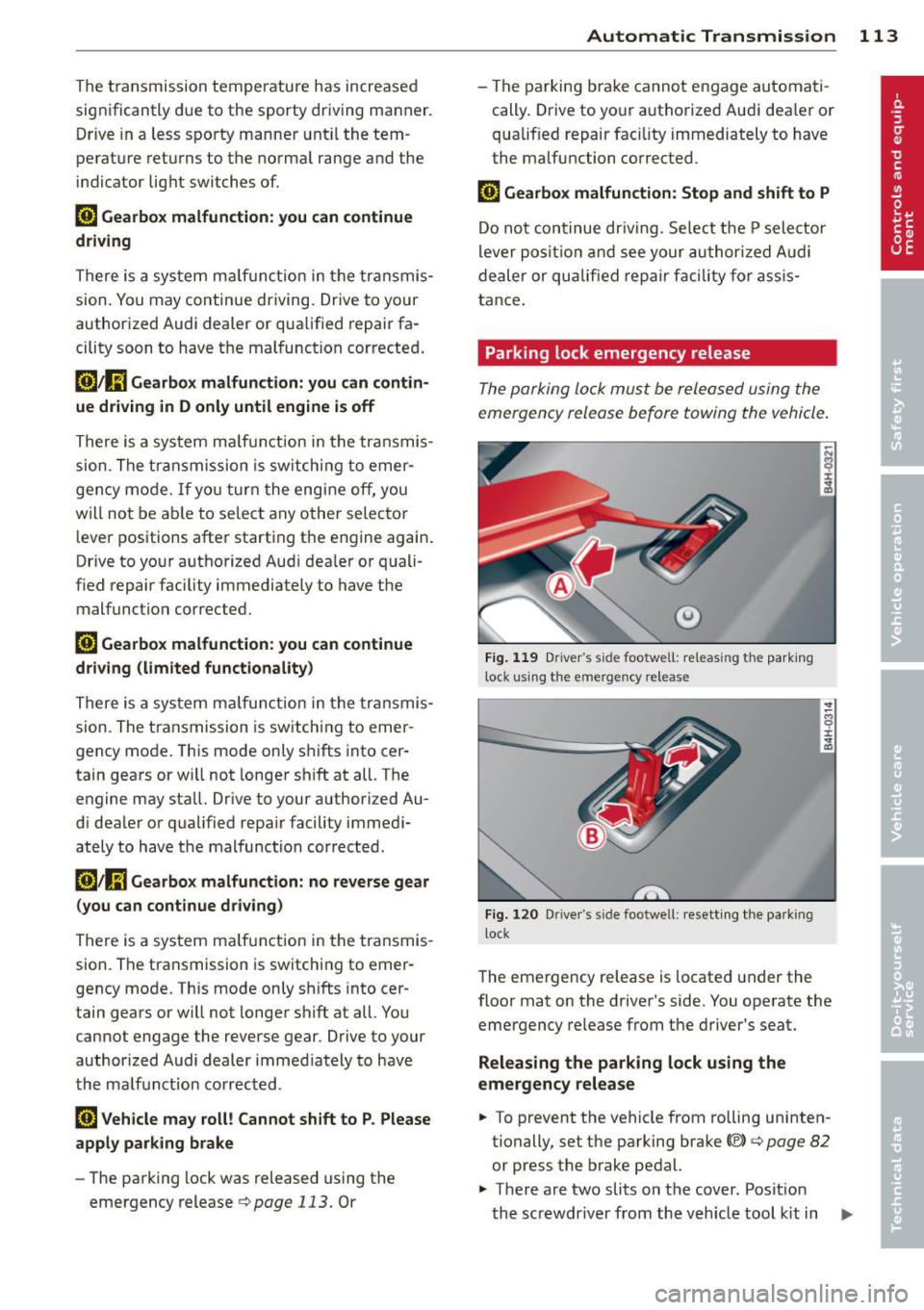
Parking lock emergency release
The parking lock must be released using the
emergency release before towing the vehicle.
Fig. 119 Driver 's side footwell: releas ing the park ing
lock using the emergency release
.------------------ -~
Fig. 120 Dr iver"s side footwel l: resett ing the parking
l ock
8 ±
~
The emergency release is located under the
floor mat on the driver's side. You operate the
emergency release from the driver's seat.
Releasing the parking lock using the
emergency release
.. To prevent the vehicle from rolling uninten
tionally, set the parking brake©
r=:> page 82
or press the brake pedal.
.,. There are two slits on the cover. Posit ion
the screwdriver from the veh icle tool kit in
Ill-
Page 116 of 300

114 Automatic Transmission
one of the sli ts on the cover and pry the cov
er
off .
.. Pu ll the band @ in the direction of the ar
row until the release lever locks in place
<=>fig . 119.
• Fold the upper section of the release lever
down into the recess .
Resetting the parking lock
.. Press the button @ and the release lever at
the same time. You can now push the lever
back into its orig inal position . Make sure the
lever locks in place <=>
fig. 120 .
• Install the cover .
The indicator light
[O] and the N position indi
cator in the instrument cluster turn on when
the park ing lock is released using the emer
gency re lease . The message
Risk of rolling! P
not possible . Please set the parking brake
al
so appears .
.&_ WARNING
If you release the parking lock using the
emergency release, secure your vehicle
with the parking brake or the brake pedal
if the parking brake is not working. The ve
hicle can roll away if it is not secured and
cause a crash.
-
Page 118 of 300

116 Advanc ed Parking S ystem
Rear vi ew cam era co ve ra ge area
The MM I display shows the area covered by
the rear view camera
c::> fig. 123 @ . Objects
that are not in the area covered @are not
shown on the MMI display.
We recommend that you p ractice park ing with
the rear view camera in a t raffic -free location
or parking lot to become familiar with the sys
tem, the orientation lines, and their function.
When doing th is, there sho uld be good light
and weather conditions.
In the MMI disp lay, objects or vehicles appear
closer or further away if:
- you are driving in reverse gear from a level
surface onto an incline, or a downward
s lope,
- you are d riving in reverse gear toward pro
truding objects,
- the vehicle is carrying too much load in the
rear.
The accuracy of the orientation lines and blue
surfaces dim inishes if:
- the adaptive air suspension/sport* is faulty, the vehicle is lifted or dynamic mode is se
lected
c::> page 103,
- the rear view camera does not provide a reli
able image, for examp le, in poor visibility
cond it ions or if the lens is dirty,
- the image on the screen is not visible due to
sun glare and reflect ion.
Car in g for the rear view came ra lens
The rear view camera is located above the rear
license plate bracket . For the parking system
to operate, the lens
c::> fig . 124 must be kept
clean:
- Dampen the lens with a household alcohol
based glass cleaner, and then wipe the lens
clean with a dry cloth
c::> CD.
- Remove snow with a hand brush and ice
preferably with a de-icing spray
c::> (D .
A WARNING
,-
- Senso rs have blind spots in which objects
cannot be detected . Pay special attention to small children and animals because
the sensors cannot always detect them.
- The parking system cannot replace the
driver's attention. The driver alone is re
sponsible for parking and similar driving maneuvers.
- Always keep your eyes on the vehicle 's
surroundings, us ing the rear view mirror
as well.
- Do not allow yourself to be distracted
from traffic by the rear view camera p ic
tures.
- If the position and the installation angle
of the camera has changed, for example,
after a rear end col lis ion, do not continue
to use the system for safety reasons .
H ave it checked by a qualified dea le rship.
(D Note
- Low obstacles a lready s ignaled by a
warning can disappear from the system's detection range as they are approached
and w ill not cont inue to be signaled. Ob
jects such as ba rr ier chains, trailer draw
bars, thin painted vert ica l poles or fen
ces may not be detected by the system,
posing risk of damage .
- N ever use warm or hot water to remove
snow or ice from the rear view camera
lens - this could ca use the lens to crack!
- When cleaning the lens, never use prod
ucts that are abrasive.
Page 119 of 300

Switching on and off
Applies to vehicles: with parking system advanced
The rear view camera switches on automati
cally together with the acoustic and visual
park assist when you put the vehicle in re
verse .
Fig. 125 Cen ter con sol e: Pa rking syst em swi tc h
Fig. 126 MMI display: visual distan ce di splay
Switching on
• Switch the MMI on
• Activate
comfort or auto mode in Audi drive
select
¢ page 103.
• Shift into reverse or
• Press the switch
Pw.!l. in the center console
¢
f ig. 125. A short confirmation tone
sounds and the ind icator light in the sw itch
light s up .
Switching between the rear view camera
and visual display
• Press the Graphic control button
¢
page 118 , fig . 127 @to see the visual
display .
• Press the
Rearview control button to see
the rear view camera image¢
fig. 126 .
Switching off
• Dr ive faste r than 6 mph (10 km/h), or
Advanced Parking System 11 7
• press the switch P1#.!l. or
• switch off the ignit ion .
Segments in the visual display
The red segments in front of and behind the
vehicle
¢ fig. 126 help you to determine the
distance between yo u and an obstacle. As
your vehicle comes closer to the obstacle, the
segments move closer to the veh icle. The co l
lision area has been reached when the next to
las t segmen t is displayed . Do not continue
driving farther ¢.&
in General Information
on page 116!
A WARNING
- The MMI display cannot show, or cannot
adequately show, certain objects (such as
small posts or grating), recesses in the
g ro und and protruding parts on another
car.
- Only use the rear view camera to assist
you if it shows a good, clear picture . For
examp le, the image may be affected by
the sun s hining into the lens, dirt on the
lens or if there is a defect.
- Use the rear view camera on ly with the
rear lid comp lete ly closed . Make sure any
objects you may have mounted on the
rear lid do not block the rear v iew cam
era.
(D Tips
- The sensors must be kept clean and free
of snow and ice for the park assist to op
erate.
- If your ve hicle is near an obstacle, an ad
ditional v isual ind icator appears in the
rearview camera image. Th is superim
posed image is there to help you to de
termined which area of the vehicle is af
fected .
- You can change the volume and pitch of the signals as well as the display
r:!;; page 119.
-What appears in the display is time-de
layed .
Page 123 of 300
Homelink®
Universal remote
control
General information
Applies to vehicles: with Horne Link® universal remote
control
The Homelink universal remote control can
be programmed with hand -held transmitters
from existing equipment.
Using the Homelink universal remote control,
you can operate equipment such as garage
doors, property gates and house lights from inside your vehicle.
Using the Homelink universal remote control,
you can replace up to three separate hand
held transmitters for equipment on your
property with just one universal remote con
trol. Most of these transmitters a re used to
operate ga rage doo rs and property gates. The
individua l transmitters are programmed at
the front bumper. That is where the control
module is located.
The transmitters must be programmed first in
order to operate systems using the Homelink universal remote control.
A WARNING
-
- Never use the Homelink® transmitter
with any garage door opener that does have not the safety stop and reverse fea
ture as required by federal safety stand ards . Th is includes any garage door open
er model manufactured before April 1, 1982.
- A garage door opener which cannot de
tect an object, signaling the door to stop
and reverse does not meet current feder
al safety standards. Using a garage door
opener without these features increases
risk of serious injury or death.
- For safety reasons never release the
parking brake or start the engine while
anyone is standing in front of the vehicle .
- A garage door or an estate gate may
sometimes be set in motion when the
Homelink ® 121
Homelink ® remote control is being pro
grammed.
If the device is repeatedly ac
tivated, this can overstrain motor and
damage its electrical components - an
overheated motor is a fire hazard!
- To avoid possible injuries or property
damage, please always make absolutely
certain that no persons or objects are lo
cated in the range of motion of any
equ ipment being operated.
(D Tips
- If you would like additional information
on the Homelink ® Universal Transce iver,
Homelink compatible products, or to
purchase other accessories such as the
Homel ink ® Lighting Package, please
contact Homelink at 1 -800 -355-3515 or
on the Internet at www.homelink.com.
- For Declaration of Comp liance to United
States FCC and Industry Canada regu la
tions ~
page 283.
Page 127 of 300
.. Make sure to use the right child restraint
correct ly to protect children
Q page 166,
Child Safety.
.. Sit properly in your seat and make sure that
your passengers do the same¢
page 54,
General recommendations .
.. Faste n your safety belt and wear it properly.
Also instruct your passengers to fasten their
safety belts properly ¢
page 134 .
What impairs driving safety?
Safe driving is directly related to the condi
tion of the vehicle, the driver as well as the
driver 's ability to concentrate on the road
without being distracted.
The driver is respons ible for the safety of the
veh icle and all of its occupants.
If your ability
to drive is impai red, safety r isks for everybody
in the vehicle increase and you also become a
hazard to everyone else on the road ¢ _&. .
Therefore:
.. Do not let yourself be dist racted by passen
gers or by using a cellular telephone.
.. NEVER drive when your driving ability is im
paired (by medications, alcohol, drugs, etc.).
.. Observe all traffic laws, rules of the road
and speed limits and plain common sense .
.. ALWAYS adjust your speed to road, traffic
and weather conditions .
.,. Take frequent breaks on long trips . Do not
drive for more than two hours at a stretch.
.. Do NOT drive when you are tired, under
pressure or when you are stressed.
A WARNING
Impaired driving safety increases the risk
of serious personal injury and death when
ever a vehicle is being used.
Driving Safely 125
Proper occupant
seating positions
Proper seating position for the driver
The proper driver seating position is impor
tant for safe, relaxed driving .
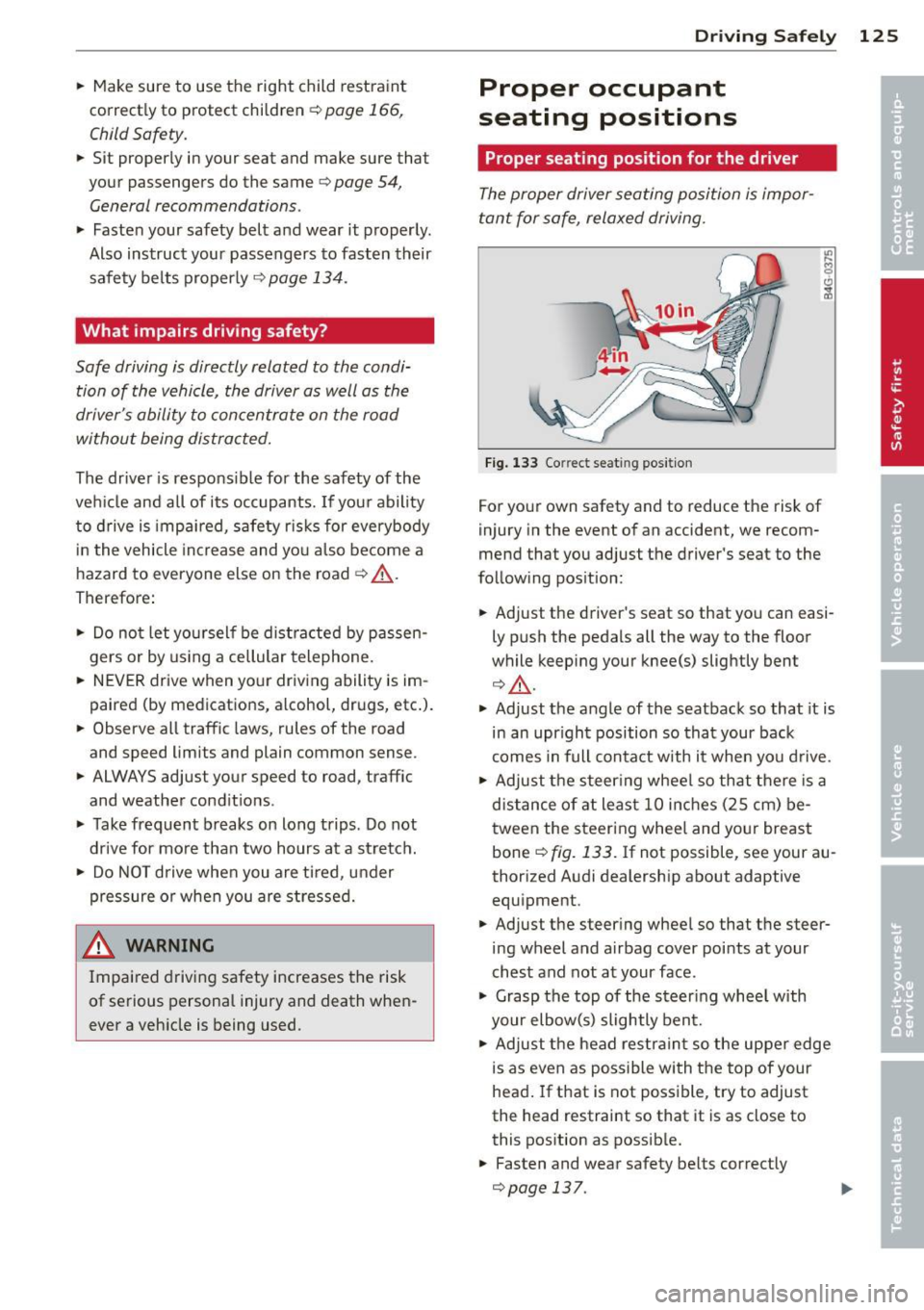
Fig. 133 Correct seat ing pos it ion
For your own safety and to reduce the risk of
injury in the event of an accident, we recom
mend that you adjust the driver's seat to the
follow ing pos ition:
.. Adjust the driver's seat so that you can easi
ly push the pedals all the way to the floor
wh ile keeping your knee(s) slightly bent
¢ _&. .
.. Adjust the angle of the seatback so that it is
in an upr ight position so that your back
comes in full contact w ith it when you drive.
.. Adjust the steering wheel so that there is a
distance of at least 10 inches (25 cm) be
tween the steering wheel and yo ur breast
bone
Q fig. 133. If not possible, see your au
thorized Audi dealership about adaptive
equipment .
.. Adjust the steer ing wheel so that the steer
ing wheel and airbag cover points at your
chest and not at your face.
.,. Grasp the top of the steering whee l with
your elbow(s) slightly bent.
.. Adjust the head restraint so the upper edge
is as even as possible with the top of your
head. If that is not poss ible, try to adjust
the head restraint so that it is as close to
this position as possible .
.. Fasten and wear safety belts correctly
¢page 137.
Page 136 of 300
134 Safety belts
Safety belts
General notes
Always wear safety belts!
Wearing safety belts correctly saves lives!
This chapter explains why safety belts are nec
essary, how they work and how to adjust and
wear them correctly .
.. Read all the information that follows and
heed all of the instructions and WARNINGS.
A WARNING
Not wearing safety belts or wearing them
improperly increases the risk of serious
personal injury and death.
- Safety belts are the single most effective
means available to reduce the risk of se
rious injury and death in automobile acci
dents . For your protection and that of
your passengers, always correctly wear
safety belts when the vehicle is moving .
- Pregnant women, injured, or physically
impaired persons must also use safety
belts. Like all vehicle occupants, they are
more likely to be seriously injured if they
do not wear safety belts. The best way to
protect a fetus is to protect the mother -
throughout the entire pregnancy.
Number of seats
Your Audi has a total of five seating positions: two in the front and three in the rear. In some
vehicles, there are four seating positions: two in the front and two in the rear. Each seating
position has a safety belt.
A WARNING
Not wearing safety belts or wearing them
improperly increases the risk of serious
personal injury and death.
- Never strap more than one person, in
cluding small children, into any belt.
It is
especially dangerous to place a safety
belt over a child sitting on your lap. -
Never let more people ride in the vehicle
than there are safety belts available.
- Be sure everyone riding in the vehicle is
properly restrained with a separate safe
ty belt or child restraint.
~ Safety belt warning light
Your vehicle has a warning system for the
driver and front seat passenger to remind you
about the importance of buckling-up.
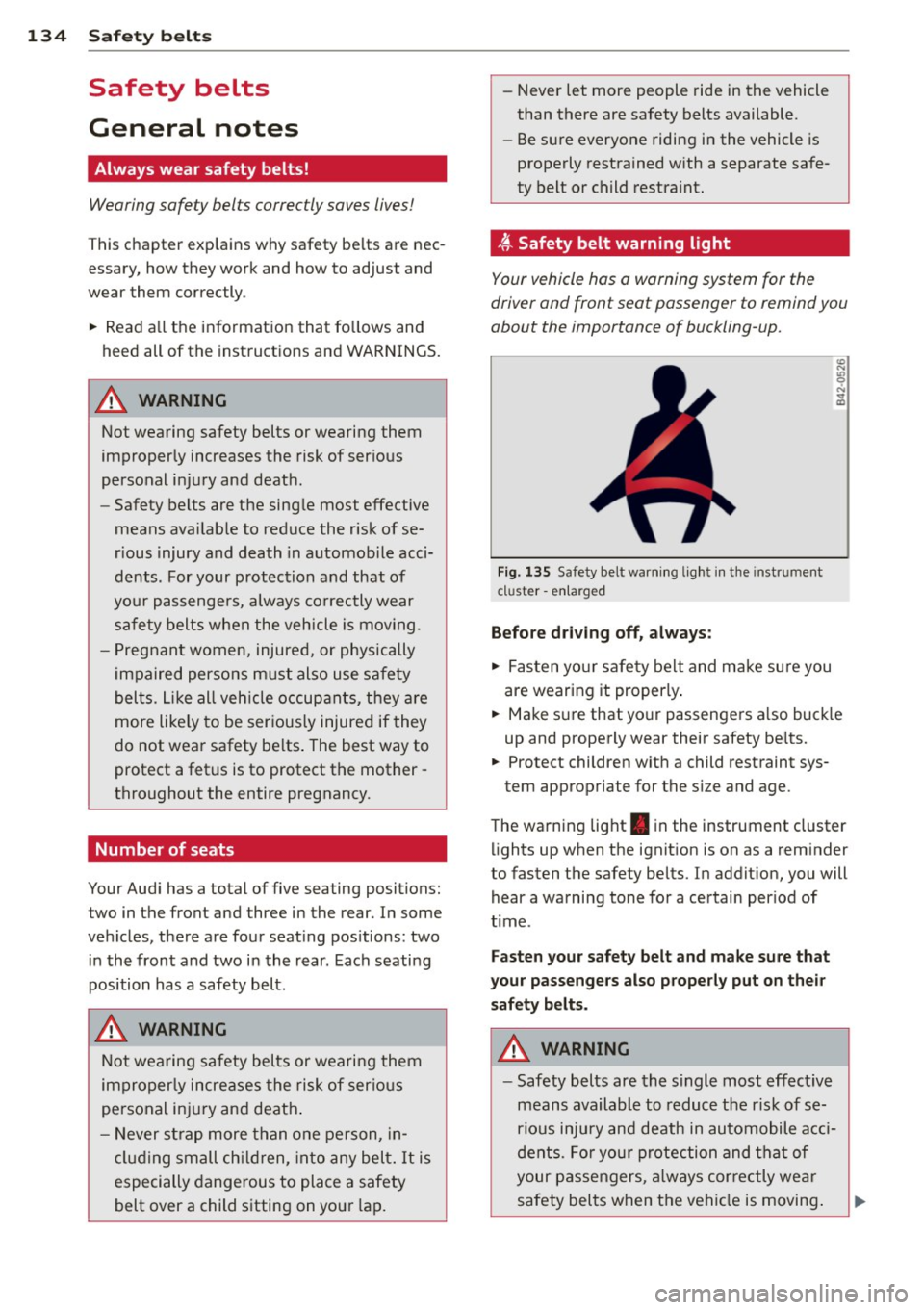
Fig. 13S Safety bel t warning light in the instr ument
cl uster -enlarged
Before driving off, always:
.. Fasten your safety belt and make sure you
are wearing it properly.
.. Make sure that your passengers also buckle
up and properly wear their safety belts.
.. Protect children with a child restraint sys-
tem appropriate for the size and age .
The warning light . in the instrument cluster
lights up when the ignition is on as a reminder
to fasten the safety belts. In addition, you will
hear a warning tone for a certain period of
time .
Fasten your safety belt and make sure that
your passengers also properly put on their
safety belts.
A WARNING
-- Safety belts are the single most effective
means available to reduce the risk of se
rious injury and death in automobile acci
dents. For your protection and that of
your passengers, always correctly wear
safety belts when the vehicle is moving.