brake AUDI A8 2013 Owner's Guide
[x] Cancel search | Manufacturer: AUDI, Model Year: 2013, Model line: A8, Model: AUDI A8 2013Pages: 318, PDF Size: 79.34 MB
Page 121 of 318
![AUDI A8 2013 Owners Guide A WARNING 1=
Please note that the wheels could spin on
slick or slippery roads when kick-down is
act ive.
Transmission malfunction
[O] Transmission: please pre ss the brake ped
a](/img/6/57614/w960_57614-120.png "AUDI A8 2013 Owners Guide A WARNING 1=
Please note that the wheels could spin on
slick or slippery roads when kick-down is
act ive.
Transmission malfunction
[O] Transmission: please pre ss the brake ped
a")
A WARNING 1=
Please note that the wheels could spin on
slick or slippery roads when kick-down is
act ive.
Transmission malfunction
[O] Transmission: please pre ss the brake ped
al and select the position again
Press the brake pedal and select the des ired
selector lever pos it ion again. You can then
continue dr iv ing .
[O] Transmission hot: please modify driving
style
The transmission temperature has increased
significantly due to the sporty driving manner. Drive in a less sporty manner until the tem
perature returns to the normal range and the
in dicator light switches of .
[O] Gearbox malfunction: you can continue
driving
There is a system ma lfunction in the transmis
sion. You may continue driving. Drive to your
authorized Audi dealer or qualified repair fa
cility soon to have the malfunction corrected.
l'§J/1;1 Gearbox malfunction: you can contin
ue driving in D only until engine is off
There is a system malfunction in the transmis
sion. The transmission is switching to emer
gency mode. If you turn the engine off, you
will not be able to select any other selector
lever positions after start ing the engine again.
Drive to your authorized Aud i dealer or quali
fied repair facility immediately to have the
malfunction corrected.
[O] Gearbox malfunction: you can continue
driving (limited functionality)
There is a system ma lfunction in the transmis
sion. The transmission is switching to emer
gency mode. This mode only shifts into cer
tain gears or will not longer shift at all. The
engine may stall. Dr ive to your authorized
Aud i dealer or qualified repair facility immedi
ately to have the malfunction corrected.
Automatic Transmission 119
[o];ffl Gearbox malfunction: no reverse gear
(you can continue driving)
The re is a system malfunction in the transmis
s ion. The transmission is switching to emer
gency mode. This mode on ly shifts into cer
tain gears or will not longer shift at a ll. You
cannot engage the reverse gear . Dr ive to your
authorized Aud i dea ler immediately to have
the malfunction corrected.
[O] Vehicle may roll! Cannot shift to P. Please
apply parking brake
-The parking lock was released using the
emergency release ¢
page 120. Or
- The parking brake cannot engage automati
cally . Drive to your authorized Audi dea ler o r
qualified repair facility immediately to have
the malfunction corrected.
[O] Gearbox malfunction: Stop and shift to P
Do not continue dr iving . Select the P selector
lever position and see your authorized Audi
dealer or qualified repair facility for assis
tance.
Page 122 of 318
120 Automatic Transmission
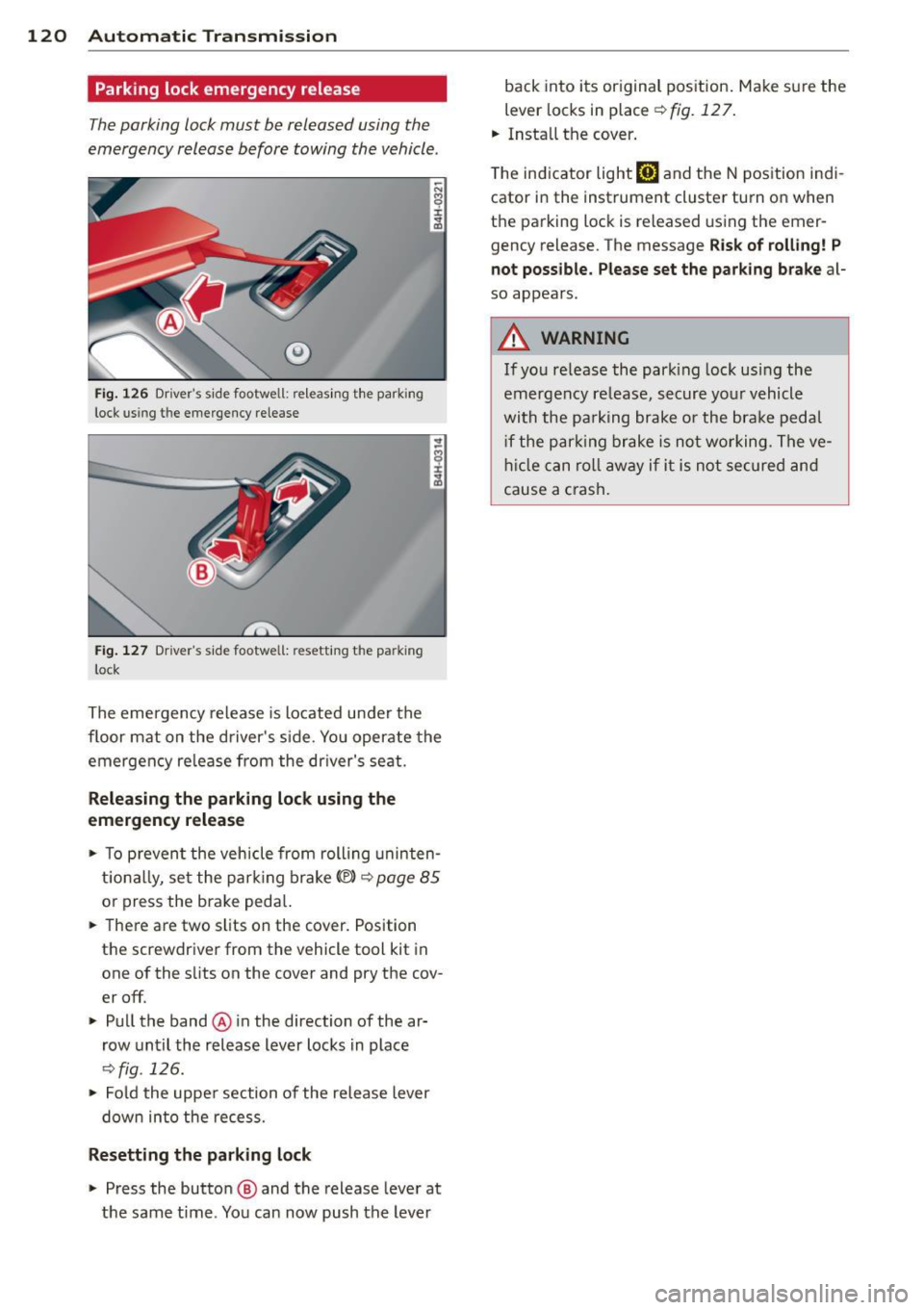
Parking lock emergency release
The parking lock must be released using the
emergency release before towing the vehicle .
@
Fig. 126 Dr iver's side footwell: releasing t he park ing
lock us ing t he emergency release
Fig. 127 Drive r's s ide footwe ll: resetting th e pa rking
l ock
The emergency release is located under the
floor mat on the driver's side. You operate the
emergency re lease from the dr iver's seat.
Releasing the parking lock using the
emergency release
• To prevent the vehicle from rolling uninten
tionally, set the park ing brake© ¢
page 85
or press the brake peda l.
.. There are two slits on the cover. Position
the screwdriver from the vehicle tool kit in
one of the s lits on the cover and pry the cov
er off.
• Pull the band@ in the direction of the ar
row until the release lever locks in place
¢ fig . 126.
• Fold the uppe r section of the release lever
down into the recess.
Resetting the parking lock
• Press the button @ and the release lever at
the same time . You can now push the lever back into its original pos
ition . Make sure the
lever locks in place
¢fig. 127.
.. Install the cover .
T he indicator light
[O] and the N position indi
cator in the instrument cluster turn on when
the parking lock is released using the emer
gency release . The message
Risk of rolling! P
not possible . Please set the park ing brake
a l
so appears.
A WARNING
If you release the park ing lock using the
emergency release, secure your vehicle
with the pa rking brake or the brake pedal
i f the parking brake is not working. The ve
hicle can roll away if it is not secured and
cause a crash.
Page 134 of 318

132 Homelink®
Homelink®
Universal remote
control
General information
Applies to vehicles: with Homelink® universal remote
control
The Homelink universal remote control can
be programmed with hand-held transmitters
from existing equipment.
Using the Homelink universal remote control
you can operate equipment such as garage doors, property gates and house l ights from
ins ide your vehicle . '
Using the Homelink universal remote control '
you can replace up to three separate hand-
held transmitte rs for equipment on your
property with just one universal remote con
trol. Most of these transmitters a re used to
ope rate ga rage doo rs and property g ates. The
individua l transmitters are programmed at
the front bumper. That is where the control
module is located.
The transmi tters must be p rogrammed first in
orde r to operate systems using the Homelink
universal remote control.
A WARNING
- Never use the Homelink ® transmitter
with any garage door opener that does have not the safety stop and reverse fea
ture as requ ired by federa l safety stand
ards . T his includes any garage door open
er model manufact ured before April 1,
1982.
- A garage door opener which cannot de
tect an object, signaling the door to stop
and reverse does not meet current feder
al safety s tandards . Us ing a ga rage doo r
opener witho ut these fea tures increases
risk of serious injury or death.
- For safety reasons never release the
parking brake or start the engine while
anyone is standing in front of the vehicle .
- A garage door or an estate gate may
sometimes be set in motion when the Homelink
® remote control is being pro
grammed. If the device is repeatedly ac
tivated, th is can overstrain motor and
damage its e lectrica l components - an
overhea ted mo tor is a fire hazard !
- To avo id possib le injuries or property
damage, please always make absolutely
certa in that no persons or ob jects are lo
cated in the rang e of motion of any
eq uipme nt bei ng ope rated.
(0 Tips
- If you would like add itional information
on the Hom e Link ® Unive rsal Transce iver
'
Home link compatib le p rod ucts, or to
pur chase other acce ssories s uch as the
Homel ink® Light ing Package, please
contact Homelin k at 1-800 -355 -3515 o r
on the Internet at www.homelink .com.
- For Declaration of Comp liance to Unite d
States FCC and Ind ustry Canada reg ula
tions ¢
page 299.
'Operation
Applies to vehicles: with Homelink
F ig. 151 Contro l u ni t in the head liner
-"' 8 ± .. .,
Requi rement: The buttons must be program
med
¢ page 133.
'" Press the p rogrammed button¢&_ in Gen
eral information on page 132
to open the
ga rage door. The light @will blink or turn
on.
'" Press the b utton again to close the garage
door ¢
&. in General information on
page 132.
~
Page 135 of 318
@ Tips
To open the garage door, press the button,
but do not press it for longer ten seconds
or the Homelink modu le w ill switch to
programming mode .
Programming transmitters
Applies to vehicles : wit h Home link
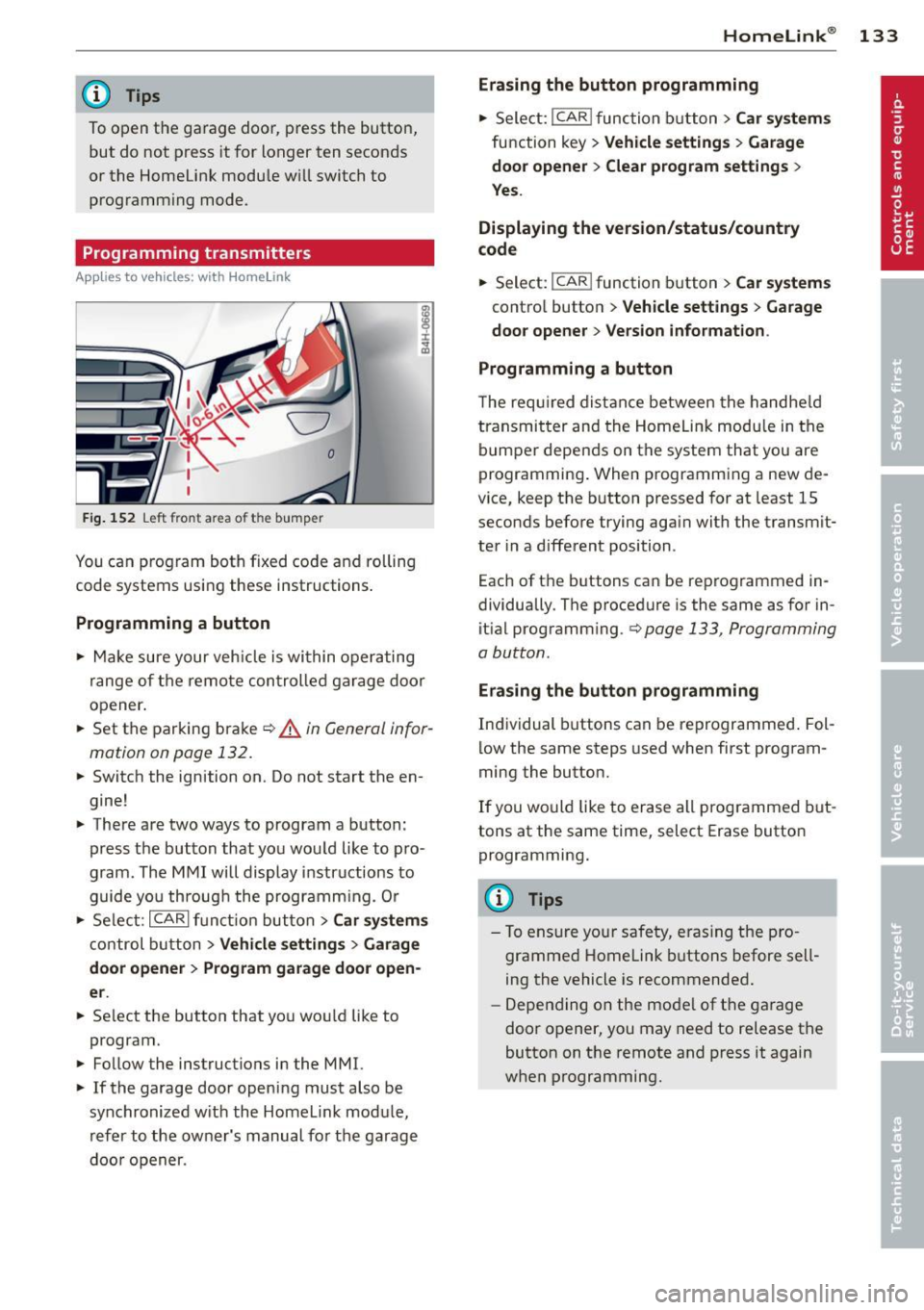
Fig. 152 Left front a rea o f the bum per
You can program both fixed code and rolling
code systems using these instructions .
Programming a button
.,. Make sure your veh icle is within operating
range of the remote control led garage door
opener.
.,. Set the parking brake
¢ A in General infor
mation on page 132.
.,. Switch the ignition on . Do not start the en
gine!
.,. There are two ways to program a button :
press the button that you would like to pro
gram . The MMI will display instructions to
guide you throug h the programm ing. Or
.,. Select :
I CAR I function button > Car systems
control button > Vehicle settings > Garage
door opener> Program garage door open
er .
.,. Se lect the button that you wou ld like to
program.
.,. Follow the instructions in the MMI.
.,. If the garage door opening must also be
synchronized w ith the Homelink module ,
refer to the owner's manual for the garage
doo r opener .
Homelink ® 133
Erasing the button programming
.,. Select: !CAR lfunction button> Car systems
function key> Vehicle settings > Garage
door opener
> Clear program settings >
Yes.
Displaying the version/status/country
code
.,. Select: I CAR ! function button > Car systems
control button > Vehicle settings > Garage
door opener > Version information .
Programming a button
T he requ ired distance between the handheld
transmitter and the Homelink modu le in the
bumper depends on the system that you are
programming . When programming a new de
vice, keep the button pressed for at least 15
seconds before trying again with the transm it
ter in a different position .
Each of th e buttons can be reprogrammed in
dividually . The procedure is the same as for in
itial programm ing .¢
page 133 , Programming
a button .
Erasing the button programming
Individual buttons can be reprogrammed. Fol
low the same steps used when first program
ming the button .
If you would like to erase all prog rammed but
tons at the same time, select Erase button
programming.
@ Tips
- To ensure your safety, eras ing the pro
grammed Homelink buttons before sell
ing the vehicle is recommended.
- Depending on the mode l of the garage
door opener, you may need to release the
button on the remote and press it again
when programming .
Page 141 of 318
The following bulletins list only some sample positions that will increase the risk of serious
in ju ry and death . Our hope is that these exam
p les will make you more aware of seating po
sitions that are dangerous.
The refore, wh en ev er th e vehicl e is
mov ing:
- never stand up in the vehicle
-never stand on the seats
- never knee l on the seats
- never ride with the seatbac k reclined
- never lie down on the rear seat
- never lean up against the instrument panel
- never sit on the edge of the seat
- never sit s ideways
- never lean out the window
- never put yo ur feet out the window
- never put yo ur feet on the ins trument panel
- never rest your feet on the seat cushion o r
back of the seat
- never r ide in the footwe ll
- never ride in the cargo area
A WARNING
Imprope r seat ing positions increase the
r isk of se rious personal injury and death
whenever a veh icle is being used.
- Always make sure that all vehicle occu
pants stay in a p ro per seating pos it ion
and are properly restr ained whenever the
vehicle is be ing used.
Driver and passenger
side footwell
Important safety instructions
A WARNING
Always make sure that the knee a irbag can
inf late without interference. Objects be
tween yourse lf and the airbag can increase
the risk of injury in an acc ident by interfer
ing w it h the way the a irbag deploys or by
being p ushed into you as the airbag de
ploys.
-
Dr iving S afel y 139
-No persons (children) or animals sho uld
ride in the footwell in front of the pas
senger seat. If the airbag dep loys, this
can result in ser ious or fatal injuries.
- No objects of any kind should be carried
in the footwell area in front of the driv
er 's or passenger's seat. Bulky objects
(shopping bags, fo r example) can ham
pe r o r prevent proper deployment of the
airbag. Small obje cts can be thrown
through the vehicle if the airbag deploys
an d inju re you or your passenge rs .
Pedal area
Pedals
The pedals must always be free to move and
must never be interfered with by a floor mat
or any other object.
Make sure that a ll peda ls move free ly without
interference and that nothing prevents them
from return ing to their orig inal positions.
Only use floor mats t hat leave the pedal area
free and can be secured with floor mat fasten
ers.
If a brake circ uit fai ls, inc reased brake pedal
trave l is required to b ring the vehicle to a f ull
stop .
A WARNING
-Pedals that cannot move free ly can cause
loss of vehicle control and increase the risk
of ser ious injury.
- Never p lace any objects in the drive r's
footwell. An ob ject cou ld get into the
pedal area and interfere with pedal func
tion. In case of sudde n brak ing o r an ac
cident, yo u wou ld not be able to b rake or
accelerate!
- Always ma ke sure that nothing can fall
or move into the driver's footwel l. •
•
Page 142 of 318
140 Driving Safely
Floor mats on the driver side
Always use floor mats that can be securely attached to the floor mat fasteners and do
not interfere with the free movement of the
pedals.
~ Make sure that the floor mats are properly
secured and cannot move and interfere with
the pedals ~,&. .
Use only floor mats that leave the pedal area
unobstructed and that are firmly secured so
that they cannot slip out of position . You can
obtain suitable floor mats from your author
ized Audi Dealer.
Floor mat fasteners are installed in your Audi.
Floor mats used in your vehicle must be at
tached to these fasteners. Properly securing
the floor mats will prevent them from sliding into positions that could interfere with the
pedals or impair safe operation of your vehicle
in other ways .
_& WARNING
Pedals that cannot move freely can result
in a loss of vehicle control and increase the
risk of serious personal injury.
- Always make sure that floor mats are
properly secured.
- Never place or install floor mats or other
floor coverings in the vehicle that cannot
be properly secured in place to prevent
them from slipping and interfering with
the pedals or the ability to control the
vehicle.
- Never place or install floor mats or other
floor coverings on top of already instal
led floor mats. Additional floor mats and
other coverings will reduce the size of
the pedal area and interfere with the
pedals .
- Always properly reinstall and secure floor
mats that have been taken out for clean
ing .
-Always make sure that objects cannot fall into the driverfootwell while the ve
hicle is moving. Objects can become trapped
under the brake pedal and accel
erator pedal causing a loss of vehicle
control.
Stowing luggage
Loading the luggage compartment
All luggage and other objects must be prop· erly stowed and secured in the luggage com·
partment.
Loose items in the luggage compartment can
shift suddenly, changing vehicle handling
characteristics. Loose items can also increase
the risk of serious personal injury in a sudden
vehicle maneuver or in a collision.
~ Distribute the load evenly in the luggage
compartment.
~ Always place and properly secure heavy
items in the luggage compartment as far
forward as possible.
~ Secure luggage items using the tie-downs
provided
~ page 69, Luggage comport·
ment.
A WARNING ,_
Improperly stored luggage or other items
can fly through the vehicle causing serious
personal injury in the event of hard brak
ing or an accident. To help reduce the risk
of serious personal injury:
- Always put objects, for example, luggage
or other heavy items in the luggage com
partment.
- Always secure objects in the luggage
compartment using the tie-down hooks
and suitable straps.
A WARNING
Heavy loads will influence the way your ve
hicle handles. To help reduce the risk of a
loss of control leading to serious personal
injury:
- Always keep in mind when transporting
heavy objects, that a change in the cen
ter of gravity can also cause changes in
vehicle handling:
Page 200 of 318
198 Intellige nt tec hno logy
Intelligent technology
Notice about data
recorded by veh ic le
control modules
Your vehicle is not equipped with an Event Da
ta Recorder (EDR), installed by some manu
facturers fo r the express purpose of capturing
data for retrieval after an accident or crash
event . EDR's are sometimes called "crash re
corders".
Some state laws restrict the retrieval or down
loading of data stored by EDR's that were in
stalled in a vehicle for the express purpose of
retrieving data after an accident or crash
event without the owner's consent.
A lthough your vehicle is not equipped with an
EDR, it is equipped with a number of electron
ic control modules for various vehicle systems
such as, for example, engine function, emis
sion control, as well as for the airbags and
safety belts.
These electronic control modules also record
vehicle-related data during normal vehicle op
eration for diagnostic and repair purposes.
The recording capacity of the electronic con
trol modules is limited to data (no sound is re
corded) and only a small amount of data is ac
tually recorded over a very limited period of
time and stored when a system fault or other
condition is sensed by a control unit. Some of
the data then stored may relate to vehicle
speed, direction, braking as well as restraint
system use and performance in the event of a
crash or other condition. Stored data can only
be read and downloaded with special equip
ment.
Electronic Stab ilization
Control (ESC)
Description
ESC helps to improve road holding and vehicle
dynamics to help reduce the probability of
skidding and loss of vehicle control. It works
only when the engine is running. ESC detects certain difficult driving situations, including
when the vehicle is beginning to spin (yaw)
out of control and helps you to get the vehicle back under control by selectively braking the
wheels, and/or reducing engine power and
providing steering assistance to help hold the
vehicle on the driver's intended course. The in
dicator light
G) in the instrument cluster
blinks when ESC is taking action to help you
control the vehicle.
ESC has limitations.
It is important to remem
ber that ESC cannot overcome the laws of
physics. It will not always be able to help out
under a ll cond itions you may come up against.
For example, ESC may not always be able to
help you master situations where there is a
sudden change in the coefficient of friction of
the road surface. When there is a section of
dry road that is suddenly covered with water,
slush or snow, ESC cannot perform the same
way it would on the dry surface . If the vehicle
hydroplanes (rides on a cushion of water in
stead of the road surface), ESC will not be
able to help you steer the vehicle because con
tact with the pavement has been interrupted
and the vehicle cannot be braked or steered.
During fast cornering, particularly on winding
roads, ESC cannot always deal as effectively
with difficult driving situations than at lower
speeds. When towing a trailer, ESC is not able
to help you regain control as it would if you
were not towing a trailer.
Always adjust your speed and driving style to road, traffic; and weather conditions. ESC can
not override the vehicle's physical limits, in
crease the available traction, or keep a vehicle
on the road if road departure is a result of
driver inattent ion. Instead, ESC improves the
possibility of keeping the vehicle under con
trol and on the road during extreme maneu
vers by using the driver's steering inputs to
help keep the vehicle going in the intended di
rection . If you are traveling at a speed that
causes you to run off the road before ESC can
provide any assistance, you may not experi
ence the benefits of ESC.
Page 201 of 318
ESC includes and/or works together with the
anti-lock braking system (ABS), brake assist
system, anti-s lip regulat ion (ASR), electronic
d ifferential lock (EDL), dynamic steering* and
electronic interaxle differential lock*. ESC is
sw itched on all the time . In certain s ituations
when you need less tract ion, you can sw itch
off ASR by pressing the button above
~ page 200, fig. 188 the se lector lever. Be
sure to sw itch ASR o n aga in when yo u no lon
ger need less traction.
Anti -lock braking system (ABS)
ABS prevents the wheels from locking up
when braking. The veh icle can still be steered
even du ring ha rd b raking . Apply steady p res
sure to the brake pedal. Do not p ump the ped
a l. A pulsing in the brake peda l indicates that
the system is he lping you to brake the vehicle .
Brake as sist system
The brake assist system can decrease bra king
d istance.
It increases braking power when the
driver presses the brake pedal qu ick ly in eme r
gency situations . You must p ress and ho ld the
brake peda l until the situation is over. In
vehicles with adaptive cruise control*, the
brake assist system is more sensit ive if the
d istance detected to the vehicle ahead is too
small.
Anti- slip regulati on (A SR )
ASR reduces engine power when the drive
wheels begin to spin and adapts the force to the road condit ions. This makes it eas ier to
start, accelerate and drive up hills.
Electronic diff erential lo ck (EDL )
The ED L brakes wheels that are spinning and
transfers the drive power to the other drive
wheel or whee ls if the vehicle is equipped with
all whee l drive*. This funct ion is available up
to about 75 mph (120 km/h).
In extreme cases, EDL automatica lly switches
off to help keep the brake on the braked whee l
from overheating. EDL w ill switch on again au
tomatically when conditions have returned to normal.
Int ellig ent technolog y 199
Dynamic ste ering *
On vehicles with dynam ic steering, ESC helps
stabilize the steering in certain situations.
Electronic intera xle differential l ock
function*
T he electron ic i nteraxle differential lock f unc
tion activa tes when dr iving th ro ugh curves.
Braking is targeted toward the wheels on the
inside of the curve as needed. This he lps to
minimize front whee l skid, improves traction
and allows for more precise driving through curves .
A WARNING
- ESC, ABS, ASR, EDL, dynamic steering*
and the elect ronic interaxle differential
loc k function* cannot ove rcome the laws
of physics. This is espec ially important
on slippery or we t roads.
If the systems
begin acting to stabilize your veh icle, you
should immediately change yo ur speed
to match the road and traffic conditions .
Do not let the increased safety provided
by these systems tempt you to take risks.
Doing so will increase the risk of a loss of
veh icle contro l, collision and ser ious per
sonal injur ies.
- Always adapt your speed to road, traffic and weather conditions. The risk of losing con trol of the vehicle increases when
driving too fast, espe cially through
curves a nd on slippe ry or wet roads, and
when dr iving too close to vehicles up
ahead. ESC, ABS, the brake assist sys
tem, EDL, ASR, dynam ic steering* and
the electron ic interaxle d ifferential lock
function" cannot prevent co llisions.
- Always accelerate with spec ial care on
even, smooth surfaces such as those that
are wet or covered with ice and snow.
The drive wheels can spin even w ith
these assistance systems that cannot al
ways he lp to red uce the risk of loss of ve
hicle control.
-
•
•
Page 202 of 318

200 Intelligent technology
-ABS and ASR on ly work correctly when
all four wheels are equipped w ith ident i
ca l tires. Different tire s izes can lead to a
reduction in engine power.
- You may hear noises when the systems described are working.
- If the indicator light
DJ or m:11 (USA
models) ;tiJ (Canada models) appears,
there may be a malfunct ion
c::;, page 19,
c::;, page 18 .
Switching on and off
ESC turns on automatically when you start
the engine.
Fig. 188 Center console w ith ESC OFF button
Switching ASR off (sport mode)
In certain situat io ns, you can switch ASR and
ESC into sport mode by pressing the button
l!l
c::;, fig. 188. The indicator light II comes on
and the mess age Stabilization control (ESC ):
Off warning! Reduced stability appears. ASR
deactivates completely and the assistance provided by the ESC system is limited. Switch
to sport mode on ly when your driving skills,
traffic and weather cond itions permit .
I n some situations, it may be useful to switc h
ASR off to let the wheels slip. Example:
- Rocking the vehicle back and forth when it is
stuck
- Driving in deep snow or on loose ground
- Driving with snow cha ins
Switching ASR on Press the button[!] aga in. The message Stabi
lization control (ESC): On appears.
A WARNING
- Drive whee ls can sp in and you can lose
control of the vehicle more eas ily when
ASR and ESC are in sport mode, especial
ly when the road is slippery.
- Sw itch to sport mode only when your
driving skills, traff ic and weather condi
tions permit.
@ Tips
You cannot sw itch sport mode on when
adaptive c ruise control* is working.
Braking
General information
What affects braking efficiency?
-
Operating conditions and driving habits
The brakes on today's automobiles are still
subject to wear, depending largely on operat
ing condit ions and driving habits
c::;, &. . On
vehicles that are either dr iven mostly in stop
and-go city traffic or are driven hard, the
brake pads should be checked by your author
ized Audi dea ler more often than specified in
the Warranty
& Maintenance booklet. Failure
to have your brake pads inspected can result
in reduced brake performance.
On steep slopes, you should use the braking
effect of the engine. This way, you prevent un
necessary wear on the brake system. If you
must use your brakes, do not hold the brakes
down continuously. Pump the brakes at inter
vals .
Operating noise
Noises may occur when braking depending on
the speed, braking force and outside condi
tions such as temperature and humidity.
Due to the nature of the materia ls used in ce
ramic brake rotors*, noises may become more
apparent at low speeds. .,..
Page 203 of 318
Effect of w ate r and ro ad sa lt
In certain situa tions, for example after driving
through water, in heavy rain, after overnight
condensation or after washing your car, the
braking effect can be reduced by moisture or
ice on the brake rotors and brake pads. The
brakes must be dried first wit h a few careful
brake applications.
At higher speeds and with the windshield wip
ers turned on, the brake pads press against
the brake rotors for a short amount of time.
This occurs at regular intervals w ithout the
driver noticing and provides for better brake response time under wet condit ions.
The effectiveness of the brakes can be reduced
when the vehicle is dr iven o n a salt-covered
road and the brakes are not used . Likewise,
you clean
off accumulated sa lt coating from
brake discs and pads with a few caut ious ap
p lications of the brake¢&. -
Due to their surface characteristics, ceram ic
brake roto rs* absorb mo isture in such condi
tions. This can cause a temporary reduction in
b rak ing fo rce compared to d ry brakes. You can
compensate for this by pressing the brake pedal harder .
Corrosion
There may be a tendency for dirt to build up
on the brake pads and corrosion to form on
the discs if the car is not dr iven regularly or
on ly for short t rips with little use of the
brakes.
I f t he b rakes are not used frequently, or if co r
rosion has formed on the dis cs, it is advisable
to clean
off the pads and discs by brak ing
firm ly a few times from a moderately high
speed ¢.&. .
Faults in the brake system
If you should notice a sudden increase in
b rake peda l travel, then o ne of the two bra ke
circuits may have failed~ .&..
Int ellig ent technolog y 201
Low br ake fluid level
Malfunctions can occu r in the bra ke system if
the b rake fluid level is too low. The brake fluid
level is monitored electronica lly.
Brake lining wear status
B rake lining wear may be checked by visual in
spe ct ion of the condition of the brake pads
through the open ings in the wheel. If neces
sary, the whee l may be removed for this in
spection
r=;, page 2 7 3, Changing a wheel.
_& WARNING
-You should perform braking maneuvers
for the purpose of cleaning the brake
system only if road conditions permit.
Other road users must not be put at risk -
you may cause an accident!
- Before descend ing a steep grade, reduce
speed and sh ift transmission into a lower
gear or lower dr iving range . Do not ride
the brakes or hold t he pedal down too
long o r too often. Th is could cause the
brakes to get hot and diminish braking
efficiency .
- Do not "ride the brakes" by rest ing you r
foo t on the pedal when you do not intend
to b rake . This may cause the brakes to
overheat, premature wear and increased
stopping distance.
- Under certain climatic and operating
conditions such as passing thro ugh wa
ter, dr iv ing in heavy rain or after washing
the vehicle, the effectiveness of the brakes can be reduced. In winter, ice can
accumu late on the brake pads, lin ings,
discs and drums . Carefully app ly brakes
for a test. Brakes w ill dry and ice coat
ings w ill be cleaned
off after a few care
fu l brake applicat ions.
- Driving for an extended period of time on
salt- cove red roads without using your
brakes can a lso affect braking efficiency .
Clean
off accum ulated salt coating from
brake discs and pads with a few careful
brake applications.
•
•