warning AUDI A8 2015 Owners Manual
[x] Cancel search | Manufacturer: AUDI, Model Year: 2015, Model line: A8, Model: AUDI A8 2015Pages: 312, PDF Size: 79.18 MB
Page 114 of 312

112 Night visi on assis tant
-Mark ing pedestrians or wi ld an imals in red
in the instrument cluster and turning on the
. or. symbo l¢ fig.119.
-Sounding a warning tone .
The area regarded as cr it ical depends on the
vehicle speed and steering angle . Pedestrian
and wild anima l warning a ims to increase you r
attention.
I f the n ight vision assistant image is replaced
by another d isplay such as the t rip computer,
the red indicator lamp . or.
c::;, fig . 120
will turn on when there is a pedestrian or wild
animal warning .
I f the Head-up Display* is swi tched on and the
night vision assistant disp lay content is acti
vated, the display . or. appears in the
Head-up Display *.
General information
A ppl ies to vehicles : w ith nigh t visio n ass istant
F ig . 12 1 Fron t of the vehicle: night v ision a ssistant
camera
The follow ing s ituations may affect the func
tion of the night vision assistant system:
- poor visibility such as snow , rain, fog or
heavy road spray
- dirty lens on the night vision assistant cam -
era
Make sure the night v is ion assistan t camera
c::;, fig . 121 is not covered by stickers, deposits
or any other obstructions beca use that can
prevent the camera from working properly.
For information on cleaning the lens, refer to
c::;,page214.
Pedestrian and wild animal detection depends
on the difference in temperature between the person/wild anima
l and the backg round area.
Pedestrians/w ild an imals may not be detected
if the d ifference is too sma ll. Pedestrian and
wild animal marking are deactivated at tem
peratures above approximately 77 °F
(25 °()
and when it is light outside. When the night
v ision assistant image is selected in the in
strument cluster d isplay, the
II symbo l ap·
pears in the upper right.
_&. WARNING
Night vision ass ista nt has limits and ca n
not always detect pedestr ians . Always pay
close attention to t raffic and the area
a round your veh icle even when nig ht vision
assistant is switched on.
- Night vision assistant can only warn
about people and wild animals located
w ith in the visual range of the infrared
camera. The visua l range corresponds to
the image in the instrument cluster dis·
p lay.
- Night vision assistant may not detect
people or w ild an imals and mark them if
- they a re not in an up right po siti on, for
example if they are si tting or lying
down and/or
- the silhouette in the disp lay is incom
plete or interrupted, for examp le be
cause a perso n is partially covered by a
parked vehicle or a wild anima l is parti·
a lly covered by tall grass. This increases
the risk of a collision.
- Never try to swerve to avoid anima ls if
this will put you or other drivers at risk.
This could increase t he risk of a collision.
(D Tips
- Even though the shape and warmth radi·
ated by each object detected is evaluat·
ed, the system does have limitations and
it can give incorrect warnings .
- For technical reasons, the image pauses
in split second intervals.
-
Page 118 of 312

116 Automatic Tran sm iss ion
& WARNING
-Never e ngag e R or P w hile driving . It
could cause a cras h.
-
-Power is sti ll t ransmi tte d to t he whee ls
whe n the e ngine is runni ng at idle . To
prevent the vehicle from "creepin g", you
must keep your foot on the brake in all
selector lever positions except P and N
when the eng ine is running. Do not inad
vertent ly press the accelerator pedal
when the veh icle is stationary . Otherwise
the vehicle will s tart to move immediate
ly. This cou ld happen even if the parking
brake is activa ted .
- Be fore opening the hood, select the P se
lector lever position and set the par king
brake. This red uces the risk of a crash. Al
ways read and follow the applicable
warnings
<=)page 228.
-Never get out of the driver's seat when
the engine is running.
- If you mus t get out of the vehicle, move
the se lector lever securely into the P po
sition an d apply the park ing brake .
(D Tips
-If you u nin tentionally shift into the N se
l ector lever posi tion while dr iv ing, ta ke
your foot off the acce lerator pedal and
wait for the e ngine to slow down until it
i s idling before you shift into Dor S.
Driving tips
The gears shi~ automatically .
Starting from a stop
"" Press and ho ld the brake pedal.
"" Sta rt the eng ine
c:> page 83.
"" Press the but ton on the se lector lever and
select the D, S or R selecto r lever pos it ion
c:> page 114 .
""Wait a moment until the transmission
shifts. You w ill not ice a slight movement
when the gear engages .
"" Re lease the brake pedal and press the accel
erator pedal¢ ,& .
Stopping temporarily
""Press the brake pedal to s top the ve hicle, for
examp le a t a traffic light . Do not press the
accelerato r peda l when doing this.
"" To prevent the vehicle from ro lling when yo u
start dr iving, set the parking brake when
stopping on large incl ines
c:> ,& .
"" The parking brake will release automat ica lly
and the vehicle will start mov ing once you
press the acce lerator pedal.
Parking
If the se lector lever is not in the P position
whe n you open the driver's door, the ve hicle
could roll. The message
Transmission: Car
may roll! Shift to park!
appears .
"" Press and hold the brake pedal¢ ,& .
"" Set the park ing brake.
"" To engage the P se lector lever position,
press the button on the selector lever and
shift into the P posit ion
c:> page 114 .
Under certa in conditions such as dr iv ing in the
mountains or when towing a trailer, it may be
helpful to switch to manual mode tempo rari ly
to shift
manually to adapt to the driving con
di tions
c:> page 117.
On s lopes, activate the parki ng bra ke first and
then move the selecto r leve r to the P position .
T his prevents too much st ress from be ing
pla ced on the locking mec hanism.
& WARNING
Read an d fol low all WAR NIN GS ¢ .&. in Se
lecting a selector lever position on
page 116.
- The vehicle can also roll when the engine
is stopped.
- Do not press t he acceler ator pe dal when
chan ging the se lector leve r posi tion
while the veh icle is stationary and t he
engine is running . This cou ld result in a
crash.
- Never engage R o r P while driving .
It
could cause a crash.
- Power is still transmitted to the wheels
when the engine is runn ing at idle. To
IJJ,,
Page 119 of 312

rl N
rl N
0 J:
""'. rl I.O
"' rl
"' ......
prevent the vehicle from "creeping", you
must keep your foot on the brake in all
selector lever positions except P and N
when the eng ine is running. Do not inad
vertently press the accelerator pedal
when the veh icle is stationary. Otherwise
the vehi cle will s tart to move immediate
ly, even if the park ing brake is set. This
cou ld result in a crash.
- Do not ride the brakes or p ress the brake
peda l too often or too long when dr iv ing
down a hill. Constant braking causes the
brakes to overheat and substant ially re
duces b raking performance, increases
braking distance or ca uses comp lete fail
ure of the brake system.
Hill descent control
The hill descent control system assists the
driver when driving down declines.
H ill descent control is activated when these
lector lever is in D/S and you press the brake
pedal. The transmission automatically selects
a gear that is suitab le for the incline. Hill de
scent control tries to maintain the speed ach
ieved at the time of braking, within physical
a nd techn ical limitations.
It may st ill be nec
essary to adjust the speed with the brakes.
H ill descent control switches off once the de
cline levels out or you press the accelerator
pedal.
Hill descent control is also activated when the
speed is set by starting the cruise contro l sys
tem c::>
page 90.
A WARNING
Hill descent control can not overcome
phys ical limitations, so it may not be able
to main tain a constant speed under a ll
condi tions. Always be re ady to app ly the
br akes.
Automatic Tra nsmi ssi on 11 7
Shifting manually
The shift paddles allow the driver to shift the
gears manually .
Fig . 1 26 Steer ing w heel: sh ift ing manually
.,.. To shift to a h igher or lowe r gear tempo rari
ly, tap the
0 or 0 shift padd le c::> fig. 126 .
.. To switch manua l mode on, press the~
button . An Mand the gear that is currently
engaged appear in the instrument cluster
disp lay @ c::>
page 114, fig. 123.
.. To shift up one gear, tap the right shift pad
dle
0 c::> fig . 126 .
.. To sh ift down one gear, tap the left shift
paddle Q.
.. To switc h manua l mode off, press the~
button aga in, or
.. Move the selector lever back and release it .
T he transm iss ion automatically sh ifts up or
down before cr itical engine speed is reached.
The transm iss ion only allows manual sh ifting
whe n the eng ine speed is w ith in the pe rmit
ted range.
The engine braking effect increases when you
downshift when going downhill.
Kick-down
Kick-down enables maximum acceleration.
When you press the accelerator pedal down
beyond the resistance point, the automatic
transmission downshifts into a lower gear, de
pending on veh icle speed and eng ine RPM .
It
shifts up into the next higher gear once the
maximum specified engine RPM is reached . ..,.
Page 120 of 312

118 Automatic Transmission
8_ WARNING
Please note that the wheels could spin on
slick or slippery roads when kick-down is
active .
Transmission malfunction
r;J Transmission: please press the brake ped
al and select the position again
Press the brake pedal and select the des ired
selector lever posit ion again. You can then
continue dr iv ing .
r;J Transmission hot: please modify driving
style
The transmission temperature has increased
significantly due to the sporty driving manner.
Drive in a less sporty manner until the tem
perature returns to the normal range and the
indicator light switches of.
r;J Gearbox malfunction: you can continue
driving
There is a system ma lfunction in the transmis
sion. You may continue driving. Drive to your
authorized Audi dealer or qualified repair fa
cility soon to have the malfunction corrected.
@]JIJI Gearbox malfunction: you can contin
ue driving in D only until engine is off
There is a sys tem ma lfunction in the transmis
sion. The transmission is switching to emer
gency mode. If you turn the engine off, you
will not be able to select any other se lector
lever positions after starting the engine again.
Drive to your authorized Aud i dealer or quali
fied repair facility immediately to have the
malfunction corrected.
r;J Gearbox malfunction: you can continue
driving (limited functionality)
There is a system ma lfunction in the transmis
sion. The transmission is switching to emer
gency mode. Th is mode only shifts into cer
tain gears or will not longer shift at all. The
engine may stall. Dr ive to your authorized
Aud i dealer or qualified repair facility immedi
ate ly to have the malfunction corrected.
@]lift Gearbox malfunction: no reverse gear
(y ou can continue driving)
The re is a system malfunction in the transmis
s ion. The transm ission is swi tching to emer
gency mode. This mode on ly shifts into cer
tain gears or will not longer shift at al l. You
cannot engage the reverse gear . Dr ive to your
authorized Aud i dea ler immediately to have
the malfunction corrected.
r;J Vehicle may roll! Cannot shift to P. Please
apply parking brake
-The parking lock was released using the
emergency release
¢page 119. Or
- The parking brake cannot engage automati
cally . Drive to your authorized Audi dea ler or
qualified repair facility immediately to have
the malfunction corrected.
r;J Gearbox malfunction: Stop and shift to P
Do not continue dr iving . Select the P selector
lever position and see your authorized A udi
dealer or qualified repair faci lity for assis
tance.
Page 121 of 312
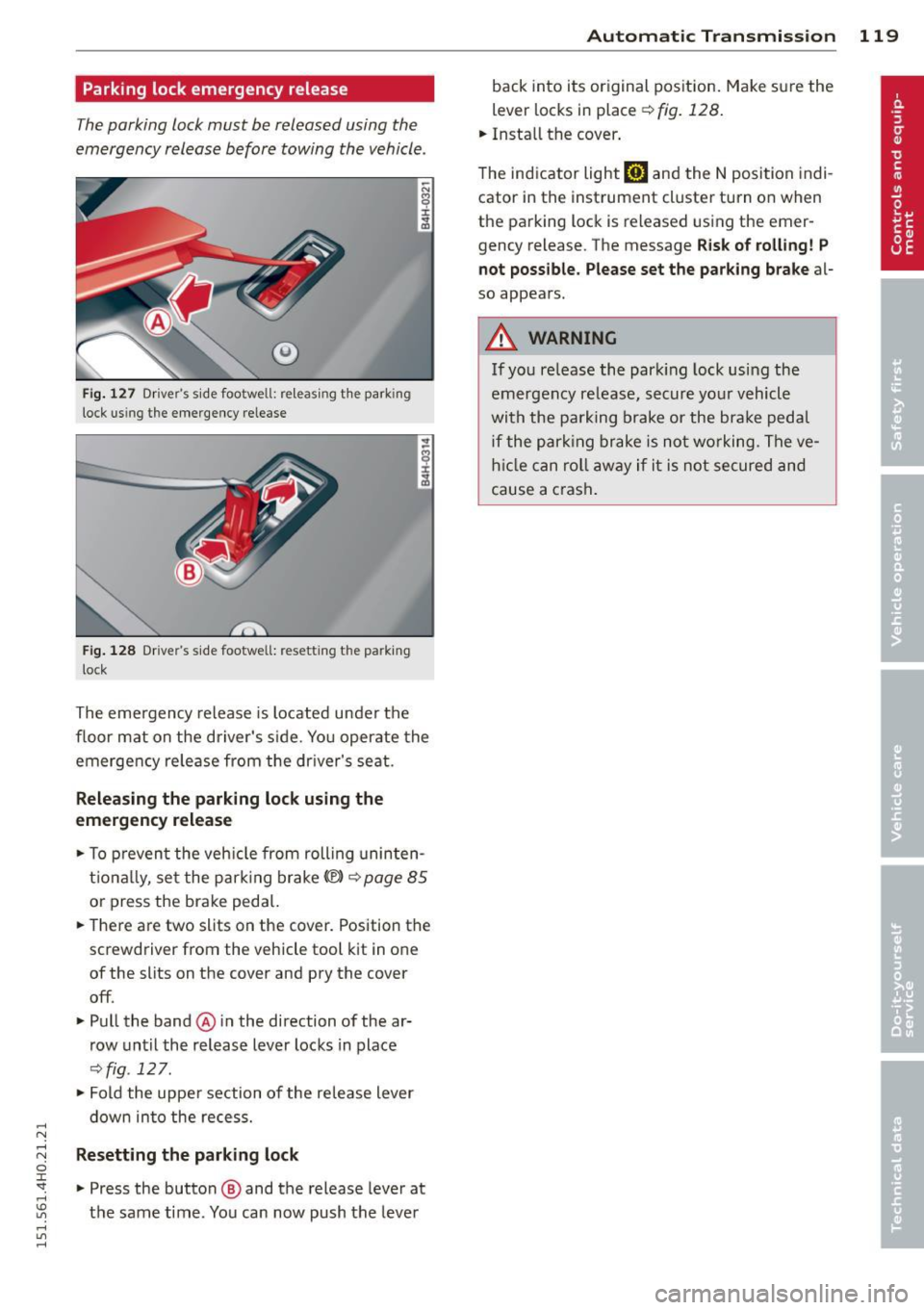
Parking lock emergency release
The parking lock must be released using the
emergency release before towing the vehicle .
®
Fig. 127 Driver's s ide footwell: re lea sing t he park ing
lock us ing the emergency release
Fig. 128 Driver's s ide footwell: resettin g th e pa rk ing
lock
The emergency release is located under the
f loor mat on the driver's s ide. You operate the
emergency re lease from the driver's seat.
Releasing the parking lock using the
emergency release
.,. To prevent the vehicle from rolling uninten
tionally, set the parking brake
«e)) q page 85
or press the brake peda l.
.,. There are two slits on the cover. Position the
screwdriver from the vehicle tool kit in one
of the slits on the cover and pry the cover
off .
.,. Pull the band@ in the direction of the ar
row until the release lever locks in place
qfig . 127 .
.,. Fold the uppe r section of the re lease lever
down into the recess.
Resetting the parking lock
.,. Press the button @ and the release lever at
t h e same time . You can now push the lever
Automatic Transmission 119
back into its original position. Make sure the
lever locks in place ~
fig. 128.
.,. Install the cover .
T he indicator light
mJ and the N position indi
cator in the instrument cluster turn on when
the parking lock is released using the emer
gency release. The message
Risk of rolling! P
not possible. Please set the parking brake
al
so appears .
.&_ WARNING
If you release the park ing lock using the
emergency release, secure your vehicle
with the parking brake or the brake pedal
i f the parking brake is not working. The ve
hicle can roll away if it is not secured and
cause a crash .
Page 122 of 312
120 Parking system s
Parking systems
General information
A ppl ies to vehicles: with parkin g system plus/rear view
camera/peripheral cameras
Depending on your vehicle's equ ipment, vari
ous parking a ids wi ll help yo u when pa rk ing
and maneuve ring.
The
parking sy stem plu s with rear view cam
era
ass ists you when park ing by aud ibly and
visua lly indicating objec ts detected
in front of
and behind the vehicle. The rear view came ra
shows the area behind the vehicle in the Info
tainment display . This display assists yo u
when you are cross or paralle l pa rking
co page 121.
The pe ripheral camera s assist yo u with pa rk
ing and maneuvering . You are aided by various
cameras depending on the vehicle equipment
leve l
co page 124. In add it ion, you are assist
ed by the functions from the sensors
co page 121, Sensors, co page 123, Visual
display.
A WARNING
- Always look fo r traff ic and check the area
around you r vehicle by looking at it di
rect ly as we ll. The parking sys tem canno t
rep lace t he drive r's a ttent ion. The dr iver
is a lways respons ible for safety during
parking and for all other maneuvers.
- Please note tha t some sur faces, such as
clothing, are not detected by the system .
- Sensors and cameras have blind spots in
wh ich peop le and objects cannot be de
tected . Be especially cautious of children
and animals.
- The sensors can be displaced by impacts or damage to the radiato r grille, bumpe r,
wheel housing and the underbody. The park ing systems may become impaired
as a result. Have your authorized Audi
dealer or qualified workshop check their
f unction.
- Make sure the sensors are not covered by
stickers, deposits or any othe r obstruc
t ions as it may impair the senso r func- tion. Fo
r informat ion on cleaning, refe r
to
co page 214.
@ Note
- Some objects are not detected by the
system under certain ci rcumstances:
- Objects such as barrie r chains, trailer
draw bars, vertical poles or fe nces
- Objects above the sensors such as wall
extensions
- Objects w ith specific surfaces or struc
tures such as chain link fences or pow
de r snow.
- If you conti nue driving closer to a low- ly
ing object, it may disappea r from the
sensor range. Note that you w ill no lon
ger be warned about this obstacle.
0) Tips
- The system may provide a warning even
tho ugh there are no obstacles in the cov
erage a rea in some situations, such as:
- certain road su rfaces or for long grass .
- ex terna l ult raso nic sources e.g. from
cleaning vehi cles.
- h eavy ra in, s now or thick ve hicle ex
ha ust.
- We recommend tha t yo u pr actice park
ing in a t raff ic-free locat ion or par king
lot to become familiar w it h the system.
Whe n doi ng this, the re should be good
light and weathe r cond itions.
- Yo u can change the vol ume and pitch of
the s ignals as we ll as the disp lay
co page 130.
-Please refer to the instr uctions for tow
ing a t railer
co page 130.
-W hat appea rs in the infotainment dis
play is somewhat time-delayed.
Page 124 of 312
122 Parking systems
If the distance to an obstacle remains con
stant, the volume of the distance warning
gradually drops after about four seconds (this
does not apply in the continuous tone range).
Rear view camera
The rear view camera is located above the rear
license plate bracket. Make sure that the lens
for the parking system
c:> fig. 132 is not cov
ered by deposits or any other obstructions be
cause this can affect the function of the park
ing system. For information on clean ing, refer
to
c:> page 214.
The rear view camera coverage area includes
(D ¢fig . 131. Only this area is shown in the
Infotainment display. Objects that are outside
of this area @are not displayed.
The accuracy of the orientation lines and the
blue surfaces is reduced if the adaptive air
suspens ion* is faulty, if the vehicle is lifted or
if the
dynamic mode is activated c;, page 108.
A WARNING
-Always read and follow the applicable
warnings
c:> &. in General information on
page 120.
- If the position and the installation angle
of the rear view camera was changed, for
example, after a collision, do not contin
ue to use the system for safety reasons.
Have it checked by your authorized Audi
dealership or authorized repair facility.
- Only use the rear view camera to assist
you if it shows a good, clear picture. For example, the image may be affected by
the sun shining into the lens, dirt on the
lens or if there is a system fault.
- Use the rear view camera only if the lug
gage compartment lid is completely
closed. Make sure any objects you may
have mounted on the luggage compart
ment lid do not block the rear view cam
era.
- The camera lens enlarges and distorts
the field of vision . The object appears
both altered and inaccurate on the
screen. -
In certain situations, people or objects in
the display appear closer or further
away:
- objects that do not touch the ground,
such as the bumper of a parked vehicle,
a trailer hitch or the rear of a truck. Do
not use the help lines in this case.
- If driven from a level surface onto an
incline , or a downward slope.
- If driven toward protruding objects.
-If the vehicle is carrying too much load
in the rear.
(D Note
-Always read and follow the applicable
warnings
c:> 0 in General information on
page 120.
- The orange colored orientation lines in
the Infotainment display show the vehi cle path depending on the steering
wheel angle. The front of the vehicle
front swings out more than the rear of
the vehicle. Maintain plenty of distance
so that your outside mirror or a corner of
your vehicle does not collide with any ob
stacles.
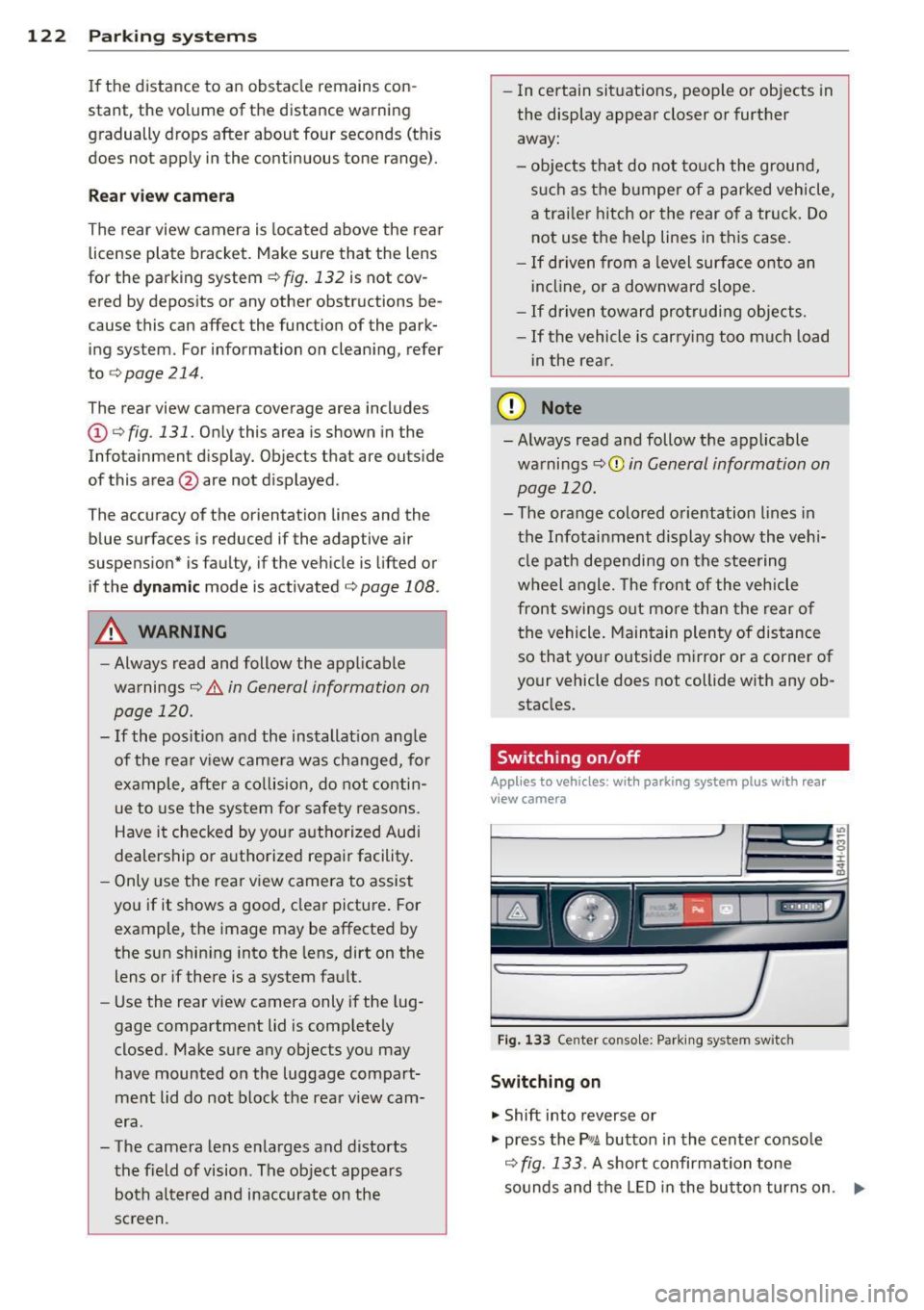
Switching on/off
Applies to vehicles : with parking system pl us with rear
v iew camera
Fig . 133 Center console: Parking system sw itch
Switching on
.,. Shift into reverse or
.,. press the
PwA button in the center console
c:> fig. 133 . A short confirmation tone
sounds and the LED in the button turns on. .,..
Page 127 of 312
.... N .... N
0 J:
"". .... I.O
"' ....
"' ....
cameras. Depending on the vehicle equip
ment, you are assisted by vario us views such
as peripheral view, corner views at the front
and rear of the vehicle, and views directly in
front of or behind the vehicle.
General information
App lies to vehicles: with top view camera system
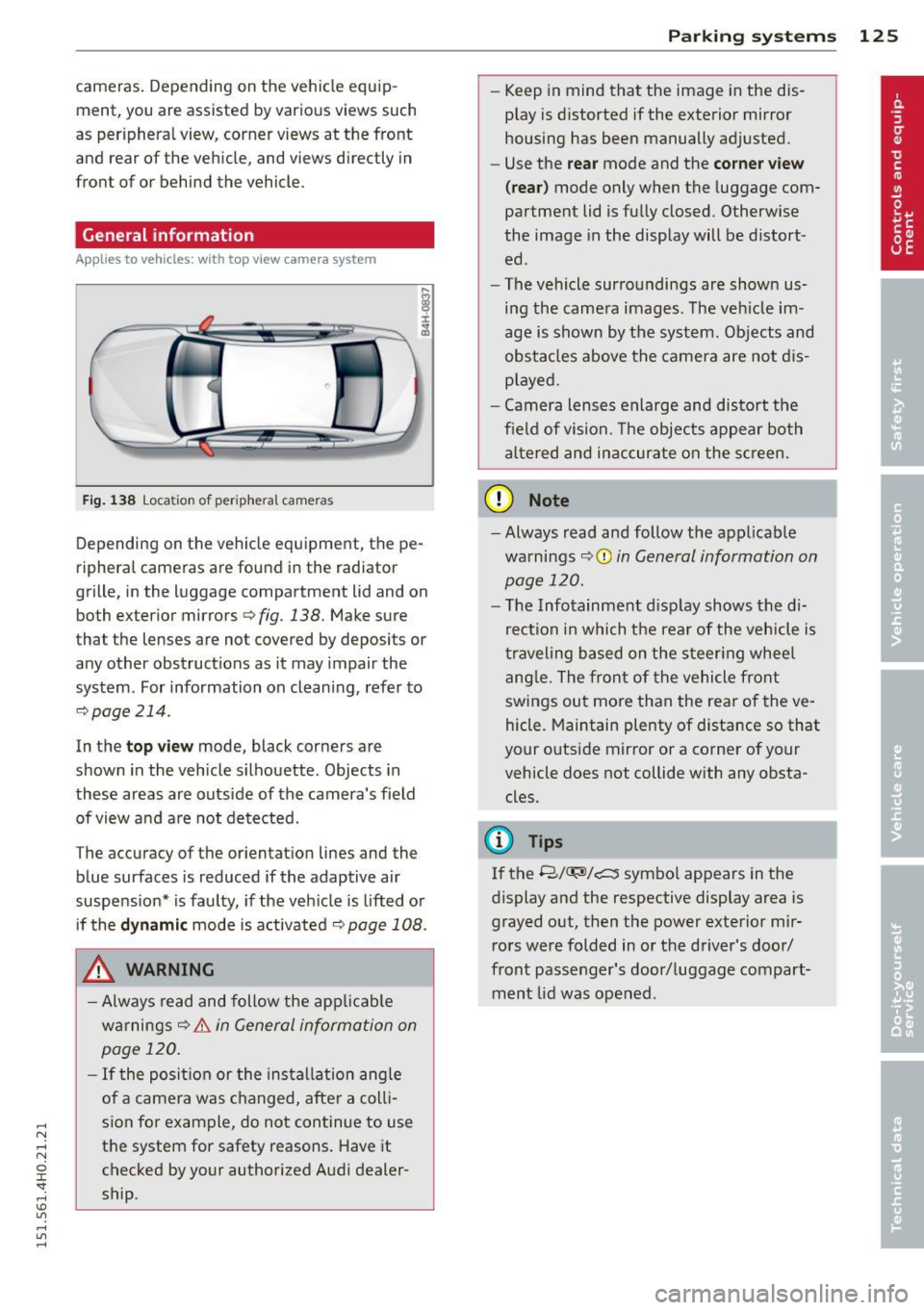
Fig. 138 Location of peripheral cameras
Depending on the vehicle equipment, the pe
ripheral cameras are found in the radiator
grille, in the luggage compartment lid and on
both exterior mirrors
c> fig. 138. Make sure
that the lenses are not covered by deposits or
any other obstructions as it may impair the
system. For information on cleaning, refer to
9page214.
In the top view mode, black corners are
shown in the vehicle silhouette . Objects in
these areas are outside of the camera's field of view and are not detected.
The accuracy of the orientation lines and the
b lue surfaces is reduced if the adaptive air
suspension* is faulty, if the vehicle is lifted or
if the
dynamic mode is activated 9 page 108 .
_& WARNING
-Always read and follow the applicable
warnings
9 .&. in General information on
page 120.
- If the position or the installation angle
of a camera was changed, after a colli
sion for example, do not continue to use
the system for safety reasons. Have it checked by your authorized Audi dealer
ship .
-
Parking systems 125
- Keep in mind that the image in the dis
play is distorted if the exterior mirror
housing has been manually adjusted.
- Use the
rear mode and the corner view
(rear)
mode only when the luggage com
partment lid is fully closed. Otherwise
the image in the display will be distort
ed.
- The vehicle surroundings are shown us
ing the camera images. The vehicle im
age is shown by the system. Objects and
obstacles above the camera are not dis
played.
- Camera lenses enlarge and distort the
field of vision. The objects appear both
altered and inaccurate on the screen.
(D Note
-Always read and follow the applicable
warnings
~CD in General information on
page 120.
- The Infotainment display shows the di
rection in which the rear of the vehicle is
traveling based on the steering wheel
angle. The front of the vehicle front
swings out more than the rear of the ve
hicle. Maintain plenty of distance so that
your outside mirror or a corner of your
vehicle does not collide with any obsta
cles.
@ Tips
If the 8/IT;1J/c:5 symbol appears in the
display and the respective display area is
grayed out, then the power exterior mir rors were folded in or the driver's door/
front passenger's door/luggage compart
ment lid was opened .
Page 132 of 312

130 Parking systems
Adjusting the display and the warning tones
App lies to vehicles: with par king system p lus w it h rear
view came ra/ top view came ra system
The display and warning tones can be adjust
ed in the Infotainment.
.. Se lect : ICAR !funct io n button> Car sy stem s
control button > Driver assist > Parking aid .
Display
On* -
rear view came ra image is s hown fo r
pa rking system pl us with rear view camera *.
Off -when the park ing system is switched on,
on ly audib le signa ls are given.
Warning tones
Front volume -
Volume fo r the fro nt area
Rear volume -Volume for the rear area
Front frequency -Frequen cy for the front area
Rear frequency -Frequency for the rear area
Music volume while parking -When the park
ing system is turned on, the volume of the au
d io/v ideo source is lowered .
The new ly adjusted value is briefly heard from
the signa l generator.
@ Tips
- The wa rning tones can a lso be adjusted
directly from the visual display or the
camera image. Simply p ress the
Settings
control b utt on .
- Changed settings are activated when the parking system is switched on aga in.
- The settings a re automatically stored
and ass igned to the remote control key
that is in use.
Error messages
App lies to vehicles: with pa rk in g system p lus wit h rear
view ca mera/ top view ca mera system
There is an error in the system if the LED in
the
P •1! b utton is bli nki ng and you hear a con
tinuous alarm for a few seconds afte r switch
ing on the parking system or when the park -ing system
is already activa ted . If the error is
not co rrected before you switc h off the igni
t ion, the LED in the
P, g! button wi ll blink the
next t ime yo u sw itch on t he parking system by
shifting into reverse.
If a sensor is fa ulty, the !:l4 symbol will appear
i n front of/behind the vehicle in the Infota in
ment display . If a rear sensor is faulty, only
obstacles t hat are in the front detection area
are shown . If a front senso r is fau lty, o nly ob
stacles that are in the rear area are show n.
Peripheral camera s*
There is also a system error if:
- t he
°C8l" symbol appears in the display and
t he corresponding display area is shown in
b lue. The camera is not working in this area.
- all segments aro und the vehi cles are red or
if no segments are displayed.
Dr ive to your au thori zed A udi dealer or au
tho rized repa ir facili ty imme diately to h ave
the mal func tion correcte d.
Trailer hitch
Applies to vehicles: wi th parking system pl us with rea r
v iew camera/top v iew camera system
For vehicles us ing the trailer socket, the park
ing system rear sensors do not tu rn on wh en
yo u shift i nto reverse gea r or whe n you press
the
P' #! bu tton. This res ults in the following re
strictions:
T he re is no distance warn ing fo r th e rea r. T he
fron t sensors remain ac tivated. The visua l dis
play sw itches to the trailer towing mode. The
r ear view camera image will no t show the or i
entatio n lines and the blue surfaces.
(D Tips
Tr ail e r hit ch es th at ar e not in sta lled a t the
fa ctory may ca use the par king system to
malfunction or they may restr ict its func
tion .
Page 133 of 312

Homelink
Universal remote
control
General information
Applies to vehicles: with Home link unive rsal remote con
tro l
The Homelink universal remote control can
be programmed with hand -held transmitters
from existing equipment
Using the Homelink universal remote control,
you can operate equ ipment such as garage
doors, property gates and house lights from inside your vehicle .
Using the Homelink universal remote control,
you can replace up to three separate hand
held transmitters for equipment on your
property with just one universal remote con
trol. Most of these transmitters a re used to
operate ga rage doors and property gates. The
individual transmitters are programmed at
the front bumper. That is where the control
module is located.
The transmitters must be programmed first in
order to operate systems using the Homelink
universal remote control.
A WARNING , .,.
- Never use the Homelink transmitter
with any garage door opener that does
have not the safety stop and reverse fea
ture as required by federal safety stand
ards . Th is includes any garage door open
er model manufactured before April 1,
1982.
- A garage door opener which cannot de
tect an object, signaling the door to stop
and reverse does not meet current feder
al safety standards . Us ing a garage door
opener without these features increases
risk of serious injury or death.
- For safety reasons never release the
parking brake or start the engine while
anyone is standing in front of the vehicle .
- A garage door or an estate gate may sometimes be set in motion when the
H ome link 131
Homelink remote control is being pro
grammed. If the device is repeatedly ac
tivated, this can overstrain motor and
damage its electrical components -an
overheated motor is a fire hazard!
- To avoid possible injuries or property
damage, please always make absolutely
certa in that no persons or objects are lo
cated in the range of motion of any
equipment being ope rated.
(D Tips
- If you would like additional information
on the Home link Universal Transce iver
'
Homelink compatib le products, or to
purchase other accessories such as the
Homelink Lighting Package, please con
tact Homelink at 1-800-355-3515 or on
the Internet at www.homelink.com.
- For Declaration of Comp liance to United
States FCC and Ind ustry Canada reg ula
tions
~ page 293.
Operation
Applies to vehicles: with Homeli nk
Fig. 151 Contro l u ni t in the head liner
"' 8 ±
" m
Requ irement: The buttons must be program
med
~ page 132.
"Press the programmed button~ & in Gen
eral information on page 131
to open the
garage door. The light @will bl ink or turn
on .
" Press the button again to close the garage
door
¢ .&. in General information on
pag e 131 . .,.