ECU AUDI A8 2015 User Guide
[x] Cancel search | Manufacturer: AUDI, Model Year: 2015, Model line: A8, Model: AUDI A8 2015Pages: 312, PDF Size: 79.18 MB
Page 101 of 312

,....,
N ,....,
N
0 J:
'SI: ,...., \!) 1.1'1 ,...., 1.1'1 ,....,
Audi adaptive cru ise control and brakin g guar d 99
limits, for example w hen approaching a
stopped vehicle or stationary obstacle
(end of a traffic jam or veh icle that has
br oken down in traffic).
- Always remember that the radar sensor
for the braking guard works only withi n
defined detection and range limits that
may prevent the proper detection of oth
er vehicles.
- The radar sensor's function and range
can be reduced by rain, snow and heavy
spray. Moving vehicles up ahead may not
be promptly detected or may not be de
tected at al l.
- Reflective surfaces in cl ud ing crash barr i
ers or t unnel entrances may impair the
f unction of the radar sensor .
@ Tips
-You can cance l the braking w ith increas
i ng fo rce that is initiated by the system
by braking yo urself, by accelerating no
ticeab ly or by swerving .
- Bra king guard error messages
¢page
99.
- Keep in mind that braking gua rd can
brake unexpec tedly. Always secure any
cargo or objec ts that yo u are transport
ing to reduce the risk of damage o r in
j u ry .
Settings in the MMI
App lies to vehicles: with Audi adaptive cruise co ntrol
.. Se lect : ICARI funct ion button > Car sy stem s
control button > Driv er assist > Audi brak
ing guard .
S ystem ·
Switch braking guard On and Off .
When you switch the ignition on, the message
Audi b raking gu ard off appears if the system
is switched off.
Early wa rning -The distance and approach
warn ings in the display can be switched
On /
Off .
(D Tips
-Yo ur settings are automatically stored
and assigned to the remote contro l key
being used at the time the settings are
made.
- If you restrict the ESC, the braking guard
also switches itself off¢ page
199.
-Switch braking guard off when you are
loading the vehicle onto a veh icle carrier
,
train, ship or other type of transporta
tion. This can prevent undesired warn
ings from the braking guard system.
Messages
App lies to vehicles : wit h Audi adapt ive cruise contro l
Braking guard : off
This driver message appears if the system is
turned off via the infotainment. Otherwise, if
the system is turned off, the information ap
pears every t ime shortly after the start of the
trip.
The driver message also appears if the system
is not available due to a malfunct ion or if the
ESC is not switched on¢ page
199. If this is
the case, the system w il l no t prov ide warnings
about a poss ible collision .
Braking guard : activated
This dr iver message appears if sharp brake
pressure was applied due to an acute warning.
ACC: Un availabl e!
ACC and Audi braking guard: not available
The system cannot detect moving vehicles up
ahead correctly and is switched off. The sen
sors have been displaced or are not working
proper ly . The Audi pre sense funct ions may al
so be affected. Drive to yo ur autho rized Audi
dealer or author ized A udi se rv ice facility im
med iate ly to have the malfunction corrected.
ACC: currently unavailable . No sensor vision
A CC and brak ing guide: cu rrentl y una va ila
ble . No sensor vision
Page 111 of 312
the drive select mode. Adaptive cruise control
also responds to the driving behavior of the
veh icle ahead in a more conservative or sporty
manner.
E ngin e soun d*
The sound of the engine is adapted to the se
l ected mode and ranges from subtle to sporty.
(D Note
- Make sure there is eno ugh clea rance
above and below the veh icle when park
i ng. The height of the vehicle can change
once it is parked due to temperature
fluctuations, changes to the load cond i
tions and changes to the dr iv ing modes,
which can affect clearance.
- When transporting the veh icle on a car
carrier, tra in, ship or by other means, on
ly tie the veh icle down at the running
surface of the tires, which is the outer
circumference. Secur ing the vehicle at
the axle components, s uspension struts
or tow ing eyes is not pe rm itted because
the pressure in the air suspension stru ts
can cha nge during transport . The vehicle
may not be sec ured s ufficient ly if this
happens.
- If you a re going to tow a trailer, you
must activate the trailer operation mode
C? poge210.
@ Tips
- In some models, the maximum vehicle
speed can only be reached in the
auto
and dynami c modes.
- Se lecting the
d ynamic mode results in
sporty shifting characteristics . The S
gear position engages automatically.
- In vehicles that have dynamic steering*,
operating noise is heard when starting or
stopping the engine. Th is does not indi
cate a problem.
Audi dri ve sele ct 109
-In ve hicles w ith sport differentia l*, the
dynamic mode is deactivated when tow
ing a trailer.
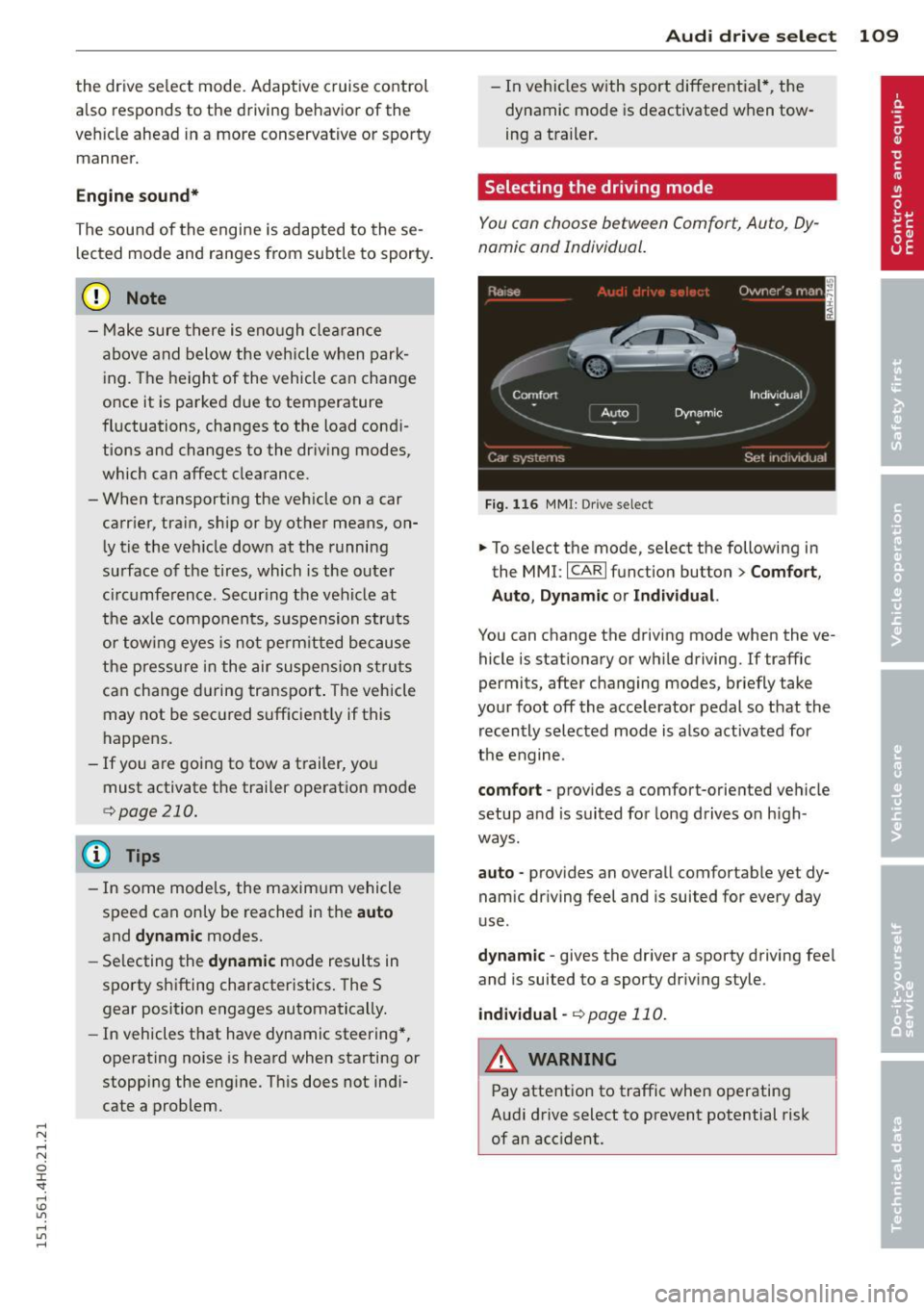
Selecting the driving mode
You con choose between Comfort, Auto, Dy
namic and Individual.
F ig. 116 MMI: Drive select
.,. To select the mode, se lect the following in
the MMI:
I CARI function button > C om fort ,
Auto , Dynamic or Individu al.
You can change the driving mode when the ve
hicle is stationary or wh ile driving. If traffic
permits, after changing modes, briefly take
your foot off the accelerator pedal so that the recently selected mode is also activated for
the engine.
comfort -provides a comfort-oriented ve hicle
setup a nd is suited for long drives on h igh
ways .
auto -provides an overall comfortable yet dy
namic dr iving feel and is suited for every day
use .
dy nami c -gives the driver a sporty driving fee l
and is suited to a sporty driv ing style.
indi vidual -¢page 110.
A WARNING
Pay attention to traffic when operating
Audi drive select to prevent potential risk
of an accident.
Page 118 of 312

116 Automatic Tran sm iss ion
& WARNING
-Never e ngag e R or P w hile driving . It
could cause a cras h.
-
-Power is sti ll t ransmi tte d to t he whee ls
whe n the e ngine is runni ng at idle . To
prevent the vehicle from "creepin g", you
must keep your foot on the brake in all
selector lever positions except P and N
when the eng ine is running. Do not inad
vertent ly press the accelerator pedal
when the veh icle is stationary . Otherwise
the vehicle will s tart to move immediate
ly. This cou ld happen even if the parking
brake is activa ted .
- Be fore opening the hood, select the P se
lector lever position and set the par king
brake. This red uces the risk of a crash. Al
ways read and follow the applicable
warnings
<=)page 228.
-Never get out of the driver's seat when
the engine is running.
- If you mus t get out of the vehicle, move
the se lector lever securely into the P po
sition an d apply the park ing brake .
(D Tips
-If you u nin tentionally shift into the N se
l ector lever posi tion while dr iv ing, ta ke
your foot off the acce lerator pedal and
wait for the e ngine to slow down until it
i s idling before you shift into Dor S.
Driving tips
The gears shi~ automatically .
Starting from a stop
"" Press and ho ld the brake pedal.
"" Sta rt the eng ine
c:> page 83.
"" Press the but ton on the se lector lever and
select the D, S or R selecto r lever pos it ion
c:> page 114 .
""Wait a moment until the transmission
shifts. You w ill not ice a slight movement
when the gear engages .
"" Re lease the brake pedal and press the accel
erator pedal¢ ,& .
Stopping temporarily
""Press the brake pedal to s top the ve hicle, for
examp le a t a traffic light . Do not press the
accelerato r peda l when doing this.
"" To prevent the vehicle from ro lling when yo u
start dr iving, set the parking brake when
stopping on large incl ines
c:> ,& .
"" The parking brake will release automat ica lly
and the vehicle will start mov ing once you
press the acce lerator pedal.
Parking
If the se lector lever is not in the P position
whe n you open the driver's door, the ve hicle
could roll. The message
Transmission: Car
may roll! Shift to park!
appears .
"" Press and hold the brake pedal¢ ,& .
"" Set the park ing brake.
"" To engage the P se lector lever position,
press the button on the selector lever and
shift into the P posit ion
c:> page 114 .
Under certa in conditions such as dr iv ing in the
mountains or when towing a trailer, it may be
helpful to switch to manual mode tempo rari ly
to shift
manually to adapt to the driving con
di tions
c:> page 117.
On s lopes, activate the parki ng bra ke first and
then move the selecto r leve r to the P position .
T his prevents too much st ress from be ing
pla ced on the locking mec hanism.
& WARNING
Read an d fol low all WAR NIN GS ¢ .&. in Se
lecting a selector lever position on
page 116.
- The vehicle can also roll when the engine
is stopped.
- Do not press t he acceler ator pe dal when
chan ging the se lector leve r posi tion
while the veh icle is stationary and t he
engine is running . This cou ld result in a
crash.
- Never engage R o r P while driving .
It
could cause a crash.
- Power is still transmitted to the wheels
when the engine is runn ing at idle. To
IJJ,,
Page 121 of 312
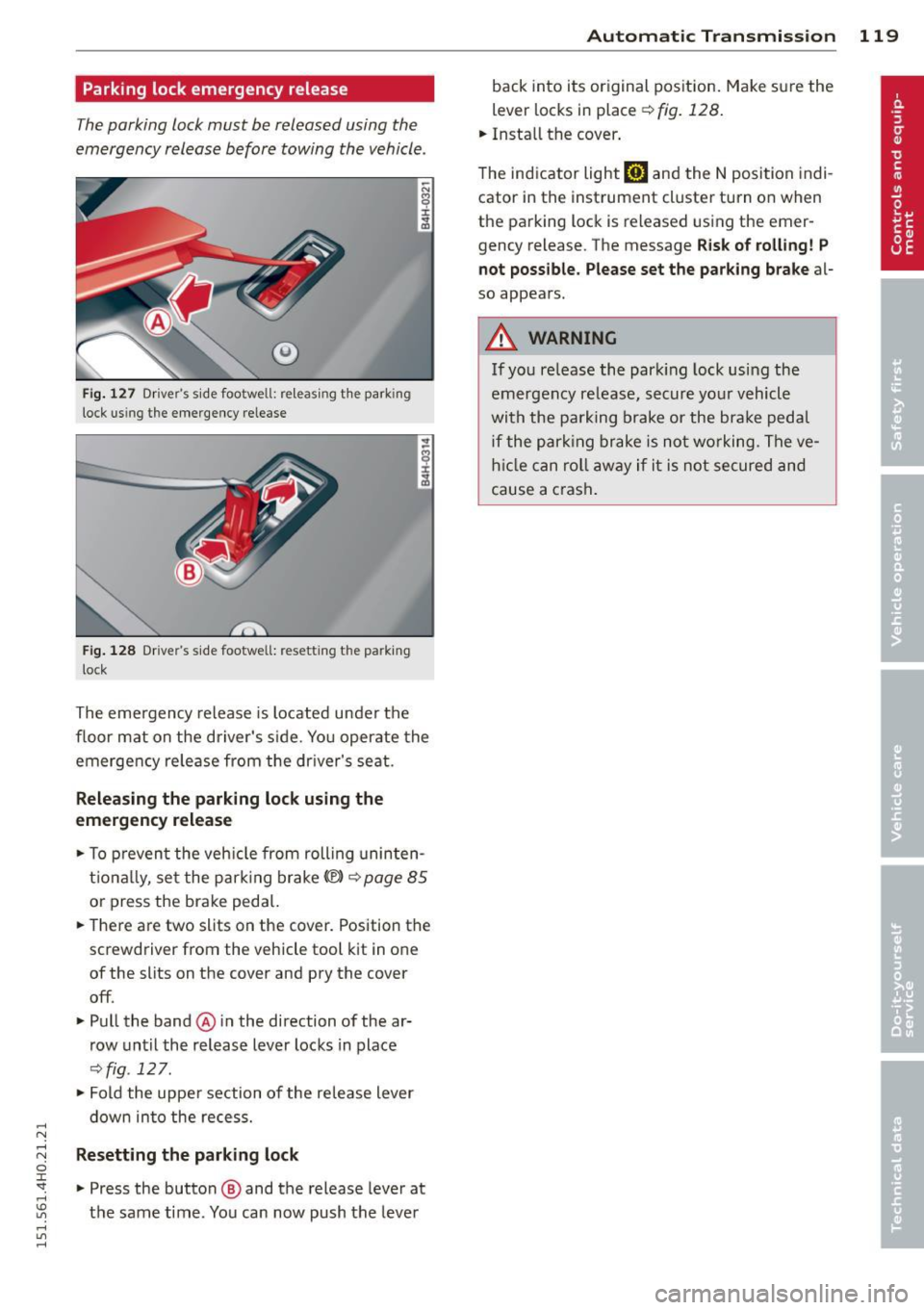
Parking lock emergency release
The parking lock must be released using the
emergency release before towing the vehicle .
®
Fig. 127 Driver's s ide footwell: re lea sing t he park ing
lock us ing the emergency release
Fig. 128 Driver's s ide footwell: resettin g th e pa rk ing
lock
The emergency release is located under the
f loor mat on the driver's s ide. You operate the
emergency re lease from the driver's seat.
Releasing the parking lock using the
emergency release
.,. To prevent the vehicle from rolling uninten
tionally, set the parking brake
«e)) q page 85
or press the brake peda l.
.,. There are two slits on the cover. Position the
screwdriver from the vehicle tool kit in one
of the slits on the cover and pry the cover
off .
.,. Pull the band@ in the direction of the ar
row until the release lever locks in place
qfig . 127 .
.,. Fold the uppe r section of the re lease lever
down into the recess.
Resetting the parking lock
.,. Press the button @ and the release lever at
t h e same time . You can now push the lever
Automatic Transmission 119
back into its original position. Make sure the
lever locks in place ~
fig. 128.
.,. Install the cover .
T he indicator light
mJ and the N position indi
cator in the instrument cluster turn on when
the parking lock is released using the emer
gency release. The message
Risk of rolling! P
not possible. Please set the parking brake
al
so appears .
.&_ WARNING
If you release the park ing lock using the
emergency release, secure your vehicle
with the parking brake or the brake pedal
i f the parking brake is not working. The ve
hicle can roll away if it is not secured and
cause a crash .
Page 138 of 312
136 Driving Safely
-Passengers must always sit in an upright
position and never lean against or place
any part of their body too close to the
area where the airbags are located.
- Passengers who are unbelted, out of po
sition or too close to the airbag can be
seriously injured by an airbag as it un
folds with great force in the blink of an eye.
-Always make sure that there are at least 10 inches (25 cm) between the front
passenger's breastbone and the instru
ment panel.
-Always make sure that there are at least
4 inches (10 cm) between the front pas
senger 's knees and the lower part of the
instrument panel.
- Each passenger must always sit on a seat
of their own and properly fasten and
wear the safety belt belonging to that
seat.
- Before driving, always adjust the front
passenger seat and head restraint prop
erly.
- Always keep your feet on the floor in front of the seat. Never rest them on the seat, instrument panel, out of the win
dow, etc. The airbag system and safety
belt will not be able to protect you prop
erly and can even increase the risk of in
jury in a crash .
- Never drive with the backrest reclined or
tilted far back! The farther the backrests
are tilted back, the greater the risk of in
jury due to incorrect positioning of the
safety belt and improper seating posi
tion.
- Children must always ride in child seats
¢
page 174. Special precautions apply
when installing a child seat on the front
passenger seat
¢ page 151.
Proper seating positions for passengers
in rear seats
Rear seat passengers must sit upright with
both feet on the floor consistent with their
physical size and be properly restrained
whenever the vehicle is in use.
To reduce the risk of injury caused by an incor
rect seating position in the event of a sudden
braking maneuver or an accident , your pas
sengers on the rear bench seat must always
observe the following:
.., For adjustable head restraints: Adjust the
head restraint so the upper edge is as even
as possible with the top of your head. If that
is not possible , try to adjust the head re
straint so that it is as close to this position
as possible
¢page 137.
.., Keep both feet flat in the footwell in front of
the rear seat .
.., Fasten and wear safety belts properly
¢ page 146 .
.., Make sure that children are always properly
restrained in a child restraint that is appro
priate for their size and age¢
page 174.
A WARNING
Passengers who are improperly seated on
the rear seat can be seriously injured in a
crash.
- Each passenger must always sit on a seat
of their own and properly fasten and
wear the safety belt belonging to that
seat .
- Safety belts only offer maximum protec
tion when the safety belts are properly
positioned on the body and securely
latched . By not sitting upright, a rear
seat passenger increases the risk of per
sonal injury from improperly positioned
safety belts!
- Always adjust the head restraint properly
so that it can give maximum protection.
Page 140 of 312
138 Driving Safel y
The following bulletins list only some sample
positions that wi ll increase the risk of serious
in jury and death . Our hope is that these exam
ples w ill make you more aware of seating po
sitions that are dangerous.
Th erefore, whenever th e vehicl e is
mov ing:
- never stand up in the vehicle
-never stand on the seats
- never knee l on the seats
- never ride with the seatback reclined
- never lie down on the rear seat
- never lean up aga inst the instrument panel
- never sit o n the edge of the seat
- never sit s ideways
- never lean out the window
- never put yo ur feet out the window
- never put yo ur feet on the ins trument panel
- never rest your feet on the seat cushion o r
back of the seat
- never ride in the footwe ll
- never ride in the cargo area
.&, WARNING
Improper seat ing positions increase the
r isk of serious personal injury and death
whenever a veh icle is being used.
- Always make sure that all vehicle occu-
pants stay in a p roper seating pos it ion
and are properly restra ined whenever the
vehicle is be ing used.
Driver and passenger
side footwell
Important safety instructions
.&, WARNING
Always make sure that the knee a irbag can
inf late w ithout interference. Objects be
tween yourself and the airbag can increase
the risk of injury in an acc ident by interfer
ing w ith the way the a irbag deploys or by
being pushed into you as the airbag de
ploys.
-
- No persons (children) or animals shou ld
ride in the footwell in front of the pas
senger seat. If the airbag dep loys, this
can result in ser ious or fatal injuries.
- No objects of any kind should be carried
in the footwell area in front of the driv
er's or passenger's seat. Bulky objects
(shopping bags, fo r example) can ham
pe r or p revent proper deployment of the
ai rbag. Small obje cts can be thrown
through the vehicle if the airbag deploys
and in jure you or yo ur passenge rs .
Pedal area
Pedals
The pedals must always be free to move and
must never be interfered with by a floor mot
or any other object.
Make sure that a ll peda ls move free ly without
interference and that nothing prevents them
from return ing to their orig inal positions.
Only use floor mats t hat leave t he pedal area
free and can be secu red with floor mat fasten
ers.
If a brake circ uit fai ls, increased brake pedal
trave l is required to bring the vehicle to a f ull
stop .
.&, WARNING ,-
Pedals that cannot move free ly can cause
l oss of vehicle control and increase the risk
of ser ious injury.
- Never p lace any objects in the drive r's
footwell. An object cou ld get into the
pedal area and interfere with pedal func
tion . In case of sudde n brak ing o r an ac
cident, yo u wou ld not be able to b rake or
accelerate!
- Always make sure that nothing can fall
or move into the driver's footwel l.
Page 141 of 312
,....,
N ,....,
N
0 J:
'SI: ,...., \!) 1.1"1 ,...., 1.1"1 ,....,
Floor mats on the driver side
Always use floor mats that can be securely attached to the floor mat fasteners and do
not interfere with the free movement of the
pedals.
.,. Make sure that the floor mats are properly
secured and cannot move and interfere with
the pedals
9 &. -
Use only floor mats that leave the pedal area
unobstructed and that are firmly secured so
that they cannot s lip out of position . You can
obtain suitable floor mats from your author
iz ed A udi Dealer .
Floor mat fasteners are installed in your Audi.
Floor mats used in your vehicle must be at
tached to these fasteners. Properly securing
the floor mats will prevent them from slid ing
i nto pos itions that could interfere with the
pedals or impair safe operation of your vehicle
in other ways .
A WARNING
Pedals that cannot move freely can resu lt
in a loss of vehicle contro l and increase the
risk of serious personal injury.
- Always make sure that floor mats are
properly secured .
- Never place or insta ll floo r mats or other
floo r coverings in the vehicle that cannot
be properly secured in place to prevent
them from slipping and interfering with
the pedals or the ability to control the
vehicle .
- Never place or install floor mats or other
floor coverings on top of already instal
led floor mats . Additional floor mats and
other coverings w ill reduce the size of
the pedal area and interfere with the
peda ls .
- Always properly reinstall and secure floor mats that have been taken out for clean
ing .
- Always make sure that objects cannot
fall into the driver footwell wh ile the ve
hicle is moving. Objects can become
Driving S afel y 139
trapped under the brake pedal and acce l
erator pedal causing a loss of vehicle
control.
Stowing luggage
Loading the luggage compartment
All luggage and other objects must be prop erly stowed and secured in the luggage
com
partment.
Loose items in the luggage compartment can
shift suddenly, changing veh icle handling
c h aracteristics. Loose items can also increase
the risk of serious persona l injury in a sudden
vehicle maneuve r or i n a collision.
.,. Distribute the load evenly in the luggage
compartment.
.,. Always place and properly secure heavy
items in the luggage compartment as far
forward as possible .
... Secure luggage items using the tie-downs
provided
¢ page 70, Luggage compart
ment.
A WARNING
Improperly stored luggage or other items
can fly through the veh icle causing ser ious
personal injury in the event of hard brak
ing or an accident. To help reduce the risk
of serious personal inju ry:
- Always put objects, for example, luggage
or other heavy items in the luggage com
partment.
- Always secure objects in the luggage
compartment using the tie-down hooks
and suitable straps.
A WARNING
Heavy loads w ill influence the way yo ur ve
hicle handles. To help reduce the risk of a
loss of contro l leading to serious personal
injury :
-Always keep in mind when transporting
heavy objects, that a change in the cen
ter of gravity can also cause changes in
veh icle handling: •
•
Page 142 of 312
140 Driving Safely
-Always distribute the load as evenly as
possible.
- Place heavy objects as far forward in
the luggage compartment as possible.
- Never exceed the Gross Axle Weight Rat
ing or the Gross Vehicle Weight Rating
specified on the safety compliance stick
er on the left door jamb. Exceeding per
missible weight standards can cause the
vehicle to slide and handle differently.
- Please observe information on safe driv
ing
q page 133.
A WARNING
-
To help prevent poisonous exhaust gas
from being drawn into the vehicle, always keep the rear lid closed while driving.
- Never transport objects larger than those fitting completely into the luggage
area because the rear lid cannot be fully
closed.
- If you absolutely must drive with the rear
lid open , observe the following notes to
reduce the risk of poisoning:
- Close all windows,
- Close the power roof,
- Open all air outlets in the instrument
panel,
- Switch off the air recirculation,
- Set the fresh air fan to the highest
speed.
A WARNING
Always make sure that the doors, all win
dows, the power roof and the rear lid are
securely closed and locked to reduce the
risk of injury when the vehicle is not being
used.
- After closing the rear lid, always make
sure that it is properly closed and locked.
- Never leave your vehicle unattended es pecially with the rear lid left open. A
child could crawl into the vehicle through
the luggage compartment and close the
rear lid becoming trapped and unable to
get out . Being trapped in a vehicle can
Lead to serious personal injury .
-
-Never let children play in or around the
vehicle.
- Never let passengers ride in the luggage
compartment. Vehicle occupants must
always be properly restrained in one of
the vehicle's seating positions .
(D Tips
-Air circulation helps to reduce window
fogging. Stale air escapes to the outside
through vents in the trim panel, on the
Left side of the Luggage compartment.
Be sure to keep these slots free and
open .
- The tire pressure must correspond to the
load . The tire pressure is shown on the
tire pressure label. The tire pressure la
bel is located on the driver's side B-pillar.
The tire pressure Label lists the recom
mended cold tire inflation pressures for
the vehicle at its maximum capacity
weight and the tires that were on your
vehicle at the time it was manufactured.
For recommended tire pressures for nor
mal Load conditions, please see chapter
¢ page 249.
Tie-downs
The luggage compartmen t is equipped wi th
four tie-downs to secure luggage and o ther
items.
Use the tie-downs to secure your cargo p rop
erly ¢
page 139 , Loading the luggage com
partment.
In a collision, the laws of physics mean that
even smaller items that are loose in the vehi
cle will become heavy missiles that can cause
serious injury. Items in the vehicle possess en
ergy which vary with vehicle speed and the
weight of the item. Vehicle speed is the most significant factor.
For example, in a frontal collision at a speed
of 30 mph (48 km/h), the forces acting on a 10-lb (4 .5 kg) object are about 20 times the
normal weight of the item. This means that
the weight of the item would suddenly be
Page 143 of 312
,....,
N ,....,
N
0 J:
'SI: ,...., \!) ..,.,
,...., ..,., ,....,
about 200 lbs. (90 kg). You can imagine the
injuries that a 200 lbs. (90 kg) item flying
freely through the passenger compartment
could cause in a collision like this.
_&. WARNING
Weak,
damaged or improper straps used
to secure items to tie-downs can fail dur
ing hard braking or in a collision and cause
serious personal injury.
- Always use suitable mounting straps and properly secure items to the tie-downs in
the luggage compartment to help pre
vent items from shifting or flying for
ward as dangerous missiles .
- Never attach a child safety seat tether
strap to a tie-down.
Reporting Safety
Defects
Applicable to U.S.A.
If you believe that your vehicle
has a defect which could cause
a crash or could cause injury or
death, you should immediately
inform the National Highway
Traffic Safety Administration
(NHTSA) in addition to notify
ing Audi of America, Inc.
If NHTSA receives similar com
plaints, it may open an investi
gation, and if it finds that a
safety defects exists in a group
of vehicles, it may order a recall
and remedy campaign. Howev
er, NHTSA cannot become in
volved in individual problems
Driving Safely 141
between you, your dealer, or
Audi of America, Inc.
To contact the NHTSA, you may
either call:
Tel.: 1-888-327-4236 (TTY: 1-800-424-9153) or
1-800-424-9393
or you may write to:
NHTSA
U.S. Department of Transporta
tion
1200 New Jersey Ave., S.E.
West Building
Washington, DC 20590
You can also obtain other infor
mation about motor vehicle
safety from:
http://www.safercar.gov
Applicable to Canada
If you live in Canada and you
believe that your vehicle has a
defect that could cause a crash,
injury or death, you should im
mediately inform Transport
Canada, Defect Investigations
and Recalls. You should also no
tify Audi Canada.
•
•
'
Page 148 of 312

146 Safety belts
Important safety instructions about
safety belts
Safety belts must always be correctly posi
tioned across the strongest bones of your
body.
,.. Always wear safety belts as illustrated and
described in this chapter.
,.. Make sure that your safety belts are always
ready for use and are not damaged.
A WARNING
Not wearing safety belts or wearing them
improperly increases the risk of serious
personal injury and death. Safety belts can
work only when used correctly .
- Always fasten your safety belts correctly
before driving
off and make sure all pas
sengers are correctly restrained.
- For maximum protection, safety belts must always be positioned properly on
the body .
- Never strap more than one person , in
cluding small children, into any belt.
- Never place a safety belt over a child sit ting on your lap.
- Always keep feet in the footwell in front
of the seat while the vehicle is being driv
en .
- Never let any person ride with their feet on the instrument panel or sticking out
the window or on the seat.
- Never remove a safety belt while the ve
hicle is moving. Doing so will increase
your risk of be ing injured or killed.
- Never wear belts twisted.
- Never wear belts over rigid or breakable
objects in or on your clothing, such as
eye glasses, pens, keys, etc., as these
may cause injury.
- Never allow safety belts to become dam
aged by being caught in door or seat
hardware .
- Do not wear the shoulder pa rt of the belt
under your arm or otherwise out of pos i
tion . -
Several layers of heavy clothing may in
terfere with correct positioning of belts
and reduce the overall effectiveness of
the system .
- Always keep belt buckles free of anything
that may prevent the buckle from latch
ing securely .
- Never use comfort clips or devices that
create slack in the shoulder belt . Howev
er, special clips may be required for the
proper use of some child restraint sys
tems .
- Torn or frayed safety belts can tear, and
damaged belt hardware can break in an
accident. Inspect belts regularly .
If web
bing, bindings, buck les, or retractors are
damaged, have belts replaced by an au
thorized Audi dealer or qualified work
shop.
- Safety belts that have been worn and
loaded in an accident must be replaced
with the correct replacement safety belt
by an authorized Audi dealer . Replace
ment may be necessary even if damage
cannot be clearly seen . Anchorages that
were loaded must also be inspected.
- Never remove, modify, disassemble, or
try to repair the safety belts yourself.
- Always keep the belts clean. Dirty belts
may not work properly and can impair
the function of the inert ia reel
c::> ta
ble Cleaning interior on page 216 .
Safety belts
Fastening safety belts
Safety first -everbody buckle up!
Fig. 161 B elt buckl e and to ngue on t he drive r's se at