steering wheel AUDI A8 2015 User Guide
[x] Cancel search | Manufacturer: AUDI, Model Year: 2015, Model line: A8, Model: AUDI A8 2015Pages: 312, PDF Size: 79.18 MB
Page 84 of 312

82 On the road
On the road
Steering
Adjusting steering wheel position
The steering wheel position can be adjusted
for height and reach .
Fig. 87 Switch for steering whee l adjustment
F irst, adjust the driver's seat correctly.
• To adjust the height, press the sw itch up/
down. The stee ring column will continue
moving as long as you a re pressing the
switch.
• To move the steering wheel forward or back,
press the switch forwa rd/back. The steering
column will continue moving as long as you
are pressing the switch.
There must be at least 10 inches (25 cm) be
tween your chest and the center of the steer ing wheel. If you cannot sit more than 10 in
ches (25 cm) from the steering wheel, see if
adaptive equipment is available to help you
reac h the pedals and increase the distance
from the steering wheel.
For detai led informat ion on how to adjust the
driver's seat, see
Qpage 59.
In vehicles with the memory function*, the
steering column settings are stored together
with the seat position.
A WARNING
Improper use of steering wheel adjust
ment and improper seating position can
cause serious personal injury . -
Adjust the steering wheel col umn only
when the vehicle is not mov ing to pre
vent loss of vehicle control.
- Adj ust the driver's seat or steering whee l
so that there is a minimum of 10 inches
(25 cm) between your chest and the
steer ing wheel
Q page 134, fig . 153 . If
you cannot mainta in th is m inimum dis
tance, the airbag system cannot p rotect
you properly.
- If physical limitations prevent you from sitt ing 10 inches (25 cm) or more from
the steering wheel, check wit h your au
thorized A udi dealer to see if adaptive
equipment is available .
- I f the steering wheel is al igned with your
face, the supplementa l driver's airbag
cannot provide as much protection in an
accident. Always make sure that the
steering whee l is aligned with your
chest.
- Always hold the steering wheel w ith your
hands at the 9 o'clock and 3 o'clock posi
tions to reduce the risk of persona l injury
if the dr iver's airbag dep loys.
- Never hold the steering wheel at the 12
o'clock position or with your hands inside
the steeri ng wheel rim or on t he steering
wheel hub. Holding the steer ing wheel
the wrong way can cause serious injuries
to the hands, arms and head if the driv
er's airbag deploys.
Easy entry feature
The easy entry feature makes it easier to en
ter and exit the vehicle by automatically ad
justing the steering wheel.
• Select in the MMI: ICAR lfunction button>
Car sy st e m s control button > Vehi cle set·
tin gs > Se ats > Dri ver 's s eat > Ea sy entr y>
On .
When the easy entry feature is turned on, the
steering wheel moves up to the park position
whe n you switch off the igni tion. Afte r you en-
ter the ve hicl e, the steering wheel moves to .,..
Page 89 of 312

,....,
N ,....,
N
0 J:
'SI: ,...., \!) 1.1'1 ,...., 1.1'1 ,....,
Starting off with a trailer
To prevent rolling back unintentionally on an
incline, do the following:
11-Keep the switch© pulled and depress the
accelerator. The parking brake stays applied
and prevents the vehicle from rolling back
ward .
11-You can release the switch<®> once you are
su re that you a re develop ing enough for
ward momentum at the wheels as you de
press the accelerator.
D epending on the weight of the r ig (vehicle
and tra ile r) and the severi ty of the incl ine, you
may roll backwards as you start. Yo u can pre
vent rolling backwards by holding the parking brake switch<®) p ulled out and acce lerating -
just as you would when starting on a hill with
a conventional hand brake.
Emergency braking
In the event that the conventional brake sys
tem fails or locks.
11-In an emergency, pull the switch(®) and
contin ue to p ull it to slow your vehicle down
with the parking brake.
11-As soon as you release the switch (®) or ac-
ce lerate, the braking process stops.
If you pull the switch<®> and hold it above a
speed of about 5 mph (8 km/h), the emergen
cy braking function is initiated. The vehicle is
braked at all four wheels by activating the hy
draulic brake system. Th e brake performance
i s similar to making an emergency stop
~ &..
In order not to activate the emergency brak
ing by m istake, an audible warning tone (buz
ze r) sou nds when the switch C®> is pulled. As
soon as the switch(®) is released, or the accel
e rator pedal is dep ressed, emergency b ra ki ng
stops.
_& WARNING
Emergency braking should only be used i n
an emergency, when the normal foot brake
has failed or the brake pedal is obstructed .
On the ro ad 87
Using the parking b rake to pe rform emer
gency brak ing will slow your vehicle down
as if you had made a full brake application.
The laws of physics cannot be suspended
even with ESC and i ts associated compo
nents (ABS, ASR, EDL). In corners and
when road o r weathe r cond itions are bad,
a full brake appl ication can ca use the vehi
cle to sk id or the re ar end to break away -
risking an acciden t.
Start-Stop-System
' Description
Applies to vehicles: wit h Start -Stop-System
The Start-Stop-System can help increase fuel
economy and reduce CO2 emissions .
In the Start-Stop-mode, the engine shuts off
automat ica lly w hen the vehicle is stopped,
such as at a traffic light. The ignition remains
switched on du ring this stop phase. The en
gine wi ll be automat ica lly restarted when
needed.
The last Start-Stop-System sett ing (on/off us
ing the button
I O\l ~I) will be restored when the
i gnition is turned on. The L ED in the
1(7() .. 1 but
ton turns on when the Star t-Stop-System is
swi tched off man ually.
Basic requirements for the Start -Stop
mode
- The d rive r's doo r is closed.
- The d river ' seat belt is latched .
- The hood is closed .
- The vehicle must have been driven faster
than
2.5 mph (4 km/h) since the last stop.
- A trailer is not hitched to the vehicle.
_& WARNING
-Never let the vehicle roll with the eng ine
sw itched off. You cou ld lose control over
the vehicle. Th is can lead to a collision
and serio us in ju ries.
- The brake booster and the steering sup port do not work while the engine is
Page 90 of 312

88 On the road
switched off. More force is required to
stop and to steer the vehicle.
- To reduce the risk of injuries, make sure
that the Start-Stop-System is turned off
when working in the engine compart
me nt¢
page 89.
(D Note
Always switch off the Start-Stop -System
when driving through water ¢
page 89.
Starting/stopping the engine
Applies to vehicles: with Start-Stop-System
Fig . 91 In strument duster : eng ine switc hed off (stop
phase)
~ Slow the vehicle to a stop using the brake
and keep pressing the brake pedal. The en
gine w ill switch off. The
11] indicator light
appears in the information line in the instru
ment cluster display.
~ When you take your foot off the brake ped
al, the engine restarts . The ind icator light
turns off.
Additional information
The engine w ill switch off in the P, D, N and S
positions as well as in manua l mode. In the P
position, the e ngine will also remain off if you
take your foot off the brake pedal. The engine
starts again when you select another se lector
lever position and take your foot off the brake
pedal.
If you select the R position during a Stop
phase, the engine will start again .
Shift from D to P quickly to prevent the engine
from starting unintentionally when shifting
through R. You
can determine for yourself if the engine
will stop or not by reducing or increasing the
amount of force you use to press the brake
pedal. For example, if you only lightly press
on the brake pedal in stop-and and-go traffic
or when turning, the engine will not switch off
when the vehicle is stationary. As soon as you
press the brake down harder, the engine wi ll
switch off.
General information
Applies to vehicles: with Start-Stop-System
The standard Start-Stop-mode can be cancel
led for different system-related reasons.
Fig. 92 Instrument cluster: eng ine -Stop temporarily
unavailable
Engine will not switch off
Before each stop phase, the system checks if
certain conditions have been met. For exam
ple, the eng ine will
not be switched off in the
following situations:
- The engine has not reached the minimum
requ ired temperature for Start-Stop-mode.
- The interior temperature selected by the A/C
system has not been reached.
- The outside temperature is extremely high/
low.
- The windshield is being defrosted
¢page 81.
-The parking system* is switched on.
- The battery charge level is too low.
- The steering wheel is sharply turned or
there is a steering movement.
- After engaging the reverse gear.
- On sharp incl ines.
Page 97 of 312

Audi adaptive cruise control and braking guard 95
tachometer @and is also shown briefly in
thedisplay @c::>fig.101.
.. You must also press the brake pedal when
the vehicle is stopped.
Switching adaptive cruise control off
.. Push the lever away from you into position
@ until it clicks into place. The message
ACC off appears.
@ Indicator lights
II-Adaptive cru ise contro l is switched on.
No vehicles are detec ted up ahead. The stored
speed is ma intained.
• -A moving vehicle is detected up ahead.
The adaptive cruise control system regulates
the speed and distance to the moving vehicle
ahead and acce lerates/brakes automatical ly.
fit -Adaptive cruise contro l is switched on. A
mov ing vehicle up ahead was detected. Your
vehicle remains stopped.
• -When automatic brak ing is not able to
keep enough distance to a previously detected
moving vehicle up ahead, you must take con
trol and brake
c::> page 97, Prompt for driver
intervention.
© Display
If adaptive cruise control is not shown in the
d isp lay, you can call it up with the multifunc
tion steering wheel buttons c::>
page 23.
Based on the symbols in the d isplay, you can
determine if the system is maintaining a dis
tance to the vehicle ahead and what that d is
tance is.
No vehicle · No veh icle ahead was detected .
White vehicle -A vehicle ahead was detected.
Red vehicle -Prompt for the driver to take ac
tion
<=:> page 97.
Both
arrow s on the scale© indicate the dis
tance to the vehicle ahead. No arrow appears
when the vehicle is on an open road and there
is no object ahead . If an object is detected
:;, ahead , the arrow moves on the scale .
"' ,....,
"' ,....,
The green zone on the scale shows the stored
distance. For information on changing the
stored distance, refer to
c::> page 96. If the
distance selected is too close or may soon be
come too close, the arrows move into the red
zone on the sca le .
A WARNING
Improper use of the adaptive cruise con
trol can cause collisions, other accidents
and serious personal injur ies .
- Pressing the
!SET ! button when driv ing at
speeds below 20 mph (30 km/h), will au
tomatically accelerate the vehicle to 20
mph (30 km/h), which is the minimum
speed that can be set.
(D Tips
-If you switch the ignit ion or the adaptive
cruise control off, the set speed is erased
from the system memory.
- You cannot switch the Electronic Stabili
zation Control (ESC) to the SPORT mode
when adaptive cruise control is switched
on.
Changing the speed
Applies to vehicles: with Aud i adapt ive crui se control
0
f
• 0
Fig. 102 Selector lever: ch ang ing the speed
.. To increase or reduce the speed in incre
ments,
tap the lever up or down.
-0:, N 0 ± ... a)
.. To increase or reduce the speed quickly, hold
the lever up or down until the red LED @
reaches the desired speed
c::> page 94,
fig.101. ~
Page 103 of 312

,....,
N ,....,
N
0 J:
'SI: ,...., \!) 1.1'1 ,...., 1.1'1 ,....,
Audi active Lane assist
Active Lane assist
Description
Applies to vehicles: with active lane assist
Active lane assist helps you keep your vehicle
in your lane.
Active lane assist detects lane marker lines
within the limits of the system using a camera in the windshield . If you are approaching a de
tected lane marker line and it appears likely
that you w ill leave the lane, the system will
warn you by means of corrective steer ing . T he
driver can over ride the cor re ct ive steer ing at
any time. If the veh icle crosses a line, the d riv
er is also warned by a light
vibration in the
steering whee l. The vibration warning must
be switched on in the MMI for this to happen.
Active lane ass ist is operable when the line
marking the lane is detected on at least one
side of the vehicle .
The system is designed for driv ing on free
ways and expanded highways and thus works only at speeds of 40 mph (65 km/h) or more .
Applies to vehicles with side assist* : If you ac
tivate your turn s ignal when active lane assist
is ready and when activated side assist has
classified a lane change as crit ica l because of
vehicles traveling alongside you or comi ng
closer, there will be noticeable correct ive
steer ing just before you leave the lane . This is
done to try to keep your veh icle in the lane.
Applies to vehicles w ithout s ide ass ist*: when
the system is ready, it does not warn you if
you act ivate your turn signa l before driving
across a lane marker line . In this case, it as
sume s that yo u are ch ang ing lanes intent ion
a lly.
I f the vehicle is also equipped with Audi adap
tive cruise cont ro l*, the co rrec tive steering
will be mo re specific in rega rd to the driving
situation. In addition to the lane marker lines,
the system can a lso take into account other
objects such as guard rails . If they are detect
ed in close proximity to the veh ic le, Audi ac-
Audi acti ve lane a ssis t 10 1
tive lane assist he lps prevent the vehicle from
driving too close to them. There is a lso pass
ing ass istance . The system does not provide
any correct ive steering if it detects that you
are passing another vehicle.
A WARNING
- The system warns the drive r that the ve
hicle is leaving the lane using co rrect ive
s teer ing . The d river is always r esponsible
for keeping the vehicle withi n the lane.
- The system can assist the dr iver in keep
i n g the vehicle in the lane, but it does
not steer by itself. A lway s keep yo ur
h a nds on the steering wheel.
- Cor rective s teer ing may not occur in cer
tain sit uat ions, such as dur ing heavy
bra king.
- Th e camera does not recogni ze all lane
marker lines. Cor rective s teer ing ca n only
take p lace on the side of the vehi cle
where lane marke r lines are detected.
- Othe r road str uctures o r objects co uld
possibly be identified unintentiona lly as
lane ma rker lines . As a res ult, corrective
steering may be unexpected or may not
occ ur.
- The camera view can be restricted, for
examp le by vehicles driving ahead or by
ra in, snow, heavy spray or light shining
into the camera . Th is can result in act ive
lane assis t not detecti ng the lane marke r
lines or detect ing them inco rrectly.
- Unde r ce rtain conditions such as ruts in
the road, a banked roadway or cross
winds, the co rrective stee ring alone may
not be enough to keep the vehicle in the
lane.
- For safety reasons, active lane ass ist
m ust not be u sed w hen the re a re poor
road and/or weat her condi tions such as
slippe ry roads, fog, grave l, heavy rain,
snow an d the potential for hydroplaning .
Using active lane assist under these con
ditions may increase the risk of a crash.
Page 104 of 312

102 Audi active lane assist
Activating and deactivating
Applies to vehicles: with active lane assist
-
I
Fig. 107 Turn signal lever: Act ive lan e ass ist button
Fig. 108 Windshield: Active lane assist camera viewin g
win dow
~ Press the ¢ fig. 10 7 button to activate or
deactivate the system . The indicator light
• or. in the instrument cluster will illu
minate or go out.
Instrument cluster indicator light
• Ready: The indicator light shows that the
system is ready to use . The system can now
warn you if you are about to cross a known
lane marker line .
• Not ready: The ind icator light shows that
the system is turned on but unable to send a
warning . This can be due to the following :
- There is no lane marker line .
- The relevant lane marker lines are not de-
tected (for example, markings in a construc
tion zone or because they are obstructed by
snow, dirt, water or backlight ing).
- The vehicle 's speed is below the speed need
ed to activate it, which is about 40 mph (65
km/h) .
- The lane is narrower than about 8 ft . (2 .5 m)
or wider than 15 ft (4 .5 m).
- The curve is too sharp . - The driver's hands are not on the steering
wheel.
(D Tips
Make sure the camera's field of view
¢
fig. 108 is not obstructed by stickers,
deposits or anything else. For information
on cleaning, refer to
¢ page 214 .
Active lane assist display in the
instrument cluster
Applies to vehicles: wit h active lane assist
Fig. 109 D isp lay : Act iv e lane ass ist is swi tc h ed on a nd
is wa rnin g
Fig. 110 Instrumen t cl uster: Active lane as sis t is
s witch ed o n but not re ad y to provid e wa rnin gs
You can call up the active lane assist display
using the buttons in the multifunction steer
ing wheel ¢
pag e 23.
When active lane assist is switched on, the
system indicates which lines are detected by
displaying solid lines on the left and/or right
side of your vehicle :
ll>
Page 105 of 312

,....,
N ,....,
N
0 J:
'SI: ,...., \!) 1.1'1 ,...., 1.1'1 ,....,
White Active l ane assist is sw itched on
line(s) and ready to p rov ide warnings
on the side that is ind icated
¢ fig. 109 .
Red line Act ive lane assist is warning you
(left or that you are about to leave your
right) lane
¢ fig . 109. In addition, the
steeri ng wheel vibrates s light ly.
Gray Act ive l ane assist is switched on
line(s) but is not ready to provide warn-
ings
¢ fig . 110.
Mes sages in the instrument clu ster
display
When the active lane ass ist turns off automat
ically, the i nstrument cluster ind icator goes
out and one of the fo llow ing messages ap
pears on the display :
Audi active lane a ssist : Curr ently un availa
bl e. No camera view
This message appears if the camera is no lon
ger funct ional after the system has cont inous
ly failed to detect the lane markings . This
could happen if :
- The camera field of view¢
page 102,
fig. 108 is dirty or covered in ice. Clean the
area on the w indshield .
- The camera field of view is fogged over. Wait
until the fog has cleared before switching
active lane assist on .
- The system has been unable to detect the
lanes for an extended period of time due to
road cond it ions . Switch active lane ass ist
back on when the lines are more visible .
Audi active lane a ssist : Currently un available
A temporary ma lf u nction is preventing lane
assist from operating. Try sw itching active
lane assist on again later.
Audi acti ve lane a ssist : S ys tem fault!
Drive to you r autho rized Aud i dea le r soon to
h ave the ma lfunction co rrec ted.
Audi active lane a ssis t: Pl ea se take over
s te ering
Audi acti ve lane a ssis t 103
This message appears if yo u do not s teer the
vehicle yourself . If this is the case, active lane
ass ist does not switch off, b ut it does sw itch
to the "not ready" stat us. The system can help
you keep the vehicle in the lane. However it is
your own responsibility to steer and control
t h e ve hicle .
Setting the steering wheel vibration
Applies to veh icles: w ith active la n e assist
11> Select: !CAR ! function button> (Car )* sys
tem s
control button > Driver a ssis t > Aud i
a ctive lan e as sis t.
You can switch the vibrat ing warn ing in t he
stee ring wheel
o n or off .
(D Tips
Your setting is a utomat ically stored and
assigned to the remote control key being
used.
Page 113 of 312

Night vision assistant
Night vision assistant
with pedestrian and
wild animal detection
Description
App lies to vehicles: with night visio n assistant
Night vision assistant with pedestrian and
wild animal detection assists you in darkness
by using an infrared camera to monitor the
area in front of your vehicle, within the lim its
of the system.
It can display objects up to ap
proximately 1000 feet (300 meters) away.
The heat image detected by the camera is
shown in the instrument cluster display.
Warm areas appear lighter and cold areas ap pear darker.
Pedestrian and wild animal detection
Applies to vehicles: with nig ht visio n assistant
Fig . 117 Display: yellow pedestrian marking
Fig. 118 Display: symbol when infrared image is not
visible
Within the limits of the system, night vision
assistant can detect pedestrians and wild ani
mals that are within the detection range be
tween approximately 32 feet (10 meters) and
295 feet (90 meters) in front of the vehicle .
Night vision assistant 111
When it is dark outside and the headlights are
switched on, detected pedestrians and wild
animals are marked in ye llow
¢ fig. 117with
in the limits of the system
¢page 112. Wild
animal detection is not active in built-up
areas. The system only detects large wild ani
mals such as deer .
(!) Tips
-If another display such as navigation re
places the image from the night vis ion
assistant, the~,, symbol appears in the
tab
¢fig. 118. You can call up night vi
sion assistant using the buttons on the
mu ltifunc tion steering wheel
r::;, page 24.
Pedestrian and wild animal warning
App lies to vehicles: wi th night vision assistan t
Fig. 119 Instrument cluste r: @ pedest rian warning,
@ wild animal warning
Fig. 120 Instrument cluster : @ pedestr ian warning/
® wild animal warning when the night vision assistant
im age is not selected in th e instrument cluster display
Instrument cluster display/Head-up
Display*
If pedestrians or wild animals are detected in
an area in front of your vehicle that is consid
ered critical, the system will attempt to draw
your attention to this by:
111>--
Page 124 of 312
122 Parking systems
If the distance to an obstacle remains con
stant, the volume of the distance warning
gradually drops after about four seconds (this
does not apply in the continuous tone range).
Rear view camera
The rear view camera is located above the rear
license plate bracket. Make sure that the lens
for the parking system
c:> fig. 132 is not cov
ered by deposits or any other obstructions be
cause this can affect the function of the park
ing system. For information on clean ing, refer
to
c:> page 214.
The rear view camera coverage area includes
(D ¢fig . 131. Only this area is shown in the
Infotainment display. Objects that are outside
of this area @are not displayed.
The accuracy of the orientation lines and the
blue surfaces is reduced if the adaptive air
suspens ion* is faulty, if the vehicle is lifted or
if the
dynamic mode is activated c;, page 108.
A WARNING
-Always read and follow the applicable
warnings
c:> &. in General information on
page 120.
- If the position and the installation angle
of the rear view camera was changed, for
example, after a collision, do not contin
ue to use the system for safety reasons.
Have it checked by your authorized Audi
dealership or authorized repair facility.
- Only use the rear view camera to assist
you if it shows a good, clear picture. For example, the image may be affected by
the sun shining into the lens, dirt on the
lens or if there is a system fault.
- Use the rear view camera only if the lug
gage compartment lid is completely
closed. Make sure any objects you may
have mounted on the luggage compart
ment lid do not block the rear view cam
era.
- The camera lens enlarges and distorts
the field of vision . The object appears
both altered and inaccurate on the
screen. -
In certain situations, people or objects in
the display appear closer or further
away:
- objects that do not touch the ground,
such as the bumper of a parked vehicle,
a trailer hitch or the rear of a truck. Do
not use the help lines in this case.
- If driven from a level surface onto an
incline , or a downward slope.
- If driven toward protruding objects.
-If the vehicle is carrying too much load
in the rear.
(D Note
-Always read and follow the applicable
warnings
c:> 0 in General information on
page 120.
- The orange colored orientation lines in
the Infotainment display show the vehi cle path depending on the steering
wheel angle. The front of the vehicle
front swings out more than the rear of
the vehicle. Maintain plenty of distance
so that your outside mirror or a corner of
your vehicle does not collide with any ob
stacles.
Switching on/off
Applies to vehicles : with parking system pl us with rear
v iew camera
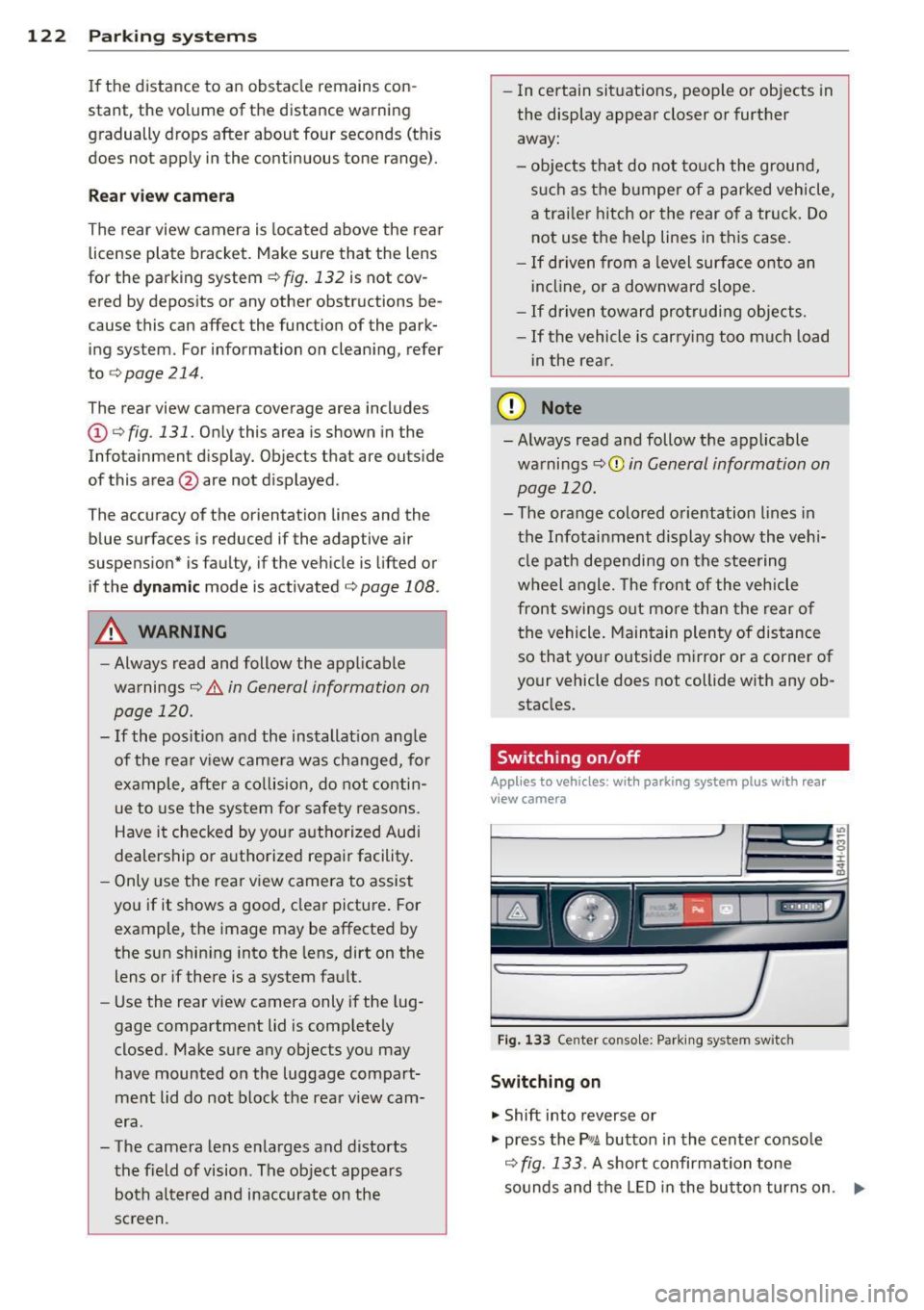
Fig . 133 Center console: Parking system sw itch
Switching on
.,. Shift into reverse or
.,. press the
PwA button in the center console
c:> fig. 133 . A short confirmation tone
sounds and the LED in the button turns on. .,..
Page 125 of 312
Switching between the r ear view camer a
and optical di spl ay
• Press the Gra ph ic control button ®
¢ page 123, fig. 134 to see the optica l dis
play.
• Press the
Rear view control button to see the
rear view camera image .
Switching off
• Drive forward faster than 6 mph (10 km/h),
or
• Press the
Pwi button, or
• Switch the ign ition off .
Visual di splay
Using the segments, you can estimate the d is
tance to an object in front of or behind the ve
h icle. The red lines mark the expected direc
tion of travel accord ing to the steering angle .
A white segment indicates an identified ob
stacle that is outside of the vehicle's path .
Red segments show identif ied obstacles that
a re in your veh icle's path. As your vehicle
comes closer to the obs tacle, the segmen ts
move closer to the vehicle. A t the la test the
coll is ion area has been reached whe n the next
to last segment is displayed. Obstacles in the
col lision area, including those outside of the
ve hicle's path, are shown in red. Do not con
tinue driving farther forward or in reverse
¢ .& in General information on page 120,
¢0 in General information on page 120 .
(!) Tips
The visua l disp lay in t he left part of the
disp lay should help you detect the critical
veh icle areas .
Parking sys tems 123
Cross parking
App lies to vehicles: wit h parking system plus w ith rear
v iew camera
This view may be used when parking in a ga
rage or in a parking space .
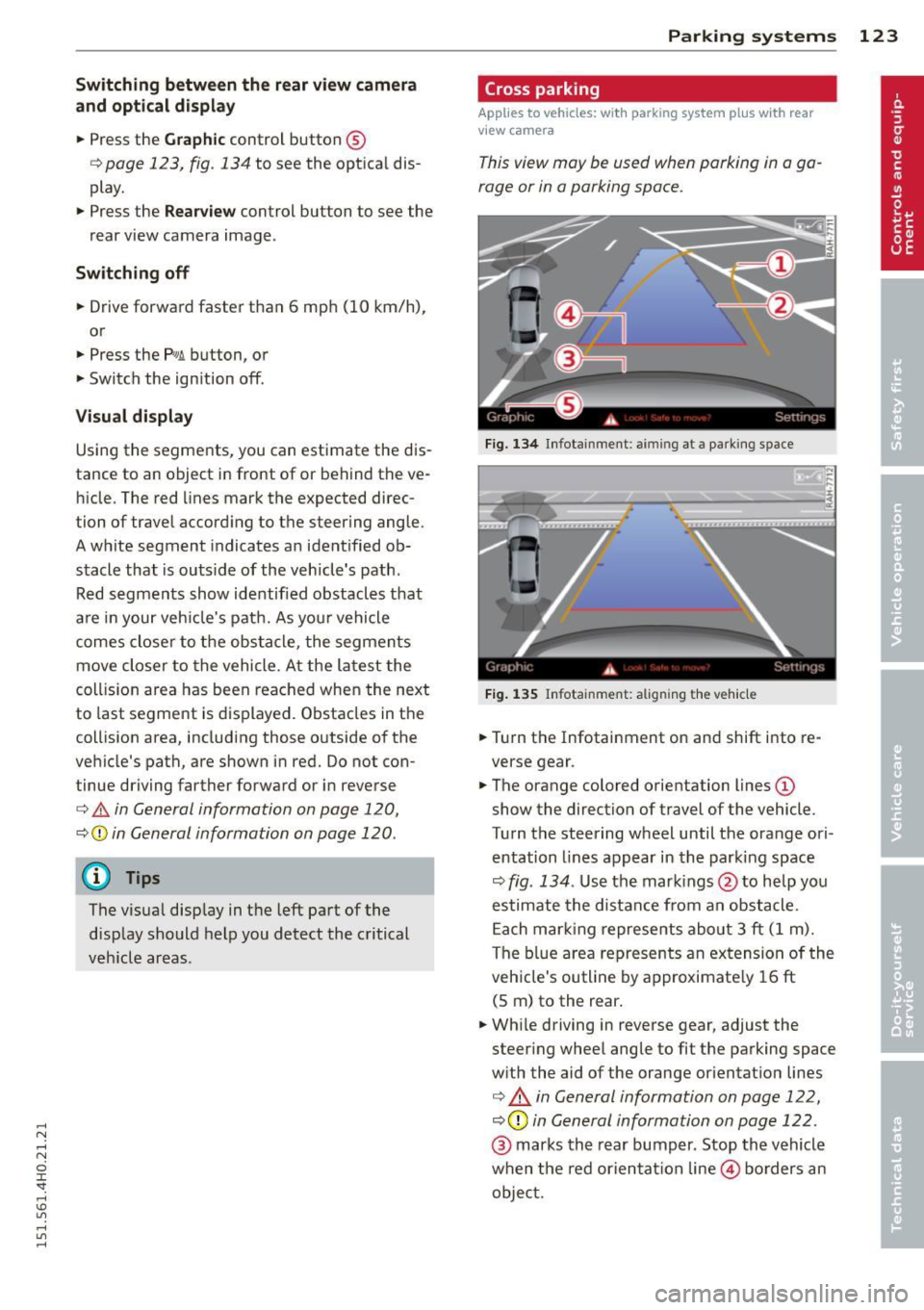
Fig. 134 In fo tainment : aimin g at a pa rk ing space
Fi g. 1 35 Infota inment : aligning t he ve hicle
• Turn the Infotainment on and shift i nto re
verse gear .
• The orange colored orientation lines@
show the direction of travel of the vehicle .
Turn the steering wheel until the orange ori
entation lines appear in the parki ng space
¢ fig . 134 . Use the mar kings @to help yo u
estimate the distance from an obstacle. Each mar king represents about 3 ft (1 m).
The b lue area represents an extension of the
veh icle's outline by approximate ly 16 ft
(5 m) to the rear .
• Wh ile driving in reverse gear, adjust the
steer ing whee l angle to fit the parking space
w ith the aid of the orange or ientation lines
¢ & in General information on page 122,
¢ (Din General information on page 122 .
@ marks the rear bumper. Stop the vehicle
when the red orientat ion line © borders an
objec t.