warning lights AUDI A8 2015 Owner's Manual
[x] Cancel search | Manufacturer: AUDI, Model Year: 2015, Model line: A8, Model: AUDI A8 2015Pages: 312, PDF Size: 79.18 MB
Page 31 of 312
Instrument s and warning /indicator lights 29
(D Note
To prevent sc ratches on the g lass covering
the Head-up Disp lay, do not place any ob
jects i n the projection opening.
(D} Tips
- Sunglasses with polarizat ion fi lters and
u nfavo rable lighting condit ions can af
fect the display.
- A specia l windshield is needed for the
Head-up Display funct ion .
- Fo r information on cleaning, refe r to
c:!) table on page 216.
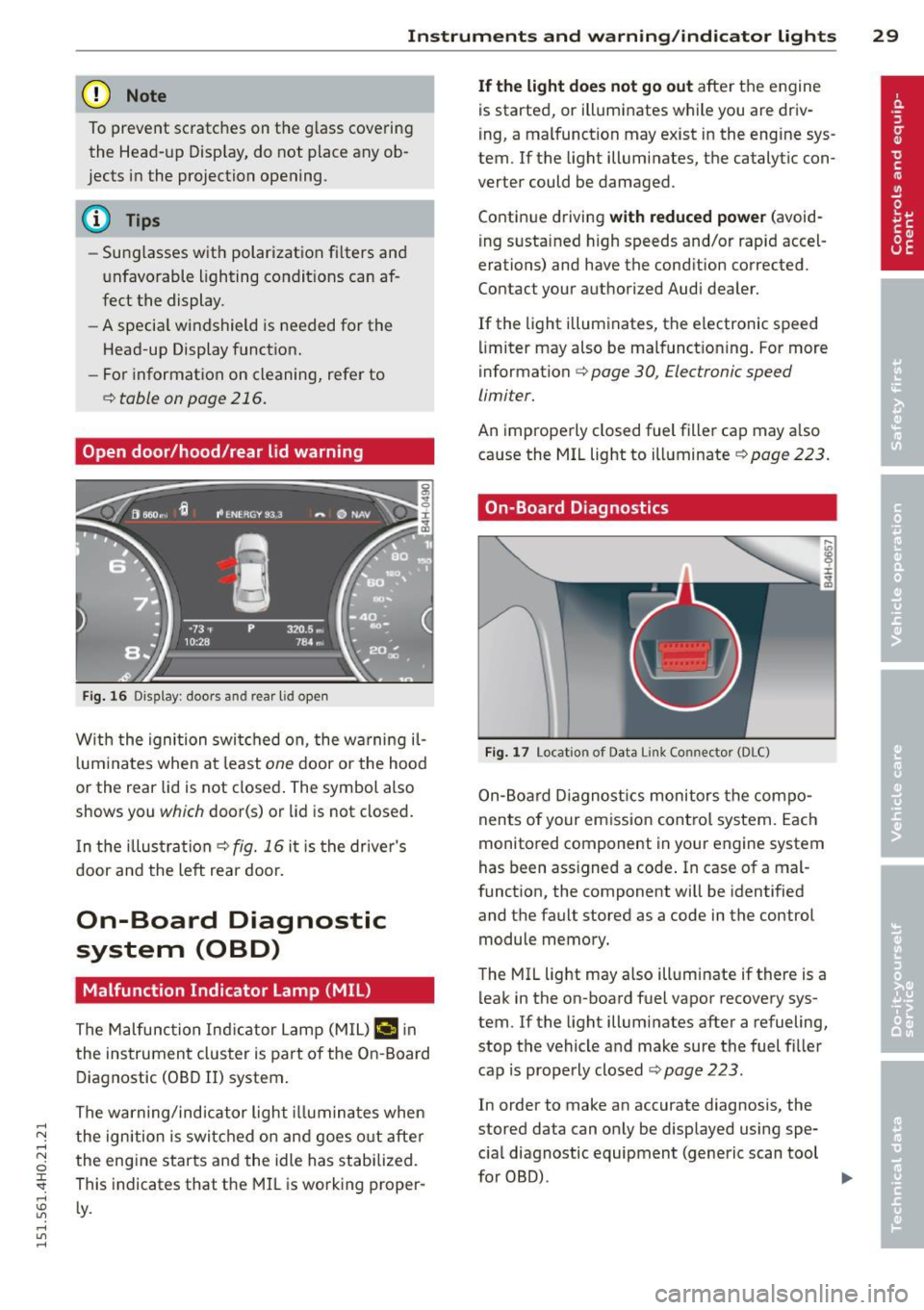
Open door/hood/rear lid warning
Fig. 16 Dis play: door s and rear lid o pe n
W ith the ignition swi tched on , the w arning il
l um ina tes when at le ast
one d oor or the hood
or the rear lid is not closed . The symbol also
shows you
which door(s) or lid is not closed.
I n the illus trati on
Q fig. 16 it i s the drive r's
door and the left rear door.
On-Board Diagnostic
system (OBD)
Malfunction Indicator Lamp (MIL)
The Malfunction In dica tor Lamp (M IL) ¢..ifl in
the ins trument clus ter is part of the On-B oard
D iagnostic (OB D II) system .
The warning/ind icator l ight illum ina tes when
the ign ition is switc hed o n and goes o ut afte r
the eng ine starts and the idle has stabilized.
This indicates that t he MIL is working proper ·
Ly .
If the light does not go out afte r th e engine
is starte d, or illumi nates while you are driv
i ng , a mal function may e xist in the eng ine sys
tem .
If the light illumi nate s, the catalytic con
verter could be d amaged .
Contin ue d riving
with reduced power (avo id
i ng s usta ined h igh speeds and/or rapid accel
erations) and have the cond ition corrected .
Contact your authori zed Audi dea ler.
If the light illuminates, the electronic speed
li miter may also be malfunct ioning. For more
i nformation
Q page 30, Elec tronic speed
limiter.
An imprope rly closed fuel fille r cap may a lso
ca use the MIL light to ill uminate
~ page 223.
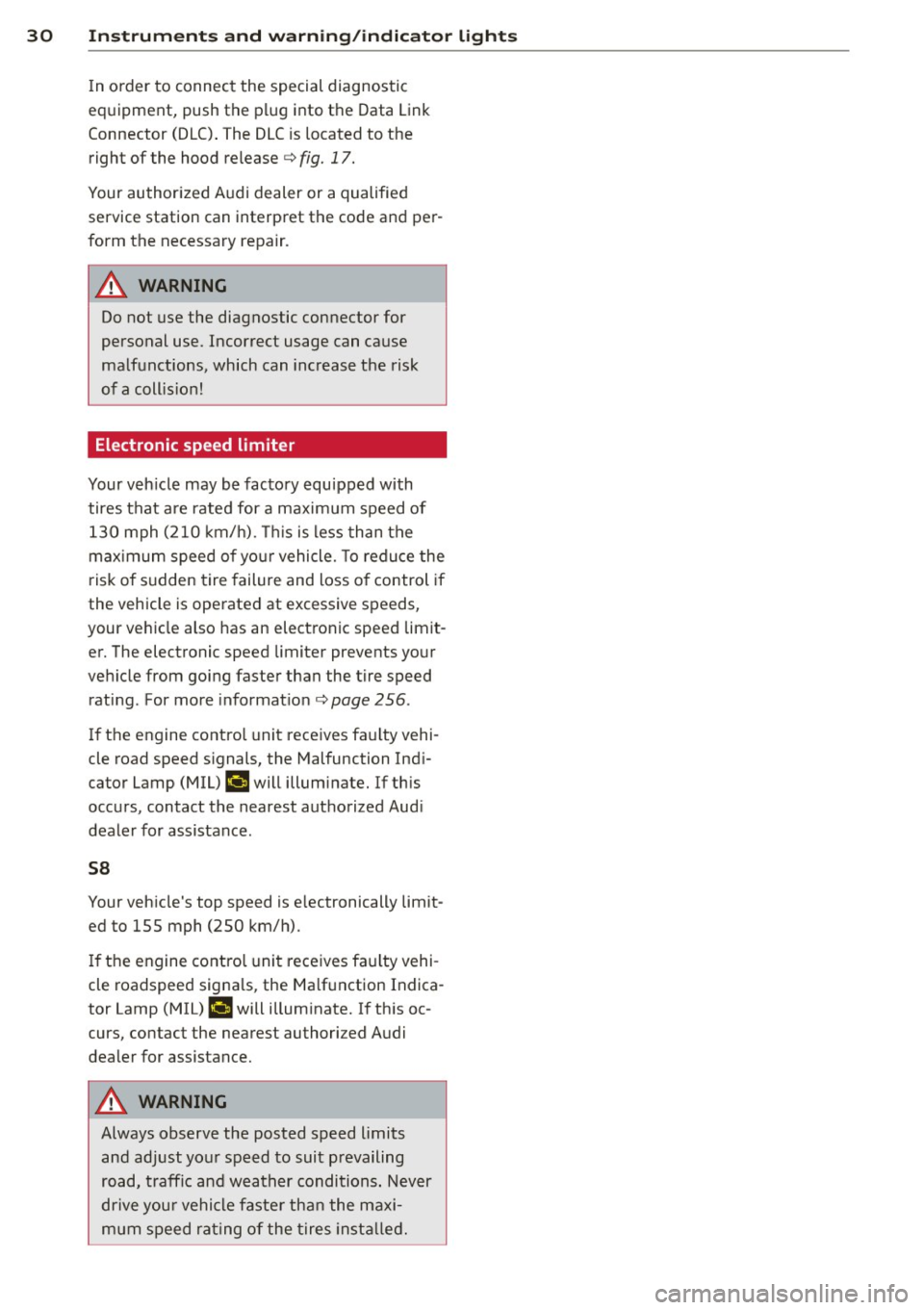
On-Board Diagnostics
Fig. 17 Locat io n of Data Link Co nn ector (D LC)
On- Boa rd Diagnost ics monitors the compo
nents of your emiss ion cont ro l s ystem. Each
monitored component in your eng ine system
has been ass igned a code . In case of a mal
funct ion, the component will be identified
and the fault stored as a code in the control
module memory.
T he MIL light may also illuminate if there is a
leak in the on -board fuel vapor recovery sys
tem. If the lig ht illuminates after a refueling,
stop the vehicle a nd make sure the fuel fi ller
cap is prope rly closed
c:!) page 223.
In order to make an accurate diagnosis, the
stored data can on ly be displayed using spe
c ia l diagnostic equipment (generic scan tool
furOBru.
~
Page 32 of 312
30 Instruments and warning /indicator lights
In order to connect the special diagnostic
equipment, push the plug into the Data Link
Connector (DLC) . The DLC is located to the
right of the hood release<=>
fig. 17.
Your authorized Audi dealer or a qualified
service station can interpret the code and per
form the necessary repa ir .
.&_ WARNING
Do not use the diagnostic connector for
personal use. Incorrect usage can cause
malfunctions, which can increase the risk
of a coll is ion!
Electronic speed limiter -
Your veh
icle may be factory equipped with
tires that are rated for a maximum speed of
130 mph (210 km/h). Thi s is less than the
maximum speed of your vehicle. To reduce the
risk of sudden tire failure and loss of control if
the vehicle is operated at excessive speeds,
your vehicle also has an electronic speed limit
er. The electronic speed limiter prevents your
vehicle from going faster than the tire speed
rating. For more information
c> page 256.
If the engine control unit receives faulty vehi
cle road speed signals, the Malfunction Indi
cator Lamp (MIU
¢'4 will illuminate. If this
occurs, contact the nearest authorized Aud i
dealer for assistance .
S8
Your vehicle's top speed is e lectronically limit
ed to 155 mph (250 km/h).
If the engine control unit receives faulty vehi
cle roadspeed signals, the Malfunction Indica
tor Lamp (MIU
¢'4 will illuminate. If this oc
curs, contact the nearest authori zed Audi
dealer for assistance .
.&_ WARNING
-
Always observe the posted speed limits
and adjust your speed to suit prevailing
road, traffic and weather conditions. Never
dr ive you r vehicle faster than the maxi
mum speed rating of the tires installed.
Page 44 of 312
42 Opening and closing
Closing the windows
.,. Pull the switch to the first stop and hold it
until the window reaches the desired posi
tion .
.,. Pull the switch briefly to the
second stop to
automatically close the window.
Power window switches
@ Driver's door
@ Passenger's door
© Left rear door
@ Right rear door
® Safety button (or two safety buttons in
vehicles w ith power child safety locks
r::!) page 41)
Child safety lock
When the safety button®¢ fig. 35 is press
ed, the LED in the button lights up. The fol
lowing features are switched off:
- The power windows in the rear doors,
- The buttons for the power sun shades * in
the side windows,
- The buttons for the power sun shade* in the
rear window,
- Front passenger power seat adjustment*
button.
&_ WARNING
- When you leave your veh icle - even if on
ly brief ly - always take the ignition key
with you. This applies particularly when children remain in the veh icle. Otherwise
the chi ldren could start the engine or op
erate electrical equipment (e.g. power
w indows). The power windows are func
tional until the driver's door or passeng
er's door has been opened .
- Be careful when closing the windows.
C heck to see that no one is in the way, or
serious injury could result!
- When locking the vehicle from outside,
the vehicle must be unoccupied since the
windows can no longer be opened in an
emergency.
(D Tips
- The driver can lower or raise the power
sun shades* in the s ide windows by using
switches © and @.
- After the ignition has been switched
off,
the windows can sti ll be opened or
closed for about 10 minutes. The power
w indows are not switched off until the
dr iver's door or passenger's door has
been opened .
What to do after a malfunction
The one-touch open and close function must
be reactivated if the battery has been discon
nected .
.,. Pull and hold the power window switch until
the window is fully closed .
.,. Release the sw itch and then pull it again for
at least one second.
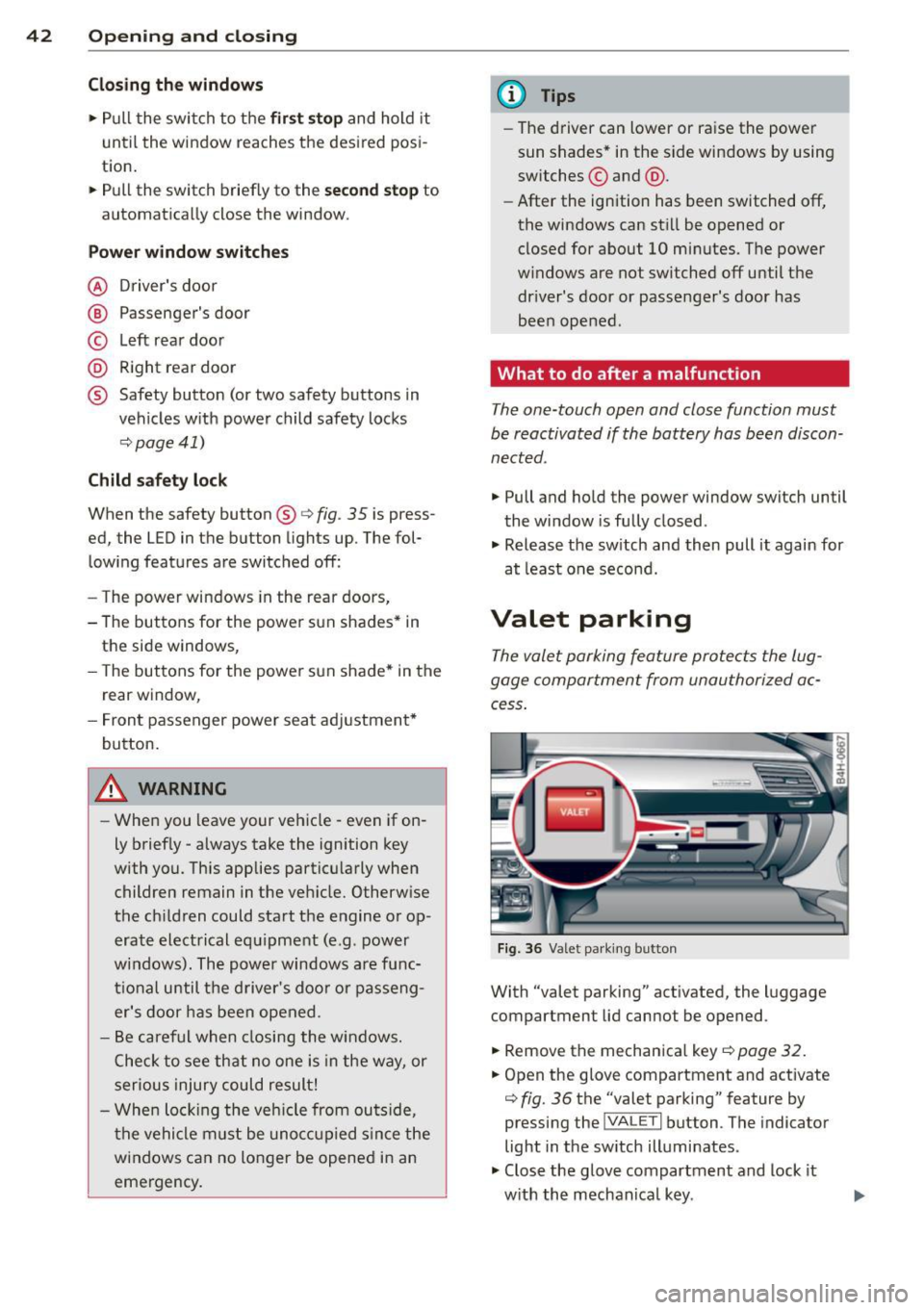
Valet parking
The valet parking feature protects the lug
gage compartment from unauthorized ac
cess .
Fig. 36 Valet parking button
With "valet parking" activated , the luggage
compartment lid cannot be opened .
.,. Remove the mechanica l key
¢ page 32.
.,. Open the glove compartment and activate
¢ fig. 36 the "valet parking" feature by
pressing the
j VA LETi button . The indicator
light in the sw itch illuminates .
.,. Close the glove compartment and lock it
w ith the mechanical key . .,.
Page 49 of 312

_& WARNING
-Automatic headlights are only intended
to assist the driver . They do not relieve
the driver of his responsibility to check
the headlights and to turn them on man
ually according to the current light and
visibility conditions. For example, fog
cannot be detected by the light sensors.
So always switch on the headlights
io
under these weather conditions and
when driving in the dark.
- Crashes can happen when you cannot see
the road ahead and when you cannot be
seen by other motorists. Always turn on
the headlights so that you can see ahead
and so that others can see your car from
the back.
- Please observe legal regulations when
using the lighting systems described.
(D Note
The rear fog lights should only be turned
on in accordance with traffic regulation, as
the lights are bright for following traffic.
(D Tips
- The light sensor* for automatic dynamic
headlight range control* is located in the
rear view mirror mount. You should
therefore not apply any stickers to the
windshield in this area in order to pre
vent malfunctions or failures.
- In the event of a light sensor malfunc
tion, the driver is notified in the instru
ment cluster display ~
page 22.
- You will hear a warning tone if you open
the driver door when the exterior lights
are switched on.
- In cool or damp weather, the inside of
the headlights, turn signals and tail
lights can fog over due to the tempera
ture difference between the inside and
outside. They will clear shortly after
switching them on. This does not affect
the service life of the lighting. Clear vision 4
7
Emergency flasher
The emergency flasher makes other motorists
aware that you or your vehicle are in an emer
gency situation .
Fig. 41 Center consol e: eme rge ncy flash er sw itc h
.,. Press the switch&..~ fig. 41 to turn the
emergency flashers on or off.
When the emergency flasher is on, all four
turn signals blink at the same time. The turn
signal indicator lights
B DI in the instru
ment cluster, as well as the light in the emer
gency flasher switch &.. blink likewise. The
emergency flasher also works when the igni
tion is turned off.
The emergency flashers will turn on automati
cally if you are in an accident where the airbag
has deployed.
@ Tips
You should turn on the emergency flashers
when:
- you a re the last vehicle standing in a traf
fic jam so that any other vehicles coming
can see you, or when
- your vehicle has broken down or you are
in an emergency situation, or when
- your vehicle is being towed by a tow
truck or if you are towing another vehicle
behind you.
Adjusting the exterior lighting
The settings ore adjusted in the MMI.
.,. Select: !CAR ! function button> Car systems
control button > Vehicle settings > Exterior
lighting. ..,.
Page 51 of 312

,....,
N ,....,
N
0 J:
'SI: ,...., \!) 1.1'1 ,...., 1.1'1 ,....,
-The high beam works only when the head
lights are on. The indicator light
II in the
instrument cluster ill uminates when the
high beams are on.
- The
headlight flasher works only as long as
you hold the lever -even if there are no
lights turned on. The indicator light
II in
the instrument cluster illum inates when you
use the head light flasher .
A WARNING
Do not use the high beam o r headlight
flasher if you know t hat these could blind
on coming traffic.
High beam assist
A ppl ies to vehicles : wit h high bea m ass ist
-
The high beam assist automatically switches
the high beams on or off, depending on the
surroundings and traffic conditions.
F ig. 4 3 Tu rn signa l an d h igh beam lever: Turning on
and off t he h igh beam ass ist
Activating high beam a ssist
Requirement : The light sw itch must be in the
AUTO position, the low beam headlights must
be on and the high beam assist must be
sw itched on in the Infotainment~
page 47.
.. Press the lever forwards (Din order to acti-
vate the high beam ass ist. The indicator
light
IIJ turns on in the inst rument cluste r
display and the high beams switch on or off
automati ca lly. The indica to r ligh t
Iii turns
on if the high be ams were switched on.
Switching the high beams on /off
manually
R equi rement : Hig h beam ass ist is activated.
Clear v is ion 49
If the high beams d id not swi tch on/off auto
matically when expected, you may instead
switch them on/off manually:
.. To swi tch the high beams on manually, press
the lever forwa rds (D. The indicato r light
Bl
turns on.
.. To switch the high beams off manually, pull
the lever backwards @. The high beam as
sist is deactivated .
Operating the headlight fla sher
.. To operate the flashe rs while the high beam
assist is active and the high beams are
sw itched off, pull the lever into posit ion @.
The high beam assist will remain active.
Messag es in the instrument cluster
di splay
Headlight ass ist: System fault
Drive to your authorized A udi dealer immedi
ate ly to have the ma lfunction corrected. Yo u
can still switch the high beams on or off man
u ally.
Headlight assi st: Unavailable . No camera
view
T he came ra v iew is b locked, for example by a
sticker o r debr is.
The sensor is loca ted between the inter io r
r earvi ew mirror and the w indshield . There
fo re, do not p lace a ny s tick ers i n this a rea on
t h e windsh ie ld.
Service setting
There is a different sensit iv ity sett ing for serv
ic ing . T hi s sett ing can be activated by pressing
and holding the b utton on the int erio r r ear
view m irror for more tha n 18 seconds. The
L E D next to the button blinks th ree times.
If
yo u have accidentally se lec ted this service
function, the origi nal sensitivity will be auto
matically restored the next t ime yo u sw itch
the ignit ion on.
IJ>,
Page 52 of 312

50 Clear vis ion
& WARNING
H igh beam assist is only intended to assist
the driver. The driver is still responsible for controlling the headlights and sw itching
th e high beams on and off manually de
pending on traffic, l ighting and visibility
condi tions. Failure to intervene manually
may lead to ris k of accident . It may be nec
essary to operate the high beams man ua l
ly in the following situat ions, e.g .:
- For adverse weather conditions such as
fog, heavy rain, blowing snow or spraying
water .
- On roads where oncoming traffic may be
partia lly obsc ured such as expressways .
-If there are individuals on the road with
no light ing or poor lighting, such as cy
cl ists .
- In tight c urves and on steep s lopes .
- In poorly lit areas.
- With strong reflectors su ch as signs.
- If the area of the windshie ld nea r th e
sensor is fogged over, dirty, icy or cov
ered w ith a st icker.
(D Tips
- The high beam ass ist is active above a
speed of approx . 25 mph (40 km/h).
- If afte r activation, your speed falls below
approx . 15 mp h (24 km/h), the high
beams w ill automatically be switched
off.
Interior lights
Front and rear interior lighting
Fi g. 44 Headliner: Front interior lights
F ig. 45 Rear headli ner : Read ing light
Press the app ropriate button ~ fig . 44:
~ -Inter ior light ing on/off
l!l -Door contact switch. The interior lighting
turns on automatically when you u nlock the
vehicle, open a door or switch the ignition off.
The interior light ing turns off several seconds
after you close the doors, when you lock the
vehicle or when you switch the ignition on.
When a doo r is open, the light turns off after
a few min utes.
~ -Read ing lights on/off
~ - Switching the rear reading lights on/off
from the cockpit .
I REAR MODEi* -Switching the rear readi ng
li ghts on/off from the cockpit : press the
I REAR MODE ! button and then th e appropriate
button ~ in the cockpit.
Ambience lighting
Applies to veh icles: w it h amb ience l ig h ting
You can select a color profile and brightness
for the ambie nce lighting in various areas of
the ve hicle, called zones.
Turning ambience lighting on
.. Select in the MMI: ICAR ! function button >
Car systems control button > Vehicle set·
tings > Interior light ing > On .
Adjusting /turning off the brightness
• Sele ct in the MM I: ICARI fu nction button >
Car sy stems control b utton > V ehicle set
ting s> Inte rior light ing > Brightness .
Page 55 of 312

Wiper and washer system
Switching the windshield wipers on
Fig. Sl W indshield wiper leve r
Move the windshield wiper lever to the corre
spond ing pos ition:
@ -Windshie ld w ipers
off
(D -Rain sensor mode. The w indshie ld w ipers
switch on once the vehicle speed exceeds ap
proximately 2 mph (4 km/h) and it is raining.
The higher the rain sensor sensitivity is set
(switch @to the right), the earlier the w ind
shield wipers react to moisture on the wind
shie ld. You can deact ivate rain sensor mode in
the MMI, which w ill then activate intermittent
mode. Select:
ICARI function button > Car sys
t e m s
control button > Dri ver ass is t > Ra in
s en sor
> Off . In intermittent mode, you can
adjust the interval time using the switch @.
@ -Slow wiping
@-Fast wiping
©-Single wipe. If you hold the lever in this
position longer, the wipers switch from slow
wiping to fast wip ing .
® -Clean the windshield . The wipers wipe
one time after several seconds of driving to
remove water drop lets. You can switch this
function
off by moving the lever to position ®
within 10 seconds after the afterw ipe . The af
terw ipe f unction is react ivated the next time
you switch the ig nition on.
Cleaning the headlights . The headlight wash
er system* only functions when the headlights
are on. If you move the lever to position ®,
Clear vi sion 5 3
the headlights and the night vision system
camera* are washed in intervals.
A WARNING
-The rain sensor is only designed to assist
and support the driver.
It remains entire
ly the driver's responsibility to monitor
outs ide weather cond itions and to man
ually activate the wipers as soon as rain
or drizzle reduces visibility through the
windshie ld.
- The windsh ield must not be treated w ith
wate r-repellent mate rials. They can in
crease glare unde r poo r vis ibility condi
tions such a s wetness, d arkness, or w hen
the sun is low on the hori zon. In addi
tion, they can cause the w indshield wip
ers to chatter.
- Properly f unctioning windshield wiper
blades are req uired for a clear v iew and
safe driving
¢ page 54, Replacing
windshield wiper blades.
(D Note
- In the case of frost, check whether the
windshield wiper blades are frozen to
the windshield. Switching on the wind
shield wipers can damage the wiper
blades!
- Prior to us ing a car wash, the w indshield
w iper system must be sw itched off ( lever
in posit ion @). T his he lps to prevent un
intentional switching on and damage to
the windsh ield wiper system.
- Do not use the wipers to clear a frosted
w indow. Us ing the wipers as a conve n
ient ice scrape r will destroy the wiper
blades.
(D Tips
- The windshield wipers are sw itched off
when the ign it ion is off . Activate the
w indshield wipe rs after the ignition is
switched back o n by movi ng the w ind
shield wiper lever to any positi on.
- Worn or d irty wi ndshield wipe r blades
result in streaking. This ca n affec t the
Page 58 of 312

56 Clear vis ion
Dimming the mirrors
Fig. 5 4 Automat ic d imming rea rv iew mirror
.. To dim the rearview mirror and both exterior
mirrors, press the @button . The diode @
turns on. The rearview and exter ior mirrors
dim automatically when light sh ines on
them, for example from head lights on ave
hicle to the rea r.
.&_ WARNING
Electrolyte fl uid can leak from au tomatic
dimmi ng mirrors if the glass is broken.
Electrolyte fl uid can irritate sk in, eyes and
respiratory system.
- Repeated or prolonged exposure to elec
t ro lyte can cause irritation to the resp ira
tory system, especially among people
with asthma or other respiratory cond i
tions. Get fresh air immediately by leav
ing the vehicle or, if that is not possible,
open windows and doors all the way .
- If electrolyte gets into the eyes, flush
them thoroughly with large amounts of
clean water for at least 15 m in utes;
med ica l attent ion is recommended.
- If electrolyte contacts sk in, f lush affect
e d area w ith clean water for at least 15
min utes and then w ash affec ted area
with soap and water; medical at tention
is recommended. Thoroughly wash af
fected clothing and shoes before reuse.
- If swa llowed and person is conscious,
rinse mouth w it h wate r fo r at leas t 15
minutes. Do not induce vomiting unless
instructed to do so by medical professio
nal. Get medical attention immediately.
.
(D Note
Liqu id e lectrolyte leaking from broken mir
ror glass w ill damage any plastic surfaces
i t comes in contact with. Clean up spilled
electrolyte immediately with clean water
and a sponge .
@ Tips
-Switching off the dimming function of
the inside rear view mirror also deacti
vates the automatic dimming function of
the exter ior mir ro rs .
- Automatic d imm ing for the mirror on ly
operates properly if the sun shade* for
the rear w indow is not in use or the light
st riking the inside m irror is not hinde red
by ot he r objects.
- The automatic dimming m irrors do not
dim when the interior lighting is tu rned
on or the reve rse gear is selected .
Digital compass
Switching the compass on and off
Applies to vehicles: with digital compass
The compass direction is shown in the rear
view mirror .
l
Fig. 55 Rearv iew mirro r: Digital compass activated
.. To switch the compass on or off, press and
hold the b utton @ until the compass dis
p lay in the m irror ¢
fig. 55 appears o r disap
pea rs.
The dig ital compass on ly works when the igni
t ion is on . The directions are indicated with
abbrev iat ions:
N (nor th), NE (no rtheast), E
(east) , SE (southeas t), S (so uth), SW (so uth
west),
W (west), NW (northwest) .
Page 63 of 312

enter and exit comforta bly . The side bol
sters inf late again once you begin dr iv
i ng .
Armrest
There is a storage compartment under the
armrest.
F ig. S 9 Cockp it: ce nter arm rest
Opening the storage compartment
iii 0
±
"' m
• Press the button -arrow- and move the arm
rest up
¢ fig. 59 .
Adjusting the armre st
• To
move the armrest forward and up, press
the button -a rrow- whi le pulling the armrest
into the desired position.
• To bring the armrest back into its original
pos it ion, press the button -arrow- wh ile
pressing the arm rest down .
P lease note that the driver 's arm movements
may be restr icted w ith the armrest folded
down . For th is reason, the armrest should not
be folded down when dr iving in c ity traffic.
Rear seats
General information
S afe transporta tion of pas sengers on the rear
sea ts requires proper safe ty precautions.
All passengers on the rear seats must be sea t
ed i n comp lian ce w it h t he safety g uidelines
explaine d in
r=.>page 143 and ¢page 151.
The correct seating position is critical for the
safety of front
and rear seat passengers alike
¢ page 136.
Seats and storage 61
A WARNING
-Occupants in t he front and rear seats
must always be properly restrai ned.
- Do not let anyone rid e in the ve hicle
without the head rest raints p rov ided.
Head rest raints help to reduce injuries .
- Loose items inside the passenge r com
partment can fly forward in a cras h or
sudden maneuve r and injure occupants .
A lways s to re articles in the luggage com
pa rtm ent a nd use t he tie-down eyelets.
- Read and heed a ll WAR NIN GS
r=.> pag e 136, Prop er se ating positions
for passengers in rear sea ts.
Adjusting the rear seats
App lies to veh icles: w ith comfort seats
Fi g. 6 0 Rig ht rea r seat: seat adjustme nt b utto ns
@ -Adjust ing the lumbar support: press the
button to the left/r ight to adjust the lumbar
support c urvatu re
r=.> ,&. . Press the button up/
down to adjust the he ight of the l umbar sup
po rt ¢
A::,. .
®-Moving t he upper sect io n of the back rest
fo rward/back . P ress th e button forwa rd/back
¢ _&. .
©-Massage function*: to select the "pu lsat
i ng" massage function, press the button for
ward . To select the "wave" massage function,
pr ess the button bac k.
If three lights in the
bu tton t urn on, the massage is a t the s tron
ges t leve l. To reduce the m assage level, press
the button again. To tu rn the massage func
tion off, press the button again until a ll of the
li ghts tur n off . ..,.
Page 64 of 312

62 Seats and storage
@-Moving the seat forward/back: press the
button forward/back
r=:, .&. .
@ -Moving the seat up/down: press the but
ton up/down~ &..
©-Switching front passenger seat adjust
ment on/off: this function must be activated
in the MMI
<=:> page 64 , <=:> &, .To switch front
passenger seat adjustment on, press the but
ton. You can now adjust the front passenger
seats using the buttons @and @. If you do
not press the buttons ® or@ , front passen
ger se at adjustment switche s off automatical
ly after approximately ten seconds.
A WARNING
- The power adjustment for the individual seats also works with the ignition. For
this reason, children should never be left
unattended in the vehicle -they could be
injured!
- Exercise caution when adjusting the
seats . Unsupervised or careless seat ad
justment can pinch fingers or hands causing injuries.
- Vehicles with a pass through in the cen
ter console have seating for four. The
Reclining rear seat overview
Applies to vehicles: with reclining rear seat
,-@
_____ ___ ., ------- ---- ·-------- ----- ------
-
Fig. 61 Rear door : ad justing t he reclining po sit ion
CD -Adjusting the reclining position long center console between the two
rear seats is
not a seating position.
Therefore, a safety belt is not provided.
(D Note
If a child seat is attached to one of the rear
seats, this seat must not be adjusted using
the power controls under any circumstan
ces. The easy entry function for this seat
must also be deactivated in the MMI
<=:> page 64. The child seat as well as the
rear seat can be damaged by the adjust
ment process.
(D Tips
The massage function switches off auto
matically after approximately 10 minutes.
- If you cannot move the front passenger
seat, it may be because
- the front passenger's seat memory
function is switched off
r=;, page 67 or
- the child safety lock is switched on (the
@ button ¢ page 41 or the right t
button <=:> page 41 lights up in the driv
er's door), or
- the front passenger seat adjustment is
switched off in the MMI
r=;, page 64.
@ -Adjusting the standard position