ECO mode AUDI A8 2016 User Guide
[x] Cancel search | Manufacturer: AUDI, Model Year: 2016, Model line: A8, Model: AUDI A8 2016Pages: 302, PDF Size: 75.68 MB
Page 75 of 302
Storage
Cupholder
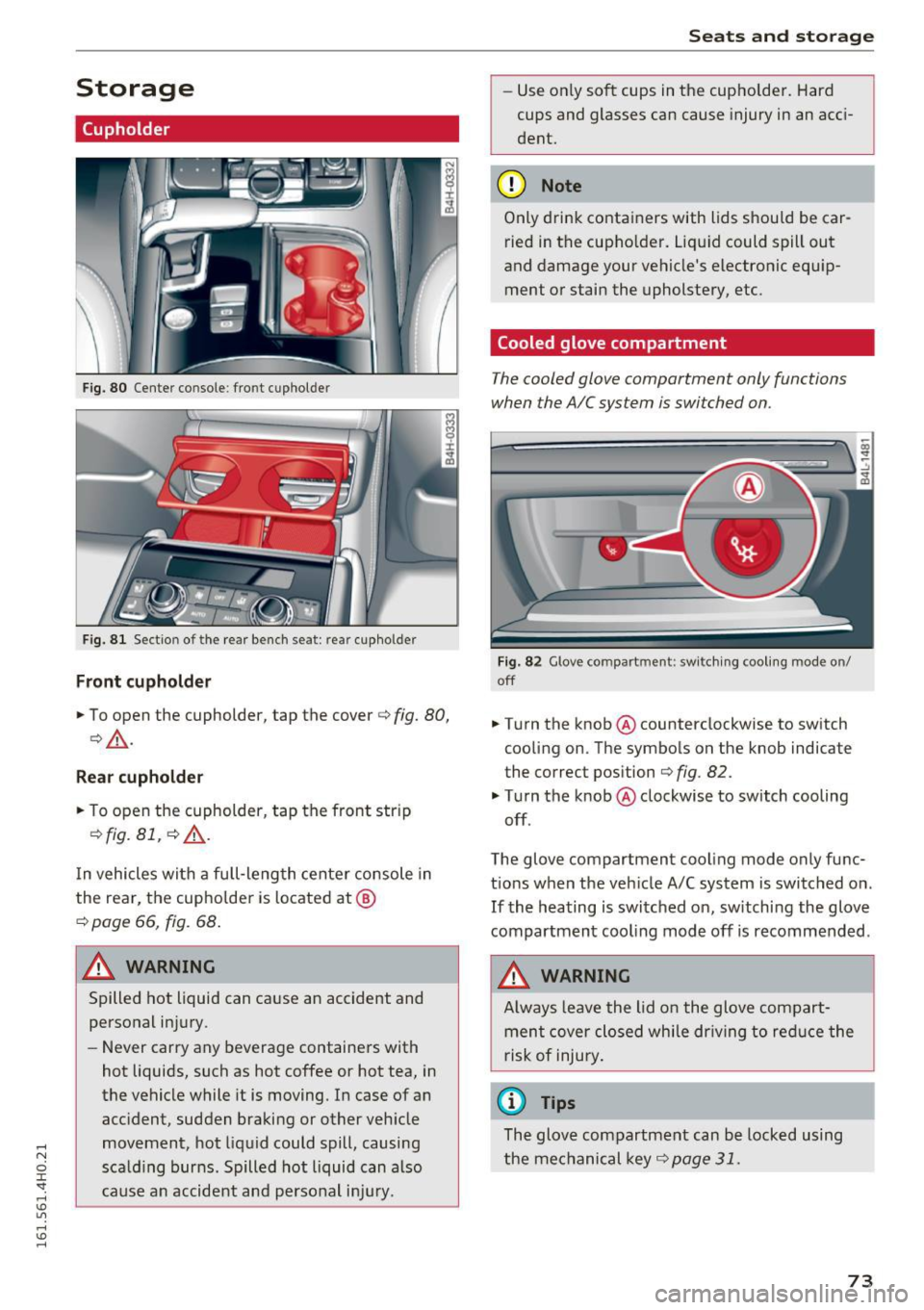
Fig. 80 Center console : fro nt c uphol der
F ig. 8 1 Sect io n of t he rear bench se at: r ear cupho lde r
Front cupholder
.,. To open the cupholder, tap the cover c:> fig. 80,
c:>& .
Rea r cupho lder
.,. To open the cupholder, tap the front strip
¢ fig. 81, c::> &.
In vehicles with a full-length center console in
the rear, the cupho lder is located at @
c:> page 66, fig. 68.
A WARNING
Spilled hot liquid can cause an accident and
personal in jury .
- Never carry any beverage containers with
hot liquids, such as hot coffee or hot tea, in
the vehicle while it is moving. In case of an
acc ident , sudden braking or other veh icle
movement, hot liquid could spill, causing
scald ing burns. Spilled hot liquid can also
cause an accident and perso nal i njury.
Seats and storag e
-Use on ly soft cups in the cupholder. Hard
cups and glasses can cause injury in an acc i
dent.
(D Note
Only drink containers with lids should be car
ried in the cupholder. Liq uid could spill out
and damage your vehicle's electronic equ ip
ment or stain the upholstery, etc .
Cooled glove compartment
The cooled glove compartment only functions
when the AIC system i s switched on.
Fig. 82 G love co mpart ment : swit ch ing coo ling mode o n/
off
.,. Turn the knob@ counterclockwise to switch
cooling on . The symbols on the knob indicate
the correct position
c:> fig. 82 .
"Turn the knob @ clockwise to switch cooling
off.
The glove compartment cooling mode only func
tions when the veh icle A/C system is switched o n.
If the heating is switched on, sw itchi ng the glove
compartment coo ling mode off is recommended .
A WARNING
-
Always leave the lid o n the glove compart
ment cover closed while dr iving to re duce the
r isk of injury .
(0 Tips
The glove compartment can be locked using
the mechanical key ¢
page 31.
73
Page 78 of 302
Warm and cold
Warm and cold
Climate control system
Description
The climate control system warms, cools and
adds humidity to the air in the veh icle inter ior. It
is the most effective when the windows and sun
roof* are closed . If the temperature inside the
parked vehicle becomes very warm, opening the
window briefly will speed up the cooling process.
I n all heating mode functions except
defrost, the
b lower only switches to a higher speed once the
engine coolant has reached a certain tempera
ture .
Condensat ion from the cooling system can drip
and form a puddle of water under the veh icle.
This is normal and does not mean there is a leak.
P ollutant filt er
The po llutant filte r removes pollutants such as
dust and pollen from the a ir.
The air pollutants filter must be changed at the intervals specif ied in your Warranty
& Mainte
nance booklet, so that the a ir cond it ione r can
properly work.
If you drive your vehicle in an area with high air pollut ion, the filter may need to be changed
more frequently than specified i n your Aud i Wa r
ranty
& Maintenance booklet. If in doubt, ask
your author ized Audi Service Advisor for advice.
Key cod ed setting s
The climate control settings are automatically
stored and assigned to the remote contro l key
that is in use .
.8, WARNING
Reduced visib ility is dangerous and can ca use
accidents.
- For safe dr iv ing it is very impo rtan t that a ll
windows be free of ice, snow and condensa
t ion .
76
- Complete ly familiarize yourself with the
proper use and function of the heating and
ventilation system and espec ially how to de
fog and defrost the wi ndows .
- Never use the windshield wiper/washer sys
tem in freezing weather until you have
warmed the windshield first, using the heat ing and vent ilation system. The washer solu
tion may freeze on the windshield and re
duce visibi lity.
(D Note
- If you suspect that the air conditioner has
been damaged, sw itch the system off to
avoid further damage and have it inspected
by a q ualified dealership.
- Repa irs to the Aud i air cond itioner requ ire
special techn ica l know ledge and spec ial
tools. Contact an a uthorized Audi dealer fo r
assistance.
@ For the sake of the environment
By reduc ing the amo unt of fuel you use, you
also red uce the amount of pollutants emitted
into the a ir.
(D Tips
- Keep t he a ir intake slots (in front of the
windshield) free from ice, snow and debr is
in orde r to maintain the prope r funct ion of
the climate control system .
- The energy management sys tem may sw itch
the seat heating* o r rea r window defroster
off temporarily. These systems are available
again as soon as the energy balance has
been restored.
- Air escapes through vents under the rear
window. When placing items of clothing on
the luggage compartment cover, ensure
that the openings are not covered.
Page 79 of 302
Warm and cold
Operation
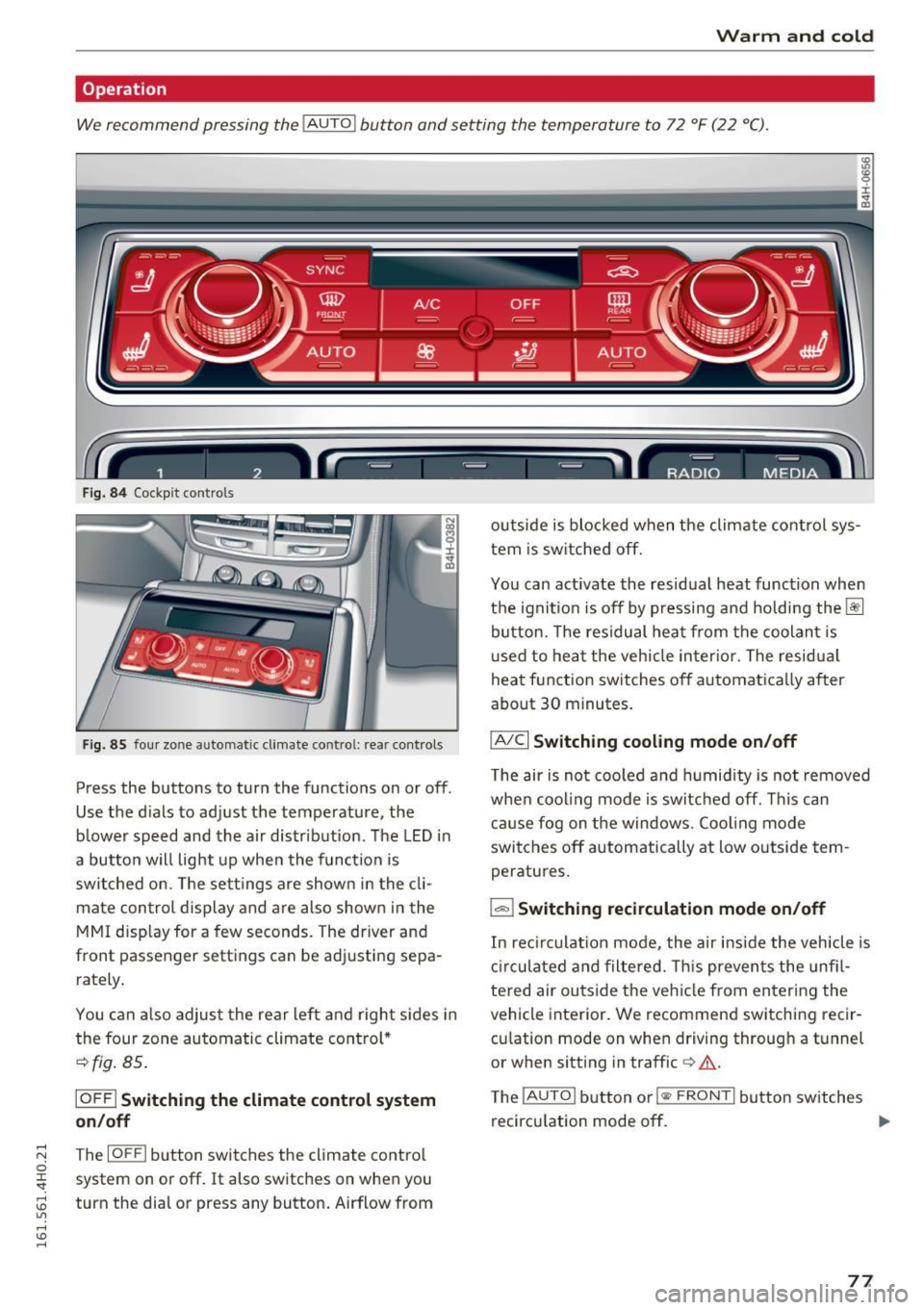
We recommend pressing the
! AUTO ! button and setting the temperature to 72 °F (22 °C).
Fig. 84 Cockpit con trols
Fig. 85 four zone automatic climate control: rear controls
Press the buttons to turn the functions on or off .
Use the dials to adjust the temperature, the
b lower speed and the air distr ibut ion. The LED in
a butto n will light up when the function is
switched on. The settings a re shown in the cli
mate con trol display and are also shown in the
MMI disp lay for a few seconds. The driver and
front passenger settings can be adj usting sepa
rately .
You can also adjus t the rear left and right sides in
the four zone automatic climate control*
¢fig. 85 .
IOFF I Switching the climate control system
on/off
~ The IOFFI button switches the climate control 0
~ system on or off. It also switches on when you
~ turn the dial or press any button. Airflow from U"I ,...., \!) ,....,
outside is blocked when the climate control sys
tem is switched off.
You can act ivate the residual heat function when
the ignit io n i s off by pressing and holding the~
button. The residual heat from the coolant is
u sed to heat the veh icle inter ior. The residua l
heat function switches off automatica lly after
about 30 minutes .
IA/Cl Switching cooling mode on/off
The air is not cooled and humidity is not removed
when cooling mode is switched off. This can
cause fog on the windows. Coo ling mode
switches off automatically at low outside tem
peratures.
1 .,.,,1 Switching recirculation mode on/off
In rec irculat ion mode, the air inside the vehicle is
circulated and filtered. This prevents the unfi l
tered air outside the vehicle from entering the
vehicle interior. We recommend switching recir
cu lation mode on when driving through a tunnel
or when sitting in traffic
c> &.
The !AUTO I button or I
recircu lation mode off. ..,.
77
Page 80 of 302
Warm and cold
IAUTO ! Switching auto matic mode on
Automatic mode ma intains a constant tempera
ture inside the vehicle. Air temperature, airflow
and air distribution are cont rolled automatically.
Adjusting th e tempe rature
Tempe ratures between 60 °F (+16 °C) and 84 °F
(+28 °C) can be set. Outside of this range,
l o or hi
will appear in the climate control system disp lay.
At both of these settings, the climate control sys
tem runs continuously at maximum cooling or
heating power . There is no temperature regula
tion .
~ Adjust ing th e airflo w
You can adjust the airf low manually to suit your
needs . To have the airflow regulated automati
cally, press the
IAU TO I button.
~ Adjusting the air distribution
You can manually se lect the vents where the a ir
will flow. To have the a ir dist ribution reg ulated
automatically, press the
IAU TO I button.
[ti /~ * Adjusting Seat h eating /v entil ation *
Pressing the button switches the seat heating/
venti lation on at the h ighest setting (level 3) . The
L EDs indicate the temperature level. To reduce
the tempera ture, press the button aga in. To
switch the seat heating/ventilation off, press the
button repeated ly until the LED turns off.
Afte r 10 minutes, the seat heating/ventilation
automatically switches from level 3 to level 2 .
In vehicles without the four zone automat ic cl i
mate control*, buttons in the rear center console
control the seat hea ting for both outer rear
seats*.
I @ FRONT I Switch th e defroster on /off
The windsh ield and s ide windows are defrosted
or cleared of condensation as qu ickly as possible .
The max imum amo unt of air flows ma inly from
the vents below the w indshield. Recircu lation
mode switches off. The temperature shou ld be
set to approximate ly 72 ° F (22 °C).
The
IAU TOI button switches the defroster off.
78
lliil REAR I Switch ing rear window he ater on /
off
The rear window heater only operates when the
engine is running . It switches off automatically
after 10 to 20 minutes, depending on the outside
temperature.
To prevent the rear window heater from switch
i ng off automatica lly, press and hold the
ICiJ REARI
button for more than 2 seconds. This rema ins
stored until the ignition is sw itched off.
I SYNC ! Synchroni zation *
When synchronization is switched on, the set
tings for the driver's side are applied to the front
passenger's side (except for seat heating/venti la
tion*). The rear seat is also synchroni zed in
vehicles with the 4-zone deluxe automatic cli mate control system*. Synchron izat ion sw itches
off if the sett ings a re adjusted on the front pas
senger's s ide or in the rear*.
You can synchronize the sett ings in a row by
pressing and holding a knob . For example, to ap
ply the settings for the front passenger's side to
the d river's s ide, press and hold the knob o n the
front passenger 's side.
Air vents
You can open or close the center and rear vents in
the cockpit and the vents in the rear center con
so le and doo r pillars us ing the ridged thumb
whee ls. The levers adj ust the direction of the air
flow from the vents.
_&. WARNING
- Do not use the rec irculat ion mode for ex
tended periods of time . The windows could
fog up since no fresh air can enter the vehi cle. If the windows fog up, press the air re
circulation button again immed iate ly to
sw itch off the a ir recircu lation function or
select defrost.
- Individuals w ith reduced sensit iv ity to pa in
or temperature could develop burns when
using the seat heating funct ion. To reduce
the risk of injury, these individuals should not use seat heating.
-
Page 87 of 302
.... N
0 J:
'SI: ....
To prevent rolling back unintentionally on an in
cline, do the following:
11-Keep the sw itch<®) pulled and depress the ac
celerator. The parking brake stays applied and
prevents the vehicle from rolling backward .
11-You can release the switch© once you are su re
that you a re deve loping enough forwa rd mo
mentum at the whee ls as you depress the ac
celerator .
Depending on the weight of the rig (vehicle and
trailer) and the seve rity of the incline, you may
roll backwards as you start. You can prevent roll
ing backwards by holding the parking brake
switch C®> pulled out and accelerating -just as
you would when starting on a hill with a conven
tional hand brake.
Emergency braking
In the event that the conventional brake system
fails or locks.
11-In an emergency, pull the sw itch<®) and contin
ue to pull it to s low your vehicle down with the
parking brake.
11-As soon as you release the switch © or acceler-
ate, the brak ing process stops.
If you pull the switch<®> and hold it above a
speed of about 5 mph (8 km/h), the emergency
braking function is in itiated. The vehicle is braked
at all four wheels by activating the hydrau lic
brake system . The brake performance is sim ilar
to making an emergency stop¢,& .
In order not to activate the emergency brak ing by
mistake, an audib le warning tone (bu zzer)
sounds when the sw itch(®) is pu lled . As soon as
the switch(®) is released, or the accelerator pedal
i s depressed, emergency braking stops .
A WARNING
Emergency braking should only be used in an
emergency, when the normal foot brake has
fai led or the brake pedal is obstructed. Using
t he parking brake to perform emergency
braking will slow your vehicle down as if you
D riving
had made a full brake applicat ion . The laws of
physics cannot be suspended even with ESC
and its associated components (ABS, ASR,
EDL). In corners and when road or weather
conditions are bad, a full brake application
can cause the vehicle to skid or the rear end to
b reak away -risking an acc ident.
Start/Stop system
Description
Applies to: vehicles with Start-Stop-System
The Start-Stop -System can help increase fuel
economy and reduce CO2 emissions.
In the Start-Stop-mode, the engine shuts off au
tomatica lly when the vehicle is stopped, such as
at a traffic light . The ign ition remains switched
on during this stop phase. The eng ine will be au
tomat ically restarted when needed.
The last Start-Stop-System setting (on/off using
the b utton
10 -I) will be restored when the igni
t ion is turned on. The LED in the
10 ~1 button turns
on when the Start-Stop-System is switched off
manually .
Basic requirements for the Start-Stop mode
-The driver's door is closed.
- The driver' seat belt is latched .
- The hood is closed.
- The vehicle must have bee n driven faster than
2.5 mph (4 km/h) since the last stop.
- A trailer is not hitched to the vehicle .
A WARNING
-
-Never let the vehicle roll with the engine
switched off. You could lose contro l over the
veh icle. Th is can lead to a collision and seri
ous injuries .
- The brake booster and the steering support
do not work while the engine is switched
off . More force is required to stop and to
steer the vehicle.
- To reduce the risk of injur ies, ma ke sure that
the Sta rt-Stop-System is turned off when
working in the engine compartment
¢page 87.
85
Page 90 of 302
Driving
Speed warning system
Introduction
The speed warning system helps you to stay un
der a specified maximum speed .
The speed warning system warns you if you are
exceeding the maximum speed that you have set .
You will hear a warning tone when your speed ex
ceeds the stored value by approximately 3 mph
(3 km/h). An indicator light . (USA models) .
(Canada models) in the instrument cluster dis
p lay also tur ns on at the same time. The indicator
light •• turns off when the speed decreases
be low the stored maximum speed.
Setting a threshold is recommended if you would
like to be reminded when you reach a certa in
maximum speed. Situations where you may want
to do so include driving in a country with a gener
al speed limit or if there is a specified maximum
speed for winter tires.
(D Tips
Even though your vehicle is equipped with a
speed warning system, you should still watch
the speedometer to make sure you are not
driving faster than the speed limit.
Setting the threshold
You con set, change and delete the threshold in
the MMI.
.,. Select:
ICARI function button > Car systems
contro l button > Driver assist > Speed warning.
You can set any threshold between 20 mph (30
km/h) and 150 mph (240 km/h). Settings can
each be adjusted in increments of S mph (10 km/
h).
88
Cruise control system
Switching on
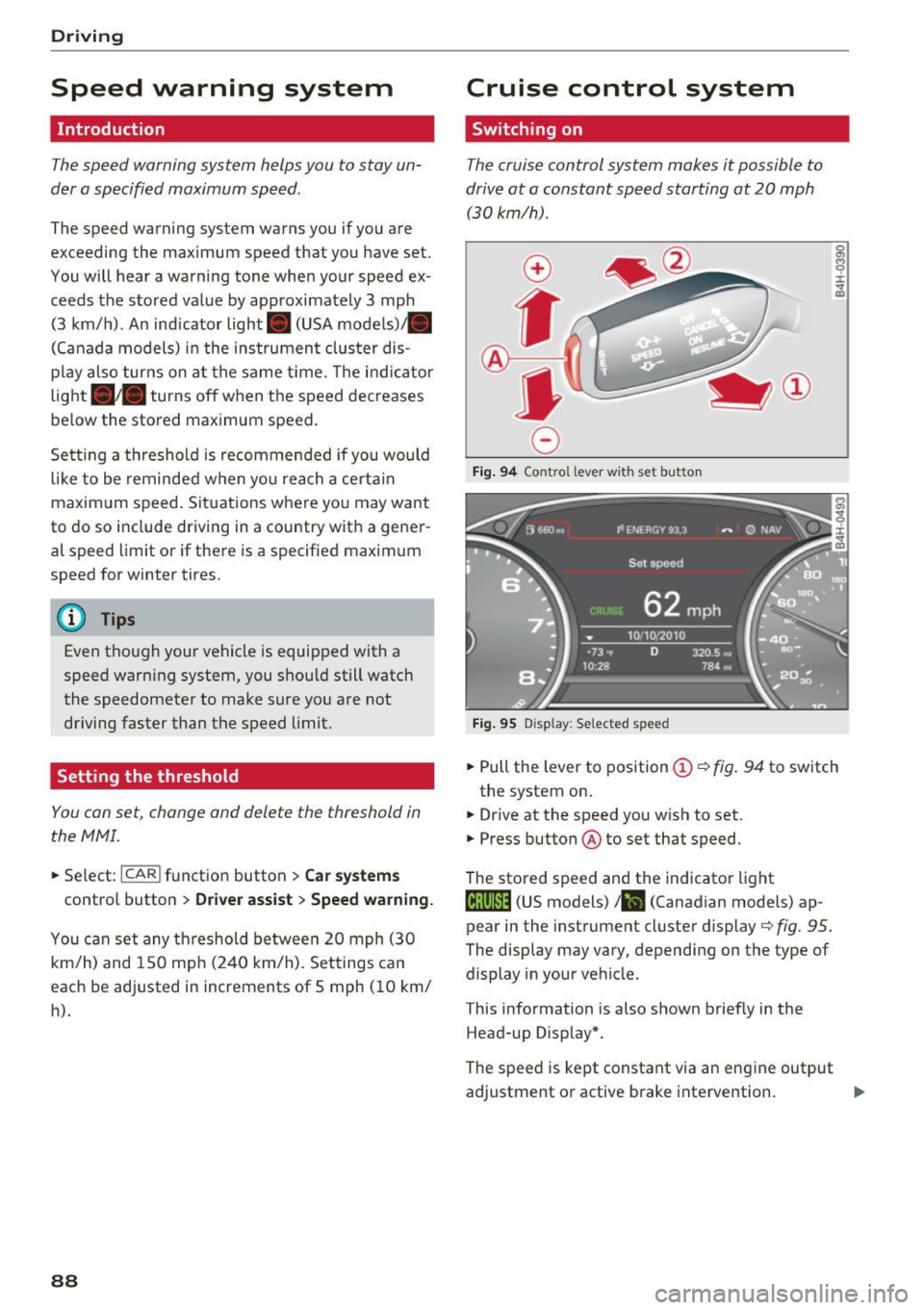
The cruise control system makes it possible to
drive at a constant speed starting at 20 mph (30 km/h) .
0
f
®l
0
Fig. 94 Contro l lever wi th se t but ton
Fig. 95 D isp lay : Selected speed
g M 0 ±
~
.,. Pull the lever to position (D <::> fig . 94 to switch
the system on.
.,. Drive at the speed you wish to set .
.,. Press button @to set that speed .
The stored speed and the indicator light
Iij;\1)~14 (US models) !Bl (Canadian models) ap
pear in the instrument cluster display
c> fig. 95.
The display may vary, depending on the type of
display in your vehicle.
This information is also shown briefly in the
Head-up Display*.
The speed is kept constant via an engine output
adjustment or active brake intervention. ..,_
Page 95 of 302
Audi adaptive cruise control and braking guard
.. You must also press the brake pedal when the
vehicle is stopped .
Switching adaptive cruise control off
.. Push the lever away from you into position @
until it clicks into place. The message
ACC off
appea rs.
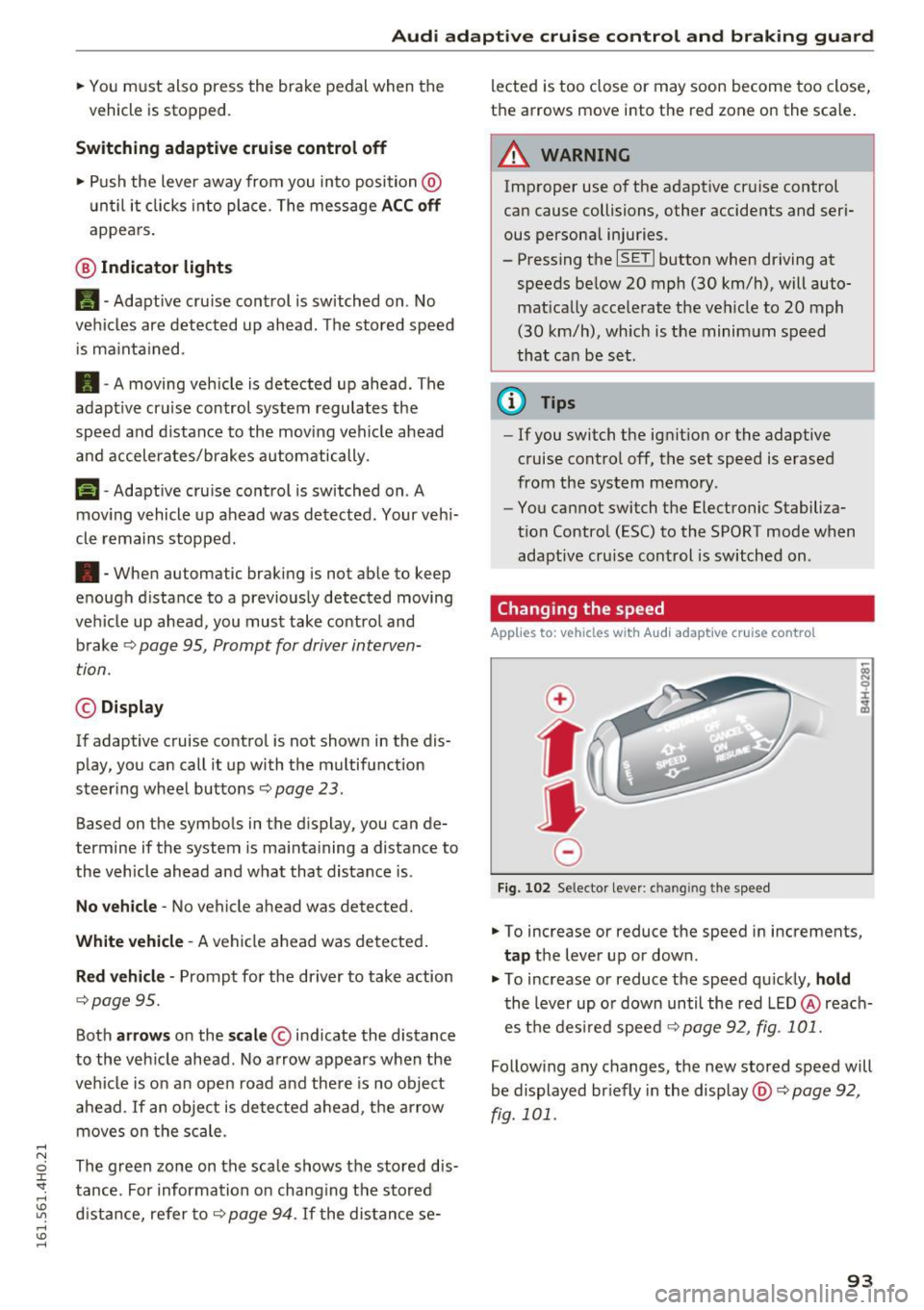
@ Indicator lights
II-Adapt ive cru ise control is switched on . No
vehicles are detected up ahead. The stored speed
is ma inta ined .
• -A moving vehicle is detected up ahead . The
adapt ive cruise control system regulates the
speed and distance to the moving vehicle ahead
and accelerates/brakes automatically.
(-) -Adaptive cru ise control is switched on . A
mov ing vehicle up ahead was detected . Your veh i
cle remains stopped .
• -When automatic braking is not able to keep
enough d istance to a previously detected moving
veh icle up ahead, you must take control and
brake
c::> page 95, Prompt for driver interven
tion.
© Display
If adaptive cruise control is not shown in the dis
play, you can call it up with the multifunction
steer ing wheel buttons c::>
page 23.
Based on the symbols in the display, you can de
termine if the system is ma inta ining a distance to
the vehicle ahead and what that distance is.
No vehicle -No vehicle ahead was detected.
White vehicle -A vehicle ahead was detected.
Red vehicle -Prompt for the driver to take action
c::>page 95.
Both arrows on the scale © indicate the distance
to the vehicle ahead. No arrow appears when the
vehicle is on an open road and there is no object
ahead . If an object is detected ahead, the arrow
moves on the scale .
The green zone on the scale shows the stored dis
tance . For information on chang ing the stored
distance, refer to
c::> page 94. If the distance se-lected is too
close or may soon become too close,
the arrows move into the red zone on the scale .
A WARNING
Improper use of the adaptive cruise control
can cause collisions, other accidents and seri
ous personal injuries.
- Pressing the
ISETI button when driving at
speeds below 20 mph (30 km/h), will auto matically accelerate the ve hicle to 20 mph
(30 km/h), which is the minimum speed
that can be set.
(D Tips
-If you switch the ignit ion or the adaptive
cruise control off, the set speed is erased
from the system memory .
- You cannot switch the Electronic Stabiliza
tion Control (ESC) to the SPORT mode when
adaptive cruise control is switched on .
Changing the speed
Applies to: vehicles with Aud i adapt ive cru ise control
0
f
•
0
Fig. 102 Selector lever: chan gin g t he speed
.. To increase or reduce the speed in increments,
tap the lever up or down .
.,. To increase or reduce the speed quickly,
hold
the lever up or down until the red LED@reach
es the desired speed c::>
page 92, fig. 101.
Following any changes, the new stored speed will
be displayed br iefly in the display @c::>
page 92,
fig. 101 .
93
Page 97 of 302
Audi adaptive cruise control and braking guard
The distances provided are specified values . De
pending on the driving situation and the how the
vehicle ahead is driving, the actual distance may
be more or less than these target distances.
The various symbols for the time increments ap
pear briefly in the information line@~
page 92,
fig. 101 when you change the settings.
~-~ --- Distance 1: This setting corresponds
to a distance of 92 feet/28 meters when travel
ing at 62 mph (100 km/h), or a time interval of 1
second.
~ -- ~-- Distance 2: This setting corresponds
to a distance of 118 feet/36 meters when travel
ing at 62 mph (100 km/h), or a time interval of
1.3 seconds .
~--- ~-Distance 3: This setting corresponds
to a distance of 164 feet/SO meters when travel
ing at 62 mph (100 km/h), or a time interval of
1.8 seconds.
~ ---- ~ Distance 4: This setting corresponds
to a distance of 210 feet/64 mete rs when travel
ing at 62 mph (100 km/h), or a time interval of
2 .3 seconds.
.&_ WARNING
Following other vehicles too closely increases
the risk of col lisions and ser ious personal in
jury.
- Setting short distances to the traffic ahead
reduces the t ime and distance available to
bring your vehicle to a safe stop and makes
it even more necessary to pay close atten
tion to traffic.
- Always obey applicable traffic laws, use
good judgment, and select a safe following
distance fo r the traffic, road and weather
con ditions.
(0 Tips
-Distance 3 is set automatically each time
you switch the ignition on.
- Your standard sett ings are automatically
stored a nd assigned to the remote control
key being used.
Selecting the driving mode
Applies to: vehicles with Audi adaptive cruise control
• Select the desired driving mode in drive select
~page 106.
(D Tips
Your settings are automatically stored and as
signed to the remote control key being used.
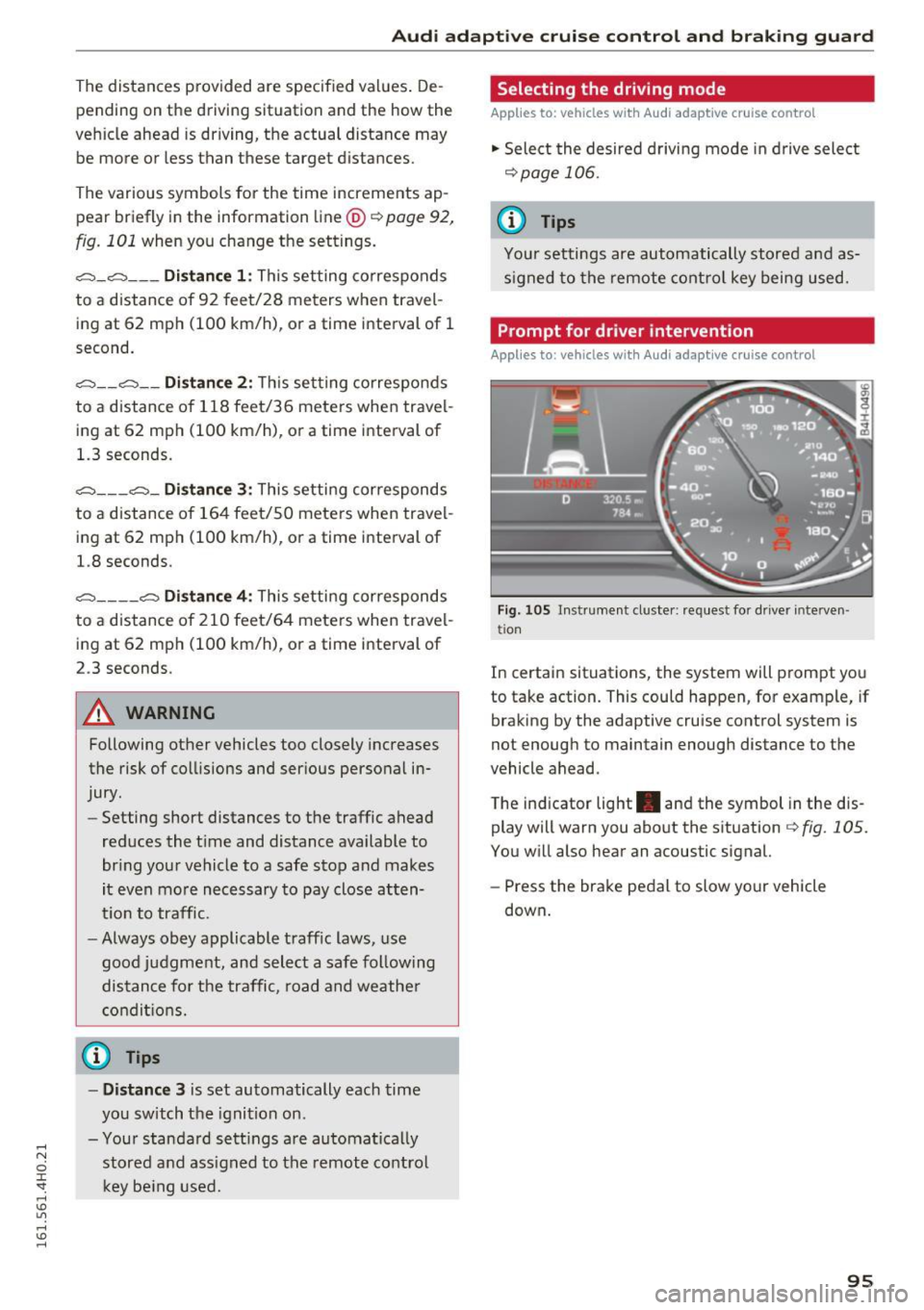
Prompt for driver intervention
Applies to: vehicles with Audi adaptive cruise control
Fig . 105 Instrument cluste r: request for driver interve n
tio n
In certain situations, the system will prompt you
to take action. This could happen, for example, if
braking by the adaptive cruise control system is
not enough to maintain enough distance to the
vehicle ahead.
T he ind icator light . and the symbol in the dis
play will warn you about the situation~
fig. 105.
You will also hear an acoustic signal.
- Press the brake pedal to slow your vehicle
down .
95
Page 108 of 302
Audi drive select
Audi drive select
Driving settings
Introduction
Aud i drive select makes it possib le to experience
d ifferent types of veh icle sett ings in one veh icle.
The driver ca n select three
Comf ort, Aut o and
Dyn am ic modes in the MMI to switch between a
sporty and a comfortable driving mode.
You can a lso adjust the setting accord ing to your
p references in the
indi vidual mode. For example,
you can combine settings such as a sporty engine tuning with comfortable steering.
A WARNING
Improper use of the Audi drive select can
cause collisions, other accidents and serious
personal injury.
Description
-
The follow ing systems are affected by drive se
lect:
Engine and t ransm is sion
Depending on the mode, the engine and the
transmission respond quicker or in a more ba l
anced manner to accelerator pedal movements.
In the sporty dynamic mode, the transmission
shifts at h igher RPMs.
Air suspe nsion
The adaptive air suspension/adaptive air suspen
sion sport*
(Air suspension in the MMI) is an
electronically controlled air suspens ion and
damping system . They are adjusted depending
on the se lected dr iving mode, the driver's steer
ing, b raking and acceleration input and the road
surface, vehicle speed and load. A spo rty setting
is gene rally used in veh icles with adaptive air sus
pens ion sport*.
The vehicle clearance va ries depending on these
lected mode and the speed .
The highway setting is activated automatically
when yo u drive above 75 mph (120 km/h) for
mo re than 30 seconds in the
au to or dynamic
106
mode. The ground clea rance is increased auto
matically if the speed drops below 44 mph (70
km/h) for more than 120 seconds.
Steering
The steering adapts in terms of steering effort
and steering rat ios. Indirect stee ring that moves
easily, like the steering in com fort mode, is best
suited to long drives on a highway. In contrast,
dynamic mode provides sporty, direct steering .
The following app lies to veh icles with dynamic
steering*: the steering ratio changes based on
vehicle speed in order to maintain optimum
steering effort for the dr iver at a ll times . This
sets the steering to be less sensitive at higher
speeds in order to provide improved vehicle con
trol. At reduced speeds, however, steering is more d irect in order to keep t he steering effort as
min imal as possible whe n the dr iver is maneuve r
i ng the vehicle. A t low and ave rage speeds, dy
namic steeri ng addit ionally prov ides more re
spons ive steering performance.
Sport differential*
As a component of the all whee l dr ive sys tem
(quattro)
~ page 195, the Sport differe ntia l*
dist ributes t he d riving powe r to the rear axle de
pend ing on the s ituation. The distr ib ution of
power va ries depending on the selected mode,
from ba lanced (comfort) to agile (dynamic). The
goal is a high level of agility and ability to accel
erate on curves. The vehicle is very responsive to
steering.
Cur ve light *
The curve light adapts to driving on curves . The
pivoting action and the lighting are also adapted
to the mode.
Adapt ive cruise control*
The behavio r whe n accelerating ca n be adjusted
from comfortable to sporty, depending on the
drive select mode. Adaptive cruise contro l also
responds to the driving behavior of the vehicle
ahead in a more conservative or sporty manner . ..,_
Page 114 of 302
Automatic transmission
Automatic transmission
tiptronic
Introduction
Your vehicle is equipped with an electron ically
controlled 8-speed automatic transmission.
Upshifting and downshifting occurs automatical ly and is controlled electronically. The driving
style continuously influences the select ion of the
driving program.
When a
moderate driving style is used, the
transmission selects the most economical driving
mode.
It will then change up early and delay the
downshifts to give better fuel economy.
The transmission switches to a sporty mode after a kick-down or when the driver uses a
sporty
driving style
characterized by quick accelerator
pedal movements, heavy acceleration, frequent
changes in speed and traveling at the maximum
speed.
If desired, the dr iver can also select the gears
manually (tiptronic mode) ~ page 115.
Indicator in the display
F ig. 123 Display: selector lever position
@-The current selector lever position is dis
p layed continuously. The gear is also displayed in
manual mode
M.
@ -This indicator appears temporarily if you
change the selector lever position or if you press
the button on the se lector lever~
page 112,
fig. 124.
The current selector lever position is
shown with a white background .
112
Selecting a selector lever position
Fig. 124 Selector lever
---- p--- --11
---- R--- ---1
---- N------1
- D/S~
Fig. 125 Press ing t he button on the selector lever
:;: M 0 :i: Sf a,
The current selector lever position is displayed on
the selector lever~
fig. 124 .
.,. You may need to release the selector lever lock
depending on wh ich selector lever pos ition is
selected and which one you would like to select
~ page 112, Selector lever lock .
.,. To engage the nearest selector lever position,
move the selector lever forward/back until you
feel the first pressure point. The selector lever
wi ll return to its original position .
.,. To skip over one (or two) selector lever posi
tions, move the selector lever past the first
(and second) pressure point into the des ired
position. The selector lever will return to its
original position .
For example, to move directly from the D selec
tor lever position to P when stopping the vehicle,
you can shift past the N and R selector lever posi
tions .
Selector lever lock
The selector lever lock prevents you from select
i ng a position unintentionally , causing the vehicle
to roll. When engag ing some selector lever .,.