light AUDI A8 2017 Owners Manual
[x] Cancel search | Manufacturer: AUDI, Model Year: 2017, Model line: A8, Model: AUDI A8 2017Pages: 354, PDF Size: 88.68 MB
Page 285 of 354
0
a:,
.... N ...... N .... 0
0
I
Wheels and Tires
General information
.,.Check your tires regularly for
damage (punctures, cuts, cracks
and bulges). Remove foreign ob
jects from the tire tread.
.,. If driving over c urbs or similar
obstacles, drive slowly and ap
proach the curb at an angle.
.,.Have faulty tires or rims re
placed immediately.
.,.Protect your tires from oil,
grease and fuel.
.,.Mark tires before removing
them so that the same running direction can be maintained if
they are reinstalled .
.,.Lay tires flat when storing and
store them in a cool, dry location
with as little exposure to light as possible.
(D Note
-Please note that summer and winter tires are designed for
the conditions that are typical in those seasons. Audi recom
mends using winter tires dur
ing the winter months. Low
temperatures significantly de
crease the elasticity of summ
er tires, which affects traction
Wheels
and braking ab ility. If summer
tires are used in very cold
temperatures, cracks can form on the tread bars, result ing in
permanent tire damage that
can cause loud driving noise
and unbalanced tires.
-Burnished, polished or chromed rims must not be
used in winter driving condi
tions. The surface of the rims does not have sufficient corro
sion protection for this and
could be permanently dam
aged by road salt or sim ilar
substances.
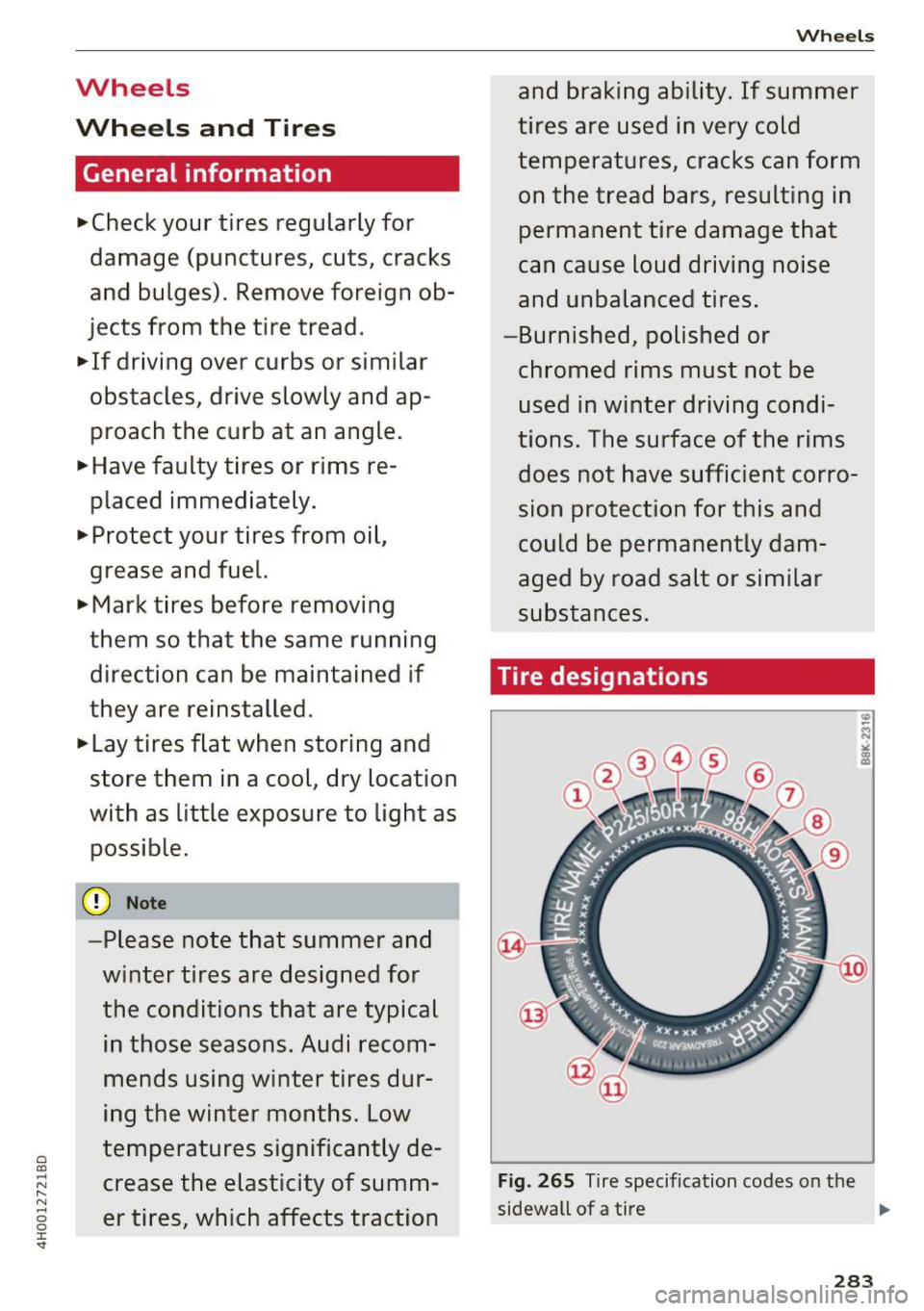
Ti re designations
Fig. 265 Tire specification codes on the
sidewall of a tire .,.
283
Page 303 of 354

C) C0 ....
"' " "' .... 0 0 :r
Temperature grades apply to tires that are properly inflated and not over or underinflat
ed .
Tire Pressure Monitoring
System (AS, S8)
(D General notes
A ppl ies to: AS, 58
Each t ire, including the spare (if provided),
should be checked monthly when cold and inflat
ed to the inflation pressure recommended by the
veh icle manufact urer on the vehicle placard or
tire inflation pressure label. (If your vehicle has
tires of a different size than the size indicated on
the vehicle placard or tire inflation pressure la
be l, you should determine the proper tire infla
tion pressure for those tires).
As an added safety feature, your veh icle has been
equipped with a tire pressure monitoring system
(TPMS) that illuminates a low tire pressure te ll
tale when one or more of your tires is significant
ly under-inflated . Accordingly, when the low tire
pressure telltale illuminates, you should stop and
check your tires as soon as possible, and inflate
them to the proper pressure . Driving on a signifi
cantly under-inflated tire causes the tire to over
heat and can lead to tire failure. Under-inflation
also reduces fuel efficiency and tire tread life,
and may affect the vehicle's handling and stop
ping ability .
Please note that the TPMS is not a substitute for
p roper tire maintenance, and it is the driver's re
sponsib ility to ma intain correc t tire p ressure,
even if under-inflation has not reached the level
to trigger illumination of the TPMS low tire pres
sure telltale.
Your veh icle has also bee n eq uipp ed w ith a TPM S
mal function indicator to indicate when the sys
tem is not operat ing properly. The TPMS mal
function indicator is combined with the low tire
pressure telltale. When the system detects a
malfunction, the telltale will flash for approxi
mately one mi nute and then remain cont inuously
illuminated . This sequence will continue upon
Wheels
subsequent vehicle start-ups as long as the mal
function exists .
When the malfunction indicator is illuminated ,
the sys tem may not be able to detect or signal
low tire pressure as intended . TPMS malfunctions
may occur for a variety of reasons, including the
i nsta llation of replacement or alternate tires or
whee ls on the vehicle that prevent the TPMS
from functioning properly. Always check the
TPMS malfunction telltale after replac ing one or
more tires or wheels on your vehicle to ensure
that the replacement or a lternate tires and
whee ls allow the TPMS to continue to function
properly.
If the Tire Pressure Monitoring System
indicator appears
Applies to: A8, 58
The tire pressure indicator in the instrument
cluster informs you if the tire pressure is too low
or if there is a system malfunction.
Fig. 269 I n strument cluste r: indicator light with messa ge
Using the ABS sensors, the tire pressure monitor
ing system compares the tire tread c ircumfer
ence and vibration characteristics of the individu
al tires.
If the press ure changes in one or more
tires, this is indicated in the instrument cluster
display with an indicator light
[I] and a message.
If only one tire is affected, the location of that
tire will be indicated.
T he tire press ures must be stored in the Infotain
ment system again each time the pressures
change (switching between partial and full load
pressure) or after changing or replacing a tire on
your vehicle
c:> page 302. The tire pressure moni
toring system only monitors the tire pressure you have stored . Refer to the t ire pressure label for ..,.
301
Page 304 of 354

Wheels
the recommended tire pressure for your vehicle
¢page 293, fig. 268.
Tire tread circumference and vibration character
istics can change and cause a tire pressure warn
ing if:
- the tire pressure in one or more tires is too low.
- the tire has structural damage .
- the tire was replaced or the tire pressure was
changed and it was not stored¢
page 302.
-the spare tire* is installed.
Indicator lights
IE Loss of pressure in at least one tire¢&. .
Check the tires and replace or repair if necessary.
Check/correct the pressures of all four tires and
store the pressure again in the Infotainment sys
tem ¢
page 302 .
mm (Tire Pressure Monitoring System) Tire
pressure: System malfunction!.
Ifmm appears
after switching the ignition on or while driving
and the
IE indicator light in the instrument clus
ter blinks for approximately one minute and then
stays on , there is system malfunction . Try to
store the correct tire pressures¢
page 302. If
the indicator light does turn off or turns on again
after a short period of time, drive to an author
ized Audi dealer or authorized Audi Service Facili
ty immediately to have the malfunction correct
ed .
A WARNING
- If the tire pressure indicator appears in the
display, reduce your speed immediately and
avoid any hard steer ing or braking maneu
vers . Stop as soon as possible and check the
t ir es and their pressure .
- The driver is responsible for maintaining the
correct tire pressure. You must check the
t ire pressure regularly.
- Under certain conditions (such as a sporty
dr iv ing style, winter cond itions or unpaved
roads), the tire pressure monitoring system
indicator may be delayed.
- Do not use run-flat tires on your vehicle. Us
ing them when not permitted can lead to
vehicle damage or accidents .
302
(D Tips
-The tire pressure monitoring system can al
so stop working when there is an ESC mal
function.
- Using snow chains may result in a system
malfunction.
- The tires with the identification "AO" or
"RO" ¢
page 290 have been matched with
your Audi tire pressure monitoring system.
We recommend that you use these tires.
Storing tire pressures
App lies to: AB, 58
If the tire pressure changes or a tire is replaced ,
it must be confirmed in the Infotainment sys
tem.
... Make sure before storing that the tire pressur es
of all four tires meet the specified values and
are adapted to the load ¢
page 291.
... Switch the ignition on.
... Select: the
ICARI funct ion button> Car Systems
control button > Servicing & checks > Tire
pressure monitoring
> Store tire pressure >
Yes, store now.
(D Tips
Do not store the tire pressures if snow chains
are installed. Othe rw ise the system could
malfunction.
Tire Pressure Monitoring System (S8 plus)
(l) General notes
App lies to : 58 plus
Each tire, including the spare (if provided),
sho uld be checked monthly when cold and inflat
ed to the inflation pressure recommended by the
vehicle manufacturer on the vehicle placard or
tire inflation pressure label. (If your vehicle has
tires of a different size than the size indicated on
the vehicle placard or tire inflation pressure la
bel, you should determ ine the proper t ire infla-
tion pressure for those tires). .,.
Page 306 of 354

Wheels
@ For the sake of the environment
Low tire pressure inc reases fuel consumption
and tire wear.
@ Tips
- The pressure of the spare tire * is not moni
tored.
- If t ires are re pla ced, the sensors/valves do
not need to be removed or rep laced . Ju st re
placed the valve stem and, if necessary, the
valve and the wheel e lectron ics . If you have
quest ions, see your autho riz ed Aud i dea ler
or authorized Audi Service Facility.
Displaying tire pressures/temperatures
App lies to : 58 plus
Req uirement: the ign ition must be switched on .
.,. Select : the
ICARI function button > C ar s ystems
> Serv icing & checks > Tire pressure mon itor
ing
> Display tire pressures.
The current tire pressures are shown in green and
yellow numbers in the Infotainment system:
- Green : the current tire pressure and the speci
fied tire pressure are approximately the same .
-Yellow: the c urrent tire press ure is too low
compared to the specified tire pressure.
The spe cified t ire press ure is the la st tire pres
sure th at was s tored
c::> page 305.
No te that the tire pressure also depends on the
t emperature of the ti re . The ti re pressu re in
creases as the engine becomes wa rmer wh ile
d riving.
& WARNING
R ea d and follow t he important information
and notes
c::> page 303 .
@ Tips
The tire pressure or tem per ature are not dis
pl ayed in ada ptation mode. D ashe s·-.·- are
shown i n place of the press ure and tempera
ture .
304
-
Tire pressure loss
Applies to: 58 plus
Fig. 2 70 Dis pla y: ind icator light w it h a mess age
If the [I] ind icator light turns on, the pressure in
at least one tire is too low or new sensors were
not adapted:
RE indicator light s turn s on after turning the
ignition on
The tire pressure is too low compared to the
spec ified press ure .
.. Check and store the tire press ure(s) the next
time it is possible
c::> page 305.
RE indicator light turns on while dr iving
Wheels with new sensors we re not adapted or
the tire p ressure has reached a critica l level com
pared to the specif ied pressure.
.. Avoid unnecessary s teering and brak ing maneu-
vers .
.. Adapt your driving sty le to the s ituation.
.. Stop as soon as possib le and check the tire(s).
.. If it is possib le to cont inue dr iv ing, see an au-
thorized Audi dealer or authorized Audi Service
Facility immediately and have your tire(s) re
pai red or rep laced .
& WARNING
Read and f ollow the impo rtant inform ation
and notes
c::>p age 303.
-
Page 307 of 354

Storing new tire pressures
Applies to: S8 plus
Correctly stored tire pressure specifications are
necessary for reliable tire pressure monitoring .
.. Check the tire pressures in all wheels.
1> If necessary, correct the tire pressure according
to the spec ificat ions on the sticker on the driv
er's door ~
page 291 . Only correct the press ure
in tires whose tempera tu re is approx imately
the same as the amb ient temperature.
If the
tempera ture of the tire is highe r than the ambi
ent a ir temperat ure, the tire pressure must be
increased approximately 3 PSI (0,2 bar) above
the va lue on the sticker.
.. Switch the ignition on.
.. Se lect :
I CARI funct ion button > Car systems >
T ire pr essure monitoring > Store tire pres
s ure s.
After stor ing, the tire pressure mon itor
ing system measures the c urrent tire pressures
and stores them as the new specified p res
s ur es .
.. If the changed tire press ures are not displayed
in t he Infotainment system, dr ive the veh icle
for approximate ly 10 minutes so that the sen
sor signal from the whee ls is received again .
During this adap tat ion phase, --,-- is disp layed
for pressure and temperature and the Tire Pres
sure Monitoring System is only partially availa
b le: it only warns you if one or more of the tire
pressures is/are under the m inimum permitted
va lue. If this is the case, the
It] indicator light
appears w ith a message .
A WARNING
Read and follow the important information
and notes
~ page 303.
Malfunctions
Applies to: S8 plus
-
I f t he Tire Pressu re Monito ring System is not
av ail able,
the m ind icator light appe ars in the
driver informat ion system. The
HJ] indi cator light
o a lso blinks for approx imately one m inutes each co
~ time the ignition is switched on . The tire pressure ,.....
~ monitoring system cannot be selected in the In-o 0 :c '
fota inment system. The following are examp les
of situations that cou ld cause a malfunction:
- I f the message appears at t he e nd of the adap
t ation phase, the system cannot detec t the
wheels installed on the veh icle. This may result
from one or more whee ls being installed with
out wheel senso rs or with incompatible whee l
sensors.
- A wheel sensor or another component has
fa iled.
- Using snow chains can affect the function of
the system beca use of the shielding effect of
the chains .
- The tire pressure monitoring system is not
avai lab le due to a ma lf u nction .
- Transmitters with the same frequency, such as
headphones or remote-cont rolled devices, may
cause a temporary system malfunct ion due to
the strong electromagnetic field.
The
fim indicator light t urns off once the Tire
Pressure Monitoring System is availab le aga in . If
you cannot correct the ma lf u nction and
the m
indicator light stays on, drive immediately to an
authorized Aud i dealer or a uthorized Audi Serv ice
Facility to have the malf unct ion repaired .
305
Page 308 of 354

Care and cleaning
Care and cleaning
General information
Regular, proper care helps to maintain your vehi
cle's value.
It can also be a requirement when
submitting warranty claims for corrosion damage
and paint defects on the body.
The necessary care products can be obtained
from an authorized Audi dealer or authorized
Audi Service Facility. Read and follow the instruc
tions for use on the packaging.
A WARNING
-Using cleaning and care products incorrectly
can be dangerous to your health .
- Always store cleaning and care products out
of reach of children to reduce the risk of poi
soning.
@ For the sake of the environment
- Preferably purchase environmentally-friend ly cleaning products.
- Do not dispose of leftover cleaning and care
products with household trash.
Car washes
The longer that deposits such as insects, bird
droppings, tree sap or road salt remain on the ve hicle, the more the surface can be damaged. High
temperatures such as those caused by sunlight
increase the damaging effect .
Before washing, rinse off heavy deposits with
plenty of water.
Stubborn deposits such as bird droppings or tree
sap are best removed with plenty of water and a microfiber cloth.
Also, wash the underside of your vehicle once road salt stops being used for the season .
Pressure washers
When washing your veh icle w ith a pressure wash
er, always follow the operating instructions pro
vided with the pressure washer. This is especially
important in regard to the pressure and spraying
distance. Do not aim the spray directly at the
306
seals on the side windows, doors, lids or the sun
roof* or at tires, rubber hoses, insulating materi
al, sensors* or camera lenses* . Keep a distance of
at least 16 in (40 cm).
Do not remove snow and ice with a pressure
washer.
Never use cone nozzles or high pressure nozzles.
The water temperature must not be above 140 °F
(60 °C).
Automatic car washes
Spray off the vehicle before washing.
Make sure that the windows and roof* are closed
and the windshield wipers are off . Follow instruc
tions from the car wash operator, especially if
there are accessories attached to your vehicle.
If possible, use car washes that do not have
brushes.
Only use car washes where the veh icle remains
stationary and the washing equipment moves
around the vehicle when washing and drying. Car
washes that move the vehicle through the car
wash using a chain are not recommended.
Washing by hand
Clean the vehicle starting from the top and work
ing down using a soft sponge or cleaning brush.
Use solvent-free cleaning products.
Washing vehicles with matte finish paint by
hand
To avoid damaging the paint when washing, first
remove dust and large particles from your vehi
cle. Insects, grease spots and fingerprints are
best removed with a special cleaner for matte
finish paint.
Apply the product using a microfiber cloth. To
avoid damaging the paint surface, do not use too
much pressure.
Rinse the vehicle thoroughly with water. Then
clean using a neutral shampoo and a soft micro
fiber cloth .
Rinse the vehicle thoroughly again and let it air
dry. Remove any water residue using a chamois. ..,..
Page 309 of 354
0 co .... N ,..... N .... 0 0 :c '
-Only wash the vehicle when the ignition is
off and follow the instructions from the car
wash operator to reduce the risk of acci
dents.
- To reduce the risk of cuts, protect yourself
from sharp metal components when wash
ing the underbody or the inside of the wheel
housings.
-After washing the vehicle, the braking effect
may be delayed due to moisture on the
brake rotors or ice in the winter . This in
creases the risk of an accident . The brakes
must be dried first with a few careful brake
applications.
(D Note
- If you wash the vehicle in an automatic car
wash, you must fold the exterior mirrors in
to reduce the risk of damage to the mirrors.
Power folding exterior mirrors* must only
be folded in and out using the power folding
function.
- To reduce the risk of paint damage, do not
wash the vehicle in direct sunlight.
-
Care and cleaning
-To reduce the risk of damage, do not wash
the power top with a pressure washer.
- To reduce the risk of damage to the surface,
do not use insect removing sponges, kitchen
sponges or similar items.
- Matte finish painted vehicle components:
- To reduce the risk of damage to the sur-
face, do not use polishing agents or hard
wax.
- Never use protective wax. It can destroy
the matte finish effect .
- Do not place any stickers or magnetic
signs on vehicle parts painted with matte
finish paint . The paint could be damaged
when the stickers or magnets are re
moved.
@ For the sake of the environment
Only wash the vehicle in facilities specially de
signed for that purpose . This will reduce the
risk of dirty water contaminated with oil from
entering the sewer system.
Cleaning and care information
When cleaning and caring for individual vehicle
components, refer to the following tables. The
information contained there is simply recom
mendations. For questions or for components that are
not listed , consult an authorized Audi
dealer or authorized Audi Service Facility. Also
follow the information found in¢& .
Exterior cleaning
Component Situation Solution
Windshield wiper
Deposits ¢ page 51
blades
Headlights/
Deposits Soft sponge with
a mild soap solutiona)
Tail lights
Sensors/
Deposits Sensors: soft cloth with solvent-free cleaning solution
camera lenses Camera lenses: soft cloth with alcohol-free cleaning solu-
tion
Snow/ice Hand brush/solvent-free de-icing spray
Wheels Road salt Water
Brake dust Acid-free special cleaning solution
307
Page 311 of 354
0 co .... N ,..... N .... 0 0 :c '
Component Situation Solution
T ex til es
Deposits adhering to Vacuum cleaner
art ifici al leat her, the surface
A lcan tara Water-based deposits Absorbent
cloth and mild soap solutiona>
such as coffee, tea,
b lood, etc.
Oil -based deposits Apply a m ild soap solution
a), blot away the dissolved o il or
such as oil, make-up, dye, treat afterward with water, if necessary
etc.
Special deposits such Special stain
remover, blot with absorbent material, treat
as ink, nail polish, la- afterward with mild soap solution, if necessary
a)
tex paint, shoe pol-
ish, etc.
Natu ral le ath er Fresh stains Wool cloth with a mild soap solution a)
Water-based deposits Fresh stains: absorbent cloth
such as coffee, tea, dried stains: stain
remover suitable for leather
b lood , etc.
Oi [-based deposits Fresh stains: absorbent cloth and stain
remover suitable
such as oil, make-up, for leather
etc. dried stains: oil cleaning spray
Special deposits such Spot remove r suitab le for leather
as ink, nail polish, la-
tex paint, shoe pol-
ish, etc.
Care Regularly apply condit ion ing c ream that protects from
lig ht and penet rates into the material. Use specia lly-co l-
ored conditioning cream, if necessary .
Refrig erator Dust and d irt Clean the ventilation openings in the luggage com part-
ment
Deposits Lukewarm water, mild
soap solution if necessarya>, then
dry
Defrosting Empty the refrigera to r, switch it off and let it thaw with
the door open, then dry
Carb on part s Deposits clean the same way as plast ic parts
a) Mi ld soap solution: maximum two tablespoons of neutral soap in 1 quar t (1 liter) of water
_&. WARNING
The windshie ld may not be treated with wa
ter-repelling windshield coating agents. Un
favorable cond itions such as wetness, dark
ness, or low sun can result in increased glare .
Wipe r blade chatter is also possible.
(D Note
- He adlight s/tail li ghts
-
- Never clean headlights or tail lights w ith a
dry cloth or sponge.
- Do not use any cleaning product that con
tains alcohol, because they could cause
cracks to form .
-W heels
- Neve r use any pa int polish o r other abra-
sive mate rials.
309
Page 312 of 354
Care and cleaning
- Damage to the protective layer on the rims such as stone chips or scratches must
be repaired immediately.
- Sensors/camera lenses
- Never use warm or hot water to remove
snow or ice from the camera lens. This
could cause the lens to crack .
- Never use abrasive cleaning materials or
alcohol to clean the camera lens . This
could cause scratches and cracks.
- Door windows
- Remove snow and ice on windows and ex-
terior mirrors with a plastic scraper. To
avoid scratches, move the scraper only in
one direction and not back and forth.
- Never remove snow or ice from door win
dows and mirrors using warm or hot water
because this could cause cracks to form.
- To avoid damage to the rear window de
fogger, do not apply any stickers on the
heating wires on the inside of the window.
- Decorative parts/trim
- Never use chrome care or cleaning prod-
ucts.
- Paint
- To reduce the risk of scratches, the vehicle
must be free of dirt and dust before pol
ishing or waxing.
- To prevent paint damage, do not polish or
wax the vehicle in direct sunlight.
- To reduce the risk of paint damage, do not
polish away rust spots.
- Remove cosmetics and sunscreen immedi
ately- these could damage the paint.
- Displays
- To avoid scratches, do not use dry cleaning
methods on displays.
- Controls
- Make sure that no fluids enter the con-
trols , because this could cause damage.
- Safety belts
- Do not remove the safety belts to clean
them.
- Never clean safety belts or their compo
nents chemically or with corrosive fluids
or solvents and never allow sharp objects
to come into contact with the safety belts.
310
This could cause damage to the belt web
bing.
- If there is damage to the webbing, the
connections, the retractors or the buckles, have them replaced by an authorized Audi
dealer or authorized Audi Service Facility.
- Textiles/artificial leather/ Alcantara
- Never treat artificial leather/ Alcantara
with leather care products, solvents, floor polish, shoe polish, spot remove or similar
products.
- Have a specialist remove stubborn stains
to prevent damage.
- Never use steam cleaners, brushes, hard
sponges, etc. when cleaning.
- Do not turn on the seat heating* to dry the seat .
- Objects with sharp edges, such as zippers
or rivets on clothing or belts, can cause
damage to the surface.
- Open hook and loop fasteners, for exam ple on clothing, can damage seat covers .
Make sure hook and loop fasteners are
closed.
- Natural leather
- Never treat leather with solvents, floor polish, shoe polish, spot remover or simi
lar products.
- Objects with sharp edges, such as zippers
or rivets on clothing or belts, can cause
damage to the surface.
- Never use steam cleaners, brushes, hard
sponges, etc. when cleaning.
- Do not turn on the seat heating* to dry the
seat.
- To help prevent the leather from fading,
do not leave the vehicle in direct sunlight
for long periods of time. If leaving the ve
hicle parked for long periods of time, you
should cover the leather to protect it from
direct sunlight.
- Refrigerator
- Do not try to speed up the defrosting
process by applying heat.
- To help prevent health risks or damage to
the refrigerator, do not use any abrasive ..,.
Page 316 of 354
Emergency assistance
7. Tighten all wheel bo lts light ly .
8. Lower the veh icle with the jack .
9. Use the whee l bolt wrench and firmly tighten
all whee l bolts
<=:> page 315.
10. Replace the decorative wheel cover* .
11. Deactivate the vehicle jack mode in the MMI:
I CA R I function butto n > Car systems control
b utton
> Servicing & checks > Air susp.: jack
mode > Off .
The vehicle jack mode switches off automat ically
at s peeds above
10 km/ h.
,& WARNING
Alw ays read and fo llow all WAR NIN GS and in
f o rm at ion
c;, .&. in AB: R ais ing the vehi cle on
p oge316 and <=:>page 319.
After changing a wheel
A wheel change is not complete without the do
ing the following.
• Always store the veh icle tool kit, the jack* a nd
the replaced t ire in the luggage compartment
<=:> page 213.
• Che ck the tire pressure on the sp are whee l im
med iate ly after mo unti ng it .
• As soon as possible, have the
tightening tor
ques
on all whee l bo lts chec ked with a torque
wrench. The correct tightening torque is 90 ft
lb
(120 N m).
• Have the flat tire
replaced as soon as possible.
(D Tips
- If you notice t hat the whee l bolts are cor
r oded and diffic ult to t urn w hile cha nging a
tire, they should be rep laced before you
c heck the tighte ning torque .
- Drive at reduced speed until you have the
tighte ning torques c hecke d.
- After changing a wheel, the tire pressure in
all four tires must be c heck ed/co rrect ed a nd
the tire press ure mon itor ing indicato r must
be stor ed in the MM I
<=:> page 302 .
314 Decorative wheel covers
App
lies to: vehicles with decorative w heel covers
The decorative wheel covers must be removed
first to access the wheel bolts.
Fig. 274 Changi ng a whee l: Removing t he whee l cover
Removing
• Insert t he hook (p rovided w ith the vehicle tool
ki t) i n the hole in the w heel hu b cover .
• Pull off the
decorative wheel cover <=:> fig. 2 7 4.
Wheels with wheel bolt caps
Applies to: vehicles wit h wheel bolts with caps
The cops mus t be removed fir st from the wheel
bol ts before the bol ts con be unscrewed.
Fig. 275 C ha ng ing a w heel: remov ing th e w heel bo lt caps
Removing
• Push t he plastic clip (prov ided with the vehicle
tool kit) over the whee l bolt cap until the inne r
reta iners on the clip a lign with t he edge of the
cover.
• Remove the cap wi th t he
plastic clip (vehicle
t oo l kit )
c;, fig. 2 75.
Refitting
• Place the caps over the whee l bolts and push
them back on .