cooling AUDI A8 2017 Owners Manual
[x] Cancel search | Manufacturer: AUDI, Model Year: 2017, Model line: A8, Model: AUDI A8 2017Pages: 354, PDF Size: 88.68 MB
Page 6 of 354
Table of content s
Other settings . . . . . . . . . . . . . . . . . . . . . . 196
H eadphon es . . . . . . . . . . . . . . . . . . . . . . . . 197
Media drives/connections . . . . . . . . . . . . . 200
Nav iga tion . . . . . . . . . . . . . . . . . . . . . . . . . 200
En te rt ainment sys tem s . . . . . . . . . . . . . . . 201
Video playback information . . . . . . . . . . . 2 02
Troubleshoot ing . . . . . . . . . . . . . . . . . . . . . 203
System settings . . . . . . . . . . . . . . . . . . 204
Sett ing the time and date . . . . . . . . . . . . . 204
Adjusting the so und . . . . . . . . . . . . . . . . . . 204
Ad justi ng the system vo lume . . . . . . . . . . 20 5
Othe r settings . . . . . . . . . . . . . . . . . . . . . . 205
Safety .. .. .. ... ... ...... ... .... .. . 207
Driving safety . . . . . . . . . . . . . . . . . . . . 207
Basics . . . . . . . . . . . . . . . . . . . . . . . . . . . . . 207
Correct passenger seating positions . . . . . 208
D river's and front passenger 's footwell . . 212
Pedal ar ea. ... ... .. .. ..... ... .. .. .. . 212
Storing cargo cor rectly . . . . . . . . . . . . . . . 213
Reporting S afety Defects... ........ .. . 214
Audi pre sense .. ..... ......... .. . 216
Preventative passenger protection 216
Safety belts . . . . . . . . . . . . . . . . . . . . . . 218
Gene ral information . . . . . . . . . . . . . . . . . 218
Why use safety belts? . . . . . . . . . . . . . . . . 219
Safety belts . . . . . . . . . . . . . . . . . . . . . . . . 221
Bel t tensioners . . . . . . . . . . . . . . . . . . . . . . 224
Airbag system . . . . . . . . . . . . . . . . . . . . 226
Important information . . . . . . . . . . . . . . . 226
F ront ai rbags . . . . . . . . . . . . . . . . . . . . . . . 230
M on itor ing the Advanced Airbag System . 236
Knee ai rbags . . . . . . . . . . . . . . . . . . . . . . . . 24 0
Side airbags . . . . . . . . . . . . . . . . . . . . . . . . 24 3
Side curtain airbags . . . . . . . . . . . . . . . . . . 24 5
Child safety . . . . . . . . . . . . . . . . . . . . . . 248
I mportant info rmation . . . . . . . . . . . . . . . 248
Chi ld seats . . . . . . . . . . . . . . . . . . . . . . . . . 254
Securing chi ld seats . . . . . . . . . . . . . . . . . . 258
LATCH system (Lower anchorages and
t ethe rs for children) . . . . . . . . . . . . . . . . . 261
Addit io nal information . . . . . . . . . . . . . . . 266
4
Maintenance and Care . . . . . . . . . . . 267
Checking and Filling . . . . . . . . . . . . . 267
Gasoline . . . . . . . . . . . . . . . . . . . . . . . . . . . 267
Refueling . . . . . . . . . . . . . . . . . . . . . . . . . . 268
Catalytic converter .. .. ............. .. 271
E ngine compartment ................. 271
E ngine o il . .. .. .. .. .. .... .... ..... .. 274
Cooling sys tem . . . . . . . . . . . . . . . . . . . . . . 277
B rake fl uid . . . . . . . . . . . . . . . . . . . . . . . . . 279
B att ery . . . . . . . . . . . . . . . . . . . . . . . . . . . . 279
Windshie ld washer system . . . . . . . . . . . . 2 81
Service interva l display . . . . . . . . . . . . . . . 28 2
Wheels .... .. .. .. .. ............. .. 283
Whee ls and Tires . . . . . . . . . . . . . . . . . . . . 283
Tire Pressure Monitoring System (A8 , 58) 301
Tir e Pressure Monitor ing System (58
pl us) . . . . . . . . . . . . . . . . . . . . . . . . . . . . . . 302
Care and cleaning . . . . . . . . . . . . . . . . 306
Genera l information . . . . . . . . . . . . . . . . . 306
Car was hes . . . . . . . . . . . . . . . . . . . . . . . . . 306
Cleaning and care i nformation . . . . . . . . . 307
Plac ing your vehicle out of serv ice . . . . . . 311
Troubleshooting . . . . . . . . . . . . . . . . . 312
Emergency assistance .......... . 312
Genera l info rmation . . . . . . . . . . . . . . . . . 312
E q ui pment .. .. .. .. .. ... ....... ... .. 312
Replacing wheels . . . . . . . . . . . . . . . . . . . . 313
S pa re ti res .. .. .. .. .. ............. .. 319
Fuses and bulbs . . . . . . . . . . . . . . . . . . 322
El ectr ica l fuses . . . . . . . . . . . . . . . . . . . . . . 322
Bu lbs. . . . . . . . . . . . . . . . . . . . . . . . . . . . . . 326
Emergency situations ............ 327
Genera l . . . . . . . . . . . . . . . . . . . . . . . . . . . . 327
Start ing by pus hing or tow ing . . . . . . . . . . 327
Starting with jumper cab les . . . . . . . . . . . 327
U sing the jump start cabl e . . . . . . . . . . . . 328
Towing with a tow truck . . . . . . . . . . . . . . 329
Raising the vehicle .. .. ............. .. 331
Technical data and accessories . . 333
Technical data . . . . . . . . . . . . . . . . . . . . 333
Vehicle specificat ions . . . . . . . . . . . . . . . . 333
Notes abo ut technical data . . . . . . . . . . . . 333
Page 12 of 354
Cockpit overv iew
CD Note
-Auxiliary headlights and other accessories in
front of the cooling-a ir intake impair the
cooling effect of the coolant. This increases
the r isk of the engine overheat ing during
high outside temperatures and heavy en-
gine load.
- The front spoiler also he lps to distr ibute
cooling air correctly wh ile driving. If the
spoiler is damaged, the cooling effect will
be impaired and the risk of the engine over
hea ting will inc re ase. See an a uthorized
A udi dealer or au thori zed A udi Service Fa
cility for assistance .
Tachometer
The tachometer display s the engine speed in rev
olutions per minute
(RPM).
You shou ld shift to the nex t lowest gea r whe n
the speed is below 1,500 R PM. The beginn ing of
the red zone in the t achometer indic ates the
maxim um permissible eng ine speed fo r all gears
once the engine has been broken in an d when it is
warmed up to operating temperature . Before
reaching this zone, you should shift into the next
h ighest gear, select the D selector lever pos ition,
or remove your foot from the accelerator pedal.
CD Note
The needle in the tachometer @ <=:> page 9,
fig. 3 may only be in the red area of the gauge
for a short t ime or the re is a risk of engine
damage. The locat ion where the red zone be
gi ns varies depending on the engine.
@ For the sake of the environment
Upshifting early helps you to save fuel a nd re
duce operating noise.
Fuel level
The display ® only works when the ignition is
sw itched on. If the fuel level d rops below 4 gal
(15
L), a red L ED will light up and the ll) ind ica
tor light will tur n on
<=:> page 24 . The red LED
will blink when the fuel level is very low.
10
The fuel tank capacity of your ve hicl e is listed in
the
Techn ical Data section <=:> page 334 .
CD Note
Never dr ive until t he ta nk is comp letely emp
ty. The irreg ular su pp ly of fuel t hat res ults
from that can cause engine m isfires . Uncom
b uste d fue l w ill then enter the exhaust sys
tem. This ca n cause overheating and damage
to the catalyt ic converter.
Odometer
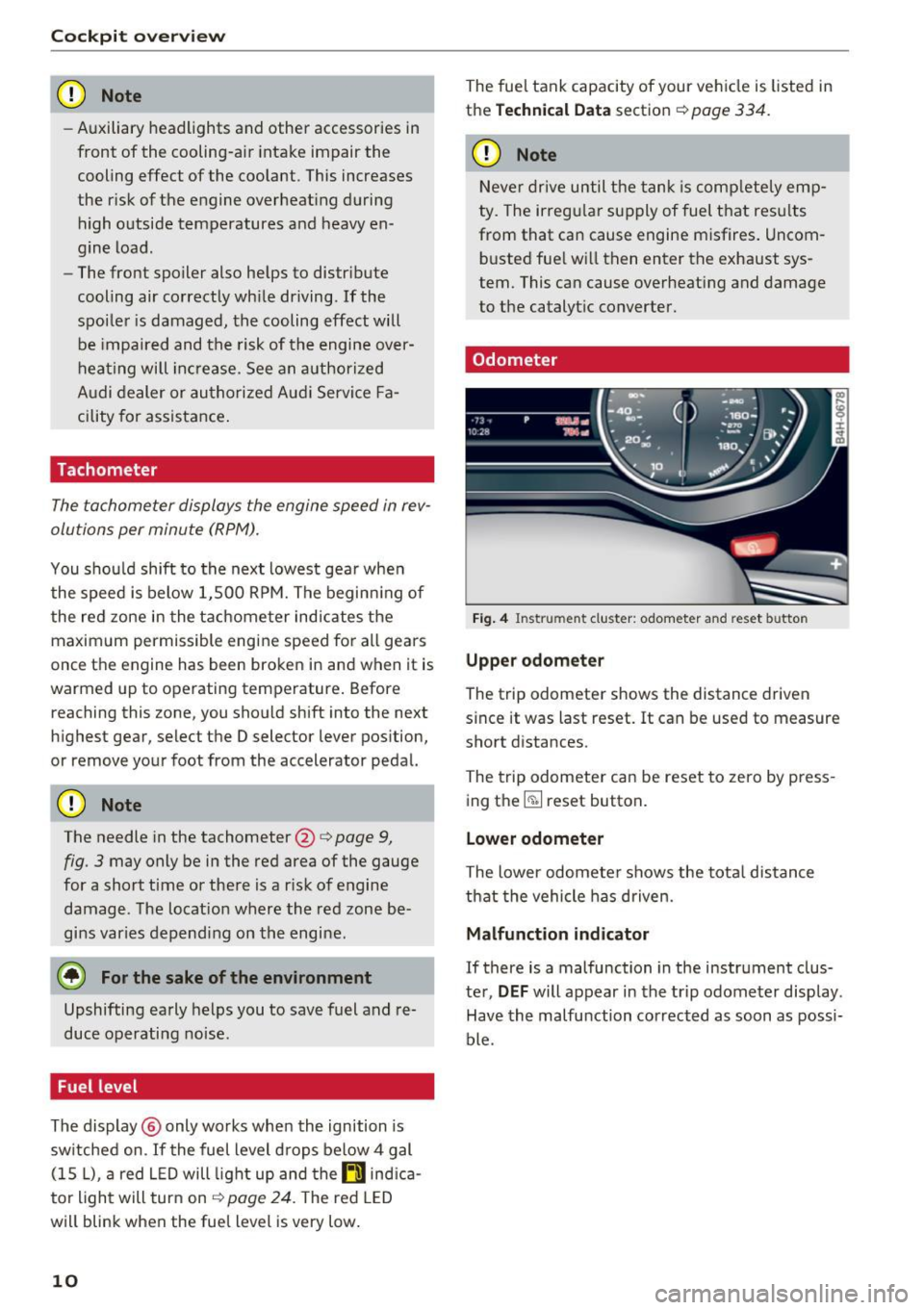
Fi g. 4 Instru ment cluster: odometer a nd reset button
Upper odomet er
The trip odometer shows the distance driven
since it was last reset. It can be used to measure
short distances.
The trip odometer can be reset to zero by press
ing the ~ reset button.
Lower odometer
The lower odomete r shows the tota l distance
that the vehicle has d riven.
Malfunction indicator
If there is a malfunction in the instr ument clus
te r,
DEF will appear in the trip odometer display.
Have the malfu nction corrected as soon as possi
ble.
Page 22 of 354
Cockpit over view
- If the brake system indicator light does not
turn off or it t urns on while driv ing, the
brake fluid level in the reservoir is too low,
and this increases the risk of an acc ident .
Stop the vehicle a nd do not continue dr iv
ing . See an author ized Audi dealer or au
t h o rized Aud i Serv ice Facility fo r ass istance.
- If the brake system indicator light turns on
togethe r with the ABS and ESC ind icator
l igh ts, the ABS/ ESC regula ting func tion may
be malfunctioning. Fu nctions that stabilize
the vehicle are no longer ava ilable . This
could cause the vehicle to swerve, whic h in
creases the risk that the ve hicle wi ll slide.
Do not continue driving. See an author ized
Audi dealer or author ized Audi Service Facili
ty for assistance.
PARK/( ®) Electromechanical parking brake
If the -(USA models) /. (Canada models)
i n dicator light t urns on, the park ing brake was
set .
- (USA models) /. (Canada models) Cau·
tion : Vehicle parked too st eep
If the indicator light blinks and the message ap
pears, the re is not enough brak ing power to se
cure the vehicle . The b rakes have overhea ted. The
ve hicle could roll away eve n on a small incline.
- (USA models) /. (Canada models) P ress
brake pedal to release parking b rake
To re lease the parking brake, press the brake
pedal and press the~ button at the same time
or start driv ing with hill start ass ist
¢ page 82 .
Ill Parking brake!
There is a malfunction in the park ing brake . Dr ive
t o a n author ized Audi dealer or au thor ized Audi
Serv ice Facil ity immediately to have t he mal func
tion correc ted.
(j) Tips
For add it io na l information on the park ing
brake, see
c::> page 81.
20
_ L Cooling system
• Swit ch off engine and check coolant level!
T he coolant level is too low .
Do not continue dr iv ing and switch the eng ine
off. Check the coolant level
c::> page 2 77 .
- If the coo lant level is too low , add coolant
c::> page 2 78 . Only continue driving once the in
dicator light turns off.
• Coolant temperature too high! Please let en
gine run with vehicle stationary
Let the engine ru n at idle fo r a few min utes to
cool off, until t he ind icator lig ht t urns off .
- If the ind icator light does not turn off , do not
cont inue driving the veh icle. See an authorized
Aud i dea le r or aut horized Audi Serv ice Facility
for assistance.
.&_ WARNING
- Never ope n the hood if you can see or hear
steam or coo lant escaping from the engine
compa rtment. This increases the risk of
burns. Wait until you no longer see o r hear
steam or coolant escaping.
- The engine compartment in any vehicle can
be a dange rous a rea. Stop the engine and
allow it to cool before working in the engine
compa rtment . Always follow the informa
tion fo und in
c::> page 2 71.
(I) Note
Do not continue driv ing if the . indicator
li ght turns on -this increases the risk of en
gine damage .
~ Safety belt
The. indicator lig ht stays on unti l the dr iver 's
and front passenge r's safety belts are faste ned .
Above a certa in speed, the re will a lso be a warn
i ng tone.
@ Tips
Fo r addi tional info rmat ion on saf ety belts,
see
c::> page 218 .
Page 65 of 354
C) C0 ....
"' " "' .... 0 0 :r
Cup holders
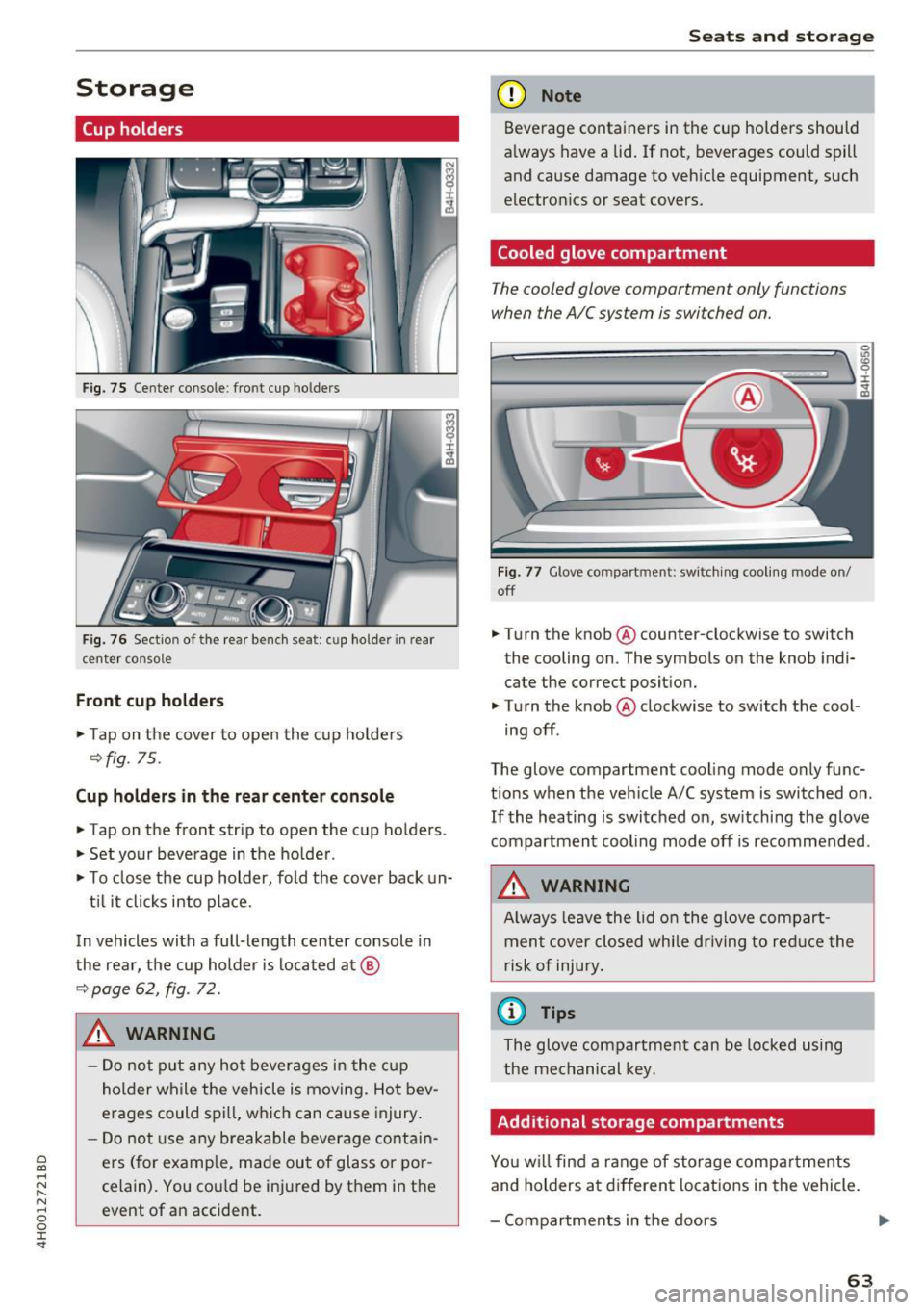
Fig. 75 Center co nsole : fro nt cup ho lders
F ig. 76 Sect io n of th e re ar bench se at: cu p ho lder in rear
center co nso le
Front cup holders
.. Tap on the cover to open the cup ho lde rs
Q fig. 75.
Cup holder s in the rear center console
.. Tap on the front strip to open the cup holders .
.. Set your beverage in the ho lder .
.. To close the cup holder , fold the cover back un-
t il it clicks into place.
In vehicles with a full-length center console in
the rear, the cup holder is located at @
9page 62, fig . 72.
A WARNING
-
- Do not p ut any hot beverages in the c up
holder while the vehicle is moving. Hot bev
erages could spill, wh ich can cause injury .
- Do not use any breakable beverage contain
ers (for example, made out of glass or po r
celain). You cou ld be injured by them in the
event of an accident .
Seats and storag e
(D Note
Beverage containers in the cup holders should
a lways have a lid . If not , beverages could spill
and cause damage to vehicle equipment, such
electron ics or seat covers.
Cooled glove compartment
T he cooled glove compartment only functions
when the AIC system is swi tched on.
Fig . 77 G love co mpart ment: swi tching cooling mode o n/
off
.. Turn the knob @counter-clockwise to switch
the cooling on . The symbols on the knob ind i·
cate the correct posit ion.
.. Turn the knob @clockwise to switch the cool ·
ing off .
The glove compartment cooling mode only func
t ions when the veh icle A/C system is switched on .
If the heating is switched on, switching the glove
compartmen t cooling mode off is recommended .
_& WARNING
Always leave the lid o n the glove compart
ment cover closed while dr iving to red uce the
risk of injury .
a) Tips
The glove compartment can be locked using
the mechanical key.
Additional storage compartments
Yo u w ill find a range of storage compa rtments
and holders at different locations in the vehicle.
- Compartments in the doors
IJ,,
63
Page 69 of 354
C) C0 ....
"' " "' .... 0 0 :r
-Only fold the bag up if it is dry.
- When transporting skis or snowboards,
tighten the securing strap between the
bindings.
- Lay skis in the bag with the points facing
forward and snowboards and ski pole points
facing the rear.
Refrigerator
Introduction
Applies to: vehicles with refrigerator
Clean the refrigerator before the first use ~ table
on page 308.
You can only switch the refrigerator on, if :
- the temperature in the luggage compartment
is less than 131
° F (55 °(). If the refrigerator is
switched on , it will automatically switch off if
the temperature in the luggage compartment
exceeds 131
° F (55 °(). If the temperature
goes back below 131
° F (55 °(), the refrigera
tor will automatically switch on again.
- The charge level of the vehicle battery is suffi.
cient. The refrigerator is automatically switch
ed off if the electrical system voltage falls be
low the spec ified minimum value. This prevents
the vehicle battery from discharging . The re
frigerator automatically switches back on if th e
electrical system voltage increases again, for
example after starting the vehicle.
When the cooling function is working optimally,
the cooling function reaches 43° F
(+6 °C) and
the free zing function reaches 21 ° F
(-6 °C). The
cooling temperature in the refrigerator also de
pends on the luggage compartment tempera
ture. When the temperature in the luggage com
partment is high, there may only be a limited
cooling effect.
.&, WARNING
-
To avoid any injury risks to the passengers
caused by the refrigerator, the following safe
ty precautions must be followed:
Seats and storage
-The maximum load capacity for the freezer
is
5.5 lbs (2 .5 kg).
- Never overload the refrigerator. There is a
risk of injury in the event of a collision or
sudden braking.
- The refrigerator cover must always be
closed and locked while driving. The refrig
erator contents could enter the vehicle inte
rior during a collision or sudden braking ma
neuver, which increases the risk of injury.
- Never store flammable fluids, gas contain
ers and similar objects in the refrigerator
due to the risk of an explosion . This also ap
plies to goods and products that can emit
volatile or flammable gases.
-At temperatures of 32° F
(0 °() and lower,
frozen liquid inside glass containers can
cause the containers to burst.
(D Note
- The ventilation openings for the refrigerator
are at the rear panel trim panel in the lug
gage compartment and must not be cov
ered.
- If the refrigerator is not functioning correct
ly, turn it off to prevent any damage. Have it
checked by an authorized Audi dealer or au
thorized Audi Service Facility.
Operation
Applies to: vehicles with refrigerator
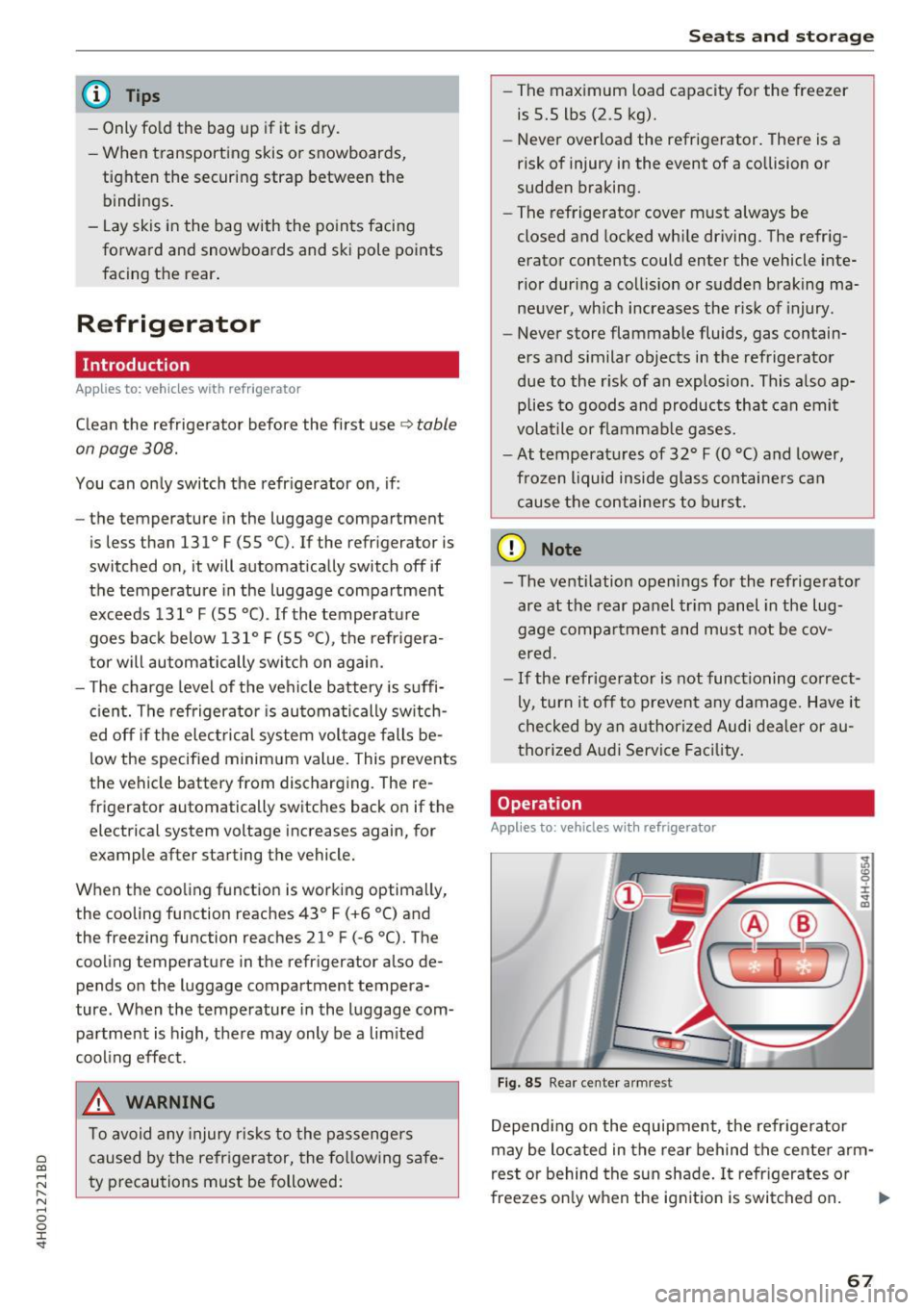
Fig. 85 Rear center armres t
Depending on the equipment , the refrigerator
may be located in the rear behind the center arm
rest or behind the sun shade. It refrigerates or
freezes only when the ignition is switched on. ..,.
67
Page 70 of 354
Seats and storage
Opening and closing the refrigerator
.,. Pull the release lever CD<=? fig. 85 to open the
refrigerator .
.,. Push the cover back into its closed position to
close the refrigerator . The cover is closed cor
rectly if the re lease lever CD audibly engages.
Switching on/off
.,. Press the button @<=? fig. 85 to switch the
cooling function on or off. The symbo l in the
button lights up when the function is switched
on .
.,. Press the button @ to switch the freezer func
tion on or off. The symbol in the button lights
up when the function is switched on .
(D Tips
-To avoid a build-up of condensat ion, only
open the refrigerator cover as briefly and
quickly as possible.
- Do not p lace any warm food or drinks in the
refrigerator.
68
Page 71 of 354

0 co .... N ,..... N .... 0 0 :c '
climate control
Description
The climate con trol system warms, coo ls and re
moves humidity from the air in the vehicle inte ri
or. It is the most effective when the w indows and
sunroof* are closed. If there is a bu ild-up of heat
i n side the veh icle, ven tilat ion can he lp to speed
up the cooling process .
In a ll heating mode functions, except for defrost,
the blower on ly switches to a higher speed once
the eng ine coolant has reached a sufficient tem
perature.
Pollutant filt er
The po llutant filter removes pollutants such as
d ust and pollen from the air.
Key recognition
The clima te control settings are automatically
s tored and assig ned to th e remo te contro l key
that is in use.
& WARNING
Poo r visibility can lead to accidents.
- For safer d riving, keep all windows free of
ice, snow and fo g.
- B ecome familia r as quickly as possible wi th
the correct use and function of the cl imate
contro l system, especially with the defrost
ing and defogging function.
- When the temperat ure is below freezing,
only use the windsh ield washer system after
Warm and cold
the windshield has been warmed by the cli
mate control system. The washer fluid could
freeze on the windshie ld and impair visib ili
ty .
(D Note
-If you suspect that the climate contro l sys
tem is damaged, switch the system off to
prevent further damage and have it checked
by an authorized Aud i dealer o r authorized
Aud i Serv ice Facility.
- Repa irs to the Aud i climate control system
require special technical know ledge and
special tools . See an autho rized Aud i dea le r
or authorized Audi Service Fac ility.
@ For the sake of the environment
Reducing the amount of fuel used also re
duces the amount of pollu tan ts that enter the
ai r.
@ Tips
- To prevent interference with the heat ing
and coo lin g output and to prevent the wi n
dows from fogging over , the air intake in
fro nt of the windshie ld m ust be free of i ce,
snow o r leave s.
- Condensat ion from the coo ling system c an
dr ip and fo rm a pudd le of w ater un der t he
vehicle. Th is i s n orm al and does not me an
t here is a lea k.
- T he e nergy m anagemen t sy stem may tem
por arily swi tch off cert ain fu nctions, s uch a s
the seat heating * or rear window defogger .
T hese systems are ava ila ble again as soon
as the energy supply has been restored.
69
Page 72 of 354

Warm and cold
Operation
We recommend pressing the !AUTOI button and setting the temperature to 72 °F (22 °C) .
Fig . 8 6 Cockp it con trols
F ig . 87 Re ar contro ls: 4 -zone de luxe auto matic cl imate
con tro l
Press the bu ttons to turn the func tions on or off .
The LED in a button will light up when the func
tion is sw itched on. Use the knob to adjust the
temperature, the blower speed and the air distri bution*. The driver and front passenger settings
can be adjusted separate ly.
Applies to: vehicles with 4-zone del uxe automatic climate
cont rol
You can adj ust the rea r left and r igh t sides using
the rea r contro ls ¢
fig . 87 .
IOFF ! Switching the climate cont rol system
on /off
The IO FFI button switches the cl imate co ntro l
system on or off . It also sw itches on whe n you
p ress the knob . The
!OFF I button in the rear only
sw itches the A/C system on/off in the rear of the
70
vehicle . A irflow from outside is blocked w hen the
cl imate control system is switched off.
IAIC I Switching cooling mode on and off
The air is not coo led and h umid ity is not removed
whe n coo ling mode is sw itched off . This can
c a use fog on the windows. The coo ling mode
swi tches off automatically whe n there a re cold
outside temperatures.
I""' ! Switching recirculation mode on and off
In recirculat ion mode , the air inside the vehicle is
c ir culated and filtered . Th is prevents the unfi l
te red air ou ts ide the ve hicle from en teri ng the
vehicle interior. We recommend sw itching recir
cu lation mode on whe n driving through a t unnel
or when sitting in traffic¢& .
The
! AU TO I button o r I@ FRON TI bu tton switches
recircu lation mode off .
IAUTO I Switching automatic mode on
Automat ic mode maintains a constant tempera
ture inside the vehicle. Air temperature , a irflow
and air distrib ution are controlled automatica lly .
If press and hold the button longer, 72 °F (22
°()
will be set . .,,.
Page 92 of 354

Trailer mode
Trailer load distribution
Be s ure the load in the trailer is held securely in
p lace to prevent it from shifting forward, back
ward or sideways .
Never allow a passenger to ride in a trailer¢.&.
in Driving instructions on page 91.
Engine cooling system
Towing a trailer makes the eng ine work harder . It
is important that the cooling system's perform
ance is up to the additional load. Make sure that
the cooling system has eno ugh fluid.
Tire pressure
When tow ing a tra iler, inflate the tires of your
veh icle to the tire pressure listed under "Full
load " on the label ¢
page 293 . Inflate trailer
tires to trailer and tir e manufacturers' specifica
tions.
Lights
Check to make sure both vehicle and trailer lights
are working properly .
Safety chains
Be sure trailer safety chains are properly connect
ed from the trailer to the hitch on the vehicle. Leave enough slack in the chains to permit turn
ing corners . When you install safety cha ins, make
sure they w ill not drag on the road when you are
driving.
The chains should cross under the trailer tongue to prevent it from dropping in case of separation
from the hitch.
Adjusting the Audi drive select
Make sure the vehicle is on a level surface before
hitching up the trailer and before adjust ing the
tongue weight. The vehicle must be in
auto or
comfort driving mode and not raised
o:,;, page 110, o:,;, 0 .
Make sure that the vehicle is lowered. In Info
tainment, select:
ICARI function button> Lower
control button.
90
If you must drive under poor road conditions, you
can raise the vehicle
after coupling the trailer or
after adjust ing the tongue we ight ¢ page 112.
([) Note
-Changes in temperature or load can affect
the height of the vehicle.
- Always select auto or comfort mode. Other
wise, the tongue load specified for your ve
hicle will no longer be app licab le .
Driving instructions
Driving with a trailer always requires extra care
and consideration.
Weight distribution
Towing a loaded trailer with an empty car results
i n a high ly unstable distribution of we ight . If this
cannot be avoided, drive at very low speeds only
to avoid t he risk of losing steering contro l.
A "balanced " rig is easier to operate and control.
This means that the tow vehicle should be loaded
to the extent possible and permissib le, wh ile
keeping the trailer as light as possible under the
circumstances. Whenever possible, transfer
some cargo to the luggage compartment of the
tow veh icle while observing tongue load require
ments and vehicle loading considerations.
Speed
The higher the speed, the more difficult it be
comes for the driver to control the rig . Do not
drive at the maximum permissible speed. Reduce
your speed even more if load, weather or wind cond it ions are unfavorable - particularly when
go ing downh ill.
Reduce vehicle speed
immediately if the trailer
shows the slightest sign of sway ing.
Do not try
to stop the swaying by accelerating.
Observe speed limits. In some areas, speeds for
vehicles towing trailers are lower than for regular
vehicles.
Always apply brakes early. When driving down
hill, shift into a lower gear to use the engine
braking effect to slow the vehicle. Use of the
brakes alone can cause them to overheat and fail. ..,.
Page 274 of 354
Checking and Filling
-Set the parking brake.
- Select the P selector lever position.
- Let the engine cool down.
- Never open the hood when there is steam or
coolant escaping from the engine compart
ment, because there is a risk that you could
be burned. Wait until no steam or coolant is
escaping.
- Keep children away from the engine com
partment.
- Never spill fluids on a hot engine. These flu
ids (such as the anti-freezing agent con
tained in the coolant) can ignite.
- Avoid short circuits in the electrical system.
- When working in the engine compartment,
remember that the radiator fan can switch
on even if the ignition is switched off, which
increases the risk of personal injury.
- Never open the cap on the coolant expan
sion tank when the engine is warm. The
cooling system is under pressure.
- To protect your face, hands, and arms from
hot steam or coolant, cover the cap with a
large cloth when opening.
- Do not remove the engine cover under any
circumstances. This increases the risk of
burns.
- If tests need to be performed with the en
gine running, there is additional danger due
to moving components (such as the ribbed
belt, alternator and radiator fan) and from
the high-voltage ignition system .
- Do not under any circumstances activate the
throttle inadvertently (for example, by hand
from the engine compartment) if the vehi
cle is stationary but the engine is running
and a gear is engaged. Otherwise, the vehi
cle will start to move immediately and this
could result in an accident.
- Pay attention to the following warnings list
ed when work on the fuel system or on the
electrical equipment is required.
- Do not smoke .
- Never work near open flames.
- Always have a working fire extinguisher
nearby
- All work on the battery or electrical system
in your vehicle can result in injuries, chemi-
272
cal burns, accidents or burns. Because of
this, all work must be performed
only by an
authorized Audi dealer or authorized Audi
Service Facility .
- To reduce the risk of electric shock and in
jury, never touch the following components when the engine is running or is being start
ed:
- Ignition cable
- Other components in the electronic high-
voltage ignition system
- If you must check or perform work on the
engine while it is running:
- Set the parking brake and place the selec tor lever in the P (park) position first.
- Always proceed with extreme caution so
that clothing, jewelry or long hair do not
become caught in the radiator fan, fan
belt or other moving components or do
not come into contact with hot compo
nents . Tie back long hair before beginning
work and do not wear clothing that can
hang down into the engine .
- Limit your exposure to exhaust and chemi
cals to as short a time as possible
c:> ,&. .
.&_ WARNING
California Proposition 65 Warning:
- Engine exhaust, some of its constituents,
and certain vehicle components contain or
emit chemicals known to the State of Cali
fornia to cause cancer and birth defects and
reproductive harm. In addition, certain flu
ids contained in vehicles and certain prod
ucts of component wear contain or emit
chemicals known to the State of California
to cause cancer and birth defects or other
reproductive harm .
- Battery posts, terminals and related acces
sories contain lead and lead compounds,
chemicals known to the State of California
to cause cancer and reproductive harms .
Wash hands after handling.