audio AUDI A8 2017 User Guide
[x] Cancel search | Manufacturer: AUDI, Model Year: 2017, Model line: A8, Model: AUDI A8 2017Pages: 354, PDF Size: 88.68 MB
Page 141 of 354

0 co .... N ,..... N .... 0 0 :c '
®
®
0
®
®
@
@
@
@
Symbol/Description
TMC
Importing process* Cell phone signal
strength bars*
Data connect ion signa l
strength bars *
Arrow Mute
I mport ing p rocess
Bluetooth
2G/3G*
Select ion list
Multi Media Interfac e
Ex planat ion
Reception of TMC traffic reports
Import or update the contacts in the directory or the call lists
Cell phone netw ork signal streng th fo r a connected cell phone
Signal streng th fo r the ac tive data connection, o r
PIN: enter the PIN (SIM)
PUK: enter the PUK
SIM: insert the Aud i SIM card
Submenu w ith add it iona l functions that are accessed by p ressing the
contro l knob
The audio source is muted ¢
page 134
Importing audio/video files to the J ukebox ¢page 182
Bluetoot h dev ice connected
Netwo rk coverage for the active d ata connection
2G : GSM network
3G: UMTS network
Settings for the se lected function that are accessed by press ing the
contro l knob
139
Page 143 of 354
0 co .... N ,..... N .... 0 0 :c '
Appl ies to: vehicles with vo ice recog nitio n system
You con operate many Infotainment functions
conveniently by speaking .
Requirement: the ignition and the MM I must be
switched on~
page 134 , there must be no phone
call in progress and the parking system m ust not
be active .
~ Switching on : briefly press the~ button @
~ page 11, fig. 7 on the m ultif unction steering
whee l* and say the desired command after the
Beep .
~ Switching off : press and hold the l2;J button .
Or: press any button on the MMI control panel.
~ Canceling : press the 10, I button and say a new
command.
Or : say the command Canc el.
Input as sistance
The system gu ides you through the input with
visua l and audio feedback .
-Vi su al input a ssistance : after turning on voice
recognition, a d isplay with a select ion of possi
ble commands appears in the Infotainment dis
play . The command d isplay can be turned on or
off in the ma in menu using the
S etup MMI con
t rol button.
- Aud io input assi stance : to have the possible
commands read, turn the voice recognition sys
tem o n and say
Help .
For the system to underst and you:
Speak clearly and distinct ly at a normal volume.
Speak louder when driving faster.
Emphasize the words in the commands even ly
and do not leave long pauses .
D o not speak a command when the voice recogni
tion system is mak ing an anno uncement.
C lose the doors, the windows a nd the sunroof* to
reduce background noise . Make su re that passen
gers are not speaking when you are giving a voice
command.
Voice recognition system
Do not d irect the air vents toward the hands free
microphone, which is on the roof headliner near
the front inte rior lights .
Only use the system from the dr iver's seat be
ca use the hands free microphone is directed to
ward that seat .
Additional settings
Additional settings, such as individual speech
training
based on yo ur voice, the Command dis
play
or the prompt volume , can be adjusted in
the main men u using the
Setup MMI control but
ton
~ page 205.
A WARNING
--Direct your full attention to dr iv ing. As the
driver, you have complete responsibility for
safety in traff ic. Only use the functions in
such a way that you a lways maintain com
plete control over your vehicle in all traffic
situa tions.
- Do not use the voice recognition system in
emergencies beca use your voice may change
in stressfu l situations. It may ta ke longe r to
dia l the numbe r or the sys tem may not be
a ble to dia l it at all. Dia l the emergency
number manually.
@ Tips
- The d ialog pauses w hen the re is a n incom
ing phone call and will con tinue if yo u ig
nore the cal l. T he d ia log ends if you answer
the ca ll.
- Yo u can select an item in the list using ei
ther the vo ice recogn it io n sys tem or the
cont rol knob.
Command overview
information
Applies to: vehicles with voice recogn it ion system
The following overv iews describe the commands
that can be used to operate the MMI using the
vo ice recognit io n system .
Alternative commands are separated by a
" I", for
example, say:
Telephone I (or) Na vigation I (or)
Rad io . .,..
141
Page 147 of 354
0 co .... N ,..._
N .... 0 0 :c '
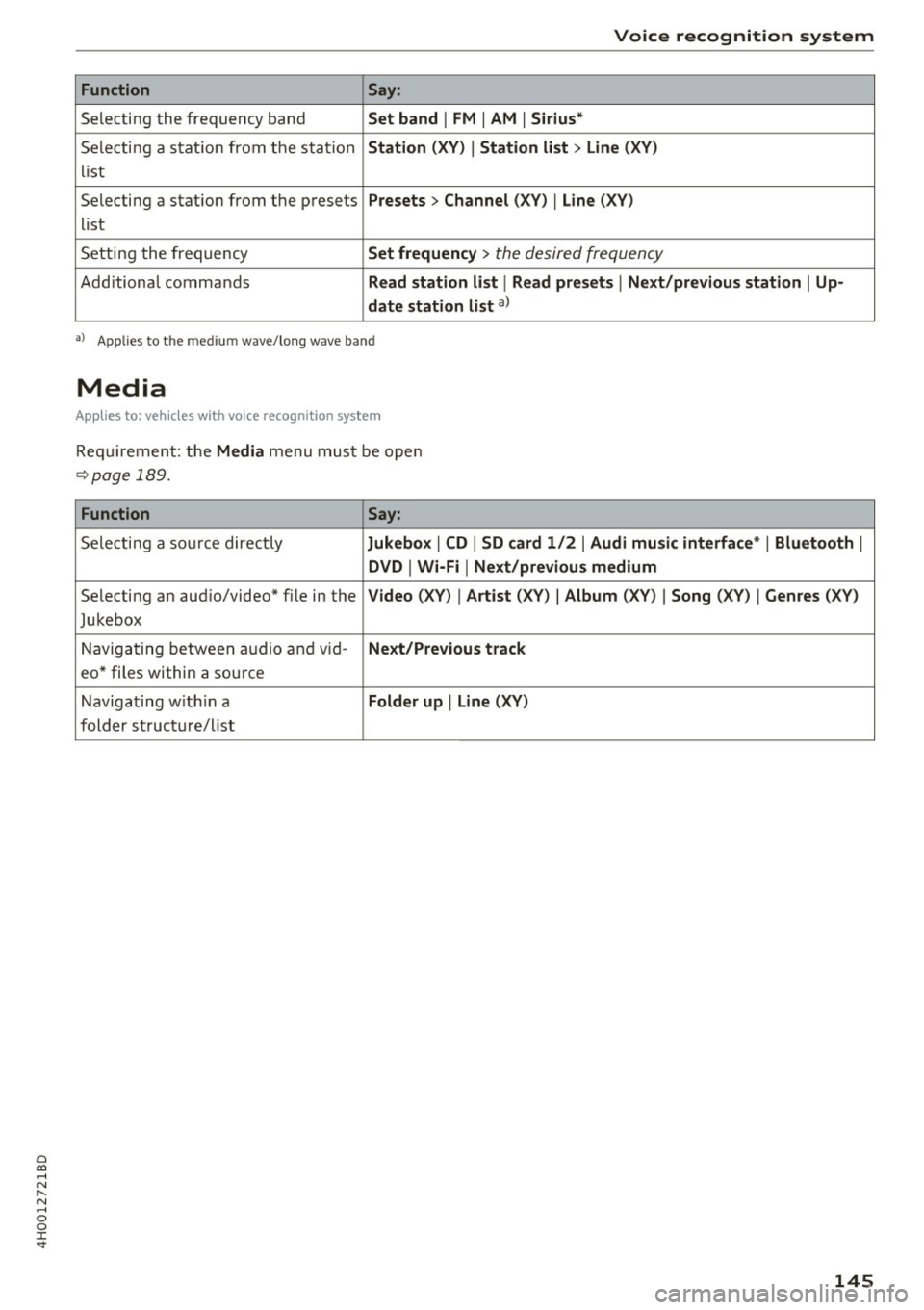
Function Say:
Selecting the frequency band Set band I FM I AM I Siriu s*
Selecti ng a stat ion from the station Station (XV ) I Station li st > Lin e (XV )
list
Selecting a stat ion from the presets
Presets > Channel ( XV) I Line (XV)
list
Setting the frequency
Set frequency > the desired frequency
Additional commands Read station li st I Read pre set s I Next /pr ev ious station I Up-
date station list
a)
•> Applies to the med iu m wave/ long wave band
Media
Appl ies to: vehicles wit h voice recognitio n system
Req uirement: the Media menu must be open
~page 189.
Function Say:
Selecti ng a so urce directly Jukebox I CD I SD card 1 /2 I Audi mu sic int erface * I Bluetoo th I
DVD I Wi-Fi I Next /previou s m edium
Selecting an audio/video* f ile in the Video (XV) I Art ist (XV) I Album (XV) I Song ( XV) I Genres (XV )
Jukebox
Navigating between au dio and v id-
Ne xt/ P re viou s track
eo * files within a source
Navigating w ith in a
Folder up I Lin e (XV )
folder structure/list
145
Page 150 of 354
Telephone
® Enter number ................ .
@ Assigning a voicemail number or
calling voicemail .... ....... .. .
Dialing a telephone
number
From the directory
Applies to: vehicles with telephone
148
155
You can select a phone number directly from the
directory
c> page 150.
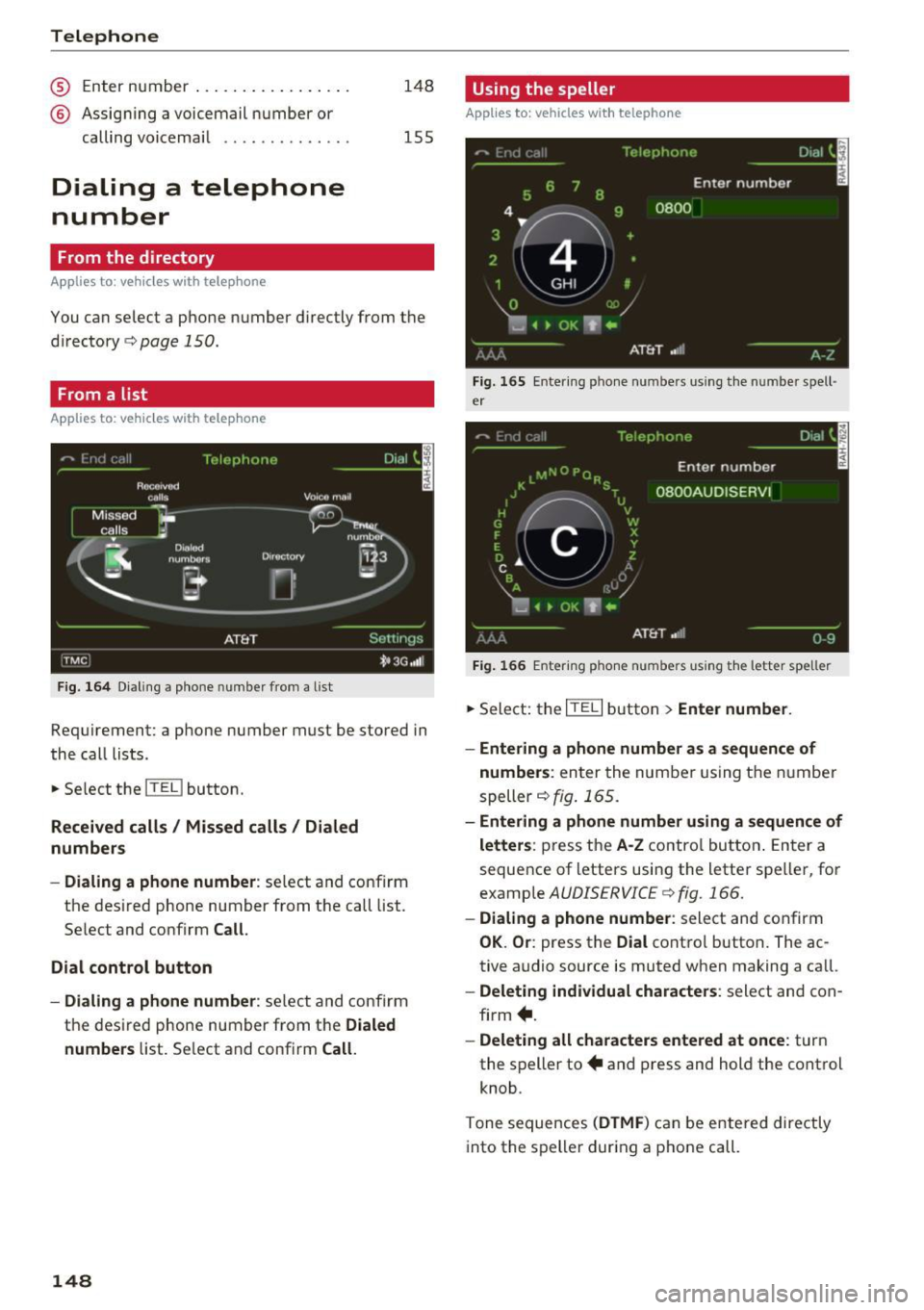
From a list
App lies to: vehicles with telephone
Fig. 164 Dialing a phone number from a list
Requirement: a phone number must be stored in
the call lists.
.. Select the
ITEL I button.
Received calls/ Missed calls/ Dialed
numbers
- Dialing a phone number:
select and confirm
the desired phone number from the call list.
Select and confirm
Call.
Dial control button
- Dialing a phone number:
select and confirm
the desired phone number from the
Dialed
numbers
list. Select and confirm Call.
148
Using the speller
Applies to: vehicles with telephone
Fig. 165 Entering phone numbers using the number spell·
er
Fig. 166 E nter ing phone numbers using the letter speller
.,. Select: the ITE LI button > Enter number.
- Entering a phone number as a sequence of
numbers :
enter the number using the number
speller~
fig. 165.
- Entering a phone number using a sequence of
letters :
press the A·Z contro l button . Enter a
sequence of letters using the letter speller, for
example
AUDISERVICE c> fig. 166.
- Dialing a phone number : select and confirm
OK. Or : press the Dial control button. The ac
tive audio source is muted when making a call.
- Deleting individual characters: select and con
firm +.
-Deleting all characters entered at once: turn
the speller to+ and press and hold the control
knob.
Tone sequences
(DTMF ) can be entered directly
into the speller during a phone call.
Page 151 of 354
Storing a phone number
Storing a new phone number
Applies to: vehicles with telephone
You can store a new phone number as a contact
in the directory
¢page 153.
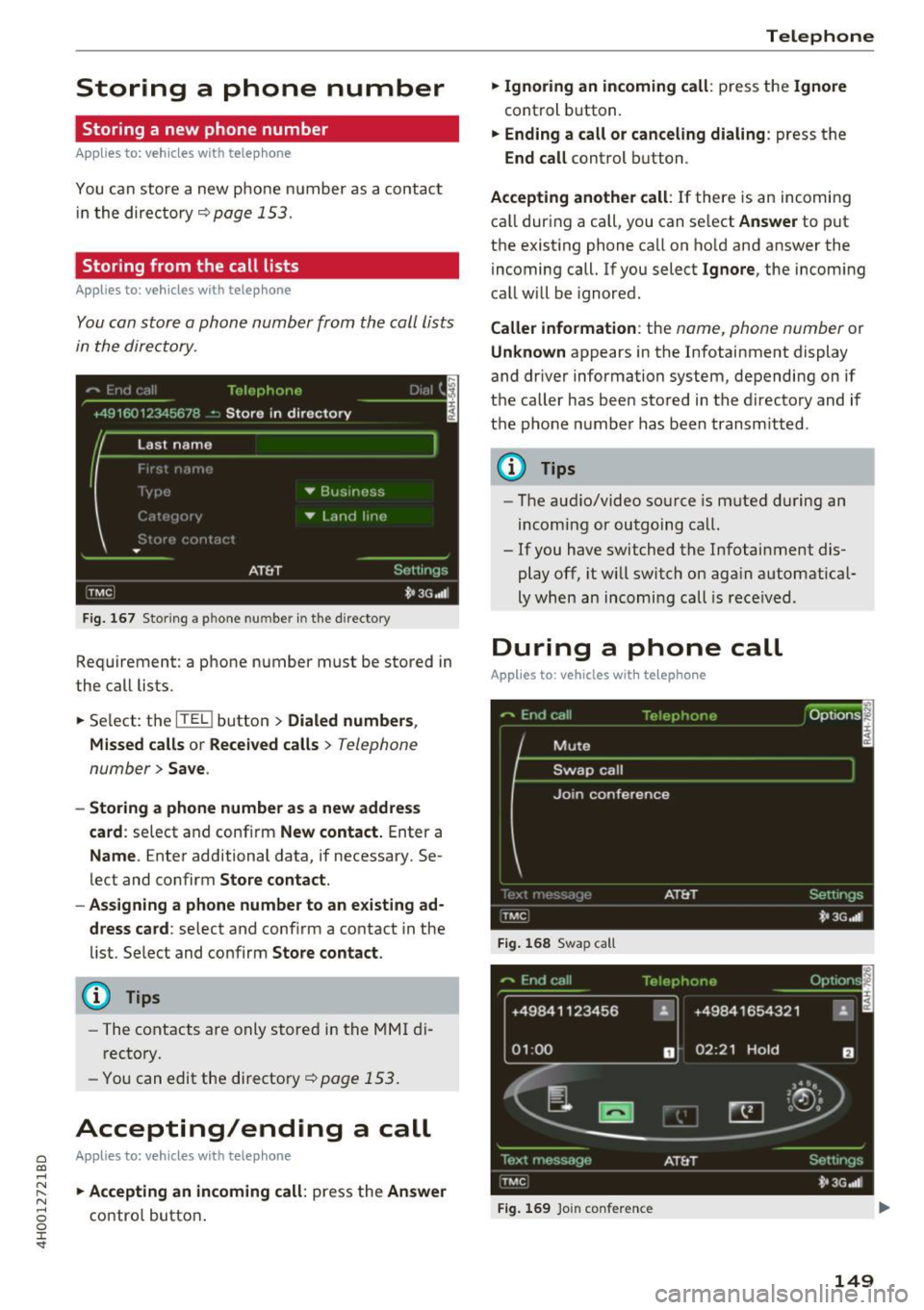
Storing from the call lists
Applies to: vehicles with telephone
You can store a phone number from the call lists
in the directory .
Fig. 167 Stor ing a p hone nu mbe r in the directory
Requirement: a phone number must be stored in
the call lists.
• Select: the
ITKl button > Dialed numbers ,
Missed calls
or Received calls> Telephone
number>
Save .
- Storing a phone number as a new address
card :
select and confirm New contact. Enter a
Name . Enter additional data, if necessary. Se
lect and confirm
Store contact.
- Assigning a phone number to an existing ad
dress card :
select and confirm a contact in the
list. Select and confirm
Store contact.
@ Tips
-The contacts are only stored in the MMI di
rectory .
- You can edit the directory¢
page 153 .
Accepting/ending a call
0 Applies to: vehicles with telephone C0 ....
~ • Accepting an incoming call: press the Answer N
8 contro l button . 0 :r
• Ignoring an incoming call: press the Ignore
control button.
• Ending a call or canceling dialing : press the
End call control button.
Accepting another call : If there is an incoming
ca ll during a call, you can select
Answer to put
the existing phone call on hold and answer the
incoming call. If you select
Ignore, the incom ing
call will be ignored.
Caller information : the name, phone number or
Unknown appears in the Infotainment display
and driver information system, depending on if
the caller has been stored in the directory and if
the phone n umber has been transm itted .
@ Tips
-The audio/video source is muted during an
incoming or outgoing call.
- If you have switched the Infotainment dis play off, it will switch on aga in automatical
ly when an incoming call is received .
During a phone call
Applies to: vehicles with telephone
Fig. 168 Swap ca ll
+49841123456 ~
01 :00 D
Fig. 169 Join conference
149
Page 157 of 354

Call options
Automati c redial :
when the func tion is swi tched
On , a phone number wi ll be au toma tic ally re
d ialed up to five times if it is busy. Automatic re
d ia l can be canceled with
End call . The function is
only active when the network gives a b usy signa l.
Auto answer : when the func tion is switche d On,
incom ing ca lls are automatically answered afte r
a brief t ime.
Three-way conference (GSM)
- On :
you can answe r an incoming call while an
othe r call is in progress by selecti ng
Answer.
T he fi rst call is pu t on hold. Using the Hold op
ti on, you c an also put an ac tive c all on hold and
sta rt an other call o r a con ference ca ll.
-Off : you can repla ce a c all w ith an in com ing c all
by se lecting
Replace. Yo u can ignore an in com
ing ca ll using the
Ignore op tion . You ca nnot
p ut an active ca ll on ho ld or sta rt a new ca ll.
Telephone settings
Volume settings
1
): fo r the Ring tone volume /
Call volume, refer to~ p age 20 5.
Voice mail : the voicemai l number can be en tere d
or ed ited i n the
Number in pu t fie ld using th e
spe ller. W hen a voicemail nu mber is stored, t he
voicema il c an be a cces se d wi th the ® sym bol in
the speller. The
Delete number func tion deletes
the stored voicemail number.
Invert call lists : the phone number s in t he call
l is ts ar e sorted accor ding to t he time the call
too k place . When the f unct io n is swi tched
On,
the so rting orde r is reverse d.
Bluetooth
Bluetooth :
the MMI Bluetoot h fu nct io n can be
sw itched
On or Off. The Blu etoo th symbol @
~page 138, fig. 159 appears in the In fo ta in
men t display when the fu nct ion is swi tched
on.
Visible :
the visibili ty of the MM I in cell phones o r
in B lu etoo th audio players ca n be switc hed
On o r
Off . When Auto is selec ted, the M MI w ill rema in
~ visib le for cell phones or a Blu etoo th a udio player .... N ,..._
N .... 0 0
~ 1) Depends on the conn ected cell phone.
Telephone
fo r ab out five minu tes when the vehicle is sta
t iona ry and the ignition is switched on. The visi
bility sw itches o ff after that. Howeve r, it is still
poss ible to estab lish a B luetooth connection with
ce ll phones or devices that have already been
paired when the vis ibility is switched off . The visi
bility of the MMI automatically swi tches
Off
wh en aud io fi les are be ing pla yed using a con
ne cted Bluetooth aud io player to avo id pro blems
du ring playb ack .
Bluetooth audio player : the Bluetooth audio
player
func tion must be switched On to be ab le
t o selec t th e
Bluetooth audio player as the
sou rce in t he
Media men u. S w itch the Bluetooth
audio player
f u nct io n Off if you are no t usi ng it
to preven t mal funct ions i n the
Telephone or Me
dia
men us.
Find Bluetooth devices : the system sea rches for
and lists Bluetooth devi ces th at are with in range .
Bonded Bluetooth devices : the Bluetoot h dev ic es
c o nn ecte d t o the MMI are lis ted. The cur rently
conn ecte d B lueto o th device is labele d wi th the
Bl uetoot h symbo l. To dele te con necte d Blu e
tooth devices individually, se lect the device and
delete it with the
Delete Bluetooth device func
t ion. To disconnect or connect pa ired cell phones
individ uall y, select the B luetoot h dev ice and
c h ange the profi le using the
Connect funct io n
wh ile the vehicle is stat io na ry . U se
Disconnect to
disco nnect the paired Bluetoot h dev ice.
Known Bluetooth devices : up to 50 known devi
ces can be listed. These Bluetooth dev ices may no
longer be in ra nge when searc hing to connect.
Bluetooth name : the Bluetooth name of the MMI
(for example, "AUDI M MI 2613") is shown and
can be cha nged.
Delete Bluetooth devices : all connected Blue
tooth devices can be deleted by confirming with
Yes .
Wi-Fi settings
See~ page 160.
155
Page 163 of 354
C) C0 ....
"' " "' .... 0 0 :r
-In vehicles without Audi connect*, the use
of the Wi-Fi hotspot is only possible for the
Wi-Fi audio p layer*. A data connection to
the Internet cannot be established.
- A separate, paid mobile subscription may be
needed to use the Wi-Fi hotspot. You can
obtain more information from your cell
phone service provider .
- Depending on your cell phone plan, receiv
ing data packages through the Wi-Fi hot
spot may result in additional charges, par
ticularly when in another country. The use
of a flat rate data plan is highly recom
mended. You can obtain more information
from your cell pho ne service provider.
Configuring a data
connection
Applies to: vehicles with Audi connect
To use Audi connect services through a phone in
the vehicle, a data connection must be config
ured .
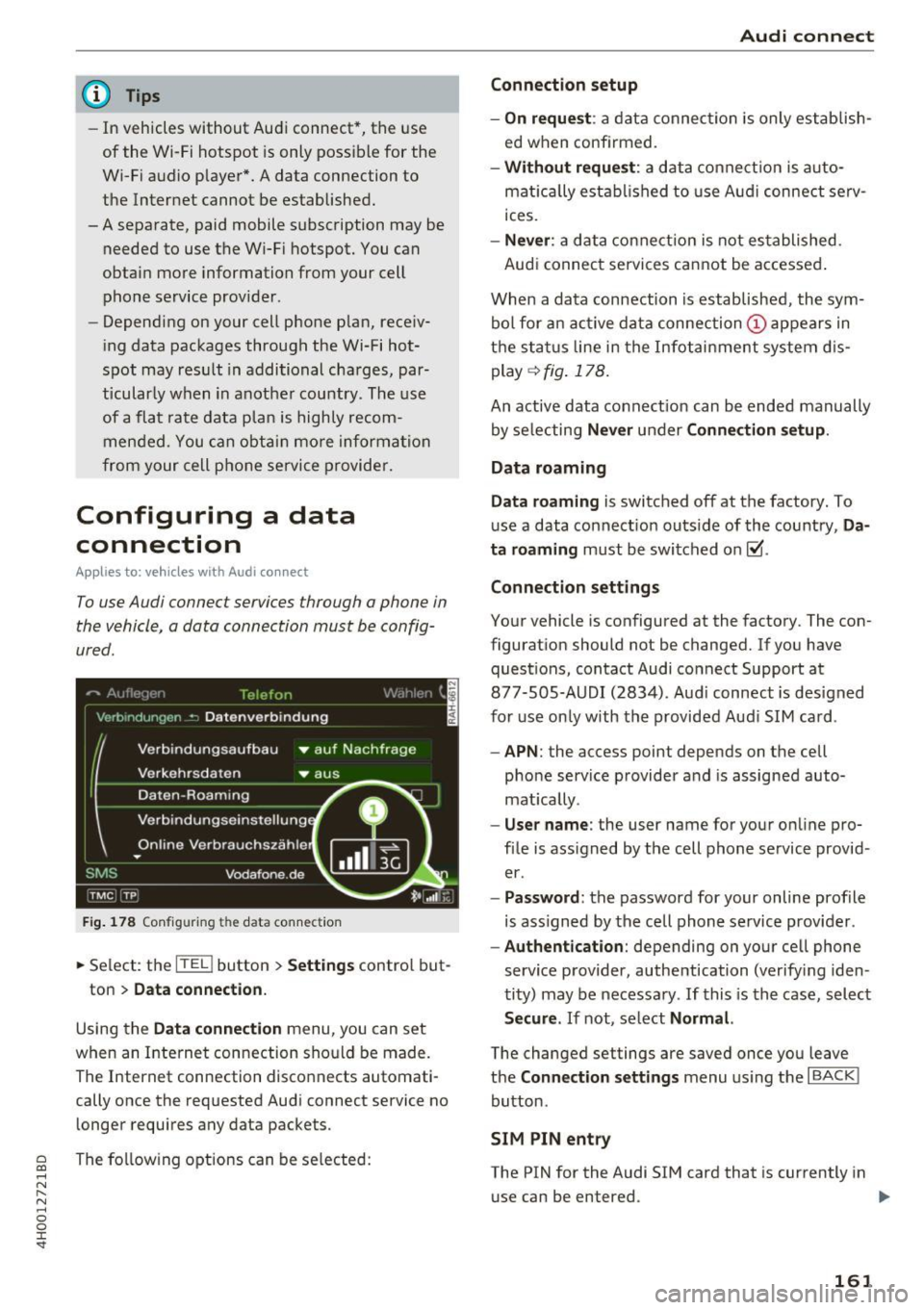
Fig. 178 Configu ring th e da ta conne ction
.,. Select : the [fa] button > Settings control but -
ton
> Data connection.
Using the Data connection menu, you can set
when an Internet connection should be made.
The Internet connection disconn ects automati
cally once the requested Audi connect service no longer requires any data packets .
The following options can be selected:
Audi connect
Connection setup
- On request :
a data connection is only establish
ed when confirmed.
- Without request: a data connection is auto
matically established to use Audi connect se rv
ices .
-Never : a data connection is not established .
Audi connect services cannot be accessed .
When a data connection is established, the sym
bol for an active data connection
(D appears in
the status line in the Infotainment system dis
play
<=> fig. 178.
An active data connect ion can be ended manually
by selecting
Never under Connection setup.
Data roaming
Data roaming
is switched off at the factory. To
use a data connection outs ide of the country,
Da
ta roaming
must be switched on~-
Connection settings
Your vehicle is configured at the factory. The con
figuration should not be changed. If you have quest ions, contact Audi connect Support at
877-505-AUDI (2834). Aud i connect is designed
for use only with the provided Audi SIM card .
-APN: the access point depends on the cell
phone service provider and is assigned auto
mat ically .
-User name : the user name for your on line pro
file is assigned by the cell phone service provid
er .
- Password : the password for your on line profile
is ass igned by the cell phone service provider .
-Authentication: depending on your cell phone
service provider, authentication (verifying iden
tity) may be necessary . If this is the case, select
Secure. If not, se lect Normal.
The changed settings are saved once you leave
the
Connection settings menu using the I BACK I
button.
SIM PIN entry
The PIN for the Audi SIM card that is cu rrently in
use can be entered . ..,.
161
Page 182 of 354
Media drive s and conn ections
Media drives and
connections
Introduction
There are various media drives and connections
ava ilable in the MMI. For example, you can play
aud io/video* f iles through the Jukebox, or you
can connect a portable device to the Audi music i n terface* a nd ope rate it through the MM I.
Notes
General information
Med ia and format restrictions :
the MMI (includ
ing the SD card reader and the USB storage de
vice connect ion*) was tested w ith a var iety of
p roducts and media on the market . However ,
there may be cases where ind iv idual devices or
media and audio/video* files may not be recog
n iz ed, may play on ly w ith restrict ions or may no t
p lay at a ll.
The MM I media dr ives do not suppo rt Windows
Media Audio 9 Vo ice, Windows Media Audio 9
L oss less and Windows Media
9 Profess ional for
mats .
Digital Right s Managem ent : please note that
the audio/v ideo* files are subjec t to copyright
p rotection .
The med ia drives do not play f iles that are pro
tected by ORM and that are ident ified with the
symbo l~ -
Data s ecurity : Never store important data on the
memory cards, the Jukebox, CDs/DVDs or porta
b le aud io devices . A udi is not responsib le for
damaged or lost files and med ia.
Lo ad ing t imes : the more files/folders/playlists
that a re on a storage medium, the longer it w ill
take to load the audio/v ideo* fi les . Audi recom
mends using storage media that on ly conta in au
d io/video files*. To decrease the t ime it takes to
load audio/video fi les*, create subfo lders (for ex
ample, for the artist or album). The loading time
will also increase when importing files.
A dditional information : when playing, audio
fi les are automatically displayed with any addi-
180
tiona l information that is stored (such as the ar
tist, track and album cover) . If this information is
not avai lab le on the storage medium, the MMI
will check Gracenote . However, in some cases,
the addit ional information may not be d isplayed .
Restri cted functionalit y: if functionality is re
stricted, reset the
Media setting s to the factory
default settings
c> page 206.
Reset the Jukebox to the factory defau lt settings
if functiona lity is restricted
c> page 206.
Fo r information abo ut the propert ies of s upport
ed med ia and fi le formats, see
c> page 186 .
(D Note
Always fo llow the information found in c> (D in
Wi-Fi
hotspot on page 160.
CD/DVD operation
CD /DVD and fo rmat re striction s:
the functionali
ty of individua l storage media may be limited due
to the variety of b lank CDs/DVDs available and
the various capacities . Aud io CDs or video DVDs
with copy protection, CDs/DVDs that do not con
form to the standard and mult isess ion CDs may
have l imited playback or may not play at all. Audi
r ecommends finaliz ing the recording process
whe n creat ing mult isess io n CDs . Mult isess ion is
not supported for DVDs .
Handling CDs/DVDs and th e DV D dri ve: To en
sure good, h igh-quality sound reproduction and
to prevent damage to the dr ive or disc reading er
r ors, always store CDs/DVDs in a protective
s leeve and do not expose them to direct s unlight.
Do
not u se:
- Damaged, dirty or sc ratched CDs/DVDs
- Single CDs/DVDs (3 inch/8 cm diameter)
- CD/DVDs that are not round
- CDs/DVDs w ith labels
- Protective rings
- Clean ing CDs
Thermal protection switch : CD/DVD playback
may be tempora rily unavailable if o utside tem
peratures a re extremely hot or co ld. A thermal
Page 183 of 354
C) C0 ....
"' " "' .... 0 0 :r
DVD and the laser.
Laser devices : laser devices are divided into safe
ty classes 1 to 4 in accordance with DIN IEC 76
(CO) 6/VD E 0837. The various types of audio
equipment install ed conform to safety class
1.
T he laser uses so little power or is s hielded so
there is no danger when it is used correctly .
Device cover: do not remove the cover from the
device . The device does not contain any parts that
the owner can repair .
SD card reader
The SD card readers are located behind the cover
in the cen ter console.
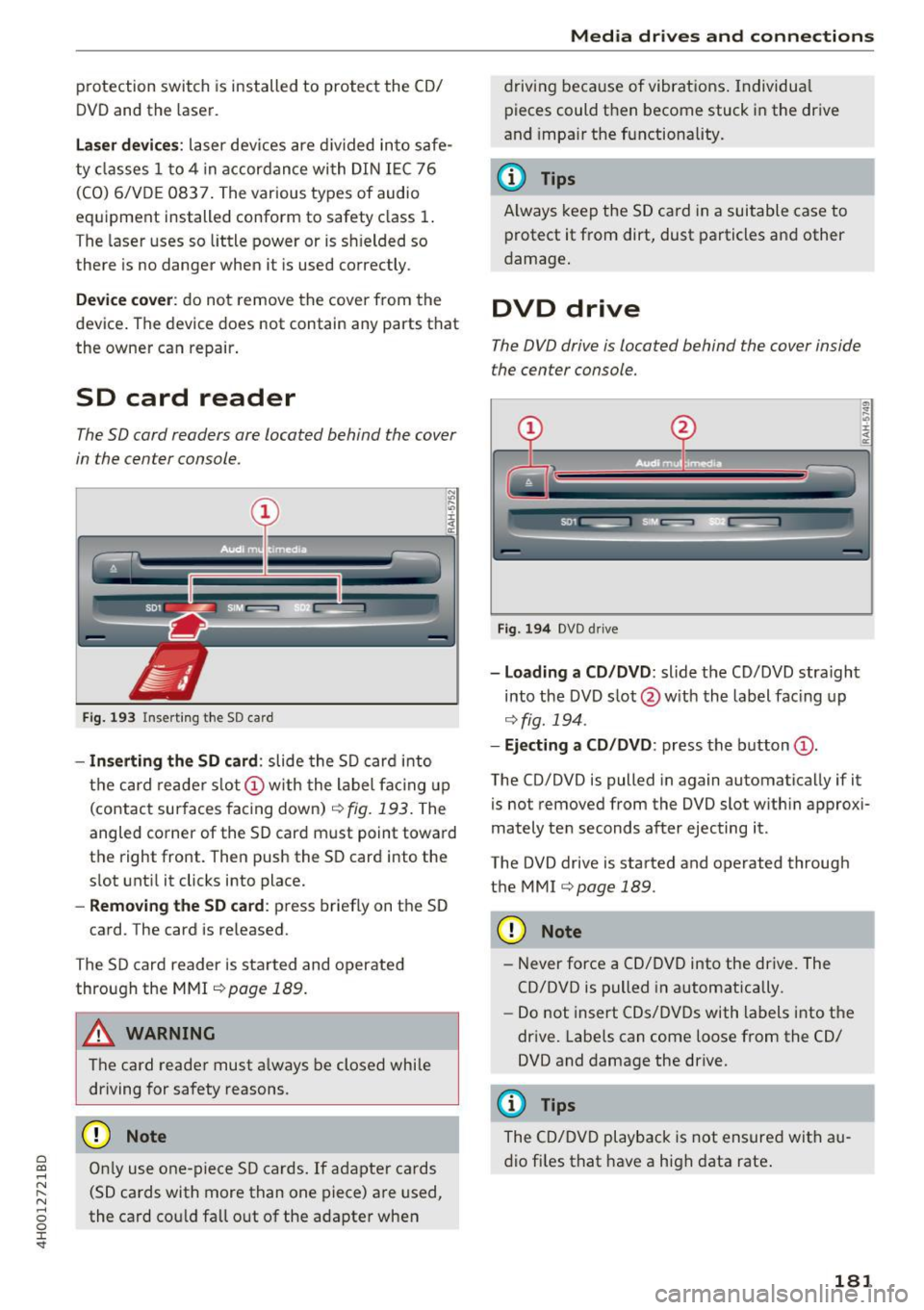
Fig. 193 Insert ing the SD card
- Inserting the SD card: slide the SD card into
the card reader slot
(D w ith the label facing up
(contact sur faces facing down)
r=> fig. 193. The
angled corner of the SD card must point toward
the right front. Then push th e SD card into the
s lot until it clicks into place.
-Removing the SD card : press briefly on the SD
card . The card is re leased.
The SD card reader is started and operated
through the MMI
r=> page 189.
A WARNING
The card reader must always be closed while
driving for safety reasons .
CD Note
Only use one-piece SD cards. If adapter cards
(SD cards with more than one piece) are used,
the card could fall out of the adapter when
Media drives and connections
driving because of vibrations. Individua l
pieces could then become stuck in the drive
and impa ir the functionality.
(D Tips
Always keep the SD card in a suitable case to
protect it from dirt, dust particles and other
damage.
DVD drive
The DVD drive is located behind the cover inside
the center console.
Fig . 194 DVD drive
-Loading a CD/DVD: slide the CD/DVD straight
into the DVD slot @ with the label fac ing up
r=o fig. 194 .
-Ejecting a CD/DVD : press the button (D.
The CD/DVD is pulled in again automatically if it
is not removed from the DVD slot w ith in approxi
mately ten seconds after ejecting it.
The DVD drive is started and operated through
the MMI
r=>page 189.
CD Note
-Never force a CD/DVD into the drive. The
CD/DVD is pulled in automatically .
- Do not insert CDs/DVDs with labels into th e
drive. Labels can come loose from the CD/
DVD and damage the drive.
(D Tips
The CD/DVD playback is not ensured with au
dio files that have a high data rate.
181
Page 184 of 354
Media drive s and conn ections
DVD changer
Applies to: vehicles w ith DVD changer
The DVD changer is located in the glove com
partment.
@
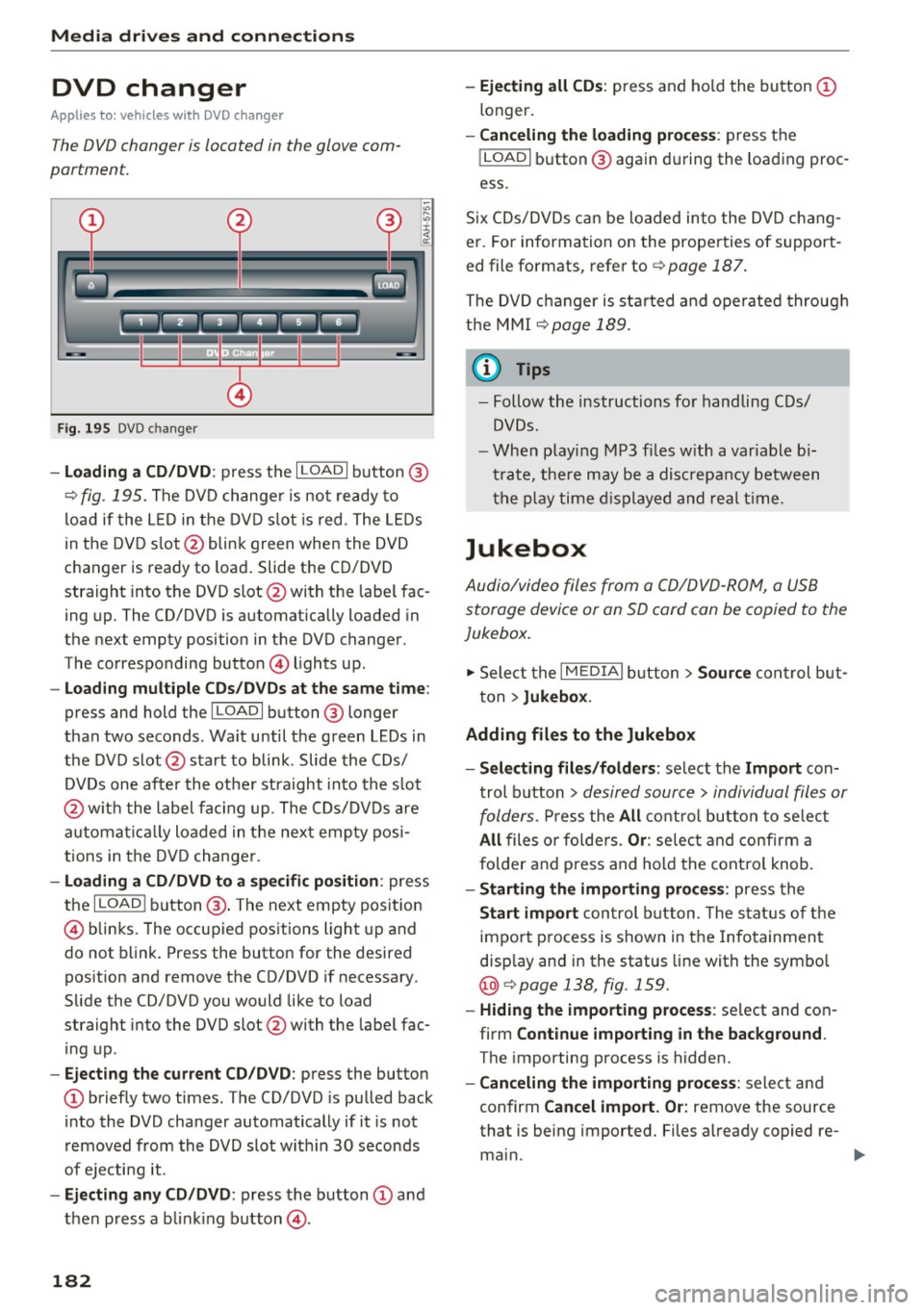
F ig . 195 DVD c hanger
- Loading a CD /DVD : press the I LOADI button @
¢
fig. 195. The DVD change r is not ready to
load if the L ED in the DVD slot is red . The LEDs
in the DVD s lot @ blink green when the DVD
changer is ready to load . Slide the CD/DVD
straight into the DVD slot @with the labe l fac
ing up. The CD/DVD is automat ica lly loaded in
the next empty position in the DVD changer .
The corresponding button © lights up .
-Loading mul tiple CD s/ DV Ds at the same t ime :
press and hold the I LOAD I button @ longer
than two seconds . Wait until the green LEDs in
the DVD slot @start to blink . Slide the CDs/
DVDs one after the othe r straight into the s lot
@ wit h the label facing up. The CDs/DVDs are
a utomat ica lly loaded in the nex t empty posi
tions in the DVD changer .
-Loading a CD /DVD to a specific position : press
the
I L OAD I button @. The next empty pos it ion
© blinks. The occupied positions light up and
do not b link . Press the button for the desired
position and remove the CD/DVD if necessary .
Slide the CD/DVD you would like to load
straight into the DVD slot @with the labe l fac
ing up .
-Ejecting the current CD/DVD : press the button
CD briefly two times. The CD/DVD is pu lled back
i nto the DVD changer automatically if it is not
removed from the DVD slot w ith in 30 seconds
of ejecting it .
-Ejecting any CD /DVD : press the b utton CD and
then press a blink ing button @.
182
-Ejecting all CD s: press and ho ld the button CD
longer .
-Canceling the load ing pro ce ss: press the
!LOAD I button @ again d uring the loading proc
ess.
S ix CDs/DVDs can be loaded into the DVD chang
er. For information on the properties of support
ed file fo rmats, refer to ¢
page 187.
The DVD c hanger is sta rted and oper ated throug h
the MMI
¢ page 189.
(1} Tips
-Follow the instructions fo r handling C Ds/
DVDs.
- Whe n playi ng MP3 f iles w ith a variable b i
t rate, t he re may be a disc repancy between
t h e p lay time d isplayed and real t ime.
Jukebox
Audio/video files from a CD/DVD -ROM, a USB
storage device or an SD card can be copied to the
Jukebox.
... Select the I MEDIAi button> Source con trol b ut
ton >
Jukebox.
Adding fil es to the Jukebox
- Select ing files /fold ers :
select the Import con
trol b utton >
desired source > individual files or
folders.
P ress the All c o ntro l butto n to se lec t
All files o r fo lde rs. Or : selec t and confirm a
folder and press and hold the contro l knob.
- Starting the importing proc ess: press the
Start import con trol b utton . T he stat us o f the
import p rocess is shown in the Infotainment
disp lay and in the status line with the symbo l
@¢page 138, fig . 159.
- Hid ing the importing proce ss: se lect and con
firm
Continue importing in the background .
The importing process is hidden.
- Canceling the impo rt ing process : select and
confirm
Can cel import. Or : remove the source
that is being imported. Files a lready copied re-
ma in.
Ill>-