center console AUDI A8 2017 User Guide
[x] Cancel search | Manufacturer: AUDI, Model Year: 2017, Model line: A8, Model: AUDI A8 2017Pages: 354, PDF Size: 88.68 MB
Page 195 of 354
C) C0 ....
"' " "' .... 0 0 :r
RSE components
overview
A ppl ies to: ve hicl es w ith Re ar Seat E nte rtainment
The Rear Seat Entertainment, abbreviated RSE ,
combines different entertainment systems . The
RSE control panel is located in the rear center
console .
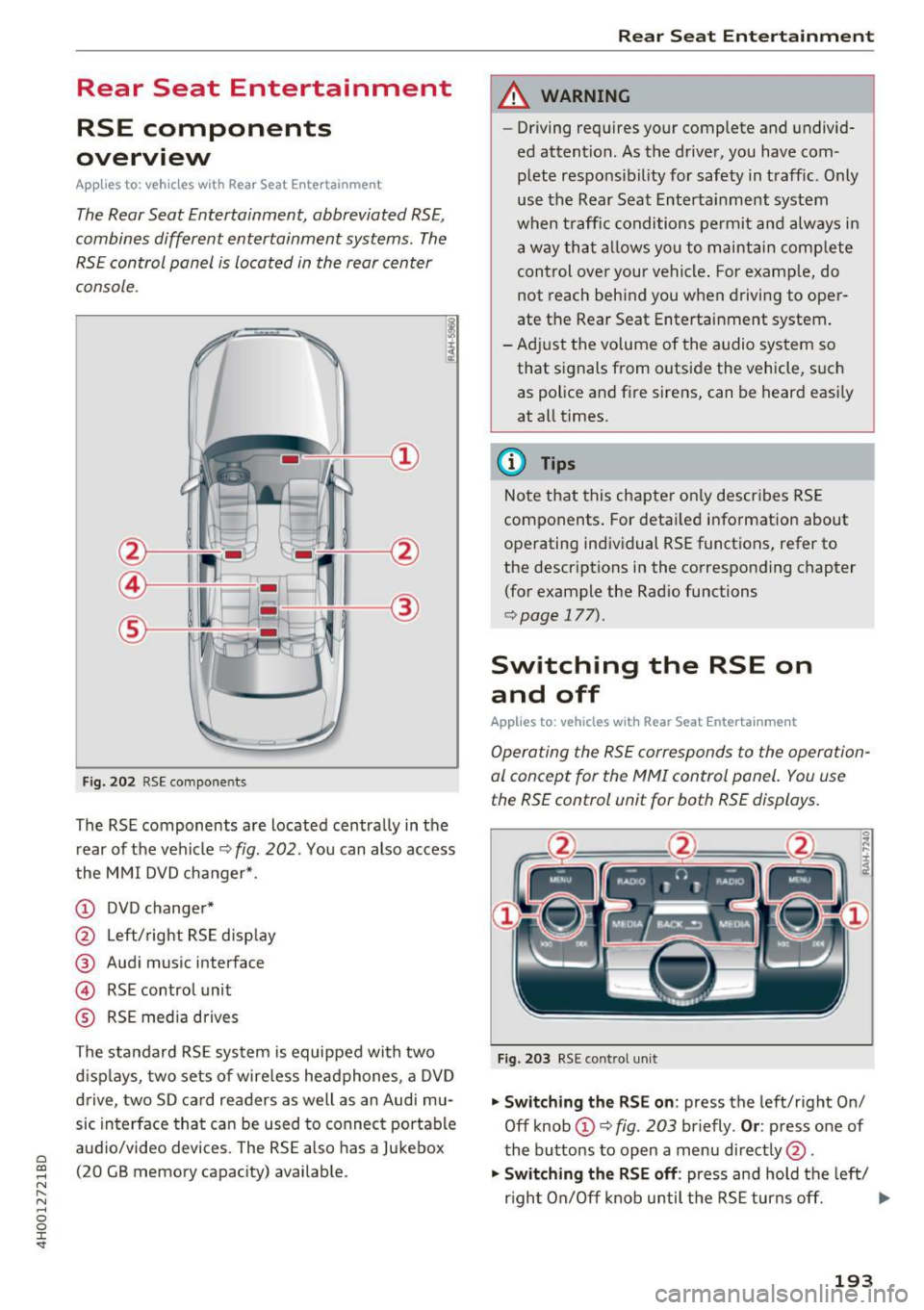
Fig . 202 RSE compo nen ts
The RSE components are located centra lly in the
rear of t he vehicle
9 fig. 202 . You can also access
the MMI DVD changer* .
CD DVD changer*
@ Left/right RS E disp lay
® Audi music interface
© RSE control unit
® RSE media drives
The standard RSE sys tem is equipped with two
d isp lays, two sets of wire less headphones, a DVD
drive, two SD card readers as well as an Audi mu
sic interface that can be used to connect portable
audio/video devices . The RSE also has a Jukebox
(20 GB memory capacity) available.
Rear Seat Entertainment
A WARNING
-- Driving requires your complete and undivid-
ed attention. As the drive r, you have com
plete responsib ility for safety in traff ic. Only
use the Rear Seat Entertainment system
when t raff ic conditions permit and always in
a way tha t allows you to maintain comp lete
control over your vehicle . For examp le, do
not reach behind you when driving to oper
ate the Rear Seat Entertainment system .
-Adj ust the volume of the audio system so
that signals from outside the vehicle, suc h
as police and fire sirens, can be heard easi ly
at all times.
(D Tips
Note that this chapte r on ly describes RSE
components . For deta iled information about
operating indiv idual RSE funct ions, refer to
the descriptions in the corresponding chapter
(for example the Radio functions
¢ page 177).
Switching the RSE on
and off
Applies to : vehicles wit h Rear Seat Enterta inment
Operating the RS E corresponds to the operation
al conc ept for the MMI control pan el. You us e
the RSE control unit for both RSE displays.
F ig . 203 RS E cont ro l un it
.,. Swit ching the RS E on : press the left/right On/
Off knob
CD ¢ fig . 203 briefly . Or: press one of
the buttons to open a menu direct ly @ .
"" Swit ching the R SE off : press and hold the left/
r igh t On/Off knob until the RSE turns off.
IJ,,
193
Page 200 of 354
Rear Seat Entertainment
Labeling the wireless headphones
-Attach the supplied label CD or@ c::> fig. 209 on
the inside of the left/right wire less head
phones.
La beling the w ireless headphones:
CD Wireless headphones label (paired with the
left RSE display)
@ Wireless headphones label (paired with the
right RSE display)
Switching wireless headphones on/off
- Switching on:
to switch the wire less head
phones on, press the On/Off button
CD
9 fig. 208 on the right earpiece (R) for approxi
mately
3 seconds and release it once the LED
@ starts blinking . The light @will blink s lowly
once the connection to the wireless head phones has been established.
- Switching off : to switch the wireless head
phones off, press and hold the On/Off button
CD until the LED @turns off.
The wireless headphones switch off automatical ly about five minutes after the RSE switches off.
Disconnect wireless headphones
You can delete the pairing between the wireless
headphones and the RSE if yo u need to switch
out the headphones o r change the pairing .
- Select:
I M ENU I button> Setup RSE control but
ton
> Headphones > Delete wireless head
phones.
A WARNING
- For safety reasons, as the driver, only use
the headphones when the vehicle is station
ary to reduce the r isk of a crash .
- When driving, store the headphones secure
ly so that they do not move around in the
vehicle interior when braking or in a crash.
- Maintain a moderate volume leve l when lis
tening to audio playback through the head
phones. Continuous exposure to extreme
volume levels may result in loss of hearing.
198
-
@ Tips
-If the wire less headphones were already
paired, the connection to the headphones
will be reestablished after switching the
RSE on if the headphones are sw itched on.
- The RSE only supports wireless headphones
from your authorized Audi dealer.
- Audio/video output through the wire less
headphones stops during the pairing proc
ess.
- The pairing process must be done separate
ly for the left and right w ireless head
phones. The wireless headphones are as
signed to the left or right RSE display de
pend ing on the side of the RSE control unit
where you started the pairing process. The
pairing between the wireless headphones
and the lef t/r ight RSE display is ide ntifi ed
with a label.
- Volume that is too high or too low is auto
matically adjusted to a preset leve l when
the wireless headphones are connected.
Charging and changing the battery
Applies to: vehicles with Rear Seat Entertainment
If the light on the wireless headphones turns
red the batteries are low and need to be charg-
,
ed or replaced .
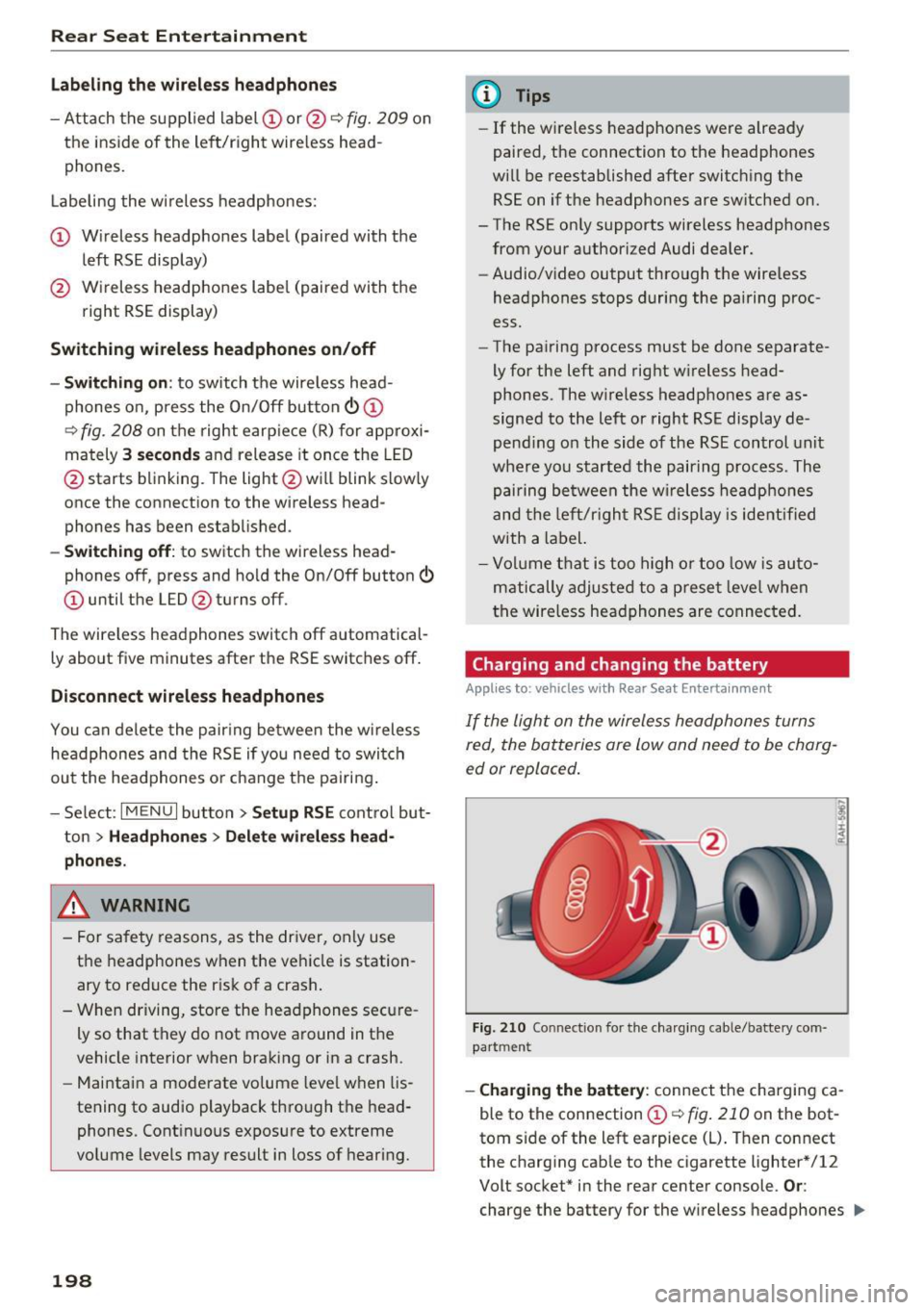
Fig. 210 Connec tion for the charg ing cable/battery com
partm ent
-Charging the battery : connect the charging ca
ble to the connection
CD c::> fig . 210 on the bot
tom side of the left earpiece (L) . Then connect
the charging cable to the cigarette lighter * /12
Volt socket* in the rear center console.
Or:
charge the battery for the wireless headphones .,.