fuel AUDI A8 2017 User Guide
[x] Cancel search | Manufacturer: AUDI, Model Year: 2017, Model line: A8, Model: AUDI A8 2017Pages: 354, PDF Size: 88.68 MB
Page 71 of 354

0 co .... N ,..... N .... 0 0 :c '
climate control
Description
The climate con trol system warms, coo ls and re
moves humidity from the air in the vehicle inte ri
or. It is the most effective when the w indows and
sunroof* are closed. If there is a bu ild-up of heat
i n side the veh icle, ven tilat ion can he lp to speed
up the cooling process .
In a ll heating mode functions, except for defrost,
the blower on ly switches to a higher speed once
the eng ine coolant has reached a sufficient tem
perature.
Pollutant filt er
The po llutant filter removes pollutants such as
d ust and pollen from the air.
Key recognition
The clima te control settings are automatically
s tored and assig ned to th e remo te contro l key
that is in use.
& WARNING
Poo r visibility can lead to accidents.
- For safer d riving, keep all windows free of
ice, snow and fo g.
- B ecome familia r as quickly as possible wi th
the correct use and function of the cl imate
contro l system, especially with the defrost
ing and defogging function.
- When the temperat ure is below freezing,
only use the windsh ield washer system after
Warm and cold
the windshield has been warmed by the cli
mate control system. The washer fluid could
freeze on the windshie ld and impair visib ili
ty .
(D Note
-If you suspect that the climate contro l sys
tem is damaged, switch the system off to
prevent further damage and have it checked
by an authorized Aud i dealer o r authorized
Aud i Serv ice Facility.
- Repa irs to the Aud i climate control system
require special technical know ledge and
special tools . See an autho rized Aud i dea le r
or authorized Audi Service Fac ility.
@ For the sake of the environment
Reducing the amount of fuel used also re
duces the amount of pollu tan ts that enter the
ai r.
@ Tips
- To prevent interference with the heat ing
and coo lin g output and to prevent the wi n
dows from fogging over , the air intake in
fro nt of the windshie ld m ust be free of i ce,
snow o r leave s.
- Condensat ion from the coo ling system c an
dr ip and fo rm a pudd le of w ater un der t he
vehicle. Th is i s n orm al and does not me an
t here is a lea k.
- T he e nergy m anagemen t sy stem may tem
por arily swi tch off cert ain fu nctions, s uch a s
the seat heating * or rear window defogger .
T hese systems are ava ila ble again as soon
as the energy supply has been restored.
69
Page 76 of 354

Driving
Economical and environmentally-friendly
driving
The amount of fue l consumption, the environ
mental impact and the wear to the engine,
brak es and tir es d epends mostly on your driving
style. W ith an anticipatory and economic driv ing
style, fuel consumption can be reduced by ap proximately 10-15% . The following tips will help
you conserve the environment and your money at the same time .
Anticip atory d riving
A vehicle uses the most fuel when acce lerating.
When you drive with ant ic ipat ion , you do not
need to brake as often and so you accelerate less .
When possible, let your ve hicle coast w ith a
g ear
e ngag ed ,
for example , when you notice that the
next traffic light is red. This produ ces a n eng ine
b raking effect, which helps to protect the brakes
and tires and reduces the emissions and fuel con
sumption to zero (f uel shut-off during decelera
tion).
Shift effici ently
An effective way to save f uel is to upshift earlie r.
Staying in a gear too long uses fue l unnecessari
ly. Press down on the accelerator pedal slowly
and avoid "k ick-down".
Avoid full acceleration
You sho uld rare ly t ravel at the maximum vehicle
speed. High speeds cause a disp roportiona tely
h igh increase in fuel consumption, emissions and
traffic noise . Slower driving saves fuel.
Reduce idling time
The Start-Stop system * helps to reduce the id ling
time automatically . In vehicles witho ut the Start
S top sys tem* , it is efficient to switch the eng ine
off when stopped at ra ilroad cross ings a nd long
red lights . Stopping t he engine for 30 -40 sec
onds already saves more fuel than the amount of
extra fuel needed to restart the eng ine .
It takes a very long time in idle to wa rm the en
gine up to operating temperature . Wea r and
emissions are especially high in the warm -up
phase. Therefore, yo u should begin driving im-
74
mediate ly after s tarting the engine . Avoid high
RPMs whi le doing this.
Have maintenance performed regularly
By having maintenance pe rformed regu la rly on
you r vehicle, you can help to reduce fuel con
s u mption before you even sta rt to drive. The
maintenance condition of your vehicle not on ly
affects traffic safety and long-term value but al
so impacts fuel consumption. A poorly main
ta ined engine can lead to fuel consumption that
i s 10% higher than normal.
Avo id short trip s
The engine and exha ust cleaning system must
reach their optima l operating temperature to ef
fect ive ly reduce consumpt ion and emissions.
A cold engine uses a d isproportionately high
amount of fue l. The engine reaches operating
temperat ure and cons umption no rmalizes on ly
after approximate ly four kilometers.
Check the tire pre ssure
To save fuel, ma ke sure the tires are always in
flated to t he corre ct pressure
¢ page 291 . The
fuel consumption can increase by 5% if the pres
sure is only 0 .5 bar too low. Due to the increased
roll ing resistance, low tire pressures w ill also
lead to greater tire wear and will affect driving
behavior.
D rive with summer tires when possib le because
th is can increase fue l economy by up to 10%.
Eliminate unnecessary we ight
Since eve ry po und of extra weight increases f uel
consump tion, it pays to remove any unnecessa ry
weight .
A roof rac k increases the w ind resis tan ce on the
vehicle and shou ld be removed when it is not
needed . You will save approximately 12% o f you r
fuel when at speeds from 62-75 mph (100-120 km/h) .
Save energy
The eng ine d rives the genera tor , which gene rates
e lectric ity; the fuel consumpt ion also increases
with t he demand for e lec tricity . T he refore, switch ..,_
Page 85 of 354
C) C0 ....
"' " "' .... 0 0 :r
place on all h ills (for example, if the ground
is slippery or icy).
- To reduce the risk of an accident, always
make sure the vehicle is situated safely
wh ile stat io nary.
Automatic transmission
Introduction
The automat ic transmission is cont rolled e lec
tron ica lly . Power is transferred using a torque
converter.
The transm ission shifts up or down a utomat ica lly
depending on w hich drive program is sele cted.
When a
moderate driving style is used , the
transmission selects the most economical d riving
mode. The t ransm iss ion upsh ifts at a lowe r RPM
a nd downshifts at a highe r RPM to imp rove fuel
effi ciency .
The transm ission sw itches to a spo rty mode after
a ki ck-down or when the drive r uses a
sporty
driving style
c haracterized by quick accelerator
pedal movements, heavy acce leration , freq uent
changes in speed and traveling at the maximum
speed.
If desired , the dr iver can also select the gears
manually (tiptronic mode)
c::> page 86 .
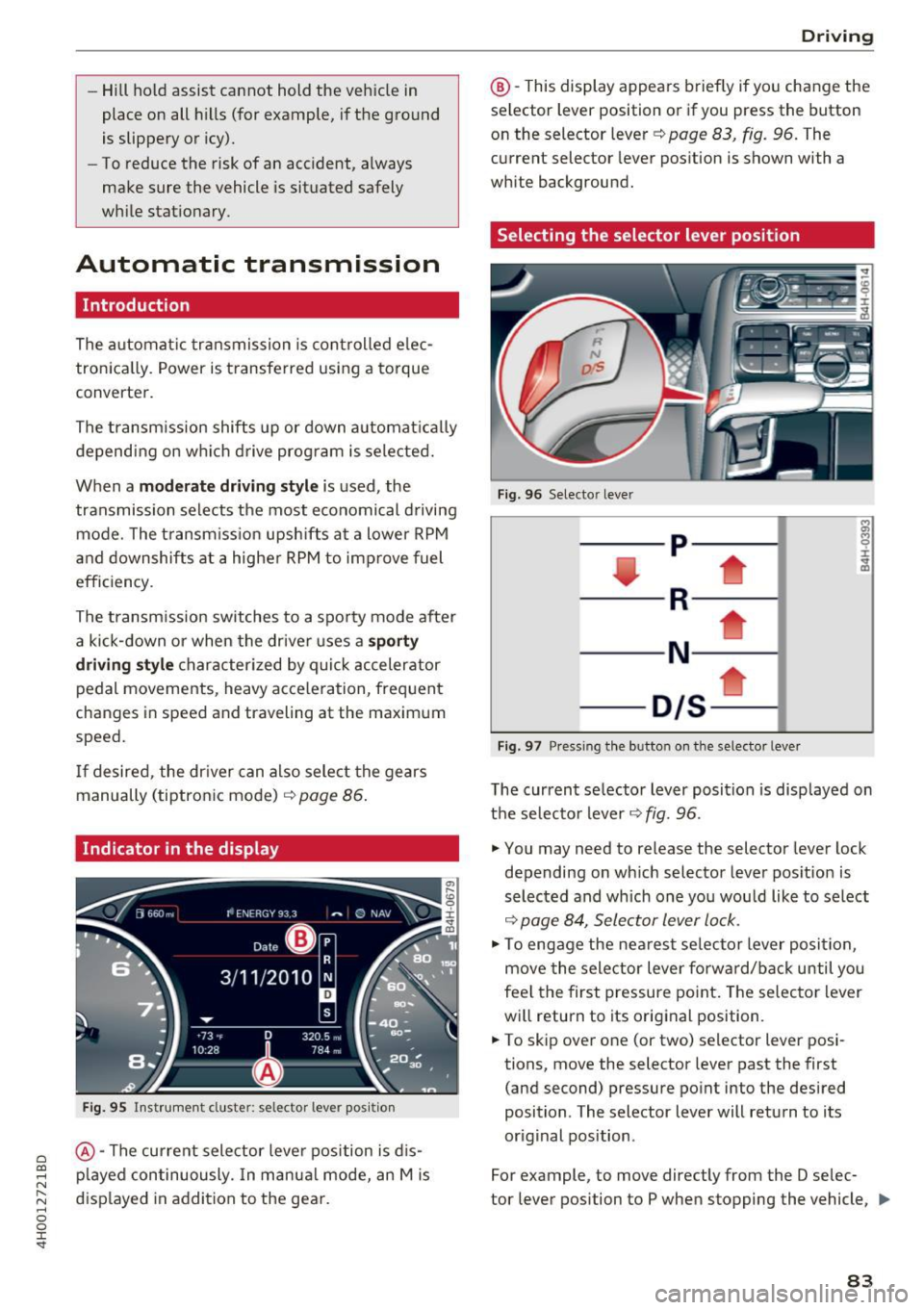
Indicator in the display
Fig . 9 5 Inst rumen t cluste r: s elec to r leve r po sit io n
@ -The current sele ctor leve r position is d is
p layed continuously. In manua l mode, an Mis
d isp layed in addi tion to the gea r.
D rivi ng
@ -This display appea rs brief ly if you change the
sel ector lev er posit ion or if you pr ess the button
on the selector lever
c::> pag e 83 , fig . 96. The
current selector lever pos ition is shown with a
white background.
Selecting the selector lever position
Fi g. 9 6 Selecto r lever
-- p----
----R--- --1
----N - -- ---
- D/S--
Fig . 97 Pres sin g the b utto n on the se lector leve r
The current se lector lever position is disp layed on
t h e se lector lever
c::> fig. 96 .
.,. You may need to release the selector lever lock
depending on wh ich selector lever pos ition is
selected and which one yo u wou ld like to se lect
c::> page 84, Selector lever lock .
.,. To engage the ne arest se lector lever posi tion,
move the selector lever forw ard/back until you
fee l the first pressure po int. The selector lever
wi ll return to its orig inal position .
.,. To skip ove r one (or two) selector lever posi
tions, move the selector lever past the first
(and second) pressure po int into the desired
position . T he selector lever will return to its
or iginal position .
For example, to move directly from the D selec-
tor lever position to P when stopping the vehicle,
ll>
83
Page 142 of 354
Voice recognition system
• l ELEPHONE
• NAVIGATION
• INFO
• RADIO
• MEDIA
• HELP
• HELP VOICE RECOGNlTION
• HELP TELEPHONE
• HELP NAVIGATION
• HE LP MAP
• HELP INFO
• HELP RADIO
• HELP MEDIA
liEttEPHONE
• ENTER NUMBER
• DIAL
• REPEAT
• CORRECTION
• DE LETE NUMBER
• REDIAL
• CAL L (XV)
(BUSINESS/ PRIVATE/ LAND LINE/ CELL)
• ENTER ADDRESS
• ENTER COUNTRY
• ENT ER ZIP CODE/ CITY
• ENTER STREET
• ENTER HOUSE NUMBER
• ENTER DOWNTOWN
• START/ CANCEL ROUTE GUIDANCE
• NAVIGATE
TO (XV)
• LAST DESTINATIONS
• FAVORITES
• HOME ADDRESS
• SHORT /FAST/ ECONOMY ROUTE
• DYNAMIC ROUTE ON / OFF
• ROUTE UST
• VOICE GUI DANCE ON / OFF
• ROUTE INFO ON/ OFF
• SCALE (XY) MILES / YARDS
I r-.1 F.O
• READ TRAFFIC REPORTS
RADIO
• SET STATION
• STATION (XV)
• SET FREQUE NCY
• SET BAND
• FM / AM/ SIRIUS
• STATION LIST
• READ STATION LIST
• PRESETS
• READ PRESETS
• UPDATE STATIO N LIST
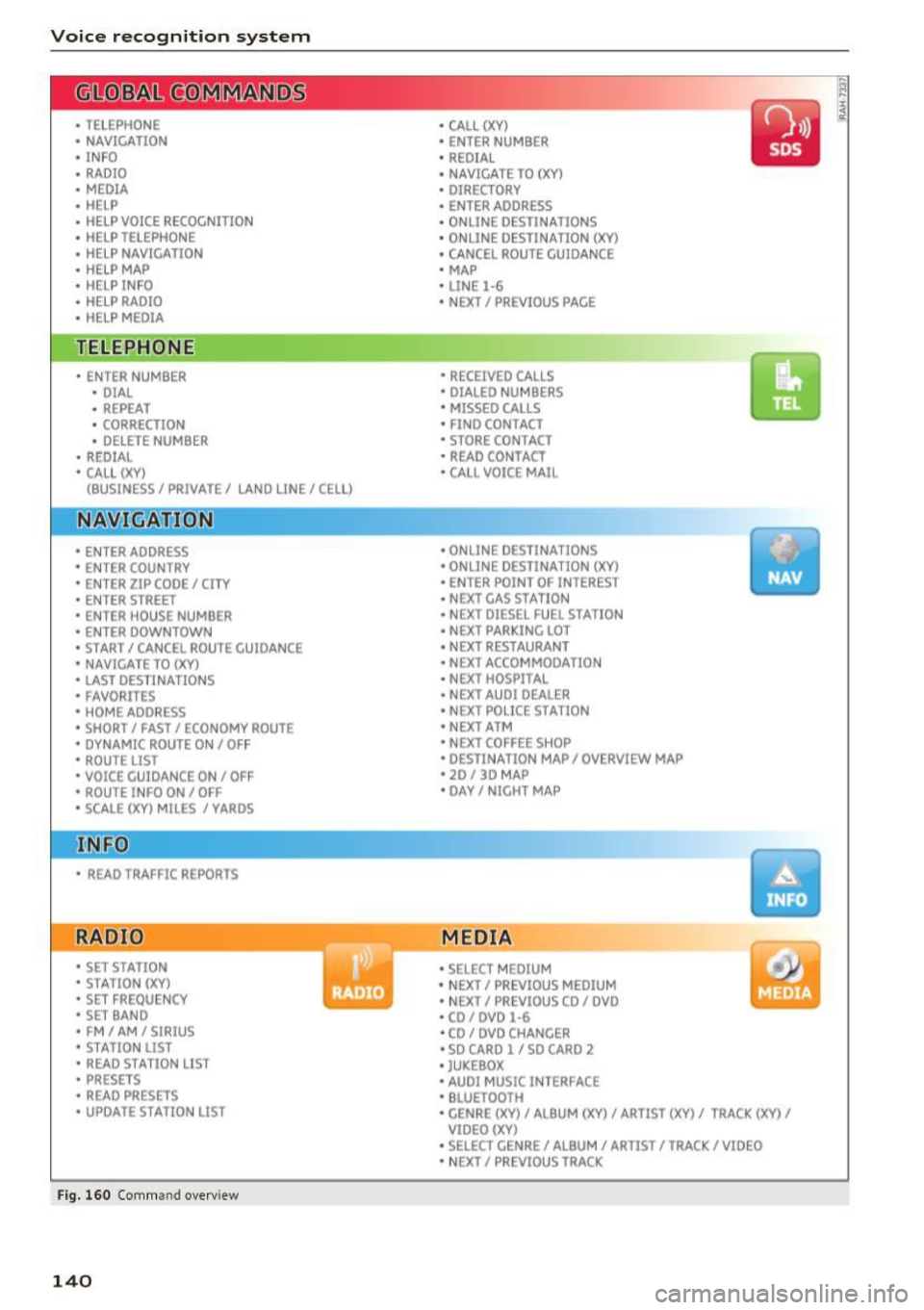
Fig. 160 Com mand overv iew
140
• CALL (XY)
• ENTER NUMBER
• REDIAL
• NAVIGATE TO (XY)
• DIRECTORY
• ENTER ADDRESS
• ON LINE DESTINATIONS
• ONLINE DESTINATION (XV)
• CANCEL ROUTE GUIDANCE
• MAP
• LINE
1·6
• NEXT/ PREVlOUS PAGE
• RECEIVED CALLS
• DIALED NUMBERS
• MISSED CALLS
• FIND CONTACT
• STORE CONTACT
• READ CONTACT
• CALL VOICE MAIL
• ONLINE DESTINATIONS
• ONLINE DESTINATION (XV)
• ENT ER POINT OF INTEREST
• NEXT GAS
ST A TION
• NEXT DIESEL FUEL STATION
• NEXT PARKING LOT
• N EXT RESTAURANT
• NEXT ACCOMMODATION
• NEXT HOSPITAL
• NEXT AUDI DEALER
• NEXT POLICE STATION
• NEXT ATM
• NEXT COFFEE S HOP
• DESTINATION MAP/ OVERVIEW MAP
• 20 / 30 MA P
• DAY/ NICHT MAP
MEDIA
• SELECT MEDIUM
• N EXT/ PREVIOUS MEDIUM
• NEXT/ PREVIOUS CO/ DVD
• CD/ DVD
1·6
• CD / DVD CHANCER
• SD CARD l / SD CARO 2
• JUKEBOX
• AUDI MUSIC INTERFACE
• BLUETOOTH
• CENRE (XV)/ ALB UM (XV)/ ARTIST (XV)/ TRACK (XV)
I
VIDEO (XV)
• SELECT CENRE /ALBUM/ ARTIST/ TRACK/ VIDEO
• NEXT/ PREVIOUS TRACK
Page 145 of 354
0 co .... N ,..... N .... 0 0 :c '
Correcting the phone number that
was entered
Displaying call lists
Calling the last number dialed
List ening to messages
(D Tips
Voice recognition system
Say :
Delete number
I Correction
Dialed numbers
I Received calls I Missed calls
Redial
Call voice mail
- Name tags can only be stored using the
voi ce recogni tion system.
- You can assign up to SO additional name
tags for address cards. - Name
tags can only be deleted using the
MMI control panel.
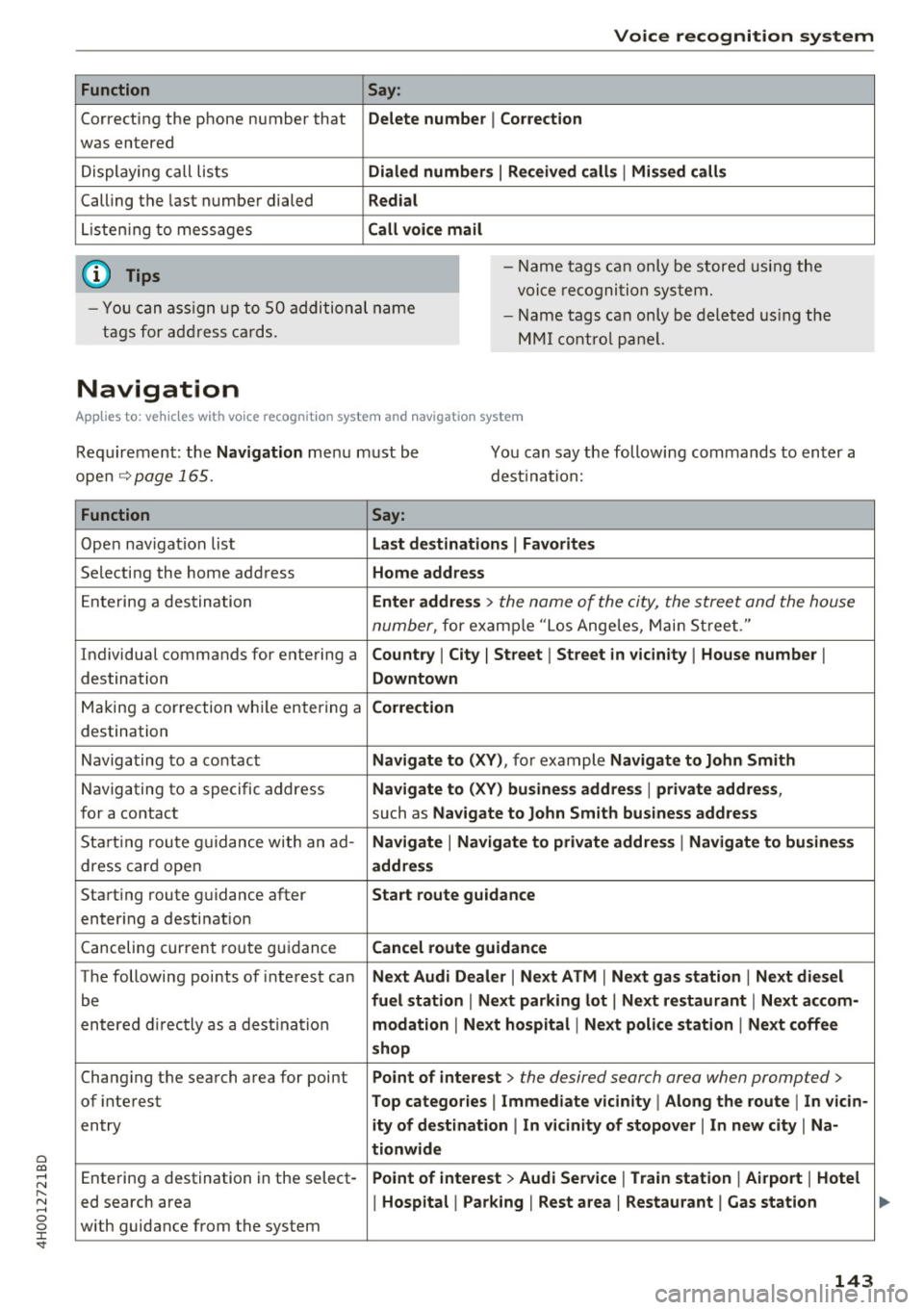
Navigation
Applies to: vehicles with voice recognition system and navigation system
Requirement: the Navigation menu must be
open
~ page 165.
You can say the following commands to enter a
dest ination:
Function Say:
Open navigat ion list Last destinations I Favorites
Selecting the home address Home address
Entering a destination Enter address > the name of the city, the street and the house
number,
for examp le "Los Ange les, Main Street ."
Individual commands for entering a
Country I City I Street I Street in vicinity I House number I
destination Downtown
Making a correction while entering a Correction
destination
Navigating to a contact
Navigate to (XV), for example Navigate to John Smith
Navigating to a specific address Navigate to (XV) business address I private address,
for a contact such as Naviigate to John Smith business address
Sta rt ing route guidance with an ad-Navigate I Navigate to private address I Navigate to business
dress card open address
Starting route guidance after Start route guidance
entering a destination
C anceling current route gu idance
Cancel route guidance
The following points of inte res t can Next Audi Dealer I Next ATM I Next gas station I Next diesel
be fuel station I Next parking lot I Next restaurant I Next accom-
entered directly as a destination modation I Next hospital I Next police station I Next coffee
shop
Changing the search area for point Point of interest > the desired search area when prompted>
of interest Top categories I Immediate vicinity I Along the route I In vicin-
entry ity of destination I In vicinity of stopover I In new city I Na-
tionwide
Entering a destination in the select -Point of interest > Audi Service I Train station I Airport I Hotel
ed search area I Hospital I Parking I Rest area I Restaurant I Gas station
with guidance from the system
143
Page 148 of 354

Telephone
Telephone
Introduction
Applies to: vehicles with telephone
To make phone calls in your vehicle using the
f\1/11[, connect your cell phone to the /11/11[ via
8/uetooth.
Hand sfree
With this connection, you use the handsfree sys
tem and operate telephone functions through
the MMI. Phone calls are transmitted through
the antenna on your cell phone.
A WARNING
- Medical experts warn that cell phones can
interfere with the function of pacemakers .
Always mainta in a m inimum d istance of 20
cent imeters between the cell phone anten
na and the pacemaker.
- Do not carry the cell phone in a pocket di
rectly over the pacemaker when the phone
is switched on.
- Sw itch the cell phone off immediately if
you suspect it may be interfering w ith the
pacemaker.
- Do not use the voice recognition system
c:> page 141 in emergencies because your
vo ice may change in stressful situations. It
may take longer to dial the number or the
system may not be able to dial it at al l. Dial
the emergency numbe r manually.
- Switch your cell phone
off in areas where
there is a risk of an exp losion . These loca
tions are not always clea rly mar ked. This
may include gas stations, fuel and chemical
storage fa cilit ies or transpo rt ve hicl es, or lo
cations where fue l vapors (such as propane
or gaso line vapor in vehicles or bui ldings),
chemicals or large quantities of dust parti
cles (such as flour, sawd ust o r metal) may
be present in the air. This also applies to a ll
other locations where you would normally
turn yo ur vehicle engine
off .
-The demands of traffic requ ire your full at
tent ion. Read and follow the guidelines pro
vided in
c:> page 134 .
146
.
(D Note
Always follow the information found in c:> 0 in
Wi-Fi hotspot on page 160.
@ Tips
The B luetooth connection range is limited to
inside the vehicle. It can also be affected by
l ocal cond itions and interference with other
devices.
Setup
Connecting a cell phone using Bluetooth
Applies to: vehicles with telephone
Fig. 16 1 Searching for ce ll phones
Fi g. 162 D isp lay ing the PfN for en teri ng in t he cell p hone
Requirements
The vehicle must be stationary and the ignition
must be sw itched on .
The Bluetooth funct io n and visib ility of the MMI
c:> page 155 a nd cell phone must be sw itched on .
The MMI and the cell phone to be paired must not be actively connected to any other Bluetooth
devices.
IIJ,,
Page 161 of 354
0 co .... N ,..... N .... 0 0 :c '
I BACK! button.
A WARNING
To reduce the risk of an accident, only use
Audi connect services when road and traffic conditions permit.
(D Tips
Some functions are only avai lable when the
vehicle is stationary.
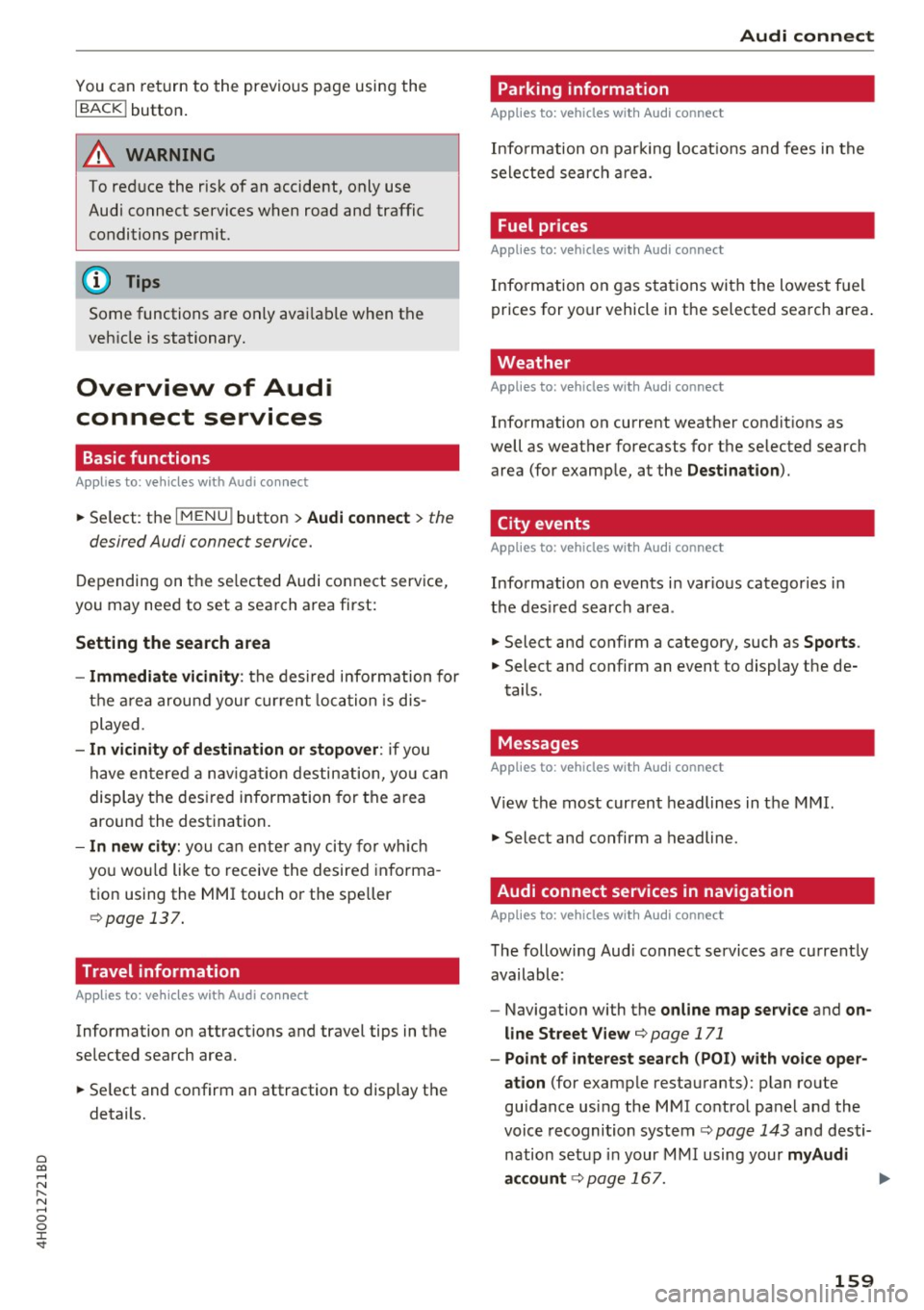
Overview of Audi
connect services
Basic functions
Applies to: vehicles with Audi connect
.,. Se lect : the I MENU ! button > Audi connect > the
desired Audi connect service.
Depending on the selected Audi connect service,
you may need to set a search area first:
Setting the search area
- Immediate vicinity:
the desired information for
the area around your current location is dis
played .
-In vicinity of destination or stopover: if you
have entered a navigat ion destination, you can
display the desired information for the area
around the destination.
- In new city: you can ente r any city for which
you wou ld like to receive the desired informa
tion using the MMI touch or the speller ¢ page
137.
Travel information
Applies to: vehicles with Audi connect
Information on attractions and travel tips in the
selected search area.
.,. Select and confirm an attraction to display the
details.
Audi connect
Parking information
Applies to: vehicles with Audi connect
Information on parking locations and fees in the
selected search area.
Fuel prices
Applies to: vehicles with Audi connect
Info rmation on gas stations with the lowest fuel
prices for your vehicle in the selected search area .
Weather
Applies to: vehicles with Audi connect
Information on current weather conditions as
well as weather forecasts for the selected search area (for example, at the
Destination ).
City events
Applies to : vehicles with Audi connect
Information on events in various categories in
the desired search area .
.,. Select and confirm a category, such as
Sports .
.,. Select and confirm an event to display the de-
tails.
Messages
Applies to: vehicles with Audi connect
View the most current headlines in the MMI.
.,. Select and confirm a headline.
Audi connect services in navigation
Applies to: vehicles with Audi connect
The following Audi connect services are currently
available:
- Navigation with the
online map service and on
line Street View
¢page 171
-Point of interest search (POI) with voice oper·
ation
(for example restaurants): plan route
guidance using the MMI control panel and the
voice recognition system
¢ page 143 and desti
nation setup in your MMI using your
myAudi
account ¢
page 167. .,..
159
Page 207 of 354

sound distribu tion)/ Driver (sound dist ribution
aime d toward th e driver) or
All /Front /Rear .
- Surround level* :
you can adjust the vo lume of
t h e sur round effect by tu rning the contro l
kno b.
-AudioPilot (dynamic road noise compensa
tion)* :
select and confirm Active /Inactive.
When the funct io n is act ive, the vo lume is a uto
matically ad justed depending on the leve l of
noise ins ide the ve hicle.
- Sound focus* (adjusting the sound distribu
tion ):
select and conf irm All (symmet rical
sou nd
di stribution)/ Movie (optimal so und dis
t ribution fo r playing a
movie)/ Front/Rear .
- Volume balancing *:
the dynam ic road noise
compensation can be ad justed by t urni ng the
co ntro l knob .
@Subwoofer* I@ Bass/ © Treble
You can a djust the Subwoofer *, Bass and Treble
settings by turning the cont ro l knob. The
changed settings only apply fo r the aud io source
that is active a t the t ime . Th is allows you to ad
just t he sound se tt in gs for eac h aud io source sep
a ra tely .
® Balance/Fader (sound focus)
- Adjusting the sound distribution using the
MMI touch :
move your finger on the MMI touch
contro l pane l in the desir ed di rect io n.
Adjusting the system
volume
.,. Se le ct: th e IMENU J butto n> Tone.
Navigation* control button
Voice guidance volume /Entertainment volume :
volume of navigation prompts du ring act ive
ro ute gui dance. Music vol ume dur ing navigation
p romp ts m eans tha t the vol ume o f aud io p lay
b ack is tem porar ily lowe red w hen the p arking
s ys tem or vo ice g uidan ce is active .
Voice guidance : refer to q pag e 174 .
0 !:! Voice guidance on during call : see c>page 174 .
N ,..._
N ...... 0 0 :c '
Telephone* control button
Ring tone volume /Call volume :
you ca n adjust
t h e se lec ted ring tone vo lume o r cal l vo lume by
tu rnin g the cont ro l knob. The
Call volume can
o nl y be adj usted during a ca ll.
Systems control button
Voice recognition volume. :
you c an adju st the
vo lu m e of the an noun cemen ts by turni ng the
contro l kno b.
MMI touch volume *: the vo lume of the MMI
touch pr om pts ca n be adju sted by tu rn ing the
c on tro l k n ob .
Other settings
.,. Sele ct: the I M ENU I butto n > Setup MMI co ntr ol
bu tton.
Language
The language ca n be changed fo r the Info tain
me nt display, t he d river info rmation sys tem dis
play , voice guida nce* and t he voice re cogn ition
syste m*.
En glish, French an d Spanish are ava ila ble .
Measurement units
The following meas urement u nits can be set in
t h e Infotainment disp lay and d river info rmat ion
system.
- Speed (mph o r km/ h)
- Distance (miles o r kilomete rs)
- Temperature (°Fo r 0
( )
-Fuel consumption (L/1 00k m, mpg ( US) , m pg
(U K) or km/l)
- Volume (lite rs , ga llons ( UK) o r gallons (US))
Voice recognition
Applies to : vehicles wit h voice recog nitio n system
Command display : the display of possible com
mands during vo ice input can be switched
On or
Off .
Short dialogue : prompts in a shorte r fo rmat can
be switched
On o r Off .
Input signal :
the beep inp ut sig na l during a dia -
l og can be switched
On or Off. .,.
205
Page 269 of 354

Checking and Filling
Gasoline
Fuel supply
Applies to: vehicles with gaso line engine
Using the right fuel helps keep the environment
clean and prevents engine damage .
Fuel recommendation
The fuel recommended for your vehicle is unlead
ed premium
grade gasoline. Audi recommends
using TOP TIER Detergent Gasoline with a mini
mum octane rating of 91 AKI (95 RON). For more
information on TOP TIER Detergent Gasoline,
please go to the official website
(www.toptiergas .com) .
The recommended gasoline octane rating for
your engine can also be found on a label located
on the inside of the fuel filler flap. This rating
may be specified as AKI or RON.
Your vehicle may also be operated using unlead
ed regular gasoline with a min imum octane rat
ing of 87 AKl/91 RON. However, using 87 AKl/91
RON octane fuel will slightly reduce engine per
formance.
Use unleaded gasoline only. Unleaded gasoline
is available throughout the USA, Canada, and in
most European countries . We recommend that
you do not take your vehicle to areas or countries
where un leaded gasol ine may not be available.
For more information on refueling your vehicle,
see
~ page 268.
Octane rating
Octane rating indicates a gasoline's ability to re
sist engine damaging "knock" caused by prema
ture ignit ion and detonation . Therefore , buy ing
the correct grade of gasoline is very important to
h e lp prevent possible engine damage and a loss
of eng ine performance.
Gasoline most commonly used in the United
States and Canada has the following octane rat-
~ ings that can usually be found on the filler pump: .... N
~ -Premium Grade: 91 -96 AKI .... 0 0 :c '
-Regu lar Grade: 87 -90 AK I
Exp lanation of the abbreviations:
AK I=
Anti Knock Index = (R +M)/2 = (RON +MON)/
2
RON = Research Octane Number
MON= Moto r Octane Number.
(D Note
- Do not use any fuel with octane ratings low
er than 87 AKI or 91 RON otherwise expen
sive engine damage will occur.
- Do
not us e leaded gasoline. The use of lead
ed gasoline will severe ly damage your vehi
cle's catalytic converter and its ability to
control exhaust emissions .
Blended gasoline
Applies to: vehicles with gasoline engine
Use of gasoline containing alcohol or MTBE
(methyl tertiary butyl ether)
You may use unleaded gasoline blended with al
cohol or MTB E (commonly referred to as oxygen
ates) if the blended mixture meets the following
criteria:
Blend of gasoline methanol (wood alcohol or
methyl alcohol)
-Anti -knock index must be 87 AKI or higher.
- Blend must contain no more than 3% metha-
nol.
- Blend must contain more than 2% co-solvents.
Blend of gasoline and ethanol (grain alcohol or
ethyl alcohol)
- Anti-knock index must be 87 AKI or higher.
- Blend must not conta in more than 15% etha-
nol.
Blend of gasoline and MTBE
- Anti-knock index must be 87 AK I or higher.
- Blend must contain not more than 15% MTBE.
Seasonally adjusted gasoline
Many gasoline grades are blended to perform es
pecially well for winter or summer dr iving . Dur-
ing seasonal change-over, we suggest that you ..,.
267
Page 270 of 354

Checking and Filling
fill up at busy gas stations where the seasonal
adjustment is more likely to be mad e in time.
0 Note
- Methanol fuels which do not meet these re
quirements may cause corrosion and dam
age to plastic and rubber components in the
fuel system.
- Do not use fuels that fail to meet the speci
fied criteria in this chapter .
- If you are unable to determine whether or
not a particular fuel blend meets the speci
fications, ask your service station or its fuel
supplier.
- Do not use fuel for which the contents can
not be identified.
- Fuel system damage and performance prob
lems resulting from the use of fuels differ
ent from those specified are not the respon
sibility of Audi and are not covered under
the New Vehicle or the Emission Control
System Warranties.
- If you experience a loss of fuel economy or
driveability and performance problems due
to the use of one of these fuel blends, we
recommend that you switch to unblended
fuel.
Gasoline additives
A pp lies to: ve hicles w ith gasoline engine
A major concern among many auto manufactur
ers is carbon deposit build-up caused by the type
of gasoline you use .
Although gasoline grades differ from one manu
facturer to another, they have certain things in
common. All gasoline grades contain substances
that can cause deposits to collect on vital engine
parts, such as fuel injectors and intake valves. Al
though most gasoline brands include additives to keep engine and fuel systems clean, they are not
equally effective .
Audi recommends using TOP TIER Detergent Gas
oline. For more information on TOP TIER Deter
gent Gasoline, please go to the official website (www.toptiergas .com) .
268
After an extended period of using inadequate
fuels, carbon deposit build-ups can rob your en
gine of peak performance.
([) Note
Damage or malfunction due to poor fuel qual
ity is not covered by the Audi New Vehicle
Limited Warranty.
Refueling
· Fuel filler neck
The fuel filler neck is located on the right rear
side panel behind the fuel filler flap .
If the power locking system should fail, you can
still open the flap manually -for detailed instruc
tions see
~ page 2 70.
You can find the fuel tank capacity of your vehicle
in
~ page 334 .
The label on the inside of the fuel filler flap tells
you the correct fuel for your vehicle. For more in
formation about fuel specifications, see
~ page 267.
Your vehicle fuel tank has an on board refuelling
vapor recovery system. This feature helps to pre
vent fuel vapors from escaping from the tank and
polluting the environment while you refuel your
vehicle . In order to fill the tank properly while
protecting the environment, please follow this
refueling procedure carefully.
& WARNING
-Under normal operating conditions, never car
ry additional fuel containers in your car. Gas
canisters and other containers used to trans
port fuel can be dangerous. Such containers,
full or empty, may leak and could cause a fire
in a collision. If you must transport fuel to
use for your lawn mower, snow blower, etc .,
be very careful and always observe local and
state laws regarding the use, transportation
and storage of such fuel containers. Make cer
tain the container meets industry standards
(ANSI/AS TM F8S2 -86).