mirror AUDI A8 2017 User Guide
[x] Cancel search | Manufacturer: AUDI, Model Year: 2017, Model line: A8, Model: AUDI A8 2017Pages: 354, PDF Size: 88.68 MB
Page 58 of 354
Seat s and sto rage
Adju st ing lumbar support
.,. To a djust the cu rvature of the lumbar support,
press the b utton @to the left/right.
.,. To adj ust the he ight of the lumbar support,
press the button @upward/downward.
Adjusting th e head rest raint angle
.,. To adjust the head restraint so t hat it is more
vertical/more ang led, press the bu tton @ for
ward/back.
Adjusting th e seat position
.,. To adjust the seat forward/back, press the but
ton © forwa rd/back.
.,. To move the seat up/down, press t he button ©
upward/downward .
Adjusting the massage function *
.,. To adjust the "pulsating"/"wave" massage
funct ion, press the button © to the left/r ight.
T he massage f unction is at i ts strongest level
when three LEDs in the butto n turn on.
.,. To reduce the massage level, press the © but
ton again .
.,. To switc h the massage function off, press the
button repeatedly until the L ED turns off.
Adju st ing th e re clining position
.,. To adjust the reclining position, press and hold
the button @ until the seat reaches its end po
sition .
.,. Applies to vehicles with reclining seat*: if you
select the reclining position, the front passeng
er's seat moves forward and the backrest re
clines. Depending on the last setting, the leg
support may fold out at the same t ime . The
front passenger 's seat can no longer be used in
the re clining posit ion ¢..&, . You can adjust the
l eg suppo rt or fold the display fo rwa rd in the
reclining position.
Selecting the standard seat position
.,. To adjust the sta ndard seat pos it ion, press and
hold the button © unt il the seat reaches its
end posit ion .
.,. Applies to vehicles with reclining seat*: if you
select the standa rd sea t position, the fron t pas
senger's seat moves back into the norma l posi-
56
tion, the head restraint moves to the upright
position and the leg support folds inward¢..&, .
Adjusting the d isplay*
.,. To t ilt the display fo rwa rd/bac k, press and hold
the left/r ight button @) until the d isp lay reach
es the des ired position .
.,. Applies to vehicles with reclining seat*: to
maintain a clear view of the road when the seat
is in the reclining pos ition, press and hold the
r ight button @) until the disp lay has folded for
ward. Make sure the driver has a clear view of
the exter ior mirrors . If so, confirm the quest io n
in the Infotainment system w ith
Ye s. If you an
swe r
No or do not respond to the q uest ion, the
disp lay w ill return to the up right pos ition.
Adju sting the leg support (vehicles with
reclining seat*)
Requirement: the reclining position must be se
l ected
¢ page 56.
.,. To fold the leg support out/in, press and hold
the left/r ight button @ until the leg support
reaches the desired pos it ion.
.,. To angle the leg suppo rt so that it is more up
r igh t/mo re reclined or to move it fo rward/back,
adj usting the front passenge r's sea t accord ing
ly .
Adjusting the front passenger 's seat
.,. Make sure that the front passenger's seat ad
jus tment is switc hed on in the Infotainment
system
¢ page 58 .
.,. To activate the front passenger's seat adjust
ment, press the button ®·
.,. To adjust the front passenger's seat forward/
back, press the button © forward/back.
.,. To move the front passenger's seat up/down,
press the button © upward/downward.
.,. To adjust the front passenger's seat backrest so
that is more upright/more recl ined, press the
button @ forward/back .
.,. App lies to ve hicles with reclin ing seat*: to ad
just the reclin ing/standard sea t position, press
and hold the b utton @!© unt il the front pas -
senger's seat reaches its end position. .,.
Page 59 of 354
C) C0 ....
"' " "' .... 0 0 :r
-The power seats can also be adjusted when
the ignition is switched off. For this reason,
children should never be left unattended in
the vehicle - they could be injured!
- Be careful when ad justing the seat. Unsu
pervised or careless seat adjustment can
pinch fingers o r hands ca using injur ies.
- Applies to vehicles with reclining seat*:
- Do not use the fron t passenger's seat for
seating when it is in the reclining position .
This increases the risk of serious injury or
death.
- Never adjust the reclining position when
the front passenger 's seat is occupied.
This increases the risk of injury.
- Do not tilt the display if the driver's view
of the right exterior mirror w ill be ob
structed .
- Make sure the area between the leg sup
port and the front passenger 's seat back
rest is clear before folding the leg support
in so that you are not pinched.
(D Tips
- The massage function switches off auto
matically after approx imately 10 minutes.
- If you
cannot ad just the reclining seat * or
the front passenger's seat from the rear, it is possible that:
- t he front passenger's seat memory fu nc
t ion is swi tched off~ page
59, or
- the c hild safety lock is switched on (the~
button ~ page 37 or the right
T button
~ page 37 is turned on in the dr iver's
door), o r
- the front passenger seat adjustment is
switched off in the Infotainment system
~ page
SB.
Seats and storag e
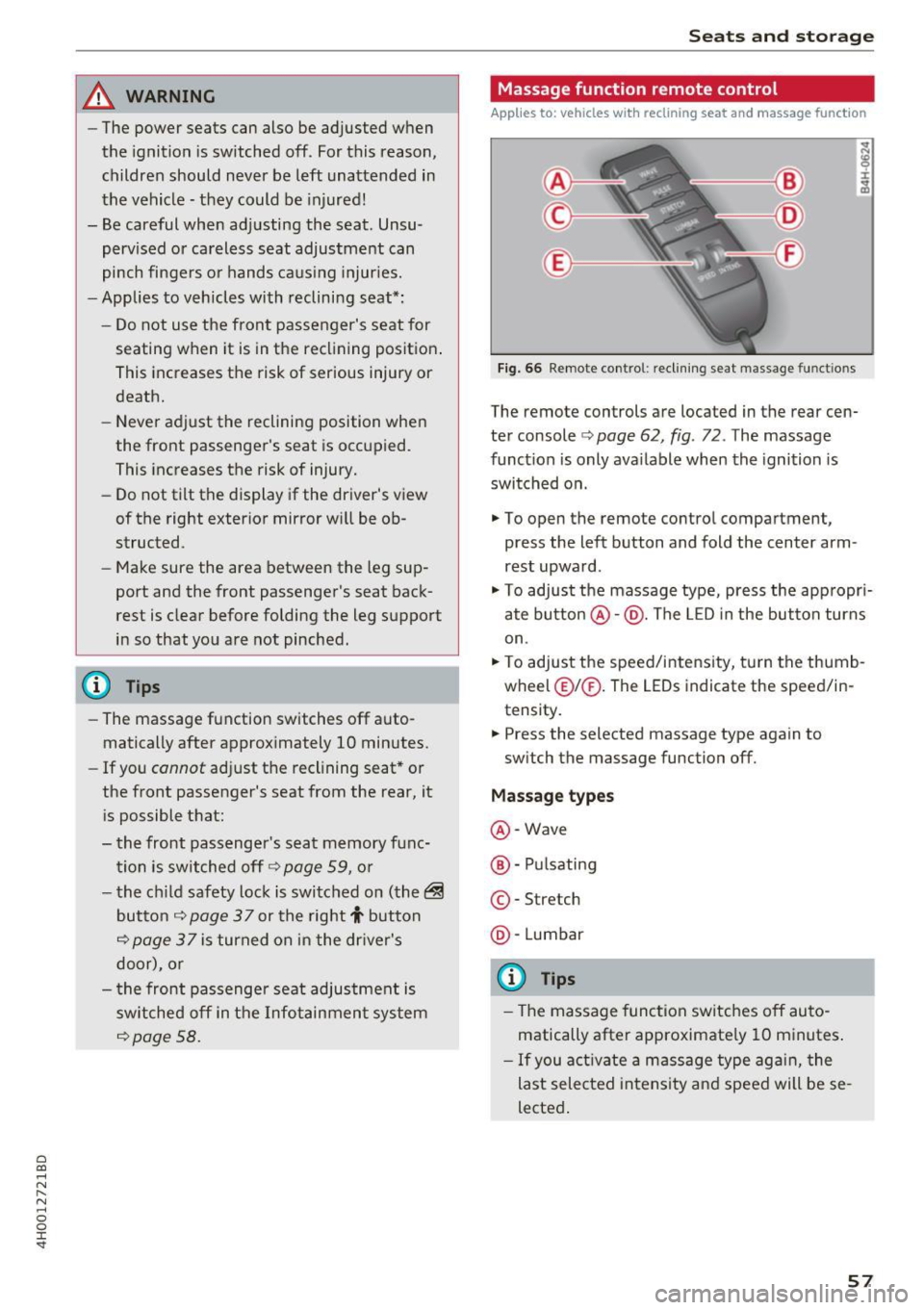
Massage function remote control
Applies to: vehicles with reclining seat and massage function
Fig. 66 Remote cont rol: rec lin ing seat massage functions
The remote controls are located in the rear cen
ter console ¢ page 62, fig. 72 . The massage
funct ion is only ava ilable when the ignition is
switched on.
.,. To open the remote control compartment,
press the left button and fold the center arm
rest upward .
.,. To adjust the massage type, press the appropr i
ate button @·@ . The LED in the button turns
on .
.,. To adjust the speed/inte nsity, turn the thumb
wheel @I® . The LEDs indicate the speed/in
tensity.
.. Press the selected massage type again to
sw itch the massage function off.
Massage types
@ -Wave
@ -Pul sating
© -Stretch
@ -Lumbar
(D Tips
- The massage function switches off auto
matically after approximate ly 10 minutes .
- If you activate a massage type aga in, the
last selected intensity and speed will be se
lected .
57
Page 61 of 354
C) C0 ....
"' " "' .... 0 0 :r
To prevent the head restraints from running into the headline, they are automat ically
Memory function
Description
Appl ies to: vehicles wit h memory function
Using the memo ry funct ion, you can q uickly and
eas ily store a pe rsonal seat profile for the driver
and front passenger as we ll as for the o uter rear
seats* and recall the settings. The memory func
tion is controlled using the remote contro l key
and the memory buttons in the driver's/front
passenger's door and in the rear doors*.
The driver's seat profi le is stored again and as
signed to the remote control key each time the
vehicle is locked. When you open the door, the
seat profile is automat ically recalled. If two peo-
Remote control
key
Dr iver
Seat X
Head rest raint X
Steering wheel * X
Safety belt* X
Both exterior mirrors* X
Remote control key
Applies to: vehicles with memory function
The function must be switched on so that the
driver's seat profile will be assigned to the re
mote control key when lock ing the vehicle .
.. Se lect : the
I CAR I function button > C ar sy stem s
control button > Veh icle setting s> Driver' s
s eat > Remote control ke y> On.
(D Tips
If you do not wish to have the seat p rofile for
another driver assigned to the remote control
key, switch the memory function off in the In
fotainment system or using the
IO FFI button
~page 59.
Seats and storag e
moved forward or upward when the seat is
adjusted.
ple use the vehicle, it is recommended that each
person always uses the ir "own" remote control
key .
Two seat profiles can be stored using the memo ry buttons in the d river 's/front passenger 's door
respectively, and one seat profile can be stored in
each of the rear doors *. Once they a re stored,
these seat profi les can be se lected at any time.
T he following sett ings a re stored :
Memory button
Driver Front passenger Outer
Rear seats*
X X X
X
X
X
X X
X
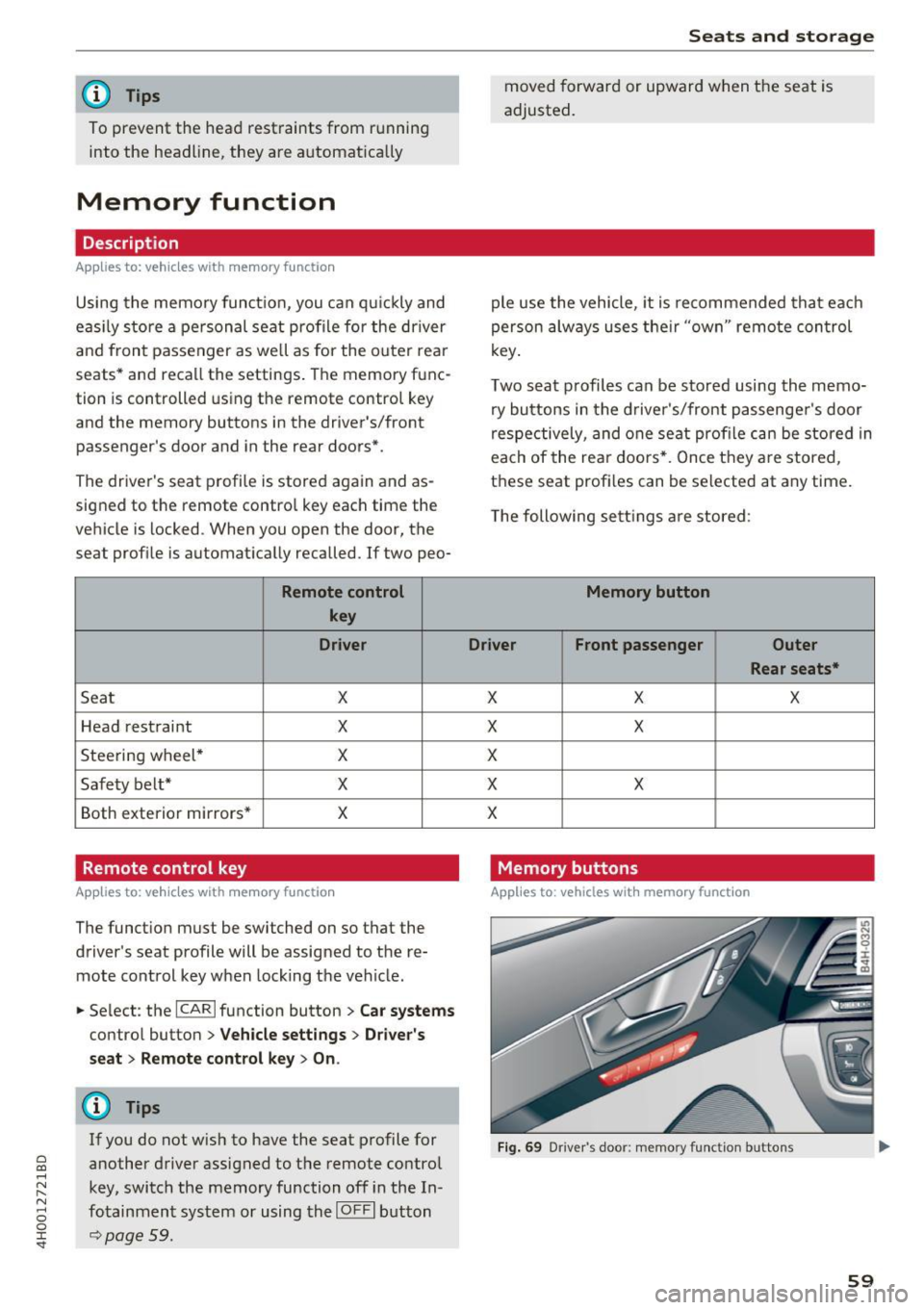
Memory buttons
Applies to: veh icles w ith memory function
F ig . 69 Dr iver 's door: memory function buttons
59
Page 66 of 354
Seats and storage
-Net in the front passenger footwell
- Glasses holder in the headliner (near the rear-
view mirror)
- Storage compartments under the center arm
rest
- Compartments* on the backrests of the front
seats
- Garment hooks above the rear doors
- Compartment behind the rear center armrest
(on vehicles without a pass-through* or refrig
erator*)
- Cell phone holder* in the right rear door
- Bag hooks* in the luggage compartment
A WARNING
- When driving, do not leave any hard objects
on the rear window shelf or allow your pet
to sit on the shelf. They could become a haz
ard for vehicle occupants in the event of
sudden braking or a crash.
- Any articles of clothing that you have hung
up must not interfere with the driver's view.
The coat hooks are designed only for light
weight clothing . Never hang any clothing
with hard, pointed or heavy objects in the
pockets on the coat hooks. During sudden
braking or in an accident -especially if the
airbag is deployed -these objects could in
jure any passengers inside the vehicle.
- To reduce the risk of personal injury in an
accident or sudden stop, always keep the glove compartment closed while driving.
- Read and follow all WARNINGS
~ page 244, Important safety instructions
on the side airbag system.
- Hang clothes in such a way that they do not
impair the driver's vision.
- The coat hooks must only be used for light
weight clothing. Do not leave any heavy or
sharp edged objects in the pockets which
may interfere with the side curtain airbag
deployment and can cause personal injury in
a crash .
- Do not use coat hangers for hanging cloth
ing on the coat hooks as this can interfere
with proper deployment of the side curtain
airbags in an accident.
64
- Do not hang heavy objects on the coat
hooks, as they could cause personal injury in
a sudden stop.
(D Note
Objects on the rear shelf that rub against the
rear window can damage the rear window de
fogger wires .
(D Tips
-A vent slot is located between the shelf and
the rear window. Do not block the vent with
any items you may place on the rear window
shelf .
- Do not place bulky items on the rear window
shelf as they could restrict or block the driv
er's vision in the rear view mirror.
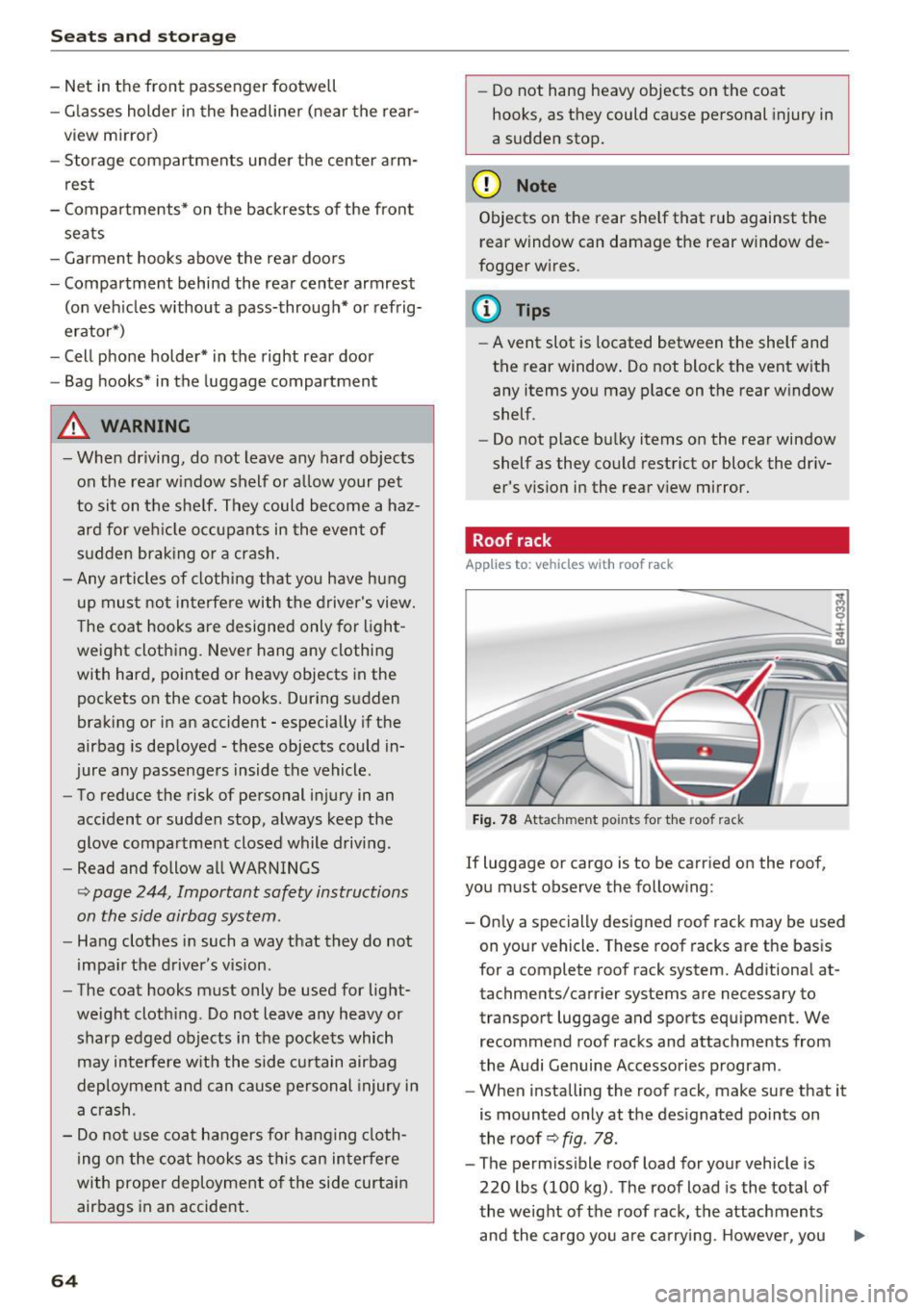
Roof rack
App lies to : vehicles wit h roof rack
Fig. 78 Attachment po ints for the roof rack
If luggage or cargo is to be carried on the roof,
you must observe the following:
- Only a specially designed roof rack may be used
on your vehicle. These roof racks are the basis
for a complete roof rack system. Additional at
tachments/carrier systems are necessary to
transport luggage and sports equipment. We
recommend roof racks and attachments from
the Audi Genuine Accessories program .
- When installing the roof rack, make sure that it
is mounted only at the designated points on
the roof ~
fig. 78 .
-The permissible roof load for your vehicle is
220 lbs (100 kg) . The roof load is the total of
the weight of the roof rack, the attachments
and the cargo you are carrying . However, you ..,.
Page 91 of 354
C) C0 ....
"' " "' .... 0 0 :r
Gen eral information
Your Audi was designed primarily for passenger
transportation .
If you plan to tow a trailer, please remember that
the additional load will affect durability, econo
my and performance .
T ra iler towing not only p laces more stress on the
vehicle, it a lso calls for more concentration from
the driver.
For this reason, always follow the operating and
driving instr uctions provided and use common
sense.
(D Note
If you are going to tow a trailer, you must ac
tivate the tra iler operation mode
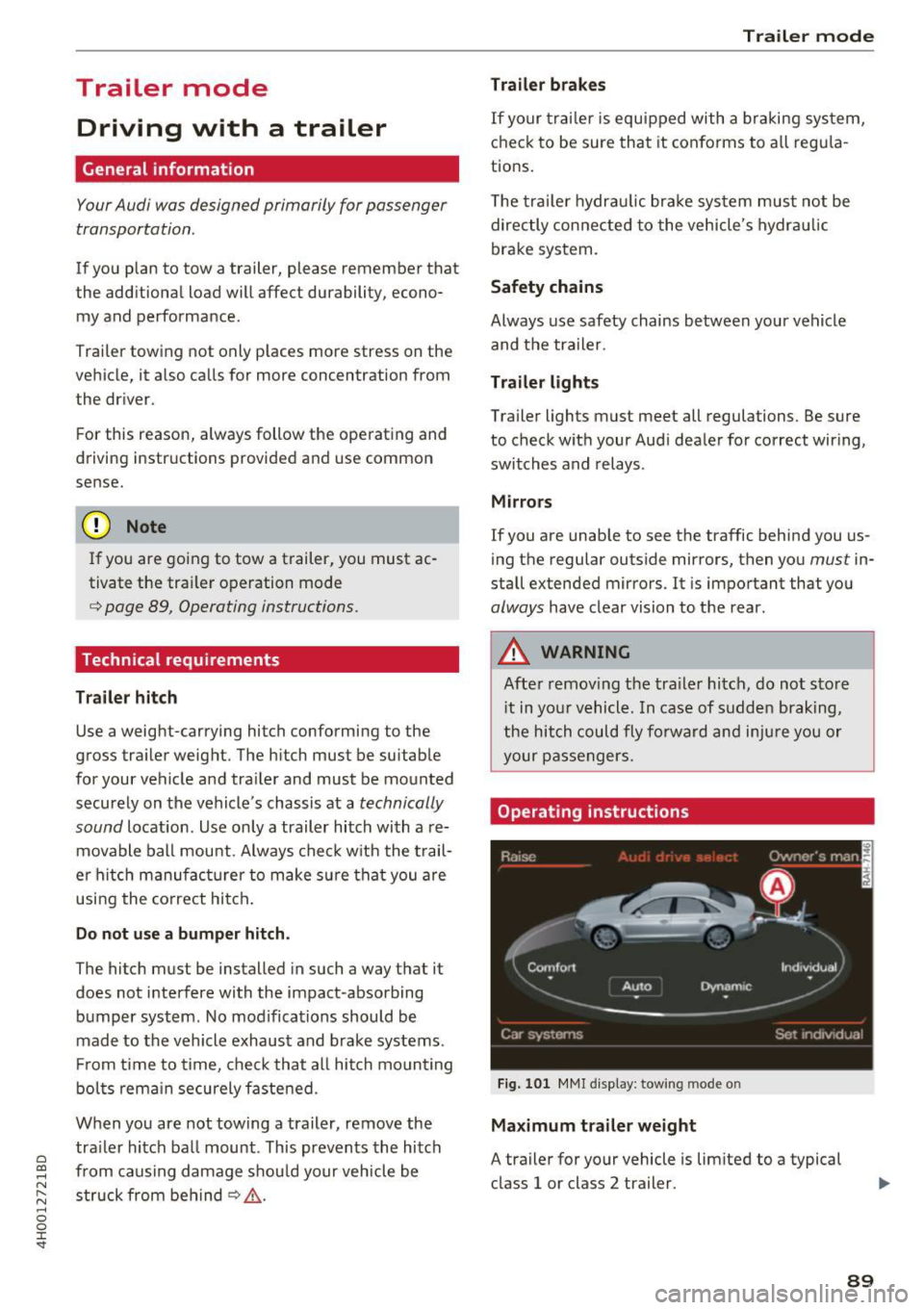
<=> page 89, Operating instructions.
Technical requirements
Tr ailer hitch
Use a weight-carrying hitch conforming to the
gross tra iler weight. The h itch must be suitab le
for your vehicle and tra iler and must be mounted
securely on the vehicle's chassis at a
technically
sound
location . Use on ly a trailer hitch with a re
movable ba ll mount . Always chec k w ith the t rail
er hitch manufac turer to make sure that you are
using the correct hitch .
Do not u se a bumper hitch .
The hitch must be installed in such a way that it
does not interfere with the impact -absorbing
bumper system . No mod ifications should be
made to the vehicle exhaust and b rake systems .
Fr om t ime to t ime, check that al l hitch mo un ting
bol ts rem ain securely fastened.
When you are not towing a trailer, remove the tra iler hi tch ba ll mount . This preven ts the hitch
from causing damage shou ld your vehicle be
struck from beh ind
C? _&. .
Tr ailer mod e
Trailer brakes
If your trai ler is equ ipped with a b raking system,
check to be sure that it conforms to a ll regu la
tions.
T he trai ler hydra ulic bra ke sys tem must not be
directly connected to the vehicle's hydra ulic
brake system.
Safety chains
Always use safety chains between your vehicle and the tra iler .
Tra iler lights
Trailer lights must meet all regulations. Be sure
to check w ith your Audi dealer for correct wir ing,
switches and relays .
Mirror s
If you are unable to see the traffic behind you us
ing the regular outside mirrors, then you
must in
stall extended mirrors . It is important that you
always have clear vision to the rear .
A WARNING ,~ -Afte r remov ing the tra ile r hitch, do not sto re
i t in you r vehicle. In case of sudden brak ing,
t he hitch could fly fo rward and inju re you or
your passengers.
Operating instruction s
Fig. 10 1 M MI displ ay: towing mode o n
Maximum tra iler weight
A trailer for your vehicle is lim ited to a typical
class 1 or class 2 trailer.
89
Page 106 of 354
Ass is t
Messag es in the instrument cluster display
If the active lane ass ist switches off automatica l
ly, the indicator lig ht in the display turns off and
one of the following messages appears:
Audi acti ve lan e ass ist : Cur rently un availabl e.
No camera vie w
This message appears if the camera is unable to
detect the lines. This co uld happen if :
- The camera field of view
9page 103, fig . 115 is
dirty or cove red in ice . Clean this area on the
windshield .
- The camera field of v iew is fogged over . Wait
unt il the fog has cleared before sw itch ing the
active lane assist on again .
- The system has been unable to detect the lanes for an extended period of time d ue to road con
ditions. Switch a ctive lane assist back on when
the lines are mo re visible .
Audi acti ve lan e ass ist : Cu rrently un available
There is a temporary active lane assist ma lf u nc
tion . Try sw itching the act ive lane assist on aga in
later.
Audi active lane a ssist : System fault!
Dr ive to an a utho rized Aud i dea le r or a uthorized
Aud i Serv ice Facility immediately to have t he
malfunction corrected.
Audi active lane a ssist : Please take over steering
This message appea rs if you are not steering by
yourself . If th is is the case, active lane assist does
no t swi tch off, but it is "not ready" to provide a
warn ing . The system ca n he lp you keep the veh i
cle in the lane. However, yo u are responsib le for
d riving the vehicle and must steer it yo ursel f.
Setting the vibration warning
Applies to: ve hicles with Audi active lane assist
.,. Se lect : the ICARI function button > Car systems
contro l button > Driver a ssist > Audi acti ve
lane ass ist .
V ibration warning
You can switch the additional vibration wa rni ng
in the steering wheel o n or off.
104
@ Tips
Your settings are automatically stored and as
signed to the remote contro l key being used.
Audi side assist
Description
App lies to: vehicles with A udi side ass ist
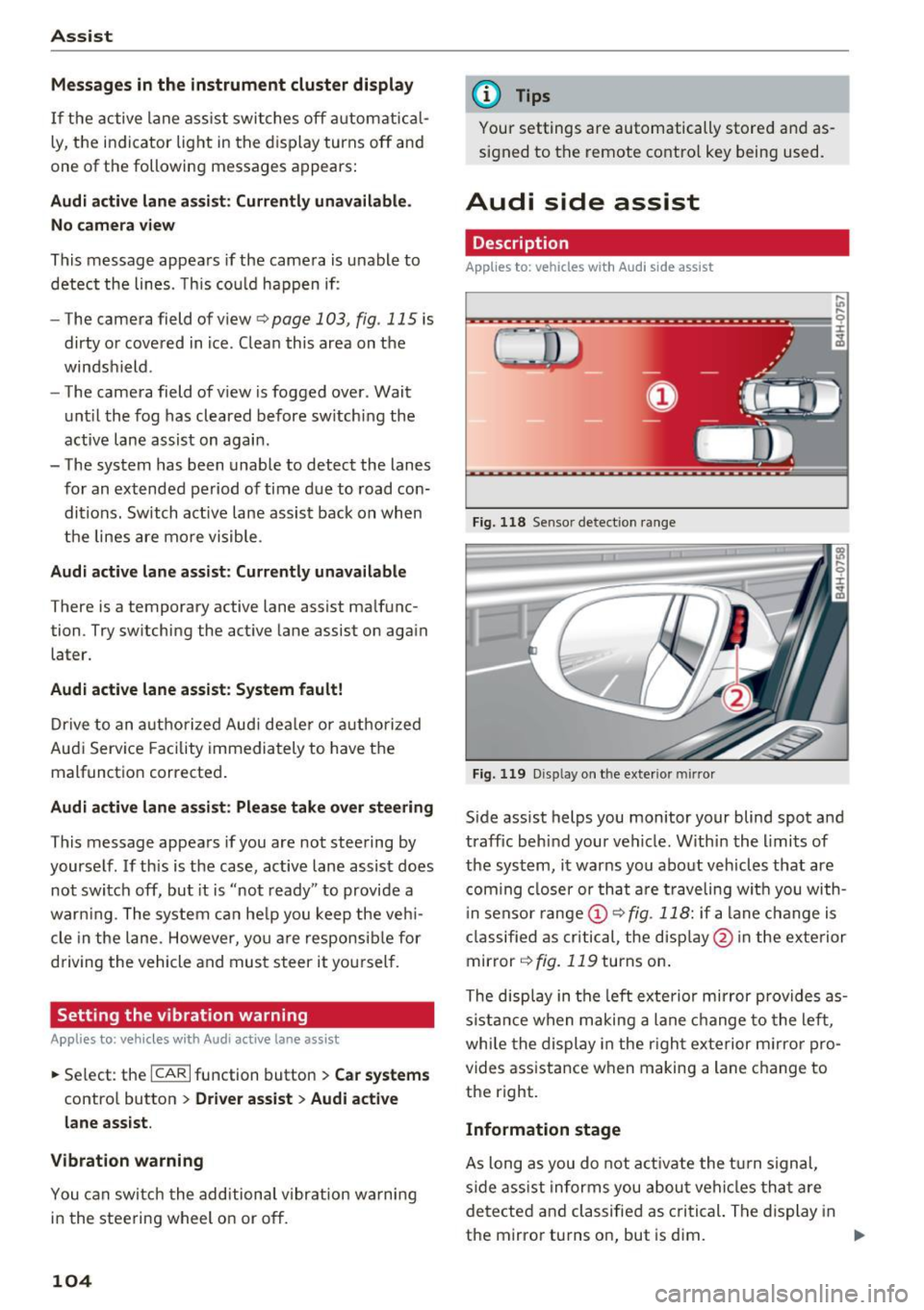
Fi g. 118 Senso r detect ion ra nge
Fig. 119 D isp lay on t he exterio r mirr or
Side assist helps you monitor your blind spot and
traffic behind your vehicle. W ithin the limits of
the system, it warns you abo ut vehicles that are
coming closer or th at a re t raveling wit h you with
i n senso r range @
9 fig. 118: if a lane c hange is
classified as cri tical, the disp lay @ in the exte rior
mirror
9 fig. 119 turns on .
The disp lay in the left exte rio r mirror prov ides as
s ista nce when making a lane change to the left,
whi le the display in the r igh t exterior m irror pro
vides assistance w hen making a lane c hange to
the right.
Information stage
As long as you do not a ct iva te the t urn signal,
side ass ist informs you abou t vehi cles tha t are
detected a nd classified as c rit ical. The di splay in
the mirror turns on, but is dim. ""
Page 107 of 354

C) C0 ....
"' " "' .... 0 0 :r
so that your view toward the front is not distur
bed .
Warning stage
If the d isplay i n a m irror blinks br igh tly when yo u
activate a turn signal, side assist is warning you
about detected vehicles that it has classified as
cr itical. If this happens, check traffic by g lancing
in the exterior mirrors and over your shoulder
c::>
.& in General information on page 106.
Ap plies to vehicles with active lane assist
The display in the mirror can a lso b link if you
have not activated a turn signa l: if you are ap
proaching a detected lane marker line and it ap
pears you w ill be leaving the lane, side assist will
warn you about detected vehicles that it has clas sified as critical.
@ Tips
- You can adjust the brightness of the display
i n the exte rior mirror @c::>page
107.
-Please refer to the instructions for towing a
trailer located in
c::>page 105.
General information
Appl ies to: ve hicles with Audi side assist
®
®
©
Fig. 120 D riving s ituations
A ss ist
f1ID
AUD I
Fig. 121 Rea r of the vehicle: pos it io n of the sensors
Side assist funct ions at speeds above approxi
mately 19 mph (30 km/h) .
@ Vehicles that are approaching
N
N
~
:i: .. co
In certain cases, a vehicle will be classified as
critical for a lane change even if it is still some
what far away . The faster a vehicle approaches,
the sooner the display in the exterior m irror will
tu rn o n.
@ Vehicles traveling with you
Vehicles traveling with yo u are indicated in the
exter ior mirror if they are classified as cr itical for
a lane change . A ll vehicles detected by side assist
are ind icated by the t ime they ente r you r "blind
spot", at the lates t.
© Vehicles you are passing
If you s low ly pass a veh icle that s ide ass ist has
detected (the difference in speed between the
vehicle and you r vehicle is less than 9 mph (15
k m/h)), the display in the exte rior m irror turns
o n as soon as t he veh icle enters your b lind spot .
The display w ill not t urn on if you quickly pass a
vehicle that side ass ist has de tected (the differ
ence in speed is greater than 9 mph (15 km/ h)).
Function al limitat ions
The radar sensors are designed to detect the left
and right ad jacent lanes when the road lanes are
t h e normal width. In some situations, the display
in the exterior m irror may turn on even though
t h e re is no veh icle located in the area tha t is criti
ca l for a lane change . For ex ample :
- If the lanes are na rrow or if your are drivi ng on
the edge of you r lane. If th is is the case, the ..,.
105
Page 108 of 354
Ass is t
system may have detected a vehicle in another
lane that is not adjacent to your current lane.
- If you are driving through a curve. Side assist may react to a vehicle that is one lane over
from th e adjacent lane .
- If s ide assist reacts to other objects (such as
high or d isplaced guard ra ils).
- In poor weather condit ions. The side assist
functions are limited.
Do not cover the radar sensors <=>
fig. 121 with
stickers, deposits, bicycle wheels o r othe r ob
jects, beca use they wi ll impair the function. Do
not use side ass ist when towing a trailer. For in
formation on cleaning, see <=>
page 306.
A WARNING
-Always pay attention to traffic and to the
area around your vehicle. Side assist cannot
rep lace a driver's attention. The driver alone
is a lways responsible for lane changes and
similar d riving maneuvers .
- In some situat ions, the system may not
func tion or its funct ion may be limited . For
example :
- if vehicles are approaching or being left
behind very quickly. The display may not
turn on in t ime .
- In poor weather conditions such as heavy
rain, snow or heavy mist .
- On very wide lanes, in tight curves, or i f
there is a rise in the road surface. Vehicles
in the adjacent lane may not be detected
because they are outs ide of the sensor
range.
- Audi side ass ist cannot detect a ll vehicles
under a ll condit ions, which can increase the
risk of accidents.
- Please note that side assist only displays ap proaching vehicles or vehicles in your blind
spot if your vehicle is traveling at least
19 mph (30 km/h) .
- In certain situations, the system may not
work or its function may be limited. For ex
amp le:
- The display may not turn on at the rig ht
time if veh ides are approaching or passing
very q uick ly .
106
-
- In poor weather conditions, such as heavy
rain, snow or fog .
- In very wide lanes , in tight c urves or when
there are slopes in the roadway, vehicles
i n the ne ighboring lanes may not be de
tected because they a re outside of the
sensor range .
(D Note
The sensors can be d isplaced by impacts or
damage to the bumper, wheel housing and underbody. This can impair the system. Have
an authorized Audi dealer or author ized Audi
Service Fac ility check their f unct io n.
@ Tips
- If the w indow glass in the dr iver's door or
front passenge r's door has been tinted, the
display in t he exterior mirror may be incor
rect .
- For an explanat ion on co nfo rm ity w ith the
FCC regulations in the Un ited States and the
Indust ry Canada regulatio ns, see
~page 339.
Switching on/off
Applies to: vehicles wi th A ud i side assist
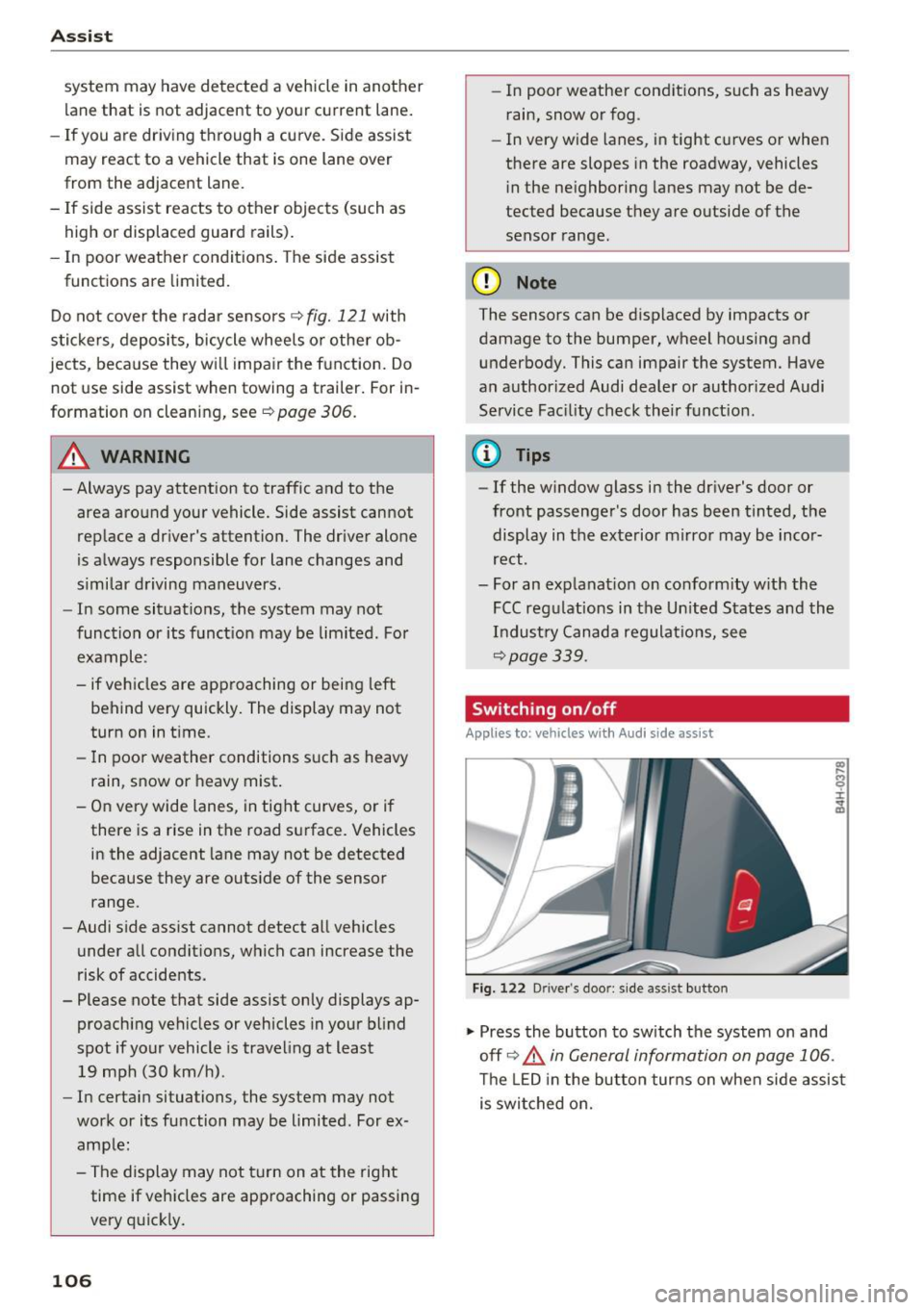
F ig . 122 D river 's doo r: side as sist but ton
.,. Press the button to sw itch the system on and
off <=>.&
in General information on page 106 .
The LED in the button tur ns on when side assis t
is swi tched on.
Page 109 of 354
0 co .... N ,..... N .... 0 0 :c '
Appl ies to: ve hicles with Audi side assist
The display brightness can be adjusted in the In
fotainment system.
.. Se lect : the I CAR I function button > Car systems
contro l button > Driver ass ist > Audi side as
sist .
The display brightness ad justs automat ica lly to
the br ightness of the surroundings, both in the
i n formation and in the warning stage . In very
dark or very bright sur roundings, the automatic
ad ju stment will set t he d isp lay to the m inimum
or maxim um level. In such cases, you may no tice
no change when adjus ting the b rightness, o r the
change may only be no tic eable once the s ur
r o undings change .
Ad just the b rig ht ness to a level where the d isp lay
in t he inform ation stage wi ll no t dis rup t your
view ahead. If you change the bright ness, the dis
p lay in the ex terior mirror will brief ly show the
b rightness level in the information stage . The
brightness of the warning stage is linked to the
brightness in the informat ion stage and is ad just
ed along w ith the information stage.
(D Tips
- Side assist is not active wh ile you are ma k
i ng the ad justment.
- Your settings are automatically store d and
ass igned to the remote control key being
used.
Messages
A ppl ies to: ve hicles with Audi side assist
If s ide ass ist switches off by itself, the LED in the
button turns off and a message will appear in the
i nstr ument cluster d is pl ay :
Audi side assist: Currently unavailable . No
sensor vision
The rada r senso rs' vision is affected . Do not cover
the area in front of the senso rs with bike wheels ,
sticke rs, dirt o r othe r objects . Clean t he a rea in
fr on t of the senso rs , if necess ary
c> page 105,
fig. 1 21 .
Assist
Audi side assist: currently unavailable
S id e assist c annot be sw itched on at this time be
ca use there is a ma lfunction ( for example, the
battery c harge leve l may be too low).
Audi side assist: System fault!
T he system canno t gua rantee that it will detect
vehicle s cor rec tly and it has switc hed off. The
senso rs have been moved or are f aulty. H ave the
system checked by an au thorized Audi dealer o r
autho rized Audi Serv ice Facility soon.
Audi side assist: Unavailable when towing
S ide ass ist swit ches off automatically when a fac
tory -inst alled tra ile r hi tch is con necte d to the
electrical connec tor on the t rai ler . There is no
guarantee the system will switch off when using
a retrofitted trailer hitch. Do not use side assist
when towing a trai ler.
Night vision assist with
pedestrian and wild
animal detection
Description
App lies to : vehicles wit h night vision assist
The night vision assist can detect, highlight and,
if necessary, warn about pedestrians and large wild animals.
N ight v ision assist w ith pedestrian and w ild ani
mal detection assists you at nig ht by using an in
frared camera to monitor the a rea in front of
your vehicle, within the limits of the system. It can d isplay objects up to a distance of approxi
mately 1000 feet (300 m) . The thermal image
de te cted by the camera is show n in the inst ru
ment cluster d is pla y. Warm areas appear lighter
and co ld areas appear d arker.
107
Page 119 of 354
C) C0 ....
"' " "' .... 0 0 :r
the display appear closer or farther away:
- For objects that do not touch the ground,
such as the bumper of a parked vehicle, a
trailer hitch or the rear of a truck. Do not
use the orientation lines in this case.
- If driven from a level surface onto an in
cline, or a downward slope.
- If driven toward protruding objects.
- If the vehicle is carrying too much load in
the rear.
- The accuracy of the orientation lines and
blue surfaces decreases when the vehicle is
raised/lowered ¢
page 110.
(D Note
-Always read and follow the applicable warn
ings
c:> © in General information on
page 114 .
-The orange-colored orientation lines in the
Infotainment display show the vehicle path based on the steering wheel angle . The
front of the vehicle swings out more than
the rear of the vehicle. Maintain plenty of
distance so that an exterior mirror or a cor
ner of the vehicle does not collide with any
obstacles.
Switching on/off
Applies to: vehicles with rearv1ew camera
Switching on
"'Shif t into reverse, or
"' Press the
p,,,A button in the center console
c:>page 115, fig. 131. A short conf irmation
tone sounds and the LED in the button turns
on.
Switching between the rearview camera and
optical display
"' Press the Graphic contro l button ®
c:, page 117, fig. 136 to see the optical display .
"' Press the
Rear view control button to see the
. . rearv,ew camera image.
Switching off
"'Drive faster than 6 mph (10 km/h), or
"' Press the
P'"A button, or
Parking systems
"'Sw itch the ignition off.
@ Tips
- The visual display in the left part of the dis
play should help you detect the critical vehi
cle areas.
- You can change the volume and pitch of the
signals as well as the display ¢
page 124.
Perpendicular parking
Applies to: vehicles with rearview camera
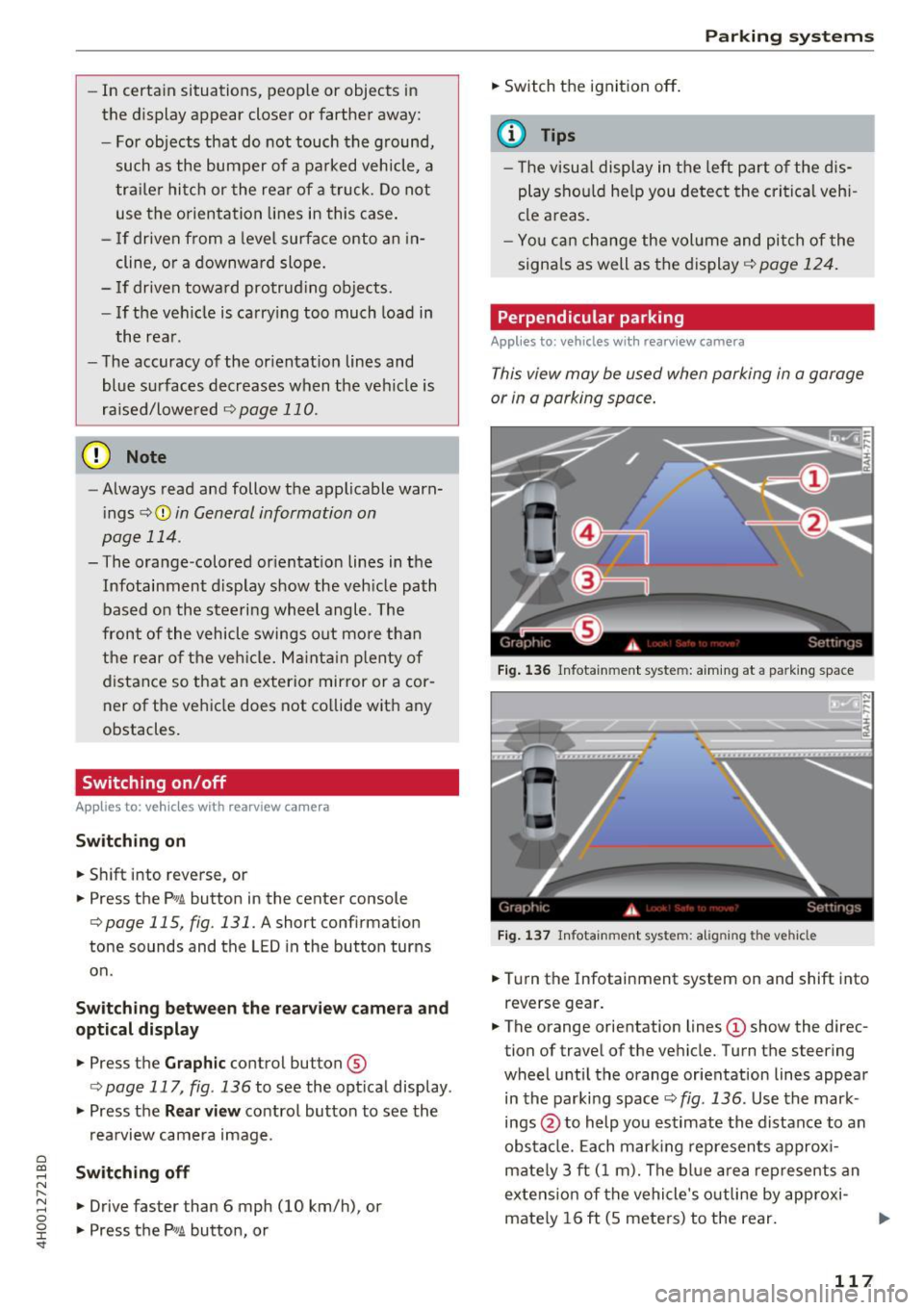
This view may be used when parking in a garage
or in a parking space.
Fig. 136 Infota inment system: a iming at a park ing space
Fig. 137 Infotainment system: aligning the vehicle
"'Turn the Infotainment system on and shift into
reverse gear.
"' The orange orientation lines
(D show the direc
tion of travel of the ve hicle. Turn the steering
wheel until the orange orientation lines appear
in the parking space
c:> fig. 136. Use the mark
ings @to help you estimate the distance to an
obstacle. Each marking represents approxi
mately 3 ft (1 m). The blue area represents an
extension of the vehicle's outline by approxi
mately 16 ft (S meters) to the rear.
117