mirror AUDI A8 2017 Owner's Manual
[x] Cancel search | Manufacturer: AUDI, Model Year: 2017, Model line: A8, Model: AUDI A8 2017Pages: 354, PDF Size: 88.68 MB
Page 121 of 354
@ Tips
The left or ri ght orientation lines and surfaces
w ill be displayed, depending on the turn sig
nal being used.
Peripheral cameras
Introduction
A ppl ies to: ve hicles with per ip heral came ras
W ith this equipmen t, the parking system p lus*
c::!;> page 115 is supplemented with various periph
e ral cameras.
The fo ur cameras g ive you the fo llow ing v iews :
a rea around the vehicle, front corner view and
rear corne r view, view in front of the ve hicl e and
behind the vehicle .
General information
Appl ies to: ve hicles with pe rip heral ca meras
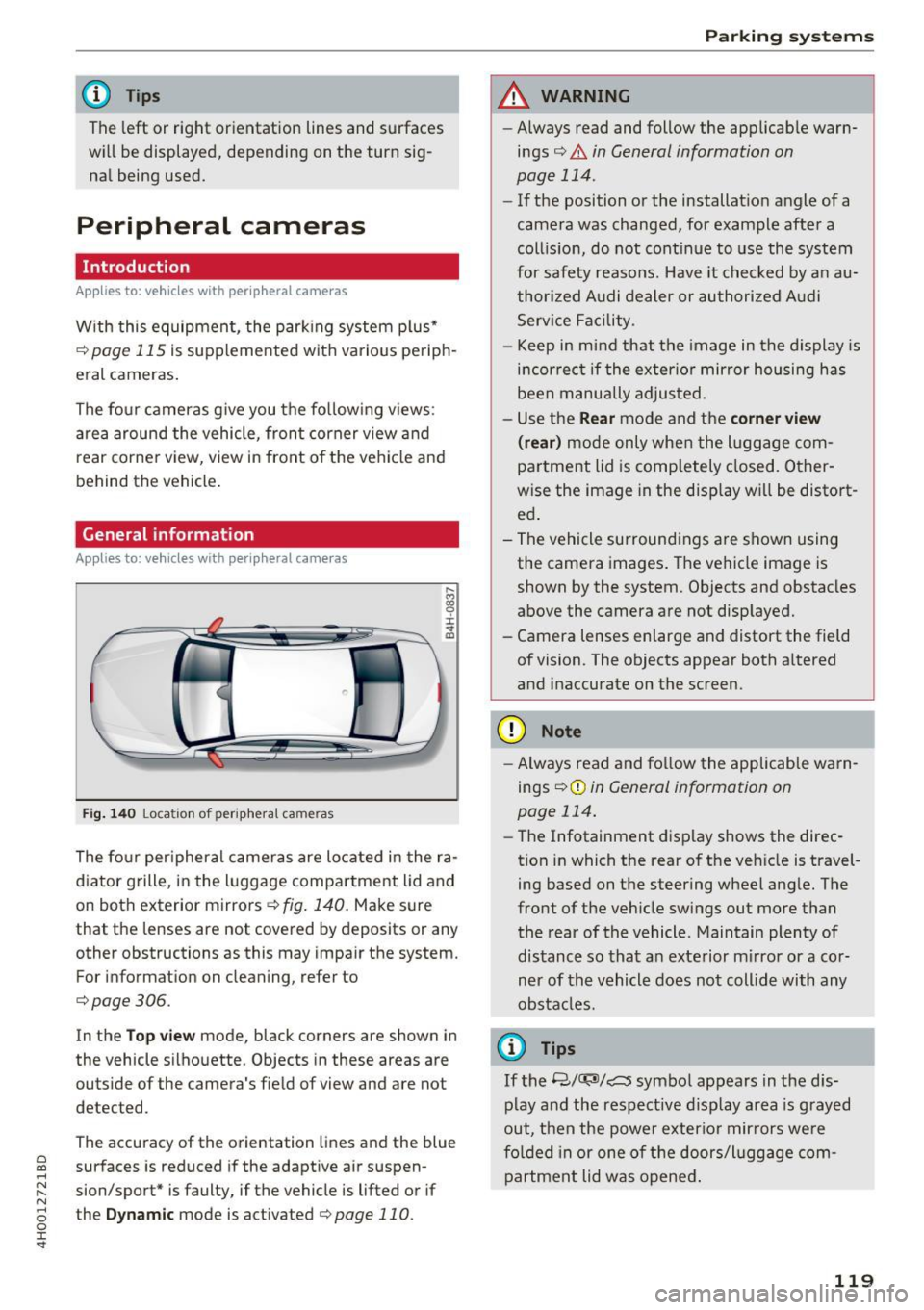
Fi g. 14 0 Locatio n of perip he ra l cameras
The fo ur per ipheral cameras are located i n the ra
d iator grille, in the luggage compa rtment lid and
on both exterior mirrors
¢ fig . 140 . Make sure
that the lenses are not covered by deposits or any
other obstructions as this may impa ir the system.
For information on cleaning, refer to
¢page 306.
In the Top view mode, black corners are shown i n
the vehicle silhouette. Objects in these areas are
outside of the camera's fie ld of view and are not
detected.
The accuracy of the orientation lines and the blue
~ surfaces is reduced if the adapt ive air suspen-...,
~ sion/sport* is faulty, if the vehicle is lifted or if N
8 the D ynamic mode is activated ¢ page 110. 0 :r
A WARNING
-
-Always read and follow the applicab le warn-
i n gs¢ &.
in General information on
page 114 .
-If the position or the installat io n angle of a
camera was changed, for example afte r a
coll is ion, do not cont inue to use the system
for safety reasons. Have it c hec ked by a n au
thori zed A udi dealer or authorized A udi
Serv ice Facility.
- Keep in mind that the image in the display is
i n cor rec t if the exterio r mirror housing ha s
been manually adjus ted.
- Use the
Rear mode and the corner view
( rear)
mode only when the luggage com
partment lid is comp letely closed. Other
wise the image in the disp lay w il l be distort
ed .
- The vehicle surround ings are shown using
the camera images . The vehicle image is
shown by the system. Objects and obstacles
above the camera are not disp layed.
- Camera lenses enlarge and distort the field
of vision. The objects appear both a ltered
and inaccurate on the screen.
(D Note
- Always read and fo llow the applicab le wa rn
ings
¢ (Din General information on
page 114.
- The Infotainment display shows the direc
tion in which the rear of the ve hicle is travel
ing based on the steering whee l ang le. The
front of the vehicle swings out more than
the rear of the vehicle . Maintain plenty of
dis tance so that a n exte rior m irror or a cor
ner of the vehicle does not coll ide with any
obsta cles.
¢j) Tips
If the 8/cr;J'J/c:s symbol appears in the d is
p lay and the respective d isp lay area is grayed
o ut, then the powe r exter io r mir rors we re
fo lded in or one of t he doors/l ugg age com
partment lid w as opened .
119
Page 209 of 354
Driving safety
Basics
Safe driving habits
Please remember -safety first!
This chapter contains important information,
tips, instructions and warnings that you need to
read and observe for your own safety, the safety
of your passengers and others . We have summar
ized here what you need to know about safety
belts, airbags, child restraints as well as child
safety. Your safety is for us
priority number 1. Al
ways observe the information and warnings in
this section - for your own safety as well as that
of your passengers.
The information in this section applies to all
model versions of your vehicle. Some of the fea
tures descr ibed in this sections may be standard
equipment on some models, or may be optional
equipment on others. If you are not sure, ask
your authorized Audi dealer.
A WARNING
- Always make sure that you follow the in
structions and heed the WARNINGS in this
Manual. It is in your interest and in the in
terest of your passengers .
-
-Always keep the complete Owner's Litera
ture in your Audi when you lend or sell your
vehicle so that this important information
will always be available to the driver and
passengers.
- Always keep the Owner's literature handy so
that you can find it easily if you have ques
tions.
Safety equipment
The safety features are part of the occupant re
straint system and work together to help reduce the risk of injury in a wide variety of accident sit
uations.
~ Your safety and the safety of your passengers
~ should not be left to chance. Advances in tech-,..._
~ nology have made a var iety of features available 0
~ to help reduce the risk of injury in an accident. '
The following is a list of just a few of the safety
features in your Audi:
- sophisticated safety belts for driver and all pas-
senger seat ing pos itions,
- safety belt pretensioners,
- safety belt force limiters for the front seats,
- safety belt height adjustment systems for the
front seats,
- front airbags,
- knee airbags for the front seats
- side airbags in the front seats and outer rear
seats,
- side curtain airbags,
- special LATCH anchorages for child restraints,
- head restraints for each seating position,
- adjustable steering column.
These individual safety features, can work to gether as a system to help protect you and your
passengers in a w ide range of accidents . These
features cannot work as a system if they are not
always correctly adjusted and correctly used.
Safety is everybody's responsibility!
Important things to do before driving
Safety is everybody 's job! Vehicle and occupant
safety always depends on the informed and care
ful driver .
For your safety and the safety of your passen
gers,
before driving always:
.,. Make sure that all lights and signals are operat
ing correctly .
.,. Make sure that the tire pressure is correct.
.,. Make sure that all windows are clean and afford
good visibility to the outside .
.,. Secure all luggage and other items carefully
c:c.> page 65, c:c.> page 63 .
.,. Make sure that nothing can interfere with the
pedals.
.,. Adjust front seat, head restraint and mirrors
correctly for your height.
.,. Instruct passengers to adjust the head re
straints according to their height.
.,. Make sure to use the right child restraint cor
rectly to protect children
¢ page 248, Child
safety. ..,.
207
Page 309 of 354
0 co .... N ,..... N .... 0 0 :c '
-Only wash the vehicle when the ignition is
off and follow the instructions from the car
wash operator to reduce the risk of acci
dents.
- To reduce the risk of cuts, protect yourself
from sharp metal components when wash
ing the underbody or the inside of the wheel
housings.
-After washing the vehicle, the braking effect
may be delayed due to moisture on the
brake rotors or ice in the winter . This in
creases the risk of an accident . The brakes
must be dried first with a few careful brake
applications.
(D Note
- If you wash the vehicle in an automatic car
wash, you must fold the exterior mirrors in
to reduce the risk of damage to the mirrors.
Power folding exterior mirrors* must only
be folded in and out using the power folding
function.
- To reduce the risk of paint damage, do not
wash the vehicle in direct sunlight.
-
Care and cleaning
-To reduce the risk of damage, do not wash
the power top with a pressure washer.
- To reduce the risk of damage to the surface,
do not use insect removing sponges, kitchen
sponges or similar items.
- Matte finish painted vehicle components:
- To reduce the risk of damage to the sur-
face, do not use polishing agents or hard
wax.
- Never use protective wax. It can destroy
the matte finish effect .
- Do not place any stickers or magnetic
signs on vehicle parts painted with matte
finish paint . The paint could be damaged
when the stickers or magnets are re
moved.
@ For the sake of the environment
Only wash the vehicle in facilities specially de
signed for that purpose . This will reduce the
risk of dirty water contaminated with oil from
entering the sewer system.
Cleaning and care information
When cleaning and caring for individual vehicle
components, refer to the following tables. The
information contained there is simply recom
mendations. For questions or for components that are
not listed , consult an authorized Audi
dealer or authorized Audi Service Facility. Also
follow the information found in¢& .
Exterior cleaning
Component Situation Solution
Windshield wiper
Deposits ¢ page 51
blades
Headlights/
Deposits Soft sponge with
a mild soap solutiona)
Tail lights
Sensors/
Deposits Sensors: soft cloth with solvent-free cleaning solution
camera lenses Camera lenses: soft cloth with alcohol-free cleaning solu-
tion
Snow/ice Hand brush/solvent-free de-icing spray
Wheels Road salt Water
Brake dust Acid-free special cleaning solution
307
Page 312 of 354
Care and cleaning
- Damage to the protective layer on the rims such as stone chips or scratches must
be repaired immediately.
- Sensors/camera lenses
- Never use warm or hot water to remove
snow or ice from the camera lens. This
could cause the lens to crack .
- Never use abrasive cleaning materials or
alcohol to clean the camera lens . This
could cause scratches and cracks.
- Door windows
- Remove snow and ice on windows and ex-
terior mirrors with a plastic scraper. To
avoid scratches, move the scraper only in
one direction and not back and forth.
- Never remove snow or ice from door win
dows and mirrors using warm or hot water
because this could cause cracks to form.
- To avoid damage to the rear window de
fogger, do not apply any stickers on the
heating wires on the inside of the window.
- Decorative parts/trim
- Never use chrome care or cleaning prod-
ucts.
- Paint
- To reduce the risk of scratches, the vehicle
must be free of dirt and dust before pol
ishing or waxing.
- To prevent paint damage, do not polish or
wax the vehicle in direct sunlight.
- To reduce the risk of paint damage, do not
polish away rust spots.
- Remove cosmetics and sunscreen immedi
ately- these could damage the paint.
- Displays
- To avoid scratches, do not use dry cleaning
methods on displays.
- Controls
- Make sure that no fluids enter the con-
trols , because this could cause damage.
- Safety belts
- Do not remove the safety belts to clean
them.
- Never clean safety belts or their compo
nents chemically or with corrosive fluids
or solvents and never allow sharp objects
to come into contact with the safety belts.
310
This could cause damage to the belt web
bing.
- If there is damage to the webbing, the
connections, the retractors or the buckles, have them replaced by an authorized Audi
dealer or authorized Audi Service Facility.
- Textiles/artificial leather/ Alcantara
- Never treat artificial leather/ Alcantara
with leather care products, solvents, floor polish, shoe polish, spot remove or similar
products.
- Have a specialist remove stubborn stains
to prevent damage.
- Never use steam cleaners, brushes, hard
sponges, etc. when cleaning.
- Do not turn on the seat heating* to dry the seat .
- Objects with sharp edges, such as zippers
or rivets on clothing or belts, can cause
damage to the surface.
- Open hook and loop fasteners, for exam ple on clothing, can damage seat covers .
Make sure hook and loop fasteners are
closed.
- Natural leather
- Never treat leather with solvents, floor polish, shoe polish, spot remover or simi
lar products.
- Objects with sharp edges, such as zippers
or rivets on clothing or belts, can cause
damage to the surface.
- Never use steam cleaners, brushes, hard
sponges, etc. when cleaning.
- Do not turn on the seat heating* to dry the
seat.
- To help prevent the leather from fading,
do not leave the vehicle in direct sunlight
for long periods of time. If leaving the ve
hicle parked for long periods of time, you
should cover the leather to protect it from
direct sunlight.
- Refrigerator
- Do not try to speed up the defrosting
process by applying heat.
- To help prevent health risks or damage to
the refrigerator, do not use any abrasive ..,.
Page 326 of 354
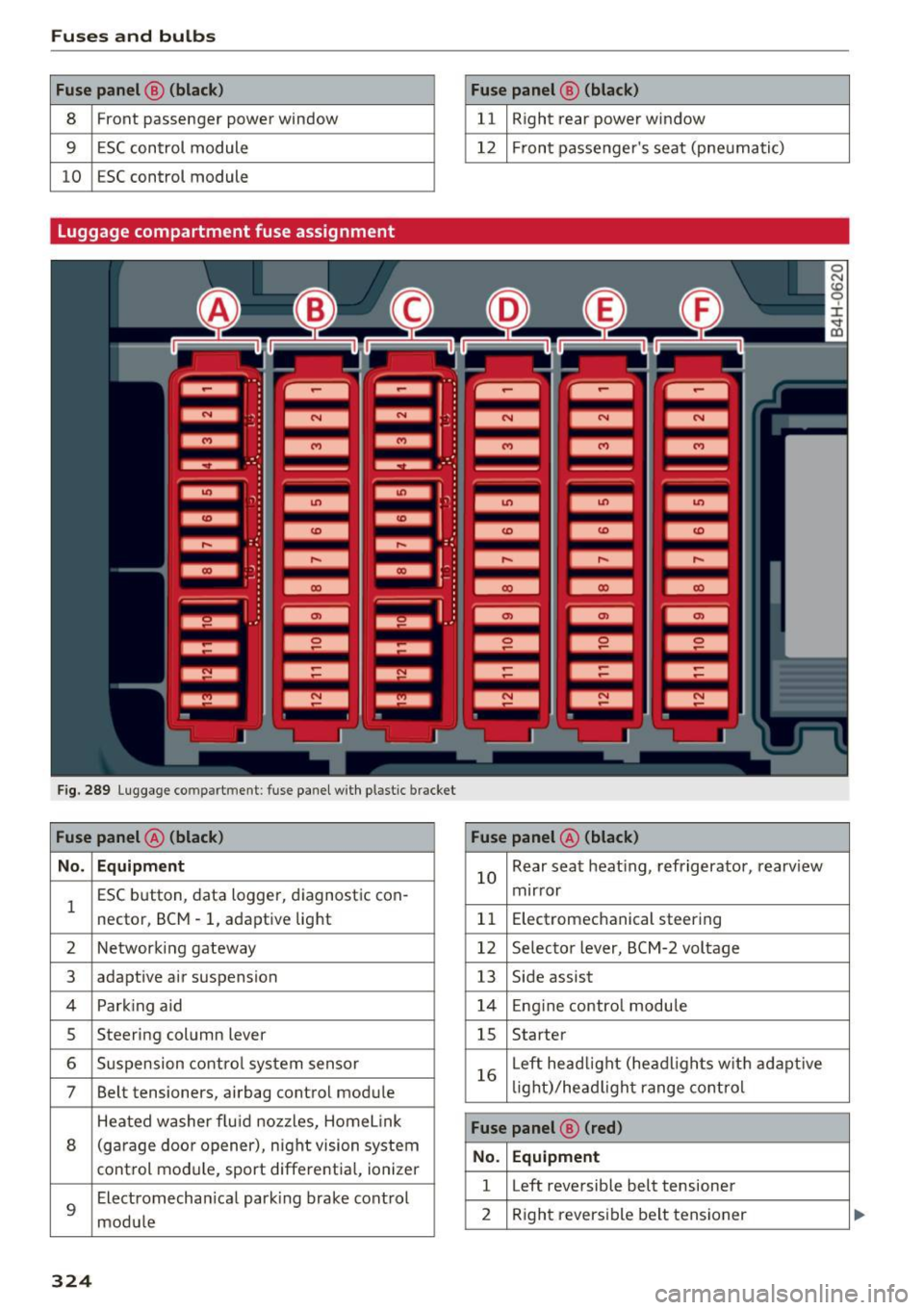
Fuses and bulbs
Fuse panel @ (black) Fuse panel@ (black)
8 Front passenger power window 11 Right rear power window
9 ESC control module 12 Front passenger's seat (pneumatic)
10 ESC control module
Luggage compartment fuse assignment
F ig. 289 Luggage compar tment: fuse panel with p lastic brack et
Fuse panel @ (black) Fuse panel@ (black)
No. Equipment
l
ESC button , data logger, diagnostic con-
nector, BCM -1, adaptive light 10
Rear
seat heating, refrigerator, rearview
mirror
11 Electromechanical
steering
2 Networking gateway 12 Selector lever, BCM-2 voltage
3 adaptive air suspension
13 Side assist
4 Park ing aid 14 Engin e control module
5 Steering column lever 15 Starter
6 Suspension control system sensor
7 Belt tensioners, airbag control module 16
Left
headlight (headligh ts with adaptive
lig ht)/head light range control
Heated washer flu id nozzles, Home Link
8 (garage door opener) , night vision system
control module, sport differential, ionizer
9
Electromechan ical parking brake control
module
Fuse panel ® (red)
No. Equipment
l Left reversible belt tensioner
2 Right reversible belt tensioner
324
Page 336 of 354
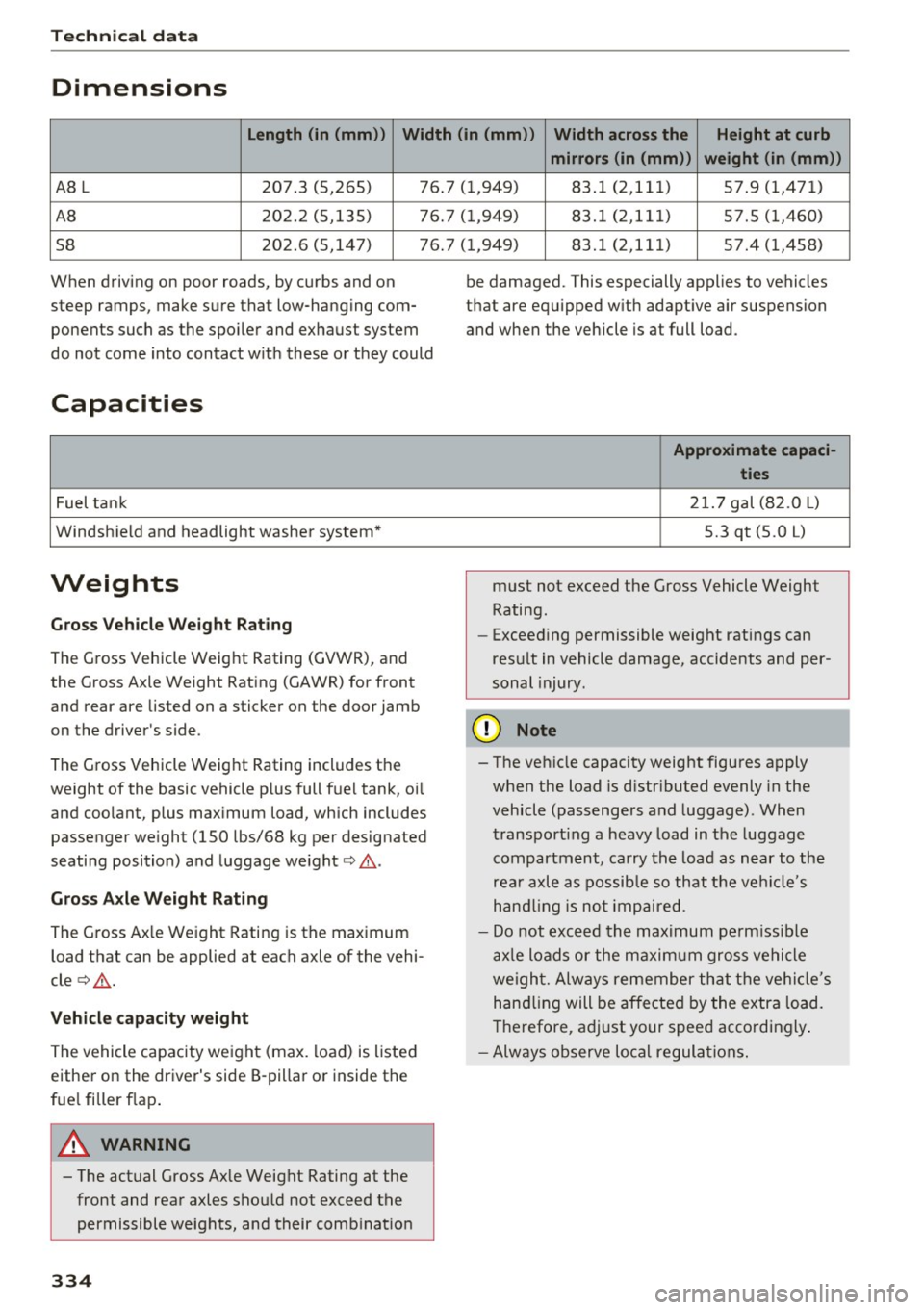
Tech nical data
Dimensions
Length (in (mm )) Width (in (mm ))
Width across the Height at curb
mirrors (in (mm )) weight (in (mm ))
A8 L 207.3 (5,265) 76.7 (1,949) 83.l (2,111) 57.9 (1,471)
AB 202.2 (5,135) 76.7 (1,949) 83.1 (2,111) 57.5 (1,460)
58 202.6 (5,147) 76.7 (1,949) 83.l (2,111) 57.4 (1,458)
When driving on poor roads, by curbs and on
steep ramps, make sure that low-hanging com ponents such as the spoiler and exhaust system
do not come into contact w ith these or they could
Capacities
Fuel tank
Windshield and headlight washer system*
Weights
G ro ss Vehicl e Weight Rat ing
The Gross Vehicle Weight Rating (GVWR), and
the Gross Axle Weight Rating (GAWR) for front
and rear are listed on a sticker on the door jamb
on the driver's side .
The Gross Vehicle Weight Rating includes the
weight of the basic vehicle p lus full fuel tank, oi l
and coolant, plus max imum load, which includes
passenger we ight (150 lbs/68 kg per designated
seating position) and luggage weight¢ ,&..
Gross A xle W eight Rating
The Gross Ax le Weight Rating is the maximum
load that can be applied at each axle of the vehi
cle ¢,&. .
V ehicle capaci ty weight
The vehicle capacity we ight (max. load) is listed
either on the driver's side B-pillar or inside the
fue l filler flap .
A WARNING
- The actual Gross Axle Weight Rating at the front and rear axles shou ld not exceed the
permissible weights, and their comb inat ion
334
be damaged. This especially applies to vehicles
that are equipped w ith adapt ive air suspension
and when the vehicle is at full load .
Appro ximate capaci-
tie s
2 1. 7 gal (82.0
L)
5.3 qt (5.0 L)
must not exceed the Gross Vehicle Weight
Rating.
- Exceed ing permissible weight ratings can
result in vehicle damage, accidents and per
sonal injury.
(D Note
- The veh icle capacity weight figures apply
when the load is d istr ibuted evenly in the
vehicle (passengers and luggage) . When
transport ing a heavy load in the luggage
compartment, carry the load as near to the
rea r axle as possib le so that the ve hicl e's
h and ling is no t impaired.
- Do not exceed the maximum pe rm iss ible
ax le loads or the maxim um gross vehicle
we igh t. A lways remember that the ve hicl e's
hand ling will be affected by the extra load.
T herefore, adjust your speed accordingly .
- Always observe local regula tions.
Page 344 of 354
Index
Closing Hood . . . . . . . . . . . . . . . . . . . . . . . . . . . . . . 273
Panorama glass roof . . . . . . . . . . . . . . . . . . 39
Sun roof.. .. .. ...... ......... .... .... 38
Sun shade (panoramic sunroof) . . . . . . . . . 40
Sunshade (sliding/tilting sunroof) . . . . . . . 38
Windows . . . . . . . . . . . . . . . . . . . . . . . . . . . 37
Closing/opening . . . . . . . . . . . . . . . . . . . . . . . 30
Closing aid (doors) . . . . . . . . . . . . . . . . . . . . . 27
Cockpi t (overview) . . . . . . . . . . . . . . . . . . . . . . 7
Color number . . . . . . . . . . . . . . . . . . . . . . . . 333
Coming home . . . . . . . . . . . . . . . . . . . . . . . . . 46
Compartments . . . . . . . . . . . . . . . . . . . . . . . . 63
Compass in the mirror . . . . . . . . . . . . . . . . . . S2
Compliance . . . . . . . . . . . . . . . . . . . . . . . . . . 339
Conference call . . . . . . . . . . . . . . . . . . . . . . . 149
Connecting and d isconnecting an MP3 play-
er . . . . . . . . . . . . . . . . . . . . . . . . . . . . . . . . . . 183
Connections
refer to Media . . . . . . . . . . . . . . . . . . 180 , 189
Consum er information . . . . . . . . . . . . . . . . . 336
Consumer Information . . . . . . . . . . . . . . . . . 214
Consumption (fuel) . . . . . . . . . . . . . . . . . . . 333
Contacting NHTSA . . . . . . . . . . . . . . . . . . . . 214
Contacts . . . . . . . . . . . . . . . . . . . . . . . . . . . . 150
I mport ing/exporting 153
Convenience key Unlocking/locking . . . . . . . . . . . . . . . . . . . . 30
Cooling mode (automatic climate control) . . 70
Cooling system Checking/adding coolant. . . . . . . . . . . . . . 277
Coolant temperature indicator . . . . . . . . . . . 9
Cover Flow
refer to Browsing through album covers . 190
Cup holders . . . . . . . . . . . . . . . . . . . . . . . . . . . 63
Current economy . . . . . . . . . . . . . . . . . . . . . . 12
D
Data encryption 196
Data recorder . . . . . . . . . . . . . . . . . . . . . . . . 132
Date.. .... .. .. ... ............ .... .. . 204
Date display . . . . . . . . . . . . . . . . . . . . . . 16, 204
Daylight saving time . . . . . . . . . . . . . . . . . . . 204
Daytime running lights . . . . . . . . . . . . . . . . . 43
Declar ation of compliance . . . . . . . . . . . . . . 339
342
Defrosting (windows) . . . . . . . . . . . . . . . . . . . 71
DEF (instrument cluster) . . . . . . . . . . . . . . . . 10
Demo mode
refer to Presentation mode . . . . . . . . . . . . 172
Determining correct load limit . . . . . . . . . . 297
Digital compass . . . . . . . . . . . . . . . . . . . . . . . 52
D igital Rights Management . . . . . . . . . . . . . 180
D.
. 1mens1ons . .. .. .. .. .. .. ........... . .
Directory
refer to Contacts
Display 334
150
Brightness . . . . . . . . . . . . . . . . . . . . . 196, 206
Settings .... .. . ... .. .. ......... 190, 196
Distance . . . . . . . . . . . . . . . . . . . . . . . . . . . . . 12
Doors Child safety lock . . . . . . . . . . . . . . . . . . . . . . 36
Closing aid . . . . . . . . . . . . . . . . . . . . . . . . . . 27
Emergency locking . . . . . . . . . . . . . . . . . . . . 32
Driver information system . . . . . . . . . . . . . . . 12
Ind icator lights . . . . . . . . . . . . . . . . . . . . . . 17
Service interval display . . . . . . . . . . . . . . . 282
Driver seating position . . . . . . . . . . . . . . . . . 208
Drives
refer to Media . . . . . . . . . . . . . . . . . . 180, 189
Drive select . . . . . . . . . . . . . . . . . . . . . . . . . . 110
Driving safe ly . . . . . . . . . . . . . . . . . . . . . . . . 207
Driving through water . . . . . . . . . . . . . . . . . . 73
Driving time . . . . . . . . . . . . . . . . . . . . . . . . . . 12
DVD Changer . . . . . . . . . . . . . . . . . . . . . . . . . . . 182
Drive . . . . . . . . . . . . . . . . . . . . . . . . . . . . . . 181
Full screen display . . . . . . . . . . . . . . . . . . . 190
also refer to Media . . . . . . . . . . . . . . . 180, 189
Dynamic steering . ... .. ........... 110, 129
Dynamic volume
refer to System volume . . . . . . . . . . . . . . . 205
E
Economy tips (efficiency program) . . . . . . . . 13
E conomy (fuel) . . . . . . . . . . . . . . . . . . . . . . . . 12
Efficiency program . . . . . . . . . . . . . . . . . . . . . 13
E lectromechanical parking brake . . . . . . . . . 81
Electronic Differential Lock (EDL) . . . . . . . . 126
Electronic immobilizer . . . . . . . . . . . . . . . . . . 28
Electronic speed limiter . . . . . . . . . . . . . . . . . 26
Page 345 of 354

0 co .... N ,..... N .... 0 0 :c '
Emergency assistance . . . . . . . . . . . . . . . . . 312
Emergency braking function . . . . . . . . . . . . . 81
Em ergency flashe rs . . . . . . . . . . . . . . . . . . . . 46
Emergency locking the front passenger 's door .3.2
Emergency operation
Front passenger's door . . . . . . . . . . . . . . . .
32
Fuel filler door . . . . . . . . . . . . . . . . . . . . . . 270
Luggage compartment lid . . . . . . . . . . . . . . 36
Panoramic sunroof . . . . . . . . . . . . . . . . . . . . 40
Sliding/tilt ing sunroof . . . . . . . . . . . . . . . . . 39
Sun shade (roof) . . . . . . . . . . . . . . . . . . . . . 40
Emergency release
Parking lock . . . . . . . . . . . . . . . . . . . . . . . . .
88
Emergency starting . . . . . . . . . . . . . . . . . . . 327
Emissions data . . . . . . . . . . . . . . . . . . . . . . . 333
Energy consumers (efficiency program) . . . . 13
En ergy management . . . . . . . . . . . . . . . . . . 130
Engine
Start/Stop-System . . . . . . . . . . . . . . . . . . . .
78
Starting/stopping . . . . . . . . . . . . . . . . . . . . 76
Starting with jumper cables . . . . . . . . . . . 327
Engine compartment ......... .. .. .... . 271
Opening/closing the hood . . . . . . . . . . . . . 273
Engine oil
Changing 274
277
Specification and viscosity...... .. .... . 274
Engine sound . . . . . . . . . . . . . . . . . . . . . . . . 110
Entering a destination . . . . . . . . . . . . . 165, 169
Entering an address . . . . . . . . . . . . . . . . . . 165
From the map . . . . . . . . . . . . . . . . . . . . . . 166
La st destinations . . . . . . . . . . . . . . . . . . . . 168
Starting point (presentation mode) . . . . . 172
Entering letters (speller) . . . . . . . . . . . . . . . 137
Entering numbers/symbols (speller) ..... . 137
Entry assistance . . . . . . . . . . . . . . . . . . . . 58, 76
Environment
Catalytic converter . ... .. .... .. .. .. ...
271
Envi ronmenta Uy-friendly/ economical driv-
ing ...... ... ............. ...... ... .. 74
Fueling . . . . . . . . . . . . . . . . . . . . . . . . . . . . 269
Proper disposal of drained engine oil . . . . 277
Unleaded f uel . . . . . . . . . . . . . . . . . . . . . . . 267
EPC (engine control) . . . . . . . . . . . . . . . . . . . . 23
ESN
refer to Serial number (radio) . . . . . . . . . . 178
Index
Event Data Recorder (EDR) . . . . . . . . . . . . . 132
Exterior lighting . . . . . . . . . . . . . . . . . . . . . . . 43
Exterior mirrors . . . . . . . . . . . . . . . . . . . . . . . 4 7
F
Factory default settings
Multi Media Interface
................
RSE ...... .. .. .. .. ............... ..
Fader (sound)
Fastening Booster seats
.. .. .. ... ........... ...
Convertib le child safety seats ...... .. . .
Infant seats
... .. .. ............... ..
Fast forwarding/rewinding (audio/video
file)
......... ' . .. .. ................ .
206
196
205
256
255
254
190
Fast forwarding (audio/video file) . . . . . . . . 190
Favorite (navigation) . . . . . . . . . . . . . . 168, 172
File format (media) . . . . . . . . . . . . . . . . . . . 186
Floor mats.. .... .. .................. . 212
Folding table . . . . . . . . . . . . . . . . . . . . . . . . . . 62
Foot pedals . . . . . . . . . . . . . . . . . . . . . . . . . . 212
Free text search
T elephone. .... ................... ..
151
Freeze protection
Coo lant add itive . . . . . . . . . . . . . . . . . . . . .
277
Front airbags
Description . . . . . . . . . . . . . . . . . . . . . . . . .
230
Frontal collisions and the laws of physics . . 219
Front passenger seat adjustment . . . . . . . . . 58
Front seats
Adjusting . . . . . . . . . . . . . . . . . . . . . . . . . .
209
Child restraints in the front seat . . . . . . . . 227
also refer to Seats . . . . . . . . . . . . . . . . . . . . 54
Fuel
Additives . . . . . . . . . . . . . . . . . . . . . . . . . . .
267
Blended gasoline . . . . . . . . . . . . . . . . . . . . 267
Current economy . . . . . . . . . . . . . . . . . . . . . 12
Economy . . . . . . . . . . . . . . . . . . . . . . . . . . . 333
Fuel filler neck . . . . . . . . . . . . . . . . . . . . . . 268
Fuel gauge . . . . . . . . . . . . . . . . . . . . . . . . 9, 10
Fuel tank capacity . . . . . . . . . . . . . . . . . . . 334
Gasoline . . . . . . . . . . . . . . . . . . . . . . . . . . . 267
Gasoline additives 268
Octane rating . . . . . . . . . . . . . . . . . . . . . . . 267
Recommendation . . . . . . . . . . . . . . . . . . . . 267
Saving fuel .... .. ................ 74, 110
343
Page 347 of 354

0 co .... N ,..._
N .... 0 0 :c '
Light
Coming/Leav ing home . . . . . . . . . . . . . . . . .
46
Daytime running lights . . . . . . . . . . . . . . . . 43
Headlight range contro l . . . . . . . . . . . . . . . 43
Low beam .. .. ................ ..... .. 43
Rear fog lights . . . . . . . . . . . . . . . . . . . . . . . 43
Side marker lights . . . . . . . . . . . . . . . . . . . . 43
Light/rain sensor
H eadlights . . . . . . . . . . . . . . . . . . . . . . . . . .
43
Intermittent mode (windshie ld wipers) . . . 50
Lighting
Exterior . . . . . . . . . . . . . . . . . . . . . . . . . . . . .
43
Inter ior . . . . . . . . . . . . . . . . . . . . . . . . . . . . . 46
Lights
Ambient lighting . . . . . . . . . . . . . . . . . . . . .
46
Interior/reading lights . . . . . . . . . . . . . . . . 46
Listening to music
refer to Media . . . . . . . . . . . . . . . . . . 180, 189
Listening to the radio
MMI control panel . . . . . . . . . . . . . . . . . . .
177
RSE .......................... .... . 201
Lock ing/unlocking . . . . . . . . . . . . . . . . . . . . . 30
Low beams . . . . . . . . . . . . . . . . . . . . . . . . . . . 43
L uggage compartment. . . . . . . . . . . . . . . . . .
65
12
volt socket . . . . . . . . . . . . . . . . . . . . . . . . 60
Storing cargo correctly ......... ..... . 213
Stowing luggage . . . . . . . . . . . . . . . . . . . . 213
Valet parking function . . . . . . . . . . . . . . . . . 40
Luggage compartment lid . . . . . . . . . . . . 33, 36
Opening from the inside in an emergency . 36
Luggage rack . . . . . . . . . . . . . . . . . . . . . . . . . . 64
Lumbar support . . . . . . . . . . . . . . . . . . . . . . . 55
M
Maintenance . . . . . . . . . . . . . . . . . . . . . . . . . 336
Maintenance intervals . . . . . . . . . . . . . . . . . 282
Making emergency call. . . . . . . . . . . . . . . . . 150
Malfunction Indicator Lamp (MIL) . . . . . . . . 25
Map
Online . . . . . . . . . . . . . . . . . . . . . . . . . . . . .
171
Operating . . . . . . . . . . . . . . . . . . . . . . . . . . 170
Settings . . . . . . . . . . . . . . . . . . . . . . . . . . . 172
Massage function . . . . . . . . . . . . . . . . . . . 54, 55
Mechanical key . . . . . . . . . . . . . . . . . . . . . 28, 29
Mechanical key (replacement key) . . . . . . . . . 28
Index
Media . . . . . . . . . . . . . . . . . . . . . . . . . . . . . . 189
Audi music interface . . . . . . . . . . . . . . . . . 185
Bluetooth aud io player . . . . . . . . . . . . . . . 183
Drives (MMI) . . . . . . . . . . . . . . . . . . . . . . . 180
Format . . . . . . . . . . . . . . . . . . . . . . . . . . . . 186
Jukebox . . . . . . . . . . . . . . . . . . . . . . . . . . . . 182
Restrict ions . . . . . . . . . . . . . . . . . . . . . . . . 180
RSE .. ..... ... .. .. .......... ....... 202
Supported formats . . . . . . . . . . . . . . . . . . 186
Wi-Fi media p layer . . . . . . . . . . . . . . . . . . . 184
Media drives
RSE . . . . . . . . . . . . . . . . . . . . . . . . . . . . . . .
200
Memory capacity
Directory . . . . . . . . . . . . . . . . . . . . . . .
153, 154
Jukebox . . . . . . . . . . . . . . . . . . . . . . . . . . . . 182
Memory card
SD card reader . . . . . . . . . . . . . . . . . . . . . .
181
Memory funct ion . . . . . . . . . . . . . . . . . . . . . . 59
MENU button . . . . . . . . . . . . . . . . . . . . . . . . 134
Menu language
refer to Setting the language . . . . . . . . . . 205
Mirror compass . . . . . . . . . . . . . . . . . . . . . . . . 52
Mirrors . . . . . . . . . . . . . . . . . . . . . . . . . . . . . . 47
MM I
refer to Multi Media Interface . . . . . . . . . . 134
MMI control panel . . . . . . . . . . . . . . . . . . . . 138
MMI touch . . . . . . . . . . . . . . . . . . . . . . . . . . . 136
Model plate . . . . . . . . . . . . . . . . . . . . . . . . . . 333
Monitoring the Advanced Airbag System . . 236
Multifunction steering wheel . . . . . . . . . . . . . 11
Multi Media Interface . . . . . . . . . . . . . . . . . . 134
Mute (muting) . . . . . . . . . . . . . . . . . . . 134, 194
Muting (mute) . . . . . . . . . . . . . . . . . . . 134, 194
myAudi
Finding a destination . . . . . . . . . . . . . . . . .
167
N
Name tag 154
Navigating . . . . . . . . . . . . . . . . . . . . . . . . . . . 165
MMI control panel . . . . . . . . . . . . . . . . . . . 165
RSE . . . . . . . . . . . . . . . . . . . . . . . . . . . . . . . 200
Nav igation
Address input . . . . . . . . . . . . . . . . . . . . . . .
165
Map display . . . . . . . . . . . . . . . . . . . . . . . . 170
Online destinations . . . . . . . . . . . . . . . . . . 167
Route plan . . . . . . . . . . . . . . . . . . . . . . . . . 17 4
345
Page 349 of 354

0 co .... N ,..._
N .... 0 0 :c '
quattro (all wheel drive) . . . . . . . . . . . . . . . . 130
Selective wheel torque control 126
R
Radio clock . . . . . . . . . . . . . . . . . . . . . . . . . . . 16
Rain/light sensor Headlights . . . . . . . . . . . . . . . . . . . . . . . . . . 43
Intermittent mode (windshield w ipers) . . . SO
Range (tank level) . . . . . . . . . . . . . . . . . . . . . . 12
Reading lights . . . . . . . . . . . . . . . . . . . . . . . . . 46
Rear fog lights . . . . . . . . . . . . . . . . . . . . . . . . 43
Rear lid
refer to Luggage compartment lid . . . . . . . 33
Rear Seat Entertainment (RSE) . . . . . . . . . . 193
Rear seats . . . . . . . . . . . . . . . . . . . . . . . . . . . . 55
Rearview camera
refer to Parking systems ..... .. .. . 115, 116
Rearview mirror . . . . . . . . . . . . . . . . . . . . . . . 48
Rear window defogger . . . . . . . . . . . . . . . . . . 71
Rear window sunshade . . . . . . . . . . . . . . . . . . 49
Recirculation mode (automatic climate con-
trol) . . . . . . . . . . . . . . . . . . . . . . . . . . . . . . . . . 70
Recuperation . . . . . . . . . . . . . . . . . . . . . . . . . 12
Refrigerator Cleaning . . . . . . . . . . . . . . . . . . . . . . . . . . . 309
Operating . . . . . . . . . . . . . . . . . . . . . . . . . . . 67
Refueling . . . . . . . . . . . . . . . . . . . . . . . . . . . . 268
Remote control
refer to Remote control key . . . . . . . . . . . . 28
Remote control key . . . . . . . . . . . . . . . . . . . . 28
Remote control operation
Garage door opener (Homelink) . . . . . . . . . 41
Repair manuals . . . . . . . . . . . . . . . . . . . . . . . 336
Repairs Airbag system . . . . . . . . . . . . . . . . . . . . . . 239
Replacement key . . . . . . . . . . . . . . . . . . . . . . 28
Replacing Light bulbs . . . . . . . . . . . . . . . . . . . . . . . . . 326
Reporting Safety Defects ......... .. 214,215
Reset button (trip odometer) . . . . . . . . . . . . 10
Reset (restart) . . . . . . . . . . . . . . . . . . . . . . . 196
Residual heat (deluxe automatic climate con-
trol) . . . . . . . . . . . . . . . . . . . . . . . . . . . . . . . . . 71
Restart (reset) . . . . . . . . . . . . . . . . . . . . . . . 196
Index
Retractor . . . . . . . . . . . . . . . . . . . . . . . . . . . . 221
Reverse gear . . . . . . . . . . . . . . . . . . . . . . . . . . 83
Rewinding (audio/video file) . . . . . . . . . . . . 190
Rims ...... .... .. .. ............... .. 298
Cleaning . . . . . . . . . . . . . . . . . . . . . . . . . . . 307
Road noise compensation . . . . . . . . . . . . . . 204
Roof load . . . . . . . . . . . . . . . . . . . . . . . . . . . . . 64
Roof rack . . . . . . . . . . . . . . . . . . . . . . . . . . . . . 64
Route
refer to Route plan . . . . . . . . . . . . . . . . . . 169
Route criteria . . . . . . . . . . . . . . . . . . . . . . . . 172
Route guidance
refer to Navigation . . . . . . . . . . . . . . . . . . . 165
Route list . . . . . . . . . . . . . . . . . . . . . . . . . . . . 17 4
Route plan Editing . . . . . . . . . . . . . . . . . . . . . . . . . . . . 169
Route list . . . . . . . . . . . . . . . . . . . . . . . . . . 17
4
Settings . . . . . . . . . . . . . . . . . . . . . . . . . . . 17 4
Storing 169
s
Safe driving habits . . . . . . . . . . . . . . . . . . . . 207
Safety . . . . . . . . . . . . . . . . . . . . . . . . . . . . . . 207
Airbag system . . . . . . . . . . . . . . . . . . . . . . 226
Belts . . . . . . . . . . . . . . . . . . . . . . . . . . . . . . 218
Cargo . . . . . . . . . . . . . . . . . . . . . . . . . . . . . 213
Correct seating position . . . . . . . . . . . . . . 208
Pedal area . . . . . . . . . . . . . . . . . . . . . . . . . . 212
Telephone . . . . . . . . . . . . . . . . . . . . . . . . . . 146
Safety belt position . . . . . . . . . . . . . . . . . . . 222
Safety belts . .... .. ............... 218,221
Cleaning . . . . . . . . . . . . . . . . . . . . . . . . . . . 308
Securing child safety seats . . . . . . . . . . . . 258
Safety belt warning light . . . . . . . . . . . . . . . 218
Safety equipment . . . . . . . . . . . . . . . . . . . . . 207
Safety features for occupant restraint and
protect ion . . . . . . . . . . . . . . . . . . . . . . . . . . . 207
Safety instructions for side curtain airbags . . . . . . . . . . . . . . . 247
for using child safety seats ............ 251
for using safety belts . . . . . . . . . . . . . . . . . 220
Monitoring the Advanced Airbag System . 238
Screwdriver . . . . . . . . . . . . . . . . . . . . . . . . . . 312
SD card reader . . . . . . . . . . . . . . . . . . . . . . . 181
Seat adjustment Head restraints . . . . . . . . . . . . . . . . . . . . . 210
347