wheel AUDI A8 2017 User Guide
[x] Cancel search | Manufacturer: AUDI, Model Year: 2017, Model line: A8, Model: AUDI A8 2017Pages: 354, PDF Size: 88.68 MB
Page 59 of 354
C) C0 ....
"' " "' .... 0 0 :r
-The power seats can also be adjusted when
the ignition is switched off. For this reason,
children should never be left unattended in
the vehicle - they could be injured!
- Be careful when ad justing the seat. Unsu
pervised or careless seat adjustment can
pinch fingers o r hands ca using injur ies.
- Applies to vehicles with reclining seat*:
- Do not use the fron t passenger's seat for
seating when it is in the reclining position .
This increases the risk of serious injury or
death.
- Never adjust the reclining position when
the front passenger 's seat is occupied.
This increases the risk of injury.
- Do not tilt the display if the driver's view
of the right exterior mirror w ill be ob
structed .
- Make sure the area between the leg sup
port and the front passenger 's seat back
rest is clear before folding the leg support
in so that you are not pinched.
(D Tips
- The massage function switches off auto
matically after approx imately 10 minutes.
- If you
cannot ad just the reclining seat * or
the front passenger's seat from the rear, it is possible that:
- t he front passenger's seat memory fu nc
t ion is swi tched off~ page
59, or
- the c hild safety lock is switched on (the~
button ~ page 37 or the right
T button
~ page 37 is turned on in the dr iver's
door), o r
- the front passenger seat adjustment is
switched off in the Infotainment system
~ page
SB.
Seats and storag e
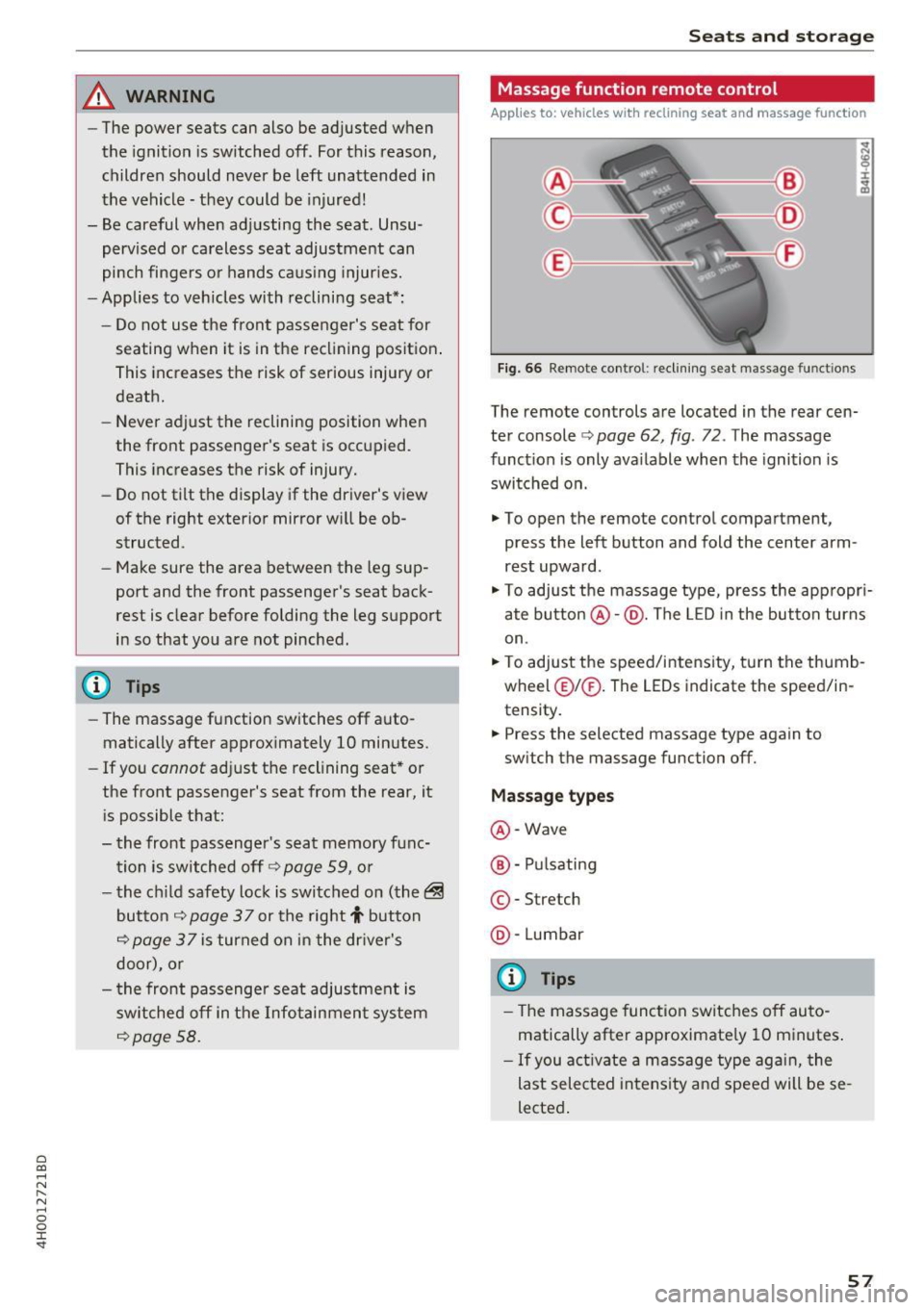
Massage function remote control
Applies to: vehicles with reclining seat and massage function
Fig. 66 Remote cont rol: rec lin ing seat massage functions
The remote controls are located in the rear cen
ter console ¢ page 62, fig. 72 . The massage
funct ion is only ava ilable when the ignition is
switched on.
.,. To open the remote control compartment,
press the left button and fold the center arm
rest upward .
.,. To adjust the massage type, press the appropr i
ate button @·@ . The LED in the button turns
on .
.,. To adjust the speed/inte nsity, turn the thumb
wheel @I® . The LEDs indicate the speed/in
tensity.
.. Press the selected massage type again to
sw itch the massage function off.
Massage types
@ -Wave
@ -Pul sating
© -Stretch
@ -Lumbar
(D Tips
- The massage function switches off auto
matically after approximate ly 10 minutes .
- If you activate a massage type aga in, the
last selected intensity and speed will be se
lected .
57
Page 61 of 354
C) C0 ....
"' " "' .... 0 0 :r
To prevent the head restraints from running into the headline, they are automat ically
Memory function
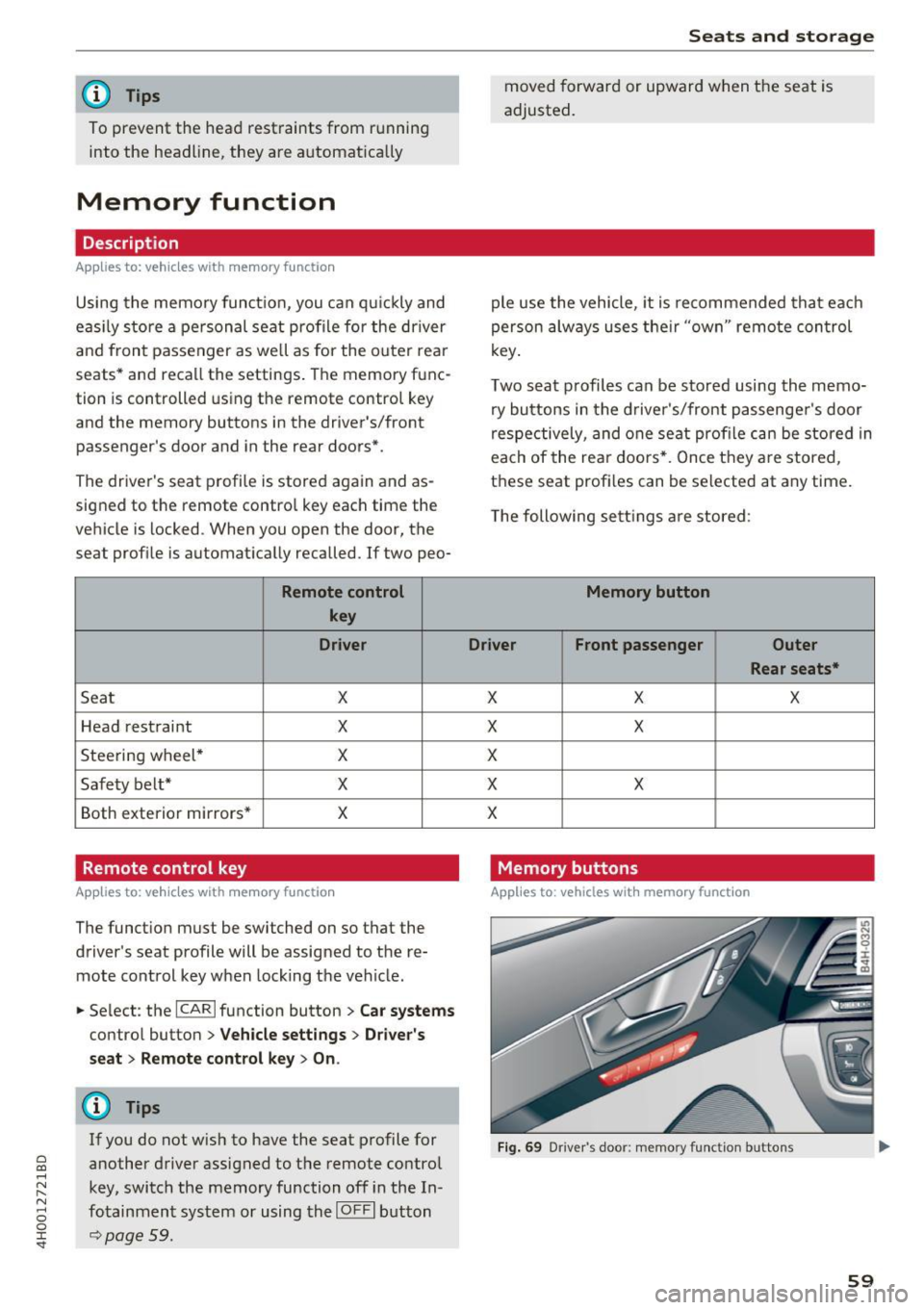
Description
Appl ies to: vehicles wit h memory function
Using the memo ry funct ion, you can q uickly and
eas ily store a pe rsonal seat profile for the driver
and front passenger as we ll as for the o uter rear
seats* and recall the settings. The memory func
tion is controlled using the remote contro l key
and the memory buttons in the driver's/front
passenger's door and in the rear doors*.
The driver's seat profi le is stored again and as
signed to the remote control key each time the
vehicle is locked. When you open the door, the
seat profile is automat ically recalled. If two peo-
Remote control
key
Dr iver
Seat X
Head rest raint X
Steering wheel * X
Safety belt* X
Both exterior mirrors* X
Remote control key
Applies to: vehicles with memory function
The function must be switched on so that the
driver's seat profile will be assigned to the re
mote control key when lock ing the vehicle .
.. Se lect : the
I CAR I function button > C ar sy stem s
control button > Veh icle setting s> Driver' s
s eat > Remote control ke y> On.
(D Tips
If you do not wish to have the seat p rofile for
another driver assigned to the remote control
key, switch the memory function off in the In
fotainment system or using the
IO FFI button
~page 59.
Seats and storag e
moved forward or upward when the seat is
adjusted.
ple use the vehicle, it is recommended that each
person always uses the ir "own" remote control
key .
Two seat profiles can be stored using the memo ry buttons in the d river 's/front passenger 's door
respectively, and one seat profile can be stored in
each of the rear doors *. Once they a re stored,
these seat profi les can be se lected at any time.
T he following sett ings a re stored :
Memory button
Driver Front passenger Outer
Rear seats*
X X X
X
X
X
X X
X
Memory buttons
Applies to: veh icles w ith memory function
F ig . 69 Dr iver 's door: memory function buttons
59
Page 73 of 354

Adjusting the temperature
Temperatures between 60 °F ( +16 °C) and 84 °F
(+28 °C) can be set . Outside of this range,
LO or
HI will appear in the climate control system dis
p lay . At both of these settings, the climate con
trol system runs continuously at maximum cool
ing or heating power. There is no temperature
regulation.
~ Adjusting the amount of air
You can adjust the airf low manually to su it your
needs. The blower should always run at a low set
ting to prevent the windows from fogging and to
ensure a continuous exchange of air inside the
vehicle. To have the airflow regulated automat i
cally, press the
IAUTO I button.
~ Adjusting the air distribution
You can manually select the vents where the air
will flow. To have the a ir distribution regu lated
automatically, press the
IAUTO ! button.
[il /~*Adjusting seat heating/ventilation*
Pressing the button switches the seat heating/
venti lation on at the highest setting (level 3). The
LEDs indicate the temperature level. To reduce
the temperature, press the button aga in. To
sw itch the seat heating/venti lation off, press the
button repeatedly until the LED turns off.
After 10 minutes, the seat heating/ventilation
automatically switches from level 3 to level 2.
l
or cleared of condensation as quickly as possible.
The maximum amount of air flows mainly from
the vents below the windshield. Recirculation
mode switches off. The temperature should be
set to approximately 72 °F (22 °().
The
IAUTO I button switches the defroster off .
IQiil R EARI Switching the rear window defogger
on and off
The rear window defogger only operates when
~ the engine is running. It switches off automati-....
~ cally after 10 to 20 minutes, depending on the N
8 outside temperature. 0 :c '
To prevent the rear window defogger from
switching off automatica lly, press and hold the
llliil REAR ! button for more than three seconds .
This is stored until the ignition is switched off.
I SYNC! Synchronization*
When synchron ization is switched on, the set
tings for the driver's side are applied to the front
passenger's side (except for seat heating/ventila
t ion*). The rear is also synchronized in vehicles
with the 4- zone deluxe automatic climate control
system*. Synchronization switches off if the set
t in gs are adjusted on the front passenger's side
or in the rear*.
You can synchronize the sett ings in a row by
pressing and holding a knob. For example, to ap
ply the sett ings for the front passenger's side to
the driver's side, press and hold the knob on the
front passenger 's side .
Vents
You can open or close the center and rear vents in
the cockpit and the vents in the rear center con
sole and door pillars using the ridged thumb
wheels. The levers adjust the direction of the air
flow from the vents.
Residual heat
You can act ivate the residual heat function when
the ignition is switched off by pressing and hold
i ng the ~ button. The residual heat from the
coolant is used to heat the vehicle interior . T he
residual heat function switches off automatically
after about 30 minutes.
_&. WARNING
- You should not use the recirculation mode
for an extended period of time since no
fresh air is drawn in. With the air-condition
ing switched off, the windows can fog up,
which increases the risk of an acc ident.
- Individuals with reduced sensit ivity to pain
or temperature could develop burns when
using the seat heating function. To reduce
the risk of injury, these individua ls should
not use seat heating .
71
Page 74 of 354

Warm and cold
(D Note
To avoid damage to the heat ing e lements in
the seats, d o not kneel o n the seats or place
heavy loads o n a small a rea of t he seat.
Basic settings
The climate control system basic settings ore ac
cessed in the Infotainment system .
.,. Se lect: the ICARI fun cti on bu tto n > Car systems
contro l button > AC .
Rear seat settings*
Wh en th is func tion is selec ted, a ll se tt in gs for
t he rea r can b e adju ste d t hroug h the cli mate co n
t rol system in the cockpit. The cli mate con trol
sys tem sett in gs cannot be adjus ted in the rear
seat at the same time. This fu nction switches off
after a certa in period of time or when one of the
d ia ls in the cockpit is pressed.
Auto recirculation*
T he sensit iv ity level of the au toma tic r ecircula
tion mode can be set at various levels from
Off to
Max. Whe n recirculation mode la> I is switched on,
the air rec irculat io n is contro lled automatically.
If the w indows fog up, press t he
I@ FRON T I but
ton .
Footwell temperature
You can a dju st the footwell temperature so that
it is coo le r or warmer .
Solar roof*
Parking ven tila tion i s co nt rolled a utoma tically in
t he
Auto settin g.
W hen the ig nitio n is swi tched o ff, solar-powered
p ark ing ventil ation may swi tch on, as long as
- there is sufficient sunlight,
- the outside temperature is not too low,
- the sunroof is closed or tilted and
-Auto (I nfo tainment system) is set
72
Steering wheel heating
Applies to: vehicles with steering wheel heating
The steering wheel rim con be heated .
Fig. 88 Steering co lumn : steeri ng w hee l heati ng b utto n
.,. Pres s the [i] butt on to sw itch st eering w heel
he atin g on/o ff. The mess age
Steering wheel
heating on /Steering wheel heating off
ap
pears in the instrument cluster disp lay .
The tempe rature is m ainta ined at a constant lev
e l when s tee ring wheel hea ting is switc hed on .
The steer ing whee l hea ting sett ings are stored
a utom atically and assig ned t o the rem ote c ontro l
k ey th at is in use.
Page 77 of 354
C) C0 ....
"' " "' .... 0 0 :r
need it. Examples of equipment that use a lot of
energy are a ir blowers at a high setting, the rear
w indow defogger and seat heating*.
CD Note
Do not leave engine idling unattended after
starting . If warning lights should come on to
ind icate improper ope ration, they wou ld go
unheeded. Extended idling also produces
heat, wh ich could result in overheat ing or
other damage to the vehicle or other proper
ty .
CD Note
- Have your vehicle maintained properly and
in accordance with the service recommenda
tions in you r War ranty
& Ma intenance book
l et. Lack of p roper maintena nce as well as
i mproper use of the vehicle will imp air the
funct ion of the emission contro l system and
could lead to damage.
- Do not alter or remove any component of
the Em ission Control System un less ap
proved by the manufacturer .
- Do no t alt er or remove any devi ce, such as
heat shie lds, switches, ignition wires,
valves, which are designed to protect your
vehicle's Em ission Control System and other
i mportant veh icle components .
@ Tips
The consumption estimates as published by E NVIRONMENTAL PROTECTION AGENCY
(EPA) and Transport Canada may not corre
spond to your actual consumption on the
road, which will vary depending upon vehicle
load and speed, road and weather condi tions,
t rip length, etc.
D rivi ng
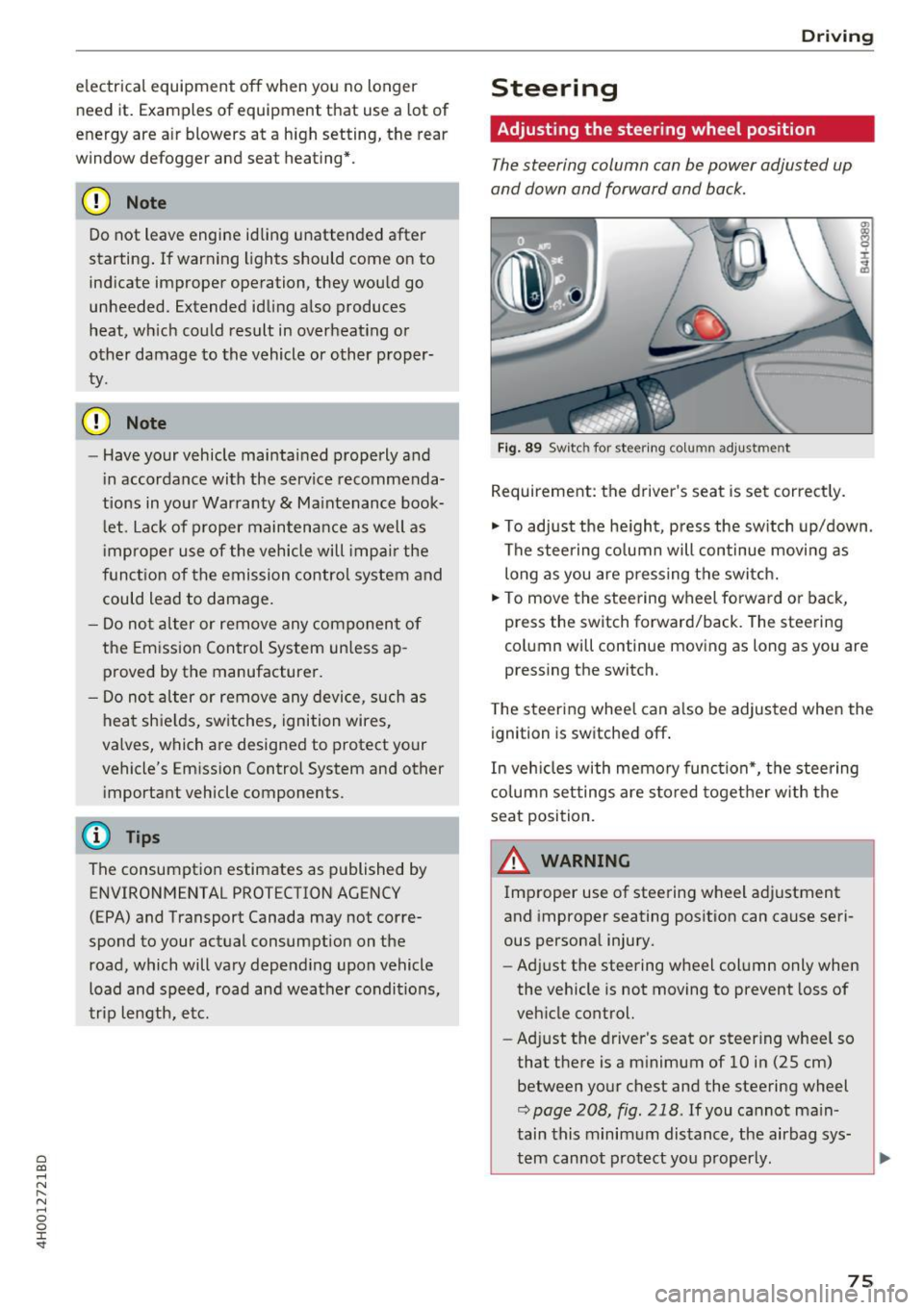
Steering
Adjusting the steering wheel position
The steering column can be power adjusted up
and down and forward and back.
F ig . 89 Switc h for steering co lu mn adjus tme nt
Requirement: the driver's seat is set correct ly.
"' To adjust the he ight, pr ess the sw itch up/down .
The stee ring co lumn will continue movi ng as
long as you are p ressing the switc h.
"' To move the steering wheel forwa rd or back,
press the switch forward/back. The steering
col umn wi ll continue mov ing as long as you are
pressing the switch.
T he steering whee l can a lso be adjusted when the
ignition is switched off .
In veh icles with memory func tion*, the steering
c o lumn set tings are s tored toget her w ith the
seat position.
A WARNING
Improper use of stee ring wheel adjustment
and improper seating posit ion can cause seri
ous persona l injury.
- Ad just the steering wheel column only when
the vehicle is not moving to prevent loss of
veh icle control.
- Adj ust the driver's seat or steer ing whee l so
that the re is a m inimum of 10 in (25 cm)
between yo ur chest and the steering wheel
r::;, page 208, fig . 218 . If you cannot ma in
tain this minimum dis tance, the airbag sys
tem cannot pro tect you p roperly.
-
75
Page 78 of 354

Driving
-If physical limitations prevent you from sit
ting 10 in (25 cm) or more from the steer
ing wheel, check with your authorized Audi
dealer to see if adaptive equipment is avail
able .
- If the steering wheel is aligned with your
face, the supplemental driver's airbag can
not prov ide as much protection in an acci
dent. Always make sure that the steering
wheel is aligned with your chest.
-Always hold the steering wheel with your
hands at the 9 o'clock and 3 o'clock posi
tions to reduce the risk of personal injury if
the driver's airbag deploys.
- Never hold the steer ing wheel at the 12
o'clock position or with your hands inside
the steering wheel rim or on the steering
wheel hub . Holding the steering wheel the
wrong way can cause serious injuries to the hands, arms and head if the driver's airbag
deploys.
Entry assistance
Easy seat entry makes it easier to enter and exit the vehicle by adjusting the steering column au
tomatically.
• In the Infotainment system, select the !CAR I
function button > Car systems control button >
Vehicle settings> Seats> Driver's seat> Easy
seat entry> On.
When easy seat entry is switched on, the steering
column goes back up into the park position when
the ignition is switched off. After entering the ve
hicle, the steering column returns to the stored position once the ignition is switched on .
76
Starting and stopping
the engine
Starting the engine
The ! S TAR T ENGINE S T OPI button switches the
ignition on and starts the engine .
Fig. 90 Cente r conso le: START ENGINE STOP but ton
Switching the ignition on/off
• To switch the ignit ion on or off, press the
!START ENGINE STOPI button . Do not press the
brake pedal while doing this.
Starting the engine
• Press the brake pedal¢.&_.
• Press the
I START ENGINE STOP I button
¢
fig . 90 . The engine will start .
If the engine does not start immediately, the
starting procedure stops automatically after a
short time . Repeat the starting process .
Start/Stop system
Read the information in¢ page 78 , Start/Stop
system.
A WARNING
To reduce the risk of poisoning, never allow
the engine to run in confined spaces .
(D Note
Avoid high engine speed, full throttle, and
heavy engine load if the engine has not
reached operating temperature yet. You could
-
damage the engine. .,..
Page 81 of 354

C) C0 ....
"' ,....
"' .... 0 0 :r
serious injuries.
- To reduce the risk of injuries, make s ure that
the Start/Stop system is turned
off when
working in the eng ine compartment
c:>page80.
(D Note
Always sw itch off the Start/Stop system when
driving through water
c:> page 80.
Starting /stopping the engine
App lies to: ve hicles with Sta rt/Stop system
Fi g. 92 Instrument cluster: eng ine switched off (stop
p h ase)
~ S low the vehicle to a stop us ing the b rake and
keep pressing the brake pedal. The engine w ill
switch off. The
rt] indicator light appears in the
infor mation li ne in the ins trumen t cluster dis
play.
~ When you take your foot off the b rake peda l,
t h e engine restarts. The ind icator light turns
off.
Additional information
The engine w ill swi tch off in the P, D, N and S po
sitions as we ll as in manu al mode. I n the P pos i
tion, the engine will also remain o ff if you take
your foot
off the brake pedal. The engine starts
again when you se lect another selector lever po
sition and take your foot
off the brake pedal.
If yo u select the R pos ition dur ing a Stop phase,
the eng ine will start agai n.
Shift from D to P quickly to p revent t he engine
from sta rting unintentionally whe n shifti ng
through R .
Drivi ng
You can de termine for yourse lf if the engine w ill
stop or not by red ucing or increasing the amount
of force you use to press the brake pedal. For ex
amp le, if you only lightly press on the brake ped
al in stop-and-go traffic or when turning, the en
gine will not switch off when the vehicle is sta
t io nary . As soon as you press the b rake down
harder, the engine w ill switch off.
(0 Tips
-Press the brake pedal during a Stop phase
t o keep the vehicle from rolling.
- The ignit ion w ill tur n
off if you press the
!S T ART ENGINE STOPI button d uring a stop
phase.
General information
Applies to: vehicles w ith Start/Stop system
The standard Start/Stop mode con be canceled
for various system-related reasons.
Eng ine does not sw itch off
Befo re each stop phase, the system checks if cer
ta in conditions have been met. If the
r,J indica
tor light appears in the instrument cluster dis
play, the eng ine will not be stopped, for examp le
i n t he following situat ions :
- The engine has not reached the minim um re
quired tempe rature for Start/Stop mode .
- The interior temperature selected by the A/C
system has not been reached.
- The outside temperature is extremely high/low.
-The winds hield is being defrosted
c:> poge 71.
-The pa rking sys tem* is be switched on.
- The ve hicl e battery cha rge level is too low.
- The steering wheel is t urned at a sha rp angle or
is moving.
- After engaging the reve rse gear .
- On sharp inclines.
Engine automat ically restarts
T he standard Start/Stop mode wi ll be canceled
during a stop phase in the following sit uat ions .
The engine restarts without any action by the driver .
79
Page 83 of 354

C) C0 ....
"' " "' .... 0 0 :r
parking brake
Fig . 94 Center conso le: park ing brake
Your vehicle is equipped with an e lectromechani
cal parking brake@~
fig. 94. The parking brake
is designed to prevent the vehicle from rolling
un intentionally and replaces the hand brake.
Setting/manually releasing the parking
brake
.. Pull the<®> switch to set the parking brake. The
LED in the switch illuminates. The -(USA
models)/ . (Canada models) indicator light al
so turns on in the instrument cluster display .
.. To release the parking brake manually, press
the brake or acce lerator pedal while the igni
t ion is switched on and press the© switch at
the same time. The LED in the button and the
indicator light in the display turn off.
Releasing the parking brake automatically
Requirement: the driver's door must be closed,
the dr iver's safety belt must be latched and the
parking brake must be set.
.,. To start driving and release the park ing brake
automatically, press the acce lerator peda l as
usual.
In addition to releasing the parking brake auto mat ically, other convenience and safety funct ions
are available when you start driving~
page 82,
Starting from a stop.
Preventing the automatic parking brake
release
The vehicle could begin rolling unintentionally,
depending on the hill or if towing a trailer.
Driving
.. To prevent the parking brake from releasing au
tomatically, pull and hold the(®) switch and press the accelerator peda l. The parking brake
remains set and prevents the vehicle from roll
ing backward .
.,. You can release the<®> switch again once you
are sure that you are giving enough driving
force to the wheels by press ing the accelerator
pedal.
Emergency braking function
You can use the emergency braking function in an
emergency situation, or if the standard brake op
eration malfunctions or is disabled.
.. Pull and hold the(®) switch.
.. As soon as you release the <®> switch or acceler-
ate, the braking stops.
Pulling and ho lding the© switch wh ile driving
the vehicle activates the emergency braking func
tion. The vehicle is braked at all four wheels by
activating the hydraulic brake system. The brak
ing effect is sim ilar to heavy braking ~_& .
To reduce the risk of activating the emergency
braking by mistake, a warning tone (buzzer)
sounds when the© switch is pulled . Emergency
braking stops as soon as the© switch is released
or the accelerator pedal is pressed.
Parking
.. Press the brake pedal to stop the veh icle.
.,. Pull the(®) switch to set the parking brake.
.,. Select the P selector lever position .
.,. Tu rn the engine off~_& .
.,. Turn the steering w heel when parking o n in
clines so that the wheels w ill roll into the curb
if the vehicle starts moving.
& WARNING
-
-Do not press the acce lerator peda l inadver
tently if a gear is selected when the vehicle
is stationary and the engine is running. Oth
erwise, the vehicle will start to move imme
diately and this could result in an accide nt.
- Eme rgency braking should only be used in
an emergency, when the normal brake pedal
has failed or the brake pedal is obstructed . ..,.
81
Page 84 of 354

Driving
During emergency braking, your vehicle will
brake similar to heavy braking. ESC and the
associated components (ABS, ASR, EDL)
cannot overcome the laws of physics. In cor
ners and when road or weather conditions
are bad, a full brake application can cause
the vehicle to skid or the rear end to swerve,
which increases the risk of an accident.
- If the power supply fails, you cannot set the
parking brake if it is released. In this case,
park the vehicle on level ground and secure
it by placing the selector lever in the P posi
tion. See an authorized Audi dealer or au
thorized Audi Service Facility for assistance.
- Always take the vehicle key with you when leaving your vehicle, even for a short period
of time. This applies particularly when chil
dren remain in the vehicle . Otherwise chil
dren could start the engine, release the
parking brake or operate electrical equip
ment such as power windows, which in
creases the risk of an accident.
- No one should remain in the vehicle when it is locked -especially children. Locked doors
make it more difficult for emergency work
ers to get into the vehicle, which puts lives
at risk.
(D Tips
When stopping at a traffic signal or stopping in city traffic, you can set the parking brake
manually. The vehicle does not have to be
held with the brake pedal. The parking brake
eliminates the tendency to creep when a se
lector lever position is engaged. As soon as
you press the accelerator pedal, the parking brake releases automatically and your vehicle
starts to move
c> page 82.
(D} Tips
-Occasional noises when the parking brake is
set and released are normal and are not a
cause for concern.
- The parking brake goes through a self-test
cycle at regular intervals when the vehicle is
stopped. Any noises associated with this are normal.
82
- If there is a power failure, the parking brake
will not set if it is released, and it will not release if it is set ¢&. . See an authorized
Audi dealer or authorized Audi Service Fa cility for assistance .
Starting from a stop
Various convenience and safety functions may be
available when the vehicle begins driving, de
pending on vehicle equipment .
Starting on hills with the parking brake set
Requirement: the driver 's door must be closed
and the driver's safety belt must be fastened.
.,. To start driving comfortably when on a hill, set
the parking brake and begin driving as usual.
The braking force of the parking brake does not
release automatically until the wheels build up
enough driving force.
Starting on hills with hill hold assist
Hill hold assist makes it easier to start on hills.
Requirement: the driver's door must be closed
and the engine must be running.
.,. To activate hill hold assist, press and hold the
brake pedal for several seconds. The vehicle
must be in an uphill direction of travel.
After releasing the brake pedal, the braking pow
er is maintained for a brief moment
c> &. to pre
vent the vehicle from rolling back when starting.
During this time, you can easily begin to move
your vehicle.
&_ WARNING
A ppl ies to: ve hicles with hill hold assist
- If you do not begin driving immediately or
the engine stalls after releasing the brake
pedal, your vehicle may begin to roll back
ward. Press the brake pedal or set the park
ing brake immediately .
- The intelligen t technology of hill hold assist
cannot overcome the limitations imposed by
natural physical laws. The increased comfort
offered by hill hold assist should not cause
you to take safety risks .
Page 87 of 354
0 co .... N ,..... N .... 0 0 :c '
lect the R or P posit ions while driving.
- Power is sti ll transmitted to the wheels
when the engine is running at idle. To pre
vent the veh icle from "creeping", you must
keep your foot on the brake in all se lector
lever positions (except P and N) when the
engine is ru nning. Do not inadvertent ly
press the acce le ra to r pedal when the vehicle
is sta tionary. Otherwise the vehicle will start
to move immedi ately, even if the parking
bra ke is set . Th is could result in a c rash.
- Before opening the hood, se lect the P selec
tor lever pos ition and se t the parking bra ke.
T his reduces the risk of an accident. Always
read and fo llow the applicable warnings
¢ page 2 71, Working in the engine com
partment.
- Never leave your vehicle with the engine
running wh ile in gear. If you must leave
your vehicle when the engine is running, set the parking brake and move the selector lev
er to the P position .
If you accidentally se lect N wh ile driving, take
your foot off the acce lerator pedal and wa it
for the engine to s low down to idle before se
lect ing Dor S.
Driving tips
Starting the engine
.. The selector lever must be in the P or the N po
s it io n.
Starting from a stop
.. Press and hold the brake pedal.
.. Start the engine¢
page 76.
.. Press the button o n the selector lever and se
lect the D, Sor R selector lever position
¢ page 83.
.. Wait a moment unt il the transm ission shifts.
Yo u w ill notice a sl ight movement when the
gear engages.
.. Release the brake pedal and press the acce lera
tor pedal ¢ ,&. .
Driv ing
Stopping temporarily
.. Press the bra ke pedal to stop the veh icle, for
examp le at a traffic light . Do not press the ac
celerator pedal when doing this .
.. To prevent the vehicle from ro lling when you
start driv ing, set the parking brake when stop
ping on steep inclines¢ ,&..
.. The parking brake will release automat ically
and the vehicle will start moving once you press
the acce lerato r pedal.
Stopping /par king
If the selector lever is not in the P position when
you open the driver's door, the vehicle could roll. The message
Transmi ssion: selector lever in
drive po sition!
appears.
.. Press and hold the brake pedal¢ ,&. .
.. Set the park ing brake.
.. To engage the P selector lever position, press
the button on the selector lever and shift into
t he P position
¢ page 83 .
Under certain conditions , such as driving in the
mountains or when towing a trailer, it may be
helpful to switch to manual mode temporar ily
and shift manually to adapt to the driv ing cond i
tions¢
page 86.
On hills, activate the park ing brake first and then
shift into the P position¢
page 81 . This prevents
too much stress from being p laced on the loc king
mecha nism .
_& WARNING
-The vehicle can roll even i f the ignit ion is
switched off .
- Do not press the a cce le ra tor pedal when
changing the se lector lever position while
the vehicle is stationary and the engine is running . This could result in a crash .
- To reduce the r isk of an accident, neve r se
lect the R o r P positions while driving.
- Power is still transmitted to the wheels
when the engine is running at idle. To pre
vent the vehicle from "creeping", you must
keep your foot on the brake in all selector
lever positions (except P and N) when the
engine is running.
-
85