navigation AUDI A8 2017 Owner's Manual
[x] Cancel search | Manufacturer: AUDI, Model Year: 2017, Model line: A8, Model: AUDI A8 2017Pages: 354, PDF Size: 88.68 MB
Page 170 of 354
Navigation
Requirement: the requirements for Audi connect
services must be met
¢page 157.
.,. Select : I NAVI button> Route guidance control
button >
Online destinations .
- Search at location or vicinity of destination/
stopover
1>: select and confirm Search in imme
diate vicinity or Search at dest./stopover.
En
ter a sea rch term, such as restaurant, and con
firm the input with
OK . Select and confirm a
point of interest >
Start route guidance .
- Search in new cityl}:
select and confirm In new
city
> Find city. Enter the name of the city and
confirm the input with
OK . Enter a search term,
such as restaurant, and confirm the input with
OK . Select and confirm a point of interest>
Start route guidance .
- Finding destinations from myAudi account
2>:
select and confirm Find destinations from
myAudi account .
Enter the myAudi PIN for
your myAud i account, if necessary. The contacts
stored in the myAudi account are displayed.
You only need to enter the
myAudi PIN one
time . You will receive the
myAudi PIN in your
myAudi account once you have assigned a vehi
cle to the account. Select and confirm a con
tact. Se lect and conf irm a private or business
navigation destination >
Start route guidance .
You can display additional information about on
line destinations in the
Destination details menu
¢fig . 183.
@ Tips
- F or additional information on the myAudi
account, visit
www.audi.com/myAudi.
- Refer to the notes in the chapter About
Audi connect
r:!>page 162.
1> Provider at time of prin ting.
2> Requirement : you must have a my Audi accou nt set up at
my.a udiusa.com. You must have a vehicle stored in your
myA udi account and you must have a destinat ion stored .
168
Setting a favorite/home address as the
destination
App lies to : vehicles wi th naviga tion sys te m
Favorites make it easier to enter a destination
that you use often.
Requirement: a favorite o r home address must
be stored ¢
page 172.
.,. Select: !NAV ! button > Route guidance control
button >
Favorites .
"' Select and confirm a favorite or the home ad
dress. Start route guidance.
You can store up to ten ind iv idual destinat ions
and your
Home address as favorites ¢ page 172.
(j) Tips
-You can disp lay, find, ed it and delete your
stored favorites and home address on the
map
¢page 172.
-Favor ites are d isp layed on the map at a
scale up to 1.5 miles (2.5 km).
Loading the last destination
App lies to: vehicles wit h navigat ion syste m
Your previous destinations are stored automati
cally and can be loaded directly as destinations.
.,. Select: !NAV ! button > Route guidance contro l
button
> Last destinations .
"'Select and confirm a previous dest ination from
the list. Start route guidance .
(D Tips
The list of last destinations can be deleted
¢page 174.
Page 171 of 354
C) C0 ....
"' " "' .... 0 0 :r
destination
App lies to: ve hicles with naviga tion sys tem
Start route guidance to the home address you
set simply and quickly .
Requirement : a home address must be stored
r=;, page 172.
"'Selec t: I NAVI button> Route guidance control
button >
Home address .
"'Sta rt route guidance .
Transferring a destination from the
directory
A ppl ies to: ve hicles with naviga tion system
You can navigate directly to destinations in the
directory.
Requirement: the directory must contain con
tacts w it h priva te/bus iness addresses stored as
desti nations.
"' Se lect :
I NAVI button> Route guidance control
button >
Dire ctory .
"'Select and confirm a contact . If a contact con
ta ins two navigation destinations (private and
business), se lect and confirm one destination .
Sta rt route guidance.
Entering a destination using geo
coordinates
A ppl ies to: ve hicles with navigation system
"' Select : I NAVI button > Route guid ance control
button >
Address > Coordinates .
"'Select and confirm the Latitude and Longitude .
Start route guidance.
Navigat ion
Entering a stopover/route plan
A pp lies to : vehicles wit h navigat ion syste m
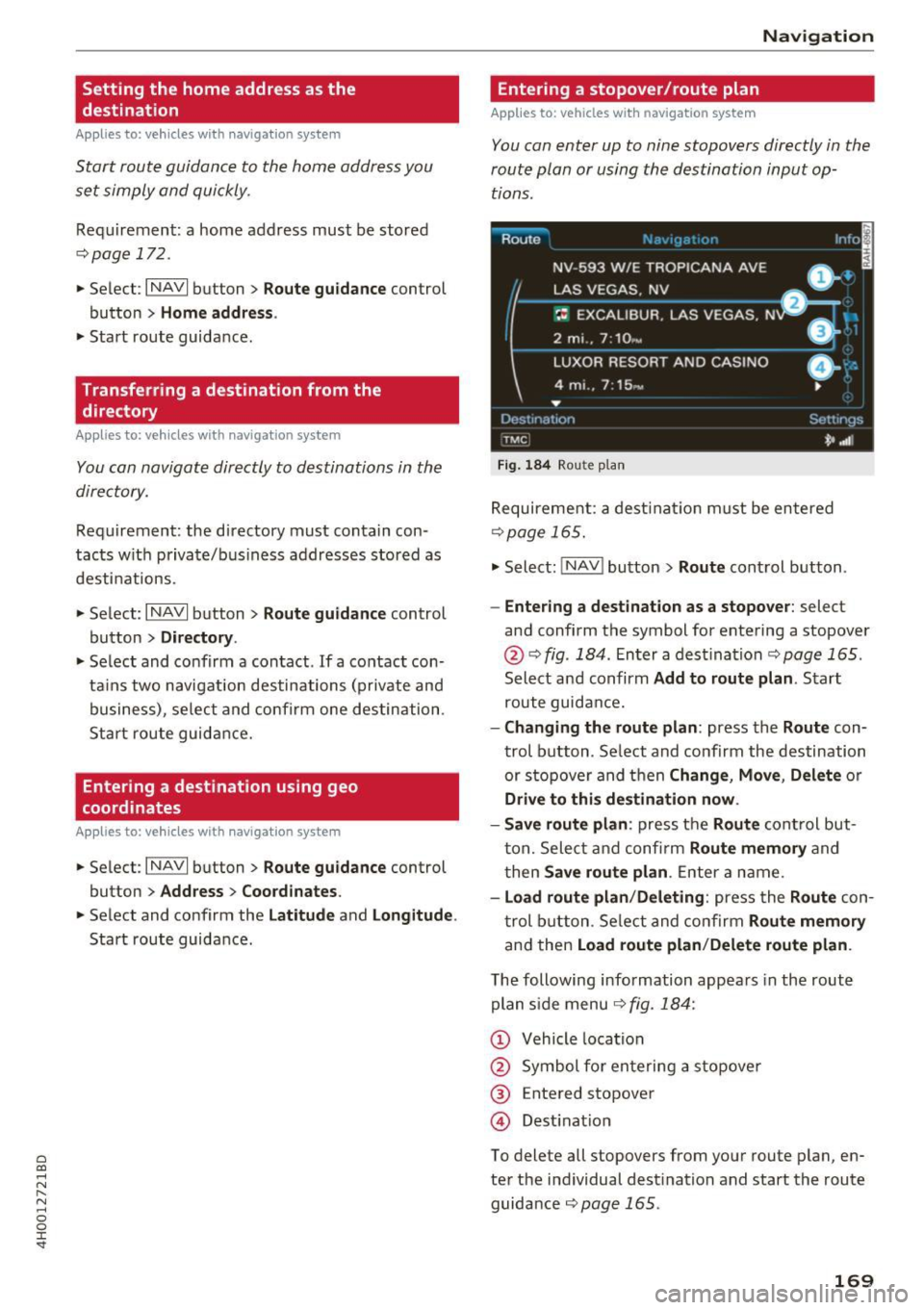
You can enter up to nine stopovers directly in the
route plan or using the destination input op tions .
Route
NV -593 W/E ~:~::~~ 'NA AVE ,,: ol
LAS VEGAS . NV
-- B,...._
~: EXCALIBUR. LAS VEGAS. N DI :
2 mi .. 7 : 10 ,~ _ _ _ _:::'.J
LUXOR RESORT AND CASINO
4 mi .. 7:15 -
...
Dcst1nat 1on
T MC
Fi g. 184 Route p la n
0- ::
•
Settings
'*' ,.dl
Requireme nt: a dest ina tion m ust be en tered
¢page 165.
"'Select: !NAV ! button > Route control button .
-Entering a destination as a stopove r: select
and confirm the symbol for entering a stopover
@ ¢ fig . 184 . Enter a dest inat ion r=;, page 165 .
Select and confirm Add to route plan . Start
route guida nce.
- Changing the route plan : press the Route con
trol b utton . Se lect and confirm the destination
or s topove r and t hen
Change , Move , Delete or
Drive to this de stination now .
- Save route plan :
press the Route cont rol but
t on. Selec t and confi rm
Route memory and
t hen
Save route plan . Enter a name.
- Load route plan /Deleting : press the Route con
t rol b utton . Se lect and con firm
Route memory
a nd then Load route plan /Delete route plan .
The following information appea rs in the rout e
plan s ide menu ¢
fig. 184:
(D Vehicle location
@ Symbol fo r ente ring a stopove r
@ Entered stopove r
@ Destinat io n
To delete all st opovers from your route plan , en
te r th e i ndividual dest ination and start the route
guidance
r=;, page 165 .
169
Page 172 of 354
Navigation
Starting/canceling route
guidance
App lies to: ve hicles w ith navigat ion system
You can a lso cancel route guidance by enter ing a
new dest ination
c> page 165 .
-Start ing route guidance when entering a new
destination :
select the I NAVI button > Route
guidance
control button > Enter a destination
> Start route guidan ce .
- Resta rti ng/canceling last route guidance :
se
lect the
I NAVI button> Route guidance control
button >
Start/Cance l.
The follow ing additional funct ions are ava ilable
when enter ing a new destination:
Alternative route s: three route suggest ions are
calculated for the destination that is cu rrent ly
entered. The side menu shows information about
the alternative routes, such as distance to the
destination and the ca lculated arrival t ime.
Alternative ro utes can only be calc ulated for indi
vidual destinations .
Set point of intere st in cit y: allows yo u to search
for attractions and public p laces around the
specified location, such as hospita ls, movie thea
ters, recreation areas, etc. The points of interest
can be selected d irectly as a destinat ion.
Set district : the navigation system calculates the
route to the center of the city or district that is
entered.
Display destination on map : the destinat io n en
tered is disp layed on the map.
1l Only app lies to vehicles w itho ut camera -based speed limit
dis play .
170
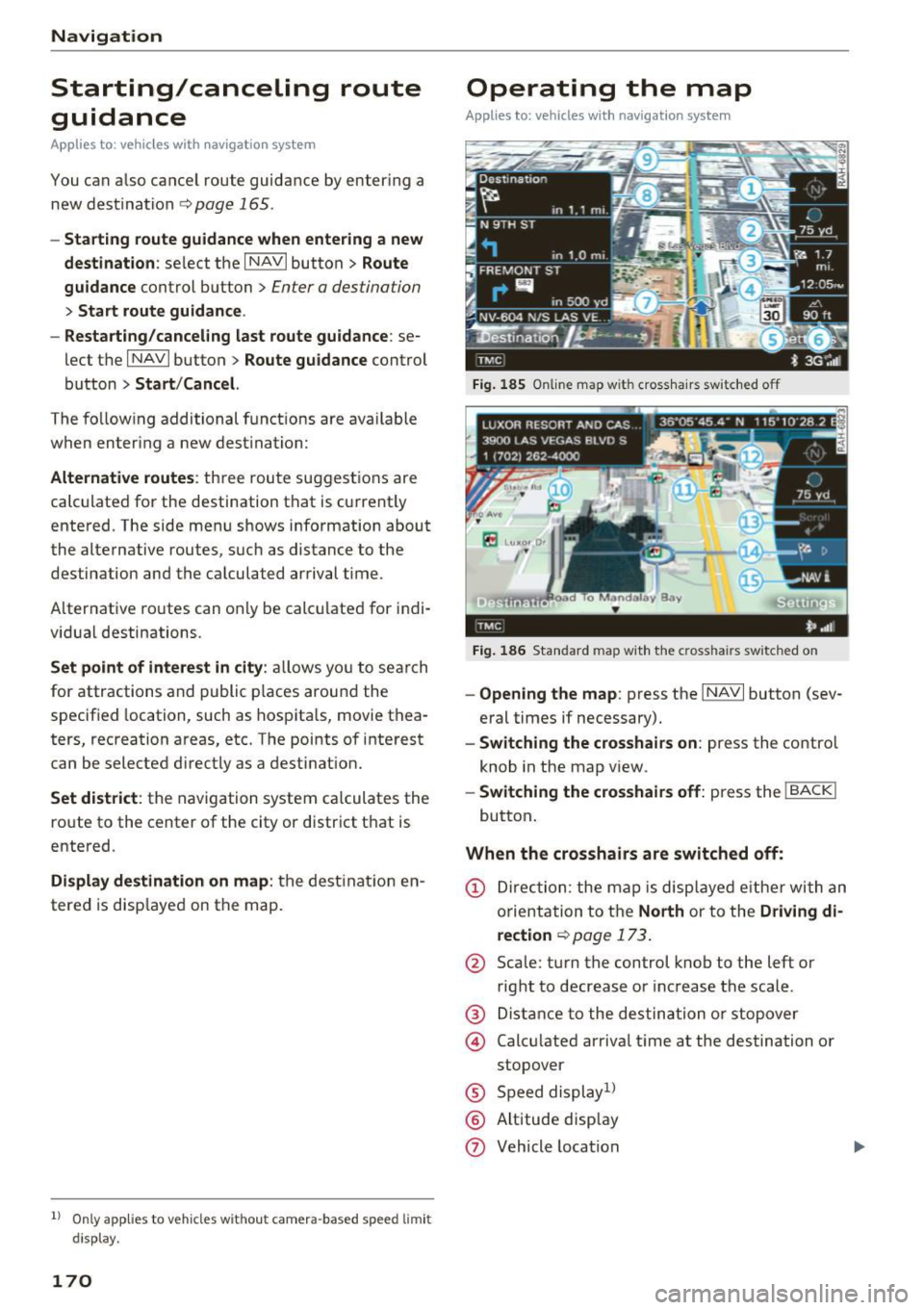
Operating the map
Appl ies to: ve hicles with navigation system
Fig. 185 Online map wit h cross hairs sw itc hed off
F ig . 18 6 Standard map wit h the c ross hair s sw itched o n
-Ope ning the map : press the INAVI button (sev
eral times if necessary) .
-Switching the crosshairs on : press the control
knob in the map v iew.
- Switching the cro sshair s off: press the I BACKI
button .
When the crosshairs are switched off:
(D Dir ec tion: the map is disp layed e ithe r with an
orientation to t he
North or to the Driving di
re ction
<=> page 17 3 .
@ Scale: turn the control knob to the left or
right to decrease or inc rease the scale .
@ Dista nce to the des tination o r stopover
@ Calc ulated arriva l time at the destination or
stopover
® Speed display1 )
® Altitude disp lay
0 Vehicle location
Page 173 of 354
C) C0 ....
"' " "' .... 0 0 :r
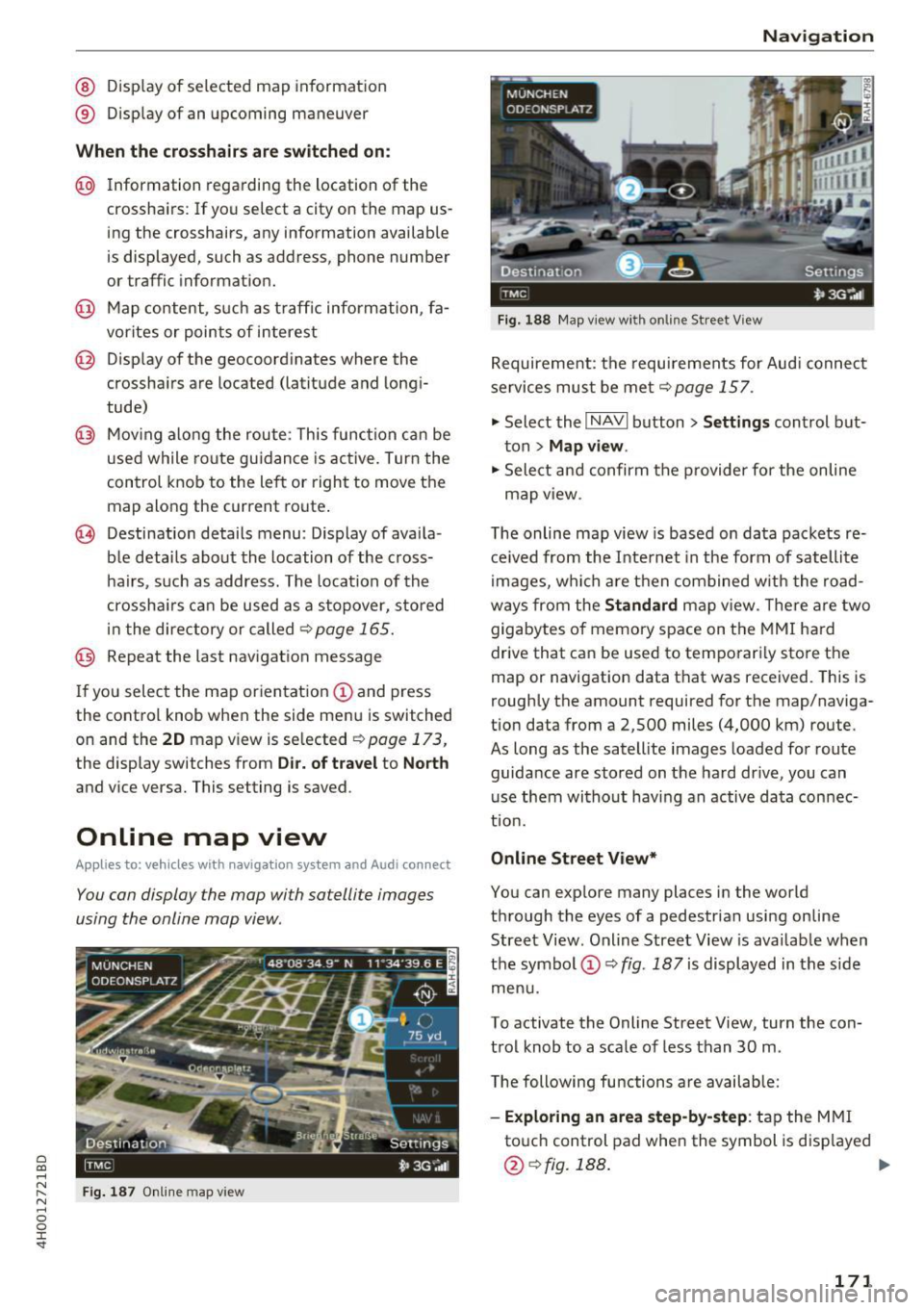
® Display of an upcoming maneuver
When the crosshair s are switched on:
@ Information regarding the location of the
crosshairs: If yo u select a city on the map us
ing the crosshairs, any information available
is displayed, such as address, phone number
or traffic information.
@ Map content, such as traff ic information, fa
vorites or points of interest
@ Display of the geocoordinates where the
crosshairs are located (latitude and longi
tude)
@ Moving along the route : This function can be
used while route guidance is active. Turn the
control knob to the left or right to move the
map along the current route .
@ Destination details menu: Display of availa
ble details about the location of the cross
hairs, such as address. The location of the
crossha irs can be used as a stopover, stored
in the directory or called
¢page 165.
@ Repeat the last navigation message
If you select the map orientation(!) and press
the control knob when the side menu is switched
on and the
20 map view is selected ~ page 173,
the display switches from Dir. of travel to North
and vice versa. This setting is saved.
Online map view
Appl ies to: ve hicles with naviga tion sys tem and Audi co nnect
You can display the map with satellite images
using the online map view .
Fig. 187 Online map v iew
Navigation
Fig. 188 Map view w ith on line Street V iew
Requirement: the requirements for Audi connect
services must be met
~page 157.
., Select the I NAVI button> Settings control but
ton >
Map view.
., Select and confirm the provider for the on line
map view .
The online map view is based on data packets re
ceived from the Internet in the form of satellite
images, which are then combined with the road
ways from the
Standard map view. The re are two
gigabytes of memory space on the MMI hard
drive that can be used to temporari ly store the
map or navigation data that was received. This is
roughly the amount required for the map/naviga
tion data from a 2,500 miles (4,000 km) route.
As long as the satellite images loaded for route
guidance are stored on the hard drive, you can
use them without having an active data connec
tion.
Online Street View*
You can explore many places in the world
through the eyes of a pedestrian using on line
Street View . Online Street View is available when
the symbol (!)¢
fig. 187 is displayed in the side
menu.
To activate the Online Street View, turn the con
trol knob to a scale of less than 30 m.
The following functions are available:
- Exploring an area step-by-step : tap the MMI
touch control pad when the symbol is disp layed
@ ¢fig.188. ...
171
Page 174 of 354
Navig ation
- Zoomi ng in or out on the cur rent view in fou r
sta ges:
turn the contro l knob to the left or to
the right @.
-Turning the view to the left /right or tilt in g
up /do wn:
move your finger over the MMI touch
contro l pad in the desired direction.
@ Tips
- Refer to the notes in the chapter About
Audi connect
¢ page 162.
-Stored data for the on line map view can be
deleted with
Factory setting s¢ page 206 .
-The online map view is an Audi co nnect serv
ice and is updated regu larly when the func
tion is opened . The process may take seve ral
seconds.
- When the on line map display is sw itched on
with the 30 map type, the Infotainment dis play automatically switches to the 20 map
type when dr iv ing through tunnels.
- Content, scope and providers of available
Internet-based services may vary.
- For safety reasons, the online Street View
funct ions can only be used when the veh icle
is stationary.
Additional settings
Storing a favorite or home address
App lies to: ve hicles with navigation system
Favorites ore stored automatically as a contact
in the directory .
"'Select : I NAVI button> Route guidance control
button >
Favor ite s.
- Storing a favo rite :
select Create fa vorite . Se
lect and co nfirm a favorite with the displayed
funct ions.
- Storing a home addre ss: select Home address .
Select and confirm a home address with the
displayed functions .
A home address can be stored for each cell phone
or SIM card that is paired with the MMI as well as
for the public MMI directory . It is only visible
when the respective directory is active.
Addit ional functions include:
172
- Call : select and confirm a favorite or the home
address. Select and confi rm
Call .
- Change :
select and confirm a favor ite or the
home address . Se lect and confirm
Re-a ssign
home add ress /favorite .
- Showing on the map:
select a nd confirm a fa
vorite/home add ress. Se lect and confirm
Dis
play de stination on map .
- Delete :
select and confirm a favorite or the
home address . Se lect and confirm
Delete home
a dd ress /fa vo rite .
Storing a destination in the directory
App lies to: vehicles wit h navigat io n syste m and telepho ne
Two addresses (private/business) can be as
signed as destinations for each contact in the di
rectory.
"' Select: !NAV ! button > Route guida nce contro l
button >
enter a destination > Store in di re cto
ry .
- Sto ring a destinati on a s a new addre ss card :
select New contact. Enter a name . Enter addi
tional data, if necessary . Select and confirm
Sto re contact .
- Ass igning a de stination to an e xisting addre ss
card :
select and confirm an address card. Select
and confirm
Stor e contact . If you already have
an address card for a destination, the o ld desti
nation will be overwritten.
Di spla y as fav orite : to be able to access a desti
nation qu ickly, the destination can be displayed
i n the list of favor ites when the function is
switched on~
¢page 169.
Stored destinations are ident ified on the map by
a b lue or red push p in (bus iness/private naviga
tion destination).
General settings
App lies to: vehicles wit h nav igat ion system
"' Select : !NAV ! button > Sett ing s control button .
Several criteria are used to calculate route guid
ance.
...
Page 175 of 354
Route criteria
Au to rerouting (traff ic):
when auto rerouting is
On , the route is automatically adjusted based on
TMC traffic information. If the MM I does not cal
culate a detour even though you have se lected
dynamic route
On and a traffic jam was reported
on the ca lculated route, then the detour the sys
tem calculated would take more time than the
time spent wa it ing in the traff ic jam .
Alternati ve route s: when the fun ction is On , up
to three suggested routes and their criteria ap pear in the Infotainment d isplay in the side
menu . After chang ing to map view, the new route
that was calculated according to your cr iteria is
hi ghlighted. Yo u can select the poss ib le routing
i n the alte rnative routes by turning and press ing
the cont rol knob .
Route option s: you can se lect a Short , Fas t or
Mix ed route .
Highway /Toll road /Fe rry : select the Minimize
option you do not want the navigation system to
include highways, toll roads o r ferries when cal
culating a ro ute.
T ime rest ricted roads : using the Minim ize func
tion will exclude t ime restricted roads, such as
pedestrian zones, from the route ca lculation .
When
Auto i s selected , the M MI decides if the
time rest ricted roads s hou ld be included when
calculat ing the ro ute guidance based on the en
tr ies stored in the navigation data .
Seasonal clo sing : using the Minimize function
will exclude seasona l closings, su ch as mountai n
passes, from the route calcu lation . When
Auto is
se lected, the MMI decides if the seasonal re
stricted roads should be included when calc ulat
ing the route guidance based on th e entries stor
ed in the navigation data .
Map colors
Day/Night :
the map is displayed with a light/
dark background.
Auto : when t he lights switch on, the map co lors
~ sw itch from day to night . .... N ,..._
N .... 0 0
~ l) Only po ssible in th e 2D map view
Na vigation
O rientation
North 1
l:
the map orienta tion is facing north.
Dir. of travel : the map orientat ion is in the direc
t ion of t ravel. At a sca le of 62 mi les (100 km) ,
the map is or iented to t he no rth for eas ier o rien
tation.
Auto : at a scale up to 3 miles (5 km), the map
o rientation is in the direction of travel. At a scale
greate r than 3 miles (5 km), the map is oriented
to the no rth.
Map type
D estination :
the destination is marked with a
c h ecke red flag . The map indicates the destina
t ion and is o riented to the north.
2D: the current veh icle position is displayed. The
map or ientation corresponds to the sett ing in the
Map orientation menu ~ page 173.
3D : when th is function is switched on, the cur
rent vehicle pos ition is displayed in a three-di
mensional terrain map and the map or ientat ion
is set automat ica lly to the
Dir. of travel. At a
sca le of 100 km and la rger, the map is o riented
to the no rth. At a sca le between 30 -100 meters,
the d isplay will show three-d imens iona l city
models and landmarks will be shown at a scale of
30 -200 meters.
Ov ervi ew : the entire route from the veh icle loca
t ion to the destina tion is disp layed on the map.
T he map scale depends on the length of the
route. The map is oriented to the north.
Map disp lay
Online map view 9 page 171
Map content
Map contents such as traffic information, favor
ites or restaurants can be displayed (~) or hid
den .
The functions in the
Map content menu depend
on the map d isplay that is selected .
IJl,
173
Page 176 of 354
Navig ation
Rout e info
When the function is switched On , the three up
coming turns and the calcu lated distance and ar
rival time are shown in the Infotainment display
during route guidance@¢
page 170, fig. 185 .
The cu rrent st reet traveled, upcoming maneu
vers, traffic in formation or points of interest on
the current ro ute are a lso displayed.
The next turn is d isp layed at the bottom of the
table.
Autom atic zoom
On : the map scale is adapted automatically de
pending on the type of road being traveled on
(expressway, highway, other roads) so that yo u
always have an optima l overv iew of the road
a h ead. When there are upcom ing mane uvers, t he
scale is automatically reduced to provide a better
detai led view.
Inters ection : when route gu idance is active, the
map tempora rily zooms in to a detailed scale
when there are upcoming mane uvers so that you
can see the route better.
Off : the map scale yo u have chosen is kept in
stead.
Gas station message
When th is function is sw itched On , a message
appears when the fue l gauge goes below the re
serve mar king. Confirm ing this message displays
a list of gas stations in the area. When a gas sta
tion is selected, route guidance from the current
vehicle position is calcu lated .
Speed limit display*1>
The max imum speed limits for expressways,
h ighways and ma in streets can be swit ched
On-/
Off if they are stored i n the navigation data .
Voice guidance
The voice guidance prompts can be Complete or
Compact . When Off is selected, no voice gu id
ance is given.
l ) O nly app lies to vehicles w ithout camera -based speed limit
dis play .
174 Nav
igation prompts can be g iven by pressing the
Ill b utton.
Voice guidance on during call
Nav igation p rompts can be switched on~ or off
during a phone call.
Delete recent destinations
The destinations you have entered last are auto
matically sto red. They can be deleted ind iv idually
or a ll at once .
Present ation mode
The Demo mode helps you to effectively plan and
display a route by showing map contents or route
c riter ia . You ca n
Set starting location when you
would like to calculate a route start ing from a lo
cation other than t he ve hicle position. Start
Demo mode to sim ulate the route g uidance .
(D Tips
The route s imulation in presentation mode is
deact ivated while driving fo r safety reasons.
' Route settings
App lies to: vehicles with navigation system
.,. Select: !NAV ! button> Rout e control b utton.
Route list
The route list is v is ible only when route guidance
i s active and contai ns info rmation regard ing the
r oute, the names of the streets and the length of
the route sect io ns. On longer route sec tions, ad
dit ional info rmation may be disp layed such as
possib le i nterchanges when driving on exp ress
ways.
Avoid route from here
D etermin ing th e le ngth of the rout e to be
avoided :
turn the contro l knob to t he left o r
r ight.
When route guidance is active and the
Standard
¢ page 170 map v iew is switched on, the ca lcu
l ated route is avo ided fo r the d ista nce you have ...
Page 177 of 354
0 co .... N ,..... N .... 0 0 :c '
culates an alternative route .
The route to be avoided t hat you have ente red
appl ies on ly to the current rou te and must be set
again, if needed.
The areas you have se lected to avoid will appea r
with red and wh ite shad ing on the map.
{D) Tips
If the MMI does not calcu late an alte rnative
route, that means the re is no ne ava ilable.
Accessing traffic
information
Auto rerouting (traffic)
App lies to: vehicles with navigation system and Sirius (satel
li te radio)
By receiving traffic information from the TMC or
satellite -depending on ava ilability - the MMI cal
culates an optim ized route and the possib le t ime
saved for the current route guidance . You can de
cide yourse lf which route you would like to use.
Traffic information (TMC)
Applies to: ve hicles with navigation system and Sirius (satel
li te radio)
Tfv1C traffic reports can be shown in the Infotain
ment display using Sirius* (satellite radio).
Info Audi connect I
@ EASTBOUND 59 mi _ ·
D ~ Slow traffic
@ NORTHBOUND
59 mi
(~ Road works
fJ!: ~ SOUTHBOUND
59 mi·
(~ Road works
Read Settings
I_
TMC _ t• "'"
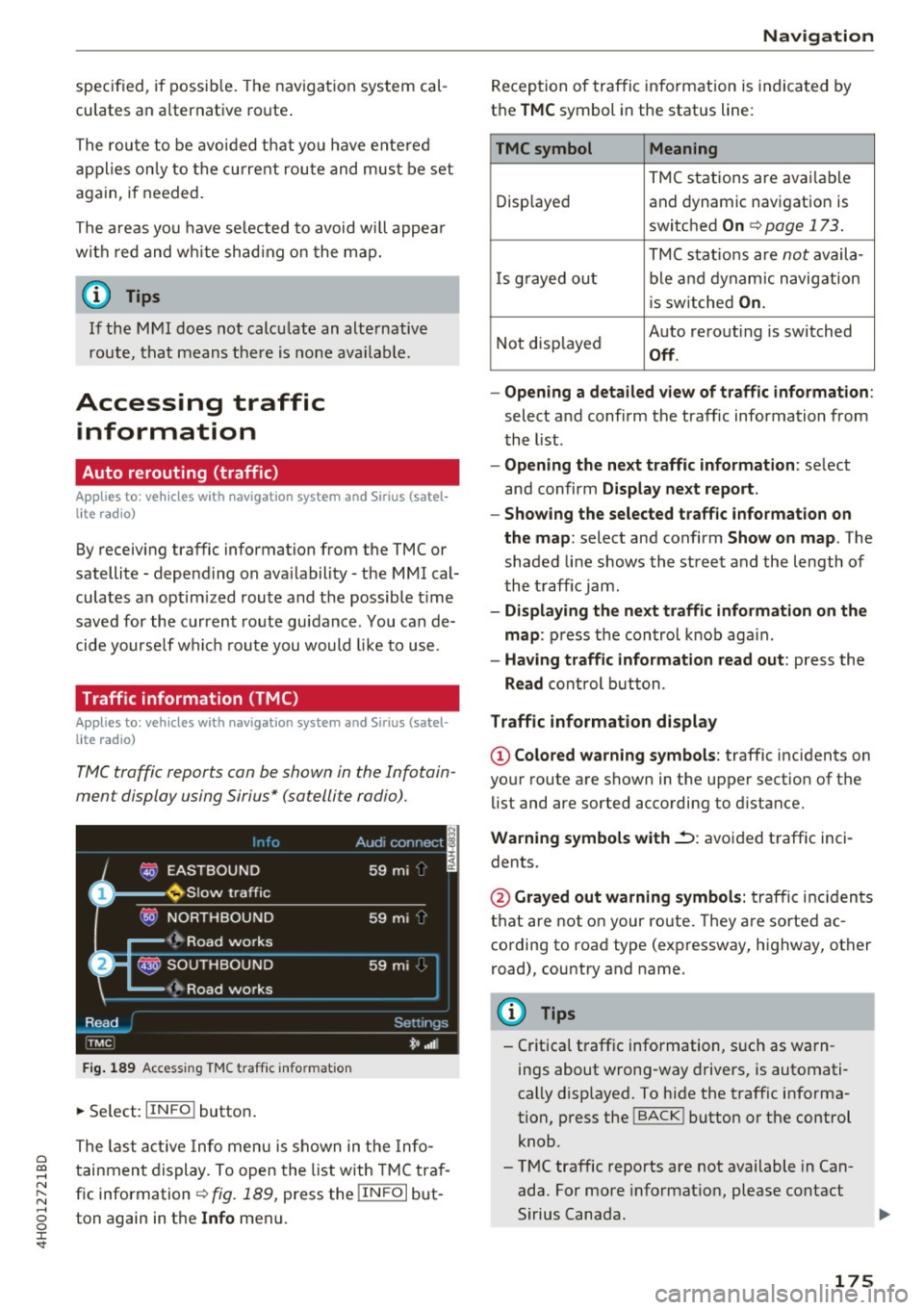
Fig. 189 Access ing TMC traff ic info rma tion
~ Se lect: IIN FO I button .
The last act ive Info menu is shown in the Info
tainment display . To open the list with TMC tra f
fic information¢
fig. 189, press the !IN FO I but
ton again in th e
Info menu.
Na vigation
Reception of traffic information is indicated by
the
T MC symbol in the status line:
TMCsymbol Meaning
TMC stations are avai lable
Disp layed and dynam ic navigation is
switched
On ¢ page 173.
TMC stat io ns are not availa -
I s g rayed out ble a nd dynam ic navigation
i s sw itched
On .
Not disp layed Auto rerouti
ng is switched Off .
- Opening a detailed vie w of traffic informat ion :
select a nd confirm the traffic information from
t he l ist .
-Opening the next tr affic information : select
and confirm
Display n ext report .
- Showing the selected traffic information on
th e map :
select and confirm Show on map . The
shaded li ne shows the stree t and the length of
the t raff ic jam .
-Displaying the ne xt tr affic information on the
map :
press the control k nob aga in .
- Having traffic information r ead out: press the
Read control button .
Traffic information display
© Colored warn ing symbols : traffic incidents on
your route are shown in the upper section of the
li st and are sorted according to distance.
Warning symbols with~: avoided traffic inci
dents.
@ Grayed out warning symbols: traffi c inc iden ts
that are not on your route. They are sorted ac
cording to road type (expressway, highway, other
road), country and name.
(D Tips
-Cr itica l t raff ic information, s uch as warn
ings about wrong-way drivers, is automati
cally disp layed. To hide the traffic info rma
tion, press the
I BACK I button or the control
knob.
- TMC traffic reports are not available in Can
ada. For more informat ion, please contact
Sirius Canada.
175
Page 178 of 354

Navig ation
- Traffic reports are shown in the driver infor
mation system disp lay and can be selected
by turning the left thumbwheel.
Other settings
~ Se lect : IIN FO l button> Setting s control button.
Traffic report
Traffic info rmation that refers to a n active dest i
nation is given as a spoken announcement when
the func tion is sw itched
On.
Troubleshooting
Applies to: vehicles with navigation system
Problem Solution Ent
ertainm ent volume
Turn the On/Off knob to the right or left to the
adjust the volume during traffic reports .
Favorites that were a lready star- The favorites in the public MMI directory are visib le for a ll u sers in
ed are no longer displayed .
the vehicle.
If a cell phone is connected, both the favor ites from the private
d irectory and the favorites stored as public are displayed.
If you w ant to make a favorite ava ilable for all users, it must be
stored in the public MMI directory . A favorite in the private direc -
tory must be marked as a
P u blic contact if you want it to be ava il-
ab le for all use rs .
176
Page 198 of 354

Rear Seat Entertainment
Restarting the RSE
(reset)
Applies to: ve hicles w ith Rear Seat Ente rta inment
F ig. 207 Button combination to restart th e system
... Press and hold the control knob (D , the upper
right control button @and the
righ t!MENUI
button ® c:::> fig. 207 at the same time for a
brief moment and then release the buttons .
@ Tips
The MMI and RSE use some components at
the same time. Because of this, Audi recom
mends restarting both systems.
Display settings
Applies to: vehicles with Rear Seat Enterta inment
... Se lect: I MENU I button > Display control button.
Turning off the display
The display switches off.
The active aud io/video source does not pause
when yo u switch the RSE display off . You can still
change the stat ion or track for the selected au
dio/video source using the arrow buttons.
Switching display on
Press any button on the MMI control panel.
Display brightness
You can adjust the display brightness by turning
the control knob .
196
Parental control
Applies to: ve hicles with Rear Seat Entertainment
Selected RSE functions can be restricted or deac
tivated in the MMI.
... Select: I MEN u I fu nction button > Setup MMI
control button > Rear Seat Entertainment.
System
When the function is switched On, the RSE is en
abled for use. When the function is switched
Off,
the RSE is switched off and the RSE control panel
i s locked.
Vehicle speakers
Audio output
through the vehicle speakers in the
rear can be set to
Vehicle speakers or Head
phones only.
Operation
You can set whether all of the RSE functions (All)
or the Volume only can be adjusted through the
RSE.
Navigation destinations*
You can Apply the navigation destination auto
matically for active route guidance in the MMI or
Confirm the navigation dest ination before trans
ferring to the MMI.
Other settings
App lies to: vehicles with Rear Seat Enterta inment
.,. Select: the I MENU I button> Setup RSE control
button.
Factory default settings
You can reset the following functions to the fac
tory default settings:
- Sound settings
- Radio
- Media settings
-Jukebox
- Navigation settings*
You can select the desired functions individually
or all at once with the option
Select all entries.
Select and confirm Yes . .,,.