reset AUDI A8 2017 Owner's Manual
[x] Cancel search | Manufacturer: AUDI, Model Year: 2017, Model line: A8, Model: AUDI A8 2017Pages: 354, PDF Size: 88.68 MB
Page 200 of 354
Rear Seat Entertainment
Labeling the wireless headphones
-Attach the supplied label CD or@ c::> fig. 209 on
the inside of the left/right wire less head
phones.
La beling the w ireless headphones:
CD Wireless headphones label (paired with the
left RSE display)
@ Wireless headphones label (paired with the
right RSE display)
Switching wireless headphones on/off
- Switching on:
to switch the wire less head
phones on, press the On/Off button
CD
9 fig. 208 on the right earpiece (R) for approxi
mately
3 seconds and release it once the LED
@ starts blinking . The light @will blink s lowly
once the connection to the wireless head phones has been established.
- Switching off : to switch the wireless head
phones off, press and hold the On/Off button
CD until the LED @turns off.
The wireless headphones switch off automatical ly about five minutes after the RSE switches off.
Disconnect wireless headphones
You can delete the pairing between the wireless
headphones and the RSE if yo u need to switch
out the headphones o r change the pairing .
- Select:
I M ENU I button> Setup RSE control but
ton
> Headphones > Delete wireless head
phones.
A WARNING
- For safety reasons, as the driver, only use
the headphones when the vehicle is station
ary to reduce the r isk of a crash .
- When driving, store the headphones secure
ly so that they do not move around in the
vehicle interior when braking or in a crash.
- Maintain a moderate volume leve l when lis
tening to audio playback through the head
phones. Continuous exposure to extreme
volume levels may result in loss of hearing.
198
-
@ Tips
-If the wire less headphones were already
paired, the connection to the headphones
will be reestablished after switching the
RSE on if the headphones are sw itched on.
- The RSE only supports wireless headphones
from your authorized Audi dealer.
- Audio/video output through the wire less
headphones stops during the pairing proc
ess.
- The pairing process must be done separate
ly for the left and right w ireless head
phones. The wireless headphones are as
signed to the left or right RSE display de
pend ing on the side of the RSE control unit
where you started the pairing process. The
pairing between the wireless headphones
and the lef t/r ight RSE display is ide ntifi ed
with a label.
- Volume that is too high or too low is auto
matically adjusted to a preset leve l when
the wireless headphones are connected.
Charging and changing the battery
Applies to: vehicles with Rear Seat Entertainment
If the light on the wireless headphones turns
red the batteries are low and need to be charg-
,
ed or replaced .
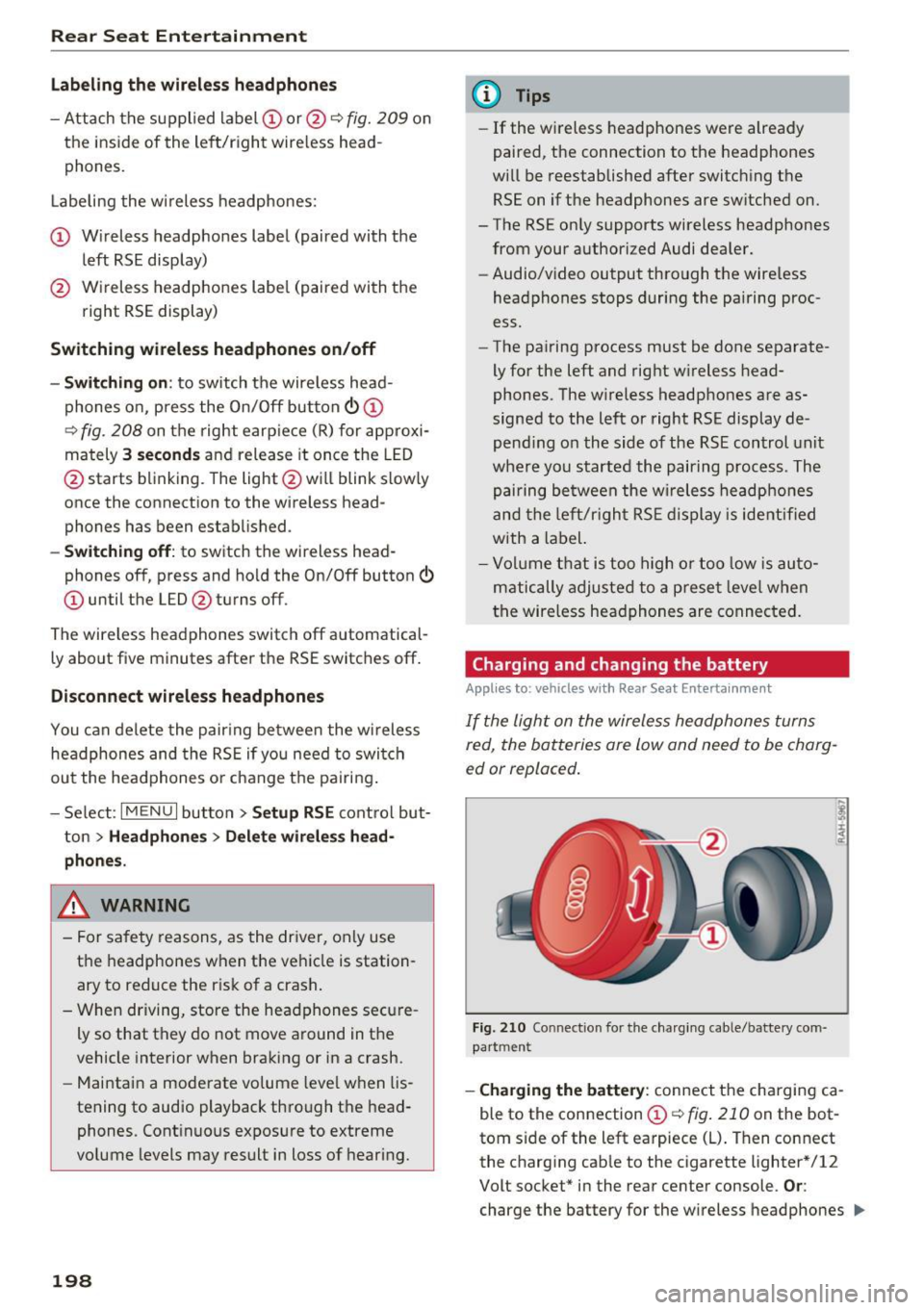
Fig. 210 Connec tion for the charg ing cable/battery com
partm ent
-Charging the battery : connect the charging ca
ble to the connection
CD c::> fig . 210 on the bot
tom side of the left earpiece (L) . Then connect
the charging cable to the cigarette lighter * /12
Volt socket* in the rear center console.
Or:
charge the battery for the wireless headphones .,.
Page 201 of 354

0 co .... N ,..... N .... 0 0 :c '
Audi music interface ¢
page 185.
-Ch angin g th e batt erie s: turn the cover @
¢ fig. 210 on the left earpiece (L) to the left/
right and change the batteries as labeled in the
battery compartment. Then attach the cover
back on to the left earpiece (L).
You can identify the charge status of the battery
¢
table on page 199 based on the blinking
speed
of the L ED in the charging cable connec
tion ©¢
fig. 210 .
Blinking fre- Charge status
quency
Blinking The batteries are charging.
Remains on The batteries are charged.
Blinking An error occurred while charg-
quickly ing .
..&, WARNING
-Do not use damaged rechargeable batteries.
T h is increases the r isk of an explos ion.
- T he headphones can become warm when
the batteries a re charg ing and increase the
risk of inj ury.
- Do not cha rge standard batteries with the
charg ing cable. This increases the risk of an
exp losion .
- Be careful when using the c igarette lighter.
Inattentive or unsupervised use of the c iga
ret te lighter can cause burns.
- T he cigarette lighter/sockets and any elec
trical accessories connected to them func
tion only when the ignition is switched on .
Using the cigarette lighter/sockets or elec
trical accessories incorrectly can lead to se rious injur ies or cause a f ire. To reduce the
risk of injuries, never leave children unat
tended in the vehicle with the vehicle key.
(D Note
- Do not charge the batteries in the wireless
headphones when the engine is not run
ning. This w ill dra in the vehicle battery.
- For wireless headphones, only use batteries
that are approved for that type of device,
for example NiMH batteries with a min i-
R ear S eat Ent ertainm ent
mum capacity of 550 mAh in AAA size that
are suitable for quick charging.
~ For the sa ke of the environment
Batter ies contain polluting substances. They
must be disposed of using methods that wi ll
not harm the environment. Do not dispose of
them in househo ld trash .
(D Tips
The charging time for the included rechargea
ble batteries is approximate ly three to four
hours and may increase by approximately 25
percent if the batteries are in use while charg
ing .
Headphones connected by cable
App lies to: vehicles wit h Rear Seat Enterta inmen t
The headphone connections ore located on the
RS£ control uni t.
Fig. 211 Conn ecting w ired headphones
"'I nsert th e headphone connecto r into the left or
r ight jack ©¢
fig. 211 on the RSE control pan
el.
The unit is equ ipped w ith 3.5 mm stereo jacks .
The w ireless headphones sw itch off automatical
ly about five minutes after the cable headphones
are connected .
(D Tips
Volume that is too high or too low is auto matically ad justed to a preset level when the
wired headphones are connected .
199
Page 204 of 354
Rear Seat Entertainment
The radio functions match those in the MMI. For
more information on the Radio menu, refer to
c::>page 177.
You can store a separate presets list in the RSE
that may contain up to SO stations from all fre
quency bands. You can a lso display the station
name for the selected radio stat ion or change the
station sorting separately in both RSE disp lays.
Playing media
A pp lies to: ve hicles w ith Rea r Seat E nte rtainment
.,. Select : I MEDIAi button .
The media functions match those in the MMI to a
large extent. For more information on the Media
menu, refer to
c::> page 189.
Possible sources are:
(D Jukebox
@ SD card reader
® DVD drive
@ DVD changer*
® Audi music interface (such as iPod, USB or ex
ternal audio/video input)
Different functions are available depending on
the active source and the medium inserted.
(D Tips
- The Album browser function is not available
in the RSE .
- The copy and delete process cannot be
started simultaneous ly when accessing the
Jukebox from both systems at the same
time.
Video playback information
Playback combinations
A pp lies to: ve hicles w ith Rea r Seat E nte rtainment
When se lecting the same video source, both
sound and picture w ill play through both RSE dis
plays.
202
If different video sou rces are started on both RSE
displays, only certain picture/sound playback
combinations are poss ible and they depend on
the selected video sources.
Complete output format (sound and video
image) on both RSE displays
Se lect a video DVD as the first video source in the
DVD drive and then the following source:
- DVD changer*
- Aud i music interface with AV adapter cable*/
iPod adapter cab le plus*
Playing only sound on the second RSE
display
There is only sound output for the second v ideo
source if you:
- Start a video DVD in the DVD drive as the first
source and sele ct a video file from the Jukebox
or the SD card as the second source.
- Sta rt a video file from the Juke box as the first
source, and select a video file from the SD card
or from the Aud i music interface using an AV
adapter cable* /USB adap ter cable" /iPod adapt
er cable plus * as the second sou rce and vice
versa .
- Start a video DVD/video fi le in the DVD chang
er * as the first source, and select a video file
from the Jukebox, SD card or from the Audi mu
sic interface using an AV adapter cable*/USB
adapter cable*/iPod adapter cable plus* as the
second source.
No picture/sound playback on the second
RSE display
If a video file from the Jukebox, from an SD card
or from the Audi music interface w ith the USB
adapter cable* is already play ing o n one RSE dis
play, playback of a video DVD in the DVD drive on
the other RSE display is not possible.
Page 208 of 354

System settings
Voice recognition volume: you ca n adjust the vol
ume of the announcements by t urning the con
trol knob.
Individual speech training (onl y when the ve hi
cle is s tat io nary): yo u ca n ada pt the voice recog
n ition system to yo ur voice or pro nunciat io n in
or der to im prove the system's ability to reco gnize
your speech. Individua l train ing is comprised of
40 speech e ntries that cons ist of commands and
sequences of numbers . Yo u can delete t he p ro
g ra m med voice tra ining using
Reset speech
training .
Delete all name tags :
all of the name tags that
you have stored (spoke n na mes) a re deleted .
Display brightness
You can a djust the Infotainment display bright
ness by t urning the co ntro l knob .
Factory settings
Yo u can r ese t t he followi ng func tion s to t he fa c
t ory defa ult settin gs:
- Sound settings
- Radio
- Media settings
- Jukebox
- Directory*
- Telephone *
- Bluetooth *
- Navigation settings*
- Navigation and online memory *
- Voice recognition system
You can se lect the des ired functions individua lly
or all at once with the
Select all entries option.
Select an d confirm
Restore factory default set
tings .
If you reset the Jukebox to facto ry setti ngs, all of
the music/video files are deleted and the
Media
settings
are reset.
System update
T he MMI softwa re, s uch a s the navig ation d ata*,
ca n be updated by DV D, USB or S D card usin g t he
system update feature .
206
Fo r more info rmation abou t the System update ,
visit www.audiusa.com/bluetooth or contact an
a uth orize d Aud i dea le r or authorized Aud i Serv ice
Facility.
Data encryption
Yo u can prote ct your pe rsonal dat a, su ch as con
tac ts in the dire ctory, destina tions in navigation*
and name tags with a persona l passwor d. If the
u nit is rep lace d, you can on ly t ransfe r yo ur per
sona l data to t he new MMI unit using your pass
w ord . T he default passwo rd "M MI3G" is valid un
ti l yo u assig n a perso nal passwo rd .
Version information
Info rmation on the software ve rsion of the MMI
and t he nav igation database * is displayed.
Page 284 of 354

Checking and Filling
Service interval display
The service interval display detects when your ve
hicle is due for service.
The service interval display works in two stages:
-Inspection or oil change reminder: after a cer-
tain distance driven, a message appears in the
instrument cluster display each time the igni
tion is switched on or off . The remaining dis
tance or time is displayed briefly.
- Inspection or oil change due: if yo ur vehicle
has reached an inspection or oi l change interval
or both intervals at the same time, the mes
sage
Inspection due! or Oil change due! or Oil
change and inspection due!
appears briefly af
ter switching the ignition on/off .
Checking service intervals
You can check the remaining distance or time un
til the next oil change or next inspection in the
Car menu. To do this, select : the
ICARI function
but ton
> Car systems control button > Servicing
& checks > Service intervals .
Resetting the indicator
Your authorized Audi dealer or authorized Audi
Serv ice Facility will reset the serv ice interval dis
p lay after performing serv ice.
If you have changed the oil yourself, you must re
set the oil change interva l.
To reset the indicator, select : the
ICARI function
button
> Car systems contro l button > Servicing
& checks > Service intervals. Turn the control
knob downward to
Reset oil change interval and
press the control knob.
([) Note
-Only reset the oil change indicator if the oil
was changed .
- Following the service intervals is critical to
maintain ing the service life and va lue of
your vehicle, especially the engine. Even if
the m ileage on the vehicle is low, do not ex
ceed the time for the next service.
282
Page 349 of 354

0 co .... N ,..._
N .... 0 0 :c '
quattro (all wheel drive) . . . . . . . . . . . . . . . . 130
Selective wheel torque control 126
R
Radio clock . . . . . . . . . . . . . . . . . . . . . . . . . . . 16
Rain/light sensor Headlights . . . . . . . . . . . . . . . . . . . . . . . . . . 43
Intermittent mode (windshield w ipers) . . . SO
Range (tank level) . . . . . . . . . . . . . . . . . . . . . . 12
Reading lights . . . . . . . . . . . . . . . . . . . . . . . . . 46
Rear fog lights . . . . . . . . . . . . . . . . . . . . . . . . 43
Rear lid
refer to Luggage compartment lid . . . . . . . 33
Rear Seat Entertainment (RSE) . . . . . . . . . . 193
Rear seats . . . . . . . . . . . . . . . . . . . . . . . . . . . . 55
Rearview camera
refer to Parking systems ..... .. .. . 115, 116
Rearview mirror . . . . . . . . . . . . . . . . . . . . . . . 48
Rear window defogger . . . . . . . . . . . . . . . . . . 71
Rear window sunshade . . . . . . . . . . . . . . . . . . 49
Recirculation mode (automatic climate con-
trol) . . . . . . . . . . . . . . . . . . . . . . . . . . . . . . . . . 70
Recuperation . . . . . . . . . . . . . . . . . . . . . . . . . 12
Refrigerator Cleaning . . . . . . . . . . . . . . . . . . . . . . . . . . . 309
Operating . . . . . . . . . . . . . . . . . . . . . . . . . . . 67
Refueling . . . . . . . . . . . . . . . . . . . . . . . . . . . . 268
Remote control
refer to Remote control key . . . . . . . . . . . . 28
Remote control key . . . . . . . . . . . . . . . . . . . . 28
Remote control operation
Garage door opener (Homelink) . . . . . . . . . 41
Repair manuals . . . . . . . . . . . . . . . . . . . . . . . 336
Repairs Airbag system . . . . . . . . . . . . . . . . . . . . . . 239
Replacement key . . . . . . . . . . . . . . . . . . . . . . 28
Replacing Light bulbs . . . . . . . . . . . . . . . . . . . . . . . . . 326
Reporting Safety Defects ......... .. 214,215
Reset button (trip odometer) . . . . . . . . . . . . 10
Reset (restart) . . . . . . . . . . . . . . . . . . . . . . . 196
Residual heat (deluxe automatic climate con-
trol) . . . . . . . . . . . . . . . . . . . . . . . . . . . . . . . . . 71
Restart (reset) . . . . . . . . . . . . . . . . . . . . . . . 196
Index
Retractor . . . . . . . . . . . . . . . . . . . . . . . . . . . . 221
Reverse gear . . . . . . . . . . . . . . . . . . . . . . . . . . 83
Rewinding (audio/video file) . . . . . . . . . . . . 190
Rims ...... .... .. .. ............... .. 298
Cleaning . . . . . . . . . . . . . . . . . . . . . . . . . . . 307
Road noise compensation . . . . . . . . . . . . . . 204
Roof load . . . . . . . . . . . . . . . . . . . . . . . . . . . . . 64
Roof rack . . . . . . . . . . . . . . . . . . . . . . . . . . . . . 64
Route
refer to Route plan . . . . . . . . . . . . . . . . . . 169
Route criteria . . . . . . . . . . . . . . . . . . . . . . . . 172
Route guidance
refer to Navigation . . . . . . . . . . . . . . . . . . . 165
Route list . . . . . . . . . . . . . . . . . . . . . . . . . . . . 17 4
Route plan Editing . . . . . . . . . . . . . . . . . . . . . . . . . . . . 169
Route list . . . . . . . . . . . . . . . . . . . . . . . . . . 17
4
Settings . . . . . . . . . . . . . . . . . . . . . . . . . . . 17 4
Storing 169
s
Safe driving habits . . . . . . . . . . . . . . . . . . . . 207
Safety . . . . . . . . . . . . . . . . . . . . . . . . . . . . . . 207
Airbag system . . . . . . . . . . . . . . . . . . . . . . 226
Belts . . . . . . . . . . . . . . . . . . . . . . . . . . . . . . 218
Cargo . . . . . . . . . . . . . . . . . . . . . . . . . . . . . 213
Correct seating position . . . . . . . . . . . . . . 208
Pedal area . . . . . . . . . . . . . . . . . . . . . . . . . . 212
Telephone . . . . . . . . . . . . . . . . . . . . . . . . . . 146
Safety belt position . . . . . . . . . . . . . . . . . . . 222
Safety belts . .... .. ............... 218,221
Cleaning . . . . . . . . . . . . . . . . . . . . . . . . . . . 308
Securing child safety seats . . . . . . . . . . . . 258
Safety belt warning light . . . . . . . . . . . . . . . 218
Safety equipment . . . . . . . . . . . . . . . . . . . . . 207
Safety features for occupant restraint and
protect ion . . . . . . . . . . . . . . . . . . . . . . . . . . . 207
Safety instructions for side curtain airbags . . . . . . . . . . . . . . . 247
for using child safety seats ............ 251
for using safety belts . . . . . . . . . . . . . . . . . 220
Monitoring the Advanced Airbag System . 238
Screwdriver . . . . . . . . . . . . . . . . . . . . . . . . . . 312
SD card reader . . . . . . . . . . . . . . . . . . . . . . . 181
Seat adjustment Head restraints . . . . . . . . . . . . . . . . . . . . . 210
347