sensor AUDI A8 2017 Owner's Manual
[x] Cancel search | Manufacturer: AUDI, Model Year: 2017, Model line: A8, Model: AUDI A8 2017Pages: 354, PDF Size: 88.68 MB
Page 116 of 354

Parking systems
Parking systems
General information
Applies to: vehicles with parking system plus/rearview cam
era/peripheral camera
Depending on your vehicle's equipment , various
parking aids will help you when parking and ma
neuvering.
The
parking system plus assists you when park
ing by audibly and visually indicating objects de
tected in front of and behind the vehicle
¢page 115.
The rearview camera shows the area behind the
vehicle in the Infotainment system display. This
display assists you when you are cross or parallel parking
¢ page 116. The parking system plus
functions are also available
¢ page 115.
The peripheral cameras give various views to
help you when parking or maneuvering
¢ page 119. The parking system plus functions
are also available
¢page 115.
& WARNING
-Always look for traffic and check the area
around your vehicle by looking at it directly
as well. The parking system cannot replace
the driver's attention. The driver is always
responsible when entering or leaving a park
ing space and during similar maneuvers .
- Please note that some surfaces , such as
clothing, are not detected by the system .
- Sensors and cameras have blind spots in
which people and objects cannot be detect
ed . Be especially cautious of small children
and animals .
- The sensors can be displaced by impacts or
damage to the radiator gr ille, bumper,
wheel housing and the underbody . The park
ing system may be impaired as a result.
Have an authorized Audi dealer or author
ized Audi Service Facility check their func
tion .
- Make sure the sensors are not obstructed by
stickers, deposits or other materials. If they
are, the sensor function could be impaired.
For additional information on cleaning, see
c:> page 306.
114
(D Note
-Some objects are not detected or displayed
by the system under certain circumstances:
- Objects such as barrier chains, trailer draw
bars, vertical poles or fences
- Objects above the sensors such as wall ex
tensions
- Objects with certain surfaces or structures
such as chain link fences or powder snow
- If you continue driving closer to a low ob
ject, it may disappear from the sensor range. Note that you will no longer be
warned about th is obstacle.
(D Tips
- The system may provide a warning even
though there are no obstacles in the cover
age area in some situations, such as:
- certain road surfaces or when there is tall
grass.
- external ultrasonic sources such as from cleaning vehicles .
- in heavy rain, snow, or thick vehicle ex
haust.
- We recommend that you practice parking in
a traffic -free location or parking lot to be
come familiar with the system . When doing
this, there should be good light and weath
er conditions.
- You can change the volume and pitch of the
signals as well as the display¢
page 124.
-Please refer to the instructions for towing a
trailer located in
¢page 124.
-What appears in the infotainment display is
somewhat time-delayed.
- The sensors must be kept clean and free of
snow and ice for park aid to operate .
Page 117 of 354
C) C0 ....
"' " "' .... 0 0 :r
Description
Applies to: vehicles with parking system plus
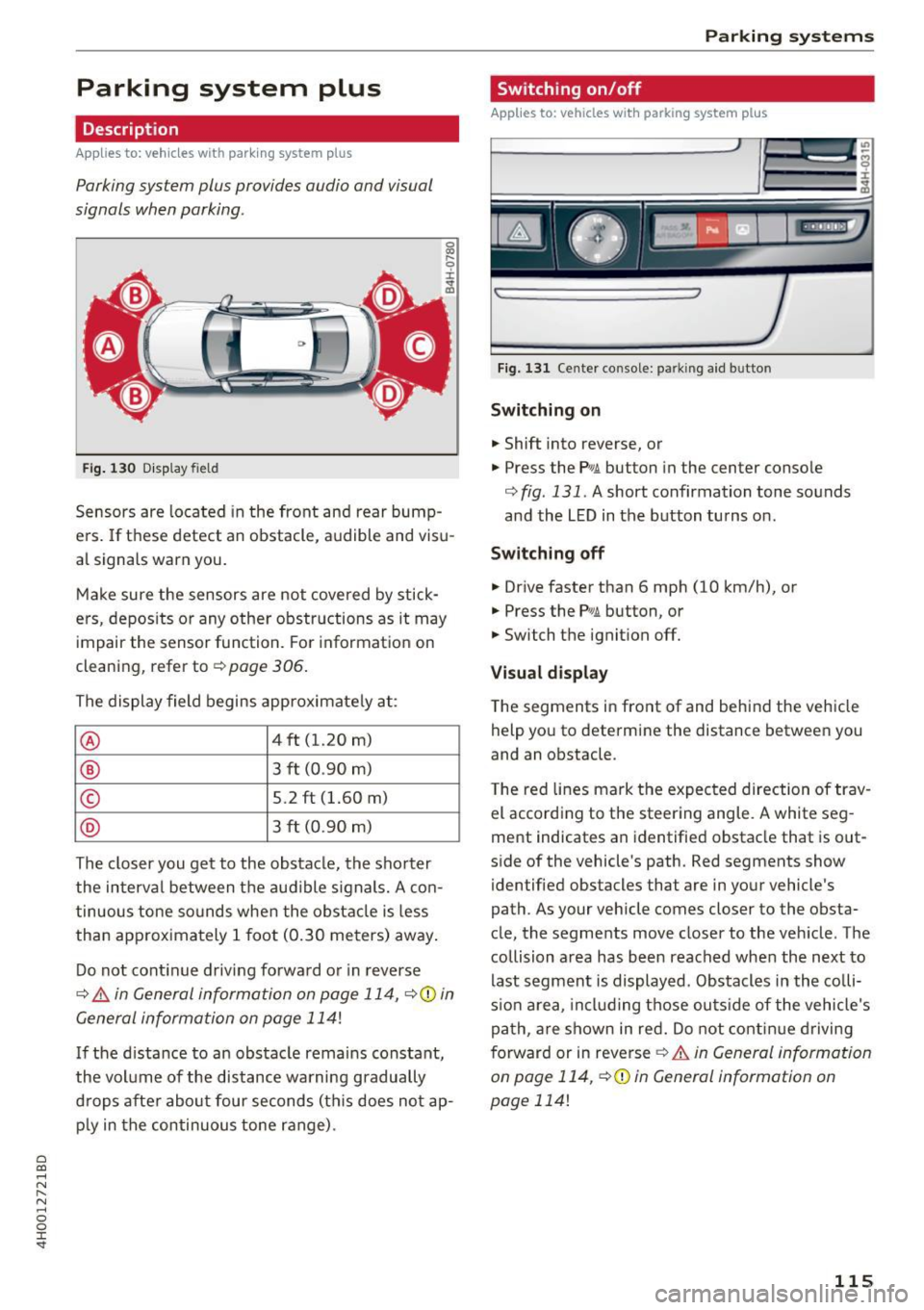
Parking system plus provides audio and visual
signals when parking .
Fig. 130 D isp lay field
Sensors are located in the front and rear bump
e rs. If these detect an obstacle , audible and visu
al signa ls warn you.
Make sure the sensors are not covered by stick
ers, depos its or any other obstructions as it may
impair the sensor function. Fo r information on
cleaning, refer to¢
page 306.
The display field begins approximate ly at:
® 4 ft (1.20 m)
® 3 f t (0.90 m)
© 5 .2 ft (1.60 m)
® 3 f t (0.90 m)
The closer you get to the obstacle, the sho rter
the interval between t he audible s ignals. A con
tinuous tone so unds when the obstacle is less
than approximately
1 foot (0.30 meters) away .
Do not cont inue driving forwa rd o r in reverse
¢ &. in General information on page 114, ¢(D in
General information on page 114!
If the distance to an obs tacle remains constant,
the vol ume of the distance wa rning gradually
d rops afte r about four seconds (th is does not ap
p ly in the continuous tone range) .
Parking systems
Switching on/off
Applies to: vehicles w ith park ing system plus
F ig. 131 Ce nter console: parking a id b utto n
Switching on
.. Shift into reverse, or
.. Press the
P wA button in the center console
¢
fig. 131. A short confirmation tone sounds
and the LED in the b utton turns on.
Switching off .. Drive faster than 6 mph (10 km/h), or
.. Press the
PwA button, or
.. Switch the ignit ion off.
Vi sual d isplay
T he segments in front of and behind the veh icle
help you to determine the distance between you
and an obstacle .
T he red lines mark the expected direction of trav
el according to the steering angle. A white seg
ment indicates an identified obstacle that is out
side of the vehicle 's path. Red segments show
identified obstacles that are in your vehicle's
path . As your vehicle comes closer to the obsta
cle, the segments move close r to the veh icle . The
collision area has been reached when the next to
last segment is displayed. Obstacles in the colli
s io n area, in cl uding those ou ts ide of the vehicle's
pa th , a re shown in red. Do not cont in ue driving
f orward or in reverse
¢ &. in General information
on page 114 , ¢ (D in General information on
page 114!
115
Page 126 of 354

Parking systems
Adjusting the display
and the warning tones
Applies to: vehicl es with parking system plus/rearview cam
era/per ipheral came ra
The display and warning tones can be adjusted in
the Infotainment.
~ Select: the ICARI function button > Car systems
control button > Driver assist > Parking aid.
Display
On* -
An optical display is shown for the parking
system plus, a rearview camera image is shown
for the rearview camera*.
Off -When the parking system is switched off,
only audib le signals are given.
Signal tones
Front volume -
volume for the front area
Rear volume -volume for the rear area
Front frequency -frequency for the front area
Rear frequency -frequency for the rear area
Entertainment volume -when the parking sys
tem is turned on, the volume of the audio/video
source is lowered.
The new ly selected level is demonstrated briefly
by the sound generator.
{!) Tips
- The warning tones can also be adjusted di
rectly by the v isual disp lay or the picture
from the camera. Simply press the
Settings
contro l button .
- Changed settings are act ivated when the
parking system is switched on aga in.
- The settings for volume and frequency are automat ically saved and assigned to the re
mote control key being used.
Error messages
Applies to: ve hicles w ith parking system plus/rearview cam
era/peripheral came ra
There is an error in the system if the LED in the
P,YA button is blinking and you hear a continuous
alarm for a few seconds after switching on the
124
parking system or when the pa rking system is al
ready activated . If the error is not corrected be
fore you switch off the ignition, the LED in the
P wA
button will blink the next time you switch on the
parking system by shifting into reverse.
Parking system plus*
If a sensor is faulty, the~ symbol will appear in
front of/behind the vehicle in the Infotainment display. If a rear sensor is faulty, on ly obstacles
that are in areas @and @ are displayed
c>page 115, fig . 130. If a front sensor is faulty,
only obstacles that are in areas © and @are dis
played. There is a lso a system malfunction if all
segments around the vehicle are red or if no seg
ments are disp layed.
Peripheral cameras*
There is a system malfunc tion if the ~· symbol
appears and the corresponding display area is
shown in blue. The camera is not working in this
a rea.
Drive to an authorized Audi dealer or authorized
Audi Service Facility immediately to have the
malfunction corrected .
Trailer hitch
Applies to: vehicles with parking system plus/rearv iew cam
era/peripheral cameras and t ra iler hitc h
For vehicles using the trailer socket, the parking
system rear sensors are not activated when you
shift into reverse gear or when you press the P
1
1.A
button . This results in the following restrictions .
Parking system plus*
There is no distance warning for the rear. The
front sensors remain activated. The visual display
switches to trailer mode.
Rearview camera* /Peripheral cameras*
There is no distance warning for the rear. The
front senso rs remain activated . The visua l display
switches to trailer mode . The rearview camera
image will not show the orientation lines and the
blue surfaces .
Ill-
Page 133 of 354
0 co .... N ,..... N .... 0 0 :c '
gy management system for distributing electrici
ty. This s ignif icantly improves the starting abi lity
and increases the vehicle battery life.
The energy management system Is made up of
batt ery diagno sis , idling current management ,
and dynam ic energ y man agement.
Battery diagnosis
The batte ry diagnosis de termines the vehicle bat
tery charge level. The sensors determ ine the bat
tery voltage, the battery current, and the battery
temperature. The current charge level and the performance of the vehicle battery are deter
mined based on th is.
Idling curr ent manag ement
The idling current management decreases the
energy used whi le parked . With the engine
switched off, it manages the energy distribution
to the different electrical components. Data from
the battery diagnosis is taken into account for
this .
Depending on the vehicle battery charge level,
e lectrical equipment is sw itched off one item af
ter the other to prevent the vehicle battery from
draining and to maintain the starting ability .
Dynamic en erg y manag ement
While driving, dynamic energy management dis
tr ibutes the appropriate amount of energy to the
e lectrical equipment. It controls the battery
charge level so that the amount of energy is not
greater than the amount being generated in or
der to ma inta in an optimal veh icle battery charge
l evel.
(D Tips
- Energy management cannot overcome the
laws of physics . Note that the charge level
and length of the vehicle battery life a re
limited .
- When the start ing ability is endangered, the
(•) indicator light turns on
9 page 21.
Intellig ent Technology
What you should know
Maintaining the starting ability is the highest
priority .
A lot of stress is placed on the veh icle battery
when driving short distances, during city driving, and at cold times of the year . A lot of energy is
used but little is generated. It is also critical
whe n the eng ine is not r unni ng but elect rical
equipmen t is switched on . In this case, energy is
u sed but none is generated.
In situat ions like th is, energy management w ill
active ly regulate the distrib ution of energy.
Long period s without use
If you do not drive your vehicle for severa l days or
weeks, electrical equ ipment is gradually scaled
back or sw itched off. This reduces energy use and
ensures the vehicle will be ab le to start after long
per iods of time. Some conven ience f unctions,
s u ch as interio r lig hting or power seat adjust
ment, may no t be av ailable under certain circum
stances . These conven ience f unctions wi ll be
available again once you sw itch the ignition on
and start the engine.
With the engine switched off
T he veh icle ba tte ry w ill dr ain if you use Info tain
ment functions such as listening to the radio
whi le the engine is switched off.
If the sta rting abili ty is impaired by the energy
u se, the following message will appear in the In
fotainment system display:
Please start the engine , otherwi se the system
will turn off shortl y.
This message indicates that the system will
switch off automatically after 3 m inutes . If you
would like to continue us ing the funct ions, you
must start the engine.
With the engine running
Although e lectr ica l energy is generated while
driv ing, the ve hicle battery can drai n. This can
happen if litt le energy is generated b ut much is
used , and the charge level of the vehicle battery
is not optimal. .,.
131
Page 218 of 354
Audi pre sense
Audi pre sense Preventative passenger
protection
A pp lies to: ve hicles w ith Audi p re se nse
Pre sense can initiate steps to protect vehicle oc
cupants in certain dangerous situations. The
fu nctions described a re available depending on
ve hicle equi pment:
Audi pre sense basic
The fo llow ing funct ions can be triggered in cer
tain driving situations:
- Tighten ing of the safety belts (for examp le,
during heavy braking): the front safety belts
have reversible belt tensioners. If a coll is ion
does not occur, the safety belts loosen slightly
and are ready to trigger again.
- Closing the w indows and the sunroof*
The function of the pre sense basic is activated at
a speed of 20 mp h (30 km/h) or higher. The de
p loyment time is adapted in the drive select dy
namic mode.
Audi pre sense front (vehicles with adaptive
cru ise control*)
Pre sense front contains the f unctions of pre
sense basic. In add ition, the likelihood of a rear
end collis ion with the vehicle ahead is also calcu
lated, withi n the limits of the system. If the risk
of a collision is detected, the following functions
can t rigge r:
- Audi braking gua rd¢
page 99
- Tensioning of the safety belts
- Closing the windows and the sunroof *
Audi pre sense rear (vehicles with side
a ss ist* )
Pre sense rear contains the functions of p re sense
basic. In addition, the li ke lihood of a rear-end
col lision from the vehicle be hind is a lso ca lculat
ed, w ith in the lim its of the system .
If the risk of a
collis ion is detected, the following functions can
tr igger:
- Tens ioning of the safety be lts
- Closing the windows and the sunroof *
216
- Adjusting the seats: the settings for the powe r
head restrains, the upper sections of the backr
ests and the pne umatic side bolsters* change
on the front seats and the outer rear seats*. If
a collision does not occur, the seat sett ings
that were previously used are restored .
Audi pre sen se plus
Pre sense plus contains the f unctions of p re
sense front and pre sense rear.
Error message
Audi pre sense : Unavailable
Preventative passenger protection is not ava ila
ble. Drive to yo ur autho rized Aud i dea le r o r au
t h ori zed Aud i Service Facility immedia tely to have
t h e malfunct ion corre cte d.
.&_ WARNING
Pr e sense canno t overcome natura l phys ica l
l aws . It is a system designed to assist and it
cannot prevent a co llision. Do not let t he in
creased sa fety provided tempt you into tak ing
risks . T his could inc rease your ris k of a colli
sion.
- The system can dep loy inco rrectly.
- Please note that the sensors do not always
detect a ll objects. Th is increases the r is k of
a co llision.
- Pre sense does not react to peop le or ani
mals or objects that a re c rossing the vehi
cle's path or are difficu lt to detect
¢page 94.
- Ref lective objects such as gua rd ra ils o r the
entrance to a tunne l, heavy rain and ice can
affect the funct io n of the radar sensors a nd
t he system 's ability to de tect a collision risk.
(D Note
The sensors can be d isplaced by impacts or
damage to the bumper , wheel housing a nd
underbody . Pre sense can be impaired by this .
Have an autho rized Aud i deale r or autho rized
A udi Service Fac ility ch eck their f unct io n. .,..
Page 226 of 354
Safety belt s
A WARNING
Always read and heed all WARNINGS and oth
er important informat ion
c:> page 220 .
(D Tips
You can also adjust the height of the front
seats to change the position of the safety
belts.
Improperly worn safety belts
Incorrectly posit ioned safety belts can cause se
vere injuries.
Wearing safety belts imprope rly can cause seri
ous injury or death. Safety belts can on ly work
when they a re correctly positioned on the body.
Improper seating positions reduce the effect ive
ness of safety belts and wi ll even increase the
ris k of injury and deat h by mov ing the safety bel t
to cr it ica l areas of the body . Imp roper seating
posi tions a lso increase the risk of serio us in jury
an d deat h when an air bag deploys and strikes an
oc cupan t who is no t in the co rrect seating pos i
tion. A d river is responsib le for the safety of a ll
ve hicle occupants and especia lly for children.
Therefo re:
... Neve r permit anyone to ass ume an in co rrect
s itting position in the vehicle w hil e trave ling
c:> & .
A WARNING
Improperly worn safety belts increase t he risk
of se rious personal injury and deat h wheneve r
a vehicle is being used.
- Always make sure that all vehicle occupants
are correctly restra ined and stay in a correct
seat ing pos ition whenever the veh icle is be
ing used.
- Always read a nd heed all WARNINGS and
othe r important information
c:> pag e 220.
224
Belt tensioners
' How safety belt pretensioners work
In front, side and rear-end collisions above a
particular sev erity and in a rollover, safety b elts
are tensioned automatically.
Rever sible safety belt tensioners
The safety belts on the front seats a re equipped
with power revers ible tensione rs. The following
funct ions are available whe n the drive r's/front
passenger 's safety belts are faste ned:
- Automatic tens ione rs: at the start of a drive,
the safety belts automat ically adjust to t he
passe nger after a certain time period or ve hicle
speed. To switch t he automatic tensioners off,
select the follow ing in the MMI :
!CARI fu nction
but to n
> Car systems > Vehicle setting s >
Seats > Driver's seat or Passenger's seat > Au
tomatic belt tensioner
> Off .
-In ce rta in dr iving situ ations , the safe ty belts
may tighten w ith a reve rsib le tensioning func
t ion
c:> page 216 .
- Th e safety be lts may also tighten with this re -
vers ible te nsion ing f un ct ion in m ino r collisions.
Pyrotechnic safety belt pretensioners
The safety belts are eq uipped w ith safety bel t
p retens ione rs . The system is activa ted by sensors
i n front, side a nd rear-e nd coll is ions of grea t se
verity and in a ro llover. This tig htens the bel t and
t ak es up belt sla ck
c:> .&. in Service an d disposal of
safety belt pretensioner on page 225.
Taking up
the slack he lps to reduce forward occupant
movement during a collision.
A WARNING
- It is poss ible for the pretensioners to dep loy
incor rect ly.
- The pyrotechnic system can only p rovide
protection for one collision. If t he py rotech
nic pretens io ners deploy, the pretensioning
sys tem must be replaced .
(1) Tips
The pyrotechnic sa fety belt pretensioners can
on ly dep loy once . ..,_
Page 234 of 354
Airbag syste m
-a small adu lt or teenager is on the front pas
senger seat
- a passenger who is not sitting upright with
their back against a non -reclined backrest with
their feet on the vehicle floor in front of the
seat is on the front passenger seat.
I f the front passenger airbag dep loys, the Feder
al Standard requires the airbag to meet the "low
risk" deployment criteria to help reduce the risk
of injury through interaction with the airbag.
"Low risk" deployment occurs in those crashes
that take place at lower decelerations as def ined
in the electronic control unit¢
page 236.
Alway s remember: Even though your vehicle is
equ ipped w ith Advanced Airbags, the safest place
for children is properly restrained on the back
seat . Please be sure to read the important infor
mat ion in the sections that follow and be sure to
heed a ll of the WARN INGS.
A WARNING
To red uce the risk of inj ury when an ai rbag in
fla tes, a lways wear safety bel ts p roperly.
- If you are unrestrained, leaning fo rwa rd, s it
t ing s ideways or o ut of pos ition in any way,
yo ur risk of in jury is much h igher .
- Yo u will also re ceive serious injur ies and
could even be killed if you are up aga inst the
airbag or too close to it when it inflates -
even with an Advanced Airbag ¢
page 226.
A WARNING
A child in a rearward-facing chi ld seat insta l
led on the front passenger seat will be seri
ously injured and can be k illed if the front air
bag inflates -even with an Advanced Airbag
System.
- Although the Advanced A irbag System in
your vehicle is designed to turn off the front
airbag when a rearward-facing child re
straint has been installed on the front pas
senger seat, nobody can absolutely g uaran
tee that deployment is impossible in all con
ceivable s ituations that may happen during
the usef ul life of your vehicle .
- The inflating a irbag w il l hit the child seat or
infant carrier w ith great force and will
232
-
smash the child seat and child against the
backrest, center armrest, door, or roof.
- Always install rearward-facing child re
straints on the rear seat.
- If you must install a rearward facing child
seat on the front passenge r seat because of
except ional circumstances and the
PASSEN
GER AIR BAG OFF
light does not come on
and stay on, immed iate ly install the rear
facing chi ld seat in a rear seating posit ion
and have the airbag system inspected by
your Aud i dea le r.
A WARNING
If, in exceptional ci rcums tances, you must in
stall a forward-facing child restraint on the
fron t passenger's seat:
- Always make sure the forward-fa cing sea t
has been des igned and certified by its man
ufacturer for use on a front seat with a pas
senger front and side airbag.
- Never put the forwa rd-facing child restrain t
up against or very near the instr ument pan
el.
-Always move the front passenge r seat to
the highest position in the up and down ad
justment range and move it back to the
rearmost position in the seat's fore and aft
ad justment range, as far away from the air
bag as poss ible, before installing the for
ward-facing chi ld restraint.
- Always make sure that the safety be lt upper
anchorage is behind the ch ild restraint and
not next to or in fron t of the child restraint
so that the safety be lt will be p roperly posi
tioned.
- Ma ke sure that the
PASSENGER AIR BAG
OFF
li ght comes on and stays on a ll the time
wheneve r the ign it ion is swi tched on.
· Advanced Airbag System components
The fro nt passenge r sea t in your veh icle has a lo t
of ve ry important parts o f the Advanced A irbag
System in it. These parts include t he weight
sensing mat, sensors, wiring, brackets, and
more. The fu nction of the system in the front
passenger seat is checked by the electronic
1111>
Page 235 of 354
control unit when the ignition is on. The control
unit monitors the Advanced Airbag System and
turns the airbag indicator light on when a ma l
function in the system components is detected. The funct ion of the a irbag indicator light is de
scr ibed in greater deta il below . Because the front
passenger seat contains important parts of the
Advanced Airbag System, you must take care to p revent it from being damaged. Damage to the
seat may preven t the Advanced A irbag for the
fron t passenger seat from doing its job in a
crash .
The front Advanced Airbag System consists
of the follo wing :
-Crash sensors in the front of the vehicle that
measure vehicle acceleration/deceleration to
provide information to the Advanced Airbag
System a bout the severity of the crash.
- An e lectronic control unit, with integrated
crash sensors for front and side impacts. The
control unit "decides" whether to fire the front
airbags based on the information received from
the crash sensors. The control unit also "de
c ides" whether the safety belt pretens ioners
should be activated .
- An Advanced Airbag with gas generator and
control valve for the driver ins ide the steer ing
wheel hub .
- An Advanced Airbag with gas generator and control valve inside the instrument pa nel for
the front passenger.
- A weig ht-sensing mat under the upholstery
padd ing of the front passenger seat cushion
that meas ures the total weight on the seat. The
i nformation registered is sent continuously to
the e lectron ic cont rol unit to reg ulate dep loy
ment of the front Adv a need Airbag on the pas
senger side .
- An airbag monitoring system and indicator
light in the instrument cluster
¢ page 236.
-A sensor in eac h front seat registers the dis
tance between the respective seat and the steering wheel or instrument pane l. The infor
mation registered is sent contin uously to the
0 co electronic control unit to regulate deployment ....
~ of the front Adva need A irbags. N .... 0 0 :c '
- The PASSENGER AIR BAG OFF light comes on
and stays on in the center of the instrument
pane l¢
page 237, fig . 233 and te lls yo u when
the front Advanced Airbag on the passenger side has been turned off.
- A sensor below the safety be lt latch for the
front seat passenger to measure the tension on the safety belt. The tension on the safety belt
and the we ight registered by the weight -sens
ing mat help the contro l unit "decide" whether
the front airbag fo r the front passenger seat
should be tu rned off o r not ¢
page 22 7, Child
restraints on the front seat -some important
things to know.
- A sensor in the safety belt latch for the driver
and for the front seat passenger that senses
whether that safety be lt is latched o r not and
transmits this information to the electronic control unit.
A WARNING ,-
Damage to the front passenger seat can pre-
vent the front airbag from working properly.
- Improper repair or disassembly of the front passenger and driver seat will prevent the
Advanced Airbag System from funct ion ing
properly .
- Repairs to the front passenger seat must be
performed by qualified and properly trained
workshop personnel.
- Never remove the front passenger or driver
seat from the vehicle.
- Never remove the upholstery from the front
passenger seat.
- Never d isassemble or remove parts from the
seat or disconnect w ires from it.
- Never carry sharp objects in your pockets or
p lace them on the seat. If the weight-sens
ing mat in the passenger seat is punctured
it cannot work properly .
- Never carry things on your lap or carry ob
jects on the passenger seat . Such items can
increase the weight reg istered by the
weight-sensing mat and send the wrong in
formation to the a irbag con trol u nit.
- Never store items under the front passenger
seat. Parts of the Advanced Airbag System
under the passenger seat cou ld be
~
233
Page 236 of 354
Airbag syste m
damaged, preventing them and the airbag
system from working properly.
- Never place seat covers or rep lacement up
holstery that have not been specifically ap
proved by Audi on the front seats .
- Seat covers can prevent the Advanced Air
bag System from recognizing child re
straints or occupants on the front passenger
seat and prevent the side a irbag in the seat
backrest from deploying properly.
- Never use cush ions, pillows, blankets or
similar items on the front passenger seat.
The add it ional padding will prevent the
weight-sens ing mat in the seat from acc u
rately reg istering the ch ild restraint or per
son on the seat and prevent the Advanced
Airbag System from funct ioning properly.
- If you must use a child rest raint on the front
passenge r seat and the child restraint man
ufacturer 's instructions require the use of a
towel, foam cushion or something else to properly position the ch ild restraint, make
certain that the
PA SSENGER AIR BAG OFF
light comes on and stays on whenever the
child restraint is installed on the front pas
senger seat.
- If the
PASSEN GER AIR B AG OFF light does
not come on and stay on, immed iately in
stall child restraint in a rear seating position and have the airbag system inspected by
yo ur Audi dealer.
How the Advanced Airbag System
components work together
The front Advanced Airbag System and the side
airbags supplement the protection offered by the
front three-po int safety belts with pretensioners
and load limiters and the adjustable head re
stra ints to help reduce the r isk of injury in a wide
range of accident and crash situations. Be sure to read the important informa tion about safety and
heed the WARN INGS in t his chapter.
Deployment of the Advanced Airbag System and
the act ivat ion of the safety belt pretensioners de
pend on the deceleration measu red by the crash
sensors and regis tered by the electronic control
unit. Crash severity depends on speed and decel-
2 34
eration as well as the mass and stiffness of the
vehicle or object involved in the crash .
On the passenger side, regard less of safety be lt
u se, the airbag will be turned off if the weight on
the passenger seat is less than the amount pro
grammed in the electronic control unit . The front
airbag on the passenger side will also be turned
off if one of the child seats that has been certi
fied under Federal Motor Vehicle Safety Standard 208 has been recognized on the seat. The
PA S
S ENGER AIR BAG OFF
light comes on and stays
on to tell you when the front Advanced A irbag on
the passenger side has been turned off
q page 22 7, Child restraints on the front seat
some important things to know.
A WARNING
To reduce the ris k of injury when an airbag in
f lates, always wea r safety belts properly.
- If you are un restrained, leaning forward, sit
ting sideways or out of position i n any way,
your risk of injury is much higher.
- You will a lso receive serious injuries and
could even be killed if you are up against the
airbag or too close to it when it inflates -
even with an Advanced Airbag
q page 226.
More important things to know about front
airbags
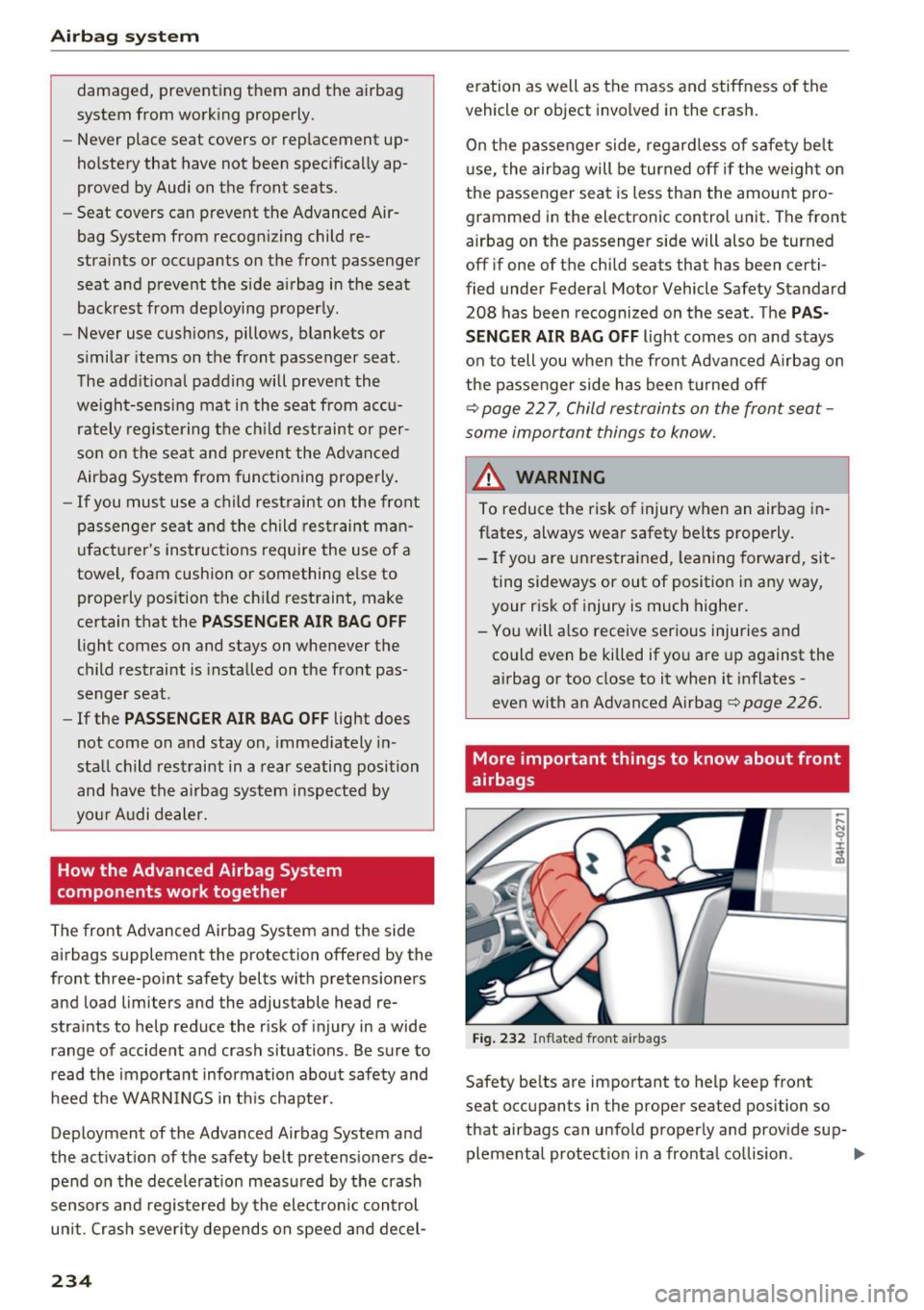
Fig . 232 Inflated front a irbags
Safety be lts are important to help keep front
seat occupants in the proper seated position so
that airbags can unfold properly and prov ide sup-
plemental protection in a fronta l collision . ..,.
Page 238 of 354
Airbag syste m
-Ne ver t ransport items on or in the area of
t h e fr ont passenger seat. Objects could
m ove into the area of the front airbags dur
ing brak ing or oth er sudden maneuvers and
become dangerous projectiles that can
cause serious pe rsonal injury if the a irbags
inflate.
- Never place or attach accessor ies or other
objects (such as cup holders, te lephone
brackets, large, heavy o r bulky objects) on
the doors, over or ne ar the area marked
"AIRBAG" on the steering wheel, instru
ment pane l, seat bac krests or between
t h ose areas and yourself. These objects
could cause injury in a crash, especially
when the airbags inflate.
- Never recline the front passenge r's seat to
transport objects. Items can also move into
the area of the side airbag o r the front a ir
bag dur ing braking or in a s udden maneu
ver. Objects near the airbags can become
projectiles and cause in ju ry, particularly
when the sea t is re clin ed.
.8, WARNING
The f ine dust create d when airbags deploy can
cause breathing problems for people w ith a
his tory of asthma or o ther breathing condi
tions .
- T o reduce the risk o f brea thing pro blems,
those w ith asthma or o ther respiratory con
ditions should get fresh air right away by
gett ing out of the vehicle o r opening w in
dows o r doors.
- If you are in a collision in which airbags de
ploy, wash your hands and face with mild
soap and water before eat ing.
- Be careful not to get the dust into your eyes,
or into any cuts or scratches.
- If the resid ue should get into your eyes,
flush them with water.
236
Monitoring the
Advanced Airbag System
tli (USA models )/!{' (Canada model s)
Airbag monitoring indicator light
Two separate indicators monitor the function of
the Advanced Airbag System: the airbag moni
toring indicator light and the
PASSENGER AIR
BAG OFF
light.
The Advanced A irbag System ( including the e lec
tronic control unit, sensor circuits and system
wiring) is monitored continuously to make sure
that it is functioning properly whenever the igni
tion is o n. Each time you sw itch on the ig nition,
the a irbag mo nitor ing indica to r light
II (U SA
models)/ fll (Canada models) w ill come o n for a
few seconds (se lf d iagnost ic s) .
The system must be inspected when the
indicator light
fl (USA models) /E,I (Canada
models) :
-does not come on when the igni tion is sw itched
on,
- does not go out a few se co nd s afte r you h ave
sw itched on the ignit ion, or
- comes on while driv ing.
If an airbag system malfunction is detected, the
i ndica to r light will come on to se rve as a constant
r em inder to have t he system inspected immedi
ate ly.
If a ma lfunction occurs that turns the front air
bag on the passenge r side off, the
PASSENGER
A IR BAG OFF
light w ill come on and stay o n
whe never the ignition is on.
_& WARNING
A n a ir b ag system t hat i s no t functioning prop
e rly cannot provide sup plemental pro te ct ion
in a fronta l crash .
- If the air bag ind icator ligh t<=? page 23
comes when the vehicle i s being u sed, have
the system inspected immediately by your
author ized Audi dealer . It is possib le that
the airbag will inflate when it is not sup posed to, or will not inflate when it should.