ECO mode AUDI A8 2017 Owners Manual
[x] Cancel search | Manufacturer: AUDI, Model Year: 2017, Model line: A8, Model: AUDI A8 2017Pages: 354, PDF Size: 88.68 MB
Page 4 of 354
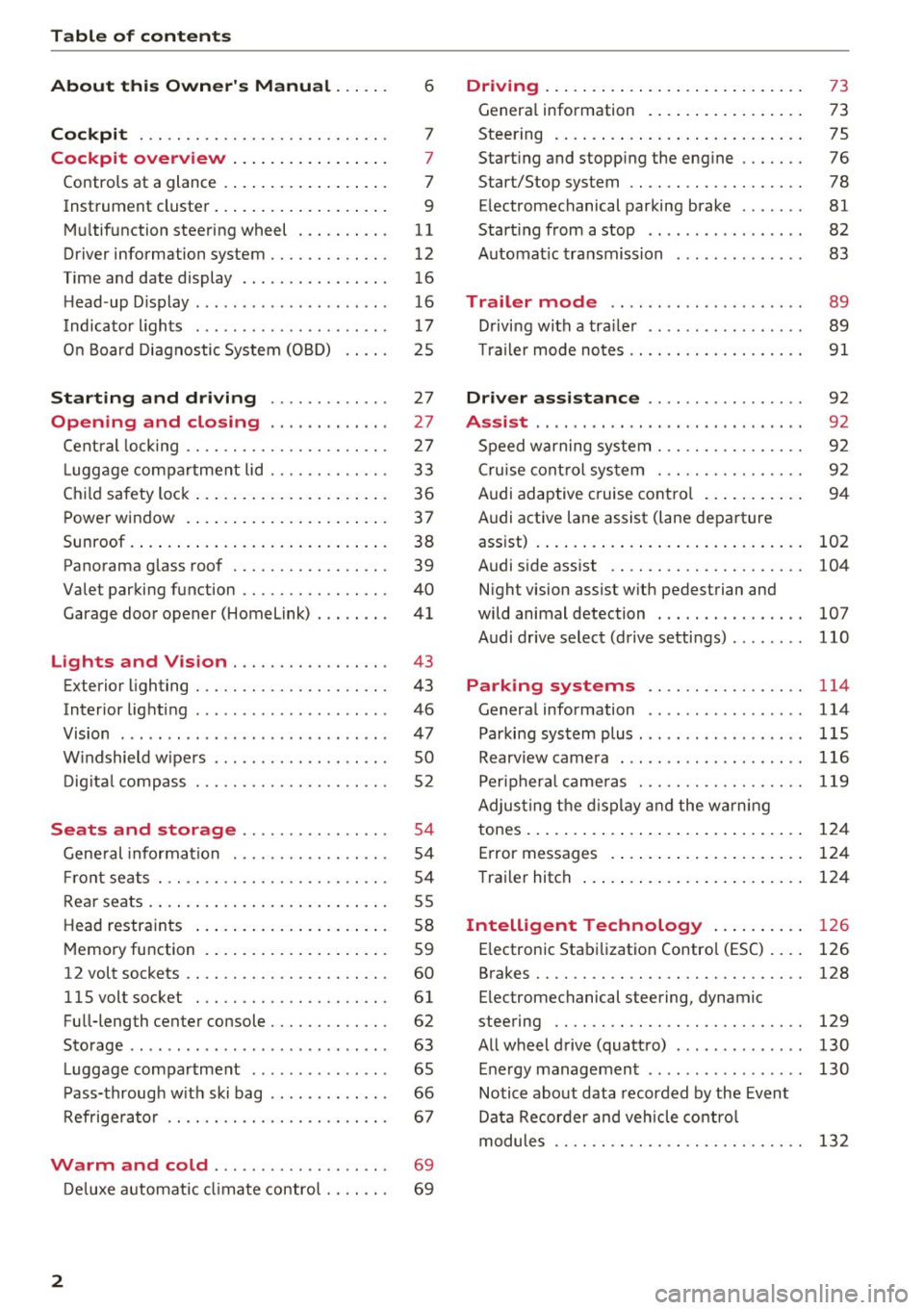
Table of contents
About this Owner's Manual ... .. .
Cockpit ... .. ............... .... .. .
Cockpit overview ................ .
Controls at a glance ... .......... .. .. .
Instrument cluster .. .......... .. .. .. .
Multifunction steering wheel ... .. .. .. .
Driver information system ............ .
Time and date display ...... ... .. .... .
H ead-up Display .... .. .. ..... ... .. .. .
Indicato r lights . ................ ... .
On Board Diagnostic System (OBD) .... .
Starting and driving ............ .
Opening and closing .. .... .... .. .
Central locking .... ........... .... .. .
L uggage compartment lid ...... .... .. .
Child safety lock ........... ..... .. .. . 6
7
7
7
9
11
12
16
16
17
25
27
27
27
33
36
Power
window . . . . . . . . . . . . . . . . . . . . . . 37
Sunroof. .. ... ... .. .......... .. .. .. . 38
Panorama glass roof . . . . . . . . . . . . . . . . . 39
Valet parking function . . . . . . . . . . . . . . . .
40
Garage door opener (Homelink) . . . . . . . . 41
L ights and Vision . . . . . . . . . . . . . . . . . 43
Exterior lighting . . . . . . . . . . . . . . . . . . . . . 43
Interior lighting . . . . . . . . . . . . . . . . . . . . . 46
V1s1on . . . . . . . . . . . . . . . . . . . . . . . . . . . . . 47
Windshield wipers . . . . . . . . . . . . . . . . . . . SO
Digital compass . . . . . . . . . . . . . . . . . . . . . 52
Seats and storage . . . . . . . . . . . . . . . . 54
General information . . . . . . . . . . . . . . . . . 54
Front seats . . . . . . . . . . . . . . . . . . . . . . . . . 54
Rear seats . . . . . . . . . . . . . . . . . . . . . . . . . . 55
Head restraints . . . . . . . . . . . . . . . . . . . . .
58
Memory function . . . . . . . . . . . . . . . . . . . . 59
12 volt sockets . . . . . . . . . . . . . . . . . . . . . . 60
llSvoltsocket .............. .... ... 61
Full-length center console. . . . . . . . . . . . . 62
Sto rage . . . . . . . . . . . . . . . . . . . . . . . . . . . . 63
Luggage compartment . . . . . . . . . . . . . . . 65
Pass-through with ski bag . . . . . . . . . . . . . 66
Refrigerator . . . . . . . . . . . . . . . . . . . . . . . . 67
Warm and cold . . . . . . . . . . . . . . . . . . . 69
Deluxe automatic climate control . . . . . . . 69
2
Driving ..... .. .. .. .. ... .......... . .
General information . .... .......... . .
Steering .......... .. .. . .......... . .
Start ing and stopping the eng ine ..... . .
Start/Stop system .. .. ............. . .
E le ctromechanical parking brake ...... .
Start ing from a stop .. ........ ..... . .
Automat ic transmission
Trailer mode .. .. .. ........ ..... . .
D rivin g with a trailer .. .............. .
T raile r mode notes .. .. ............. . .
Driver assistance .. .............. .
Assist .... .. .. .. .. .. ... .. ... ... .. . .
Speed warning system ... ........... . .
Cruise control system .... .......... . .
Audi adaptive cruise control .......... .
Audi active lane assist (lane departure 73
73
75
76
78
81
82
83
89
89
91
92
92
92
92
94
assist) . . . . . . . . . . . . . . . . . . . . . . . . . . . . . 102
Audi side assist . . . . . . . . . . . . . . . . . . . . . 104
N ight vision assist w ith pedestrian and
wild animal detection . . . . . . . . . . . . . . . .
107
Audi drive select (drive settings) . . . . . . . . 110
Parking systems . . . . . . . . . . . . . . . . . 114
General information . . . . . . . . . . . . . . . . . 114
Parking system plus ........ ....... ... 115
Rearv iew camera . . . . . . . . . . . . . . . . . . . . 116
Peripheral cameras . . . . . . . . . . . . . . . . . . 119
Adjus ting the display and the warning
tones. . . . . . . . . . . . . . . . . . . . . . . . . . . . . .
124
Error messages . . . . . . . . . . . . . . . . . . . . . 124
T railer hitch . . . . . . . . . . . . . . . . . . . . . . . . 124
Intelligent Technology . . . . . . . . . . 126
E lectronic Stabilization Control (ESC) . . . . 126
Brakes . . . . . . . . . . . . . . . . . . . . . . . . . . . . . 128
E lectromechanical steering, dynamic
steering . . . . . . . . . . . . . . . . . . . . . . . . . . .
129
All wheel drive (quattro) . . . . . . . . . . . . . . 130
Energy management . . . . . . . . . . . . . . . . . 130
Notice about data recorded by the Event
Data Recorder and vehicle control
modules . . . . . . . . . . . . . . . . . . . . . . . . . . .
132
Page 10 of 354
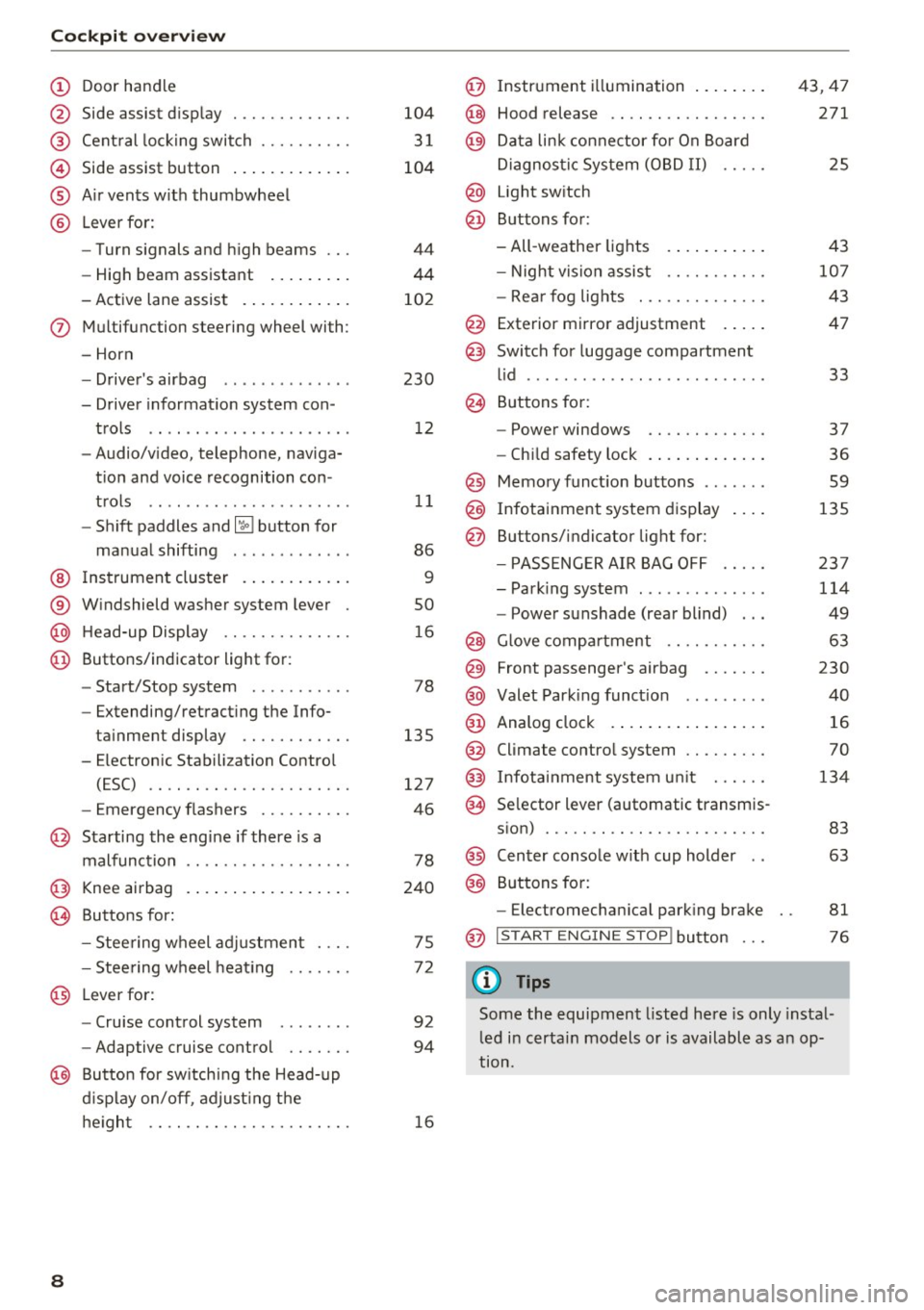
Cockpit over view
CD
@
®
©
®
®
Door hand le
S ide assist d isp lay
Cent ral locking switch ....... .. .
Side assist button .. ..... ... .. .
A ir vents w ith thumbwheel
L ever fo r:
- Turn signals and h igh beams
- High beam assistant ... ... .. .
- Active lane assist . ..... ... .. .
(J) Multifunction steering wheel with :
- Horn
D. ' . b - rivers air ag .... ... .. .. .. .
- Driver informat io n system con -
trols .. .... .......... ..... .
- Audio/v ideo, telephone, naviga
t ion and voice recognition con -
t rols .. .. .. ... ... ... .. .. .. .
- Shift paddles and~ button for
ma nual shifting .. .... .. .. .. .
@ Ins trument cluster . ..... ... .. .
® W indshield washer system lever
@ H ead-up Display ........... .. .
@ Buttons/ indicator light for :
- Start/Stop system . ..... .. .. .
- Extending/retracting the Info-
ta inment display ...... ..... .
- E lectron ic Stabili zation Contro l
(ESC) .. .. ............... .. .
- Emergency flashers ......... .
@ Starting the engine if there is a
malfunction
@ Knee airbag .. .. . .. ..... ... .. .
~ Buttons for :
- Stee ring wheel adjustmen t ... .
- Stee ring w heel heat ing
@ L everfor:
- Cru ise control system ....... .
- Adaptive cruise control .... .. .
@ Butto n for sw itching the Head-up
d isplay on/off , adjust ing t he
he igh t .. .. .. .. . .......... .. .
8
104
3 1
104
44
44
10 2
230 12
11
86
9
so
1 6
78
135
127
46
78
240
75
7 2
92
94
16
@ Instrument illumination ... .... .
@ Hood release .... .. .. ........ .
@ Da ta link co nne ctor for On Board
Di agnos tic Sys tem (OB D II) .....
@ Light sw itch
@ Buttons for:
- All -weather lights
- Night vision assist .......... .
- Rea r fog lights . .. .. ........ .
@ Exterior mirror adjustment .... .
@ Switch for luggage compartment
l id ........ ... ... ........... .
@ B uttons fo r:
- Power windows .. .......... .
- Ch ild safety lock .. .. . ... .... .
@ Memo ry funct ion buttons ...... .
@ Infotainment system d isplay
@ Buttons/indicator light for:
- PA SSE NG ER AIR BAG OFF .... .
- Park ing system ............. .
- Power sunshade (rear blind) .. .
@ Glove compartment ... ....... .
@) Front passenger 's airbag ...... .
@ Valet Park ing func tion ........ .
@ Analog clo ck .. .. .. .. .. .. .... .
@ Climate contro l system ........ .
@) Infotainment system u nit ..... .
@ Se lector lever (automatic transm is-
s ion) ... .. .. .. .. .. .......... .
@) Center conso le w ith cup holder ..
@) Buttons fo r:
- Electromechan ica l park ing brake
@ I START EN GINE STOP! button
(D Tips
43,47
271
25
4 3
10 7
43
47
33
37
36
59
135
23 7
114
49
63
230
40
16
70
134
83
63
81
76
Some the equipment listed here is only instal
l ed i n certa in models or is available as an op
tion.
Page 15 of 354
C) C0 ....
"' " "' .... 0 0 :r
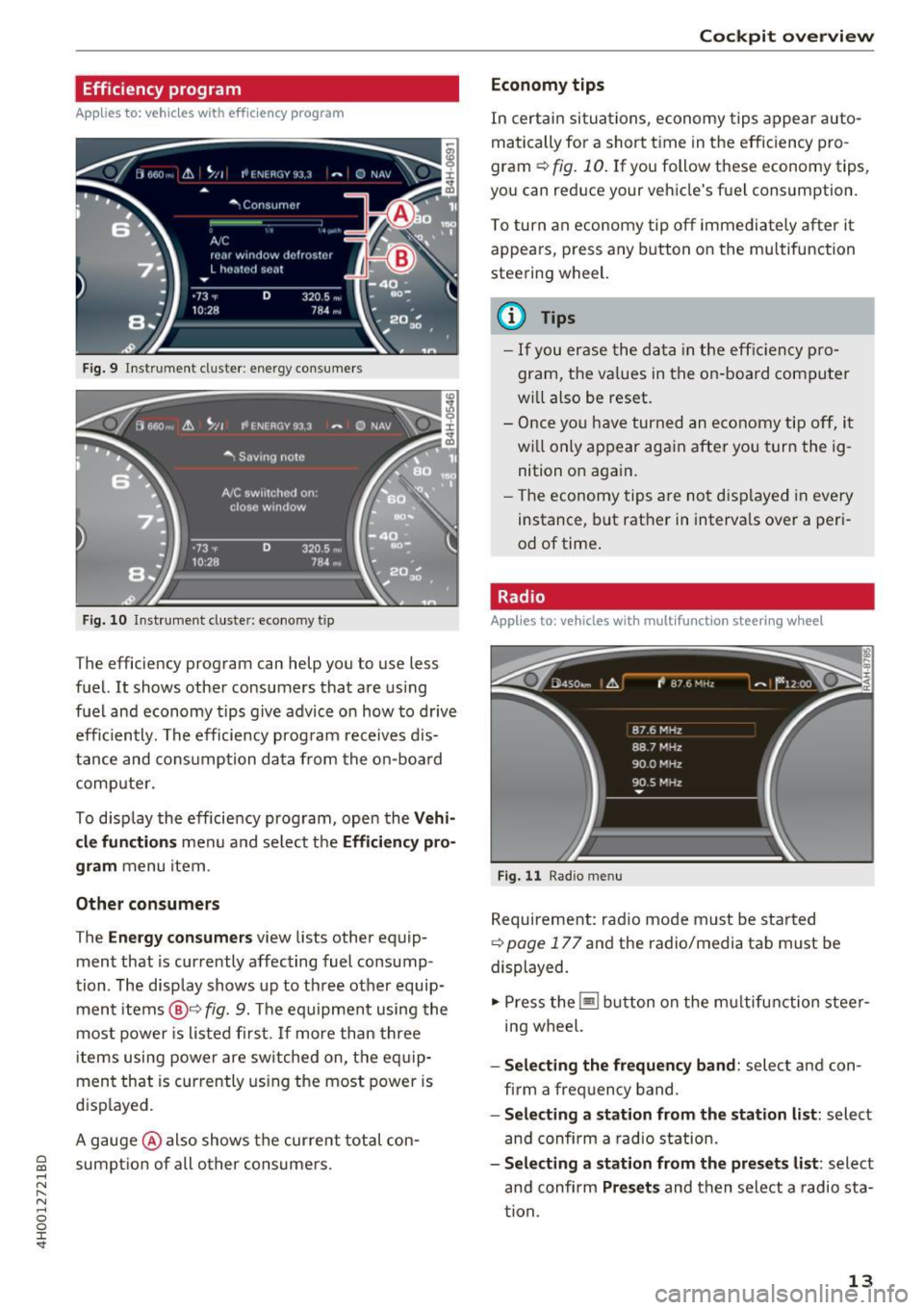
Applies to: vehicles with efficiency prog ram
Fig. 9 Instrument cluster : en ergy consumers
F ig. 10 Instrument cluster: economy t ip
The efficiency program can help you to use less
fuel. It shows other consumers that are using
fuel and economy tips give advice on how to drive
efficiently. The efficiency program receives dis
tance and consumption data from the on-board
computer.
To disp lay the efficiency program, open the
Vehi
cle functions
menu and select the Efficiency pro
gram
menu item.
Other consumers
The Energy consumers view lists other equip
ment that is currently affecting fuel consump
tion. The display shows up to three other equip
ment items
@9 fig. 9. The equipment using the
most power is listed first. If more than three
items using power are sw itched on, the eq uip
ment that is currently using the most power is
displayed.
A gauge @also shows the current total con
sumpt ion of all o ther consumers.
Cockpit overview
Economy tips
In certain situations, economy tips appear auto
matically for a short time in the efficiency pro
gram ¢
fig. 10. If you follow these economy tips,
you can reduce your vehicle's fuel consumption.
To turn an economy tip off immediately after it
appears, press any button on the multifunction
steering wheel.
(D Tips
- If you erase the data in the efficien cy pro
gram, the va lues in the on -board computer
w ill also be reset.
- Once you have turned an economy tip off, it
w ill only appear again after you turn the ig
nition on again.
- Th e economy tips are not displayed in every
instance, but rather in interva ls over a peri
od of time .
Radio
Applies to: vehicles with mult ifunction steering w heel
Fig. 11 Radio me nu
Requirement: radio mode must be started
9 page 177 and the radio/media tab must be
displayed.
.,. Press the~ button on the multifunction steer
ing wheel.
- Selecting the frequency band: select and con
fi rm a frequency band.
-Selecting a station from the station list: select
and confirm a radio station.
-Selecting a station from the presets list: select
and confirm
Presets and then select a radio sta
tion .
13
Page 41 of 354
C) C0 ....
"' " "' .... 0 0 :r
Applies to: vehicles with s liding/tilting sunroof
If the sun roof detects an object in its path when
it is clos ing, it w ill open ag ain au tomati cally. In
this case, you can close the roof w ith the power
emergency closing function.
.. Wi thin five seconds af te r the su nroof opens au
tomat ically, pull the swit ch unt il t he roo f
cl oses .
Panorama glass roof
Opening/closing the roof
Applies to: vehicles with panorama glass roof
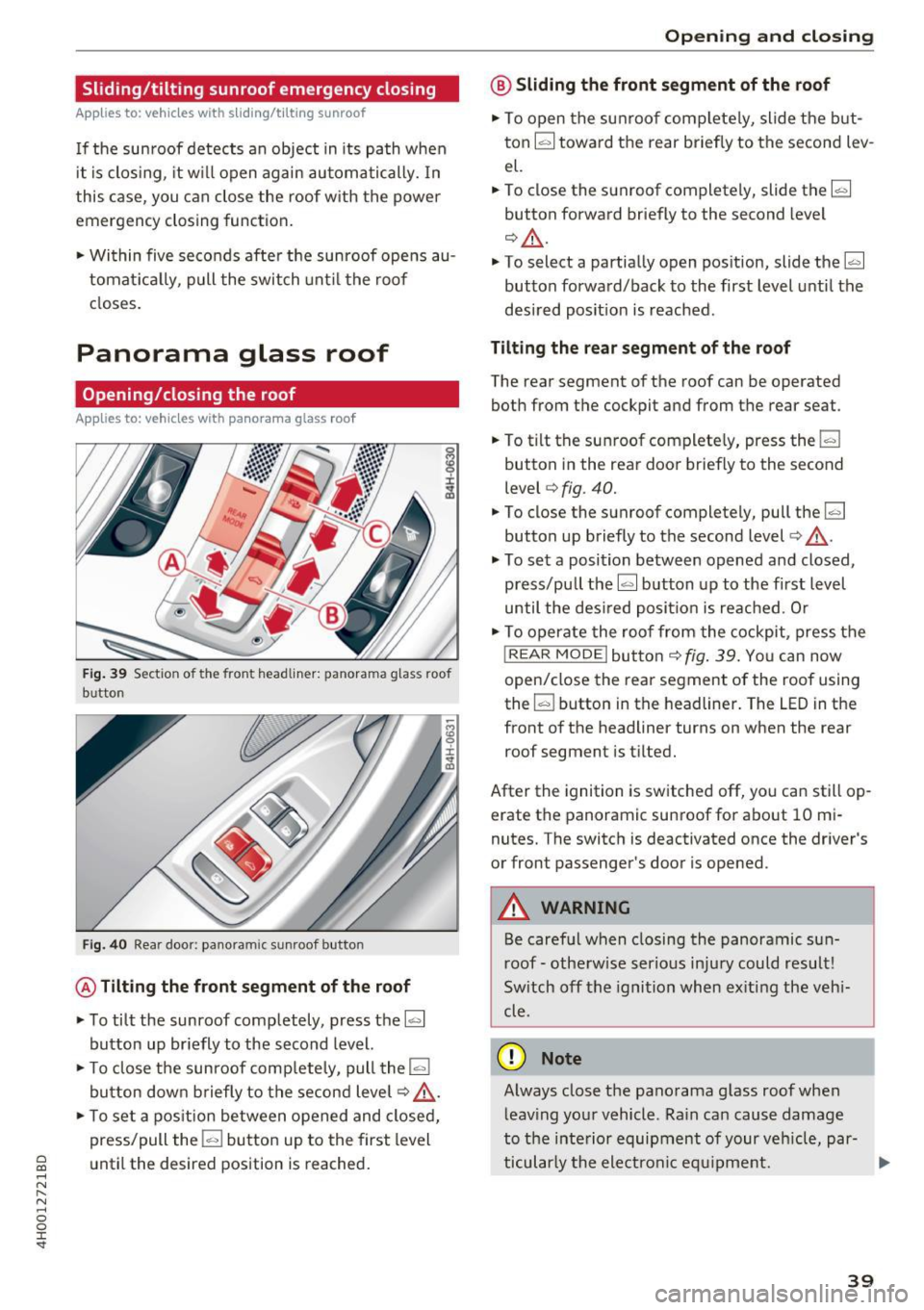
Fig. 39 Sect io n of the front headlin er: pa norama g lass roof
b u tton
Fi g. 40 Rea r doo r: pa noram ic sunroo f button
@ Tilting the front segment of the roof
.. To tilt the sunroof completely, press the~
button up br iefly to the second level.
.. To close the sunroof comp lete ly, pull the
la.I
bu tton down b rief ly to t he se cond level q ,& .
.. To set a pos ition between opened and closed,
press/pull the
l-"'I bu tto n up to the first level
until the des ired position is reached .
Opening and closing
@ Sliding the front segment of the roof
.. To open the su nroof com plete ly, slide the but
ton ~ tow ard t he rear briefly to the second lev
el.
.. To close the sun roof completely, slide the~
button forward briefly to the second level
¢ _&. .
.. To select a partially open pos ition, slide the~
button forwa rd/back to the first level unti l the
desi red posit ion is reached .
Tilting the rear segment of the roof
The rear segment of t he roof can be operated
both from the cockpit and from the rear seat .
.. To t ilt the sun roof complete ly, press the
l-"'I
button i n the rear doo r briefly to the second
level ¢
fig. 40 .
.. To close the sunroof completely, pull the~
button up briefly to the second level
c:> ,& .
.. To set a position between opened and closed,
press/pu ll the~ button up to the first level
until the des ired posi tion i s re ach ed. O r
.. To o perate the roof fro m the cockpit, press the
! REAR MODE !but to n
¢ fig . 39 . Yo u can now
open/close the rear segment of the roof using
the ~ button in t he headliner . The
LED in t he
front of the headliner turns on when the rear
roof segment is t ilted .
After the ignition is sw itche d off, you can still op
erate the panoramic sun roof for about 10 m i
nutes. The switch is deactivated once the dr iver's
or front passenger's doo r is opened.
A WARNING
Be caref ul when closing the panoramic su n
r oof -oth erwise ser ious in ju ry could resul t!
Sw itch off t he igni tion when ex iting the veh i
cle .
(D Note
Always close the pano rama g lass roof when
l eav ing yo ur vehicle . R ain ca n cause damage
to the inte rior equip ment of your ve hicle, par-
ticu larly the electron ic eq uipm ent . .,,.
39
Page 42 of 354
Opening and clo sin g
@ Tips
- The panorama roof will on ly open down to
-4°F (-20°).
-To prevent both roof segments from co llid -
i ng with one another, you do not need to
- tilt the rear roof segment if the front roof
segment is already open.
- close the front roof segment if the rear
roof segment is already tilted.
Opening/closing the sun shade
Applies to: veh icles with panorama glass roof
© Front sun shade
• To open the sun shade completely, slide the~
button backward to the second level
¢ page 39, fig. 39 .
• To close the sun shade completely, slide the~
button forward briefly to the second level.
• To se lect a partially open position, slide the
l:c ... l
button to the first level until the sun shade has
reached the desired position.
© Rear sun shade
• To open the sun shade comple tely, press the li,. I
button in the rear door briefly down to the sec
ond leve l
9 page 39, fig. 40 .
• To close the sun shade completely, p ull the ~
button up to the second level¢.&_ .
• To se lect a partially open position, press/pull
the~ button to the f irst level until the desired
pos ition is reached . Or
• To ope rate the sun shade from the cockp it,
press the
I REAR MODEi b utton 9 page 39,
fig. 39.
You can now open/close the rear su n
shade using the
I;] bu tton in the headliner.
_& WARNING
Be careful when closing t he panoramic sun
roof -otherwise serious injury could result!
Switch off the ign ition when exiting the vehi
cle.
40
-
Roof segments/sun shade emergency
closing
Applies to: vehicles with pano rama glass roof
If the roo f segment o r su n shade detects an ob
ject in its path when it is closing, it will open
again automatically . In this case, you can then
close it wit h the power emergency closing func
tion.
• Withi n five seconds after the roof segment or
sun shade opens automat ica lly, pull the switch
until it closes.
Valet parking function
Applies to: vehicles with valet parking function
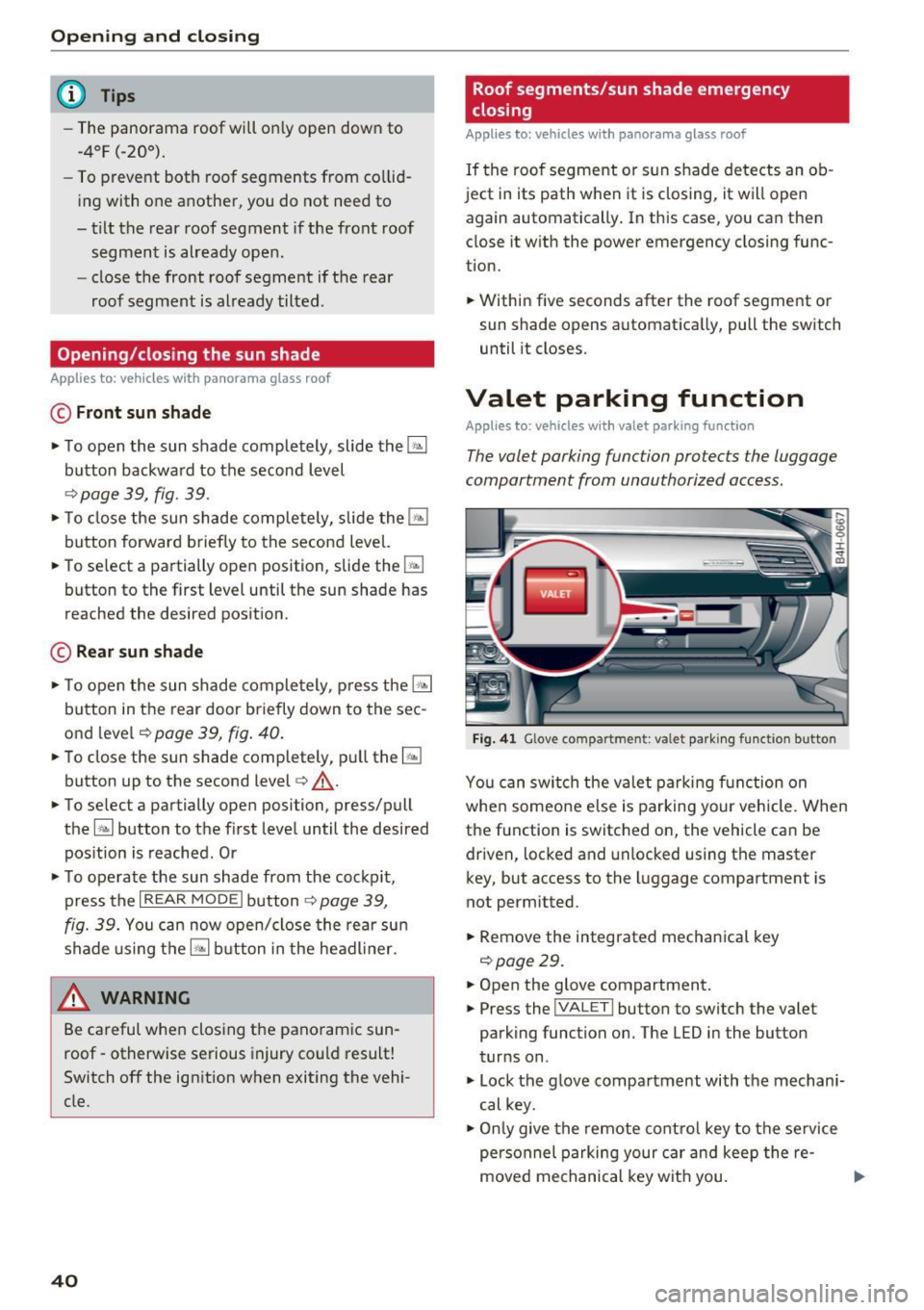
The valet parking function protects the luggage
compartment from unauthorized access.
Fig. 4 1 Glove compartment: va le t pa rkin g functio n button
Yo u can switch the va let parking function on
whe n someo ne else is parking your vehicle. When
the function is switched on, the vehicle can be
driven, locked and unlocked using the master
key, but access to the luggage compartment is
not permitted.
• Remove the integrated mechanical key
9 page29.
• Open the glove compartment.
• Press the
I VALET I button to switch the valet
parking function on . The LED in the button
turns on .
• Lock the g love compartment with the mechani
cal key.
• Onl y give the remote cont ro l key to the se rvice
personnel parking your car and keep the re-
moved mechanical key wit h you. .,.
Page 52 of 354

Lights and Vision
Retracting the rear door sun sh ades*
.. To re trac t the sun shade from the drive r's s eat ,
press the left/right rear powe r window switc h
~ in the driver's door .
.. To retract the sun shade from the
rear of the
vehicle ,
press the power window switch Q;;; in
the left/right rear door .
You can adjust the settings for the rear sun shade so the shade retracts automatically when you se
lect the reverse gear. Select:
CAR function button
> Car sy stem s control button > Vehicle settings
> Automatic rear blind > On. The settings are au
tomatically sto red and assigned to the remote
con trol key. The sun shade is extended again as
soon as the vehicle is trave ling fo rwa rd a t a speed
g rea ter than 9 mph (15 km/h) if the ignition has
not been swi tched o ff in the mean time .
.&_ WARNING
Always pay caref ul attention when closing the
sunshades . Pinching could ca use serio us inju
r ies.
@ Tips
- Pressing the l~•~ l b utton several t imes in a
r ow can trigger the overload protection. The
su n shade can only be extended/retracted
again after a br ief waiting period.
- The rear win dow sun shade on ly functions
when the vehicle interior is warmer than
14°F (-10°().
Vanity mirror in the rear
App lies to: veh icles with vanity mirrors in the rear
Fig. 55 Rea r head liner: va nity m irro r
50
.. Press the button to fold the mirror o pen . The
mirror lighting turns on automatically .
.. To change the mir ror's angle, move it forward/
back with your hand.
Windshield wipers
Switching the windshield wipers on
Fig. 56 W indsh ield w iper lever
Move the w indshie ld w iper lever to the co rre
sponding posi tion:
@ -wipers off
@-Rain sensor mode. The windshield wi pe rs
switch on once the vehicle speed exceeds appro x
i mately 2 mph (4 km/h) and it is raining. The
higher the rain sensor sensit iv ity is set (switch @
to t he right), the earlier the windshield wipers re
act to moisture on the windsh ie ld . You can deac
tivate the rain sensor mode in the I nfota inment
system, which swi tches the intermitten t mo de
o n. Sele ct:
!CARI function button> Car sy stem s
contro l bu tto n > Driver as sist > Rain sensor >
Off . In inte rmitten t mode, you can adjus t the in
te rval time using the switch @.
@-slow w iping
@ -fast w iping
@ -single wipe If you hold the lever in this pos i
t ion longer, the wipers switch from slow wiping
to fast wiping.
® -clean the wi ndshield The w ipers w ipe one
time a fter several seconds of driving to remove
water droplets. You can sw itch this function off
by moving the leve r to posit ion ® within
10 sec
o nds of the a fterwipe . The afterwipe function is ..,_
Page 55 of 354
C) C0 ....
"' ,....
"' .... 0 0 :r
Applies to: vehicles with digital compass
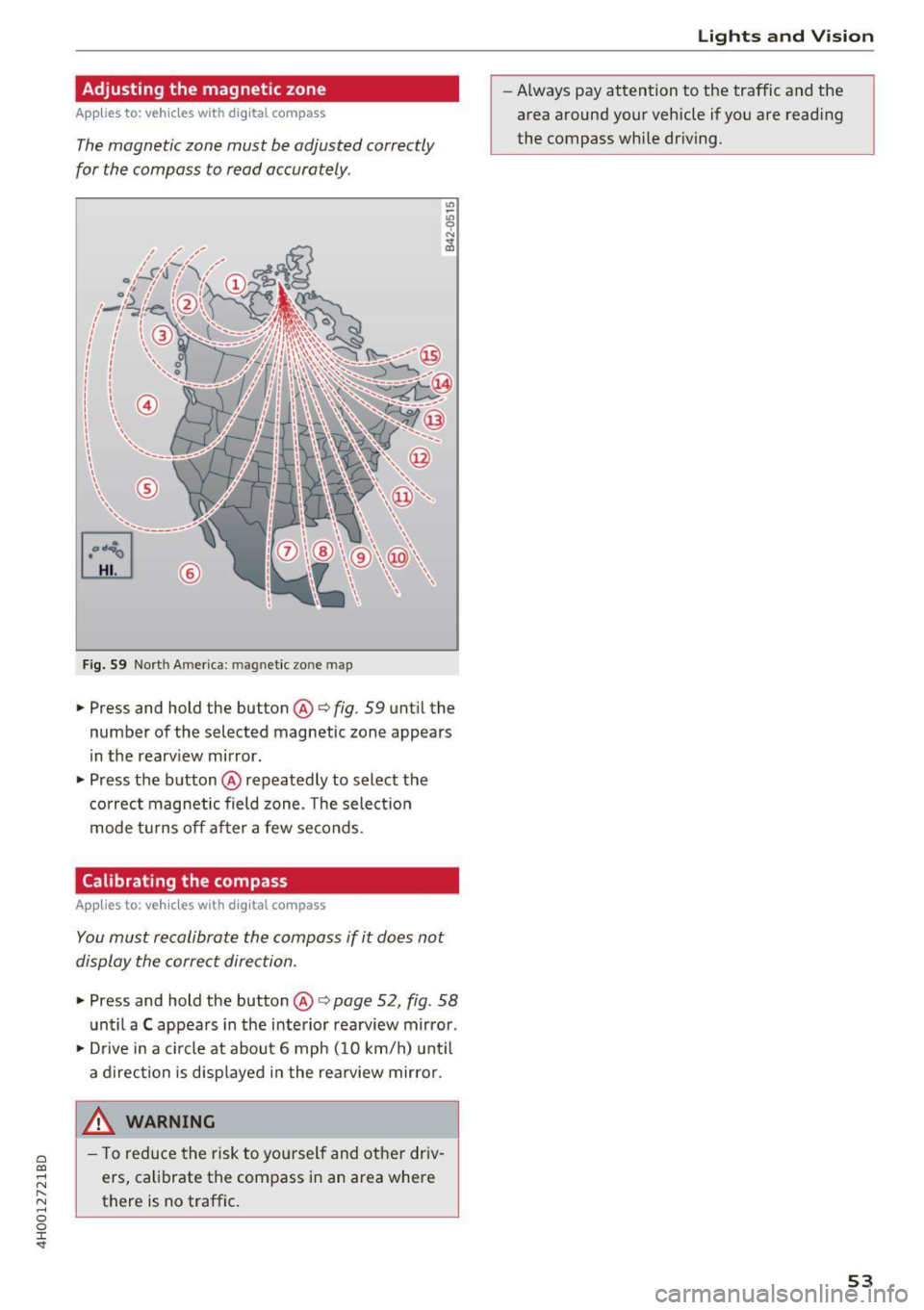
The magnetic zone must be adjusted correctly
for the compass to read accurately .
®
Fig. S9 Nort h Americ a: magn etic zone map
• Press and hold the button @i=> fig. 59 unt il the
number of the selected magnetic zone appears
in the rearv iew mirror.
• Press the button @repeatedly to select the
correct magnetic field zone . T he select io n
mode t urns off after a few seconds.
Calibrating the compass
Applies to: vehicles with digital compass
You must recalibrate the compass if it does not
display the correct direction .
• Press and hold the button @i=> page 52, fig . 58
unt il a C appears in the interior rearview mirror .
• Drive in a c ircle at about 6 mph ( 10 km/h) unt il
a d irection is disp layed in the rea rview mirror.
_& WARNING ,___
- T o reduce the risk to you rself and other driv
ers, calibrate the compass in an area where
there is no traffic.
Lights and V ision
-Always pay attention to the traffic and the
area around your vehicle if you are reading
the compass while dr iv ing .
53
Page 65 of 354
C) C0 ....
"' " "' .... 0 0 :r
Cup holders
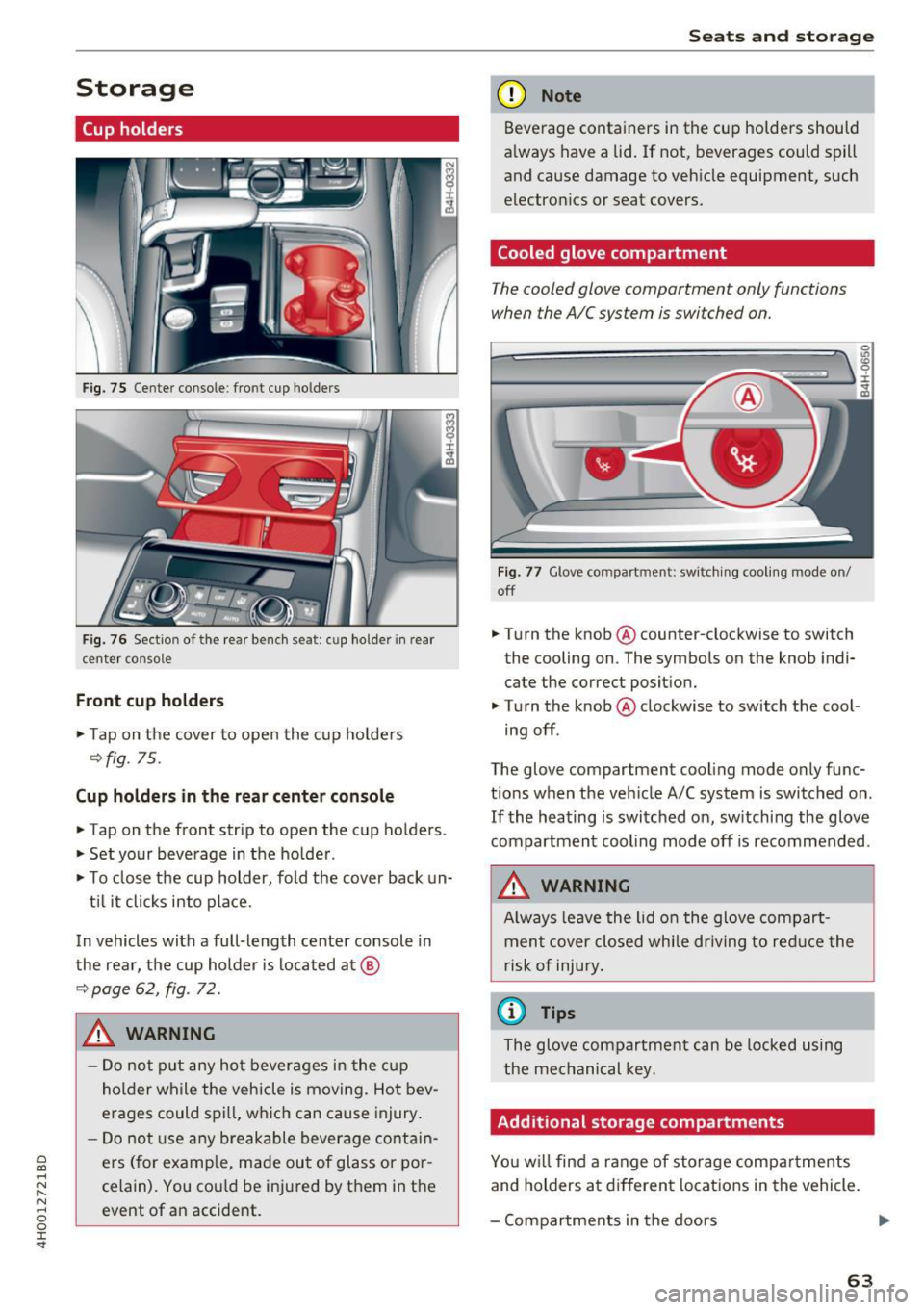
Fig. 75 Center co nsole : fro nt cup ho lders
F ig. 76 Sect io n of th e re ar bench se at: cu p ho lder in rear
center co nso le
Front cup holders
.. Tap on the cover to open the cup ho lde rs
Q fig. 75.
Cup holder s in the rear center console
.. Tap on the front strip to open the cup holders .
.. Set your beverage in the ho lder .
.. To close the cup holder , fold the cover back un-
t il it clicks into place.
In vehicles with a full-length center console in
the rear, the cup holder is located at @
9page 62, fig . 72.
A WARNING
-
- Do not p ut any hot beverages in the c up
holder while the vehicle is moving. Hot bev
erages could spill, wh ich can cause injury .
- Do not use any breakable beverage contain
ers (for example, made out of glass or po r
celain). You cou ld be injured by them in the
event of an accident .
Seats and storag e
(D Note
Beverage containers in the cup holders should
a lways have a lid . If not , beverages could spill
and cause damage to vehicle equipment, such
electron ics or seat covers.
Cooled glove compartment
T he cooled glove compartment only functions
when the AIC system is swi tched on.
Fig . 77 G love co mpart ment: swi tching cooling mode o n/
off
.. Turn the knob @counter-clockwise to switch
the cooling on . The symbols on the knob ind i·
cate the correct posit ion.
.. Turn the knob @clockwise to switch the cool ·
ing off .
The glove compartment cooling mode only func
t ions when the veh icle A/C system is switched on .
If the heating is switched on, switching the glove
compartmen t cooling mode off is recommended .
_& WARNING
Always leave the lid o n the glove compart
ment cover closed while dr iving to red uce the
risk of injury .
a) Tips
The glove compartment can be locked using
the mechanical key.
Additional storage compartments
Yo u w ill find a range of storage compa rtments
and holders at different locations in the vehicle.
- Compartments in the doors
IJ,,
63
Page 71 of 354

0 co .... N ,..... N .... 0 0 :c '
climate control
Description
The climate con trol system warms, coo ls and re
moves humidity from the air in the vehicle inte ri
or. It is the most effective when the w indows and
sunroof* are closed. If there is a bu ild-up of heat
i n side the veh icle, ven tilat ion can he lp to speed
up the cooling process .
In a ll heating mode functions, except for defrost,
the blower on ly switches to a higher speed once
the eng ine coolant has reached a sufficient tem
perature.
Pollutant filt er
The po llutant filter removes pollutants such as
d ust and pollen from the air.
Key recognition
The clima te control settings are automatically
s tored and assig ned to th e remo te contro l key
that is in use.
& WARNING
Poo r visibility can lead to accidents.
- For safer d riving, keep all windows free of
ice, snow and fo g.
- B ecome familia r as quickly as possible wi th
the correct use and function of the cl imate
contro l system, especially with the defrost
ing and defogging function.
- When the temperat ure is below freezing,
only use the windsh ield washer system after
Warm and cold
the windshield has been warmed by the cli
mate control system. The washer fluid could
freeze on the windshie ld and impair visib ili
ty .
(D Note
-If you suspect that the climate contro l sys
tem is damaged, switch the system off to
prevent further damage and have it checked
by an authorized Aud i dealer o r authorized
Aud i Serv ice Facility.
- Repa irs to the Aud i climate control system
require special technical know ledge and
special tools . See an autho rized Aud i dea le r
or authorized Audi Service Fac ility.
@ For the sake of the environment
Reducing the amount of fuel used also re
duces the amount of pollu tan ts that enter the
ai r.
@ Tips
- To prevent interference with the heat ing
and coo lin g output and to prevent the wi n
dows from fogging over , the air intake in
fro nt of the windshie ld m ust be free of i ce,
snow o r leave s.
- Condensat ion from the coo ling system c an
dr ip and fo rm a pudd le of w ater un der t he
vehicle. Th is i s n orm al and does not me an
t here is a lea k.
- T he e nergy m anagemen t sy stem may tem
por arily swi tch off cert ain fu nctions, s uch a s
the seat heating * or rear window defogger .
T hese systems are ava ila ble again as soon
as the energy supply has been restored.
69
Page 72 of 354

Warm and cold
Operation
We recommend pressing the !AUTOI button and setting the temperature to 72 °F (22 °C) .
Fig . 8 6 Cockp it con trols
F ig . 87 Re ar contro ls: 4 -zone de luxe auto matic cl imate
con tro l
Press the bu ttons to turn the func tions on or off .
The LED in a button will light up when the func
tion is sw itched on. Use the knob to adjust the
temperature, the blower speed and the air distri bution*. The driver and front passenger settings
can be adjusted separate ly.
Applies to: vehicles with 4-zone del uxe automatic climate
cont rol
You can adj ust the rea r left and r igh t sides using
the rea r contro ls ¢
fig . 87 .
IOFF ! Switching the climate cont rol system
on /off
The IO FFI button switches the cl imate co ntro l
system on or off . It also sw itches on whe n you
p ress the knob . The
!OFF I button in the rear only
sw itches the A/C system on/off in the rear of the
70
vehicle . A irflow from outside is blocked w hen the
cl imate control system is switched off.
IAIC I Switching cooling mode on and off
The air is not coo led and h umid ity is not removed
whe n coo ling mode is sw itched off . This can
c a use fog on the windows. The coo ling mode
swi tches off automatically whe n there a re cold
outside temperatures.
I""' ! Switching recirculation mode on and off
In recirculat ion mode , the air inside the vehicle is
c ir culated and filtered . Th is prevents the unfi l
te red air ou ts ide the ve hicle from en teri ng the
vehicle interior. We recommend sw itching recir
cu lation mode on whe n driving through a t unnel
or when sitting in traffic¢& .
The
! AU TO I button o r I@ FRON TI bu tton switches
recircu lation mode off .
IAUTO I Switching automatic mode on
Automat ic mode maintains a constant tempera
ture inside the vehicle. Air temperature , a irflow
and air distrib ution are controlled automatica lly .
If press and hold the button longer, 72 °F (22
°()
will be set . .,,.