ECO mode AUDI A8 2017 Owner's Manual
[x] Cancel search | Manufacturer: AUDI, Model Year: 2017, Model line: A8, Model: AUDI A8 2017Pages: 354, PDF Size: 88.68 MB
Page 126 of 354

Parking systems
Adjusting the display
and the warning tones
Applies to: vehicl es with parking system plus/rearview cam
era/per ipheral came ra
The display and warning tones can be adjusted in
the Infotainment.
~ Select: the ICARI function button > Car systems
control button > Driver assist > Parking aid.
Display
On* -
An optical display is shown for the parking
system plus, a rearview camera image is shown
for the rearview camera*.
Off -When the parking system is switched off,
only audib le signals are given.
Signal tones
Front volume -
volume for the front area
Rear volume -volume for the rear area
Front frequency -frequency for the front area
Rear frequency -frequency for the rear area
Entertainment volume -when the parking sys
tem is turned on, the volume of the audio/video
source is lowered.
The new ly selected level is demonstrated briefly
by the sound generator.
{!) Tips
- The warning tones can also be adjusted di
rectly by the v isual disp lay or the picture
from the camera. Simply press the
Settings
contro l button .
- Changed settings are act ivated when the
parking system is switched on aga in.
- The settings for volume and frequency are automat ically saved and assigned to the re
mote control key being used.
Error messages
Applies to: ve hicles w ith parking system plus/rearview cam
era/peripheral came ra
There is an error in the system if the LED in the
P,YA button is blinking and you hear a continuous
alarm for a few seconds after switching on the
124
parking system or when the pa rking system is al
ready activated . If the error is not corrected be
fore you switch off the ignition, the LED in the
P wA
button will blink the next time you switch on the
parking system by shifting into reverse.
Parking system plus*
If a sensor is faulty, the~ symbol will appear in
front of/behind the vehicle in the Infotainment display. If a rear sensor is faulty, on ly obstacles
that are in areas @and @ are displayed
c>page 115, fig . 130. If a front sensor is faulty,
only obstacles that are in areas © and @are dis
played. There is a lso a system malfunction if all
segments around the vehicle are red or if no seg
ments are disp layed.
Peripheral cameras*
There is a system malfunc tion if the ~· symbol
appears and the corresponding display area is
shown in blue. The camera is not working in this
a rea.
Drive to an authorized Audi dealer or authorized
Audi Service Facility immediately to have the
malfunction corrected .
Trailer hitch
Applies to: vehicles with parking system plus/rearv iew cam
era/peripheral cameras and t ra iler hitc h
For vehicles using the trailer socket, the parking
system rear sensors are not activated when you
shift into reverse gear or when you press the P
1
1.A
button . This results in the following restrictions .
Parking system plus*
There is no distance warning for the rear. The
front sensors remain activated. The visual display
switches to trailer mode.
Rearview camera* /Peripheral cameras*
There is no distance warning for the rear. The
front senso rs remain activated . The visua l display
switches to trailer mode . The rearview camera
image will not show the orientation lines and the
blue surfaces .
Ill-
Page 165 of 354
0 co .... N ,..._
N .... 0 0 :c '
and costs of services may vary depending on
the country, model, model year, end device
and rates. Additional information can be
found under
www.audiusa.com/audicon
nect.
- An initial registration/activation on the
myAudi platform at my.audiusa.com is nec
essary to use individual services. You can
contact an authorized Audi dealer or Audi
connect Support at 877-505-AUDI (2834)
to receive information on options for ex panding your usage and any costs that may
result.
- It is only possible to use Audi connect serv
ices with a valid Audi SIM card.
- To ensure all of the Audi connect features
work correctly , Audi recommends setting up
a data service and Wi-Fi package with your
cell phone service provider. Your cell phone
service provider can be authorized by law,
through a judicial order or other lawful in
structions, to disclose the position of your
vehicle. Additional information on your cell
phone service provider's privacy policies can
be found in their Terms of Use .
- The availability of Audi connect services,
such as weather information, depends on
the cell phone service provider .
- You can specify when the MMI establishes
an online connection
¢ page 161 . The Inter
net connection ends automatically when the
Audi connect service in use no longer re
quires any data packets.
- The Audi connect services are a Wi-Fi/Inter
net-based system.
If the system does not
function correctly even though all of the re
quirements are met, please try again later
or contact Audi connect Support at
877-505-AUDI (2834).
- For detailed information on Audi connect
and the Terms of Use, visit
www.audiusa.com/audiconnect.
Audi connect
Privacy protection
App lies to : vehicles wi th Audi connect
{I) Tips
- Your privacy is important to us.
- AUDI AG collects, processes, shares and
transmits your personal information in ac
cordance with legal regulations in order to
ensure proper function and availability of
the individual Audi connect services. You
can view the complete, current and valid
Audi connect data protection policy in your MMI. The my Audi website is available for to
you to activate additional Audi connect serv ices and to transfer data with your vehicle,
among other services. A one-time registra
tion is required to establish a connection to
your vehicle. For this purpose, AUDI AG col
lects, processes, transmits and uses your re
quired personal information as required for
you to use the services provided by AUDI
AG. Your information is not distributed to
third parties. Using your cell phone with the
help of your myAudi platform, you can
transfer information for Audi connect serv
ices functions to your vehicle and allow spe
cific information to be transmitted from
your vehicle .
- By activating special information services
that are part of your Audi connect portfolio,
you can use these functions directly in your
vehicle by entering data to confirm your
identity (to use social networks, for exam
ple). To do this, the identification informa
tion you provided is forwarded with the re
quest to the respective service provider .
Then you can access your personal content
using a secure connection. This content is
displayed in the vehicle for your use. Your
personal content is not stored within Audi
AG . The necessary connection information is
processed and used for providing services
and the proper function of the services in
accordance with applicable legal guidelines.
- By providing Audi connect services , Audi of
America is authorized to collect, process,
transmit and transfer information about
163
Page 200 of 354
Rear Seat Entertainment
Labeling the wireless headphones
-Attach the supplied label CD or@ c::> fig. 209 on
the inside of the left/right wire less head
phones.
La beling the w ireless headphones:
CD Wireless headphones label (paired with the
left RSE display)
@ Wireless headphones label (paired with the
right RSE display)
Switching wireless headphones on/off
- Switching on:
to switch the wire less head
phones on, press the On/Off button
CD
9 fig. 208 on the right earpiece (R) for approxi
mately
3 seconds and release it once the LED
@ starts blinking . The light @will blink s lowly
once the connection to the wireless head phones has been established.
- Switching off : to switch the wireless head
phones off, press and hold the On/Off button
CD until the LED @turns off.
The wireless headphones switch off automatical ly about five minutes after the RSE switches off.
Disconnect wireless headphones
You can delete the pairing between the wireless
headphones and the RSE if yo u need to switch
out the headphones o r change the pairing .
- Select:
I M ENU I button> Setup RSE control but
ton
> Headphones > Delete wireless head
phones.
A WARNING
- For safety reasons, as the driver, only use
the headphones when the vehicle is station
ary to reduce the r isk of a crash .
- When driving, store the headphones secure
ly so that they do not move around in the
vehicle interior when braking or in a crash.
- Maintain a moderate volume leve l when lis
tening to audio playback through the head
phones. Continuous exposure to extreme
volume levels may result in loss of hearing.
198
-
@ Tips
-If the wire less headphones were already
paired, the connection to the headphones
will be reestablished after switching the
RSE on if the headphones are sw itched on.
- The RSE only supports wireless headphones
from your authorized Audi dealer.
- Audio/video output through the wire less
headphones stops during the pairing proc
ess.
- The pairing process must be done separate
ly for the left and right w ireless head
phones. The wireless headphones are as
signed to the left or right RSE display de
pend ing on the side of the RSE control unit
where you started the pairing process. The
pairing between the wireless headphones
and the lef t/r ight RSE display is ide ntifi ed
with a label.
- Volume that is too high or too low is auto
matically adjusted to a preset leve l when
the wireless headphones are connected.
Charging and changing the battery
Applies to: vehicles with Rear Seat Entertainment
If the light on the wireless headphones turns
red the batteries are low and need to be charg-
,
ed or replaced .
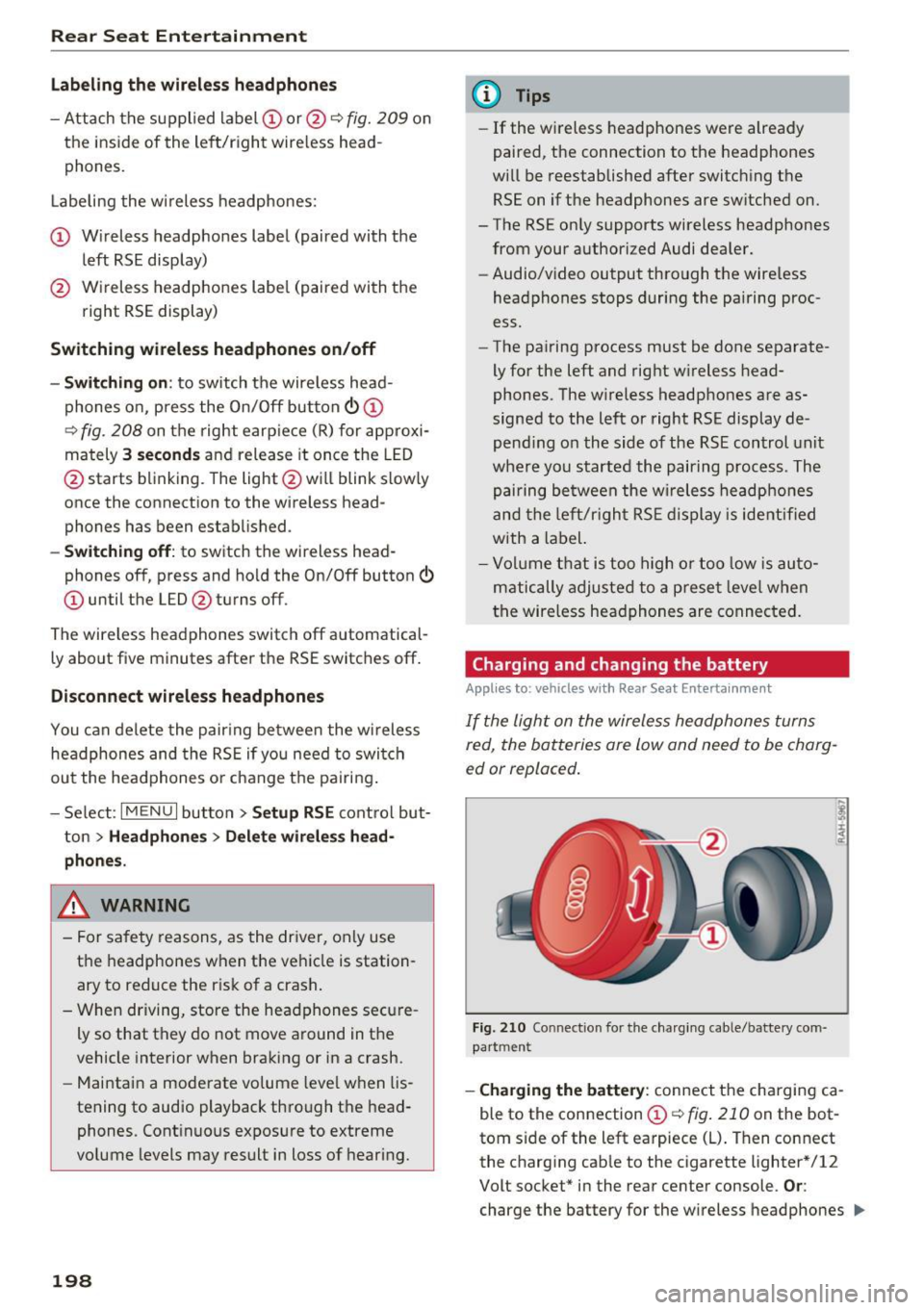
Fig. 210 Connec tion for the charg ing cable/battery com
partm ent
-Charging the battery : connect the charging ca
ble to the connection
CD c::> fig . 210 on the bot
tom side of the left earpiece (L) . Then connect
the charging cable to the cigarette lighter * /12
Volt socket* in the rear center console.
Or:
charge the battery for the wireless headphones .,.
Page 238 of 354
Airbag syste m
-Ne ver t ransport items on or in the area of
t h e fr ont passenger seat. Objects could
m ove into the area of the front airbags dur
ing brak ing or oth er sudden maneuvers and
become dangerous projectiles that can
cause serious pe rsonal injury if the a irbags
inflate.
- Never place or attach accessor ies or other
objects (such as cup holders, te lephone
brackets, large, heavy o r bulky objects) on
the doors, over or ne ar the area marked
"AIRBAG" on the steering wheel, instru
ment pane l, seat bac krests or between
t h ose areas and yourself. These objects
could cause injury in a crash, especially
when the airbags inflate.
- Never recline the front passenge r's seat to
transport objects. Items can also move into
the area of the side airbag o r the front a ir
bag dur ing braking or in a s udden maneu
ver. Objects near the airbags can become
projectiles and cause in ju ry, particularly
when the sea t is re clin ed.
.8, WARNING
The f ine dust create d when airbags deploy can
cause breathing problems for people w ith a
his tory of asthma or o ther breathing condi
tions .
- T o reduce the risk o f brea thing pro blems,
those w ith asthma or o ther respiratory con
ditions should get fresh air right away by
gett ing out of the vehicle o r opening w in
dows o r doors.
- If you are in a collision in which airbags de
ploy, wash your hands and face with mild
soap and water before eat ing.
- Be careful not to get the dust into your eyes,
or into any cuts or scratches.
- If the resid ue should get into your eyes,
flush them with water.
236
Monitoring the
Advanced Airbag System
tli (USA models )/!{' (Canada model s)
Airbag monitoring indicator light
Two separate indicators monitor the function of
the Advanced Airbag System: the airbag moni
toring indicator light and the
PASSENGER AIR
BAG OFF
light.
The Advanced A irbag System ( including the e lec
tronic control unit, sensor circuits and system
wiring) is monitored continuously to make sure
that it is functioning properly whenever the igni
tion is o n. Each time you sw itch on the ig nition,
the a irbag mo nitor ing indica to r light
II (U SA
models)/ fll (Canada models) w ill come o n for a
few seconds (se lf d iagnost ic s) .
The system must be inspected when the
indicator light
fl (USA models) /E,I (Canada
models) :
-does not come on when the igni tion is sw itched
on,
- does not go out a few se co nd s afte r you h ave
sw itched on the ignit ion, or
- comes on while driv ing.
If an airbag system malfunction is detected, the
i ndica to r light will come on to se rve as a constant
r em inder to have t he system inspected immedi
ate ly.
If a ma lfunction occurs that turns the front air
bag on the passenge r side off, the
PASSENGER
A IR BAG OFF
light w ill come on and stay o n
whe never the ignition is on.
_& WARNING
A n a ir b ag system t hat i s no t functioning prop
e rly cannot provide sup plemental pro te ct ion
in a fronta l crash .
- If the air bag ind icator ligh t<=? page 23
comes when the vehicle i s being u sed, have
the system inspected immediately by your
author ized Audi dealer . It is possib le that
the airbag will inflate when it is not sup posed to, or will not inflate when it should.
Page 241 of 354
0 co .... N ,..._
N .... 0 0 :c '
whenever the ignition is switched on.
A WARNING
- If the PASSENGER AIR BAG OFF light does
not go out when an adult is sitting on the
front passenger seat after taking the steps described above, make sure the adult is
properly seated and restrained at one of the
rear seating positions.
- Have the airbag system inspected by your
Audi dealer before transporting anyone on
the front passenger seat.
{D) Tips
If the weight-sensing mat in the front passen
ger seat detects an empty seat, the front air
bag on the passenger side will be turned off,
and the
PASSENGER AIR BAG OFF light will
stay on.
Repair, care and disposal of the airbags
Parts of the airbag system are installed at many
different places on your Audi. Installing, remov
ing, servicing or repairing a part in an area of the
vehicle can damage a part of an airbag system
and prevent that system from working properly in a collision .
There are some important things you have to
know to make sure that the effectiveness of the
system will not be impaired and that discarded
components do not cause injury or pollute the
environment.
A WARNING
Improper care, servicing and repair proce
dures can increase the risk of personal injury
and death by preventing an airbag from de
ploying when needed or deploying an airbag
unexpectedly:
- Never cover, obstruct, or change the steer
ing wheel horn pad or airbag cover or the in
strument panel or modify them in any way.
- Never attach any objects such as cup holders
or telephone mountings to the surfaces cov
ering the airbag units.
Airbag system
-For cleaning the horn pad or instrument
panel, use only a soft, dry cloth or one mois
tened with plain water. Solvents or cleaners
could damage the airbag cover or change
the stiffness or strength of the material so
that the airbag cannot deploy and protect properly.
- Never repair, adjust, or change any parts of
the airbag system.
-All work on the steering wheel, instrument panel, front seats or electrical system (in
cluding the installation of audio equipment,
cellular telephones and CB radios, etc.) must be performed by a qualified technician
who has the training and special equipment
necessary.
- For any work on the airbag system, we
strongly recommend that you see your au
thorized Audi dealer or qualified workshop.
- Never modify the front bumper or parts of
the vehicle body.
- Always make sure that the side airbag can
inflate without interference:
- Never install seat covers or replacement
upholstery over the front seatbacks that
have not been specifically approved by
Audi.
- Never use additional seat cushions that
cover the areas where the side airbags in
flate.
- Damage to the original seat covers or to
the seam in the area of the side airbag
module must always be repaired immedi
ately by an authorized Audi dealer.
- The airbag system can be activated only
once. After an airbag has inflated, it must
be replaced by an authorized Audi dealer or
qualified technician who has the technical
information, training and special equipment
necessary.
- The airbag system can be deployed only
once. After an airbag has been deployed, it
must be replaced with new replacement
parts designed and approved especially for
your Audi model version. Replacement of complete airbag systems or airbag components must be performed by qualified work-
shops only. Make sure that any airbag
Ill-
239
Page 252 of 354
Child safety
Advanced Airbags and the weight-sensing mat in the front seat
The Advanced Airbag System in your vehicle de
tects the presence of an infant or child in a child
restraint on the front passenger seat using the
weight -sensing mat in the seat cushion and the
sensor below the safety belt latch on the front
passenger seat that measures the tension on the
safety belt .
The weight-sensing mat measures total weight
of the child and the child safety seat and a child blanket on the front passenger seat . The weight
on the front passenger seat is related to the de
sign of the child restraint and its "footprint ", the
size and shape of the bottom of the child re
straint as it sits on the seat. The weight of a child
restraint and its "footprint" vary for different
kinds of child restraints and for the different
models of the same kind of child restraint of
fered by child restraint manufacturers.
The weight ranges for the individual types,
makes and models of child restraints that the
NHTSA has specified in the Safety Standard to
gether with the weight ranges of typical infants
and typical 1 year-old child have been stored in
the control unit of the Advanced Airbag System .
When a child restraint is being used on the front
passenger seat with a typical 1 year-old child, the
Advanced Airbag System compares the weight
measured by the weight sensing mat with the in
formation stored in the electronic control unit.
The electronic control unit also registers the ten
sion on the front passenger safety belt. The ten
sion on the safety belt for the front passenger
seat will be different for an adult who is properly
using the safety belt as compared to the tension
on the belt when it is used to attach a child re
straint to the seat. The sensor below the latch for
the safety belt for the front seat passenger
measures the tension on the belt. The input from
this sensor is then used with the weight to "de
cide" , whether there is a child restraint with a
typical 1 year-old child on the front passenger
seat and whether or not the airbag must be
turned off.
250
· Child restraints and Advanced Airbags
Regardless of the child restraint that you use,
make sure that it has been certified to meet Safe
ty Standards and has been certified by its manu
facturer for use with an airbag. Always be sure
that the child restraint is properly installed at
one of the rear seating positions . If in exception
al circumstances you must use it on the front passenger seat, carefully read all of the informa
tion on child safety and Advanced Airbags and heed all of the applicable WARNINGS. Make cer
tain that the child restraint is correctly recog
nized by the weight-sensing mat inside the front
passenger seat, that the front passenger airbag
is turned off and that the airbag status is always
correctly signaled by the
PASSENGER AIR BAG
OFF
light.
Many types and models of child restraints have
been available over the years, new models are in
troduced regularly incorporating new and im
proved designs and older models are taken out of
production. Child restraints are not standardized.
Child restraints of the same type typically have
differen t weights and si zes and different 'foot
prints,' the size and shape of the bottom of the
child restraint that sits on the seat, when they
are installed on a vehicle seat. These differences
make it virtually impossible to certify compliance
with the requirements for advanced airbags with
each and every child restraint that has ever been
sold in the past or will be sold over the course of
the useful life of your vehicle.
For this reason, the United States National High
way Traffic Safety Administration has published a
list of specific type, makes and models of child
restraints that must be used to certify compli
ance of the Advanced Airbag System in your vehi
cle with the suppression requirements of Federal
Motor Vehicle Safety Standard 208. These child
restraints are:
Subpart A - Car bed child restraints
Model Manufactured on or
after
Angel Guard Angel September 25, 2007 Ride AA2403FOF
Page 292 of 354
Wheel s
Occupant loading and distri
bution for vehicle normal load
for various designated seat ing
capacit ies
Refer to the tire inflation pres
sure label ¢
page 293, fig . 268
for the number of seating posi
tions . Refer to the table¢
table
on page 295
for the number of
people that correspond to the ve
hicle normal load .
New tires or wheels
Audi recommends having all work
on tires or wheels performed by
an authorized Audi dealer or au
thorized Audi Service Facility .
These facilities have the proper knowledge and are equipped with
the required tools and replace
ment parts.
.,. New tires do not yet have the
optimum gripping properties. Drive carefully and at moderate
speeds for the first 350 miles (500 km) with new tires .
.,. Use tires of the same construc
tion, size (rolling circumference)
and as close to the same tread pattern as poss ible on all four
wheels .
290
.,.Do not replace tires individually .
At least replace both tires on the
same axle at the same time.
.,. Audi recommends that you use
Audi Original Tires. If you would
like to use different tires, please
note that the tires may perform
differently even if they are the
same size ¢
,&..
.,. If you would like to equip your
vehicle with a tire/rim combina
tion that is different from what
was installed at the factory, con
sult with an authorized Audi
dealer or authorized Audi Service Facility before making a pur
chase ¢&, .
The spare tire* is different from
the regular tires installed on the
vehicle -for example, if winter
tires or wide tires are installed -
so only use the spare tire* tempo
rarily in case of emergency and
drive carefully while it is in use. It
should be replaced with a regular
tire as soon as possible.
All four wheels must be equipped
with tires that are the same brand and have the same construction
and tread pattern so that the
drive system is not damaged by
different tire speeds. For this rea -
son, in case of emergency, only .,.
Page 301 of 354

~ Check and correc t the seating of the snow
chains after driving a few feet , if necessary . Fo l
l ow the instructions from the manufacturer .
~ Note the maximum speed of 30 mph (SO km/
h). Note the loca l regulat ions.
Use of snow chains is on ly pe rmitted with certain
rim/tire combinations due to technical reasons.
Check w ith an authori zed Audi dealer or author
ized Audi Service Fac ility to see if you may use
snow chains .
You must remove the snow chains on roads with
out snow. Otherw ise, you could impair dr iving
ab ility and damage the tires.
_8 WARNING
Using incorrect snow chains o r insta lling snow
chains incorrectly can result in loss of vehicle
cont rol, which inc reases the risk of an acc i
dent.
(D Note
- Snow cha ins can damage the rims/wheel
covers* if the cha ins come into d irect con·
tact with t hem . Remove the whee l cove rs*
f irst. Use coate d snow chai ns.
- Using snow cha ins tha t add more than 0.4
i nch (10.5 mm) of he igh t ca n seve rely dam
age the wheel ho usings and other vehicle
componen ts .
- Do no t install and use s now chai ns if there is
a mal funct ion in the adaptive air suspe n
s ion, because the vehicle heigh t will be very
l ow . If you drive with snow chains anyway,
the wheel ho usings and other vehicle com
ponents can be severely damaged.
@ Tips
When using snow chains, it may be useful to
sw itch on sport mode ¢page
127.
Low aspect ratio tires
Your Aud i is factory-equipped with low aspect ra-
o tio tires. These t ires have been thorough ly tested co
~ and been selected specifically for your model for ,.....
~ their supe rb performance, road feel and handli ng 0 0 :c '
under a var iety o f dr iv ing condit ions . Ask your au
thorized Audi dea le r for more detai ls.
T he low aspect rat io of t hese tires is indicated by
a nu meral o f
55 or less in the tire's si ze des igna
tion . The n umera l represents the ratio of the
tire's sidewa ll height in relation to its tread width
expressed in percentage . Conve ntiona l tires have
a height/width ratio of 60 or more .
The performance of low-aspect- ratio tires is par
ti cula rly sen siti ve to imprope r inflation p res
sure. It is the refore important that low aspect
rat io tires are inflated to the specified pressure
and that the inflation pressure is regularly
checked and maintained . Tire pressures should
be checked at lea st once a month and always
before a long trip
¢ page 293 .
What you can do to avo id tire and rim
damage
Low aspect ratio tires can be damaged more eas i
ly by impact w ith potho les, curbs, gullies or
ridges on the road, particularly if the tire is un
der inflated .
In order to m in imize the occurrence of impact
damage to t he tires of yo ur vehicle , we recom
me nd tha t you observe the following preca u
tio ns:
- Always maintain recommended inflat ion pres
sures. Check you r ti re pressu re every 2,000
m iles (3,000 km) a nd add air if necessary.
- Dr ive carefully on roads w it h potholes, deep
gullies o r ridges. The impact from dr iving
t hrough or over such obst acles can damage
your tires. Impac t with a cur b may also ca use
damage to your tires.
- After a ny impac t, im med iate ly inspect yo ur
t ires or have them inspe cted by the neares t au
t horized A udi dealer. Replace a damaged tire as
soon as possible.
- I nspect your tires every 2,000 m iles (3,000 km)
for damage and wear. Damage is not a lways
easy to see. Damage can lead to loss of air and
underinflation, wh ich could event ually cause
tire fa ilure . If you believe that a tire may have
been damaged, replace the tire as soon as pos
sible .
- These tires may wear more quickly than others . .,.
299
Page 306 of 354

Wheels
@ For the sake of the environment
Low tire pressure inc reases fuel consumption
and tire wear.
@ Tips
- The pressure of the spare tire * is not moni
tored.
- If t ires are re pla ced, the sensors/valves do
not need to be removed or rep laced . Ju st re
placed the valve stem and, if necessary, the
valve and the wheel e lectron ics . If you have
quest ions, see your autho riz ed Aud i dea ler
or authorized Audi Service Facility.
Displaying tire pressures/temperatures
App lies to : 58 plus
Req uirement: the ign ition must be switched on .
.,. Select : the
ICARI function button > C ar s ystems
> Serv icing & checks > Tire pressure mon itor
ing
> Display tire pressures.
The current tire pressures are shown in green and
yellow numbers in the Infotainment system:
- Green : the current tire pressure and the speci
fied tire pressure are approximately the same .
-Yellow: the c urrent tire press ure is too low
compared to the specified tire pressure.
The spe cified t ire press ure is the la st tire pres
sure th at was s tored
c::> page 305.
No te that the tire pressure also depends on the
t emperature of the ti re . The ti re pressu re in
creases as the engine becomes wa rmer wh ile
d riving.
& WARNING
R ea d and follow t he important information
and notes
c::> page 303 .
@ Tips
The tire pressure or tem per ature are not dis
pl ayed in ada ptation mode. D ashe s·-.·- are
shown i n place of the press ure and tempera
ture .
304
-
Tire pressure loss
Applies to: 58 plus
Fig. 2 70 Dis pla y: ind icator light w it h a mess age
If the [I] ind icator light turns on, the pressure in
at least one tire is too low or new sensors were
not adapted:
RE indicator light s turn s on after turning the
ignition on
The tire pressure is too low compared to the
spec ified press ure .
.. Check and store the tire press ure(s) the next
time it is possible
c::> page 305.
RE indicator light turns on while dr iving
Wheels with new sensors we re not adapted or
the tire p ressure has reached a critica l level com
pared to the specif ied pressure.
.. Avoid unnecessary s teering and brak ing maneu-
vers .
.. Adapt your driving sty le to the s ituation.
.. Stop as soon as possib le and check the tire(s).
.. If it is possib le to cont inue dr iv ing, see an au-
thorized Audi dealer or authorized Audi Service
Facility immediately and have your tire(s) re
pai red or rep laced .
& WARNING
Read and f ollow the impo rtant inform ation
and notes
c::>p age 303.
-
Page 315 of 354

0 co .... N ,..._
N .... 0 0 :c '
cident.
- The factory-supplied jack is intended only
for your vehicle model. Under no circum
stances should it be used to lift heavy
vehicles or other loads; you r isk injuring
yourself .
- Never start the engine when the vehicle is
ra ised, which could cause an accident.
- Support the veh icle secure ly with appropri
ate stands if work is to be performed under
neath the vehicle; otherwise, there is a po
tent ial risk for injury .
- Never use the jack supplied with your Audi
on anothe r vehicle, particularly on a heav ier
one . The jack is only suitable for use on the
vehicle it came w ith.
(D Tips
The vehicle jack* in your vehicle is mainte
na nee-free.
Replacing wheels
Before changing a wheel
Observe the following precautions for your own
and your passenger's safety when changing a
wheel .
.,. After you experience a tire fail ure, pull the car
well away from moving t raff ic and try to reach
le vel ground before you stop¢,&. .
.,. All passengers should
lea ve the ca r and move
to a safe location (for instance, behind the
guardrail) ¢,&. .
.,. Engage the
parking brake to prevent your vehi
cle from rolling unintentionally¢,&. .
.,. Move
sel ecto r le ve r to pos it ion P ¢ ,&. .
.,. If you a re towing a trailer, unh itch the trailer
from your veh icle.
.,. Take the
jack and the s pare tir e out of the lug
gage compartment
¢ page 312.
WARNING
You or your passengers co uld be injured while
chang ing a wheel if you do not follow these
safety precautions:
Em ergenc y ass is tanc e
-If you have a flat tire, move a safe distance
off the road. Turn off the eng ine, turn the
emergency flashers on and use other warn ing dev ices to alert other motorists .
- Make sure that passengers wait in a safe
p lace away from the vehicle and well away
from the road and traff ic .
- To help prevent the veh icle from moving
suddenly and possib ly slipping off the jack,
always fully set the park ing brake and block
the wheel d iagonally opposi te the wheel be
ing changed. When one front whee l is lifted
off the groun d, p lacing the Automatic
Transmission in "P" (Park) w ill
not prevent
the vehicle from mov ing.
- Before you change a wheel, be sure the
g round is leve l and firm. If necessary, use a
sturdy board under the jack .
- Always s tore the vehicle tool kit, the jack
and the replaced tire in the luggage com
partment
r::> page 213 .
(D Tips
Befo re c hanging the w heel, you must activate
t he jacking mode, so that the a utomat ic co n
tro ls for the Adaptive Air Suspension do not
make it more difficult to lift the vehicle with
the jack
¢ page 315.
Changing a wheel
When you change a wheel, follow the sequence
described below step-by-step and in exactly that
order .
1. Activate the vehicle jack mode ¢ page 315 .
2. Remove the decorative wheel cover *. For
more detai ls see also
r:::> page 314, Decora
tive wheel covers
or ¢ page 314, Wheels
with wheel bolt caps.
3. Loosen the wheel bolts r:=> page 315 .
4. Locate the proper mounting point for the
jack a nd align the jack below that point
r:::> page 315 or ¢page 316.
5. Raise the ca r wi th the jack ¢ page 315 or
r:::> page 316 .
6. Remove the whee l with the flat tire and then
insta ll
the spare r:::>page 318 . IJII>
313