four wheel drive AUDI A8 2017 Owners Manual
[x] Cancel search | Manufacturer: AUDI, Model Year: 2017, Model line: A8, Model: AUDI A8 2017Pages: 354, PDF Size: 88.68 MB
Page 13 of 354

C) C0 ....
"' " "' .... 0 0 :r
wheel
Operating
A pp lies to: ve hicles with mult ifunction steer ing wheel
You can operate various MMI functions and the
driver information system, change the volume,
and turn the voice recognition system* on and
off with the multifunction steering wheel.
Fig. 5 Driver information system
Fig. 6 Mult ifunct ion steer ing wheel operat ion
Requirement: the ignition and the MMI must be
switched on
<=:> page 134.
Operating the driver information system
The driver information system contains multiple
tabs ©<=:>
fig. 5 that display various information
@.
The following tabs are available, depending on
vehicle equipment:
First tab Vehicle information,
assistance systems
Second tab
a) Indicator lights, driver
messages, speed warn-
ing system
Cockpit overview
Third tab b) Night vision assist*
<=:> page 107
Fourth tab Radio/media
¢page 13
Fifth tab Telephone*
¢page 14
Sixth tab Navigation*
<=:>page 15
•l This tab is only v isible if at least one indica tor ligh t o r
messa ge is show n or if the co rr espo nding syste m is
swi tched o n.
b l Thi s tab is on ly v is ib le if Night visio n ass ist* has been act i·
vated .
@Button ~
-Switching tabs: press the l<1 1> I button repeated
ly until the desired tab is shown (for example,
Radio) .
@Button [i]
-Opening/closing the submenu: press the~
button.
® Left thumbwheel
- Selecting a function in a menu/list : turn the
left thumbwheel to the desired function (for
example, selecting a frequency).
- Confirming a selection: press the left thumb
wheel.
- Zooming in/out on the map: when a map is
disp layed, turn the left thumbwheel to zoom in
and out on the map.
- Quick scrolling through lists: turn the left
thumbwheel quickly.
Additional function buttons
Appl ies to: vehicles wit h mult ifunct ion steeri ng w heel
Fig. 7 R ight s ide of multifu nction steer ing whee l
11
Page 14 of 354

Cockpit overview
(D button(;;g
- Repeating the last navigation prompt :
press
the ~ button.
-Changing the voice guidance volume: turn the
right thumbwheel up or down dur ing vo ice
guidance.
@ button ~
- Switching the voice recognition system* on:
press the 5J button briefly on the multifunc
tion steer ing whee l. Say the desired command
after the
Beep.
- Switching the voice recognition system* off:
press and hold the 5J butto n. Or : say the com
mand
Cancel.
For more information abo ut the vo ice recog nition
system, see~
page 141.
@ Right thumbwheel
You can adjust the vo lume of an audio source or a
system message (for example, from the voice recognit ion system*) whe n the sound is playing.
-Increasing or decreasing the volume: turn the
right thumbwheel up or down.
-Muting or pausing : turn the right thumbwheel
down.
Or : press the rig ht thumbwheel.
-Un muting or resuming: turn the right thumb
wheel up .
Or: press the right thumbwheel.
© Manual shifting
See ¢ page 86 .
Driver information
system
On-board computer
F ig . 8 Instrument cluster: fuel co nsumption display
12
You can call up the fo llowing information in the
on-board computer:
- Da te
- Dr iv ing time from the short-te rm memory
-Average consumption from the short -term
memory
- Average speed from the short-term memory
- Distance driven from the short-term memory
- Current fuel consumption
- Short-term memory overv iew
- Long-te rm memory overview
The short-term memory collects driv ing inf orma
tion from the time the ign ition is switched on un
til it is switched off. If you continue driving with
i n two hours after switch ing the ignit ion off, the
new values are included when ca lculating the cur
rent trip information.
Unlike the short-term memory, the long-term
memory is not erased automatically. You can se
lect the time period for evaluating trip informa
tion yourself .
Fuel consumption
The current fu el consumption can be shown us
in g a bar graph ¢
fig. 8. The average consump
tion stored in the short-term memory is also dis
played . If the bar is green, your vehicle is saving
fuel through one of the fo llowing functions :
-Recuperation : electrical energy can be stored in
the vehicle battery when the vehicle is coast ing
or dr iving down hill. The bar will move towa rd
0 .
-Cylinder on demand system*: the engine auto
matically switches four cylinders (4 .0L TFSI) or
six cylinders (6.3L FSI) off when lower power
output is required and other conditions are
met. This change is not noticeable to the pas
sengers . The cylinders w ill switch on again
when higher power output is needed .
Page 83 of 354

C) C0 ....
"' " "' .... 0 0 :r
parking brake
Fig . 94 Center conso le: park ing brake
Your vehicle is equipped with an e lectromechani
cal parking brake@~
fig. 94. The parking brake
is designed to prevent the vehicle from rolling
un intentionally and replaces the hand brake.
Setting/manually releasing the parking
brake
.. Pull the<®> switch to set the parking brake. The
LED in the switch illuminates. The -(USA
models)/ . (Canada models) indicator light al
so turns on in the instrument cluster display .
.. To release the parking brake manually, press
the brake or acce lerator pedal while the igni
t ion is switched on and press the© switch at
the same time. The LED in the button and the
indicator light in the display turn off.
Releasing the parking brake automatically
Requirement: the driver's door must be closed,
the dr iver's safety belt must be latched and the
parking brake must be set.
.,. To start driving and release the park ing brake
automatically, press the acce lerator peda l as
usual.
In addition to releasing the parking brake auto mat ically, other convenience and safety funct ions
are available when you start driving~
page 82,
Starting from a stop.
Preventing the automatic parking brake
release
The vehicle could begin rolling unintentionally,
depending on the hill or if towing a trailer.
Driving
.. To prevent the parking brake from releasing au
tomatically, pull and hold the(®) switch and press the accelerator peda l. The parking brake
remains set and prevents the vehicle from roll
ing backward .
.,. You can release the<®> switch again once you
are sure that you are giving enough driving
force to the wheels by press ing the accelerator
pedal.
Emergency braking function
You can use the emergency braking function in an
emergency situation, or if the standard brake op
eration malfunctions or is disabled.
.. Pull and hold the(®) switch.
.. As soon as you release the <®> switch or acceler-
ate, the braking stops.
Pulling and ho lding the© switch wh ile driving
the vehicle activates the emergency braking func
tion. The vehicle is braked at all four wheels by
activating the hydraulic brake system. The brak
ing effect is sim ilar to heavy braking ~_& .
To reduce the risk of activating the emergency
braking by mistake, a warning tone (buzzer)
sounds when the© switch is pulled . Emergency
braking stops as soon as the© switch is released
or the accelerator pedal is pressed.
Parking
.. Press the brake pedal to stop the veh icle.
.,. Pull the(®) switch to set the parking brake.
.,. Select the P selector lever position .
.,. Tu rn the engine off~_& .
.,. Turn the steering w heel when parking o n in
clines so that the wheels w ill roll into the curb
if the vehicle starts moving.
& WARNING
-
-Do not press the acce lerator peda l inadver
tently if a gear is selected when the vehicle
is stationary and the engine is running. Oth
erwise, the vehicle will start to move imme
diately and this could result in an accide nt.
- Eme rgency braking should only be used in
an emergency, when the normal brake pedal
has failed or the brake pedal is obstructed . ..,.
81
Page 132 of 354

Intelligent Technology
The stee ring wheel will be easy to move after
starting the engine . Re-initialization might be
necessary if the steering whee l was moved hard
t o the lef t and right wh ile the vehicle was not
mov ing. The display turns off if the initialization
was successful.
(D Tips
- If the. or
1;:r- ij ind icator light only stays on
for a short time, you may continue driving.
- The dynamic steering stability systems
c> page 126 are not available in the event of
a system ma lfunction.
- For additional informat ion on dynamic
steering, refer to
c> page 110.
All wheel drive (quattro)
In all wheel drive, all four wheels are powered .
General information
In a ll wheel drive, the driving power is divided be
tween a ll four wheels . T his happens automatical
ly depending on your driving behavior as well as
t he current road cond itions. Also see
c> page 126, Electronic Stabilization Control
(ESC) .
With the sport differential*, power distri
bution to the rear whee ls is variable and can be
ad ju sted using the dr ive select
c> page 110.
The all wheel drive concept is designed for h igh
eng ine power. Your ve hicle is exceptionally pow
erful and has excellent driving characterist ics
both under norma l dr iv ing condit ions and on
snow a nd ice. Always read and fo llow safety pre
cautions
c> .&. .
Winter tires
By us ing all w heel d rive , yo ur vehicle has good
forward mot ion w ith standa rd t ires in winter con
d itions . However, in winter we recommend us ing
w in ter o r all season t ires o n all fo ur wheels, be
cause this will improve the b raking effect .
Snow chains
If there are snow chai n laws, snow chains must
a lso be used on vehicles with all w heel d rive
c> page 298, Snow chains .
130 Replacing tires
Fo
r vehicles wi th a ll wheel d rive, o nly wheels with
the same ro ll ing circ umfe rence sho uld be used .
Avo id using tires with different tread depths
c> page 290, New tires or wheels .
Offroad vehicle?
You r A udi is not an off road vehicle -there is not
enough ground clearance. For th is reason, avoid
difficult terrain .
A WARNING
- Also, in ve hicles with all wheel drive, adapt
your driving sty le to the current road and
traffic conditions. Do not let the increased
safety provided tempt you into taking r isks,
because this increases the risk of an acc i
dent.
- The braking ab ility of your vehicle is limited
to the traction of the wheels . In this way, it
is not different from a two wheel d rive vehi
cle. Do not be tempted to accelerate to a high speed when the road is s lippery, be
c a use th is i ncreases the r is k of an accident.
- Note that on wet st reets, the front wheels
c a n " hydroplane " if driv ing at speed s tha t
are too high. Unlike front wheel drive
vehicles, t he engine does not rev higher sud
de nly when the vehicle begins hydroplan ing.
For this reason, adapt yo ur speed to the
road conditions to reduce the risk of an acci
dent.
Energy management
The starting ability is optimized
The energy management system manages the
electrical energy distribution and optimizes the
availability of electrical energy for starting the
engine.
When a vehicle with a conventiona l energy sys
tem is no t drive n for a long t ime, the veh icle bat
te ry is drained by equ ipment (fo r example, the
i mmob ilizer). In certa in circ umstances, there
could may not be enough energy to start the en
gine.
Page 292 of 354
Wheel s
Occupant loading and distri
bution for vehicle normal load
for various designated seat ing
capacit ies
Refer to the tire inflation pres
sure label ¢
page 293, fig . 268
for the number of seating posi
tions . Refer to the table¢
table
on page 295
for the number of
people that correspond to the ve
hicle normal load .
New tires or wheels
Audi recommends having all work
on tires or wheels performed by
an authorized Audi dealer or au
thorized Audi Service Facility .
These facilities have the proper knowledge and are equipped with
the required tools and replace
ment parts.
.,. New tires do not yet have the
optimum gripping properties. Drive carefully and at moderate
speeds for the first 350 miles (500 km) with new tires .
.,. Use tires of the same construc
tion, size (rolling circumference)
and as close to the same tread pattern as poss ible on all four
wheels .
290
.,.Do not replace tires individually .
At least replace both tires on the
same axle at the same time.
.,. Audi recommends that you use
Audi Original Tires. If you would
like to use different tires, please
note that the tires may perform
differently even if they are the
same size ¢
,&..
.,. If you would like to equip your
vehicle with a tire/rim combina
tion that is different from what
was installed at the factory, con
sult with an authorized Audi
dealer or authorized Audi Service Facility before making a pur
chase ¢&, .
The spare tire* is different from
the regular tires installed on the
vehicle -for example, if winter
tires or wide tires are installed -
so only use the spare tire* tempo
rarily in case of emergency and
drive carefully while it is in use. It
should be replaced with a regular
tire as soon as possible.
All four wheels must be equipped
with tires that are the same brand and have the same construction
and tread pattern so that the
drive system is not damaged by
different tire speeds. For this rea -
son, in case of emergency, only .,.
Page 300 of 354

Wheels
th e av ail able cargo and lug
g age load capa cit y of your vehi
cl e.
.,.Ch eck th e tire s idewall
(¢ page 283 , fig. 265) to deter
mine the d esignated load r atin g
for a sp ecifi c tire .
Wheel bolts and rims
Wheel bolts
W heel bo lt s must be clean and loosen/t ighten
easi ly.
Rims
R ims with a bol ted rim ring * or w it h bolted wheel
covers * consist of m ultip le pieces . These compo
nents we re bolted together using specia l bolts
a nd a speci al procedu re. You must not repair o r
d is a ssemble them¢
A.
A WARNING
Whee l bolts that a re tightened or repaired in
co rrectly can become loose and result in loss
o f vehicle control, which increases the risk of
an acc ident. For the correct t ightening specifi
cat io n, see¢
page 314.
- Always keep the wheel bolts and the
th reads in the whee l hub clean and free of
grease.
- Only use wheel bolts that fit the rim.
- Always have damaged rims repaired by an
autho rized Aud i dealer or authorized Aud i
Service Facility. Never repair or d isassemble
rims yourse lf, because this increases the risk
of an accident .
Winter tires
Winte r ti res s ignificantly improve the veh icle's
handling when d riving i n w inte r condit io n s. Be
cause of the ir constr uction (width, compound,
t read pattern) , summe r ti res provide less trac
tion on ice and snow.
298
.,. Use win ter tires on a ll four wheels .
.. On ly use winter tires that are approved for yo ur
veh icle.
.,. Please note that the maximum permitted
speed may be lower with winter tires¢&_. An
author ized A udi dealer or autho rized Audi Serv
ice Fac ility can inform you about the maximum
permitted speed for your t ires .
.,. Check t he tire p ressure afte r insta lling wheels
¢ page 293 .
The effectiveness of wi nter tires is reduced g reat
l y when the tread is wo rn down to a depth of
0.157 in ( 4 mm). The characte ris tic s of winter
ti res a lso decrease g rea tly as the t ire ages, re
gard less o f the remaining t read.
_&. WARNING
- Never drive faster than the maximum pe r
m itted speed for your tires . This could cause
the t ires to heat up too much. This increases
the risk of an accident because it can cause
the t ire to burst .
- Always adapt your driving to the road and
traffic conditions . Drive carefully and reduce
your speed on icy or slippery roads . Even
winter t ires can lose t ract io n on black ice .
@ For the sake of the environment
Reinstall summer tires at the appropr iate
time, because they prov ide better handling
when roads are free of snow and ice. Summer
tires cause less road no ise, tire wear and fuel
consumpt ion.
(i_) Tips
You can also use all season tires instead of
winter tires . Please note that in some coun
tries where wint er tires are required, o nly
winter tires w it h t he
& symbol may be per
mi tted.
Snow chains
-
Snow chains not on ly improve the driving in win
ter road conditions, but a lso the braking .
.,. Onl y ins tall snow ch ain s on t he fro nt wheels. ..,.
Page 304 of 354

Wheels
the recommended tire pressure for your vehicle
¢page 293, fig. 268.
Tire tread circumference and vibration character
istics can change and cause a tire pressure warn
ing if:
- the tire pressure in one or more tires is too low.
- the tire has structural damage .
- the tire was replaced or the tire pressure was
changed and it was not stored¢
page 302.
-the spare tire* is installed.
Indicator lights
IE Loss of pressure in at least one tire¢&. .
Check the tires and replace or repair if necessary.
Check/correct the pressures of all four tires and
store the pressure again in the Infotainment sys
tem ¢
page 302 .
mm (Tire Pressure Monitoring System) Tire
pressure: System malfunction!.
Ifmm appears
after switching the ignition on or while driving
and the
IE indicator light in the instrument clus
ter blinks for approximately one minute and then
stays on , there is system malfunction . Try to
store the correct tire pressures¢
page 302. If
the indicator light does turn off or turns on again
after a short period of time, drive to an author
ized Audi dealer or authorized Audi Service Facili
ty immediately to have the malfunction correct
ed .
A WARNING
- If the tire pressure indicator appears in the
display, reduce your speed immediately and
avoid any hard steer ing or braking maneu
vers . Stop as soon as possible and check the
t ir es and their pressure .
- The driver is responsible for maintaining the
correct tire pressure. You must check the
t ire pressure regularly.
- Under certain conditions (such as a sporty
dr iv ing style, winter cond itions or unpaved
roads), the tire pressure monitoring system
indicator may be delayed.
- Do not use run-flat tires on your vehicle. Us
ing them when not permitted can lead to
vehicle damage or accidents .
302
(D Tips
-The tire pressure monitoring system can al
so stop working when there is an ESC mal
function.
- Using snow chains may result in a system
malfunction.
- The tires with the identification "AO" or
"RO" ¢
page 290 have been matched with
your Audi tire pressure monitoring system.
We recommend that you use these tires.
Storing tire pressures
App lies to: AB, 58
If the tire pressure changes or a tire is replaced ,
it must be confirmed in the Infotainment sys
tem.
... Make sure before storing that the tire pressur es
of all four tires meet the specified values and
are adapted to the load ¢
page 291.
... Switch the ignition on.
... Select: the
ICARI funct ion button> Car Systems
control button > Servicing & checks > Tire
pressure monitoring
> Store tire pressure >
Yes, store now.
(D Tips
Do not store the tire pressures if snow chains
are installed. Othe rw ise the system could
malfunction.
Tire Pressure Monitoring System (S8 plus)
(l) General notes
App lies to : 58 plus
Each tire, including the spare (if provided),
sho uld be checked monthly when cold and inflat
ed to the inflation pressure recommended by the
vehicle manufacturer on the vehicle placard or
tire inflation pressure label. (If your vehicle has
tires of a different size than the size indicated on
the vehicle placard or tire inflation pressure la
bel, you should determ ine the proper t ire infla-
tion pressure for those tires). .,.
Page 305 of 354

0 co .... N ,..._
N .... 0 0 :c '
equipped with a tire pressure monitoring system (TPMS) that illuminates a low tire pressure tell
tale when one or more of your tires is significant ly under-inflated. Accordingly, when the low tire
pressure telltale illuminates, you should stop and
check your tires as soon as possible, and inflate
them to the proper pressure. Driving on a signifi
cantly under-inflated tire causes the tire to over
heat and can lead to tire failure. Under-inflation
also reduces fuel efficiency and tire tread life,
and may affect the vehicle's handling and stop
ping ability.
Please note that the TPMS is not a substitute for
proper tire maintenance, and it is the driver's re
sponsibility to maintain correct tire pressure,
even if under-inflation has not reached the level
to trigger illumination of the TPMS low tire pres
sure telltale.
Your vehicle has also been equipped with a TPMS
malfunction indicator to indicate when the sys
tem is not operating properly. The TPMS mal
function indicator is combined with the low tire
pressure telltale. When the system detects a
malfunction, the telltale will flash for approxi
mately one minute and then remain continuously
illuminated. This sequence will continue upon
subsequent vehicle start-ups as long as the mal
function exists .
When the malfunction indicator is illuminated,
the system may not be able to detect or signal
low tire pressure as intended. TPMS malfunctions
may occur for a variety of reasons, including the
installation of replacement or alternate tires or
wheels on the vehicle that prevent the TPMS
from functioning properly. Always check the
TPMS malfunction telltale after replacing one or
more tires or wheels on your vehicle to ensure
that the replacement or alternate tires and
wheels allow the TPMS to continue to function
properly.
Wheels
Description
App lies to : 58 plus
The tire pressure monitoring system monitors
the pressure in the four tires when driving .
The system uses sensors that measure the tem
perature and pressure in the tires. The data is
sent from these sensors to the control module by
radio frequency.
The Tire Pressure Monitoring System shows the current pressures and temperatures of the tires
in the Infotainment system
o page 304. It also
compares the current tire pressures with the
stored tire pressures and gives a warning in the
driver information system if the tire pressure is
different from what is stored
o page 304.
The system does not detect if the stored tire
pressures match the recommended tire pres
sures.
- Every time the tire pressures change, for exam-
ple when the load in the vehicle changes,
- after replacing a tire, or
- if wheels with new wheel sensors are used,
you must store the tire pressures again
opage 305.
A WARNING
--The tire pressure monitoring system assists
the driver in monitoring tire pressures. The
driver is responsible for having the tires in
flated to the correct pressure.
- Do not change the tire pressure when the
temperature of the tire is high. This could
result in serious damage to the tire and
even cause the tire to burst, increasing the
risk of an accident.
- A tire with low pressure flexes more. This
heats the tire up too much. This could cause
the tread to separate and even cause the
tire to burst, increasing the risk of an acci
dent.
- The Tire Pressure Monitoring System does
not warn you of damage or defects in the
tire construction that could cause the tire to
burst, for example. Inspect your tires regu
larly.
303
Page 316 of 354
Emergency assistance
7. Tighten all wheel bo lts light ly .
8. Lower the veh icle with the jack .
9. Use the whee l bolt wrench and firmly tighten
all whee l bolts
<=:> page 315.
10. Replace the decorative wheel cover* .
11. Deactivate the vehicle jack mode in the MMI:
I CA R I function butto n > Car systems control
b utton
> Servicing & checks > Air susp.: jack
mode > Off .
The vehicle jack mode switches off automat ically
at s peeds above
10 km/ h.
,& WARNING
Alw ays read and fo llow all WAR NIN GS and in
f o rm at ion
c;, .&. in AB: R ais ing the vehi cle on
p oge316 and <=:>page 319.
After changing a wheel
A wheel change is not complete without the do
ing the following.
• Always store the veh icle tool kit, the jack* a nd
the replaced t ire in the luggage compartment
<=:> page 213.
• Che ck the tire pressure on the sp are whee l im
med iate ly after mo unti ng it .
• As soon as possible, have the
tightening tor
ques
on all whee l bo lts chec ked with a torque
wrench. The correct tightening torque is 90 ft
lb
(120 N m).
• Have the flat tire
replaced as soon as possible.
(D Tips
- If you notice t hat the whee l bolts are cor
r oded and diffic ult to t urn w hile cha nging a
tire, they should be rep laced before you
c heck the tighte ning torque .
- Drive at reduced speed until you have the
tighte ning torques c hecke d.
- After changing a wheel, the tire pressure in
all four tires must be c heck ed/co rrect ed a nd
the tire press ure mon itor ing indicato r must
be stor ed in the MM I
<=:> page 302 .
314 Decorative wheel covers
App
lies to: vehicles with decorative w heel covers
The decorative wheel covers must be removed
first to access the wheel bolts.
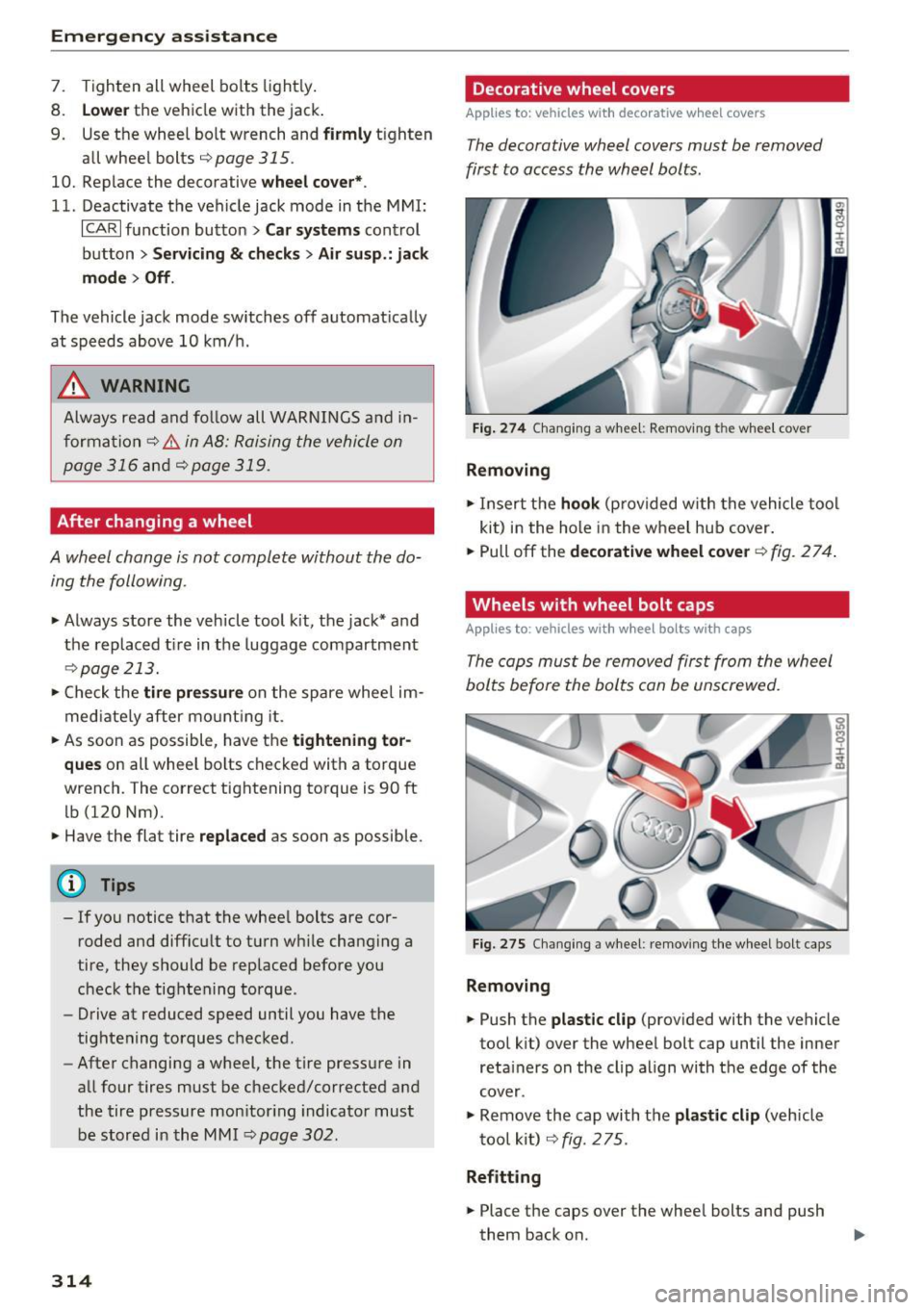
Fig. 274 Changi ng a whee l: Removing t he whee l cover
Removing
• Insert t he hook (p rovided w ith the vehicle tool
ki t) i n the hole in the w heel hu b cover .
• Pull off the
decorative wheel cover <=:> fig. 2 7 4.
Wheels with wheel bolt caps
Applies to: vehicles wit h wheel bolts with caps
The cops mus t be removed fir st from the wheel
bol ts before the bol ts con be unscrewed.
Fig. 275 C ha ng ing a w heel: remov ing th e w heel bo lt caps
Removing
• Push t he plastic clip (prov ided with the vehicle
tool kit) over the whee l bolt cap until the inne r
reta iners on the clip a lign with t he edge of the
cover.
• Remove the cap wi th t he
plastic clip (vehicle
t oo l kit )
c;, fig. 2 75.
Refitting
• Place the caps over the whee l bolts and push
them back on .