lock AUDI A8 2017 Owners Manual
[x] Cancel search | Manufacturer: AUDI, Model Year: 2017, Model line: A8, Model: AUDI A8 2017Pages: 354, PDF Size: 88.68 MB
Page 4 of 354
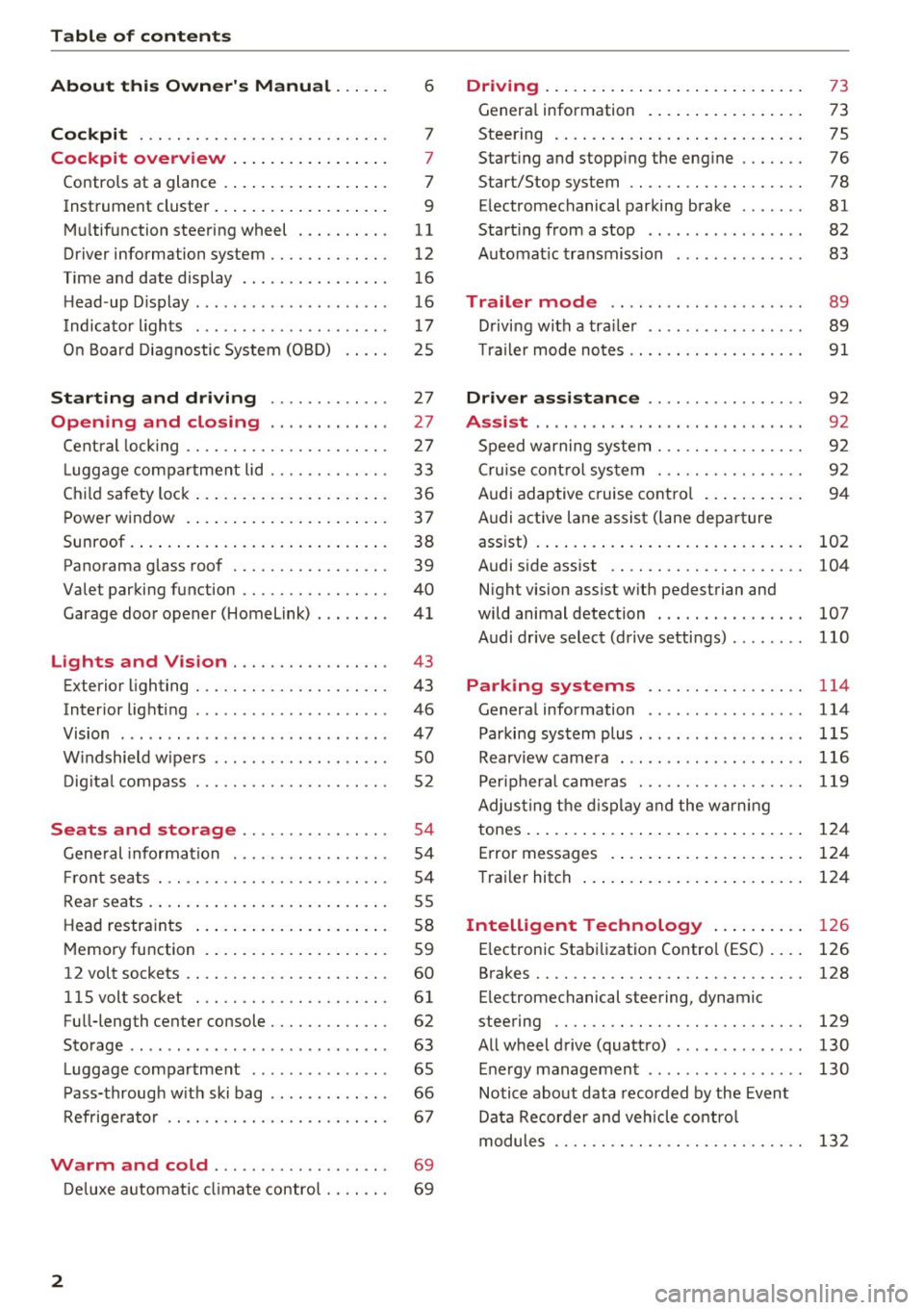
Table of contents
About this Owner's Manual ... .. .
Cockpit ... .. ............... .... .. .
Cockpit overview ................ .
Controls at a glance ... .......... .. .. .
Instrument cluster .. .......... .. .. .. .
Multifunction steering wheel ... .. .. .. .
Driver information system ............ .
Time and date display ...... ... .. .... .
H ead-up Display .... .. .. ..... ... .. .. .
Indicato r lights . ................ ... .
On Board Diagnostic System (OBD) .... .
Starting and driving ............ .
Opening and closing .. .... .... .. .
Central locking .... ........... .... .. .
L uggage compartment lid ...... .... .. .
Child safety lock ........... ..... .. .. . 6
7
7
7
9
11
12
16
16
17
25
27
27
27
33
36
Power
window . . . . . . . . . . . . . . . . . . . . . . 37
Sunroof. .. ... ... .. .......... .. .. .. . 38
Panorama glass roof . . . . . . . . . . . . . . . . . 39
Valet parking function . . . . . . . . . . . . . . . .
40
Garage door opener (Homelink) . . . . . . . . 41
L ights and Vision . . . . . . . . . . . . . . . . . 43
Exterior lighting . . . . . . . . . . . . . . . . . . . . . 43
Interior lighting . . . . . . . . . . . . . . . . . . . . . 46
V1s1on . . . . . . . . . . . . . . . . . . . . . . . . . . . . . 47
Windshield wipers . . . . . . . . . . . . . . . . . . . SO
Digital compass . . . . . . . . . . . . . . . . . . . . . 52
Seats and storage . . . . . . . . . . . . . . . . 54
General information . . . . . . . . . . . . . . . . . 54
Front seats . . . . . . . . . . . . . . . . . . . . . . . . . 54
Rear seats . . . . . . . . . . . . . . . . . . . . . . . . . . 55
Head restraints . . . . . . . . . . . . . . . . . . . . .
58
Memory function . . . . . . . . . . . . . . . . . . . . 59
12 volt sockets . . . . . . . . . . . . . . . . . . . . . . 60
llSvoltsocket .............. .... ... 61
Full-length center console. . . . . . . . . . . . . 62
Sto rage . . . . . . . . . . . . . . . . . . . . . . . . . . . . 63
Luggage compartment . . . . . . . . . . . . . . . 65
Pass-through with ski bag . . . . . . . . . . . . . 66
Refrigerator . . . . . . . . . . . . . . . . . . . . . . . . 67
Warm and cold . . . . . . . . . . . . . . . . . . . 69
Deluxe automatic climate control . . . . . . . 69
2
Driving ..... .. .. .. .. ... .......... . .
General information . .... .......... . .
Steering .......... .. .. . .......... . .
Start ing and stopping the eng ine ..... . .
Start/Stop system .. .. ............. . .
E le ctromechanical parking brake ...... .
Start ing from a stop .. ........ ..... . .
Automat ic transmission
Trailer mode .. .. .. ........ ..... . .
D rivin g with a trailer .. .............. .
T raile r mode notes .. .. ............. . .
Driver assistance .. .............. .
Assist .... .. .. .. .. .. ... .. ... ... .. . .
Speed warning system ... ........... . .
Cruise control system .... .......... . .
Audi adaptive cruise control .......... .
Audi active lane assist (lane departure 73
73
75
76
78
81
82
83
89
89
91
92
92
92
92
94
assist) . . . . . . . . . . . . . . . . . . . . . . . . . . . . . 102
Audi side assist . . . . . . . . . . . . . . . . . . . . . 104
N ight vision assist w ith pedestrian and
wild animal detection . . . . . . . . . . . . . . . .
107
Audi drive select (drive settings) . . . . . . . . 110
Parking systems . . . . . . . . . . . . . . . . . 114
General information . . . . . . . . . . . . . . . . . 114
Parking system plus ........ ....... ... 115
Rearv iew camera . . . . . . . . . . . . . . . . . . . . 116
Peripheral cameras . . . . . . . . . . . . . . . . . . 119
Adjus ting the display and the warning
tones. . . . . . . . . . . . . . . . . . . . . . . . . . . . . .
124
Error messages . . . . . . . . . . . . . . . . . . . . . 124
T railer hitch . . . . . . . . . . . . . . . . . . . . . . . . 124
Intelligent Technology . . . . . . . . . . 126
E lectronic Stabilization Control (ESC) . . . . 126
Brakes . . . . . . . . . . . . . . . . . . . . . . . . . . . . . 128
E lectromechanical steering, dynamic
steering . . . . . . . . . . . . . . . . . . . . . . . . . . .
129
All wheel drive (quattro) . . . . . . . . . . . . . . 130
Energy management . . . . . . . . . . . . . . . . . 130
Notice about data recorded by the Event
Data Recorder and vehicle control
modules . . . . . . . . . . . . . . . . . . . . . . . . . . .
132
Page 10 of 354
Cockpit over view
CD
@
®
©
®
®
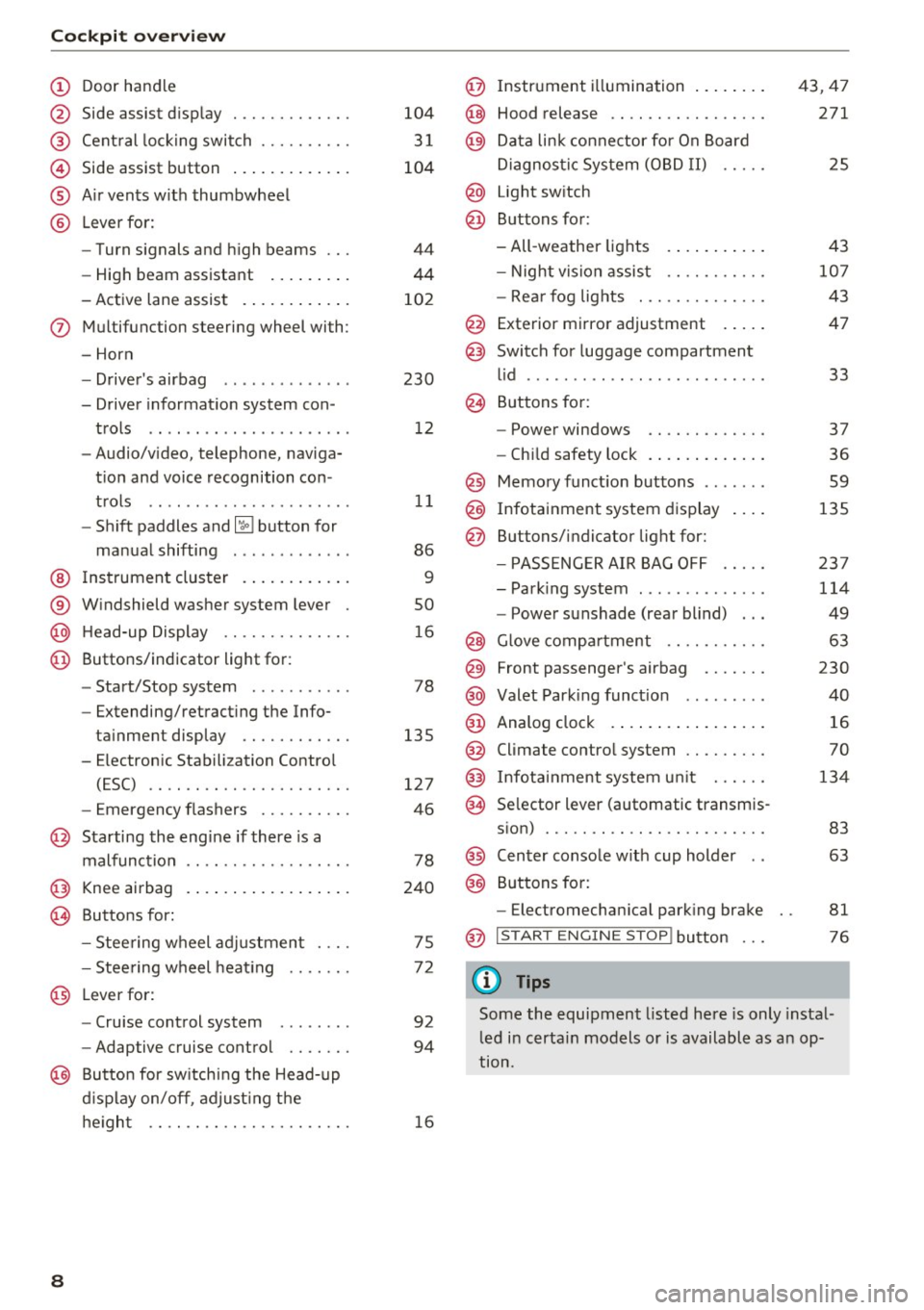
Door hand le
S ide assist d isp lay
Cent ral locking switch ....... .. .
Side assist button .. ..... ... .. .
A ir vents w ith thumbwheel
L ever fo r:
- Turn signals and h igh beams
- High beam assistant ... ... .. .
- Active lane assist . ..... ... .. .
(J) Multifunction steering wheel with :
- Horn
D. ' . b - rivers air ag .... ... .. .. .. .
- Driver informat io n system con -
trols .. .... .......... ..... .
- Audio/v ideo, telephone, naviga
t ion and voice recognition con -
t rols .. .. .. ... ... ... .. .. .. .
- Shift paddles and~ button for
ma nual shifting .. .... .. .. .. .
@ Ins trument cluster . ..... ... .. .
® W indshield washer system lever
@ H ead-up Display ........... .. .
@ Buttons/ indicator light for :
- Start/Stop system . ..... .. .. .
- Extending/retracting the Info-
ta inment display ...... ..... .
- E lectron ic Stabili zation Contro l
(ESC) .. .. ............... .. .
- Emergency flashers ......... .
@ Starting the engine if there is a
malfunction
@ Knee airbag .. .. . .. ..... ... .. .
~ Buttons for :
- Stee ring wheel adjustmen t ... .
- Stee ring w heel heat ing
@ L everfor:
- Cru ise control system ....... .
- Adaptive cruise control .... .. .
@ Butto n for sw itching the Head-up
d isplay on/off , adjust ing t he
he igh t .. .. .. .. . .......... .. .
8
104
3 1
104
44
44
10 2
230 12
11
86
9
so
1 6
78
135
127
46
78
240
75
7 2
92
94
16
@ Instrument illumination ... .... .
@ Hood release .... .. .. ........ .
@ Da ta link co nne ctor for On Board
Di agnos tic Sys tem (OB D II) .....
@ Light sw itch
@ Buttons for:
- All -weather lights
- Night vision assist .......... .
- Rea r fog lights . .. .. ........ .
@ Exterior mirror adjustment .... .
@ Switch for luggage compartment
l id ........ ... ... ........... .
@ B uttons fo r:
- Power windows .. .......... .
- Ch ild safety lock .. .. . ... .... .
@ Memo ry funct ion buttons ...... .
@ Infotainment system d isplay
@ Buttons/indicator light for:
- PA SSE NG ER AIR BAG OFF .... .
- Park ing system ............. .
- Power sunshade (rear blind) .. .
@ Glove compartment ... ....... .
@) Front passenger 's airbag ...... .
@ Valet Park ing func tion ........ .
@ Analog clo ck .. .. .. .. .. .. .... .
@ Climate contro l system ........ .
@) Infotainment system u nit ..... .
@ Se lector lever (automatic transm is-
s ion) ... .. .. .. .. .. .......... .
@) Center conso le w ith cup holder ..
@) Buttons fo r:
- Electromechan ica l park ing brake
@ I START EN GINE STOP! button
(D Tips
43,47
271
25
4 3
10 7
43
47
33
37
36
59
135
23 7
114
49
63
230
40
16
70
134
83
63
81
76
Some the equipment listed here is only instal
l ed i n certa in models or is available as an op
tion.
Page 18 of 354

Cockpit overview
_& WARNING
The route calculated by the navigation system
is a recommendation for reaching your desti
nation. Obey traffic lights, stopping restric
tions, one-way streets, lane change restric
tions, etc.
An asterisk
" *" in front of the street name in
dicates that the information about this street
or this section of the route is not complete in
the navigation data that the MMI contains .
Obey traffic laws in one-way streets and pe
destr ian zones.
Time and date display
Fig. 16 Center conso le: analog clock
The date and time are shown in the instrument
cluster display . There is also an ana log clock in
the center console
<=:> fig. 16 .
When you open the driver's door, the date and
time appear in the display for 30 seconds . When
the ignition is switched on, the time is always dis
played in the status line © regardless of the cur
rent d isplay.
You can set the time on both clocks and the date (disp lay) in the Infotainment system
<=:> page 204.
16
Head-up Display
Appl ies to: vehicles with Head-up D isplay
Fig. 17 Examp le : i ndicators in the Head-up Display
Fig. 18 Instrument panel: knob for th e head-up display
The Head-up Display pro jects certain warnings or
selected information from the assist systems* or
navigation* on the windshield. The display ap
pears within the driver's field of vision.
Switching on/off
.,. To switch the Head-up Display on or off, press
the knob~ ¢
fig. 18.
Adjusting the height
The height of the display can be adjusted to the
i ndivid ual driver .
.,. Make sure you are seated correctly
<=:>page 208.
.,. Turn the knob~ to adjust the d isplay.
Settings in the Infotainment system
.,. Select: the I CARI function button > (Car)* Sys
tems
contro l button > Driver assist > Head-up
display
> Head-up display contents or Display
brightness .
Page 19 of 354
0 co .... N ,..._
N .... 0 0 :c '
In the Infotainmen t system, yo u can specify
which informa tion should be displayed: This
could be Navigation information* or Night vision
assist *, for example.
The display of certa in information and some of
the red indicator lights cannot be hidden in the
I nfotainment system .
Display brightness
You can adjust the display brightness in the Info
tainment system. The display b rightness decreas
es automati cally as the amoun t of light decreas
es. The backg ro und brightness is adjusted with
the instrument illumination ¢
page 47.
(D Note
To preven t scratches on the g lass cove ring the
head -up d isplay, do not place any objects in
the projection opening .
(D Tips
-Sunglasses w ith polar izat ion fi lte rs and u n
favorab le lighting conditions can have a
negative effect on the display.
- An optim um display depends on the seat
position and the height adjustment of the
head -up display.
- A specia l windshield is needed for the head
up disp lay function.
- For in formation on cleaning, refer to¢
ta
ble on page 308 .
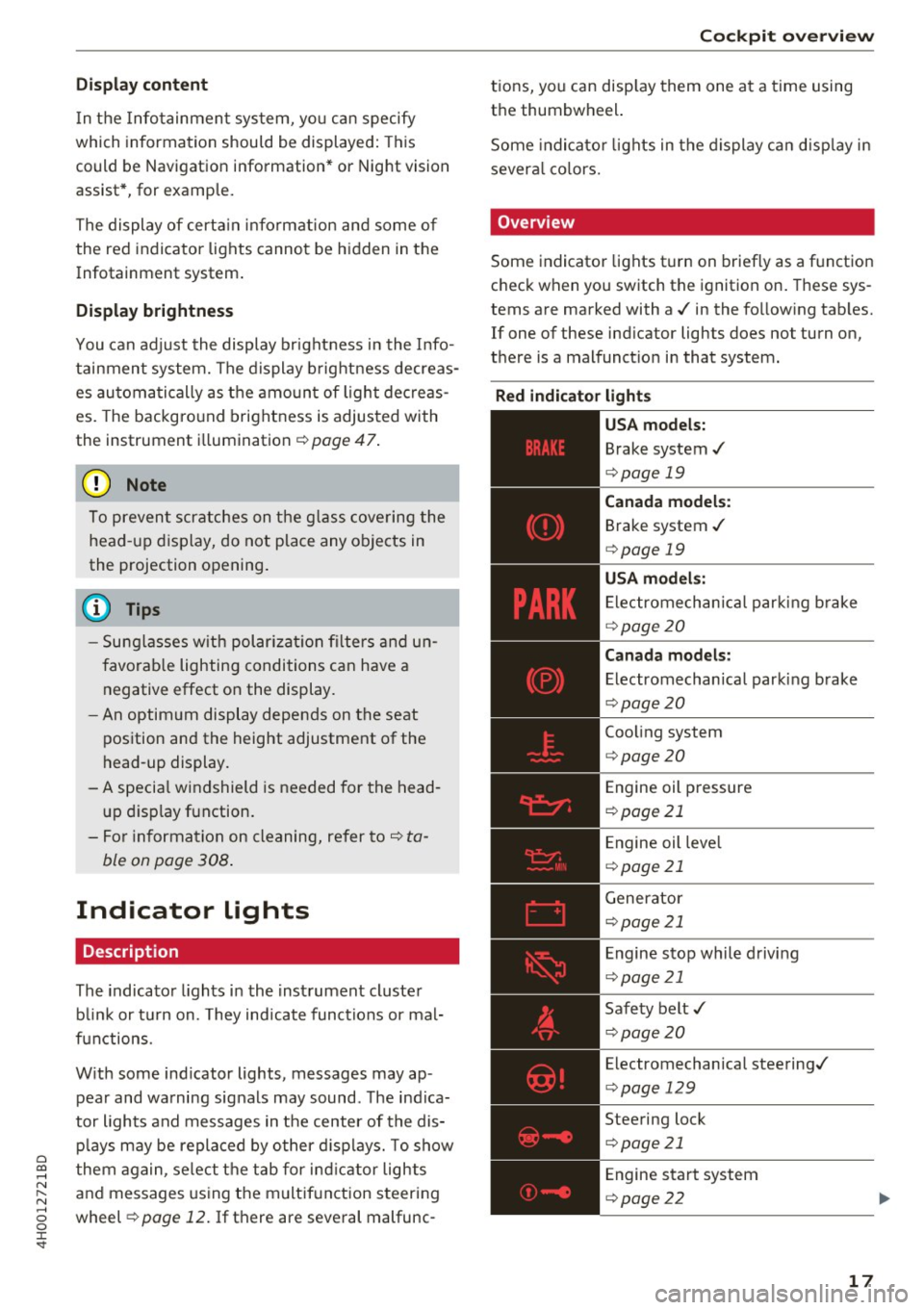
Indicator lights
Description
The indicator lights in the inst rument cluster
b lin k or t urn on. They indicate functions or mal
f u nctions.
W it h some ind icator lights, messages may ap
pear and wa rning signals may sound . The indica
tor lights and messages in the center of the dis p lays may be replaced by other d isp lays. To show
them again, se lect t he tab for ind icator lights
and messages using the m ultif unction steering
wheel ¢
page 12. If there are seve ral malfunc -
Cockpit o ve rv iew
tions, you can disp lay them one a t a time using
the thumbwheel.
Some indicato r lights in the display ca n disp lay in
severa l co lors.
' Overview
Some indicator lights t urn on briefly as a f unction
c h eck when you switch the ignition on . These sys
tems are marked with a./ in the fo llow ing tab les.
If one of these ind icator lights does not turn on,
there is a malfunct io n in that system.
Red indicator light s
-------------
US A models:
Brake system./
¢page 19
Canada model s:
Brake system ./
¢page 19
USA model s:
Electrome chanica l par kin g b rake
¢ page20
Canada models:
Electromechanica l parking brake
¢ page20
Coo ling system
¢ page 20
Engine oil pressure
¢page 21
Engine oil leve l
¢page 21
Generator
¢page 21
Engine stop while driv ing
¢ page 21
Safety belt ./
¢page20
Electromechanical steering./
¢page 129
Steering lock
¢page 21
Engine start system
¢page 22
17
Page 20 of 354
Cockpit over view
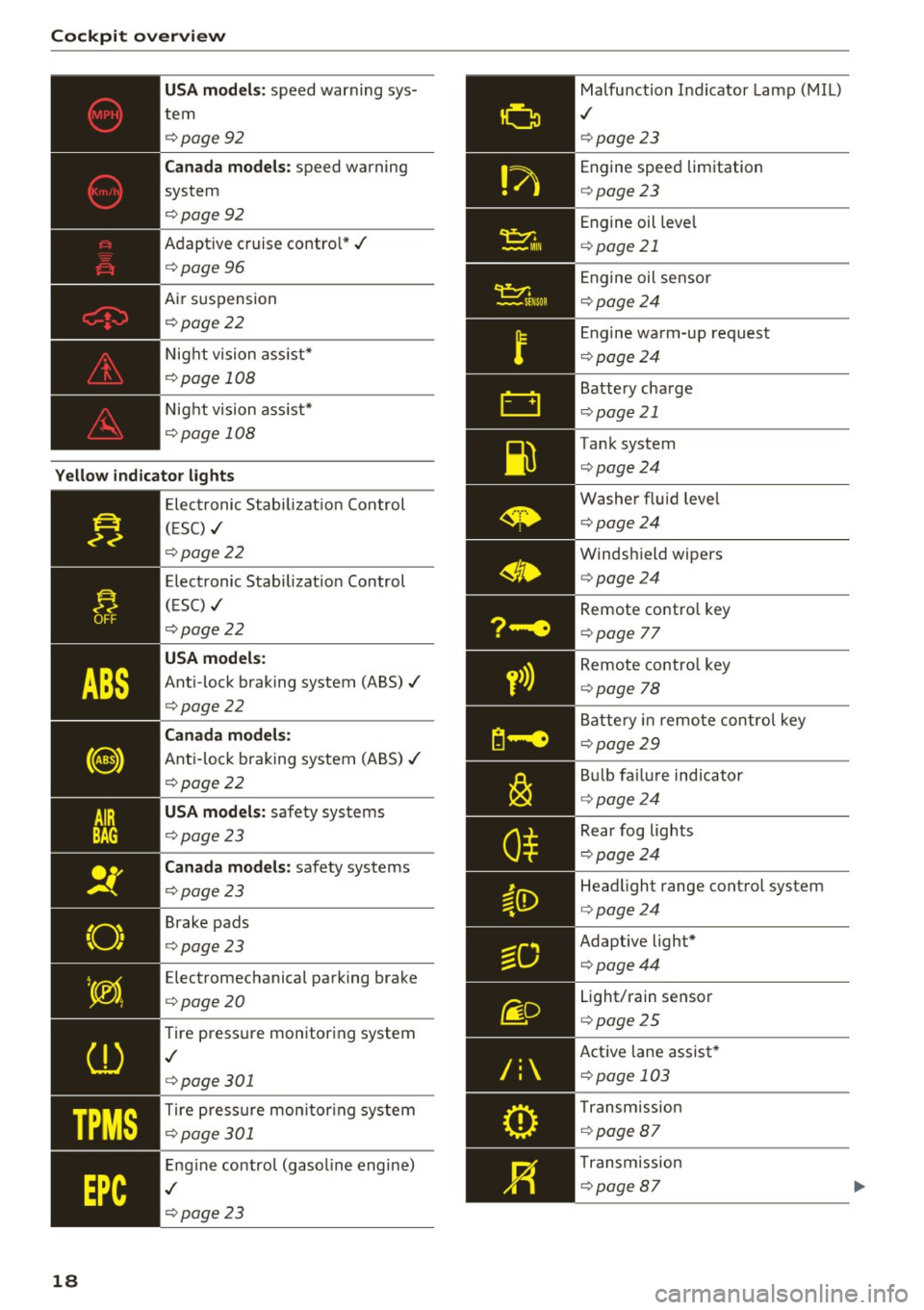
US A mode ls: speed warning sys
tem
¢ page92
Can ada m odels: speed warning
system
¢ page92
Adaptive cruise control*../
¢page 96
Air suspension
¢ page22
Night vision ass ist*
¢ page 108
Night vision ass ist*
¢ page 108
Yello w indic ator light s
TPMS
18
-------------Elec tronic Stab ilizat ion Control
( E SC) ../
¢page22
Electronic Stabilizat ion Control
(ESC) ../
¢page22
USA models :
Anti-lock braking system (ABS)../
¢page22
Canada mod els:
Anti-lock braking system (ABS) ../
¢page22
USA models: safety systems
¢ page23
Can ad a mod els : safety systems
¢ page23
Brake pads
¢ page23
Electromechanical parking brake
¢ page20
Tire pressure monitoring system
,I
¢page 301
Tire press ure mon itor ing system
¢ page 301
Engine control (gasol ine engine)
,I
¢ page 23
Malfunction Indicator Lamp (MIL)
,I
¢page 23
Engine speed limitation
¢page23
Engine oil leve l
¢page 21
Engine oil sensor
¢page24
Engine wa rm-up request
¢ page24
Battery charge
¢page 21
Tank system
¢page24
Washer flu id leve l
¢page24
Windshield wipers
¢page24
Remote contro l key
¢ page 77
Remote contro l key
¢ page 78
Battery in remo te control key
¢page29
B ul b fa ilu re indicator
¢ page24
Rear fog lights
¢page24
Headlight range control system
¢page24
Adaptive light*
¢page44
Light/rain sensor
¢page 25
Active lane assist *
¢page 103
Transm ission
¢ page 87
Transmission
¢page 87
Page 21 of 354
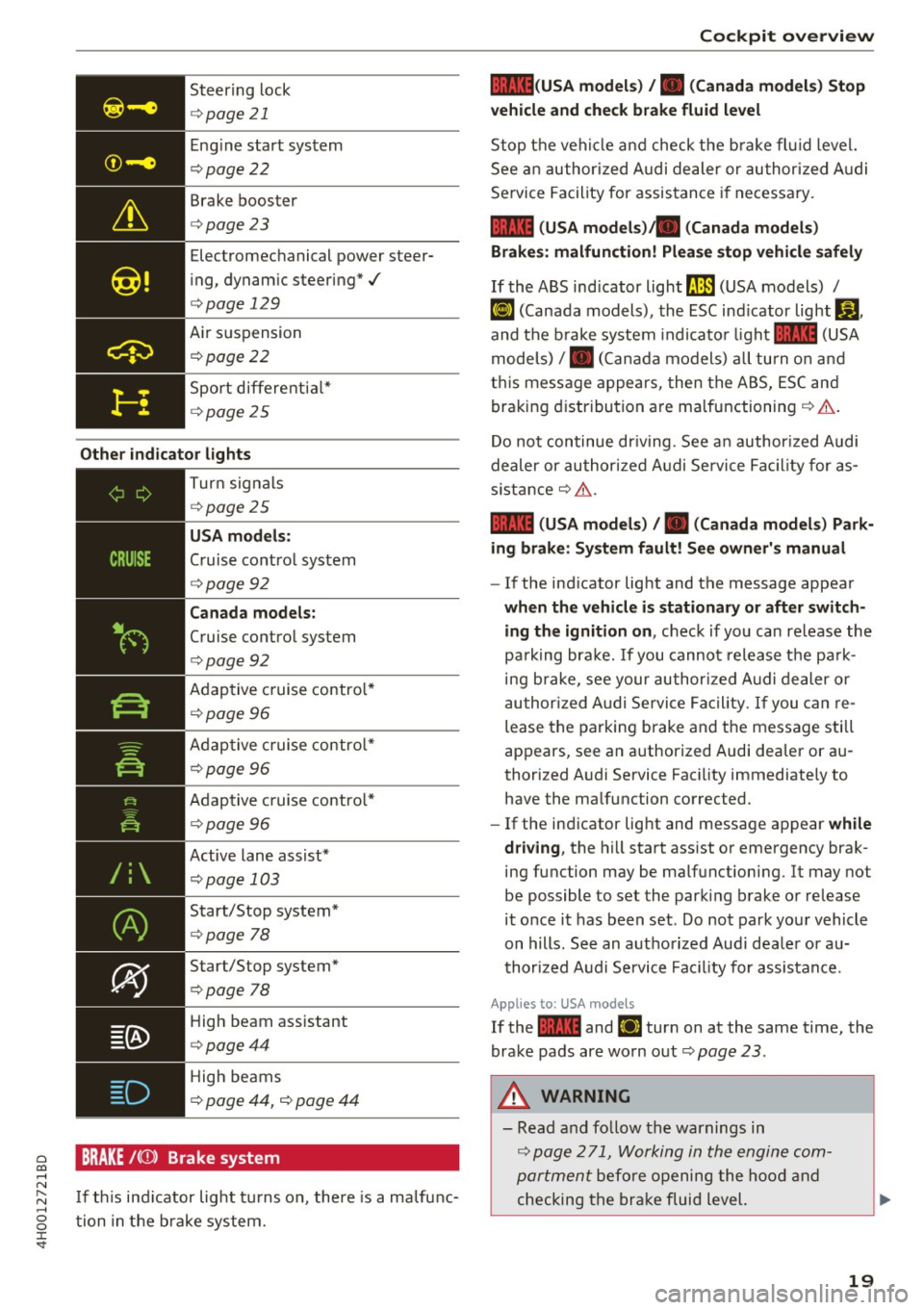
0 co .... N ,..... N .... 0 0 :c '
¢page 21
Eng ine start system
¢ page22
Brake booster
<=>page23
Electromechanical power steer
i ng, dynam ic steering*./
<=> page 129
Air suspension
¢ poge22
Sport differe ntia l*
¢ poge 25
Other indi cator lights
-------------
Turn sig na ls
¢ poge25
USA mod els :
Cruise contro l system
<=>page 92
Can ada model s:
Cruise control system
<=>page 92
Adaptive c ruise contro l*
¢ page 96
Adaptive c ruise contro l*
¢ page 96
Adaptive c ruise contro l*
¢page 96
Active lane assist*
¢page 103
Start/Stop system*
¢page 78
Start/Stop system*
<=>page 78
High beam ass istant
<=> poge44
High beams
¢ page 44, <=> page 44
BRAKE /((J)) Brake system
I f th is ind icator light tu rns on, there is a malfunc
tion in the brake system.
Coc kpit o ve rv iew
llll (USA model s) /. (Canada model s) Stop
v ehicle and che ck brake fl uid le vel
Stop t he veh icle a nd check t he b rake fl uid level.
See an author ized A udi dealer or author ized A udi
Service Facility for assistance if necessary.
1111 (USA mod els) ta (Canada model s)
Brakes : malfunction! Plea se sto p vehi cle safel y
If the ABS ind icator light ll.JJJ (USA models) /
~ (Canada models), the ESC ind icator light Bl ,
and the b rake system indicato r light 1111 (USA
models) /. (Can ada models) all turn o n and
t hi s message appea rs, then the ABS, ESC and
braking d istribution are malfunctioning ¢&. .
Do not continue dr iv ing. See a n author ized Audi
dealer or authori zed A udi Se rvice Fac il ity for as
s istance ¢&. .
1111 (USA mod els) /. (Canada mod els) Park
ing brake : S ys tem fault! See owner' s manual
- If the ind icator light and the message appear
when the vehicle is stationary or after switch
ing the ignition on ,
check if you can re lease the
pa rk ing bra ke. If you cannot release the pa rk
ing brake , see your author ized Audi dealer or
au thor ized Audi Se rvice Fa cil ity. I f you can re
lease the parking brake and the message still
appears, see an authorized Audi dealer or au
thorized Audi Service Faci lity immediately to
have the malfunction corrected.
- If the indicator light and message appear
while
dri ving ,
the hill start ass ist or emergency brak
ing function may be malfunctioning. It may not
be possible to set the parking brake or release
it once it has been set . Do not park you r vehicle
on hills. See an authorized Audi dea le r or a u
thori zed A udi Service Fac ility for assistance.
App lies to: USA mode ls
If the 1111 and Ei1 tur n on at the same time, the
brake pads are worn out
¢ page 2 3 .
.&, WARNING
-Read and fo llow the warnings in
¢ page 2 71, Working in the engine com
portment
befo re opening the hood and
checking the brake fluid level.
19
Page 23 of 354
0 co .... N ,..._
N .... 0 0 :c -
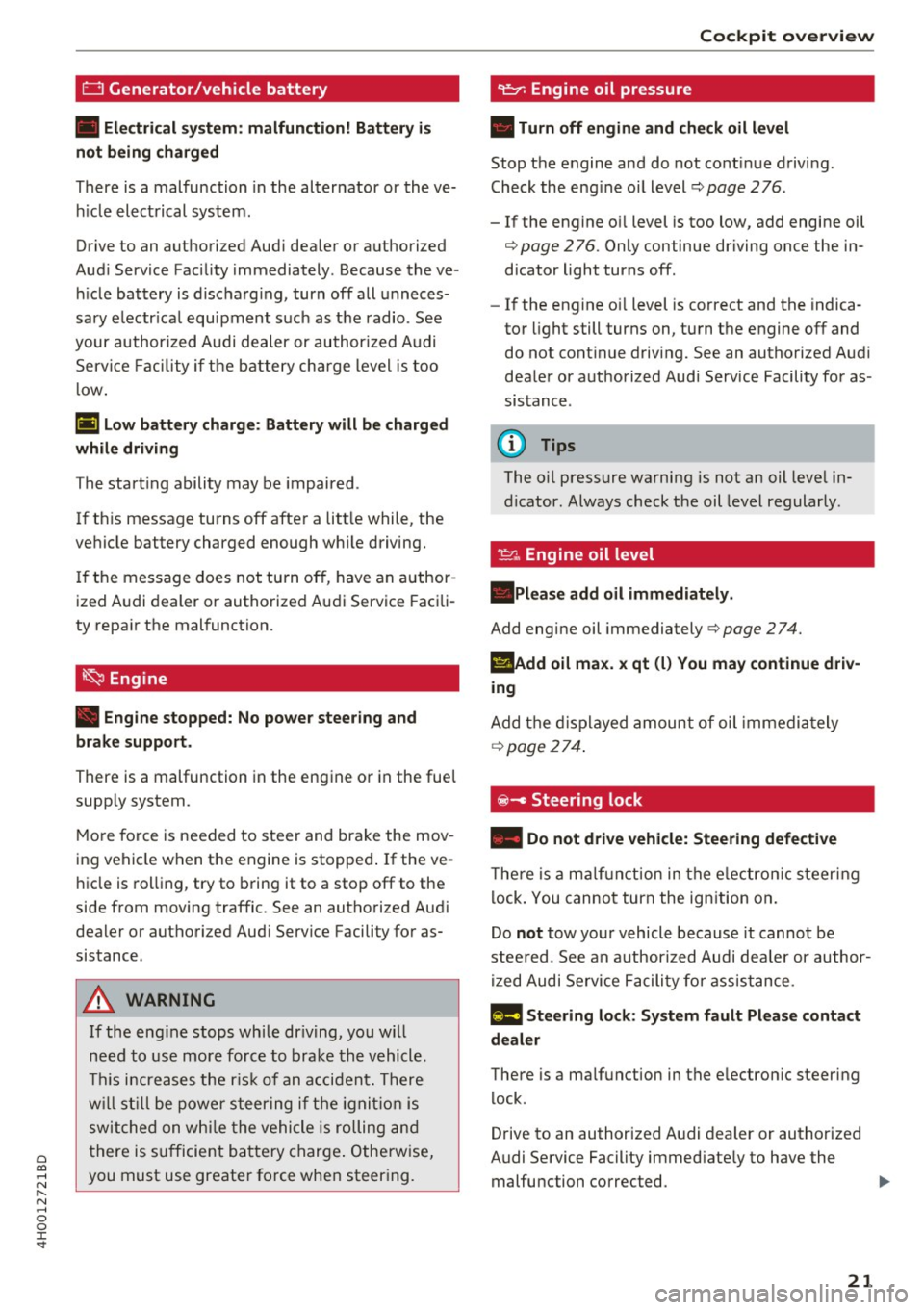
• Electrical system: malfunction! Battery i s
not being charged
There is a malfunction in the alternator or the ve
hicle electrical system .
Drive to an authori zed Aud i dealer or authorized
Audi Service Facility immediately. Because the ve
hicle battery is discharg ing , turn off all unneces
sary e lectr ica l equipment such as the radio. See
your author ized Audi dealer or authorized Audi
Service Facility if the battery charge level is too
l ow .
(•) Low battery charge: Battery will be charged
while driving
T he start ing ability may be impaired .
If th is message turns off after a litt le while, the
vehicle battery charged enough wh ile driving.
If the message does not turn off, have an author
ized Audi dealer or authorized Audi Service Facili
ty repair the malfunction.
~ Engine
• Engine stopped: No power steering and
brake support.
There is a malfunction in the engine or in the fuel
supp ly system .
More force is needed to steer and brake the mov
ing vehicle when the engine is stopped . If the ve
hicle is rolling, try to bring it to a stop off to the
side from moving traffic. See an authorized Audi
dealer or authorized Aud i Serv ice Facility for as
sistance .
_& WARNING
-
If the eng ine stops while dr iving, you will
need to use more force to brake the vehicle.
Thi s increases the risk of an accident. There
will still be power steering if the ignition is
switched on while th e vehicle is rolling and
there is sufficient battery charge. Otherwise,
you must use greater force when steering .
Cockpit overview
Stop the engine and do not cont inue driving.
Check the eng ine oil level
c::;. page 276.
- If the engine o il level is too low, add engine oil
c::;. page 276. Only continue driving once the in
dicator light turns off.
- If the engine o il level is correct and the indica
tor light still turns on, turn the engine off and
do not cont inue driving. See an authorized Aud i
dealer or authorized Audi Service Facility for as
sistance .
(D Tips
The oil pressure warning is not an oil leve l in
dicator. Always check the oil level regularly .
~. Engine oil level
.P lease add oil immediately.
Add engine oil immediately c::;. page 2 74.
l!IAdd oil max. x qt
(l) You may continue driv
ing
Add the displayed amount of oil immedia tely
c::;. page 2 7 4.
~ - Steering lock
• Do not drive vehicle: Steering defective
There is a malfunction in the electron ic st eering
lock. You cannot turn the ign ition on.
Do
not tow your vehicle because it cannot be
stee red. See an author ized Audi dea ler or author
ized Audi Service Facility for assistance .
!II Steering lock: System fault Please contact
dealer
There is a ma lfunction in the e lectron ic steering
lock.
Drive to an authorized A udi dealer or authorized
Audi Service Facility immed iate ly to have the
malfunction corrected. .,..
21
Page 24 of 354
Cockpit over view
& WARNING
Do not tow your veh icle when there is a mal
function in the electronic steering lock -this
increases the risk of an accide nt.
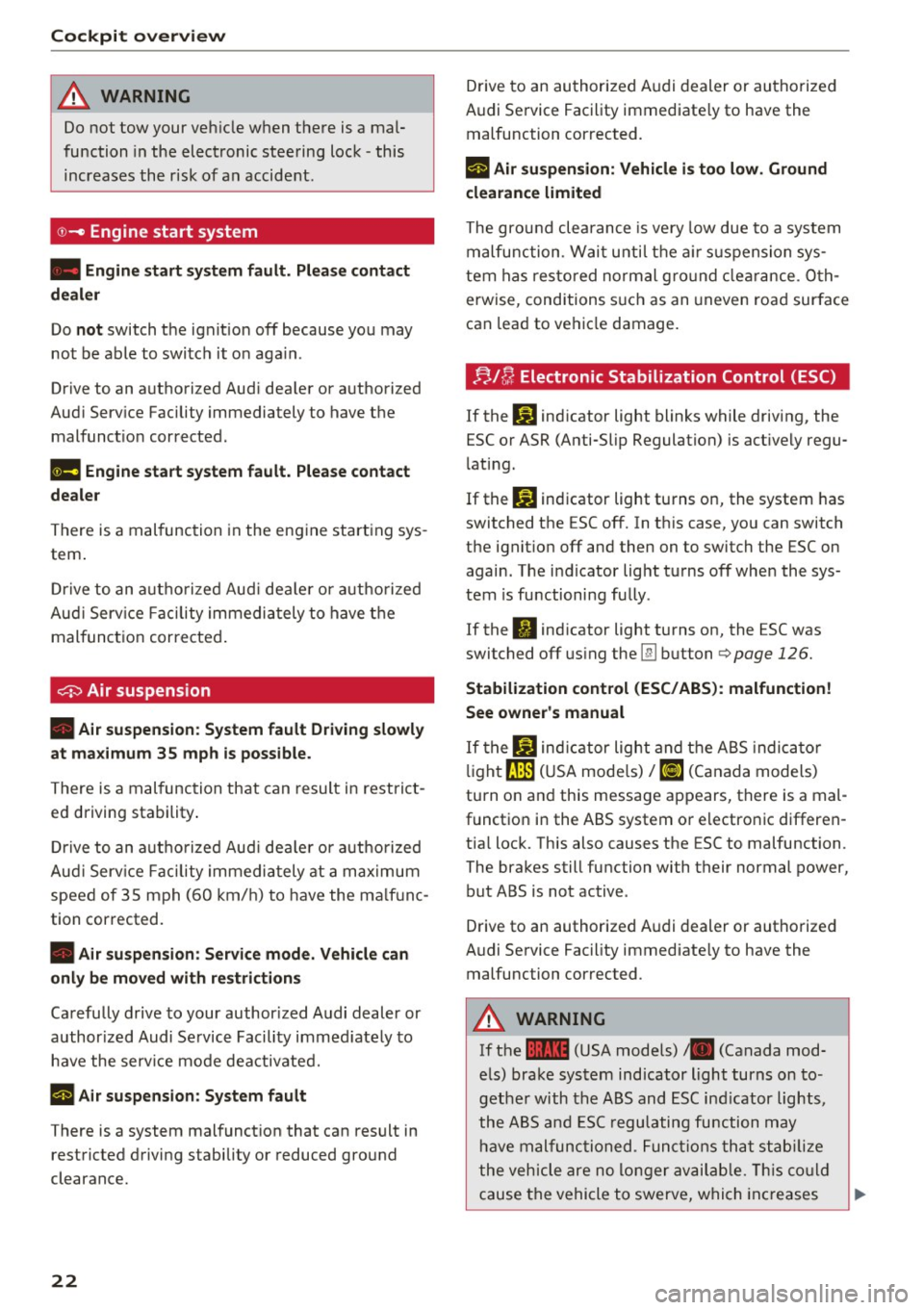
© -Engine start system
• Engine start sy ste m fault . Plea se contact
dealer
Do not switch the ignit io n off because you may
not be able to switch it o n aga in .
Drive to an authorized Aud i dea ler or a uthorized
Aud i Serv ice Facility immediately to have the
malfunct io n corrected.
1111 Engine start system fault. Please contact
dealer
There is a mal func tion in the eng ine start ing sys
tem .
D rive to an a uth o riz e d Aud i de aler or a uth o rized
Au di Serv ice Facility immedi ately to have t he
malfunct ion corre cted .
~ Air suspension
• Air su spension : System fault Driving slowly
at ma ximum 35 mph is possible.
There is a malfunction that can resul t in restrict
ed d riving stability .
D rive to an a uth o rized Au di dea le r or a uthorize d
Aud i Serv ice Facility immedi ately at a ma xim um
speed of 3S mph (6 0 km/ h) to have the m alfu nc
tion corrected.
• Air suspen sion : Service mode. Vehicle can
onl y be moved with restriction s
Carefully drive to your author ized A udi dealer or
author ized Audi Se rvice Facility immed iate ly to
have the serv ice mode deactivated.
rl Air su spension : System fault
There is a system malfunct ion that can result in
restricted d riving stability or reduced gro und
clearance.
22
Drive to an au thori zed A udi dealer or authori zed
Audi Se rvice Facility immediate ly to have the
malfunction cor rected.
rl Air suspension : Vehicle i s too low. Ground
clearance limited
The gro und clea rance is very low due to a system
malfunction . Wai t unti l th e air su sp ension sys
tem has restored normal g ro und clear ance. Oth
erwise, conditions s uch as an uneven road surface
can lead to ve hicle damage.
. ;;.l u Electronic Stabilization Control (ESC)
If the G) ind icator light blinks while driving, the
ESC or ASR (Anti-Slip Regulation) is act ively regu
l ating.
If the
G) indicator light turns on, the system has
switched the ESC off. In th is case, you can switch
the ignit ion off and then on to switch the ESC on
again. The i ndicator light tu rns off when the sys
tem is functioning fully .
If the
II ind icator light turns on, the ESC was
switched off using the
lli] b utton o page 126.
Stabilization cont rol (ESC/ABS) : malfunction!
See owner's manual
I f the If.) ind ic a tor light and t he A BS indica to r
li gh t~ (U SA mode ls)
I [IJ (Canada models)
turn o n an d this message appears, there is a mal
functio n in the ABS system or electro nic differen
tia l lock. This also causes the ESC to malfunction.
The brakes still function with their normal power, but ABS is not active .
Drive to an authorized A udi dealer or authorized
Audi Se rvice Fac ility immediate ly to have the
malfunction corrected .
& WARNING
If the ... (USA models) • (Canada mod
e ls) bra ke system indicator light turns on to
ge the r with the ABS and ESC in dicator ligh ts,
the ABS a nd ESC r egulating fu nction may
ha ve malfunc tioned. Fu n ct io ns t hat stab ilize
t he vehicle are no l onger av aila ble. This co uld
cause t he vehicle to swerve, which increases
Page 29 of 354
Opening and closing
Central locking
Description
You can lock and unlock the veh icle centrally . You
have the following options:
- Remote control key¢
page 30
-Sensors in the door handles* ¢ page 30
-Lock cylinder in the driver's door¢ page 32
-Inter central locking switch ¢ page 31
Turn signals
The turn signals flash tw ice when you un lock the
vehicle and flash once when you lock the vehicle.
If the vehicle is unlocked and the flashing contin
ues, then
- one of the doors, the luggage compartment lid
or the hood is open.
- the ignition is still switched on .
- the selector lever is not in the P position
Auto Lock
The Auto Lock function locks all doors and the
luggage compartment lid once the speed has ex
ceeded approximately 15 km/h.
The vehicle can be unlocked if the opening func
tion in the centra l locking system switch is used
or one of the door handles is pulled. The Auto Lock function can be switched on and off in the
Infotainment system ¢
page 32.
In the event of a crash with airbag deployment,
the doors will also automatically unlock to allow
access to the vehicle.
Selective door unlocking
The doors and luggage compartment lid will lock
when they close. You can set in the Infotainment
system whether only the driver 's door or the en
tire vehicle should be unlocked when unlocking
¢page 32.
Unintentionally locking yourself out
0 co The following conditions prevent you from lock-....
~ ing your remote control key in the vehicle: N .... 0 0 :c '
-If the driver's door is open, the vehicle cannot
be locked by pressing the~ button on the re
mote contro l key or touching the locking sensor
on a door.
- When locking using the~ button in the central
locking switch, the vehicle will not lock if a door
is open
¢ page 31.
-If the most recently used convenience key* is in
the luggage compartment, the luggage com
partment lid automatically unlocks again after
closing it¢
page 33 . The emergency flashers
blink four times.
Do not lock your vehicle with the remote control
key or convenience key* until all doors and the
luggage compartment lid are closed . This helps
to prevent you from locking yourself out acc iden
tally .
Closing aid on the doors*
The vehicle doors are equipped with closing aids.
When closing a door, you only have to let it fall
lightly into the latch . It then closes automatically
¢ &_ .
.&, WARNING '"----
- When you lock your vehicle from outs ide,
nobody -espec ially children -should rema in
inside the vehicle. Remember, when you
lock the vehicle from the outside the win
dows cannot be opened from the inside .
- When you leave the vehicle, always take the
ignition key with you. This will prevent pas
sengers (children, for examp le) from acci
dentally being locked in the vehicle should
they accidentally press the power locking switch in the doors.
- Do not leave children ins ide the vehicle un
supervised. In an emergency it would be im
possible to open the doors from the outside
without the key.
- Applies to vehicles with power side door
closer*:
- When closing a door, make sure nothing
can interfere with the door. This could
cause serious personal injury.
27
Page 30 of 354

Opening and clo sin g
- You can stop the door from closing at any
time by pulling on the inside or outside
door handle.
@ Tips
-Do not leave valuables unattended in the ve
hicle . A locked vehicle is not a safe!
- The LE D in the driver's door rail blinks when
you lock the vehicle . If the LED lights up for
approximately 30 seconds after locking,
there is a malfunction in the central locking
system. Have the problem corrected by an
a uthorized Audi dea ler or authorized Audi
Service Fac ility .
Key set
Fig. 2 0 Your ve hi cle key set
@ Remote control key with integrated
mechanical key
You can unlock and lock your vehicle w ith the re
mote cont rol key . A mechanical key is integrated
i n the remote con trol key ~
page 29.
@ Separate mechanical key
This key is not intended for constant use. It
should only be used in an emergency . Do not car
ry it on your key r ing and do not store it in the ve
h icle .
Replacing a key
If a key is lost, see an authorized Audi dealer or
author ized Audi Service Facility. Have th is key de
activated . It is impo rtant to bring a ll keys with
you .
If a key is lost, you should report it to your
i n surance company.
28
Number of keys
You can chec k the number of keys assigned to
your vehicle i n the I nfota inment system. Se lec t:
the
I CAR I function button > Car systems control
button
> Servicing & c hecks > Programmed
keys .
This way, you can make sure that you have
all the keys when purchasing a used vehicle.
Electronic immobiliz er
The immobilizer p revents unauthorized use of
the ve hicle .
Under certai n circumstances, the vehicle may not
be a ble to start if there is a key from a d ifferen t
vehicle manufacturer on the key chain.
Data in the master key
When dr iving, service and ma intenance-re levant
da ta is cont inuo usly s to red in you r remo te con
tro l key . You r A udi se rvice advisor can read ou t
th is data and tell you abo ut the work yo ur vehicle
needs . This applies also to ve hicles with a con
venience key *.
Personal convenience settings
If two peo ple use one vehicle, it is recommended
that each person alw ays uses their own remote
contro l key. When the ignit ion is turned off or
when the vehicle is locked, personal convenience
settings for the follow ing systems are stored and
ass igned to the remote master key.
- Climate cont rol system
- Ce ntral loc king
- Window and rea r shade*
- Interior lighting*
- Memory function
- Park ing system *
- Adaptive cruise control *
- Ac tive la ne assist*
- Side assist*
- Dr ive se lect
- Night vis ion assist*
- Steering wheel heating*
The stored settings are a utomat ica lly recalled
when you unlock the vehicle, open the doo rs or
turn on the ignition.
II>